

Sente que as suas reuniões individuais são completamente desorganizadas? Não está sozinho. Entre gerir os objetivos da equipa, dar feedback e acompanhar o progresso, é fácil deixar escapar conversas importantes — ou, pior ainda, desperdiçar tempo em reuniões que não levam a lado nenhum.
Essa desorganização acumula-se rapidamente, prejudicando a motivação e o desempenho. A solução? Software para reuniões individuais. Estas ferramentas conferem estrutura, clareza e acompanhamento a cada reunião. Testei as principais opções — continue a ler para encontrar a solução certa para a sua equipa.
Porque pode confiar nas nossas recomendações de software
6,700+
Reviews
20
Industry experts
16+
Evaluation factors
14
Years reviewing software
A nossa equipa testa e analisa software desde 2012. Como especialistas em RH, sabemos o quão difícil — e importante — é escolher o software certo.
Para este guia, avaliámos as ferramentas através de testes práticos e pesquisa independente, pontuando-as de acordo com os nossos critérios de seleção. Recorremos também a contributos de líderes de opinião do setor e de especialistas em RH no ativo.
As nossas análises refletem o juízo da nossa equipa editorial, e não um discurso de vendas.
Revisores especialistas:
- Phil GrayCOO
 Kim BehnkeHR Tech Editor & Analyst
 Josh BarkerPeople Ops Manager

Tabela comparativa: software para reuniões individuais
Esta tabela comparativa resume os detalhes de preços das minhas principais escolhas de software para reuniões individuais.
Sorted by: Default
| Tool | Starting Price | Website | |
|---|---|---|---|
Best for performance-tied 1:1 conversations | 4.3 out of 5 | $3/user/month 30-day free trial | Website |
Best for Google Workspace users | 4.7 out of 5 | Pricing upon request Free plan available | Website |
Best for finding time slots | 4.6 out of 5 | $16/user/month Free plan + free demo available | Website |
Best for video conferencing | 4.5 out of 5 | $14.16/user/month Free plan available | Website |
Best for meeting notes | 4.7 out of 5 | $7/user/month Free plan available | Website |
Best for 4K video and uncompressed audio | 4.8 out of 5 | $24/month 14-day free trial + free plan + free demo available | Website |
Best for enterprise integration | 4.3 out of 5 | $4/user/month Free plan + 1-month free trial available | Website |
Best for scheduling integration | 4.6 out of 5 | $7.56/month 14-day free trial | Website |
Best for remote teams | 4.3 out of 5 | $12/organizer/month Free trial + free demo available | Website |
Best for agenda planning | 4.6 out of 5 | $9.95/user/month Free trial available | Website |


Análise do melhor software para reuniões individuais
Seguem-se os meus resumos detalhados dos melhores softwares para reuniões individuais que entraram na minha seleção. As minhas análises apresentam uma visão detalhada das principais funcionalidades, vantagens e desvantagens, integrações e casos de utilização ideais de cada ferramenta, para o ajudar a encontrar a melhor opção para si.
 Best for performance-tied 1:1 conversations
- 30-day free trial
- From $3/user/month (billed annually)
Visit WebsiteCustomer Rating:4.3/5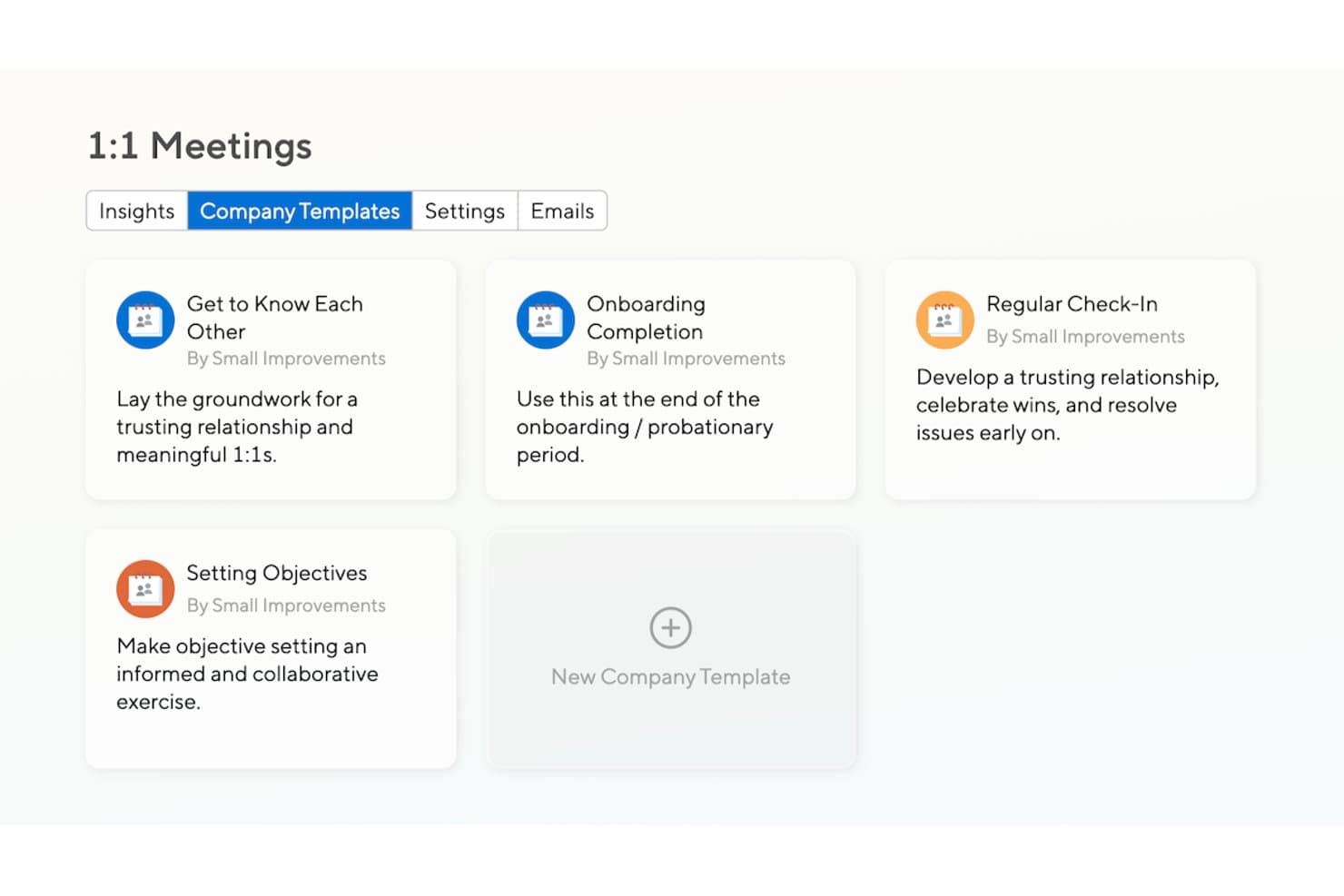
Small Improvements offers built-in 1:1 meeting templates for key stages. Small Improvements is a performance management platform that connects 1:1 meetings, employee reviews, objectives, and pulse surveys, with shared agendas, searchable meeting history, and action item tracking built into its dedicated 1:1 meeting feature.
Who Is Small Improvements Best For?
Small Improvements suits teams that want 1:1 meetings wired directly into performance reviews, objectives, and feedback cycles rather than treated as a separate tool.
Why I Picked Small Improvements
I picked Small Improvements as one of the best because it treats 1:1 meetings as part of your performance cycle, not a separate tool you toggle between. Talking points and notes from 1:1s carry directly into performance reviews, and you can add an agenda item to track an employee's objectives in real time during the meeting itself. The admin insights dashboard also lets me see which managers haven't held meetings recently and send nudges in bulk, which keeps 1:1 cadence consistent across the whole org.
Small Improvements Key Features
- Searchable meeting history: Browse and search notes and talking points from past 1:1s across months or years of conversations.
- Action item carry-forward: Incomplete action items roll into the next meeting automatically and appear in each user's homepage to-do list.
- Talking point templates: Built-in templates cover regular check-ins, new-hire onboarding, and quarterly career conversations, with options to build personal or company templates.
- 1:1 Insights Dashboard: Admins can track meeting frequency, compare departments, identify employees with no recent manager meetings, and send bulk nudges.
Small Improvements Integrations
Small Improvements offers native integrations with Google Calendar, Office 365, Slack, Workday, BambooHR, Rippling, and Personio. It also provides a REST API for custom integrations.
Pros and Cons
Pros:
- Reviewers connect conversations with goals and development
- Action items carry forward between meetings
- Shared agendas keep both participants aligned
Cons:
- Additional participants can’t add agenda items or actions
- Calendar sync doesn’t create meeting invites
Learn more about Small Improvements: Best for Google Workspace users
- Free plan available
- Pricing upon request
Visit WebsiteCustomer Rating:4.7/5
Google Meet supports live discussions for teams using Google platforms. Google Meet is a video conferencing tool that serves users within the Google Workspace ecosystem, facilitating virtual meetings and collaboration. It's primarily used by businesses and educational institutions that rely on Google services for their daily operations.
Why I picked Google Meet: It integrates well with Google Workspace, allowing you to schedule and join meetings directly from Google Calendar. This feature helps streamline your scheduling process.
Google Meet also offers real-time captions, which can enhance accessibility for participants. Its browser-based interface means you don't need to download any software, making it convenient for users who prioritize ease of access.
Standout features & integrations:
Features include customizable layouts to suit your meeting preferences, the ability to share your screen for presentations, and noise cancellation to improve audio quality. These features enhance your meeting experience by providing flexibility and clarity in communication.
Integrations include Google Calendar, Gmail, Google Drive, Microsoft Outlook, Slack, Zoom, Trello, Asana, Salesforce, and Zapier.
Pros and Cons
Pros:
- No software download required
- Real-time captions for accessibility
- Easy access through browser
Cons:
- Occasional connectivity issues
- Requires Google account
Learn more about Google Meet: Best for finding time slots
- Free plan + free demo available
- From $16/user/month (billed annually)
Visit WebsiteCustomer Rating:4.6/5
Doodle simplifies finding shared availability for group or solo plans. Doodle is a scheduling tool tailored for individuals and teams to coordinate meetings and events efficiently. It's used by those who need a simple way to find common available time slots among multiple participants.
Why I picked Doodle: It specializes in finding time slots, allowing you to propose multiple time options to participants. You can create polls to gather availability preferences, making scheduling straightforward. Doodle's interface guides you through setting up meetings without hassle. These features make it ideal for users who prioritize simplicity in scheduling.
Standout features & integrations:
Features include a booking page that allows others to schedule meetings with you based on your availability, a calendar view that provides a clear overview of all your commitments, and reminders to ensure you don't miss any meetings. These tools enhance your scheduling process by keeping everything organized and timely.
Integrations include Google Calendar, Microsoft Outlook, Slack, Zoom, Microsoft Teams, iCloud, Zapier, Trello, Asana, and Evernote.
Pros and Cons
Pros:
- No account needed for participants
- Customizable meeting polls
- Efficient group scheduling
Cons:
- May need manual follow-up
- Can become cluttered with many polls
Learn more about Doodle: 4Best for video conferencing
Zoom
- Free plan available
- From $14.16/user/month (billed annually)
Visit WebsiteCustomer Rating:4.5/5
Zoom powers high-quality virtual sessions for teams and individuals. Zoom is a video conferencing platform widely used by businesses and individuals for meetings, webinars, and virtual events. It's popular among users who need reliable and high-quality video communication for both small and large groups.
Why I picked Zoom: It excels in video conferencing, offering features like HD video and audio to ensure clear communication. You can also record meetings, which is excellent for reviewing discussions later. Zoom offers breakout rooms that allow you to split your meeting into smaller groups for more focused discussions. These features make Zoom ideal for teams that prioritize video-based communication.
Standout features & integrations:
Features include virtual backgrounds to maintain privacy, waiting rooms to manage participant entry, and polling to gather instant feedback during meetings. These options provide flexibility and control over meeting dynamics, enhancing the overall experience.
Integrations include Google Calendar, Microsoft Outlook, Slack, Salesforce, Dropbox, HubSpot, Asana, Trello, YouTube, and LinkedIn.
Pros and Cons
Pros:
- Customizable meeting settings
- Easy meeting setup
- High-quality video and audio
Cons:
- Consumes significant bandwidth
- Requires app download for full use
Learn more about Zoom: Best for meeting notes
- Free plan available
- From $7/user/month (billed annually)
Visit WebsiteCustomer Rating:4.7/5
Fellow supports structured workflows with agenda planning and task follow-ups. Fellow is a meeting management tool designed to enhance the productivity of teams and organizations. It's ideal for users who need a structured way to organize meeting agendas, take notes, and track action items.
Why I picked Fellow: Fellow specializes in meeting notes, offering features like collaborative note-taking to ensure everyone is on the same page. You can create shared agendas to prepare for meetings effectively. The tool also helps track action items, making follow-ups more efficient. These functionalities cater to teams that value organized and productive meetings.
Standout features & integrations:
Features include feedback requests that allow team members to provide input after meetings, a feature that enables tasks to be assigned directly from meeting notes, and a library of meeting templates to streamline the preparation process. These features help you maintain a high level of organization and ensure accountability within your team.
Integrations include Slack, Google Calendar, Microsoft Teams, Zoom, Asana, Jira, Trello, GitHub, Zapier, and Todoist.
Pros and Cons
Pros:
- Helps track meeting action items
- Supports collaborative note-taking
- Effective agenda management
Cons:
- Some features may be underutilized
- Requires consistent usage for effectiveness
Learn more about Fellow: Best for 4K video and uncompressed audio
- 14-day free trial + free plan + free demo available
- From $24/month (billed annually)
Visit WebsiteCustomer Rating:4.8/5
Riverside offers a clean and intuitive interface for recording high-quality video conferences. Riverside is designed for professionals who need reliable, high-quality one-on-one meeting recordings. Its recording and editing features focus on capturing clear audio and video, making it well-suited for content creators who want their conversations to look and sound professional.
Why I Picked Riverside
I chose Riverside because it can record 4K video and uncompressed audio, delivering consistently sharp results. Recordings are captured locally, so quality stays high even if the internet connection is unstable. Riverside also includes AI-powered editing tools that help clean up recordings by removing filler words and correcting speech, which makes it a strong option for anyone who cares about the final quality of their meeting content.
Riverside Key Features
In addition to its standout recording capabilities, Riverside offers several features that enhance your one-on-one meeting experience:
- Live Streaming: Engage with your audience in real-time across multiple platforms without compromising on quality.
- AI-Powered Transcriptions: Automatically generate transcripts of your meetings for easy reference and documentation.
- Multi-Track Recording: Capture each participant's audio and video on separate tracks for better editing control.
- Direct Publishing: Seamlessly publish your recordings to platforms like YouTube and Spotify for wider accessibility.
Riverside Integrations
Native integrations are not currently listed by Riverside.
Pros and Cons
Pros:
- AI-powered transcription and editing tools
- Multitrack audio video participant recording
- 4K video uncompressed audio recording
Cons:
- Advanced features require paid plans
- Primarily focused on content creation
Learn more about Riverside: Best for enterprise integration
- Free plan + 1-month free trial available
- From $4/user/month (billed annually)
Visit WebsiteCustomer Rating:4.3/5
Microsoft Teams combines group coordination with access to the Microsoft ecosystem. Microsoft Teams is a communication and collaboration platform designed for businesses that want to integrate with other Microsoft services. It caters to enterprises needing a unified solution for meetings, chat, and collaboration.
Why I picked Microsoft Teams: It offers enterprise integration by seamlessly connecting with Microsoft 365 tools, such as Outlook and SharePoint. This integration allows you to schedule meetings directly from your calendar and share files effortlessly.
Teams also provides features like threaded messages and channels for organized communication. These capabilities make it an excellent choice for businesses already using Microsoft products.
Standout features & integrations:
Features include live captions in meetings for accessibility, background blur to enhance video calls, and meeting recording for future reference. These features help make your meetings more inclusive and efficient, providing options to suit different needs.
Integrations include Microsoft 365, Outlook, SharePoint, OneDrive, Power BI, Trello, Asana, GitHub, Zoom, and Adobe Creative Cloud.
Pros and Cons
Pros:
- Real-time collaboration on documents
- Customizable meeting layouts
- Supports large virtual meetings
Cons:
- Occasional lag in large meetings
- Limited functionality outside Microsoft ecosystem
Learn more about Microsoft Teams:

Google Calendar helps structure daily plans through event tracking. Google Calendar is a scheduling tool primarily used by individuals and teams to organize and manage time effectively. It's favored by users who need a straightforward way to plan meetings and appointments while integrating with other Google services.
Why I picked Google Calendar: It excels in scheduling integration, making it easy to coordinate meetings directly from your calendar. The tool allows you to share your calendar with others, making the scheduling process simpler.
You can set reminders to keep track of upcoming events and deadlines. These features make Google Calendar a great choice for those who rely on Google Workspace for their daily tasks.
Standout features & integrations:
Features include creating multiple calendars for different purposes, color-coding events to easily identify them, and setting up recurring events to save time on repetitive scheduling. These features help you organize your schedule efficiently and keep track of various commitments.
Integrations include Google Meet, Gmail, Google Drive, Microsoft Outlook, Slack, Zoom, Trello, Asana, Evernote, Salesforce, and Zapier.
Pros and Cons
Pros:
- Accessible from any device
- Customizable event notifications
- Easy integration with Google services
Cons:
- No direct customer support
- Limited advanced scheduling options
Learn more about Google Calendar: Best for remote teams
- Free trial + free demo available
- From $12/organizer/month (billed annually)
Visit WebsiteCustomer Rating:4.3/5
GoTo Meeting offers a stable setup for remote team interactions. GoTo Meeting is a video conferencing solution designed for businesses and remote teams to conduct virtual meetings and presentations. It's favored by users who need a reliable platform for remote collaboration and communication.
Why I picked GoTo Meeting: It caters to remote teams by providing features like HD video conferencing and screen sharing, which enhance communication quality. The tool offers meeting transcription services, allowing you to revisit discussions later. You can also record meetings for those who were unable to attend.
These capabilities make GoTo Meeting a solid choice for teams working across different locations.
Standout features & integrations:
Features include drawing tools that let you annotate shared screens during meetings, mobile apps that enable you to join meetings on the go, and a meeting lock feature for added security. These features ensure your meetings are interactive, accessible, and secure.
Integrations include Slack, Microsoft Office 365, Google Calendar, Salesforce, Zapier, Zoho CRM, Trello, Asana, Podio, and Calendly.
Pros and Cons
Pros:
- Provides drawing tools for interaction
- Offers meeting transcription
- Reliable connection for remote meetings
Cons:
- Limited features on mobile apps
- Can have occasional audio issues
Learn more about GoTo Meeting: Best for agenda planning
- Free trial available
- From $9.95/user/month (billed annually)
Visit WebsiteCustomer Rating:4.6/5
MeetingKing brings structure to planning, notes, and team decisions. MeetingKing is a meeting management tool designed to help teams plan and organize their meetings effectively. It's used by teams who need a structured approach to setting agendas and managing meeting outcomes.
Why I picked MeetingKing: MeetingKing is tailored for agenda planning, offering features that let you easily create and share agendas with your team. You can assign tasks during meetings, ensuring follow-ups are clear and actionable.
The tool also provides templates to streamline the creation process of agendas. These features make it a valuable choice for teams focusing on structured and productive meetings.
Standout features & integrations:
Features include the ability to convert meeting notes into tasks, track decisions made during meetings, and store all meeting data in one place for easy access. These features enhance your ability to manage meetings efficiently and keep everyone aligned on objectives.
Integrations include Google Calendar, Microsoft Outlook, Slack, Evernote, Dropbox, Box, OneDrive, Trello, Asana, and Zapier.
Pros and Cons
Pros:
- Easy access to meeting history
- Provides structured meeting templates
- Supports detailed meeting minutes
Cons:
- May need training for full utilization
- Requires regular updates from users
Learn more about MeetingKing:
Outros softwares para reuniões individuais
Eis algumas opções adicionais de software para reuniões individuais que não entraram na minha seleção, mas que ainda vale a pena conhecer:
- 11ArrangrBest for quick scheduling
- 12SlackBest for team collaboration
- 13WebexBest for hybrid work environments
- 14ClickMeetingBest for webinars
- 15Zoho MeetingBest for small business integration
- 16Mesh AIBest for performance tracking
- 17Cyberlink uMeetingBest for video quality
- 18RangeBest for daily check-ins
- 19Deel EngageBest for employee onboarding
- 20Spinach AIBest for team alignment
- 21WaggleBest for AI-driven insights
- 22Jitsi MeetBest for open-source users
- 23FreeConferenceCallBest for budget-friendly meetings
- 24RumiBest for quick video meetings
How I Evaluate One-on-One Meeting Software
I look at two layers: the table stakes every 1:1 tool must cover—shared agendas, action tracking, meeting notes—and the differentiators that make a tool the right fit for people teams.
Core Functionality (Table Stakes For This List)
When I'm selecting tools for my list, I rank each one on a scale from 0 (does not offer the functionality) to 5 (excels in this area) for each core functionality listed below. Then, I calculate the tool's total score as a percentage. Each tool needs to achieve a minimum total score of 65% to be considered for inclusion.
- Shared Agenda Building: I check whether both managers and direct reports can add agenda items before and during the meeting, so neither party walks in unprepared.
- Talking Points & Templates: Pre-built 1:1 templates matter—I look for libraries that cover common formats like weekly check-ins, career growth conversations, and onboarding syncs.
- Action Item Tracking: Every tool should let you assign action items with owners and due dates that carry forward into the next meeting automatically.
- Goal & OKR Integration: I evaluate how well 1:1 discussions connect to existing goals, so managers can reference progress updates without switching between platforms.
- Continuous Feedback Exchange: The ability to share structured feedback tied to specific 1:1s is something I look for, especially for teams running ongoing performance conversations.
- Meeting History & Notes: A searchable archive of past 1:1 notes helps managers prep for reviews and spot patterns over time, so I check how each tool organizes and retrieves this data.
Once I have a list of tools that meet the criteria, I consider what sets each platform apart.
Differentiating Factors (What Sets Vendors Apart)
Here's how I compare and contrast different vendors:
Standout Features
AI-powered meeting assistants are a big differentiator—I look for tools that auto-generate recaps and surface relevant talking points from prior conversations, which cuts prep time for managers with large teams. Manager coaching nudges also matter, especially for organizations developing first-time people leaders who benefit from in-app question prompts. I evaluate 1:1 analytics dashboards too, since HR teams need visibility into meeting cadence and cancellation patterns across departments to spot disengaged managers early.
Beyond Features
Integration depth is one of the first things I check. A 1:1 tool needs to sync with your calendar, Slack or MS Teams, and your HRIS—otherwise, adoption drops fast because managers won't leave their existing workflow. Data privacy also carries real weight here, since 1:1 notes often contain sensitive performance and personal details. I look for granular controls that separate private manager notes from shared content. Finally, I evaluate how well a platform supports manager adoption through onboarding resources and ready-to-use playbooks, because HR teams rarely have time to train every people leader individually.
Como escolher software para reuniões individuais
É fácil ficar perdido entre listas extensas de funcionalidades e estruturas de preços complexas. Para o ajudar a manter o foco enquanto percorre o seu processo específico de seleção de software, eis uma lista de fatores a ter em conta:
| Fator | O que considerar |
| Escalabilidade | Certifique-se de que o software consegue acompanhar o crescimento da sua equipa. Procure soluções que suportem um número crescente de utilizadores e reuniões sem perder funcionalidades ou velocidade. |
| Integrações | Escolha software que se integre com as ferramentas que já utiliza, como calendários e aplicações de gestão de projetos, para simplificar os seus fluxos de trabalho e poupar tempo. |
| Personalização | Opte por soluções que lhe permitam adaptar as funcionalidades às necessidades específicas da sua equipa, aumentando a produtividade e a satisfação dos utilizadores. |
| Facilidade de utilização | Certifique-se de que a interface é fácil de utilizar e intuitiva, o que reduz a curva de aprendizagem e melhora a adoção em toda a equipa. |
| Orçamento | Considere o custo total, incluindo eventuais taxas ocultas. Procure preços flexíveis que se enquadrem no seu orçamento e ofereçam a melhor relação qualidade-preço para as funcionalidades disponibilizadas. |
| Medidas de segurança | Verifique se existem funcionalidades de segurança robustas, como encriptação e conformidade com os regulamentos de proteção de dados, para manter as suas reuniões seguras. |
| Suporte | Um suporte ao cliente fiável é essencial. Procure assistência 24 horas por dia, 7 dias por semana, e várias opções de contacto para resolver problemas rapidamente. |
| Funcionalidades | Identifique as funcionalidades indispensáveis que correspondem às suas necessidades, como gravação de vídeo, notas de reunião ou gestão de tarefas, para garantir que a ferramenta cumpre os seus objetivos. |
Tendências no software para reuniões individuais
Durante a minha pesquisa, analisei inúmeras atualizações de produtos, comunicados de imprensa e registos de lançamentos de diferentes fornecedores de software para reuniões individuais. Eis algumas das tendências emergentes que estou a acompanhar:
- Informações baseadas em IA: A IA está a ser utilizada para analisar dados das reuniões e fornecer informações acionáveis. Isto ajuda as equipas a compreender os níveis de participação e a melhorar a eficácia das reuniões. Alguns fornecedores disponibilizam ferramentas de análise de sentimentos e feedback em tempo real para melhorar a comunicação.
- Reuniões em realidade virtual: A realidade virtual está a tornar as reuniões mais imersivas. Permite aos participantes interagir num espaço virtual, o que pode ser especialmente útil para equipas remotas que procuram criar uma sensação de presença e colaboração.
- Foco no bem-estar mental: Muitas ferramentas estão a incorporar funcionalidades que promovem a saúde mental, como lembretes para fazer pausas e técnicas de redução do stress. Esta tendência reflete um reconhecimento crescente da importância do bem-estar para a produtividade no local de trabalho.
- Funcionalidades de segurança reforçadas: À medida que a proteção de dados se torna uma prioridade, os fornecedores de software estão a adicionar mais funcionalidades de segurança, como a encriptação de ponta a ponta e a conformidade com normas internacionais. Isto é crucial para as empresas que lidam com informações sensíveis.
- Ferramentas de colaboração assíncrona: Está a verificar-se uma mudança no sentido de apoiar o trabalho assíncrono, em que as equipas podem colaborar sem estarem na mesma reunião. Funcionalidades como mensagens gravadas e espaços de trabalho partilhados estão a tornar-se mais comuns, permitindo uma comunicação flexível.
O que é um software para reuniões individuais?
O software para reuniões individuais é uma ferramenta concebida para facilitar a comunicação direta entre duas pessoas. Estas ferramentas são normalmente utilizadas por gestores, líderes de equipa e profissionais de recursos humanos para realizar reuniões de acompanhamento regulares, avaliações de desempenho e sessões de orientação. As funcionalidades de agendamento, videoconferência e tomada de notas ajudam a organizar as reuniões, melhorar a comunicação e acompanhar o progresso. De um modo geral, estas ferramentas proporcionam valor ao melhorar a eficiência da comunicação e ao promover relações profissionais mais sólidas.
Funcionalidades do software para reuniões individuais
Ao selecionar um software para reuniões individuais, procure as seguintes funcionalidades principais:
- Ferramentas de agendamento: Encontram e marcam automaticamente os horários das reuniões, poupando-lhe o incómodo de trocar emails.
- Videoconferência: Facilita a comunicação cara a cara, crucial para criar empatia e compreensão.
- Funcionalidades de tomada de notas: Permitem registar pontos e decisões importantes, garantindo que nada é esquecido.
- Gestão de tarefas: Ajuda a atribuir e acompanhar itens de ação, responsabilizando todos e mantendo todos a par.
- Modelos de reuniões: Fornecem um formato estruturado para as reuniões, melhorando a consistência e a eficiência.
- Colaboração em tempo real: Permite aos participantes trabalharem em conjunto durante as reuniões, aumentando a produtividade.
- Funcionalidades de segurança: Protegem informações sensíveis através de encriptação e conformidade com as normas de proteção de dados.
- Informações baseadas em IA: Disponibilizam análises sobre o desempenho das reuniões, ajudando-o a melhorar as interações futuras.
- Comunicação assíncrona: Apoia horários de trabalho flexíveis, permitindo aos participantes interagir quando lhes for conveniente.
- Opções de integração: Ligam-se a outras ferramentas que utiliza, simplificando os fluxos de trabalho e aumentando a produtividade.
Vantagens do software para reuniões individuais
A implementação de um software para reuniões individuais proporciona várias vantagens para a sua equipa e a sua empresa. Eis algumas das vantagens que pode esperar:
- Melhoria da comunicação: As ferramentas de videoconferência e colaboração em tempo real melhoram a clareza e a compreensão durante as reuniões.
- Aumento da produtividade: A gestão de tarefas e os modelos de reuniões ajudam a manter as reuniões focadas e eficientes, poupando tempo.
- Melhor organização: As ferramentas de agendamento e as funcionalidades de tomada de notas garantem que as reuniões são bem organizadas e que os detalhes importantes ficam documentados.
- Maior responsabilização: A atribuição de tarefas e o acompanhamento do progresso garantem que os membros da equipa cumprem os seus compromissos.
- Flexibilidade: As opções de comunicação assíncrona permitem aos membros da equipa interagir de acordo com o seu horário, acomodando diferentes fusos horários e hábitos de trabalho.
- Segurança dos dados: As funcionalidades de segurança protegem informações sensíveis, proporcionando tranquilidade durante as reuniões.
- Informações acionáveis: As análises baseadas em IA fornecem feedback sobre a eficácia das reuniões, ajudando-o a fazer melhorias onde forem necessárias.
Custos e preços do software para reuniões individuais
A seleção de um software para reuniões individuais requer uma compreensão dos vários modelos e planos de preços disponíveis. Os custos variam consoante as funcionalidades, o tamanho da equipa, os complementos e outros fatores. A tabela abaixo resume os planos comuns, os respetivos preços médios e as funcionalidades normalmente incluídas nas soluções de software para reuniões individuais:
Tabela de comparação de planos para software de reuniões individuais
| Tipo de plano | Preço médio | Funcionalidades comuns |
| Plano gratuito | $0 | Agendamento básico, videoconferência limitada e armazenamento mínimo. |
| Plano pessoal | $5-$15/utilizador/mês | Reuniões ilimitadas, qualidade de vídeo padrão e integrações básicas. |
| Plano empresarial | $15-$25/utilizador/mês | Agendamento avançado, vídeo HD, gestão de tarefas e suporte prioritário. |
| Plano empresarial avançado | $25-$50/utilizador/mês | Funcionalidades personalizáveis, segurança reforçada, informações baseadas em IA e gestão dedicada da conta. |
Perguntas frequentes sobre software de reuniões individuais
Eis algumas respostas a perguntas frequentes sobre software de reuniões individuais:
Como escolho o software certo para reuniões individuais?
A escolha do software certo depende das necessidades da sua equipa. Considere fatores como a facilidade de utilização, as integrações com as ferramentas existentes e o custo. Avalie se o software suporta funcionalidades importantes para si, como videoconferência ou gestão de tarefas. Também é aconselhável ler as avaliações dos utilizadores para obter informações úteis.
O software de reuniões individuais pode melhorar a comunicação da equipa?
Sim, pode melhorar a comunicação ao disponibilizar uma plataforma estruturada para reuniões. As funcionalidades de videoconferência permitem uma interação presencial, enquanto as funcionalidades de tomada de notas e gestão de tarefas garantem que todos estão alinhados. Estas ferramentas ajudam a clarificar expectativas e ações de acompanhamento.
Que funcionalidades de segurança devo procurar num software de reuniões individuais?
Procure software que disponibilize encriptação de ponta a ponta, conformidade com normas de proteção de dados e opções de início de sessão seguro. Estas funcionalidades protegem as informações sensíveis discutidas nas reuniões. Também é vantajoso que o software forneça atualizações e auditorias de segurança regulares.
Como pode o software de reuniões individuais ajudar no trabalho remoto?
Facilita o trabalho remoto ao disponibilizar ferramentas para reuniões virtuais e comunicação assíncrona. Funcionalidades como chamadas de vídeo, partilha de ecrã e tomada de notas colaborativa permitem que as equipas remotas se mantenham ligadas e produtivas. Este software reduz a distância entre diferentes localizações.
Vale a pena utilizar versões gratuitas de software de reuniões individuais?
As versões gratuitas podem ser úteis para equipas mais pequenas ou com necessidades básicas. Incluem frequentemente funcionalidades essenciais, como agendamento e videoconferência básica. No entanto, para funcionalidades avançadas, como análise ou limites maiores de participantes, poderá ser necessário um plano pago.
Como melhoram as integrações a funcionalidade do software de reuniões individuais?
As integrações permitem que o software se ligue a outras ferramentas que já utiliza, como calendários e aplicações de gestão de projetos. Isto simplifica os fluxos de trabalho e reduz a necessidade de alternar entre diferentes plataformas. Também ajuda a automatizar tarefas e a sincronizar dados entre aplicações.