

Toplantı özeti yapay zekâ aracı, toplantılarınızdan önemli noktaları otomatik olarak yakalamak, yazıya dökmek ve düzenlemek için yapay zekâ kullanır. Manuel not alma ihtiyacını azaltmanın, hiçbir şeyin gözden kaçmamasını sağlamanın ve ekibinizin uyum içinde çalışmasını sürdürmenin yollarını arıyorsanız bu araçlar, toplantıları belgeleme ve toplantı sonrasında takip etme biçiminizi dönüştürmenize yardımcı olabilir.
Bu listede, 2026 yılının en iyi toplantı özeti yapay zekâ seçeneklerini bulacaksınız. Her biri, İK profesyonellerinin ve işletme ekiplerinin her gün karşılaştığı gerçek zorluklara çözüm sunan özellikleriyle seçildi. Çözümleri karşılaştırmak ve iş akışınıza en uygun seçeneği bulmak için bu rehberi kullanın.
Why Trust Our Software Recommendations
6,700+
Reviews
20
Industry experts
16+
Evaluation factors
14
Years
Our team has been testing and reviewing software since 2012. As HR experts ourselves, we know how difficult—and important—it is to choose the right software.
For this guide, we evaluated tools using hands-on testing and independent research, scoring tools using our selection criteria. We also draw on insights from industry thought leaders and practicing HR experts.
Our reviews reflect our human editorial judgment, not a sales pitch.
Expert reviewers:
- Phil GrayCOO
 Kim BehnkeHR Tech Editor & Analyst
 Josh BarkerPeople Ops Manager

Toplantı Özeti Yapay Zekâ Araçları Karşılaştırma Tablosu
Aşağıdaki tablo, en iyi toplantı özeti yapay zekâ aracı seçimlerimin fiyatlandırma ayrıntılarını karşılaştırır.
Sorted by: Default
| Tool | Starting Price | Website | |
|---|---|---|---|
Best with built-in support for Zoom meetings | 4.5 out of 5 | $14.16/user/month Free plan available | Website |
Best for capturing highlights in Google Meet | 4.1 out of 5 | $8/user/month Free plan available | Website |
Best for live transcription with speaker labels | Not rated | $8.33/user/month Free plan available | Website |
Best for noise-free audio note capture | Not rated | $8/user/month Free plan + trial available | Website |
Best for exporting notes in multiple formats | Not rated | $8.17/month Free plan available | Website |
Best for automated action item extraction | Not rated | $15/month Free plan available | Website |
Best for multilingual summary support | Not rated | €39/user/month Free plan + free demo available | Website |
Best for AI-powered follow-up suggestions | Not rated | $9/month Free plan available | Website |
Best for AI data privacy and ISO 27001 compliance | Not rated | Pricing upon request Free demo available | Website |
Best for instant summaries after calls | Not rated | Pricing upon request Free trial available | Website |


En İyi Toplantı Özeti Yapay Zekâ Araçları İncelemeleri
Aşağıda, kısa listeme giren toplantı özeti yapay zekâ araçlarına ilişkin ayrıntılı özetlerimi bulabilirsiniz. İncelemelerim, size en uygun aracı bulmanıza yardımcı olmak için her aracın özelliklerine, entegrasyonlarına ve en iyi kullanım alanlarına ayrıntılı bir bakış sunar.
 1Best with built-in support for Zoom meetings
Zoom
- Free plan available
- From $14.16/user/month (billed annually)
Visit WebsiteCustomer Rating:4.5/5
Zoom’s AI note-taker auto-sends meeting summaries with key points and action items. If your team already relies on Zoom for meetings, Zoom’s AI note-taking feature brings meeting summary AI directly into your existing workflow. This feature is designed for organizations that want automated summaries, action items, and insights without leaving the Zoom environment. It’s especially useful for HR, project managers, and business leaders who need instant, in-context meeting recaps right where conversations happen.
Why I Picked Zoom
Because Zoom’s AI note-taker is built directly into the Zoom platform, it’s a natural fit for teams that already use Zoom for their meetings. I picked this tool for its ability to generate real-time meeting summaries and action items without requiring any extra setup or switching between apps. The AI feature can automatically capture key discussion points and decisions as the meeting happens, making it easy to keep everyone aligned. This built-in approach means you get meeting insights right where your conversations take place, which is especially valuable for busy HR teams and business leaders.
Zoom Key Features
Some other features that make Zoom useful for meeting summary AI include:
- Automated smart chapters: The tool divides meeting recordings into labeled sections for quick navigation.
- In-meeting live transcription: Users can view real-time captions and transcripts during calls.
- Post-meeting searchable transcripts: All meeting transcripts are stored and searchable within the Zoom platform.
- AI chat responses: The AI Companion can generate suggested responses in Zoom Team Chat conversations.
Zoom Integrations
Integrations include Google Drive, Microsoft 365, Figma, Confluence, Notion, Coda, Microsoft Teams, Slack, Calendly, and Salesforce.
Pros and Cons
Pros:
- Transcripts are searchable within the Zoom platform
- Smart chapters organize recordings for review
- Action items are auto-generated and highlighted
Cons:
- Occasional transcription errors with accents
- Summaries only available for Zoom meetings
Learn more about Zoom: Best for capturing highlights in Google Meet
- Free plan available
- From $8/user/month (billed annually)
Visit WebsiteCustomer Rating:4.1/5
Tactiq dashboard with AI prompts for summaries, action items, and insights. Tactiq is designed for teams and professionals who rely on Google Meet and want to capture key moments during live calls. It lets you highlight important discussion points in real time, making it easy to create actionable AI meeting summaries. This tool is especially useful for HR, project managers, and educators who need to quickly reference or share meeting highlights without sifting through full transcripts.
Why I Picked Tactiq
What sets Tactiq apart is its focus on capturing highlights directly within Google Meet, which is ideal for teams that use Google Workspace as their primary collaboration hub. I picked Tactiq because it allows users to mark important moments during live meetings, so you can quickly generate summaries that focus on what matters most. The tool automatically transcribes conversations and lets you add highlights and comments in real time. This approach helps HR professionals, project leads, and educators save time by surfacing key points without having to review entire transcripts.
Tactiq Key Features
In addition to real-time highlighting, Tactiq offers several other features that support meeting summary AI needs:
- Automatic meeting transcription: Tactiq generates live transcripts for Google Meet sessions.
- Speaker identification: The tool tags each line of the transcript with the speaker’s name.
- Export to Google Docs and Notion: Users can send meeting summaries and transcripts directly to these platforms.
- AI-generated meeting summaries: Tactiq uses AI to create concise summaries from the full transcript.
Tactiq Integrations
Integrations include Google Meet, Zoom, Microsoft Teams, Slack, Notion, Linear, and HubSpot.
Pros and Cons
Pros:
- Speaker labels included in all transcripts
- Exports summaries directly to Google Docs
- Highlights can be added during live meetings
Cons:
- Limited editing options for generated summaries
- Occasional missed highlights in busy meetings
Learn more about Tactiq: Best for live transcription with speaker labels
- Free plan available
- From $8.33/user/month (billed annually)

Otter dashboard showing meeting overview, action items, and transcript tabs. Otter is a meeting summary AI built for teams that need live transcription with clear speaker labels. It’s especially useful for professionals who want to capture conversations in real time and quickly identify who said what. If you’re looking to improve meeting documentation and accountability, Otter.ai’s speaker identification and searchable transcripts can help.
Why I Picked Otter
For teams that need accurate, real-time meeting records, Otter stands out for its live transcription with speaker labels. I picked this tool because it automatically distinguishes and tags each speaker, making it easy to follow conversations and attribute comments. The live transcription feature means you can capture discussions as they happen, without waiting for post-meeting processing. This combination is especially valuable for teams that need clear, actionable records of who said what during meetings.
Otter Key Features
In addition to live transcription and speaker labeling, I also found these features useful for meeting summary AI:
- Automated summary generation: Otter.ai creates concise meeting summaries that highlight key points and decisions.
- Searchable transcript archive: Store and search past meeting transcripts to quickly locate specific topics or statements.
- Shared live notes: Collaborate on meeting notes in real time with other participants.
- Calendar integration: Connect Otter.ai with Google or Microsoft calendars to automatically join and record scheduled meetings.
Otter Integrations
Integrations include Zoom, Google Meet, Microsoft Teams, Slack, Salesforce, HubSpot, Asana, Jira, Notion, and Dropbox.
Pros and Cons
Pros:
- Searchable transcripts for quick reference
- Live transcription updates in real time
- Speaker labels accurately identify participants
Cons:
- Limited formatting options for exported notes
- Occasional transcription errors with accents
Learn more about Otter: Best for noise-free audio note capture
- Free plan + trial available
- From $8/user/month (billed annually)

Krisp transcript dashboard with speaker labels, timeline view, and AI summaries. For teams that struggle with background noise during virtual meetings, Krisp offers AI-powered noise cancellation and audio note capture. It’s especially useful for remote professionals, recruiters, and HR teams who need clear, distraction-free recordings for accurate meeting summaries. Krisp helps ensure your meeting notes reflect what was actually said, not what got lost in the noise.
Why I Picked Krisp
When capturing meeting notes, audio quality can make or break the usefulness of your summaries. I picked Krisp because its AI-driven noise cancellation removes background sounds in real time, so you get clean, clear audio for every meeting. The tool also offers voice isolation, which helps ensure that only the speaker’s voice is captured, reducing confusion in transcripts and summaries. For anyone who needs reliable meeting summary AI, Krisp’s focus on noise-free audio gives you a strong foundation for accurate note-taking.
Krisp Key Features
Some other features that make Krisp useful for meeting summary AI include:
- AI Meeting Assistant: Automatically generates meeting notes and summaries from your calls.
- Call Transcription: Provides real-time transcription for meetings across supported platforms.
- Meeting Analytics Dashboard: Offers insights into talk time, meeting participation, and engagement.
- Multi-Platform Compatibility: Works with Zoom, Microsoft Teams, Google Meet, and other major conferencing tools.
Krisp Integrations
Integrations include Zoom, Google Meet, Microsoft Teams, Slack, HubSpot, Salesforce, Google Calendar, Webex, Outlook, and Discord.
Pros and Cons
Pros:
- Supports multiple conferencing platforms
- Tracks talk time and meeting participation
- Removes background noise from recordings
Cons:
- Requires desktop app installation for full features
- Transcription accuracy drops with strong accents
Learn more about Krisp: Best for exporting notes in multiple formats
- Free plan available
- From $8.17/month (billed annually)

Notta dashboard showing AI meeting notes, transcripts, summaries, and chat. Notta is a meeting summary AI designed for teams and professionals who need flexible options for sharing and storing meeting notes. If you often work with clients, cross-functional teams, or external partners, Notta makes it easy to export transcripts and summaries in a wide range of formats. This helps you keep everyone aligned, no matter what tools or workflows your collaborators use.
Why I Picked Notta
What sets Notta apart for meeting summary AI is its ability to export notes and transcripts in a variety of formats, which is especially useful for teams that need to share information across different platforms. I picked Notta because it lets you download meeting summaries as PDF, TXT, DOCX, SRT, and even shareable links, making it easy to fit into any workflow. This flexibility is valuable for HR professionals, consultants, and project managers who often need to distribute meeting outcomes to different audiences. If you’re looking for a tool that adapts to your documentation and sharing needs, Notta’s export options make it a strong choice.
Notta Key Features
In addition to its flexible export options, Notta offers several other features that support meeting summary needs:
- Real-Time Transcription: Converts spoken words to text as the meeting happens.
- Speaker Identification: Labels who is speaking during multi-person conversations.
- Audio and Video Import: Lets you upload recordings for transcription and summary.
- Mobile App: Allows you to record and access meeting notes on the go.
Notta Integrations
Integrations include Zoom, Google Meet, Microsoft Teams, Slack, Notion, Google Docs, Salesforce, HubSpot, ClickUp, and Dropbox.
Pros and Cons
Pros:
- Speaker labels help clarify meeting transcripts
- Mobile app supports on-the-go recording
- Transcribes uploaded audio and video files
Cons:
- No live human transcription option available
- No built-in calendar scheduling for meetings
Learn more about Notta: Best for automated action item extraction
- Free plan available
- From $15/month (billed annually)

Read AI visualizes pace, clarity, inclusion, and engagement in one dashboard. If you need a meeting summary AI that pinpoints and extracts action items automatically, Read AI is worth a look. This tool is designed for teams and professionals who want to capture next steps without sifting through long transcripts. Its focus on actionable outcomes helps you keep meetings productive and follow-ups clear.
Why I Picked Read AI
What sets Read AI apart for meeting summary AI is its focus on automated action item extraction. I picked this tool because it identifies and highlights next steps directly from your meeting conversations, so you don’t have to dig through transcripts. The platform uses AI to tag and organize action items, making it easy to assign tasks and track follow-ups. This targeted approach helps teams stay accountable and ensures that important tasks don’t get lost after meetings.
Read AI Key Features
Some other features of Read AI that stand out for meeting summary AI users include:
- Real-time transcription: Capture spoken content as it happens, making it easy to review or reference discussions immediately after meetings.
- Meeting analytics dashboard: Access visual summaries and engagement metrics to understand participation and meeting effectiveness.
- Customizable summary templates: Choose or design summary formats that fit your team’s workflow and documentation needs.
- Multi-platform support: Use Read AI with popular video conferencing tools like Zoom, Microsoft Teams, and Google Meet.
Read AI Integrations
Integrations include Zoom, Google Meet, Microsoft Teams, Slack, HubSpot, Salesforce, Atlassian, Notion, Asana, and Gmail.
Pros and Cons
Pros:
- Multi-language support for over 20 languages
- Real-time transcription across multiple platforms
- Accurate action item extraction for meetings
Cons:
- Limited analytical depth during live meetings
- Occasional privacy concerns reported
Learn more about Read AI: Best for multilingual summary support
- Free plan + free demo available
- From €39/user/month (billed annually)

Jamie dashboard with meeting notes, action items, participants, and decisions. If you need meeting summaries in multiple languages, Jamie is built to support global teams and multilingual workplaces. It automatically transcribes and summarizes meetings in over 15 languages, making it a strong fit for international HR, project managers, and consultants. Jamie helps you bridge language gaps and keep everyone aligned, no matter where your team is based.
Why I Picked Jamie
Jamie stands out for its ability to generate meeting summaries in multiple languages, which is essential for teams working across borders. I picked Jamie because it supports over 15 languages, allowing users to receive accurate transcripts and summaries regardless of the language spoken in the meeting. The tool also detects the spoken language automatically, so you don’t have to set preferences before each call. This makes Jamie a strong choice for HR professionals, consultants, and global teams who need to keep everyone on the same page, no matter where they’re located.
Jamie Key Features
Some other features that make Jamie useful for meeting summary AI include:
- Automated action item extraction: Jamie identifies and lists action items from meeting conversations.
- Custom summary templates: Users can choose or design templates for how meeting summaries are formatted.
- Direct calendar integration: The tool connects with your calendar to automatically join and record scheduled meetings.
- GDPR-compliant data handling: Jamie processes and stores meeting data in accordance with GDPR requirements.
Jamie Integrations
Integrations include Notion, Google Docs, OneNote, and HubSpot.
Pros and Cons
Pros:
- Offers GDPR-compliant data processing
- Automatically detects spoken language in meetings
- Summarizes in over 15 languages
Cons:
- No mobile app for on-the-go access
- Occasional inaccuracies in action item extraction
Learn more about Jamie: Best for AI-powered follow-up suggestions
- Free plan available
- From $9/month (billed annually)

NoteGPT interface for uploading audio, transcribing meetings, and generating AI notes. If you’re looking for meeting summary AI that goes beyond basic note-taking, NoteGPT stands out with its AI-powered follow-up suggestions. This tool is a good fit for sales teams, project managers, and HR professionals who want to turn meeting insights into actionable next steps. NoteGPT helps you capture key points and automatically recommends follow-up actions, so nothing important slips through the cracks.
Why I Picked NoteGPT
Unlike many meeting summary tools that simply transcribe and summarize, NoteGPT actively analyzes conversations to suggest relevant follow-up actions. I picked NoteGPT because its AI doesn’t just capture what was said—it helps you decide what to do next. The tool highlights action items and automatically generates suggested follow-ups based on meeting content, which is especially useful for teams that need to keep projects moving forward. For anyone who wants more than just a record of their meetings, NoteGPT’s focus on actionable insights sets it apart.
NoteGPT Key Features
Some other features that make NoteGPT useful for meeting summary AI include:
- Multi-Language Transcription: Supports transcription in several major languages for global teams.
- Speaker Identification: Distinguishes between different speakers in meeting recordings.
- Meeting Search Function: Lets you search across past meeting notes and transcripts.
- Chrome Extension: Captures and summarizes meetings directly from your browser.
NoteGPT Integrations
Integrations are not publicly listed.
Pros and Cons
Pros:
- Search function finds details in past meetings
- Chrome extension captures browser-based meetings
- AI suggests follow-up actions after meetings
Cons:
- Free plan restricts meeting length and uploads
- No direct integration with Zoom or Teams
Learn more about NoteGPT: Best for AI data privacy and ISO 27001 compliance
- Free demo available
- Pricing upon request
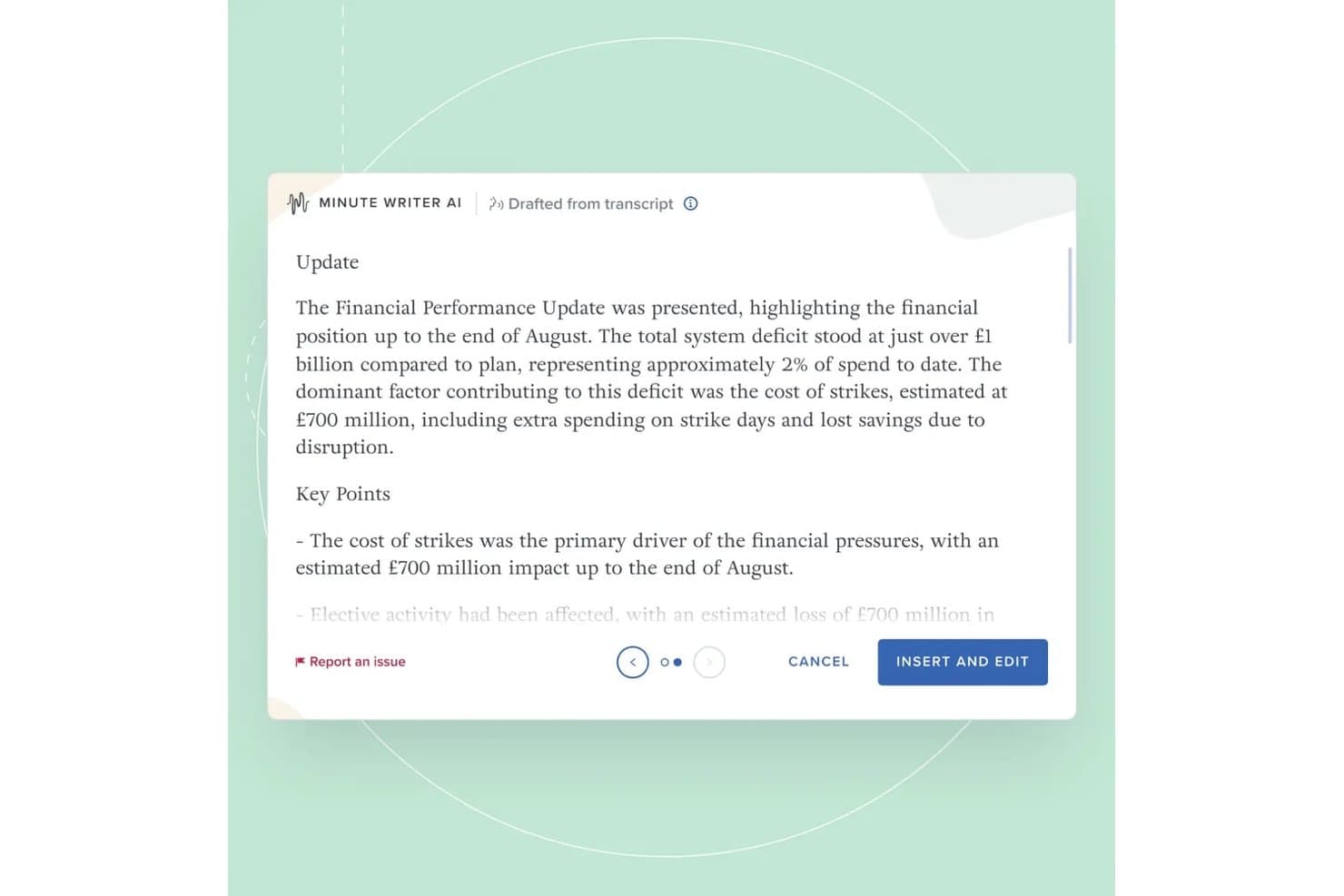
Board Intelligence's Minute Writer AI drafts structured meeting minutes from transcripts, summarizing financial performance updates with key points automatically. Board Intelligence is a board management platform with purpose-built AI tools for drafting meeting minutes, summarizing board packs, and writing board papers within a secure governance workflow.
Who Is Board Intelligence Best For?
Company secretaries and governance teams at large enterprises will get the most from Board Intelligence's board-specific meeting and minute workflows.
Why I Picked Board Intelligence
Board Intelligence earns its spot on my shortlist because its AI processes board meeting audio and transcripts in temporary memory only, leaving zero retained data once the session ends. I particularly like that this is backed by ISO 27001 certification, not just a policy statement. Its Minute Writer AI also pauses recording on demand, so sensitive discussions stay out of the transcript entirely.
Board Intelligence Key Features
- Agenda builder: Lets you create and manage structured agenda templates tailored for each meeting.
- AI-powered IQ Insights: Surfaces decision points and risks by analyzing board pack content and summarizing what matters.
- Report Writer add-in: Allows users to draft board-ready reports directly within Microsoft Word.
- Action tracker: Helps teams log, assign, and follow up on actions agreed during meetings.
Board Intelligence Integrations
Board Intelligence offers native integrations with Microsoft 365 and Microsoft Word, supports calendar integrations for meeting scheduling, and accepts meeting transcripts from third-party transcription tools.
Pros and Cons
Pros:
- Pause AI capture for sensitive topics
- ISO 27001 compliance for strict security
- AI-generated minutes with no retained data
Cons:
- Limited to Microsoft-based workflow
- No API for custom integrations
Learn more about Board Intelligence: Best for instant summaries after calls
- Free trial available
- Pricing upon request

Meeting.ai mobile view with live notes, speaker labels, and AI follow-up prompts. Meeting.ai is designed for teams and professionals who need instant, actionable summaries right after their calls. It’s a strong fit for fast-paced environments where quick follow-up and clear documentation are essential. If you want to capture meeting outcomes without delay, Meeting.ai’s rapid summary delivery sets it apart from other meeting summary AI tools.
Why I Picked Meeting.ai
What drew me to Meeting.ai is its focus on delivering instant summaries right after calls end. For anyone who needs to quickly review meeting outcomes or share action items, this tool’s rapid summary generation is a major advantage. Meeting.ai automatically processes call recordings and produces concise, structured summaries within minutes. I appreciate how this approach helps teams stay aligned and move forward without waiting for manual note-taking or delayed recaps.
Meeting.ai Key Features
Some other features that make Meeting.ai useful for meeting summary AI include:
- Automated action item extraction: The tool identifies and lists action items discussed during meetings.
- Speaker identification: Meeting.ai tags statements with the correct speaker for clarity.
- Searchable meeting archive: Users can search past meeting summaries and transcripts by keyword.
- Customizable summary templates: Teams can adjust the format and structure of summaries to fit their workflow.
Meeting.ai Integrations
Integrations include Zoom, Google Meet, Microsoft Teams, and Google Drive.
Pros and Cons
Pros:
- Speaker identification included in transcripts
- Action items automatically highlighted in summaries
- Summaries delivered within minutes
Cons:
- Occasional missed context in summary sections
- Limited integrations with project management tools
Learn more about Meeting.ai:
Diğer Toplantı Özeti Yapay Zekâ Araçları
İşte kısa listeme giremeyen ancak yine de incelemeye değer bazı ek toplantı özeti yapay zekâ aracı seçenekleri:
- 11FirefliesBest for integration with popular HR tools
- 12FlownoteBest for organizing summaries by project
- 13VOMOBest for privacy-focused meeting documentation
- 14GranolaBest for Slack integration
- 15LindyBest for workflow automation support
- 16Hedy AIBest for calendar-based meeting organization
- 17SummaryBest for iOS mobile note-taking
How I Evaluate Meeting Summary AI
I split my evaluation into two layers: baseline capabilities a tool must have—like transcription and AI summaries—and differentiators like ATS sync and data privacy that matter to HR teams.
Core Functionality (Table Stakes For This List)
When I'm selecting tools for my list, I rank each one on a scale from 0 (does not offer the functionality) to 5 (excels in this area) for each core functionality listed below. Then, I calculate the tool's total score as a percentage. Each tool needs to achieve a minimum total score of 65% to be considered for inclusion.
- Automated Meeting Transcription: I evaluate transcription accuracy across multiple speakers and accents, plus whether the tool reliably labels who said what during panel interviews or group calibration sessions.
- AI-Generated Summaries: Each tool should produce structured, readable summaries that capture decisions and key themes rather than just condensing the transcript into shorter paragraphs.
- Action Item Extraction: I check whether the tool can automatically pull follow-ups with assigned owners and deadlines, like flagging a hiring manager's commitment to submit scorecard feedback by Friday.
- Video Conferencing Integrations: Native connections to Zoom, Microsoft Teams, and Google Meet matter here, along with auto-join from calendar events so recruiters aren't manually starting recordings between back-to-back screens.
- Searchable Meeting Repository: I look for the ability to search across past meetings by keyword, speaker, or topic, which is especially useful when HR teams need to locate a specific candidate debrief or policy discussion months later.
- Sharing & Collaboration Controls: Permission settings should let you share interview summaries with a hiring panel while restricting access to sensitive employee relations conversations from the same account.
Once I have a list of tools that meet the criteria, I consider what sets each platform apart.
Differentiating Factors (What Sets Vendors Apart)
Here's how I compare and contrast different vendors:
Standout Features
I look for tools that sync summaries and scorecards directly into ATS or HRIS platforms, so recruiters aren't copy-pasting notes between systems after every interview loop. Bias and compliance flagging is another differentiator I evaluate—some tools can surface potentially non-compliant interview questions in real time. Sentiment analysis also adds depth, helping ER specialists review tone shifts during difficult employee conversations beyond what a written summary captures.
Beyond Features
HR conversations often involve sensitive personal data, so I evaluate each vendor's approach to consent management, data retention policies, and encryption standards. Scalability matters too—recruiting teams running dozens of screens per week need a tool that handles concurrent meetings without transcript quality dropping off. I also consider onboarding support, since rolling out a recording tool to hiring managers and interviewers across departments takes clear training resources and change management guidance.
Toplantı Özeti Yapay Zekâ Yazılımı Nasıl Seçilir?
Uzun özellik listeleri ve karmaşık fiyatlandırma yapıları içinde kaybolmak kolaydır. Kendinize özgü yazılım seçim sürecinizi yürütürken odağınızı korumanıza yardımcı olmak için göz önünde bulundurmanız gereken faktörlerin bir kontrol listesi aşağıdadır:
| Faktör | Göz Önünde Bulundurulması Gerekenler |
|---|---|
| FaktörÖlçeklenebilirlik | Göz Önünde Bulundurulması GerekenlerEkibiniz veya kuruluşunuz büyüdükçe araç toplantı hacminizi kaldırabilecek mi? Kullanıcı sınırlarını, depolama kotalarını ve daha büyük ekipler için fiyatlandırmayı kontrol edin. |
| FaktörEntegrasyonlar | Göz Önünde Bulundurulması GerekenlerAraç takviminize, görüntülü konferans veya iş birliği platformlarınıza yerel olarak bağlanabiliyor mu? Eksik entegrasyonlar manuel iş yükü oluşturabilir. |
| FaktörÖzelleştirilebilirlik | Göz Önünde Bulundurulması GerekenlerÖzetleri, şablonları veya iş akışlarını kuruluşunuzun belge standartlarına ya da uyumluluk gereksinimlerine uyacak şekilde özelleştirebilir misiniz? |
| FaktörKullanım kolaylığı | Göz Önünde Bulundurulması GerekenlerTeknolojiye daha az aşina olanlar da dâhil olmak üzere tüm kullanıcılar için arayüz sezgisel mi? Ekip üyelerinin aracı ne kadar hızlı benimseyebileceğini değerlendirin. |
| FaktörUygulama ve başlangıç | Göz Önünde Bulundurulması GerekenlerAracı kullanmaya başlamak ne kadar sürecek? Açık başlangıç kaynakları, geçiş desteği ve mevcut iş akışlarında en az düzeyde kesinti sunan çözümleri tercih edin. |
| FaktörMaliyet | Göz Önünde Bulundurulması GerekenlerFiyatlandırma kademeleri şeffaf ve öngörülebilir mi? Bütçenizi etkileyebilecek gizli ücretlere, kullanıcı başına ücretlere veya zorunlu eklentilere dikkat edin. |
| FaktörGüvenlik önlemleri | Göz Önünde Bulundurulması GerekenlerAraç cihaz üzerinde işleme, şifreleme veya katı veri işleme politikaları sunuyor mu? Hassas toplantı içeriklerini nasıl koruduğunu değerlendirin. |
| FaktörUyumluluk gereksinimleri | Göz Önünde Bulundurulması GerekenlerAraç sektörünüzün uyumluluk standartlarını (GDPR veya HIPAA gibi) destekliyor mu? Düzenlemeye tabi verilerle çalışıyorsanız sertifikaları ve denetim kayıtlarını doğrulayın. |
Toplantı Özeti Yapay Zekâ Platformu Nedir?
Toplantı özeti yapay zekâ platformu, yapay zekâ kullanarak toplantıları otomatik olarak kaydeden, yazıya döken ve önemli noktalarını özetleyen bir yazılımdır. Bu araçlar konuşulan içeriği yakalar, konuşmacıları belirler ve kolay başvuru ile belgeleme için kısa yazılı özetler oluşturur. Toplantı özeti yapay zekâ aracı, ekiplerin zamandan tasarruf etmesine, doğruluğu artırmasına ve manuel not alma gerektirmeden görüşmelerin tutarlı kayıtlarını tutmasına yardımcı olur.
Toplantı Özeti Yapay Zekâ Aracının Özellikleri
Bir toplantı özeti yapay zekâ aracı seçerken aşağıdaki temel özelliklere dikkat edin:
- Otomatik kayıt: Toplantılardaki sesleri manuel müdahale olmadan kaydederek tüm görüşmelerin baştan sona belgelenmesini sağlar.
- Yazıya dökme: Konuşulan kelimeleri yazılı metne dönüştürerek toplantı içeriğinin incelenmesini, aranmasını ve referans olarak kullanılmasını kolaylaştırır.
- Konuşmacı tanımlama: Farklı konuşmacıları etiketler ve birbirinden ayırarak toplantı sırasında kimin ne söylediğinin netleşmesine yardımcı olur.
- Zaman damgası ekleme: Metindeki belirli noktaları zaman kodlarıyla işaretleyerek kullanıcıların önemli anlara hızlıca geçmesini sağlar.
- Dışa aktarma seçenekleri: Kullanıcıların metinleri ve özetleri paylaşım veya arşivleme amacıyla PDF, DOCX veya TXT gibi çeşitli biçimlerde indirmesine olanak tanır.
- Arama işlevi: Kullanıcıların metinler veya özetler içinde belirli konuları, kararları ya da yapılacak işleri bulmasını sağlar.
- Özelleştirilebilir şablonlar: Toplantı özetleri için kurumsal standartlara veya tercihlere uygun önceden ayarlanmış ya da düzenlenebilir biçimler sunar.
- Erişim denetimleri: Yöneticilerin toplantı belgelerini kimlerin görüntüleyebileceği, düzenleyebileceği veya paylaşabileceği konusunda izinler belirlemesine olanak tanır.
- Birden çok dil desteği: Farklı ekiplerin ihtiyaçlarını karşılamak üzere birden çok dilde yazıya dökme ve özetleme olanağı sunar.
- Bulut depolama entegrasyonu: Toplantı dosyalarını güvenli bir şekilde depolamak ve düzenlemek, ayrıca dosyalara her yerden erişmek için bulut platformlarına bağlanır.
Yaygın Toplantı Özeti Yapay Zekâ Özellikleri
Yukarıda sıralanan standart toplantı özeti yapay zekâ özelliklerinin yanı sıra bu çözümlerin çoğu aşağıdaki gibi özelliklerde yapay zekâdan yararlanıyor:
- Yapılacak işlerin otomatik olarak çıkarılması: Toplantı konuşmalarından takip görevlerini veya kararları belirlemek ve listelemek için yapay zekâyı kullanır; ekiplerin sorumlulukları manuel inceleme yapmadan takip etmesine yardımcı olur.
- Bağlama duyarlı özetleme: Ana noktaları ve sonuçları yakalayan kısa ve ilgili özetler oluşturmak için yapay zekâdan yararlanır; toplantının özel bağlamına ve konularına uyum sağlar.
- Duygu analizi: Yapay zekâ kullanarak görüşmelerin tonunu ve ruh hâlini analiz eder, ekip dinamikleri veya toplantılar sırasında dile getirilen olası endişeler hakkında içgörüler sunar.
- Konu algılama: Toplantının bölümlerini konuya göre otomatik olarak sınıflandırmak ve etiketlemek için yapay zekâdan yararlanır; bilgilerin daha sonra düzenlenmesini ve bulunmasını kolaylaştırır.
- Akıllı vurgular: Önemli duyurular veya kararlar gibi kilit anları yapay zekâ kullanarak işaretler; böylece kullanıcılar toplantının en kritik bölümlerini hızlıca inceleyebilir.
Toplantı Özeti Yapay Zekâ Aracının Faydaları
Bir toplantı özeti yapay zekâ aracını uygulamak ekibiniz ve işletmeniz için çeşitli faydalar sağlar. Yararlanmayı bekleyebileceğiniz birkaç fayda şunlardır:
- Doğru belgeleme: Otomatik kayıt ve yazıya dökme, her görüşmenin ayrıntılar atlanmadan veya hafızaya güvenilmeden kaydedilmesini sağlar.
- Zamandan tasarruf: Yapay zekâ destekli özetleme ve yapılacak işlerin çıkarılması, manuel not alma ve toplantı sonrası takip ihtiyacını azaltır.
- Geliştirilmiş hesap verebilirlik: Konuşmacı tanımlama ve yapılacak işlerin takibi, her görev veya karardan kimin sorumlu olduğunu netleştirir.
- Geliştirilmiş gizlilik: Cihaz üzerinde işleme ve erişim denetimleri, hassas toplantı içeriğinin korunmasına ve verilerin açığa çıkmasının sınırlandırılmasına yardımcı olur.
- Tutarlı kayıtlar: Özelleştirilebilir şablonlar ve dışa aktarma seçenekleri, ekipler ve projeler arasındaki toplantı belgelerini standartlaştırır.
- Daha iyi erişilebilirlik: Birden çok dil desteği ve aranabilir metinler, toplantı içeriğini farklı ve dağınık ekiplerin kullanımına sunar.
- Uygulanabilir içgörüler: Duygu analizi ve konu algılama gibi yapay zekâ özellikleri, ekip dinamikleri ve toplantı sonuçları hakkında daha derin bir anlayış sağlar.
Toplantı Özeti Yapay Zekâ Araçlarının Maliyetleri ve Fiyatlandırması
Toplantı özeti yapay zekâ araçlarını seçmek, mevcut çeşitli fiyatlandırma modellerinin ve planların anlaşılmasını gerektirir. Maliyetler özelliklere, ekip büyüklüğüne, eklentilere ve daha fazlasına göre değişir. Aşağıdaki tablo, toplantı özeti yapay zekâ çözümlerinde yaygın planları, bunların ortalama fiyatlarını ve genellikle içerdiği özellikleri özetlemektedir:
Toplantı Özeti Yapay Zekâ Araçları İçin Plan Karşılaştırma Tablosu
| Plan Türü | Ortalama Fiyat | Yaygın Özellikler |
|---|---|---|
| Plan TürüÜcretsiz Plan | Ortalama Fiyat$0 | Yaygın ÖzelliklerTemel kayıt, sınırlı transkripsiyon dakikası, basit özetler ve temel dışa aktarma seçenekleri. |
| Plan TürüKişisel Plan | Ortalama Fiyat$5-$15/kullanıcı/ay | Yaygın ÖzelliklerSınırsız kayıt, aranabilir transkriptler, konuşmacı tanımlama ve temel entegrasyonlar. |
| Plan Türüİşletme Planı | Ortalama Fiyat$15-$30/kullanıcı/ay | Yaygın ÖzelliklerEkip yönetimi, gelişmiş dışa aktarma biçimleri, özelleştirilebilir şablonlar, iş birliği araçları ve öncelikli destek. |
| Plan TürüKurumsal Plan | Ortalama Fiyat$30-$60/kullanıcı/ay | Yaygın ÖzelliklerGeliştirilmiş güvenlik, uyumluluk özellikleri, özel işe alıştırma, gelişmiş analizler ve özel entegrasyonlar. |
Toplantı Özeti Yapay Zekâ Araçları Hakkında SSS
Toplantı özeti yapay zekâ araçları hakkında sık sorulan bazı soruların yanıtları aşağıdadır:
Bir toplantı özeti yapay zekâ aracı birden fazla dili destekleyebilir mi?
Evet, birçok çözüm artık toplantıları 100’den fazla dil ve aksanda yazıya dökebiliyor. Bu özellik, yazılımın katılımcının tercih ettiği dilde gerçek zamanlı çeviri ve yapay zekâ destekli özetler sunabildiği Microsoft Teams toplantısı gibi platformları kullanan küresel ekipler için özellikle yararlıdır. Bazı araçlar bir podcast veya kaydedilmiş video için canlı çeviri bile sunduğundan, bir çözüm seçmeden önce belirli dil özelliklerinin güncel olup olmadığını mutlaka kontrol edin.
Gizli toplantılar için toplantı özeti yapay zekâ aracı ne kadar güvenlidir?
Profesyonel toplantı yapay zekâ çözümlerinin çoğu SOC 2 Type II sertifikası, şifreleme ve erişim denetimleri dâhil olmak üzere kurumsal düzeyde güvenlik sunar. Yüksek derecede gizli yüz yüze toplantılar için bazı araçlar, verilerin donanımınızdan hiçbir zaman ayrılmamasını sağlamak amacıyla cihaz üzerinde işleme özelliği sunar. Bu veri işleme politikalarını doğrulamak, hassas çıkarımların ve toplantı kayıtlarının kuruluşunuzun uyumluluk standartlarına uygun şekilde korunmasını sağlar.
Bir toplantı özeti yapay zekâ aracını kullanmak için özel bir yazılım yüklemem gerekir mi?
Hayır, birçok toplantı özeti yapay zekâ aracı bulut tabanlıdır ve doğrudan tarayıcınızda çalışır veya video konferans platformlarıyla entegre olur. Bununla birlikte bazı sağlayıcılar, toplantıları yazıya dökmenin yaygın bir yolu olan çağrıya bir “bot” katılmadan ses yakalamanıza olanak tanıyan masaüstü uygulamaları sunar. Bu uygulamalar ayrıca bulguları doğrudan CRM’nizle senkronize ederek müşteri notlarının manuel giriş yapılmadan otomatik olarak güncellenmesini sağlayabilir.
Bir toplantı özeti yapay zekâ aracı farklı konuşmacıları tanımlayıp etiketleyebilir mi?
Evet, konuşmacı tanımlama (veya diarizasyon) standart bir özelliktir. Yapay zekâ transkripsiyon motoru, ses özelliklerini analiz ederek katılımcıları birbirinden ayırır ve katkılarını son transkriptte etiketler. Bu özellik, katılımcıya göre arama yapmayı ve bir kararın alındığı belirli zaman damgasını görmeyi kolaylaştırarak ekip genelinde hesap verebilirliği sağlar.
Bir toplantının ses kalitesi düşükse ne olur?
Düşük ses kalitesi, transkripsiyon doğruluğunu etkileyebilir. Bazı toplantı özeti yapay zekâ araçları arka plan gürültüsünü filtrelemek ve konuşmayı netleştirmek için yapay zekâ kullanır; ancak en iyi sonuçlar için iyi bir mikrofon ve sessiz bir ortam kullanmak en iyisidir.