

Bire bir toplantılarınızın dağınık bir hâl aldığını mı hissediyorsunuz? Yalnız değilsiniz. Ekip hedeflerini dengelemek, geri bildirim vermek ve ilerlemeyi takip etmek arasında önemli konuşmaların gözden kaçmasına veya daha kötüsü, hiçbir yere varmayan toplantılarda zaman kaybetmenize izin vermek kolaydır.
Bu düzensizlik hızla büyüyerek morali ve performansı olumsuz etkiler. Çözüm mü? Bire bir toplantı yazılımı. Bu araçlar her görüşmeye yapı, netlik ve takip olanağı kazandırır. En iyi seçenekleri test ettim; ekibiniz için doğru olanı bulmak için okumaya devam edin.
Why Trust Our Software Recommendations
6,700+
Reviews
20
Industry experts
16+
Evaluation factors
14
Years
Our team has been testing and reviewing software since 2012. As HR experts ourselves, we know how difficult—and important—it is to choose the right software.
For this guide, we evaluated tools using hands-on testing and independent research, scoring tools using our selection criteria. We also draw on insights from industry thought leaders and practicing HR experts.
Our reviews reflect our human editorial judgment, not a sales pitch.
Expert reviewers:
- Phil GrayCOO
 Kim BehnkeHR Tech Editor & Analyst
 Josh BarkerPeople Ops Manager

Karşılaştırma Tablosu: Bire Bir Toplantı Yazılımları
Bu karşılaştırma tablosu, en iyi bire bir toplantı yazılımı seçimlerimin fiyatlandırma ayrıntılarını özetlemektedir.
Sorted by: Default
| Tool | Starting Price | Website | |
|---|---|---|---|
Best for performance-tied 1:1 conversations | 4.3 out of 5 | $3/user/month 30-day free trial | Website |
Best for finding time slots | 4.6 out of 5 | $16/user/month Free plan + free demo available | Website |
Best for video conferencing | 4.5 out of 5 | $14.16/user/month Free plan available | Website |
Best for meeting notes | 4.7 out of 5 | $7/user/month Free plan available | Website |
Best for 4K video and uncompressed audio | 4.8 out of 5 | $24/month 14-day free trial + free plan + free demo available | Website |
Best for Google Workspace users | 4.5 out of 5 | Pricing upon request Free plan available | Website |
Best for enterprise integration | 4.3 out of 5 | $4/user/month Free plan + 1-month free trial available | Website |
Best for scheduling integration | 4.6 out of 5 | $7.56/month 14-day free trial | Website |
Best for remote teams | 4.3 out of 5 | $12/organizer/month Free trial + free demo available | Website |
Best for agenda planning | 4.6 out of 5 | $9.95/user/month Free trial available | Website |


En İyi Bire Bir Toplantı Yazılımları İncelemesi
Kısa listeme giren en iyi bire bir toplantı yazılımlarına ilişkin ayrıntılı özetlerimi aşağıda bulabilirsiniz. İncelemelerim, sizin için en iyi aracı bulmanıza yardımcı olmak amacıyla her aracın temel özelliklerine, artılarına ve eksilerine, entegrasyonlarına ve ideal kullanım alanlarına ayrıntılı bir bakış sunuyor.
 Best for performance-tied 1:1 conversations
- 30-day free trial
- From $3/user/month (billed annually)
Visit WebsiteCustomer Rating:4.3/5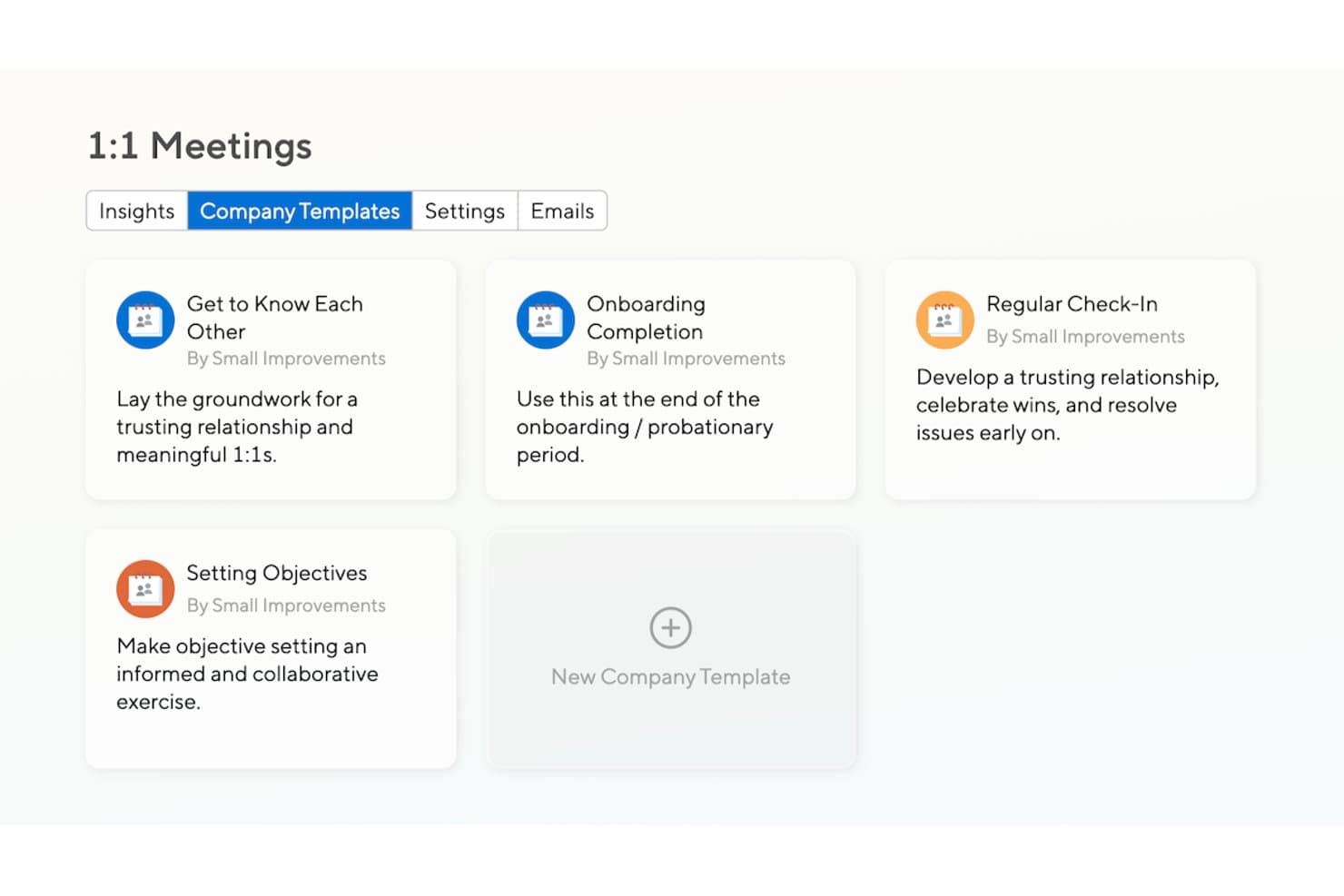
Small Improvements offers built-in 1:1 meeting templates for key stages. Small Improvements is a performance management platform that connects 1:1 meetings, employee reviews, objectives, and pulse surveys, with shared agendas, searchable meeting history, and action item tracking built into its dedicated 1:1 meeting feature.
Who Is Small Improvements Best For?
Small Improvements suits teams that want 1:1 meetings wired directly into performance reviews, objectives, and feedback cycles rather than treated as a separate tool.
Why I Picked Small Improvements
I picked Small Improvements as one of the best because it treats 1:1 meetings as part of your performance cycle, not a separate tool you toggle between. Talking points and notes from 1:1s carry directly into performance reviews, and you can add an agenda item to track an employee's objectives in real time during the meeting itself. The admin insights dashboard also lets me see which managers haven't held meetings recently and send nudges in bulk, which keeps 1:1 cadence consistent across the whole org.
Small Improvements Key Features
- Searchable meeting history: Browse and search notes and talking points from past 1:1s across months or years of conversations.
- Action item carry-forward: Incomplete action items roll into the next meeting automatically and appear in each user's homepage to-do list.
- Talking point templates: Built-in templates cover regular check-ins, new-hire onboarding, and quarterly career conversations, with options to build personal or company templates.
- 1:1 Insights Dashboard: Admins can track meeting frequency, compare departments, identify employees with no recent manager meetings, and send bulk nudges.
Small Improvements Integrations
Small Improvements offers native integrations with Google Calendar, Office 365, Slack, Workday, BambooHR, Rippling, and Personio. It also provides a REST API for custom integrations.
Pros and Cons
Pros:
- Reviewers connect conversations with goals and development
- Action items carry forward between meetings
- Shared agendas keep both participants aligned
Cons:
- Additional participants can’t add agenda items or actions
- Calendar sync doesn’t create meeting invites
Learn more about Small Improvements: Best for finding time slots
- Free plan + free demo available
- From $16/user/month (billed annually)
Visit WebsiteCustomer Rating:4.6/5
Doodle simplifies finding shared availability for group or solo plans. Doodle is a scheduling tool tailored for individuals and teams to coordinate meetings and events efficiently. It's used by those who need a simple way to find common available time slots among multiple participants.
Why I picked Doodle: It specializes in finding time slots, allowing you to propose multiple time options to participants. You can create polls to gather availability preferences, making scheduling straightforward. Doodle's interface guides you through setting up meetings without hassle. These features make it ideal for users who prioritize simplicity in scheduling.
Standout features & integrations:
Features include a booking page that allows others to schedule meetings with you based on your availability, a calendar view that provides a clear overview of all your commitments, and reminders to ensure you don't miss any meetings. These tools enhance your scheduling process by keeping everything organized and timely.
Integrations include Google Calendar, Microsoft Outlook, Slack, Zoom, Microsoft Teams, iCloud, Zapier, Trello, Asana, and Evernote.
Pros and Cons
Pros:
- No account needed for participants
- Customizable meeting polls
- Efficient group scheduling
Cons:
- May need manual follow-up
- Can become cluttered with many polls
Learn more about Doodle: 3Best for video conferencing
Zoom
- Free plan available
- From $14.16/user/month (billed annually)
Visit WebsiteCustomer Rating:4.5/5
Zoom powers high-quality virtual sessions for teams and individuals. Zoom is a video conferencing platform widely used by businesses and individuals for meetings, webinars, and virtual events. It's popular among users who need reliable and high-quality video communication for both small and large groups.
Why I picked Zoom: It excels in video conferencing, offering features like HD video and audio to ensure clear communication. You can also record meetings, which is excellent for reviewing discussions later. Zoom offers breakout rooms that allow you to split your meeting into smaller groups for more focused discussions. These features make Zoom ideal for teams that prioritize video-based communication.
Standout features & integrations:
Features include virtual backgrounds to maintain privacy, waiting rooms to manage participant entry, and polling to gather instant feedback during meetings. These options provide flexibility and control over meeting dynamics, enhancing the overall experience.
Integrations include Google Calendar, Microsoft Outlook, Slack, Salesforce, Dropbox, HubSpot, Asana, Trello, YouTube, and LinkedIn.
Pros and Cons
Pros:
- Customizable meeting settings
- Easy meeting setup
- High-quality video and audio
Cons:
- Consumes significant bandwidth
- Requires app download for full use
Learn more about Zoom: Best for meeting notes
- Free plan available
- From $7/user/month (billed annually)
Visit WebsiteCustomer Rating:4.7/5
Fellow supports structured workflows with agenda planning and task follow-ups. Fellow is a meeting management tool designed to enhance the productivity of teams and organizations. It's ideal for users who need a structured way to organize meeting agendas, take notes, and track action items.
Why I picked Fellow: Fellow specializes in meeting notes, offering features like collaborative note-taking to ensure everyone is on the same page. You can create shared agendas to prepare for meetings effectively. The tool also helps track action items, making follow-ups more efficient. These functionalities cater to teams that value organized and productive meetings.
Standout features & integrations:
Features include feedback requests that allow team members to provide input after meetings, a feature that enables tasks to be assigned directly from meeting notes, and a library of meeting templates to streamline the preparation process. These features help you maintain a high level of organization and ensure accountability within your team.
Integrations include Slack, Google Calendar, Microsoft Teams, Zoom, Asana, Jira, Trello, GitHub, Zapier, and Todoist.
Pros and Cons
Pros:
- Helps track meeting action items
- Supports collaborative note-taking
- Effective agenda management
Cons:
- Some features may be underutilized
- Requires consistent usage for effectiveness
Learn more about Fellow: Best for 4K video and uncompressed audio
- 14-day free trial + free plan + free demo available
- From $24/month (billed annually)
Visit WebsiteCustomer Rating:4.8/5
Riverside offers a clean and intuitive interface for recording high-quality video conferences. Riverside is designed for professionals who need reliable, high-quality one-on-one meeting recordings. Its recording and editing features focus on capturing clear audio and video, making it well-suited for content creators who want their conversations to look and sound professional.
Why I Picked Riverside
I chose Riverside because it can record 4K video and uncompressed audio, delivering consistently sharp results. Recordings are captured locally, so quality stays high even if the internet connection is unstable. Riverside also includes AI-powered editing tools that help clean up recordings by removing filler words and correcting speech, which makes it a strong option for anyone who cares about the final quality of their meeting content.
Riverside Key Features
In addition to its standout recording capabilities, Riverside offers several features that enhance your one-on-one meeting experience:
- Live Streaming: Engage with your audience in real-time across multiple platforms without compromising on quality.
- AI-Powered Transcriptions: Automatically generate transcripts of your meetings for easy reference and documentation.
- Multi-Track Recording: Capture each participant's audio and video on separate tracks for better editing control.
- Direct Publishing: Seamlessly publish your recordings to platforms like YouTube and Spotify for wider accessibility.
Riverside Integrations
Native integrations are not currently listed by Riverside.
Pros and Cons
Pros:
- AI-powered transcription and editing tools
- Multitrack audio video participant recording
- 4K video uncompressed audio recording
Cons:
- Advanced features require paid plans
- Primarily focused on content creation
Learn more about Riverside: Best for Google Workspace users
- Free plan available
- Pricing upon request
Visit WebsiteCustomer Rating:4.5/5
Google Meet supports live discussions for teams using Google platforms. Google Meet is a video conferencing tool that serves users within the Google Workspace ecosystem, facilitating virtual meetings and collaboration. It's primarily used by businesses and educational institutions that rely on Google services for their daily operations.
Why I picked Google Meet: It integrates well with Google Workspace, allowing you to schedule and join meetings directly from Google Calendar. This feature helps streamline your scheduling process.
Google Meet also offers real-time captions, which can enhance accessibility for participants. Its browser-based interface means you don't need to download any software, making it convenient for users who prioritize ease of access.
Standout features & integrations:
Features include customizable layouts to suit your meeting preferences, the ability to share your screen for presentations, and noise cancellation to improve audio quality. These features enhance your meeting experience by providing flexibility and clarity in communication.
Integrations include Google Calendar, Gmail, Google Drive, Microsoft Outlook, Slack, Zoom, Trello, Asana, Salesforce, and Zapier.
Pros and Cons
Pros:
- No software download required
- Real-time captions for accessibility
- Easy access through browser
Cons:
- Occasional connectivity issues
- Requires Google account
Learn more about Google Meet: Best for enterprise integration
- Free plan + 1-month free trial available
- From $4/user/month (billed annually)
Visit WebsiteCustomer Rating:4.3/5
Microsoft Teams combines group coordination with access to the Microsoft ecosystem. Microsoft Teams is a communication and collaboration platform designed for businesses that want to integrate with other Microsoft services. It caters to enterprises needing a unified solution for meetings, chat, and collaboration.
Why I picked Microsoft Teams: It offers enterprise integration by seamlessly connecting with Microsoft 365 tools, such as Outlook and SharePoint. This integration allows you to schedule meetings directly from your calendar and share files effortlessly.
Teams also provides features like threaded messages and channels for organized communication. These capabilities make it an excellent choice for businesses already using Microsoft products.
Standout features & integrations:
Features include live captions in meetings for accessibility, background blur to enhance video calls, and meeting recording for future reference. These features help make your meetings more inclusive and efficient, providing options to suit different needs.
Integrations include Microsoft 365, Outlook, SharePoint, OneDrive, Power BI, Trello, Asana, GitHub, Zoom, and Adobe Creative Cloud.
Pros and Cons
Pros:
- Real-time collaboration on documents
- Customizable meeting layouts
- Supports large virtual meetings
Cons:
- Occasional lag in large meetings
- Limited functionality outside Microsoft ecosystem
Learn more about Microsoft Teams:

Google Calendar helps structure daily plans through event tracking. Google Calendar is a scheduling tool primarily used by individuals and teams to organize and manage time effectively. It's favored by users who need a straightforward way to plan meetings and appointments while integrating with other Google services.
Why I picked Google Calendar: It excels in scheduling integration, making it easy to coordinate meetings directly from your calendar. The tool allows you to share your calendar with others, making the scheduling process simpler.
You can set reminders to keep track of upcoming events and deadlines. These features make Google Calendar a great choice for those who rely on Google Workspace for their daily tasks.
Standout features & integrations:
Features include creating multiple calendars for different purposes, color-coding events to easily identify them, and setting up recurring events to save time on repetitive scheduling. These features help you organize your schedule efficiently and keep track of various commitments.
Integrations include Google Meet, Gmail, Google Drive, Microsoft Outlook, Slack, Zoom, Trello, Asana, Evernote, Salesforce, and Zapier.
Pros and Cons
Pros:
- Accessible from any device
- Customizable event notifications
- Easy integration with Google services
Cons:
- No direct customer support
- Limited advanced scheduling options
Learn more about Google Calendar: Best for remote teams
- Free trial + free demo available
- From $12/organizer/month (billed annually)
Visit WebsiteCustomer Rating:4.3/5
GoTo Meeting offers a stable setup for remote team interactions. GoTo Meeting is a video conferencing solution designed for businesses and remote teams to conduct virtual meetings and presentations. It's favored by users who need a reliable platform for remote collaboration and communication.
Why I picked GoTo Meeting: It caters to remote teams by providing features like HD video conferencing and screen sharing, which enhance communication quality. The tool offers meeting transcription services, allowing you to revisit discussions later. You can also record meetings for those who were unable to attend.
These capabilities make GoTo Meeting a solid choice for teams working across different locations.
Standout features & integrations:
Features include drawing tools that let you annotate shared screens during meetings, mobile apps that enable you to join meetings on the go, and a meeting lock feature for added security. These features ensure your meetings are interactive, accessible, and secure.
Integrations include Slack, Microsoft Office 365, Google Calendar, Salesforce, Zapier, Zoho CRM, Trello, Asana, Podio, and Calendly.
Pros and Cons
Pros:
- Provides drawing tools for interaction
- Offers meeting transcription
- Reliable connection for remote meetings
Cons:
- Limited features on mobile apps
- Can have occasional audio issues
Learn more about GoTo Meeting: Best for agenda planning
- Free trial available
- From $9.95/user/month (billed annually)
Visit WebsiteCustomer Rating:4.6/5
MeetingKing brings structure to planning, notes, and team decisions. MeetingKing is a meeting management tool designed to help teams plan and organize their meetings effectively. It's used by teams who need a structured approach to setting agendas and managing meeting outcomes.
Why I picked MeetingKing: MeetingKing is tailored for agenda planning, offering features that let you easily create and share agendas with your team. You can assign tasks during meetings, ensuring follow-ups are clear and actionable.
The tool also provides templates to streamline the creation process of agendas. These features make it a valuable choice for teams focusing on structured and productive meetings.
Standout features & integrations:
Features include the ability to convert meeting notes into tasks, track decisions made during meetings, and store all meeting data in one place for easy access. These features enhance your ability to manage meetings efficiently and keep everyone aligned on objectives.
Integrations include Google Calendar, Microsoft Outlook, Slack, Evernote, Dropbox, Box, OneDrive, Trello, Asana, and Zapier.
Pros and Cons
Pros:
- Easy access to meeting history
- Provides structured meeting templates
- Supports detailed meeting minutes
Cons:
- May need training for full utilization
- Requires regular updates from users
Learn more about MeetingKing:
Diğer Bire Bir Toplantı Yazılımları
Kısa listeme giremeyen ancak yine de göz atmaya değer bazı ek bire bir toplantı yazılımı seçenekleri şunlardır:
- 11ArrangrBest for quick scheduling
- 12SlackBest for team collaboration
- 13WebexBest for hybrid work environments
- 14ClickMeetingBest for webinars
- 15Zoho MeetingBest for small business integration
- 16Mesh AIBest for performance tracking
- 17Cyberlink uMeetingBest for video quality
- 18RangeBest for daily check-ins
- 19Deel EngageBest for employee onboarding
- 20Spinach AIBest for team alignment
- 21WaggleBest for AI-driven insights
- 22Jitsi MeetBest for open-source users
- 23FreeConferenceCallBest for budget-friendly meetings
- 24RumiBest for quick video meetings
How I Evaluate One-on-One Meeting Software
I look at two layers: the table stakes every 1:1 tool must cover—shared agendas, action tracking, meeting notes—and the differentiators that make a tool the right fit for people teams.
Core Functionality (Table Stakes For This List)
When I'm selecting tools for my list, I rank each one on a scale from 0 (does not offer the functionality) to 5 (excels in this area) for each core functionality listed below. Then, I calculate the tool's total score as a percentage. Each tool needs to achieve a minimum total score of 65% to be considered for inclusion.
- Shared Agenda Building: I check whether both managers and direct reports can add agenda items before and during the meeting, so neither party walks in unprepared.
- Talking Points & Templates: Pre-built 1:1 templates matter—I look for libraries that cover common formats like weekly check-ins, career growth conversations, and onboarding syncs.
- Action Item Tracking: Every tool should let you assign action items with owners and due dates that carry forward into the next meeting automatically.
- Goal & OKR Integration: I evaluate how well 1:1 discussions connect to existing goals, so managers can reference progress updates without switching between platforms.
- Continuous Feedback Exchange: The ability to share structured feedback tied to specific 1:1s is something I look for, especially for teams running ongoing performance conversations.
- Meeting History & Notes: A searchable archive of past 1:1 notes helps managers prep for reviews and spot patterns over time, so I check how each tool organizes and retrieves this data.
Once I have a list of tools that meet the criteria, I consider what sets each platform apart.
Differentiating Factors (What Sets Vendors Apart)
Here's how I compare and contrast different vendors:
Standout Features
AI-powered meeting assistants are a big differentiator—I look for tools that auto-generate recaps and surface relevant talking points from prior conversations, which cuts prep time for managers with large teams. Manager coaching nudges also matter, especially for organizations developing first-time people leaders who benefit from in-app question prompts. I evaluate 1:1 analytics dashboards too, since HR teams need visibility into meeting cadence and cancellation patterns across departments to spot disengaged managers early.
Beyond Features
Integration depth is one of the first things I check. A 1:1 tool needs to sync with your calendar, Slack or MS Teams, and your HRIS—otherwise, adoption drops fast because managers won't leave their existing workflow. Data privacy also carries real weight here, since 1:1 notes often contain sensitive performance and personal details. I look for granular controls that separate private manager notes from shared content. Finally, I evaluate how well a platform supports manager adoption through onboarding resources and ready-to-use playbooks, because HR teams rarely have time to train every people leader individually.
Bire Bir Toplantı Yazılımı Nasıl Seçilir?
Uzun özellik listeleri ve karmaşık fiyatlandırma yapıları içinde kaybolmak kolaydır. Kendinize özgü yazılım seçim sürecinizde ilerlerken odağınızı korumanıza yardımcı olmak için göz önünde bulundurmanız gereken faktörleri içeren bir kontrol listesi hazırladım:
| Faktör | Nelere Dikkat Edilmeli? |
| Ölçeklenebilirlik | Yazılımın ekibinizle birlikte büyüyebildiğinden emin olun. İşlevselliğini veya hızını kaybetmeden artan kullanıcı ve toplantı sayısını destekleyen çözümler arayın. |
| Entegrasyonlar | İş akışlarınızı kolaylaştırmak ve zamandan tasarruf etmek için takvimler ve proje yönetimi uygulamaları gibi hâlihazırda kullandığınız araçlarla entegre olan yazılımları seçin. |
| Özelleştirilebilirlik | Verimliliği ve kullanıcı memnuniyetini artırmak için özellikleri ekibinizin özel ihtiyaçlarına uyacak şekilde düzenlemenize olanak tanıyan çözümleri tercih edin. |
| Kullanım Kolaylığı | Öğrenme süresini kısaltan ve ekibiniz genelinde benimsenmeyi artıran, kullanıcı dostu ve sezgisel bir arayüze sahip olduğundan emin olun. |
| Bütçe | Gizli ücretler de dâhil olmak üzere toplam maliyeti göz önünde bulundurun. Bütçenize uyan ve sunulan özellikler karşılığında en iyi değeri sağlayan esnek fiyatlandırma seçeneklerini arayın. |
| Güvenlik Önlemleri | Toplantılarınızı güvende tutmak için şifreleme ve veri koruma düzenlemelerine uyumluluk gibi güçlü güvenlik özelliklerini kontrol edin. |
| Destek | Güvenilir müşteri desteği çok önemlidir. Sorunları hızlıca çözmek için 7/24 yardım ve birden fazla iletişim seçeneği sunan çözümleri arayın. |
| Özellikler | Aracın hedeflerinizi karşıladığından emin olmak için video kaydı, toplantı notları veya görev yönetimi gibi ihtiyaçlarınızla örtüşen olmazsa olmaz özellikleri belirleyin. |
Bire Bir Toplantı Yazılımlarındaki Trendler
Araştırmam sırasında farklı bire bir toplantı yazılımı sağlayıcılarının sayısız ürün güncellemesini, basın bültenini ve sürüm günlüğünü inceledim. Takip ettiğim yeni ortaya çıkan trendlerden bazıları şunlar:
- Yapay Zekâ Destekli İçgörüler: Yapay zekâ, toplantı verilerini analiz etmek ve uygulanabilir içgörüler sunmak için kullanılıyor. Bu, ekiplerin katılım düzeylerini anlamasına ve toplantıların verimliliğini artırmasına yardımcı oluyor. Bazı sağlayıcılar, iletişimi geliştirmek için duygu analizi ve gerçek zamanlı geri bildirim araçları sunuyor.
- Sanal Gerçeklik Toplantıları: Sanal gerçeklik, toplantıları daha sürükleyici hâle getiriyor. Katılımcıların sanal bir alanda etkileşim kurmasına olanak tanıyor. Bu özellik, varlık ve iş birliği hissi oluşturmak isteyen uzaktan çalışan ekipler için özellikle yararlı olabilir.
- Zihinsel İyilik Hâline Odaklanma: Birçok araç, mola hatırlatıcıları ve stresi azaltma teknikleri gibi zihinsel sağlığı destekleyen özellikleri bünyesine katıyor. Bu eğilim, iş yeri verimliliğinde iyilik hâlinin öneminin giderek daha fazla kabul edildiğini gösteriyor.
- Gelişmiş Güvenlik Özellikleri: Veri koruma öncelik hâline geldikçe yazılım sağlayıcıları, uçtan uca şifreleme ve uluslararası standartlara uyumluluk gibi daha fazla güvenlik özelliği ekliyor. Bu, hassas bilgileri işleyen işletmeler için kritik önem taşıyor.
- Eş Zamansız İş Birliği Araçları: Ekiplerin aynı toplantıda bulunmadan iş birliği yapabildiği eş zamansız çalışmayı desteklemeye yönelik bir değişim yaşanıyor. Kaydedilmiş mesajlar ve paylaşılan çalışma alanları gibi özellikler giderek yaygınlaşıyor ve esnek iletişime olanak tanıyor.
Bire Bir Toplantı Yazılımı Nedir?
Bire bir toplantı yazılımı, iki kişi arasındaki doğrudan iletişimi kolaylaştırmak için tasarlanmış bir araçtır. Bu araçlar genellikle yöneticiler, ekip liderleri ve İK profesyonelleri tarafından düzenli görüşmeler, performans değerlendirmeleri ve koçluk oturumları gerçekleştirmek için kullanılır. Planlama, video konferans ve not alma özellikleri toplantıları düzenlemeye, iletişimi geliştirmeye ve ilerlemeyi takip etmeye yardımcı olur. Genel olarak bu araçlar, iletişim verimliliğini artırarak ve daha güçlü profesyonel ilişkiler kurulmasını sağlayarak değer sunar.
Bire Bir Toplantı Yazılımının Özellikleri
Bire bir toplantı yazılımı seçerken aşağıdaki temel özelliklere dikkat edin:
- Planlama araçları: Toplantı zamanlarını otomatik olarak bulup ayarlayarak karşılıklı e-posta trafiğiyle uğraşma zahmetinden kurtarır.
- Video konferans: Yakınlık ve anlayış oluşturmak için kritik önem taşıyan yüz yüze iletişimi kolaylaştırır.
- Not alma özellikleri: Önemli noktaları ve kararları kaydetmenize olanak tanıyarak hiçbir şeyin unutulmamasını sağlar.
- Görev yönetimi: Yapılacak işleri atamanıza ve takip etmenize yardımcı olarak herkesin sorumluluklarını yerine getirmesini ve aynı doğrultuda ilerlemesini sağlar.
- Toplantı şablonları: Toplantılar için yapılandırılmış bir biçim sunarak tutarlılığı ve verimliliği artırır.
- Gerçek zamanlı iş birliği: Katılımcıların toplantılar sırasında birlikte çalışmasını sağlayarak verimliliği artırır.
- Güvenlik özellikleri: Şifreleme ve veri koruma standartlarına uyumluluk sayesinde hassas bilgileri korur.
- Yapay zekâ destekli içgörüler: Toplantı performansına ilişkin analizler sunarak gelecekteki etkileşimleri geliştirmenize yardımcı olur.
- Eş zamansız iletişim: Katılımcıların kendilerine uygun zamanda etkileşim kurmasına olanak tanıyarak esnek çalışma programlarını destekler.
- Entegrasyon seçenekleri: Kullandığınız diğer araçlara bağlanarak iş akışlarını kolaylaştırır ve verimliliği artırır.
Bire Bir Toplantı Yazılımının Faydaları
Bire bir toplantı yazılımını uygulamak ekibiniz ve işletmeniz için çeşitli faydalar sağlar. Yararlanabileceğiniz birkaç fayda şunlardır:
- Gelişmiş iletişim: Video konferans ve gerçek zamanlı iş birliği araçları, toplantılar sırasında netliği ve anlayışı artırır.
- Artan verimlilik: Görev yönetimi ve toplantı şablonları, toplantıların odaklanmış ve verimli geçmesine yardımcı olarak zaman kazandırır.
- Daha iyi organizasyon: Planlama araçları ve not alma özellikleri, toplantıların iyi organize edilmesini ve önemli ayrıntıların belgelenmesini sağlar.
- Artan hesap verebilirlik: Görevlerin atanması ve ilerlemenin takip edilmesi, ekip üyelerinin taahhütlerini yerine getirmesini sağlar.
- Esneklik: Eş zamansız iletişim seçenekleri, ekip üyelerinin kendi programlarına göre etkileşim kurmasına olanak tanıyarak farklı saat dilimlerine ve çalışma alışkanlıklarına uyum sağlar.
- Veri güvenliği: Güvenlik özellikleri hassas bilgileri koruyarak toplantılar sırasında içinizin rahat olmasını sağlar.
- Uygulanabilir içgörüler: Yapay zekâ destekli analizler, toplantıların verimliliği hakkında geri bildirim sağlayarak gerektiğinde iyileştirmeler yapmanıza yardımcı olur.
Bire Bir Toplantı Yazılımının Maliyetleri ve Fiyatlandırması
Bire bir toplantı yazılımı seçmek, mevcut çeşitli fiyatlandırma modellerinin ve planların anlaşılmasını gerektirir. Maliyetler özelliklere, ekip büyüklüğüne, eklentilere ve daha fazlasına göre değişir. Aşağıdaki tabloda yaygın planlar, bunların ortalama fiyatları ve bire bir toplantı yazılımı çözümlerinde genellikle yer alan özellikler özetlenmiştir:
Bire Bir Toplantı Yazılımı Plan Karşılaştırma Tablosu
| Plan Türü | Ortalama Fiyat | Yaygın Özellikler |
| Ücretsiz Plan | $0 | Temel planlama, sınırlı video konferansı ve minimum depolama. |
| Kişisel Plan | $5-$15/kullanıcı/ay | Sınırsız toplantılar, standart video kalitesi ve temel entegrasyonlar. |
| İşletme Planı | $15-$25/kullanıcı/ay | Gelişmiş planlama, HD video, görev yönetimi ve öncelikli destek. |
| Kurumsal Plan | $25-$50/kullanıcı/ay | Özelleştirilebilir özellikler, gelişmiş güvenlik, yapay zekâ destekli içgörüler ve özel hesap yönetimi. |
Bire Bir Toplantı Yazılımı SSS
Bire bir toplantı yazılımı hakkında sık sorulan bazı soruların yanıtlarını burada bulabilirsiniz:
Doğru bire bir toplantı yazılımını nasıl seçerim?
Doğru yazılımı seçmek ekibinizin ihtiyaçlarına bağlıdır. Kullanım kolaylığı, mevcut araçlarla entegrasyon ve maliyet gibi faktörleri göz önünde bulundurun. Yazılımın video konferansı veya görev yönetimi gibi sizin için önemli özellikleri destekleyip desteklemediğini değerlendirin. İçgörüler edinmek için kullanıcı yorumlarını okumak da iyi bir fikirdir.
Bire bir toplantı yazılımı ekip iletişimini geliştirebilir mi?
Evet, toplantılar için yapılandırılmış bir platform sağlayarak iletişimi geliştirebilir. Video konferansı özellikleri yüz yüze etkileşimi mümkün kılarken not alma ve görev yönetimi özellikleri herkesin aynı noktada olmasını sağlar. Bu araçlar beklentilerin ve takip adımlarının netleştirilmesine yardımcı olur.
Bire bir toplantı yazılımında hangi güvenlik özelliklerini aramalıyım?
Uçtan uca şifreleme, veri koruma standartlarına uyumluluk ve güvenli giriş seçenekleri sunan yazılımları arayın. Bu özellikler toplantılarda ele alınan hassas bilgileri korur. Yazılımın düzenli güvenlik güncellemeleri ve denetimleri sağlaması da faydalıdır.
Bire bir toplantı yazılımı uzaktan çalışmaya nasıl yardımcı olabilir?
Sanal toplantılar ve eşzamansız iletişim için araçlar sağlayarak uzaktan çalışmayı kolaylaştırır. Görüntülü aramalar, ekran paylaşımı ve ortaklaşa not alma gibi özellikler uzaktaki ekiplerin bağlantıda ve üretken kalmasını sağlar. Bu yazılım farklı konumlar arasındaki boşluğu kapatır.
Bire bir toplantı yazılımının ücretsiz sürümlerini kullanmaya değer mi?
Ücretsiz sürümler küçük ekipler veya temel ihtiyaçları olanlar için kullanışlı olabilir. Bu sürümler genellikle planlama ve temel video konferansı gibi gerekli özellikleri içerir. Ancak analizler veya daha yüksek katılımcı sınırları gibi gelişmiş özellikler için ücretli bir plan gerekli olabilir.
Entegrasyonlar bire bir toplantı yazılımının işlevselliğini nasıl artırır?
Entegrasyonlar, yazılımın takvimler ve proje yönetimi uygulamaları gibi hâlihazırda kullandığınız diğer araçlara bağlanmasını sağlar. Bu, iş akışlarını kolaylaştırır ve farklı platformlar arasında geçiş yapma ihtiyacını azaltır. Ayrıca görevlerin otomatikleştirilmesine ve verilerin uygulamalar arasında senkronize edilmesine yardımcı olur.