

Los 10 mejores programas de gestión de la seguridad, analizados para 2026

10 Lista del mejor software de gestión de la seguridad


Gestionar la seguridad en el lugar de trabajo puede ser una tarea abrumadora, especialmente debido a la constante evolución de las normativas y a la necesidad de mantener a salvo a tu equipo. Como persona con amplios conocimientos del sector de la gestión de RR. HH., entiendo los desafíos a los que te enfrentas. El software de gestión de la seguridad puede ayudar a simplificar estas complejidades mediante la organización de datos, el seguimiento de incidentes y la garantía del cumplimiento normativo.
En este artículo, compartiré mis principales selecciones de software de gestión de la seguridad. He probado y analizado estas herramientas de forma independiente para ofrecerte información imparcial. Encontrarás soluciones prácticas adaptadas a tus necesidades, lo que facilitará la elección de la opción adecuada para tu equipo. Exploremos cómo estas herramientas pueden hacer que la gestión de la seguridad sea más sencilla para ti.
Por qué confiar en nuestras reseñas de software
Nuestro equipo lleva probando y evaluando software desde 2012. Como expertos en RR. HH., sabemos lo difícil —y lo importante— que es elegir el software adecuado.
Para esta guía, evaluamos las herramientas mediante pruebas prácticas e investigación independiente, puntuando las herramientas según nuestros criterios de selección. También nos basamos en la experiencia de líderes de opinión del sector y de profesionales de RR. HH. en activo.
Nuestras reseñas reflejan nuestro criterio editorial humano, no un discurso de ventas.
Revisores expertos:
Resumen del mejor software de gestión de la seguridad
Esta tabla comparativa resume los detalles de precios de mis principales selecciones de software de gestión de la seguridad para ayudarte a encontrar la mejor opción para tu presupuesto y las necesidades de tu empresa.
| Tool | Best For | Trial Info | Price | ||
|---|---|---|---|---|---|
| 1 | Software de gestión EHS que ofrece capacitación tanto remota como presencial | Not available | Website | ||
| 2 | Mejor para planes de seguridad en salud que cumplan con OSHA | Demostración gratuita disponible | Precio a consultar | Website | |
| 3 | Software EHS avanzado diseñado para respaldar los indicadores de seguridad ISO 45001 | Demostración gratuita disponible | Precio a consultar | Website | |
| 4 | Solución de software de RR. HH. con módulos integrados para gestión de salud, seguridad y formación | Demostración gratuita o prueba gratis | Desde £16 al mes para hasta 5 personas | Website | |
| 5 | Software de seguimiento de incidentes fácil de usar con capacidades personalizables de evaluación de riesgos | Demo gratuita disponible | Precios disponibles bajo consulta | Website | |
| 6 | Software EHS personalizable que se integra con otros módulos para calidad, gestión de riesgos, sostenibilidad y ESG | Demostración gratuita o una prueba gratuita | Precios a consultar | Website | |
| 7 | Sistema de gestión de seguridad integral con potentes herramientas de involucramiento del empleado y para la construcción de cultura de seguridad | Demostración gratuita o prueba gratuita | Desde $3 USD/usuario/mes | Website | |
| 8 | Software sofisticado de gestión de seguridad con informes granulares y resúmenes de datos generados por IA | Demo gratuita disponible | Precio a consultar | Website | |
| 9 | Sistema de gestión de seguridad completo y fácil de usar en dispositivos móviles, con información predictiva y una puntuación de seguridad patentada | 30 días de prueba gratis o demostración gratuita | Desde $16 USD/usuario/mes | Website | |
| 10 | Software EHS amigable para dispositivos móviles con capacidades de seguimiento de equipos | Demostración gratuita en su sitio web | Precio a consultar | Website |
Mejor software de gestión de la seguridad
A continuación encontrarás una breve descripción de cada software de gestión de la seguridad para mostrar el caso de uso más adecuado de cada herramienta, además de algunas funciones destacadas y capturas de pantalla que te ofrecen una visión general de la interfaz de usuario. Sigue leyendo para encontrar selecciones adicionales al final de la lista.
Software de gestión EHS que ofrece capacitación tanto remota como presencial
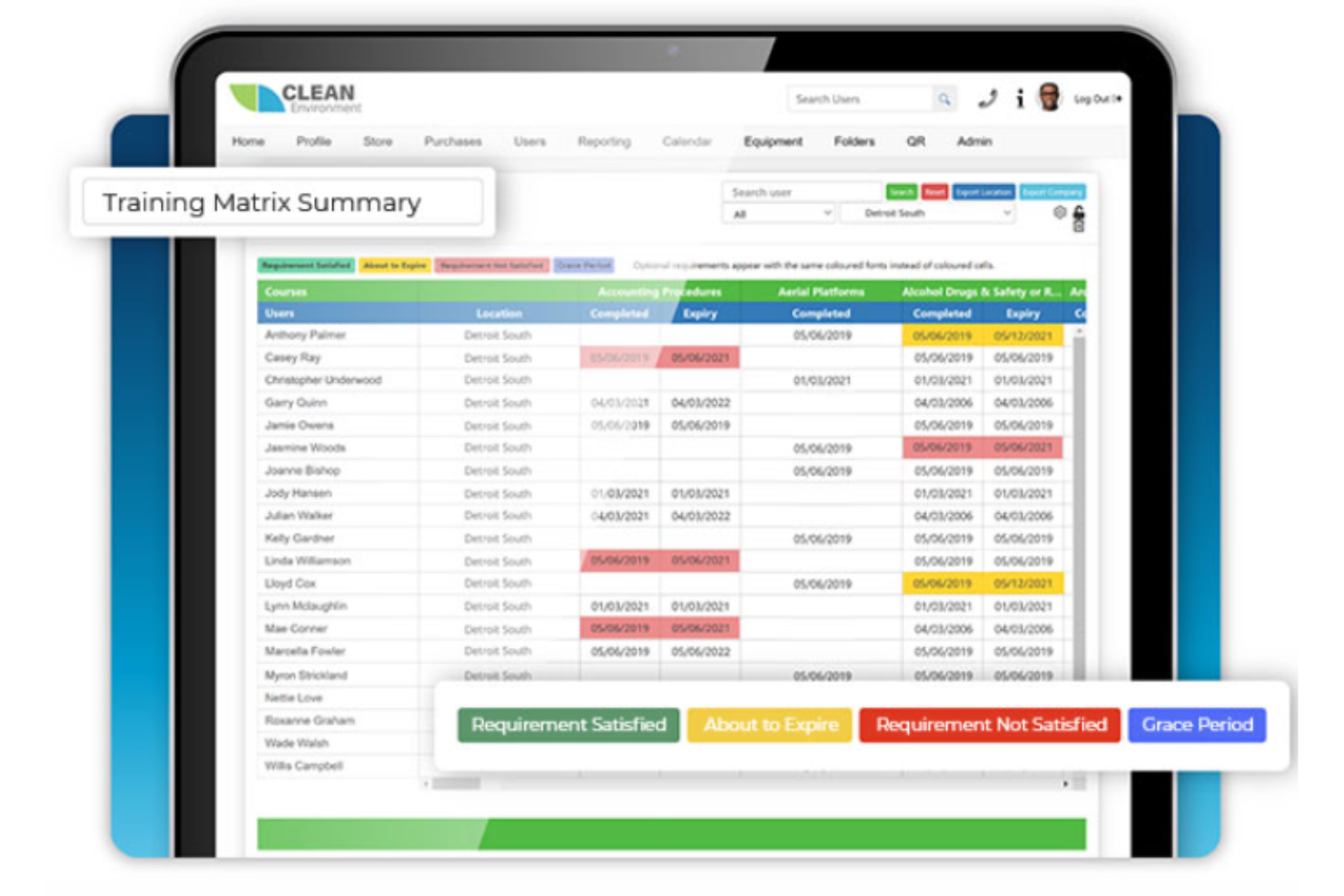
BIStrainer entra en mi lista de recomendaciones por la forma en que admite tanto la formación remota como la presencial bajo una sola plataforma EHS. Cuando los equipos se dividen entre diferentes lugares de trabajo, oficinas y ubicaciones remotas, encuentro que este tipo de flexibilidad facilita la implementación de los programas de seguridad según el horario de cada persona. Me gusta que puedas asignar y seguir cursos en línea mientras gestionas las sesiones presenciales y las certificaciones prácticas en un mismo sistema.
Lo mejor de BIStrainer para
- Organizaciones que imparten formación en seguridad tanto en línea como presencial
- Responsables de seguridad que hacen seguimiento de la formación y cumplimiento EHS combinados
Lo menos adecuado de BIStrainer para
- Empresas enfocadas únicamente en la formación presencial dirigida por instructores
- Equipos que necesitan herramientas avanzadas para reportar incidentes o peligros
Lo que diferencia a BIStrainer
BIStrainer gestiona los programas de seguridad permitiéndote combinar formación remota y presencial desde el mismo panel. A diferencia de los proveedores que solo permiten aprendizaje en línea, da por hecho que también necesitas gestionar sesiones en vivo, firmas de supervisores y requisitos específicos de cada ubicación. A menudo veo que funciona mejor para responsables de seguridad que manejan equipos híbridos y registros de formación estrictos en sectores regulados.
Compromisos con BIStrainer
BIStrainer está optimizado para el aprendizaje combinado y la certificación, pero sacrificas profundidad en el seguimiento de incidentes y peligros. Si necesitas una gestión sólida de eventos de seguridad, querrás agregar una herramienta adicional.
Mejor para planes de seguridad en salud que cumplan con OSHA

MedTrainer está en mi lista de opciones porque cubre las necesidades de planificación de seguridad y cumplimiento de OSHA para lugares de trabajo en el sector salud en un solo lugar. He encontrado que su generador de políticas y procedimientos es muy eficaz para mantener la documentación de seguridad actualizada y asegurar que nada se omita durante las auditorías.
Lo que realmente me llama la atención es cómo se puede asignar y realizar un seguimiento de la formación obligatoria de OSHA por departamento, lo cual es especialmente útil para clínicas u organizaciones con múltiples sedes. Aprecio poder organizar y actualizar los registros de cumplimiento en diferentes ubicaciones sin tener que buscar en hojas de cálculo.
Para quién es mejor MedTrainer
- Organizaciones de salud que necesitan documentación y formación de seguridad conforme a OSHA
- Clínicas con varias sedes que centralizan políticas de seguridad y auditorías
Para quién no es ideal MedTrainer
- Equipos fuera del sector salud que requieren gestión general de seguridad
- Organizaciones que buscan funcionalidades avanzadas de seguimiento personalizado de incidentes
Qué distingue a MedTrainer
MedTrainer se enfoca en convertir el cumplimiento de OSHA y la seguridad en el sector salud en algo rutinario en lugar de reactivo. A diferencia de soluciones como Google Workspace, donde tienes que juntar documentos y hojas de cálculo, MedTrainer parte de la base de que deseas que los planes de seguridad, la formación y las políticas estén centralizados y listos para auditoría. En la práctica, esto es especialmente útil para organizaciones de salud que gestionan varias sedes o estándares de acreditación.
Compromisos al usar MedTrainer
MedTrainer está optimizado para la seguridad y el cumplimiento en el sector salud, pero ese enfoque significa que tendrás menos flexibilidad si necesitas procesos de seguridad fuera del sector salud o altamente personalizados. En su mayoría, trabajarás dentro de flujos de trabajo estructurados y predefinidos.

Cority
Software EHS avanzado diseñado para respaldar los indicadores de seguridad ISO 45001
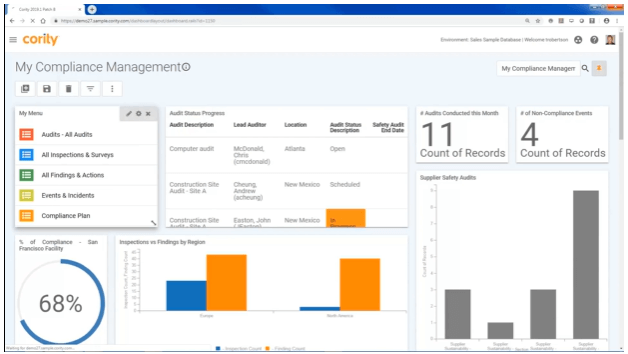
Cority se gana su lugar aquí por la excelente manera en que centraliza la gestión EHS a nivel empresarial, con un enfoque claro en el cumplimiento de la norma ISO 45001. Lo recomiendo cuando necesitas un seguimiento detallado y reportes de incidentes que puedan cumplir con los estándares de seguridad globales.
Lo que hace valioso a Cority para mí es su panel de indicadores de seguridad en tiempo real y los flujos de trabajo de auditoría personalizables. Me gusta especialmente cómo permite que los equipos de seguridad y RRHH supervisen, demuestren y mejoren el cumplimiento en múltiples sitios.
Mejor uso de Cority
- Grandes organizaciones que gestionan necesidades EHS y de cumplimiento complejas
- Equipos que necesitan indicadores de seguridad y auditorías alineados con ISO 45001
No es ideal para
- Pequeñas empresas con necesidades básicas de salud y seguridad
- Equipos que buscan una solución de seguridad ligera o de nivel inicial
Qué distingue a Cority
Cority se distingue por su enfoque en que los equipos de seguridad y cumplimiento trabajen en múltiples sitios utilizando procesos claramente definidos y registros de auditoría estructurados. A diferencia de herramientas más flexibles como monday.com, que te permiten diseñar tus propios flujos de trabajo, Cority pone mayor énfasis en respaldar estándares formales de salud y seguridad en ubicaciones globales.
Veo que esto funciona mejor cuando necesitas datos estandarizados, paneles centralizados e informes que se vinculen directamente a regulaciones como la ISO 45001.
Compromisos de Cority
Cority está optimizado para la estandarización y la alineación regulatoria, pero esto implica que se sacrifica flexibilidad para personalizar flujos de trabajo o para casos de uso más simples. Los equipos pequeños o quienes requieran una solución más adaptable pueden encontrarlo restrictivo.

Solución de software de RR. HH. con módulos integrados para gestión de salud, seguridad y formación
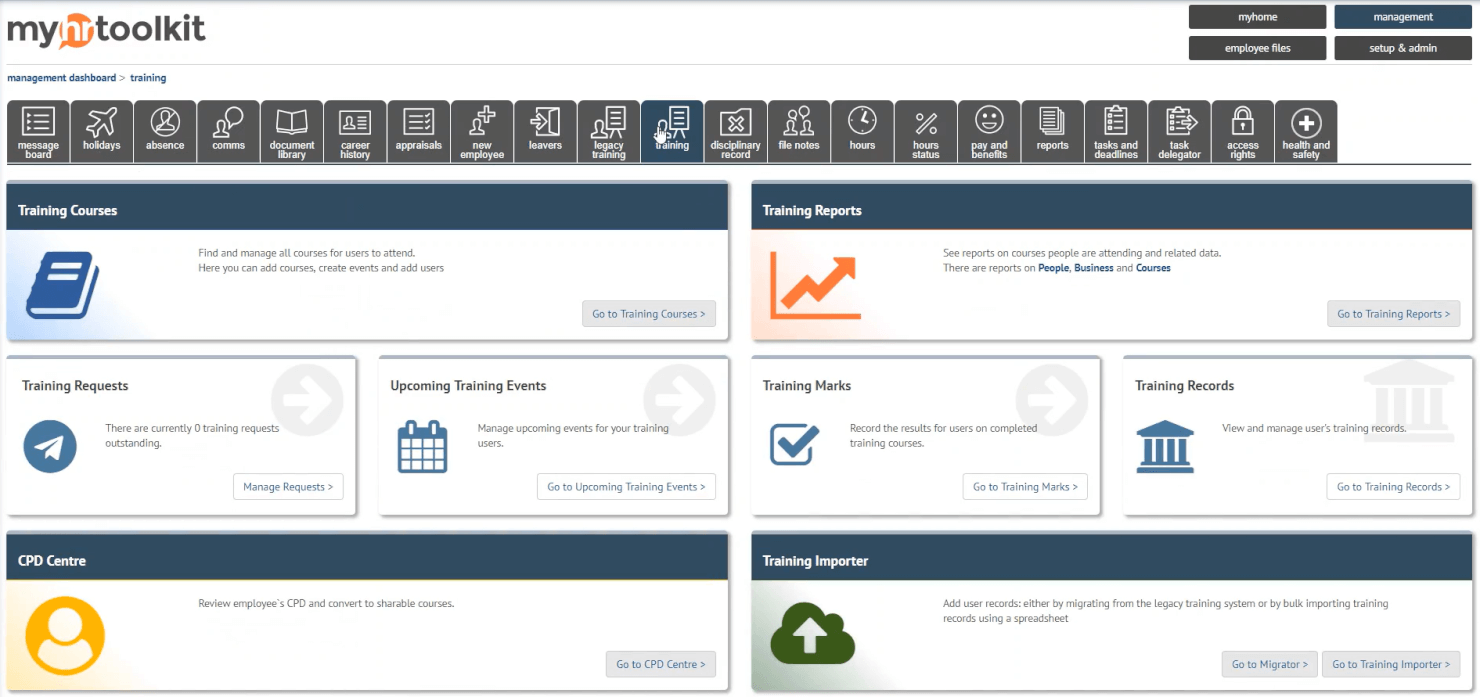
myhrtoolkit se gana un lugar en mi lista por su forma de integrar el seguimiento esencial de salud y seguridad directamente en los procesos principales de RR. HH. Me gusta cómo sus módulos integrados ayudan a gestionar los informes de accidentes, supervisar el cumplimiento del personal y gestionar la formación desde el mismo sistema.
Considero que funciona especialmente bien para equipos pequeños y medianos que necesitan centralizar los registros de incidentes y la documentación de la capacitación. Tener esa visibilidad completa sobre los eventos de seguridad y RR. HH. es lo que lo diferencia para mí.
Mejor uso de myhrtoolkit
- Pequeñas y medianas empresas que gestionan la seguridad y RR. HH. de forma conjunta
- Equipos que necesitan seguimiento integrado de formación e incidentes
No recomendado para
- Grandes empresas con necesidades regulatorias complejas
- Industrias altamente especializadas que requieren análisis avanzados de seguridad
Qué diferencia a myhrtoolkit
myhrtoolkit destaca por combinar la gestión de RR. HH. con el registro de salud y seguridad de una manera que no se ve en herramientas HRIS tradicionales como BambooHR. En lugar de dejar el cumplimiento y la formación como algo secundario, todo se gestiona de la mano. Las organizaciones pequeñas tienden a usarlo para mantener una única fuente de verdad sin agregar una plataforma de seguridad adicional.
Desventajas de myhrtoolkit
myhrtoolkit está optimizado para flujos de trabajo simples e integrados, pero los equipos que necesitan automatización de cumplimiento personalizada o análisis avanzados encuentran esas áreas limitadas. Para entornos muy regulados o técnicos, a menudo no llega a cumplir las expectativas.

Software de seguimiento de incidentes fácil de usar con capacidades personalizables de evaluación de riesgos

BrightSafe está en mi lista de favoritos porque ofrece un seguimiento de incidentes claro vinculado a evaluaciones de riesgos flexibles, lo que resulta útil cuando necesitas tanto documentación como prevención en un solo lugar. Recomiendo BrightSafe cuando quieres ir más allá de las hojas de cálculo y los registros en papel, especialmente si en tu lugar de trabajo se manejan riesgos de seguridad variados.
Lo que más me llama la atención es cómo puedes adaptar las evaluaciones de riesgos para distintos sitios o actividades, y luego registrar rápidamente accidentes, casi accidentes y peligros para obtener un historial de seguridad completo. Me gusta que todo sea auditable y accesible para revisiones rápidas, lo cual es importante cuando aparecen protocolos o controles de cumplimiento.
BrightSafe es ideal para
- Organizaciones que rastrean incidentes laborales y ajustan evaluaciones de riesgos
- Responsables de seguridad que gestionan el cumplimiento en varios lugares de trabajo
BrightSafe no es ideal para
- Empresas que necesitan gestión integrada de mantenimiento de equipos
- Equipos que requieren análisis avanzados más allá del seguimiento de incidentes
Qué diferencia a BrightSafe
BrightSafe hace que el seguimiento de la seguridad sea accesible para los gestores que quieren dejar atrás los procesos manuales. En lugar de abrumarte con configuraciones, te permite documentar incidentes y personalizar evaluaciones de riesgos para diferentes departamentos o ubicaciones. Considero que promueve abordar la seguridad construyendo un registro activo y actuando en base a evidencia real, en lugar de reaccionar solo cuando surgen problemas.
A diferencia de Alliant Safety o suites EHS más complejas, BrightSafe es ideal para equipos que buscan responsabilidad y trazabilidad integradas en el flujo diario, pero sin sacrificar la facilidad de uso por una configuración complicada.
Compromisos con BrightSafe
BrightSafe está optimizado para una gestión de incidentes sencilla y repetible, lo que implica que se sacrifican análisis avanzados y automatizaciones personalizables que suelen necesitar los sitios más grandes o con mayores exigencias de cumplimiento.

Intelex
Software EHS personalizable que se integra con otros módulos para calidad, gestión de riesgos, sostenibilidad y ESG
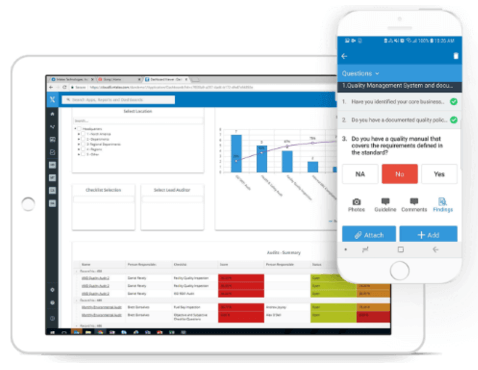
Intelex es una opción clave para organizaciones con necesidades de seguridad complejas y que requieren una gran flexibilidad. He visto equipos obtener valor de su enfoque modular, especialmente cuando ya están rastreando datos de calidad, medio ambiente o riesgos y necesitan todo en una sola herramienta.
Lo que más destaco es cómo puedes configurar flujos de trabajo y vincular métricas de seguridad directamente a los objetivos de ESG y sostenibilidad. Si quieres paneles personalizados para mantener los datos de incidentes, auditorías y acciones de mejora bien conectados, Intelex cumple con ello.
Lo mejor de Intelex
- Organizaciones que integran la gestión de seguridad, calidad y ESG
- Equipos de EHS que necesitan paneles y flujos de trabajo altamente configurables
No tan recomendable para Intelex
- Pequeñas empresas que necesitan herramientas de seguridad básicas listas para usar
- Equipos que buscan una implementación rápida con mínima configuración
Qué diferencia a Intelex
Intelex toma un enfoque modular que espera que gestiones seguridad, calidad y métricas de ESG en conjunto. He visto equipos que desarrollan procesos adaptados a sus necesidades de cumplimiento, en lugar de forzar el trabajo en flujos predefinidos como ocurre en aplicaciones de seguridad básicas. A diferencia de opciones como SafetyCulture, tienes mucha flexibilidad para diseñar formularios, paneles y el seguimiento de incidentes según tus requerimientos.
Esta configuración tiene más sentido cuando se manejan requerimientos complejos que cambian entre regiones o unidades de negocio.
Ventajas y desventajas de Intelex
Intelex prioriza la personalización, pero la configuración lleva tiempo y requiere trabajo administrativo constante. Si buscas algo que puedas implementar y usar rápidamente, este no es el adecuado.

Sistema de gestión de seguridad integral con potentes herramientas de involucramiento del empleado y para la construcción de cultura de seguridad
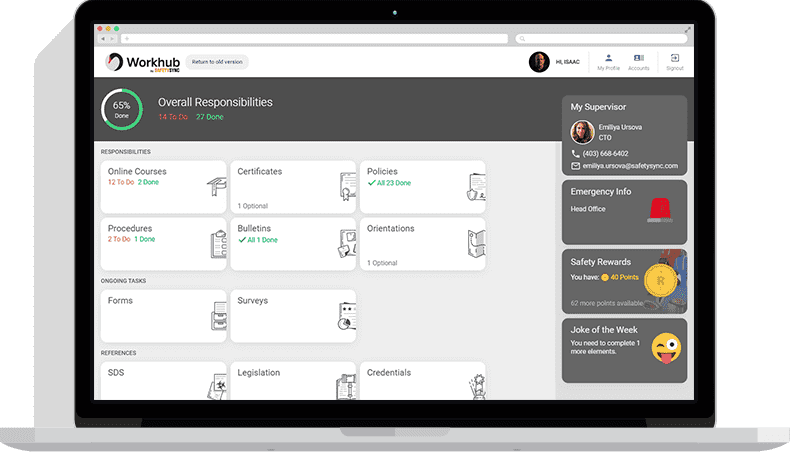
Cority Safety Cloud está en mi lista para organizaciones que necesitan una plataforma unificada para la gestión de incidentes, auditorías y acciones correctivas. Lo que me gusta es cómo Cority sitúa la seguridad como prioridad al involucrar a los empleados directamente en la notificación de peligros y compartir retroalimentación en tiempo real a través de herramientas móviles. He visto equipos beneficiarse de las funciones para la seguridad conductual y construcción de cultura cuando el objetivo es fomentar la responsabilidad compartida.
Es ideal cuando buscas ir más allá de las listas de verificación y realmente involucrar a las personas en la cultura de seguridad, no solo cumplir con normativas.
Cority Safety Cloud es mejor para
- Grandes empresas con necesidades complejas de cumplimiento en seguridad
- Organizaciones que fomentan una cultura de seguridad participativa e impulsada por los empleados
Cority Safety Cloud no es ideal para
- Pequeñas empresas con necesidades básicas u ocasionales de seguimiento en seguridad
- Equipos que buscan una solución de seguridad ligera y rápida de implementar
Lo que diferencia a Cority Safety Cloud
Cority Safety Cloud está diseñado para organizaciones que quieren que la seguridad sea una actividad compartida y cotidiana en toda la empresa. A diferencia de herramientas más simples como SafetyCulture, Cority apuesta por crear un ciclo de retroalimentación donde los empleados tienen un rol activo: no solo reportando peligros, sino también moldeando el programa general junto a los líderes de EHS.
En la práctica, esto funciona mejor cuando se busca un compromiso con la seguridad que se percibe de abajo hacia arriba, no solo como una imposición de políticas desde la dirección.
Compensaciones con Cority Safety Cloud
Cority se enfoca en el detalle y participación a nivel empresarial, pero su configuración y diseño de programas puede requerir mucho tiempo. Para organizaciones pequeñas o equipos que necesitan respuestas rápidas, esa complejidad puede ralentizar la implementación y los primeros resultados.
SiteDocs
Software sofisticado de gestión de seguridad con informes granulares y resúmenes de datos generados por IA
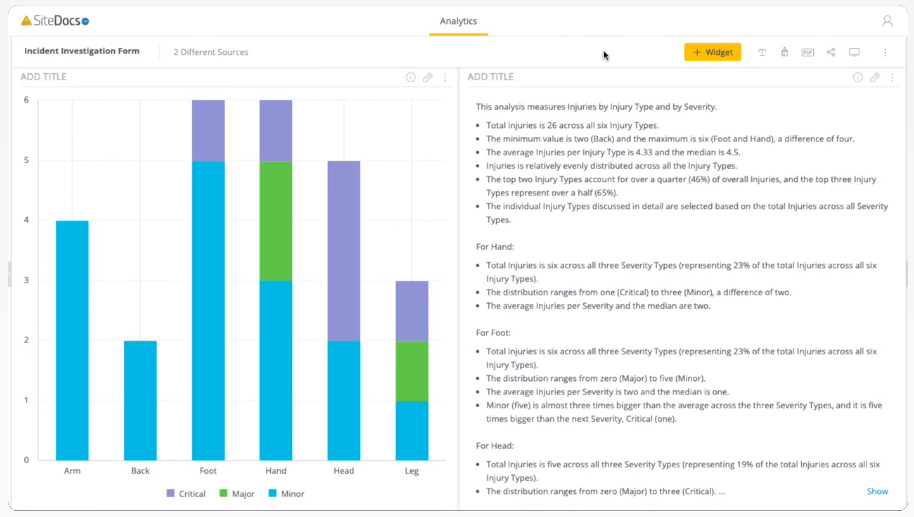
SiteDocs se gana su lugar entre las organizaciones orientadas a la seguridad que buscan ir más allá de simples listas de verificación. Al probar sus informes granulares y resúmenes de datos impulsados por IA, veo una clara ventaja para equipos que gestionan cientos de inspecciones, auditorías e incidentes.
Aprecio que SiteDocs te permita profundizar en tendencias individuales, al mismo tiempo que revela patrones más amplios mediante análisis automatizados. Esto es exactamente lo que quiero cuando los líderes de seguridad necesitan tanto detalles como resúmenes claros y accionables para orientar sus decisiones.
Lo mejor de SiteDocs para
- Responsables de seguridad que deben dar seguimiento a grandes volúmenes de inspecciones o incidentes
- Organizaciones que desean resúmenes de datos de seguridad impulsados por IA
Lo menos recomendable de SiteDocs para
- Pequeños equipos con solo requisitos básicos de seguridad
- Grupos que prefieren herramientas de seguridad sencillas basadas en listas de verificación
Qué distingue a SiteDocs
SiteDocs destaca al organizar la gestión de la seguridad en torno a trazabilidad detallada de auditorías y paneles de control resumidos. A diferencia de aplicaciones básicas de listas de verificación o Google Forms, espera que profundices en tendencias y brechas de cumplimiento con el tiempo, no solo que recolectes firmas o formularios aislados. En la práctica, esto funciona mejor para líderes de seguridad que necesitan monitorear riesgos de manera continua, con la IA destacando hallazgos clave para que no pases por alto patrones en un mar de informes.
Compromisos de SiteDocs
SiteDocs está optimizado para seguimiento estructurado y de alto volumen, pero ese enfoque implica que los equipos pequeños con flujos de trabajo simples pueden encontrar la configuración y los informes más complejos de lo que necesitan.
Safesite
Sistema de gestión de seguridad completo y fácil de usar en dispositivos móviles, con información predictiva y una puntuación de seguridad patentada
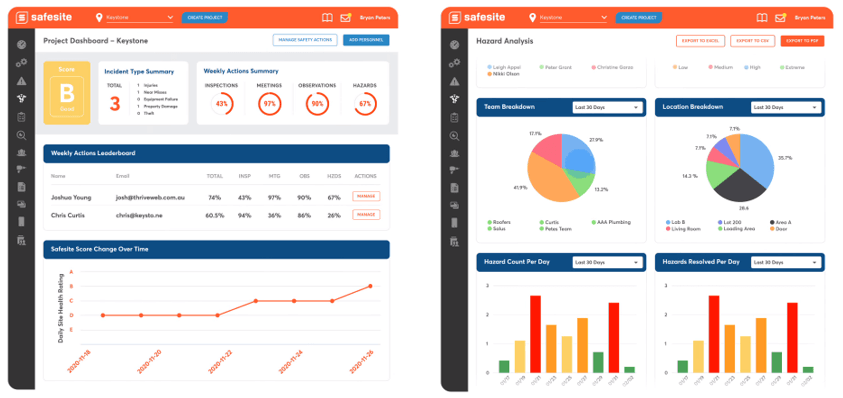
Safesite está en mi lista porque va muy por delante en la gestión predictiva de la seguridad. Me gusta cómo todo está diseñado para el uso móvil, lo que permite a los equipos registrar peligros, incidentes o actividades de seguridad directamente en el campo. La puntuación de seguridad patentada ofrece una lectura directa del riesgo en la obra, lo que considero ayuda a los supervisores a actuar rápidamente y lograr mejoras reales.
Mejor uso de Safesite
- Equipos de campo que necesitan gestión de seguridad enfocada en dispositivos móviles
- Empresas que requieren rastreo de riesgos con datos predictivos en tiempo real
Safesite no es ideal para
- Organizaciones con procesos en papel o muy manuales
- Pequeñas cuadrillas que no registran actividades de seguridad digitalmente
Lo que diferencia a Safesite
Safesite trata la seguridad como un proceso proactivo y continuo que ocurre en el campo. En lugar de depender de tableros de escritorio como los que encuentras en plataformas como SafetyCulture, Safesite espera que los equipos registren actividades, reporten peligros y rastreen métricas directamente en dispositivos móviles. Esto funciona bien si se busca conciencia y visibilidad en tiempo real para superintendentes o gerentes de seguridad a medida que avanzan los trabajos.
Compromisos con Safesite
Safesite optimiza los flujos digitales enfocados en dispositivos móviles, pero sacrifica opciones para quienes prefieren procesos tradicionales y dependientes de papel. Si no estás listo para la gestión digital de registros, puede parecer un trabajo adicional.

Software EHS amigable para dispositivos móviles con capacidades de seguimiento de equipos
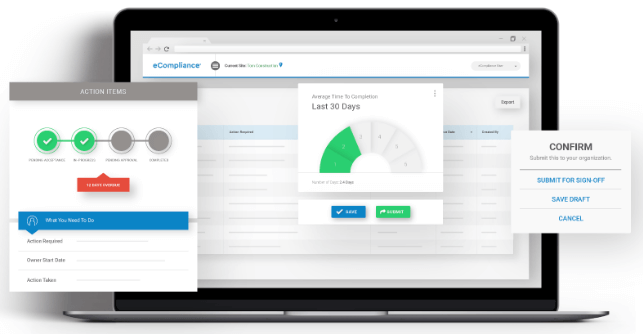
eCompliance está en esta lista porque se especializa en simplificar la gestión de la seguridad en campo para equipos que necesitan acceso móvil. Al evaluar sus funciones de seguimiento de equipos, pude comprobar lo sencillo que es para el personal de primera línea consultar registros de inspección o el estado de mantenimiento directamente desde su teléfono.
La aplicación móvil reduce el papeleo y mantiene actualizados los datos de los activos, algo que considero especialmente valioso para los responsables de seguridad que coordinan en varios sitios de trabajo. Me gusta cómo la programación de inspecciones y la notificación de peligros están estrechamente vinculadas a los perfiles de los equipos; esto se adapta a situaciones reales donde la conformidad y la seguridad de los activos se superponen.
Para quién es mejor eCompliance
- Equipos de seguridad que necesitan inspección y seguimiento de equipos desde el móvil
- Empresas que gestionan varios sitios de trabajo con equipos de campo distribuidos
Para quién no es ideal eCompliance
- Organizaciones que no gestionan activos de equipos
- Equipos que necesitan investigación de incidentes en profundidad y análisis de causas raíz
Lo que diferencia a eCompliance
eCompliance está diseñado para equipos de campo que necesitan registrar inspecciones, acceder a formularios de seguridad y hacer un seguimiento de equipos sin salir del sitio de trabajo. A diferencia de opciones como SafetyCulture, que enfatizan las auditorías o los informes basados en observaciones, eCompliance espera que el personal utilice dispositivos móviles para cerrar ciclos de inspección y gestionar el estado de los activos en tiempo real, justo donde ocurre el trabajo.
En la práctica, esto hace que la herramienta sea indicada para organizaciones con mucho equipo físico en movimiento entre distintos sitios.
Compromisos de eCompliance
eCompliance está optimizado para tareas de seguridad móvil desde el principio, pero al hacerlo, limita el nivel de personalización y análisis que podrías obtener con sistemas más orientados a paneles de control. Si tu equipo desea desarrollar flujos de trabajo especializados o analizar tendencias en detalle, aquí encontrarás ciertos límites.
Otros programas de gestión de la seguridad
Estas son algunas opciones más que no entraron en la lista del mejor software de gestión de la seguridad. No tuve espacio para hacer un análisis completo de cada una, pero aun así merecen consideración:
- WHS Monitor
Solución avanzada para la gestión de la seguridad que incluye acceso a 7 millones de documentos y plantillas de seguridad
- SafetyAmp
Software de gestión de seguridad en la nube con aplicaciones de registro configurables para automatizar tareas de seguimiento de cumplimiento
- Weever
Plataforma de gestión de operaciones digitales con herramientas de participación de empleados para mantener la seguridad como prioridad
- Lighthouse
Software de gestión de seguridad sencillo y basado en la web, con almacenamiento de datos offline para trabajadores en lugares remotos


Cómo Evalúo el Software de Gestión de Seguridad
Divido mi evaluación en dos capas: los criterios básicos que toda herramienta debe cumplir—como el mantenimiento de registros OSHA y los flujos de trabajo de incidentes—y los diferenciadores que separan las herramientas más adecuadas del resto.
Funcionalidad Básica (Requisitos Indispensables Para Esta Lista)
Cuando selecciono herramientas para mi lista, califico cada una en una escala del 0 (no ofrece la funcionalidad) al 5 (sobresale en esta área) para cada función básica listada a continuación. Luego, calculo la puntuación total de la herramienta en un porcentaje. Cada herramienta necesita lograr una puntuación mínima total del 65% para ser considerada.
- Reporte de Incidentes y Lesiones: Busco formularios estructurados de ingreso, flujos de trabajo de investigación y seguimiento de acciones correctivas que permitan al departamento de RRHH registrar todo, desde una caída en un almacén hasta un casi accidente en una obra.
- Gestión de Cumplimiento Normativo: Cada herramienta debe permitir la generación de registros OSHA 300, 300A y 301 (o equivalentes regionales), para que su equipo pueda obtener archivos listos para auditorías sin tener que reconstruirlos en una hoja de cálculo.
- Seguimiento de Formación y Certificaciones de Seguridad: Evalúo si la plataforma realiza un seguimiento de las finalizaciones, fechas de vencimiento de certificaciones y recordatorios para renovaciones—especialmente para requisitos específicos según el puesto, como operación de montacargas o ingreso a espacios confinados.
- Evaluaciones de Riesgos e Inspecciones: Las herramientas deben ofrecer plantillas de inspección configurables y programación, para que un responsable de seguridad pueda realizar una auditoría mensual de extintores o una evaluación trimestral de riesgos en sitio desde un único sistema.
- Gestión de Documentos y Políticas de Seguridad: Reviso si existe almacenamiento centralizado con control de versiones y seguimiento de la recepción por parte de los empleados, algo esencial cuando se necesita demostrar que el personal revisó los procedimientos actualizados de EPP o nuevas hojas de datos de seguridad.
- Informes y Paneles Analíticos: La plataforma debe mostrar indicadores clave de seguridad como TRIR, tasas DART y tendencias de incidentes en paneles configurables que su equipo de liderazgo de RRHH pueda realmente utilizar.
Una vez que tengo una lista de herramientas que cumplen estos criterios, considero lo que distingue a cada plataforma.
Factores Diferenciadores (Lo Que Distingue a los Proveedores)
Así es como comparo y contrasto los diferentes proveedores:
Características Destacadas
El acceso móvil y sin conexión es importante cuando el personal se encuentra repartido en diferentes obras o almacenes—busco aplicaciones que permitan a los supervisores completar inspecciones y registrar incidentes sin necesidad de una conexión Wi-Fi. La integración con compensación laboral es otro elemento diferenciador, ya que vincular un registro de incidente directamente con una reclamación ahorra al departamento de RRHH la tarea de volver a ingresar datos en varios sistemas. También reviso si la plataforma gestiona la seguridad de contratistas y visitantes, una necesidad real para los equipos que gestionan fuerzas laborales mixtas en múltiples ubicaciones.
Más Allá de las Funcionalidades
La integración con HRIS es fundamental—verifico si la plataforma se sincroniza con sistemas como Workday, BambooHR o ADP para que los listados de empleados y los datos organizacionales estén siempre actualizados sin importaciones manuales. También importa el ajuste según la industria y el tipo de personal; una herramienta diseñada para equipos de construcción dispersos en diversas obras tiene diferentes necesidades de configuración que una pensada para un centro de salud. Evalúo de cerca las normas de cumplimiento y seguridad, pues las plataformas de seguridad almacenan registros sensibles de lesiones y datos médicos que requieren protecciones como certificación SOC 2 y controles de acceso según roles.
Cómo elegir un software de gestión de la seguridad
Es fácil perderse entre largas listas de funciones y complejas estructuras de precios. Para ayudarte a mantener la concentración mientras avanzas en tu proceso particular de selección de software, aquí tienes una lista de factores que debes tener en cuenta:
| Factor | Qué debes considerar |
|---|---|
| Escalabilidad | ¿El software crecerá junto con tu empresa? Comprueba si admite más usuarios y datos a medida que tu negocio se expande. |
| Integraciones | ¿Se integra con tus sistemas actuales? Busca compatibilidad con herramientas como sistemas de RR. HH. y ERP. |
| Capacidad de personalización | ¿Puedes adaptar el software a tus flujos de trabajo? Asegúrate de poder modificar formularios y procesos para ajustarlos a tus necesidades. |
| Facilidad de uso | ¿El software es intuitivo? Evalúa si tu equipo puede aprender rápidamente a utilizar la plataforma y navegar por ella sin frustraciones. |
| Implementación e incorporación | ¿La transición es fluida? Considera los recursos necesarios para la configuración y la capacitación, así como el tiempo necesario para ponerlo en funcionamiento. |
| Coste | ¿Cuál es el coste total de propiedad? Compara las tarifas de suscripción, los costes ocultos y el valor de las funciones ofrecidas. |
| Medidas de seguridad | ¿Existen medidas de protección de datos? Asegúrate de cumplir las normas del sector y de contar con cifrado de datos. |
| Requisitos de cumplimiento | ¿Admite las normativas necesarias? Verifica si el software cumple las necesidades de cumplimiento específicas del sector. |
¿Qué es el software de gestión de la seguridad?
El software de gestión de la seguridad es una herramienta que ayuda a las organizaciones a gestionar la seguridad y el cumplimiento normativo en el lugar de trabajo. Profesionales como los responsables de seguridad, el personal de RR. HH. y los responsables de cumplimiento suelen utilizar estas herramientas para garantizar un entorno de trabajo seguro y cumplir con las normativas. Las funciones de notificación de incidentes, evaluación de riesgos y seguimiento del cumplimiento ayudan a mantener los estándares de seguridad y el cumplimiento normativo. En general, estas herramientas aportan valor al simplificar los procesos de seguridad y reducir los riesgos laborales.
Funciones
Al seleccionar un software de gestión de la seguridad, presta atención a las siguientes funciones clave:
- Notificación de incidentes: Permite a los usuarios documentar y hacer un seguimiento eficaz de los incidentes laborales, facilitando una respuesta y prevención oportunas.
- Evaluación de riesgos: Ayuda a identificar posibles peligros y evaluar los riesgos para garantizar la aplicación de medidas de seguridad proactivas.
- Seguimiento del cumplimiento: Garantiza el cumplimiento de las normativas del sector mediante el seguimiento del estado de cumplimiento y la generación de los informes necesarios.
- Gestión de auditorías: Facilita la realización periódica de auditorías e inspecciones de seguridad, ayudando a mantener los estándares de seguridad en toda la organización.
- Gestión de documentos: Organiza los documentos y registros de seguridad, facilitando el acceso y la actualización de información importante.
- Acceso móvil: Proporciona acceso desde cualquier lugar a los datos y los informes de seguridad, algo útil para los trabajadores de campo y los equipos remotos.
- Flujos de trabajo personalizables: Permite adaptar los procesos y formularios para que coincidan con las necesidades y los flujos de trabajo específicos de la organización.
- Análisis de datos: Ofrece información mediante paneles e informes en tiempo real, ayudando a tomar decisiones de seguridad fundamentadas.
- Gestión de la formación: Permite programar y hacer un seguimiento de las sesiones de formación en seguridad, garantizando la preparación de los empleados.
- Capacidades de integración: Se conecta con sistemas existentes, como el software de RR. HH. y ERP, para agilizar las operaciones de seguridad y el intercambio de datos.
Beneficios
La implementación de un software de gestión de la seguridad ofrece varios beneficios para tu equipo y tu empresa. Estos son algunos de los que puedes esperar:
- Mejora del cumplimiento: Mantiene a tu organización alineada con las normativas del sector mediante el seguimiento y la elaboración de informes de cumplimiento.
- Mejora de la cultura de seguridad: Promueve un enfoque proactivo de la seguridad con herramientas de notificación de incidentes y evaluación de riesgos.
- Ahorro de tiempo: Reduce las tareas administrativas al automatizar procesos como las auditorías y las inspecciones.
- Mejor toma de decisiones: Proporciona información mediante el análisis de datos, ayudándote a tomar decisiones de seguridad fundamentadas.
- Mayor accesibilidad: Ofrece acceso móvil, lo que permite a tu equipo gestionar los datos de seguridad desde cualquier lugar.
- Procesos adaptados: Los flujos de trabajo personalizables te permiten adaptar el software a tus necesidades específicas de gestión de la seguridad.
- Formación eficaz: Gestiona y hace un seguimiento de las sesiones de formación, garantizando que tu equipo esté bien preparado para afrontar los desafíos de seguridad.
Costes y precios
Para seleccionar un software de gestión de la seguridad es necesario comprender los distintos modelos de precios y planes disponibles. Los costes varían en función de las funciones, el tamaño del equipo, los complementos y otros factores. La siguiente tabla resume los planes habituales, sus precios medios y las funciones que suelen incluir las soluciones de software de gestión de la seguridad:
Tabla comparativa de planes de software de gestión de la seguridad
| Tipo de plan | Precio medio | Funciones habituales |
|---|---|---|
| Plan gratuito | $0 | Notificación básica de incidentes, acceso limitado de usuarios y herramientas básicas de cumplimiento. |
| Plan personal | $10-$30/usuario/mes | Notificación de incidentes, gestión de documentos, evaluación de riesgos y acceso móvil. |
| Plan empresarial | $30-$60/usuario/mes | Gestión de auditorías, seguimiento del cumplimiento, flujos de trabajo personalizables e integraciones. |
| Plan corporativo | $60-$100/usuario/mes | Análisis avanzados, asistencia exclusiva, funciones de seguridad avanzadas y personalización completa. |
Preguntas frecuentes
¿Es difícil cambiar a un nuevo software de gestión de la seguridad?
Cambiar a un nuevo software puede ser complicado, pero muchos proveedores ofrecen asistencia para la incorporación. Busca soluciones con recursos de formación, recorridos por el producto y equipos de asistencia especializados. Planifica cuidadosamente la transición evaluando las necesidades de migración de datos y preparando a tu equipo para el cambio.
¿Qué nivel de seguridad ofrece el software de gestión de la seguridad?
La mayoría de los programas de gestión de la seguridad incluyen medidas de protección como el cifrado de datos y la autenticación de usuarios. Al elegir un software, pregunta por sus protocolos de seguridad y su cumplimiento de normas como el RGPD o ISO. Asegúrate de que el software proteja los datos confidenciales y se ajuste a las políticas de seguridad de tu organización.
¿Se puede personalizar el software de gestión de la seguridad para mi sector?
Sí, muchas soluciones ofrecen opciones de personalización para adaptarse a las necesidades específicas de cada sector. A menudo puedes ajustar los flujos de trabajo, los formularios y los informes para que coincidan con tus requisitos operativos. Al evaluar el software, comprueba que incluya funciones de personalización y pregunta por las plantillas o los módulos específicos para tu sector.
Qué sigue:
Si estás investigando un software de gestión de la seguridad, ponte en contacto con un asesor de SoftwareSelect para recibir recomendaciones gratuitas.
Rellena un formulario y mantén una breve conversación en la que te preguntarán sobre los detalles específicos de tus necesidades. Después recibirás una lista corta de programas que podrás revisar. También te ayudarán durante todo el proceso de compra, incluidas las negociaciones de precios.