

Recolher feedback honesto dos colaboradores é essencial para criar confiança e melhorar a cultura no local de trabalho, mas nem sempre é fácil fazê-lo bem. Os colaboradores podem hesitar em partilhar preocupações abertamente, especialmente quando o feedback parece rastreável ou desconfortável. As ferramentas de feedback anónimo dos colaboradores ajudam a eliminar essa barreira, proporcionando às pessoas uma forma segura de partilharem as suas perspetivas sem receio de repercussões.
Há anos que testo e analiso software de RH, com especial atenção às ferramentas que melhoram genuinamente a comunicação e a tomada de decisões. Com base na minha experiência, a plataforma de feedback anónimo certa pode identificar problemas numa fase inicial, revelar informações relevantes e ajudar as equipas a responder de forma mais eficaz às necessidades dos colaboradores. Neste artigo, partilharei as ferramentas que se destacam e explicarei o que as torna eficazes em ambientes reais de RH.
Neste artigo, partilharei as minhas principais escolhas de ferramentas de feedback anónimo. Encontrará análises imparciais, centradas nas funcionalidades e vantagens mais importantes para si. Vamos encontrar a opção mais adequada para a sua equipa.
Why Trust Our Software Recommendations
6,700+
Reviews
20
Industry experts
16+
Evaluation factors
14
Years
Our team has been testing and reviewing software since 2012. As HR experts ourselves, we know how difficult—and important—it is to choose the right software.
For this guide, we evaluated tools using hands-on testing and independent research, scoring tools using our selection criteria. We also draw on insights from industry thought leaders and practicing HR experts.
Our reviews reflect our human editorial judgment, not a sales pitch.
Expert reviewers:
- Phil GrayCOO
 Kim BehnkeHR Tech Editor & Analyst
 Josh BarkerPeople Ops Manager

Tabela comparativa de ferramentas de feedback anónimo dos colaboradores
Esta tabela comparativa resume os detalhes de preços das minhas principais escolhas de ferramentas de feedback anónimo dos colaboradores:
| Tool | Best For | Trial Info | Price | ||
|---|---|---|---|---|---|
| 1 | Best for employee listening and whistleblowing | Free demo available | Pricing upon request | Website | |
| 2 | Best with enforced anonymity rules | Free plan + free trial + free demo available | From $4/user/month (billed annually) | Website | |
| 3 | Best for linking pulse surveys to performance data | 30-day free trial | From $3/user/month (billed annually) | Website | |
| 4 | Best for interactive presentations | Free plan available | From $14/user/month (billed annually) | Website | |
| 5 | Best for custom surveys | Free plan available | From $30/user/month (billed annually) | Website | |
| 6 | Best for user-friendly interfaces | Free plan available | From $28/month (billed annually) | Website | |
| 7 | Best for secure data handling | Free plan available | From $120/month (billed annually) | Website | |
| 8 | Best for culture insights | Free demo available | Pricing upon request | Website | |
| 9 | Best for live audience polling | From $120/user/year (billed annually) | Website | ||
| 10 | Best for budget-conscious users | Free plan available | From $20/month | Website |


Análises das melhores ferramentas de feedback anónimo dos colaboradores
Abaixo encontram-se os meus resumos detalhados das melhores ferramentas de feedback anónimo dos colaboradores que entraram na minha lista restrita. As minhas análises apresentam uma visão detalhada das principais funcionalidades, vantagens e desvantagens, integrações e casos de utilização ideais de cada ferramenta, para o ajudar a encontrar a melhor opção para si.
 Best for employee listening and whistleblowing
- Free demo available
- Pricing upon request
Visit WebsiteCustomer Rating:4.6/5
Eletive surfaces anonymous feedback themes via AI-powered comment analysis. Eletive is a people intelligence platform that combines pulse surveys, lifecycle surveys, anonymous employee chat, AI-powered comment analysis, and a whistleblowing channel to collect and act on employee feedback.
Who Is Eletive Best For?
Eletive is a strong fit for HR leaders and people teams in mid-to-large organizations that need structured employee listening alongside a compliant whistleblowing channel.
Why I Picked Eletive
Eletive earns its spot on my shortlist because it's one of the few platforms that combines structured employee listening with a built-in whistleblowing channel that's compliant with the EU Whistleblowing Directive. I particularly like how Comments AI automatically surfaces themes and sentiment from open-text responses, so patterns in employee feedback don't get buried. The anonymous employee chat also lets managers follow up on survey comments without ever exposing who submitted them.
Eletive Key Features
- Pulse survey scheduling: Administrators can set up recurring or manual survey schedules targeting the whole organization or specific groups, with adaptive question rotation built in.
- Lifecycle surveys: Dedicated onboarding and exit surveys track employee experience at key stages, with results aggregated monthly by segment.
- eNPS correlation analysis: The platform identifies themes linked to promoter praise and detractor concerns, giving HR teams a clear view of what's driving scores.
- HRIS integrations: Eletive connects with systems like Workday, BambooHR, Personio, and SAP SuccessFactors to sync employee data and support segmented reporting.
Eletive Integrations
Eletive integrations include Workday, Personio, SAP SuccessFactors, Bamboo HR, Slack, and Microsoft Teams. API 2.0 and a data export API support custom connectivity, while integration count and native status aren't specified.
Pros and Cons
Pros:
- AI groups comments into themes and sentiment
- Adaptive pulses revisit low-scored topics
- Anonymous whistleblowing channel supports sensitive reporting
Cons:
- Reviewers report occasional reporting-data problems
- Comment replies identify the responding manager
Learn more about Eletive: Best with enforced anonymity rules
- Free plan + free trial + free demo available
- From $4/user/month (billed annually)
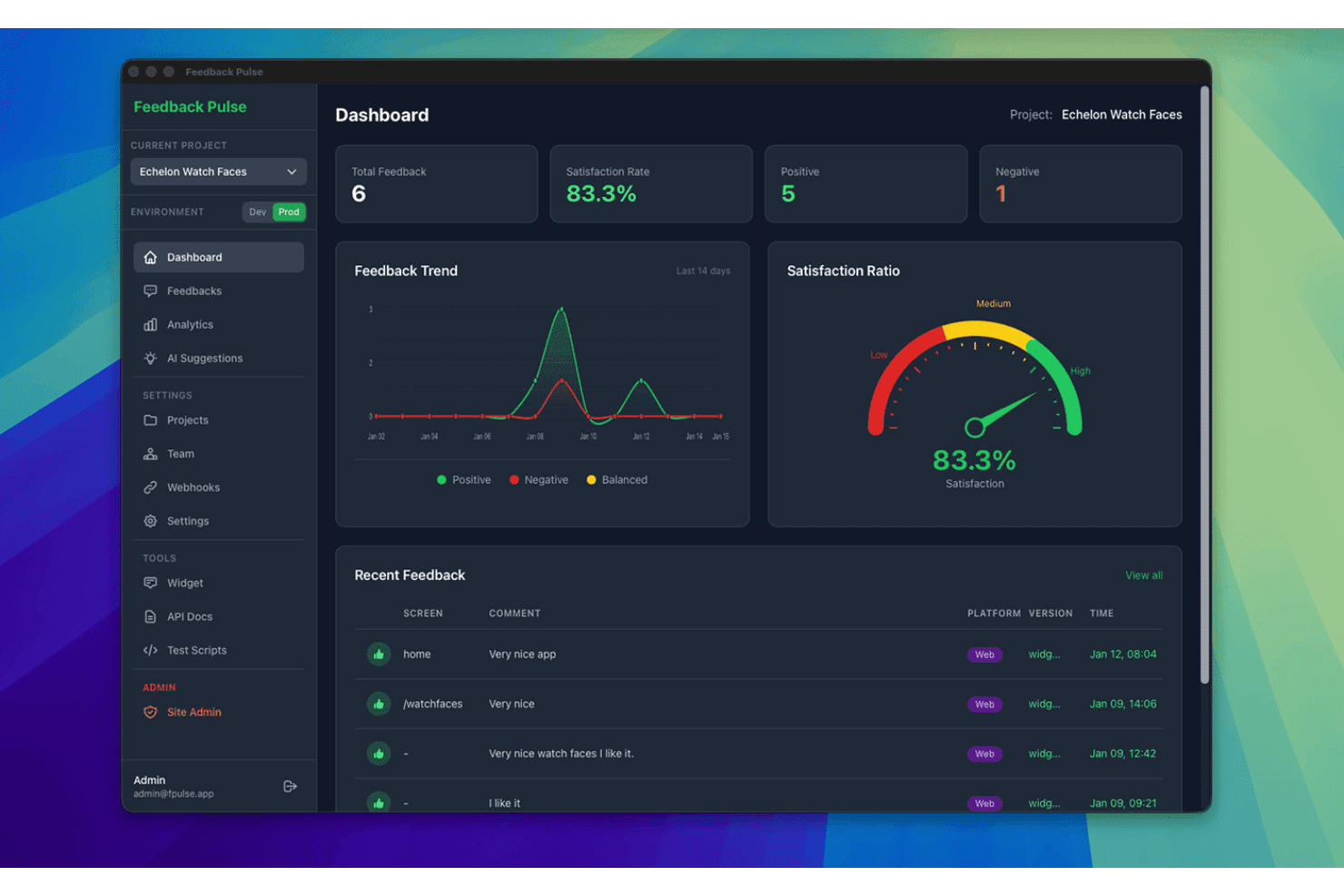
FeedbackPulse displays an anonymous employee feedback dashboard with satisfaction scores, feedback trends, and recent submissions. FeedbackPulse is an anonymous employee feedback software designed for HR and people teams to run automated pulse surveys, aggregate responses, and guarantee employee anonymity by enforcing technical privacy safeguards.
Who Is FeedbackPulse Best For?
HR and people teams at small to midsize organizations that need simple, secure, and technically enforced anonymous feedback.
Why I Picked FeedbackPulse
I picked FeedbackPulse as one of the best because it enforces technical anonymity rules that can't be bypassed. I like how the platform locks feedback results until a minimum response threshold is met and never reveals respondent identities.
FeedbackPulse Key Features
- Automated pulse survey scheduling: Set up recurring pulse surveys with automatic delivery to all team members.
- Role-based admin access: Control survey management and results access with granular admin permissions.
- Filterable aggregate dashboards: View feedback trends by department, location, or manager without exposing individual responses.
- GDPR-compliant EU hosting: Store and process employee feedback securely on servers based in the EU.
FeedbackPulse Integrations
Native integrations are not currently listed.
Pros and Cons
Pros:
- Dashboards display only aggregated group data
- Results locked unless minimum responses met
- Technical anonymity threshold prevents response tracing
Cons:
- Limited advanced analytics and dashboards
- No two-way anonymous messaging
Learn more about FeedbackPulse: Best for linking pulse surveys to performance data
- 30-day free trial
- From $3/user/month (billed annually)
Visit WebsiteCustomer Rating:4.3/5
Small Improvements tracks employee survey trends grouped by performance rating. Small Improvements is a performance management platform that includes a pulse survey module for collecting confidential employee feedback, with built-in scheduling, eNPS, Slack delivery, and results grouped by department, role, and performance data.
Who Is Small Improvements Best For?
Small Improvements suits mid-sized teams that already use it for performance reviews and want to layer in pulse surveys without switching to a separate tool.
Why I Picked Small Improvements
I picked Small Improvements as one of the best because it's the only tool on this list that lets you group pulse survey results by performance rating data from your review cycles. That means if you run a recurring monthly pulse and want to see how engagement scores differ between high performers and the rest of the team, you can do that without leaving the platform. I also like how surveys can be answered directly inside Slack, which removes friction and keeps response rates up.
Small Improvements Key Features
- Recurring pulse survey scheduler: Set surveys to repeat weekly, biweekly, monthly, or quarterly, with a custom end date and automatic weekend skipping.
- eNPS question support: Run an employee Net Promoter Score question on its own or alongside custom rating and free-text questions in the same survey.
- Heatmap reporting: View results as a heatmap that highlights lower-scoring groups across departments, locations, and managers at a glance.
- Automatic survey reminders: The platform sends timed reminders to non-respondents—24 hours before deadline for weekly surveys and 7 days out for monthly ones.
Small Improvements Integrations
Small Improvements offers integrations with BambooHR, Workday, Personio, Rippling, Namely, Workable, Slack, Okta, OneLogin, and Google Workspace. Slack supports two-way survey delivery, allowing employees to answer directly within Slack.
Pros and Cons
Pros:
- Heatmaps reveal lower-scoring employee groups
- Recurring schedules support regular pulse checks
- Groups feedback by performance ratings
Cons:
- No anonymous replies or follow-up workflows
- Confidentiality falls short of true anonymity
Learn more about Small Improvements: Best for interactive presentations
- Free plan available
- From $14/user/month (billed annually)
Visit WebsiteCustomer Rating:4.7/5
Mentimeter supports interactive polls and quizzes with real-time results. Mentimeter is an interactive presentation tool designed for educators, corporate trainers, and event organizers to engage audiences through live polls and quizzes. It aims to enhance participation and gather real-time feedback during presentations.
Why I picked Mentimeter: It focuses on creating interactive presentations that keep your audience engaged with features such as multiple-choice polls and quizzes. The tool can also display real-time results that change as responses come in.
Standout features & integrations:
Features include customizable presentation templates that can be tailored for various themes, the ability to create word clouds and other visualizations of audience input, and audience Q&A hosting capabilities.
Integrations include Microsoft Teams, Zoom, Hopin, Google Slides, Microsoft PowerPoint, Google Meet, and more.
Pros and Cons
Pros:
- Interactive polls and quizzes
- Dynamic, real-time result displays Interactive polls and quizzes
- Strong support for education and training programs
Cons:
- Learning curve for new users
- Limited customization options
Learn more about Mentimeter: Best for custom surveys
- Free plan available
- From $30/user/month (billed annually)
Visit WebsiteCustomer Rating:4.6/5
SurveyMonkey offers customizable surveys and advanced reporting tools. SurveyMonkey is a versatile survey tool aimed at businesses, educational institutions, and nonprofits seeking to gather detailed feedback. It provides customizable surveys that cater to a wide range of data collection needs, from market research to employee engagement.
Why I picked SurveyMonkey: It focuses on offering custom surveys that allow you to tailor questions to your specific needs and goals. With features such as skip logic and question randomization, you can create dynamic surveys that improve response quality. The platform also provides advanced reporting tools to analyze your data.
Standout features & integrations:
Features include an extensive question bank to help you choose the right questions, mobile-friendly survey designs for on-the-go feedback collection, and automated survey distribution to help save you time.
Integrations include Salesforce, Mailchimp, HubSpot, Microsoft Teams, Google Drive, Dropbox, and more.
Pros and Cons
Pros:
- Automated distribution features
- Mobile app accessibility Automated distribution features
- Extensive question customization
Cons:
- May need technical support for setup
- May require training for advanced features
Learn more about SurveyMonkey: Best for user-friendly interfaces
- Free plan available
- From $28/month (billed annually)
Visit WebsiteCustomer Rating:4.7/5
Typeform's clean design enables a user-friendly survey experience. Typeform is an online form builder that caters to businesses, educators, and marketers looking to create engaging surveys and forms. It focuses on delivering an enjoyable user experience with its interactive and conversational design.
Why I picked Typeform: It offers a user-friendly design that enhances the experience for both creators and respondents. Its design features enable you to create conversational, visually appealing forms that help make filling out surveys engaging without overwhelming your audience.
Standout features & integrations:
Features include customizable, interactive layouts, logic jumps to personalize the form experience based on user responses, and the ability to embed forms on websites.
Integrations include Mailchimp, Slack, Google Forms, HubSpot, Salesforce, Airtable, Trello, and more.
Pros and Cons
Pros:
- Embedding options for smooth integration
- Logic jumps for personalized experiences
- Engaging conversational forms
Cons:
- Limited customization in lower tiers
- Data export complexities
Learn more about Typeform: Best for secure data handling
- Free plan available
- From $120/month (billed annually)
Visit WebsiteCustomer Rating:4.6/5
SmartSurvey offers surveys with encryption and customizable data collection. SmartSurvey is a survey tool designed for businesses and organizations that prioritize data security and compliance. It serves industries such as health care and government, offering secure survey creation and data collection.
Why I picked SmartSurvey: It provides secure data handling with features such as GDPR, CCPA, and HIPAA compliance and data encryption, keeping your data protected. The tool also offers customizable survey options to meet your specific requirements.
Standout features & integrations:
Features include automated calculations and reporting, scheduled surveys to routinely gather insights, and accessible surveys with assistive technology and multilingual support.
Integrations include Salesforce, Google Analytics, HubSpot, Mailchimp, Slack, Microsoft Teams, and more.
Pros and Cons
Pros:
- Accessible surveys available
- Automated analytics and reporting
- GDPR, CCPA, and HIPAA compliance
Cons:
- Potentially dated user interface
- Less suitable for smaller teams
Learn more about SmartSurvey:

CultureMonkey provides instant culture insights with pulse surveys. CultureMonkey is an employee engagement platform designed for HR teams and managers to gather insights into workplace culture. It helps businesses in various sectors understand employee sentiments and foster a positive work environment.
Why I picked CultureMonkey: It offers deep culture insights through its specialized feedback tools. With features such as pulse surveys, you can regularly check in on employee morale. The platform includes sentiment analysis to help you interpret feedback effectively and create an action plan for addressing employee concerns.
Standout features & integrations:
Features include customizable surveys that let you tailor questions to your company's needs, automated reporting to save time on data analysis, and benchmarking tools to compare your results with industry standards.
Integrations include Slack, Microsoft Teams, Google Workspace, Workday, WhatsApp, and more.
Pros and Cons
Pros:
- Automated reporting features
- Regular pulse surveys
- Offers deep culture insights
Cons:
- Limited custom questions in surveys
- Learning curve for new features
Learn more about CultureMonkey:

Poll Everywhere focuses on live polling with real-time results and engagement. Poll Everywhere is an interactive polling tool designed for university educators, corporate presenters, and event organizers to engage with audiences in real time. It allows users to create polls, quizzes, and Q&A sessions to gather live feedback and boost participation.
Why I picked Poll Everywhere: It focuses on live audience polling, making it a good option for interactive presentations and events. Features such as real-time response collection and instant result displays can help keep your audience engaged. The platform supports various question types, allowing you to tailor polls to your needs.
Standout features & integrations:
Features include customizable poll designs to match your branding, multi-device support for easy participation, and detailed reporting tools to analyze audience feedback after each session.
Integrations include PowerPoint, Google Slides, Microsoft Teams, Keynote, Webex, and Slack.
Pros and Cons
Pros:
- Strong reporting tools
- Customizable poll designs
- Multi-device participation
Cons:
- Participant caps in free or lower tiers
- Most suited for large-scale use
Learn more about Poll Everywhere:

FreeOnlineSurveys offers unlimited surveys with simple analytics for small teams. FreeOnlineSurveys is a survey tool designed for small businesses, educators, and nonprofits seeking cost-effective solutions for gathering feedback. It provides essential survey creation and data collection features without breaking the bank.
Why I picked FreeOnlineSurveys: It offers budget-friendly survey options that make it accessible for small teams. With features such as unlimited questions and responses, you can gather comprehensive data without limits. The tool includes basic analytics to help interpret your results.
Standout features & integrations:
Features include customizable survey templates to get you started quickly, real-time reporting to view results as they come in, and mobile compatibility for on-the-go data collection.
Integrations are not publicly listed.
Pros and Cons
Pros:
- Includes basic analytics
- Cost-effective for small teams
- Unlimited questions and responses
Cons:
- Less support for large teams
- Best suited for schools and nonprofits
Learn more about FreeOnlineSurveys:
Outras ferramentas de feedback anónimo dos colaboradores
Eis algumas opções adicionais de ferramentas de feedback anónimo dos colaboradores que não entraram na minha lista restrita, mas que ainda assim vale a pena consultar:
- 11ProProfs Survey MakerBest for diverse survey templates
- 12IncogneatoBest for anonymous surveys
- 13ShoutBest for private feedback collection
- 14SparkbayBest for talent management
- 15JotformBest for form design
- 16WorkTangoBest for employee engagement
- 17HiBobBest for HR management integration
- 18Engagement MultiplierBest for business impact insights
- 19SurveyKingBest for market research
How I Evaluate Anonymous Employee Feedback Tools
I evaluate these tools in two layers: baseline anonymity and survey capabilities that qualify a vendor, then the differentiators—like benchmarking data and manager dashboards—that determine best fit.
Core Functionality (Table Stakes For This List)
When I'm selecting tools for my list, I rank each one on a scale from 0 (does not offer the functionality) to 5 (excels in this area) for each core functionality listed below. Then, I calculate the tool's total score into a percentage. Each tool needs to achieve a minimum total score of 65% to be considered for inclusion.
- Anonymity Protection & Safeguards: I check how each tool strips identifiers and enforces minimum response thresholds—for example, whether a three-person team's results are suppressed to prevent managers from guessing who said what.
- Survey & Pulse Creation: Each tool should offer configurable templates for engagement, eNPS, and pulse surveys with flexible scheduling, so HR teams can run a quick weekly check-in or a full quarterly engagement cycle.
- Two-Way Anonymous Messaging: I look for tools that let HR or managers reply to anonymous submissions and hold a real conversation—like following up on a concern about workload—without ever revealing the employee's identity.
- Sentiment & Reporting Analytics: Dashboards should aggregate responses with trend tracking and team-level segmentation while respecting anonymity thresholds, giving people ops leaders a clear picture of where morale is shifting.
- Multi-Channel Distribution: I evaluate whether employees can submit feedback through the channels they already use—Slack, Teams, email, mobile app, or a web link—rather than requiring a separate login that adds friction.
- Action Planning & Follow-Up: Tools that let you tag themes, assign owners, and track resolution help close the loop, so feedback about onboarding gaps or manager communication actually turns into visible change.
Once I have a list of tools that meet this criteria, I consider what sets each platform apart.
Differentiating Factors (What Sets Vendors Apart)
Here's how I compare and contrast different vendors:
Standout Features
AI-powered theme detection matters because it surfaces patterns—like recurring frustration with promotion criteria—that manual tagging would miss across hundreds of open-ended responses. I also look for external benchmarking data, which helps HR leaders understand whether a 65% engagement score is strong for their industry or a red flag. Manager-level dashboards are another differentiator, giving people managers direct visibility into their team's sentiment without compromising anonymity. These features separate a basic survey tool from a platform that drives real action.
Beyond Features
Trust and anonymity transparency are the first things I evaluate—employees won't participate if they don't believe the tool protects them. I check whether vendors publish their anonymization methodology and offer configurable response thresholds. Data privacy compliance also matters, especially for organizations with employees across multiple jurisdictions where GDPR or similar regulations apply. HRIS integration depth determines how easily you can sync org structures and demographics into the platform without manual CSV uploads every survey cycle.
Como escolher uma ferramenta de feedback anónimo dos colaboradores
É fácil ficar preso a longas listas de funcionalidades e estruturas de preços complexas. Para o ajudar a manter-se concentrado enquanto percorre o seu processo específico de seleção de software, eis uma lista de verificação dos fatores a ter em conta:
| Fator | O que considerar |
|---|---|
| FatorEscalabilidade | O que considerarA ferramenta pode crescer com a sua equipa? Considere a expansão futura e se a ferramenta consegue lidar com um aumento de utilizadores ou dados à medida que a sua organização cresce. |
| FatorIntegrações | O que considerarEstabelece ligação aos seus sistemas atuais? Verifique a compatibilidade com o seu software de RH, plataformas de comunicação e ferramentas de análise de dados para garantir fluxos de trabalho eficientes. |
| FatorPossibilidade de personalização | O que considerarPode adaptá-la às suas necessidades? Procure opções para personalizar inquéritos, relatórios e painéis de controlo de modo a corresponderem aos seus processos e à sua identidade visual. Evite ferramentas com estruturas rígidas. |
| FatorFacilidade de utilização | O que considerarÉ intuitiva para todos os utilizadores? Uma ferramenta fácil de utilizar reduz o tempo de formação e aumenta a adoção pelas equipas. Experimente demonstrações para avaliar diretamente a facilidade de utilização. |
| FatorImplementação e integração inicial | O que considerarCom que rapidez pode começar? Avalie o processo de configuração e a disponibilidade de recursos de integração inicial, como tutoriais, guias e suporte, para garantir uma transição rápida. |
| FatorCusto | O que considerarEnquadra-se no seu orçamento? Analise as estruturas de preços, incluindo custos ocultos ou planos escalonados, para garantir que obtém uma boa relação qualidade-preço sem gastar em excesso. Considere os custos a longo prazo. |
| FatorMedidas de segurança | O que considerarComo protege os dados sensíveis? Verifique as normas de encriptação, as práticas de tratamento de dados e a conformidade com os regulamentos para garantir que as informações dos colaboradores permanecem seguras. |
| FatorDisponibilidade do suporte | O que considerarPode obter ajuda quando necessário? Certifique-se de que o fornecedor disponibiliza canais de suporte fiáveis, como chat, e-mail ou telefone, e verifique os tempos de resposta para evitar períodos de inatividade. |
O que é uma ferramenta de comentários anónimos dos colaboradores?
Uma ferramenta de comentários anónimos dos colaboradores é uma solução de software que permite aos colaboradores partilhar opiniões sinceras sem revelarem a sua identidade. Os profissionais de recursos humanos e os gestores utilizam normalmente estas ferramentas para obter informações honestas sobre a cultura do local de trabalho e a satisfação dos colaboradores. A criação de inquéritos, a análise de dados e o tratamento seguro dos dados ajudam a recolher e compreender as opiniões dos colaboradores. De um modo geral, estas ferramentas promovem uma comunicação aberta e ajudam a melhorar os ambientes de trabalho, dando resposta às preocupações dos colaboradores.
Funcionalidades
Ao selecionar uma ferramenta de comentários anónimos dos colaboradores, procure as seguintes funcionalidades principais:
- Recolha anónima de comentários: Permite aos colaboradores partilhar as suas opiniões sem receio de serem identificados, incentivando a honestidade e a abertura.
- Análise em tempo real: Fornece informações imediatas sobre os dados dos comentários, ajudando a resolver rapidamente os problemas.
- Inquéritos personalizáveis: Permitem adaptar as perguntas e o design às necessidades específicas e à imagem da organização.
- Tratamento seguro dos dados: Protege as informações sensíveis dos colaboradores através de encriptação e do cumprimento dos regulamentos relativos aos dados.
- Inquéritos de pulso: Oferecem inquéritos curtos regulares para acompanhar ao longo do tempo as opiniões e o envolvimento dos colaboradores.
- Análise de sentimentos: Analisa o texto dos comentários para avaliar o estado de espírito e a satisfação gerais dos colaboradores.
- Suporte multilingue: Dá resposta a forças de trabalho diversificadas, permitindo realizar inquéritos em vários idiomas.
- Ferramentas de comparação: Permitem comparar o desempenho da sua organização com os padrões do setor.
- Capacidades de integração: Ligam-se aos sistemas existentes de recursos humanos e comunicação para simplificar os processos de recolha de comentários.
- Compatibilidade com dispositivos móveis: Garante que os colaboradores podem enviar comentários a partir de qualquer dispositivo, aumentando as taxas de participação.
Vantagens
A implementação de uma ferramenta de comentários anónimos dos colaboradores proporciona várias vantagens à sua equipa e à sua empresa. Eis algumas das que pode esperar:
- Comunicação melhorada: Incentiva o diálogo aberto e os comentários honestos, permitindo aos colaboradores partilhar opiniões anonimamente.
- Maior envolvimento: Os inquéritos de pulso regulares e a análise em tempo real ajudam a manter os colaboradores envolvidos e ligados à organização.
- Tomada de decisões melhorada: A análise detalhada e a análise de sentimentos fornecem informações que contribuem para melhores decisões de gestão.
- Maior confiança: O tratamento seguro dos dados e o anonimato criam confiança entre os colaboradores e a administração, promovendo um ambiente de trabalho positivo.
- Informações sobre a cultura: Os inquéritos personalizáveis e as ferramentas de comparação revelam informações sobre a cultura do local de trabalho e as áreas a melhorar.
- Taxas de participação mais elevadas: A compatibilidade com dispositivos móveis e o suporte multilingue garantem que mais colaboradores podem participar nos processos de recolha de comentários.
- Resolução atempada de problemas: A recolha de comentários em tempo real permite identificar e resolver rapidamente os problemas no local de trabalho.
Custos e preços
A seleção de uma ferramenta de comentários anónimos dos colaboradores exige compreender os vários modelos de preços e planos disponíveis. Os custos variam consoante as funcionalidades, a dimensão da equipa, os complementos, entre outros fatores. A tabela abaixo resume os planos comuns, os respetivos preços médios e as funcionalidades normalmente incluídas nas soluções de ferramentas de comentários anónimos dos colaboradores:
Tabela de comparação de planos para uma ferramenta de comentários anónimos dos colaboradores
| Tipo de plano | Preço médio | Funcionalidades comuns |
|---|---|---|
| Tipo de planoPlano gratuito | Preço médio$0 | Funcionalidades comunsCriação básica de inquéritos, respostas limitadas e análise mínima. |
| Tipo de planoPlano pessoal | Preço médio$5-$25/utilizador/mês | Funcionalidades comunsInquéritos personalizáveis, análise básica, comentários em tempo real e suporte por e-mail. |
| Tipo de planoPlano empresarial | Preço médio$30-$75/utilizador/mês | Funcionalidades comunsAnálise avançada, capacidades de integração, suporte prioritário e personalização da marca. |
| Tipo de planoPlano empresarial de grande dimensão | Preço médio$100+/utilizador/mês | Funcionalidades comunsFuncionalidades de segurança abrangentes, gestor de conta dedicado, personalização completa e acesso à API. |
Perguntas frequentes sobre ferramentas de feedback anónimo dos colaboradores
Eis algumas respostas a perguntas comuns sobre ferramentas de feedback anónimo dos colaboradores:
Como é que as ferramentas de feedback anónimo dos colaboradores garantem o anonimato?
Estas ferramentas garantem o anonimato ao remover informações identificativas e ao utilizar processos seguros de tratamento de dados. Utilizam frequentemente técnicas de encriptação e anonimização para proteger a identidade dos inquiridos. Ao configurar a ferramenta, certifique-se de que esta oferece definições de privacidade robustas e comunica claramente o anonimato, de modo a incentivar respostas honestas aos inquéritos por parte da sua equipa.
Posso personalizar as perguntas na ferramenta de feedback?
Sim, a maioria das ferramentas de feedback anónimo dos colaboradores permite personalizar as perguntas de acordo com as necessidades da sua organização. Pode adaptar os inquéritos para abordar questões específicas ou recolher informações sobre determinados temas. Procure ferramentas com modelos de inquérito flexíveis e funcionalidades de personalização fáceis de utilizar para tornar este processo simples.
Estas ferramentas integram-se com outros softwares de RH?
Sim, muitas ferramentas de feedback anónimo dos colaboradores oferecem integração com sistemas de RH populares. Isto permite otimizar a recolha e a análise de dados, ligando o feedback a outras métricas de RH. Antes de comprar, verifique se a ferramenta se integra com os seus sistemas atuais para garantir um fluxo de trabalho simples.