

Üretkenlik, güvenlik ve uyumluluk görünürlüğünü korumak, izleme verilerinin kendi altyapınızda kalması gerektiğinde daha karmaşık hâle gelir. Bu nedenle birçok BT ve İK ekibi, kuruluşlara etkinlik verilerinin nasıl toplandığı, saklandığı ve yönetildiği üzerinde tam kontrol sağlayan, yerel sunuculara kurulan araçlar olan şirket içi çalışan izleme yazılımlarını tercih eder. Bu platformlar, bilgileri bir tedarikçinin bulut ortamına göndermeden cihaz kullanımını izlemeye, uygulama ve web etkinliklerini takip etmeye ve olası riskleri işaretlemeye yardımcı olur.
Doğru şirket içi çözümü seçmek, görünürlüğü gizlilik ve operasyonel denetimle dengelemeye bağlıdır. Basit etkinlik izleyicilerinden daha gelişmiş içeriden gelen tehdit ve veri kaybı önleme sistemlerine kadar, yerel dağıtım için çeşitli araçları inceledim. Bu kılavuz, bugün mevcut olan en iyi seçenekleri öne çıkarıyor ve her birinin farklı izleme, uyumluluk ve güvenlik ihtiyaçlarını nasıl desteklediğini açıklıyor.
Why Trust Our Software Recommendations
6,700+
Reviews
20
Industry experts
16+
Evaluation factors
14
Years
Our team has been testing and reviewing software since 2012. As HR experts ourselves, we know how difficult—and important—it is to choose the right software.
For this guide, we evaluated tools using hands-on testing and independent research, scoring tools using our selection criteria. We also draw on insights from industry thought leaders and practicing HR experts.
Our reviews reflect our human editorial judgment, not a sales pitch.
Expert reviewers:
- Phil GrayCOO
 Kim BehnkeHR Tech Editor & Analyst
 Josh BarkerPeople Ops Manager

Şirket İçi Çalışan İzleme Yazılımları Karşılaştırma Tablosu
Aşağıdaki tablo, en iyi şirket içi çalışan izleme yazılımı seçimlerimin fiyatlandırma ayrıntılarını karşılaştırmaktadır.
Score legend (out of 5)
- Excellent4.5–5
- Good4–4.4
- Average3–3.9
- Below average2–2.9
- Poor1–1.9
Sorted by: Default
| Tool | Starting Price | Website | |||||||
|---|---|---|---|---|---|---|---|---|---|
Best for budget-friendly plans | 3.2 out of 5 | 2 | 4 | 3 | 4 | 3 | 3 | $7/user/month Free trial available | Website |
Best for filtering web access on-prem | 3.3 out of 5 | 3 | 4 | 3 | 4 | 3 | 3 | $6.67/user/month 14-day free trial | Website |
Best for air-gapped on-premise deployments | 3.7 out of 5 | 4 | 4 | 3 | 4 | 4 | 3 | Pricing upon request 14-day free trial | Website |
Best for air-gapped insider threat detection | 3.8 out of 5 | 5 | 5 | 4 | 4 | 4 | 1 | Pricing upon request Free demo available | Website |
Best for forensic-depth keystroke monitoring | 3.5 out of 5 | 4 | 5 | 3 | 4 | 2 | 3 | Pricing upon request 30-day free trial | Website |
Best for video recording | 4.2 out of 5 | 4 | 5 | 4 | 4 | 4 | 4 | $7/user/month Free demo + 14-day free trial available | Website |
Best for insider threat forensics on-prem | 4.2 out of 5 | 4 | 5 | 4 | 4 | 4 | 4 | Pricing upon request Not available | Website |
Best for PAM-led on-prem monitoring | 4.0 out of 5 | 5 | 4 | 4 | 3 | 4 | 4 | Pricing upon request Free trial available | Website |
Best for real-time monitoring | 4.0 out of 5 | 4 | 5 | 4 | 4 | 4 | 3 | Pricing upon request 7-day free trial | Website |
Best for GDPR compliance | 3.5 out of 5 | 4 | 5 | 4 | 3 | 4 | 1 | Pricing upon request 30-day free trial | Website |


En İyi Şirket İçi Çalışan İzleme Yazılımları İncelemesi (Etkinlik Takibi, Zaman Takibi ve Üretkenlik İzleme)
Aşağıda, kısa listemde yer alan en iyi şirket içi çalışan izleme yazılımlarına ilişkin ayrıntılı özetlerimi bulabilirsiniz. İncelemelerim, her aracın temel özelliklerine, artılarına \u0026 eksilerine, entegrasyonlarına ve ideal kullanım alanlarına ayrıntılı bir bakış sunarak sizin için en uygun olanı bulmanıza yardımcı olur.
 Best for budget-friendly plans
- Free trial available
- From $7/user/month
Visit WebsiteCustomer Rating:4.7/5
Apploye supports affordable time and productivity management for growing teams. Apploye is a time-tracking and employee-monitoring platform designed for small and mid-sized teams that need reliable visibility into work hours, activity levels, and location data without paying enterprise prices. It offers both cloud and on-premise deployment options, making it suitable for organizations that want to store monitoring data internally. Distributed and field-based teams frequently use the tool due to its GPS support and mobile tracking.
Why I picked Apploye: Apploye stands out for delivering a broad set of time tracking and activity-monitoring features at a lower cost than many competitors. It includes website and application tracking, optional screenshots, and productivity analysis that help teams understand how work hours are used. For field teams, GPS tracking and route history provide additional oversight, and the on-premises option gives organizations greater control over data retention.
Standout features & integrations:
Features include detailed time tracking with productivity summaries, optional screenshot monitoring, app and website usage logs, and GPS-based location tracking for field workers. The platform also supports invoicing, budgeting, and payroll-ready timesheets, helping teams consolidate time- and cost-related workflows.
Integrations include Asana, Trello, ClickUp, and Jira.
Pros and Cons
Pros:
- Supports on-premise deployment
- Offers GPS and field-team tracking
- Affordable pricing for small and mid-sized teams
Cons:
- Some integrations and features continue to evolve
- Reporting is less advanced than enterprise tools
Learn more about Apploye: Best for filtering web access on-prem
- 14-day free trial
- From $6.67/user/month (billed annually)
Visit WebsiteCustomer Rating:4.9/5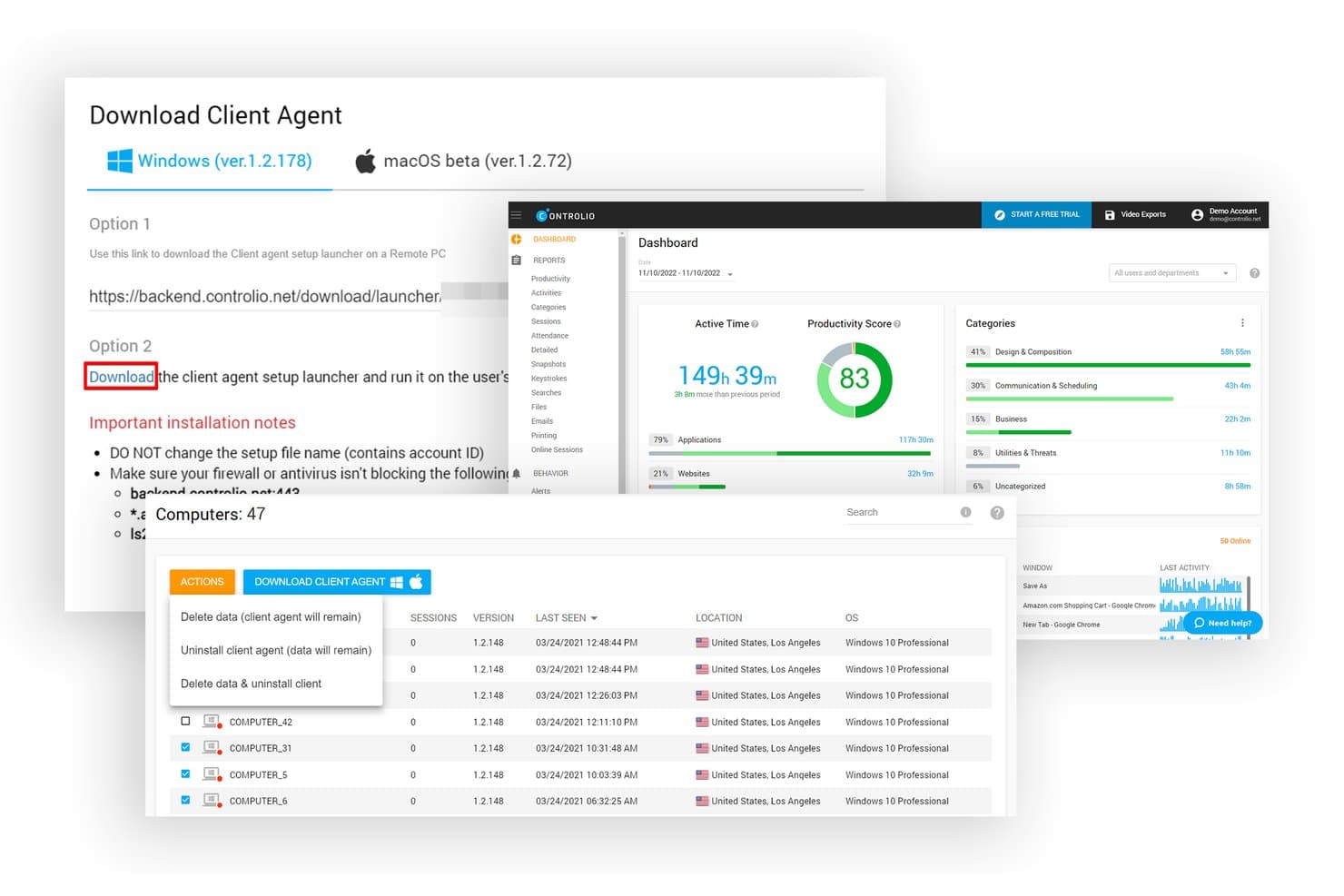
Controlio lets users install client agents on monitored computers easily. Controlio is an employee monitoring platform that tracks app and website usage, captures continuous screen video, applies web filtering and behavior rules, and supports cloud, private cloud, or on-premise deployment.
Who Is Controlio Best For?
Controlio is a strong fit for operations and call center managers who need continuous screen recording and web filtering controls within an on-premise environment.
Why I Picked Controlio
I picked Controlio as one of the best because its behavior rules engine puts web filtering controls directly in your hands, on your own infrastructure. You can set rules for specific websites, app categories, and removable media, then get an alert the moment a rule is triggered. I also love that on-premise deployment starts at just 10 users, so you don't need a massive rollout to keep monitoring data off third-party servers entirely.
Controlio Key Features
- Continuous video screen recording: Captures employee screens as ongoing video footage rather than periodic screenshots, so you get full context for any session you review.
- Stealth or visible agent mode: Deploy the endpoint agent either hidden from the system tray and Task Manager or visible to employees, depending on your monitoring policy.
- AI-based productivity scoring: Automatically categorizes app and website activity as productive or distracting and generates a productivity score for each user and department.
- Active Directory sync: Syncs with your existing AD on-premise (Advanced plan and up) to keep user and department data consistent without manual updates.
Controlio Integrations
Controlio offers Active Directory sync and SSO on Advanced and higher plans, plus a REST API for custom integrations. Native HRIS, SIEM, payroll, and project-tool integrations aren’t clearly documented.
Pros and Cons
Pros:
- Reviewers praise clear reports and timelines
- Web filtering rules trigger alerts
- Continuous video captures full sessions
Cons:
- Windows and macOS endpoints only
- On-premise architecture remains underdocumented
Learn more about Controlio: Best for air-gapped on-premise deployments
- 14-day free trial
- Pricing upon request
Visit WebsiteCustomer Rating:5/5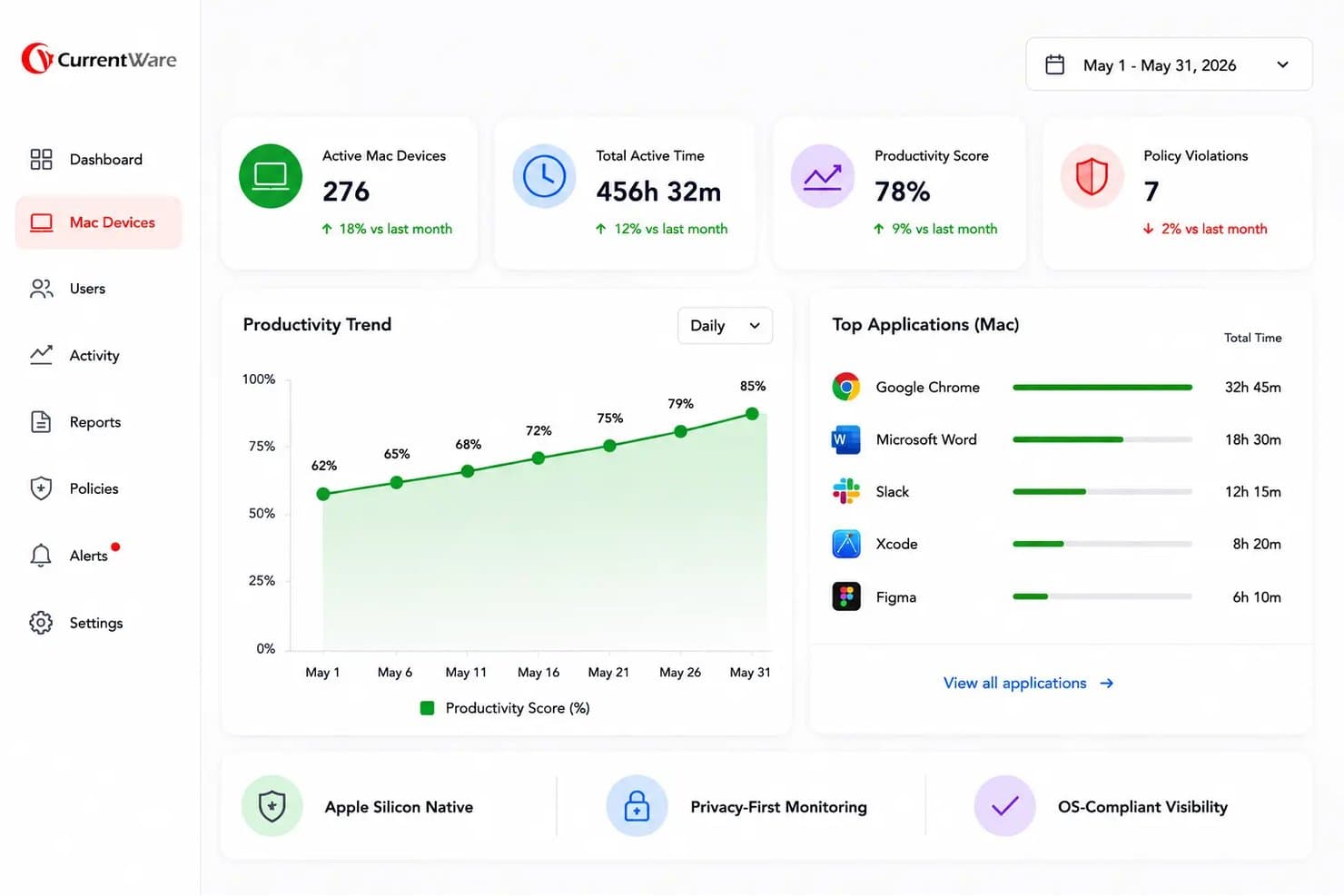
BrowseReporter by CurrentWare tracks Mac device productivity and app usage on-premise. BrowseReporter by CurrentWare is an on-premise employee monitoring tool that tracks website and application usage, active and idle time, bandwidth consumption, AI-tool activity, and screenshots across Windows and macOS endpoints.
Who Is BrowseReporter Best For?
BrowseReporter is a strong fit for IT security and compliance teams in regulated industries that need full control over their monitoring data and can't rely on cloud infrastructure.
Why I Picked BrowseReporter by CurrentWare
BrowseReporter earns its spot on my shortlist because it's one of the few tools I've found that genuinely supports air-gapped deployments, running entirely on your own SQL Server with no cloud dependency required. I like that offsite mode works without any internet access, which matters for defense contractors or healthcare networks where data can't leave the building. Its AI-tool tracking (covering ChatGPT and Copilot usage) and OCR-searchable screenshots add real investigative depth without requiring keystroke logging.
BrowseReporter Key Features
- Active Directory sync: Import users and sync organizational units directly from Active Directory into the web console.
- Mouse jiggler detection: Identifies and excludes activity from mouse jigglers and auto-clickers so productivity data stays accurate.
- Scheduled report delivery: Automatically email productivity, usage, and risk reports to HR, IT, or compliance teams on a set schedule.
- Software license tracking: Reports on application usage across your workforce so you can identify unused or overlapping software licenses.
BrowseReporter Integrations
BrowseReporter has a native Active Directory integration for user and organizational-unit syncing. It also supports SAML, OIDC, CEF, SIEM connections, Power BI templates, and shared access to BrowseControl, AccessPatrol, and enPowerManager.
Pros and Cons
Pros:
- Reviewers praise detailed web activity tracking
- OCR-searchable screenshots aid incident investigations
- Air-gapped deployment keeps monitoring data onsite
Cons:
- Advanced analytics stop short of behavior modeling
- Windows and macOS endpoints only
Learn more about BrowseReporter by CurrentWare: Best for air-gapped insider threat detection
- Free demo available
- Pricing upon request
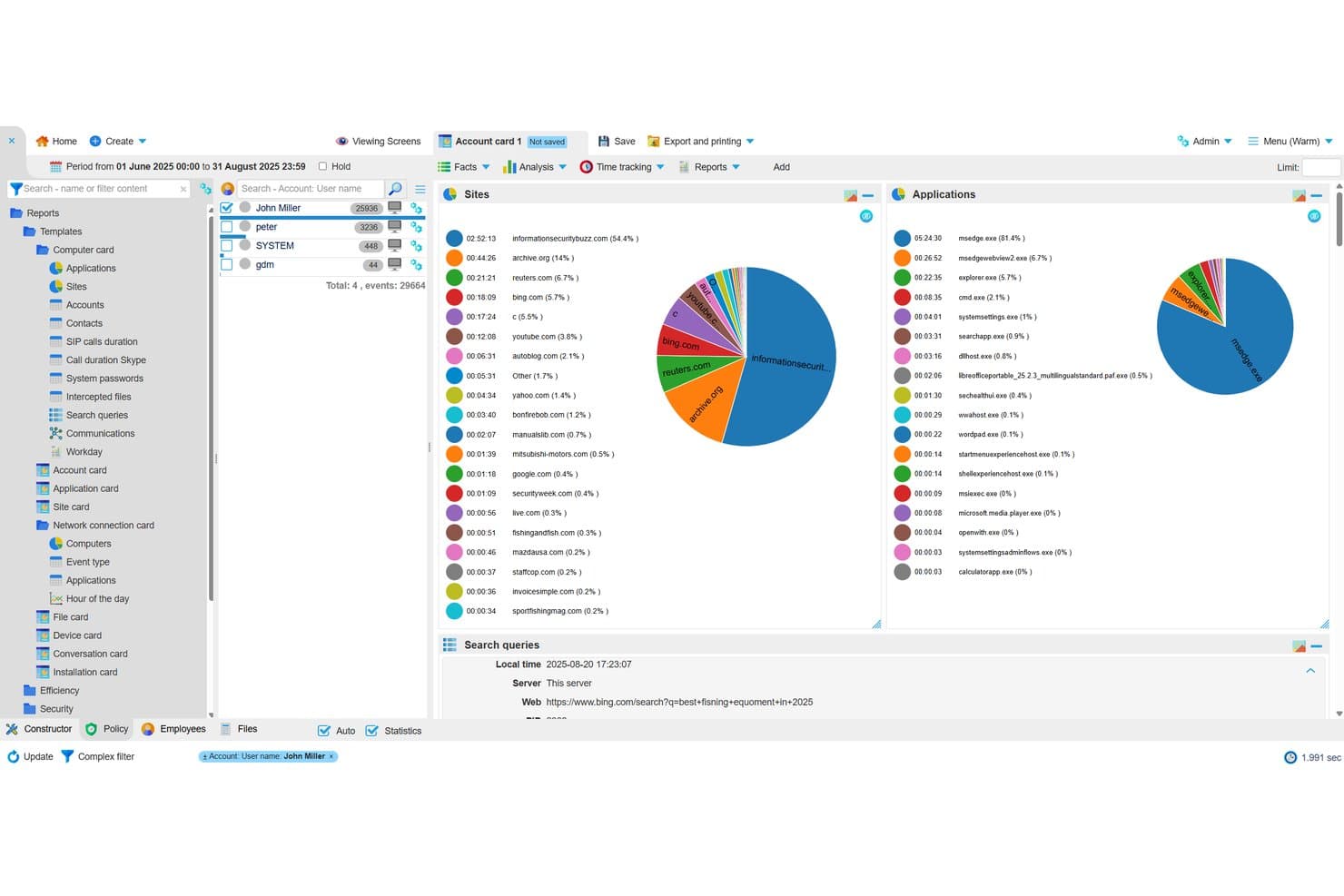
StaffCop tracks internet usage and application activity per user. StaffCop Enterprise is a fully self-hosted employee monitoring platform that captures keystroke logging, screen recording, file activity, USB control, and web and app usage, alongside built-in DLP and user behavior analytics.
Who Is StaffCop Best For?
StaffCop Enterprise is a strong fit for IT security teams in regulated or high-security environments that need fully self-hosted monitoring with no cloud dependency.
Why I Picked StaffCop
StaffCop earns its spot on my shortlist because it's one of the few monitoring tools built specifically to run in fully isolated, air-gapped environments, with zero reliance on a vendor cloud. I particularly like its UEBA module, which builds a behavioral baseline per user and flags anomalies, so your security team catches insider threats before data leaves the building. Paired with USB device control and file shadow copies, it's a serious forensic setup for high-security environments.
StaffCop Key Features
- Screen recording and session video: Records desktop sessions and indexes footage by app, website, file, and keystroke for forensic review.
- OCR-based content search: Scans captured screens for text using keyword, wildcard, and RegEx queries to surface policy violations.
- SIEM integration via Syslog: Sends policy-triggered events to your SIEM in real time, so StaffCop alerts feed directly into your existing security workflows.
- Active Directory sync: Assigns monitoring policies and agent configurations by AD or ALD Pro group, supporting both one-time and scheduled directory syncs.
StaffCop Integrations
StaffCop supports integrations with Microsoft Active Directory, ALD Pro, SIEM platforms via Syslog, PostgreSQL, Prometheus, Grafana, and Node Exporter. It also supports Postgres Pro 16 for database deployment.
Pros and Cons
Pros:
- Combines DLP with behavioral analytics
- Captures detailed forensic activity evidence
- Supports air-gapped monitoring deployments
Cons:
- Lacks documented role-based access controls
- Night-shift activity may log incorrectly
Learn more about StaffCop: Best for forensic-depth keystroke monitoring
- 30-day free trial
- Pricing upon request
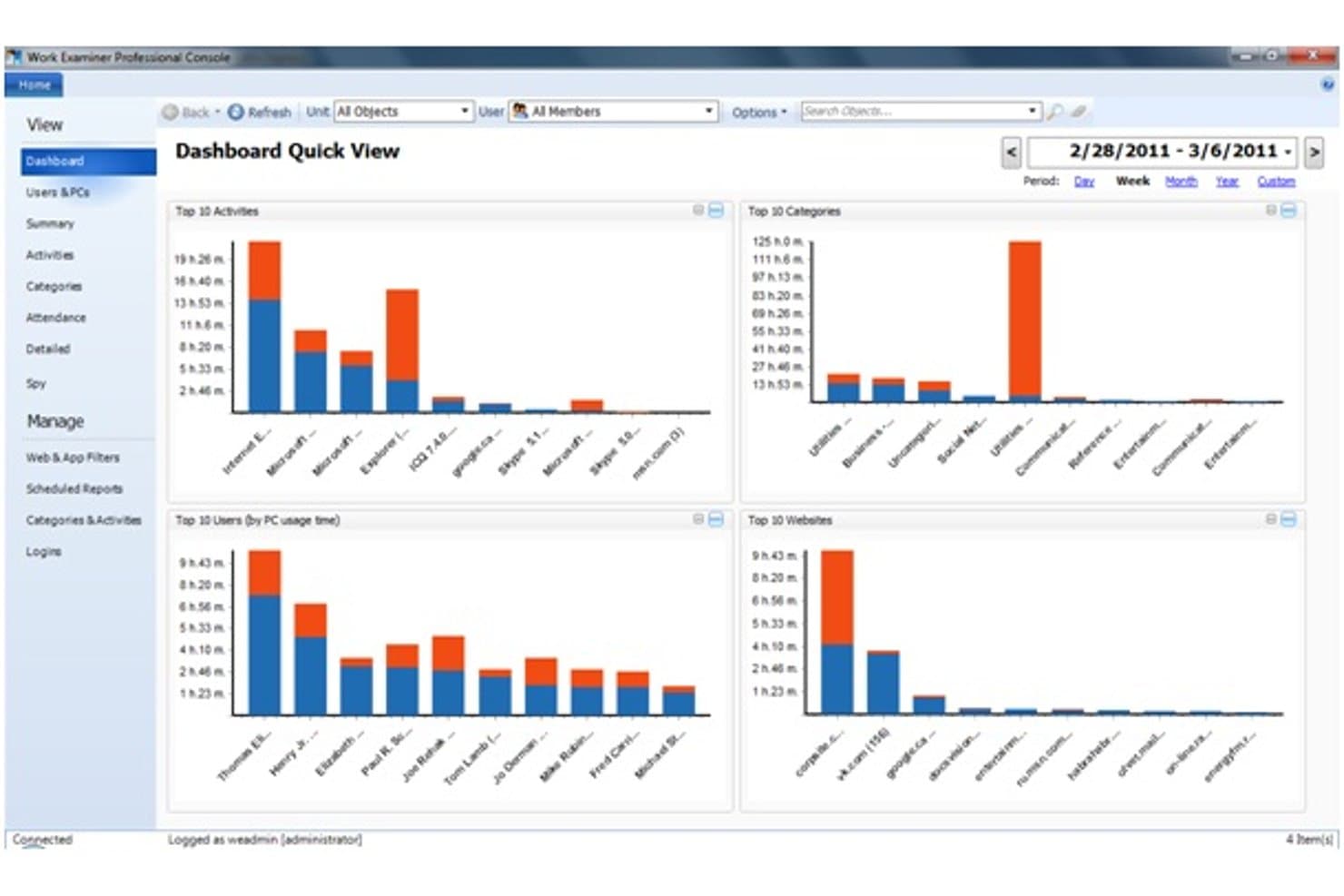
Work Examiner's dashboard gives a quick view of top activities, users, and websites. Work Examiner is a self-hosted employee monitoring solution that tracks app and website usage, captures keystrokes, emails, and instant messages, records screenshots, and logs USB and print activity across Windows and macOS endpoints.
Who Is Work Examiner Best For?
Work Examiner is a strong fit for IT security teams and operations supervisors at small to mid-size companies that need forensic-depth, self-hosted monitoring without relying on cloud infrastructure.
Why I Picked Work Examiner
Work Examiner earns its spot on my shortlist because the keystroke logging goes deeper than most tools I've tested: it captures every keystroke across all programs, including passwords, and you can scope capture to specific apps to avoid noise. I also like that it records email bodies and attachments (Exchange, Gmail, Outlook) alongside IM conversations and live screenshots, giving security teams a complete forensic trail when investigating a policy breach. All of that data stays on your own server, with no cloud dependency.
Work Examiner Key Features
- Web and app filtering: Block or redirect specific sites, set time-limited access allowances, and apply keyword-based content filtering across HTTP and HTTPS traffic.
- Active Directory sync: Sync users, groups, and organizational units from your existing AD structure directly into Work Examiner across all editions.
- USB and print activity logging: Track and log all USB device connections and print jobs across monitored endpoints for data loss prevention.
- Scheduled report delivery: Export productivity, attendance, and activity reports to PDF, CSV, or XLS, and set them to deliver automatically by email on a schedule.
Work Examiner Integrations
Work Examiner offers native Active Directory synchronization for users, groups, and organizational units. Controlio also includes a REST API with limited-lifetime tokens for custom integrations.
Pros and Cons
Pros:
- USB, print, and screenshot evidence collection
- Local storage supports internal data control
- Forensic-depth keystroke and message capture
Cons:
- Compliance controls remain insufficiently documented
- Windows-only agents limit endpoint coverage
Learn more about Work Examiner: Best for video recording
- Free demo + 14-day free trial available
- From $7/user/month (billed annually)
Visit WebsiteCustomer Rating:4.8/5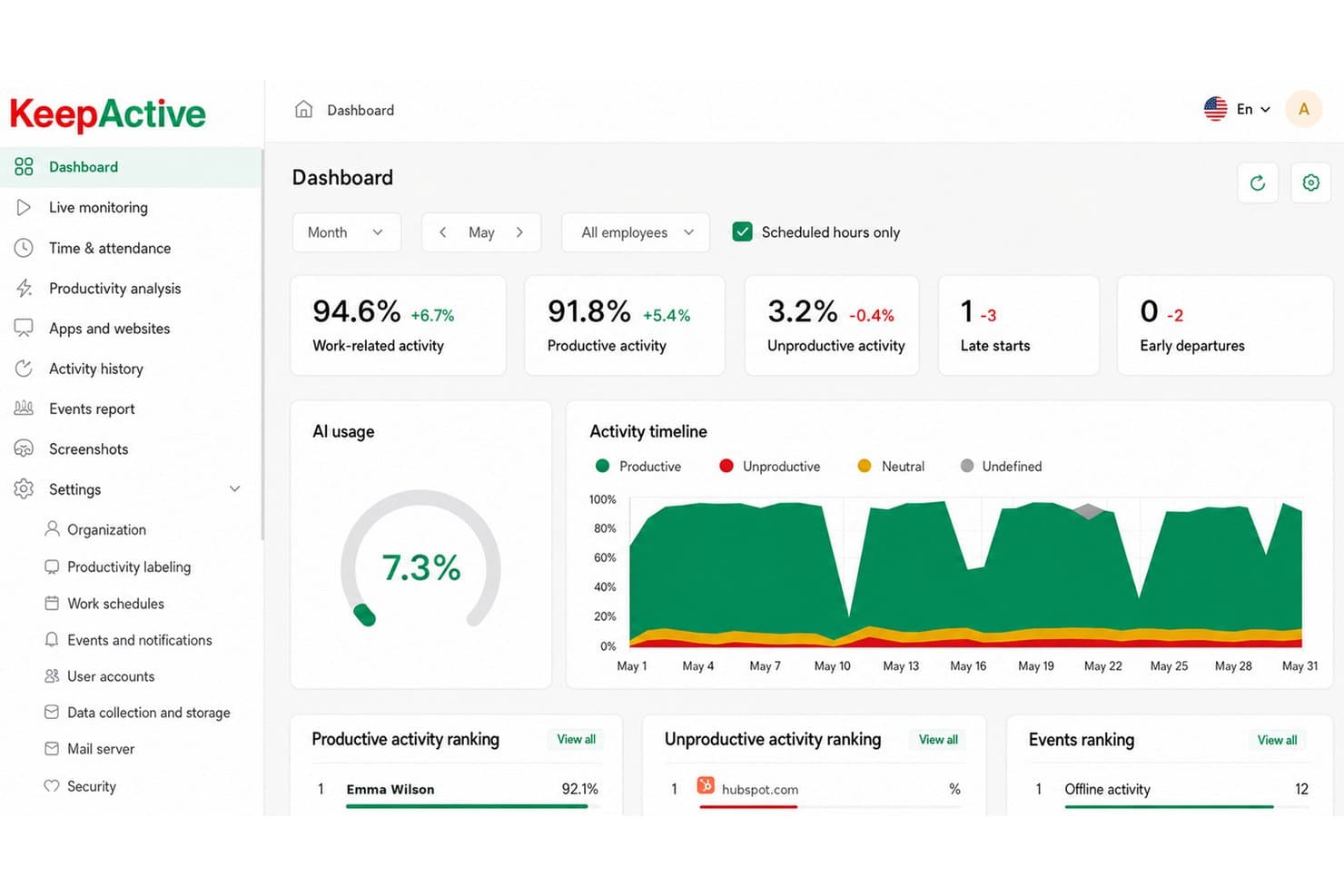
KeepActive's dashboard surfaces team productivity metrics at a glance. KeepActive (formerly Kickidler) is a self-hosted employee monitoring platform that combines activity tracking, screen and audio recording, keystroke logging, and data loss prevention across Windows, macOS, and Linux endpoints.
Who Is KeepActive Best For?
KeepActive is a strong fit for IT security teams and operations supervisors who need deep, on-premise video and audio surveillance with insider-threat detection built in.
Why I Picked KeepActive
KeepActive earns its spot on my shortlist because its video recording depth goes well beyond what most on-premise tools offer. I particularly like the encrypted forensic "black box," which continuously records both screen and microphone in encrypted form, so you have a tamper-resistant record if an incident is ever disputed. Event-based video recording and live webcam streaming round that out, giving security teams a full visual audit trail without relying on cloud storage.
KeepActive Key Features
- Keystroke logging: Captures every keystroke on monitored endpoints, with the DLP tier adding typed-text capture, clipboard logging, and keystroke-dynamics analysis.
- SIEM and Syslog integration: Forwards security events to your existing SIEM setup, letting IT teams centralize alerts alongside other infrastructure data.
- Risk scoring: Assigns each employee a risk score using three analysis methods, with automatic alerts for unusual behavior like mass file copying or deletions.
- Active Directory sync: Mirrors your org structure, deploys the Grabber agent to AD machine groups, and maps manager permissions to existing AD hierarchy.
KeepActive Integrations
KeepActive offers native integrations with Active Directory, SIEM/Syslog, Telegram, and VK Teams. It also provides an API for custom integrations and supports report delivery to FTP and Dropbox.
Pros and Cons
Pros:
- Strong insider-threat detection and DLP
- Deep video and audio surveillance
- Encrypted black box preserves forensic recordings
Cons:
- macOS and Linux DLP is limited
- Offline deployment requires separate local edition
Learn more about Keepactive: Best for insider threat forensics on-prem
- Not available
- Pricing upon request
Visit WebsiteCustomer Rating:4.6/5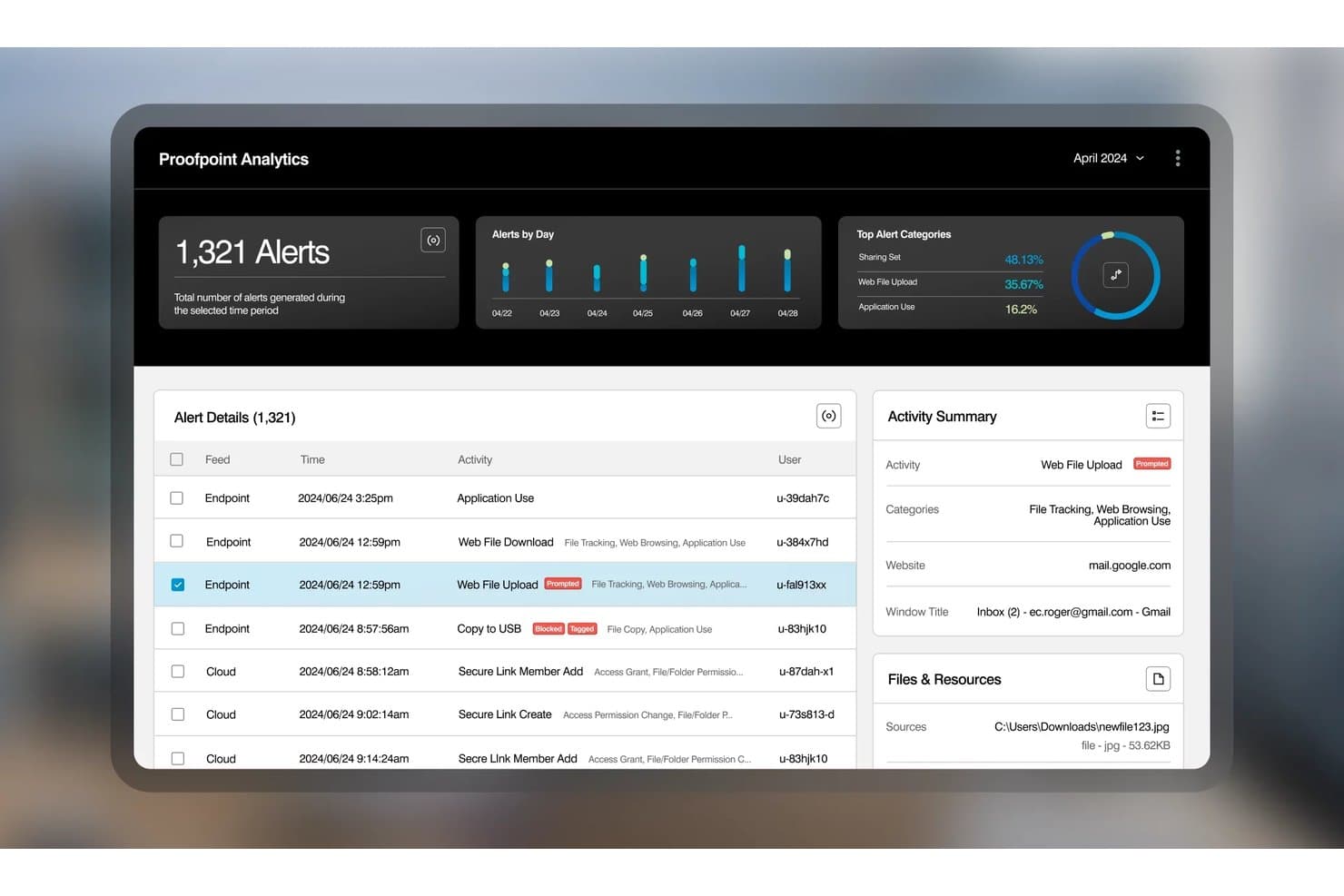
Proofpoint tracks employee alerts and file activity with detailed logs. Proofpoint ITM On-Prem is a self-hosted insider threat management platform that captures session video replay, keystroke logging, file activity, USB transfers, database queries, and Unix commands across Windows, Mac, and legacy Unix systems.
Who Is Proofpoint Best For?
Proofpoint ITM On-Prem is a strong fit for IT security teams in regulated industries that need deep forensic visibility into insider threats across on-premise infrastructure.
Why I Picked Proofpoint
Proofpoint ITM On-Prem earns its spot on my list because the forensic depth it offers on self-hosted infrastructure is unmatched. I'm particularly impressed by session video replay paired with keystroke logging and SQL query capture, which means a security team can reconstruct exactly what a database admin did during a suspicious session. It also supports legacy Unix systems like AIX, Solaris, and HP-UX, covering infrastructure most on-prem monitoring tools simply ignore.
Proofpoint Key Features
- Unix command capture: Records commands run on legacy Unix systems including AIX, Solaris, and HP-UX, giving security teams full visibility into non-Windows server activity.
- Role-based console access: Assigns permissions to console users through LDAP/Active Directory integration, with LDAPS encryption for secure admin authentication.
- User risk scoring: Tracks policy violations per user and generates a running risk score through the built-in intelligence module.
- SIEM integration via REST API: Sends activity and alert data to external SIEM tools, connecting on-premise monitoring data to your broader security stack.
Proofpoint Integrations
Proofpoint ITM On-Prem integrates with Elastic, Active Directory, Microsoft Information Protection, and IT ticketing systems, plus a REST API for sending activity and alert data to SIEM tools.
Pros and Cons
Pros:
- Protects sensitive investigations with replay access controls
- Captures legacy Unix commands and database queries
- Reconstructs incidents with session video replay
Cons:
- Offers limited workforce productivity analytics
- Requires substantial SQL Server administration
Learn more about Proofpoint: Best for PAM-led on-prem monitoring
- Free trial available
- Pricing upon request
Visit WebsiteCustomer Rating:4.7/5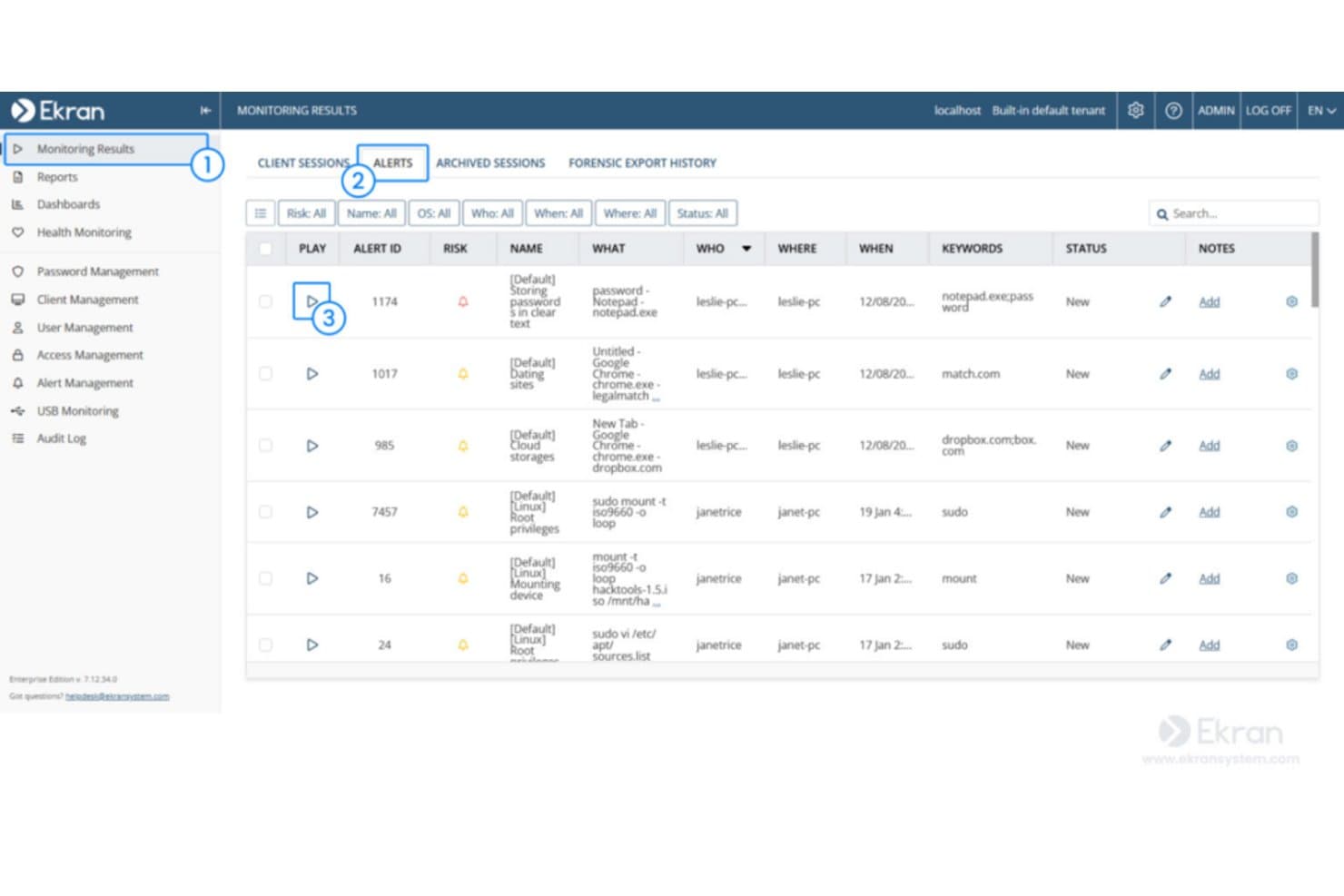
Syteca surfaces security alerts with risk levels and session details. Syteca is an on-premises privileged access management (PAM) and insider threat platform that combines user activity monitoring, session recording, keystroke logging, behavior-based alerts, and access controls across Windows, macOS, and Linux endpoints.
Who Is Syteca Best For?
Syteca is a strong fit for IT security teams and compliance officers in mid-to-large organizations that need PAM-integrated monitoring deployed entirely within their own infrastructure.
Why I Picked Syteca
Syteca earns its spot on my shortlist because its PAM-first architecture makes it one of the few on-prem monitoring tools that ties privileged access control directly to session recording. I like that when a privileged user connects to a critical endpoint, Syteca can require manual approval, issue a one-time password, and simultaneously record every keystroke and clipboard action in a tamper-proof forensic format. If something looks wrong, real-time alerts can automatically kill the session or block the user before damage is done.
Syteca Key Features
- Compliance framework alignment: Maps activity data to HIPAA, SOC 2, ISO 27001, GDPR, PCI DSS, and NIST 800-53 for audit readiness.
- Multi-tenant architecture: Runs separate, independent environments for different business units or locations under one platform.
- USB device management: Detects and controls USB device connections to prevent unauthorized data transfers on monitored endpoints.
- Sensitive data masking: Automatically redacts passwords and other sensitive strings from session recordings before they're stored.
Syteca Integrations
Syteca supports integrations with Active Directory, AWS, Azure, and Microsoft Windows Virtual Desktop, plus SIEM, ticketing, and SSO systems. It also supports connectivity with external security and access-management environments.
Pros and Cons
Pros:
- Blocks risky sessions through real-time alerts
- Records keystrokes, screens, and clipboard activity
- Fully on-premises with local database control
Cons:
- Requires customer-managed servers and database
- Productivity reporting trails dedicated workforce tools
Learn more about Syteca:
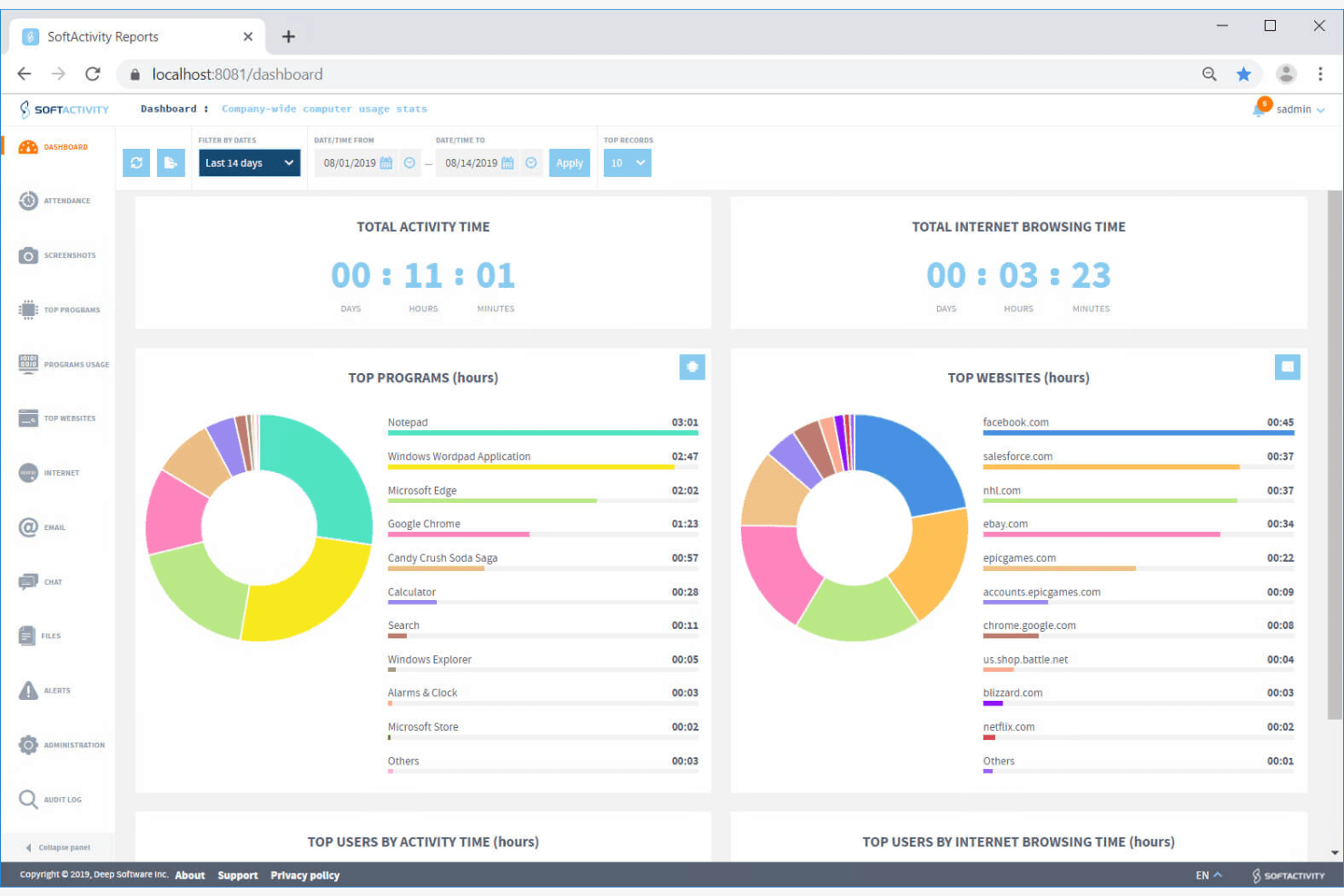
SoftActivity monitors teams with real-time activity insights. SoftActivity Monitor is an on-premise employee monitoring software that tracks application usage, website activity, file operations, keystrokes, and live screen views across company-owned Windows devices.
Who Is SoftActivity Best For?
SoftActivity Monitor is a strong fit for IT security administrators and compliance officers who need forensic-depth monitoring on Windows devices within a fully self-managed, on-premise infrastructure.
Why I Picked SoftActivity
SoftActivity earns its spot on my shortlist because its real-time monitoring capabilities are genuinely hard to beat in an on-premise setup. I love that you can pull up live screen views of multiple employee desktops simultaneously, essentially running CCTV-style visibility across your entire Windows fleet from a single console. Paired with IntelliSnap screenshots triggered by user actions, you get a precise, timestamped record of exactly what happened and when.
SoftActivity Key Features
- Keystroke logging: Captures keystrokes across monitored Windows devices in multiple languages, including English, Spanish, Japanese, Chinese, and Cyrillic scripts.
- File activity tracking: Logs read, write, delete, rename, and move operations across local, network, USB, and external drives.
- User behavior analytics: Flags unusual activity patterns on monitored devices to help surface potential insider threats.
- Remote actions console: Lets admins view running processes, close apps, log users off, and reboot or shut down machines directly from the console.
SoftActivity Integrations
Integrations include Microsoft Active Directory, Microsoft Entra ID, PostgreSQL, Microsoft Outlook, Microsoft Exchange, Citrix XenApp, and Windows Remote Desktop Services. No API or HRIS integrations are clearly documented.
Pros and Cons
Pros:
- Reviewers praise helpful technical support
- Detailed file and USB audit trails
- Live multi-screen views aid supervision
Cons:
- Antivirus exclusions can require troubleshooting
- Windows-only coverage excludes other endpoints
Learn more about SoftActivity:
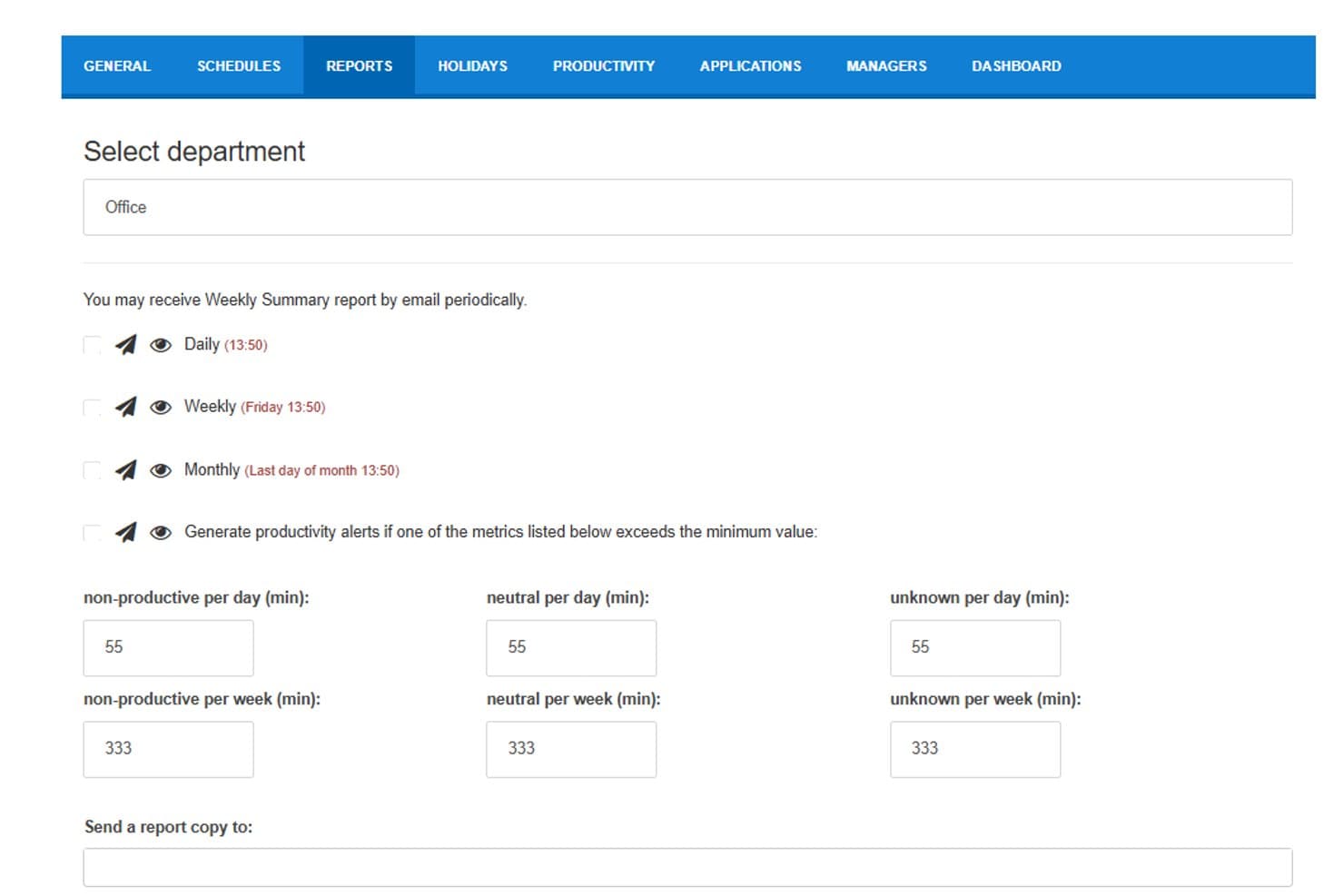
StaffCounter lets users schedule automated email reports by frequency. StaffCounter is a self-hosted employee monitoring solution that tracks application usage, websites, keystrokes, screenshots, and chat activity across Windows, Mac, Linux, and Android endpoints, with a built-in DLP module and behavior analysis engine.
Who Is StaffCounter Best For?
StaffCounter is a strong fit for compliance officers and IT security teams that need employee monitoring data stored entirely within their own infrastructure.
Why I Picked StaffCounter
StaffCounter earns its spot on my shortlist because its on-premise architecture is built specifically around GDPR data sovereignty, not retrofitted from a cloud product. I like that all monitoring data, including keystrokes, screenshots, and DLP flags, stays encrypted within your own infrastructure and never touches a vendor server. The open-source Windows agent and PHP server code mean your security team can audit exactly what's being collected and how it's stored.
StaffCounter Key Features
- Virtual appliance deployment: Ships as a pre-configured OVF/OVA or Docker image that runs on VMware ESXi, VirtualBox, KVM, Hyper-V, and XEN.
- User behavior analysis engine: Monitors for rule violations and sends automatic email alerts when thresholds are breached, such as excessive time on unproductive sites.
- Cross-platform endpoint agents: Installs on Windows, Mac, Linux, and Android devices, with settings managed centrally from the web console.
- Data Leak Prevention module: Tracks unauthorized changes to sensitive files and flags policy violations across monitored endpoints.
StaffCounter Integrations
Native integrations are not clearly documented. StaffCounter provides an API for custom integrations and supports connections with ERP systems and other internal systems.
Pros and Cons
Pros:
- Covers Windows, Mac, Linux, and Android
- Supports DLP alerts and behavior analysis
- Keeps monitoring data inside your infrastructure
Cons:
- Lacks documented role-based access controls
- Requires internal IT maintenance and backups
Learn more about StaffCounter:
Diğer Şirket İçi Çalışan İzleme Yazılımları
Kısa listeme giremeyen ancak yine de göz atmaya değer bazı ek şirket içi çalışan izleme yazılımı seçenekleri şunlardır:
- 11InsightfulBest for detailed analytics
- 12TeramindBest for data loss prevention
- 13WorkTimeBest for small businesses
- 14Time ChampBest for Active Directory agent rollout
- 15VeriatoBest for AI-driven productivity risk scoring
Related Reviews
How I Evaluate On-Premise Employee Monitoring Software
I split my evaluation into two layers: the core requirements a tool must meet to qualify and the differentiators—like data sovereignty controls and HR policy alerting—that separate vendors.
Core Functionality (Table Stakes For This List)
When I'm selecting tools for my list, I rank each one on a scale from 0 (does not offer the functionality) to 5 (excels in this area) for each core functionality listed below. Then, I calculate the tool's total score into a percentage. Each tool needs to achieve a minimum total score of 65% to be considered for inclusion.
- On-Premise Deployment Options: I check whether the software runs entirely on your own servers and infrastructure, including support for air-gapped environments with no external data transmission.
- Employee Activity Tracking: The tool should capture app usage, website visits, and active/idle time per workstation so HR teams can review daily work patterns across departments.
- Screen & Screenshot Monitoring: I look for automated screenshot intervals, event-triggered captures, and screen recording—features that give investigators visual evidence during policy reviews.
- Productivity Reporting & Dashboards: Reports should categorize tracked activity into productive vs. unproductive buckets, with filtering by team, role, or time period for performance reviews.
- Local Data Storage & Access Controls: I evaluate whether monitoring data stays on-premise with role-based permissions, so only authorized HR or compliance staff can view sensitive employee records.
- Policy & Alert Configuration: Custom rule-building matters here—for example, triggering an alert when an employee accesses restricted sites or exceeds idle thresholds during shift hours.
Once I have a list of tools that meet the criteria, I consider what sets each platform apart.
Differentiating Factors (What Sets Vendors Apart)
Here's how I compare and contrast different vendors:
Standout Features
When HR needs to investigate policy violations discreetly, stealth mode operation matters. Tools like Teramind and Veriato can run agents invisibly so employees aren't alerted during an active investigation. User behavior analytics is another feature I evaluate closely—baseline tracking that flags anomalies like sudden file transfer spikes or off-hours logins helps compliance officers spot risks early. Keystroke logging rounds this out by giving investigators searchable records of typed input during misconduct reviews.
Beyond Features
Data sovereignty is a major consideration—I check whether vendors support configurable retention policies and employee consent workflows that align with your organization's privacy obligations. Deployment requirements also vary widely; some tools need specific Windows Server environments while others support Linux, so I evaluate compatibility with your existing infrastructure. HR system integrations matter too, particularly whether the platform connects with your HRIS or Active Directory for automatic user provisioning and org-level reporting.
Şirket İçi Çalışan İzleme Yazılımı Nasıl Seçilir
Uzun özellik listeleri ve karmaşık fiyatlandırma yapılarına kapılmak kolaydır. Kendinize özgü yazılım seçim sürecinizi yürütürken odağınızı korumanıza yardımcı olmak için aklınızda bulundurmanız gereken faktörleri içeren bir kontrol listesi hazırladım:
| Etken | Dikkat Edilmesi Gerekenler |
|---|---|
| EtkenÖlçeklenebilirlik | Dikkat Edilmesi GerekenlerYazılım ekibinizle birlikte büyüyecek mi? Desteklediği maksimum kullanıcı sayısını ve performans sorunları yaşamadan artan verileri işleyip işleyemeyeceğini değerlendirin. |
| EtkenEntegrasyonlar | Dikkat Edilmesi GerekenlerMevcut araçlarınıza bağlanabiliyor mu? Proje yönetimi veya iletişim platformları gibi ekibinizin en sık kullandığı yazılımlarla uyumluluğunu kontrol edin. |
| EtkenÖzelleştirilebilirlik | Dikkat Edilmesi GerekenlerYazılımı ihtiyaçlarınıza uyacak şekilde uyarlayabilir misiniz? Belirli iş akışlarınız ve politikalarınızla uyumlu olacak şekilde panoları, raporları ve uyarıları özelleştirme seçeneklerini arayın. |
| EtkenKullanım kolaylığı | Dikkat Edilmesi GerekenlerYazılım ne kadar sezgisel? Öğrenme eğrisini ve ekibinizin kapsamlı eğitim veya destek almadan arayüzde kolayca gezinebilip gezinemeyeceğini değerlendirin. |
| EtkenUygulama ve işe alıştırma | Dikkat Edilmesi GerekenlerGeçiş ne kadar sorunsuz? Yazılımı kurmak için gereken süreyi ve kaynakları, ayrıca sağlayıcının işe alıştırma sırasında eğitim materyalleri veya destek sunup sunmadığını değerlendirin. |
| EtkenMaliyet | Dikkat Edilmesi GerekenlerFiyatlandırma şeffaf ve bütçeniz dahilinde mi? Maliyeti sunulan özelliklerle karşılaştırın ve gizli ücretleri veya esnek ödeme planlarını kontrol edin. |
| EtkenGüvenlik önlemleri | Dikkat Edilmesi GerekenlerVerileriniz ne kadar güvende? Hassas bilgileri korumak için yazılımın şifreleme, erişim kontrolleri ve veri koruma düzenlemelerine uyumluluk sunduğundan emin olun. |
| EtkenUyumluluk gereklilikleri | Dikkat Edilmesi GerekenlerSektör standartlarını karşılıyor mu? Yazılımın işletme faaliyetleriniz için gerekli olabilecek GDPR veya HIPAA gibi düzenlemelere uygun olup olmadığını doğrulayın. |
Şirket İçi Çalışan İzleme Yazılımı Nedir?
Şirket içi çalışan izleme yazılımı, çalışan faaliyetlerini ve üretkenliğini takip edip analiz etmek amacıyla bir şirketin yerel sunucularına kurulan bir araçtır. BT yöneticileri, İK profesyonelleri ve ekip liderleri bu araçları genellikle veri güvenliğini sağlamak ve iş gücü verimliliğini artırmak için kullanır. Faaliyet takibi, zaman izleme ve web filtreleme gibi özellikler üretkenliğin yönetilmesine ve hassas bilgilerin korunmasına yardımcı olur. Genel olarak bu araçlar, işletmelere verileri üzerindeki kontrolü sürdürme ve operasyonel denetimi geliştirme olanağı sağlar.
Özellikler
Şirket içi çalışan izleme yazılımı seçerken aşağıdaki temel özelliklere dikkat edin:
- Faaliyet takibi: Üretkenlik kalıplarını belirlemeye ve şirket politikalarına uyumu sağlamaya yardımcı olmak için çalışanların cihazlardaki eylemlerini izler.
- Zaman izleme: Çalışma saatlerini ve devam durumunu takip ederek çalışanların zaman yönetimi ve verimliliği hakkında içgörüler sunar.
- Web filtreleme: Belirli web sitelerine erişimi kontrol eder ve kısıtlar; dikkat dağınıklığını önleyerek odaklanmayı artırır.
- Veri şifreleme: Verileri şifreleyerek hassas bilgileri korur ve yetkisiz erişime karşı güvende kalmasını sağlar.
- Gerçek zamanlı uyarılar: Yöneticileri şüpheli veya yetkisiz faaliyetler hakkında bilgilendirerek hızlı müdahaleye ve risklerin azaltılmasına olanak tanır.
- Özelleştirilebilir raporlama: Belirli işletme ihtiyaçlarına uygun raporlar sunarak veriye dayalı karar alma süreçlerine yardımcı olur.
- Ekran kaydı: Çalışanların masaüstü faaliyetlerinin görsel kayıtlarını yakalayarak denetimler veya soruşturmalar için kanıt sunar.
- Tuş vuruşu kaydı: Veri girişini izlemek ve olası güvenlik tehditlerini tespit etmek için tuş vuruşlarını kaydeder.
- Proje takibi: Proje ilerlemesini yönetmeye ve izlemeye yardımcı olarak kaynakların etkili şekilde tahsis edilmesini ve teslim tarihlerine uyulmasını sağlar.
- GPS konum takibi: Mobil çalışanların konumunu izleyerek hesap verebilirliği sağlar ve saha operasyonlarını optimize eder.
Faydalar
Şirket içi çalışan izleme yazılımını uygulamak, ekibiniz ve işletmeniz için çeşitli faydalar sağlar. Yararlanabileceğiniz bazı faydalar şunlardır:
- Gelişmiş güvenlik: Veri şifreleme ve gerçek zamanlı uyarılar gibi özelliklerle hassas şirket verilerini koruyarak ihlal riskini azaltır.
- Artan üretkenlik: Faaliyetleri ve web kullanımını izleyerek çalışanların odağını artırır, dikkat dağıtıcı unsurların belirlenmesine ve ortadan kaldırılmasına yardımcı olur.
- Doğru zaman yönetimi: Çalışma saatlerini ve devam durumunu takip ederek daha iyi planlama ve verimli kaynak tahsisi sağlar.
- Özelleştirilmiş içgörüler: İhtiyaca uygun raporlar ve analizler sunarak yöneticilerin belirli işletme ihtiyaçlarına dayalı bilinçli kararlar almasına olanak tanır.
- Düzenlemelere uyum: Faaliyet takibi ve veri koruma önlemleri gibi özelliklerle sektörel düzenlemelere uyulmasını sağlamaya yardımcı olur.
- Daha iyi hesap verebilirlik: Ekran kaydı ve tuş vuruşu kaydı gibi izleme özellikleriyle çalışanları üretkenliklerini ve şeffaflığı korumaya teşvik eder.
Maliyetler & Fiyatlandırma
Şirket içi çalışan izleme yazılımını seçmek, mevcut çeşitli fiyatlandırma modellerinin ve planların anlaşılmasını gerektirir. Maliyetler özelliklere, ekip büyüklüğüne, eklentilere ve daha fazlasına bağlı olarak değişir. Aşağıdaki tablo, şirket içi çalışan izleme yazılımı çözümlerinde yaygın planları, ortalama fiyatlarını ve genellikle sunulan özellikleri özetlemektedir:
Şirket İçi Çalışan İzleme Yazılımı İçin Plan Karşılaştırma Tablosu
| Plan Türü | Ortalama Fiyat | Yaygın Özellikler |
|---|---|---|
| Plan TürüÜcretsiz Plan | Ortalama Fiyat$0 | Yaygın ÖzelliklerTemel etkinlik takibi, sınırlı raporlama ve kısıtlı kullanıcı erişimi. |
| Plan TürüKişisel Plan | Ortalama Fiyat$5-$15/kullanıcı/ay | Yaygın ÖzelliklerZaman takibi, web filtreleme ve temel veri şifreleme. |
| Plan Türüİşletme Planı | Ortalama Fiyat$20-$35/kullanıcı/ay | Yaygın ÖzelliklerGelişmiş raporlama, ekran kaydı ve entegre proje takibi. |
| Plan TürüKurumsal Plan | Ortalama Fiyat$40-$60/kullanıcı/ay | Yaygın ÖzelliklerKapsamlı güvenlik önlemleri, gerçek zamanlı uyarılar ve tam özelleştirme seçenekleri. |
Şirket İçi Çalışan İzleme Yazılımı SSS
Şirket içi çalışan izleme yazılımı hakkında sık sorulan bazı soruların yanıtları aşağıda yer almaktadır:
Şirket içi ve bulut tabanlı çalışan izleme yazılımı arasındaki fark nedir?
Şirket içi yazılım, kuruluşunuzun kendi sunucularına yüklenir ve veri depolama ile erişim üzerinde tam kontrol sahibi olmanızı sağlar. Bu, katı güvenlik veya uyumluluk gereksinimleri olan şirketler için önemli olabilir. Bulut tabanlı yazılım, bir sağlayıcının altyapısında barındırılır ve genellikle daha kolay kurulum ve ölçeklendirme olanağı sunar; ancak sağlayıcının veri işleme uygulamalarına güvenmenizi gerektirir.
İzleme yazılımı kullanırken gizlilik yasalarına uyumluluğu nasıl sağlayabilirim?
Açık politikalar belirleyerek, gerektiğinde çalışanların bilgilendirilmiş onayını alarak ve hangi verilerin neden toplandığını açıklayarak uyumluluğu destekleyebilirsiniz. Gereksiz veri yakalamayı sınırlamak için izleme ayarlarını yapılandırmak, politikaları düzenli olarak gözden geçirmek ve yüksek düzeyde düzenlemeye tabi sektörlerde faaliyet gösterirken hukuki danışmanlık almak da önemlidir.
Şirket içi çalışan izleme yazılımımı ne sıklıkta güncellemeliyim?
Düzenli güncellemeler güvenliğin, kararlılığın ve uyumluluğun korunmasına yardımcı olur. Çoğu sağlayıcı, özellikle davranış analitiği, ekran kaydı veya gerçek zamanlı izleme bileşenleri içeren araçlar için birkaç ayda bir güvenlik yamaları ve yılda bir veya iki kez büyük sürüm güncellemeleri yayımlar. Şirket içi sistemler otomatik olarak güncellenmediğinden, üç aylık bakım aralıkları planlamak, mevcut yamaları gözden geçirmek ve izlenen tüm cihazlarda güncellemeleri uygulamak için BT ekibinizle koordinasyon sağlamak iyi bir uygulamadır. Bu yaklaşım güvenlik açıklarına karşı korunmaya, etkinlik takibinin doğruluğunu sağlamaya ve sistemi gelişen güvenlik ve uyumluluk gereksinimleriyle uyumlu tutmaya yardımcı olur.