

Geçici iş gücünü yönetmek gerçekten baş ağrıtıcı olabilir. Her birinin kendine özgü ihtiyaçları olan serbest çalışanlar, yükleniciler ve geçici personelle aynı anda ilgilenmeniz gerekir. Geçici iş gücü yönetimi yazılımı, her şeyi düzenli ve verimli tutmanıza yardımcı olur.
Deneyimlerime göre doğru yazılımı bulmak size zaman kazandırabilir ve hataları azaltabilir. Ekibinizin büyüklüğüne ve sektörünüze uygun bir araç istersiniz; ben de bu noktada devreye giriyorum. Size mevcut en iyi seçenekleri sunmak için çeşitli çözümleri bağımsız olarak test edip inceledim.
Bu makalede, sizin ve ekibiniz için en önemli noktalara odaklanarak en iyi seçenekleri açıklayacağım. Geçici iş gücünüzü yönetmeyi biraz daha az stresli hale getirelim.
Why Trust Our Software Recommendations
6,700+
Reviews
20
Industry experts
16+
Evaluation factors
14
Years
Our team has been testing and reviewing software since 2012. As HR experts ourselves, we know how difficult—and important—it is to choose the right software.
For this guide, we evaluated tools using hands-on testing and independent research, scoring tools using our selection criteria. We also draw on insights from industry thought leaders and practicing HR experts.
Our reviews reflect our human editorial judgment, not a sales pitch.
Expert reviewers:
- Phil GrayCOO
 Kim BehnkeHR Tech Editor & Analyst
 Josh BarkerPeople Ops Manager

Geçici İş Gücü Yönetimi Yazılımları Karşılaştırma Tablosu
En iyi geçici iş gücü yönetimi yazılımı seçimlerim için fiyatlandırma ayrıntılarını incelemek üzere bu karşılaştırma tablosunu kullanın.
Sorted by: Default
| Tool | Starting Price | Website | |
|---|---|---|---|
Best with custom workflow configuration | 4.4 out of 5 | Pricing upon request Free demo available | Book Demo |
Best for contractor classification accuracy | 4.8 out of 5 | $5/user/month Free demo available | Website |
Best for automated compliance workflows | 4.7 out of 5 | Pricing upon request Free demo available | Website |
Best for global contractor management at scale | 5.0 out of 5 | Pricing upon request Not available | Website |
Best for freelancer and contractor compliance ops | 4.6 out of 5 | Pricing upon request Free demo available | Website |
Best for international payroll | 4.5 out of 5 | $199/user/month Free plan + free demo available | Website |
Best for AI-native procurement workflows | 4.2 out of 5 | Pricing upon request Free demo available | Website |
Best for AI-powered, large-scale recruitment | Not rated | Pricing upon request Not available | Website |
Best for HR and IT integration | Not rated | $8/user/month Free demo available | Website |
Best for vendor management | Not rated | Pricing upon request Free demo available | Website |


En İyi Geçici İş Gücü Yönetimi Yazılımı İncelemeleri
Aşağıda, kısa listeme giren en iyi geçici iş gücü yönetimi yazılımlarına ilişkin ayrıntılı özetlerimi bulabilirsiniz. İncelemelerim, size en uygun seçeneği bulmanıza yardımcı olmak için her aracın temel özelliklerine, artılarına ve eksilerine, entegrasyonlarına ve ideal kullanım alanlarına ayrıntılı bir bakış sunuyor.
 Best with custom workflow configuration
- Free demo available
- Pricing upon request
Visit WebsiteCustomer Rating:4.4/5
Worksuite offers a searchable freelancer talent pool with profile cards showing contractor type, company, and contact details. Worksuite is a contractor management platform built for enterprises that need to onboard, manage, and pay large volumes of freelancers and independent contractors across multiple countries, entities, and currencies.
Who Is Worksuite Best For?
Worksuite is a strong fit for mid-size to large enterprises in media, publishing, and creative industries managing high volumes of contractors across multiple business units.
Why I Picked Worksuite
Worksuite earns its spot on my shortlist because its workflow builder is one of the most configurable I've seen in this space. I love that you can set up distinct onboarding sequences for each business unit or contractor type, layering in compliance gates, document collection, and approval checkpoints tailored to each entity. The built-in classification engine and AOR coverage sit directly inside those workflows, not as separate tools you have to manage elsewhere.
Worksuite Key Features
- Multi-currency payments: Pay contractors in over 120 currencies with consolidated invoicing and payment tracking.
- Direct sourcing and talent pools: Build private, searchable directories of pre-vetted freelancers and contractors.
- Project and milestone tracking: Assign, monitor, and manage work progress and deliverables for contractors.
- Dashboards and analytics: Access detailed business intelligence on spend, headcount, and compliance status across all entities.
Worksuite Integrations
Worksuite offers native integrations with NetSuite, QuickBooks, Xero, Salesforce, HubSpot, Monday.com, Airtable, Google Workspace, and Slack. It connects with Zapier and provides an API for custom integrations.
Pros and Cons
Pros:
- Built-in global contractor classification engine
- End-to-end freelance onboarding automation
- Workflow allows entity-specific customization
Cons:
- Advanced reporting requires upgraded module
- No supplier management or bidding features
Learn more about Worksuite: Best for contractor classification accuracy
- Free demo available
- From $5/user/month
Visit WebsiteCustomer Rating:4.8/5
Deel HR manages global contractors, EOR hiring, and payments in 150+ countries. Deel HR is a global contingent workforce management platform that centralizes contractor management, Contractor of Record (CoR), EOR hiring, compliant contract generation, and multi-currency payments across 150+ countries.
Who Is Deel HR Best For?
Deel HR is a strong fit for HR and legal teams managing international contractors who need built-in classification safeguards, localized contracts, and compliant global payments.
Why I Picked Deel HR
I picked Deel HR because contractor classification is where most global teams get exposed to legal risk. Deel actively monitors contractor relationships and flags potential misclassification issues based on local labor law. That’s not just contract templates — it’s ongoing oversight. Combined with localized agreements and Contractor of Record services, it gives companies real protection when engaging contingent workers internationally.
Deel HR Key Features
- Contractor self-service portal: Contractors can submit invoices, manage documents, and track payment status independently.
- Multi-currency payments: Pay contractors in 120+ currencies through multiple payout methods, including bank transfer and digital wallets.
- Misclassification monitoring: Built-in safeguards flag contractor classification risks based on country-specific regulations.
- Background checks: Run screening during onboarding directly inside the platform.
Deel HR Integrations
Deel HR integrates with tools like Workday, BambooHR, NetSuite, QuickBooks, Greenhouse, Ashby, Slack, Okta, and Rippling. It also provides a public API, webhooks, and Zapier connectivity for custom workflows.
Pros and Cons
Pros:
- Multiple payout options across global currencies
- Contractor of Record option shifts classification liability
- Covers 150+ countries with localized contracts and compliance
Cons:
- Reporting tools are less advanced than dedicated analytics platforms
- Costs increase as contractor volume scales
 Best for automated compliance workflows
- Free demo available
- Pricing upon request
Visit WebsiteCustomer Rating:4.7/5
Worksome tracks talent pool growth with dashboards showing new sign-ups and cumulative hires over time. Worksome is an AI-enabled external workforce management platform for sourcing, classifying, onboarding, and paying freelancers and contractors globally, with compliance contracting, worker classification, EOR/AOR services, and payments across 150+ countries.
Who is Worksome Best For?
Worksome is a strong fit for mid-size to enterprise companies that hire freelancers and contractors in multiple countries or regions.
Why I Picked Worksome
I've included Worksome in my top picks because of how much compliance automation it bakes directly into the hiring workflow. I like that worker classification happens instantly in the platform, with a built-in determination tool that flags how each contractor should be engaged across different countries, so my team isn't manually researching local labor laws before every hire. What really sets it apart is the misclassification indemnification: if a classification decision made through the tool is ever challenged, Worksome underwrites the associated costs. That's a level of accountability I haven't seen built into many other platforms.
Worksome Key Features
- Global contractor payments: Pay contractors in 150+ countries with consolidated billing and automated invoicing in local currencies.
- Talent pool management: Build, organize, and re-engage your own curated pool of pre-vetted freelancers and contractors.
- Custom approval workflows: Create multi-step approval flows for contractor engagements, spending limits, and hiring requests.
- EOR and AOR services: Engage contractors through Worksome as the employer or agent of record when direct engagement isn't possible.
Worksome Integrations
Worksome connects with Zapier and offers built-in connections to HRIS, accounting, and project management tools, including SAP SuccessFactors, Sage, Workday, Xero, QuickBooks, Google Sheets, and Google Docs. It also integrates with monday.com, Asana, Trello, and NetSuite. A public API is available for custom integrations.
Pros and Cons
Pros:
- Generates contracts automatically with digital signatures
- Supports contractor payments in more than 150 countries
- Built-in worker classification reduces misclassification risk
Cons:
- Must contact sales for pricing
- No dedicated mobile app
Learn more about Worksome: Best for global contractor management at scale
- Not available
- Pricing upon request
Visit WebsiteCustomer Rating:5/5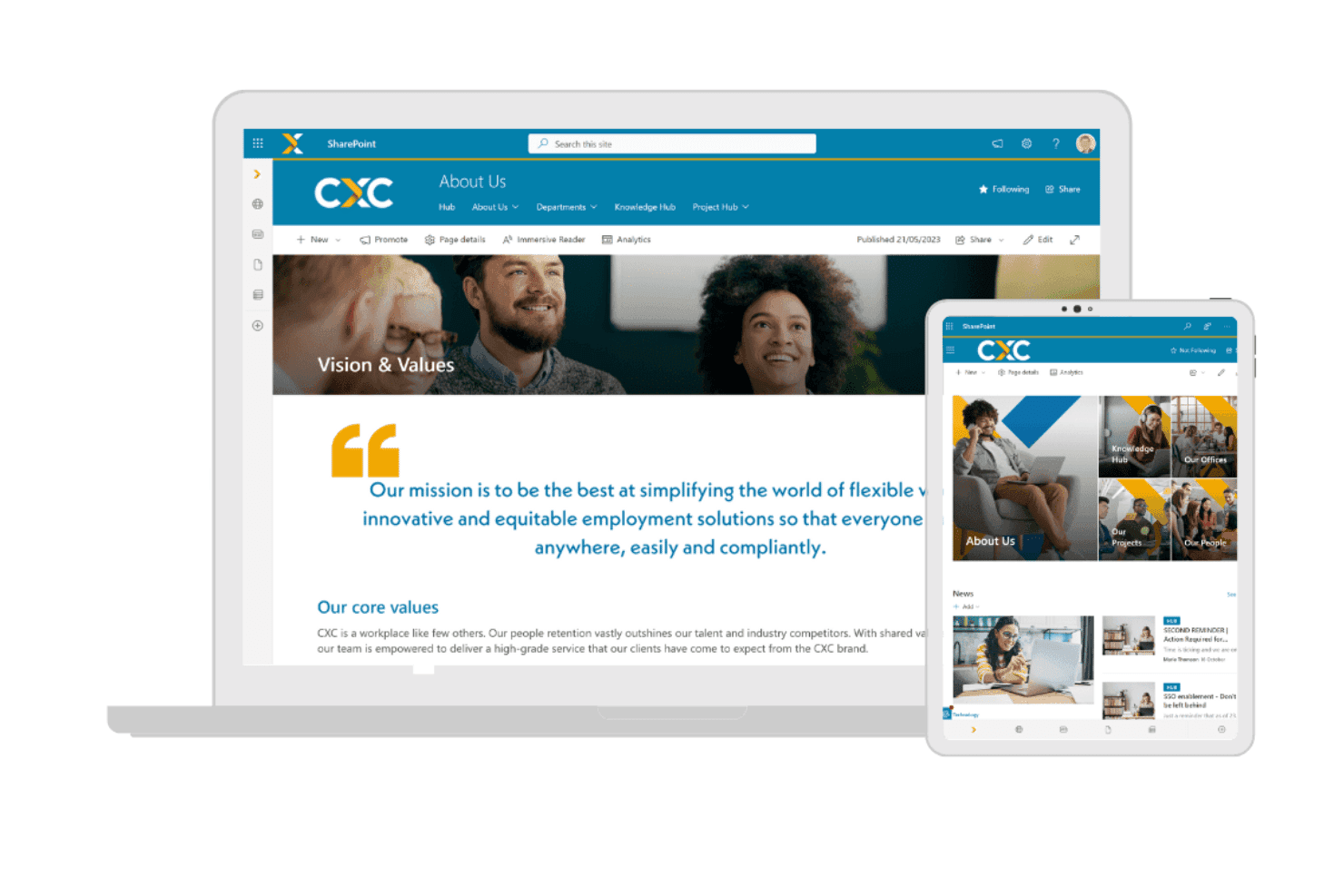
CXC Global provides a workforce portal for organizations managing contingent workers, with access to company resources and workforce information. CXC Global is a managed contingent workforce solution that combines employer of record, agent of record, vendor-neutral MSP, and global contractor payroll services across more than 100 countries.
Who Is CXC Global Best For?
CXC Global suits enterprise organizations running large-scale contingent programs across multiple countries, particularly those already using SAP Fieldglass or Beeline.
Why I Picked CXC Global
CXC Global earns its spot on my shortlist because no other provider combines vendor-neutral MSP with a purpose-built compliance engine at this geographic scale. I particularly like CXC Comply, which runs pre-engagement classification assessments in complex markets like the UK (IR35) and Germany before a contractor is ever hired. That kind of upfront risk management is what separates CXC from generic payroll providers when you're running programs across dozens of countries at once.
CXC Global Key Features
- Vendor-neutral MSP delivery: Lets you manage multi-country staffing suppliers through a single managed solution.
- Direct SAP Fieldglass and Beeline integration: Connects natively with leading VMS platforms for enterprise-grade procurement.
- Contractor payroll management: Handles global contractor payments, taxes, and invoicing across 100+ countries.
- Dedicated account management: Provides centralized program support from local HR and compliance experts.
CXC Global Integrations
CXC Global offers native integrations with SAP Fieldglass and Beeline, other integrations are not currently listed.
Pros and Cons
Pros:
- Vendor-neutral MSP reduces staffing supplier bias
- Pre-engagement IR35 classification assessments built in
- Operates compliantly across 100+ countries
Cons:
- No self-service SaaS platform available
- Not suited for small-scale contingent programs
Learn more about CXC Global: Best for freelancer and contractor compliance ops
- Free demo available
- Pricing upon request
Visit WebsiteCustomer Rating:4.6/5
TalentDesk centralizes provider contracts and compliance documents in one place. TalentDesk is a freelancer and contractor management platform that covers onboarding, worker classification, compliance checks, SOW-based project management, and global payments across a centralized workforce directory.
Who Is TalentDesk Best For?
TalentDesk is a strong fit for HR ops teams managing large pools of freelancers and independent contractors who need built-in compliance, onboarding, and payment tools in one place.
Why I Picked TalentDesk
I've included TalentDesk in my top picks because it handles freelancer and contractor compliance with a level of specificity I don't often see. It acts as Agent of Record in 30+ countries, meaning it signs contracts on your behalf, runs AML/KYC checks, and covers IR35 and 1099 classification automatically. I also like that W-9 collection and TIN validation can be made mandatory during onboarding, so compliance gaps don't slip through before work begins.
TalentDesk Key Features
- Consolidated vendor invoicing: Replaces multiple contractor invoices with one invoice issued on a weekly, bi-weekly, or monthly schedule across all vendors and projects.
- SOW project creation: Lets you build statements of work with milestones, task assignments, and rate settings directly within the platform.
- Insights Dashboard: Displays freelancer activity, project and task utilization, and platform usage across configurable date ranges.
- Zapier integration: Connects TalentDesk to 8,000+ apps—including Slack, Jira, HubSpot, and Google Sheets—without custom development.
TalentDesk Integrations
TalentDesk supports integrations with Xero and QuickBooks through bill-format exports, plus an Open API, webhooks, and CSV imports and exports. It also connects with Google Sheets, Slack, Jira, and HubSpot through Zapier.
Pros and Cons
Pros:
- Agencies manage their own worker teams
- Task-level budgets support spend control
- Built-in AOR and classification checks
Cons:
- Analytics omit time-to-fill reporting
- No supplier scorecards or SLA tracking
Learn more about TalentDesk: Best for international payroll
- Free plan + free demo available
- From $199/user/month
Visit WebsiteCustomer Rating:4.5/5
RemoFirst manages global hiring, payroll, and Employer of Record needs. RemoFirst is a global HR and payroll platform designed for hiring managers looking for top talent internationally. It provides Employer of Record services and manages payroll, making it ideal for companies expanding their full-time workforce across borders.
Why I picked RemoFirst: It offers payroll management in various currencies, which is important for businesses operating in multiple countries. RemoFirst's Employer of Record services simplify international hiring by handling compliance and legal matters. Its ability to onboard and pay independent contractors in more than 150 countries makes it a cost-effective option for global operations. The platform also provides health insurance and visa support, which are essential for managing international employees.
Standout Features and Integrations:
Features include quick onboarding of international employees and contractors, supporting compliance with local regulations. The platform offers secure payment processing for contractors, which is a key feature for managing international finances. Additionally, RemoFirst provides health coverage options through RemoHealth, supporting employee well-being.
Integrations include ADP and more.
Pros and Cons
Pros:
- Health benefits for employees
- Extensive payroll services
- Fast onboarding process
Cons:
- Onboarding can be slow
- Variable customer support quality
 Best for AI-native procurement workflows
- Free demo available
- Pricing upon request
Visit WebsiteCustomer Rating:4.2/5
Coupa supports procurement tasks and strengthens supplier oversight. Coupa is a cloud-based spend management platform designed for businesses looking to manage their procurement processes efficiently. Its main user base includes procurement professionals and finance teams who need to control spending and improve supplier relationships.
Why I picked Coupa: It offers procurement solutions that integrate well with existing financial ecosystems, which is important for effective spend management. Coupa's real-time spend visibility helps you make informed purchasing decisions. Its supplier management tools optimize communication and collaboration with vendors. The platform's user-friendly interface allows your team to navigate and manage procurement tasks with ease.
Standout Features and Integrations:
Features include real-time spend visibility, allowing you to track and manage expenses effectively. The platform provides supplier management tools that facilitate communication and collaboration. Additionally, Coupa offers an intuitive user interface, making it more accessible for your team.
Integrations include SAP, Oracle, Microsoft Dynamics 365, QuickBooks, and more.
Pros and Cons
Pros:
- Effective procurement tools
- Optimized supplier management
- Real-time spend visibility
Cons:
- Occasional system lag
- High implementation costs
Learn more about Coupa:

Avature optimizes applicant tracking and candidate relationship workflows. Avature is a talent management platform designed for recruitment professionals and HR teams. It offers solutions for applicant tracking, candidate relationship management, and high-volume recruiting, making it ideal for large organizations.
Why I picked Avature: The platform provides a unique combination of high configurability and AI-driven insights, which align with its strength in large-scale recruitment. Avature's Talent Acquisition Suite supports applicant tracking and candidate management, optimizing the recruitment process.
Additionally, its Talent Management Suite aids in onboarding and performance management, enhancing workforce integration. Its focus on user experience and unification capabilities sets it apart in managing large-scale recruitment needs.
Standout Features and Integrations:
Features include a highly configurable platform that allows you to tailor workflows and processes to fit your organization's needs. Avature's AI-driven insights provide valuable data analytics to improve recruitment strategies. The platform also offers broad support services, including account management and technical assistance.
Integrations include LinkedIn, Microsoft Teams, and more.
Pros and Cons
Pros:
- Extensive talent management tools
- AI-driven insights
- Highly configurable platform
Cons:
- Reporting limitations with complex data sets
- Complex implementation process
Learn more about Avature: Best for HR and IT integration
- Free demo available
- From $8/user/month (billed annually)

Rippling unifies HR processes with IT setup for efficient employee management. Rippling is a workforce management platform designed for businesses that need to manage both HR and IT tasks in one place. Its primary users are HR professionals and IT managers who require a unified approach to employee management and technology setup.
Why I picked Rippling: It offers a smooth integration of HR and IT functions, which is important for managing employee onboarding and offboarding efficiently. Rippling's platform allows you to automate employee device provisioning and software access, reducing manual tasks. Its centralized dashboard gives you a clear view of employee data across both HR and IT domains. Additionally, Rippling supports compliance management, helping your team adhere to relevant regulations.
Standout Features and Integrations:
Features include automation of device provisioning, which simplifies the process of setting up new employees. The platform provides a centralized dashboard for managing both HR and IT data efficiently. Rippling also offers compliance management tools, ensuring your team meets regulatory requirements.
Integrations include Slack, Microsoft 365, Google Workspace, Zoom, Salesforce, GitHub, and more.
Pros and Cons
Pros:
- Centralized data dashboard
- Automated device provisioning
- Unified HR and IT management
Cons:
- Complex initial implementation
- Add-on modules increase costs
Learn more about Rippling:

Beeline oversees contractor procurement and contingent workforce tasks. Beeline is a vendor management system designed for organizations and staffing agencies that need to manage their contingent labor workforce efficiently. It primarily serves large enterprises and helps optimize the procurement and management of temporary staff and contingent workers.
Why I picked Beeline: It offers a centralized platform for managing vendor relationships, which is essential for large-scale operations. Beeline's analytics tools provide insights into workforce spending and performance, helping you make informed decisions. Its customizable dashboards allow you to tailor data views to your specific needs. The platform also supports compliance management, helping your organization adhere to relevant regulations.
Standout Features and Integrations:
Features include advanced analytics that help you track workforce performance and spending. The platform's compliance management tools help your team meet regulatory requirements. Additionally, Beeline offers customizable dashboards that let you organize data in ways that suit your business needs.
Integrations include SAP, Oracle, Workday, and more.
Pros and Cons
Pros:
- Advanced analytics
- Strong compliance tools
- Centralized vendor management
Cons:
- Requires ongoing technical support
- Can be resource-intensive
Learn more about Beeline:
Diğer Geçici İş Gücü Yönetimi Yazılımları
Kısa listeme giremeyen ancak yine de göz atmaya değer bazı ek geçici iş gücü yönetimi yazılımı seçenekleri şunlardır:
- 11SAP Fieldglass Contingent Workforce ManagementBest for enterprise solutions
- 12InstaworkBest for AI-driven worker matching
- 13VectorVMSBest for contingent workforce visibility
- 14Magnit GlobalBest for resource optimization
- 15Workforce.comBest for shift scheduling
- 16ADPBest for payroll and HR integration
- 17Impact Workforce OptimizationBest for managing diverse workforces
- 18WorkMarketBest for freelance management
How I Evaluate Contingent Workforce Management Software
I look at two layers: the baseline—vendor management, worker classification, and spend tracking—every platform must cover, and the differentiators that make certain tools right for specific programs.
Core Functionality (Table Stakes For This List)
When I'm selecting tools for my list, I rank each one on a scale from 0 (does not offer the functionality) to 5 (excels in this area) for each core functionality listed below. Then, I calculate the tool's total score into a percentage. Each tool needs to achieve a minimum total score of 65% to be considered for inclusion.
- Contingent Worker Lifecycle Management: I evaluate how each platform handles the full arc from requisition through offboarding—things like automated onboarding checklists, assignment extensions, and self-service portals for contractors.
- Vendor & Staffing Agency Management: Each tool should let you distribute requisitions across tiered suppliers, track SLAs, and score vendor performance so your VMO can manage dozens of agencies from one place.
- Worker Classification & Compliance: I check whether the platform provides structured classification workflows that flag co-employment risks and generate audit-ready documentation across different jurisdictions.
- Rate & Spend Management: Tools should give you control over bill rates, markups, and consolidated invoicing—especially when you're reconciling spend across multiple staffing suppliers and SOW engagements.
- Statement of Work Management: I look at how well each platform tracks SOW-based work, including milestone approvals, deliverable sign-offs, and project-based billing separate from time-and-materials engagements.
- Workforce Analytics & Reporting: Dashboards should surface real metrics like time-to-fill, cost-per-hire by supplier, headcount by engagement type, and tenure tracking—not just static, pre-built summaries.
Once I have a list of tools that meet this criteria, I consider what sets each platform apart.
Differentiating Factors (What Sets Vendors Apart)
Here's how I compare and contrast different vendors:
Standout Features
Direct sourcing is a big one—I look for platforms that let you build private talent pools from alumni, retirees, and past contractors so you're not always going back to staffing agencies. Total talent management matters too, especially when your leadership wants a single view of contingent and permanent headcount for workforce planning. For teams engaging contractors across borders, I also evaluate global payment and EOR support, which can simplify multi-currency invoicing and local tax compliance.
Beyond Features
Integration depth is one of the first things I check—your VMS needs to sync with your HRIS and procurement systems like Workday or SAP Ariba, or you'll end up with fragmented worker data. Implementation support also carries real weight here, since rolling out a contingent workforce program often involves change management across procurement, HR, and hiring managers. I also evaluate whether a vendor offers MSP partnerships or in-house program services, which can make or break adoption for teams standing up their first formal CW program.
Geçici İş Gücü Yönetimi Yazılımı Nasıl Seçilir?
Uzun özellik listeleri ve karmaşık fiyatlandırma yapıları arasında kaybolmak kolaydır. Kendinize özgü yazılım seçim sürecinizi yürütürken odaklanmanızı korumanıza yardımcı olmak için aklınızda bulundurmanız gereken faktörleri içeren bir kontrol listesi hazırladım:
| Faktör | Dikkat Edilmesi Gerekenler |
| Ölçeklenebilirlik | Araç ekibinizle birlikte büyüyebilir mi? Gelecekteki büyümeyi ve yazılımın kullanıcı veya veri artışını sorunsuz şekilde yönetip yönetemeyeceğini değerlendirin. |
| Entegrasyonlar | Mevcut sistemlerinizle çalışıyor mu? Mevcut İK, bordro ve diğer temel araçlarınızla uyumluluğunu kontrol edin. |
| Özelleştirilebilirlik | Aracı süreçlerinize uyarlayabilir misiniz? Bir geliştiriciye ihtiyaç duymadan iş akışlarını ve alanları özel ihtiyaçlarınıza uyacak şekilde ayarlama seçeneklerini arayın. |
| Kullanım kolaylığı | Ekibiniz ne kadar hızlı kullanmaya başlayabilir? Arayüzü ve gezinme kolaylığını değerlendirin. Aracı çalışırken görmek için bir demo talep edin. |
| Uygulama ve işe alıştırma | Kurulum sırasında hangi destek sunuluyor? Aracı uygulamak ve ekibinizi etkili bir şekilde eğitmek için gereken zamanı ve kaynakları değerlendirin. |
| Maliyet | Fiyatlandırma açık ve bütçeniz dahilinde mi? Herhangi bir eklenti veya gizli ücret dahil olmak üzere toplam maliyeti anlamak için temel fiyatın ötesine bakın. |
| Güvenlik önlemleri | Verilerinizi nasıl koruyor? Güçlü şifrelemeye ve GDPR veya CCPA gibi veri koruma düzenlemelerine uyumluluğa sahip olduğundan emin olun. |
| Uyumluluk gereksinimleri | Düzenleyici gereksinimleri destekliyor mu? Özellikle sıkı şekilde düzenlenen sektörlerde faaliyet gösteriyorsanız, sektöre özgü uyumluluk gereksinimlerini karşılayabildiğini doğrulayın. |
Geçici İş Gücü Yönetimi Yazılımı Nedir?
Geçici iş gücü yönetimi yazılımı, işletmelerin geçici ve sözleşmeli çalışanları yönetmesine yardımcı olmak üzere tasarlanmış bir araçtır. İK profesyonelleri ve satın alma yöneticileri, geçici iş güçlerini verimli bir şekilde takip etmek, yönetmek ve optimize etmek için genellikle bu araçları kullanır. Tedarikçi yönetimi, uyumluluk takibi ve iş gücü analitiği gibi özellikler verileri düzenlemeye, düzenlemelere uyulmasını sağlamaya ve iş gücü verimliliğini artırmaya yardımcı olur. Genel olarak bu araçlar, esnek bir iş gücünün yönetimini kolaylaştırarak ve operasyonel verimliliği artırarak değer sağlar.
Özellikler
Geçici iş gücü yönetimi yazılımını seçerken aşağıdaki temel özelliklere dikkat edin:
- Tedarikçi yönetimi: En iyi yetenek ve hizmeti alıp almadığınızı değerlendirmek için personel tedarikçileriyle olan iş ortaklıklarınızı düzenlemenize ve değerlendirmenize yardımcı olur.
- Uyumluluk takibi: Geçici iş gücü programınızın sektör düzenlemelerini ve iş yasalarını karşılayıp karşılamadığını doğrulayarak riski azaltır.
- İş gücü analitiği: İş gücü performansı ve harcamaları hakkında içgörüler sunarak bilinçli kararlar almanıza yardımcı olur.
- Gerçek zamanlı içgörüler: İş gücü ölçümleri hakkında güncel bilgiler sunarak personel ihtiyaçlarında hızlı ayarlamalar yapılmasını sağlar.
- Özelleştirilebilir iş akışları: Süreçleri ve alanları kuruluşunuzun özel ihtiyaçlarına uyacak şekilde uyarlamanıza olanak tanıyarak operasyonel verimliliği artırır.
- Entegrasyon yetenekleri: Mevcut İK ve bordro sistemleriyle uyumluluğu destekleyerek veri akışını sağlar ve manuel veri girişini azaltır.
- Zaman ve devam takibi: Çalışanların çalışma saatlerine ilişkin doğru kayıtlar tutarak bordro işlemlerine ve uyumluluğa yardımcı olur.
- İşe alıştırma desteği: Yeni kullanıcıların hızlı bir şekilde kullanmaya başlamasına yardımcı olmak için eğitim videoları ve ürün tanıtımları gibi kaynaklar sunar.
- Risk yönetimi: Geçici iş gücü operasyonlarıyla ilişkili olası riskleri belirler ve azaltır; böylece kuruluşunuzu korur.
- Maliyet yönetimi: İş gücü maliyetlerini takip etmeye ve kontrol etmeye yardımcı olarak geçici iş gücünüzün bütçe dahilinde kalmasını sağlar.
Faydalar
Geçici iş gücü yönetimi yazılımını uygulamak ekibiniz ve işletmeniz için çeşitli faydalar sağlar. Yararlanabileceğiniz bazı faydalar şunlardır:
- Geliştirilmiş uyumluluk: İş gücü operasyonlarınızın yasal standartları karşılayıp karşılamadığını kontrol ederek para cezaları ve yaptırım riskini azaltır.
- Geliştirilmiş tedarikçi ilişkileri: Mevcut en iyi hizmeti ve yeteneği aldığınızı doğrulamaya yardımcı olmak için tedarikçi performansının gözetimini optimize eder.
- Artırılmış görünürlük: Gerçek zamanlı içgörüler ve analizler sunarak iş gücünüz hakkında bilinçli kararlar almanıza olanak tanır.
- Verimli maliyet yönetimi: İş gücü harcamalarını takip etmeye ve kontrol etmeye yardımcı olarak bütçenizi kontrol altında tutar.
- Basitleştirilmiş işe alıştırma: Yeni kullanıcıların hızlı ve etkili bir şekilde başlamasına yardımcı olmak için eğitim videoları ve ürün tanıtımları gibi insan kaynakları araçları sunar.
- Daha iyi risk yönetimi: Olası riskleri belirler ve kuruluşunuzu korumak için bunları azaltmanıza yardımcı olur.
- Özelleştirilebilir süreçler: İş akışlarını özel ihtiyaçlarınıza uyacak şekilde uyarlamanıza olanak tanıyarak operasyonel verimliliği artırır.
Maliyetler ve Fiyatlandırma
Geçici iş gücü yönetimi yazılımı seçmek, mevcut çeşitli fiyatlandırma modellerinin ve planların anlaşılmasını gerektirir. Maliyetler özelliklere, ekip büyüklüğüne, eklentilere ve daha fazlasına göre değişir. Aşağıdaki tablo, geçici iş gücü yönetimi yazılımı çözümlerinde yaygın planları, ortalama fiyatlarını ve genellikle dahil edilen özellikleri özetlemektedir:
Geçici İş Gücü Yönetimi Yazılımı İçin Plan Karşılaştırma Tablosu
| Plan Türü | Ortalama Fiyat | Yaygın Özellikler |
| Ücretsiz Plan | $0 | Temel tedarikçi yönetimi, sınırlı analizler ve temel uyumluluk takibi. |
| Kişisel Plan | $300-$3000/yıl | Tedarikçi yönetimi, uyumluluk takibi, analizler ve temel raporlama araçları. |
| İşletme Planı | $2400-$30000/yıl | Gelişmiş analizler, özel raporlama, tam uyumluluk araçları ve entegrasyonlar. |
| Kurumsal Plan | $50000+/yıl | Tüm özellikler, üst düzey destek, özel entegrasyonlar ve özel hesap yöneticisi. |
Geçici İş Gücü Yönetimi Yazılımı Hakkında SSS
Geçici iş gücü yönetimi yazılımı hakkında sık sorulan bazı soruların yanıtlarını burada bulabilirsiniz:
Geçici iş gücü yönetimi yazılımının temel amacı nedir?
Temel amacı, işletmelerin geçici ve sözleşmeli çalışanlarını verimli bir şekilde yönetmesine yardımcı olmaktır. Tedarikçi ilişkilerini, faturalandırmayı, uyumluluğu ve iş gücü analizlerini denetlemek için araçlar sağlar. Bu yazılımı kullanarak ekibiniz personel planlamasını optimize edebilir, idari görevleri azaltabilir ve düzenlemelere uyumluluğun sağlanmasına yardımcı olabilir.
İşletmemin geçici iş gücü yönetimi yazılımına ihtiyacı olup olmadığını nasıl anlarım?
İşletmeniz önemli sayıda geçici veya sözleşmeli çalışana güveniyorsa bu yazılım, değerli yönetim ve kıyaslama raporlama araçları sunabilir. Tedarikçi yönetimi, zaman çizelgeleri veya personel talepleriyle ilgili mevcut zorluklarınızı değerlendirin. Bunlar endişe duyduğunuz alanlarsa yazılımı uygulamak operasyonlarınızı geliştirmeye yardımcı olabilir.
Geçici iş gücü yönetimi yazılımı mevcut İK sistemlerimle entegre olabilir mi?
Evet, çoğu platform SAP, Workday ve ADP gibi popüler İK sistemleriyle entegre olacak şekilde tasarlanmıştır. Satın almadan önce yazılımın mevcut araçlarınızla uyumluluğunu kontrol edin. Bu, sorunsuz veri akışını destekler ve manuel veri girişi ihtiyacını azaltarak ekibinizin zaman ve çaba tasarrufu yapmasını sağlar.
Geçici iş gücü yönetimi yazılımının sektöre özel sürümleri var mı?
Bazı tedarikçiler sağlık, BT veya imalat gibi sektörlere göre uyarlanmış sektöre özel çözümler sunar. Bu sürümler, benzersiz çalışan sınıflandırması gereksinimlerini veya personel bulma zorluklarını ele alır. Sektörünüzün özel ihtiyaçları varsa yatırımınızdan en iyi şekilde yararlanmak için bu gereksinimlere uygun yazılımları arayın.