Worksome Review: Pros, Cons, Features and Pricing Explained



Worksome is a freelance management system for companies that need to onboard, classify, contract, and pay external talent from one system. I'd reach for it when your business is juggling a growing pool of independent contractors across multiple countries and you're worried about worker misclassification risk, tax compliance, and slow payment cycles. Compared to a platform like Fiverr Enterprise, which leans more toward sourcing and project marketplace features, Worksome puts compliance workflows and automated AI-powered misclassification checks at the center, so your HR and legal teams get tighter control over how contractors are engaged and paid.
Worksome Evaluation Summary

- Pricing upon request
- Free demo available
Why Trust Our Software Recommendations
Our team has been testing and reviewing software since 2012. As HR experts ourselves, we know how difficult—and important—it is to choose the right software.
For this guide, we evaluated tools using hands-on testing and independent research, scoring tools using our selection criteria. We also draw on insights from industry thought leaders and practicing HR experts.
Our reviews reflect our human editorial judgment, not a sales pitch.
Expert reviewers:
Worksome Overview
I think Worksome stands out for its focus on compliance, automated misclassification checks, and global contractor payments, making it especially appealing if your HR and legal teams need extra control over classification and payments. The interface is straightforward, onboarding is fast, and support is responsive, but I’ve found its integration options somewhat limited compared to broader tools. Pricing is transparent and pay-as-you-go, which helps when you’re juggling on-demand contractor onboarding. I’d recommend it when you’re expanding global contractor operations and can’t afford compliance slip-ups or payment delays.
pros
-
Built-in AI-driven contractor misclassification risk checks
-
Transparent pay-as-you-go pricing without hidden fees
-
Fast onboarding and global contractor payments management
cons
-
Limited direct integrations with HR and payroll platforms
-
No project marketplace or sourcing functionality included
-
Reporting options are basic compared to some competitors
-

Justworks
Visit WebsiteThis rating combines scores from multiple user review sites to reflect overall customer sentiment about the product.4.6 -
Prevue Assessments
Visit WebsiteThis rating combines scores from multiple user review sites to reflect overall customer sentiment about the product.4.6 -
Small Improvements
Visit WebsiteThis rating combines scores from multiple user review sites to reflect overall customer sentiment about the product.4.3





How We Test & Score Our Tools
We’ve spent years building, refining, and improving our software testing and scoring system. The rubric is designed to capture the nuances of software selection and what makes a tool effective, focusing on critical aspects of the decision-making process.
Below, you can see exactly how our testing and scoring works across seven criteria. It allows us to provide an unbiased evaluation of the software based on core functionality, standout features, ease of use, onboarding, customer support, integrations, customer reviews, and value for money.
Core Functionality (25% of final score)
The starting point of our evaluation is always the core functionality of the tool. Does it have the basic features and functions that a user would expect to see? Are any of those core features locked to higher-tiered pricing plans? At its core, we expect a tool to stand up against the baseline capabilities of its competitors.
Standout Features (25% of final score)
Next, we evaluate uncommon standout features that go above and beyond the core functionality typically found in tools of its kind. A high score reflects specialized or unique features that make the product faster, more efficient, or offer additional value to the user.
We also evaluate how easy it is to integrate with other tools typically found in the tech stack to expand the functionality and utility of the software. Tools offering plentiful native integrations, 3rd party connections, and API access to build custom integrations score best.
Ease of Use (10% of final score)
We consider how quick and easy it is to execute the tasks defined in the core functionality using the tool. High scoring software is well designed, intuitive to use, offers mobile apps, provides templates, and makes relatively complex tasks seem simple.
Onboarding (10% of final score)
We know how important rapid team adoption is for a new platform, so we evaluate how easy it is to learn and use a tool with minimal training. We evaluate how quickly a team member can get set up and start using the tool with no experience. High scoring solutions indicate little or no support is required.
Customer Support (10% of final score)
We review how quick and easy it is to get unstuck and find help by phone, live chat, or knowledge base. Tools and companies that provide real-time support score best, while chatbots score worst.
Customer Reviews (10% of final score)
Beyond our own testing and evaluation, we consider the net promoter score from current and past customers. We review their likelihood, given the option, to choose the tool again for the core functionality. A high scoring software reflects a high net promoter score from current or past customers.
Value for Money (10% of final score)
Lastly, in consideration of all the other criteria, we review the average price of entry level plans against the core features and consider the value of the other evaluation criteria. Software that delivers more, for less, will score higher.
Core Features
AI-Powered Worker Classification
Worksome uses AI-driven checks to assess contractor classification risk and guide you through compliant onboarding. This helps you avoid misclassification fines with clear, automated recommendations for each hire.
Automated Contractor Payments
Set up global payments for contractors in multiple currencies with automated compliance checks on each invoice. Worksome manages local tax compliance, making cross-border payments faster and more predictable.
Digital Contract Generation
Generate legally binding contracts for each freelancer with company-specific templates and local law coverage. Contracts are created and signed electronically, with audit trails stored for compliance purposes.
Centralized Worker Profiles
Each contractor has a secure, centralized profile where you can track documents, contracts, payment details, and work history. This makes it easy to find everything you need for onboarding, audits, or renewals.
Onboarding Workflow Automation
Move contractors through onboarding stages with automated prompts for document collection, compliance checks, and approvals. This reduces time-to-hire and keeps your HR and legal teams looped in at every step.
Payment and Compliance Dashboard
View contractor statuses, invoices, payments, and compliance alerts in a single dashboard. You get at-a-glance transparency on upcoming deadlines, outstanding payments, and any required compliance tasks.
Sourcing & Talent Pooling
Centralize talent sourcing across private pools, staffing agencies, and marketplaces in one place. Build preferred candidate networks, broadcast jobs, and use skill filtering to quickly identify strong matches.
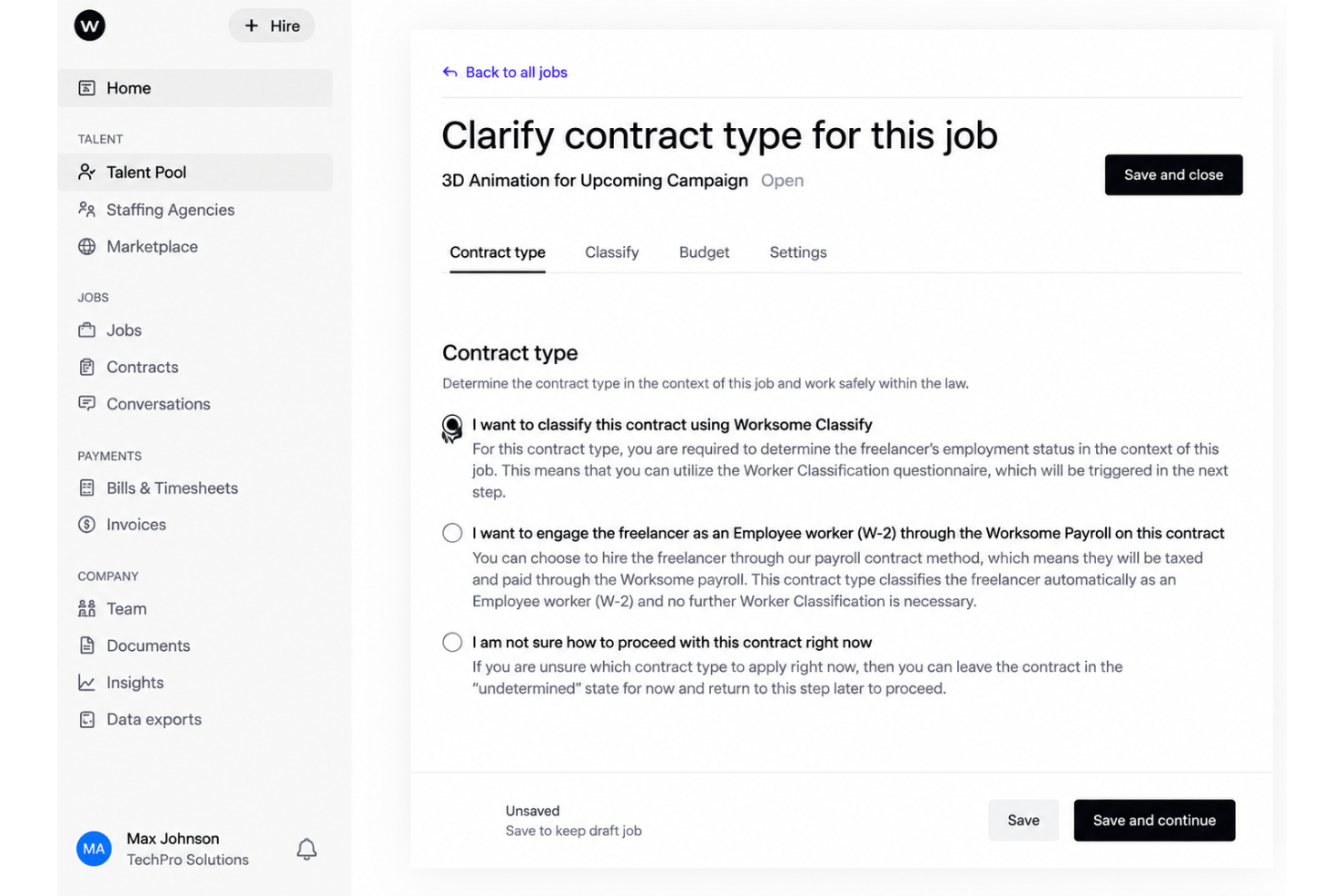
Ease of Use
Worksome is straightforward to learn and navigate, with clear onboarding workflows that guide you through compliance checks, document uploads, and payouts. I like how each contractor has a centralized profile and that payment, contract, and compliance tasks are grouped in a single dashboard. The limited integration options mean more manual steps if you use other HR tools, but day-to-day contractor management feels intuitive and well-organized.

Integrations
Worksome integrates with SAP SuccessFactors, Sage, Workday, Xero, Netsuite, Quickbooks, Asana, Trello, and monday.com among others.
Worksome also offers a public API and connects with third-party integration tools like Zapier to expand its connectivity.

Worksome Specs
- 2-Factor Authentication
- 360 Degree Feedback
- API
- Application Tracking
- Attendance Tracking
- Batch Permissions & Access
- Budgeting
- Calendar Management
- Dashboard
- Data Export
- Data Import
- Data Visualization
- Employee Database
- Employee Engagement
- Employee Incentive Management
- Employee Onboarding
- Expense Tracking
- External Integrations
- Feedback Management
- Forecasting
- Multi-User
- Notifications
- Onboarding
- Payroll
- Project Management
- Scheduling
- Time Management
- Timesheets
- Travel Management
- Vacation & Absence Calendar