

Ekipler yoğun takvimler, uzaktan iş birliği ve hızla ilerleyen projelerle uğraşırken etkili toplantılar yürütmek giderek zorlaştı. Pek çok kişi işi gerçekten tartışmaktan çok koordinasyon sağlamaya, not almaya ve takip işlemlerine zaman harcıyor. Yapay zekâ toplantı asistanları; deşifre, not alma, eylem maddelerini çıkarma ve gündem yönetimi gibi görevleri üstlenerek ekibinizin sohbete odaklanmasına yardımcı olabilir.
Hangi araçların gerçekten zaman kazandırdığını, hangilerinin ise yalnızca gürültü eklediğini anlamak için çok çeşitli yapay zekâ toplantı asistanı araçlarını test edip inceledim. Bu rehberdeki araçlar, her ekip veya sektörde daha anlaşılır belgeler oluşturmayı, daha sorunsuz takip süreçlerini ve daha verimli toplantı rutinlerini destekliyor.
Bu makalede, özellikleri, güçlü yönleri ve ideal kullanım alanları hakkında bilgilerle birlikte en iyi önerilerimi bulacaksınız. Makalenin sonunda, hangi yapay zekâ toplantı asistanlarının toplantılarınızı planlama, yürütme ve gözden geçirme şeklinizi anlamlı ölçüde iyileştirebileceği konusunda net bir fikre sahip olacaksınız.
Why Trust Our Software Recommendations
6,700+
Reviews
20
Industry experts
16+
Evaluation factors
14
Years
Our team has been testing and reviewing software since 2012. As HR experts ourselves, we know how difficult—and important—it is to choose the right software.
For this guide, we evaluated tools using hands-on testing and independent research, scoring tools using our selection criteria. We also draw on insights from industry thought leaders and practicing HR experts.
Our reviews reflect our human editorial judgment, not a sales pitch.
Expert reviewers:
- Phil GrayCOO
 Kim BehnkeHR Tech Editor & Analyst
 Josh BarkerPeople Ops Manager

Yapay Zekâ Toplantı Asistanı Karşılaştırma Tablosu
Bu karşılaştırma tablosu, en iyi yapay zekâ toplantı asistanı seçimlerimin fiyatlandırma ayrıntılarını özetliyor:
Sorted by: Default
| Tool | Starting Price | Website | |
|---|---|---|---|
Best for syncing action items to boards | 4.6 out of 5 | $9/user/month Free plan + 14-day trial available | Book Demo |
Best for team feedback | 4.7 out of 5 | $7/user/month Free plan available | Website |
Best for meeting insights | 4.6 out of 5 | $19/user/month 14-day free trial + free demo available | Website |
Best for project scheduling | 4.2 out of 5 | $19/seat/month Free trial available | Website |
Best for task automation | 4.3 out of 5 | $10/user/month Free plan + free demo available | Website |
Best for real-time transcription | Not rated | $8.33/user/month Free plan available | Website |
Best for noise cancellation | Not rated | $8/user/month Free plan + trial available | Website |
Best for meeting analytics | Not rated | $15/month Free plan available | Website |
Best for note-taking | Not rated | $15/user/month Free plan available | Website |
Best for meeting summaries | Not rated | $10/user/month Free plan available | Website |


En İyi Yapay Zekâ Toplantı Asistanı İncelemesi
Aşağıda, kısa listeme giren en iyi yapay zekâ toplantı asistanı araçlarının ayrıntılı özetlerini bulabilirsiniz. İncelemelerim, sizin için en iyi aracı bulmanıza yardımcı olmak amacıyla her aracın temel özelliklerine, artılarına \u0026 eksilerine, entegrasyonlarına ve ideal kullanım alanlarına ayrıntılı bir bakış sunuyor.
 Best for syncing action items to boards
- Free plan + 14-day trial available
- From $9/user/month (billed annually)
Visit WebsiteCustomer Rating:4.6/5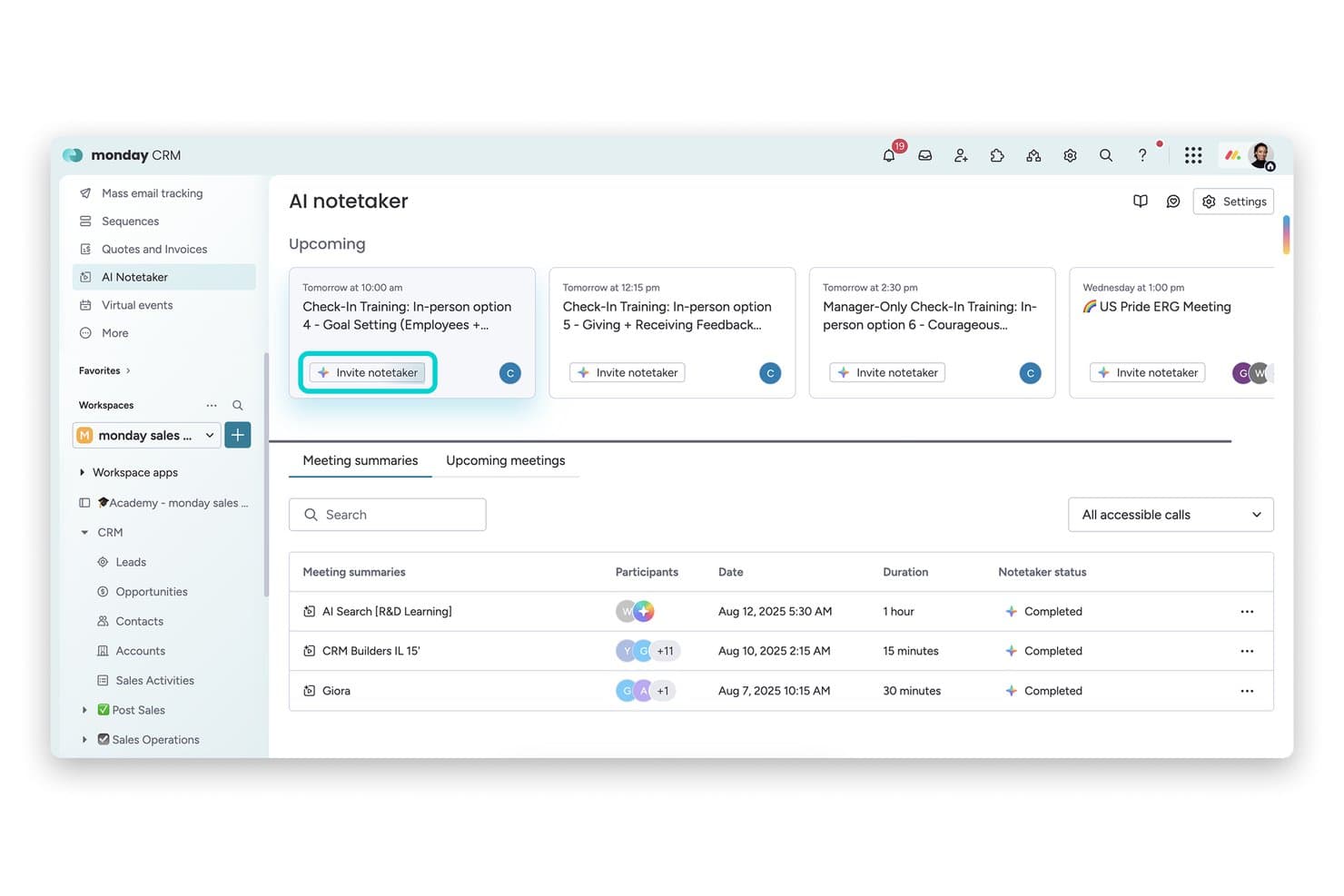
monday AI Workspace offers an AI Notetaker feature that displays upcoming meetings. monday AI Workspace is a work management platform with a built-in AI meeting assistant that transcribes calls on Zoom, Teams, and Google Meet, generates summaries, and converts meeting action items directly into board tasks.
Who Is monday AI Workspace Best For?
It's a strong fit for project-driven teams that already run their work inside monday.com and want meeting action items to land directly in their boards.
Why I Picked monday AI Workspace
monday AI Workspace earns its spot on my shortlist because no other meeting assistant connects conversation to tracked work as directly. When AI Notetaker captures action items from a call, I can push them straight to any monday board as subitems in just a few clicks. I also like that the bot auto-joins scheduled meetings two minutes early, so nothing gets missed before the conversation even starts.
monday AI Workspace Key Features
- AI-powered meeting transcriptions: Transcribes Zoom, Teams, and Google Meet calls with speaker attribution in real time.
- AI-generated meeting summaries: Creates structured overviews of meeting content using built-in AI tools.
- Integrated board automations: Lets you automate workflow actions based on meeting outputs or changes to items.
- Multi-platform workspace templates: Provides customizable templates for different meeting and task types within the platform.
monday AI Workspace Integrations
monday AI Workspace offers over 200 native integrations, including Zoom, Microsoft Teams, Google Meet, Google Workspace, Slack, Salesforce, and Outlook. It also supports Zapier and provides an API for custom integrations.
Pros and Cons
Pros:
- AI-generated summaries available within workspace boards
- Auto-joins meetings and transcribes with speaker labels
- Syncs meeting tasks to monday boards instantly
Cons:
- Lacks conversation analytics or sentiment tracking
- No interview or HR-specific summary templates
Learn more about monday AI Workspace: Best for team feedback
- Free plan available
- From $7/user/month (billed annually)
Visit WebsiteCustomer Rating:4.7/5
Fellow is a meeting tool that helps teams run structured meetings and share feedback. Fellow earns a spot here because it's built for feedback-driven cultures, not just meeting notes. Its feedback features tie in directly with AI meeting summaries, so teams can capture decisions and peer input right as they're made. I like that you can request feedback in context and pull insights into one place, which makes follow-ups much more actionable.
Fellow’s Best For
- Teams prioritizing feedback and action items from meetings
- Managers who want to connect meetings directly to performance reviews
Fellow’s Not Great For
- Those needing detailed automated transcriptions or voice-based AI actions
- Teams seeking a pure scheduling or calendar assistant
What Sets Fellow Apart
Fellow stands out by making feedback and meeting follow-up a central part of the workflow, not an afterthought. Unlike tools like Otter.ai that focus mainly on recording and transcribing, Fellow expects you to start and end meetings with defined outcomes and actionable feedback. This works best when you want meeting notes to connect directly to growth conversations and performance reviews.
Tradeoffs with Fellow
Fellow optimizes for feedback and meeting outcomes, but that emphasis means you lose out on full voice transcription and some AI-driven automation that other meeting assistants provide.
Pros and Cons
Pros:
- Meeting analytics with talk-time data
- Built-in team feedback and action tracking
- Collaborative agendas for structured meetings
Cons:
- Setup needed for workflow automation
- Limited offline functionality
Learn more about Fellow: Best for meeting insights
- 14-day free trial + free demo available
- From $19/user/month (billed annually)
Visit WebsiteCustomer Rating:4.6/5
Avoma is an AI tool that transcribes meetings and gives insights to improve productivity. Avoma makes my shortlist because it goes beyond basic transcription with meeting intelligence I haven't seen elsewhere. I recommend Avoma when you want to capture exact action items, sentiment, and speaker insights you can actually use after the call. What I like is how quickly teams can search and review specific topics or trends from recorded meetings—nothing gets lost in the shuffle.
Avoma’s Best For
- Sales, customer success, and recruiting teams needing meeting insights
- Teams that want searchable conversation records and sentiment analysis
Avoma’s Not Great For
- Organizations with strict data residency or privacy requirements
- Those prioritizing real-time meeting collaboration over post-call analysis
What sets Avoma apart
Avoma organizes meeting information around searchable highlights, action items, and topics so you don’t lose insights in lengthy call recordings. It expects you to reference conversations later, not just during live meetings. Unlike Google Meet’s built-in summaries or tools like Otter, Avoma gives you event-based navigation and speaker insights that make finding meaning fast, especially for teams reviewing high-stakes customer calls.
Tradeoffs with Avoma
Avoma optimizes for post-meeting analysis and insights, but that means you give up real-time editing and collaboration during meetings. Teams expecting dynamic in-call whiteboarding or simultaneous note-taking often still use a second tool.
Pros and Cons
Pros:
- Offers real-time transcription
- Includes AI call scoring and topic tracking
- Provides detailed meeting analytics
Cons:
- Requires internet connection
- Advanced analytics require paid add-ons
Learn more about Avoma: Best for project scheduling
- Free trial available
- From $19/seat/month (billed annually)
Visit WebsiteCustomer Rating:4.2/5
Motion is a project management tool that automates scheduling and task management for teams. Motion earns its spot here because it uniquely blends project scheduling with smart AI to automate meeting planning. When I tested its AI calendar assistant, I saw it dynamically rearrange tasks and meetings based on shifting project priorities.
What I appreciate most is how Motion keeps calendars, deadlines, and meetings in sync for teams that juggle frequent project-based meetings. It saves time by automatically finding and booking the best meeting slots around existing project work.
Motion’s Best For
- Teams with frequent project-based meetings needing dynamic scheduling
- Managers who want AI to automate calendar updates
Motion’s Not Great For
- Simple teams without shifting meeting priorities
- Organizations expecting detailed meeting transcripts and recording
What sets Motion apart
Motion stands out by using AI to constantly reorganize meetings and tasks in real time. Unlike traditional AI assistants that just summarize or record, Motion expects you to let the tool actively manage calendar conflicts and shifting priorities as project needs change. In practice, I see this working best when schedules are unpredictable and meetings compete with project deadlines.
Tradeoffs with Motion
Motion optimizes for adapting to shifting schedules, but you give up advanced meeting note-taking and recording. This means teams who need detailed meeting documentation should look elsewhere.
Pros and Cons
Pros:
- Supports multiple meeting platforms
- High transcription accuracy
- Converts notes to tasks
Cons:
- Limited customization in templates
- Limited offline functionality
Learn more about Motion: Best for task automation
- Free plan + free demo available
- From $10/user/month (billed annually)
Visit WebsiteCustomer Rating:4.3/5
Fireflies.ai is an AI meeting assistant that transcribes talks and organizes tasks for teams. Fireflies.ai earns a spot on my list because its AI meeting assistant doesn’t just transcribe, but actively automates meeting outcomes. I like that you can instantly highlight action items and set automated follow-ups directly from transcripts, so nothing falls through the cracks after a call. This works best when your team is overwhelmed by manual note-taking or repetitive post-meeting tasks—Fireflies.ai turns those into click-and-go actions that save you real time.
Fireflies.ai’s Best For
- Teams wanting automated meeting summaries and follow-ups
- Managers who track action items from recurring calls
Fireflies.ai’s Not Great For
- Organizations needing highly secure, on-premise storage
- Teams with complex privacy or sensitive compliance demands
What sets Fireflies.ai apart
Fireflies.ai expects your meetings to generate actionable outcomes, not just notes. Unlike Otter.ai, which mainly focuses on transcription and data capture, Fireflies.ai leans into automating what happens after the call. In practice, this suits managers and project leads who want action items automatically surfaced and followed up, instead of moving tasks around after every meeting.
Tradeoffs with Fireflies.ai
Fireflies.ai optimizes for automation and fast follow-ups, but you lose some manual control over privacy and storage, which can be a dealbreaker if your process requires on-premise recording or tight data governance.
Pros and Cons
Pros:
- AI Apps for follow-up tasks
- Supports many recording workflows
- Automated action item creation
Cons:
- Can slow down with long recordings
- Accuracy varies with audio quality
Learn more about Fireflies.ai: Best for real-time transcription
- Free plan available
- From $8.33/user/month (billed annually)

Otter.ai is an AI tool that transcribes meetings and makes summaries for sales, education, and media professionals. Otter earns a spot on my list because its live transcription keeps up with fast-paced meetings without missing speaker changes or key details. This is the first tool I go to when real-time capture is essential, especially in environments where you can't afford to pause for notes or review recordings later.
What I appreciate is how it instantly generates searchable, shareable transcripts and highlights action items live as the conversation unfolds. If you're in meetings that move quickly or handle lots of speakers, Otter handles the workload reliably and gives you a full, accurate record right away.
Otter’s Best For
- Teams needing live, searchable meeting transcriptions
- Fast-paced meetings with multiple, quickly changing speakers
Otter’s Not Great For
- Sensitive conversations needing advanced privacy controls
- Teams requiring meeting summaries or advanced analytics
What sets Otter apart
Otter focuses on capturing conversations as they happen, making live transcription its core workflow. Instead of structured collaboration like you see with Google Workspace or meeting summaries like Fireflies, it expects teams to use transcripts as a single source of truth, often in high-velocity or multi-speaker meetings.
You get transcripts you can search and reference almost immediately, which helps when topics move fast.
Tradeoffs with Otter
Otter optimizes for speed and live accuracy, but you give up deep built-in meeting insights or summaries, so teams spend more time digging through transcripts for decisions or action items.
Pros and Cons
Pros:
- Syncs notes to major platforms
- Action item identification
- Voice command functionality
Cons:
- May struggle with accents
- Audio transcription may require some manual review
Learn more about Otter: Best for noise cancellation
- Free plan + trial available
- From $8/user/month (billed annually)

Krisp is a noise-canceling app that helps remote workers and teams have clear, distraction-free calls. Krisp makes the cut for best AI meeting assistant because it uses advanced voice AI to remove background noise in real time, something I haven’t seen matched by other meeting tools. I usually recommend Krisp when teams or individuals work from noisy environments and can’t risk distractions bleeding into meetings.
What I really like is how Krisp’s noise cancellation can be toggled on for both input and output, so you never have to worry about what’s happening in your space or the other person’s. In practice, I’ve found meetings are just less stressful with it on, especially with kids, pets, or city noise nearby.
Krisp’s Best For
- Remote workers in noisy environments needing distraction-free calls
- Teams that join meetings from shared or unpredictable workspaces
Krisp’s Not Great For
- Users who want AI-driven note-taking and meeting summaries
- Teams that require built-in scheduling or collaboration tools
What Sets Krisp Apart
Krisp is focused on making remote meetings quieter by blocking background sounds before they reach the call. It assumes you value having a clean audio channel over capturing and processing meeting content. In practice, I’ve noticed this suits people who work from busy or unpredictable spaces, rather than teams who want deep collaboration tools bundled in. Unlike Otter.ai, Krisp doesn’t emphasize transcripts or searchable notes.
Tradeoffs with Krisp
Krisp optimizes for real-time audio clarity, but you sacrifice meeting notes and searchable content, so you’ll need a second tool if note capture is essential.
Pros and Cons
Pros:
- Minimal impact on system resources
- Works across multiple platforms
- Improves call clarity
Cons:
- Performance varies with device setup
- Limited features beyond audio processing
Learn more about Krisp:

Read.ai helps teams analyze meetings and improve communication. Read AI is on my shortlist because it gives meeting analytics you can act on, not just raw notes or transcripts. When I tested it, I found the automated sentiment and talk-time breakdowns actually change how teams review engagement and speaking balance. I like how you can spot when meetings drift off track, then use the analytics to coach teams and improve future sessions.
Read AI's Best For
- Teams that want actionable meeting analytics and insights
- Organizations focused on improving meeting engagement and participation
Read AI's Not Great For
- Anyone looking for full-featured AI note-taking or summaries
- Teams that rarely analyze or follow up on meeting data
What sets Read AI apart
Read AI takes a meeting analytics approach instead of just capturing transcripts or action items like Otter or Fireflies. It assumes you want to understand how meetings actually run, not just what gets said. In practice, I see the value when you want to fix common issues like team members dominating the agenda or overall disengagement. Unlike note-taking tools, it shows you where your meeting structure can improve.
Tradeoffs with Read AI
Read AI optimizes for analytics and meeting diagnostics, so you give up strong AI note-taking or summary-focused features. That means you may still need another tool to capture action items or provide detailed written recaps.
Pros and Cons
Pros:
- AI search across meetings and messages
- Automatic recaps and insights
- Engagement and participation analytics
Cons:
- Advanced features only on paid plans
- Setup may require onboarding
Learn more about Read AI:

MeetGeek is an AI tool that takes and organizes meeting notes. Meetgeek.ai earns a spot on my shortlist for its focus on automatic, structured meeting note-taking that stays accurate as conversations evolve. This isn’t just about live transcription—Meetgeek.ai generates shareable summaries, highlights decisions, and even picks up on action items as people talk.
What I like most is how you can search, review, and revisit notes instantly, which solves the "what did we agree on?" headache right away. It fits well when you need reliable, searchable meeting records for recurring team syncs and client calls.
Meetgeek.ai’s Best For
- Teams that need accurate, automatic meeting notes
- Organizations tracking decisions and action items across calls
Meetgeek.ai’s Not Great For
- Teams needing advanced video conferencing or collaboration features
- Groups that want full meeting management or scheduling
What sets Meetgeek.ai apart
Meetgeek.ai flips the script on meeting documentation by actively capturing and structuring key moments while conversations are happening. Unlike Otter.ai, which focuses mainly on transcription, Meetgeek.ai organizes highlights and action items in real time so you can reference outcomes quickly without trawling through full transcripts.
I see this working best when meetings move fast and decisions need to be recalled without extra manual cleanup.
Tradeoffs with Meetgeek.ai
Meetgeek.ai optimizes for automation and clarity in note capture, but that comes at the cost of broader meeting management features. If you want one platform for video calls, scheduling, and deep collaboration, you’ll need to pair this with another tool.
Pros and Cons
Pros:
- Browser-based recording option
- Automatic call-type summaries
- Detailed and searchable transcripts
Cons:
- Limited offline functionality
- Limited customization options
Learn more about Meetgeek.ai:

Sembly is an AI tool that transcribes meetings and gives simple summaries. Sembly earns a spot on my list for how well it turns conversations into clear, smart summaries you can actually use. When meeting notes need to be accurate and shareable—no more messy transcriptions or missed details—I’ve found Sembly’s AI-generated summaries catch people up fast and with important context. What I appreciate most is how action items, speaker highlights, and key decisions are neatly organized so teams can follow up without chasing down recordings.
Sembly’s Best For
- Teams needing fast, actionable meeting summaries
- Organizations handling a high volume of virtual meetings
Sembly’s Not Great For
- Users needing in-depth voice analytics or sentiment analysis
- Teams preferring manual note-taking or highly formatted outputs
What sets Sembly apart
Sembly approaches meetings by automatically breaking conversations into usable summaries and turning long calls into short, action-focused recaps. Unlike tools like Otter.ai, which mostly emphasize transcription accuracy, Sembly highlights context, decisions, and next steps in a concise, digestible format. This works well if you want clarity without sifting through long transcripts.
Tradeoffs with Sembly
Sembly optimizes for quick, summary-focused outputs, but this means you lose detailed capturing of every spoken nuance. In practice, teams that need full verbatim transcripts or extensive analytics may feel limited.
Pros and Cons
Pros:
- Saves time on meeting reviews
- Generates actionable insights
- Offers keyword search functionality
Cons:
- Complexity in advanced features
- Limited customization options
Learn more about Sembly:
Diğer Yapay Zekâ Toplantı Asistanları
İşte kısa listeme girmeyen ancak yine de göz atmaya değer bazı ek yapay zekâ toplantı asistanı seçenekleri:
- 11JamieBest for bot-free note-taking
- 12Board IntelligenceBest with AI-driven board governance tools
- 13CluelyBest for team collaboration
- 14Meeting.aiBest for agenda management
- 15GongBest for sales team insights
- 16TactiqBest for real-time captions
- 17NottaBest for language translation
- 18BubblesBest for asynchronous collaboration
- 19tl;dvBest for timestamped meeting highlights
- 20Zoom AI CompanionBest for integrated video conferencing
How I Evaluate AI Meeting Assistants
Any tool can join a call and hit record, but I look for AI that gives HR teams something back—like walking out of a candidate debrief with a ready-made summary instead of scattered notes. I evaluate each tool on two levels: the core functionality it needs to qualify and the differentiating factors that set one option apart from the rest.
Core Functionality (Table Stakes For This List)
When I'm selecting tools for my list, I rank each one on a scale from 0 (does not offer the functionality) to 5 (excels in this area) for each core functionality listed below. Then, I calculate the tool's total score into a percentage. Each tool needs to achieve a minimum total score of 65% to be considered for inclusion.
- Automated Meeting Transcription: I evaluate transcript accuracy, speaker attribution, and language support—especially in fast-paced panel interviews where multiple voices overlap.
- AI-Generated Summaries: Good summaries should go beyond raw bullet points. I look for structured recaps tailored to the meeting type, like a candidate interview debrief or 1:1 check-in.
- Action Item Extraction: I check whether the tool picks up on next steps organically from conversation, like a hiring manager agreeing to send a take-home assignment by Friday.
- Video Conferencing Integrations: Each tool should connect natively with Zoom, Microsoft Teams, and Google Meet at a minimum, with smooth calendar-based auto-join.
- Searchable Meeting Repository: I look for organized storage where an HR team can search past transcripts by speaker, keyword, or date—useful when revisiting notes across a full interview loop.
- Conversation Intelligence & Analytics: Metrics like talk-time ratios, sentiment tracking, and topic trends help HR teams spot patterns across recurring meetings such as stay interviews or skip-levels.
Once I have a list of tools that meet this criteria, I consider what sets each platform apart.
Differentiating Factors (What Sets Vendors Apart)
Here's how I compare and contrast different vendors:
Standout Features
ATS and HRIS integrations matter a lot here. I look for tools that push interview notes or meeting summaries directly into platforms like Greenhouse or Workday, saving recruiters from manual copy-paste after every call. Bias detection and PII redaction are equally valuable—especially when documenting employee relations conversations where sensitive details need to stay protected. I also check for AI-generated interview scorecards that help hiring panels evaluate candidates consistently across a full loop.
Beyond Features
Compliance and data privacy top my list. HR meetings often touch sensitive topics like terminations or accommodation requests, so I check for SOC 2 Type II certification, configurable data residency, and consent management workflows. Security goes hand-in-hand here—role-based access controls matter when an employee relations specialist's recordings shouldn't be visible to the broader team. I also evaluate pricing structures to understand whether per-seat models work for a small recruiting team or if volume-based enterprise plans better fit an organization-wide rollout.
Yapay Zekâ Toplantı Asistanı Nasıl Seçilir?
Uzun özellik listeleri ve karmaşık fiyatlandırma yapıları arasında kaybolmak kolaydır. Kendinize özgü yazılım seçim sürecinizi yürütürken odaklanmanıza yardımcı olmak için göz önünde bulundurmanız gereken faktörleri içeren bir kontrol listesi hazırladım:
| Faktör | Dikkat Edilmesi Gerekenler |
| Ölçeklenebilirlik | Araç ekibinizle birlikte büyüyebilir mi? Performans sorunları yaşamadan artan kullanıcı veya toplantı sayısını ne kadar iyi yönettiğini değerlendirin. Büyümeye uyum sağlayan esnek planları tercih edin. |
| Entegrasyonlar | Mevcut araçlarınıza bağlanabiliyor mu? İş akışında kesintileri önlemek için Zoom, Slack veya Google Takvim gibi mevcut platformlarınızla entegre olup olmadığını kontrol edin. |
| Özelleştirilebilirlik | Aracı ihtiyaçlarınıza göre uyarlayabilir misiniz? Ekibinizin süreçleriyle uyumlu ayarları, şablonları veya iş akışlarını değiştirme seçeneklerini arayın. |
| Kullanım kolaylığı | Kullanıcı dostu mu? Arayüzü ve gezinme özelliklerini değerlendirin. Sezgisel bir araç, ekibiniz için öğrenme süresini ve benimseme engellerini azaltır. |
| Uygulama ve işe alıştırma | Başlamak ne kadar kolay? Kurulum sırasında sunulan kaynakları ve desteği değerlendirin. İşe alıştırmayı hızlandırmak için eğitim materyalleri veya ürün tanıtımlarını tercih edin. |
| Maliyet | Bütçenize uygun mu? Fiyatlandırma yapılarını karşılaştırın ve gizli ücretleri kontrol edin. Maliyetin ekibinize sağladığı değerle uyumlu olduğundan emin olun. |
| Güvenlik önlemleri | Veri korumaları mevcut mu? Hassas toplantı bilgilerini korumak için aracın veri şifreleme ve uyumluluk açısından sektör standartlarına uyduğunu doğrulayın. |
| Destek erişilebilirliği | Gerektiğinde yardıma erişilebiliyor mu? Sohbet, e-posta veya telefon gibi destek kanallarının kullanılabilirliğini kontrol edin ve bunların ekibinizin ihtiyaçlarıyla uyumlu olduğundan emin olun. |
YZ Toplantı Asistanı Nedir?
YZ toplantı asistanı, toplantıların yönetimini otomatikleştirmeye ve iyileştirmeye yardımcı olmak için tasarlanmış bir araçtır. Bu araçlar genellikle proje yönetimi, satış ve İK gibi alanlarda çalışan profesyoneller tarafından kullanılır ve verimliliği ve düzeni artırarak değer sağlar.
Gerçek zamanlı yazıya dökme, otomatik not alma ve görev atama gibi özellikler, kullanıcıların toplantı ayrıntılarını doğru şekilde kaydetmesine ve takip eylemlerinin net olmasını sağlamasına yardımcı olur. Genel olarak bu araçlar zaman kazandırır ve toplantıları yönetmenin idari yükünü azaltır.
YZ Toplantı Asistanının Özellikleri
Bir YZ toplantı asistanı seçerken aşağıdaki temel özelliklere dikkat edin:
- Gerçek zamanlı yazıya dökme: Toplantılar sırasında söylenenleri kaydederek doğru ve anında belgelendirme olanağı sağlar.
- Otomatik not alma: Ayrıntılı notları otomatik olarak oluşturur, zamandan tasarruf sağlar ve hiçbir şeyin atlanmamasını güvence altına alır.
- Toplantı özetleri: Görüşmelere ilişkin kısa genel bakışlar sunarak kullanıcıların önemli noktaları hızlıca anlamasına yardımcı olur.
- Görev atama: Toplantı görüşmelerinden otomatik olarak görevler oluşturur ve atar; böylece takip eylemleri net olur.
- Anahtar kelime etiketleme: Kullanıcıların önemli konuları kolayca başvurmak ve aramak üzere etiketlemesine olanak tanır.
- Sesli komutla etkinleştirme: Araç eller serbest şekilde kontrol edilebilir, toplantılar sırasında çoklu görev yürütme becerisini geliştirir.
- Dil çevirisi: Toplantıları gerçek zamanlı olarak çevirerek çok dilli ekipleri destekler.
- Duygu analizi: Görüşmelerin duygusal tonunu değerlendirerek katılımcıların etkileşimi hakkında içgörüler sunar.
- Entegrasyon özellikleri: İş akışının sürekliliğini korumak için Zoom, Slack ve Google Takvim gibi mevcut araçlara bağlanır.
- Güvenlik önlemleri: Şifreleme ve sektör standartlarına uyumluluk yoluyla hassas verileri korur.
YZ Toplantı Asistanının Faydaları
Bir YZ toplantı asistanını uygulamak ekibiniz ve işletmeniz için çeşitli faydalar sağlar. Yararlanabileceğiniz birkaç fayda şunlardır:
- Zaman tasarrufu: Otomatik not alma ve görev atama, idari işlere harcanan zamanı azaltarak ekibinizin daha önemli çalışmalara odaklanmasını sağlar.
- Geliştirilmiş doğruluk: Gerçek zamanlı yazıya dökme, toplantı ayrıntılarının doğru şekilde kaydedilmesini sağlayarak yanlış anlaşılmaları en aza indirir.
- Geliştirilmiş iş birliği: Entegrasyon özellikleri, Zoom ve Slack gibi araçlarla sorunsuz bağlantı kurulmasını sağlayarak ekibinizin iş akışını kesintisiz tutar.
- Daha iyi düzen: Anahtar kelime etiketleme ve toplantı özetleri, bilgilerin düzenli ve kolay erişilebilir tutulmasına yardımcı olarak verimliliği artırır.
- Artırılmış erişilebilirlik: Dil çevirisi özellikleri çok dilli ekipleri destekleyerek toplantıları tüm katılımcılar için kapsayıcı hâle getirir.
- Eyleme dönüştürülebilir içgörüler: Duygu analizi ve toplantı analizleri, ekip dinamikleri ve etkileşim düzeyleri hakkında değerli içgörüler sunar.
YZ Toplantı Asistanının Maliyetleri ve Fiyatlandırması
Bir YZ toplantı asistanı seçmek, mevcut çeşitli fiyatlandırma modellerinin ve planların anlaşılmasını gerektirir. Maliyetler özelliklere, ekip büyüklüğüne, eklentilere ve daha fazlasına göre değişir. Aşağıdaki tabloda YZ toplantı asistanı çözümlerinde yaygın planlar, bunların ortalama fiyatları ve genellikle sunulan özellikler özetlenmektedir:
AI Toplantı Asistanı için Plan Karşılaştırma Tablosu
| Plan Türü | Ortalama Fiyat | Yaygın Özellikler |
| Ücretsiz Plan | $0 | Temel transkripsiyon, sınırlı toplantı dakikaları ve temel entegrasyonlar. |
| Kişisel Plan | $7-$19.99/kullanıcı/ay | Sınırsız transkripsiyon, toplantı özetleri ve temel entegrasyonlar. |
| İşletme Planı | $29-$50/kullanıcı/ay | Gelişmiş analizler, görev atamaları ve iyileştirilmiş entegrasyonlar. |
| Kurumsal Plan | $60-$100/kullanıcı/ay | Özelleştirilebilir özellikler, özel destek ve üst düzey güvenlik önlemleri. |
AI Toplantı Asistanı SSS
AI toplantı asistanları hakkında sık sorulan bazı soruların yanıtları:
AI yüz yüze yapılan bir toplantı sırasında not alabilir mi?
Evet, birçok AI toplantı asistanı yüz yüze yapılan toplantılar sırasında not alabilir. Bu araçlar genellikle sesi yakalamak ve notlara dönüştürmek için mobil uygulamalar kullanır. Bu özellik, manuel not alma sırasında önemli ayrıntıların gözden kaçabileceği uzun tartışmalar için faydalı olabilir. Uygulamanın yüz yüze toplantı işlevini desteklediğinden emin olun.
AI toplantı asistanlarının riskleri nelerdir?
AI toplantı asistanlarını kullanmak, açık konuşmayı kısıtlamak gibi riskler taşıyabilir. Bazı katılımcılar, söylediklerinin yazıya döküldüğünü veya kaydedildiğini bilmekten rahatsız olabilir. Tüm katılımcılar için rahat bir ortamı korumak amacıyla bu araçların nasıl ve ne zaman kullanılacağına ilişkin kurallar belirlemeyi düşünün.
Bir AI asistanı kullanmak güvenli midir?
AI asistanları, özellikle gizlilik konusunda güvenlik kaygılarına yol açabilir. Bu araçlar genellikle e-postalar ve takvimler gibi hassas bilgilere erişim gerektirir. Verilerinizi korumak için seçtiğiniz aracın gizlilik düzenlemelerine uygun olduğundan ve güçlü güvenlik önlemlerine sahip olduğundan emin olun.
AI toplantı asistanları birden fazla konuşmacıyı nasıl ele alır?
Çoğu AI toplantı asistanı, gelişmiş algoritmalar kullanarak birden fazla konuşmacıyı tanımlayabilir ve birbirinden ayırabilir. Bu özellik, transkripsiyonların doğru olmasını ve her katılımcının katkılarının doğru kişiye atfedilmesini sağlar. Bir araç seçmeden önce konuşmacı tanımlamadaki doğruluğunu kontrol edin.
AI toplantı asistanları diğer araçlarla entegre olabilir mi?
Evet, birçok AI toplantı asistanı Zoom, Slack ve Google Calendar gibi platformlarla entegrasyonlar sunar. Bu entegrasyonlar, toplantı verilerini araçlarınız arasında senkronize ederek iş akışlarının kesintisiz olmasına yardımcı olur. Tercih ettiğiniz AI asistanının mevcut yazılım altyapınızla uyumluluğunu kontrol edin.
AI toplantı asistanları dil çevirisi sunar mı?
Bazı AI toplantı asistanları, çok dilli ekipler için faydalı olan gerçek zamanlı dil çevirisi sağlar. Bu özellik, toplantılar sırasında konuşulan kelimeleri farklı dillere çevirerek iletişimi geliştirebilir. Ekibinizin ihtiyaçlarını karşıladığından emin olmak için aracın desteklediği dilleri doğrulayın.