

Dürüst çalışan geri bildirimleri toplamak, güven oluşturmak ve iş yeri kültürünü geliştirmek için çok önemlidir; ancak bunu iyi yapmak her zaman kolay değildir. Özellikle geri bildirimlerin izlenebilir veya rahatsız edici olabileceği durumlarda çalışanlar endişelerini açıkça paylaşmakta tereddüt edebilir. Anonim çalışan geri bildirim araçları, insanların misilleme korkusu olmadan görüşlerini paylaşmaları için güvenli bir yol sunarak bu engelin ortadan kaldırılmasına yardımcı olur.
İletişimi ve karar alma süreçlerini gerçekten geliştiren araçlara odaklanarak İK yazılımlarını test edip inceleyerek yıllar geçirdim. Deneyimlerime göre doğru anonim geri bildirim platformu, sorunları erkenden ortaya çıkarabilir, anlamlı içgörüleri görünür kılabilir ve ekiplerin çalışan ihtiyaçlarına daha etkili şekilde yanıt vermesine yardımcı olabilir. Bu yazıda öne çıkan araçları paylaşacak ve bunları gerçek hayattaki İK ortamlarında etkili kılan özellikleri açıklayacağım.
Bu yazıda anonim geri bildirim araçları arasındaki en iyi seçimlerimi paylaşacağım. Sizin için en önemli özelliklere ve avantajlara odaklanan tarafsız incelemeler bulacaksınız. Ekibiniz için en uygun seçeneği birlikte bulalım.
Why Trust Our Software Recommendations
6,700+
Reviews
20
Industry experts
16+
Evaluation factors
14
Years
Our team has been testing and reviewing software since 2012. As HR experts ourselves, we know how difficult—and important—it is to choose the right software.
For this guide, we evaluated tools using hands-on testing and independent research, scoring tools using our selection criteria. We also draw on insights from industry thought leaders and practicing HR experts.
Our reviews reflect our human editorial judgment, not a sales pitch.
Expert reviewers:
- Phil GrayCOO
 Kim BehnkeHR Tech Editor & Analyst
 Josh BarkerPeople Ops Manager

Anonim Çalışan Geri Bildirim Aracı Karşılaştırma Tablosu
Bu karşılaştırma tablosu, en iyi anonim çalışan geri bildirim aracı seçimlerim için fiyatlandırma ayrıntılarını özetlemektedir:
Sorted by: Default
| Tool | Starting Price | Website | |
|---|---|---|---|
Best for employee listening and whistleblowing | 4.6 out of 5 | Pricing upon request Free demo available | Website |
Best with enforced anonymity rules | Not rated | $5/user/month Free plan + free trial + free demo available | Website |
Best for linking pulse surveys to performance data | 4.3 out of 5 | $3/user/month 30-day free trial | Website |
Best for interactive presentations | 4.7 out of 5 | $14/user/month Free plan available | Website |
Best for custom surveys | 4.6 out of 5 | $30/user/month Free plan available | Website |
Best for user-friendly interfaces | 4.7 out of 5 | $28/month Free plan available | Website |
Best for secure data handling | 4.6 out of 5 | $120/month Free plan available | Website |
Best for culture insights | 4.7 out of 5 | Pricing upon request Free demo available | Website |
Best for live audience polling | Not rated | $120/user/year | Website |
Best for budget-conscious users | Not rated | $20/month Free plan available | Website |


En İyi Anonim Çalışan Geri Bildirim Aracı İncelemeleri
Aşağıda, kısa listeme giren en iyi anonim çalışan geri bildirim araçlarının ayrıntılı özetlerini bulabilirsiniz. İncelemelerim, sizin için en iyi aracı bulmanıza yardımcı olmak amacıyla her aracın temel özelliklerine, artılarına ve eksilerine, entegrasyonlarına ve ideal kullanım alanlarına ayrıntılı bir bakış sunmaktadır.
 Best for employee listening and whistleblowing
- Free demo available
- Pricing upon request
Visit WebsiteCustomer Rating:4.6/5
Eletive surfaces anonymous feedback themes via AI-powered comment analysis. Eletive is a people intelligence platform that combines pulse surveys, lifecycle surveys, anonymous employee chat, AI-powered comment analysis, and a whistleblowing channel to collect and act on employee feedback.
Who Is Eletive Best For?
Eletive is a strong fit for HR leaders and people teams in mid-to-large organizations that need structured employee listening alongside a compliant whistleblowing channel.
Why I Picked Eletive
Eletive earns its spot on my shortlist because it's one of the few platforms that combines structured employee listening with a built-in whistleblowing channel that's compliant with the EU Whistleblowing Directive. I particularly like how Comments AI automatically surfaces themes and sentiment from open-text responses, so patterns in employee feedback don't get buried. The anonymous employee chat also lets managers follow up on survey comments without ever exposing who submitted them.
Eletive Key Features
- Pulse survey scheduling: Administrators can set up recurring or manual survey schedules targeting the whole organization or specific groups, with adaptive question rotation built in.
- Lifecycle surveys: Dedicated onboarding and exit surveys track employee experience at key stages, with results aggregated monthly by segment.
- eNPS correlation analysis: The platform identifies themes linked to promoter praise and detractor concerns, giving HR teams a clear view of what's driving scores.
- HRIS integrations: Eletive connects with systems like Workday, BambooHR, Personio, and SAP SuccessFactors to sync employee data and support segmented reporting.
Eletive Integrations
Eletive integrations include Workday, Personio, SAP SuccessFactors, Bamboo HR, Slack, and Microsoft Teams. API 2.0 and a data export API support custom connectivity, while integration count and native status aren't specified.
Pros and Cons
Pros:
- AI groups comments into themes and sentiment
- Adaptive pulses revisit low-scored topics
- Anonymous whistleblowing channel supports sensitive reporting
Cons:
- Reviewers report occasional reporting-data problems
- Comment replies identify the responding manager
Learn more about Eletive: Best with enforced anonymity rules
- Free plan + free trial + free demo available
- From $5/user/month
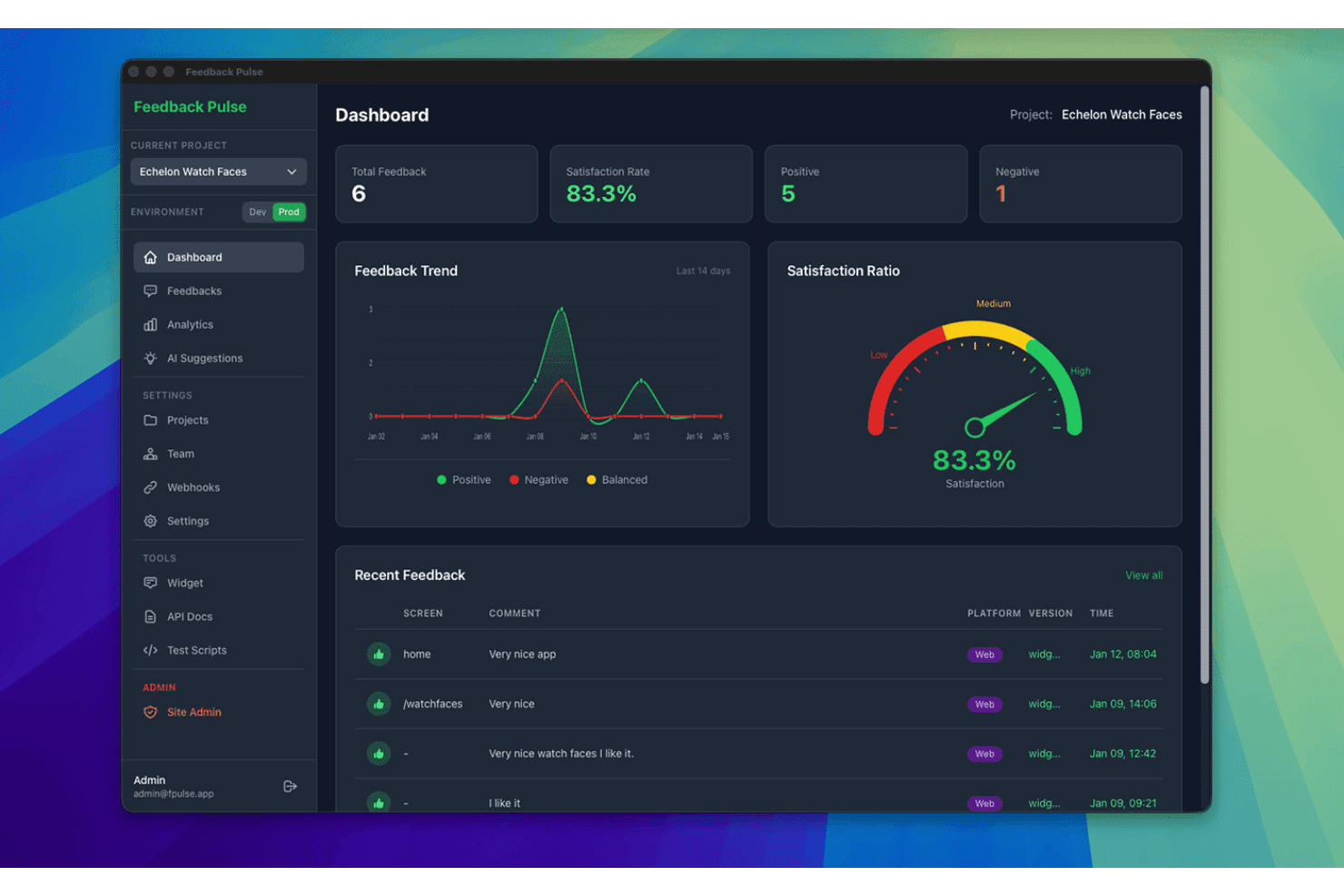
FeedbackPulse displays an anonymous employee feedback dashboard with satisfaction scores, feedback trends, and recent submissions. FeedbackPulse is an anonymous employee feedback software designed for HR and people teams to run automated pulse surveys, aggregate responses, and guarantee employee anonymity by enforcing technical privacy safeguards.
Who Is FeedbackPulse Best For?
HR and people teams at small to midsize organizations that need simple, secure, and technically enforced anonymous feedback.
Why I Picked FeedbackPulse
I picked FeedbackPulse as one of the best because it enforces technical anonymity rules that can't be bypassed. I like how the platform locks feedback results until at least three responses are received and never reveals respondent identities.
FeedbackPulse Key Features
- Automated pulse survey scheduling: Set up recurring pulse surveys with automatic delivery to all team members.
- Role-based admin access: Control survey management and results access with granular admin permissions.
- Filterable aggregate dashboards: View feedback trends by department, location, or manager without exposing individual responses.
- GDPR-compliant EU hosting: Store and process employee feedback securely on servers based in the EU.
FeedbackPulse Integrations
Native integrations are not currently listed.
Pros and Cons
Pros:
- Results locked until at least three responses are received
- Dashboards display only aggregated group data
- Technical anonymity threshold prevents response tracing
Cons:
- Limited advanced analytics and dashboards
- No two-way anonymous messaging
Learn more about FeedbackPulse: Best for linking pulse surveys to performance data
- 30-day free trial
- From $3/user/month (billed annually)
Visit WebsiteCustomer Rating:4.3/5
Small Improvements tracks employee survey trends grouped by performance rating. Small Improvements is a performance management platform that includes a pulse survey module for collecting confidential employee feedback, with built-in scheduling, eNPS, Slack delivery, and results grouped by department, role, and performance data.
Who Is Small Improvements Best For?
Small Improvements suits mid-sized teams that already use it for performance reviews and want to layer in pulse surveys without switching to a separate tool.
Why I Picked Small Improvements
I picked Small Improvements as one of the best because it's the only tool on this list that lets you group pulse survey results by performance rating data from your review cycles. That means if you run a recurring monthly pulse and want to see how engagement scores differ between high performers and the rest of the team, you can do that without leaving the platform. I also like how surveys can be answered directly inside Slack, which removes friction and keeps response rates up.
Small Improvements Key Features
- Recurring pulse survey scheduler: Set surveys to repeat weekly, biweekly, monthly, or quarterly, with a custom end date and automatic weekend skipping.
- eNPS question support: Run an employee Net Promoter Score question on its own or alongside custom rating and free-text questions in the same survey.
- Heatmap reporting: View results as a heatmap that highlights lower-scoring groups across departments, locations, and managers at a glance.
- Automatic survey reminders: The platform sends timed reminders to non-respondents—24 hours before deadline for weekly surveys and 7 days out for monthly ones.
Small Improvements Integrations
Small Improvements offers integrations with BambooHR, Workday, Personio, Rippling, Namely, Workable, Slack, Okta, OneLogin, and Google Workspace. Slack supports two-way survey delivery, allowing employees to answer directly within Slack.
Pros and Cons
Pros:
- Heatmaps reveal lower-scoring employee groups
- Recurring schedules support regular pulse checks
- Groups feedback by performance ratings
Cons:
- No anonymous replies or follow-up workflows
- Confidentiality falls short of true anonymity
Learn more about Small Improvements: Best for interactive presentations
- Free plan available
- From $14/user/month (billed annually)
Visit WebsiteCustomer Rating:4.7/5
Mentimeter supports interactive polls and quizzes with real-time results. Mentimeter is an interactive presentation tool designed for educators, corporate trainers, and event organizers to engage audiences through live polls and quizzes. It aims to enhance participation and gather real-time feedback during presentations.
Why I picked Mentimeter: It focuses on creating interactive presentations that keep your audience engaged with features such as multiple-choice polls and quizzes. The tool can also display real-time results that change as responses come in.
Standout features & integrations:
Features include customizable presentation templates that can be tailored for various themes, the ability to create word clouds and other visualizations of audience input, and audience Q&A hosting capabilities.
Integrations include Microsoft Teams, Zoom, Hopin, Google Slides, Microsoft PowerPoint, Google Meet, and more.
Pros and Cons
Pros:
- Interactive polls and quizzes
- Dynamic, real-time result displays Interactive polls and quizzes
- Strong support for education and training programs
Cons:
- Learning curve for new users
- Limited customization options
Learn more about Mentimeter: Best for custom surveys
- Free plan available
- From $30/user/month (billed annually)
Visit WebsiteCustomer Rating:4.6/5
SurveyMonkey offers customizable surveys and advanced reporting tools. SurveyMonkey is a versatile survey tool aimed at businesses, educational institutions, and nonprofits seeking to gather detailed feedback. It provides customizable surveys that cater to a wide range of data collection needs, from market research to employee engagement.
Why I picked SurveyMonkey: It focuses on offering custom surveys that allow you to tailor questions to your specific needs and goals. With features such as skip logic and question randomization, you can create dynamic surveys that improve response quality. The platform also provides advanced reporting tools to analyze your data.
Standout features & integrations:
Features include an extensive question bank to help you choose the right questions, mobile-friendly survey designs for on-the-go feedback collection, and automated survey distribution to help save you time.
Integrations include Salesforce, Mailchimp, HubSpot, Microsoft Teams, Google Drive, Dropbox, and more.
Pros and Cons
Pros:
- Automated distribution features
- Mobile app accessibility Automated distribution features
- Extensive question customization
Cons:
- May need technical support for setup
- May require training for advanced features
Learn more about SurveyMonkey: Best for user-friendly interfaces
- Free plan available
- From $28/month (billed annually)
Visit WebsiteCustomer Rating:4.7/5
Typeform's clean design enables a user-friendly survey experience. Typeform is an online form builder that caters to businesses, educators, and marketers looking to create engaging surveys and forms. It focuses on delivering an enjoyable user experience with its interactive and conversational design.
Why I picked Typeform: It offers a user-friendly design that enhances the experience for both creators and respondents. Its design features enable you to create conversational, visually appealing forms that help make filling out surveys engaging without overwhelming your audience.
Standout features & integrations:
Features include customizable, interactive layouts, logic jumps to personalize the form experience based on user responses, and the ability to embed forms on websites.
Integrations include Mailchimp, Slack, Google Forms, HubSpot, Salesforce, Airtable, Trello, and more.
Pros and Cons
Pros:
- Embedding options for smooth integration
- Logic jumps for personalized experiences
- Engaging conversational forms
Cons:
- Limited customization in lower tiers
- Data export complexities
Learn more about Typeform: Best for secure data handling
- Free plan available
- From $120/month (billed annually)
Visit WebsiteCustomer Rating:4.6/5
SmartSurvey offers surveys with encryption and customizable data collection. SmartSurvey is a survey tool designed for businesses and organizations that prioritize data security and compliance. It serves industries such as health care and government, offering secure survey creation and data collection.
Why I picked SmartSurvey: It provides secure data handling with features such as GDPR, CCPA, and HIPAA compliance and data encryption, keeping your data protected. The tool also offers customizable survey options to meet your specific requirements.
Standout features & integrations:
Features include automated calculations and reporting, scheduled surveys to routinely gather insights, and accessible surveys with assistive technology and multilingual support.
Integrations include Salesforce, Google Analytics, HubSpot, Mailchimp, Slack, Microsoft Teams, and more.
Pros and Cons
Pros:
- Accessible surveys available
- Automated analytics and reporting
- GDPR, CCPA, and HIPAA compliance
Cons:
- Potentially dated user interface
- Less suitable for smaller teams
Learn more about SmartSurvey:

CultureMonkey provides instant culture insights with pulse surveys. CultureMonkey is an employee engagement platform designed for HR teams and managers to gather insights into workplace culture. It helps businesses in various sectors understand employee sentiments and foster a positive work environment.
Why I picked CultureMonkey: It offers deep culture insights through its specialized feedback tools. With features such as pulse surveys, you can regularly check in on employee morale. The platform includes sentiment analysis to help you interpret feedback effectively and create an action plan for addressing employee concerns.
Standout features & integrations:
Features include customizable surveys that let you tailor questions to your company's needs, automated reporting to save time on data analysis, and benchmarking tools to compare your results with industry standards.
Integrations include Slack, Microsoft Teams, Google Workspace, Workday, WhatsApp, and more.
Pros and Cons
Pros:
- Automated reporting features
- Regular pulse surveys
- Offers deep culture insights
Cons:
- Limited custom questions in surveys
- Learning curve for new features
Learn more about CultureMonkey:

Poll Everywhere focuses on live polling with real-time results and engagement. Poll Everywhere is an interactive polling tool designed for university educators, corporate presenters, and event organizers to engage with audiences in real time. It allows users to create polls, quizzes, and Q&A sessions to gather live feedback and boost participation.
Why I picked Poll Everywhere: It focuses on live audience polling, making it a good option for interactive presentations and events. Features such as real-time response collection and instant result displays can help keep your audience engaged. The platform supports various question types, allowing you to tailor polls to your needs.
Standout features & integrations:
Features include customizable poll designs to match your branding, multi-device support for easy participation, and detailed reporting tools to analyze audience feedback after each session.
Integrations include PowerPoint, Google Slides, Microsoft Teams, Keynote, Webex, and Slack.
Pros and Cons
Pros:
- Strong reporting tools
- Customizable poll designs
- Multi-device participation
Cons:
- Participant caps in free or lower tiers
- Most suited for large-scale use
Learn more about Poll Everywhere:

FreeOnlineSurveys offers unlimited surveys with simple analytics for small teams. FreeOnlineSurveys is a survey tool designed for small businesses, educators, and nonprofits seeking cost-effective solutions for gathering feedback. It provides essential survey creation and data collection features without breaking the bank.
Why I picked FreeOnlineSurveys: It offers budget-friendly survey options that make it accessible for small teams. With features such as unlimited questions and responses, you can gather comprehensive data without limits. The tool includes basic analytics to help interpret your results.
Standout features & integrations:
Features include customizable survey templates to get you started quickly, real-time reporting to view results as they come in, and mobile compatibility for on-the-go data collection.
Integrations are not publicly listed.
Pros and Cons
Pros:
- Includes basic analytics
- Cost-effective for small teams
- Unlimited questions and responses
Cons:
- Less support for large teams
- Best suited for schools and nonprofits
Learn more about FreeOnlineSurveys:
Diğer Anonim Çalışan Geri Bildirim Aracı
Kısa listeme giremeyen ancak yine de göz atmaya değer bazı ek anonim çalışan geri bildirim aracı seçenekleri şunlardır:
- 11ProProfs Survey MakerBest for diverse survey templates
- 12IncogneatoBest for anonymous surveys
- 13ShoutBest for private feedback collection
- 14SparkbayBest for talent management
- 15JotformBest for form design
- 16WorkTangoBest for employee engagement
- 17HiBobBest for HR management integration
- 18Engagement MultiplierBest for business impact insights
- 19SurveyKingBest for market research
How I Evaluate Anonymous Employee Feedback Tools
I evaluate these tools in two layers: baseline anonymity and survey capabilities that qualify a vendor, then the differentiators—like benchmarking data and manager dashboards—that determine best fit.
Core Functionality (Table Stakes For This List)
When I'm selecting tools for my list, I rank each one on a scale from 0 (does not offer the functionality) to 5 (excels in this area) for each core functionality listed below. Then, I calculate the tool's total score into a percentage. Each tool needs to achieve a minimum total score of 65% to be considered for inclusion.
- Anonymity Protection & Safeguards: I check how each tool strips identifiers and enforces minimum response thresholds—for example, whether a three-person team's results are suppressed to prevent managers from guessing who said what.
- Survey & Pulse Creation: Each tool should offer configurable templates for engagement, eNPS, and pulse surveys with flexible scheduling, so HR teams can run a quick weekly check-in or a full quarterly engagement cycle.
- Two-Way Anonymous Messaging: I look for tools that let HR or managers reply to anonymous submissions and hold a real conversation—like following up on a concern about workload—without ever revealing the employee's identity.
- Sentiment & Reporting Analytics: Dashboards should aggregate responses with trend tracking and team-level segmentation while respecting anonymity thresholds, giving people ops leaders a clear picture of where morale is shifting.
- Multi-Channel Distribution: I evaluate whether employees can submit feedback through the channels they already use—Slack, Teams, email, mobile app, or a web link—rather than requiring a separate login that adds friction.
- Action Planning & Follow-Up: Tools that let you tag themes, assign owners, and track resolution help close the loop, so feedback about onboarding gaps or manager communication actually turns into visible change.
Once I have a list of tools that meet this criteria, I consider what sets each platform apart.
Differentiating Factors (What Sets Vendors Apart)
Here's how I compare and contrast different vendors:
Standout Features
AI-powered theme detection matters because it surfaces patterns—like recurring frustration with promotion criteria—that manual tagging would miss across hundreds of open-ended responses. I also look for external benchmarking data, which helps HR leaders understand whether a 65% engagement score is strong for their industry or a red flag. Manager-level dashboards are another differentiator, giving people managers direct visibility into their team's sentiment without compromising anonymity. These features separate a basic survey tool from a platform that drives real action.
Beyond Features
Trust and anonymity transparency are the first things I evaluate—employees won't participate if they don't believe the tool protects them. I check whether vendors publish their anonymization methodology and offer configurable response thresholds. Data privacy compliance also matters, especially for organizations with employees across multiple jurisdictions where GDPR or similar regulations apply. HRIS integration depth determines how easily you can sync org structures and demographics into the platform without manual CSV uploads every survey cycle.
Anonim Çalışan Geri Bildirim Aracı Nasıl Seçilir?
Uzun özellik listeleri ve karmaşık fiyatlandırma yapılarına takılıp kalmak kolaydır. Kendinize özgü yazılım seçim sürecinizde ilerlerken odağınızı korumanıza yardımcı olmak için göz önünde bulundurmanız gereken faktörleri içeren bir kontrol listesi hazırladık:
| Faktör | Nelere Dikkat Edilmeli? |
|---|---|
| FaktörÖlçeklenebilirlik | Nelere Dikkat Edilmeli?Araç ekibinizle birlikte büyüyebilir mi? Gelecekteki genişlemeyi ve kuruluşunuz büyüdükçe aracın kullanıcı veya veri artışını yönetip yönetemeyeceğini değerlendirin. |
| FaktörEntegrasyonlar | Nelere Dikkat Edilmeli?Mevcut sistemlerinizle bağlantı kurabiliyor mu? Sorunsuz iş akışları sağlamak için İK yazılımınız, iletişim platformlarınız ve veri analizi araçlarınızla uyumluluğunu kontrol edin. |
| FaktörÖzelleştirilebilirlik | Nelere Dikkat Edilmeli?İhtiyaçlarınıza göre uyarlayabilir misiniz? Anketleri, raporları ve gösterge tablolarını süreçlerinize ve marka kimliğinize uyacak şekilde özelleştirme seçenekleri arayın. Katı yapılara sahip araçlardan kaçının. |
| FaktörKullanım kolaylığı | Nelere Dikkat Edilmeli?Tüm kullanıcılar için sezgisel mi? Gezinmesi kolay bir araç, eğitim süresini azaltır ve ekipler genelinde benimsenmeyi artırır. Kullanıcı dostu olup olmadığını doğrudan değerlendirmek için demoları deneyin. |
| FaktörUygulama ve işe alıştırma | Nelere Dikkat Edilmeli?Ne kadar hızlı başlayabilirsiniz? Hızlı bir geçiş sağlamak için kurulum sürecini ve eğitimler, kılavuzlar ve destek gibi işe alıştırma kaynaklarının kullanılabilirliğini değerlendirin. |
| FaktörMaliyet | Nelere Dikkat Edilmeli?Bütçenize uygun mu? Fazla harcama yapmadan iyi bir değer elde ettiğinizden emin olmak için gizli ücretler veya kademeli planlar da dahil olmak üzere fiyatlandırma yapılarını analiz edin. Uzun vadeli maliyetleri göz önünde bulundurun. |
| FaktörGüvenlik önlemleri | Nelere Dikkat Edilmeli?Hassas verileri nasıl koruyor? Çalışan bilgilerinin güvende kalmasını sağlamak için şifreleme standartlarını, veri işleme uygulamalarını ve düzenlemelere uygunluğu doğrulayın. |
| FaktörDestek erişilebilirliği | Nelere Dikkat Edilmeli?Gerektiğinde yardıma erişebiliyor musunuz? Sağlayıcının sohbet, e-posta veya telefon gibi güvenilir destek kanalları sunduğundan emin olun ve kesinti yaşamamak için yanıt sürelerini doğrulayın. |
Anonim Çalışan Geri Bildirim Aracı Nedir?
Anonim çalışan geri bildirim aracı, çalışanların kimliklerini açıklamadan samimi geri bildirim sağlamasına olanak tanıyan bir yazılım çözümüdür. İnsan kaynakları profesyonelleri ve yöneticiler, iş yeri kültürü ve çalışan memnuniyeti hakkında dürüst içgörüler elde etmek için genellikle bu araçları kullanır. Anket oluşturma, veri analizi ve güvenli veri işleme özellikleri, çalışanların görüşlerini toplamaya ve anlamaya yardımcı olur. Genel olarak bu araçlar, açık iletişimi teşvik eder ve çalışanların endişelerini ele alarak iş yeri ortamlarının iyileştirilmesine yardımcı olur.
Özellikler
Anonim bir çalışan geri bildirim aracı seçerken aşağıdaki temel özelliklere dikkat edin:
- Anonim geri bildirim toplama: Çalışanların kimliklerinin belirlenmesi korkusu yaşamadan düşüncelerini paylaşmasına olanak tanıyarak dürüstlüğü ve açıklığı teşvik eder.
- Gerçek zamanlı analiz: Geri bildirim verileri hakkında anında içgörüler sağlayarak sorunları hızlı bir şekilde ele almanıza yardımcı olur.
- Özelleştirilebilir anketler: Soruların ve tasarımın belirli kurumsal ihtiyaçlara ve marka kimliğine uygun şekilde düzenlenmesini sağlar.
- Güvenli veri işleme: Hassas çalışan bilgilerini şifreleme ve veri düzenlemelerine uyum yoluyla korur.
- Güncel durum anketleri: Çalışanların zaman içindeki görüşlerini ve bağlılıklarını takip etmek için düzenli, kısa anketler sunar.
- Duygu analizi: Genel çalışan ruh hâlini ve memnuniyetini değerlendirmek için geri bildirim metinlerini analiz eder.
- Çoklu dil desteği: Anketlerin birden fazla dilde sunulmasına olanak tanıyarak farklı çalışan gruplarının ihtiyaçlarını karşılar.
- Karşılaştırma araçları: Kuruluşunuzun performansını sektör standartlarıyla karşılaştırmanıza olanak tanır.
- Entegrasyon olanakları: Geri bildirim süreçlerini kolaylaştırmak için mevcut insan kaynakları ve iletişim sistemlerine bağlanır.
- Mobil uyumluluk: Çalışanların herhangi bir cihazdan geri bildirim sağlamasını mümkün kılarak katılım oranlarını artırır.
Faydalar
Anonim bir çalışan geri bildirim aracını uygulamak, ekibiniz ve işletmeniz için çeşitli faydalar sağlar. Yararlanabileceğiniz avantajlardan bazıları şunlardır:
- Gelişmiş iletişim: Çalışanların düşüncelerini anonim olarak paylaşmasına olanak tanıyarak açık diyaloğu ve dürüst geri bildirimi teşvik eder.
- Artan bağlılık: Düzenli güncel durum anketleri ve gerçek zamanlı analizler, çalışanların kuruma bağlı ve kurumla iletişim hâlinde kalmasına yardımcı olur.
- Geliştirilmiş karar alma: Ayrıntılı analizler ve duygu analizi, daha iyi yönetim kararlarına yön veren içgörüler sağlar.
- Daha güçlü güven: Güvenli veri işleme ve anonimlik, çalışanlarla yönetim arasındaki güveni güçlendirerek olumlu bir çalışma ortamı oluşturur.
- Kültürel içgörüler: Özelleştirilebilir anketler ve karşılaştırma araçları, iş yeri kültürü ve iyileştirme alanları hakkında içgörüler ortaya çıkarır.
- Daha yüksek katılım oranları: Mobil uyumluluk ve çoklu dil desteği, daha fazla çalışanın geri bildirim süreçlerine katılabilmesini sağlar.
- Sorunların zamanında çözülmesi: Gerçek zamanlı geri bildirim toplama, iş yeri sorunlarının hızlı bir şekilde belirlenmesini ve çözülmesini sağlar.
Maliyetler & Fiyatlandırma
Anonim bir çalışan geri bildirim aracı seçmek, mevcut çeşitli fiyatlandırma modellerinin ve planların anlaşılmasını gerektirir. Maliyetler; özelliklere, ekip büyüklüğüne, eklentilere ve diğer unsurlara göre değişir. Aşağıdaki tabloda yaygın planlar, ortalama fiyatları ve anonim çalışan geri bildirim aracı çözümlerinde genellikle bulunan özellikler özetlenmiştir:
Anonim Çalışan Geri Bildirim Aracı İçin Plan Karşılaştırma Tablosu
| Plan Türü | Ortalama Fiyat | Yaygın Özellikler |
|---|---|---|
| Plan TürüÜcretsiz Plan | Ortalama Fiyat$0 | Yaygın ÖzelliklerTemel anket oluşturma, sınırlı yanıtlar ve minimal analiz. |
| Plan TürüKişisel Plan | Ortalama Fiyat$5-$25/kullanıcı/ay | Yaygın ÖzelliklerÖzelleştirilebilir anketler, temel analiz, gerçek zamanlı geri bildirim ve e-posta desteği. |
| Plan Türüİşletme Planı | Ortalama Fiyat$30-$75/kullanıcı/ay | Yaygın ÖzelliklerGelişmiş analiz, entegrasyon olanakları, öncelikli destek ve özelleştirilebilir marka kimliği. |
| Plan TürüKurumsal Plan | Ortalama Fiyat$100+/kullanıcı/ay | Yaygın ÖzelliklerKapsamlı güvenlik özellikleri, özel hesap yöneticisi, tam özelleştirme ve API erişimi. |
Anonim Çalışan Geri Bildirim Aracı SSS'leri
Anonim çalışan geri bildirim araçları hakkında sık sorulan bazı soruların yanıtları:
Anonim çalışan geri bildirim araçları anonimliği nasıl sağlar?
Bu araçlar, kimliği belirleyici bilgileri kaldırarak ve güvenli veri işleme süreçleri kullanarak anonimliği sağlar. Yanıtlayanların kimliklerini korumak için genellikle şifreleme ve anonimleştirme tekniklerinden yararlanırlar. Aracı kurarken güçlü gizlilik ayarları sunduğundan ve ekibinizin dürüst anket yanıtları vermesini teşvik etmek için anonimliği açıkça belirttiğinden emin olun.
Geri bildirim aracındaki soruları özelleştirebilir miyim?
Evet, çoğu anonim çalışan geri bildirim aracı, soruları kuruluşunuzun ihtiyaçlarına uyacak şekilde özelleştirmenize olanak tanır. Belirli sorunları ele almak veya belirli konular hakkında içgörü toplamak için anketleri uyarlayabilirsiniz. Bu süreci kolaylaştırmak için esnek anket şablonlarına ve kullanımı kolay özelleştirme özelliklerine sahip araçları tercih edin.
Bu araçlar diğer İK yazılımlarıyla entegre olur mu?
Evet, birçok anonim çalışan geri bildirim aracı popüler İK sistemleriyle entegrasyon sunar. Bu, geri bildirimleri diğer İK ölçümleriyle bağlayarak veri toplama ve analizini kolaylaştırmanıza olanak tanır. Satın almadan önce sorunsuz bir iş akışı sağlamak için aracın mevcut sistemlerinizle entegre olduğundan emin olun.