

Kurumsal ortak masa rezervasyon yazılımı, çalışanların masaları önceden veya hareket hâlindeyken rezerve etmesine olanak tanıyarak büyük kuruluşların esnek oturma düzenlerini yönetmesine yardımcı olur. Hibrit veya aktivite tabanlı bir çalışma alanı oluşturuyorsanız doğru platform büyük fark yaratabilir; alan yönetimini iyileştirmenize, planlama stresini azaltmanıza ve herkesin bağlantıda kalmasına yardımcı olabilir. Bu liste, büyük ekipler için en iyi çözümleri gösterir. Böylece önde gelen tedarikçileri karşılaştırabilir, hangi özelliklerin ihtiyaçlarınıza uygun olduğunu görebilir ve dinamik ofisiniz için doğru ortak masa rezervasyon sistemini güvenle seçebilirsiniz.
Why Trust Our Software Recommendations
6,700+
Reviews
20
Industry experts
16+
Evaluation factors
14
Years
Our team has been testing and reviewing software since 2012. As HR experts ourselves, we know how difficult—and important—it is to choose the right software.
For this guide, we evaluated tools using hands-on testing and independent research, scoring tools using our selection criteria. We also draw on insights from industry thought leaders and practicing HR experts.
Our reviews reflect our human editorial judgment, not a sales pitch.
Expert reviewers:
- Phil GrayCOO
 Kim BehnkeHR Tech Editor & Analyst
 Josh BarkerPeople Ops Manager

Kurumsal Ortak Masa Rezervasyon Yazılımı Karşılaştırma Tablosu
Bu karşılaştırma tablosu, en iyi kurumsal ortak masa rezervasyon yazılımı seçimlerimin fiyatlandırma ayrıntılarını özetlemektedir:
Sorted by: Default
| Tool | Starting Price | Website | |
|---|---|---|---|
Best for connected workplace operations on one map | 4.6 out of 5 | $3000/year Not available | Website |
Best for integrated service request management | 4.7 out of 5 | $500/month Free demo available | Book Demo |
Best for customizable booking permissions | 4.8 out of 5 | $4/resource/month Free plan + free trial + free demo available | Website |
Best for real-time desk availability updates | 4.7 out of 5 | €1.7/user/month Free plan available; 14-day free trial; free demo available | Website |
Best for workplace experience analytics | 4.8 out of 5 | $1.79/user/month 7-day free trial + free demo available | Website |
Best for employee-first desk booking | 4.6 out of 5 | $5/user/month Free trial + free demo available | Book Demo |
Best for managing dynamic team seating | 4.5 out of 5 | Pricing upon request Free demo available | Website |
Best for AI-powered workplace scheduling | 4.5 out of 5 | $99/month Free demo available | Website |
Best for interactive floor plan booking | Not rated | $5/bookable resource/month Free trial available | Website |
Best for enterprise workplace management | Not rated | Pricing upon request Free demo available | Website |


En İyi Kurumsal Ortak Masa Rezervasyon Yazılımı İncelemeleri
Aşağıda, kısa listeme giren en iyi kurumsal ortak masa rezervasyon yazılımlarına ilişkin ayrıntılı özetlerimi bulabilirsiniz. İncelemelerim, sizin için en iyi seçeneği bulmanıza yardımcı olmak amacıyla her platformun özelliklerini, entegrasyonlarını ve en uygun kullanım alanlarını ayrıntılı şekilde ele almaktadır.
 Best for connected workplace operations on one map
- Not available
- From $3000/year
Visit WebsiteCustomer Rating:4.6/5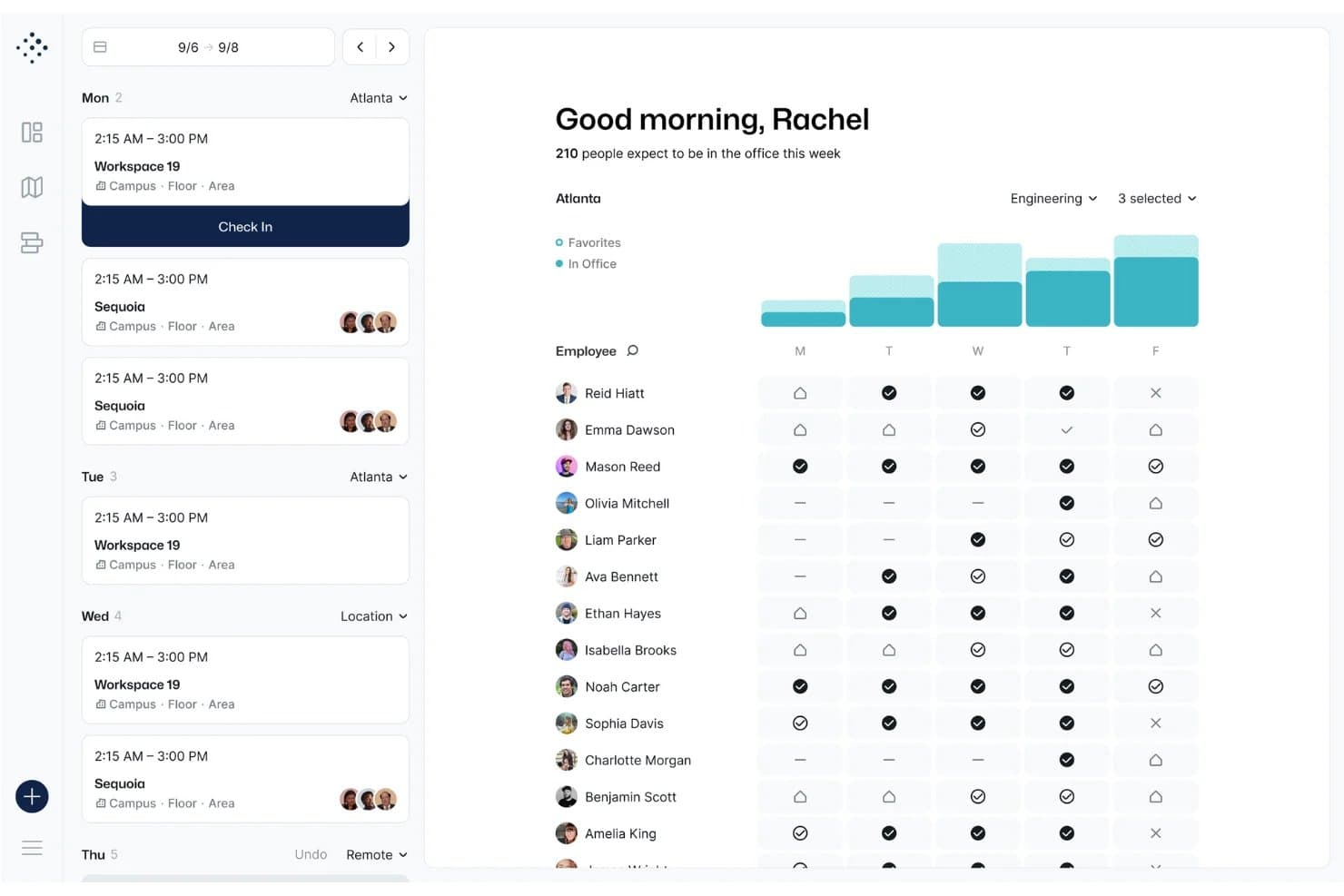
Tactic displays a weekly office attendance dashboard with employee check-in schedules, workspace bookings, and a bar chart showing in-office presence by day. Tactic is a hybrid workplace management platform that combines interactive floor plan-based desk booking, room reservations, visitor management, and occupancy analytics with a built-in AI assistant for natural language booking across web, mobile, and collaboration tools.
Who Is Tactic Best For?
Tactic is a strong fit for workplace experience and facilities managers at midsize to enterprise organizations running hybrid work models across multiple office locations.
Why I Picked Tactic
Tactic earns its spot as one of the best on my shortlist because of how it centers all workplace operations on a single interactive live map. I love that I can see live desk availability, filter by team neighborhood, and locate where specific teammates are sitting without ever leaving the floor plan view. On top of that, Tessa AI handles booking through Slack or Teams in plain language, and auto-release kicks in automatically when someone skips a check-in, keeping the map accurate without any manual cleanup.
Tactic Key Features
- Admin-configurable booking windows: Lets workplace admins set advance windows and limits for desk reservations company-wide or by location.
- Role-based access controls: Manages who can book desks, rooms, or neighborhoods by role, department, or location.
- Automated desk check-in: Supports check-in via Wi-Fi, mobile app, QR code, and Slack or Teams prompt to confirm desk usage.
- Visual occupancy analytics dashboard: Shows desk utilization, booking trends, and peak occupancy stats in real time.
Tactic Integrations
Tactic offers native integrations with Slack, Microsoft Teams, Google Workspace, Outlook, and more, and it provides an API for custom integrations.
Pros and Cons
Pros:
- Broad native ecosystem for enterprise chat apps
- Multi-location management within a single platform
- Real-time spatial tracking on live floor maps
Cons:
- Advanced reporting locked behind higher-tier plans
- Lacks native advanced hardware sensor integrations
Learn more about Tactic: 2Best for integrated service request management
elia
- Free demo available
- From $500/month
Visit WebsiteCustomer Rating:4.7/5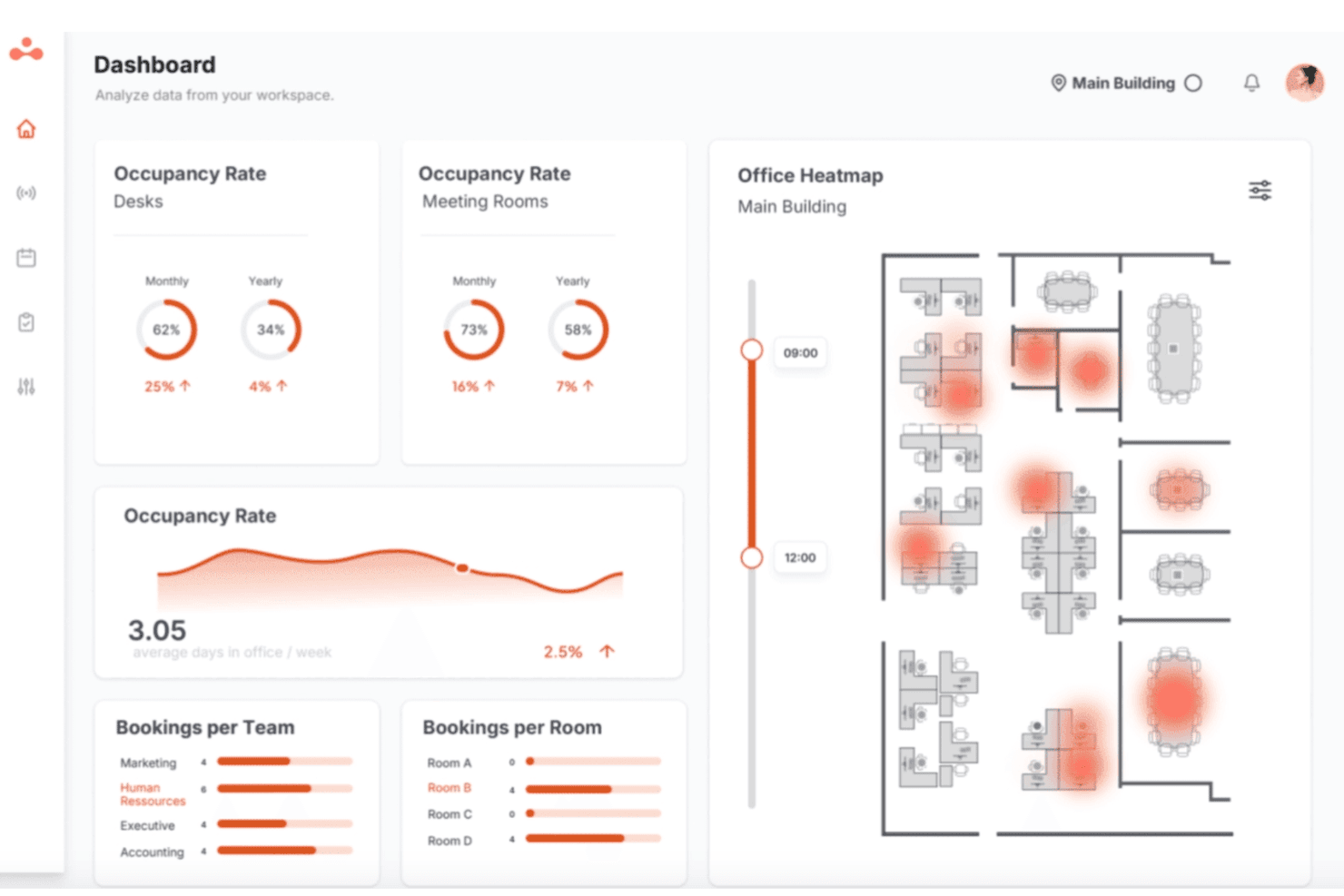
elia offers a visual desk booking interface with floor map, showing room occupancy. elia is an all-in-one workplace operations platform that brings together desk booking, meeting room reservations, interactive floor plans, visitor management, occupancy tracking, and service request management under a single interface.
Who Is elia Best For?
elia is a strong fit for mid-size to large organizations where facilities, IT, and HR teams share responsibility for managing a hybrid office environment.
Why I Picked elia
I picked elia as one of the best because its service request management is built directly into the floor plan, not bolted on as a separate module. When a team books a meeting room, any linked catering, IT setup, or maintenance requests automatically update if that booking changes. I also like that requests are tied to specific desks and zones, so facilities teams always know exactly where and when something is needed.
elia Key Features
- Interactive floor plans: Users can browse and book available desks and rooms on visual office maps, including filters for zone and location.
- Occupancy analytics dashboard: Facility teams can access real-time and historical data about desk usage and attendance trends.
- Native mobile app: Employees can book desks, check in, and manage reservations directly from their phones with QR code support.
- Microsoft 365 and Google Workspace integration: Sync bookings, calendar events, and user data with leading enterprise productivity platforms.
elia Integrations
elia offers native integrations with Microsoft 365, Google Workspace, Slack, Microsoft Teams, and Outlook. An API is available for custom integrations.
Pros and Cons
Pros:
- Visual floor plan builder with click-to-book
- Occupancy tracking leverages IoT sensor data
- Service request system integrated with bookings
Cons:
- No 3D wayfinding or interactive navigation
- HRIS integrations not natively available
Learn more about elia: 3Best for customizable booking permissions
anny
- Free plan + free trial + free demo available
- From $4/resource/month (billed annually)
Visit WebsiteCustomer Rating:4.8/5
Anny shows the workspace booking dashboard and mobile app interface. anny is an enterprise workspace booking platform that manages hot desking, room reservations, and office capacity planning with interactive 3D floor maps, SSO, community-based access controls, and a 29-language interface.
Who Is anny Best For?
anny is a good fit for enterprise organizations managing multi-location offices with complex access rules, mixed workspace types, and internationally distributed teams.
Why I Picked anny
anny earns its spot on my shortlist because of the granularity it gives admins over who can book what. Through its Communities feature, you can assign specific desks, floors, or resource types to defined groups, so the Legal team only sees their floor and the Engineering team only sees theirs. You can layer on booking contingents to cap how often a user or group can reserve a resource, giving you tight control without manual oversight.
anny Key Features
- SSO authentication: Connect anny to your existing identity provider so employees log in with their corporate credentials.
- Recurring bookings: Set repeating desk reservations on a daily or weekly basis, without re-booking each time.
- Multi-location management: Use a single admin account to manage bookable resources across multiple office sites.
- Mobile booking app: Reserve desks, check in, and view floor availability from a smartphone.
anny Integrations
anny offers native integrations with Microsoft 365, Outlook, MS Teams, Google Calendar, Google Workspace, Zoom, Personio, HRworks, Stripe, and PayPal, along with several smart lock integrations including Nuki, Salto KS, iLOQ, and dormakaba. It also connects with Make and n8n for no-code workflow automation and provides both an Admin API and a Customer API for custom integrations.
Pros and Cons
Pros:
- Built-in smart lock and access control
- Centralizes desks, rooms, and parking management
- 3D interactive maps for visual desk booking
Cons:
- Mobile app lacks some web features
- Setup requires custom workflows for complex maps
Learn more about anny: Best for real-time desk availability updates
- Free plan available; 14-day free trial; free demo available
- From €1.7/user/month (billed annually)
Visit WebsiteCustomer Rating:4.7/5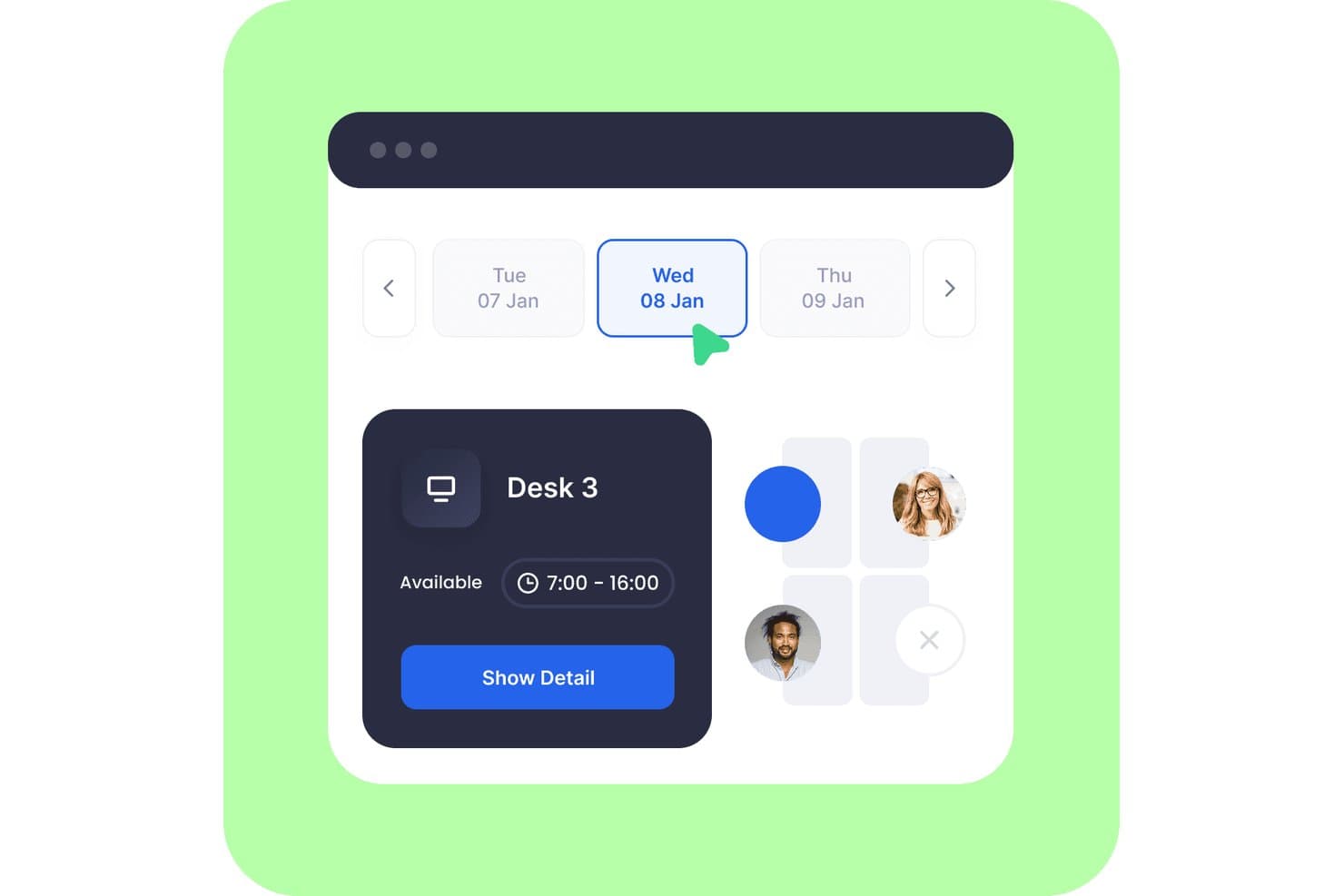
Dibsido lets users book available hot desks by date and time slot. Dibsido is a hot desk booking platform built for hybrid teams, offering one-tap reservations, interactive floor plans, QR check-in, multi-location management, and occupancy analytics across desk, meeting room, and parking workflows.
Who Is Dibsido Best For?
Dibsido is a strong fit for mid-sized hybrid teams that need a quick-to-deploy desk booking solution with real-time floor plan visibility and calendar integrations already built in.
Why I Picked Dibsido
Dibsido earns its spot on my shortlist because real-time desk availability is baked into its interactive floor plans, so employees can see exactly which desks are open before they even walk in. I particularly like the one-tap booking from a live office map and the automatic desk release, which frees up no-shows without any admin intervention. QR check-in adds another layer of accuracy, triggering automatic cancellations when employees don't show, keeping availability data honest throughout the day.
Dibsido Key Features
- Team schedule visibility: See who's in the office, working remotely, or out of office on any given day.
- SCIM provisioning: Automatically creates and deactivates user accounts as employees join or leave the organization.
- Multi-location booking management: Manage desk reservations across multiple offices and branches from a single platform.
- Booking rules and priority access: Admins can set custom booking rules and assign priority desk access to specific users or departments.
Dibsido Integrations
Dibsido offers native integrations with Microsoft Teams, Slack, Google Calendar, Outlook, Microsoft Entra ID, Google Workspace, and Okta, plus SAML 2.0 and SCIM for enterprise identity management. A REST API supports custom integrations.
Pros and Cons
Pros:
- Automatic desk release recovers no-shows
- Quick setup earns positive reviewer feedback
- Interactive maps make desk selection visual
Cons:
- QR check-in can frustrate mobile users
- Occupancy reports lack weekend filters
Learn more about Dibsido: Best for workplace experience analytics
- 7-day free trial + free demo available
- From $1.79/user/month (billed annually)
Visit WebsiteCustomer Rating:4.8/5
WorkInSync offers desk booking, team calendars, analytics, and hybrid work tools. WorkInSync is enterprise desk booking software with automated scheduling, interactive floor plan views, and configurable approval workflows for managing hybrid workspaces and desk reservations.
Who Is WorkInSync Best For?
WorkInSync is ideal for facilities managers and workspace planners at large enterprises who need detailed analytics on desk and space utilization.
Why I Picked WorkInSync
I picked WorkInSync as one of the best because I rely on its advanced analytics and reporting to monitor real-time desk utilization, spot booking trends, and export custom space usage reports for large-location occupancy planning.
WorkInSync Key Features
- Interactive floor plans: View and select available desks directly from an office map.
- Mobile booking app: Reserve desks and manage bookings on the go.
- Approval workflow: Set up customizable approval steps for desk or space reservations.
- Contactless check-in options: Enable QR code-based or sensor-based desk check-ins.
WorkInSync Integrations
WorkInSync offers native integrations with Microsoft Teams, Microsoft Outlook, Microsoft Active Directory, Microsoft Intune, Google Workspace, Google Calendar, Okta, OneLogin, Cisco, and Oracle PeopleSoft.
Pros and Cons
Pros:
- Custom floor plans for office maps
- Auto check-in with Bluetooth sensors
- Real-time heatmaps of desk occupancy
Cons:
- Desk release may need manual intervention
- Overwhelming feature set for smaller teams
Learn more about WorkInSync: Best for employee-first desk booking
- Free trial + free demo available
- From $5/user/month (billed annually)
Visit WebsiteCustomer Rating:4.6/5
deskbird offers an interactive floor map view for booking desks within specific office areas, integrated directly into Microsoft Teams. deskbird is an enterprise hot desk booking platform designed for hybrid workplaces, offering interactive floor plans, self-service desk reservations, real-time occupancy analytics, and scalable integration with collaboration and HR systems.
Who Is deskbird Best For?
Designed for large organizations with hybrid or flexible work models looking to manage desk bookings and space utilization across multiple locations.
Why I Picked deskbird
I picked deskbird as one of the best because it puts employee choice first with live interactive floor plans and quick booking from anywhere. I rely on it for point-and-click reservations, QR check-ins, and clear visibility across large hybrid offices.
deskbird Key Features
- Neighborhood zones: Set up work zones and control booking rules by department or team.
- Multi-location management: Configure and manage multiple offices, floors, and regions from a single admin interface.
- Role-based permissions: Set granular access controls for different user types, including guests, admins, and staff.
- Occupancy analytics dashboard: Track desk usage data and export custom reports for occupancy and attendance.
deskbird Integrations
deskbird offers native integrations with Google Workspace, Microsoft 365, Slack, Microsoft Teams, Okta, Azure Active Directory, Personio, Workday, SAP SuccessFactors, and has an API for custom integrations.
Pros and Cons
Pros:
- Customizable booking policies by location or team
- Supports QR-based desk check-in processes
- Interactive floor plans with real-time availability
Cons:
- Sensor integrations require custom setup
- No 3D floor plan visualizations
Learn more about deskbird: Best for managing dynamic team seating
- Free demo available
- Pricing upon request
Visit WebsiteCustomer Rating:4.5/5
Robin offers a guided onboarding setup page that walks admins through key organization configuration tasks like inviting admins, connecting calendars, adding users, and uploading a logo. Robin is an enterprise hot desk booking software designed for managing distributed workspaces, offering interactive floor plans, advanced reservation rules, occupancy analytics, and robust integrations for organizations supporting flexible seating arrangements.
Who Is Robin Best For?
Workplace and facilities teams at large enterprises managing flexible, multi-location office environments.
Why I Picked Robin
I picked Robin as one of the best for enterprise hot desk booking because I can easily adjust team seating layouts in real time, assign neighborhoods, and let teams self-select spots using interactive floor plans that visually update as bookings change.
Robin Key Features
- Role-based access controls: Limit or grant booking permissions for users and groups based on role or department.
- Occupancy analytics dashboard: Track space usage trends, booking rates, and attendance data in real time.
- Calendar integrations: Sync desk bookings with Outlook and Google Calendar for unified scheduling.
- Sensor and badge system integrations: Connect with workplace hardware to monitor real occupancy and automate desk check-ins.
Robin Integrations
Robin offers native integrations with Google Workspace, Microsoft 365, Outlook, Slack, Microsoft Teams, Okta, Azure Active Directory, BambooHR, and Cisco Webex. An API is available for custom integrations.
Pros and Cons
Pros:
- Supports occupancy tracking with sensors and badges
- Advanced team and neighborhood seat assignments
- Interactive floor plans update in real time
Cons:
- Waitlist functionality not prominently featured
- Advanced reporting features require higher-tier plans
Learn more about Robin: Best for AI-powered workplace scheduling
- Free demo available
- From $99/month
Visit WebsiteCustomer Rating:4.5/5
YAROOMS offers a calendar view where users can set and track daily work statuses, such as in-office or remote, across team calendars. YAROOMS is an enterprise workplace management platform that combines desk booking, meeting room reservations, workplace policies, and occupancy analytics to support hybrid work across multiple office locations.
Who Is YAROOMS Best For?
Enterprises and large organizations managing flexible workspaces across multiple offices and regions.
Why I Picked YAROOMS
I picked YAROOMS because it combines desk booking and workplace management in one platform. I can create flexible booking policies, manage office resources across multiple locations, and monitor workspace utilization through built-in analytics.
YAROOMS Key Features
- Interactive floor plans: Users can view and book available desks directly from a visual office map.
- Role-based booking policies: Admins configure access, booking windows, and quotas by role or department.
- Calendar integrations: Connects with Outlook and Google Workspace for seamless booking and schedule sync.
- Occupancy analytics dashboard: Visualizes usage data and trends by floor, zone, or building.
YAROOMS Integrations
YAROOMS offers native integrations with Outlook, Google Workspace, Microsoft Teams, Slack, Okta, Azure Active Directory, Workday, and BambooHR, and provides an API for custom integrations.
Pros and Cons
Pros:
- Interactive floor plans for multi-location offices
- Built-in workplace occupancy analytics
- Advanced policy and permission management
Cons:
- Sensor integrations require specific hardware partners
- No 3D wayfinding or navigation features
Learn more about YAROOMS: Best for interactive floor plan booking
- Free trial available
- From $5/bookable resource/month (billed annually)

Envoy Workplace displays a visitor management dashboard with sign-in times, host notifications, and purpose of visit tracking. Envoy Workplace is an enterprise hot desk booking platform that enables organizations to manage desk reservations, interactive floor plans, workplace occupancy, and flexible office operations across multiple locations.
Who Is Envoy Workplace Best For?
Large organizations and facilities teams that need to coordinate desk bookings and occupancy data across multiple office locations.
Why I Picked Envoy Workplace
I picked Envoy Workplace as one of the best because its interactive floor plan booking lets my team visualize desk availability in real time, click directly on workspaces to book, and navigate multi-floor offices with detailed, customizable maps.
Envoy Workplace Key Features
- Granular booking policies: Set rules for desk access, time windows, and team or department restrictions.
- Occupancy analytics dashboard: Track real-time usage data and attendance patterns across all office locations.
- Enterprise calendar integration: Sync desk reservations with Google Workspace and Outlook calendars.
- Role-based permissions: Control admin and user access levels to customize who can book, manage, and view spaces.
Envoy Workplace Integrations
Envoy Workplace offers native integrations with Google Workspace, Microsoft 365, Slack, Microsoft Teams, Okta, Azure Active Directory, Workday, BambooHR, Rippling, ADP, and provides an API for custom integrations.
Pros and Cons
Pros:
- Occupancy analytics dashboard for multi-site offices
- Granular booking policies for different user groups
- Interactive floor plans with real-time desk status
Cons:
- Advanced features require higher-tier plans
- Initial setup for multi-location can be complex
Learn more about Envoy Workplace: Best for enterprise workplace management
- Free demo available
- Pricing upon request

Eptura Workplace offers an interactive office floor map and mobile team day details view to help employees locate colleagues and manage meeting bookings. Eptura Workplace is an enterprise hot desk booking platform designed to manage desk reservations, interactive floor plans, policy controls, occupancy analytics, and large-scale workplace integrations across multiple locations.
Who Is Eptura Workplace Best For?
Eptura Workplace is a solid choice for enterprise facilities, HR, and real estate teams managing flexible workspaces across multiple locations.
Why I Picked Eptura Workplace
I picked Eptura Workplace because it lets me configure interactive floor plans, manage complex booking rules for multiple locations, and access deep utilization analytics for large organizations. It’s ideal for enterprise workplace management.
Eptura Workplace Key Features
- Neighborhood zoning: Assign specific desks to departments or teams using customizable workspace neighborhoods.
- Advanced access permissions: Set granular user roles and access levels for administrators, managers, and employees.
- Mobile desk check-in: Allow employees to check in to their reserved desk on arrival using the mobile app.
- Visitor management integration: Register and track workplace visitors directly within the same platform as desk bookings.
Eptura Workplace Integrations
Eptura Workplace offers native integrations with Microsoft 365, Google Workspace, Slack, Microsoft Teams, Okta, Azure Active Directory, and Workday. An API is available for custom integrations.
Pros and Cons
Pros:
- Handles multi-site enterprise deployments smoothly
- Supports advanced booking policy configuration
- Interactive floor plans update in real time
Cons:
- Custom reporting setup can be complex
- Desk sensors require separate system setup
Learn more about Eptura Workplace:
Diğer Kurumsal Ortak Masa Rezervasyon Yazılımları
Kısa listeme giremeyen ancak yine de göz atmaya değer bazı ek kurumsal ortak masa rezervasyon yazılımı seçeneklerini burada bulabilirsiniz:
- 11SpacewellBest for sensor-based occupancy insights
- 12EnvoyBest for neighbourhood-based seating assignments
- 13Smartway2Best for team neighborhood booking
- 14EpturaBest for automating workspace check-ins
- 15GoBrightBest for occupancy tracking with hardware
- 16MapiqBest for AI-powered workspace planning
- 17Zoom Workspace ReservationBest for integrating with Zoom environments
- 18SkeddaBest for rules-based booking controls
- 19ArchieBest for coworking space management
- 20KadenceBest for simplifying hybrid work scheduling
- 21OfficeSpaceBest for custom space utilization analytics
- 22EdenBest for all-in-one workplace operations
- 23Microsoft PlacesBest for Microsoft 365 workplaces
- 24OfficelyBest for booking directly in Slack or Teams
- 25DeskFlexBest for touchscreen-enabled booking
- 26OfficeSpaceBest for AI-driven space planning
How I Evaluate Enterprise Hot Desk Booking Software
I split evaluation into two layers: the booking and policy basics every tool must cover, and differentiators like occupancy analytics and IoT sensor support that matter at enterprise scale.
Core Functionality (Table Stakes for This List)
When I'm selecting tools for my list, I rank each one on a scale from 0 (does not offer the functionality) to 5 (excels in this area) for each core functionality listed below. Then, I calculate the tool's total score into a percentage. Each tool needs to achieve a minimum total score of 65% to be considered for inclusion.
- Desk Reservation System: I look for self-service booking where employees can search, reserve, modify, and cancel desks on their own—including recurring reservations, permanent desk assignments, desk hoteling, and check-in options.
- Interactive Floor Plans: Visual maps that show real-time availability and let people click to book matter a lot, especially for offices with multiple floors and zones.
- Booking Policies & Permissions: I evaluate how well admins can define rules like booking windows, desk neighborhoods, role-based access, and approval workflows across locations.
- Occupancy Analytics: Dashboards that track desk utilization, attendance trends, and peak usage help facilities teams make informed decisions about space planning.
- Enterprise Integrations: Connects with calendars, SSO providers, HRIS platforms, and collaboration tools to streamline workplace management and user provisioning.
- Multi-Location & Scalability: Tools should support per-site configuration across multiple offices and regions, with enterprise-grade SLAs and the ability to handle large employee populations.
Once I have a list of tools that meet the criteria, I consider what sets each platform apart.
Differentiating Factors (What Sets Vendors Apart)
Here's how I compare and contrast different vendors:
Standout Features
Team coordination features are a key differentiator. I also look for room scheduling, meeting room booking, and desk hoteling capabilities that help employees plan office days while keeping teams together. IoT sensor integration matters too, since it validates actual occupancy against bookings and auto-releases no-shows. AI-powered desk recommendations round things out by suggesting spots based on team schedules and past preferences, reducing friction across large campuses.
Beyond Features
Enterprise security is something I always evaluate—SOC 2 Type II certification and SSO/SAML support through providers like Okta or Azure AD are table stakes when you're syncing employee directories across locations. Implementation support also matters more than most buyers expect. Rolling out a booking platform to thousands of employees requires floor plan digitization, admin training, and change management resources to drive adoption.
Kurumsal Ortak Masa Rezervasyon Yazılımı Nasıl Seçilir?
Uzun özellik listeleri ve karmaşık fiyatlandırma yapılarına takılıp kalmak kolaydır. Kendinize özgü yazılım seçim sürecinizi yürütürken odağınızı korumanıza yardımcı olmak için göz önünde bulundurmanız gereken faktörleri aşağıdaki kontrol listesinde bulabilirsiniz:
| Faktör | Dikkat Edilmesi Gerekenler |
|---|---|
| FaktörÖlçeklenebilirlik | Dikkat Edilmesi Gerekenlerİşletmeniz büyüdüğünde yazılım daha fazla kullanıcıyı, konumu veya masa türünü destekleyebilecek mi? Kullanıcı sınırlarını ve hacme dayalı fiyatlandırma modellerini kontrol edin. |
| FaktörEntegrasyonlar | Dikkat Edilmesi GerekenlerMicrosoft 365 veya Google Workspace gibi mevcut takvim, SSO ya da İK sistemlerinize bağlanıyor mu? Eksiklikler, benimsemeyi ve planlama doğruluğunu olumsuz etkileyebilir. |
| FaktörÖzelleştirilebilirlik | Dikkat Edilmesi GerekenlerRezervasyon kuralları, kat planları ve kullanıcı izinleri, iş yeri yönergelerinize ve gelişen politikalarınıza uyacak şekilde kolayca ayarlanabiliyor mu? Esneklik hayati önem taşıyorsa katı sistemlerden kaçının. |
| FaktörKullanım kolaylığı | Dikkat Edilmesi GerekenlerÇalışanlar eğitim almadan masaları rezerve edebilir, yeniden atayabilir veya kontrol edebilir mi? Arayüzün karmaşıklığı kullanıcıların hayal kırıklığını ve destek taleplerini artırır. |
| FaktörUygulama ve kullanıma alma | Dikkat Edilmesi GerekenlerSözleşmeyi imzaladıktan sonra sistemi ne kadar hızlı kullanıma alabilirsiniz? Aylar süren geçişlerden kaçınmak için içe aktarma araçları, eğitim kaynakları ve kullanıma alma sürecinde destek sunan çözümleri arayın. |
| FaktörMaliyet | Dikkat Edilmesi GerekenlerToplam maliyete yapılandırma, destek ve yükseltmeler dâhil mi? Ölçeğinizi büyüttükçe katman sınırlarının veya eklentilerin fiyatı artırıp artırmayacağını doğrulayın. |
| FaktörGüvenlik önlemleri | Dikkat Edilmesi GerekenlerVeri gizliliği araçları, yönetici denetimleri ve kullanıcı kimlik doğrulama standartları (SSO, MFA gibi) kuruluşunuzun risk profiline ve uyumluluk gereksinimlerine uygun mu? |
| FaktörDestek erişilebilirliği | Dikkat Edilmesi GerekenlerDesteğe tercih ettiğiniz kanallar ve saat dilimleri üzerinden ulaşabiliyor musunuz? Öncelikli destek veya küresel yardım için gereken ek ücretleri ve yanıt sürelerini değerlendirin. |
Kurumsal Ortak Masa Rezervasyon Yazılımı Nedir?
Kurumsal paylaşımlı masa rezervasyon yazılımı, kuruluşların birden fazla konumdaki atanmamış çalışma alanlarını yönetmesine, rezerve etmesine ve izlemesine olanak tanıyan dijital platformlardır. Bu çözümler, İK ekiplerinin hibrit çalışma modellerini desteklemesine, doluluk oranlarını takip etmesine ve rezervasyon politikalarını uygulamasına yardımcı olur. Gelişen kapasite ve uyumluluk gereksinimlerinin bulunduğu karmaşık ortamlarda büyük ve dağınık iş gücünü yönetmek ve ofis alanının verimli kullanımını sağlamak için hayati öneme sahiptir.
Özellikler
Her başarılı kurumsal paylaşımlı masa rezervasyon yazılımının sahip olması gereken temel özellikler şunlardır:
- Masa rezervasyon sistemi: Çalışanların mevcut masaları önceden veya ihtiyaç halinde rezerve etmesine olanak tanıyarak hem planlı hem de anlık çalışma alanı gereksinimlerini destekler.
- Etkileşimli kat planları: Kullanıcıların belirli masaları, odaları veya bölgeleri görüp seçebilmesi için ofis yerleşimlerinin görsel haritalarını sunar.
- Mobil erişim: Çalışanların hareket halindeyken akıllı telefon veya tabletlerinden rezervasyon yapmasına, rezervasyonu iptal etmesine ya da değiştirmesine olanak tanır.
- Gerçek zamanlı uygunluk takibi: Güncel masa doluluk durumunu göstererek çifte rezervasyonları önler ve ekiplerin boş çalışma alanlarını verimli bir şekilde bulmasına yardımcı olur.
- Rezervasyon politikaları ve kuralları: Yöneticilerin departman veya konum gereksinimlerine göre izinleri, rezervasyon aralıklarını, kısıtlamaları ve onay iş akışlarını belirlemesine olanak tanır.
- Grup ve yinelenen rezervasyonlar: Ekipler için masa gruplarının rezerve edilmesini ve düzenli programlar veya toplantılar için yinelenen rezervasyonlar oluşturulmasını destekler.
- Analiz ve raporlama: Alan planlamasına yön vermek ve iş yeri kararlarını desteklemek için masa kullanımı, doluluk eğilimleri ve benimsenme oranları hakkında veriler sunar.
- Otomatik bildirimler: Yaklaşan rezervasyonlar, iptaller veya masa durumundaki değişiklikler hakkında e-posta, SMS veya uygulama içi hatırlatıcılar gönderir.
- Mevcut sistemlerle entegrasyon: Sorunsuz bir kullanıcı deneyimi için şirket takvimleri, iletişim uygulamaları, kimlik sağlayıcıları veya İK sistemleriyle bağlantı kurar.
- Sağlık ve güvenlik araçları: İş yeri uyumluluğunu ve çalışanların refahını desteklemek için sosyal mesafe gerekliliklerini, temizlik programlarını ve kapasite sınırlarını yönetir.
Avantajlar
Kurumsal paylaşımlı masa rezervasyon yazılımının uygulanması, ekibiniz ve işletmeniz için çeşitli avantajlar sağlar. Yararlanabileceğiniz avantajlardan bazıları şunlardır:
- Verimli alan kullanımı: Gerçek zamanlı masa yönetimi, çalışma alanlarının uyarlanabilir kalmasını ve ofis alanlarının gereğinden az kullanılmasını veya aşırı kalabalıklaşmasını önler.
- Geliştirilmiş çalışan deneyimi: Görsel kat planları ve mobil erişimle kolay masa rezervasyonu, çalışanların ne zaman ve nerede çalışacaklarını seçmelerini sağlar.
- Uygulanabilir iş yeri içgörüleri: Yerleşik analiz ve raporlama özellikleri doluluk eğilimlerini ortaya çıkararak İK ekiplerinin akıllı alan planlama kararları almasına yardımcı olur.
- Daha güçlü uyumluluk ve güvenlik: Otomatik rezervasyon kuralları ve sağlık araçları, daha güvenli ortamlar için sosyal mesafe, kapasite sınırları ve temizlik protokollerini destekler.
- Basitleştirilmiş hibrit çalışma lojistiği: Grup rezervasyonları ve yinelenen rezervasyonlar, ekiplerin ofiste çalışacakları günleri koordine etmesini ve sorunsuz bir şekilde iş birliği yapmasını kolaylaştırır.
- Azaltılmış idari yük: Otomatik bildirimler, entegrasyonlar ve politika kontrolleri, oturma düzenlemelerini yönetmek ve anlaşmazlıkları çözmek için harcanan zamanı en aza indirir.
- Daha kolay işe alıştırma ve destek: Rehberli işe alıştırma seçenekleri, şablonlar ve destek kaynakları, yeni kullanıcıların hızlıca uyum sağlamasına ve sorunların en aza indirilmesine yardımcı olur.
Maliyetler ve Fiyatlandırma
Kurumsal paylaşımlı masa rezervasyon yazılımı seçimi, mevcut çeşitli fiyatlandırma modellerinin ve planların anlaşılmasını gerektirir. Maliyetler özelliklere, ekip büyüklüğüne, eklentilere ve daha fazlasına göre değişir. Aşağıdaki tablo, kurumsal paylaşımlı masa rezervasyon yazılımı çözümlerinde yaygın olarak sunulan planları, ortalama fiyatlarını ve tipik özelliklerini özetlemektedir:
Kurumsal Paylaşımlı Masa Rezervasyon Yazılımı İçin Plan Karşılaştırma Tablosu
| Plan Türü | Ortalama Fiyat | Yaygın Özellikler |
|---|---|---|
| Plan TürüÜcretsiz Plan | Ortalama Fiyat$0 | Yaygın ÖzelliklerTemel masa rezervasyonu, sınırlı kullanıcı, basit kat haritası ve e-posta desteği. |
| Plan TürüKişisel Plan | Ortalama Fiyat$5–$10/kullanıcı/ay | Yaygın ÖzelliklerTek kullanıcı rezervasyonu, mobil erişim, takvim entegrasyonu ve temel raporlama. |
| Plan Türüİşletme Planı | Ortalama Fiyat$10–$25/kullanıcı/ay | Yaygın ÖzelliklerEkip rezervasyonları, yönetici kontrolleri, ayrıntılı analizler, mobil uygulama, grup planlama ve standart destek. |
| Plan TürüKurumsal Plan | Ortalama Fiyat$25–$50/kullanıcı/ay | Yaygın ÖzelliklerSınırsız kullanıcı, gelişmiş güvenlik, API erişimi, özel iş akışları, öncelikli destek ve işe alıştırma yardımı. |
SSS
Kurumsal sıcak masa rezervasyon yazılımı hakkında sık sorulan soruların bazı yanıtları:
Sıcak masa rezervasyon yazılımı birden fazla ofis konumunu destekleyebilir mi?
Evet, kurumsal sıcak masa rezervasyon yazılımlarının çoğu, birden fazla ofis veya bölgedeki masaları yönetmenize ve rezerve etmenize olanak tanır. Bu, çalışma alanı yönetimini merkezileştirir, gayrimenkul kullanımının verimli olmasını destekler ve farklı konumlarda ekipleri bulunan kuruluşların tutarlılığı ve görünürlüğü korumasına yardımcı olur.
Sıcak masa rezervasyon yazılımı hibrit çalışma politikalarına nasıl yardımcı olur?
Kurumsal çözümler, çalışanlara yalnızca ofiste bulunmaları gerektiğinde çalışma alanı rezerve etme esnekliği sunarak başarılı bir hibrit ofis için vazgeçilmez hale gelir. Yöneticiler ayrıca bu masa paylaşımı yazılımını kullanarak rezervasyon kuralları belirleyebilir, doluluk oranını takip edebilir, masa paylaşımını koordine edebilir ve esnek çalışma programlarının uygun şekilde belgelenmesini sağlayabilir.
Ne tür entegrasyonları aramalıyım?
HRIS’niz, takvim sistemleriniz (Google veya Microsoft gibi), SSO gibi kimlik doğrulama araçları ve Slack veya Teams gibi iletişim platformlarıyla entegrasyonlar arayın. Bu entegrasyonlar iş akışlarını iyileştirir, benimsenme oranını artırır ve ekip üyelerinin toplantı odası rezervasyonlarını veya oda planlamasını zaten kullandıkları araçlardan yönetmelerine olanak tanır.
Masa rezervasyon yazılımında veri gizliliği bir endişe midir?
Evet, özellikle büyük kuruluşlar için gizlilik önemli bir husustur. Yazılımın güvenli kimlik doğrulama, erişim kontrolü, veri şifreleme ve GDPR veya SOC 2 gibi ilgili gizlilik standartlarına uyumlulukla kurumsal düzeyde güvenlik sunduğunu doğrulamalısınız.
Bu araçlar sağlık ve güvenlik uyumluluğunun yönetilmesine nasıl yardımcı olur?
Kullanıcı dostu masa paylaşımı çözümlerinin çoğu, yöneticilerin esnek çalışma ortamındaki geleneksel ofisler ve ortak çalışma alanlarında iş yeri sağlığı gerekliliklerini desteklemek üzere mesafe kuralları belirlemesine, ofis kapasitesini sınırlamasına, temizlik programlarını otomatikleştirmesine ve temas izleme kayıtları sunmasına olanak tanır.
Genellikle hangi işe alıştırma ve eğitim kaynakları sunulur?
Çoğu sağlayıcı, masaüstü ve Android platformlarında çalışan video eğitimleri, adım adım kılavuzlar, web seminerleri ve uygulama içi ürün turları sunar. Bazıları, sabit bir masa düzeninden geçişi mümkün olduğunca sorunsuz hale getirmek için müşteri destek sohbeti veya özel bir uzman sağlar.