

Ziyaretçileri yönetmek, işletmeler için güvenlik ile uyumluluk arasında denge kurmayı ve aynı zamanda olumlu bir ilk izlenim oluşturmayı gerektirdiğinden zorlayıcı olabilir. Ziyaretçi yönetimi yazılımı (VMS), güvenliği ve verimliliği artırırken sorunsuz operasyonlar sağlayarak bu süreci kolaylaştırır.
Çeşitli araçları kapsamlı bir şekilde inceledikten sonra, mevcut en iyi ziyaretçi yönetimi çözümlerini belirledim. Bu makalede, güçlü ve zayıf yönlerine dair dürüst ve tarafsız bilgiler sunarak ekibiniz için doğru seçeneği bulmanıza yardımcı olacağım. Ziyaretçi yönetimi sürecinizi kolaylaştırabilecek en iyi seçenekleri birlikte inceleyelim.
Why Trust Our Software Recommendations
6,700+
Reviews
20
Industry experts
16+
Evaluation factors
14
Years
Our team has been testing and reviewing software since 2012. As HR experts ourselves, we know how difficult—and important—it is to choose the right software.
For this guide, we evaluated tools using hands-on testing and independent research, scoring tools using our selection criteria. We also draw on insights from industry thought leaders and practicing HR experts.
Our reviews reflect our human editorial judgment, not a sales pitch.
Expert reviewers:
- Phil GrayCOO
 Kim BehnkeHR Tech Editor & Analyst
 Josh BarkerPeople Ops Manager

Ziyaretçi Yönetimi Yazılımları Karşılaştırma Tablosu
Bu karşılaştırma tablosu, en iyi ziyaretçi yönetimi yazılımı seçimlerim için fiyatlandırma, deneme ve demo ayrıntılarını özetlemektedir.
Sorted by: Default
| Tool | Starting Price | Website | |
|---|---|---|---|
Best for automating visitor registration | 4.9 out of 5 | $159/month Free trial available | Website |
Best for proactive visitor coordination | 4.6 out of 5 | $3000/year Not available | Website |
Best for AI-powered visitor invitations | 4.6 out of 5 | Pricing upon request Free demo available | Website |
Best for automated access rights | 4.8 out of 5 | $4/resource/month Free plan + free trial + free demo available | Website |
Best for visitor badge printing | 4.7 out of 5 | $500/month Free demo available | Book Demo |
Best for enterprise visitor and contractor management | 4.3 out of 5 | Pricing upon request Free demo available | Website |
Best for flexible workspace booking | 4.8 out of 5 | $32.58/user/month Free plan available | Website |
Best for enterprise solutions | 4.6 out of 5 | Pricing upon request Free demo available | Website |
Best for flexible workspaces | 4.8 out of 5 | $1.79/user/month 7-day free trial + free demo available | Website |
Best for hybrid workplaces | 4.5 out of 5 | Pricing upon request Free demo available | Website |


En İyi Ziyaretçi Yönetimi Yazılımları İncelemeleri
Aşağıda, kısa listeme giren en iyi ziyaretçi yönetimi yazılımlarına ilişkin ayrıntılı özetlerimi bulabilirsiniz. İncelemelerim, ihtiyaçlarınıza en uygun seçeneği bulmanıza yardımcı olmak için her aracın temel özelliklerine, avantajlarına & dezavantajlarına, entegrasyonlarına ve ideal kullanım alanlarına ayrıntılı bir bakış sunar.
 Best for automating visitor registration
- Free trial available
- From $159/month
Visit WebsiteCustomer Rating:4.9/5
With Archie, hosts are automatically notified when visitors check in. Archie is a visitor management platform designed for offices, coworking spaces, and flexible workplaces that want to simplify guest check-ins, improve security, and create a smooth experience for both visitors and staff.
Who Is Archie Best For?
Archie is a strong fit for office managers and workplace teams at small to mid-sized businesses who need a structured, professional way to handle visitor check-ins.
Why I Picked Archie
Archie earns its spot as one of the best on my shortlist because of how far it takes visitor registration automation. I love that you can build separate check-in flows for different visit types—a job interview triggers an HR form and photo capture, while a maintenance visit routes through a completely different set of steps, all without any front desk involvement. Pre-registration is another feature I find genuinely useful: hosts can schedule visits in advance, and guests receive an email with directions and any required documents to sign before they even arrive, so check-in is just a QR code scan. The automations layer on top of that lets you define check-out procedures, set time-based access restrictions, and trigger host notifications in Slack or Microsoft Teams the moment a guest walks in.
Archie Key Features
- Visitor badge printing: Automatically generate and print branded visitor badges at check-in, including the guest's name, photo, host, and visit time.
- Watchlist screening: Flag visitors against a custom watchlist during check-in and trigger an alert to security or front desk staff before granting access.
- Visitor log and reporting: Access a real-time log of all current and past visitors, with exportable records for compliance and audit purposes.
- Desk and room booking: Let visitors or employees book desks and meeting rooms directly through the platform alongside their visit registration.
Archie Integrations
Integrations include Microsoft Teams, Slack, Google Calendar, Microsoft Outlook, Zoom, Kisi, Stripe, GoCardless, QuickBooks, and Xero.
Pros and Cons
Pros:
- Easy to set up and manage
- Modern UI with custom branding
- Offers powerful automation features
Cons:
- UI available in only 6 languages
- Some reporting features could be improved
Learn more about Archie: Best for proactive visitor coordination
- Not available
- From $3000/year
Visit WebsiteCustomer Rating:4.6/5
Tactic’s room reservation dashboard for managing meeting spaces and tracking availability in real time. Tactic helps workplaces manage visitor flow and desk bookings, giving office managers and HR teams tools to coordinate arrivals, track occupancy, and create a smooth experience for guests and employees.
Who Is Tactic Best For?
Tactic is a good fit for mid-sized companies managing hybrid workplaces that need to coordinate visitor arrivals alongside employee desk and space bookings.
Why I Picked Tactic
Tactic earns its spot on my shortlist because I love how it connects visitor check-in directly to desk and space booking in one platform. When a host sends a pre-registration invite, it includes arrival details and parking info—so guests aren't left guessing when they show up. I also like that host alerts fire instantly through Slack or Microsoft Teams the moment a visitor checks in, which means no one is left waiting in the lobby. The ability to capture NDA signatures and custom forms right at check-in is a detail I find genuinely useful for compliance-conscious teams.
Tactic Key Features
- Visitor pre-registration and invites: Hosts send guests a pre-arrival invite that includes check-in guidance, parking info, and arrival instructions before they reach the office.
- Digital badge generation: Tactic automatically prints or displays visitor badges with the guest's name, host, and access details at the moment of check-in.
- Visit history and audit log: All visitor data is securely stored and searchable, giving compliance teams a reliable record for security audits.
- Physical access system integration: Tactic connects visitor check-in data to access control systems, so guest permissions can be managed alongside their visit record.
Tactic Integrations
Integrations include Microsoft Teams, Slack, Google Calendar, Outlook, Zoom, Microsoft Entra ID, and Avigilon.
Pros and Cons
Pros:
- Centralized visitor log
- Efficient visitor pre-registration
- Offers real-time notifications
Cons:
- Some features require additional setup
- May be too complex for small businesses
Learn more about Tactic: Best for AI-powered visitor invitations
- Free demo available
- Pricing upon request
Visit WebsiteCustomer Rating:4.6/5
Kadence delivers a global, configurable visitor check-in experience, from ID verification to host approval. Kadence is a workplace management platform designed for organizations that want to simplify visitor scheduling, automate check-ins, and enhance security for guests and employees.
Who Is Kadence Best For?
Kadence is a good fit for hybrid-first organizations that need a centralized way to manage office attendance, desk booking, and visitor access across multiple locations.
Why I Picked Kadence
I picked Kadence as one of the best for its AI assistant, which handles visitor invitations end-to-end. Instead of manually coordinating visits, I can trigger the entire workflow—invite, NDA signing, and host notification—through a single prompt in Slack or Microsoft Teams. I also like that pre-arrival document management is built into the same flow, so guests arrive already compliant. Automated, AI-driven coordination from invite to arrival gives Kadence an edge in visitor management.
Kadence Key Features
- Interactive floor plans: View a live, color-coded map of your office to see desk availability, team locations, and space popularity in real time.
- Attendance tracking: Monitor in-office attendance by team, department, or location and compare actual presence against hybrid policy expectations.
- Smart booking suggestions: Get AI-generated desk recommendations based on when your teammates are scheduled to be in the office.
- Workplace analytics dashboard: Access occupancy trends, peak office days, and space utilization data to support real estate and policy decisions.
Kadence Integrations
Integrations include Microsoft Teams, Slack, Google Workspace, BambooHR, Gusto, Okta, Workday, Zendesk, Jira, and ServiceNow.
Pros and Cons
Pros:
- Broad integrations with workplace tools
- Real-time occupancy and safety tracking
- Strong hybrid workplace management features
Cons:
- Setup can be time intensive
- Limited offline visitor check-in support
 4Best for automated access rights
anny
- Free plan + free trial + free demo available
- From $4/resource/month (billed annually)
Visit WebsiteCustomer Rating:4.8/5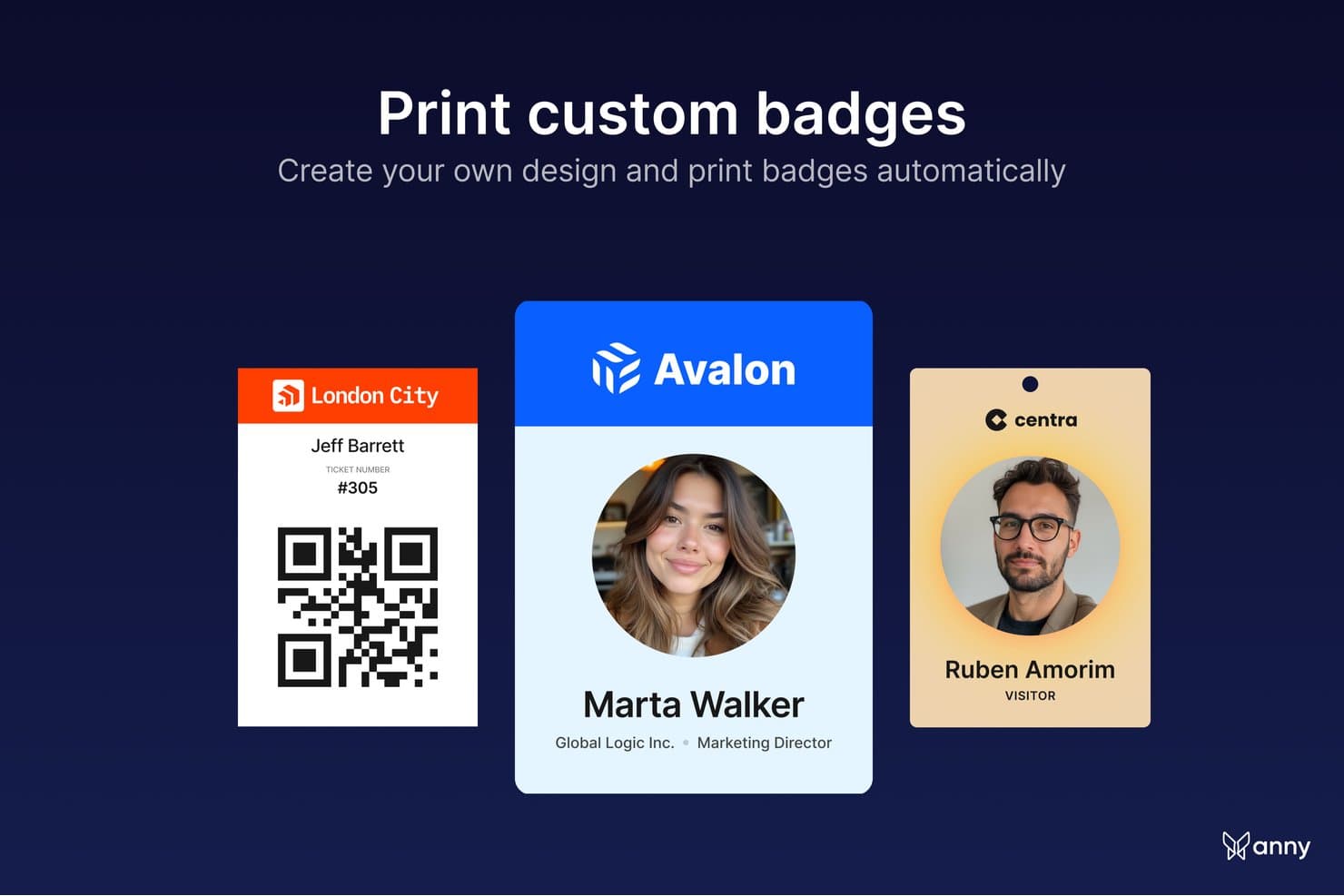
anny lets users print custom-designed badges automatically for events. anny is a visitor management solution built into a broader resource-booking platform, designed for organizations that want guest check-in, access control, and workplace booking to run in one place. It automates visitor registration, captures digital signatures, prints badges on arrival, and keeps a live record of who is in the building—from check-in to check-out.
Why I Picked anny
anny earns its spot on my shortlist because it ties visitor check-in to access control, not just the front desk. I like that a guest's access rights are issued and revoked automatically around their visit, so security teams aren't managing credentials by hand. The arrival flow is well thought out too—guests self-check-in by QR code or at a branded terminal, hosts get an instant SMS or AI call, and NDAs can be signed on the spot. For Microsoft 365 teams, visitors can even be registered straight from an Outlook meeting invite.
anny Key Features
- Flexible visitor check-in: Guests check in by QR code, email, or at a branded self-service terminal, so arrivals move quickly without tying up the front desk.
- On-arrival badge printing: Automatically print badges with the guest's name, company, host, and a check-out QR code, in a badge design you control.
- Automated access rights: Sync check-in with your access-control system and smart locks (like Salto, Nuki, or dormakaba) so visitor credentials activate on arrival and expire at check-out.
- Document capture at check-in: Have visitors sign NDAs, terms, or safety briefings on-site during check-in, with a copy emailed automatically and stored for audits.
anny Integrations
Integrations include Microsoft 365, Outlook, Google Workspace, Microsoft Teams, Zoom, Personio, SAML/SSO, and a broad range of access-control and smart-lock systems, including Salto, Nuki, dormakaba, Tapkey, iLOQ, KleverKey, Comydo, UniFi, Glutz, and more.
Pros and Cons
Pros:
- Strong compliance with ISO 27001, GDPR and EU-based hosting
- Covers the full flow from check-in to check-out
- Visitor credentials activate and expire automatically
Cons:
- Admin interface can feel complex
- No built-in watchlist or ID-document scanning
Learn more about anny: 5Best for visitor badge printing
elia
- Free demo available
- From $500/month
Visit WebsiteCustomer Rating:4.7/5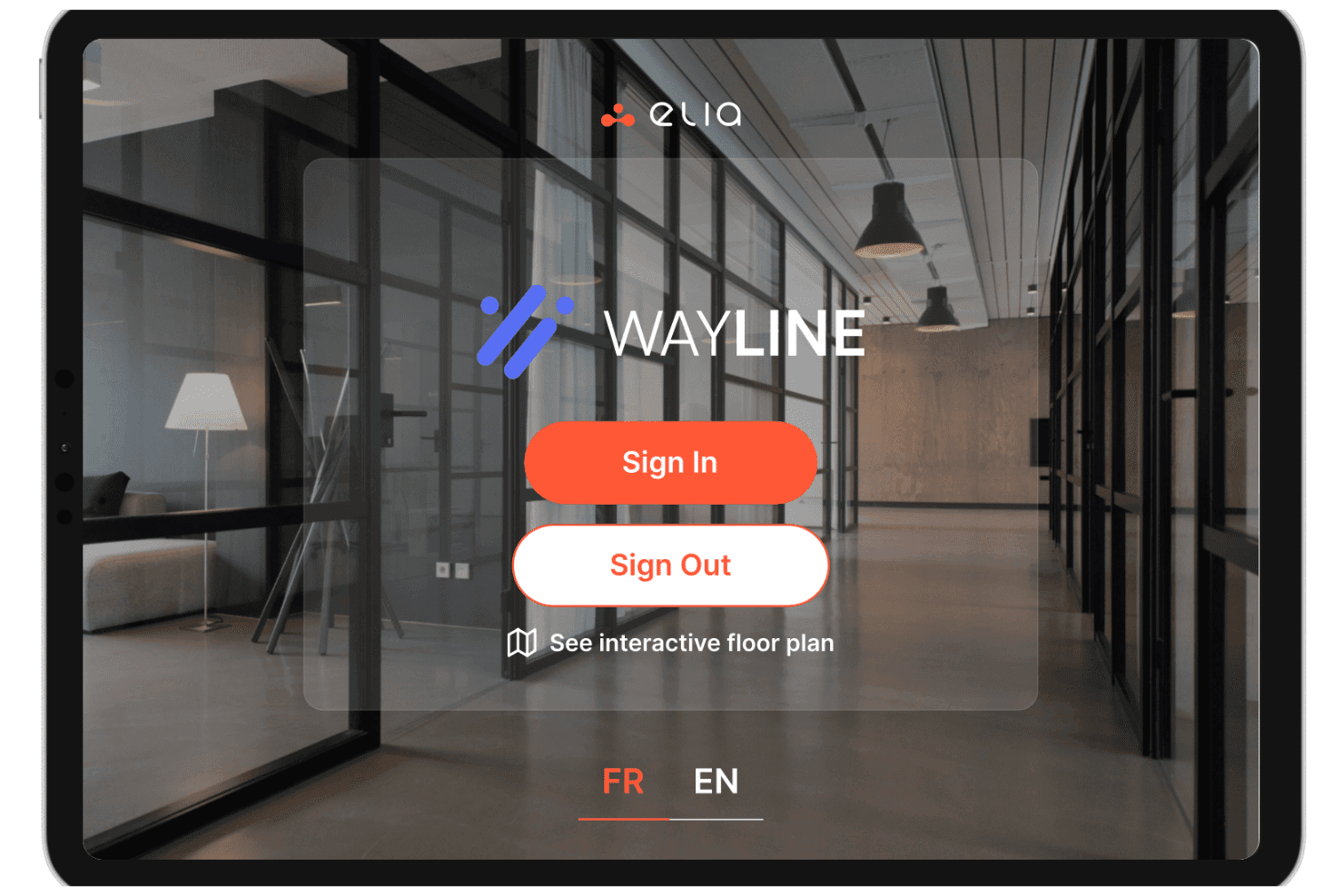
elia offers a visitor management kiosk interface called Wayline, allowing guests to sign in, sign out, or view an interactive floor plan. elia is a visitor management platform with a kiosk-based check-in system, badge printing, host notifications, document signing, and emergency evacuation tracking built for multi-site workplaces.
Who Is elia Best For?
elia is a strong fit for facilities and workplace teams managing visitor flow across multiple office locations or corporate campuses.
Why I Picked elia
I picked elia as one of the best because of how much control it gives you over visitor categorization and check-in workflows. You can create distinct visitor categories (think: contractors, guests, interviewees, VIPs) and tailor the data capture fields for each one. That means a contractor's badge will print with the specific details relevant to them—like host info or dynamic access details—while a guest badge keeps it simple. Combined with visitor photo capture, it turns standard badge printing into a powerful identification tool rather than just a basic label.
elia Key Features
- Pre-registration: Send visitors a registration link before their arrival so their details are captured in advance, speeding up the check-in process on the day.
- Host notifications: Alert the visiting employee via email, Slack, or Microsoft Teams the moment their guest checks in at the kiosk.
- Document signing at check-in: Collect visitor signatures on NDAs, safety waivers, or custom documents directly within the check-in flow.
- Visitor log export: Access a full, time-stamped record of all site visits and export it as a CSV for audits or security reviews.
elia Integrations
elia offers native integrations with Microsoft 365, Google Workspace, Slack, and specific tools within those ecosystems, including Google Calendar, Microsoft Teams, and Microsoft Outlook.
Pros and Cons
Pros:
- Built-in floor plan for space context
- Supports iPad kiosks
- Includes evacuation lists in standard plans
Cons:
- No ID scanning or watchlist screening
- Limited access control integrations available
Learn more about elia: Best for enterprise visitor and contractor management
- Free demo available
- Pricing upon request
Visit WebsiteCustomer Rating:4.3/5
Hybrid Hero sends real-time visitor notifications to hosts. Hybrid Hero is a workplace management platform for organizations that manage visitor access, monitor occupancy, and optimize space usage across offices, coworking spaces, and hybrid work environments.
Who Is Hybrid Hero Best For?
Hybrid Hero is a good fit for facilities and workplace teams in mid-to-large organizations managing hybrid work schedules and shared office spaces.
Why I Picked Hybrid Hero
Hybrid Hero earns its spot on my shortlist because of how well it connects visitor management with real-time occupancy data. I like that it tracks space utilization alongside visitor check-ins, so my team can see exactly how meeting rooms and shared areas are being used on any given day. The occupancy analytics dashboard gives us a clear view of peak usage times, which helps with capacity planning and desk allocation. That combination of visitor data and space intelligence distinguishes it from tools that only handle front-desk check-ins.
Hybrid Hero Key Features
- Visitor pre-registration: Send visitors a pre-registration link before their arrival to capture details and speed up the check-in process.
- Digital visitor logbook: Maintain a searchable, time-stamped record of all visitor entries and exits across multiple office locations.
- Host notifications: Automatically alert the relevant employee when their visitor has checked in at reception.
- Desk booking: Let employees reserve desks in advance, with availability displayed on an interactive floor plan.
Hybrid Hero Integrations
Integrations include Microsoft 365, Outlook, Teams, Azure AD, Google Workspace, and custom workflows through an API.
Pros and Cons
Pros:
- Includes real-time headcount tracking for workplace coordination and safety monitoring
- Provides centralized visibility across multiple office locations
- Combines visitor, contractor, and workplace management in one platform
Cons:
- Best suited for mid-sized and enterprise organizations rather than smaller teams
- Mobile experience is less robust than the desktop platform
Learn more about Hybrid Hero: Best for flexible workspace booking
- Free plan available
- From $32.58/user/month (billed annually)
Visit WebsiteCustomer Rating:4.8/5
Othership allows guests to check-in from anywhere, while also providing automated screening for hosts for added security. Othership is a workspace management platform designed for businesses and teams who need to coordinate hybrid work, manage guest access, and optimize office space for both employees and visitors.
Who Is Othership Best For?
Othership is a strong fit for hybrid-first companies that need to manage flexible desk booking, meeting rooms, and visitor access across shared office environments.
Why I Picked Othership
I've included Othership in my top picks because it's one of the few visitor management tools that ties guest access directly into a broader flexible workspace booking system. Where most visitor management tools treat guests as a separate workflow, Othership connects visitor scheduling to desk booking and meeting room reservations in one place. When a guest is invited to your office, the host can simultaneously book a meeting room or desk for that visit without jumping between tools. I also like that Othership's interactive floorplans let admins coordinate where visitors and employees are sitting on any given day, which is genuinely useful when your office headcount fluctuates week to week.
Othership Key Features
- Visitor invitations via multiple channels: Invite and manage guests from your phone, calendar, app, or entry tablet without a dedicated front desk device.
- Compliance data export: Export visitor logs and audit data on demand to meet compliance requirements without manual record-keeping.
- Employee feedback collection: Prompt employees to submit feedback, report broken amenities, and flag issues directly within the platform.
- Space utilization analytics: Review real-time data on office usage patterns, booking trends, and workspace preferences to inform space planning decisions.
Othership Integrations
Integrations include Microsoft 365, Google Workspace, MS Teams, Slack, Zoom, and an API is available for custom integrations.
Pros and Cons
Pros:
- Video conferencing and document management
- Self check-in with real-time updates
- Provides detailed visitor logs and analytics
Cons:
- Potential integration challenges
- Limited customization options
Learn more about Othership: Best for enterprise solutions
- Free demo available
- Pricing upon request
Visit WebsiteCustomer Rating:4.6/5
Proxyclick advances visitor flow management for large enterprises. Proxyclick is a visitor management platform built for organizations that need secure, customizable check-in experiences and compliance controls, helping facilities teams and security professionals manage visitors, contractors, and deliveries across multiple locations.
Who Is Proxyclick Best For?
Proxyclick is a strong fit for large enterprises and multi-site organizations that need centralized visitor management with advanced security and compliance controls.
Why I Picked Proxyclick
Proxyclick earns its spot as one of the best on my shortlist because of how well it handles the complexity that comes with enterprise-scale visitor management. I particularly like the watchlist feature—you can create an internal watchlist and connect it to third-party screening systems, so security teams can flag or block specific visitors before they ever reach the front desk. The access control integration is also a standout for large sites: Proxyclick syncs visitor details directly with your existing access control system and can issue QR codes or RFID cards on the spot, so visitors move through the building without creating bottlenecks at reception. For organizations managing multiple locations, the ability to configure visitor workflows, entry points, and badge designs per site from a central admin panel makes it genuinely practical at scale.
Proxyclick Key Features
- Host notifications: Send automatic SMS or email alerts to hosts the moment their visitor checks in.
- Pre-registration: Add visitors in advance and share maps, entry requirements, and contact details before they arrive.
- Guest badges and Wi-Fi credentials: Issue customized printed badges and personalized Wi-Fi credentials to each visitor at check-in.
- Destination dispatch elevator integration: Automatically direct visitors to their designated floors by connecting with destination dispatch elevator systems.
Proxyclick Integrations
Integrations include Microsoft Teams, Slack, Cisco Webex, Honeywell, LenelS2, Genetec, Avigilon, Okta, Azure Active Directory, and Google Workspace.
Pros and Cons
Pros:
- Offers detailed visitor analytics
- Advanced security options
- Supports multiple locations
Cons:
- Occasional syncing issues
- Complex setup process
Learn more about Proxyclick: Best for flexible workspaces
- 7-day free trial + free demo available
- From $1.79/user/month (billed annually)
Visit WebsiteCustomer Rating:4.8/5
WorkInSync facilitates check-ins, desk bookings, and space utilization. WorkInSync is a workplace management platform designed for organizations that want to simplify visitor check-ins, manage hybrid workspaces, and enhance on-site security for employees and guests.
Who Is WorkInSync Best For?
WorkInSync is a strong fit for mid-sized to large organizations managing hybrid or flexible workplaces where coordinating visitor access alongside desk and room bookings is a daily operational need.
Why I Picked WorkInSync
WorkInSync earns its spot on my shortlist because it's one of the few visitor management tools that's genuinely built around flexible workspaces rather than bolted onto one. I like that visitor check-ins connect directly with desk booking and meeting room scheduling, so when a guest arrives, the host's workspace is already accounted for. In practice, that means my team can pre-register visitors, assign QR code-based entry, and coordinate the host's desk or room booking all from the same platform. The customized workflow feature also lets you tailor notification messages and approval steps per visit type, which is useful when different teams have different access requirements on any given day.
WorkInSync Key Features
- Branded check-in screens: Customize check-in kiosks with your company's logo, colors, and messaging to create a consistent on-site experience for every visitor.
- Visitor log and reporting: Track visitor history, host details, and access patterns in a centralized log that can be exported for audits or compliance reviews.
- Host notifications via Microsoft Teams or email: Automatically alert hosts the moment their guest arrives, so there's no need to manually monitor the front desk.
- Emergency and evacuation management: Access a real-time list of all visitors on-site during an emergency to account for guests quickly and support safe evacuations.
WorkInSync Integrations
Integrations include Microsoft Teams, Google Workspace, Outlook, OneLogin, Okta, Active Directory, Slack, Zoom, Cisco Webex, and ServiceNow.
Pros and Cons
Pros:
- Enhances safety with contactless check-ins
- Detailed workspace analytics
- Efficient visitor pre-registration
Cons:
- Occasional syncing issues
- Some advanced features cost extra
Learn more about WorkInSync: 10Best for hybrid workplaces
Robin
- Free demo available
- Pricing upon request
Visit WebsiteCustomer Rating:4.5/5
Robin simplifies visitor check-ins and office space management. Robin helps organizations manage visitors, desks, and meeting spaces in dynamic office environments, making it easier for workplace teams to coordinate guest access, ensure compliance, and create a welcoming experience for everyone entering the office.
Who Is Robin Best For?
Robin is a great fit for mid-sized to enterprise companies managing hybrid work schedules who need visitor management built into a broader workplace operations platform.
Why I Picked Robin
Robin earns its spot on my shortlist because it's one of the few visitor management tools built directly into a hybrid workplace platform. I like that visitor check-in doesn't exist in isolation—it sits alongside desk reservations, meeting room booking, and real-time office maps. When a client arrives for an on-site, my team gets an automatic notification via Slack or email, and the visitor has already completed any required documents like NDAs or health questionnaires before they even walk in. The bulk visitor invite feature is also a practical touch I rely on for larger events, where uploading a CSV saves a lot of manual entry.
Robin Key Features
- Arrival displays: Self-service kiosks let visitors self-register and check in without staff assistance.
- Delivery management: Log, track, and manage incoming packages with recipient notifications and delivery status updates.
- Custom forms: Build registration forms with custom questions and fields to capture the specific visitor information your office needs.
- Visitor data export: Track and export records of guest visits to support security audits and compliance reporting.
Robin Integrations
Integrations include Microsoft 365, Microsoft Teams, Google Workspace, Slack, and an API is available for custom integrations.
Pros and Cons
Pros:
- Provides instant visitor notifications
- Offers detailed office analytics
- Supports flexible work arrangements
Cons:
- Can be complex for new users
- Some features cost extra
Learn more about Robin:
Diğer Ziyaretçi Yönetimi Yazılımları
Kısa listeme giremeyen ancak yine de göz atmaya değer bazı ek ziyaretçi yönetimi yazılımı seçeneklerini burada bulabilirsiniz:
- 11YAROOMSBest for meeting room booking
- 12Envoy VisitorBest for office visitor tracking
- 13The ReceptionistBest for easy setup
- 14DeskFlexBest for visitor access monitoring
- 15SkeddaBest for venue booking
- 16Greetly by OfficeSpaceBest for secure visitor verification
- 17WhatspotBest for approval-based visitor bookings
- 18OfficeSpaceBest for touchless check-ins
- 19iLobbyBest for compliance needs
- 20LobbytrackBest for visitor notifications
How I Evaluate Visitor Management Software
I evaluate every tool against baseline requirements first—like digital check-in flows and automated host alerts—then weigh differentiators like multi-location support and HRIS integrations.
Core Functionality (Table Stakes For This List)
When I'm selecting tools for my list, I rank each one on a scale from 0 (does not offer the functionality) to 5 (excels in this area) for each core functionality listed below. Then, I calculate the tool's total score into a percentage. Each tool needs to achieve a minimum total score of 65% to be considered for inclusion.
- Visitor Check-In Experience: I evaluate whether candidates and contractors can check in via tablet, kiosk, or mobile—and whether pre-registration cuts lobby wait times.
- Automated Host Notifications: Each tool should alert hosts through email, SMS, or workplace apps like Slack or Teams the moment their visitor checks in.
- Digital Visitor Log: I look for searchable, exportable records with timestamps and visit details that HR and security teams can pull quickly during audits.
- Badge Printing on Arrival: Printed badges with photos, host names, and expiration details help front-desk staff and security identify authorized visitors at a glance.
- Legal Document Capture: I check whether NDAs, health declarations, or site waivers can be signed digitally during check-in with a stored audit trail.
- Watchlist & Compliance Screening: Tools should screen arriving visitors against internal blocklists or regulatory lists and flag matches before granting entry.
Once I have a list of tools that meet the criteria, I consider what sets each platform apart.
Differentiating Factors (What Sets Vendors Apart)
Here's how I compare and contrast different vendors:
Standout Features
Multi-location management matters when your organization runs several offices. I look for a single dashboard where admins configure check-in flows and pull visitor reports per site. Emergency evacuation tools are another big differentiator; real-time on-site rosters during a fire drill or incident directly support duty-of-care responsibilities. I also evaluate access control integrations, since linking visitor check-in to turnstiles or smart locks means temporary credentials expire automatically when a visit ends.
Beyond Features
Compliance and data privacy carry real weight here. I check whether platforms offer configurable data retention policies and hold certifications like SOC 2 Type II, especially when visitor PII crosses jurisdictions. Integration fit is equally important; a tool that syncs host directories from your HRIS and creates visits from calendar invites saves HR teams hours of manual coordination. I also evaluate pricing transparency, since hidden costs for hardware or per-entry fees can quietly inflate budgets as visitor volumes grow.
Ziyaretçi Yönetimi Yazılımı Nasıl Seçilir?
Uzun özellik listeleri ve karmaşık fiyatlandırma yapıları arasında kaybolmak kolaydır. Kendinize özgü yazılım seçimi sürecinizde ilerlerken odağınızı korumanıza yardımcı olmak için göz önünde bulundurmanız gereken temel faktörleri aşağıda sıraladım:
| Faktör | Dikkat Edilmesi Gerekenler |
| Ölçeklenebilirlik | Yazılımın işletmenizle birlikte büyüyebildiğinden emin olun. Performans kaybı yaşamadan artan ziyaretçi ve konum sayısını karşılayıp karşılayamayacağını değerlendirin. |
| Entegrasyonlar | Operasyonları kolaylaştırmak için yazılımın takviminiz, erişim kontrol sistemleriniz ve iletişim platformlarınız gibi mevcut araçlarla entegre olup olmadığını kontrol edin. |
| Özelleştirilebilirlik | İş akışlarını, markalama unsurlarını ve ziyaretçi deneyimlerini işletmenizin özel ihtiyaçlarına uyacak ve ziyaretçi memnuniyetini artıracak şekilde düzenleyebilmenizi sağlayan seçenekleri arayın. |
| Kullanım Kolaylığı | Kullanıcı arayüzünün sezgisel olup olmadığını değerlendirin. Ekibiniz, kapsamlı eğitim veya teknik bilgiye ihtiyaç duymadan sistemde hızlıca gezinebilmelidir. |
| Bütçe | Bütçe kısıtlamalarınızı göz önünde bulundurun. Fiyatlandırma modellerini karşılaştırın ve gereksiz masraflar olmadan sunulan özellikler için değer elde ettiğinizden emin olun. |
| Güvenlik Önlemleri | Yazılımın güçlü güvenlik önlemlerine sahip olduğundan emin olun. Ziyaretçi taraması, veri şifreleme ve sektör düzenlemelerine uyumluluk gibi özellikleri arayın. |
| Destek | Müşteri desteğinin kullanılabilirliğini ve kalitesini değerlendirin. Güvenilir destek, ekibinizin sorunları hızlıca çözmesine ve operasyonların sorunsuz şekilde devam etmesine yardımcı olabilir. |
| Kullanıcı Geri Bildirimleri | Gerçek dünyadaki deneyimleri anlamak için kullanıcı incelemelerini okuyun. Seçiminize yön vermesi için güvenilirlik, özelliklerin etkinliği ve genel memnuniyet hakkındaki geri bildirimleri inceleyin. |
Ziyaretçi Yönetimi Yazılımlarındaki Trendler
Araştırmam sırasında farklı ziyaretçi yönetimi yazılımı sağlayıcılarından sayısız ürün güncellemesi, basın bülteni ve sürüm günlüğü inceledim. Takip ettiğim yeni trendlerden bazıları şunlar:
- Temassız Giriş: Birçok satıcı, güvenliği ve kolaylığı artırmak için temassız seçenekler ekliyor. Bu özellik, ziyaretçilerin akıllı telefonlarını kullanarak giriş yapmasına olanak tanıyarak fiziksel teması azaltır. Günümüzde sağlığa duyarlı yaklaşımın önem kazandığı ortamda bu özellik özellikle önemlidir.
- Yapay Zekâ Destekli İçgörüler: Yapay zekâ, ziyaretçi verilerini analiz etmek ve uygulanabilir içgörüler sunmak için kullanılıyor. Bu, işletmelerin ziyaretçi akışını optimize etmesine ve genel güvenliği iyileştirmesine yardımcı olur. Bazı satıcılar yoğun zamanları tahmin etmek ve personel düzenlemeleri önermek için yapay zekâ kullanıyor.
- Yüz Tanıma: Bu teknoloji, daha hızlı ve güvenli girişler için sisteme entegre ediliyor. Kimlik kartlarına veya manuel girişe ihtiyaç duymadan hızlı kimlik doğrulamaya olanak tanır. Bu trende uyum sağlayan satıcılar güvenliği ve verimliliği artırıyor.
- Özelleştirme ve Markalama: Daha fazla yazılım, işletmelerin ziyaretçi arayüzlerini logolar ve işletmeye özel iş akışlarıyla özelleştirmesine olanak tanıyor. Bu trend, şirketlerin profesyonel bir imaj sunmasına ve ziyaretçiler için tutarlı bir marka deneyimi oluşturmasına yardımcı olur.
- Sürdürülebilirlik Özellikleri: Satıcılar, dijital kimlik kartları ve kâğıtsız girişler gibi çevre dostu seçenekleri sisteme dahil ediyor. Bu trend, işletmelerin verimli operasyonlarını sürdürürken çevresel ayak izlerini azaltmasını destekler.
Ziyaretçi Yönetimi Yazılımı Nedir?
Ziyaretçi yönetimi yazılımı, kuruluşların tesislerine giren ziyaretçileri yönetmesine ve takip etmesine yardımcı olan bir sistemdir. Bu araçlar genellikle ofis yöneticileri, resepsiyon görevlileri ve güvenlik personeli tarafından güvenliği artırmak ve ziyaretçi deneyimini iyileştirmek için kullanılır. Temassız giriş, yapay zekâ destekli içgörüler ve yüz tanıma gibi özellikler, ziyaretçilerin verimli bir şekilde işlenmesine ve güvenliğin sağlanmasına yardımcı olur.
Genel olarak bu araçlar, işletmeler için güvenli ve düzenli bir ziyaretçi deneyimi sağlayarak değer sunar.
Ziyaretçi Yönetimi Yazılımının Özellikleri
Sizin için en iyi ziyaretçi yönetimi sistemini seçerken aşağıdaki temel özelliklere dikkat edin:
- Temassız giriş: Ziyaretçilerin akıllı telefonlarını kullanarak giriş yapmasına olanak tanır, fiziksel teması azaltır ve güvenliği artırır.
- Ziyaretçi ön kaydı: Konukların varıştan önce kayıt olmasını sağlar; giriş sürecini hızlandırır ve bekleme sürelerini azaltır.
- Yüz tanıma: Kimlik kartlarına veya manuel girişe ihtiyaç duymadan hızlı ve güvenli kimlik doğrulama sağlar.
- Anlık bildirimler: Ziyaretçileri geldiğinde ev sahiplerini uyararak iletişimi ve koordinasyonu geliştirir.
- Özelleştirilebilir iş akışları: İşletmelerin giriş sürecini kendi özel ihtiyaçlarına göre uyarlamasına olanak tanıyarak ziyaretçi deneyimini iyileştirir.
- Gerçek zamanlı analiz: Ziyaretçi kalıpları ve eğilimleri hakkında içgörüler sunarak işletmelerin operasyonlarını optimize etmesine yardımcı olur.
- Kimlik kartı yazdırma: Kolay kimlik doğrulama ve artırılmış güvenlik için ziyaretçi kimlik kartları oluşturur.
- Tahliye yönetimi: Acil durumlar sırasında ziyaretçileri takip ederek ve tahliye talimatları sağlayarak güvenliği temin eder.
- Masa veya oda rezervasyonu: Birçok VMS, hibrit çalışma alanlarına hizmet etmek için dahili masa rezervasyon sistemleri veya toplantı odası rezervasyon araçları gibi ek özellikler sunar.
- Entegrasyon yetenekleri: Operasyonları kolaylaştırmak için takvimler ve erişim kontrol sistemleri gibi mevcut araçlara bağlanır.
- Güvenlik önlemleri: Hassas bilgileri korumak için veri şifreleme ve uyumluluk yönetimi gibi önlemleri uygular.
Ziyaretçi Yönetimi Yazılımının Faydaları
Ziyaretçi yönetimi yazılımını uygulamak, ekibiniz ve işletmeniz için çeşitli faydalar sağlar. Yararlanabileceğiniz faydalardan bazıları şunlardır:
- Artırılmış güvenlik: Yüz tanıma ve kimlik kartı yazdırma gibi özellikler, yalnızca yetkili kişilerin tesislerinize girmesini sağlamaya yardımcı olur.
- Geliştirilmiş verimlilik: Temassız giriş ve ön kayıt, ziyaretçi sürecini kolaylaştırarak bekleme sürelerini ve idari görevleri azaltır.
- Daha iyi iletişim: Anlık bildirimler, ekibinizi ziyaretçilerin gelişinden haberdar ederek koordinasyonu ve yanıt sürelerini iyileştirir.
- Veri içgörüleri: Gerçek zamanlı analizler, ziyaretçi eğilimleri hakkında değerli bilgiler sunarak bilinçli kararlar almanıza yardımcı olur.
- Özelleştirilebilir deneyim: İşletmenizin ihtiyaçlarıyla uyumlu bir ziyaretçi deneyimi oluşturmanızı, işletmeye özel iş akışları ve markalama seçenekleri sağlar.
- Uyumluluk desteği: Güvenlik önlemleri ve veri yönetimi özellikleri, sektör düzenlemelerine uymanıza ve hassas bilgileri korumanıza yardımcı olur.
Ziyaretçi Yönetim Yazılımı Maliyetleri ve Fiyatlandırması
Ziyaretçi yönetim yazılımı seçimi, mevcut çeşitli fiyatlandırma modellerinin ve planların anlaşılmasını gerektirir. Maliyetler; özelliklere, ekip büyüklüğüne, eklentilere ve daha fazlasına bağlı olarak değişir.
Aşağıdaki tablo, ziyaretçi yönetimi yazılımı çözümlerinde yaygın planları, ortalama fiyatlarını ve genellikle sunulan özellikleri özetlemektedir:
Ziyaretçi Yönetim Yazılımı İçin Plan Karşılaştırma Tablosu
| Plan Türü | Ortalama Fiyat | Yaygın Özellikler |
| Ücretsiz Plan | $0 | Bu plan temel giriş işlemlerini, ziyaretçi kayıtlarını ve sınırlı bildirimleri içerir. |
| Kişisel Plan | $5-$25 kullanıcı başına/aylık | Bu plan özelleştirilebilir giriş işlemlerini, yaka kartı yazdırmayı ve temel analizleri içerir. |
| İşletme Planı | $25-$50 kullanıcı başına/aylık | Bu plan temassız giriş işlemlerini, entegrasyon özelliklerini ve gelişmiş analizleri içerir. |
| Kurumsal Plan | $50+ kullanıcı başına/aylık | Bu plan kapsamlı güvenlik özelliklerini, birden fazla konum yönetimini ve özel desteği içerir. |
Ziyaretçi Yönetim Yazılımı SSS
Ziyaretçi yönetim yazılımı hakkında sık sorulan bazı soruların yanıtları:
Ziyaretçi yönetim yazılımı ne kadar güvenlidir?
Ziyaretçi yönetim yazılımı güvenlik göz önünde bulundurularak tasarlanır. Tesislerinizi ve hassas bilgilerinizi korumak için genellikle ziyaretçi taraması, kimlik doğrulama ve veri şifreleme gibi özellikler içerir. Bu araçlar yalnızca yetkili kişilerin erişim sağlamasına yardımcı olarak genel güvenliği artırır.
Ziyaretçi yönetim sistemleri mevcut araçlarla entegre olabilir mi?
Evet, çoğu ziyaretçi yönetim sistemi entegrasyon özellikleri sunar. Takvim sistemleri, erişim kontrolü ve iletişim platformları gibi araçlara bağlanabilirler. Bu entegrasyon, operasyonları kolaylaştırır ve kuruluşunuzdaki farklı platformlar arasında sorunsuz iletişim kurulmasını sağlar.
Ziyaretçi yönetim yazılımı için hangi donanımlar gereklidir?
Donanım gereksinimleri sistemin özelliklerine göre değişebilir. Bazı sistemler giriş işlemleri için yalnızca bir tablet veya bilgisayara ihtiyaç duyarken diğerleri yaka kartı yazdırmak için yazıcılar ya da temassız giriş için QR kod tarayıcıları gerektirebilir. Kuruluşunuzun ihtiyaçlarına uygun donanımları seçmeniz önemlidir.
Ziyaretçi yönetim sistemleri veri gizliliğini nasıl ele alır?
Bu sistemler genellikle gizlilik düzenlemelerine uymak için veri koruma özellikleri içerir. Veri şifreleme, güvenli depolama ve veri erişimini kontrol etme seçenekleri sunarlar. Ziyaretçi verilerinin nasıl toplandığını, saklandığını ve kullanıldığını yöneterek ilgili yasalara uyulmasını sağlayabilirsiniz.
Yeni kullanıcılar için eğitim sunuluyor mu?
Birçok tedarikçi, yeni kullanıcıların başlangıç yapmasına yardımcı olmak için eğitim kaynakları sunar. Bunlar eğitim videolarını, ürün tanıtımlarını, web seminerlerini ve kullanıcı kılavuzlarını içerebilir. Bu kaynaklara erişim, ekibinizin yazılımı etkili bir şekilde kullanmasını ve avantajlarını en üst düzeye çıkarmasını sağlar.
Ziyaretçi yönetim sistemleri özelleştirilebilir mi?
Evet, özelleştirme genellikle temel bir özelliktir. Giriş sürecini, marka unsurlarını ve iş akışlarını belirli işletme ihtiyaçlarınıza uyacak şekilde düzenleyebilirsiniz. Bu esneklik, kişiselleştirilmiş bir ziyaretçi deneyimi oluşturmanıza ve sistemin operasyonel gereksinimlerinizle uyumlu olmasını sağlamanıza yardımcı olur.