

10 Best Kadence Alternatives for Desk Booking in 2026

Best Kadence Alternatives Shortlist


The best Kadence alternatives will help you manage hybrid work, optimize space usage, and simplify desk booking—while offering different features or pricing structures to better fit your organization’s needs.
Kadence is a respected workforce and space management platform, but it might not be the best fit for every team.
Drawing on my experience testing HR and workplace software, I’ve curated a list of the top Kadence alternatives that deliver smart scheduling, easy desk booking, and data-driven insights. In this guide, you’ll find reliable solutions to help you make hybrid work more efficient and worker-friendly.
What Is Kadence?
Kadence is a workplace management software designed to help teams organize their work environments efficiently.
It's often used by HR professionals and facility managers who need to manage office spaces, coordinate hybrid work schedules, and improve team collaboration. Desk booking, resource allocation, and real-time analytics help your team optimize space usage and enhance productivity. Overall, Kadence offers a valuable solution for improving workplace management and creating a more organized work environment.
Kadence Alternatives Comparison Table
This comparison table provides pricing and free trial details for my top Kadence alternatives to help you find a solution that fits your budget and business needs.
| Tool | Best For | Trial Info | Price | ||
|---|---|---|---|---|---|
| 1 | Best for team collaboration | Free trial available | From $159/month | Website | |
| 2 | Best for integrated hardware support | Free demo available | From $500/month | Website | |
| 3 | Best for quick bookings | 14-day free trial | From $19/spot/month | Website | |
| 4 | Best for multi-site occupancy analytics | Free demo available | Pricing upon request | Website | |
| 5 | Best for coworking spaces | Free plan available | From $32.58/user/month (billed annually) | Website | |
| 6 | Best for team collaboration | Free trial + free demo available | From $5/user/month (billed annually) | Website | |
| 7 | Best for real-time tracking | 30-day free trial + free demo available | Pricing upon request | Website | |
| 8 | Best for employee engagement | Free trial available | From $2/user/month | Website | |
| 9 | Best for visitor management | 30-day free trial + free demo available | From $249/month (billed annually) | Website | |
| 10 | Best for AI-driven insights | Free demo available | Pricing upon request | Website |


Why Trust Our Software Recommendations
Our team has been testing and reviewing software since 2012. As HR experts ourselves, we know how difficult—and important—it is to choose the right software.
For this guide, we evaluated tools using hands-on testing and independent research, scoring tools using our selection criteria. We also draw on insights from industry thought leaders and practicing HR experts.
Our reviews reflect our human editorial judgment, not a sales pitch.
Expert reviewers:
Best Kadence Alternatives Reviews
Below are my detailed summaries of the best Kadence alternatives that made it onto my shortlist. My reviews offer a detailed look at the key features, pros & cons, integrations, and ideal use cases of each tool to help you find the best one for you.

Archie
Best for team collaboration

Archie is a space management software designed to enhance workplace efficiency for businesses and organizations. It serves teams needing flexible workspace solutions, such as desk and conference room booking.
Why it's a good Kadence alternative: Archie provides tools for booking desks and conference rooms, which are vital for team collaboration. Its visitor management and coworking software offer seamless operations and improved user experience.
With automation and real-time data insights, your team can make informed decisions quickly. Archie's focus on team collaboration ensures that your workspace is both efficient and adaptable to your needs.
Standout features & integrations:
Features include visitor management, which ensures a smooth check-in process for guests. The coworking software helps you manage shared spaces with ease. Real-time data insights allow your team to make informed decisions based on current workspace usage.
Integrations include Microsoft Teams, Slack, Google Calendar, Outlook, Zoom, Cisco Webex, Salesforce, QuickBooks, Xero, and Mailchimp.
Pros and Cons
Pros:
- Automation features
- Flexible workspace options
- Real-time data insights
Cons:
- Limited mobile features
- Initial setup complexity
elia
Best for integrated hardware support
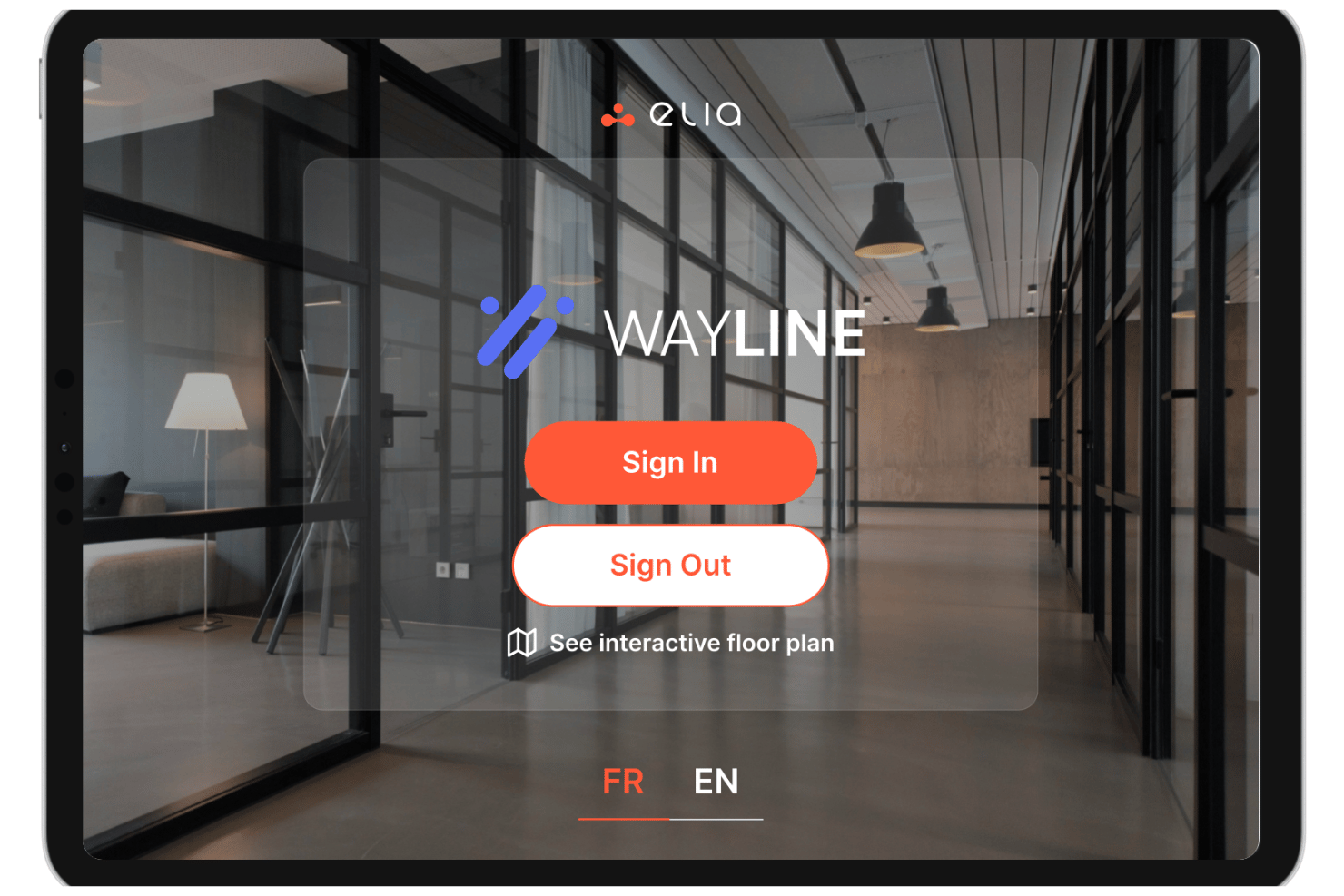
elia is a workplace management platform built for HR and facilities teams that need desk and room booking, hybrid schedule coordination, and occupancy analytics backed by a native hardware ecosystem of sensors, kiosks, and room displays.
Who Is elia Best For?
elia suits mid-sized to enterprise organizations managing multi-location offices where physical space data and digital booking need to work together.
Why elia Is a Good Kadence Alternative
I picked elia because its native hardware ecosystem sets it apart from every other Kadence alternative on my list. I like that you can pair desk occupancy sensors and room displays directly with the booking software, so your floor plan shows live availability rather than relying on manual check-ins. The built-in workplace automation layer also lets teams trigger workflows from bookings automatically, like catering requests or IT tickets, without stitching together separate tools.
elia Key Features
- Visitor management dashboard: Streamlines guest check-in, host notifications, and visitor logs for both security and convenience.
- Role-based admin controls: Lets admins set permissions, configure booking rules, and manage multi-site or department policies.
- Neighborhoods and zoning tools: Enables assigning teams or departments to dedicated zones within open office layouts.
- Custom workplace analytics: Provides dashboards for occupancy, booking trends, and space utilization across floors or locations.
elia Integrations
elia offers native integrations with Microsoft 365, Google Workspace, Slack, and specific tools within those ecosystems, including Google Calendar, Microsoft Teams, and Microsoft Outlook.
Pros and Cons
Pros:
- Sensor-backed occupancy data is highly accurate
- Automated room release reduces ghost meeting waste
- Native Microsoft Teams and Outlook integrations
Cons:
- Analytics dashboards lack predictive modeling
- Hardware components require on-site installation

Whatspot
Best for quick bookings

Whatspot is a booking management software designed to facilitate quick and efficient space reservations. It's targeted at small businesses and organizations that need a simple solution for managing their meeting rooms and shared spaces.
Why it's a good Kadence alternative: Whatspot offers a straightforward booking process that allows your team to reserve spaces quickly and efficiently. Its user-friendly interface ensures that anyone can make a booking without hassle.
The platform provides real-time availability, which helps your team plan meetings and events with ease. Whatspot's focus on simplicity and quick bookings makes it an appealing alternative to Kadence for businesses seeking a no-fuss solution.
Standout features & integrations:
Features include an intuitive interface that simplifies the booking process. The platform provides real-time notifications to keep your team updated on space availability. Customizable booking rules allow you to tailor the system to fit your organization's needs.
Integrations include Google Calendar, Microsoft Outlook, Slack, Microsoft Teams, Zoom, Cisco Webex, Trello, Asana, Salesforce, and HubSpot.
Pros and Cons
Pros:
- Customizable booking rules
- Real-time availability updates
- Quick and easy booking process
Cons:
- Basic reporting tools
- Limited advanced features
New Product Updates from Whatspot

Whatspot Adds Booking Modes for Different Space Types
Whatspot introduces Booking Modes to support different reservation rules for different space types. Admins can choose flexible bookings, fixed durations, or fixed intervals based on how each space is used. For more information, visit Whatspot's official site.
 .
.
Best for multi-site occupancy analytics
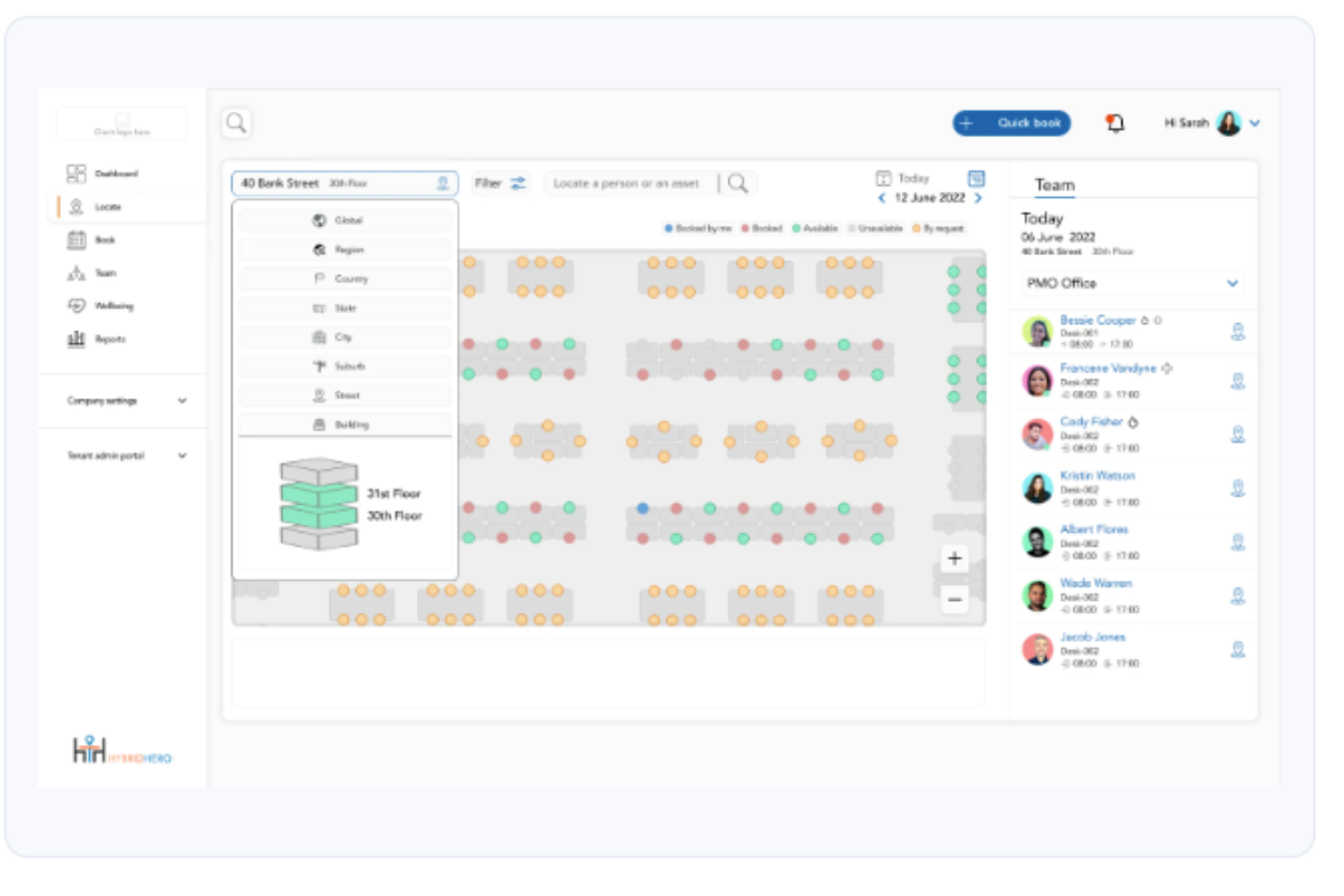
Hybrid Hero is an enterprise workspace management platform that helps multi-site organizations manage desk booking, room reservations, visitor access, and parking from a single connected system.
Who Is Hybrid Hero Best For?
Hybrid Hero suits large organizations with 500+ employees managing flexible work policies across multiple office locations or floors.
Why Hybrid Hero Is a Good Best Kadence Alternatives
I picked Hybrid Hero as one of the best because its occupancy analytics go well beyond basic booking counts. I love how it surfaces utilisation heat maps and no-show rates by building, floor, and team simultaneously, so I can compare occupancy across every site in one view. The drag-and-drop floor plan builder with live overlays means I can see exactly where capacity is being wasted in real time.
Hybrid Hero Key Features
- Built-in HR module: Manage employee records, leave requests, onboarding, and org charts within the same platform.
- Parking management: Assign, book, and monitor parking spaces alongside desks and rooms.
- Role-based access controls: Set granular permissions by user, team, region, or floor to protect data and workflows.
- Multi-language mobile app: Access the entire platform in 11 supported languages for global teams.
Hybrid Hero Integrations
Hybrid Hero offers native integrations with Microsoft 365, Google Workspace, Slack, Azure Active Directory, Okta, and SAML SSO. An API is available for custom integrations.
Pros and Cons
Pros:
- Floor plan overlays show live desk availability
- Includes built-in parking space booking
- Tracks occupancy across multiple sites simultaneously
Cons:
- Setup and onboarding require significant IT involvement
- Overkill for single-location or smaller teams
Best for coworking spaces

Othership is a platform designed to manage coworking spaces and flexible work environments. It's ideal for businesses and freelancers looking to optimize their workspace usage and enhance collaboration.
Why it's a good kadence alternative: Othership offers features like flexible booking and workspace management, which are essential for coworking environments. The platform provides real-time availability and booking options, making it easy for your team to find and reserve spaces.
With tools that support community engagement, Othership fosters a collaborative environment. Its focus on flexibility and adaptability makes it a suitable alternative to Kadence for coworking needs.
Standout features & integrations:
Features include flexible booking options that let you reserve spaces as needed. Real-time availability ensures that your team can easily find open workspaces. Community engagement tools help foster connections and collaboration among users.
Integrations include Google Calendar, Slack, Microsoft Outlook, Zoom, Microsoft Teams, Asana, Trello, Salesforce, HubSpot, and QuickBooks.
Pros and Cons
Pros:
- Enhances collaboration
- Ideal for coworking spaces
- Flexible booking options
Cons:
- Initial learning curve
- Limited customization

deskbird
Best for team collaboration

Archie is a space management software designed to enhance workplace efficiency for businesses and organizations. It serves teams needing flexible workspace solutions, such as desk and conference room booking.
Why it's a good Kadence alternative: Archie provides tools for booking desks and conference rooms, which are vital for team collaboration. Its visitor management and coworking software offer seamless operations and improved user experience.
With automation and real-time data insights, your team can make informed decisions quickly. Archie's focus on team collaboration ensures that your workspace is both efficient and adaptable to your needs.
Standout features & integrations:
Features include visitor management, which ensures a smooth check-in process for guests. The coworking software helps you manage shared spaces with ease. Real-time data insights allow your team to make informed decisions based on current workspace usage.
Integrations include Microsoft Teams, Slack, Google Calendar, Outlook, Zoom, Cisco Webex, Salesforce, QuickBooks, Xero, and Mailchimp.
Pros and Cons
Pros:
- Automation features
- Flexible workspace options
- Real-time data insights
Cons:
- Limited mobile features
- Initial setup complexity
DeskFlex
Best for real-time tracking

DeskFlex is a hybrid workplace solution offering hoteling software for managing desks, rooms, and resources. It serves organizations looking to optimize space usage and improve workplace efficiency.
Why it's a good Kadence alternative: DeskFlex provides real-time occupancy tracking and room scheduling, which are essential for managing dynamic work environments. Its location-based beacons and 3D floor maps help your team visualize and manage spaces effectively.
The software's ability to integrate with existing systems enhances its flexibility and usability. DeskFlex's focus on real-time data ensures that your team can adapt quickly to changes in space requirements.
Standout features & integrations:
Features include workstation touchscreens that offer multi-touch capabilities and compatibility with various operating systems. The FlexCube solution allows for real-time workspace management and personalized office flexibility. Room scheduling provides centralized booking with customizable settings and digital signage integration.
Integrations include Microsoft Outlook, Zapier, Okta, Google Calendar, Microsoft Office 365, Slack, Zoom, Cisco Webex, Salesforce, and Trello.
Pros and Cons
Pros:
- User-friendly interface
- Centralized booking system
- Real-time occupancy tracking
Cons:
- Basic reporting tools
- Limited customization
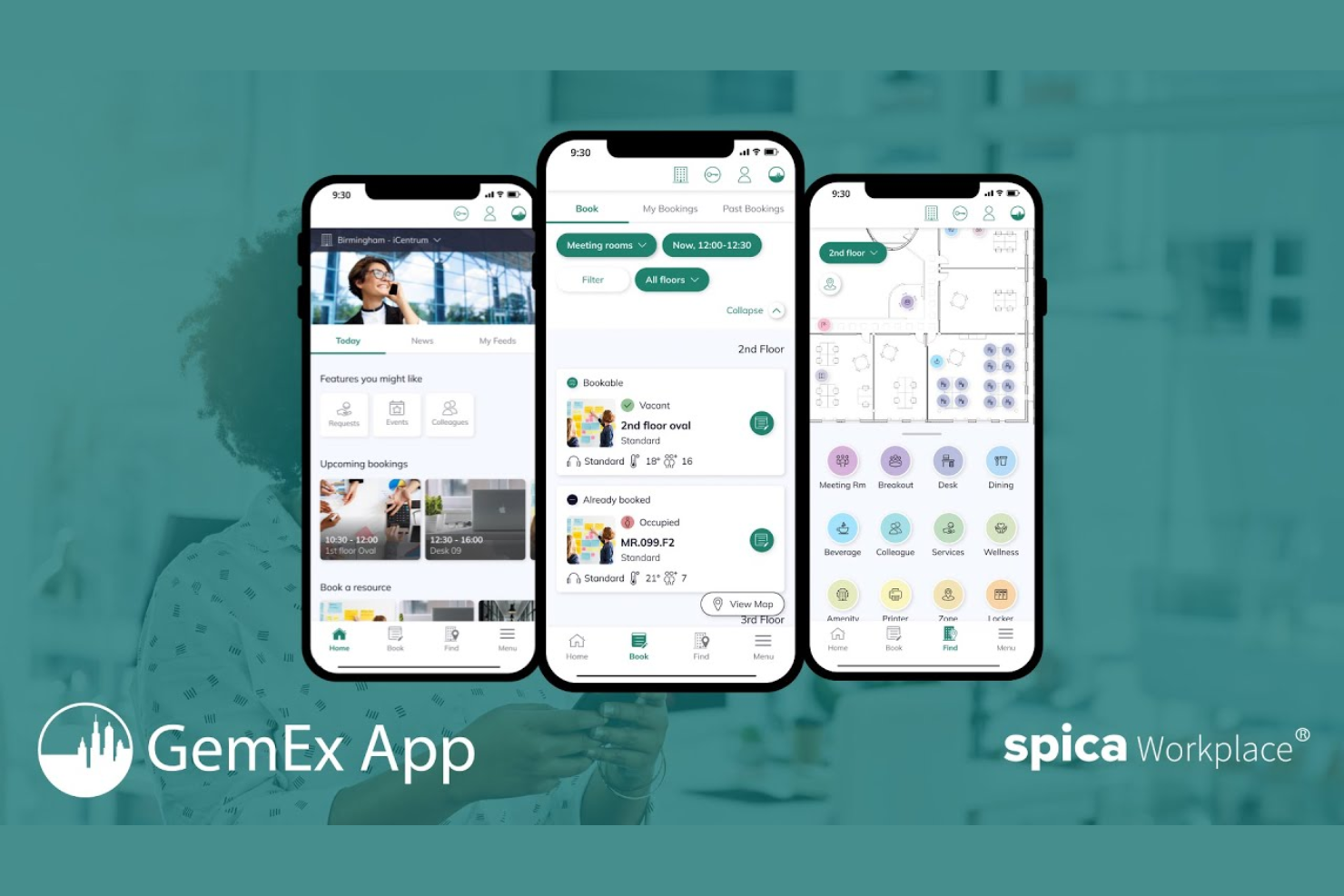
GemEx App is a workplace management platform designed to enhance employee engagement and optimize workspace usage. It's used by organizations looking to improve workplace efficiency and foster a better work environment.
Why it's a good Kadence alternative: GemEx App offers features such as space utilization analytics and employee feedback tools, which are crucial for boosting engagement. It provides real-time data to help your team make informed decisions about space management.
The platform's focus on employee wellness ensures a more positive and productive workplace experience. With tools that encourage employee participation, GemEx App enhances your team's overall engagement.
Standout features & integrations:
Features include space utilization analytics that provide insights into how your workspace is used. Employee feedback tools allow your team to share their thoughts and suggestions easily. The platform's focus on wellness initiatives helps improve the overall work environment.
Integrations include Microsoft Teams, Zoom, Slack, Google Workspace, Office 365, Salesforce, Trello, Asana, HubSpot, and Monday.com.
Pros and Cons
Pros:
- Easy feedback collection
- Supports workplace efficiency
- Encourages employee participation
Cons:
- No offline functionality
- Initial setup complexity

Skedda
Best for visitor management

Skedda is a cloud-based platform designed for scheduling and managing space bookings, primarily used by businesses and organizations that require efficient space management. It helps you manage bookings for rooms, desks, and other resources, making it ideal for coworking spaces, educational institutions, and community centers.
Why it's a good Kadence alternative: Skedda offers unique features like interactive floor plans and customizable booking rules, which can help streamline visitor management. These capabilities allow you to efficiently manage and visualize space usage, making it easy to coordinate and optimize resources. The platform also provides automated booking processes, reducing administrative tasks for your team. Skedda's focus on visitor management ensures that you can effectively handle foot traffic and resource allocation.
Standout features & integrations:
Features include interactive floor plans that allow you to visualize and manage your spaces with ease. Customizable booking rules let you tailor the system to fit your specific needs. Automated booking processes save you time by reducing manual tasks and ensuring smooth operations.
Integrations include Google Calendar, Office 365, Outlook, Slack, Zapier, iCal, Mailchimp, Xero, QuickBooks, and Salesforce.
Pros and Cons
Pros:
- Strong focus on visitor management
- Automated booking processes
- Customizable booking rules
Cons:
- No mobile app
- Limited reporting capabilities
New Product Updates from Skedda

Skedda Expands Visit Exports With Custom Field Data
Skedda adds Summary and Breakdown visit exports with custom field data, filter support, and XLSX or CSV formats. These updates give teams more flexibility when exporting visit- and visitor-level information for reporting and analysis. For more information, visit Skedda’s official site.
 .
.
OfficeSpace
Best for AI-driven insights

OfficeSpace is a workspace management tool designed to optimize office layouts and enhance productivity. It's targeted at businesses seeking to efficiently manage their office spaces and improve employee collaboration.
Why it's a good Kadence alternative: OfficeSpace offers AI-driven insights that help your team make data-informed decisions about space utilization. The platform includes features like desk booking and floor plan visualization, which are essential for efficient office management.
Its intuitive interface simplifies the process of managing complex office environments. OfficeSpace's focus on leveraging AI for space optimization makes it a strong alternative to Kadence.
Standout features & integrations:
Features include floor plan visualization that allows you to see and manage office layouts easily. The platform's scenario planning helps you prepare for changes in office space needs. AI-driven insights provide valuable data that guide your decisions about space utilization.
Integrations include Microsoft Outlook, Google Workspace, Slack, Zoom, Cisco Webex, Microsoft Teams, Salesforce, Trello, Asana, and HubSpot.
Pros and Cons
Pros:
- Supports scenario planning
- Easy floor plan management
- AI-driven insights
Cons:
- No offline access
- Basic reporting features
New Product Updates from OfficeSpace

OfficeSpace Adds Work Order Status and Cost Reports
OfficeSpace adds Work Order Status and Work Order Cost reports for built-in maintenance reporting. These reports help facilities teams track work order activity and costs without relying on manual spreadsheets. For more information, visit OfficeSpace’s official site.
 .
.Other Kadence Alternatives
Here are some additional Kadence alternatives that didn’t make it onto my shortlist, but are still worth checking out:


How I Evaluate Kadence Alternatives
I split my evaluation into two layers: baseline features every tool must have—like desk booking and team scheduling—and the differentiators that matter most for HR and workplace teams.
Core Functionality (Table Stakes For This List)
When I'm selecting tools for my list, I rank each one on a scale from 0 (does not offer the functionality) to 5 (excels in this area) for each core functionality listed below. Then, I calculate the tool's total score into a percentage. Each tool needs to achieve a minimum total score of 65% to be considered for inclusion.
- Desk & Room Booking: I evaluate whether employees can reserve desks, hot desks, and meeting rooms with real-time availability—including recurring reservations and check-in workflows.
- Hybrid Schedule Coordination: Teams need a way to set and share weekly in-office or remote days, so I look for schedule-setting tools that help align collaboration days.
- Team Visibility & Directory: I check for a searchable view that shows where colleagues are working on a given day, making it easy to plan in-person time with specific people.
- Workplace Analytics & Reporting: Good space utilization data matters, so I look for dashboards covering occupancy rates, no-show trends, and booking patterns across sites.
- Interactive Floor Plans: Visual maps that let employees browse available desks by floor, zone, or neighborhood make a real difference in adoption, so I evaluate map quality closely.
- HR & Collaboration Integrations: I look for native connections to tools like Slack, Microsoft Teams, Google Calendar, and Outlook, plus SSO and HRIS sync for automated provisioning.
Once I have a list of tools that meet this criteria, I consider what sets each platform apart.
Differentiating Factors (What Sets Vendors Apart)
Here's how I compare and contrast different vendors:
Standout Features
I pay close attention to meeting room intelligence—features like ghost meeting detection and auto-release of unused rooms save real capacity in busy offices. Neighborhoods and zoning capabilities also matter, especially for HR teams assigning departments to specific floors or areas to keep collaboration organic. Visitor management is another differentiator I evaluate, since many workplace teams handle guest check-ins, host notifications, and compliance workflows alongside daily space coordination.
Beyond Features
Pricing model matters here—I look at whether vendors charge per user, per desk, or per resource, since the right structure depends on your headcount-to-desk ratio. Implementation support is another key factor; rolling out a hybrid workplace tool often requires floor plan digitization and change management help, so I evaluate onboarding resources closely. Security and compliance posture also carries weight, especially for HR-owned deployments where employee data flows through the platform daily.
Why Look For A Kadence Alternative?
While Kadence is a good choice of workplace management software, there are a number of reasons why some users seek out alternative solutions. You might be looking for a Kadence alternative because…
- You need more customization options
- Your team requires mobile access
- You want better integration with existing tools
- You need a solution for a larger organization
- Your team operates in multiple locations
- You seek advanced analytics features
If any of these sound like you, you’ve come to the right place. My list contains several workplace management software options that are better suited for teams facing these challenges with Kadence and looking for alternative solutions.
Features
Here are some of the key features of Kadence, to help you contrast and compare what alternative solutions offer:
- Workplace management: Provides tools for space management, occupancy tracking, and visitor management to keep your office running smoothly.
- Employee engagement: Enhances collaboration with AI assistants and helps organize workplace events, keeping your team connected.
- Hybrid work solutions: Offers desk and room booking systems, along with work schedule management to accommodate flexible work arrangements.
- Real estate optimization: Delivers insights that improve space utilization and help maximize your real estate investments.
- Coordination tools: Uses smart scheduling and policy compliance to enhance collaboration and workplace culture.
- Seamless integrations: Compatible with platforms like Microsoft Teams and Slack, ensuring smooth operations across your tech stack.
- Customer success: Trusted by over 300,000 users, with reported real estate savings and improved workplace experiences.