

10 Best Skedda Alternatives for Room Booking in 2026

10 Best Skedda Alternatives Shortlist


A strong Skedda alternative gives you flexible space booking, easy integrations, and insights into how your team actually uses workspaces. If you’re looking for Skedda alternatives, you’re likely balancing evolving hybrid schedules, occupancy rules, and employee experience—all without sacrificing visibility or wasting hours managing bookings.
It’s tough to find a tool that meets your specific needs, especially as your workplace changes. This guide will help you compare the best Skedda alternatives, so you can quickly find the booking system that fits your team today—and scales for what’s next.
What Is Skedda?
Skedda is a cloud-based space booking platform designed for managing rooms, desks, and workspaces. It gives teams an easy way to reserve offices, meeting rooms, or shared areas, all managed from a clean online interface.
Administrators can set booking rules, automate approvals, and track usage trends. Skedda is popular with organizations that need flexible, centralized scheduling for hybrid work, event venues, or community facilities.
Skedda Alternatives Comparison Table
This comparison table summarizes pricing details for my top Skedda alternatives:
| Tool | Best For | Trial Info | Price | ||
|---|---|---|---|---|---|
| 1 | Best for managing shared spaces for teams and visitors | 14-day free trial | From $19/spot/month | Website | |
| 2 | Best for tracking occupancy with workplace sensors | Free plan + free demo available | From $500/month | Website | |
| 3 | Best for smooth platform migration & data transfer | Free demo available | Pricing upon request | Website | |
| 4 | Best for hybrid work schedules | 7-day free trial + free demo available | From $1.79/user/month (billed annually) | Website | |
| 5 | Best for carbon tracking in the workspace | Free demo available | From $99/month | Website | |
| 6 | Best with 3D immersive desk visualization | 30-day free trial + free demo available | From €3.00/resource/month (billed annually) | Website | |
| 7 | Best for live room status visualization | 30-day free trial + free demo available | From $13.50/month (billed annually) | Website | |
| 8 | Best for digital conference room displays | 30-day free trial available | From $51/month | Website | |
| 9 | Best for visual space mapping | Free plan available | From €5.50/month (billed annually) | Website | |
| 10 | Best for automated desk and room release | Free plan + free demo available | From $362/location/month (billed annually) | Website |

Why Trust Our Software Recommendations
Our team has been testing and reviewing software since 2012. As HR experts ourselves, we know how difficult—and important—it is to choose the right software.
For this guide, we evaluated tools using hands-on testing and independent research, scoring tools using our selection criteria. We also draw on insights from industry thought leaders and practicing HR experts.
Our reviews reflect our human editorial judgment, not a sales pitch.
Expert reviewers:
Best Skedda Alternatives Reviews
Below are my detailed summaries of the best Skedda alternatives that made it onto my shortlist. My reviews offer a detailed look at the features, integrations, and best use cases of each platform to help you find the best one for you.

Whatspot
Best for managing shared spaces for teams and visitors
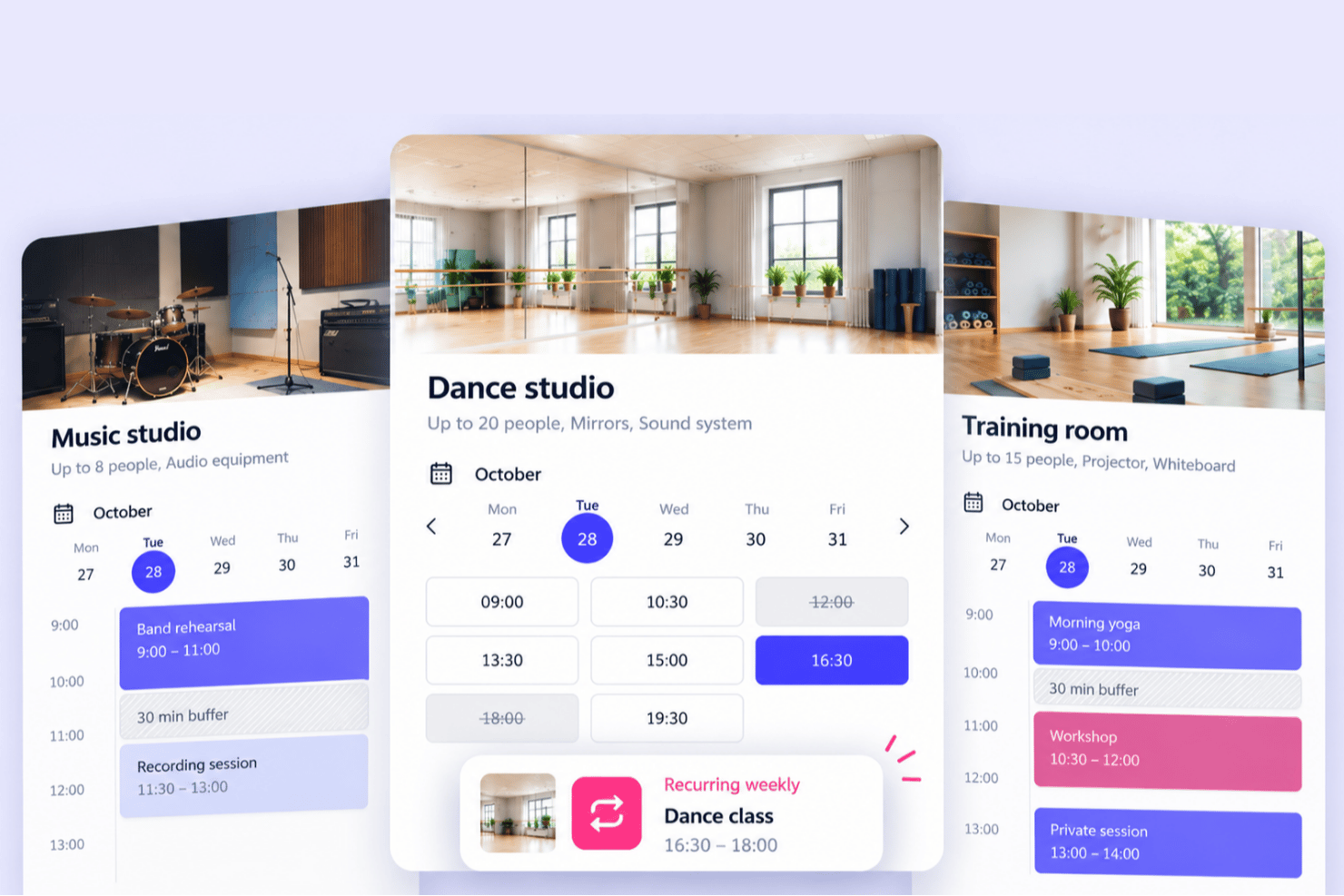
Whatspot is a space booking platform built for shared spaces that serve both internal teams and external visitors, members, or community groups. Instead of running separate tools for staff and public reservations, organizations can manage both from one system, with dedicated booking experiences, flexible booking modes, and a single shared calendar.
Who Is Whatspot Best For?
Community centers, educational and nonprofit organizations, churches, therapy and consultation spaces, sports facilities, coworking spaces, studios, and event venues that need to manage bookings for both internal users and outside visitors.
Why Whatspot Is a Good Skedda Alternative
I picked Whatspot for this list because it handles internal and public bookings in one system, which is the main reason to consider it over Skedda. Many booking tools focus either on workplace reservations or on visitor bookings, but Whatspot lets you make some spaces available to your team and others to the public, each with its own booking rules and approval workflows. Visitors can book without creating an account, and every reservation, internal or external, lands in one shared calendar. For organizations whose spaces serve staff, members, and the wider community, that combination makes it a strong fit.
Whatspot Key Features
- Separate internal and public booking: Offer distinct booking experiences for internal users and external visitors, with public booking that doesn't require an account.
- Flexible booking modes: Choose flexible, fixed-duration, or fixed-interval booking to suit different types of spaces.
- Approval workflows and booking rules: Set rules per space and require manual approval before reservations are confirmed.
- Centralized administration: Manage internal and external reservations together in one shared calendar.
- Embeddable, mobile-friendly booking: Embed public booking on your website and let people reserve spaces from any device.
Whatspot Integrations
Integrations include Google Calendar, Microsoft Outlook Calendar, Microsoft Teams, Microsoft Entra SSO, and Google Workspace SSO.
Pros and Cons
Pros:
- Multilingual support for international teams
- Mobile web booking without app install
- Public booking without requiring an account
Cons:
- Approval workflow lacks advanced automation
- Less suited to large corporate offices
New Product Updates from Whatspot

Whatspot Adds Booking Modes for Different Space Types
Whatspot introduces Booking Modes to support different reservation rules for different space types. Admins can choose flexible bookings, fixed durations, or fixed intervals based on how each space is used. For more information, visit Whatspot's official site.
 .
.
elia
Best for tracking occupancy with workplace sensors
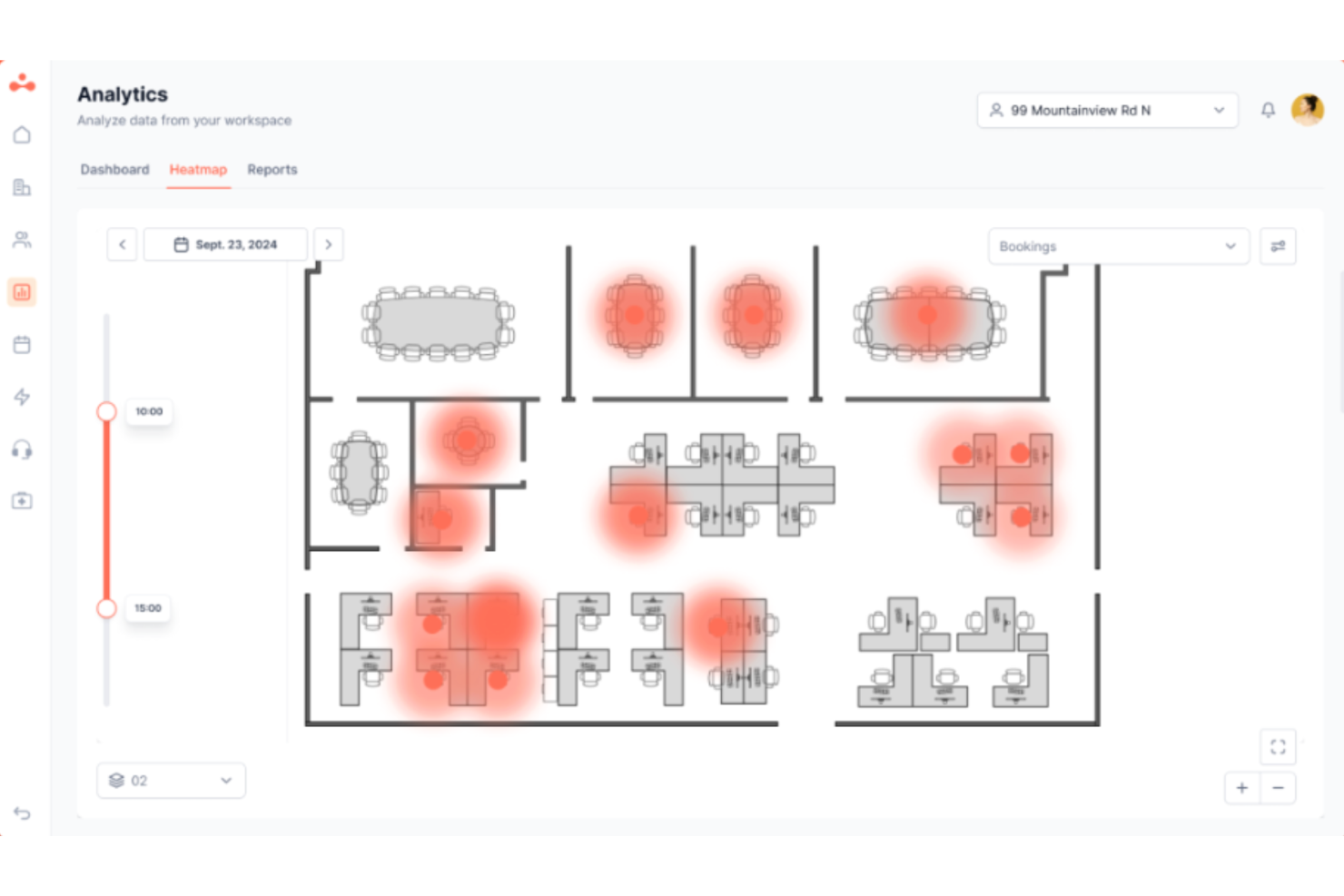
elia is a modular workplace management platform for HR, facilities, and people ops teams who need to manage desk and room bookings, hybrid scheduling, visitor management, and real occupancy data—all in one place.
Who Is elia Best For?
elia is a strong fit for mid-size to enterprise organizations managing hybrid workforces across multiple office locations who want to make data-driven decisions about their physical workspace.
Why elia Is a Good Best Skedda Alternatives
elia earns its spot on my shortlist because of how its sensor technology goes beyond what booking data alone can tell you. I particularly like that the room sensors count both entries and exits, giving a real picture of how many people are in a space, not just who booked it. The desk sensors use infrared body-heat detection to capture true presence data, anonymously, without relying on employee check-ins. That feeds directly into elia's occupancy analytics, where I can see actual usage patterns across every floor.
elia Key Features
- Interactive floor plan builder: Lets admins create clickable, multi-floor maps employees use to book desks and rooms.
- Visitor management: Includes guest check-in, host notifications, and secure visitor logs integrated with employee booking.
- Request management: Allows employees to submit service requests like catering or maintenance directly from the floor plan.
- Role-based access controls: Enables granular booking permissions and policy setup by user group, department, or location.
elia Integrations
elia offers native integrations with Microsoft 365, Google Workspace, and Slack. An API is available for custom integrations, and the Enterprise plan includes a custom integration builder for IoT and software tools.
Pros and Cons
Pros:
- Built-in visitor management and check-in flows
- Offers interactive multi-floor booking maps
- Tracks real occupancy with IoT sensors
Cons:
- Advanced analytics reserved for top-tier plans
- No native HRIS integration options

Best for smooth platform migration & data transfer
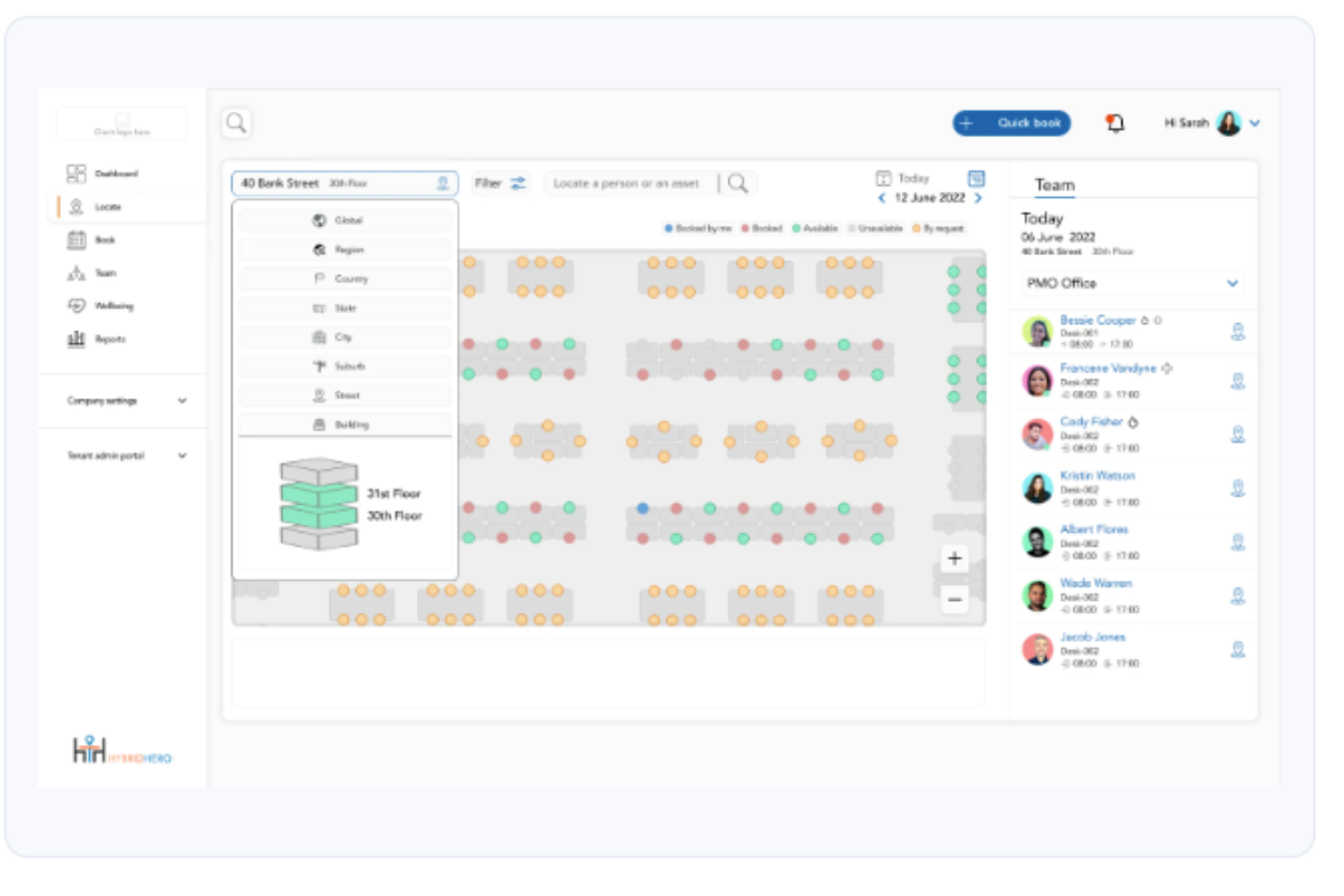
Hybrid Hero is an enterprise workplace management platform built for HR and operations teams who need to manage desks, meeting rooms, parking, and visitors alongside hybrid scheduling and workforce analytics, all from a single system.
Who Is Hybrid Hero Best For?
Hybrid Hero is a strong fit for mid-to-large enterprises with 500 or more employees managing complex, multi-site hybrid work environments.
Why Hybrid Hero Is a Good Skedda Alternative
I picked Hybrid Hero for this list specifically because of its Switch Programme, which is the most structured migration offer I've seen from any Skedda alternative. It migrates your existing desk, room, and user data without manual re-entry, runs your old and new systems in parallel, and guarantees you're live within 30 days. I also appreciate that the quote process surfaces a full module-by-module cost breakdown and implementation timeline upfront, so there are no surprises mid-migration.
Hybrid Hero Key Features
- Interactive floor plans: Users can book desks, rooms, and parking directly from visual office maps.
- Built-in visitor management: Includes kiosk check-in, badge printing, and NDA capture for streamlined front desk operations.
- Mobile and Teams app support: Employees can book and check into resources using iOS, Android, and Microsoft Teams.
- Role-based access controls: Admins set booking permissions and access at varying levels by team, region, or role.
Hybrid Hero Integrations
Hybrid Hero offers native integrations with Microsoft 365, Google Workspace, Slack, Azure Active Directory, Okta, and SAML SSO. An API is available for custom integrations.
Pros and Cons
Pros:
- Built-in IoT sensor support for real occupancy
- Covers desks, rooms, parking, and visitors
- Structured migration programme with a 30-day guarantee
Cons:
- Smaller third-party review presence than competitors
- Limited public documentation on advanced analytics

Best for hybrid work schedules
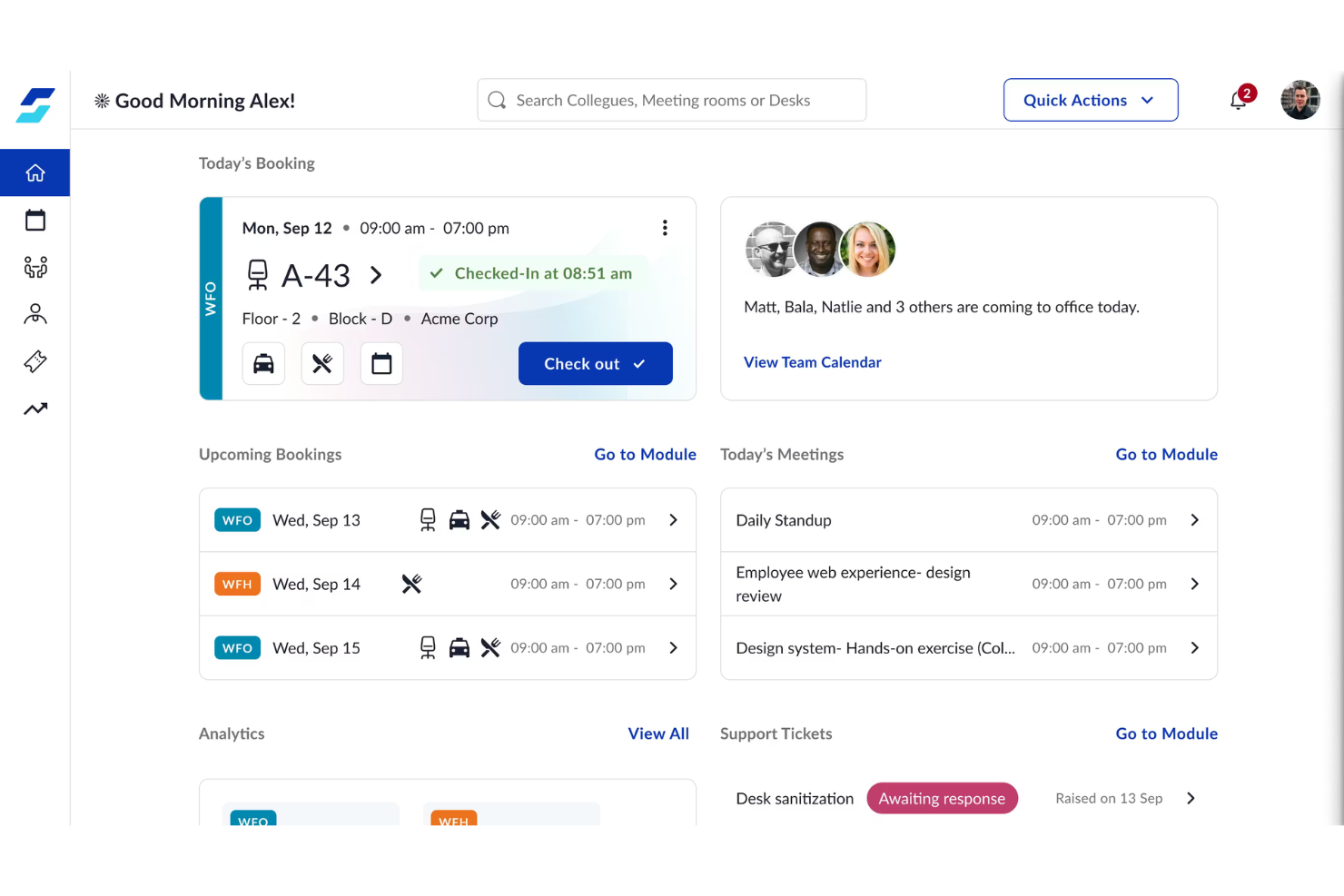
WorkInSync is an all-in-one platform for businesses managing hybrid work arrangements that need real-time visibility and coordination of employee schedules, desks, and meeting rooms. Companies looking for an easy way to align hybrid teams and improve workplace resource usage will find its feature set especially appealing.
Who Is WorkInSync Best For?
HR teams and workplace managers in mid-sized to large organizations are coordinating hybrid schedules across multiple departments or locations.
Why WorkInSync Is a Good Skedda Alternative
I picked WorkInSync because it goes beyond space booking to actually coordinate hybrid schedules across teams. The team sync feature lets employees publish their weekly in-office or remote plans, so I can see at a glance who's in on any given day and plan desk allocation accordingly. I also like the commute scheduling feature, which helps employees coordinate carpools and transit—something Skedda doesn't touch at all. For organizations managing large hybrid workforces where schedule coordination is just as important as desk availability, WorkInSync covers both in a single platform.
WorkInSync Key Features
- Ghost booking auto-release: Automatically detects and cancels unused room or desk reservations when employees don't check in, freeing up space in real time.
- Parking management: Employees can book parking spots in advance, with live occupancy tracking and waitlist support built in.
- Meal management: Allows employees to pre-order meals and helps admins track food demand, consumption, and availability across the office.
- Space utilization analytics: Generates reports on desk and room usage patterns so admins can make informed decisions about office layout and capacity planning.
WorkInSync Integrations
Integrations include Google Calendar, Microsoft Outlook, Microsoft Teams, Okta, OneLogin, Oracle PeopleSoft, Honeywell, Dormakaba, Axis Technologies, and Cisco.
Pros and Cons
Pros:
- Customizable approval workflows
- Built-in meal management modules
- Detailed desk and space booking controls
Cons:
- Limited self-service analytics
- Requires manual setup for complex shift rosters
YAROOMS
Best for carbon tracking in the workspace
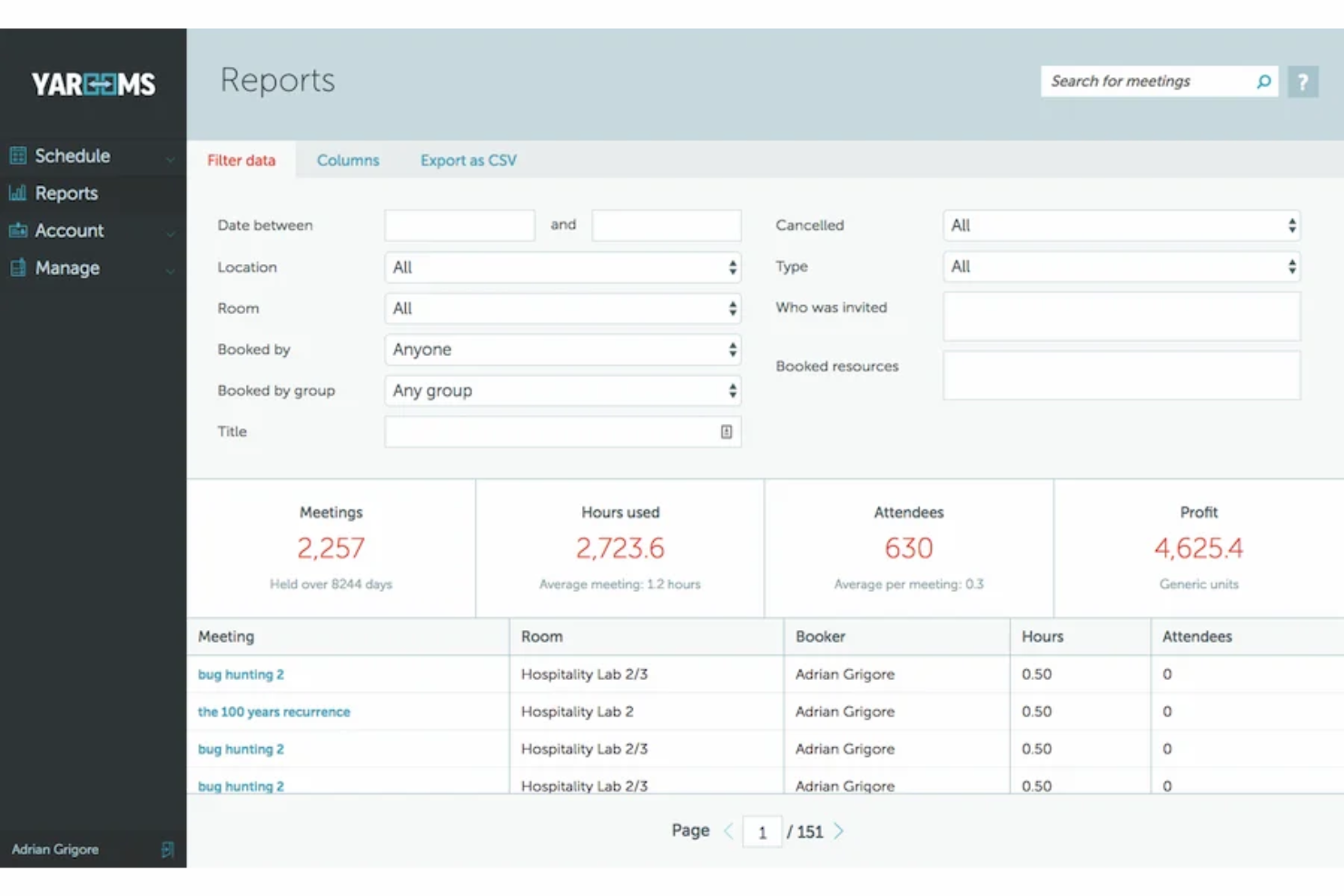
YAROOMS is a workplace management platform designed for organizations focused on resource scheduling and real-time space optimization. Facilities teams and sustainability-minded organizations use it to simplify room bookings and address modern hybrid working challenges.
Who Is YAROOMS Best For?
Facilities teams and sustainability leads in mid-sized to large organizations aiming to track space usage and environmental impact.
Why YAROOMS Is a Good Skedda Alternative
I picked YAROOMS because it's one of the only workspace booking tools that ties space reservations directly to carbon footprint data. When an employee books a desk or room, YAROOMS calculates the associated CO2 emissions based on commute and occupancy—something I haven't seen built natively into most competitors. I also like the hybrid work planner, which lets employees schedule office days alongside colleagues, reducing unnecessary trips in and the emissions that come with them. For sustainability-focused teams juggling ESG reporting and space management at once, YAROOMS handles both without needing separate tools.
YAROOMS Key Features
- Space map view: Browse an interactive floor plan to see which desks and rooms are available in real time.
- Visitor management: Register guests, send arrival notifications, and manage check-ins from a central dashboard.
- Meeting room display: Connect YAROOMS to lobby or door-mounted screens to show live room availability.
- Usage analytics: Pull reports on desk and room occupancy rates across locations and time periods.
YAROOMS Integrations
Integrations include Microsoft Teams, Microsoft 365, Outlook, Google Calendar, Azure AD, Slack, SAML 2.0, Zoom, Google Meet, and MappedIn.
Pros and Cons
Pros:
- Includes real-time interactive space maps
- Built-in data compliance standards
- Tracks carbon emissions alongside workspace bookings
Cons:
- Limited floor counts on starter plans
- No built-in parking management tools

Tribeloo
Best with 3D immersive desk visualization

Tribeloo is a workplace management platform designed for companies that want to make on-site collaboration easy and flexible. I think facilities teams and hybrid workplaces that need visual, self-serve desk booking and room booking will find it especially useful.
Who Is Tribeloo Best For?
Office managers and workplace teams in medium or large companies who want to coordinate desk booking and flexible space usage across multiple locations.
Why Tribeloo Is a Good Skedda Alternative
I picked Tribeloo because its 3D interactive floor plans make finding and booking a desk feel intuitive in a way flat floor plans don't. My team can see an immersive, to-scale view of the office, spot where colleagues are sitting, and book a nearby desk without any back-and-forth. I also appreciate the colleague finder feature, which lets you choose a desk based on who else is coming in that day. In hybrid teams where coordination matters, that kind of visibility makes a real difference for the employee experience.
Tribeloo Key Features
- Visitor management: Register guests, send welcome emails, and manage sign-in from within the platform
- Meeting room booking: Reserve rooms directly from the interactive map or calendar view
- Usage analytics: Track desk and room occupancy data to see which spaces are actually being used
- Zone and neighbourhood setup: Assign teams to specific areas of the office to organize how space is allocated
Tribeloo Integrations
Integrations include Microsoft Azure AD, Microsoft Outlook, Google Calendar, and Okta.
Pros and Cons
Pros:
- Automates cleaning schedules after every desk use
- Suggest desks near teammates or teams
- 3D floor plans simplify desk selection
Cons:
- Limited dashboard editing
- Map setup can require manual floor data
Best for live room status visualization
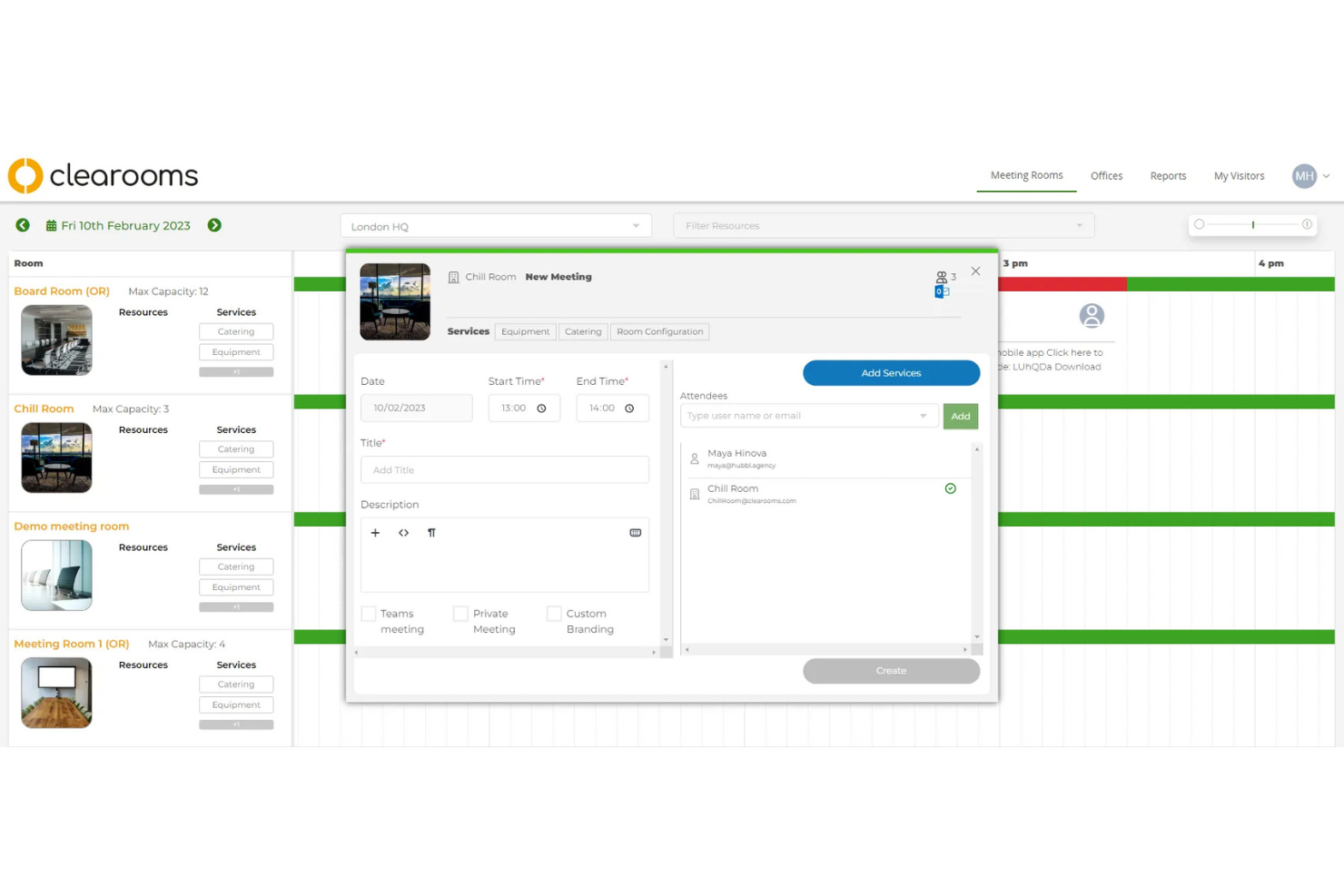
Clearooms is a workspace management software designed for organizations that need clear visibility into meeting room availability. I think teams in fast-paced office spaces or coworking environments will appreciate how it helps prevent double bookings and time-wasting room searches.
Who Is Clearooms Best For?
Facilities and office managers in busy corporate or coworking spaces who need to monitor and share real-time meeting room status.
Why Clearooms Is a Good Skedda Alternative
Live room status visualization is where Clearooms genuinely stands out, and it's the main reason I picked it for this list. I like how the meeting room displays updates in real time, so anyone walking past a conference room can see at a glance whether it's occupied or free. My team is able to book directly from a room display panel without needing to open an app or log into a portal. I also appreciate the auto-release feature, which frees up rooms when attendees don't show, preventing ghost bookings from blocking shared spaces all day.
Clearooms Key Features
- Desk booking: Reserve individual desks in advance or on the day from the web or mobile
- Interactive floor plans: View and select available desks or rooms from a visual map of your office layout
- Visitor management: Pre-register guests, send arrival notifications, and manage sign-in from one place
- Usage reporting: Access occupancy data and booking trends to understand how your spaces are actually being used
Clearooms Integrations
Integrations include Azure, Google Workspaces, Okta, OneLogin, Google Calendar, Office 365, Microsoft Teams, Paxton Access, Salto, and Slack.
Pros and Cons
Pros:
- Book directly from touch panels onsite
- Room bookings auto-release after no-shows
- Displays traffic light system for instant status
Cons:
- Limited booking rules customization
- Limited analytics on overall room utilization

Joan
Best for digital conference room displays

Joan specializes in smart, wireless displays for managing conference room reservations outside meeting spaces. Facilities teams, IT managers, and office admins use Joan to reduce booking conflicts and give employees clear, real-time room availability at a glance.
Who Is Joan Best For?
Workplace managers and IT teams in offices that want real-time, on-site conference room display solutions.
Why Joan Is a Good Skedda Alternative
I picked Joan because its e-ink room display panels are purpose-built for outside meeting rooms, giving employees instant visibility into whether a space is free without touching a keyboard. I especially like the no-show detection feature, where Joan automatically releases a room if no one confirms the booking at the door—something that directly cuts down on ghost bookings in busy offices. Joan's floor plan view also lets admins and employees see every room's status across an entire floor at a glance. For teams where physical space signage is as important as the booking software itself, Joan solves both problems together.
Joan Key Features
- Room booking panel: Reserve or release a room directly from the Joan display mounted outside the door.
- Desk booking: Employees can search, filter, and reserve individual desks through the Joan app or web portal.
- Analytics dashboard: Tracks room and desk occupancy data to show usage trends across your office.
- Visitor check-in: Manages guest arrivals and notifies hosts when visitors are ready at reception.
Joan Integrations
Integrations include Slack, MS Teams, Webex, Jabra, Logitech, Azure AD, Okta, and OneLogin.
Pros and Cons
Pros:
- Customizable notifications for meeting room events
- Identifies "ghost" meetings through AI detection
- Uses e-paper displays for room status
Cons:
- Limited customization for display screen layouts
- Requires device battery replacement

Dibsido
Best for visual space mapping
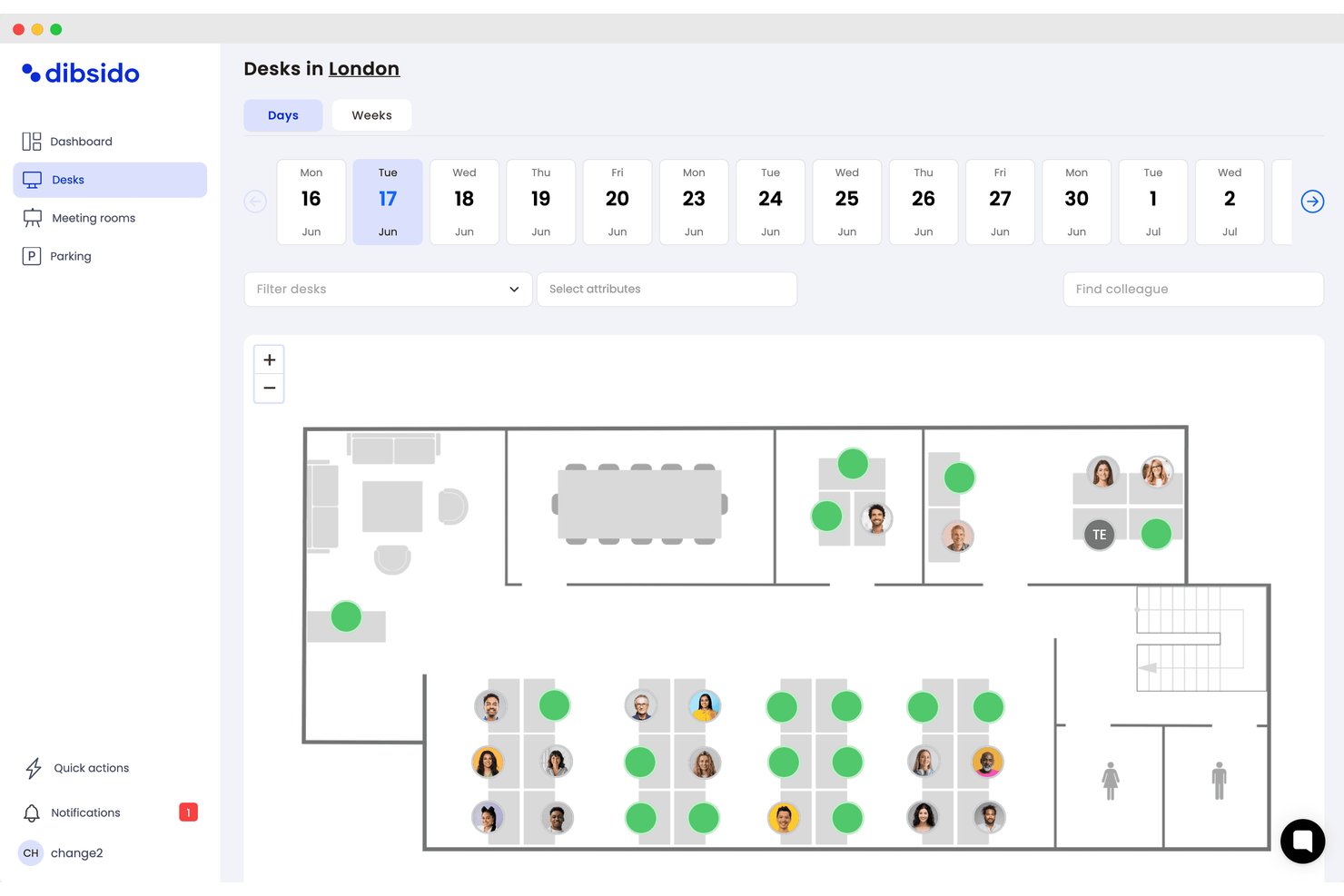
Dibsido is a workplace booking platform designed for organizations that need flexible, user-friendly ways to manage desks, meeting rooms, and shared resources while supporting hybrid work and real-time office visibility.
Who Is Dibsido Best For?
Facilities and HR teams in mid-sized companies looking to centralize desk, room, and parking reservations across flexible workspaces.
Why Dibsido Is a Good Best Skedda Alternatives
I picked Dibsido as one of the best because the platform lets me build and deploy interactive floor plans for desks, rooms, and parking, so I can adapt reservation layouts as workplace policies evolve. The same maps are available through the iOS and Android app, while parking waiting lists and spot handoffs help maximize available spaces.
Dibsido Key Features
- Interactive floor plan booking: Users click on visual office maps to reserve desks, rooms, or parking in real time.
- Multi-language interface: The app supports 11 languages for global teams and international office environments.
- Calendar sync: Integrates with Google and Outlook calendars to keep bookings visible alongside meetings.
- Role-based access controls: Admins can set user permissions and booking rules based on team, role, or location.
Dibsido Integrations
Dibsido offers native integrations with Google Workspace, Microsoft 365 (including Outlook), Slack, Microsoft Teams, and Microsoft Entra ID. It also supports SAML 2.0 single sign-on with compatible identity providers. An API is available for custom integrations.
Pros and Cons
Pros:
- Fast setup with minimal onboarding steps
- Supports meeting room and parking booking
- Interactive booking with floorplan visualization
Cons:
- Lacks deep HRIS integration features
- Limited advanced approval workflow options

Envoy
Best for automated desk and room release

Envoy increases office efficiency through automated desk and room release, making it ideal for companies that need to eliminate "ghost bookings" and reclaim unused space in real-time. It’s especially useful for facilities and operations teams looking to optimize floor capacity and ensure available desks are actually being utilized.
Who Is Envoy Best For?
Front desk, facilities, and HR teams managing physical office locations that need to eliminate wasted space and ensure that "booked" desks and rooms are actually being used.
Why Envoy Is a Good Skedda Alternative
I picked Envoy because its automated release triggers solve the "no-show" headache that Skedda often leaves to manual oversight. If someone misses their check-in window, Envoy instantly releases the desk or room back into the pool for others to grab. I also love how it uses Wi-Fi and badge data to verify physical presence—turning a "sold out" office into a functional one by handling the cleanup for you. For teams that prioritize high-efficiency utilization over simple scheduling, Envoy is the smarter play.
Envoy Key Features
- Automated Space Release: Automatically cancels desk or room reservations if a user doesn't check in via the app or door badge, instantly updating availability.
- Integrated Room Displays: Physical signage at meeting rooms that allows for "ad-hoc" booking or instant check-ins to prevent squatting.
- Occupancy tracking: Monitors real-time headcount across office floors and zones to show who is on-site at any given time.
- Presence Verification: Syncs with your existing Wi-Fi or badge systems to confirm when a person is physically on-site, ensuring data accuracy for space planning.
Envoy Integrations
Integrations include Luxer One Lockers, Gallagher Command Centre, Verkada, Google Drive, Neat Pad, Rhombus Systems, Sharebite, Pipedream, Automatic Sign Out+, and Text Field Rules.
Pros and Cons
Pros:
- Real-time visitor sign-in and tracking
- Built-in integration with workplace sensors
- Reduces "no-show" wasted space
Cons:
- Full automation requires hardware integration
- Desk booking requires separate admin setup
Other Skedda Alternatives
Here are some additional Skedda alternatives that didn’t make it onto my shortlist, but are still worth checking out:
- Officely
For team desk booking in Slack
- Eptura Engage
For enterprise meeting room bookings
- Robin
For AI-powered workplace forecasting
- deskbird
For fast mobile booking
- Kadence
For hybrid desk check-ins
- Tactic
For floor plan customization
- Archie
For door access control integration
- OfficeRnD
For coworking space management
- DeskFlex
For hospitals and educational facilities
- Gable
For managing global workspace


How I Evaluate Skedda Alternatives
I split my evaluation into two layers: baseline requirements every platform must meet, and differentiators—like hybrid scheduling and HRIS integrations—that separate good from great.
Core Functionality (Table Stakes For This List)
When I'm selecting tools for my list, I rank each one on a scale from 0 (does not offer the functionality) to 5 (excels in this area) for each core functionality listed below. Then, I calculate the tool's total score into a percentage. Each tool needs to achieve a minimum total score of 65% to be considered for inclusion.
- Desk & Room Booking: I check whether employees can self-serve reservations for desks, meeting rooms, and shared resources like phone booths or parking spots.
- Interactive Floor Plans: Visual, clickable maps make a real difference when employees are picking a desk near their team across multi-floor offices.
- Hybrid Scheduling Support: I look for recurring booking patterns, team-day coordination, and check-in workflows that match how hybrid policies actually work.
- HRIS & Calendar Integrations: Syncing with Google Calendar or Outlook is table stakes, but I also evaluate SSO and SCIM support for employee provisioning.
- Utilization Analytics: Reports should show occupancy trends, peak-day booking data, and usage patterns that HR and facilities teams can act on.
- Access & Policy Controls: I evaluate whether admins can set booking rules by department, location, or role—like reserving certain zones for specific teams.
Once I have a list of tools that meet this criteria, I consider what sets each platform apart.
Differentiating Factors (What Sets Vendors Apart)
Here's how I compare and contrast different vendors:
Standout Features
A colleague finder tool helps employees see who's in the office before they book, which makes team-day coordination much easier for hybrid teams. I also look for IoT sensor integration—platforms that pull real occupancy data from under-desk sensors give HR teams far more accurate utilization numbers than booking logs alone. Native Slack or Teams apps matter too, since employees are more likely to book consistently when they can do it from where they already work.
Beyond Features
Pricing structure matters here because workspace tools vary widely—some charge per desk, others per user, and the wrong model can inflate costs fast as headcount grows. I also evaluate HR tech stack fit, especially whether a platform offers native HRIS connectors and SCIM provisioning so employee directories stay current without manual upkeep. Security is another key factor. Platforms handling employee location and attendance data should meet SOC 2 or ISO 27001 standards and offer audit logs that satisfy internal compliance reviews.
Why Look For a Skedda Alternative?
While Skedda is a good choice for workspace management, there are a number of reasons why some users seek out alternative solutions. You might be looking for a Skedda alternative because…
- You want immersive 3D floor plan views to enhance the user experience
- Advanced analytics or reporting is needed for a more scalable office strategy
- Integration with specific workplace tools or third-party add-ons is required
- Support for large, multi-location offices is missing in the base pricing model
- Visitor management or access control is a priority
- Custom branding or configuration options are limited without a transparent pricing commitment
If any of these sound like you, you’ve come to the right place. My list contains several Skedda alternatives that are better suited for teams facing these challenges with Skedda and looking for alternative solutions.
Skedda Key Features
Here are some of the key features of Skedda, to help you contrast and compare what alternative solutions offer:
- Online booking: Participants can book desks, rooms, or parking spaces online through a user-friendly web interface, reducing the need for manual scheduling.
- Interactive floor plans: Users can select and book spaces directly from a visual map of the office layout for better spatial understanding and an intuitive interface.
- Automated booking rules: Admins can set up specific permissions for who can book which spaces, on what days, and under what conditions to enforce policy compliance.
- Self-service management: Employees can manage their own bookings, cancellations, and preferences without relying on IT or a support team.
- Booking quotas: Restrict the number of bookings per user or team, ensuring fair access to limited resources across the work environment.
- Customizable notifications: Send automated emails and in-app alerts to keep users informed of booking updates or upcoming reservations.
- Analytics and reporting: Track usage patterns and booking trends, providing actionable insights for space planning and resource optimization.
- Single sign-on (SSO): Integrate authentication with Microsoft, Google, or SAML providers for easy and secure user access.
- Access control integration: Tie desk and room booking system reservations to door security systems, ensuring only authorized users enter booked rooms.
- Calendar sync: Automatically funnel booking data to external calendars like Google Calendar or Outlook, keeping schedules aligned.