



OfficeSpace vs. Archie: Comparison & Expert Reviews For 2026



OfficeSpace helps teams plan and manage their workplaces with clarity and control, making it easy to organize space and people in one platform. Archie focuses on simpler functions, giving hybrid offices modern tools to manage space and improve daily workflows. While both tools support hybrid work, OfficeSpace leans towards enterprise functionality with a range of features, like desk booking, scenario planning, and asset management, while Archie fits smaller, agile teams that need quick setup and ease of use. In this comparison, we’ll look at their features, pros and cons, pricing, and how each stacks up in workplace and office space management.
OfficeSpace vs. Archie: An Overview
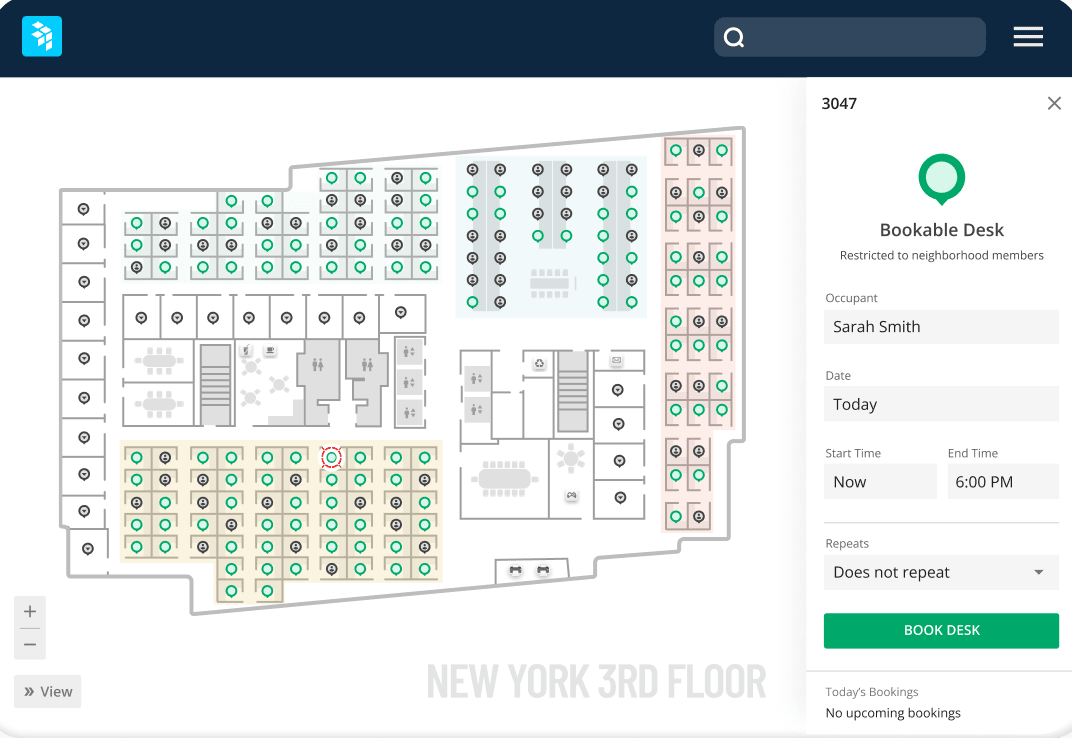
OfficeSpace


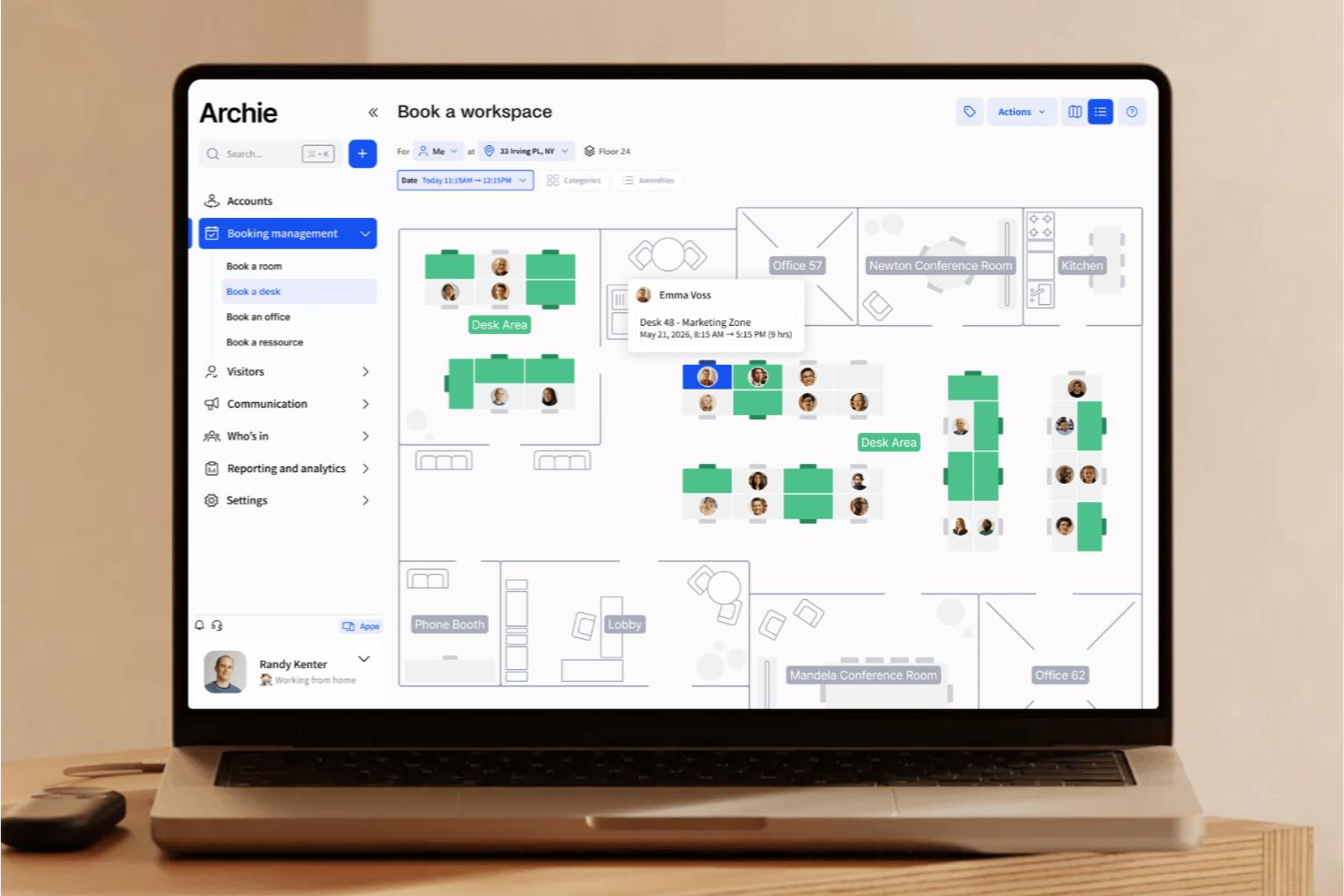
Archie


Why Trust Our Software Reviews
We’ve been testing and reviewing HR software systems since 2019. As HR experts ourselves, we know how critical and difficult it is to make the right decision when selecting software.
We invest in deep research to help our audience make better software purchasing decisions. We’ve tested more than 2,000 tools for different HR management use cases and written over 1,000 comprehensive software reviews. Learn how we stay transparent & our software review methodology.
OfficeSpace vs. Archie Pricing Comparison
| OfficeSpace | Archie | |
|---|---|---|
| Free Trial | Free demo available | 14-day free trial + free demo available |
| Pricing | Pricing upon request | From $159/month |
OfficeSpace vs. Archie Pricing & Hidden Costs
OfficeSpace requires a quote, with pricing tiered by plan level, and costs based on feature offerings that scale with growing business needs. Archie pricing follows a tiered subscription model with scalable plans that increase based on workspace size. You can purchase their entire workplace suite or pick and choose between their desk booking, room scheduling, visitor management, and coworking software. To choose the right fit, compare how each platform’s plan structure aligns with your office’s complexity, growth pace, and the level of support your team needs long-term.
OfficeSpace vs. Archie Feature Comparison
With OfficeSpace’s desk and meeting room booking, advanced space planning, AI assistance, and built-in maintenance and asset management, you can handle everything from daily operations to long-term workplace strategy in one platform. Archie focuses more on the day-to-day tools for desk and room booking, visitor management, and coworking spaces, making it ideal if you need flexibility and fast setup. OfficeSpace offers a more comprehensive suite for enterprise planning, while Archie keeps things light and simple for dynamic, shared environments.
| OfficeSpace | Archie | |
|---|---|---|
| API | ||
| Access Management | ||
| Appointment Scheduling | ||
| Batch Permissions & Access | ||
| Calendar Management | ||
| Chat | ||
| Click-to-Dial | ||
| Contact Management | ||
| Custom Data Forms | ||
| Custom Reports | ||
| Customer Management | ||
| Dashboard | ||
| Dashboards | ||
| Data Export | ||
| Data Import | ||
| Data Visualization | ||
| Email Integration | ||
| External Integrations | ||
| Forecasting | ||
| Google Apps Integration | ||
| Lead Management | ||
| Map Visualization | ||
| Marketing Automation | ||
| Mobile App | ||
| Multi-User | ||
| Notifications | ||
| Resource Management | ||
| Scheduling | ||
| Self-service Portal | ||
| Workflow Management |
OfficeSpace vs. Archie Integrations
| Integration | OfficeSpace | Archie |
| Microsoft Teams | ✅ | ✅ |
| Slack | ✅ | ✅ |
| Google Workspace | ✅ | ✅ |
| Outlook / Microsoft 365 | ✅ | ✅ |
| Kisi | ✅ | ✅ |
| Azure Active Directory | ✅ | ❌ |
| ADP | ✅ | ❌ |
| BambooHR | ✅ | ❌ |
| Stripe | ❌ | ✅ |
| GoCardless | ❌ | ✅ |
| API | ✅ | ✅ |
| Zapier | ❌ | ✅ |
With OfficeSpace’s integrations, you can connect your communication, HR, and facility tools to keep everything in sync and make daily workplace management smoother. Archie’s integrations help you link bookings, payments, and visitor management into one connected workflow for a more streamlined coworking or hybrid office experience. Both platforms make it easier to connect the systems you already use, saving time and helping your team work more efficiently.
OfficeSpace vs. Archie Security, Compliance & Reliability
| Factor | OfficeSpace | Archie |
| Data Privacy | Complies with GDPR and SOC 2 standards and never sells or shares user data. | Never sells or shares user data and only accesses accounts with consent for support purposes. |
| Encryption | Uses advanced encryption for data at rest and in transit with secure authentication protocols. | Encrypts passwords with one-way hashing and uses secure login tokens to protect user sessions. |
| Infrastructure | Hosted on secure, compliant cloud infrastructure with ongoing audits and system monitoring. | Hosted on Google Cloud Platform with backups every 6 hours and strict access controls. |
| Availability | Delivers enterprise-grade uptime backed by dedicated reliability monitoring. | Targets 99.9% uptime with 24/7 system monitoring and real-time issue response. |
| Compliance | Holds SOC 2 and GDPR certifications and provides a dedicated Trust Center for transparency. | Continuously improves compliance measures and builds privacy-focused tools for global use. |
Both OfficeSpace and Archie offer strong, transparent security practices with modern compliance and reliability standards. To choose the right fit, review each tool’s certifications, uptime guarantees, and data access policies to see which aligns best with your company’s risk, scale, and compliance requirements.
OfficeSpace vs. Archie Ease of Use
| Factor | OfficeSpace | Archie |
| User Interface | Clean, visual layouts with drag-and-drop floor plans that make space planning intuitive. | Modern, minimal interface designed for quick desk booking and coworking management. |
| Setup | Guided onboarding with implementation support and AI-assisted setup in about 35 days. | Simple, self-service setup that lets you start managing spaces in minutes. |
| Navigation | Organized dashboards with clear modules for planning, booking, and analytics. | Streamlined menus that focus on essential daily actions like booking and visitor tracking. |
| Support | 24/7 live support, in-app chat, and learning resources for long-term success. | Responsive email support and a help center focused on practical how-to guidance. |
| Customization | High flexibility for enterprise layouts and workflows. | Limited customization focused on simplicity and ease of use. |
OfficeSpace feels robust and structured, giving you the tools to manage large, complex spaces without confusion. Archie feels lighter and faster, making it easy to handle bookings and coworking tasks but less suited for deep planning or detailed configurations.
OfficeSpace vs Archie: Pros & Cons
OfficeSpace
- You get clear, visual floor plans and maps so your team can see where desks and rooms are.
- Wayfinding features help staff and visitors find rooms, desks, or people easily.
- Scenario planning and move management let you test layout options before committing.
- The mobile app can feel limited compared to the desktop version.
- May offer more features than necessary for super small business needs
- You can’t always customize dashboards or workflows for very niche needs.
Archie
- Real-time occupancy analytics help optimize workspace usage
- Desk and meeting room booking is fast and reliable
- Visitor management flows are fully customizable
- Limited advanced reporting compared to some competitors
- Fewer integration options for niche workplace tools
- No built-in asset tracking for office equipment
Best Use Cases for OfficeSpace and Archie
OfficeSpace
- Corporate Offices It helps your team manage seating, room bookings, and floor plans all in one place.
- Hybrid Teams You can manage desk sharing and remote schedules easily with OfficeSpace’s desk booking and space planning tools.
- Business Services You can streamline operations and maintain flexibility with visual planning and analytics that cut down wasted space.
- Enterprise Companies It scales well across multiple floors, teams, and even global locations.
- HR and Facilities Leaders It gives clear visibility into who’s working where and includes maintenance management.
Archie
- Coworking Spaces Archie's booking and analytics tools are designed for shared environments.
- Tech Startups Hybrid teams can easily reserve desks and meeting rooms.
- HR Departments Customizable visitor flows simplify onboarding and guest management.
- Creative Agencies Flexible workspace booking supports project-based collaboration.
- Remote-First Companies Archie helps coordinate in-office days for distributed teams.
- Facilities Managers Real-time occupancy data aids in space planning and reporting.
Who Should Use OfficeSpace, and Who Should Use Archie?
OfficeSpace is best for larger organizations or fast-growing companies that need advanced planning, reporting, and AI tools to manage complex workplaces. It’s a better fit for you if you want control and scalability across multiple offices while still having access to a platform that’s intuitive to navigate. Archie, on the other hand, is a better fit for smaller teams, coworking operators, or hybrid offices that value simplicity and quick setup. If your focus is to start quickly and you only need core features like desk, room, and visitor management, Archie might be a good choice for you.
Differences Between OfficeSpace and Archie
| OfficeSpace | Archie | |
|---|---|---|
| Automation | Includes AI features for layout optimization, reporting, and hybrid scheduling. | Provides simple automation for bookings and visitor check-ins without complex workflows. |
| Core Features | Offers full workplace management with AI assistance, planning, maintenance, and analytics. | Focuses on core tools like desk and room booking, visitor management, and coworking setup. |
| Customization | Allows detailed control over layouts, permissions, and workflows for enterprise needs. | Keeps customization minimal to prioritize ease of use and fast adoption. |
| Onboarding | Structured 35-day onboarding with guided setup and data import support. | Quick, self-service onboarding that’s ready to use in minutes. |
| Scalability | Built for mid-sized to large organizations managing multiple offices or regions. | Designed for smaller teams or coworking spaces that need flexibility and quick setup. |
| Visit OfficeSpaceOpens new window | Read Archie ReviewOpens new window |
Similarities Between OfficeSpace and Archie
| Cloud-Based | Both are fully cloud-based, giving you real-time access, automatic updates, and secure data management from anywhere. |
|---|---|
| Desk & Room Booking | Each provides simple, visual booking options that let your team reserve desks and meeting rooms from any device. |
| Hybrid Work | Both platforms make it easy to manage hybrid teams with desk booking, in-office scheduling, and collaboration tools. |
| User Interface | Each platform offers a clean, intuitive interface that’s easy for teams to learn and navigate. |
| Visitor Management | Both include built-in visitor tools to register guests, send alerts, and maintain workplace security. |
| Visit OfficeSpaceOpens new window Read Archie ReviewOpens new window | |