



deskbird vs. Skedda: Comparison & Expert Reviews For 2026



Managing desks, rooms, and hybrid schedules can get messy fast, especially when people double-book spaces or show up without a place to work. Issues like these often push teams to look for a proper booking tool, and deskbird and Skedda may come up during that search. You will find a detailed comparison of both tools in this guide, where you will explore their features, pros and cons, and pricing to help guide your choice for a workplace management and desk booking solution.
deskbird vs. Skedda: An Overview
deskbird


Skedda


Why Trust Our Software Reviews
Our team has been testing and reviewing software since 2012. As HR experts ourselves, we know how difficult—and important—it is to choose the right software.
For this guide, we evaluated tools using hands-on testing and independent research, scoring tools using our selection criteria. We also draw on insights from industry thought leaders and practicing HR experts.
Our reviews reflect our human editorial judgment, not a sales pitch.
Expert reviewers:
deskbird vs. Skedda Pricing Comparison
| deskbird | Skedda | |
|---|---|---|
| Free Trial | Free trial + free demo available | 30-day free trial + free demo available |
| Pricing | From $5/user/month (billed annually) | From $249/month (billed annually) |
deskbird vs. Skedda Hidden Costs
deskbird charges per user, so your cost scales with headcount. Hidden costs show up when you add more users or need features locked behind higher-tier plans. If you have a large team or low office attendance, the per-user model can make your bill rise faster than expected.
Skedda charges per space, meaning every desk or room increases your monthly cost. Hidden costs appear as you add more bookable resources or need advanced features available only in upper tiers. If your office has many desks or rooms, the per-space model can escalate quickly as you grow.
deskbird vs. Skedda Feature Comparison
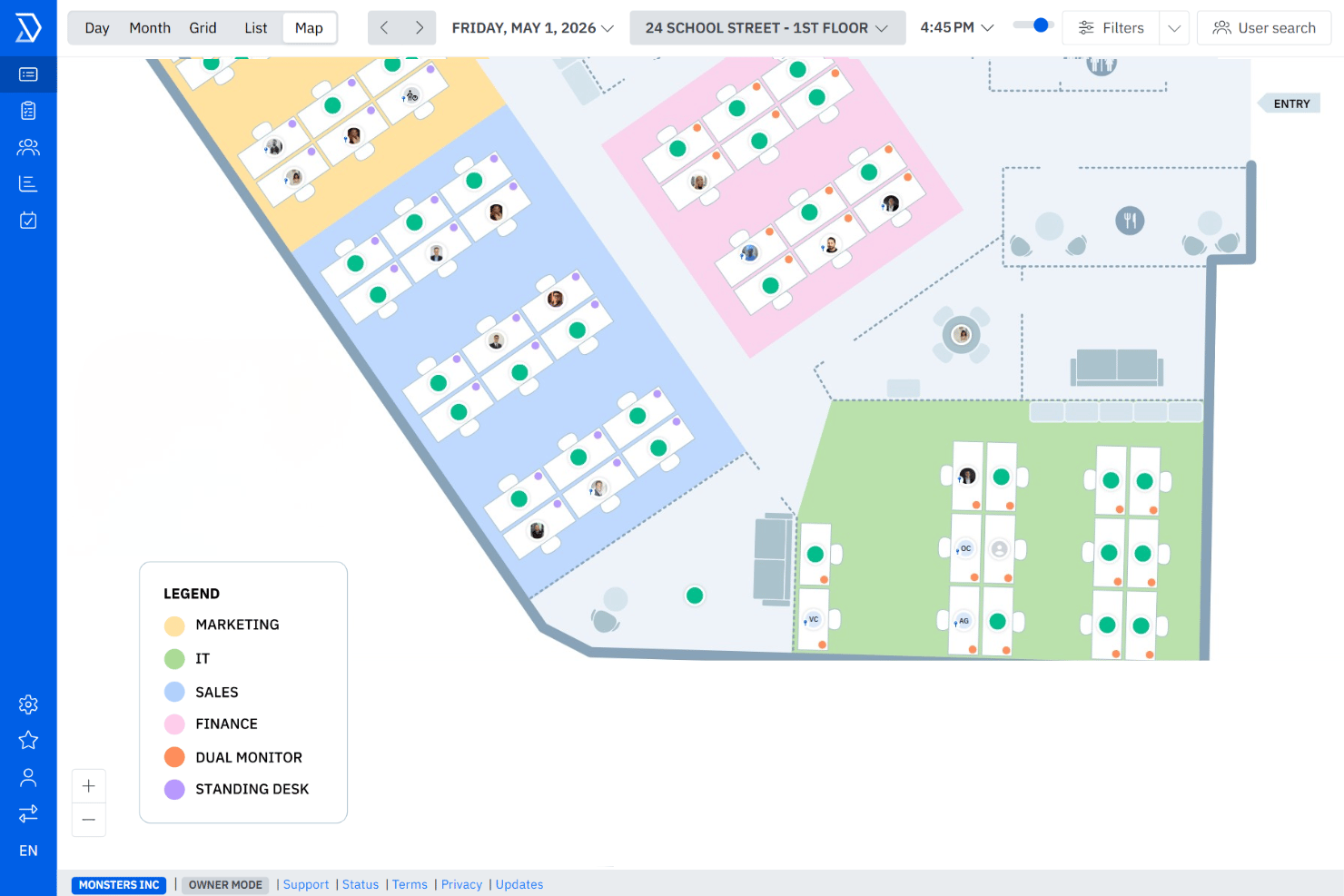
deskbird offers core tools like desk and room booking, interactive floor plans, hybrid-work scheduling, and visitor management. These features make it easy for your team to see who’s in, find a workspace, and manage daily office coordination without hassle.
Skedda includes customizable booking rules, real-time space availability, interactive floor plans, calendar integrations, and flexible scheduling for desks and rooms. These capabilities give you tight control over how shared spaces are used, making it ideal if your workplace needs more structured or rule-based bookings.
| deskbird | Skedda | |
|---|---|---|
| Appointment Scheduling | ||
| Contact Management | ||
| Customer Management | ||
| Dashboard | ||
| Data Export | ||
| Data Import | ||
| Data Visualization | ||
| Email Integration | ||
| External Integrations | ||
| Forecasting | ||
| Google Apps Integration | ||
| Multi-User | ||
| Notifications | ||
| Scheduling |
deskbird vs. Skedda Integrations
| Integration | Deskbird | Skedda |
| Microsoft Teams | ✅ | ✅ |
| Slack | ✅ | ✅ |
| Google Calendar | ✅ | ✅ |
| Microsoft Outlook | ✅ | ✅ |
| ADP | ✅ | ❌ |
| Salesforce | ❌ | ❌ |
| Trello | ❌ | ✅ |
| BambooHR | ✅ | ❌ |
| HubSpot | ❌ | ❌ |
| Paylocity | ✅ | ❌ |
| API | ✅ | ❌ |
| Zapier | ❌ | ✅ |
Both tools integrate smoothly with common workplace systems, making it easy to sync schedules and keep everything connected. However, deskbird offers many more direct options, with more emphasis on HRIS connectors, which can make it easier to slot into your everyday tech stack.
deskbird vs. Skedda Security, Compliance & Reliability
| Factor | deskbird | Skedda |
| Data Privacy | deskbird follows strict GDPR standards and hosts data in the EU to ensure strong privacy protection. | Skedda is also GDPR-compliant and applies clear data-handling policies for EU and global users. |
| Encryption | deskbird encrypts data in transit and at rest using industry-standard security protocols. | Skedda uses modern encryption practices to protect data during storage and transfer. |
| Uptime Reliability | deskbird maintains high uptime supported by monitored, enterprise-grade infrastructure. | Skedda provides consistent platform reliability with transparent system monitoring and updates. |
| Access Control | deskbird offers role-based access control along with SSO support to manage user permissions securely. | Skedda supports permission-based access settings and identity integrations like SSO. |
Both deskbird and Skedda offer strong security features, but deskbird's focus on role-based access gives it an edge in user management. To choose the right vendor, evaluate how each tool's security features align with your organization's specific compliance needs and assess their data handling policies.
deskbird vs. Skedda Ease of Use
| Factor | deskbird | Skedda |
| User Interface | Clean, simple, and easy to navigate for quick daily bookings. | Clear and structured layout built for managing multiple shared spaces. |
| Onboarding Experience | Guided steps help new users get comfortable fast. | Straightforward tutorials walk admins through setup smoothly. |
| Setup | Visual tools make configuring desks and rooms feel effortless. | More customization options, which can take a bit longer to set up. |
| Support | Helpful documentation for common questions and quick fixes. | Strong help resources and responsive support for detailed setups. |
Both tools are easy to use, but in different ways. deskbird keeps things simple and quick for everyday booking, while Skedda offers a more structured setup with extra control for admins. It all comes down to whether your team prefers a fast, visual experience or more customization behind the scenes.
deskbird vs Skedda: Pros & Cons
deskbird
- Fast and easy desk and room booking that most employees can use without guidance.
- Smooth connections with Outlook, Google Calendar, Slack, and Teams for quicker adoption.
- Helpful workspace insights that show how often your office is actually being used.
- Reporting depth may fall short for companies that need advanced or highly customized analytics.
- Mobile app can feel less polished than the desktop experience.
- Room scheduling may not fully support teams that rely on complex or highly structured recurring reservations.
Skedda
- Visual floor plans display real-time desk availability
- Customizable booking rules support hybrid workplace policies
- Automated reminders help reduce no-shows and conflicts
- Reporting features are limited without upgrading tiers
- No mobile app for on-the-go desk booking
- Support response times can lag during peak hours
Best Use Cases for deskbird and Skedda
deskbird
- Tech Startups deskbird’s flexibility supports rapid growth and changing team dynamics.
- Creative Agencies You can easily manage shared spaces for project-based work with deskbird.
- HR Departments deskbird simplifies workspace management for diverse and dynamic teams.
- Small and Mid-Sized Organizations A good choice for companies that want visibility, structure, and reliable scheduling without heavy administrative overhead.
- Remote Workers deskbird’s mobile app lets remote staff book desks on the go.
- Hybrid Teams Employees can share and view office schedules so everyone knows who will be on-site for collaboration.
- Enterprises with Basic Needs deskbird now serves multiple enterprise customers with over 5,000 employees with features such as SSO, role-based access controls, and top-tier data protection
Skedda
- Hybrid Workplaces Skedda lets businesses automate desk assignments and policies, supporting flexible teams who work onsite and remote on rotating schedules.
- Coworking Spaces Coworking providers use Skedda’s self-service portal and space analytics to control access and maximize occupancy.
- Higher Education Universities leverage Skedda to manage study desks, faculty offices, and meeting rooms with clear permissions and booking windows.
- Facilities Management Facilities teams appreciate Skedda’s floor plan management and utilization analytics to adapt layouts based on real-time activity.
- SME Offices Small-to-midsize offices can go live quickly with Skedda’s out-of-the-box features and require little technical support or onboarding.
- Hotelling Environments Projects or departments with frequently changing seating can use Skedda’s smart rules and booking credits to fairly assign shared spaces.
Who Should Use deskbird, and Who Should Use Skedda?
If you want something simple, quick to set up, and easy for your team to use every day without needing heavy customization or complex booking rules, then deskbird will likely be the better fit.
But if your workplace needs more control over bookings, flexible rule-setting, and a system that can handle multiple shared spaces with different scheduling needs, then Skedda may be the one for you.
Differences Between deskbird and Skedda
| deskbird | Skedda | |
|---|---|---|
| Customization | Prioritizes simplicity with lighter customization options focused on everyday desk and room booking. | Offers deeper configuration with flexible booking rules, space permissions, and scheduling logic. |
| Pricing | Uses a per-user pricing model that scales with headcount. | Uses a per-space model where pricing increases as you add desks, rooms, or other bookable resources. |
| Setup Complexity | Designed for quick setup and minimal admin overhead, ideal for lightweight or hybrid-work workflows. | Setup takes more time due to its flexible rule system, offering admins greater control over how spaces can be used. |
| Target Audience | deskbird is more focused on modern offices practicing hybrid work, aiming to serve businesses needing workforce scheduling + resource booking. | Skedda lists a variety of industries: workplaces, universities, labs, parking facilities, non-profits, government, etc. |
| User Interface | Built for fast, visual booking with interactive floor plans and a clean, modern interface. | Centered around structured availability views designed for managing multiple shared spaces efficiently. |
| Visit deskbirdOpens new window | Read Skedda ReviewOpens new window |
Similarities Between deskbird and Skedda
| Data Security | Both platforms follow GDPR-compliant data handling practices, ensuring user information is protected and processed securely. |
|---|---|
| Desk & Room Booking | Both allow booking desks and meeting rooms (and generally office resources). |
| Hybrid Work | Both are built to support hybrid/flexible workplaces (desks, rooms, resources, hybrid scheduling) rather than fixed assigned desks only. |
| Integrations | Each tool connects with widely used workplace apps like Google Calendar, Outlook, Microsoft Teams, and Slack, helping teams keep bookings aligned with their daily workflows. |
| Visitor Management | Both platforms support managing guest/visitor check-ins and visits. |
| Visit deskbirdOpens new window Read Skedda ReviewOpens new window | |