



deskbird vs. Officely: Comparison & Expert Reviews For 2026



If your team has ever experienced walking into the office unsure where to sit or felt the friction of using tools that don’t quite fit your hybrid setup, it’s understandable why you’d start looking for something better. These moments often lead teams to compare tools like deskbird and Officely to see which one can actually make day-to-day coordination easier.
In this guide, I’ll break down how each platform works and what to consider before choosing, to help you make informed decisions about workplace management and desk booking.
deskbird vs. Officely: An Overview
deskbird


Officely


Why Trust Our Software Recommendations
Our team has been testing and reviewing software since 2012. As HR experts ourselves, we know how difficult—and important—it is to choose the right software.
For this guide, we evaluated tools using hands-on testing and independent research, scoring tools using our selection criteria. We also draw on insights from industry thought leaders and practicing HR experts.
Our reviews reflect our human editorial judgment, not a sales pitch.
Expert reviewers:
deskbird vs. Officely Pricing Comparison
| deskbird | Officely | |
|---|---|---|
| Free Trial | Free trial + free demo available | Free trial + free demo available |
| Pricing | From $5/user/month (billed annually) | From $2.50/user/month (billed annually) |
deskbird vs. Officely Pricing & Hidden Costs
deskbird uses tiered per-user pricing, with key features sitting behind higher plans. The hidden cost shows up when teams need advanced tools like room booking or analytics. If your team’s growing, expect those upgrades sooner.
Officely also charges a straightforward per-user monthly fee. The hidden cost comes from how quickly the total rises as more people join. If your team fluctuates, costs can climb fast.
deskbird vs. Officely Feature Comparison
deskbird gives you a full workspace-management setup with desk and room booking, office maps, hybrid scheduling, and real-time availability. It’s built to help you plan who’s in the office, avoid booking conflicts, and keep everything synced through integrations like Slack, Teams, Outlook, and Google Calendar.
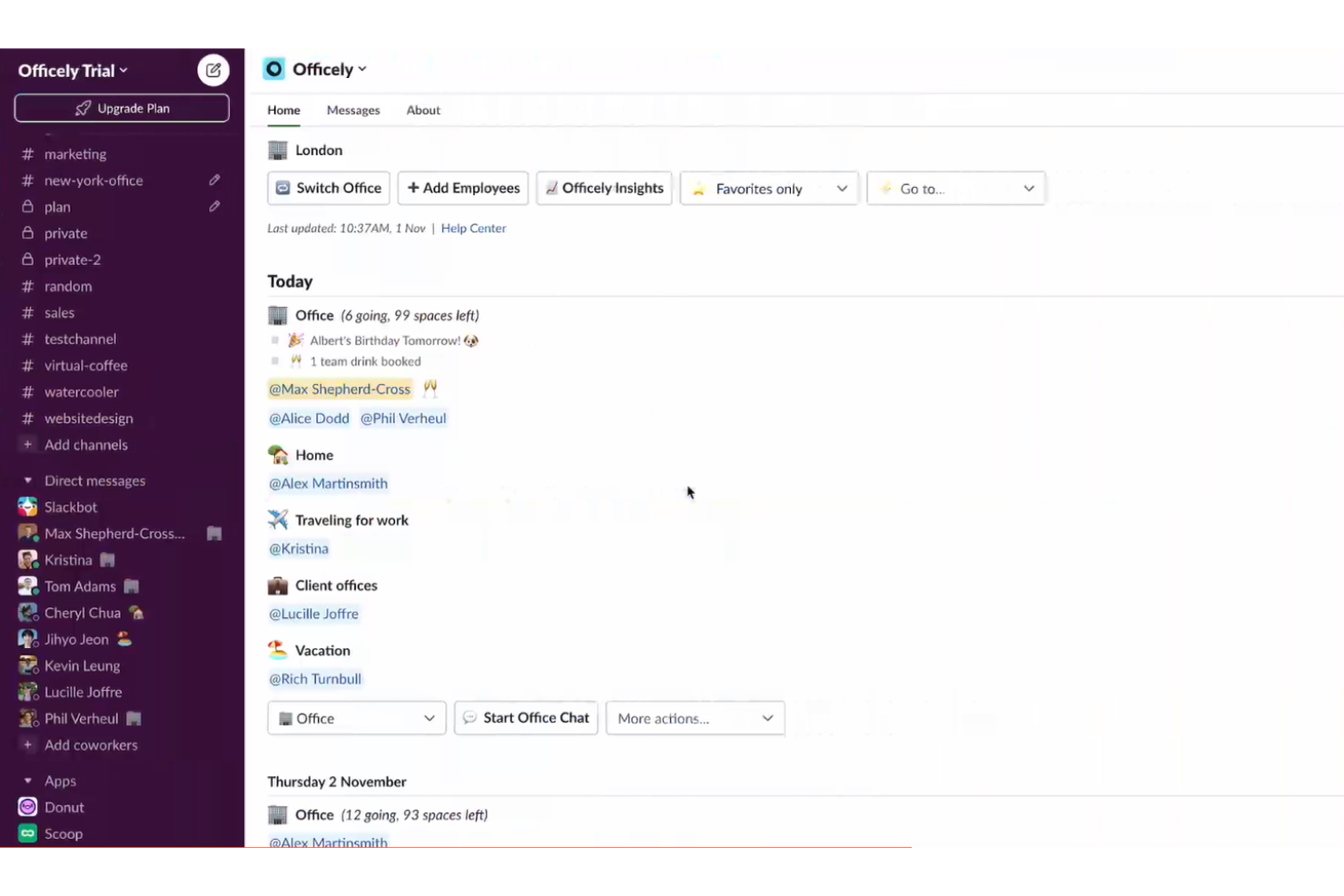
Officely keeps things simple by working entirely inside Slack or Microsoft Teams, letting you book desks, see who’s coming in, track capacity, and coordinate office days without switching apps. It’s built for quick adoption and easy day-to-day planning.
| deskbird | Officely | |
|---|---|---|
| API | ||
| Batch Permissions & Access | ||
| Dashboard | ||
| Data Export | ||
| Data Import | ||
| Data Visualization | ||
| External Integrations | ||
| Multi-User | ||
| Notifications | ||
| Scheduling |
deskbird vs. Officely Integrations
| Integration | deskbird | Officely |
| Slack | ✅ | ✅ |
| Microsoft Teams | ✅ | ✅ |
| Google Calendar | ✅ | ✅ |
| Zoom | ❌ | ❌ |
| Outlook | ✅ | ✅ |
| ADP | ✅ | ❌ |
| Salesforce | ❌ | ❌ |
| HubSpot | ❌ | ❌ |
| API | ✅ | ✅ |
| Zapier | ❌ | ❌ |
Both platforms cover the main integrations most teams need. Both offer a broad range of options, but deskbird offers more direct connections while Officely focuses specifically on its Teams and Slack integration as a highlight. The right fit depends on whether you prefer a streamlined setup or extra flexibility across different apps.
deskbird vs. Officely Security, Compliance & Reliability
| Factor | deskbird | Officely |
| Data Privacy | Follows GDPR and hosts customer data in EU-based Google Cloud data centers with ISO 27001 and SOC 2–certified infrastructure. | GDPR standards are also followed here, with a clear focus on securely managing user data. |
| Encryption | Stores customer data on Google Cloud, which encrypts data at rest and in transit as part of its managed infrastructure. | All data in its network is encrypted at rest using AES-256 and is hosted on Google Cloud data centers in the UK. |
| Uptime Reliability | Publicly promises a 99.8% uptime guarantee and provides a live status page so teams can monitor service health. | No specific uptime percentage is published. |
Both platforms meet core security standards with GDPR compliance and encrypted cloud hosting. deskbird offers more transparency around its setup, while Officely keeps things simpler. Choosing between them depends on how much detail you want about what’s happening behind the scenes.
deskbird vs. Officely Ease of Use
| Factor | deskbird | Officely |
| User Interface | Offers a clean, intuitive layout that makes desk and room booking simple to navigate. | The experience feels familiar since everything runs inside Slack or Teams with no separate app to learn. |
| Onboarding | Setup is simple and most teams get started quickly with clear guidance and in-app prompts. | Onboarding is fast because installation happens through Slack or Teams and requires only a few steps. |
| Setup | Setup is direct and supported with clear instructions and helpful documentation. | Setup is seamless, helped by built-in Slack or Teams workflows. |
| Support | Provides responsive assistance through chat and email channels. | Support is handled through a help center and quick responses within Slack or Teams. |
deskbird delivers an intuitive, dedicated interface that keeps booking and navigation simple, while Officely focuses on ease by living entirely inside Slack or Teams. The choice depends on whether you prefer a full standalone platform or a lightweight tool that fits into your team’s existing workflow.
deskbird vs Officely: Pros & Cons
deskbird
- Fast and easy desk and room booking that most employees can use without guidance.
- Smooth connections with Outlook, Google Calendar, Slack, and Teams for quicker adoption.
- Helpful workspace insights that show how often your office is actually being used.
- Reporting depth may fall short for companies that need advanced or highly customized analytics.
- Mobile app can feel less polished than the desktop experience.
- Room scheduling may not fully support teams that rely on complex or highly structured recurring reservations.
Officely
- Slack and Teams integration for direct in-app booking
- Real-time office attendance and usage visibility
- Automated policy compliance tracking for hybrid work
- Lacks advanced analytics and reporting features
- No mobile app for on-the-go desk booking
- Limited customization for complex workspace needs
Best Use Cases for deskbird and Officely
deskbird
- Tech Startups deskbird’s flexibility supports rapid growth and changing team dynamics.
- Creative Agencies You can easily manage shared spaces for project-based work with deskbird.
- HR Departments deskbird simplifies workspace management for diverse and dynamic teams.
- Small and Mid-Sized Organizations A good choice for companies that want visibility, structure, and reliable scheduling without heavy administrative overhead.
- Remote Workers deskbird’s mobile app lets remote staff book desks on the go.
- Hybrid Teams Employees can share and view office schedules so everyone knows who will be on-site for collaboration.
- Enterprises with Basic Needs deskbird now serves multiple enterprise customers with over 5,000 employees with features such as SSO, role-based access controls, and top-tier data protection
Officely
- Tech Startups Officely's Slack integration fits fast-moving teams that need quick desk booking.
- HR Departments Automated policy compliance and attendance tracking help HR manage hybrid policies.
- Creative Agencies Real-time visibility supports flexible work environments built around collaboration
- Small Businesses Simple setup and fair pricing suit companies with limited IT resources.
- Remote-First Teams Helps coordinate occasional in-office days without heavy admin work.
- Coworking Spaces Easy booking and attendance tracking for shared, flexible office environments.
Who Should Use deskbird, and Who Should Use Officely?
deskbird is great if you’re looking for a dedicated workspace tool with a clean interface and more structure around how your hybrid office runs. It works well for teams that want clearer visibility into desk and room bookings, along with a platform that integrates smoothly with calendars and communication tools.
I’d recommend Officely if your team already lives in Slack or Teams and you want the easiest setup possible. It fits fast-moving teams that prefer quick onboarding and a booking flow that stays inside their existing workflow. If you want something simple, lightweight, and low-friction, it’s a strong option to consider.
Differences Between deskbird and Officely
| deskbird | Officely | |
|---|---|---|
| Automation | Provides essential booking and scheduling automation within the deskbird platform. This includes streamlined reservations and calendar syncing. | Less robust automation, though it delivers automated reminders, office-day notifications, and scheduling updates through Slack or Teams. |
| Feature Depth | deskbird positions itself as a broader “all-in-one workplace management platform,” offering deeper/more varied features beyond the basics (resource booking, visitor management, broader workplace management). | Officely focuses on “core” needs: desk booking, hot desking, basic resource booking, attendance visibility — aiming for simplicity and ease of use. |
| Integrations | Connects with multiple tools including Slack, Microsoft Teams, Google Calendar, Outlook, and several HR systems. | Focuses on deep Slack/Teams usage and includes strong calendar integrations, especially with Google Calendar and Outlook. |
| Onboarding | Onboarding happens inside the deskbird platform with guided setup and admin configuration tools. | Onboarding is faster since everything installs and runs through Slack or Teams with minimal configuration. |
| User Interface | Functions as a standalone web and mobile platform, with optional Slack and Microsoft Teams integrations. | Operates fully inside Slack or Microsoft Teams, so all booking and planning happen within those apps. |
| Visit deskbirdOpens new window | Read Officely ReviewOpens new window |
Similarities Between deskbird and Officely
| Administrative Oversight | deskbird lets you create and manage bookings for teammates or guests. Officely likewise supports workspace management for admins. |
|---|---|
| Desk & Room Booking | Both allow employees to reserve desks in a shared office environment. |
| Flexibility | Both support flexible bookings, including hot desk bookings and meeting room bookings. |
| Hybrid Work | Both are designed for workplaces with hybrid patterns (some remote, some in-office) and for flexible seating/allocation. |
| Parking Space Management | Both support parking space management for hybrid teams. |
| Visit deskbirdOpens new window Read Officely ReviewOpens new window | |