

Los 10 mejores programas de monitoreo de empleados instalados localmente analizados en 2026

Mejor selección de software local de monitorización de empleados


Mantener la visibilidad sobre la productividad, la seguridad y el cumplimiento se vuelve más complejo cuando los datos de monitorización deben permanecer dentro de su propia infraestructura. Por eso, muchos equipos de TI y RR. HH. buscan software local de monitorización de empleados: herramientas instaladas en servidores locales que proporcionan a las organizaciones un control total sobre cómo se recopilan, almacenan y gestionan los datos de actividad. Estas plataformas ayudan a realizar un seguimiento del uso de los dispositivos, monitorizar la actividad de las aplicaciones y la web, y detectar posibles riesgos sin enviar información al entorno en la nube de un proveedor.
Elegir la solución local adecuada implica equilibrar la visibilidad con la privacidad y la supervisión operativa. He revisado una variedad de herramientas para implementaciones locales, desde rastreadores de actividad ligeros hasta sistemas más avanzados de gestión de riesgos internos y prevención de pérdida de datos. Esta guía destaca las mejores opciones disponibles actualmente y explica cómo cada una responde a distintas necesidades de monitorización, cumplimiento y seguridad.
Por qué confiar en nuestras reseñas de software
Nuestro equipo lleva probando y evaluando software desde 2012. Como expertos en RR. HH., sabemos lo difícil —y lo importante— que es elegir el software adecuado.
Para esta guía, evaluamos las herramientas mediante pruebas prácticas e investigación independiente, puntuando las herramientas según nuestros criterios de selección. También nos basamos en la experiencia de líderes de opinión del sector y de profesionales de RR. HH. en activo.
Nuestras reseñas reflejan nuestro criterio editorial humano, no un discurso de ventas.
Revisores expertos:
Tabla comparativa de software local de monitorización de empleados
La siguiente tabla compara los detalles de precios de mis principales selecciones de software local de monitorización de empleados.
| Tool | Best For | Trial Info | Price | ||
|---|---|---|---|---|---|
| 1 | Ideal para filtrar el acceso web en instalaciones locales | Prueba gratuita de 14 días | Desde $6.67/usuario/mes (facturado anualmente) | Website | |
| 2 | Ideal para implementaciones locales aisladas de Internet | Prueba gratuita de 14 días | Precio bajo solicitud | Website | |
| 3 | Ideal para detectar amenazas internas en entornos aislados | Demostración gratuita disponible | Precios disponibles previa solicitud | Website | |
| 4 | La mejor opción para la supervisión de pulsaciones de teclas con profundidad forense | Prueba gratuita de 30 días | Precios disponibles previa solicitud | Website | |
| 5 | Ideal para el cumplimiento del GDPR | Prueba gratuita de 30 días | Precios bajo solicitud | Website | |
| 6 | Ideal para la grabación de vídeo | Demostración gratuita disponible | Desde $7/usuario/mes | Website | |
| 7 | Ideal para el análisis forense de amenazas internas en infraestructuras locales | No disponible | Precio bajo solicitud | Website | |
| 8 | Ideal para la supervisión local basada en PAM | Demostración gratuita disponible | Precios disponibles previa solicitud | Website | |
| 9 | Ideal para el monitoreo en tiempo real | Prueba gratuita de 7 días | Precio bajo solicitud | Website | |
| 10 | Ideal para análisis detallados | Prueba gratuita de 7 días | Desde $8/usuario/mes (facturado anualmente) | Website |
Análisis del mejor software local de monitorización de empleados (seguimiento de actividad, seguimiento del tiempo y monitorización de la productividad)
A continuación encontrarás mis resúmenes detallados del mejor software local de monitorización de empleados de mi selección. Mis análisis ofrecen una visión detallada de las funciones principales, ventajas y & desventajas, integraciones y casos de uso ideales de cada herramienta, para ayudarte a encontrar la mejor opción para ti.

Ideal para filtrar el acceso web en instalaciones locales
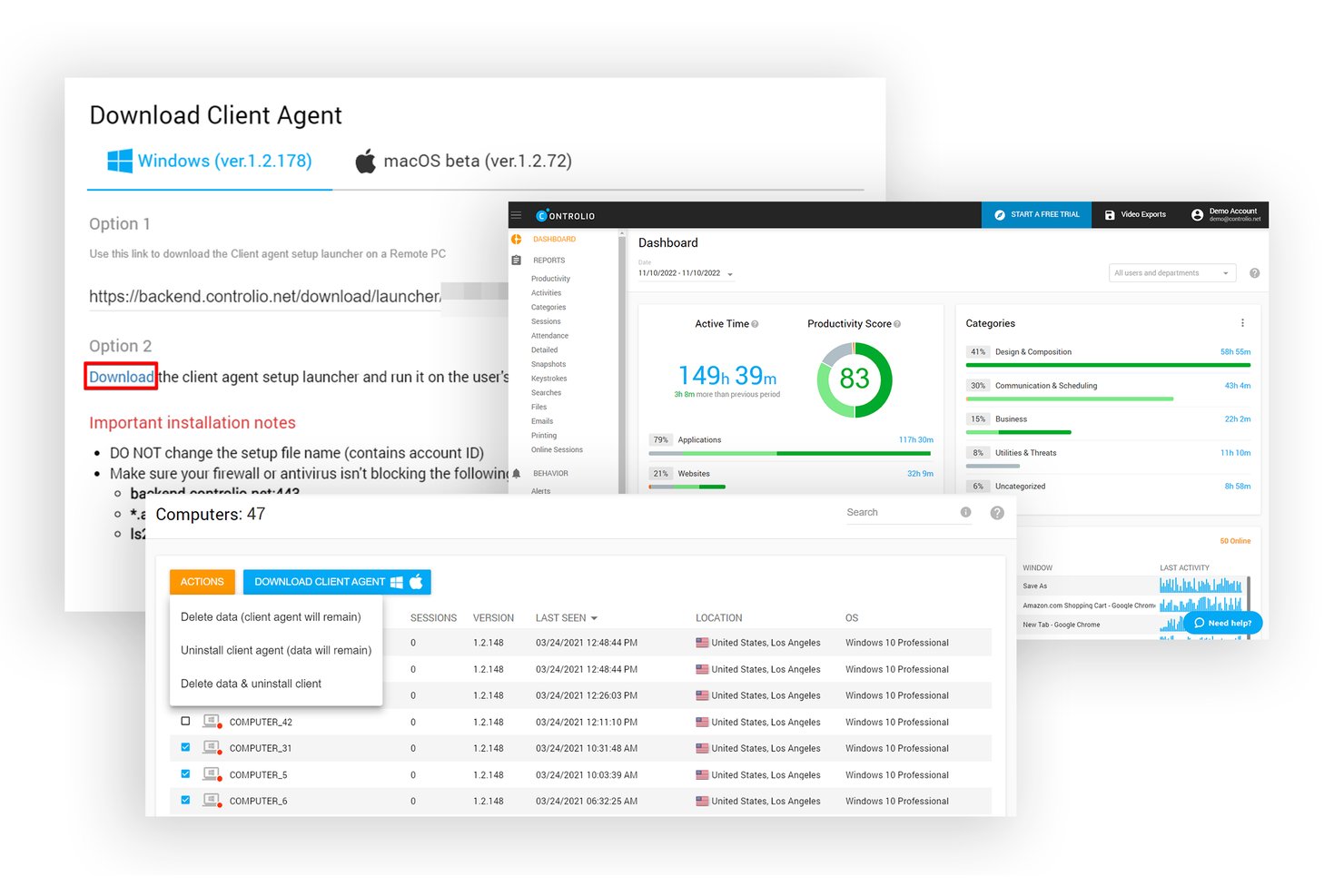
Controlio es una plataforma de monitoreo de empleados que registra el uso de aplicaciones y sitios web, captura video continuo de la pantalla, aplica filtros web y reglas de comportamiento, y admite implementaciones en la nube, nube privada o instalaciones locales.
¿Para quién es más adecuado Controlio?
Controlio es una opción sólida para responsables de operaciones y gerentes de centros de llamadas que necesitan grabación continua de pantalla y controles de filtrado web dentro de un entorno local.
Por qué elegí Controlio
Elegí Controlio como una de las mejores opciones porque su motor de reglas de comportamiento pone los controles de filtrado web directamente en tus manos, en tu propia infraestructura. Puedes establecer reglas para sitios web específicos, categorías de aplicaciones y medios extraíbles, y recibir una alerta en el momento en que se activa una regla. También me gusta que la implementación local comienza con solo 10 usuarios, por lo que no necesitas un despliegue masivo para mantener completamente los datos de monitoreo fuera de servidores de terceros.
Funciones principales de Controlio
- Grabación continua de video de la pantalla: Captura las pantallas de los empleados como secuencias de video continuas en lugar de capturas periódicas, para que obtengas todo el contexto de cualquier sesión que revises.
- Modo de agente oculto o visible: Implementa el agente de terminal oculto en la bandeja del sistema y el Administrador de tareas, o visible para los empleados, según tu política de monitoreo.
- Evaluación de productividad basada en IA: Categoriza automáticamente la actividad de aplicaciones y sitios web como productiva o distractora y genera una puntuación de productividad para cada usuario y departamento.
- Sincronización con Active Directory: Se sincroniza con tu AD local existente (plan Avanzado y superiores) para mantener coherentes los datos de usuarios y departamentos sin actualizaciones manuales.
Integraciones de Controlio
Controlio ofrece sincronización con Active Directory y SSO en los planes Avanzado y superiores, además de una API REST para integraciones personalizadas. Las integraciones nativas con sistemas de información de recursos humanos, SIEM, nóminas y herramientas de gestión de proyectos no están documentadas con claridad.
Pros and Cons
Pros:
- El video continuo captura las sesiones completas
- Las reglas de filtrado web activan alertas
- Los evaluadores elogian la claridad de los informes y las líneas de tiempo
Cons:
- La arquitectura local sigue estando poco documentada
- Solo terminales Windows y macOS

Ideal para implementaciones locales aisladas de Internet
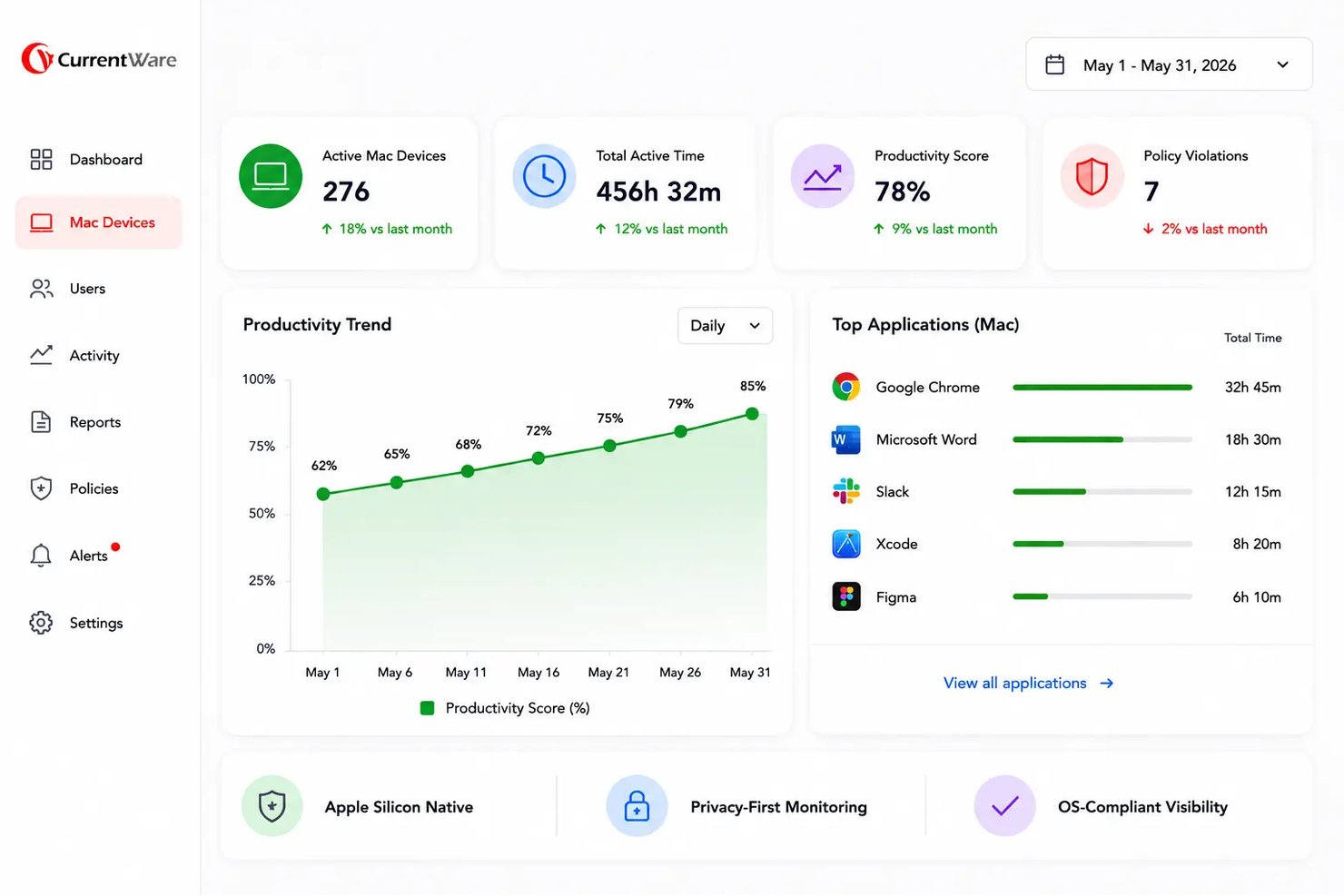
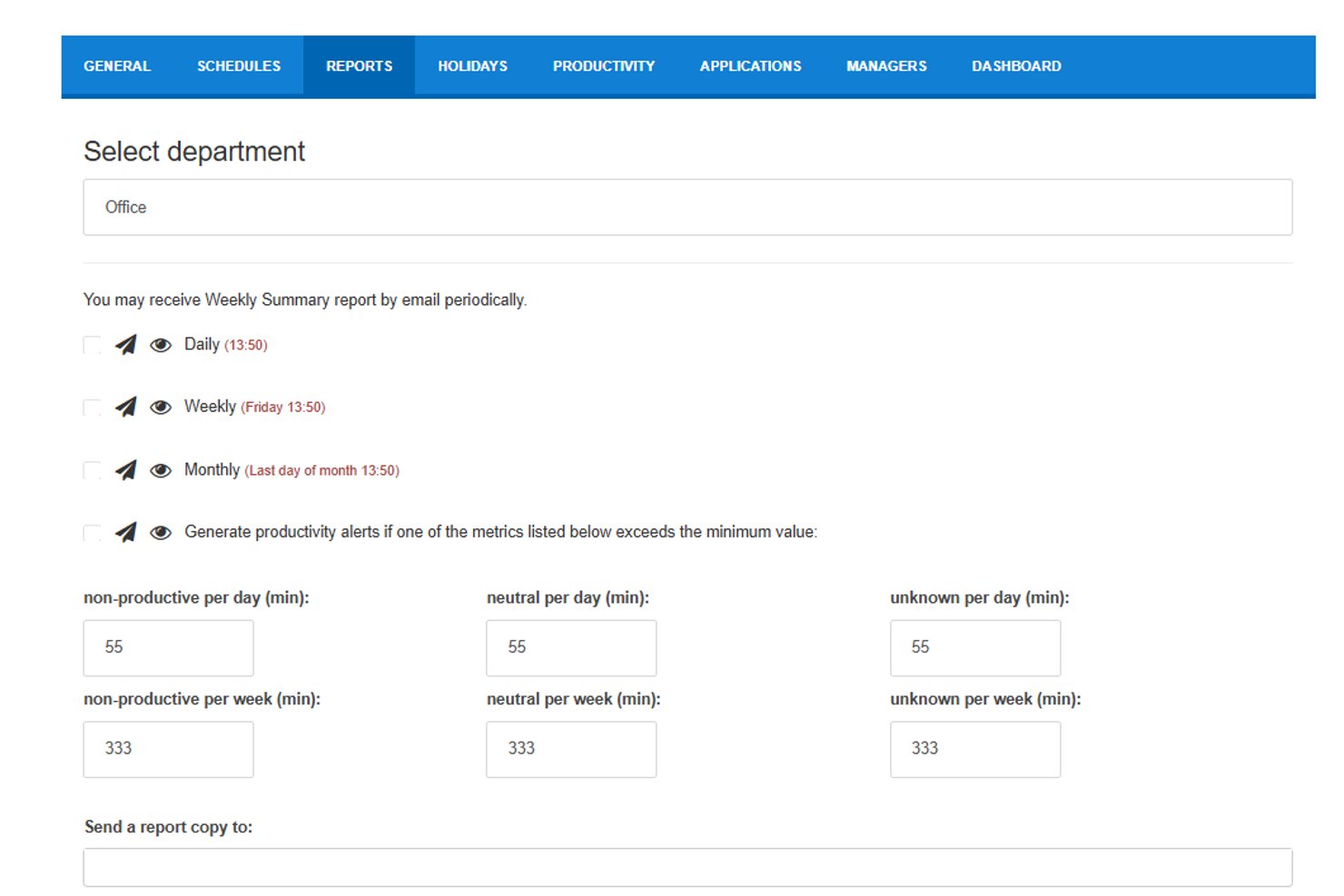
BrowseReporter de CurrentWare es una herramienta local de supervisión de empleados que realiza un seguimiento del uso de sitios web y aplicaciones, el tiempo activo e inactivo, el consumo de ancho de banda, la actividad de herramientas de IA y las capturas de pantalla en dispositivos Windows y macOS.
¿Para quién es más adecuado BrowseReporter?
BrowseReporter es una opción muy adecuada para equipos de seguridad informática y cumplimiento normativo de sectores regulados que necesitan un control total sobre sus datos de supervisión y no pueden depender de una infraestructura en la nube.
Por qué elegí BrowseReporter de CurrentWare
BrowseReporter ocupa un lugar en mi lista de opciones principales porque es una de las pocas herramientas que he encontrado que realmente admite implementaciones aisladas de Internet y que funciona completamente en su propio SQL Server, sin necesidad de depender de la nube. Me gusta que el modo fuera de las instalaciones funcione sin ningún acceso a Internet, algo importante para contratistas de defensa o redes sanitarias en las que los datos no pueden salir del edificio. Su seguimiento de herramientas de IA (que incluye el uso de ChatGPT y Copilot) y sus capturas de pantalla con búsqueda mediante OCR aportan una profundidad de investigación real sin requerir el registro de pulsaciones de teclas.
Características principales de BrowseReporter
- Sincronización con Active Directory: Importa usuarios y sincroniza unidades organizativas directamente desde Active Directory con la consola web.
- Detección de simuladores de movimiento del ratón: Identifica y excluye la actividad de simuladores de movimiento del ratón y herramientas de clic automático para que los datos de productividad sigan siendo precisos.
- Entrega programada de informes: Envía automáticamente por correo electrónico informes de productividad, uso y riesgos a los equipos de RR. HH., TI o cumplimiento normativo según un calendario establecido.
- Seguimiento de licencias de software: Informa sobre el uso de aplicaciones en toda la plantilla para ayudar a identificar licencias de software sin utilizar o duplicadas.
Integraciones de BrowseReporter
BrowseReporter ofrece una integración nativa con Active Directory para sincronizar usuarios y unidades organizativas. También admite conexiones SAML, OIDC, CEF y SIEM, plantillas de Power BI y acceso compartido a BrowseControl, AccessPatrol y enPowerManager.
Pros and Cons
Pros:
- La implementación aislada de Internet mantiene los datos de supervisión en las instalaciones
- Las capturas de pantalla con búsqueda mediante OCR ayudan a investigar incidentes
- Los usuarios destacan el seguimiento detallado de la actividad web
Cons:
- Solo admite dispositivos Windows y macOS
- Los análisis avanzados no llegan a modelar el comportamiento

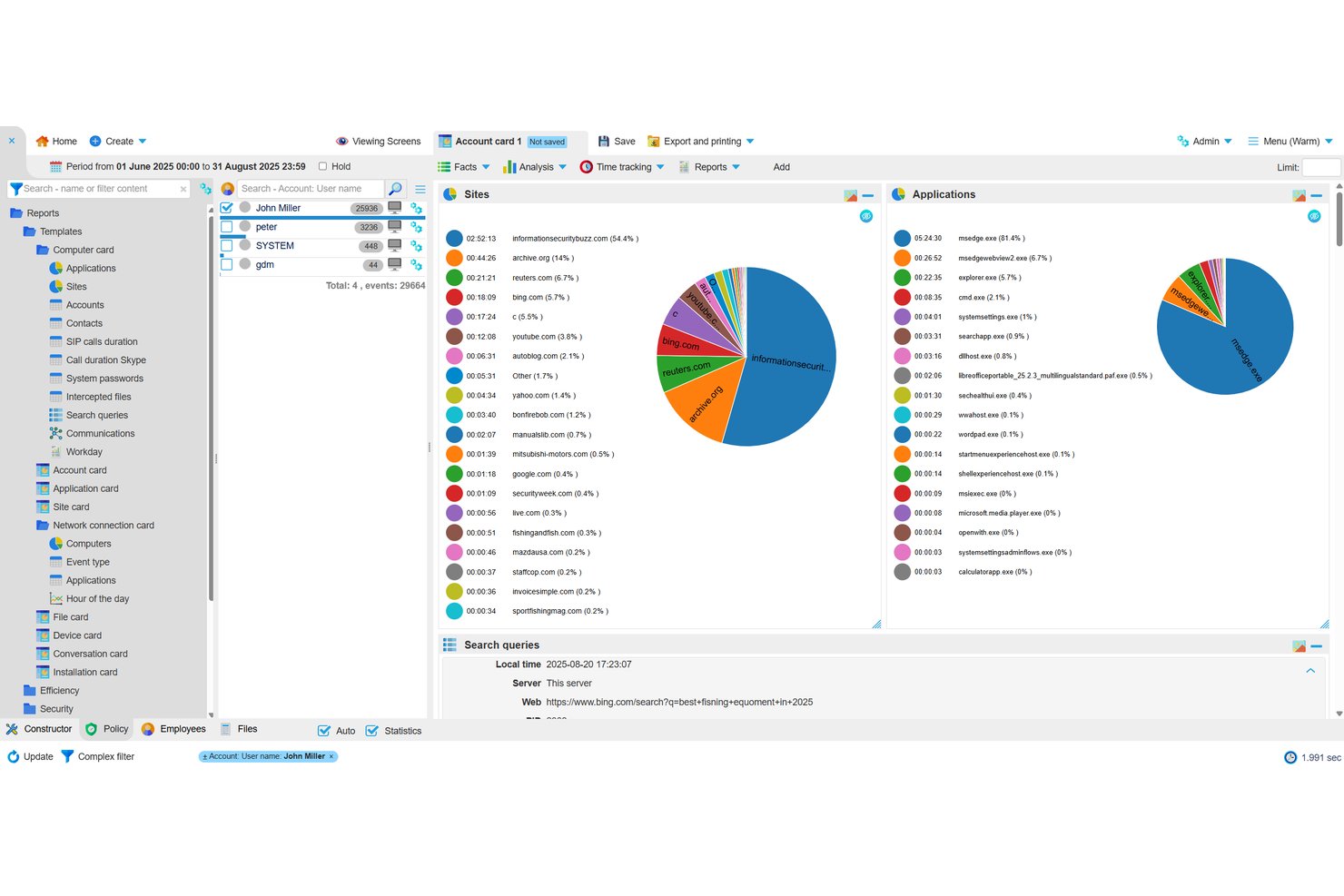
StaffCop Enterprise es una plataforma de supervisión de empleados completamente autoalojada que registra las pulsaciones de teclas, graba la pantalla, supervisa la actividad de archivos, controla los dispositivos USB y registra el uso de la web y las aplicaciones, además de incluir DLP y análisis integrados del comportamiento de los usuarios.
¿Para quién es más adecuado StaffCop?
StaffCop Enterprise es una opción excelente para equipos de seguridad informática en entornos regulados o de alta seguridad que necesitan una supervisión completamente autoalojada y sin depender de la nube.
Por qué elegí StaffCop
StaffCop está en mi lista de favoritos porque es una de las pocas herramientas de supervisión diseñadas específicamente para funcionar en entornos completamente aislados y sin conexión, sin depender en absoluto de la nube del proveedor. Me gusta especialmente su módulo UEBA, que crea una línea base de comportamiento para cada usuario y señala las anomalías, de modo que el equipo de seguridad pueda detectar las amenazas internas antes de que los datos salgan del edificio. Junto con el control de dispositivos USB y las copias sombra de archivos, ofrece una configuración forense sólida para entornos de alta seguridad.
Funciones principales de StaffCop
- Grabación de pantalla y vídeo de sesiones: Registra las sesiones del escritorio e indexa las grabaciones por aplicación, sitio web, archivo y pulsación de tecla para su revisión forense.
- Búsqueda de contenido basada en OCR: Analiza las pantallas capturadas en busca de texto mediante consultas de palabras clave, comodines y RegEx para detectar infracciones de las políticas.
- Integración con SIEM mediante Syslog: Envía eventos activados por políticas a su SIEM en tiempo real, de modo que las alertas de StaffCop se incorporen directamente a sus flujos de trabajo de seguridad existentes.
- Sincronización con Active Directory: Asigna políticas de supervisión y configuraciones de agentes por grupo de AD o ALD Pro, y admite sincronizaciones de directorio únicas y programadas.
Integraciones de StaffCop
StaffCop admite integraciones con Microsoft Active Directory, ALD Pro, plataformas SIEM mediante Syslog, PostgreSQL, Prometheus, Grafana y Node Exporter. También admite Postgres Pro 16 para la implementación de bases de datos.
Pros and Cons
Pros:
- Admite implementaciones de supervisión en entornos aislados
- Captura pruebas detalladas de actividad forense
- Combina DLP con análisis del comportamiento
Cons:
- La actividad del turno nocturno puede registrarse incorrectamente
- No cuenta con controles de acceso basados en roles documentados

La mejor opción para la supervisión de pulsaciones de teclas con profundidad forense
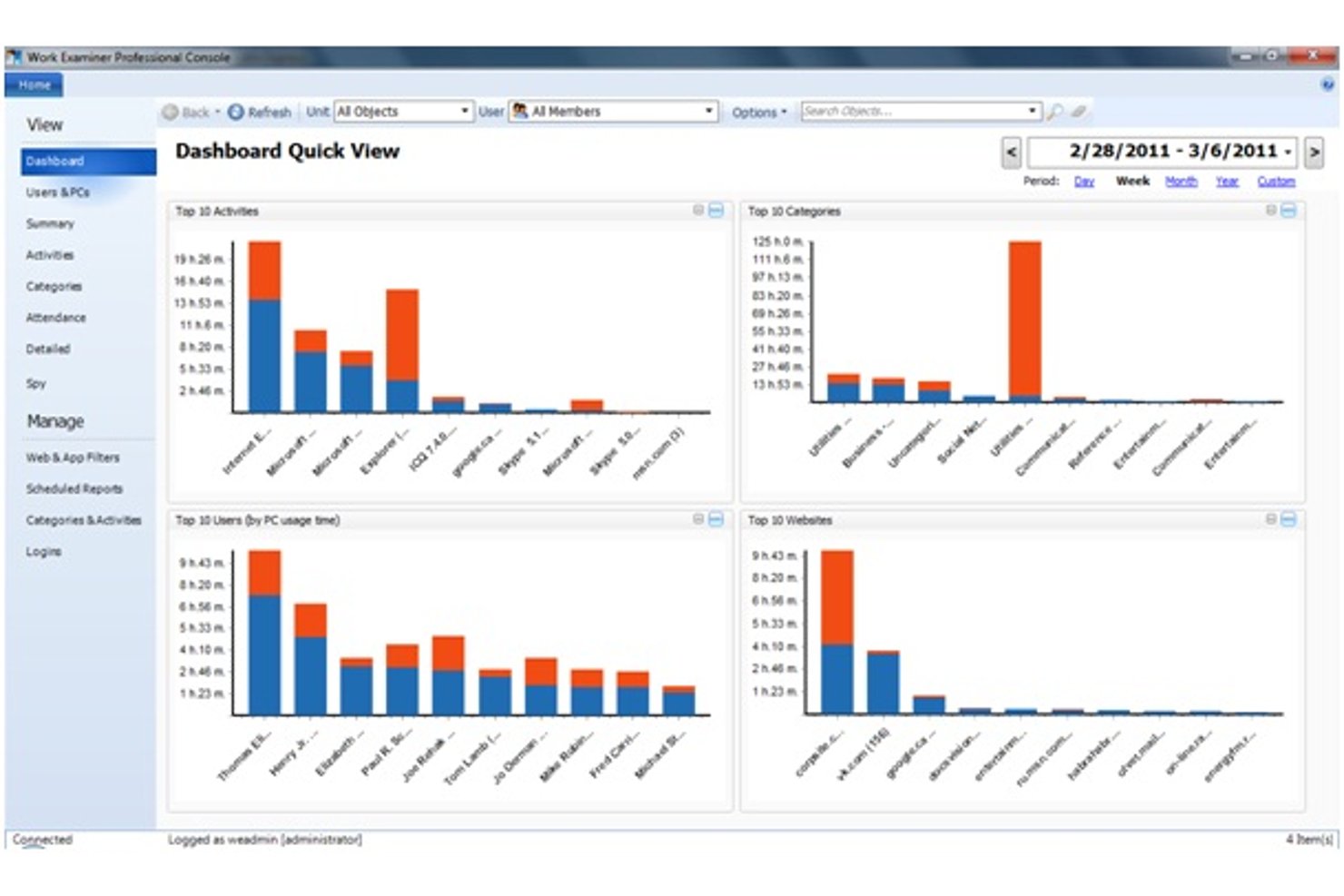
Work Examiner es una solución de supervisión de empleados autoalojada que rastrea el uso de aplicaciones y sitios web, captura pulsaciones de teclas, correos electrónicos y mensajes instantáneos, registra capturas de pantalla y supervisa la actividad de dispositivos USB e impresoras en equipos con Windows y macOS.
¿Para quién es más adecuado Work Examiner?
Work Examiner es una opción sólida para equipos de seguridad informática y supervisores de operaciones de pequeñas y medianas empresas que necesitan una supervisión autoalojada con profundidad forense sin depender de una infraestructura en la nube.
Por qué elegí Work Examiner
Work Examiner ocupa un lugar en mi lista de favoritos porque el registro de pulsaciones de teclas es más exhaustivo que el de la mayoría de las herramientas que he probado: captura cada pulsación en todos los programas, incluidas las contraseñas, y permite limitar la captura a aplicaciones específicas para evitar el ruido. También me gusta que registre el contenido y los archivos adjuntos de los correos electrónicos (Exchange, Gmail, Outlook), junto con las conversaciones de mensajería instantánea y las capturas de pantalla en directo, lo que proporciona a los equipos de seguridad un rastro forense completo al investigar una infracción de las políticas. Todos esos datos permanecen en su propio servidor, sin depender de la nube.
Características principales de Work Examiner
- Filtrado web y de aplicaciones: Bloquee o redirija sitios específicos, establezca permisos de acceso con duración limitada y aplique filtros de contenido basados en palabras clave al tráfico HTTP y HTTPS.
- Sincronización con Active Directory: Sincronice usuarios, grupos y unidades organizativas de su estructura de AD existente directamente con Work Examiner en todas las ediciones.
- Registro de actividad USB y de impresión: Realice un seguimiento y registre todas las conexiones de dispositivos USB y los trabajos de impresión en los equipos supervisados para prevenir la pérdida de datos.
- Envío programado de informes: Exporte informes de productividad, asistencia y actividad a PDF, CSV o XLS, y programe su envío automático por correo electrónico.
Integraciones de Work Examiner
Work Examiner ofrece sincronización nativa con Active Directory para usuarios, grupos y unidades organizativas. Controlio también incluye una API REST con tokens de duración limitada para integraciones personalizadas.
Pros and Cons
Pros:
- Captura forense exhaustiva de pulsaciones de teclas y mensajes
- El almacenamiento local favorece el control interno de los datos
- Recopilación de pruebas de dispositivos USB, impresiones y capturas de pantalla
Cons:
- Los agentes exclusivos para Windows limitan la cobertura de equipos
- Los controles de cumplimiento normativo siguen estando documentados de forma insuficiente

StaffCounter es una solución de supervisión de empleados autohospedada que registra el uso de aplicaciones, sitios web, pulsaciones de teclas, capturas de pantalla y actividad de chat en dispositivos Windows, Mac, Linux y Android, con un módulo DLP integrado y un motor de análisis del comportamiento.
¿Para quién es más adecuado StaffCounter?
StaffCounter es una opción sólida para responsables de cumplimiento y equipos de seguridad informática que necesitan almacenar los datos de supervisión de empleados íntegramente dentro de su propia infraestructura.
Por qué elegí StaffCounter
StaffCounter ocupa un lugar en mi lista de favoritos porque su arquitectura local está diseñada específicamente en torno a la soberanía de los datos conforme al GDPR, en lugar de haber sido adaptada a partir de un producto en la nube. Me gusta que todos los datos de supervisión, incluidas las pulsaciones de teclas, las capturas de pantalla y las alertas de DLP, permanezcan cifrados dentro de tu propia infraestructura y nunca pasen por un servidor del proveedor. El agente de Windows de código abierto y el código del servidor PHP permiten que tu equipo de seguridad audite exactamente qué se recopila y cómo se almacena.
Características principales de StaffCounter
- Implementación como dispositivo virtual: Se distribuye como una imagen OVF/OVA o Docker preconfigurada que se ejecuta en VMware ESXi, VirtualBox, KVM, Hyper-V y XEN.
- Motor de análisis del comportamiento de los usuarios: Supervisa las infracciones de las reglas y envía alertas automáticas por correo electrónico cuando se superan los umbrales, como un tiempo excesivo en sitios improductivos.
- Agentes para dispositivos multiplataforma: Se instala en dispositivos Windows, Mac, Linux y Android, con ajustes gestionados de forma centralizada desde la consola web.
- Módulo de prevención de fugas de datos: Registra los cambios no autorizados en archivos sensibles y señala las infracciones de las políticas en los dispositivos supervisados.
Integraciones de StaffCounter
Las integraciones nativas no están documentadas con claridad. StaffCounter proporciona una API para integraciones personalizadas y admite conexiones con sistemas ERP y otros sistemas internos.
Pros and Cons
Pros:
- Mantiene los datos de supervisión dentro de tu infraestructura
- Admite alertas de DLP y análisis del comportamiento
- Cubre Windows, Mac, Linux y Android
Cons:
- Requiere mantenimiento y copias de seguridad por parte del equipo interno de TI
- Carece de controles de acceso basados en roles documentados

Ideal para la grabación de vídeo
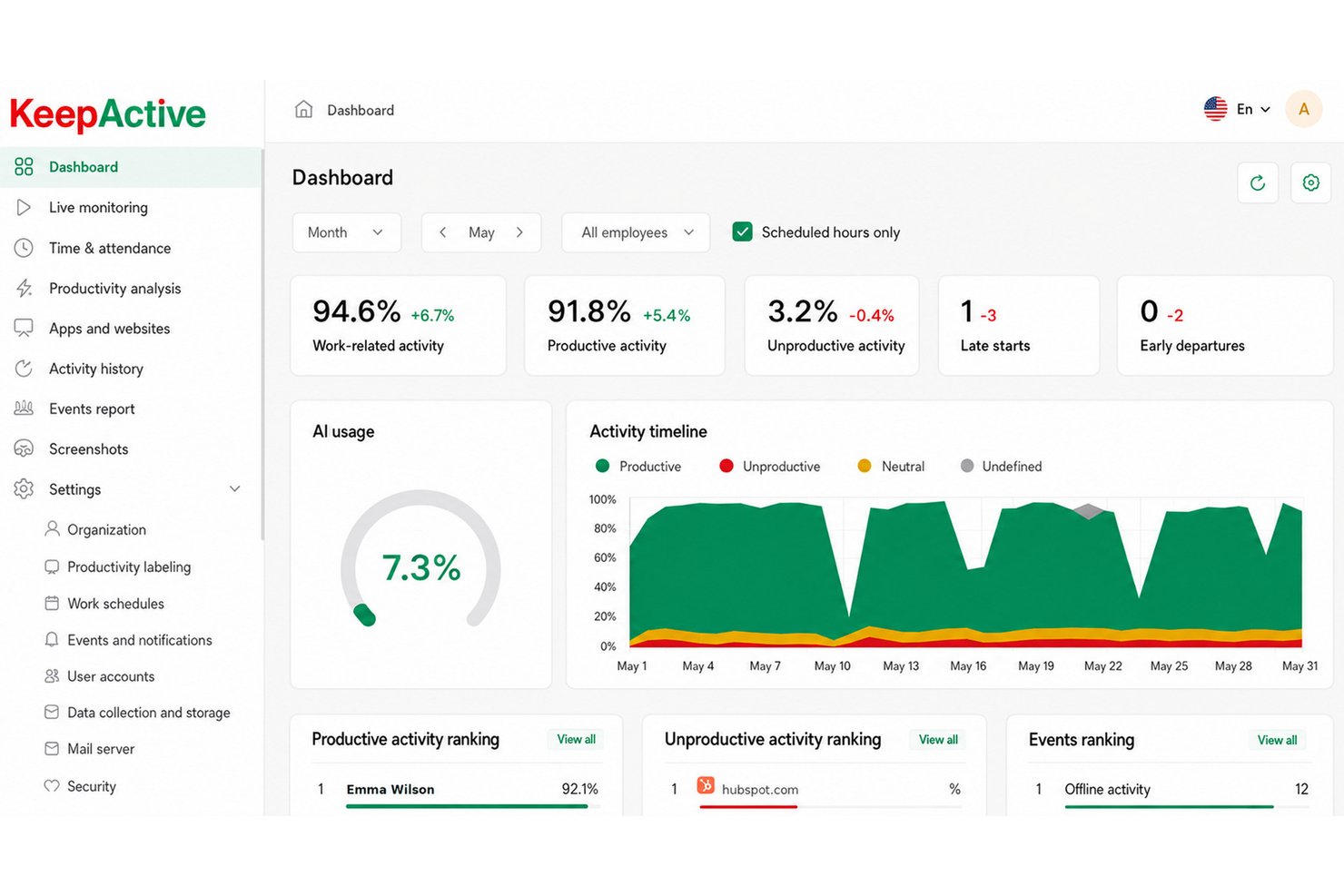
KeepActive (anteriormente Kickidler) es una plataforma de supervisión de empleados autoalojada que combina el seguimiento de la actividad, la grabación de pantalla y audio, el registro de pulsaciones de teclas y la prevención de pérdida de datos en dispositivos Windows, macOS y Linux.
¿Para quién es más adecuado KeepActive?
KeepActive es una opción excelente para los equipos de seguridad informática y los supervisores de operaciones que necesitan una vigilancia profunda de vídeo y audio en sus propias instalaciones, con detección integrada de amenazas internas.
Por qué elegí KeepActive
KeepActive merece un puesto en mi lista de finalistas porque la profundidad de su grabación de vídeo supera ampliamente lo que ofrecen la mayoría de las herramientas locales. Me gusta especialmente la 'caja negra' forense cifrada, que graba continuamente la pantalla y el micrófono de forma cifrada, de modo que se dispone de un registro resistente a manipulaciones si alguna vez se cuestiona un incidente. La grabación de vídeo basada en eventos y la transmisión en directo de la cámara web completan la solución, proporcionando a los equipos de seguridad un registro de auditoría visual completo sin depender del almacenamiento en la nube.
Características principales de KeepActive
- Registro de pulsaciones de teclas: Captura cada pulsación en los dispositivos supervisados, mientras que el nivel DLP añade la captura de texto escrito, el registro del portapapeles y el análisis de la dinámica de las pulsaciones.
- Integración con SIEM y Syslog: Reenvía los eventos de seguridad a la configuración de SIEM existente, lo que permite a los equipos de TI centralizar las alertas junto con otros datos de la infraestructura.
- Evaluación de riesgos: Asigna a cada empleado una puntuación de riesgo mediante tres métodos de análisis, con alertas automáticas para comportamientos inusuales, como la copia o eliminación masiva de archivos.
- Sincronización con Active Directory: Replica la estructura de la organización, implementa el agente Grabber en los grupos de equipos de AD y asigna los permisos de los responsables a la jerarquía de AD existente.
Integraciones de KeepActive
KeepActive ofrece integraciones nativas con Active Directory, SIEM/Syslog, Telegram y VK Teams. También proporciona una API para integraciones personalizadas y admite el envío de informes a FTP y Dropbox.
Pros and Cons
Pros:
- La caja negra cifrada conserva las grabaciones forenses
- Vigilancia profunda de vídeo y audio
- Detección sólida de amenazas internas y DLP
Cons:
- La implementación sin conexión requiere una edición local independiente
- El DLP para macOS y Linux es limitado

Ideal para el análisis forense de amenazas internas en infraestructuras locales
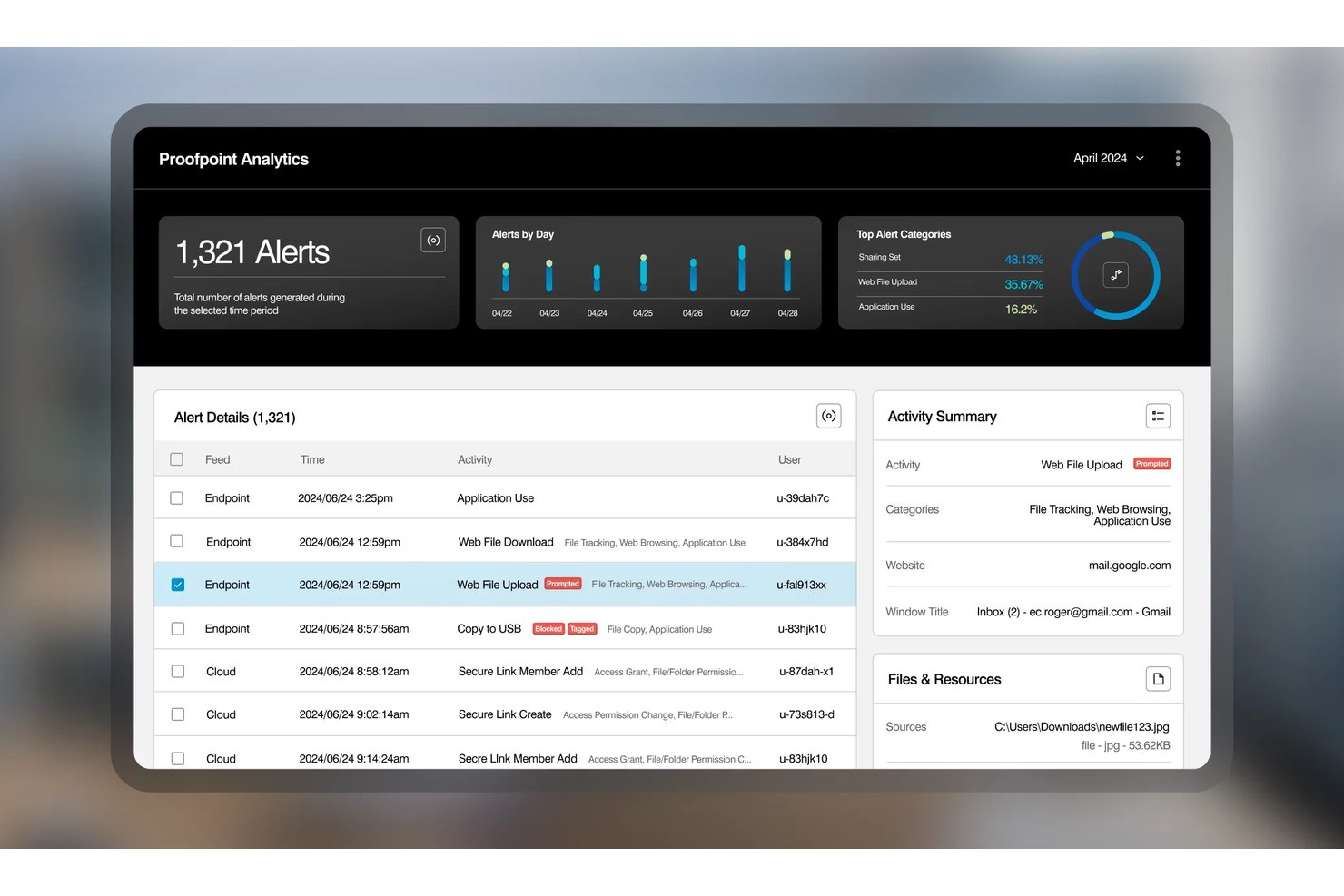
Proofpoint ITM On-Prem es una plataforma de gestión de amenazas internas alojada localmente que captura la reproducción de vídeo de sesiones, el registro de pulsaciones de teclas, la actividad de archivos, las transferencias mediante USB, las consultas a bases de datos y los comandos de Unix en sistemas Windows, Mac y Unix heredados.
¿Para quién es más adecuado Proofpoint?
Proofpoint ITM On-Prem es una opción excelente para los equipos de seguridad informática de sectores regulados que necesitan una visibilidad forense profunda de las amenazas internas en infraestructuras locales.
Por qué elegí Proofpoint
Proofpoint ITM On-Prem ocupa un lugar en mi lista porque la profundidad forense que ofrece en infraestructuras alojadas localmente no tiene rival. Me impresiona especialmente la reproducción de vídeo de sesiones combinada con el registro de pulsaciones de teclas y la captura de consultas SQL, lo que permite a un equipo de seguridad reconstruir exactamente lo que hizo un administrador de bases de datos durante una sesión sospechosa. También admite sistemas Unix heredados como AIX, Solaris y HP-UX, y cubre infraestructuras que la mayoría de las herramientas de supervisión local simplemente ignoran.
Características principales de Proofpoint
- Captura de comandos de Unix: Registra los comandos ejecutados en sistemas Unix heredados, incluidos AIX, Solaris y HP-UX, proporcionando a los equipos de seguridad una visibilidad completa de la actividad de los servidores que no utilizan Windows.
- Acceso a la consola basado en roles: Asigna permisos a los usuarios de la consola mediante la integración con LDAP/Active Directory, con cifrado LDAPS para una autenticación segura de los administradores.
- Evaluación del riesgo de los usuarios: Realiza un seguimiento de las infracciones de las políticas por usuario y genera una puntuación de riesgo continua mediante el módulo de inteligencia integrado.
- Integración con SIEM mediante API REST: Envía datos de actividad y alertas a herramientas SIEM externas, conectando los datos de supervisión local con el conjunto de herramientas de seguridad más amplio.
Integraciones de Proofpoint
Proofpoint ITM On-Prem se integra con Elastic, Active Directory, Microsoft Information Protection y sistemas de gestión de tickets de TI, además de ofrecer una API REST para enviar datos de actividad y alertas a herramientas SIEM.
Pros and Cons
Pros:
- Reconstruye incidentes mediante la reproducción de vídeo de sesiones
- Captura comandos de Unix heredados y consultas a bases de datos
- Protege las investigaciones confidenciales con controles de acceso a la reproducción
Cons:
- Requiere una administración considerable de SQL Server
- Ofrece análisis limitados de la productividad de la plantilla

Syteca
Ideal para la supervisión local basada en PAM
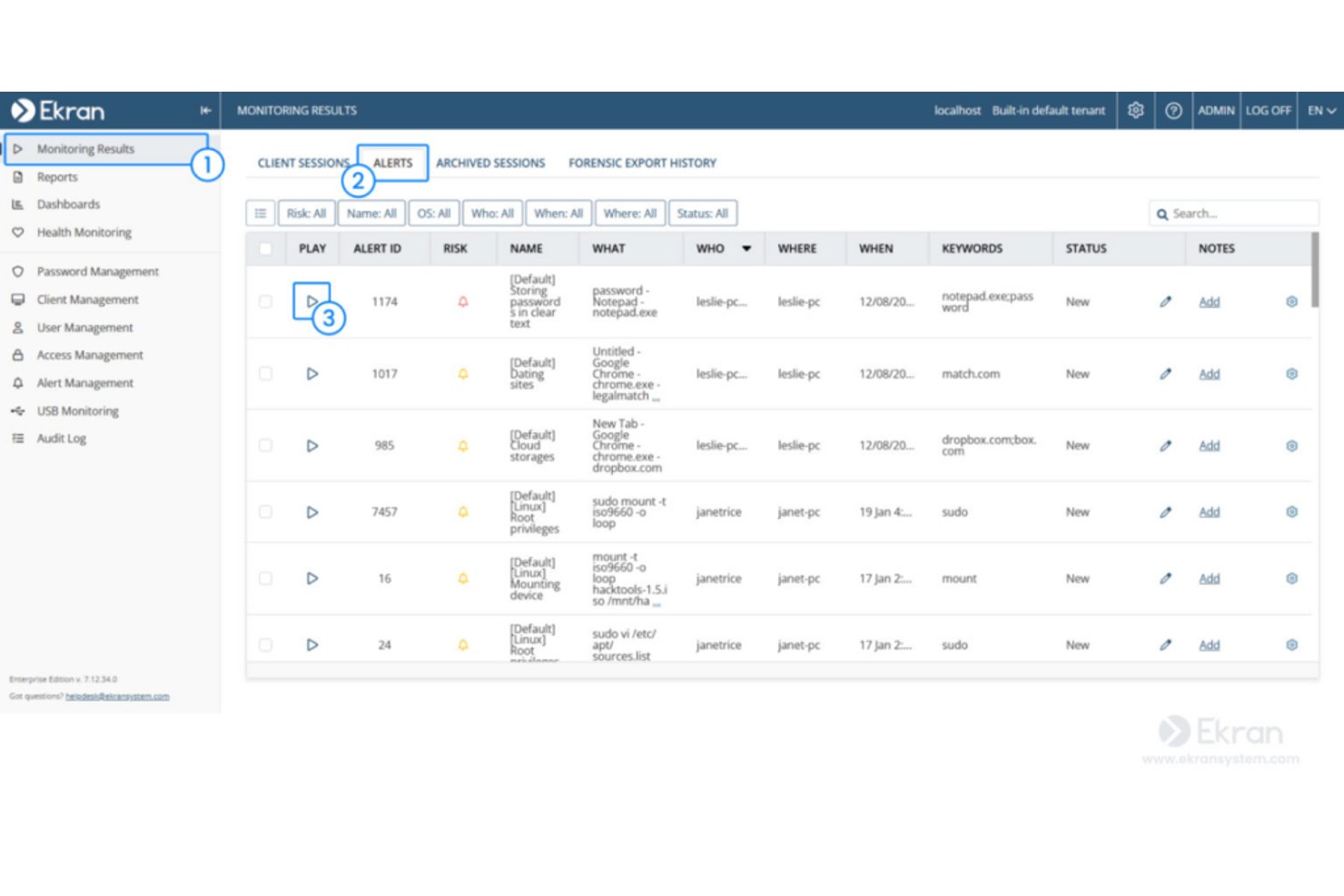
Syteca es una plataforma local de gestión de accesos privilegiados (PAM) y amenazas internas que combina la supervisión de la actividad de los usuarios, la grabación de sesiones, el registro de pulsaciones de teclas, las alertas basadas en el comportamiento y los controles de acceso en endpoints con Windows, macOS y Linux.
¿Para quién es más adecuada Syteca?
Syteca es una opción especialmente adecuada para equipos de seguridad informática y responsables de cumplimiento normativo de organizaciones medianas y grandes que necesitan una supervisión integrada con PAM e implementada íntegramente en su propia infraestructura.
Por qué elegí Syteca
Syteca ocupa un lugar en mi lista de opciones finalistas porque su arquitectura centrada en PAM la convierte en una de las pocas herramientas de supervisión locales que vinculan directamente el control de acceso privilegiado con la grabación de sesiones. Me gusta que, cuando un usuario privilegiado se conecta a un endpoint crítico, Syteca pueda exigir una aprobación manual, emitir una contraseña de un solo uso y grabar simultáneamente cada pulsación de tecla y acción del portapapeles en un formato forense a prueba de manipulaciones. Si algo parece incorrecto, las alertas en tiempo real pueden terminar automáticamente la sesión o bloquear al usuario antes de que se produzcan daños.
Características principales de Syteca
- Alineación con marcos de cumplimiento normativo: Asigna los datos de actividad a HIPAA, SOC 2, ISO 27001, GDPR, PCI DSS y NIST 800-53 para facilitar la preparación para auditorías.
- Arquitectura multicliente: Ejecuta entornos independientes y separados para distintas unidades de negocio o ubicaciones dentro de una misma plataforma.
- Gestión de dispositivos USB: Detecta y controla las conexiones de dispositivos USB para evitar transferencias de datos no autorizadas en los endpoints supervisados.
- Enmascaramiento de datos confidenciales: Elimina automáticamente las contraseñas y otras cadenas confidenciales de las grabaciones de sesiones antes de almacenarlas.
Integraciones de Syteca
Syteca admite integraciones con Active Directory, AWS, Azure y Microsoft Windows Virtual Desktop, además de sistemas SIEM, de gestión de tickets y SSO. También admite la conectividad con entornos externos de seguridad y gestión de accesos.
Pros and Cons
Pros:
- Totalmente local, con control de la base de datos local
- Registra las pulsaciones de teclas, las pantallas y la actividad del portapapeles
- Bloquea sesiones de riesgo mediante alertas en tiempo real
Cons:
- Los informes de productividad quedan por detrás de las herramientas específicas para la gestión de la plantilla
- Requiere servidores y bases de datos gestionados por el cliente

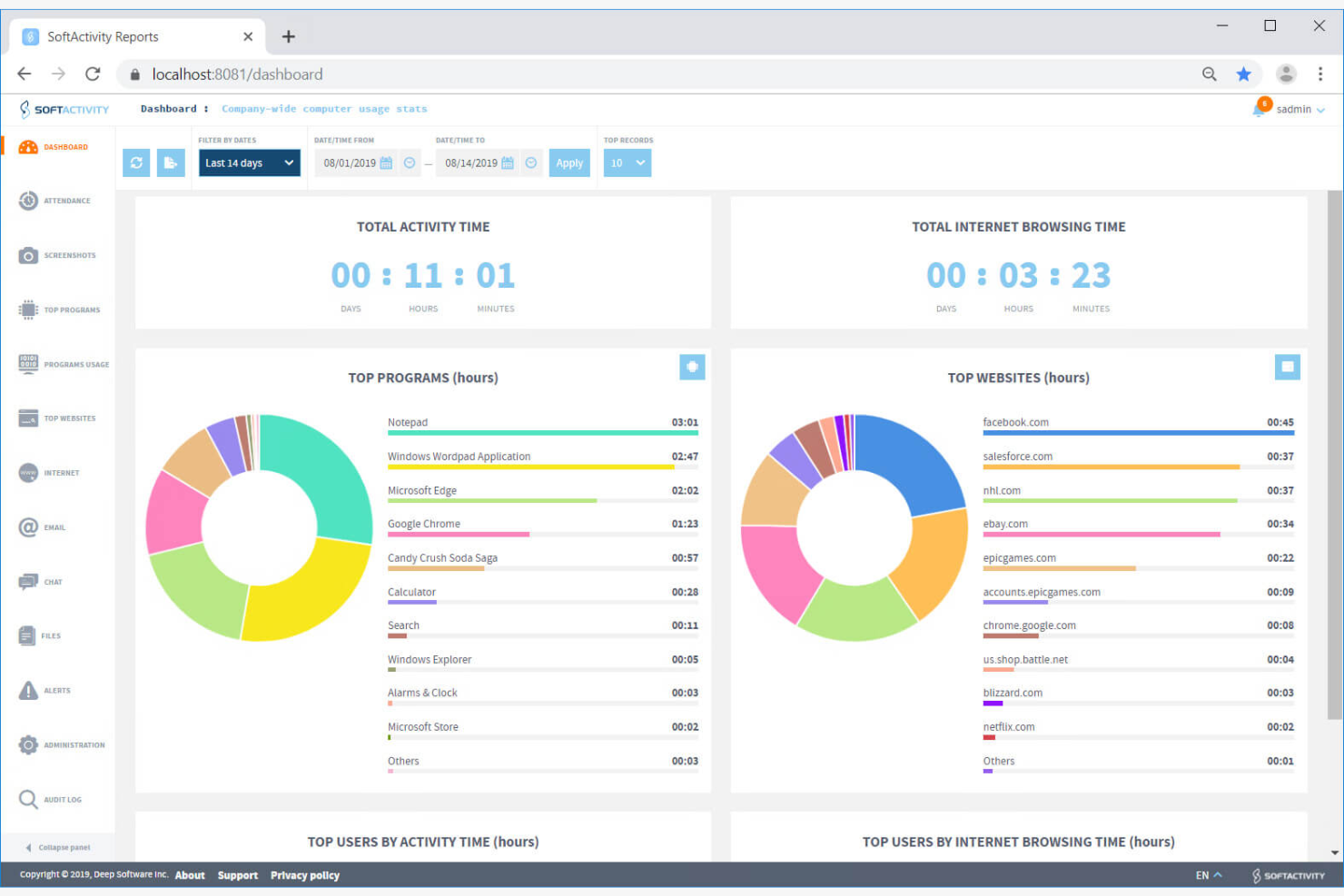
SoftActivity Monitor es un software local de monitoreo de empleados que registra el uso de aplicaciones, la actividad en sitios web, las operaciones con archivos, las pulsaciones de teclas y las vistas de pantalla en directo en dispositivos Windows propiedad de la empresa.
¿Para quién es más adecuado SoftActivity?
SoftActivity Monitor es una opción sólida para administradores de seguridad informática y responsables de cumplimiento que necesitan un monitoreo exhaustivo con fines forenses en dispositivos Windows, dentro de una infraestructura local completamente autogestionada.
Por qué elegí SoftActivity
SoftActivity ocupa un lugar en mi lista de favoritos porque sus capacidades de monitoreo en tiempo real son realmente difíciles de superar en una configuración local. Me encanta que puedas visualizar en directo los escritorios de varios empleados simultáneamente, lo que permite disponer de una visibilidad similar a la de un circuito cerrado en toda tu flota de Windows desde una sola consola. Junto con las capturas de pantalla IntelliSnap activadas por las acciones de los usuarios, obtienes un registro preciso y con marca de tiempo de exactamente lo que ocurrió y cuándo.
Funciones principales de SoftActivity
- Registro de pulsaciones de teclas: Captura las pulsaciones en los dispositivos Windows monitoreados en varios idiomas, incluidos inglés, español, japonés, chino y alfabetos cirílicos.
- Seguimiento de la actividad de archivos: Registra las operaciones de lectura, escritura, eliminación, cambio de nombre y movimiento en unidades locales, de red, USB y externas.
- Análisis del comportamiento de los usuarios: Detecta patrones de actividad inusuales en los dispositivos monitoreados para ayudar a identificar posibles amenazas internas.
- Consola de acciones remotas: Permite a los administradores ver los procesos en ejecución, cerrar aplicaciones, cerrar la sesión de los usuarios y reiniciar o apagar las máquinas directamente desde la consola.
Integraciones de SoftActivity
Las integraciones incluyen Microsoft Active Directory, Microsoft Entra ID, PostgreSQL, Microsoft Outlook, Microsoft Exchange, Citrix XenApp y Servicios de Escritorio remoto de Windows. No hay integraciones con API ni con HRIS claramente documentadas.
Pros and Cons
Pros:
- Las vistas en directo de varias pantallas facilitan la supervisión
- Registros de auditoría detallados de archivos y dispositivos USB
- Los reseñadores elogian el útil soporte técnico
Cons:
- La cobertura exclusiva para Windows deja fuera otros dispositivos
- Las exclusiones del antivirus pueden requerir solución de problemas

Insightful
Ideal para análisis detallados
Insightful es una plataforma local de supervisión de empleados y análisis de la plantilla que realiza un seguimiento del uso de aplicaciones y sitios web, capturas de pantalla, tiempo y asistencia, y actividad en tiempo real en toda la plantilla.
¿Para quién es más adecuado Insightful?
Insightful es una opción sólida para los equipos de TI y operaciones empresariales que necesitan análisis detallados de productividad y controles de seguridad ejecutados en su propia infraestructura.
Por qué elegí Insightful
Insightful ocupa un lugar en mi lista de opciones principales porque la profundidad de sus análisis es realmente difícil de igualar en una configuración local. Me gusta que la vista general en tiempo real y el análisis de capacidad proporcionen a los equipos de operaciones una visión activa del uso de la plantilla entre los equipos, no solo del número de empleados individuales. Su detección de amenazas internas y sus alertas de comportamiento irregular se ejecutan localmente en sus propios servidores, por lo que se obtiene inteligencia conductual sin enviar datos confidenciales a través de un tercero.
Funciones principales de Insightful
- Integración con Active Directory: Sincroniza el directorio de usuarios local con Insightful para automatizar la incorporación de empleados y la gestión de accesos.
- Control de acceso basado en roles: Asigna niveles de permisos de administrador, gerente y cliente para que solo los usuarios autorizados puedan consultar datos confidenciales de la plantilla.
- Asignación automática del tiempo: Registra y categoriza cómo se emplea el tiempo en tareas y proyectos sin requerir la introducción manual por parte de los empleados.
- Implementación local de tres niveles: Se adapta desde configuraciones de un solo nivel para entre 250 y 2.000 usuarios hasta configuraciones de alta disponibilidad para plantillas de más de 10.000 usuarios.
Integraciones de Insightful
Insightful se integra con Active Directory, BigQuery y Snowflake, y ofrece una API para desarrolladores que permite crear integraciones personalizadas con herramientas de BI, almacenes de datos y sistemas SIEM.
Pros and Cons
Pros:
- Los análisis detallados respaldan la supervisión operativa
- La implementación local mantiene el control sobre los datos de la plantilla
- Los controles de seguridad respaldan los programas de supervisión sensibles
Cons:
- El acceso periódico a Internet impide el funcionamiento en entornos aislados
- La ausencia de límites confirmados para el registro de pulsaciones de teclas restringe las investigaciones
New Product Updates from Insightful
Insightful Expands MCP and HRIS Integrations
Insightful adds OAuth connections for ChatGPT and Microsoft Copilot Studio through its MCP Server, while HRIS integrations gain manager scope syncing in Beta. These updates expand AI access and automate permission management. For more information, visit Insightful’s official site.
 .
.Otro software local de monitorización de empleados
Estas son algunas opciones adicionales de software local de monitorización de empleados que no se incluyeron en mi selección, pero que aún merece la pena consultar:
- Apploye
Mejor para planes económicos
- Teramind
La mejor opción para la prevención de la pérdida de datos
- WorkTime
Mejor para pequeñas empresas
- Time Champ
Ideal para el despliegue del agente de Active Directory
- Veriato
Ideal para la puntuación de riesgos de productividad basada en IA


Cómo evalúo el software de supervisión de empleados on-premise
Divido mi evaluación en dos capas: los requisitos básicos que una herramienta debe cumplir para calificar y los diferenciadores —como los controles de soberanía de datos y las alertas de políticas de RRHH— que distinguen a los proveedores.
Funcionalidad básica (requisitos indispensables para esta lista)
Cuando selecciono herramientas para mi lista, califico cada una en una escala del 0 (no ofrece la funcionalidad) al 5 (sobresale en esta área) por cada funcionalidad básica que expongo a continuación. Luego, calculo la puntuación total de la herramienta como un porcentaje. Cada herramienta debe lograr una puntuación total mínima del 65% para ser considerada para su inclusión.
- Opciones de implementación on-premise: Verifico si el software funciona completamente en tus propios servidores e infraestructura, incluyendo soporte para entornos aislados (air-gapped) sin transmisión externa de datos.
- Supervisión de la actividad del empleado: La herramienta debe capturar el uso de aplicaciones, las visitas a sitios web y el tiempo activo/inactivo por estación de trabajo, de modo que los equipos de RRHH puedan revisar los patrones de trabajo diarios entre departamentos.
- Supervisión de pantalla y captura de pantallas: Busco intervalos automáticos de capturas de pantalla, capturas activadas por eventos y grabación de pantalla, características que proporcionan pruebas visuales para los investigadores durante revisiones de políticas.
- Informes de productividad y paneles: Los informes deben categorizar la actividad monitoreada en productiva vs. improductiva, permitiendo filtrar por equipo, función o período para revisiones de desempeño.
- Almacenamiento local de datos y controles de acceso: Evalúo si los datos de monitoreo permanecen on-premise con permisos basados en roles, de forma que solo el personal autorizado de RRHH o cumplimiento pueda ver los registros sensibles de empleados.
- Configuración de políticas y alertas: Aquí importa la creación personalizada de reglas —por ejemplo, activar una alerta cuando un empleado accede a sitios restringidos o excede el límite de inactividad durante el turno.
Una vez que tengo una lista de herramientas que cumplen con los criterios, considero qué distingue a cada plataforma.
Factores diferenciadores (lo que distingue a los proveedores)
Así es como comparo y contrasto diferentes proveedores:
Características destacadas
Cuando RRHH necesita investigar posibles violaciones de políticas de forma discreta, la operación en modo sigiloso es relevante. Herramientas como Teramind y Veriato pueden ejecutar agentes de forma invisible, de manera que los empleados no sean notificados durante una investigación activa. También evalúo de cerca el análisis del comportamiento del usuario: el seguimiento de conductas base que destaque anomalías como picos inesperados en transferencias de archivos o accesos fuera de horario ayuda a los responsables de cumplimiento a detectar riesgos anticipadamente. El registro de pulsaciones de teclas complementa esto dando a los investigadores registros consultables de entradas escritas durante revisiones de mala conducta.
Más allá de las funciones
La soberanía de datos es una consideración importante —verifico si los proveedores ofrecen políticas de retención configurables y flujos de trabajo de consentimiento de empleados que se alineen con las obligaciones de privacidad de tu organización. Los requisitos de despliegue también varían ampliamente; algunas herramientas necesitan ambientes Windows Server específicos mientras que otras soportan Linux, por lo que evalúo la compatibilidad con tu infraestructura existente. Las integraciones con sistemas de RRHH también son relevantes, particularmente si la plataforma se conecta con tu HRIS o Active Directory para la provisión automática de usuarios y reportes a nivel organizacional.
Cómo elegir un software local de monitorización de empleados
Es fácil perderse entre largas listas de funciones y estructuras de precios complejas. Para ayudarte a mantener la atención mientras avanzas en tu proceso específico de selección de software, aquí tienes una lista de factores que debes tener en cuenta:
| Factor | Qué tener en cuenta |
|---|---|
| Escalabilidad | ¿El software crecerá junto con tu equipo? Considera el número máximo de usuarios que admite y si puede gestionar un aumento de datos sin problemas de rendimiento. |
| Integraciones | ¿Se conecta con tus herramientas actuales? Comprueba la compatibilidad con el software que más utiliza tu equipo, como las plataformas de gestión de proyectos o comunicación. |
| Personalización | ¿Puedes adaptar el software a tus necesidades? Busca opciones para personalizar paneles, informes y alertas de acuerdo con tus flujos de trabajo y políticas específicos. |
| Facilidad de uso | ¿Qué nivel de intuición ofrece el software? Considera la curva de aprendizaje y si tu equipo puede navegar fácilmente por la interfaz sin una formación o asistencia extensas. |
| Implementación e incorporación | ¿Qué tan fluida es la transición? Evalúa el tiempo y los recursos necesarios para configurar el software y si el proveedor ofrece materiales de formación o asistencia durante la incorporación. |
| Coste | ¿Los precios son transparentes y se ajustan a tu presupuesto? Compara el coste con las funciones ofrecidas y comprueba si existen tarifas ocultas o planes de pago flexibles. |
| Medidas de seguridad | ¿Qué nivel de seguridad ofrecen tus datos? Asegúrate de que el software ofrezca cifrado, controles de acceso y cumplimiento de las normativas de protección de datos para proteger la información confidencial. |
| Requisitos de cumplimiento | ¿Cumple las normas del sector? Verifica si el software cumple normativas como el RGPD o la HIPAA, que podrían ser necesarias para las operaciones de tu empresa. |
¿Qué es el software local de monitorización de empleados?
El software local de monitorización de empleados es una herramienta instalada en los servidores locales de una empresa para realizar un seguimiento y analizar las actividades y la productividad de los empleados. Los responsables de TI, los profesionales de RR. HH. y los líderes de equipo suelen utilizar estas herramientas para garantizar la seguridad de los datos y mejorar la eficiencia de la plantilla. Funciones como el seguimiento de actividades, la monitorización del tiempo y el filtrado web ayudan a gestionar la productividad y proteger la información confidencial. En general, estas herramientas permiten a las empresas mantener el control sobre sus datos y mejorar la supervisión operativa.
Funciones
Al seleccionar un software local de monitorización de empleados, presta atención a las siguientes funciones clave:
- Seguimiento de actividades: Supervisa las acciones de los empleados en sus dispositivos para ayudar a identificar patrones de productividad y garantizar el cumplimiento de las políticas de la empresa.
- Monitorización del tiempo: Registra las horas de trabajo y la asistencia, proporcionando información sobre la gestión del tiempo y la eficiencia de los empleados.
- Filtrado web: Controla y restringe el acceso a sitios web específicos, evitando distracciones y mejorando la concentración.
- Cifrado de datos: Protege la información confidencial mediante el cifrado de datos, garantizando que permanezca segura frente a accesos no autorizados.
- Alertas en tiempo real: Notifica a los responsables sobre actividades sospechosas o no autorizadas, lo que permite intervenir rápidamente y mitigar riesgos.
- Informes personalizables: Ofrece informes adaptados a las necesidades específicas de la empresa, facilitando la toma de decisiones basada en datos.
- Grabación de pantalla: Captura registros visuales de las actividades de los empleados en sus ordenadores, proporcionando pruebas para auditorías o investigaciones.
- Registro de pulsaciones: Registra las pulsaciones del teclado para supervisar la introducción de datos y detectar posibles amenazas de seguridad.
- Seguimiento de proyectos: Ayuda a gestionar y supervisar el progreso de los proyectos, garantizando que los recursos se asignen eficazmente y se cumplan los plazos.
- Seguimiento de la ubicación mediante GPS: Realiza un seguimiento de la ubicación de los empleados móviles, garantizando la responsabilidad y optimizando las operaciones sobre el terreno.
Ventajas
La implementación de un software local de monitorización de empleados ofrece varias ventajas para tu equipo y tu empresa. Estas son algunas de las que puedes esperar:
- Mayor seguridad: Protege los datos confidenciales de la empresa mediante funciones como el cifrado de datos y las alertas en tiempo real, reduciendo el riesgo de filtraciones.
- Mayor productividad: Aumenta la concentración de los empleados mediante la monitorización de las actividades y el uso de internet, lo que ayuda a identificar y eliminar distracciones.
- Gestión precisa del tiempo: Registra las horas de trabajo y la asistencia, permitiendo una mejor planificación y una asignación eficiente de los recursos.
- Información personalizada: Proporciona informes y análisis adaptados, lo que permite a los responsables tomar decisiones fundamentadas según las necesidades específicas de la empresa.
- Cumplimiento normativo: Ayuda a garantizar el cumplimiento de las normativas del sector mediante funciones como el seguimiento de actividades y las medidas de protección de datos.
- Mayor responsabilidad: Anima a los empleados a mantener la productividad y la transparencia mediante funciones de monitorización como la grabación de pantalla y el registro de pulsaciones.
Costes y precios
Seleccionar un software de monitorización de empleados instalado en las instalaciones requiere comprender los diversos modelos de precios y planes disponibles. Los costes varían en función de las funciones, el tamaño del equipo, los complementos y otros factores. La tabla siguiente resume los planes habituales, sus precios medios y las funciones que suelen incluir las soluciones de software de monitorización de empleados instaladas en las instalaciones:
Tabla comparativa de planes para software de monitorización de empleados instalado en las instalaciones
| Tipo de plan | Precio medio | Funciones habituales |
|---|---|---|
| Plan gratuito | $0 | Seguimiento básico de la actividad, informes limitados y acceso restringido de los usuarios. |
| Plan personal | $5-$15/usuario/mes | Seguimiento del tiempo, filtrado web y cifrado de datos básico. |
| Plan empresarial | $20-$35/usuario/mes | Informes avanzados, grabación de pantalla y seguimiento integrado de proyectos. |
| Plan para empresas | $40-$60/usuario/mes | Medidas de seguridad integrales, alertas en tiempo real y opciones de personalización completas. |
Preguntas frecuentes sobre el software de monitorización de empleados instalado en las instalaciones
Estas son algunas respuestas a preguntas habituales sobre el software de monitorización de empleados instalado en las instalaciones:
¿Cuál es la diferencia entre el software de monitorización de empleados instalado en las instalaciones y el basado en la nube?
El software instalado en las instalaciones se instala en los propios servidores de la organización, lo que proporciona un control total sobre el almacenamiento y el acceso a los datos. Esto puede ser importante para las empresas con requisitos estrictos de seguridad o cumplimiento normativo. El software basado en la nube se aloja en la infraestructura de un proveedor y, por lo general, ofrece una configuración y un escalado más sencillos, pero requiere confiar en las prácticas del proveedor para gestionar los datos.
¿Cómo puedo garantizar el cumplimiento de las leyes de privacidad al utilizar software de monitorización?
Puedes contribuir al cumplimiento estableciendo políticas claras, obteniendo el consentimiento informado de los empleados cuando sea necesario y comunicando qué datos se recopilan y por qué. También es importante configurar los ajustes de monitorización para limitar la captura innecesaria de datos, revisar las políticas periódicamente y consultar asesoramiento jurídico cuando se opere en sectores muy regulados.
¿Con qué frecuencia debo actualizar mi software de monitorización de empleados instalado en las instalaciones?
Las actualizaciones periódicas ayudan a mantener la seguridad, la estabilidad y la compatibilidad. La mayoría de los proveedores publican parches de seguridad cada pocos meses y actualizaciones de versiones principales una o dos veces al año, especialmente para las herramientas que incluyen análisis del comportamiento, grabación de pantalla o componentes de monitorización en tiempo real. Dado que los sistemas instalados en las instalaciones no se actualizan automáticamente, es recomendable programar ventanas de mantenimiento trimestrales, revisar los parches disponibles y coordinarse con el equipo de TI para aplicar las actualizaciones en todos los dispositivos monitorizados. Este enfoque ayuda a protegerse frente a vulnerabilidades, garantiza un seguimiento preciso de la actividad y mantiene el sistema alineado con la evolución de los requisitos de seguridad y cumplimiento normativo.