

Los 10 mejores programas de código abierto para monitorear empleados en 2026

Lista de selección de software de código abierto para la supervisión de empleados


El software de código abierto para la supervisión de empleados proporciona a tu equipo acceso a herramientas para realizar un seguimiento de las horas de trabajo, las actividades y la productividad, todo ello con un código fuente que puedes revisar y adaptar. Encontrar soluciones de código abierto para la supervisión de empleados y la productividad es una búsqueda difícil. La mayoría de las herramientas de supervisión de nivel empresarial son propietarias porque requieren un mantenimiento de alta seguridad y actualizaciones constantes para sortear las restricciones de privacidad de los sistemas operativos.
Sin embargo, esta lista te ayudará a comparar las principales soluciones de código abierto, comprender sus características únicas y elegir la opción adecuada para las necesidades de tu organización.
Por qué confiar en nuestras reseñas de software
Nuestro equipo lleva probando y evaluando software desde 2012. Como expertos en RR. HH., sabemos lo difícil —y lo importante— que es elegir el software adecuado.
Para esta guía, evaluamos las herramientas mediante pruebas prácticas e investigación independiente, puntuando las herramientas según nuestros criterios de selección. También nos basamos en la experiencia de líderes de opinión del sector y de profesionales de RR. HH. en activo.
Nuestras reseñas reflejan nuestro criterio editorial humano, no un discurso de ventas.
Revisores expertos:
Tabla comparativa de software de código abierto para la supervisión de empleados
Esta tabla comparativa resume los detalles de precios de mis principales selecciones de software de código abierto para la supervisión de empleados:
| Tool | Best For | Trial Info | Price | ||
|---|---|---|---|---|---|
| 1 | Mejor para el seguimiento de actividad multiplataforma | Gratis para usar | Siempre gratis | Website | |
| 2 | El panel de EmpMonitor muestra un informe de actividad del empleado. | Prueba gratuita de 15 días | Desde $9/usuario/mes (facturado anualmente) | Website | |
| 3 | Mejor para configuraciones de seguimiento de tiempo multiusuario | Plan gratuito disponible | Precios bajo consulta | Website | |
| 4 | Mejor para integración con editores de código | Prueba gratuita + plan gratuito disponible | Desde $9/usuario/mes | Website | |
| 5 | Mejor para control de datos autoalojados | Plan gratuito disponible | Precios bajo solicitud | Website | |
| 6 | Mejor para visualización de pantallas en tiempo real | No disponible | Desde €250/año | Website | |
| 7 | Mejor para gestión de equipos remotos | Prueba gratuita + plan gratuito para siempre disponible | Desde $99 (pago único) | Website | |
| 8 | Ideal para el seguimiento de horas de trabajo basadas en proyectos | Prueba gratuita de 14 días disponible | Desde $5.49/mes (facturado anualmente) | Website | |
| 9 | Mejor para monitoreo enfocado en la privacidad | Prueba gratuita + plan gratuito disponible | Desde $1/empleado/mes | Website | |
| 10 | Ideal para nómina y RRHH unificados | Prueba gratuita de 30 días + demo gratuita disponible | Desde $50/mes | Website |
Reseñas de software de código abierto para la supervisión de empleados
A continuación encontrarás mis resúmenes detallados del software de código abierto para la supervisión de empleados que se incluyó en mi lista de selección. Mis reseñas ofrecen un análisis detallado de las características, los casos de uso más adecuados y las integraciones de cada software para ayudarte a encontrar el mejor para ti.

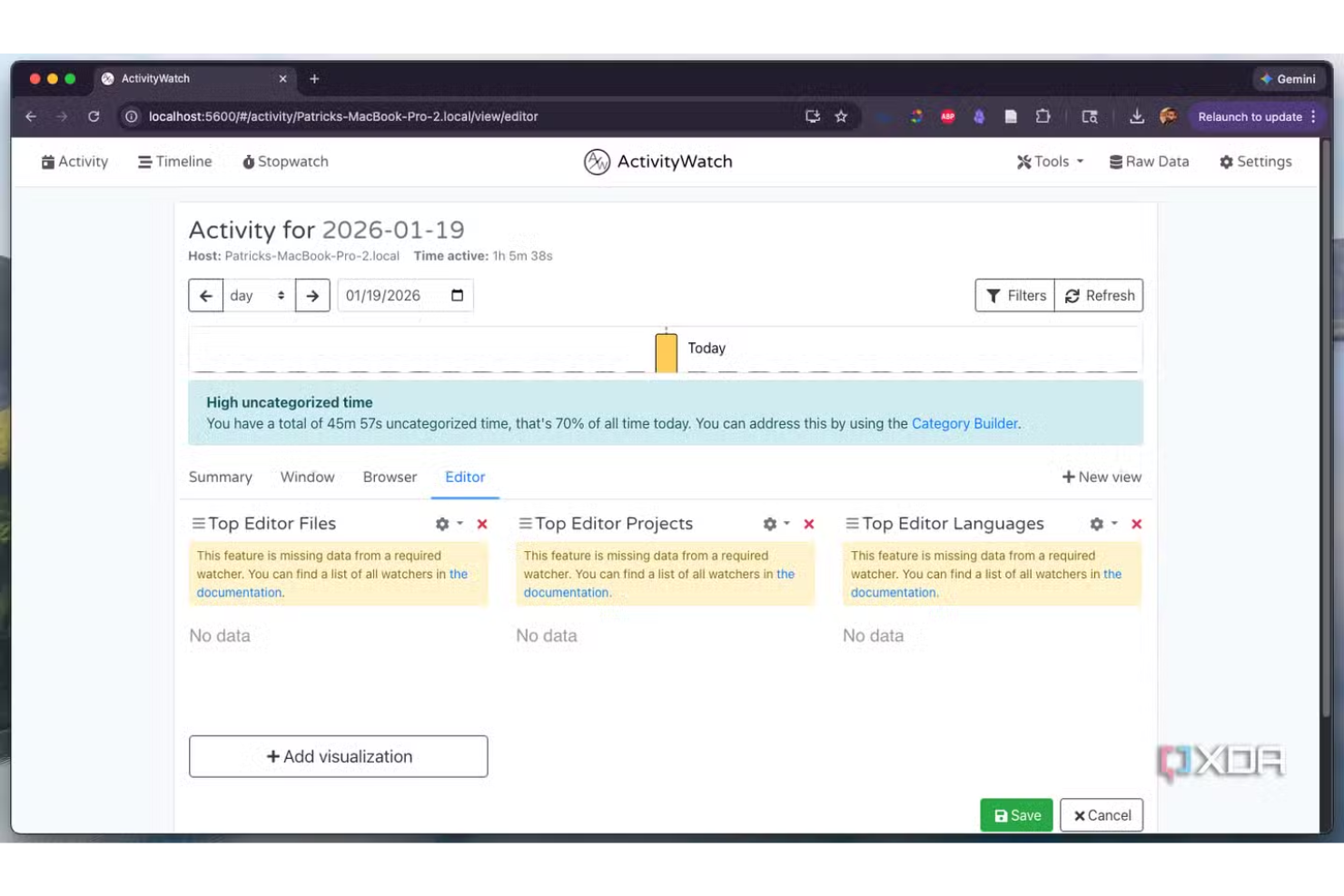
ActivityWatch es una herramienta de seguimiento de actividad de código abierto diseñada para equipos e individuos que necesitan información detallada y multiplataforma sobre el uso de la computadora. Es ideal para organizaciones que buscan un monitoreo transparente y personalizable, sin ataduras al proveedor ni compromisos de privacidad. Si buscas una solución que funcione en Windows, macOS y Linux, ActivityWatch te ayuda a controlar los hábitos laborales y la productividad manteniendo la plena propiedad de tus datos.
¿Para quién es mejor ActivityWatch?
ActivityWatch es ideal para equipos e individuos que requieren un seguimiento de actividad de código abierto y multiplataforma en entornos Windows, macOS y Linux.
Por qué elegí ActivityWatch
Elegí ActivityWatch porque es una de las pocas herramientas de código abierto que realmente ofrece seguimiento de actividad multiplataforma sin compromisos. El software se ejecuta de forma nativa en Windows, macOS y Linux, por lo que puedes supervisar equipos con dispositivos variados sin manejar múltiples soluciones. También valoro que ActivityWatch otorga al usuario el control total de sus datos, protegiendo contra fugas de información. Para las organizaciones que priorizan la transparencia y flexibilidad en el monitoreo de empleados, estas características hacen de ActivityWatch una opción destacada.
Características clave de ActivityWatch
Otras funciones destacadas de ActivityWatch para la monitorización de empleados de código abierto incluyen:
- Sistema modular de monitores: Puedes habilitar o deshabilitar módulos específicos para rastrear diferentes tipos de actividad, como uso de aplicaciones o navegación web.
- Visualización de la línea de tiempo: El panel muestra una línea temporal visual de las actividades, facilitando la revisión de los patrones de trabajo y la distribución del tiempo.
- Etiquetado y categorización: Los usuarios pueden etiquetar y categorizar actividades para informes y análisis más detallados.
- Datos exportables: Los registros de actividad pueden exportarse en varios formatos, lo que facilita análisis avanzados o requisitos de cumplimiento.
Integraciones de ActivityWatch
No hay integraciones disponibles públicamente.
Pros and Cons
Pros:
- Funciona en Windows, macOS y Linux
- Almacenamiento local de datos para control de privacidad
- Monitores modulares para un seguimiento flexible de la actividad
Cons:
- Sin herramientas integradas para despliegue remoto
- No cuenta con un panel centralizado para múltiples usuarios

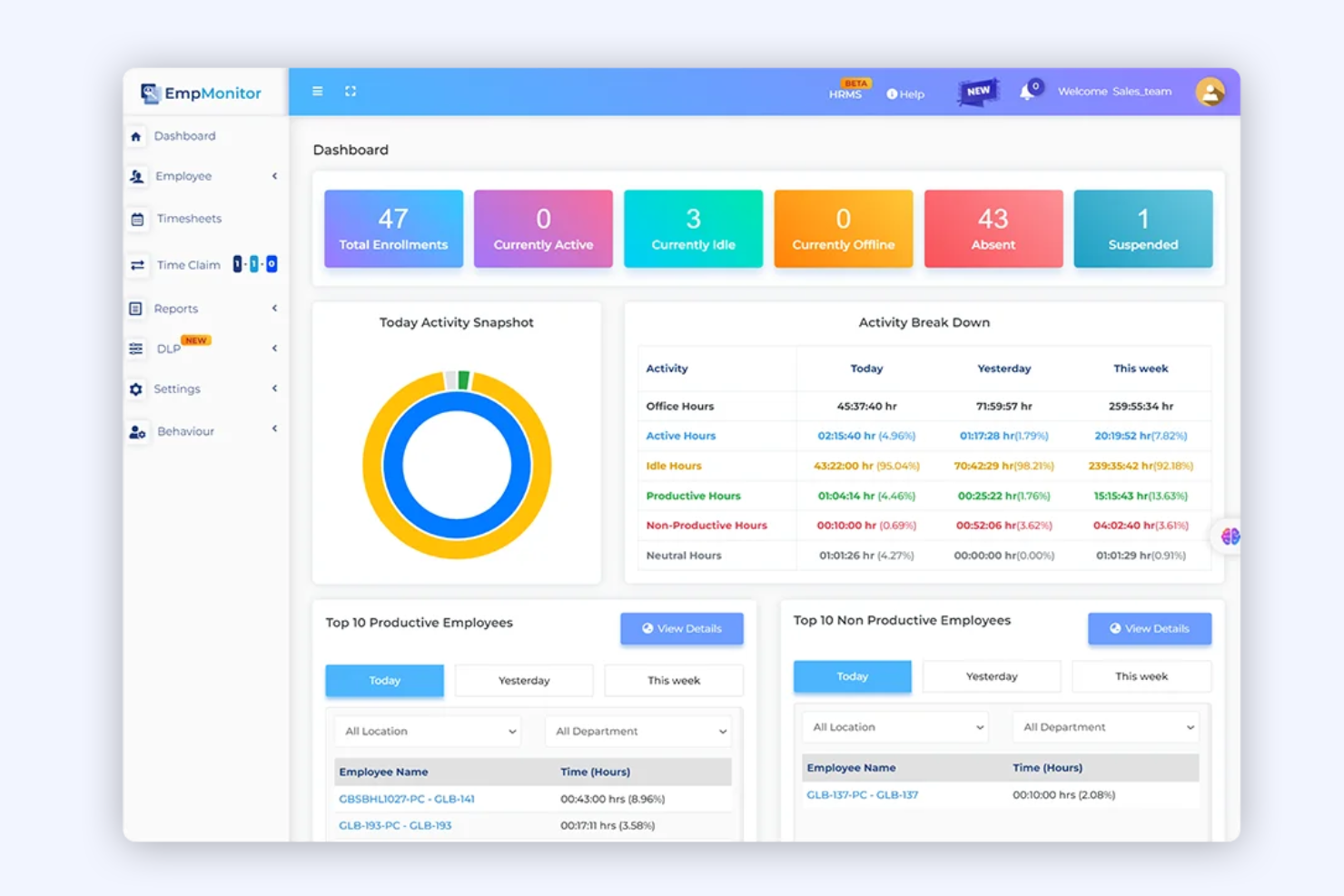
EmpMonitor es una plataforma de monitoreo diseñada para organizaciones que requieren una supervisión detallada de la actividad y el comportamiento de los empleados. Es especialmente útil para equipos de TI, finanzas y cumplimiento que desean rastrear las acciones de los usuarios, el uso de aplicaciones y el acceso a datos. Si buscas una solución que te ayude a identificar comportamientos riesgosos y mantener la visibilidad en equipos distribuidos, EmpMonitor vale la pena considerarlo.
¿Para quién es mejor EmpMonitor?
EmpMonitor es una opción sólida para equipos de TI y seguridad en organizaciones medianas y grandes que necesitan monitorear la actividad de los usuarios para cumplir con normativas y detectar amenazas internas.
Por qué elegí EmpMonitor
Lo que me atrajo de EmpMonitor es su enfoque en la detección de amenazas internas, que es una preocupación creciente para las organizaciones que manejan datos sensibles. La plataforma ofrece monitoreo en tiempo real de la actividad del usuario y análisis detallados de comportamiento, lo que facilita identificar acciones sospechosas antes de que escalen. También me gusta que EmpMonitor proporciona alertas automáticas por violaciones de políticas y rastrea transferencias de archivos, uso de USB y actividad en aplicaciones. Estas características lo hacen ideal para equipos que necesitan identificar y responder proactivamente a riesgos internos de seguridad.
Características clave de EmpMonitor
Algunas otras características de EmpMonitor que podrían interesarte son:
- Registro de pulsaciones de teclado: Captura y graba todas las pulsaciones realizadas en los dispositivos monitoreados para un análisis detallado de la actividad.
- Captura de pantalla: Realiza capturas periódicas de las pantallas de los usuarios para proporcionar registros visuales de la actividad.
- Análisis de productividad: Rastrea el tiempo dedicado a aplicaciones y sitios web para ayudar a evaluar los patrones de productividad de los empleados.
- Gestión remota de dispositivos: Permite a los administradores monitorear y gestionar puntos finales desde un panel centralizado, incluso para equipos distribuidos.
Integraciones de EmpMonitor
Actualmente no se enumeran integraciones nativas.
Pros and Cons
Pros:
- Monitoreo en tiempo real de los registros de actividad de los usuarios
- Alertas automáticas para comportamientos sospechosos
- Informes detallados de productividad y tiempo de inactividad
Cons:
- Funciones limitadas de monitoreo móvil
- Sin integraciones nativas con plataformas de RR.HH.

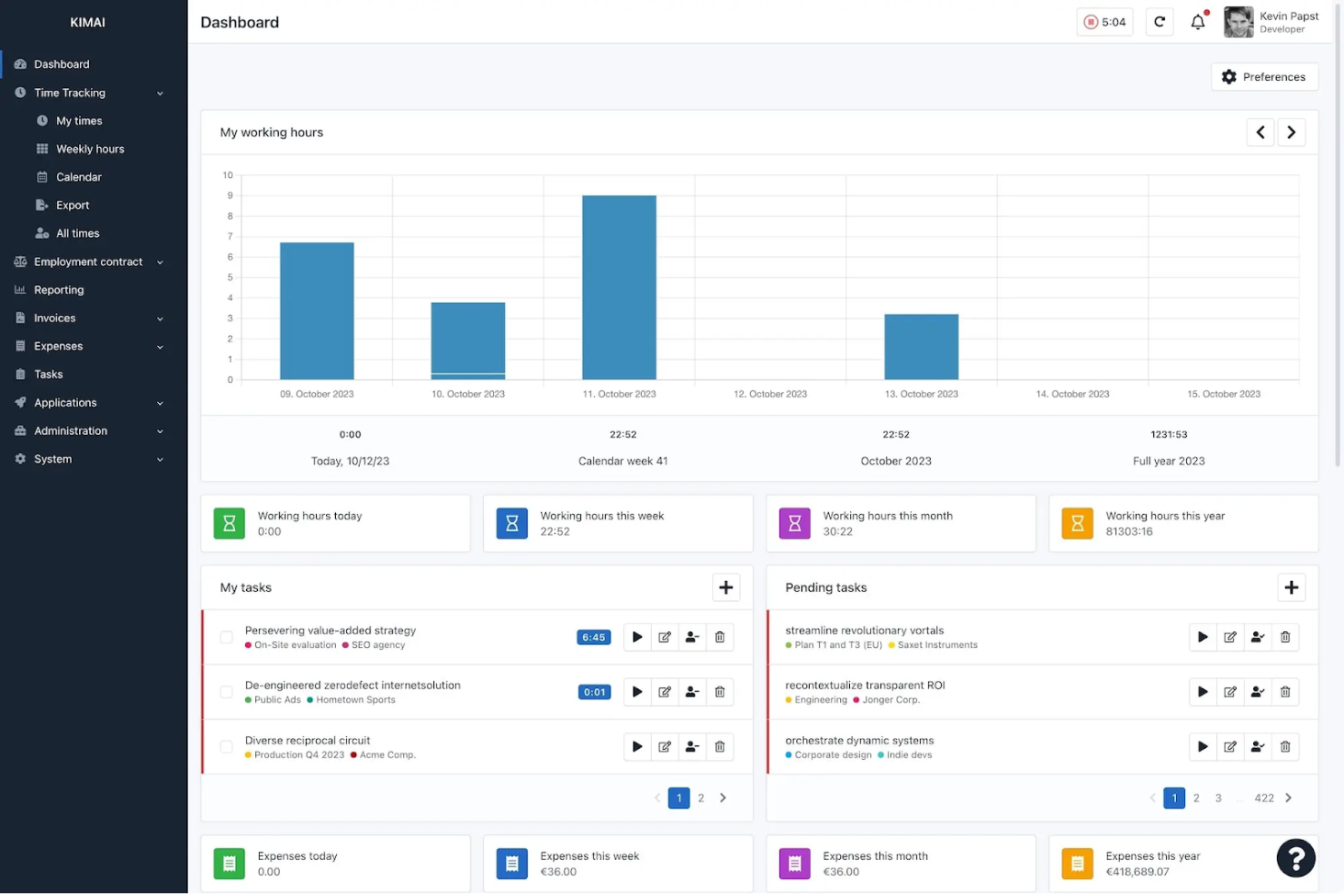
Kimai es un software de código abierto para el seguimiento del tiempo, diseñado para equipos que necesitan gestionar múltiples usuarios y proyectos. Es ideal para consultorías, agencias y organizaciones con necesidades complejas de seguimiento del tiempo entre departamentos o clientes. Kimai te ayuda a centralizar los datos de tiempo, facilitando el monitoreo de la productividad y la asignación precisa de recursos.
¿Para quién es mejor Kimai?
Kimai es adecuado para organizaciones y equipos que necesitan rastrear el tiempo de múltiples usuarios en varios proyectos o clientes.
Por qué elegí Kimai
Elegí Kimai porque está diseñado para gestionar configuraciones de seguimiento de tiempo multiusuario, lo cual es un desafío común para los equipos que administran varios proyectos o clientes a la vez. La plataforma te permite asignar usuarios a diferentes proyectos, rastrear sus horas de forma individual y generar informes detallados para cada usuario o equipo. También me gusta que Kimai admite permisos granulares basados en roles, para que puedas controlar quién ve o edita los datos de tiempo. Estas características de seguimiento hacen que sea una opción sólida para organizaciones que necesitan monitorear la actividad de los empleados y el tiempo de los proyectos en un entorno flexible y de código abierto.
Características clave de Kimai
Otras funciones útiles de Kimai para la supervisión de empleados de código abierto incluyen:
- Exportación de hojas de tiempo: Exporta datos de hojas de tiempo en varios formatos para nómina o necesidades de cumplimiento.
- Seguimiento de ausencias: Registra y gestiona las bajas y ausencias de los empleados dentro de la plataforma.
- Sistema de etiquetas: Añade etiquetas a las entradas de tiempo para facilitar el filtrado y los informes.
- Acceso API: Conecta Kimai con otros sistemas o crea integraciones personalizadas usando su API.
Integraciones de Kimai
Kimai ofrece integraciones nativas con CodeTimer Mobile, Kimai Mobile (Android), Kimai Mobile (iOS), Timai, CodeTimer Desktop, Eon Timer y más.
Pros and Cons
Pros:
- Registra el tiempo con completos registros de actividades exportables
- Admite permisos granulares de usuario para auditorías
- Ofrece un sistema de plugins para funciones de supervisión personalizadas
Cons:
- Carece de captura de pantalla o de pulsaciones de teclas incorporada
- No dispone de paneles de actividad del usuario en tiempo real

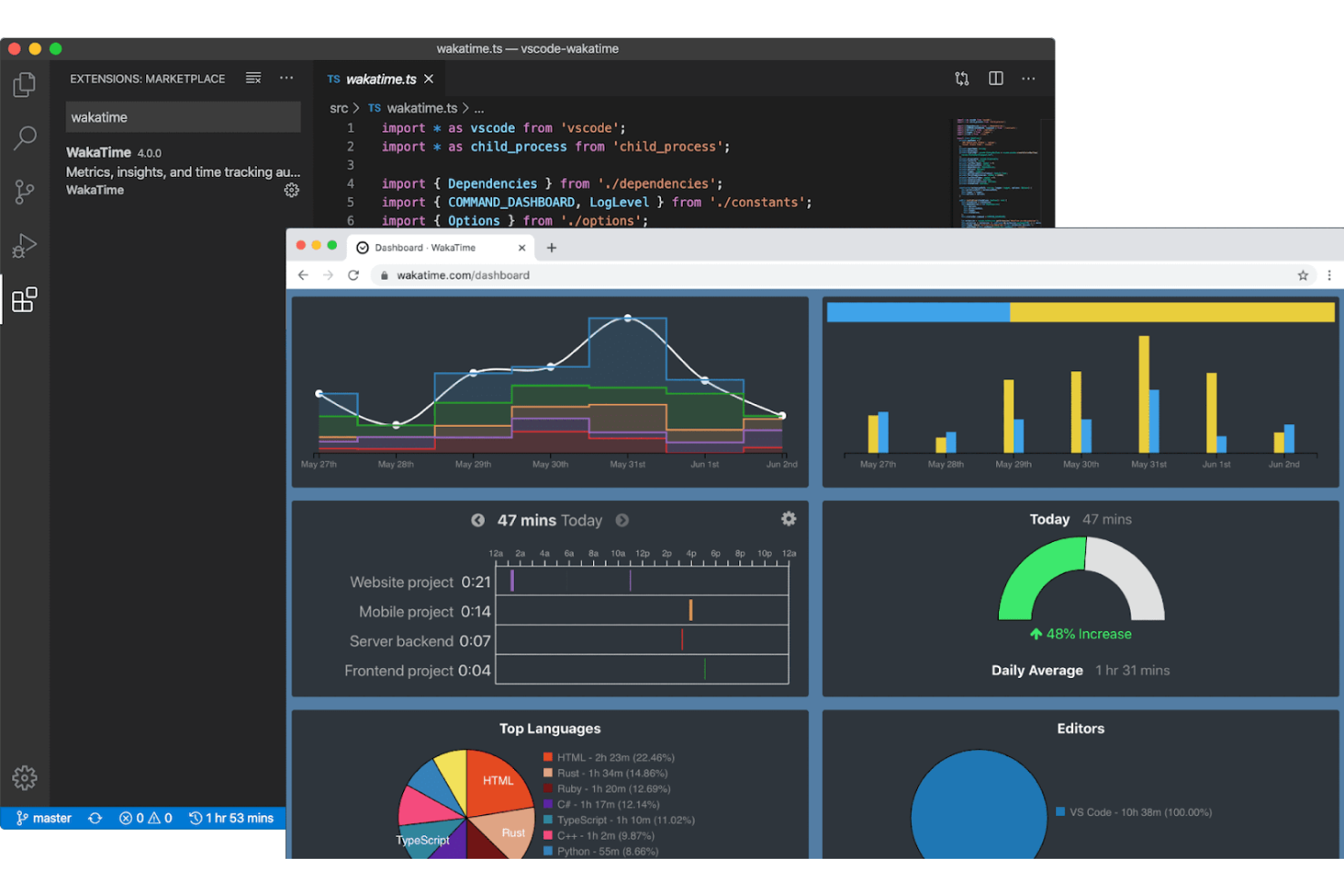
WakaTime ofrece seguimiento de tiempo de código de fuente abierta que se integra directamente con los editores de código y entornos de desarrollo (IDEs) más populares. Es una excelente opción para equipos de ingeniería y líderes técnicos que desean monitorear la actividad de programación sin interrumpir el flujo de trabajo de los desarrolladores. Si necesitas información detallada sobre el tiempo dedicado a programar y el enfoque en proyectos, WakaTime proporciona esa visibilidad directamente en tu entorno de desarrollo.
¿Para quién es mejor WakaTime?
WakaTime es ideal para equipos de desarrollo de software y profesionales técnicos que desean un seguimiento automático de la actividad de codificación dentro de sus editores de código preferidos.
Por qué elegí WakaTime
Elegí WakaTime porque es una de las únicas herramientas de monitoreo de código abierto que se integra directamente con editores de código e IDEs, lo que la hace especialmente valiosa para medir la productividad de los desarrolladores. WakaTime registra automáticamente el tiempo de codificación, la actividad de archivos y el enfoque de cada proyecto sin requerir la intervención manual de los usuarios. Este enfoque brinda a los gerentes de ingeniería y líderes de equipos una visión clara y en tiempo real de cómo se utilizan las horas de codificación en cada proyecto. Para organizaciones que desean monitorear el trabajo técnico sin interrumpir el flujo de trabajo de los desarrolladores, el modelo basado en complementos de WakaTime destaca.
Funciones clave de WakaTime
Otras funciones de WakaTime que apoyan el monitoreo de empleados para equipos técnicos incluyen:
- Cliente de código abierto: los usuarios pueden revisar, modificar o alojar por sí mismos el cliente principal de seguimiento de tiempo para mayor transparencia y control.
- Panel de control detallado: visualiza estadísticas diarias, semanales y mensuales de codificación desglosadas por proyecto, lenguaje y editor.
- Resúmenes de actividad del equipo: resume y compara la actividad de codificación de múltiples usuarios en un espacio de trabajo compartido.
- Compatibilidad con complementos para decenas de editores: instala complementos para Visual Studio Code, IDEs de JetBrains, Sublime Text, Atom y muchos otros entornos de desarrollo.
Integraciones de WakaTime
Las integraciones incluyen Visual Studio Code, IDEs de JetBrains, Sublime Text, Atom, Vim, Emacs, Eclipse, NetBeans, Xcode y más.
Pros and Cons
Pros:
- Registra automáticamente el tiempo de codificación en editores
- Compatible con decenas de editores de código populares
- Impacto mínimo en el flujo de trabajo del desarrollador
Cons:
- No monitorea actividades que no sean de codificación
- Carece de funciones de captura de pantalla o grabación de pantalla


Cattr es una plataforma de monitoreo de empleados de código abierto diseñada para organizaciones que desean tener control total sobre sus datos e implementación. Es ideal para equipos de TI, agencias y empresas preocupadas por la privacidad que necesitan rastrear horas de trabajo y actividades sin depender de servicios en la nube de terceros. Si buscas una solución que puedas alojar y personalizar para adaptarla a tu propia infraestructura, Cattr es una opción a considerar.
¿Para quién es mejor Cattr?
Cattr es una excelente opción para equipos de TI y organizaciones centradas en la privacidad que necesitan una solución de monitoreo de empleados autoalojada y de código abierto.
Por qué elegí Cattr
Cattr está construido específicamente para la comunidad que busca instalaciones en local o autoalojadas. Mientras que otras herramientas ofrecen versiones en la nube, la identidad principal de Cattr es otorgar al usuario la propiedad total de los datos de monitoreo en su propio hardware, garantizando una privacidad y cumplimiento normativo que las herramientas propietarias en la nube no pueden igualar.
El carácter de código abierto de Cattr también permite auditar el código y personalizar la herramienta según las necesidades específicas de tu organización. Para los equipos que quieren evitar el almacenamiento en la nube de terceros y mantener la información sensible internamente, Cattr ofrece un nivel de transparencia y control difícil de igualar.
Características clave de Cattr
Otras funciones de Cattr que pueden interesarte incluyen:
- Seguimiento de tiempo automatizado: Rastrea las horas de trabajo y actividades automáticamente sin intervención manual de los usuarios.
- Captura de pantallas: Toma capturas de pantalla periódicamente para proporcionar registros visuales de la actividad del usuario.
- Gestión de proyectos y tareas: Permite asignar proyectos y tareas a los usuarios y controlar el tiempo empleado en cada uno.
- Soporte multiplataforma: Ofrece aplicaciones de escritorio para Windows, macOS y Linux, cubriendo una amplia gama de dispositivos.
Integraciones de Cattr
Actualmente no se listan integraciones nativas. Hay una API disponible para integraciones personalizadas.
Pros and Cons
Pros:
- Admite usuarios ilimitados sin tarifas adicionales
- Ofrece informes detallados de actividad y tiempo
- Comunidad activa para soporte y desarrollo
Cons:
- No cuenta con funciones integradas de nómina o facturación
- Las actualizaciones de la interfaz pueden quedar rezagadas respecto a la competencia


Veyon es una plataforma de código abierto diseñada para organizaciones que necesitan supervisar y gestionar múltiples computadoras de empleados desde una ubicación central. Es especialmente útil para administradores de TI, educadores y gerentes que desean observar la actividad de los usuarios y brindar soporte remoto. Si buscas una solución que permita supervisión en vivo y control centralizado en un entorno de red, Veyon ofrece funciones adaptadas a estas necesidades.
¿Para quién es mejor Veyon?
Veyon es ideal para administradores de TI y educadores que necesitan supervisión centralizada y en tiempo real de varias computadoras en entornos de red.
Por qué elegí Veyon
Lo que me atrajo de Veyon es su capacidad para ofrecer visualización de pantallas en tiempo real entre varias computadoras, lo cual es esencial para una supervisión transparente de empleados en entornos de código abierto. Aunque está construido principalmente para aulas, Veyon puede implementarse fácilmente en una estructura empresarial también.
La función de monitoreo en vivo te permite ver al instante lo que sucede en cualquier estación de trabajo conectada, facilitando la detección de problemas o la provisión de soporte inmediato. También valoro que Veyon te permita tomar capturas de pantalla y transmitir tu propia pantalla a otros, lo que resulta especialmente útil para capacitación o resolución de problemas. Estas capacidades hacen de Veyon una opción práctica para organizaciones que necesitan visibilidad directa y en tiempo real sobre la actividad de los usuarios.
Características clave de Veyon
Otras funciones de Veyon que podrían interesarte incluyen:
- Gestión de sesiones de usuario: Cerrar sesión, reiniciar o apagar remotamente las sesiones de los usuarios desde el panel central.
- Control de acceso: Configura permisos granulares para restringir o permitir acciones específicas para diferentes usuarios o grupos.
- Ejecución remota de comandos: Ejecuta scripts o comandos en múltiples computadoras simultáneamente para mantenimiento o actualizaciones.
- Agrupación por ubicación: Organiza los dispositivos monitoreados por ubicaciones físicas o lógicas para facilitar la gestión y la supervisión.
Integraciones de Veyon
La integración incluye Microsoft Entra ID.
Pros and Cons
Pros:
- Monitoreo en tiempo real de varias pantallas de usuario
- Controles para la gestión remota de sesiones
- Modo de difusión para demostraciones en vivo o formación
Cons:
- Sin análisis de actividad o de fuerza laboral incorporados
- Opciones limitadas de informes y exportación


Si buscas un software de monitoreo de empleados de código abierto con un fuerte enfoque en la gestión de equipos remotos, Ever Gauzy Platform merece una revisión. Está diseñado para equipos distribuidos que necesitan rastrear la productividad, gestionar proyectos y manejar tareas de RR.HH. en un solo lugar. La plataforma destaca por su combinación de seguimiento del tiempo, facturación y otras funciones avanzadas.
¿Para quién es Ever Gauzy Platform?
Ever Gauzy Platform se adapta a empresas distribuidas y equipos remotos que requieren funciones integradas de monitoreo, RR.HH. y gestión de proyectos en una única plataforma de código abierto.
Por qué elegí Ever Gauzy Platform
Lo que me llama la atención de Ever Gauzy Platform es cómo reúne el monitoreo del tiempo de los empleados y la gestión de equipos remotos en una sola plataforma de código abierto. Lo elegí porque va más allá del seguimiento básico del tiempo al incluir características como gestión de proyectos y tareas, facturación y módulos de RR.HH. para ausencias y nómina. Estas capacidades lo hacen especialmente útil para organizaciones con equipos distribuidos que necesitan coordinar trabajo, monitorear la productividad y manejar procesos de RR.HH. a distancia. La capacidad de gestionar tantos aspectos del trabajo remoto desde un solo panel es un verdadero diferenciador en el espacio de código abierto.
Características clave de Ever Gauzy Platform
Además de su enfoque en la gestión de equipos remotos, también encontré varias funciones que apoyan el monitoreo y la supervisión de empleados:
- Capturas de pantalla de la actividad: La plataforma puede tomar capturas de pantalla periódicas de los escritorios de los empleados para brindar registros visuales de la actividad laboral.
- Entrada manual de tiempo: Los usuarios pueden registrar el tiempo manualmente para tareas que no se rastrean automáticamente, facilitando escenarios de trabajo flexibles.
- Permisos basados en roles: Los administradores pueden asignar niveles de acceso granulares a los usuarios, asegurando que la información sensible solo sea visible para las personas adecuadas.
- Aplicaciones de escritorio y web: Los empleados pueden rastrear el tiempo y las actividades tanto desde aplicaciones de escritorio como basadas en navegador para una mayor accesibilidad.
Integraciones de Ever Gauzy Platform
Actualmente no se mencionan integraciones nativas.
Pros and Cons
Pros:
- Ofrece módulos integrados de RR.HH. y nómina
- Admite múltiples inquilinos y organizaciones
- Permite controles de acceso granulares basados en roles
Cons:
- No incluye seguimiento integrado de pulsaciones de teclado ni uso de aplicaciones
- El soporte comunitario aún es relativamente pequeño

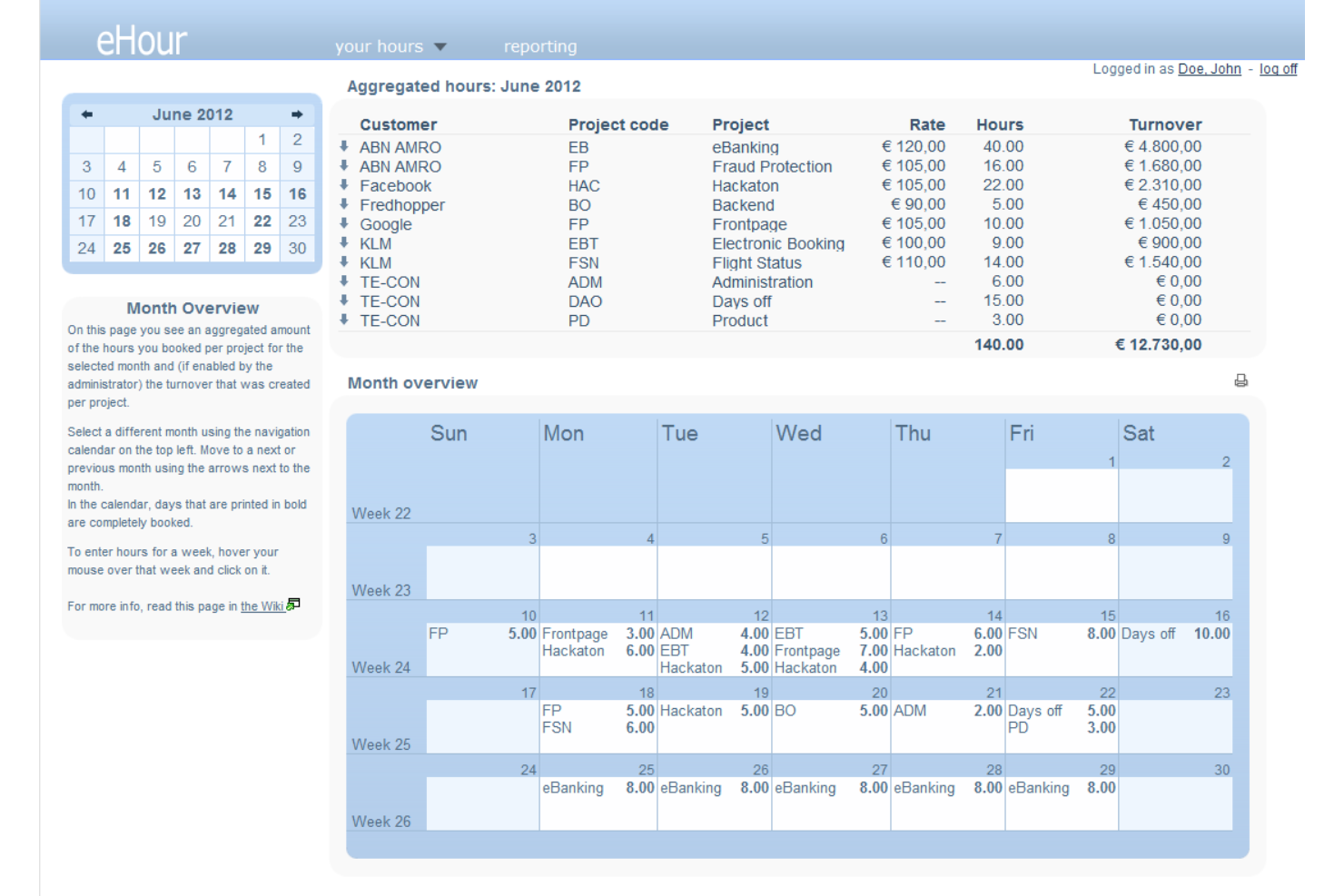
Si tu equipo gestiona múltiples proyectos y necesita un seguimiento preciso de las horas de trabajo, eHour ofrece una solución flexible y de código abierto. Está diseñado para organizaciones que facturan por proyecto o que requieren informes detallados para el trabajo con clientes. eHour te ayuda a supervisar la distribución del tiempo por proyecto y facilita una facturación transparente y precisa.
¿Para quién es mejor eHour?
Los gestores de proyectos y las consultorías que necesitan registrar horas facturables en varios proyectos de clientes encontrarán eHour especialmente útil.
Por qué elegí eHour
Elegí eHour porque está diseñado específicamente para el seguimiento de horas de trabajo basadas en proyectos, lo cual es una necesidad común para equipos que gestionan múltiples clientes o entregables. La herramienta permite asignar empleados a proyectos específicos y controlar su tiempo con gran detalle, facilitando la generación de informes precisos para facturación o análisis interno. Me gusta que eHour admita estructuras y roles de proyecto personalizables, por lo que puedes adaptarlo a diferentes flujos de trabajo o acuerdos con clientes. Su naturaleza de código abierto también significa que se puede adaptar la plataforma a requisitos únicos de seguimiento de proyectos.
Funciones clave de eHour
Otras características destacadas de eHour para la monitorización de empleados incluyen:
- Gestión de ausencias: Controla las licencias y ausencias de los empleados junto a las horas de proyecto para tener una visión completa de la disponibilidad.
- Seguimiento de horas extra: Supervisa y registra las horas extra para apoyar los procesos de cumplimiento y compensación.
- Informes personalizados: Crea y exporta informes detallados según proyectos, usuarios o periodos para auditorías o transparencia con el cliente.
- Permisos de usuario: Establece controles de acceso granulares para diferentes roles, asegurando que los datos sensibles solo sean visibles para los usuarios autorizados.
Integraciones de eHour
Las integraciones incluyen Jortt, Jira, Power BI y más.
Pros and Cons
Pros:
- Registra el tiempo por proyecto, cliente y tarea
- Admite múltiples usuarios y proyectos
- Permite flujos de trabajo de aprobación flexibles para hojas de tiempo
Cons:
- No incluye seguimiento de actividad de usuario o tiempos de inactividad
- No dispone de supervisión automática de asistencia o inicio de sesión

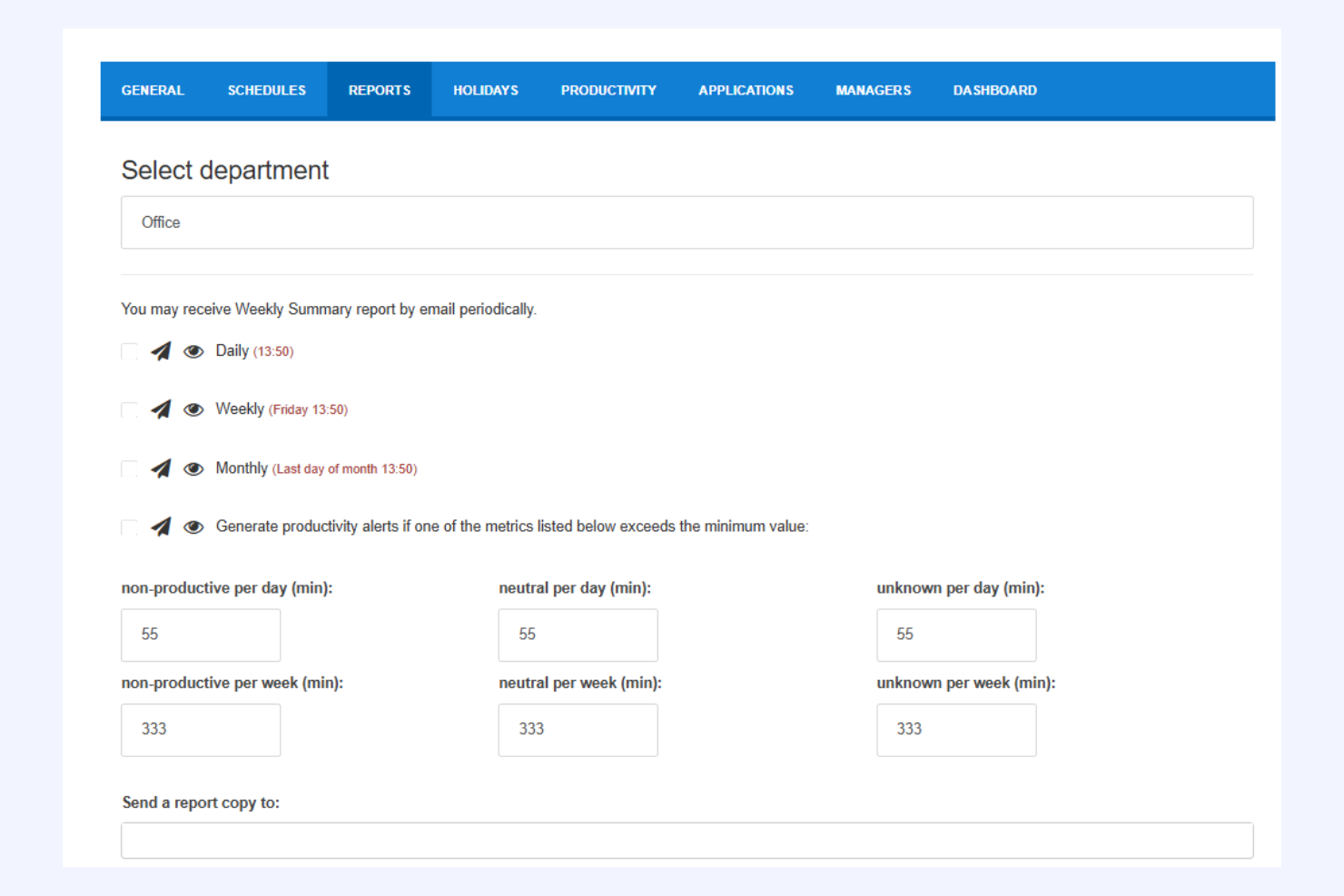
StaffCounter ofrece una supervisión de empleados centrada en la privacidad para organizaciones que desean control sin vigilancia intrusiva. Está dirigido a empresas y equipos que necesitan equilibrar el seguimiento de la productividad con el respeto a la privacidad del usuario. Si buscas un software de monitoreo que dé prioridad a la transparencia y la protección de datos, StaffCounter está diseñado pensando en esas prioridades.
¿Para quién es mejor StaffCounter?
StaffCounter es ideal para pequeñas y medianas empresas y organizaciones que necesitan supervisar empleados con fuertes protecciones de privacidad y manejo transparente de datos.
Por qué elegí StaffCounter
Elegí StaffCounter porque sitúa la privacidad en el centro del monitoreo de empleados, lo cual es un enfoque poco común en este campo. La herramienta ofrece funciones como la recopilación de datos anonimizada y niveles de monitoreo personalizables, para que las organizaciones puedan controlar la productividad sin exceder los límites. También valoro que StaffCounter proporcione claras pistas de auditoría y permita a los usuarios ver exactamente qué datos se recopilan. Para los equipos que desean supervisar la actividad laboral respetando la privacidad del empleado, estas características hacen de StaffCounter una opción sólida.
Características clave de StaffCounter
Otras funciones en StaffCounter que apoyan la supervisión centrada en la privacidad incluyen:
- Monitoreo sin conexión: StaffCounter puede registrar la actividad incluso cuando el dispositivo no está conectado a Internet, sincronizando los datos una vez que se restablece la conexión.
- Almacenamiento cifrado de datos: Todos los datos recogidos se almacenan mediante cifrado para proteger la información sensible.
- Captura automática de pantallas: La herramienta puede tomar capturas de pantalla periódicas a intervalos personalizables para mayor contexto.
- Monitoreo de dispositivos móviles: StaffCounter ofrece funciones de monitoreo para dispositivos Android, extendiendo el control más allá de computadoras de escritorio y portátiles.
Integraciones de StaffCounter
Las integraciones nativas no se publican de forma oficial.
Pros and Cons
Pros:
- Ofrece monitoreo anonimizado para el cumplimiento
- Proporciona almacenamiento cifrado para mayor seguridad
- Permite el monitoreo sin conexión y la sincronización de datos
Cons:
- No hay características de monitoreo para dispositivos móviles disponibles
- No incluye alertas integradas ni detección de anomalías

TimeTrex
Ideal para nómina y RRHH unificados

TimeTrex es una plataforma de código abierto que combina la supervisión de empleados con la gestión de recursos humanos y nóminas. Este software es adecuado para organizaciones que desean rastrear la asistencia, gestionar los horarios y manejar la nómina en un solo lugar. TimeTrex puede ayudar a los equipos de RRHH y a los dueños de negocios a reducir procesos manuales y optimizar la supervisión en las operaciones laborales.
¿Para quién es mejor TimeTrex?
TimeTrex es ideal para pequeñas y medianas empresas que necesitan supervisión de empleados integrada, programación y gestión de nóminas en una única solución de código abierto.
Por qué elegí TimeTrex
Elegí TimeTrex porque destaca para las organizaciones que desean unificar la supervisión de empleados con los procesos de nóminas y RRHH. Su plataforma de código abierto permite rastrear la asistencia de los empleados, monitorear sus horas de trabajo y conectar estos datos directamente con los cálculos de nómina. Aunque TimeTrex no supervisa la actividad en pantalla, incluye otras funciones de monitoreo como la programación, la gestión de ausencias y el seguimiento de cumplimiento. Esta combinación lo hace especialmente útil para equipos que necesitan tanto supervisión como gestión integrada del personal sin depender de múltiples herramientas.
Funciones clave de TimeTrex
Otras funciones de TimeTrex que pueden interesarte incluyen:
- Integración con reloj biométrico: Se conecta con dispositivos biométricos para verificar las horas de trabajo de los empleados y evitar el registro de asistencia por terceros.
- Seguimiento por geolocalización: Registra la ubicación física de los empleados cuando fichan la entrada o salida, lo que es compatible con empleados remotos y equipos de campo.
- Informes personalizables: Permite generar informes detallados sobre asistencia, horas extra y cumplimiento para auditorías o revisiones internas.
- Controles de acceso basados en roles: Permite definir permisos y restringir el acceso a datos sensibles de RRHH y nómina según los roles de usuario.
Integraciones de TimeTrex
Las integraciones incluyen ADP, QuickBooks, Sage, Paychex, Surepay, Ceridian, Meditech, Insync, Millennium y más.
Pros and Cons
Pros:
- Nómina, RRHH y supervisión todo en una plataforma
- Opciones de seguimiento de tiempo biométrico y por geolocalización
- Pistas de auditoría detalladas para necesidades de cumplimiento
Cons:
- Carece de funciones de monitoreo de actividad de usuario
- Experiencia de usuario desactualizada
New Product Updates from TimeTrex
TimeTrex Adds Quick Punch App With Offline and QR Support
TimeTrex adds a new Quick Punch app, offline punching, QR code scanning, punch images, configurable messages, and punch warnings or lockouts to improve employee clock-ins across browsers and local computers. For more information, visit TimeTrex’s official site.
 .
.
Cómo evalúo el software de monitoreo de empleados de código abierto
Evalúo sobre dos capas: la base que cualquier herramienta debe cumplir—como el código con licencia OSI y el despliegue autohospedado—y los diferenciadores que importan a los equipos de RR. HH. que supervisan trabajadores remotos.
Funcionalidad principal (Condiciones indispensables para esta lista)
Al seleccionar herramientas para mi lista, clasifico cada una en una escala del 0 (no ofrece la funcionalidad) al 5 (destaca en esta área) para cada funcionalidad principal listada abajo. Luego, calculo la puntuación total de la herramienta en un porcentaje. Cada herramienta necesita alcanzar una puntuación total mínima del 65% para ser considerada para su inclusión.
- Licencia de código abierto: Verifico que el código fuente esté disponible públicamente bajo una licencia aprobada por OSI reconocida como GPL, MIT o Apache, para que tu equipo pueda modificarlo y redistribuirlo libremente.
- Seguimiento de actividad y tiempo: Ya sea registrando el tiempo inactivo en turnos remotos o las horas trabajadas en proyectos de clientes, busco seguimiento automatizado que vaya más allá de simples hojas de tiempo manuales.
- Monitoreo de apps y sitios web: Las herramientas deben registrar qué aplicaciones y URLs utilizan los empleados durante el horario laboral, idealmente con la capacidad de categorizarlas como productivas o improductivas.
- Captura de pantalla o grabación de pantalla: Evalúo si la herramienta ofrece intervalos de captura configurables y controles de privacidad como el difuminado, ya que los equipos de RR. HH. a menudo necesitan equilibrar la supervisión con la confianza de los empleados.
- Informes de productividad y paneles de control: Un gerente que revisa la producción de su equipo en una fuerza laboral híbrida necesita más que registros en bruto. Busco paneles visuales y reportes exportables con métricas de productividad claras.
- Despliegue autohospedado: Busco rutas de despliegue documentadas como imágenes Docker o scripts de instalación, ya que el fin aquí de optar por open source es mantener los datos sensibles de la fuerza laboral en tu propia infraestructura.
Una vez que tengo una lista de herramientas que cumplen con este criterio, considero qué diferencia a cada plataforma.
Factores diferenciadores (Qué distingue a los proveedores)
Así es como comparo y contrasto diferentes proveedores:
Características destacadas
El soporte para agentes multiplataforma es relevante cuando tu plantilla abarca dispositivos Windows, macOS y Linux. Compruebo si cada herramienta cubre los tres sistemas sin brechas funcionales entre sistemas operativos. Los controles de acceso basados en roles son igualmente importantes: los directores de RR. HH., líderes de equipo y responsables de cumplimiento requieren vistas diferentes de los datos de monitoreo. También busco alertas DLP y de amenazas internas que permitan definir reglas sobre comportamientos de riesgo como transferencias de archivos no autorizadas o acceso al sistema fuera del horario laboral.
Más allá de las funcionalidades
La salud de la comunidad es un buen indicador de viabilidad a largo plazo. Evalúo la frecuencia de commits, el número de colaboradores y si los mantenedores responden activamente a las incidencias—un repositorio estancado indica que estarás solo si surge un problema. El cumplimiento y las garantías de privacidad también pesan, especialmente para equipos de RR. HH. que necesitan mecanismos de consentimiento, políticas de retención de datos y pistas de auditoría que cumplan con las leyes laborales regionales. El costo total de propiedad completa mi evaluación porque el software “gratuito” igualmente requiere infraestructura, tiempo de DevOps para actualizaciones y, potencialmente, niveles pagos de soporte empresarial.
Cómo elegir software de código abierto para la supervisión de empleados
Es fácil perderse entre largas listas de características y complejas estructuras de precios. Para ayudarte a mantener la concentración mientras avanzas en tu proceso único de selección de software, aquí tienes una lista de factores que debes tener en cuenta:
| Factor | Qué debes tener en cuenta |
|---|---|
| Escalabilidad | ¿El software gestionará tu número actual y futuro de empleados? Comprueba los límites de usuarios y la compatibilidad con varias sedes. |
| Integraciones | ¿Se conecta de forma nativa con tus sistemas de RR. HH., nóminas o TI? Haz una lista de las integraciones imprescindibles antes de elaborar la lista de selección. |
| Personalización | ¿Puedes adaptar los flujos de trabajo, los permisos y los informes a tus políticas? Considera si necesitas acceso a nivel de código o controles de administración. |
| Facilidad de uso | ¿Tu equipo de RR. HH. y los responsables lo adoptarán rápidamente? Busca una navegación clara, necesidades mínimas de formación e interfaces accesibles. |
| Implementación e incorporación | ¿Cuánto tiempo y conocimientos técnicos requiere la configuración? Pregunta por las herramientas de migración, la documentación y el soporte del proveedor o de la comunidad. |
| Coste | ¿Cuáles son los costes reales, incluidos el alojamiento, el soporte y las actualizaciones? Compara las condiciones de licencia del código abierto y cualquier complemento de pago. |
| Medidas de seguridad | ¿La herramienta ofrece cifrado, registros de auditoría y controles de acceso? Evalúa cómo protege los datos confidenciales de los empleados y facilita el cumplimiento normativo. |
| Disponibilidad de soporte | ¿Qué canales de soporte existen: comunidad, proveedor o terceros? Considera hasta qué punto tu equipo se siente cómodo resolviendo problemas por su cuenta frente a necesitar ayuda directa. |
¿Qué es el software de código abierto para la supervisión de empleados?
El software de código abierto para la supervisión de empleados es un software que registra la actividad, la asistencia y la productividad de los empleados, cuyo código fuente está disponible gratuitamente para que cualquiera pueda usarlo, modificarlo o distribuirlo. Estas herramientas ayudan a los equipos de RR. HH. y a los responsables a supervisar las operaciones de la plantilla, al tiempo que permiten a las organizaciones personalizar funciones, flujos de trabajo y ajustes de seguridad para adaptarlos a sus necesidades específicas y requisitos de cumplimiento.
Funciones
Al seleccionar un software de código abierto para la supervisión de empleados, presta atención a las siguientes funciones clave:
- Seguimiento del tiempo: Registra cuándo los empleados comienzan y terminan su jornada laboral, recopilando las horas trabajadas para la gestión de nóminas, el cumplimiento normativo y la supervisión de la productividad.
- Registro de actividad: Supervisa las acciones de los usuarios en dispositivos o dentro de aplicaciones, proporcionando un registro detallado de las tareas, los sitios web visitados y el uso del software.
- Gestión de la asistencia: Registra la presencia, las ausencias y las solicitudes de permisos, ayudando a los equipos de RR. HH. a gestionar los horarios y garantizar registros de asistencia precisos.
- Controles de acceso basados en roles: Permite a los administradores establecer permisos para distintos usuarios, protegiendo los datos confidenciales y garantizando que solo haya acceso autorizado.
- Informes automatizados: Genera informes personalizables sobre la actividad, la asistencia y la productividad de los empleados, respaldando las decisiones de RR. HH. basadas en datos.
- Registros de auditoría: Mantiene un registro seguro de los cambios y las acciones realizadas en el sistema, respaldando el cumplimiento normativo y las investigaciones internas.
- Automatización de flujos de trabajo personalizados: Permite a las organizaciones diseñar y automatizar procesos de RR. HH. como la incorporación de empleados, las aprobaciones y las notificaciones.
- Gestión documental: Almacena y organiza documentos de RR. HH., como contratos, políticas y evaluaciones del desempeño de los empleados, en una ubicación centralizada.
- Capacidades de integración: Se conecta con otros sistemas de RR. HH., nóminas o TI para sincronizar los datos de los empleados y agilizar las operaciones.
Ventajas
Implementar un sistema de código abierto para la supervisión de empleados ofrece varias ventajas tanto para los miembros de tu equipo como para tu empresa. Estas son algunas de las que puedes esperar:
- Personalización: Adapta los flujos de trabajo, los permisos y los informes para que coincidan con las políticas específicas y las necesidades de cumplimiento de tu organización.
- Ahorro de costes: Evita las costosas tarifas de licencia y reduce el coste total de propiedad aprovechando el código fuente disponible gratuitamente.
- Transparencia: Revisa y audita el código fuente del software para garantizar que cumple tus estándares de seguridad, privacidad y funcionamiento.
- Flexibilidad de integración: Conéctate con tus sistemas existentes de RR. HH., nóminas o TI para crear un flujo de trabajo unificado y eficiente.
- Asistencia de la comunidad: Accede a una comunidad global para resolver problemas, mejorar funciones y aplicar mejoras continuas.
- Mayor control de los datos: Mantén la propiedad y el control sobre los datos confidenciales de los empleados alojando el software en tu propia infraestructura.
- Escalabilidad: Adapta la solución a medida que crece tu organización, añadiendo nuevos usuarios o funciones sin las limitaciones restrictivas de los proveedores.
Costes y precios
Seleccionar un software de código abierto para la supervisión de empleados requiere comprender los diversos modelos de precios y planes disponibles. Los costes varían en función de las funciones, el tamaño del equipo, los complementos y otros factores. La siguiente tabla resume los planes habituales, sus precios medios y las funciones que suelen incluir las soluciones de software de código abierto para la supervisión de empleados:
Tabla comparativa de planes para software de código abierto de supervisión de empleados
| Tipo de plan | Precio medio | Funciones habituales |
|---|---|---|
| Plan gratuito | $0 | Seguimiento básico del tiempo, gestión de la asistencia, informes limitados y asistencia de la comunidad. |
| Plan empresarial | $1–$50/usuario/mes | Todas las funciones personales, informes avanzados, automatización de flujos de trabajo, controles de acceso basados en roles y registros de auditoría. |
| Plan corporativo | $25–$149/usuario/mes | Todas las funciones empresariales, integraciones personalizadas, seguridad mejorada, asistencia prioritaria y herramientas de cumplimiento. |
Preguntas frecuentes
Estas son algunas respuestas a preguntas frecuentes sobre el software de monitorización de empleados de código abierto:
¿Qué nivel de seguridad ofrece el software de monitorización de empleados de código abierto?
La seguridad depende de cómo se configure y mantenga el software. Las herramientas de código abierto permiten revisar y modificar el código, pero debes asegurarte de realizar actualizaciones periódicas, aplicar controles de acceso estrictos y utilizar un alojamiento seguro para proteger los datos confidenciales de los empleados.
¿Puede el software de monitorización de empleados de código abierto integrarse con los sistemas de recursos humanos existentes?
Sí, muchas herramientas de monitorización de empleados de código abierto ofrecen capacidades de integración. A menudo puedes conectarlas con sistemas de recursos humanos, nóminas o TI mediante API o complementos, aunque algunas integraciones pueden requerir configuración técnica o desarrollo personalizado.
¿Qué conocimientos técnicos se necesitan para implementar el software de monitorización de empleados de código abierto?
Normalmente necesitarás conocimientos básicos de TI para la instalación, la configuración y el mantenimiento continuo. Las personalizaciones o integraciones más avanzadas pueden requerir conocimientos de bases de datos, creación de scripts o gestión de servidores.
¿Hay costes ocultos asociados al software de monitorización de empleados de código abierto?
Aunque el software en sí suele ser gratuito, puedes incurrir en costes de alojamiento, asistencia, complementos premium o contratación de personal técnico para la configuración y el mantenimiento. Revisa siempre el coste total de propiedad antes de tomar una decisión.
¿Cómo funcionan las actualizaciones y la asistencia del software de monitorización de empleados de código abierto?
Las actualizaciones suelen ser publicadas por la comunidad o los responsables del proyecto. La asistencia suele proceder de foros de usuarios, documentación o proveedores externos de pago. Eres responsable de aplicar las actualizaciones y resolver los problemas, a menos que contrates servicios de asistencia.