

Los 10 mejores programas para reuniones individuales analizados en 2026

10 Selección del mejor software para reuniones individuales


¿Sientes que tus reuniones individuales están totalmente desorganizadas? No eres el único. Entre coordinar los objetivos del equipo, dar comentarios y hacer un seguimiento del progreso, es fácil dejar pasar conversaciones importantes o, peor aún, perder tiempo en reuniones que no llevan a ninguna parte.
Esta desorganización se acumula rápidamente y perjudica la motivación y el rendimiento. ¿La solución? Un software para reuniones individuales. Estas herramientas aportan estructura, claridad y seguimiento a cada reunión. He probado las principales opciones; sigue leyendo para encontrar la adecuada para tu equipo.
Por qué confiar en nuestras reseñas de software
Nuestro equipo lleva probando y evaluando software desde 2012. Como expertos en RR. HH., sabemos lo difícil —y lo importante— que es elegir el software adecuado.
Para esta guía, evaluamos las herramientas mediante pruebas prácticas e investigación independiente, puntuando las herramientas según nuestros criterios de selección. También nos basamos en la experiencia de líderes de opinión del sector y de profesionales de RR. HH. en activo.
Nuestras reseñas reflejan nuestro criterio editorial humano, no un discurso de ventas.
Revisores expertos:
Tabla comparativa: software para reuniones individuales
Esta tabla comparativa resume los detalles de precios de mis principales selecciones de software para reuniones individuales.
| Tool | Best For | Trial Info | Price | ||
|---|---|---|---|---|---|
| 1 | Ideal para encontrar franjas horarias | Plan gratuito disponible | Desde $6.95/usuario/mes (facturado anualmente) | Website | |
| 2 | Mejor para videoconferencias | Plan gratuito + demo gratuita disponible | Desde $14.16/mes (facturado anualmente) | Website | |
| 3 | Ideal para tomar notas en reuniones | Plan gratuito disponible | Desde $7/usuario/mes (facturado anualmente) | Website | |
| 4 | Ideal para video 4K y audio sin comprimir | Plan gratuito disponible | Desde $24/mes (facturado anualmente) | Website | |
| 5 | Mejor para usuarios de Google Workspace | Plan gratuito disponible | Desde $7/usuario/mes (facturado anualmente) | Website | |
| 6 | Ideal para integración empresarial | Plan gratuito disponible | Desde $4/usuario/mes (facturado anualmente) | Website | |
| 7 | Ideal para integración de programación | Prueba gratuita de 14 días | $7.56/month | Website | |
| 8 | La mejor opción para equipos remotos | Prueba gratuita + demo gratis disponible | Desde $12/organizador/mes (facturado anualmente) | Website | |
| 9 | Ideal para la planificación de agendas | Prueba gratuita disponible | Desde $9.95/usuario/mes (facturado anualmente) | Website | |
| 10 | Ideal para programaciones rápidas | Plan gratuito disponible | Desde $5/usuario/mes (facturación anual) | Website |
Análisis del mejor software para reuniones individuales
A continuación encontrarás mis resúmenes detallados de los mejores programas para reuniones individuales que llegaron a mi lista de selección. Mis análisis ofrecen una visión detallada de las funciones principales, ventajas y desventajas, integraciones y casos de uso ideales de cada herramienta para ayudarte a encontrar la mejor opción para ti.

Doodle
Ideal para encontrar franjas horarias

Doodle es una herramienta de programación diseñada para individuos y equipos que desean coordinar reuniones y eventos de manera eficiente. Es utilizada por quienes necesitan una forma sencilla de encontrar franjas horarias comunes entre varios participantes.
Por qué elegí Doodle: Se especializa en encontrar franjas horarias, permitiéndote proponer varias opciones de horario a los participantes. Puedes crear encuestas para recopilar las preferencias de disponibilidad, haciendo que la programación sea sencilla. La interfaz de Doodle te guía para organizar reuniones sin complicaciones. Estas características lo hacen ideal para usuarios que priorizan la simplicidad en la programación.
Funciones destacadas e integraciones:
Funciones incluyen una página de reservas que permite a otros programar reuniones contigo según tu disponibilidad, una vista de calendario que ofrece una visión clara de todos tus compromisos y recordatorios para asegurarte de no perder ninguna reunión. Estas herramientas mejoran tu proceso de organización manteniendo todo ordenado y puntual.
Las integraciones incluyen Google Calendar, Microsoft Outlook, Slack, Zoom, Microsoft Teams, iCloud, Zapier, Trello, Asana y Evernote.
Pros and Cons
Pros:
- Programación grupal eficiente
- Encuestas de reuniones personalizables
- No se requiere cuenta para los participantes
Cons:
- Puede volverse desordenado con muchas encuestas
- Puede requerir seguimiento manual

Zoom
Mejor para videoconferencias
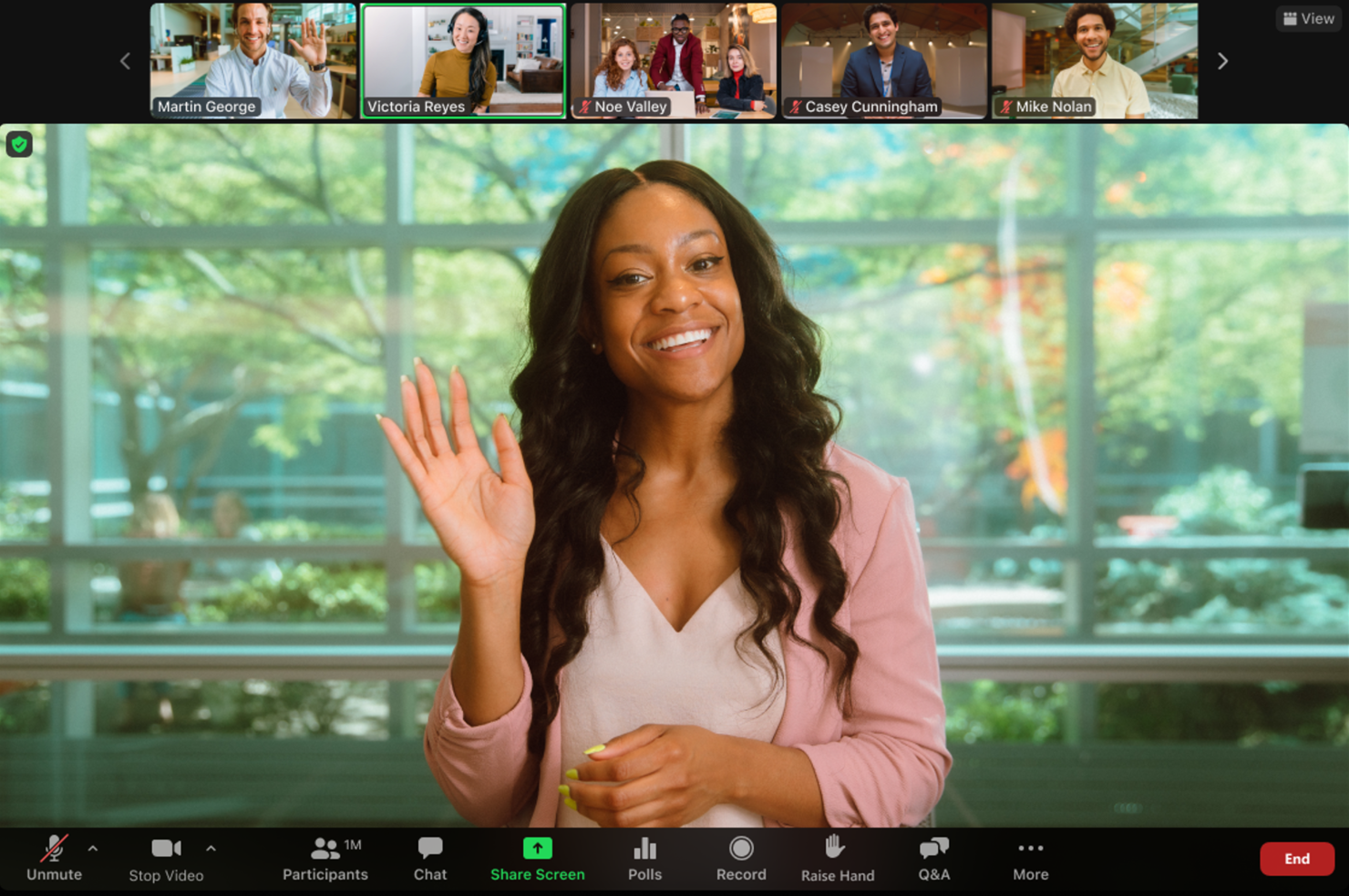
Zoom es una plataforma de videoconferencias ampliamente utilizada por empresas y particulares para reuniones, seminarios web y eventos virtuales. Es popular entre los usuarios que necesitan comunicación por video confiable y de alta calidad, tanto para grupos pequeños como grandes.
Por qué elegí Zoom: Destaca en videoconferencias, ofreciendo funciones como video y audio en HD para garantizar una comunicación clara. También puedes grabar reuniones, lo que es excelente para revisar las conversaciones más tarde. Zoom ofrece salas de grupos divididos que te permiten dividir tu reunión en grupos más pequeños para discusiones más enfocadas. Estas características hacen que Zoom sea ideal para equipos que priorizan la comunicación basada en video.
Funciones y conectores destacados:
Funciones incluyen fondos virtuales para mantener la privacidad, salas de espera para gestionar la entrada de los participantes y encuestas para obtener retroalimentación instantánea durante las reuniones. Estas opciones proporcionan flexibilidad y control sobre la dinámica de la reunión, mejorando la experiencia general.
Integraciones incluyen Google Calendar, Microsoft Outlook, Slack, Salesforce, Dropbox, HubSpot, Asana, Trello, YouTube y LinkedIn.
Pros and Cons
Pros:
- Video y audio de alta calidad
- Fácil organización de reuniones
- Configuración de reuniones personalizable
Cons:
- Requiere descargar la aplicación para uso completo
- Consume bastante ancho de banda

Fellow
Ideal para tomar notas en reuniones
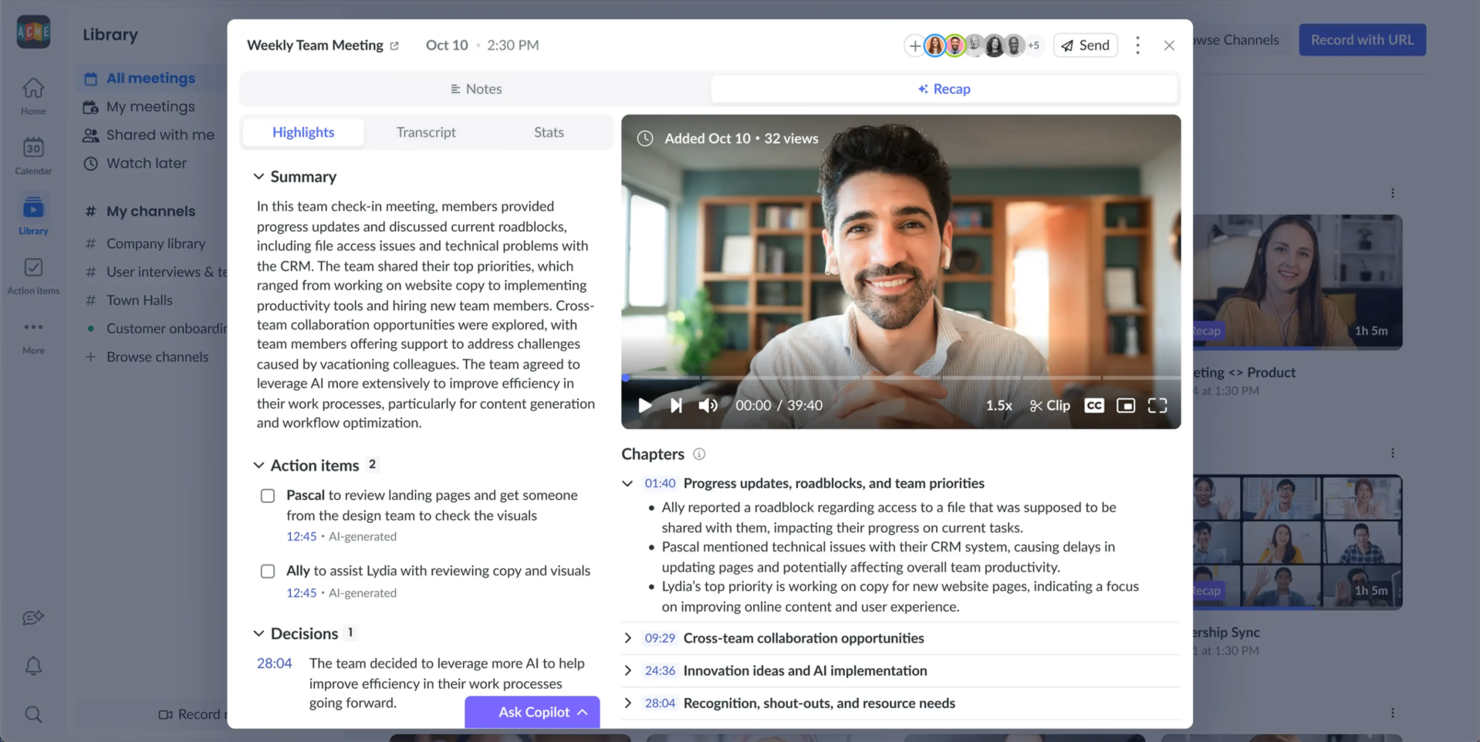
Fellow es una herramienta de gestión de reuniones diseñada para mejorar la productividad de los equipos y organizaciones. Es ideal para usuarios que necesitan una manera estructurada de organizar agendas de reuniones, tomar notas y hacer seguimiento de las tareas asignadas.
Por qué elegí Fellow: Fellow se especializa en notas de reuniones, ofreciendo funciones como la toma de notas colaborativa para asegurar que todos estén alineados. Puedes crear agendas compartidas para prepararte eficazmente para las reuniones. La herramienta también ayuda a rastrear tareas asignadas, haciendo que el seguimiento sea más eficiente. Estas funcionalidades están pensadas para equipos que valoran reuniones organizadas y productivas.
Funciones destacadas e integraciones:
Funciones incluyen solicitudes de retroalimentación que permiten a los miembros del equipo dar su opinión después de las reuniones, una función que habilita la asignación de tareas directamente desde las notas de reuniones, y una biblioteca de plantillas de reuniones para agilizar el proceso de preparación. Estas funciones te ayudan a mantener un alto nivel de organización y a asegurar la responsabilidad dentro de tu equipo.
Integraciones incluyen Slack, Google Calendar, Microsoft Teams, Zoom, Asana, Jira, Trello, GitHub, Zapier y Todoist.
Pros and Cons
Pros:
- Gestión efectiva de agendas
- Permite tomar notas de forma colaborativa
- Ayuda a hacer seguimiento de las tareas de las reuniones
Cons:
- Requiere uso constante para ser efectivo
- Algunas funciones pueden estar subutilizadas
Ideal para video 4K y audio sin comprimir
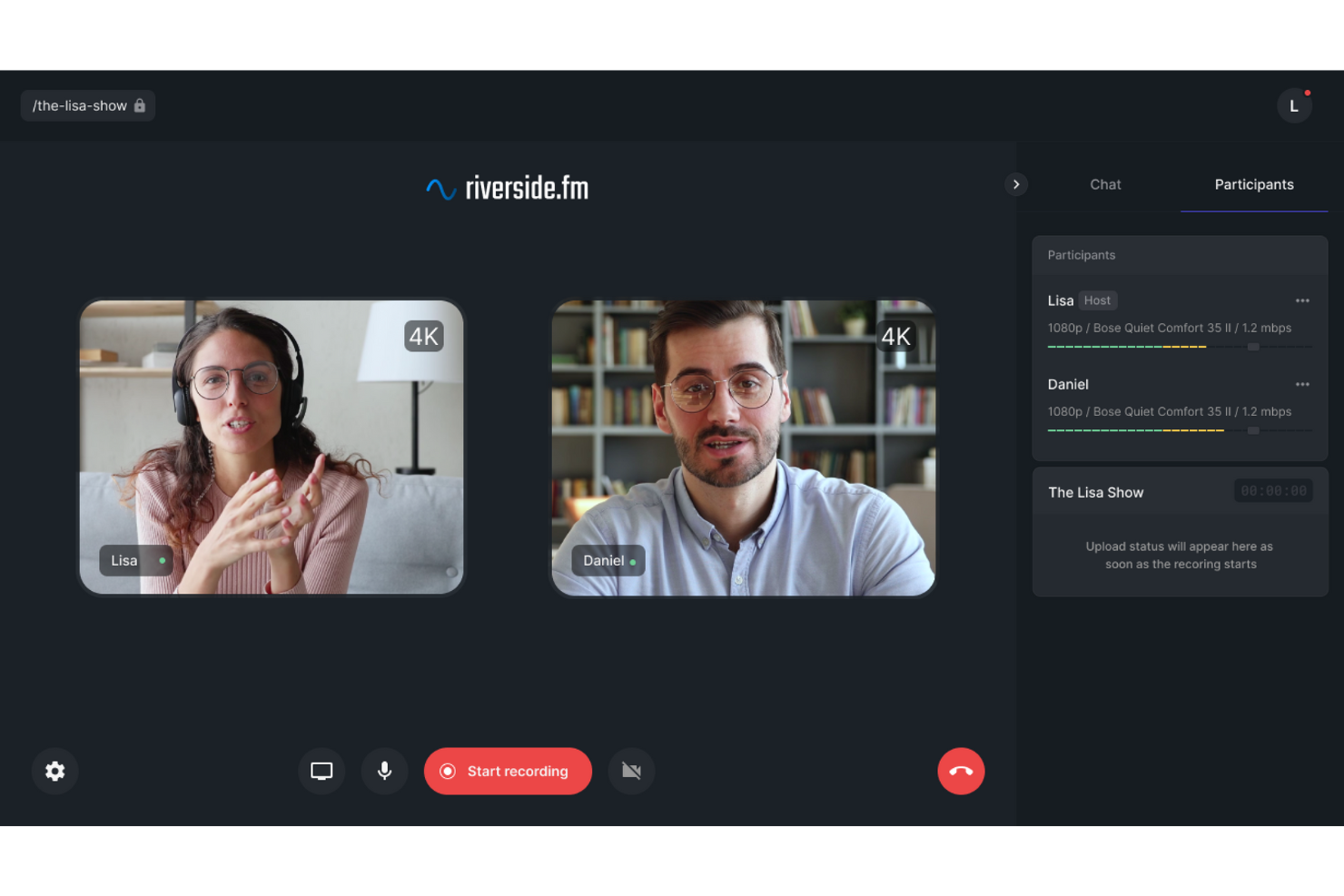
Riverside está diseñado para profesionales que necesitan grabaciones confiables y de alta calidad de reuniones uno a uno. Sus funciones de grabación y edición se centran en capturar audio y video claros, lo que lo hace ideal para creadores de contenido que desean que sus conversaciones se vean y suenen profesionales.
Por qué elegí Riverside
Elegí Riverside porque puede grabar video en 4K y audio sin comprimir, ofreciendo resultados nítidos y constantes. Las grabaciones se capturan localmente, por lo que la calidad se mantiene alta incluso si la conexión a internet es inestable. Riverside también incluye herramientas de edición potenciadas por IA que ayudan a limpiar las grabaciones eliminando muletillas y corrigiendo el habla, lo que lo convierte en una opción sólida para quienes valoran la calidad final del contenido de sus reuniones.
Características clave de Riverside
Además de sus sobresalientes capacidades de grabación, Riverside ofrece varias funciones que mejoran tu experiencia en reuniones uno a uno:
- Transmisión en vivo: Interactúa con tu audiencia en tiempo real en múltiples plataformas sin perder calidad.
- Transcripciones impulsadas por IA: Genera automáticamente transcripciones de tus reuniones para facilitar la referencia y documentación.
- Grabación multipista: Captura el audio y video de cada participante en pistas separadas para un mejor control de la edición.
- Publicación directa: Publica tus grabaciones directamente en plataformas como YouTube y Spotify para una mayor accesibilidad.
Integraciones de Riverside
Actualmente, Riverside no lista integraciones nativas.
Pros and Cons
Pros:
- Grabación de video en 4K y audio sin comprimir
- Grabación multipista de audio y video por participante
- Transcripción y herramientas de edición con IA
Cons:
- Enfocado principalmente en la creación de contenido
- Las funciones avanzadas requieren planes de pago

Mejor para usuarios de Google Workspace
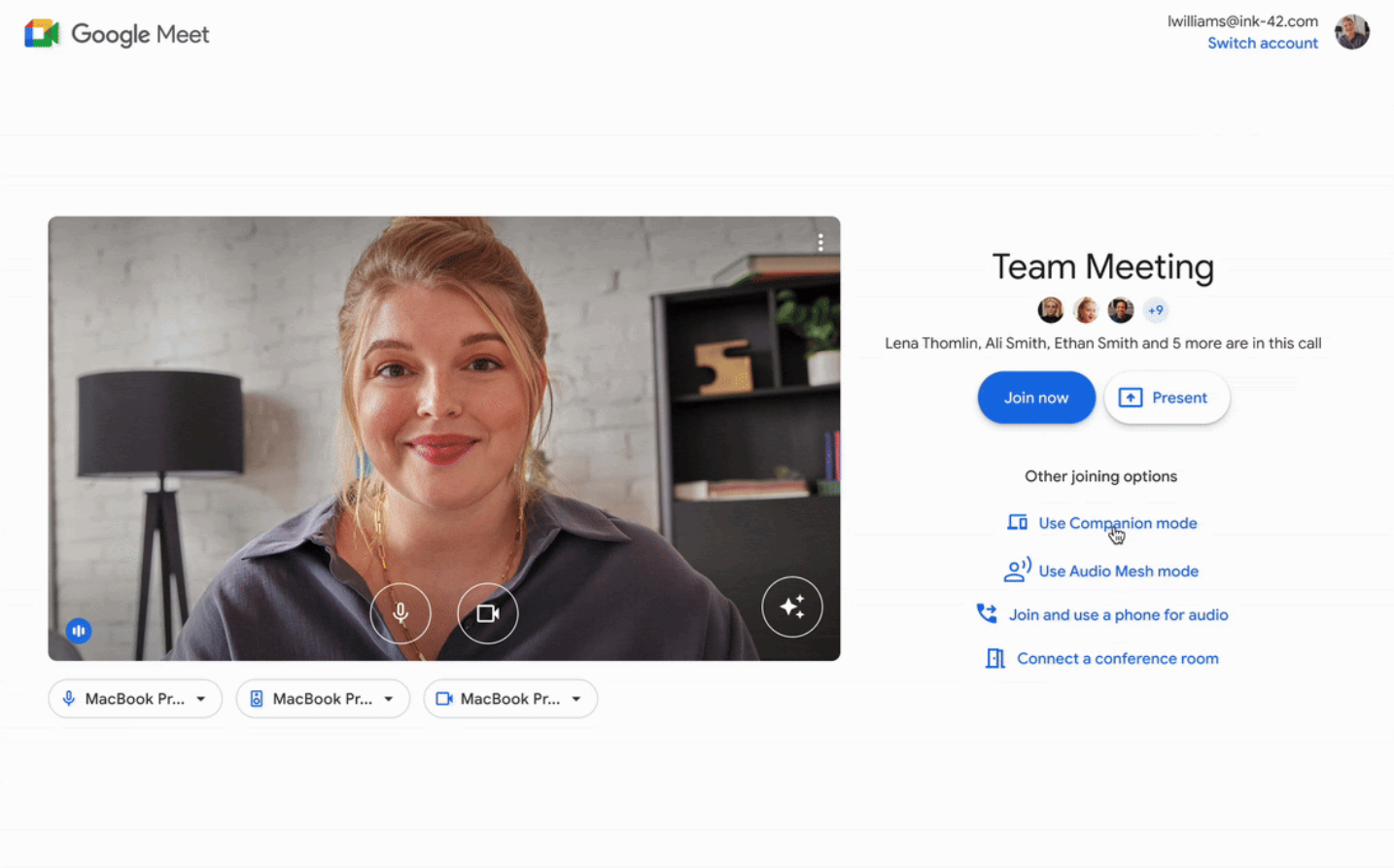
Google Meet es una herramienta de videoconferencias que sirve a los usuarios dentro del ecosistema de Google Workspace, facilitando reuniones virtuales y la colaboración. Es utilizada principalmente por empresas e instituciones educativas que dependen de los servicios de Google para sus operaciones diarias.
Por qué elegí Google Meet: Se integra perfectamente con Google Workspace, permitiéndote programar y unirte a reuniones directamente desde Google Calendar. Esta función ayuda a agilizar tu proceso de programación.
Google Meet también ofrece subtítulos en tiempo real, lo que puede mejorar la accesibilidad para los participantes. Su interfaz basada en navegador significa que no necesitas descargar ningún software, lo que lo hace conveniente para los usuarios que priorizan la facilidad de acceso.
Funciones destacadas e integraciones:
Funciones incluyen diseños personalizables para adaptar tus reuniones a tus preferencias, la capacidad de compartir pantalla para presentaciones y cancelación de ruido para mejorar la calidad del audio. Estas características mejoran tu experiencia en las reuniones al proveer flexibilidad y claridad en la comunicación.
Integraciones incluyen Google Calendar, Gmail, Google Drive, Microsoft Outlook, Slack, Zoom, Trello, Asana, Salesforce y Zapier.
Pros and Cons
Pros:
- Acceso fácil a través de navegador
- Subtítulos en tiempo real para accesibilidad
- No se requiere descarga de software
Cons:
- Requiere cuenta de Google
- Problemas ocasionales de conectividad
Ideal para integración empresarial

Microsoft Teams es una plataforma de comunicación y colaboración diseñada para empresas que desean integrarse con otros servicios de Microsoft. Está orientada a organizaciones que necesitan una solución unificada para reuniones, chat y colaboración.
Por qué elegí Microsoft Teams: Ofrece integración empresarial al conectarse de forma fluida con las herramientas de Microsoft 365, como Outlook y SharePoint. Esta integración permite programar reuniones directamente desde el calendario y compartir archivos sin esfuerzo.
Teams también ofrece funciones como mensajes en hilos y canales para una comunicación organizada. Estas capacidades lo convierten en una excelente opción para empresas que ya utilizan productos de Microsoft.
Funciones e integraciones destacadas:
Funciones incluyen subtítulos en vivo en reuniones para accesibilidad, difuminado de fondo para mejorar las videollamadas y grabación de reuniones para referencia futura. Estas funciones ayudan a hacer tus reuniones más inclusivas y eficientes, proporcionando opciones para distintas necesidades.
Integraciones incluyen Microsoft 365, Outlook, SharePoint, OneDrive, Power BI, Trello, Asana, GitHub, Zoom y Adobe Creative Cloud.
Pros and Cons
Pros:
- Permite grandes reuniones virtuales
- Diseños de reuniones personalizables
- Colaboración en tiempo real en documentos
Cons:
- Funcionalidad limitada fuera del ecosistema de Microsoft
- Retrasos ocasionales en reuniones grandes

Ideal para integración de programación
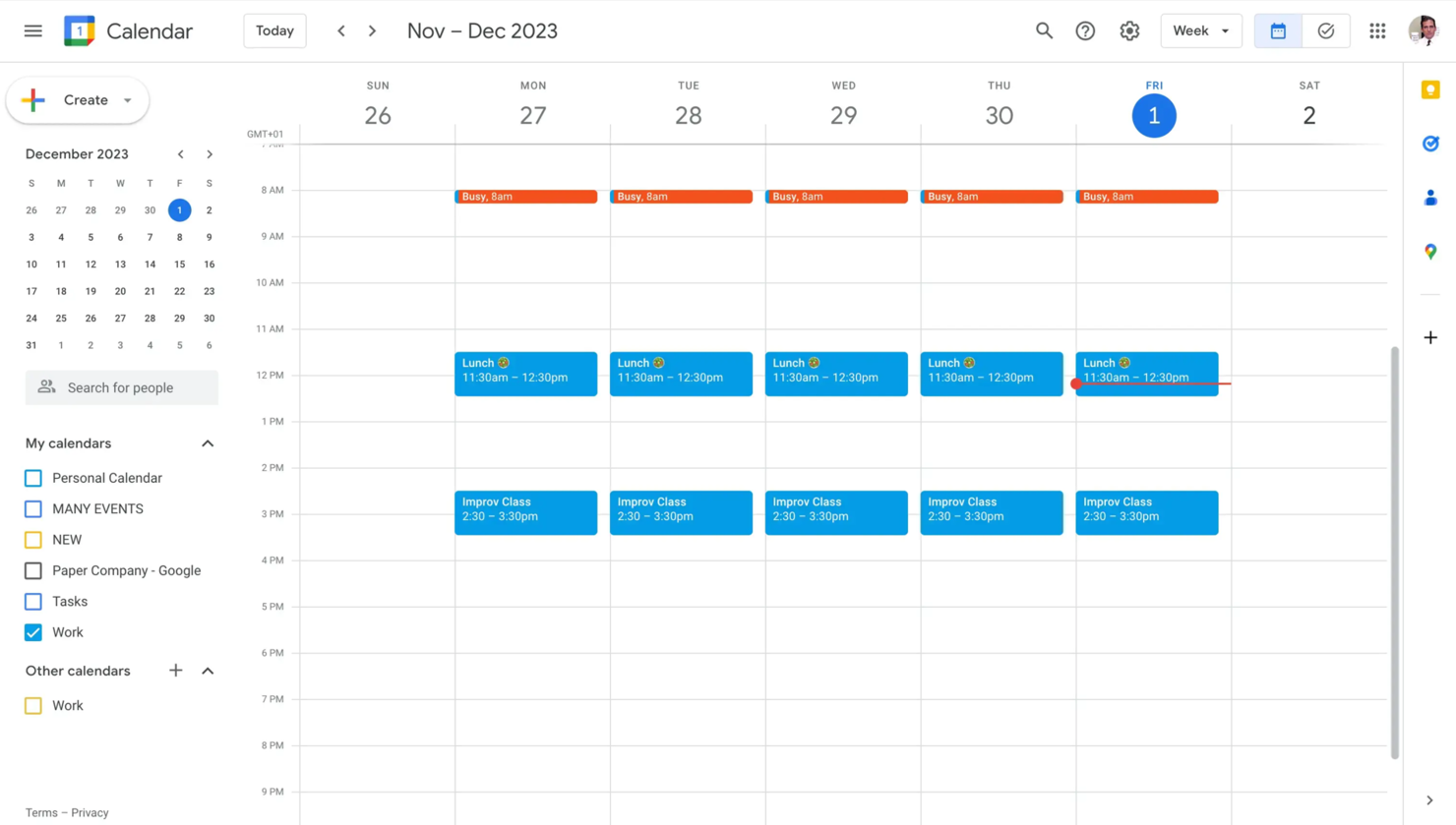
Google Calendar es una herramienta de programación utilizada principalmente por personas y equipos para organizar y gestionar el tiempo de manera efectiva. Es preferida por quienes buscan una manera sencilla de planificar reuniones y citas, a la vez que se integra con otros servicios de Google.
Por qué elegí Google Calendar: Destaca por su integración para programar, lo que facilita coordinar reuniones directamente desde tu calendario. La herramienta permite compartir tu calendario con otras personas, haciendo el proceso de programación más sencillo.
Puedes establecer recordatorios para realizar un seguimiento de próximos eventos y plazos. Estas funciones hacen de Google Calendar una excelente opción para quienes dependen de Google Workspace en sus tareas diarias.
Funciones y integraciones destacadas:
Funciones incluyen crear múltiples calendarios para diferentes propósitos, usar colores para distinguir fácilmente los eventos, y programar eventos recurrentes para ahorrar tiempo en planificaciones repetitivas. Estas características te ayudan a organizar tu agenda de manera eficiente y a mantener el control de diversos compromisos.
Integraciones incluyen Google Meet, Gmail, Google Drive, Microsoft Outlook, Slack, Zoom, Trello, Asana, Evernote, Salesforce y Zapier.
Pros and Cons
Pros:
- Fácil integración con los servicios de Google
- Notificaciones de eventos personalizables
- Accesible desde cualquier dispositivo
Cons:
- Opciones avanzadas de programación limitadas
- Sin soporte directo al cliente

La mejor opción para equipos remotos
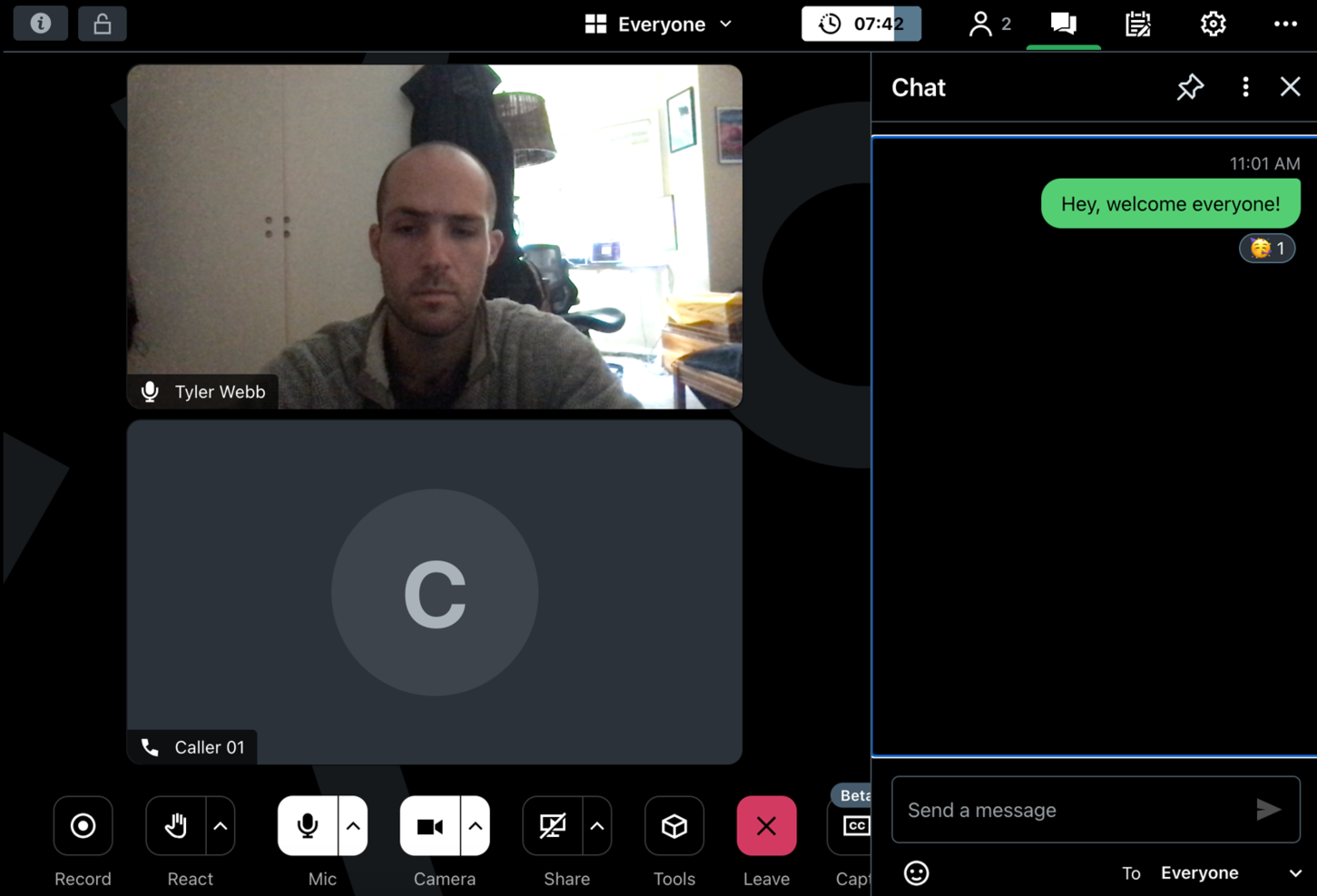
GoTo Meeting es una solución de videoconferencia diseñada para que empresas y equipos remotos realicen reuniones virtuales y presentaciones. Es preferida por usuarios que necesitan una plataforma confiable para la colaboración y comunicación a distancia.
Por qué elegí GoTo Meeting: Atiende las necesidades de los equipos remotos al ofrecer funciones como videoconferencia en HD y compartición de pantalla, que mejoran la calidad de la comunicación. La herramienta ofrece servicios de transcripción de reuniones, permitiéndote revisar las discusiones posteriormente. También puedes grabar las reuniones para quienes no hayan podido asistir.
Estas capacidades hacen de GoTo Meeting una opción sólida para equipos que trabajan desde diferentes ubicaciones.
Funciones y compatibilidades destacadas:
Funciones incluyen herramientas de dibujo que permiten anotar las pantallas compartidas durante las reuniones, aplicaciones móviles que facilitan unirte desde cualquier lugar y una función de bloqueo de reunión para mayor seguridad. Estas características aseguran que tus reuniones sean interactivas, accesibles y seguras.
Las integraciones incluyen Slack, Microsoft Office 365, Google Calendar, Salesforce, Zapier, Zoho CRM, Trello, Asana, Podio y Calendly.
Pros and Cons
Pros:
- Conexión confiable para reuniones remotas
- Incluye transcripción de reuniones
- Ofrece herramientas de dibujo para interacción
Cons:
- Puede tener problemas de audio ocasionales
- Funciones limitadas en las aplicaciones móviles

Ideal para la planificación de agendas
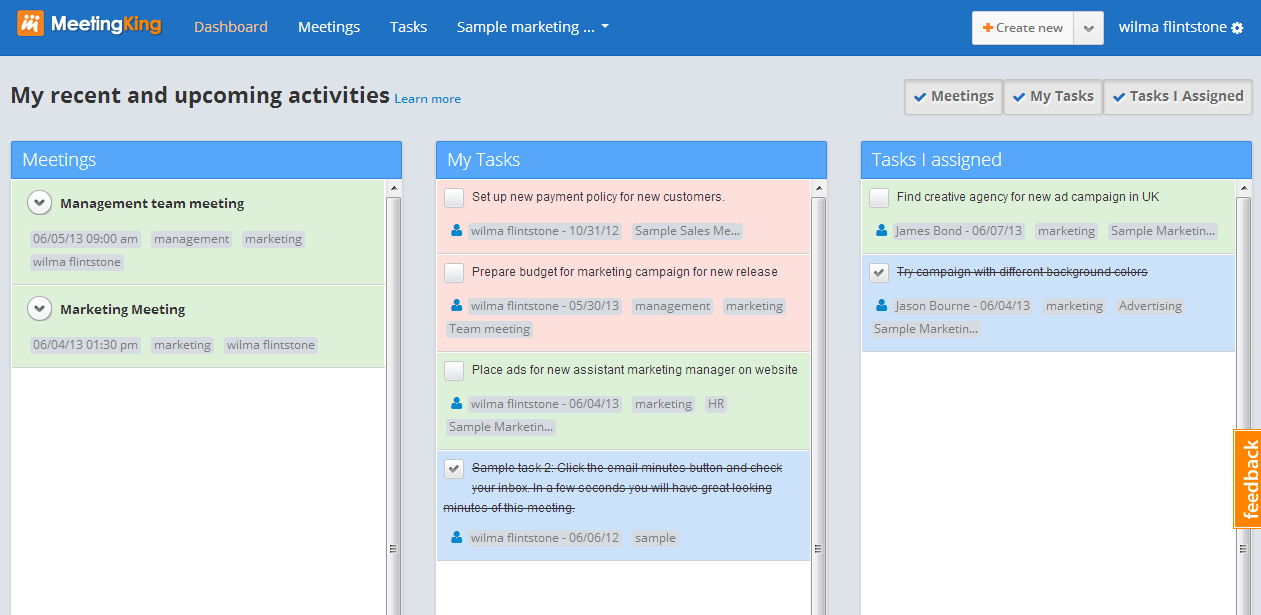
MeetingKing es una herramienta de gestión de reuniones diseñada para ayudar a los equipos a planificar y organizar sus reuniones de manera efectiva. Es utilizada por equipos que necesitan un enfoque estructurado para establecer agendas y gestionar los resultados de las reuniones.
Por qué elegí MeetingKing: MeetingKing está adaptada para la planificación de agendas, ofreciendo funciones que te permiten crear y compartir fácilmente agendas con tu equipo. Puedes asignar tareas durante las reuniones, asegurando que los seguimientos sean claros y accionables.
La herramienta también proporciona plantillas para agilizar la creación de agendas. Estas funciones la convierten en una opción valiosa para equipos enfocados en reuniones estructuradas y productivas.
Funciones destacadas e integraciones:
Funciones incluyen la capacidad de convertir notas de reuniones en tareas, rastrear decisiones tomadas durante las reuniones y almacenar todos los datos de las reuniones en un solo lugar para un fácil acceso. Estas funciones mejoran tu capacidad para gestionar reuniones de manera eficiente y mantener a todos alineados con los objetivos.
Integraciones incluyen Google Calendar, Microsoft Outlook, Slack, Evernote, Dropbox, Box, OneDrive, Trello, Asana y Zapier.
Pros and Cons
Pros:
- Permite actas de reuniones detalladas
- Ofrece plantillas estructuradas para reuniones
- Acceso fácil al historial de reuniones
Cons:
- Requiere actualizaciones regulares de los usuarios
- Puede requerir capacitación para aprovecharlo al máximo


Arrangr es una herramienta de programación diseñada para simplificar el proceso de organizar reuniones y citas. Es utilizada por individuos y equipos que necesitan una forma rápida y eficiente de coordinar horarios sin el típico intercambio interminable de correos electrónicos.
Por qué elegí Arrangr: Arrangr es excelente para programar rápidamente porque te permite proponer varios horarios con facilidad. Puedes enviar enlaces de programación para que los destinatarios seleccionen su momento preferido.
Arrangr también ofrece una función para reservar horarios tentativos hasta que se tome una decisión final. Estas funcionalidades lo hacen perfecto para quienes desean agilizar el proceso de programación.
Características destacadas e integraciones:
Características incluyen sugerencias inteligentes de lugares para encontrar sitios de reunión convenientes, detección automática de zonas horarias para evitar confusiones al programar y plantillas de reuniones personalizables para ahorrar tiempo. Estas funciones mejoran la experiencia de programación haciéndola más intuitiva y fácil de usar.
Integraciones incluyen Google Calendar, Microsoft Outlook, Zoom, Slack, Microsoft Teams, iCloud, Zapier, Trello, Asana y Salesforce.
Pros and Cons
Pros:
- Propuestas eficientes de horarios
- Plantillas de programación personalizables
- Sugerencias inteligentes de lugares
Cons:
- Funcionalidad limitada sin conexión
- Se requiere uso constante para mejores resultados
Otros programas para reuniones individuales
Estas son algunas opciones adicionales de software para reuniones individuales que no llegaron a mi lista de selección, pero que merece la pena conocer:
- Slack
Mejor para la colaboración en equipo
- Deel Engage
Mejor para la incorporación de empleados
- FreeConferenceCall
Ideal para reuniones económicas
- Rumi
Ideal para videollamadas rápidas


Wie ich Software für Einzelgespräche bewerte
Ich untersuche zwei Ebenen: die grundlegenden Anforderungen, die jedes 1:1 Tool erfüllen muss – gemeinsame Agenden, Nachverfolgung von Aufgaben, Gesprächsnotizen – und die Merkmale, die ein Tool zur idealen Lösung für People-Teams machen.
Kernfunktionen (Grundvoraussetzungen für diese Liste)
Wenn ich Tools für meine Liste auswähle, bewerte ich jede einzelne auf einer Skala von 0 (bietet die Funktionalität nicht) bis 5 (überzeugt in diesem Bereich) in Bezug auf jede der unten aufgeführten Kernfunktionen. Anschließend berechne ich die Gesamtpunktzahl des Tools als Prozentsatz. Jedes Tool muss eine Mindestgesamtpunktzahl von 65 % erreichen, um berücksichtigt zu werden.
- Gemeinsame Agenda-Erstellung: Ich prüfe, ob sowohl Führungskräfte als auch Mitarbeitende bereits vor und während des Treffens Agendapunkte ergänzen können, damit keine Partei unvorbereitet erscheint.
- Gesprächspunkte & Vorlagen: Vorgefertigte 1:1-Vorlagen sind wichtig – ich achte auf Bibliotheken mit gängigen Formaten wie wöchentlichen Check-ins, Gesprächen zur beruflichen Entwicklung und Onboarding-Abstimmungen.
- Aufgabenverfolgung: Jedes Tool sollte es ermöglichen, Aufgaben inklusive Verantwortlichen und Fälligkeitsdatum zuzuweisen, die automatisch ins nächste Treffen übernommen werden.
- Ziel-&OKR-Integration: Ich bewerte, wie gut 1:1-Gespräche mit bestehenden Zielen verbunden sind, sodass Führungskräfte Fortschritte nachvollziehen können, ohne zwischen Plattformen wechseln zu müssen.
- Laufender Feedbackaustausch: Die Möglichkeit, strukturiertes Feedback unmittelbar an spezifische 1:1-Gespräche zu knüpfen, ist mir besonders für Teams mit laufenden Leistungsgesprächen wichtig.
- Gesprächshistorie & Notizen: Ein durchsuchbares Archiv vergangener 1:1-Notizen unterstützt Führungskräfte bei der Vorbereitung auf Reviews und deckt Muster im Zeitverlauf auf. Ich prüfe daher, wie jedes Tool diese Daten organisiert und bereitstellt.
Wenn mir eine Liste von Tools vorliegt, die sämtliche Kriterien erfüllen, prüfe ich, wodurch sich jedes Tool von den anderen abhebt.
Differenzierende Faktoren (Was Anbieter unterscheidet)
So vergleiche und kontrastiere ich unterschiedliche Anbieter:
Herausragende Funktionen
Künstlich-intelligente Meeting-Assistenten sind ein großer Unterschied – ich schaue nach Tools, die Zusammenfassungen automatisch generieren und relevante Gesprächspunkte aus früheren Meetings erkennen. So sparen Führungskräfte mit vielen Mitarbeitenden Zeit bei der Vorbereitung. Coaching-Impulse für Führungskräfte sind ebenfalls wichtig, speziell für Organisationen, die neue Führungskräfte mit In-App-Fragen unterstützen möchten. Analytik-Dashboards für 1:1s spielen ebenso eine Rolle, da HR-Teams Einblick in Gesprächsfrequenz und Absagemuster über Abteilungen hinweg benötigen, um inaktive Führungskräfte frühzeitig zu identifizieren.
Mehr als nur Funktionen
Die Tiefe der Integration prüfe ich als erstes. Ein 1:1-Tool muss sich mit Ihrem Kalender, Slack oder MS Teams und dem HRIS synchronisieren – ohne das sinkt die Akzeptanz, weil Führungskräfte ihre gewohnte Arbeitsumgebung ungern verlassen. Datenschutz spielt hier eine entscheidende Rolle, da 1:1-Notizen oft vertrauliche Leistungs- und Personaldaten enthalten. Ich suche nach fein abgestuften Optionen, um private Notizen von öffentlichen Inhalten zu trennen. Schließlich werte ich aus, wie eine Plattform die Einführung bei Führungskräften mit Ressourcen und fertigen Playbooks unterstützt, da HR-Teams selten die Zeit haben, jede einzelne Führungskraft persönlich zu schulen.
Cómo elegir un software para reuniones individuales
Es fácil perderse entre largas listas de funciones y estructuras de precios complejas. Para ayudarte a mantener la concentración mientras avanzas en tu proceso específico de selección de software, aquí tienes una lista de factores que debes tener en cuenta:
| Factor | Qué debes tener en cuenta |
| Escalabilidad | Asegúrate de que el software pueda crecer junto con tu equipo. Busca soluciones que admitan un número creciente de usuarios y reuniones sin perder funcionalidad ni velocidad. |
| Integraciones | Elige un software que se integre con las herramientas que ya utilizas, como calendarios y aplicaciones de gestión de proyectos, para agilizar tus flujos de trabajo y ahorrar tiempo. |
| Personalización | Opta por soluciones que te permitan adaptar las funciones a las necesidades específicas de tu equipo, mejorando la productividad y la satisfacción de los usuarios. |
| Facilidad de uso | Asegúrate de que la interfaz sea intuitiva y fácil de usar, lo que reduce la curva de aprendizaje y mejora la adopción en todo el equipo. |
| Presupuesto | Ten en cuenta el coste total, incluidas las posibles tarifas ocultas. Busca precios flexibles que se ajusten a tu presupuesto y ofrezcan la mejor relación calidad-precio para las funciones proporcionadas. |
| Medidas de seguridad | Comprueba que incluya funciones de seguridad sólidas, como cifrado y cumplimiento de las normativas de protección de datos, para mantener tus reuniones seguras. |
| Asistencia | Una asistencia al cliente fiable es fundamental. Busca ayuda disponible las 24 horas del día, los 7 días de la semana, y varias opciones de contacto para resolver los problemas rápidamente. |
| Funciones | Identifica las funciones imprescindibles que se ajusten a tus necesidades, como grabación de vídeo, notas de reuniones o gestión de tareas, para asegurarte de que la herramienta cumple tus objetivos. |
Tendencias del software para reuniones individuales
Durante mi investigación, recopilé innumerables actualizaciones de productos, comunicados de prensa y registros de versiones de distintos proveedores de software para reuniones individuales. Estas son algunas de las tendencias emergentes que estoy siguiendo:
- Información basada en IA: La IA se utiliza para analizar los datos de las reuniones y proporcionar información práctica. Esto ayuda a los equipos a comprender los niveles de participación y mejorar la eficacia de las reuniones. Algunos proveedores ofrecen análisis de sentimientos y herramientas de comentarios en tiempo real para mejorar la comunicación.
- Reuniones de realidad virtual: La realidad virtual está haciendo que las reuniones sean más inmersivas. Permite a los participantes interactuar en un espacio virtual, lo que puede resultar especialmente útil para equipos remotos que buscan crear una sensación de presencia y colaboración.
- Enfoque en el bienestar mental: Muchas herramientas incorporan funciones que promueven la salud mental, como recordatorios para hacer pausas y técnicas de reducción del estrés. Esta tendencia refleja un reconocimiento cada vez mayor de la importancia del bienestar en la productividad laboral.
- Funciones de seguridad mejoradas: A medida que la protección de datos se convierte en una prioridad, los proveedores de software añaden más funciones de seguridad, como el cifrado de extremo a extremo y el cumplimiento de las normas internacionales. Esto es fundamental para las empresas que gestionan información confidencial.
- Herramientas de colaboración asíncrona: Se está produciendo un cambio hacia el apoyo al trabajo asíncrono, en el que los equipos pueden colaborar sin estar en la misma reunión. Funciones como los mensajes grabados y los espacios de trabajo compartidos son cada vez más habituales, lo que permite una comunicación flexible.
¿Qué es el software para reuniones individuales?
El software para reuniones individuales es una herramienta diseñada para facilitar la comunicación directa entre dos personas. Estas herramientas suelen utilizarlas los responsables, los líderes de equipo y los profesionales de recursos humanos para realizar revisiones periódicas, evaluaciones del rendimiento y sesiones de orientación. Las funciones de programación, videoconferencia y toma de notas ayudan a organizar las reuniones, mejorar la comunicación y realizar un seguimiento del progreso. En general, estas herramientas aportan valor al mejorar la eficiencia de la comunicación y fomentar relaciones profesionales más sólidas.
Funciones del software para reuniones individuales
Al seleccionar un software para reuniones individuales, presta atención a las siguientes funciones clave:
- Herramientas de programación: Encuentran y reservan automáticamente los horarios de las reuniones, ahorrándote la molestia de intercambiar correos electrónicos.
- Videoconferencia: Facilita la comunicación cara a cara, algo fundamental para crear una buena relación y favorecer la comprensión.
- Funciones para tomar notas: Permiten registrar los puntos y las decisiones importantes, garantizando que no se olvide nada.
- Gestión de tareas: Ayuda a asignar y realizar un seguimiento de las tareas pendientes, de modo que todos asuman sus responsabilidades y estén al tanto de la situación.
- Plantillas para reuniones: Proporcionan un formato estructurado para las reuniones, mejorando la coherencia y la eficiencia.
- Colaboración en tiempo real: Permite a los participantes trabajar juntos durante las reuniones, mejorando la productividad.
- Funciones de seguridad: Protegen la información confidencial mediante el cifrado y el cumplimiento de las normas de protección de datos.
- Información basada en IA: Ofrece análisis sobre el rendimiento de las reuniones para ayudarte a mejorar las interacciones futuras.
- Comunicación asíncrona: Facilita horarios de trabajo flexibles al permitir que los participantes interactúen cuando les resulte conveniente.
- Opciones de integración: Se conecta con otras herramientas que utilizas, optimizando los flujos de trabajo y aumentando la productividad.
Ventajas del software para reuniones individuales
Implementar un software para reuniones individuales ofrece varias ventajas para tu equipo y tu empresa. Estas son algunas de las que puedes esperar:
- Mejora de la comunicación: Las herramientas de videoconferencia y colaboración en tiempo real mejoran la claridad y la comprensión durante las reuniones.
- Mayor productividad: La gestión de tareas y las plantillas para reuniones ayudan a mantener las reuniones centradas y eficientes, ahorrando tiempo.
- Mejor organización: Las herramientas de programación y las funciones para tomar notas garantizan que las reuniones estén bien organizadas y que los detalles importantes queden documentados.
- Mayor responsabilidad: Asignar tareas y realizar un seguimiento del progreso garantiza que los miembros del equipo cumplan sus compromisos.
- Flexibilidad: Las opciones de comunicación asíncrona permiten a los miembros del equipo participar según su propio horario, adaptándose a distintas zonas horarias y hábitos de trabajo.
- Seguridad de los datos: Las funciones de seguridad protegen la información confidencial, proporcionándote tranquilidad durante las reuniones.
- Información práctica: Los análisis basados en IA proporcionan comentarios sobre la eficacia de las reuniones y te ayudan a realizar mejoras donde sea necesario.
Costes y precios del software para reuniones individuales
Seleccionar un software para reuniones individuales requiere comprender los distintos modelos de precios y planes disponibles. Los costes varían en función de las funciones, el tamaño del equipo, los complementos y otros factores. La tabla siguiente resume los planes habituales, sus precios medios y las funciones que suelen incluir las soluciones de software para reuniones individuales:
Tabla comparativa de planes para software de reuniones individuales
| Tipo de plan | Precio medio | Características habituales |
| Plan gratuito | $0 | Programación básica, videoconferencias limitadas y almacenamiento mínimo. |
| Plan personal | $5-$15/usuario/mes | Reuniones ilimitadas, calidad de vídeo estándar e integraciones básicas. |
| Plan empresarial | $15-$25/usuario/mes | Programación avanzada, vídeo HD, gestión de tareas y asistencia prioritaria. |
| Plan para empresas | $25-$50/usuario/mes | Funciones personalizables, seguridad mejorada, análisis basados en IA y gestión de cuentas personalizada. |
Preguntas frecuentes sobre software de reuniones individuales
Estas son algunas respuestas a preguntas frecuentes sobre el software de reuniones individuales:
¿Cómo elijo el software adecuado para reuniones individuales?
Elegir el software adecuado depende de las necesidades de tu equipo. Considera factores como la facilidad de uso, las integraciones con las herramientas existentes y el coste. Evalúa si el software admite funciones importantes para ti, como las videoconferencias o la gestión de tareas. También es recomendable leer las opiniones de los usuarios para obtener información útil.
¿Puede el software de reuniones individuales mejorar la comunicación del equipo?
Sí, puede mejorar la comunicación al proporcionar una plataforma estructurada para las reuniones. Las funciones de videoconferencia permiten la interacción cara a cara, mientras que las funciones para tomar notas y gestionar tareas garantizan que todos estén al tanto. Estas herramientas ayudan a aclarar las expectativas y las acciones de seguimiento.
¿Qué funciones de seguridad debo buscar en un software de reuniones individuales?
Busca un software que ofrezca cifrado de extremo a extremo, cumplimiento de las normas de protección de datos y opciones de inicio de sesión seguro. Estas funciones protegen la información confidencial tratada en las reuniones. También es beneficioso que el software proporcione actualizaciones y auditorías de seguridad periódicas.
¿Cómo puede ayudar el software de reuniones individuales al trabajo remoto?
Facilita el trabajo remoto al proporcionar herramientas para reuniones virtuales y comunicación asíncrona. Funciones como las videollamadas, el uso compartido de pantalla y la toma de notas colaborativa permiten a los equipos remotos mantenerse conectados y ser productivos. Este software reduce la distancia entre distintas ubicaciones.
¿Merece la pena utilizar las versiones gratuitas del software de reuniones individuales?
Las versiones gratuitas pueden ser útiles para equipos pequeños o con necesidades básicas. A menudo incluyen funciones esenciales como la programación y las videoconferencias básicas. Sin embargo, para funciones avanzadas como los análisis o límites de participantes más amplios, puede ser necesario contratar un plan de pago.
¿Cómo mejoran las integraciones la funcionalidad del software de reuniones individuales?
Las integraciones permiten que el software se conecte con otras herramientas que ya utilizas, como calendarios y aplicaciones de gestión de proyectos. Esto agiliza los flujos de trabajo y reduce la necesidad de cambiar entre distintas plataformas. También ayuda a automatizar tareas y sincronizar datos entre aplicaciones.