

Los 10 mejores programas de EPM de 2026 para la previsión financiera

10 Lista del mejor software de gestión del rendimiento empresarial


El mejor software de EPM te ayuda a optimizar la planificación estratégica, automatizar el seguimiento del rendimiento y sustituir las hojas de cálculo dispersas por una única fuente de información fiable.
Cuando los presupuestos, las previsiones y los datos de rendimiento residen en sistemas desconectados, la toma de decisiones se ralentiza y la visibilidad se ve afectada. La plataforma adecuada de gestión del rendimiento empresarial reúne la planificación financiera, los objetivos operativos y los informes en un solo lugar, para que los líderes puedan tomar decisiones más rápidas y fundamentadas.
Basándome en mi experiencia evaluando decenas de plataformas empresariales y de RR. HH., he seleccionado una lista del mejor software de EPM disponible actualmente. En esta guía encontrarás soluciones que reducen la generación manual de informes, mejoran la información en tiempo real y ayudan a las organizaciones a planificar, supervisar y optimizar el rendimiento a gran escala.
¿Qué es el software de EPM?
El software de EPM es un software de gestión del rendimiento empresarial que ayuda a las organizaciones a planificar, elaborar presupuestos, realizar previsiones y analizar el rendimiento empresarial en una plataforma unificada. Suelen utilizarlo los equipos de finanzas, operaciones y dirección para alinear la estrategia financiera con los objetivos empresariales.
Al centralizar los procesos clave, el software de EPM sustituye las hojas de cálculo propensas a errores y las herramientas fragmentadas, lo que ayuda a los líderes a mejorar la precisión, reducir el trabajo manual y tomar decisiones mejores y más rápidas con datos en tiempo real.
Por qué confiar en nuestras reseñas de software
Nuestro equipo lleva probando y evaluando software desde 2012. Como expertos en RR. HH., sabemos lo difícil —y lo importante— que es elegir el software adecuado.
Para esta guía, evaluamos las herramientas mediante pruebas prácticas e investigación independiente, puntuando las herramientas según nuestros criterios de selección. También nos basamos en la experiencia de líderes de opinión del sector y de profesionales de RR. HH. en activo.
Nuestras reseñas reflejan nuestro criterio editorial humano, no un discurso de ventas.
Revisores expertos:
Resumen de los 10 mejores programas de EPM
Esta es una breve descripción de cada una de las soluciones de EPM de mi lista. He explicado en qué destaca cada sistema e incluido capturas de pantalla para mostrar algunas de sus funciones principales.

Vena
Ideal para automatizar tareas administrativas
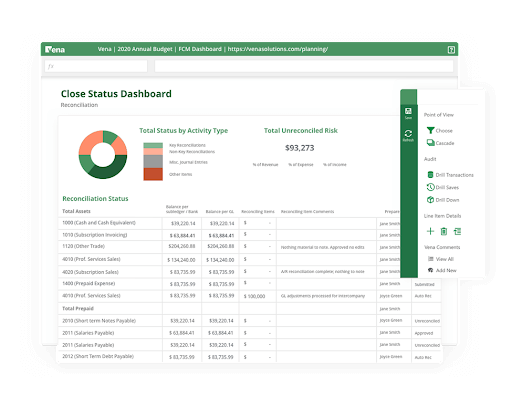
Vena es más adecuado para equipos financieros de tamaño mediano a empresarial que dependen en gran medida de Excel pero necesitan más estructura en torno a la previsión y planificación financiera. Combina flujos de trabajo familiares basados en hojas de cálculo con controles centralizados, lo que facilita la gestión de presupuestos, pronósticos y aprobaciones sin añadir carga administrativa. Si tu equipo quiere escalar los procesos de previsión sin abandonar Excel, Vena es una muy buena opción.
Por qué elegí Vena
Elegí Vena porque reduce el trabajo administrativo manual que suele ralentizar las previsiones financieras. Puedes automatizar flujos de trabajo recurrentes de planificación y pronóstico utilizando plantillas basadas en Excel que alimentan un sistema centralizado, para que tu equipo pase menos tiempo persiguiendo archivos y más tiempo analizando resultados.
La automatización de flujos de trabajo integrada enruta tareas, aprobaciones y envíos automáticamente, lo que ayuda a prevenir plazos incumplidos durante los ciclos de previsión, y también me gusta que Vena aplica el control de versiones en segundo plano, asegurando que todos trabajen con los mismos datos sin que el equipo financiero tenga que hacer una limpieza manual de archivos. Para los equipos financieros que usan Excel, este enfoque elimina obstáculos sin forzar una revisión mayor de procesos.
Características clave de Vena
Aquí algunas características destacadas:
- Automatización de flujos de trabajo: Automatiza la asignación de tareas, aprobaciones y recordatorios en los ciclos de presupuestos y previsiones.
- Control centralizado de versiones: Mantiene una única fuente de datos mientras los equipos trabajan en Excel.
- Modelos de planificación de la fuerza laboral: Conecta los planes de plantilla, compensación y contratación directamente con las previsiones.
- Planificación de capital e ingresos: Vincula los factores operativos a las proyecciones financieras para una previsión más precisa.
Integraciones de Vena
Las integraciones incluyen Microsoft Excel, Microsoft 365, Microsoft Teams, Power BI, Workday, ADP, Salesforce, NetSuite y proveedores de inicio de sesión único (SSO).
Pros and Cons
Pros:
- Cuenta con una amplia variedad de plantillas financieras
- Ofrece control de versiones centralizado
- Automatiza flujos de trabajo financieros
Cons:
- Soporte de formación limitado
- No disponible para usuarios de Mac
New Product Updates from Vena
Vena Launches Advanced Financial Consolidation Solution
Vena launches Financial Consolidation with multi-entity consolidation, governed close workflows, and AI-powered analysis. These capabilities help finance teams manage complex close processes with stronger control and auditability. For more information, visit Vena’s official site.
 .
.
El mejor software EPM para operaciones de manufactura
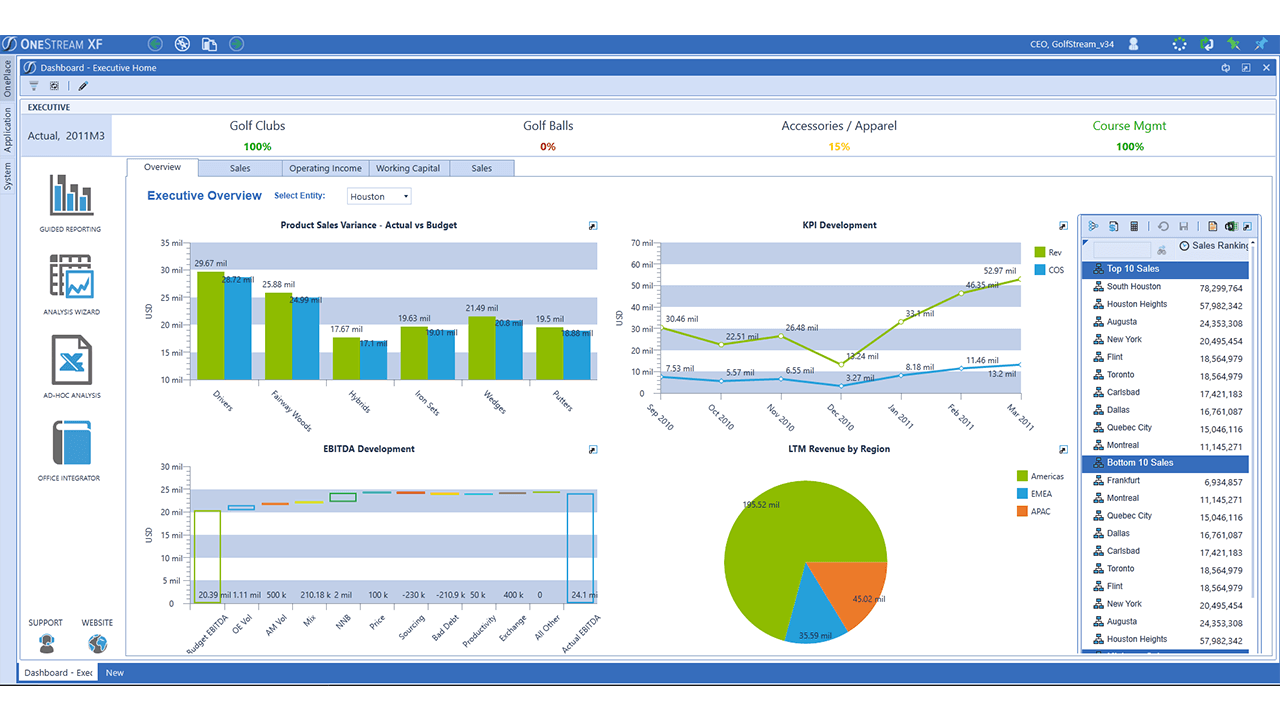
OneStream XF está diseñado para organizaciones grandes y complejas—especialmente fabricantes—que necesitan un control riguroso sobre la previsión financiera, la planificación y la elaboración de informes en una sola plataforma.
Por qué elegí OneStream XF
Elegí OneStream XF porque brinda a los equipos financieros enfocados en la manufactura un control más profundo de las previsiones, sin depender de herramientas desconectadas. Puedes crear previsiones basadas en impulsores usando entradas operativas como volúmenes de producción, centros de costos y datos a nivel de planta, lo que ayuda a alinear las previsiones financieras con la actividad operativa real.
Su modelo de datos unificado garantiza que tus previsiones, datos reales y consolidaciones provengan de la misma fuente, lo que reduce el trabajo de conciliación al cierre de mes. También me gusta que se pueda profundizar desde previsiones de alto nivel hasta entidades, plantas o líneas de productos individuales, lo que es especialmente útil para identificar variaciones de margen o costos. Para los fabricantes que gestionan la complejidad entre geografías y unidades de negocio, este nivel de visibilidad es difícil de igualar.
Características clave de OneStream XF
Aquí algunas características clave que vale la pena destacar:
- Plataforma financiera unificada: Combina previsión, presupuestación, consolidación e informes en un solo modelo de datos.
- Previsión basada en impulsores: Crea previsiones utilizando impulsores operativos como volúmenes, tarifas y estructuras de costos.
- Análisis multidimensional: Analiza previsiones por entidad, producto, planta, geografía o cliente.
- Soluciones de mercado: Amplía las capacidades de previsión e informes con aplicaciones financieras y operativas pre-construidas.
Integraciones de OneStream XF
Las integraciones incluyen SAP, Oracle ERP, Microsoft Dynamics, Workday, NetSuite, Salesforce, SQL Server, Snowflake y Active Directory.
Pros and Cons
Pros:
- Fuerte capacidad de previsión para organizaciones manufactureras y multinivel
- Modelo de datos único que reduce conciliaciones
- Análisis detallado en profundidad entre plantas, productos y regiones
Cons:
- El panel de control resulta un poco recargado
- La documentación estándar podría ser más detallada

Jedox
Ideal para la planificación y pronóstico con soporte de IA
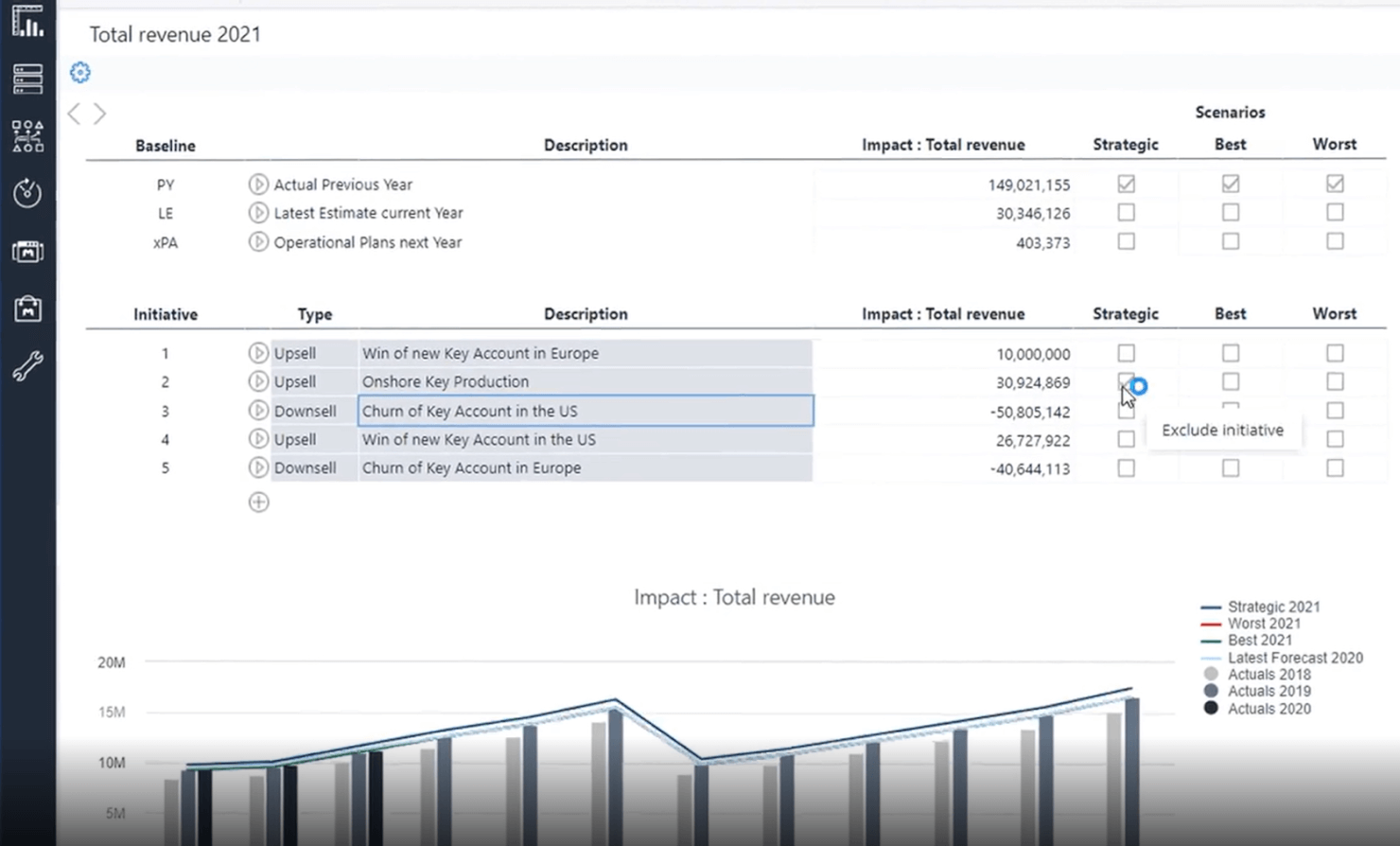
Jedox es más adecuado para equipos financieros de tamaño mediano a empresarial que necesitan planificación y pronósticos avanzados construidos directamente sobre flujos de trabajo de hojas de cálculo familiares.
Por qué elegí Jedox
Elegí Jedox porque te permite crear pronósticos financieros avanzados sin obligar a tu equipo a dejar de usar Excel. Puedes conectar modelos de datos en vivo directamente a Excel utilizando su complemento nativo, por lo que los pronósticos se mantienen precisos y siguen siendo familiares.
Su función de pronóstico asistido por IA te ayuda a generar escenarios predictivos basados en tendencias históricas, lo cual es especialmente útil al planificar entre múltiples unidades de negocio, y también me gusta que Jedox centraliza los datos de planificación entre finanzas, ventas y operaciones, reduciendo los problemas de control de versiones durante los ciclos de pronóstico. Para los equipos que gestionan pronósticos complejos y multidimensionales, Jedox ofrece una flexibilidad que las herramientas más sencillas no pueden igualar.
Características clave de Jedox
Estas son algunas características clave que vale la pena destacar:
- Complemento de planificación basado en Excel: Crea y actualiza pronósticos directamente en Excel con datos centralizados en tiempo real.
- Pronóstico asistido por IA: Genera pronósticos predictivos usando aprendizaje automático basado en datos históricos.
- Modelado de datos multidimensional: Modela escenarios entre departamentos, regiones y períodos de tiempo.
- Ciclos de planificación guiados por flujos de trabajo: Coordina aprobaciones de presupuestos y envíos de pronósticos con flujos de trabajo estructurados.
Integraciones de Jedox
Las integraciones incluyen Microsoft Excel, Microsoft Power BI, SAP (incluyendo SAP S/4HANA), Salesforce, Microsoft Dynamics 365, bases de datos Oracle, Google Sheets, Microsoft SQL Server y Snowflake.
Pros and Cons
Pros:
- Puedes conectar archivos de Excel a su base de datos de forma nativa
- El pronóstico por IA facilita la planificación de escenarios y predicciones
- Gestiona bien modelos financieros complejos y con varias entidades
Cons:
- Los análisis predictivos pueden cargar lentamente ya que todos los datos se almacenan en memoria
- La documentación de ayuda es difícil de navegar

Mejor control de versiones y análisis de escenarios
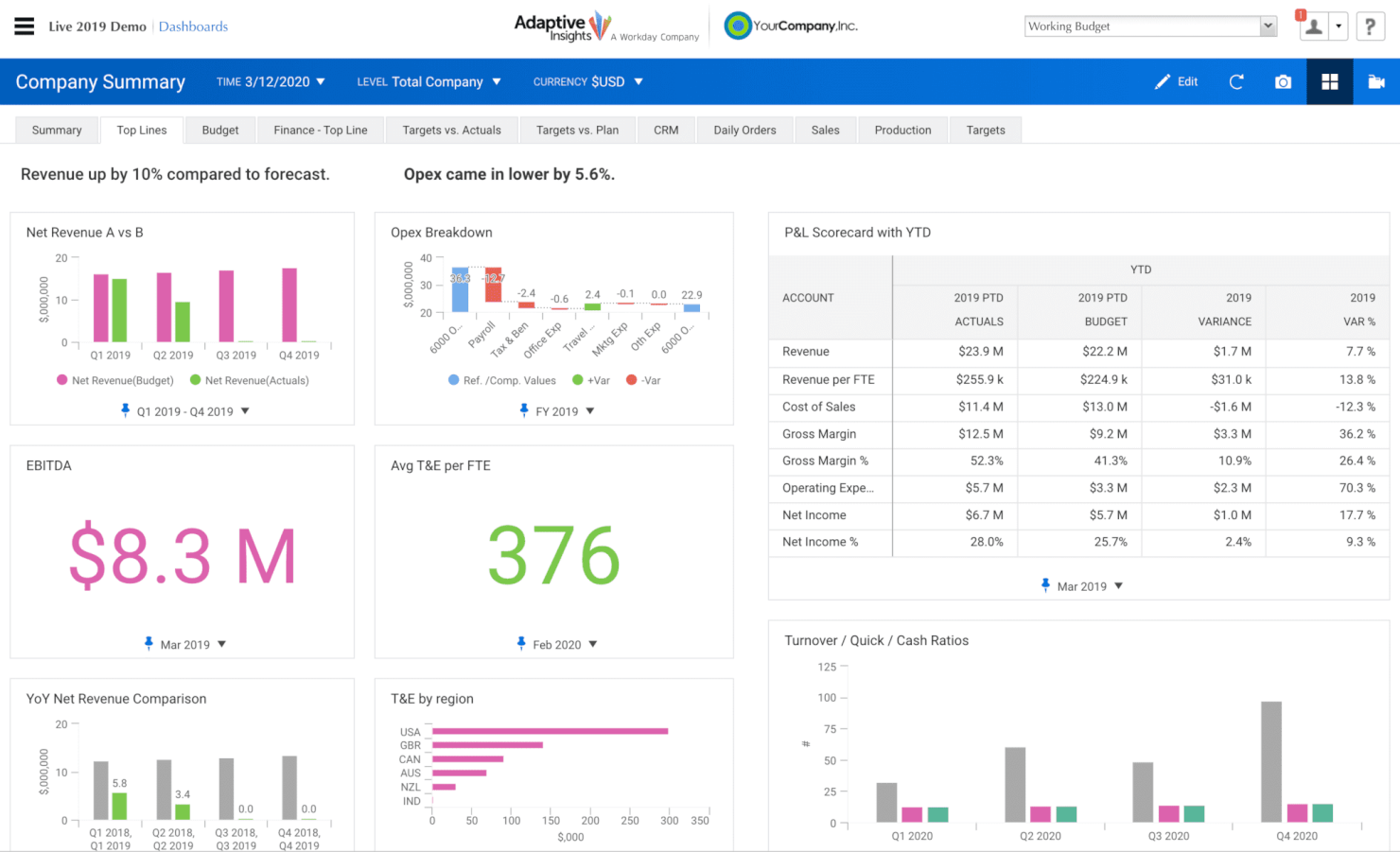
Workday Adaptive Planning ayuda a los equipos de finanzas y operaciones a reemplazar hojas de cálculo propensas a errores con una plataforma de planificación diseñada para presupuestos en tiempo real, pronósticos continuos y modelos financieros colaborativos.
Por qué elegí Workday Adaptive Planning
Elegí Workday Adaptive Planning porque brinda a tu equipo de finanzas las herramientas para crear presupuestos y pronósticos basados en impulsores, con datos reales provenientes de sistemas que ya utilizas, lo que te permite dedicar menos tiempo a conciliar hojas de cálculo y más a analizar el rendimiento.
Su análisis de escenarios te permite poner a prueba suposiciones y ver los impactos al instante, lo cual es útil cuando gestionas planes de personal, ingresos o costos entre varias unidades de negocio. Las funciones de colaboración integradas permiten que tu equipo trabaje en los planes al mismo tiempo sin dolores de cabeza por el control de versiones.
También me gusta que los paneles y los informes se actualizan en tiempo real, lo que te permite acortar los ciclos de cierre mensual y ofrecer a los líderes información oportuna. Además, con modelos personalizables y enfoques presupuestarios flexibles, se adapta a la forma en que tu organización planifica en lugar de forzarte a una estructura rígida.
Principales funciones de Workday Adaptive Planning
Estas son algunas características clave a destacar:
- Planificación basada en impulsores: Crea presupuestos y pronósticos vinculados a métricas operativas clave como número de empleados o volumen de ventas.
- Análisis de escenarios: Compara casos 'qué pasaría si' para evaluar los impactos financieros antes de tomar decisiones.
- Informes en tiempo real: Paneles interactivos e informes que reflejan datos actualizados.
- Planificación de personal: Planifica cantidad de empleados, costos de compensación y escenarios de dotación desde una misma plataforma.
Integraciones de Workday Adaptive Planning
Las integraciones incluyen Microsoft Excel, Microsoft 365, Salesforce Sales Cloud, Dynamics 365, Oracle NetSuite, Sage Intacct, SAP ERP y más a través de su marco de integración.
Pros and Cons
Pros:
- Fácil de crear y compartir diversos informes
- Dimensiones, atributos y marcos de tiempo flexibles para la planificación
- Excelente análisis de escenarios y herramientas de comparación de cambios
- La creación de fórmulas es accesible e intuitiva
Cons:
- No existen informes web dentro de los paneles
- No hay consolidación corporativa (múltiples organizaciones/socios centrales en un solo grupo)
- No hay forma de conservar pronósticos anteriores si se reajustan/modifican los datos reales

Mejor para la gestión de portafolio de proyectos empresariales
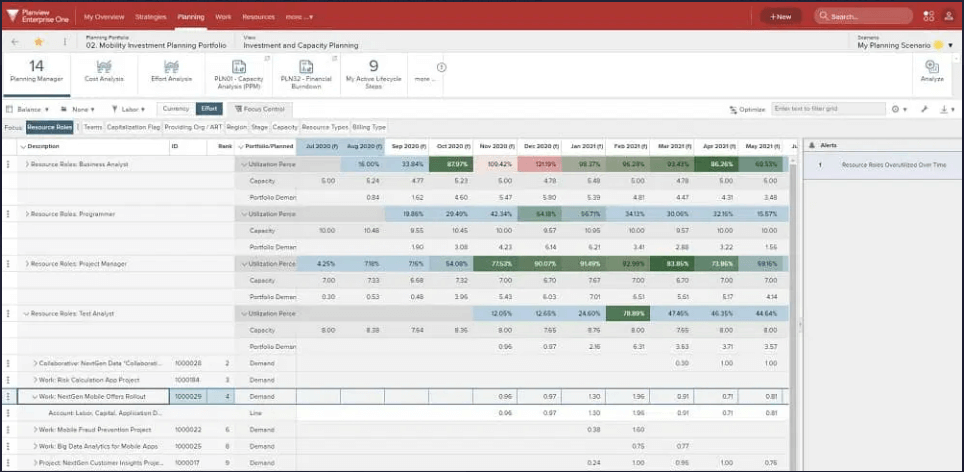
Planview Enterprise One es un sistema completo para la gestión de portafolios de proyectos empresariales (PPM) que presenta un enfoque moderno y elegante en los módulos de informes y análisis, ofreciendo visualizaciones altamente accesibles y comprensibles.
Aproveche sus soluciones para la planificación estratégica, gestión de programas, elaboración de hojas de ruta, priorización de inversiones y planificación financiera.
Las fortalezas de Planview orientadas a PPM incluyen excelentes funciones para el compromiso de las partes interesadas y el análisis de compensaciones, facilitando la navegación entre prioridades cambiantes.
La información sobre precios de Planview está disponible previa solicitud. También ofrecen una prueba gratuita de 30 días.
Pros and Cons
Pros:
- Los mosaicos de análisis KPI son claros y personalizables
- Costo por usuario/por mes muy asequible
- Pantallas de ingreso de datos fáciles de configurar con listas desplegables y campos únicos
- Sólidas capacidades de planificación de inversiones y capacidad
Cons:
- Las funciones de previsión para equipos vs recursos están en desarrollo
- Las hojas de tiempo se beneficiarían de una mayor facilidad de uso
- No puede graficar la disponibilidad de recursos en función de las fechas de alcance del proyecto

Epicor
El mejor software de EPM para análisis minorista
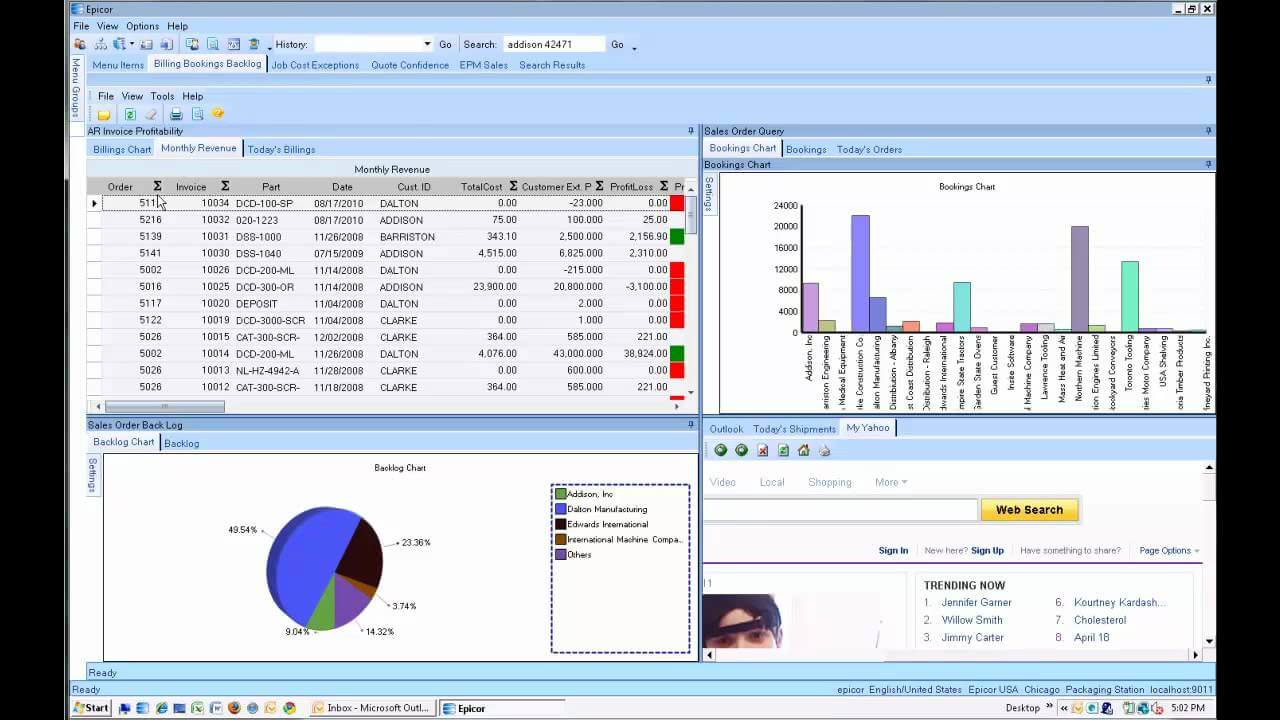
La inteligencia empresarial y el análisis de Epicor ERP ofrecen datos en tiempo real y en contexto, accesibles para clientes, proveedores y responsables de inventario.
Su sistema de gestión minorista totalmente integrado incluye mejores prácticas incorporadas, orientación sobre fidelización de clientes basada en datos, comparaciones de precios con la competencia y otras soluciones de rendimiento.
Asegúrese de aprovechar sus sólidas funciones de programación de empleados y sus herramientas de gestión documental.
Epicor cuesta desde $175/usuario/mes y ofrece una demostración gratuita.
Pros and Cons
Pros:
- Buenas funciones de gestión de la cadena de suministro (SCM)
- Altamente personalizable, con una nueva API REST implementada en 2019
- Funciones de paneles e informes de buena calidad
- Función de búsqueda en bases de datos de primer nivel (llamada Búsqueda empresarial)
Cons:
- Se agradecería una integración adicional con aplicaciones financieras y de RR. HH.
- Implementación y actualización algo engorrosas
- El proceso de liberación de pedidos no es tan fácil de usar como podría ser

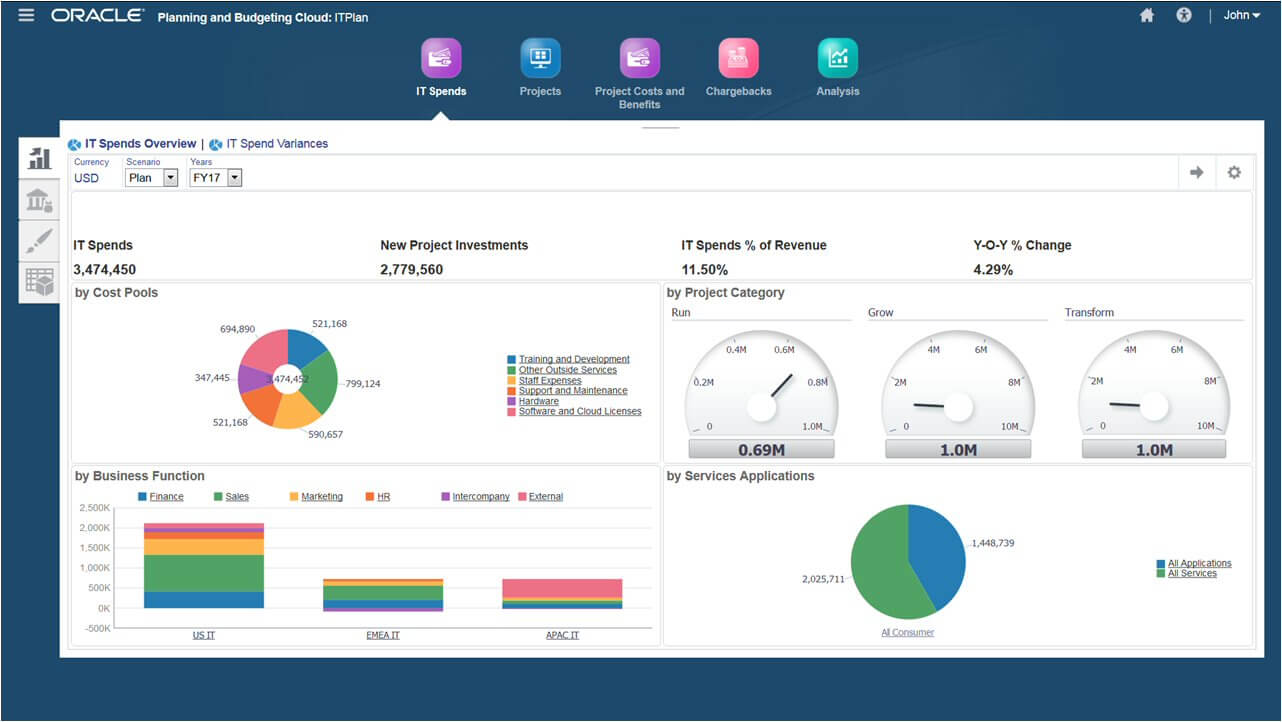
Oracle EPM Cloud le ayuda a modelar y planificar todos los aspectos de los recursos humanos corporativos, los objetivos financieros, los departamentos de ventas y la cadena de suministro.
Es reconocido como líder en soluciones de cierre financiero en la nube gracias, en parte, a sus estándares incorporados de requerimientos de informes globales, el cálculo automático de flujo de efectivo y balance general, y la automatización inteligente de procesos (IPA).
Oracle ofrece información inteligente y recomendaciones personalizadas utilizando su inteligencia artificial integral.
Oracle Cloud EPM cuesta desde $1000/usuario/mes y ofrece una prueba gratuita de 30 días.
Pros and Cons
Pros:
- Automatización del etiquetado y las taxonomías XBRL (también conocidos como códigos de barras para reportes)
- Automatiza fácilmente los procesos de conciliación
- Ofrece configuración de mejores prácticas ya incorporada
- Buen reporte automatizado de flujo de efectivo e informes multi GAAP (principios de contabilidad generalmente aceptados)
Cons:
- Carece de algunas automatizaciones de procesos (RPA) robustas
- La interfaz Smartview es algo engorrosa
- La mayor funcionalidad requiere aplicaciones adicionales de Oracle Fusion como Hyperion


Infor Dynamic Enterprise Performance Management (Infor d/EPM) combina herramientas empresariales inteligentes y capacidades de planificación financiera para ayudarte a evaluar actividades actuales y potenciales.
Su herramienta de modelado fácil de usar permite a los gerentes crear, probar y desplegar escenarios con información de aprendizaje automático, recomendaciones y análisis predictivo.
Puedes gestionar fácilmente los costos de entrega en curso, los plazos y la ejecución de proyectos.
Infor d/EPM ofrece precios empresariales bajo solicitud y una demostración gratuita.
Pros and Cons
Pros:
- Unifica la planificación de pérdidas y ganancias, balance general y flujo de caja
- Herramienta de modelado potente y fácil de usar
- Análisis predictivo convincente basado en IA
- Versionado ilimitado para la planificación de escenarios hipotéticos
Cons:
- La interfaz de usuario a menudo incorpora demasiado texto en cada pantalla
- Los informes necesitan cierta intervención manual para que tengan aspecto profesional
- Implementación y configuración inicial que requiere mucho tiempo

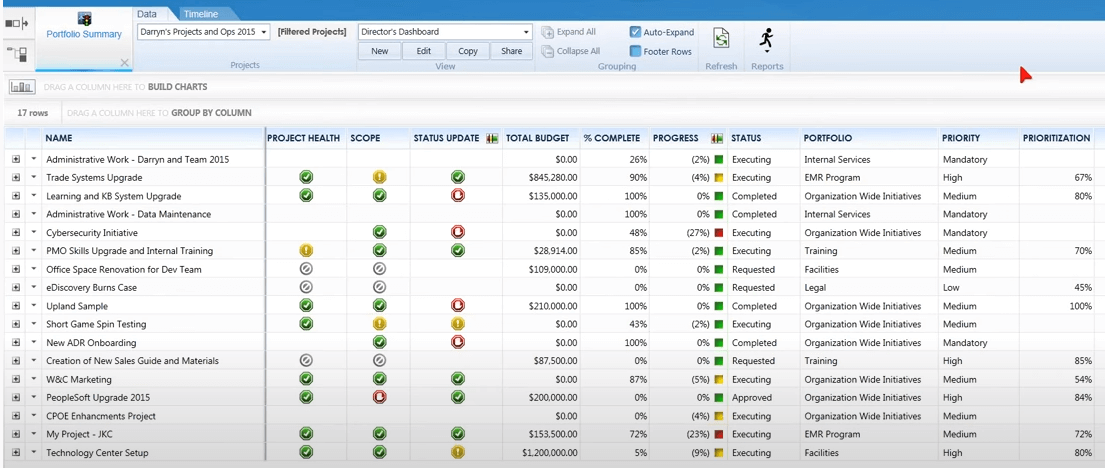
EPM Live de IgniteTech es una solución de gestión del trabajo empresarial integrada con Microsoft SharePoint, diseñada para mejorar su capacidad de rastrear y gestionar todos los proyectos y los costos asociados.
Los usuarios de EPM Live pueden enfocarse en procesos EPM específicos o acceder a otros módulos de IgniteTech que también están incluidos en su suscripción de EPM Live.
También puede acceder a todos los productos de Ignite bajo un plan Ignite Unlimited, el cual abarca seis áreas clave: gestión de la experiencia del cliente, compromiso digital, habilitación de ventas y marketing, automatización de procesos funcionales, aceleración de tecnologías de la información y comunicaciones, y colaboración remota.
EPM Live cuesta desde $6/usuario/mes y ofrece una prueba gratuita de 30 días. El precio del plan empresarial está disponible bajo petición.
Pros and Cons
Pros:
- Incluye 70 módulos de extensión funcional listos para usar
- Herramientas de colaboración social incorporadas que ayudan al rendimiento del equipo
- Excelentes funciones de gestión de costos y recursos
- Integración fácil y nativa con cualquier programa de Microsoft
Cons:
- El plan de precios mínimo no es adecuado para grandes empresas
- Demasiados clics requeridos para tareas pequeñas como cerrar un proyecto o solicitud de servicio
- Requiere el software MS SharePoint con un costo adicional

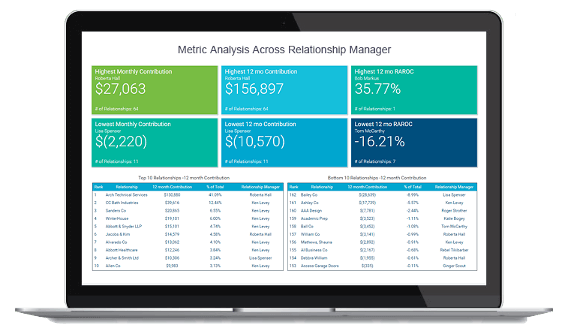
Axiom Software de Syntellis (anteriormente Axiom EPM) es una solución sofisticada y flexible de gestión del rendimiento empresarial utilizada por las empresas para modelar escenarios, analizar resultados financieros y optimizar la toma de decisiones organizativas.
Su software respalda la planificación estratégica, la elaboración de presupuestos y pronósticos, la generación de informes y análisis, la rentabilidad y la gestión de costos para entornos de datos complejos. Su módulo de gestión de costos cuenta con algoritmos de costos claros y basados en evidencia, así como tendencias de rentabilidad por líneas de negocio.
Su sistema EPM se adapta perfectamente a instituciones financieras, instituciones de educación superior y organizaciones de salud complejas. Actualmente es utilizado por empresas como Atrium Health, Trinity Health, BankUnited, Byline Bank y varias universidades y colegios de EE. UU.
Axiom EPM ofrece precios empresariales previa solicitud y una demostración gratuita.
Pros and Cons
Pros:
- Fácil de configurar y ajustar la seguridad de usuario para el acceso a los datos
- Múltiples personalizaciones y posibilidades para plantillas de informes
- El paquete de consultoría premium incluye informes únicos para cualquier conjunto de datos
- La base de datos de estilo hoja de cálculo es intuitiva para cualquiera que haya usado Excel o Sheets
Cons:
- Puede resultar complicado profundizar hasta una carga única o específica
- Utiliza métricas FTE (equivalente a tiempo completo) pagadas para los informes en lugar de FTEs productivos
- La interfaz no es tan atractiva y moderna como la de algunos competidores
Mejor software de EPM: tabla comparativa de precios
Esta tabla comparativa resume los detalles básicos de cada una de mis principales selecciones de software de EPM. Puedes consultar los precios y la disponibilidad de pruebas gratuitas o demostraciones lado a lado para encontrar el mejor software según tu presupuesto y las necesidades de tu empresa.
| Tool | Best For | Trial Info | Price | ||
|---|---|---|---|---|---|
| 1 | Ideal para automatizar tareas administrativas | Demostración | Previo contacto | Website | |
| 2 | El mejor software EPM para operaciones de manufactura | Demostración gratuita disponible | Precios personalizados a solicitud | Website | |
| 3 | Ideal para la planificación y pronóstico con soporte de IA | Prueba gratuita de 14 días | Precios empresariales bajo petición y ofrece una demostración gratuita | Website | |
| 4 | Mejor control de versiones y análisis de escenarios | 30 días de prueba gratuita | Desde $800/usuario/año | Website | |
| 5 | Mejor para la gestión de portafolio de proyectos empresariales | Prueba gratuita de 30 días | Desde $20/usuario/mes | Website | |
| 6 | El mejor software de EPM para análisis minorista | Demostración gratuita disponible | Desde $175/usuario/mes | Website | |
| 7 | La mejor opción para soluciones de cierre financiero | Prueba gratuita de 30 días | Desde $500/usuario/mes | Website | |
| 8 | La mejor herramienta de modelado fácil de usar | Demostración gratuita disponible | Precios empresariales bajo solicitud y ofrece una demostración gratuita | Website | |
| 9 | Mejor para integración con Microsoft SharePoint | Prueba gratuita de 30 días | Desde $6/usuario/mes | Website | |
| 10 | El mejor software EPM para equipos financieros | Demostración gratuita | Precios empresariales previa solicitud | Website |
Otros programas de gestión del rendimiento empresarial
Estas son algunas soluciones de EPM adicionales que no llegaron a la lista principal:
- Anaplan
Mejor software EPM para la planificación de oferta y demanda
- IBM Planning Analytics
Ideal para la planificación de la gestión del cambio
- Insight Software
Ideal para la escalabilidad de funciones propias


Cómo evalúo el software EPM
Evalúo las herramientas EPM en dos niveles: las capacidades básicas que una herramienta debe ofrecer—como ciclos de revisión configurables y seguimiento de objetivos—y los diferenciadores que separan a las mejores opciones.
Funcionalidad principal (requisitos básicos para esta lista)
Al seleccionar las herramientas para mi lista, califico cada una en una escala de 0 (no ofrece la funcionalidad) a 5 (sobresale en esta área) para cada función principal que se indica a continuación. Posteriormente, calculo la puntuación total de la herramienta y la convierto en porcentaje. Cada herramienta debe alcanzar una puntuación total mínima del 65% para ser considerada elegible.
- Gestión de evaluaciones de desempeño: Reviso si los ciclos de revisión son configurables—¿puedes realizar chequeos trimestrales para equipos de ventas y revisiones anuales para otros departamentos usando la misma configuración?
- Seguimiento de metas y OKR: Aquí los objetivos en cascada son importantes. Busco herramientas que permitan alinear metas individuales con OKR de equipo y de la empresa, con seguimiento visual del avance.
- Feedback de 360 grados: Las evaluaciones de múltiples evaluadores deben permitir incluir compañeros, gerentes y subordinados directos con controles de anonimato. Evalúo la flexibilidad del proceso de selección de evaluadores.
- Feedback continuo y 1:1s: El feedback en tiempo real y las agendas estructuradas para reuniones uno a uno ayudan a los gerentes a orientar en el momento. Busco herramientas que vinculen las acciones con los objetivos.
- Análisis de desempeño e informes: Los tableros deben ir más allá de las puntuaciones puras. Evalúo si la herramienta ofrece vistas de calibración, matrices 9-grid y análisis de tendencias durante los ciclos.
- Planificación de desarrollo y sucesión: Busco herramientas que conecten los resultados de las evaluaciones con planes de desarrollo individual y de sucesión, no simplemente los almacenen por separado.
Una vez tengo una lista de herramientas que cumplen los criterios, considero qué diferencia a cada plataforma.
Factores diferenciadores (qué distingue a los proveedores)
Así comparo y diferencio entre los diferentes proveedores:
Características destacadas
Las funciones impulsadas por IA son un gran diferenciador. Busco herramientas que detecten sesgos en las calificaciones de los gerentes o sugieran frases para los comentarios durante los ciclos de revisión. La gestión de compensaciones es otra área que valoro cuidadosamente—vincular las calificaciones de desempeño directamente a los flujos de trabajo de aumentos por mérito ahorra a RR.HH. la complicación de manejar hojas de cálculo junto con la plataforma de revisiones. También verifico si alguna herramienta incluye una biblioteca de habilidades y competencias relacionada con los roles, porque los marcos preconstruidos ofrecen a los equipos una base para crear criterios de evaluación consistentes.
Más allá de las funcionalidades
La profundidad de integración con el HRIS es muy importante aquí. Verifico si la herramienta se sincroniza en ambos sentidos con plataformas como BambooHR o Workday, para que los datos de empleados se mantengan actualizados automáticamente durante los ciclos de revisión. Otra variable que evalúo es la escalabilidad—una empresa de 50 empleados y una organización de 2,000 con distintas entidades requieren estructuras de permisos y soporte de idiomas muy diferentes. Asimismo, tengo en cuenta los recursos de implementación, ya que lanzar tu primer ciclo de evaluación en una nueva plataforma suele requerir orientación de onboarding dedicada y materiales de capacitación para gerentes.
Software de EPM: funciones principales
Al seleccionar un software de gestión del rendimiento empresarial, presta atención a las siguientes funciones principales:
- Planificación financiera integrada: Conecta presupuestos, previsiones y modelos financieros en una única plataforma fluida para que puedas tomar decisiones informadas rápidamente. Esto te permite ver el panorama general y ajustar los planes en tiempo real a medida que cambian las circunstancias.
- Paneles de rendimiento: Accede a visualizaciones en tiempo real e indicadores clave de rendimiento (KPIs) en un panel centralizado. Esto te ayuda a hacer un seguimiento del progreso, detectar tendencias y compartir información con tu equipo, sin tener que revisar hojas de cálculo.
- Alineación de objetivos estratégicos: Asegúrate de que todos los departamentos y equipos avancen en la misma dirección alineando sus actividades con los objetivos más importantes de tu organización. Esto mantiene a todos enfocados y responsables, desde la alta dirección hasta los responsables de proyectos.
- Modelado de escenarios: Prueba escenarios hipotéticos para ver cómo diferentes cambios, como las fluctuaciones del mercado o los ajustes presupuestarios, podrían afectar a los resultados. Tendrás más confianza en tu próximo paso porque ya habrás visto lo que podría ocurrir.
- Consolidación y generación de informes: Agiliza el proceso de recopilación de datos de varias unidades de negocio y países. Genera informes coherentes y precisos más rápido, lo que hace que el cierre contable sea mucho menos estresante al final del trimestre.
- Automatización de flujos de trabajo: Automatiza tareas repetitivas como aprobaciones, notificaciones o recopilación de datos. Esto mantiene a todos encaminados y te evita esos temidos errores manuales.
- Control de acceso basado en roles: Controla quién ve cada cosa y asegúrate de que la información confidencial solo sea accesible para usuarios autorizados. Puedes cambiar fácilmente los permisos a medida que evolucionan los equipos o surgen nuevos proyectos.
- Registros de auditoría: Conserva registros detallados de cambios, decisiones y aprobaciones. Esto no solo ayuda con el cumplimiento normativo, sino que también resulta fundamental cuando necesitas rastrear quién actualizó la previsión o por qué se realizó un ajuste.
Funciones comunes de inteligencia artificial del software de gestión del rendimiento empresarial
Además de las funciones estándar del software de gestión del rendimiento empresarial mencionadas anteriormente, muchas de estas soluciones están incorporando inteligencia artificial con funciones como:
- Análisis predictivo: Utiliza la inteligencia artificial para prever el rendimiento futuro identificando tendencias y patrones en tus datos. Esto significa que puedes anticipar desafíos y oportunidades antes de que lleguen a tu mesa.
- Detección automatizada de anomalías: Permite que la inteligencia artificial señale automáticamente picos o caídas inusuales en tus KPIs. Detectarás posibles problemas, como costos inesperados o brechas de ingresos, antes de que se descontrolen.
- Procesamiento del lenguaje natural para la generación de informes: Genera resúmenes ejecutivos o informes personalizados con solo unas indicaciones. La inteligencia artificial transforma los datos en un lenguaje sencillo para que todos puedan comprender la historia que hay detrás de las cifras.
- Recomendaciones inteligentes: Obtén sugerencias proactivas para mejorar procesos, reasignar recursos o ajustar estrategias. La inteligencia artificial analiza los datos más rápido que cualquier analista y ofrece información que, de otro modo, podrías pasar por alto.
- Limpieza y enriquecimiento de datos: Utiliza la inteligencia artificial para ordenar los datos desorganizados y completar la información que falta. Unas cifras más limpias y fiables se traducen en decisiones más seguras para todos los implicados.
Preguntas frecuentes
¿Por qué deberías utilizar un software EPM?
El software de gestión del rendimiento empresarial (EPM) es fundamental para la gestión de procesos empresariales (BPM) de alto nivel. Si todavía no utilizas un software EPM, quizá quieras considerar su uso en tu organización.
Pregúntate: ¿Tus procesos empresariales estratégicos se basan en datos precisos y oportunos sobre el rendimiento de la empresa? ¿Cómo puedes asegurarte de que tu organización aprovecha al máximo los datos para respaldar la toma de decisiones de alto nivel?
El software EPM aborda procesos de alto nivel como la previsión financiera y la generación de informes de comercio electrónico. Muchos también ofrecen información sobre la eficacia de la cadena de suministro, la creación de estrategias y su implementación.
¿Cuál es la diferencia entre el software ERP y el software EPM?
En pocas palabras, el software de planificación de recursos empresariales (ERP) aborda los procesos operativos dentro de una empresa. Los sistemas ERP se centran principalmente en los datos transaccionales y tienen más probabilidades de abordar:
- A/R (cuentas por cobrar)
- A/P (cuentas por pagar)
- gestión presupuestaria
- gestión de efectivo
- informes financieros (variación entre los valores reales y el presupuesto)
- estados de resultados
Por el contrario, el software EPM tiene como objetivo agilizar los procesos de gestión empresarial dentro de una empresa. Los sistemas EPM se centran principalmente en los datos de gestión y tienen más probabilidades de abordar:
- análisis y modelado de escenarios de «qué pasaría si»
- perspectiva gerencial avanzada sobre el rendimiento empresarial
- mantenimiento de presupuestos complejos
- planificación empresarial compleja
- toma de decisiones basada en resultados financieros y operativos
- análisis exhaustivo de planes operativos detallados
Dado que las soluciones EPM y ERP tienen mucho en común, gran parte del software de esta lista aborda un poco ambos aspectos. Sin embargo, los mejores sistemas EPM mantienen el enfoque más sólido.
¿Qué software EPM has utilizado?
Es el momento de que la audiencia participe. ¿Utilizas actualmente alguna herramienta de gestión del rendimiento corporativo (CPM) de la que quieras presumir? ¿Cuál es tu mejor consejo para gestionar el rendimiento empresarial? ¿Hay alguna herramienta de planificación financiera SaaS que añadirías a esta lista si pudieras? Comparte tu opinión en los comentarios.
Otros recursos
¿Buscas software que te ayude a realizar un seguimiento de datos transaccionales más granulares? Si es así, también te recomiendo consultar nuestra lista de los mejores sistemas ERP.
Si te interesan los sistemas ERP, pero tienes un presupuesto ajustado, también podemos ayudarte. Consulta nuestra lista de los mejores sistemas ERP para pequeñas empresas con un presupuesto limitado.
Qué viene después:
Si estás investigando software EPM, ponte en contacto gratuitamente con un asesor de SoftwareSelect para obtener recomendaciones.
Rellenas un formulario y mantienes una breve conversación en la que concretan los detalles de tus necesidades. Después, recibirás una lista de software preseleccionado para revisar. Incluso te apoyarán durante todo el proceso de compra, incluidas las negociaciones de precios.