

I 10 migliori software per la responsabilità sociale d’impresa per l’impatto sociale nel 2026

10 Selezione dei migliori software CSR


Orientarsi nel mondo della responsabilità sociale d'impresa può essere scoraggiante. In qualità di professionista delle risorse umane, hai il compito di allineare gli sforzi del tuo team ai valori dell'azienda e al suo impatto sulla società. È qui che entra in gioco il software CSR: ti aiuta a gestire queste iniziative in modo efficace.
In base alla mia esperienza, trovare lo strumento giusto può fare la differenza. Ho testato e valutato in modo indipendente diverse opzioni per offrirti le scelte migliori. Troverai indicazioni pratiche adattate alle tue esigenze, che ti aiuteranno ad affrontare le difficoltà più comuni.
Ti aspetta una valutazione chiara e imparziale delle principali soluzioni software CSR. Che tu sia alle prime armi con la CSR o stia cercando di aggiornare il tuo strumento, questo elenco è la tua guida per prendere decisioni consapevoli.
Perché fidarsi delle nostre recensioni sui software
Il nostro team testa e recensisce software dal 2012. In quanto esperti HR noi stessi, sappiamo quanto sia difficile — e importante — scegliere il software giusto.
Per questa guida, abbiamo valutato gli strumenti attraverso test pratici e ricerche indipendenti, assegnando un punteggio agli strumenti in base ai nostri criteri di selezione. Ci basiamo inoltre sulle competenze di leader di pensiero del settore e di professionisti HR attivi.
Le nostre recensioni riflettono il nostro giudizio editoriale umano, non un discorso di vendita.
Revisori esperti:
Tabella di confronto dei software CSR
Questa tabella di confronto riassume i dettagli dei prezzi delle mie migliori selezioni di software CSR:
| Tool | Best For | Trial Info | Price | ||
|---|---|---|---|---|---|
| 1 | Ideale per la solidarietà aziendale | Demo gratuita disponibile | Prezzo su richiesta | Website | |
| 2 | Migliore per matching delle donazioni | Demo gratuita + piano gratuito disponibile | A partire da $195/mese | Website | |
| 3 | Ideale per la gestione del rischio nella catena di fornitura | Demo gratuita disponibile | Prezzo su richiesta | Website | |
| 4 | Ideale per micro azioni | Demo gratuita disponibile | Prezzo su richiesta | Website | |
| 5 | Ideale per organizzazioni multilingue | Demo gratuita disponibile | Prezzi su richiesta | Website | |
| 6 | Ideale per campagne di impatto sociale | Demo gratuita + piano gratuito disponibile | Da $99/mese | Website | |
| 7 | Ideale per la gestione della sostenibilità | Demo gratuita disponibile | Prezzo su richiesta | Website | |
| 8 | Ideale per le sfide sociali | Demo gratuita disponibile | Prezzi su richiesta | Website | |
| 9 | Ideale per il volontariato locale | Demo gratuita disponibile | Prezzi su richiesta | Website | |
| 10 | Ideale per la gestione dei volontari | Demo gratuita disponibile | Prezzi su richiesta | Website |
Recensioni dei migliori software CSR
Ecco la mia valutazione dei migliori software CSR disponibili, con brevi descrizioni delle loro principali funzionalità e spiegazioni del motivo per cui li ho inclusi in questo elenco:

Ideale per la solidarietà aziendale

Submittable si distingue quando i programmi di donazioni aziendali e sovvenzioni richiedono visibilità, scalabilità e responsabilità. Lo scelgo quando vuoi creare campagne di donazione su larga scala con il tuo brand, gestendo tutto, dall’acquisizione delle candidature alla rendicontazione, in un unico posto.
Ciò che apprezzo di Submittable è la possibilità di gestire insieme sovvenzioni, donazioni e iniziative di raccolta fondi dei dipendenti, facilitando a team HR e CSR l’avvio, il monitoraggio e la celebrazione dell’impatto delle iniziative di solidarietà aziendale.
Ideale per
- Aziende che gestiscono programmi di donazioni aziendali o sovvenzioni su larga scala
- Team HR e CSR che necessitano di monitoraggio unificato per donazioni e volontariato
Non adatto per
- Piccole imprese con esigenze CSR di base
- Team che desiderano flussi di lavoro di donazione altamente personalizzati e completamente su misura
Cosa rende unica Submittable
Submittable è progettato per le aziende che vogliono un approccio unificato alla gestione di sovvenzioni, donazioni e raccolte fondi tra i dipendenti. A differenza dei normali generatori di moduli o dei tool di gestione progetti, Submittable propone che i team gestiscano programmi strutturati di donazioni aziendali dall’inizio alla fine in un’unica piattaforma.
Trovo che funzioni molto bene per i gruppi che necessitano di processi solidi e reportistica centralizzata su varie iniziative CSR, piuttosto che donazioni occasionali.
Compromessi con Submittable
Submittable è ottimizzato per programmi standardizzati e flussi di lavoro integrati, ma si perde la flessibilità di personalizzare pesantemente i processi di donazione o di realizzare automazioni complesse al di fuori del suo schema.
Pros and Cons
Pros:
- Ampia libreria di tutorial online
- Assistenza clienti proattiva
- Buona varietà di modelli di report
Cons:
- Le opzioni di traduzione sono a pagamento
- La piattaforma potrebbe essere più intuitiva

Millie
Migliore per matching delle donazioni

Millie si guadagna il suo posto per il modo diretto in cui affronta i programmi di matching delle donazioni—qualcosa che molti strumenti CSR trattano come un ripensamento. Ho visto aziende usare Millie per gestire il matching gift, tracciare le donazioni e coinvolgere le persone nel volontariato da un'unica dashboard.
Quello che mi piace particolarmente è come le interazioni con i donatori e il monitoraggio del matching siano tutti consolidati per gli amministratori. Questo funziona al meglio quando si è pronti a centralizzare e realmente promuovere le donazioni dei dipendenti, non soltanto supportarle in secondo piano.
Millie è ideale per
- Aziende che gestiscono programmi di matching delle donazioni e volontariato
- Responsabili HR o CSR che desiderano una gestione semplice delle donazioni dei dipendenti
Millie non è adatto per
- Organizzazioni che cercano un ampio tracking ESG o della conformità
- Team che necessitano di gestione delle sovvenzioni o reportistica complessa
Cosa distingue Millie
Millie si distingue per il fatto che mette le donazioni dei dipendenti e il matching delle donazioni al centro del suo workflow, invece che come aggiunta opzionale a suite ESG o HR più ampie. Rispetto a piattaforme come Benevity, Millie semplifica la configurazione dei programmi e pone meno attenzione sulla conformità o sui dati ESG globali. Questo è ideale quando si desidera un coinvolgimento pratico attorno alle campagne di donazione, non un monitoraggio macro delle metriche ESG.
Compromessi con Millie
Millie è ottimizzato per la gestione delle donazioni, ma ciò significa che mancano funzionalità approfondite per la reportistica su obiettivi ESG o il monitoraggio complesso della conformità. Se hai bisogno di questi aspetti, sentirai presto i suoi limiti.
Pros and Cons
Pros:
- Mantiene i dipendenti coinvolti grazie alla gamification
- Ti aiuta a collaborare con una varietà di ONG
- Potenti funzionalità di reportistica
Cons:
- Può essere difficile sincronizzare le ore di volontariato nei report del libro paga
- Le organizzazioni globali possono avere difficoltà a trovare organizzazioni non profit locali in alcune regioni

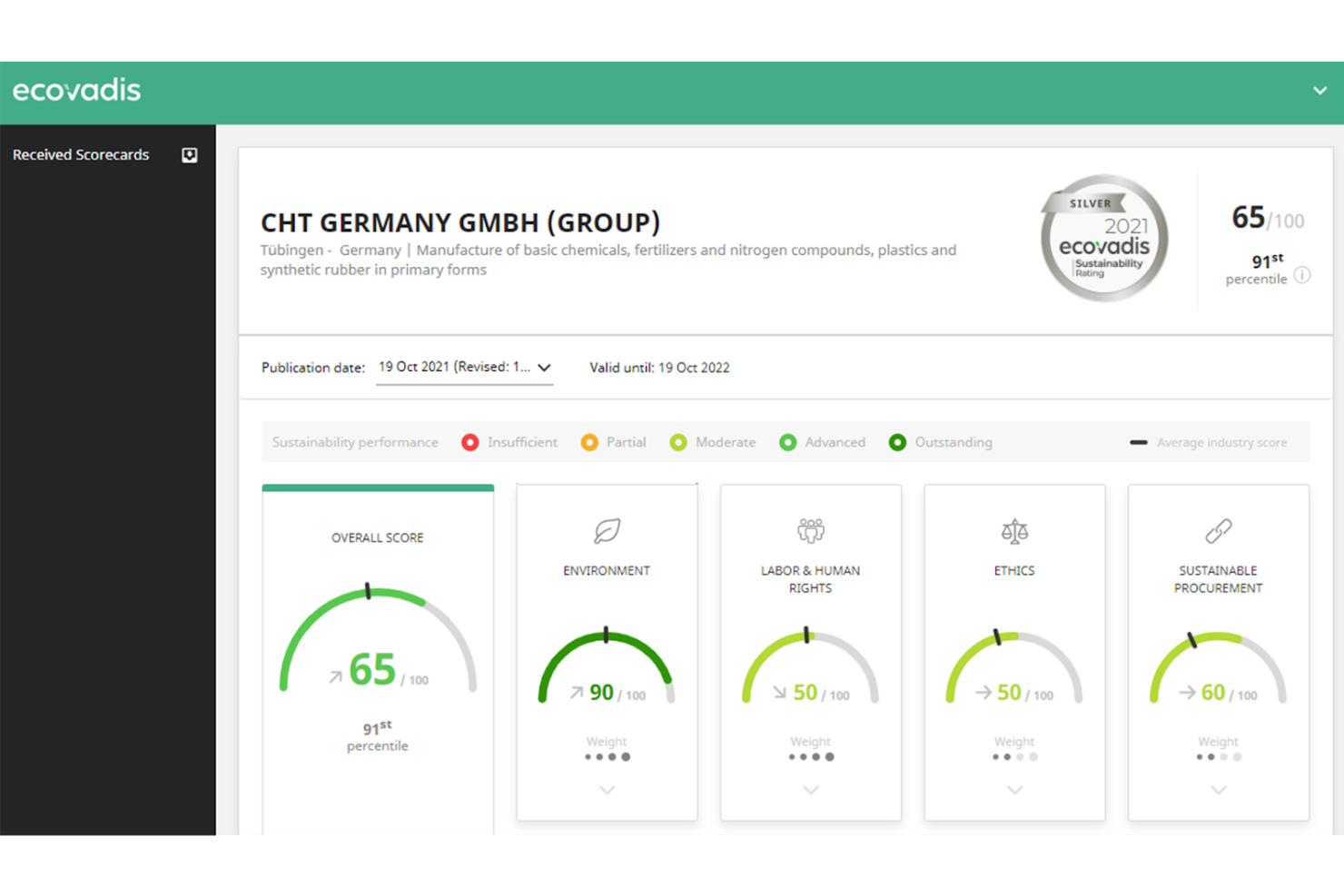
Ecovadis si distingue per il suo approccio alla valutazione del rischio nella catena di fornitura e delle valutazioni CSR su larga scala. Ciò che apprezzo è la possibilità per le organizzazioni di valutare la sostenibilità dei fornitori utilizzando un quadro standardizzato, per poi confrontare e monitorare il rischio attraverso decine o persino migliaia di partner in un unico portale.
Funziona molto bene quando è necessario rendicontare i progressi CSR ed ESG su una rete di fornitori ampia e si desidera trasparenza senza dover utilizzare i fogli di calcolo.
Ecovadis è ideale per
- Team di approvvigionamento e sostenibilità che gestiscono il rischio dei fornitori
- Grandi aziende che necessitano di valutazioni CSR ed ESG standardizzate sui fornitori
Ecovadis non è ideale per
- Piccole imprese con una base fornitori semplice
- Team che desiderano iniziative CSR senza un focus sulla catena di fornitura
Cosa distingue Ecovadis
Ecovadis è costruito attorno all'idea che la sostenibilità e il rischio dei fornitori possano essere standardizzati e monitorati su larga scala. A differenza di strumenti come Salesforce o Coupa, che possono offrire funzionalità di approvvigionamento ma poca valutazione strutturata CSR per i fornitori, Ecovadis mette la valutazione e il benchmarking dei fornitori al centro. In pratica, funziona bene quando il tuo flusso di lavoro richiede valutazioni formali dei fornitori e una validazione da parte di terzi.
Compromessi di Ecovadis
Ecovadis è ottimizzato per un punteggio coerente del rischio nella catena di fornitura, ma ciò significa che si rinuncia a funzionalità più ampie di gestione dei programmi CSR al di fuori della valutazione dei fornitori. Se desideri organizzare iniziative CSR interne, avrai bisogno di uno strumento alternativo per questo scopo.
Pros and Cons
Pros:
- Schede di valutazione standardizzate aiutano a capire cosa influisce sulla tua sostenibilità
- Puoi pianificare azioni e ricevere notifiche su quando avviarle
- Facilita il caricamento dei tuoi documenti per ottenere la valutazione
Cons:
- La libreria dei documenti può sembrare poco intuitiva a volte
- Traduzioni limitate per aziende internazionali

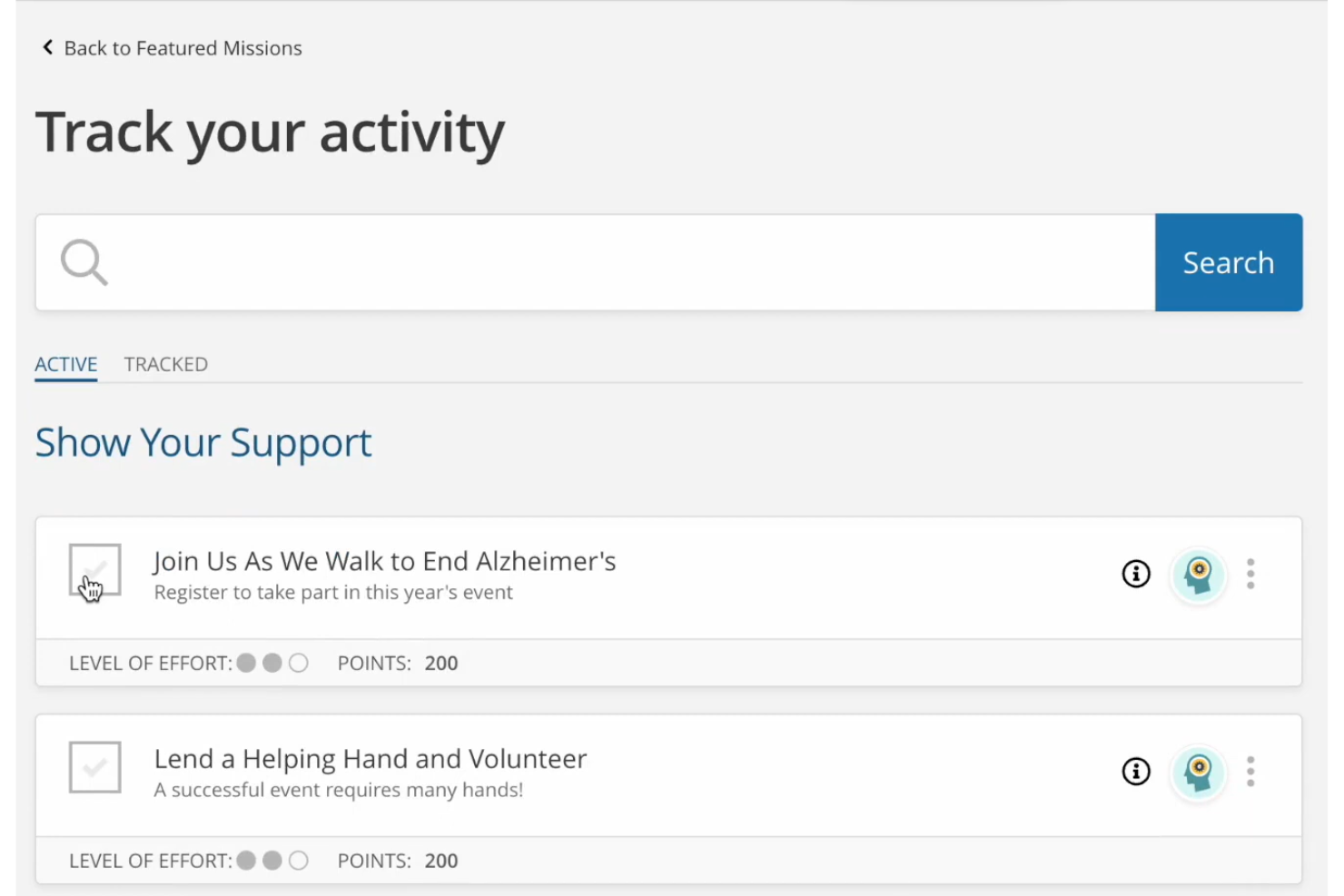
Benevity entra nella mia lista per i programmi CSR che necessitano di un coinvolgimento rapido e significativo tramite micro azioni. Quando vedo aziende che cercano modi per coinvolgere dipendenti che non hanno tempo per giornate intere di volontariato, le attività mordi e fuggi di Benevity portano davvero risultati.
Apprezzo il fatto che sia possibile progettare sfide con obiettivi specifici e monitorare piccoli contributi su larga scala. Le opzioni di ricompensa sono versatili, il che incentiva la partecipazione regolare.
Ideale per
- Aziende che attivano campagne di micro-volontariato e donazioni su piccola scala
- Organizzazioni che necessitano di frequenti e accessibili opzioni di partecipazione per i dipendenti
Non adatto per
- Imprese che cercano funzionalità avanzate di gestione delle sovvenzioni
- Team focalizzati su grandi eventi di volontariato in presenza
Cosa distingue Benevity
Benevity è strutturato per rendere la responsabilità sociale d’impresa facile e accessibile con modalità rapide e concrete. Invece della struttura orientata agli eventi che si trova in soluzioni come VolunteerMatch, invita alla partecipazione attraverso azioni mirate di piccola scala sulla piattaforma. In pratica, ciò funziona meglio per le aziende che vogliono mantenere costante l’engagement e ridurre le barriere, piuttosto che concentrare gli sforzi su pochi grandi progetti.
Compromessi con Benevity
Benevity punta su azioni accessibili e a livello micro, ma si perde profondità nello sviluppo di programmi di volontariato più ampi e gestiti in modo approfondito, specialmente se servono report complessi o requisiti logistici articolati.
Pros and Cons
Pros:
- I dipendenti possono tracciare le proprie donazioni annuali e ricevere ricevute fiscali
- Report personalizzabili e di bella presentazione per gli stakeholder
- Curva di apprendimento agevole
Cons:
- La creazione di programmi di volontariato di lunga durata potrebbe essere più semplice
- Può risultare difficile impostare programmi complessi di matching alle donazioni


Deed entra nella mia lista per le organizzazioni multilingue che devono ampliare i loro programmi di responsabilità sociale d'impresa in diverse aree geografiche. Ho notato che i team globali beneficiano dell'approccio flessibile di Deed al supporto linguistico e alle campagne di donazione attente alle differenti culture.
Ciò che apprezzo di più è il modo in cui consente di localizzare il volontariato, le donazioni e il monitoraggio dell'impatto per raggiungere le persone nelle loro lingue preferite. Quando la tua forza lavoro si estende su più continenti, questo elimina le barriere e facilita la partecipazione di tutti.
Ideale per
- Organizzazioni multinazionali che gestiscono la CSR in molte lingue
- Aziende che danno priorità a campagne di volontariato e donazione a livello globale
Non adatto a
- Piccole imprese con programmi CSR limitati a una sola regione
- Team che necessitano di analisi avanzate sull'impatto CSR o di benchmarking
Cosa distingue Deed
Deed adotta un approccio globale, facilitando il coinvolgimento dei dipendenti in tutto il mondo. Invece di presumere che tutti lavorino da un'unica sede centrale (come vedo spesso con la maggior parte delle piattaforme CSR), parte dal presupposto che l'impatto vada localizzato. Spesso vedo Deed utilizzata per supportare donazioni e volontariato in più lingue—questo funziona al meglio quando il personale è distribuito in diverse regioni e si desidera coinvolgere tutti, indipendentemente dalla lingua parlata.
Compromessi con Deed
Deed è ottimizzata per una partecipazione ampia e multinazionale, ma si rinuncia ad analisi e benchmarking avanzati, quindi le analisi dettagliate sull'impatto CSR sono limitate.
Pros and Cons
Pros:
- L'app offre un'interfaccia pulita e intuitiva
- Trasforma le iniziative CSR in sforzi collaborativi
- Ricca libreria di risorse formative
Cons:
- La comunicazione dei dati tra le versioni desktop e mobile dell'app può a volte subire dei ritardi
- La dashboard amministrativa può risultare complessa agli utenti alle prime armi

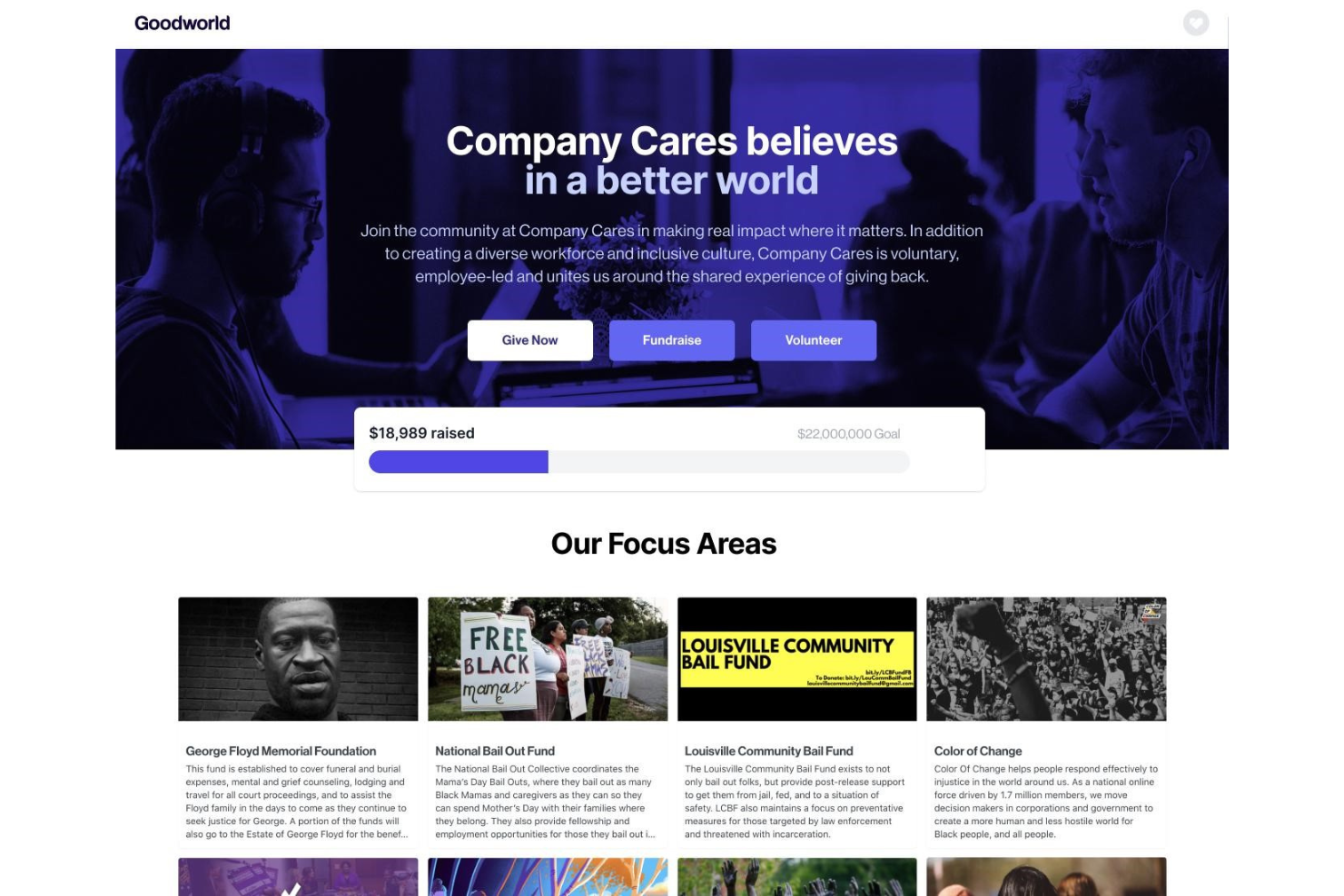
Goodworld ha senso per me quando i responsabili di progetto e i team HR vogliono attivare campagne di impatto sociale senza perdersi nella gestione manuale delle donazioni o nel reporting. Vedo l'effettivo utilizzo dell’hub di gestione campagne, dell’abbinamento automatico delle donazioni e del monitoraggio in tempo reale dell’impatto per collegare insieme donazioni dei dipendenti, raccolte fondi e volontariato.
Goodworld è ideale per
- Responsabili HR e CSR che gestiscono campagne di impatto sociale multicanale
- Aziende che danno priorità all’abbinamento delle donazioni, al volontariato e ai risultati misurabili
Goodworld non è adatto per
- Team che hanno bisogno di strumenti di coinvolgimento dei dipendenti più ampi al di fuori dell’impatto sociale
- Organizzazioni con strutture di programma CSR altamente personalizzate o complesse
Cosa distingue Goodworld
Goodworld è progettato avendo in mente una CSR basata sulle campagne, diversamente da strumenti come Benevity che adottano un approccio modulare. Quando uso Goodworld, noto che coinvolge le persone rendendo abbinamento delle donazioni, campagne e volontariato strettamente interconnessi. Questo funziona al meglio quando vuoi che le attività CSR siano visibili e orientate all’azione, non nascoste come un programma HR sullo sfondo.
Compromessi con Goodworld
Goodworld è ottimizzato per un coinvolgimento unificato basato sulle campagne, quindi rinunci a funzionalità HR o di coinvolgimento più ampie offerte dalle grandi piattaforme per dipendenti. Se prevedi di gestire altri programmi per le persone da un unico posto, non è la scelta giusta.
Pros and Cons
Pros:
- Curva di apprendimento agevole
- Costruttore di campagne drag-and-drop
- Permette di impostare facilmente donazioni ricorrenti
Cons:
- Può essere difficile creare design che risultino validi su tutti i dispositivi
- I report potrebbero essere più dettagliati

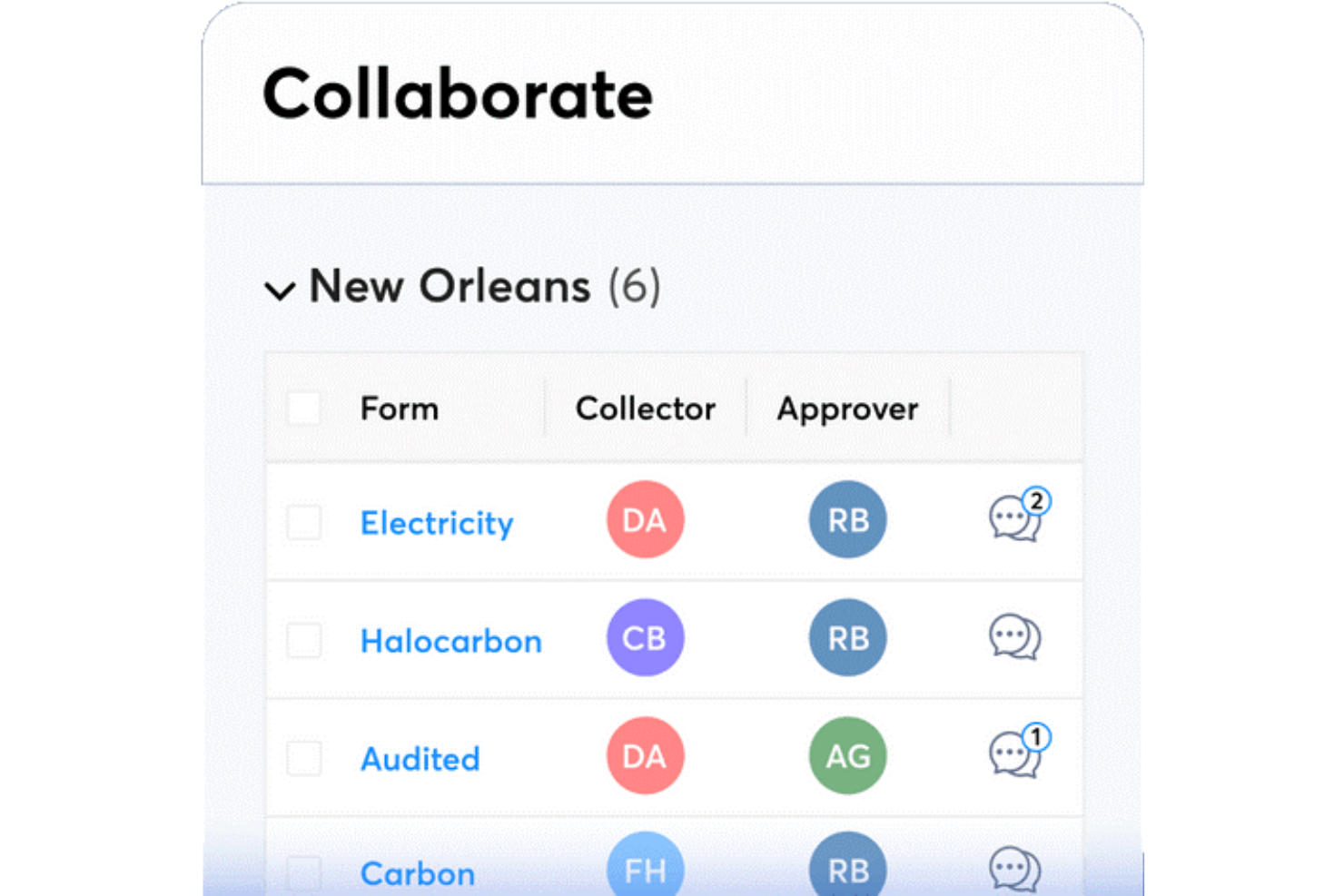
Metrio è nella mia lista dei preferiti perché è una delle poche piattaforme progettate appositamente per tracciare, gestire e rendicontare metriche di sostenibilità insieme ai principali dati CSR. Lo consiglio spesso alle organizzazioni con esigenze di reporting complesse che vogliono far evolvere la gestione di iniziative carbon, ESG e sociali in un unico luogo. Ciò che apprezzo è la possibilità di personalizzare dashboard e dichiarazioni per adeguarsi a specifici framework, senza essere vincolati a modelli generici.
Ideale per
- Aziende che tracciano dati ESG, carbon e CSR insieme
- Organizzazioni che danno priorità a report di sostenibilità e conformità personalizzabili
Non adatto a
- Piccole imprese con esigenze di reporting CSR di base
- Team che necessitano di strumenti integrati per il coinvolgimento dei dipendenti
Cosa distingue Metrio
Metrio adotta un approccio orientato al reporting per i dati di sostenibilità e CSR, consentendo di raccogliere metriche ambientali, sociali e di governance in un unico posto. A differenza dei dashboard generici in strumenti come Airtable o monday.com, Metrio prevede che tu lavori fin dall'inizio entro framework e standard di settore consolidati.
In pratica, questo ha senso quando è necessario raccogliere dati per dichiarazioni o report di impatto riconosciuti.
Compromessi con Metrio
Metrio si ottimizza per il vero reporting e la conformità, ma si rinuncia alla flessibilità del project tracking guidato dal team. Se vuoi gestire programmi CSR o iniziative di volontariato promosse dai dipendenti, sentirai la mancanza di funzionalità dedicate ai flussi di lavoro.
Pros and Cons
Pros:
- Implementazione e onboarding semplici
- Team di supporto disponibile
- I report sono molto curati e possono essere presentati a revisori o stakeholder
Cons:
- L'interfaccia può sembrare datata in alcuni momenti
- La creazione di report complessi può richiedere molto tempo


GoodUp è nella mia lista ristretta perché affronta un aspetto che la maggior parte dei software CSR trascura: trasformare le sfide sociali e le iniziative guidate dai dipendenti in programmi strutturati e misurabili all'interno dell'azienda. Quando ho testato la piattaforma, ho visto come aiuta i team a trovare, lanciare e monitorare nuovi progetti legati a problematiche reali.
Ciò che apprezzo di più è la possibilità di attivare il coinvolgimento con modelli di sfida personalizzabili e di vedere fin da subito progressi trasparenti verso gli obiettivi di impatto sociale.
GoodUp è ideale per
- Organizzazioni che lanciano iniziative sociali o guidate dai dipendenti
- Team CSR che desiderano coinvolgimento tramite programmi basati sulle sfide
Quando GoodUp non è la scelta migliore
- Aziende che necessitano di funzionalità approfondite di gestione dei grant
- Team alla ricerca di strumenti CSR focalizzati sul monitoraggio della conformità
Cosa distingue GoodUp
GoodUp adotta un approccio basato sulle sfide per la responsabilità sociale d'impresa, concentrando tutto attorno a obiettivi concreti di impatto sociale e iniziative guidate dai dipendenti. A differenza delle piattaforme CSR che si concentrano sulla conformità o sul monitoraggio delle donazioni, GoodUp punta tutto su partecipazione e coinvolgimento attraverso programmi supportati dalla collettività. In pratica, è adatto alle aziende che vogliono trasformare le buone intenzioni in progetti attivi e misurabili a cui le persone desiderano prendere parte.
Compromessi con GoodUp
GoodUp è ottimizzato per il coinvolgimento pratico e la visibilità, ma si perdono funzionalità avanzate per la gestione dei grant o per necessità di conformità dettagliata. Se hai bisogno di un'amministrazione approfondita dei programmi potresti trovare queste opzioni mancanti.
Pros and Cons
Pros:
- Rende facile creare e condividere programmi
- Ottima esperienza di onboarding
- Aiuta ad aumentare il coinvolgimento degli utenti tramite micro-azioni
Cons:
- Gli amministratori affrontano una curva di apprendimento
- Opzioni di personalizzazione limitate

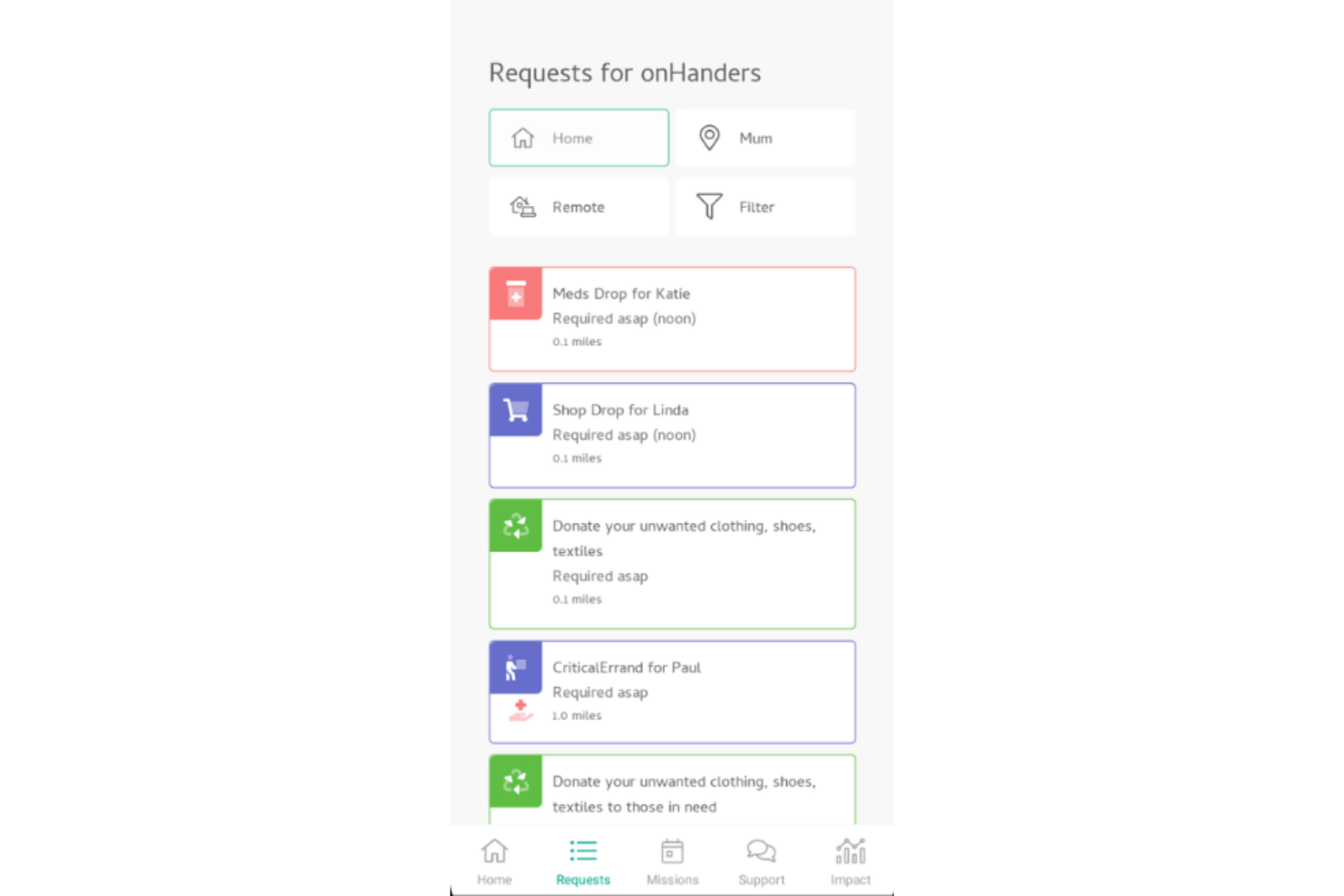
OnHand si distingue per il fatto che collega direttamente aziende e dipendenti a opportunità di volontariato iper-locali. Quando desideri che il tuo lavoro di responsabilità sociale d'impresa (CSR) abbia un impatto reale e visibile nelle tue comunità, questo è lo strumento su cui faccio affidamento.
Quello che apprezzo è come OnHand automatizzi l'abbinamento dei dipendenti con cause locali basate su interessi, disponibilità e competenze. È perfetto per i team che puntano a un coinvolgimento autentico che vada oltre le donazioni o gli eventi isolati.
OnHand è ideale per
- Aziende che danno priorità al volontariato pratico e locale nella comunità
- Programmi CSR focalizzati su un impatto comunitario reale e misurabile
OnHand non è adatto per
- Team che cercano una rete di volontariato ampia e globale
- Organizzazioni che necessitano di una gestione approfondita delle donazioni, del giving dei dipendenti o delle sovvenzioni
Cosa distingue OnHand
OnHand è costruito intorno al collegamento dei dipendenti con attività di volontariato locale, facili da iniziare e semplici da partecipare. A differenza di piattaforme come Benevity, che si concentrano su donazioni e giving aziendale su larga scala, OnHand si aspetta che le persone si coinvolgano direttamente nella propria comunità. In pratica, questa esperienza risulta meno astratta e più personale—specialmente per le aziende che vogliono un coinvolgimento locale visibile.
Compromessi con OnHand
Offre un'esperienza di volontariato locale più ricca, ma questa focalizzazione comporta una perdita in termini di portata globale e gestione avanzata delle organizzazioni benefiche. Se la tua strategia CSR si basa sul supporto di cause internazionali, OnHand non coprirà tutte le tue esigenze.
Pros and Cons
Pros:
- App mobile utile
- Offre un'ampia varietà di cause sociali
- Curva di apprendimento agevole
Cons:
- Alcune cause predefinite non hanno un obiettivo chiaro
- Nessuna funzione di ricerca per i programmi

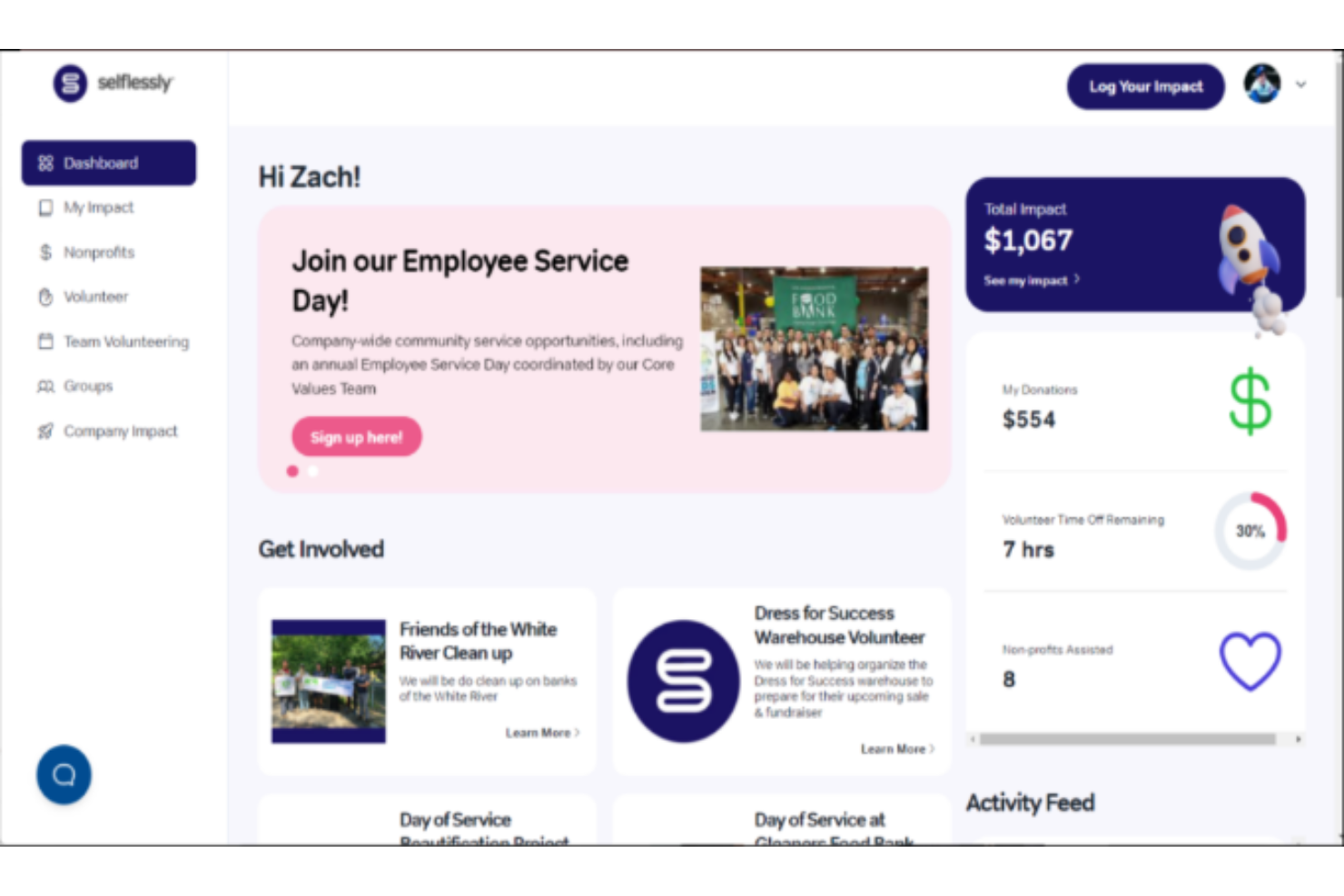
Selflessly si distingue per la gestione dei volontari perché combina monitoraggio, riconoscimento e coinvolgimento in un modo che raramente vedo altrove. Quando collaboro con i team HR nella costruzione di programmi CSR, questo è uno dei pochi strumenti che rende davvero intuitiva la gestione del volontariato aziendale—dalla creazione degli elenchi di opportunità alla reportistica automatica sull'impatto.
Ciò che apprezzo di più è il modo in cui Selflessly gestisce le iscrizioni di gruppo coordinate e la registrazione delle ore, così non è necessario mettere insieme fogli di calcolo o inseguire aggiornamenti da diversi team. Di solito lo consiglio quando le aziende vogliono rendere il volontariato una parte centrale del loro programma CSR, e non solo un'aggiunta marginale.
Selflessly è ideale per
- Team HR e CSR che gestiscono programmi di volontariato continuativi
- Aziende che desiderano monitoraggio automatico dei volontari e iscrizioni di gruppo
Selflessly non è ideale per
- Organizzazioni che si concentrano principalmente sull'abbinamento delle donazioni
- Team che necessitano di report complessi e personalizzati su tutti i pilastri CSR
Cosa distingue Selflessly
Selflessly è progettato per rendere semplice il coordinamento, il monitoraggio e il riconoscimento del volontariato. A differenza di piattaforme CSR all-in-one come Benevity, Selflessly si concentra soprattutto sull'aspetto del volontariato, anticipando il bisogno di una soluzione snella per gestire, promuovere e rendicontare gli eventi di volontariato. Nella pratica, questo lo rende ideale per i team HR e CSR che vogliono meno ostacoli nel lanciare e amministrare programmi di volontariato aziendale.
Compromessi con Selflessly
Selflessly è ottimizzato per il volontariato e quindi è meno sviluppato nella gestione delle donazioni e nella reportistica CSR più ampia. Se desideri uno strumento unico per tutte le iniziative CSR, potresti aver bisogno di un altro strumento per queste esigenze.
Pros and Cons
Pros:
- Ottimo per monitorare l'impatto del tuo team
- Consente di configurare facilmente campagne di abbinamento donazioni automatizzate
- Facile da navigare e utilizzare
Cons:
- I filtri di ricerca potrebbero essere più dettagliati
- Alcune associazioni benefiche sono elencate con nomi diversi, rendendole difficili da trovare
Altri software CSR
Ecco alcuni altri ottimi strumenti CSR che ho esaminato per questa recensione. Anche se non sono entrati nel mio elenco principale, dovresti considerarli:
- Chezuba
Ideale per organizzazioni globali
- Salesforce Philanthropy Cloud
Ideale per raccomandazioni basate sulla posizione
- Pachama
Ideale per programmi di conservazione delle foreste


Come Valuto il Software CSR
Divido la mia valutazione in due livelli: le funzionalità di base che ogni strumento CSR deve avere—come volontariato, donazioni abbinate e reportistica d'impatto—e i fattori differenzianti che distinguono le piattaforme.
Funzionalità di Base (Requisiti Fondamentali per questa Lista)
Quando seleziono gli strumenti per la mia lista, classifico ognuno su una scala da 0 (non offre la funzionalità) a 5 (eccelle in quest'area) per ciascuna delle funzionalità di base elencate di seguito. Successivamente, calcolo il punteggio totale dello strumento in percentuale. Ogni strumento deve raggiungere un punteggio totale minimo del 65% per essere considerato.
- Gestione del Volontariato dei Dipendenti: Cerco la possibilità di creare eventi, flussi di iscrizione e il tracciamento delle ore che permettano alle risorse umane di organizzare giornate di volontariato aziendale o programmi continui basati sulle competenze.
- Donazioni & Regali Abbinati: Che si tratti di trattenute in busta paga o donazioni una tantum, valuto quanto bene ogni piattaforma gestisce le donazioni dei dipendenti e automatizza l’abbinamento aziendale.
- Database No Profit & Verifica: Una solida piattaforma CSR offre ai dipendenti accesso a una directory verificata di organizzazioni no profit idonee, così il team HR non deve verificare manualmente ogni ente.
- Reportistica d’Impatto & Analisi: Controllo dashboard che tracciano i tassi di partecipazione, le donazioni complessive e le ore di volontariato—soprattutto quelle allineate ai framework ESG o SDG.
- Gestione delle Sovvenzioni: Per i team che gestiscono fondi di investimento comunitari, valuto l’iter di candidatura, i flussi di revisione, il tracciamento delle erogazioni e le funzioni di monitoraggio del budget.
- Integrazioni HRIS & Payroll: La connessione con piattaforme come Workday, BambooHR o ADP per la sincronizzazione dei dati dei dipendenti è fondamentale, quindi valuto la libreria di integrazioni native di ogni strumento.
Una volta che ho una lista di strumenti che soddisfano questi criteri, considero cosa distingue ciascuna piattaforma.
Fattori Differenzianti (Cosa Distingue i Fornitori)
Ecco come confronto diversi fornitori:
Funzionalità Distintive
Il volontariato basato sulle competenze è un grande elemento differenziante. Cerco piattaforme che abbinano i dipendenti a progetti no profit in base alle loro competenze, non solo alla disponibilità. Caratteristiche di gamification come classifiche e badge aiutano anche i team HR a incentivare la partecipazione senza dover sollecitare costantemente. Per le organizzazioni con workforce distribuite, valuto il supporto multilingue e donazioni in multi-valuta, poiché organizzare una settimana mondiale del volontariato è inefficace se metà del team non può usare la piattaforma nella propria lingua preferita.
Oltre le Caratteristiche
La trasparenza dei prezzi è molto importante in questo ambito. Verifico se i fornitori applicano costi per dipendente, per transazione o una tariffa fissa—e se i costi di erogazione o abbinamento sono chiaramente indicati in anticipo. L'allineamento a framework ESG e di conformità è un altro aspetto che valuto attentamente, soprattutto per i team che devono mappare le attività CSR ai framework GRI o SASB per la rendicontazione annuale. Considero anche il supporto durante l'onboarding, dato che lanciare un programma di donazioni a livello aziendale richiede più di un semplice link per l’accesso. Template di campagne predefinite e la presenza di esperti CSR dedicati possono davvero fare la differenza durante l’implementazione.
Come scegliere il software CSR
È facile perdersi in lunghi elenchi di funzionalità e strutture tariffarie complesse. Per aiutarti a rimanere concentrato mentre affronti il tuo specifico processo di selezione del software, ecco un elenco dei fattori da tenere a mente:
| Fattore | Cosa considerare |
|---|---|
| Scalabilità | Il software può crescere insieme alla tua azienda? Assicurati che sia in grado di gestire l'aumento dei dati e degli utenti con l'espansione delle tue iniziative CSR. |
| Integrazioni | Si integra con i sistemi esistenti, come gli strumenti per le risorse umane, la finanza e la gestione dei progetti? Verifica che il flusso dei dati sia fluido. |
| Personalizzazione | Puoi adattare il software alle tue specifiche esigenze CSR? Cerca flessibilità nei report e nei flussi di lavoro. |
| Facilità d'uso | Il software è intuitivo per il tuo team? Prova l'interfaccia utente con i potenziali utenti per assicurarti che sia semplice ed efficiente. |
| Implementazione e avviamento | Quanto tempo occorrerà per rendere operativo il software? Considera le risorse necessarie per la formazione e la disponibilità dell'assistenza durante la configurazione. |
| Costo | La struttura dei prezzi è trasparente? Confrontala con il tuo budget e considera il costo totale di proprietà, comprese eventuali commissioni nascoste o contratti a lungo termine. |
| Misure di sicurezza | Il software è conforme alle normative sulla protezione dei dati? Verifica gli standard di crittografia e i controlli degli accessi per proteggere le informazioni sensibili. |
| Disponibilità dell'assistenza | Che tipo di assistenza offre il fornitore? Assicurati che sia disponibile un supporto tempestivo tramite canali come chat, telefono o e-mail quando hai bisogno di aiuto. |
Che cos'è il software CSR?
Il software CSR è uno strumento progettato per aiutare le organizzazioni a gestire le proprie iniziative di responsabilità sociale d'impresa. I professionisti delle risorse umane, della sostenibilità e della conformità utilizzano generalmente questi strumenti per allineare le pratiche aziendali agli obiettivi sociali e ambientali. Il monitoraggio dell'impatto sociale, la gestione delle iniziative di sostenibilità e il coinvolgimento degli stakeholder aiutano ad allineare i valori aziendali e a rendicontare le attività CSR. Nel complesso, questi strumenti semplificano la gestione degli sforzi CSR, rendendo più facile ottenere e dimostrare un impatto sociale positivo.
Funzionalità
Quando selezioni un software CSR, presta attenzione alle seguenti funzionalità chiave:
- Monitoraggio dell'impatto sociale: consente di misurare e rendicontare i contributi e i risultati sociali della tua azienda.
- Gestione della sostenibilità: aiuta a organizzare e monitorare efficacemente gli obiettivi e le iniziative di sostenibilità.
- Coinvolgimento degli stakeholder: facilita la comunicazione e la collaborazione con gli stakeholder per allinearsi agli obiettivi CSR.
- Rendicontazione personalizzabile: offre flessibilità nella creazione di report adattati a metriche e obiettivi CSR specifici.
- Funzionalità di integrazione: garantisce un flusso di dati continuo tra il software CSR e altri sistemi aziendali, come quelli delle risorse umane e finanziari.
- Analisi in tempo reale: fornisce informazioni aggiornate sulle prestazioni CSR, consentendo di prendere decisioni tempestive.
- Monitoraggio della conformità: automatizza la conformità alle normative pertinenti, riducendo i rischi e il carico amministrativo.
- Interfaccia intuitiva: garantisce facilità d'uso, riducendo al minimo la curva di apprendimento per i nuovi utenti.
- Risorse per la formazione: include l'accesso a tutorial, webinar e assistenza per agevolare l'inserimento e l'utilizzo continuativo.
- Misure di sicurezza: protegge i dati sensibili con crittografia e controlli degli accessi, garantendo la conformità agli standard di protezione dei dati.
Vantaggi
L'implementazione di un software CSR offre diversi vantaggi al tuo team e alla tua azienda. Ecco alcuni dei risultati che puoi aspettarti:
- Maggiore impatto sociale: monitora e misura i contributi sociali della tua azienda, aiutandoti a migliorare il tuo impatto positivo.
- Gestione efficiente della sostenibilità: organizza e monitora gli obiettivi di sostenibilità, rendendo più facile raggiungerli.
- Collaborazione rafforzata con gli stakeholder: facilita la comunicazione con gli stakeholder, garantendo che tutti siano allineati agli obiettivi CSR.
- Rendicontazione personalizzabile: consente di creare report adattati alle proprie esigenze, fornendo informazioni specifiche sui tuoi sforzi CSR.
- Integrazione dei dati: garantisce un flusso di dati fluido tra il sistema CSR e gli altri sistemi aziendali, riducendo l'inserimento manuale dei dati.
- Processo decisionale tempestivo: le analisi in tempo reale forniscono informazioni aggiornate, aiutandoti a prendere rapidamente decisioni informate.
- Conformità normativa: automatizza il monitoraggio dei requisiti di conformità, riducendo i rischi e garantendo il rispetto degli standard.
Costi & prezzi
La scelta di un software CSR richiede la comprensione dei vari modelli e piani tariffari disponibili. I costi variano in base alle funzionalità, alle dimensioni del team, ai componenti aggiuntivi e ad altri fattori. La tabella seguente riassume i piani più comuni, i relativi prezzi medi e le funzionalità tipicamente incluse nelle soluzioni software CSR:
Tabella comparativa dei piani per il software CSR
| Tipo di piano | Prezzo medio | Funzionalità comuni |
|---|---|---|
| Piano gratuito | $0 | Report di base, accesso limitato degli utenti e assistenza di base. |
| Piano personale | $5-$25/user/month | Report avanzati, interfaccia intuitiva e integrazione con altri strumenti. |
| Piano aziendale | $30-$75/user/month | Cruscotti personalizzabili, analisi avanzate e assistenza clienti prioritaria. |
| Piano aziendale avanzato | $100+/user/month | Accesso a tutte le funzionalità, responsabile dedicato e monitoraggio della conformità personalizzabile. |
Le persone chiedono anche
Vuoi saperne di più sulla responsabilità sociale d’impresa? Ecco alcune domande frequenti su questo argomento:
Il software per la CSR può integrarsi con i sistemi aziendali esistenti?
Sì, la maggior parte dei software per la CSR può integrarsi con i sistemi aziendali esistenti, come gli strumenti per le risorse umane, la finanza e la gestione dei progetti. Le funzionalità di integrazione sono fondamentali per garantire che i dati fluiscano senza problemi tra i sistemi, ridurre l’inserimento manuale dei dati e migliorare l’efficienza complessiva. Quando valuti il software, verifica che supporti le integrazioni specifiche richieste dalla tua azienda per massimizzarne l’efficacia.
Con quale frequenza dovresti aggiornare il software per la CSR?
Dovresti aggiornare regolarmente il software per la CSR per assicurarti che rimanga efficace e sicuro. Molti fornitori rilasciano periodicamente aggiornamenti per correggere bug, aggiungere nuove funzionalità e migliorare la sicurezza. Mantenere il software aggiornato ti aiuta a garantire operazioni fluide e a sfruttare gli ultimi miglioramenti. Gli aggiornamenti regolari garantiscono inoltre la conformità a eventuali nuove normative o standard nel campo della CSR.