

10 migliori strumenti per verificare i pregiudizi nelle descrizioni di lavoro nel 2026

Migliore selezione di strumenti per il controllo dei bias nelle descrizioni delle offerte di lavoro
- 4. Diversely.io


Un controllore dei bias nelle descrizioni delle offerte di lavoro è uno strumento che analizza gli annunci di lavoro per individuare linguaggio discriminatorio o escludente prima che arrivino ai candidati. Se vuoi attrarre un team diversificato e qualificato e ridurre le barriere involontarie nel processo di selezione, lo strumento giusto può fare davvero la differenza.
Questa guida illustra cosa offrono i migliori strumenti per il controllo dei bias, perché i principali team HR li utilizzano e come puoi usare queste soluzioni per scrivere descrizioni delle offerte di lavoro che promuovano equità, conformità e inclusione nel 2026.
Perché fidarsi delle nostre recensioni sui software
Il nostro team testa e recensisce software dal 2012. In quanto esperti HR noi stessi, sappiamo quanto sia difficile — e importante — scegliere il software giusto.
Per questa guida, abbiamo valutato gli strumenti attraverso test pratici e ricerche indipendenti, assegnando un punteggio agli strumenti in base ai nostri criteri di selezione. Ci basiamo inoltre sulle competenze di leader di pensiero del settore e di professionisti HR attivi.
Le nostre recensioni riflettono il nostro giudizio editoriale umano, non un discorso di vendita.
Revisori esperti:
Riepilogo dei migliori strumenti per il controllo dei bias nelle descrizioni delle offerte di lavoro
Questa tabella comparativa riassume i dettagli dei prezzi dei miei strumenti per il controllo dei bias nelle descrizioni delle offerte di lavoro, per aiutarti a trovare quello più adatto al tuo budget e alle esigenze della tua azienda.
| Tool | Best For | Trial Info | Price | ||
|---|---|---|---|---|---|
| 1 | Ideale per controlli dei pregiudizi nelle descrizioni delle posizioni basati sui colloqui | Piano gratuito disponibile | A partire da $100/utente/mese | Website | |
| 2 | Ideale per controlli dei bias negli annunci basati sulla retribuzione su larga scala | Piano gratuito e demo gratuita disponibili | Prezzi su richiesta | Website | |
| 3 | Ideale per controlli dei pregiudizi basati sulla ricerca e su più categorie | Demo gratuita disponibile | Da $20,000/anno (fatturato annualmente) | Website | |
| 4 | Non disponibile | Prezzi su richiesta | Website | ||
| 5 | Ideale per il monitoraggio personalizzato della conformità linguistica | Demo gratuita disponibile | Prezzo su richiesta | Website | |
| 6 | Ideale per la governance dei bias dell'intelligenza artificiale certificata da terze parti | Demo gratuita disponibile | A partire da $28,000/anno (fatturato annualmente) | Website | |
| 7 | Ideale per il rilevamento dei pregiudizi in 8 categorie basato sui dati | Demo gratuita disponibile | Prezzi su richiesta | Website | |
| 8 | Ideale per il coaching sul linguaggio inclusivo legato ai risultati | Demo gratuita disponibile | Prezzi su richiesta | Website | |
| 9 | Ideale per guida automatica alla scrittura su larga scala | Demo gratuita disponibile | Da $4,900/anno | Website | |
| 10 | Ideale per rilevare pregiudizi sottili con il supporto della ricerca scientifica | Demo gratuita disponibile | Prezzi su richiesta | Website |
Recensioni dei migliori strumenti per il controllo dei bias nelle descrizioni delle offerte di lavoro
Di seguito trovi i miei riepiloghi dettagliati dei migliori strumenti per il controllo dei bias nelle descrizioni delle offerte di lavoro inclusi nella mia selezione. Le mie recensioni offrono un’analisi approfondita delle funzionalità, delle integrazioni e dei casi d’uso ideali di ogni strumento, per aiutarti a trovare quello più adatto a te.

Metaview
Ideale per controlli dei pregiudizi nelle descrizioni delle posizioni basati sui colloqui
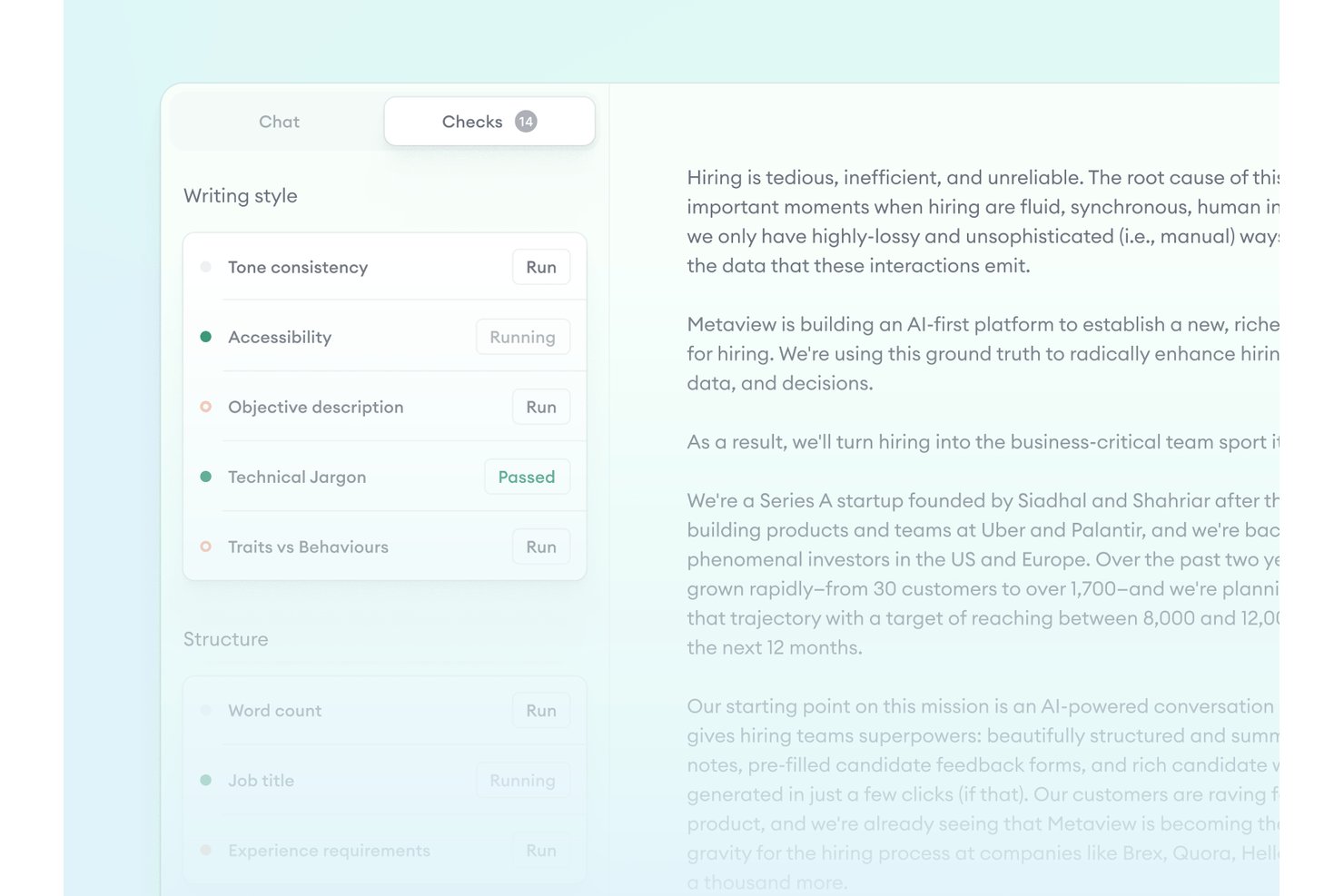
Metaview è una piattaforma di reclutamento agentico con una funzionalità per gli annunci di lavoro che segnala il linguaggio con connotazioni di genere, i termini non inclusivi e le formulazioni eccessivamente competitive nelle descrizioni delle posizioni, confrontando al contempo gli annunci con le schede di valutazione dei colloqui e le chiamate di raccolta dei requisiti.
Per chi è più adatto Metaview?
Metaview è adatto alle squadre di acquisizione dei talenti che desiderano controlli dei pregiudizi nelle descrizioni delle posizioni collegati direttamente alle chiamate di raccolta dei requisiti e alle schede di valutazione dei colloqui, anziché uno strumento di modifica indipendente.
Perché ho scelto Metaview
Ho scelto Metaview come uno dei migliori strumenti per il suo approccio ai controlli dei pregiudizi nelle descrizioni delle posizioni basato sulle informazioni dei colloqui, che nessun altro strumento di questo elenco replica. La funzionalità per gli annunci di lavoro confronta le descrizioni delle posizioni pubblicate e in bozza con le registrazioni delle chiamate di raccolta dei requisiti e le schede di valutazione, segnalando le lacune quando i requisiti dichiarati dal responsabile delle assunzioni non corrispondono a ciò che è effettivamente pubblicato. Rileva inoltre il linguaggio con connotazioni di genere, i termini non inclusivi e le formulazioni eccessivamente competitive, applicando al contempo la voce del tuo marchio affinché le riscritture mantengano il tono appropriato.
Funzionalità principali di Metaview
- Applicazione della voce del marchio: L'IA apprende la proposta di valore del datore di lavoro e il tono della tua azienda, così le riscritture relative ai pregiudizi rimangono coerenti con il marchio anziché risultare generiche.
- Aggiornamento nell'ATS: Metaview reinserisce i dati aggiornati degli annunci di lavoro direttamente nelle piattaforme ATS collegate, tra cui Greenhouse, Lever e Ashby.
- Controlli personalizzabili: Le squadre possono configurare quali controlli DEI e di qualità applicare ai propri annunci di lavoro in base agli standard interni.
- Supporto multilingue per gli annunci di lavoro: La piattaforma supporta oltre 50 lingue, consentendo alle squadre internazionali di controllare le descrizioni delle posizioni scritte in lingue diverse dall'inglese.
Integrazioni di Metaview
Metaview dispone di oltre 47 integrazioni ATS native, tra cui Greenhouse, Lever, Workday, Ashby, iCIMS, SmartRecruiters e SAP SuccessFactors. L'aggiornamento nell'ATS è supportato per Ashby, Greenhouse e Lever; al momento non è elencata alcuna API pubblica.
Pros and Cons
Pros:
- Segnala il linguaggio basandosi sulle informazioni dei colloqui
- Personalizza i suggerimenti sui pregiudizi in base alla voce del tuo marchio
- Controlla gli annunci di lavoro in oltre 50 lingue
Cons:
- Nessun punteggio numerico dei pregiudizi né pannelli di controllo DEI
- Copertura limitata delle categorie di pregiudizi oltre al genere

Payscale
Ideale per controlli dei bias negli annunci basati sulla retribuzione su larga scala
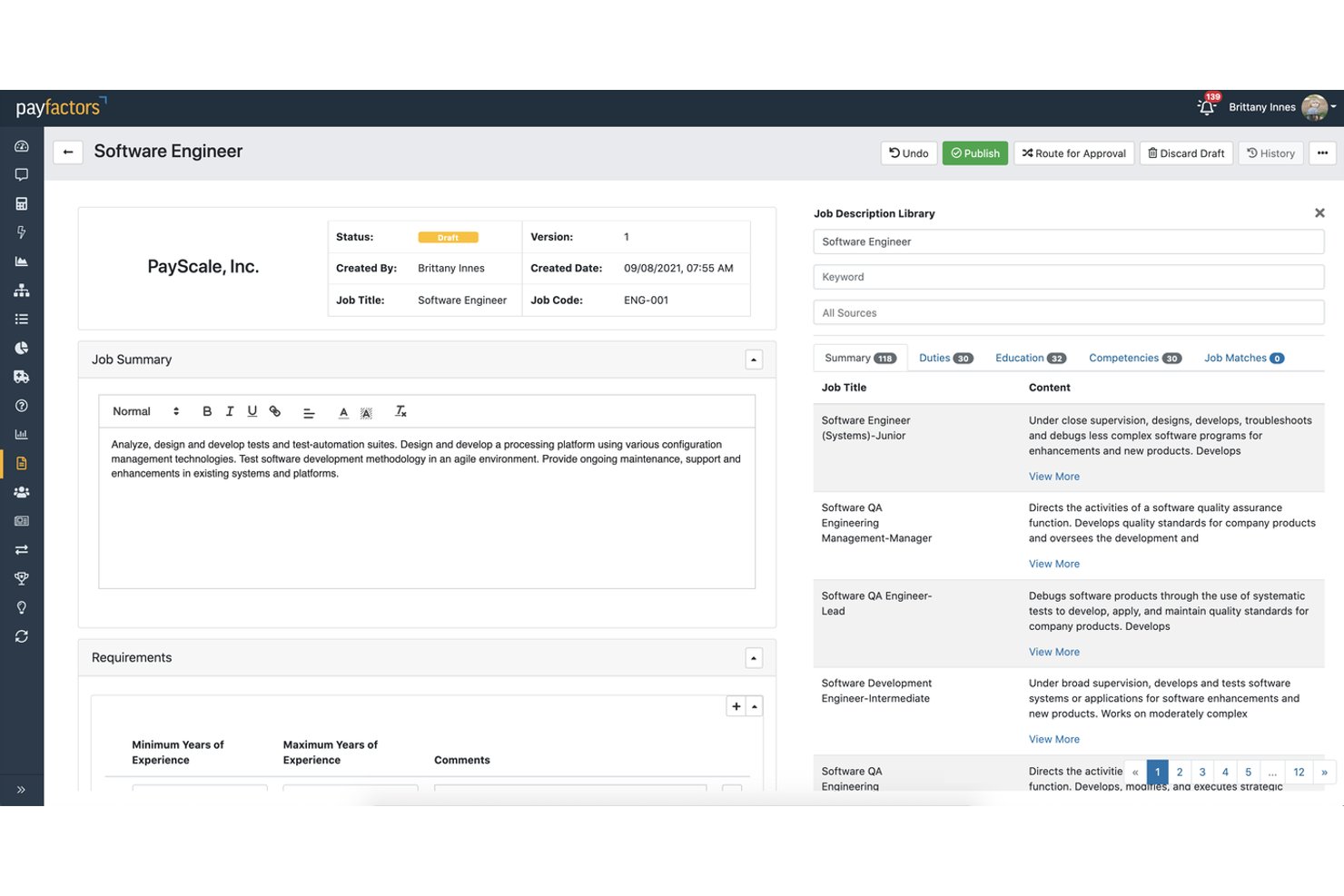
Payscale è una piattaforma di intelligence retributiva che, attraverso il modulo JobNav Recruiter, combina la valutazione delle descrizioni delle posizioni guidata dall'intelligenza artificiale, la generazione di un linguaggio inclusivo e i controlli di conformità per più Paesi, per aiutare i team aziendali a creare e gestire offerte di lavoro su larga scala.
Per chi è più indicato Payscale?
Payscale è particolarmente adatto ai team aziendali di acquisizione dei talenti e delle risorse umane che hanno bisogno di creare JD inclusive, garantire la conformità alla trasparenza retributiva e allineare le retribuzioni in un unico flusso di lavoro.
Perché ho scelto Payscale
Ho scelto Payscale come uno dei migliori strumenti perché nessun altro strumento di questo elenco integra direttamente la conformità alla trasparenza retributiva nel processo di revisione dei bias delle JD. Quando il team scrive un'offerta di lavoro, JobNav Recruiter la valuta simultaneamente in base a inclusività, conformità e chiarezza, consentendo di individuare nello stesso passaggio il linguaggio discriminatorio e le omissioni illegali relative alla retribuzione. Apprezzo particolarmente il fatto che sia basato sui dati di oltre 100 milioni di offerte di lavoro, il che conferisce alle riscritture generate dall'intelligenza artificiale un reale fondamento di mercato, anziché sostituzioni generiche.
Caratteristiche principali di Payscale
- Valutazione delle descrizioni delle posizioni tramite intelligenza artificiale: valuta ogni JD simultaneamente in base a inclusività, conformità e chiarezza prima della pubblicazione dell'offerta.
- Architettura delle posizioni governata: blocca i livelli e le famiglie professionali, oltre a una libreria di competenze mappata, per imporre un linguaggio coerente e inclusivo in tutte le offerte.
- Sincronizzazione bidirezionale con Greenhouse: sincronizza automaticamente i contenuti delle posizioni tra JobNav Recruiter e Greenhouse ogni 20 minuti, mantenendo coerenti le offerte sulle diverse piattaforme.
- Controlli di conformità per più Paesi: segnala automaticamente i requisiti di trasparenza retributiva e normativi in oltre 80 Paesi, incluse le leggi a livello statale degli Stati Uniti e la direttiva dell'UE.
Integrazioni di Payscale
Payscale offre un'integrazione nativa bidirezionale con Greenhouse, indica la disponibilità di connettività con Workday e fornisce 14 integrazioni HRIS tramite il suo Marketplace dei partner. La sua API supporta integrazioni personalizzate.
Pros and Cons
Pros:
- Segnala i problemi relativi alla trasparenza retributiva e alla conformità
- Valuta le descrizioni delle posizioni prima della pubblicazione
- Genera un linguaggio inclusivo a partire dall'architettura delle posizioni
Cons:
- Le categorie di bias non sono suddivise in modo specifico
- Non è uno strumento autonomo dedicato al controllo dei bias

Ideale per controlli dei pregiudizi basati sulla ricerca e su più categorie
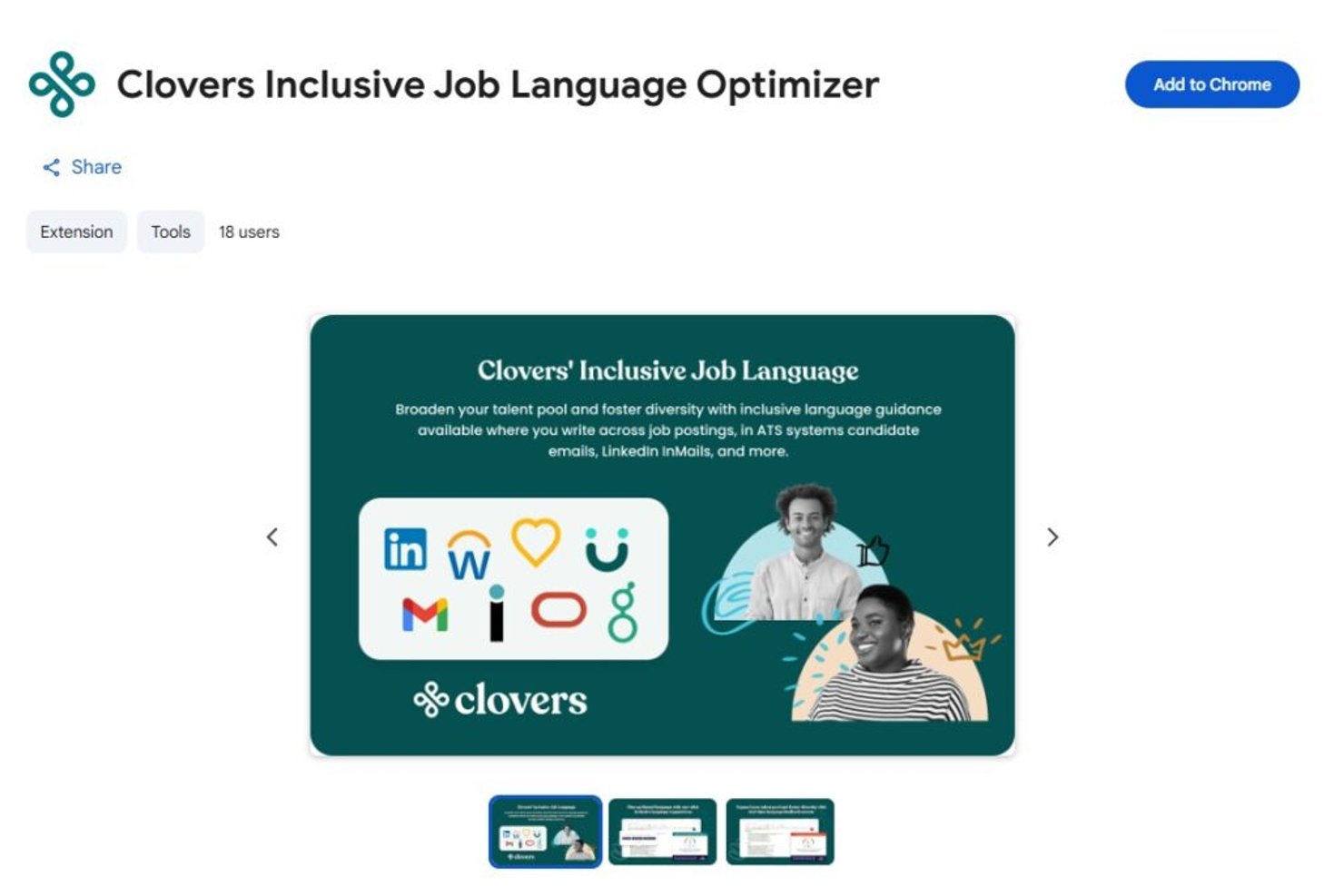
Clovers AI è uno strumento per il controllo dei pregiudizi nelle descrizioni delle posizioni e una piattaforma per assunzioni inclusive che combina un motore di ottimizzazione linguistica convalidato dalla ricerca con un editor di descrizioni delle posizioni basato sull'intelligenza artificiale, un punteggio dei pregiudizi per più categorie e un'estensione di Chrome per la modifica direttamente nel browser.
Per chi è più adatta Clovers AI?
Clovers AI è particolarmente adatta ai team aziendali di acquisizione dei talenti che hanno bisogno di rilevare i pregiudizi sulla base di ricerche sottoposte a revisione paritaria in diverse categorie protette.
Perché ho scelto Clovers AI
Ho scelto Clovers AI perché il suo motore di rilevamento dei pregiudizi è uno dei pochi che abbia visto basati su ricerche sottoposte a revisione paritaria, in particolare su uno studio della Duke University che determina il modo in cui segnala il linguaggio in sei categorie protette: genere, razza, etnia, disabilità, status di veterano e identità LGBTQ+. L'estensione di Chrome controlla il linguaggio in tempo reale, direttamente all'interno dello strumento che stai già utilizzando per scrivere, quindi non è necessario copiare e incollare il testo. Ritengo inoltre che il punteggio di inclusività in tempo reale, che si aggiorna mentre modifichi il testo, fornisca ai selezionatori un feedback immediato e concreto invece di un risultato generico di superamento o mancato superamento.
Funzionalità principali di Clovers AI
- Integrazioni ATS: Si connette nativamente a oltre 12 piattaforme ATS e HRIS, tra cui Greenhouse, Workday, Lever e SAP SuccessFactors, con supporto per la sincronizzazione bidirezionale.
- Estensione di Chrome: Controlla la presenza di pregiudizi nel linguaggio delle descrizioni delle posizioni direttamente nel browser, sulle piattaforme ATS, in Google Docs e nelle e-mail, senza dover copiare e incollare il testo.
- Flusso di lavoro di assunzione a ciclo chiuso: Combina l'ottimizzazione delle descrizioni delle posizioni con la generazione strutturata di domande per i colloqui e la trascrizione dei colloqui, coprendo il rilevamento dei pregiudizi durante l'intero processo di assunzione.
- Conformità a SOC 2 Tipo II e GDPR: Soddisfa fin da subito i requisiti aziendali di sicurezza e privacy dei dati.
Integrazioni di Clovers AI
Clovers AI offre oltre 12 integrazioni ATS e HRIS native, tra cui Greenhouse, Workday, Lever e SAP SuccessFactors. Supporta inoltre la sincronizzazione bidirezionale, l'accesso SSO e l'accesso API per integrazioni personalizzate.
Pros and Cons
Pros:
- Segnala i pregiudizi in sei categorie protette
- L'estensione di Chrome controlla le descrizioni delle posizioni in tempo reale
- Il punteggio di inclusività si aggiorna mentre modifichi il testo
Cons:
- Nessuna funzionalità per la conformità alla trasparenza retributiva
- Coaching limitato nell'app sulle scelte linguistiche

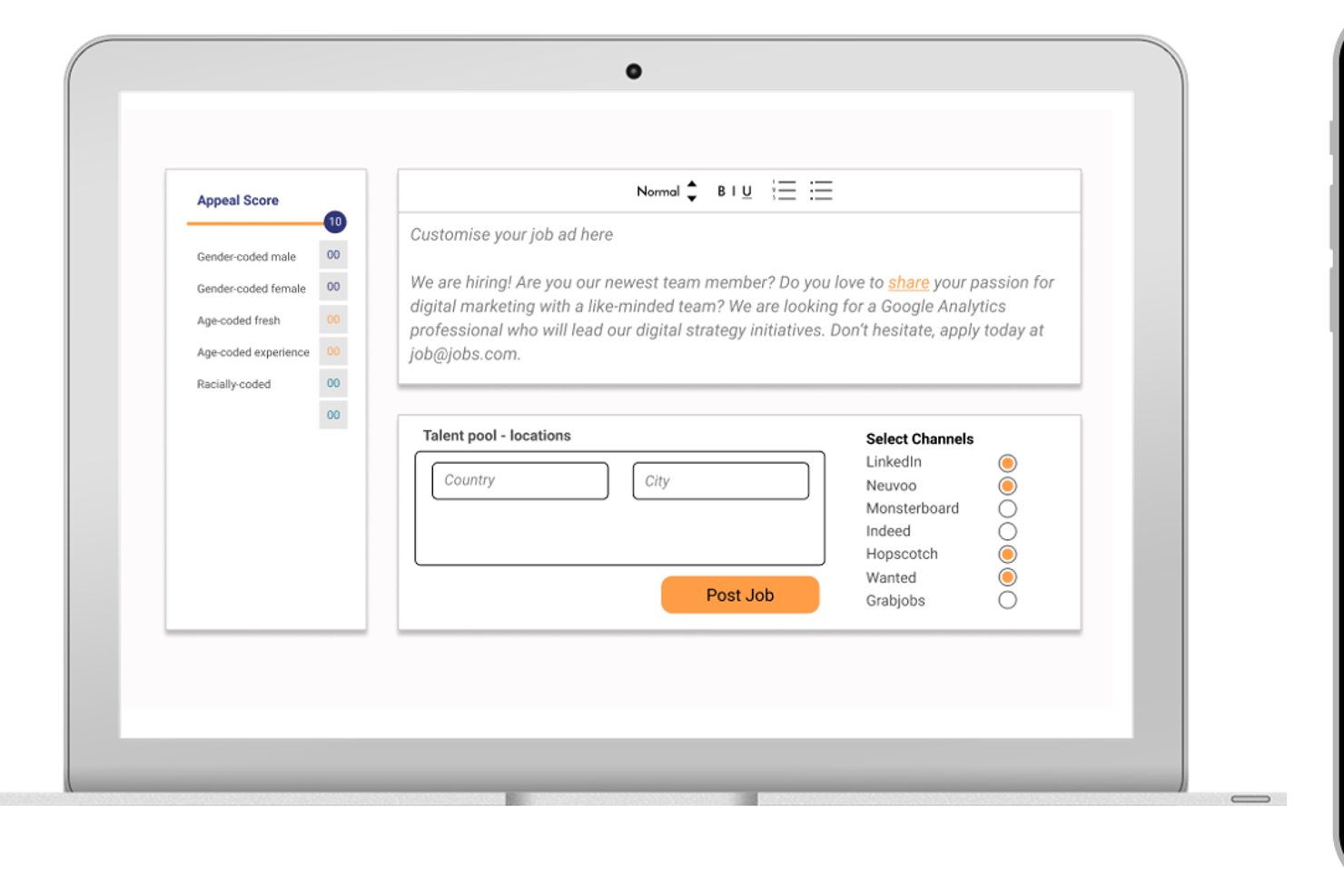
Diversely.io è una piattaforma di selezione del personale DEI che combina un analizzatore dei pregiudizi negli annunci di lavoro basato sull'IA, la selezione anonima dei candidati, la distribuzione degli annunci su bacheche di lavoro incentrate sulla diversità e il monitoraggio multidimensionale della diversità fino a otto dimensioni demografiche.
A chi è più adatto Diversely.io?
Diversely.io è particolarmente adatto alle aziende di ricerca e selezione e alle agenzie di selezione del personale che desiderano integrare le pratiche DEI nell'intero ciclo di assunzione, dalla stesura degli annunci di lavoro alla selezione dei candidati.
Perché ho scelto Diversely.io
Ho incluso Diversely.io tra le mie scelte principali perché va ben oltre un semplice strumento autonomo di verifica dei pregiudizi, coprendo l'intero ciclo di assunzione, dall'analisi degli annunci di lavoro alla selezione anonima e alla reportistica DEI. Mi piace particolarmente il fatto che l'Analizzatore dei pregiudizi basato sull'IA non si limiti a segnalare un linguaggio sessista o escludente; suggerisce attivamente riscritture inclusive, esattamente ciò di cui le aziende di ricerca e selezione hanno bisogno quando gestiscono grandi volumi di annunci di lavoro per più clienti. La piattaforma monitora inoltre fino a otto dimensioni della diversità, incluso lo status socioeconomico, e distribuisce gli annunci su bacheche di lavoro di nicchia dedicate alla diversità per ampliare attivamente i bacini di candidati.
Funzionalità principali di Diversely.io
- Anonimizzatore dei profili: Riscrive automaticamente i profili dei candidati per rimuovere i dati identificativi come nome, età e istituto scolastico, lasciando solo i contenuti rilevanti per le competenze ai fini della preselezione.
- Distribuzione su bacheche di lavoro di nicchia: Pubblica gli annunci di lavoro su bacheche di lavoro globali specifiche per la diversità e di nicchia, per raggiungere bacini di candidati sottorappresentati.
- Pannello di controllo personalizzabile sulla diversità: Monitora in tempo reale i dati sulla diversità nelle assunzioni, con filtri per paese, reparto e ruolo, oltre all'esportazione in Excel per la reportistica.
- Integrazioni ATS: Si connette nativamente a Greenhouse, JobAdder, Bullhorn, SAP SuccessFactors e Recruitee per integrare il monitoraggio DEI direttamente nei flussi di lavoro di assunzione esistenti.
Integrazioni di Diversely.io
Diversely.io dispone di integrazioni native con Greenhouse, JobAdder, Bullhorn, SAP SuccessFactors e Recruitee. Bryq, Crelate, Access Volcanic e un'API supportano ulteriori connessioni.
Pros and Cons
Pros:
- Monitora fino a otto dimensioni della diversità
- L'IA suggerisce riscritture inclusive per gli annunci di lavoro
- Anonimizza i profili per una valutazione più equa dei candidati
Cons:
- Non disponibile come prodotto autonomo
- Non segnala la conformità alla trasparenza retributiva


Una piattaforma di conformità dei contenuti basata su IA, Textmetrics analizza le descrizioni delle posizioni lavorative per individuare bias di genere, problematiche di linguaggio inclusivo e difficoltà di leggibilità, utilizzando regole configurabili impostate dalla tua organizzazione.
Per chi è più indicato Textmetrics?
Textmetrics è particolarmente adatto a team HR e di employer branding in settori regolamentati dove è necessario che il linguaggio inclusivo delle offerte di lavoro sia allineato alle politiche DEI interne o agli standard normativi regionali.
Perché ho scelto Textmetrics
Ho scelto Textmetrics tra le mie soluzioni preferite perché mi piace che la piattaforma integri la conformità linguistica direttamente nel processo di scrittura, e non solo come revisione dopo la stesura. La funzionalità di elenchi di parole personalizzati permette al mio team di segnalare o bloccare termini specifici che non rispettano i nostri standard di inclusione, una soluzione che trovo molto più efficace rispetto all'utilizzo di regole generiche.
Inoltre sfrutto il supporto multilingue per applicare gli stessi standard di conformità in annunci redatti in diverse lingue, mantenendo la coerenza dei nostri criteri a livello globale.
Caratteristiche principali di Textmetrics
- Punteggio bias di genere: Valuta ogni annuncio di lavoro su una scala linguistica dal maschile al femminile, così puoi vedere a colpo d'occhio quanto la tua descrizione risulti di genere.
- Valutazione leggibilità: Analizza la complessità del testo rispetto a un livello di lettura target per rendere le offerte di lavoro accessibili a un pubblico più ampio di candidati.
- Controllo tono di voce: Confronta la tua scrittura con le linee guida predefinite del tono di voce del brand per mantenere coerenza tra diversi autori.
- Integrazione plugin ATS: Integra l'assistente di scrittura direttamente nell'ATS esistente così gli autori ricevono feedback di conformità senza cambiare strumento.
Integrazioni di Textmetrics
Le integrazioni includono Greenhouse, SmartRecruiters, Lever by Employ, Recruitee, Pinpoint, Ubeeo, WordPress, Drupal, Optimizely e Adobe Experience Manager.
Pros and Cons
Pros:
- Ampio spettro di verifiche identitarie
- Offre un ampio supporto multilingue
- Suggerimenti di inclusività in tempo reale durante la scrittura
Cons:
- Accuratezza limitata con grammatica complessa in lingue non inglesi
- Non applica automaticamente le modifiche suggerite

X0PA AI
Ideale per la governance dei bias dell'intelligenza artificiale certificata da terze parti
X0PA AI è una piattaforma di reclutamento basata sull'intelligenza artificiale che integra il rilevamento dei bias direttamente nel generatore di descrizioni delle posizioni lavorative, analizzando il linguaggio connotato in base al genere, razziale, etnico e culturale in oltre 72 lingue, con suggerimenti di riscrittura inclusiva integrati nel flusso di creazione.
Per chi è più adatta X0PA AI?
X0PA AI è adatta ai team aziendali multinazionali che necessitano di controlli dei bias nelle descrizioni delle posizioni lavorative in decine di lingue e regioni all'interno di un'unica piattaforma di reclutamento.
Perché ho scelto X0PA AI
Ho scelto X0PA AI come una delle migliori perché nessun altro strumento di questo elenco analizza i bias legati al genere, razziali, etnici e culturali in oltre 72 lingue, un aspetto importante quando si assume in regioni in cui le sfumature linguistiche cambiano radicalmente. Il rilevamento dei bias è integrato nel flusso di generazione delle descrizioni delle posizioni lavorative, quindi le riscritture inclusive avvengono durante la stesura, non in un secondo momento. È inoltre l'unico strumento qui presente a disporre di certificazioni indipendenti di equità dell'intelligenza artificiale rilasciate dall'IMDA di Singapore e dall'AI Center di Dubai, offrendo ai team aziendali DEI una convalida da parte di terzi che va oltre le autodichiarazioni del fornitore.
Funzionalità principali di X0PA AI
- Inclusione automatica della dichiarazione EEO: Il generatore incorpora automaticamente dichiarazioni EEO e di conformità in ogni descrizione della posizione lavorativa che produce.
- Varianti illimitate delle descrizioni delle posizioni lavorative: È possibile generare più versioni di una descrizione della posizione lavorativa per test A/B o per la pubblicazione specifica su determinate piattaforme.
- Calcolatore dell'impatto avverso: Uno strumento integrato quantifica i bias nelle assunzioni in base al genere e alla razza/etnia utilizzando la Regola dei quattro quinti dell'EEOC.
- Pubblicazione con un clic sulle bacheche di lavoro: Le descrizioni delle posizioni lavorative completate vengono pubblicate direttamente su oltre 2.000 bacheche di lavoro dalla piattaforma.
Integrazioni di X0PA AI
X0PA AI offre oltre 60 integrazioni preconfigurate, tra cui Greenhouse, Workday, SAP SuccessFactors, Oracle HCM, Lever, SmartRecruiters, Taleo e Jobvite. La sua API supporta connettori personalizzati per ulteriori sistemi HR.
Pros and Cons
Pros:
- Equità certificata da organismi indipendenti di intelligenza artificiale
- Controlli dei bias in oltre 72 lingue e regioni
- Riscritture inclusive integrate durante la stesura delle descrizioni delle posizioni lavorative
Cons:
- Disponibile solo all'interno di una piattaforma di reclutamento più ampia
- Nessuna opzione autonoma per la scansione delle descrizioni delle posizioni lavorative


Datapeople è una piattaforma di ottimizzazione degli annunci di lavoro che combina intelligenza artificiale focalizzata sui talenti, valutazione di pregiudizi e linguaggio, gestione dei modelli e controlli delle policy per aiutare i team a scrivere, standardizzare e pubblicare annunci di lavoro.
Per chi è più adatto Datapeople?
Datapeople è particolarmente adatto ai team di selezione e ai responsabili delle attività legate ai talenti che hanno bisogno di una visibilità basata sui dati riguardo al modo in cui il linguaggio delle descrizioni delle posizioni influisce sull'attrazione dei candidati.
Perché ho scelto Datapeople
Ho incluso Datapeople tra le mie scelte principali perché le analisi linguistiche sono realmente diverse da quelle che riscontro nella maggior parte degli altri strumenti. Invece di utilizzare un unico punteggio relativo ai pregiudizi, Datapeople adotta un sistema a cinque categorie codificato a colori: segnala otto tipi specifici di pregiudizio in giallo, rimuove i contenuti dannosi in rosso e valorizza le scelte linguistiche corrette in verde.
Il mio team può vedere esattamente quale tipo di problema rappresenta ogni segnalazione, rendendo le correzioni più rapide e coerenti. Mi affido anche alla funzionalità di confronto competitivo degli annunci di lavoro, che consente di confrontare il proprio annuncio con posizioni aperte simili pubblicate da concorrenti locali nella ricerca di talenti.
Funzionalità principali di Datapeople
- Policy e guide di stile: Configura regole personalizzate per il tono, le sezioni di contenuto obbligatorie e le linee guida del marchio del datore di lavoro, applicabili a ogni descrizione di posizione pubblicata dal team.
- Generazione della prima bozza con l'intelligenza artificiale: Produce una bozza iniziale della descrizione della posizione utilizzando un'intelligenza artificiale addestrata sui dati relativi ai talenti, attingendo a un set di dati composto da oltre 100 milioni di posizioni lavorative e relativi risultati.
- Analisi dei requisiti: Segnala combinazioni di requisiti, obblighi relativi ai titoli di studio e stack tecnologici sovraccarichi che potrebbero restringere il bacino o scoraggiare i candidati qualificati.
- Sovrapposizione del browser: Mostra le indicazioni di Datapeople in tempo reale direttamente all'interno del sistema di gestione dei candidati, così i responsabili delle assunzioni possono scrivere e modificare senza uscire dal flusso di lavoro esistente.
Integrazioni di Datapeople
Datapeople offre integrazioni native con i sistemi di gestione dei candidati Greenhouse, Lever, Workday, iCIMS, SmartRecruiters, SAP SuccessFactors e GR8 People, con sincronizzazione bidirezionale e supporto SSO.
Pros and Cons
Pros:
- Spiega il motivo alla base di ogni segnalazione di pregiudizio
- I punteggi prevedono le prestazioni reali degli annunci di lavoro
- I responsabili delle assunzioni possono apportare modifiche autonomamente nel sistema di gestione dei candidati
Cons:
- Nessuna applicazione desktop indipendente
- Mancano configurazioni API native


Textio è uno strumento per verificare i pregiudizi nelle descrizioni di lavoro e una piattaforma per i contenuti di recruiting che combina la valutazione in tempo reale del linguaggio inclusivo, un indicatore di genere, un grafico sull'età e la generazione di bozze assistita dall'intelligenza artificiale per aiutare i team di recruiting a scrivere e standardizzare annunci di lavoro privi di pregiudizi.
Per chi è più indicato Textio?
Textio è particolarmente adatto ai team aziendali di acquisizione dei talenti e ai recruiter che devono standardizzare il linguaggio inclusivo in un grande volume di annunci di lavoro, messaggi di ricerca dei candidati e contenuti per le sezioni Lavora con noi.
Perché ho scelto Textio
Ho incluso Textio tra le mie scelte principali perché i suggerimenti linguistici in tempo reale vanno oltre un semplice punteggio. Mentre scrivi, Textio segnala direttamente le espressioni con pregiudizi e propone subito delle alternative, così i recruiter non devono cercare le risposte in un secondo momento.
Mi piace anche il punteggio Textio, che prevede chi presenterà la propria candidatura in base al linguaggio utilizzato, fornendo un'indicazione concreta prima della pubblicazione. Abbinandolo all'indicatore di genere e al grafico sull'età, ottieni una lettura visiva e articolata di come i tuoi contenuti vengono recepiti esattamente dai diversi gruppi di candidati.
Funzionalità principali di Textio
- Linee guida personalizzate per il brand: programma direttamente in Textio le tue preferenze terminologiche e regole di stile, così ogni annuncio di lavoro riflette il tuo marchio del datore di lavoro.
- Libreria degli annunci di lavoro: archivia, organizza e gestisci le descrizioni di lavoro approvate in un archivio centrale con modelli, etichette per gruppo e monitoraggio dello stato.
- Editor dei messaggi di ricerca dei candidati: scrivi e valuta in Textio le email di contatto ai candidati utilizzando le stesse linee guida sul linguaggio inclusivo applicate agli annunci di lavoro.
- Strumento per il feedback sui colloqui: scrivi feedback strutturati sui colloqui, incentrati sulle competenze, con il rilevamento integrato dei pregiudizi per supportare decisioni di assunzione eque.
Integrazioni di Textio
Textio offre integrazioni native con i sistemi ATS Workday, Greenhouse, iCIMS, Oracle Recruiting Cloud, SAP SuccessFactors e Taleo, tramite un'estensione del browser che incorpora le indicazioni di Textio direttamente in ciascuna piattaforma.
Pros and Cons
Pros:
- Evidenzia il linguaggio latente con connotazioni demografiche
- Suggerimenti basati su dati reali relativi ai risultati delle assunzioni
- Supporta processi imparziali di valutazione interna
Cons:
- Limitato all'utilizzo di una sola lingua
- Richiede un adeguamento manuale periodico delle regole


Ongig è una piattaforma software per la redazione delle job description che combina rilevamento dei bias, gestione dei modelli, controlli di conformità e integrazione con ATS per aiutare i team a creare e gestire annunci di lavoro su larga scala.
A chi è più adatto Ongig?
Ongig è particolarmente indicato per grandi team HR aziendali e responsabili dell’acquisizione di talenti che gestiscono elevati volumi di job description in più dipartimenti o sedi.
Perché ho scelto Ongig
Ongig è tra le mie scelte principali perché apprezzo molto come gestisce il rilevamento dei bias e le indicazioni di scrittura su larga scala, cosa che pochi strumenti offrono con la stessa qualità. La segnalazione automatica del linguaggio esclusivo si accompagna a suggerimenti in linguaggio semplice, in modo che il mio team non si limiti a identificare i problemi ma li riscriva attivamente.
Mi affido anche alle sezioni bloccabili dei modelli, che permettono di mantenere un linguaggio approvato e revisionato contro i bias, coerente per ogni famiglia professionale e sede, senza dover controllare manualmente ogni annuncio.
Caratteristiche principali di Ongig
- Popolamento automatico della conformità: Aggiunge automaticamente sezioni obbligatorie come dichiarazioni EEO e informazioni sugli stipendi per mantenere le offerte di lavoro conformi alle normative statali e federali.
- Tracciamento delle versioni: Mantiene una cronologia completa delle versioni di ogni job description così che recruiter e responsabili delle assunzioni lavorino sempre sulla versione più aggiornata e approvata.
- Archivio centralizzato delle job description: Conserva tutte le job description in un’unica posizione nel cloud, facilitando l’organizzazione, l’aggiornamento e l’accesso agli annunci tra i vari team.
- Integrazione ATS tramite API: Si collega al sistema di monitoraggio dei candidati già in uso tramite scambio dati unidirezionale o bidirezionale, a seconda del livello del piano scelto.
Integrazioni Ongig
Le integrazioni includono Greenhouse, iCIMS, PCRecruiter, Oracle Taleo, SmartRecruiters, Breezy HR, Lever, Bullhorn, BambooHR e Workday.
Pros and Cons
Pros:
- Rileva contemporaneamente diverse categorie di bias
- Gestisce workflow per annunci di lavoro ad alto volume
- Fornisce uno score di genere per ogni annuncio
Cons:
- Manca un feedback pubblico sull'esperienza utente
- Nessuna prova gratuita self-service disponibile

Ideale per rilevare pregiudizi sottili con il supporto della ricerca scientifica

Develop Diverse è un editor di scrittura basato sull'intelligenza artificiale e supportato dalla ricerca scientifica, che analizza descrizioni di lavoro, pagine dedicate alle carriere ed e-mail di reclutamento alla ricerca di linguaggio escludente, cliché e stereotipi, segnalando i problemi sia a livello di parola sia di frase e fornendo suggerimenti di sostituzione basati sulla ricerca.
Per chi è più adatto Develop Diverse?
Develop Diverse è una soluzione particolarmente adatta ai team DEI e ai professionisti delle risorse umane di organizzazioni di medie e grandi dimensioni che hanno bisogno di un rilevamento coerente dei pregiudizi, supportato dalla ricerca, in tutti i contenuti di reclutamento, non solo nelle descrizioni di lavoro.
Perché ho scelto Develop Diverse
Develop Diverse si è guadagnato un posto nella mia selezione perché va oltre la maggior parte degli strumenti di rilevamento dei pregiudizi nello spiegare il 'perché' alla base di ogni segnalazione. Quando l'editor evidenzia una parola o una frase, spiega chi viene escluso e perché, sviluppando nel tempo una consapevolezza reale, non limitandosi a fornire soluzioni rapide.
Apprezzo anche il fatto che la sua intelligenza artificiale venga continuamente addestrata da linguisti sulla base delle ricerche più recenti, consentendole di individuare schemi di pregiudizio sottili che gli strumenti generici basati su modelli simili a ChatGPT tendono a non rilevare.
Funzionalità principali di Develop Diverse
- Punteggio di inclusività: Ogni descrizione di lavoro riceve un punteggio di inclusività in tempo reale, così puoi monitorare i miglioramenti durante la modifica.
- Riscrittura delle frasi con un clic: Sostituisci intere frasi segnalate con un singolo clic, non solo singole parole.
- Monitoraggio dell'inclusività: Analizza automaticamente tutti gli annunci di lavoro disponibili pubblicamente nella tua organizzazione e segnala quelli che necessitano di miglioramenti.
- Analisi comparativa e parametri di riferimento: Confronta le prestazioni della tua organizzazione nell'uso di un linguaggio inclusivo con quelle di oltre 100 altri clienti, suddivise per livello di anzianità del ruolo.
Integrazioni di Develop Diverse
Develop Diverse offre integrazioni native con Greenhouse, Workday, Teamtailor, HR-ON, SAP SuccessFactors e SmartRecruiters. Dispone inoltre di un componente aggiuntivo per Microsoft Word che porta il suo editor inclusivo direttamente nei tuoi documenti.
Pros and Cons
Pros:
- Segnala sottili pregiudizi di genere e di età
- Convalidato da dati storici
- Estende il rilevamento dei pregiudizi alle valutazioni delle prestazioni
Cons:
- I suggerimenti possono risultare ripetitivi nel tempo
- Supporto limitato per il vocabolario non inglese
Altri strumenti per il controllo dei bias nelle descrizioni delle offerte di lavoro
Ecco alcune ulteriori opzioni di strumenti per il controllo dei bias nelle descrizioni delle offerte di lavoro che non sono state incluse nella mia selezione, ma che vale comunque la pena prendere in considerazione:
- RoleMapper
Ideale per la creazione strutturata delle descrizioni di lavoro
- TalentKoala
Ideale per verifiche gratuite dei pregiudizi nelle descrizioni di lavoro inclusive
- Sapling
Ideale per i controlli DEI basati sul browser in qualsiasi ATS
- DiverseTalent
Ideale per assunzioni inclusive guidate dalla DEI nelle aziende del Regno Unito


Come valuto gli strumenti di verifica dei pregiudizi nelle descrizioni delle posizioni lavorative
Ho suddiviso la mia valutazione in criteri di base — ciò che uno strumento deve fare per segnalare il linguaggio connotato in base al genere e quello discriminatorio nei confronti dell'età, oltre a integrarsi con un ATS — e gli elementi distintivi che rendono uno strumento migliore di un altro per i team DEI.
Funzionalità fondamentali (requisiti imprescindibili per questo elenco)
Quando seleziono gli strumenti per il mio elenco, assegno a ciascuno un punteggio su una scala da 0 (non offre la funzionalità) a 5 (eccelle in questo ambito) per ogni funzionalità fondamentale elencata di seguito. Poi calcolo il punteggio totale dello strumento e lo converto in percentuale. Ogni strumento deve raggiungere un punteggio totale minimo del 55% per essere preso in considerazione.
- Motore di rilevamento dei pregiudizi: verifico se lo strumento rileva qualcosa di più delle ovvie parole connotate in base al genere, ad esempio segnalando espressioni come "giovane e dinamico" per il pregiudizio legato all'età o "buona padronanza dell'inglese" per il pregiudizio culturale.
- Suggerimenti per un linguaggio inclusivo: i migliori strumenti vanno oltre la semplice evidenziazione di un problema e propongono formulazioni alternative, così un recruiter può sostituire "manodopera" con "forza lavoro" senza interrompere il proprio flusso di lavoro.
- Copertura delle categorie di pregiudizio: cerco una copertura delle dimensioni relative ai pregiudizi di genere, età, abilità, razziali e culturali, invece di strumenti che segnalano soltanto parole con connotazioni maschili come "aggressivo" o "dominante".
- Punteggio e reportistica: ogni strumento dovrebbe generare un chiaro punteggio di inclusività per ciascuna descrizione della posizione lavorativa, idealmente con una suddivisione per categoria che i responsabili DEI possano utilizzare nelle presentazioni degli audit.
- Editor per le descrizioni delle posizioni lavorative: valuto se lo strumento offre uno spazio di lavoro in cui i recruiter possano incollare, modificare e sottoporre nuovamente a scansione una descrizione in tempo reale, invece di passare da un'applicazione separata all'altra.
- Integrazione con ATS e flussi di lavoro: gli strumenti che si collegano a piattaforme come Greenhouse, Lever o Workday — oppure offrono un'estensione del browser — si adattano ai flussi di reclutamento molto meglio degli strumenti autonomi basati sul semplice copia e incolla.
Una volta ottenuto un elenco di strumenti che soddisfano questi criteri, considero ciò che distingue ciascuna piattaforma.
Fattori distintivi (ciò che differenzia i fornitori)
Ecco come confronto i diversi fornitori e ne evidenzio le differenze:
Funzionalità di spicco
Presto molta attenzione al punteggio di leggibilità, che rappresenta un elemento distintivo. Una descrizione della posizione lavorativa priva di pregiudizi, ma scritta a un livello di lettura universitario, riduce comunque il bacino di candidati. Gli strumenti che segnalano il gergo e la complessità aiutano i recruiter a raggiungere un numero maggiore di candidati. Cerco anche dashboard analitiche che monitorino nel tempo i punteggi di inclusività dei diversi team: i responsabili DEI hanno bisogno di questi dati sull'andamento per le revisioni trimestrali. Sono importanti anche i suggerimenti di riscrittura sensibili al contesto. Uno strumento che riscrive intere frasi attorno ai termini segnalati fa risparmiare molto più tempo rispetto a uno che offre sostituzioni di singole parole.
Oltre le funzionalità
L'adeguatezza al team è importante in questo caso. Un dipartimento HR di cinque persone che scrive una manciata di descrizioni di posizioni lavorative al mese ha esigenze molto diverse da una funzione aziendale di acquisizione dei talenti che pubblica centinaia di ruoli in diverse aree geografiche. Valuto la rapidità con cui i recruiter possono iniziare a eseguire le scansioni: gli strumenti con estensioni del browser o semplici editor web favoriscono l'adozione più rapidamente di quelli che richiedono implementazioni guidate dal reparto IT. Per le organizzazioni globali, verifico se il dizionario dei pregiudizi supporta più lingue e le specificità culturali locali. Anche la sicurezza dei dati incide sulla valutazione. Cerco chiarezza riguardo alla possibilità che i contenuti delle descrizioni delle posizioni lavorative confluiscano in modelli di addestramento condivisi dell'IA.
Come scegliere uno strumento per il controllo dei bias nelle descrizioni delle offerte di lavoro
È facile perdersi in lunghi elenchi di funzionalità e strutture tariffarie complesse. Per aiutarti a rimanere concentrato mentre affronti il tuo particolare processo di selezione del software, ecco una lista di fattori da tenere a mente:
| Fattore | Cosa considerare |
|---|---|
| Scalabilità | Lo strumento sarà in grado di gestire il volume previsto di annunci di lavoro con la crescita del tuo team? Verifica i limiti relativi a utenti e descrizioni e se puoi modificare facilmente il piano o aggiungere postazioni. |
| Integrazioni | La soluzione si collega al tuo ATS, al sistema di archiviazione dei documenti o alle piattaforme di collaborazione esistenti? Conferma la compatibilità per evitare esportazioni manuali o interruzioni del flusso di lavoro. |
| Personalizzazione | Puoi modificare le impostazioni di rilevamento dei bias o aggiungere formulazioni specifiche per la tua azienda? Valuta se lo strumento si adatta al tono della tua organizzazione e alle esigenze di selezione. |
| Facilità d'uso | Con quale rapidità gli utenti non tecnici possono imparare a usare la piattaforma e utilizzarla in modo costante? Cerca una navigazione chiara, assistenza integrata nell'app e flussi di lavoro semplici per ridurre al minimo la necessità di supervisione o gli errori. |
| Implementazione e avviamento | Quali risorse sono necessarie per iniziare? Valuta se sarà necessario il coinvolgimento dell'IT, con quale rapidità puoi configurare gli account utente e quale supporto per l'avviamento o la formazione offre il fornitore. |
| Costo | I livelli di prezzo sono chiari e in linea con il tuo budget e le dimensioni del team? Verifica la presenza di costi nascosti, le tariffe di rinnovo e se le funzionalità necessarie sono disponibili nei livelli inferiori o solo nei piani premium. |
| Misure di sicurezza | In che modo lo strumento protegge i dati relativi ai tuoi annunci di lavoro e i contenuti sensibili? Prima di caricare informazioni proprietarie, verifica i dettagli sulla crittografia, sulla conformità al GDPR o al SOC 2 e sui controlli degli accessi. |
| Disponibilità dell'assistenza | Quando e come puoi ricevere aiuto se qualcosa smette di funzionare o hai bisogno di consigli? Valuta i canali di assistenza, i tempi di risposta abituali e l'accesso alla documentazione o agli operatori in tempo reale durante il tuo orario di lavoro. |
Che cos'è uno strumento per il controllo dei bias nelle descrizioni delle offerte di lavoro?
Uno strumento di verifica dei pregiudizi nelle descrizioni delle posizioni lavorative è uno strumento digitale che analizza gli annunci di lavoro alla ricerca di linguaggio discriminatorio o escludente. Aiuta i team delle risorse umane a individuare parole, frasi o schemi che potrebbero scoraggiare i candidati appartenenti a gruppi diversi dal candidarsi.
Offrendo suggerimenti alternativi, questi strumenti rendono i vostri annunci di lavoro più inclusivi e favoriscono pratiche di assunzione più eque.
Funzionalità
Quando selezionate uno strumento di verifica dei pregiudizi nelle descrizioni delle posizioni lavorative, prestate attenzione alle seguenti funzionalità chiave:
- Rilevamento del linguaggio discriminatorio: analizza rapidamente le descrizioni delle posizioni lavorative per individuare termini e frasi che potrebbero contenere pregiudizi di genere, età o disabilità.
- Suggerimenti per un linguaggio inclusivo: offre formulazioni alternative per sostituire il linguaggio problematico e contribuire a creare annunci di lavoro più accoglienti.
- Categorizzazione dei pregiudizi: indica il tipo di pregiudizio rilevato, così gli utenti possono sapere se il linguaggio potrebbe riguardare il genere, la razza, l'età o un altro gruppo identitario.
- Report e analisi: genera report che riepilogano i risultati, monitorano i miglioramenti nel tempo e supportano le iniziative interne DEI.
- Analisi simultanea di più descrizioni: consente agli utenti di analizzare più annunci di lavoro contemporaneamente, facendo risparmiare tempo ai team che gestiscono volumi elevati.
- Indicazioni specifiche per il ruolo: offre suggerimenti adattati a diversi livelli professionali o settori per un rilevamento più accurato e pertinente.
- Opzioni di esportazione e condivisione: consentono di scaricare i report delle analisi o condividere le descrizioni segnalate con le parti interessate o i responsabili delle assunzioni.
- Autorizzazioni degli utenti e collaborazione: supporta diversi ruoli utente e consente ai membri del team di collaborare alla modifica o alla revisione degli annunci di lavoro.
- Integrazione con gli strumenti di recruiting: si collega direttamente ai sistemi di tracciamento dei candidati o ai software per le risorse umane, integrando la verifica dei pregiudizi nei flussi di lavoro quotidiani.
Funzionalità comuni degli strumenti di IA per la verifica dei pregiudizi nelle descrizioni delle posizioni lavorative
Oltre alle funzionalità standard degli strumenti di verifica dei pregiudizi nelle descrizioni delle posizioni lavorative elencate sopra, molte di queste soluzioni stanno integrando l'IA con funzionalità come:
- Rilevamento contestuale dei pregiudizi: analizza il contesto delle frasi per individuare pregiudizi sottili o impliciti che i sistemi basati su regole potrebbero non rilevare, portando a risultati più accurati.
- Analisi predittiva dell'impatto sui candidati: utilizza dati storici e modelli di IA per prevedere come i cambiamenti nel linguaggio possano influenzare le persone che si candidano a una posizione, contribuendo a perfezionare gli annunci in linea con gli obiettivi di diversità.
- Algoritmi di apprendimento adattivo: migliorano continuamente il rilevamento dei pregiudizi apprendendo dalle modifiche e dai feedback degli utenti, garantendo che lo strumento si evolva insieme ai cambiamenti nei modelli linguistici e negli standard DEI.
- Ottimizzazione automatizzata del linguaggio: suggerisce modifiche alla formulazione specifiche per lo stile di scrittura e il pubblico della vostra azienda, applicando il riconoscimento dei modelli basato sull'IA alle vostre descrizioni storiche delle posizioni lavorative.
- Feedback e supporto in tempo reale: utilizza l'IA per fornire indicazioni immediate durante la scrittura o la modifica, segnalando le aree a rischio e consigliando correzioni senza richiedere un'analisi separata.
Vantaggi
L'implementazione di uno strumento di verifica dei pregiudizi nelle descrizioni delle posizioni lavorative offre diversi vantaggi al vostro team e alla vostra azienda. Ecco alcuni dei risultati che potete aspettarvi:
- Maggiore inclusività: individua e rimuove il linguaggio discriminatorio, rendendo i vostri annunci di lavoro più accessibili a candidati diversi.
- Migliori risultati nelle assunzioni: suggerisce formulazioni alternative che ampliano il bacino di candidati, contribuendo ad attirare una gamma più ricca di talenti.
- Conformità più rapida: facilita l'allineamento agli standard DEI e alle normative sulle assunzioni documentando e segnalando i cambiamenti in tempo reale.
- Linguaggio coerente: standardizza il linguaggio degli annunci di lavoro tra i team addetti alle assunzioni, sostenendo la voce dell'organizzazione e pratiche di selezione eque.
- Maggiore efficienza: consente l'elaborazione in blocco e la modifica in linea, aiutando i team ad aggiornare rapidamente più descrizioni di posizioni lavorative.
- Migliori informazioni basate sui dati: offre analisi e parametri di riferimento per monitorare i miglioramenti e le tendenze nei contenuti di recruiting.
- Riduzione del rischio legale: aiuta a prevenire il linguaggio discriminatorio che potrebbe comportare controversie legali o danni alla reputazione.
Costi e prezzi
La selezione di uno strumento di verifica dei pregiudizi nelle descrizioni delle posizioni lavorative richiede la comprensione dei vari modelli e piani tariffari disponibili. I costi variano in base alle funzionalità, alle dimensioni del team, ai componenti aggiuntivi e ad altri fattori. La tabella seguente riassume i piani più comuni, i relativi prezzi medi e le funzionalità tipicamente incluse nelle soluzioni per la verifica dei pregiudizi nelle descrizioni delle posizioni lavorative:
Tabella comparativa dei piani per il rilevatore di pregiudizi nelle descrizioni delle offerte di lavoro
| Tipo di piano | Prezzo medio | Funzionalità comuni |
|---|---|---|
| Piano gratuito | $0 | Copre il rilevamento di base dei pregiudizi, supporta un numero limitato di descrizioni delle offerte di lavoro e include suggerimenti semplici. |
| Piano personale | $10-$25/utente/mese | Offre più categorie di pregiudizi, consente di esportare i report, fornisce la modifica in linea e il supporto via e-mail. |
| Piano aziendale | $30-$60/utente/mese | Include l'elaborazione in blocco, dizionari personalizzati, analisi avanzate, opzioni di integrazione e collaborazione tra team. |
| Piano per grandi imprese | $75-$150/utente/mese | Aggiunge inserimento personalizzato, report sulla conformità, gestione dedicata dell'account, accesso API e supporto prioritario. |
Domande frequenti sul rilevatore di pregiudizi nelle descrizioni delle offerte di lavoro
Ecco alcune risposte alle domande comuni sul rilevatore di pregiudizi nelle descrizioni delle offerte di lavoro:
In che modo le soluzioni per rilevare i pregiudizi nelle descrizioni delle offerte di lavoro individuano i pregiudizi?
Utilizzano l’analisi linguistica per segnalare parole o frasi negli annunci di lavoro e nei requisiti professionali che potrebbero introdurre pregiudizi, basandosi su elenchi di parole e regole contestuali supportati dalla ricerca per coprire aree come genere, età o disabilità. Questo aiuta i team responsabili delle assunzioni a scrivere descrizioni delle offerte di lavoro neutre rispetto al genere e inclusive, capaci di attirare candidati qualificati di ogni provenienza.
Posso personalizzare il rilevamento dei pregiudizi in base alle esigenze della nostra organizzazione?
Sì, molti strumenti consentono di aggiungere termini o frasi personalizzati in linea con le linee guida del brand o con specifiche priorità DEI, così da adattare i risultati al proprio contesto e creare un ambiente di lavoro più accogliente.
Questi strumenti supportano più lingue?
Alcune soluzioni offrono il rilevamento multilingue dei pregiudizi e suggerimenti per le sostituzioni, risultando utili per i team responsabili delle assunzioni a livello globale che desiderano attirare i migliori talenti e gestire il processo di selezione in diverse aree geografiche.
L'utilizzo di un rilevatore di pregiudizi garantisce la conformità alle disposizioni dell'EEOC o alla legge?
No, ma questi strumenti aiutano a ridurre il rischio di un linguaggio problematico nella scelta dei titoli professionali e negli annunci di lavoro, facilitando l’individuazione di potenziali criticità e sostenendo gli sforzi per la conformità.
Posso generare report sui miglioramenti o sulle tendenze nel tempo?
Sì, le funzionalità di reportistica consentono di monitorare i cambiamenti negli annunci di lavoro inclusivi, individuare i modelli di pregiudizio più comuni e dimostrare i progressi ai portatori di interesse mentre si lavora per raggiungere un numero maggiore di persone in cerca di lavoro.