

I 10 migliori software per la gestione della sicurezza recensiti per il 2026

10 Elenco dei migliori software per la gestione della sicurezza


Gestire la sicurezza sul luogo di lavoro può essere un compito impegnativo, soprattutto a causa delle normative in continua evoluzione e della necessità di mantenere il proprio team al sicuro. In quanto esperto del settore della gestione delle risorse umane, comprendo le difficoltà che si devono affrontare. Il software per la gestione della sicurezza può contribuire a semplificare queste complessità organizzando i dati, monitorando gli incidenti e garantendo la conformità.
In questo articolo condividerò le mie migliori scelte di software per la gestione della sicurezza. Ho testato e recensito questi strumenti in modo indipendente per offrirti valutazioni imparziali. Troverai soluzioni pratiche adattate alle tue esigenze, che renderanno più semplice scegliere quella giusta per il tuo team. Scopriamo come questi strumenti possono rendere più gestibile la sicurezza per te.
Perché fidarsi delle nostre recensioni sui software
Il nostro team testa e recensisce software dal 2012. In quanto esperti HR noi stessi, sappiamo quanto sia difficile — e importante — scegliere il software giusto.
Per questa guida, abbiamo valutato gli strumenti attraverso test pratici e ricerche indipendenti, assegnando un punteggio agli strumenti in base ai nostri criteri di selezione. Ci basiamo inoltre sulle competenze di leader di pensiero del settore e di professionisti HR attivi.
Le nostre recensioni riflettono il nostro giudizio editoriale umano, non un discorso di vendita.
Revisori esperti:
Riepilogo dei migliori software per la gestione della sicurezza
Questa tabella comparativa riassume i dettagli dei prezzi delle mie migliori selezioni di software per la gestione della sicurezza, per aiutarti a trovare quello più adatto al tuo budget e alle esigenze della tua azienda.
| Tool | Best For | Trial Info | Price | ||
|---|---|---|---|---|---|
| 1 | Software di gestione EHS che offre sia formazione a distanza che in presenza | Not available | Website | ||
| 2 | Ideale per piani di sicurezza sanitaria conformi a OSHA | Demo gratuita disponibile | Prezzo su richiesta | Website | |
| 3 | Software EHS avanzato progettato per supportare gli indicatori di sicurezza ISO 45001 | Demo gratuita disponibile | Prezzo su richiesta | Website | |
| 4 | Soluzione software HR con moduli integrati per la gestione di salute & sicurezza e formazione | Demo gratuita o prova gratuita | Da £16 al mese per un massimo di 5 persone | Website | |
| 5 | Software per il monitoraggio degli incidenti facile da usare con valutazioni del rischio personalizzabili | Dimostrazione gratuita disponibile | Prezzi su richiesta | Website | |
| 6 | Software EHS personalizzabile che si integra con altri moduli per qualità, gestione dei rischi, sostenibilità ed ESG | Demo gratuita o prova gratuita | Prezzo su richiesta | Website | |
| 7 | Sistema completo per la gestione della sicurezza con strumenti di coinvolgimento dei dipendenti e costruzione della cultura della sicurezza avanzati | Demo gratuita o prova gratuita | Da $3 USD/utente/mese | Website | |
| 8 | Software avanzato per la gestione della sicurezza con report dettagliati e riepiloghi dati generati dall'IA | Demo gratuita disponibile | Prezzo su richiesta | Website | |
| 9 | Sistema di gestione della sicurezza completo e ottimizzato per mobile, con informazioni predittive e un punteggio di sicurezza brevettato | 30 giorni di prova gratuita o demo gratuita | Da $16 USD/utente/mese | Website | |
| 10 | Software EHS mobile-friendly con funzionalità di tracciamento delle attrezzature | Demo gratuita tramite il sito web | Prezzo su richiesta | Website |
I migliori software per la gestione della sicurezza
Di seguito troverai una breve descrizione di ciascun software per la gestione della sicurezza, per evidenziare il caso d’uso migliore di ogni strumento, oltre ad alcune funzionalità degne di nota e schermate che offrono una panoramica dell’interfaccia utente. Continua a leggere per trovare ulteriori scelte bonus in fondo all’elenco.
Software di gestione EHS che offre sia formazione a distanza che in presenza
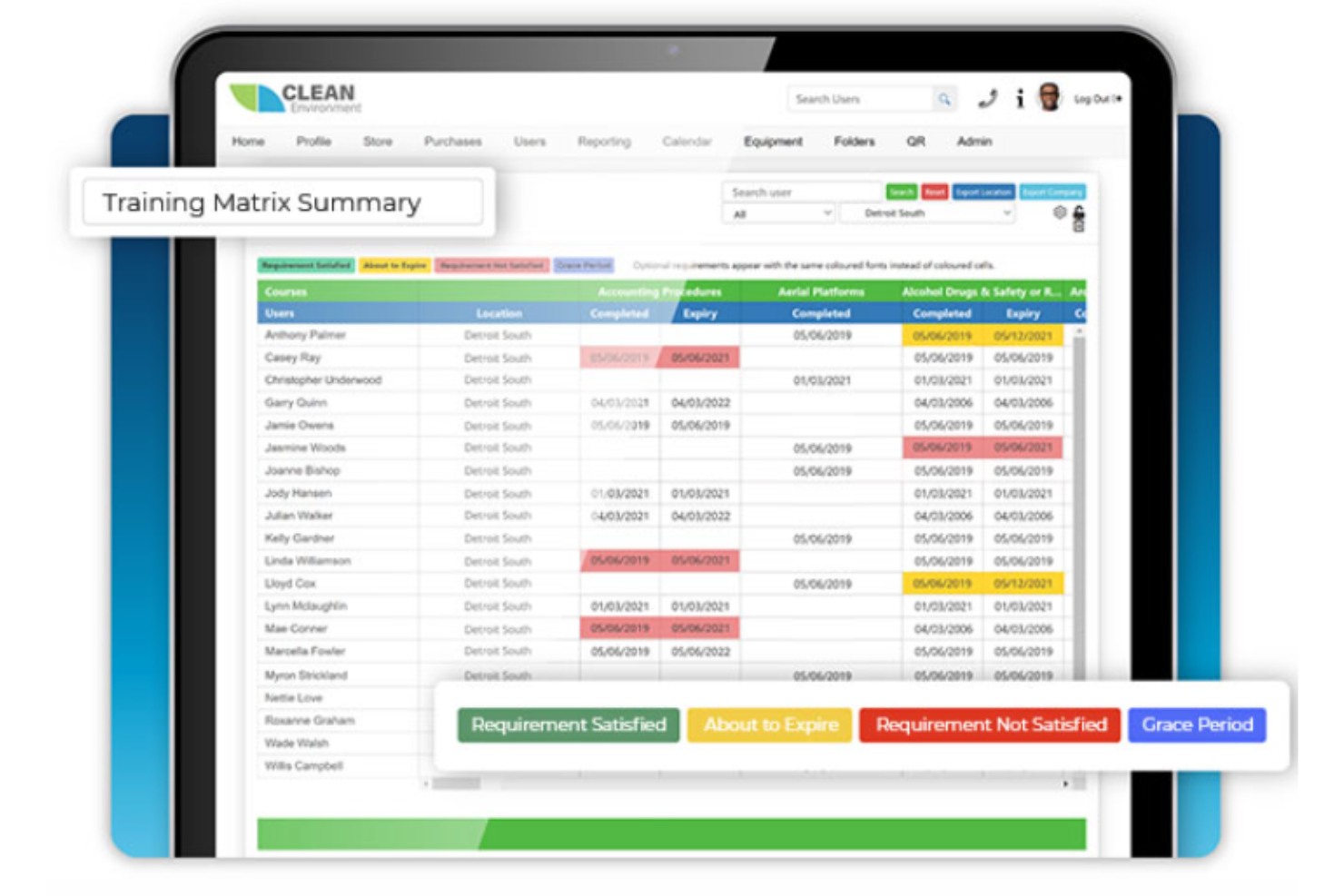
BIStrainer si guadagna un posto nella mia lista ristretta per il modo in cui supporta sia la formazione a distanza che quella in presenza sotto un'unica piattaforma EHS. Quando le squadre sono divise tra cantieri, uffici e sedi remote, trovo che questo tipo di flessibilità faciliti l'implementazione dei programmi di sicurezza secondo le tempistiche di ciascuno. Mi piace che sia possibile assegnare e monitorare corsi online pur continuando a gestire le sessioni in aula e le certificazioni pratiche in un unico sistema.
Ideale per
- Organizzazioni che erogano formazione sulla sicurezza sia online che in presenza
- Responsabili della sicurezza che monitorano la formazione EHS integrata e la conformità
Non adatto per
- Aziende interessate esclusivamente alla formazione in presenza, guidata da istruttore
- Team che necessitano di strumenti avanzati per la segnalazione di incidenti o pericoli
Cosa distingue BIStrainer
BIStrainer gestisce i programmi di sicurezza consentendo di combinare formazione a distanza e in presenza dalla stessa dashboard. A differenza dei fornitori che vincolano solo all'apprendimento online, dà per scontato che tu debba anche gestire sessioni dal vivo, approvazioni dei supervisori e requisiti specifici del sito. Spesso vedo che questa soluzione funziona al meglio per i responsabili della sicurezza che gestiscono una forza lavoro mista e registri di formazione serrati in settori regolamentati.
Compromessi di BIStrainer
BIStrainer è ottimizzato per l'apprendimento integrato e la certificazione, ma si rinuncia alla profondità nel monitoraggio di incidenti e pericoli. Se hai bisogno di una solida gestione degli eventi di sicurezza, dovrai aggiungere un secondo strumento.
Ideale per piani di sicurezza sanitaria conformi a OSHA
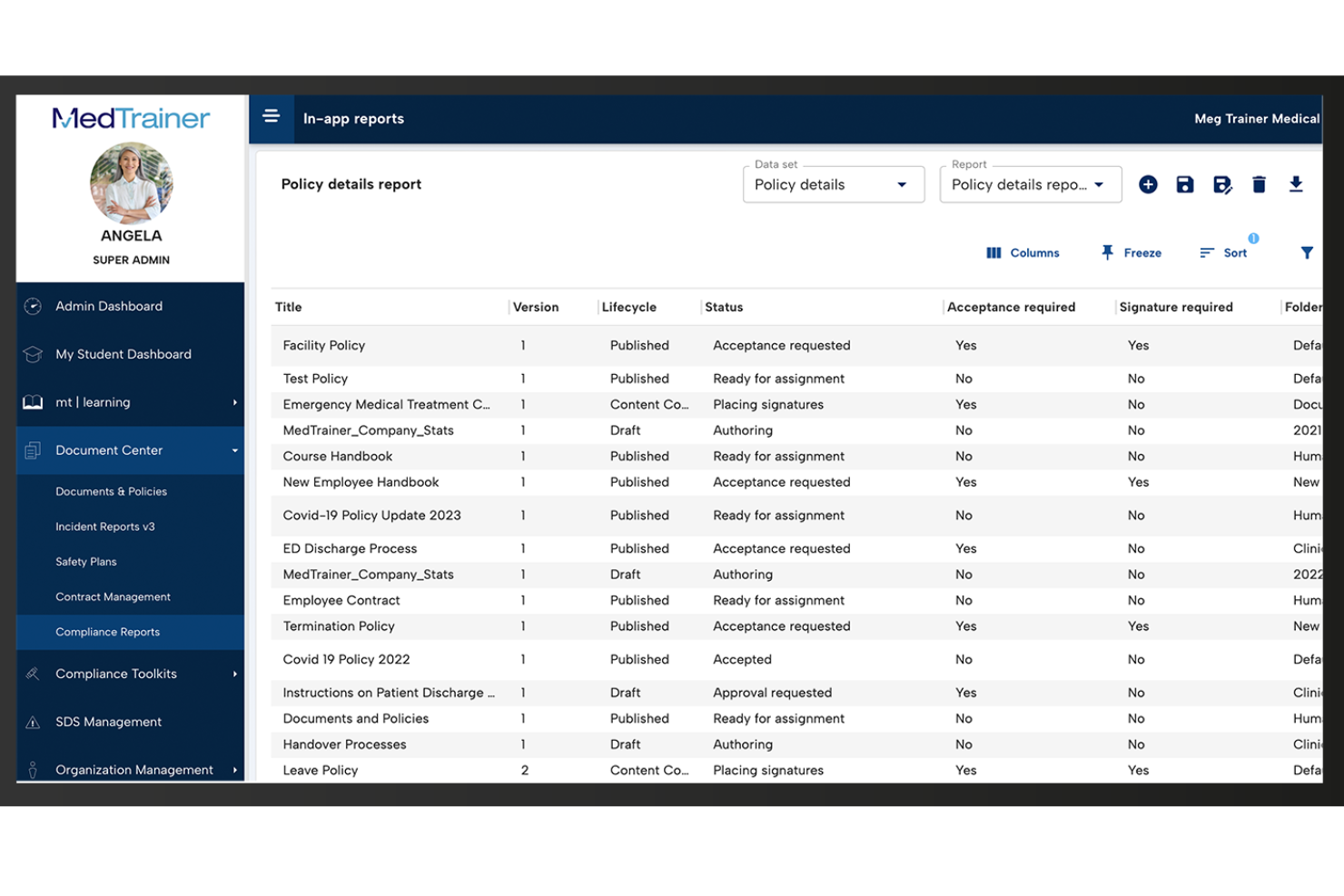
MedTrainer è nella mia lista dei preferiti perché copre in un unico posto la pianificazione della sicurezza OSHA e le esigenze di conformità per i luoghi di lavoro sanitari. Ho trovato molto efficace il suo strumento per la creazione di policy e procedure per mantenere la documentazione di sicurezza aggiornata ed essere sicuro che nulla venga trascurato durante gli audit.
Quello che davvero mi colpisce è la possibilità di assegnare e monitorare la formazione OSHA obbligatoria per dipartimento, particolarmente utile per cliniche o organizzazioni multi-sede. Apprezzo poter organizzare e aggiornare i registri di conformità tra diverse sedi senza dover scavare tra i fogli di calcolo.
MedTrainer è ideale per
- Organizzazioni sanitarie che necessitano di documentazione e formazione di sicurezza conforme a OSHA
- Cliniche multi-sede che centralizzano le politiche di sicurezza e gli audit
MedTrainer non è indicato per
- Team al di fuori del settore sanitario che necessitano di una gestione generale della sicurezza
- Organizzazioni che desiderano funzioni avanzate di tracciamento personalizzato degli incidenti
Cosa distingue MedTrainer
MedTrainer si concentra nel rendere la conformità alla sicurezza OSHA e sanitaria una routine e non qualcosa di reattivo. A differenza di una soluzione come Google Workspace, dove si mettono insieme documenti e fogli di calcolo, MedTrainer parte dal presupposto che desideri piani di sicurezza, formazione e policy gestiti centralmente e pronti per l’audit. In pratica, questo è particolarmente utile per le organizzazioni sanitarie che gestiscono più sedi o standard di accreditamento diversi.
Compromessi con MedTrainer
MedTrainer è ottimizzato per la sicurezza e la conformità sanitaria, ma questa attenzione significa meno flessibilità per processi di sicurezza non sanitari o altamente personalizzati. Si opera principalmente all’interno di flussi di lavoro strutturati e predefiniti.
Cority
Software EHS avanzato progettato per supportare gli indicatori di sicurezza ISO 45001
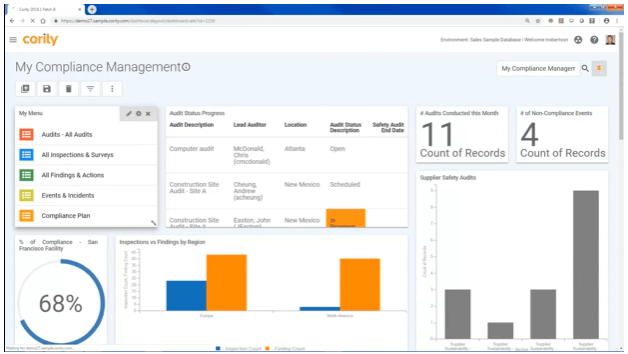
Cority si guadagna un posto qui per la sua capacità di centralizzare la gestione EHS su scala aziendale, con un chiaro focus sulla conformità alla ISO 45001. Lo consiglio quando hai bisogno di un tracciamento dettagliato e di una reportistica sugli incidenti in grado di soddisfare gli standard di sicurezza globali.
Ciò che rende Cority prezioso per me è il suo cruscotto di indicatori di sicurezza in tempo reale e i flussi di lavoro di audit personalizzabili. Mi piace particolarmente come questo permetta ai team di sicurezza e risorse umane di monitorare, dimostrare e migliorare la conformità su più sedi.
Cority: migliori utilizzi
- Grandi organizzazioni che gestiscono esigenze EHS e di conformità complesse
- Team che necessitano di indicatori di sicurezza e audit conformi a ISO 45001
Cority: non ideale per
- Piccole imprese con esigenze base di salute e sicurezza
- Team alla ricerca di una soluzione per la sicurezza leggera o entry-level
Cosa distingue Cority
Cority si distingue per il modo in cui prevede che i team di sicurezza e conformità lavorino su più sedi utilizzando processi rigidamente definiti e tracciamenti di audit strutturati. A differenza di strumenti più flessibili come monday.com, che consentono di progettare i propri flussi di lavoro, Cority si concentra maggiormente sul supporto agli standard formali di salute e sicurezza in tutte le sedi globali.
Vedo questo funzionare al meglio quando si ha bisogno di dati standardizzati, cruscotti centralizzati e reportistica collegata direttamente a regolamenti come la ISO 45001.
Compromessi di Cority
Cority ottimizza per la standardizzazione e l’allineamento normativo, ma questo significa rinunciare a flessibilità per flussi di lavoro personalizzati o casi d’uso più leggeri. Team più piccoli o chi ha bisogno di una soluzione più adattabile potrebbe trovarlo restrittivo.

Soluzione software HR con moduli integrati per la gestione di salute & sicurezza e formazione
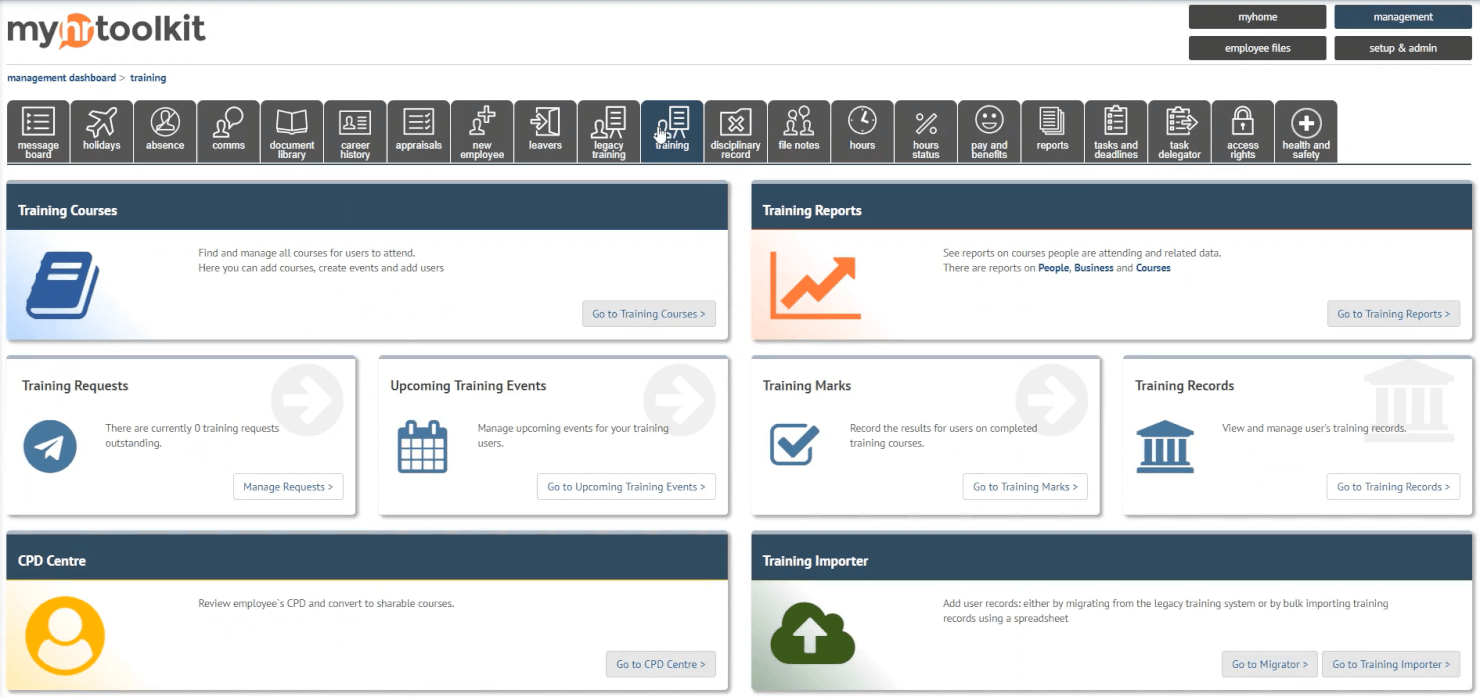
myhrtoolkit merita un posto nella mia lista per come integra il monitoraggio essenziale della salute e sicurezza direttamente nei processi HR principali. Mi piace il modo in cui i suoi moduli integrati aiutano a gestire la segnalazione degli incidenti, monitorare la conformità del personale e gestire la formazione tutto dallo stesso sistema.
Trovo che funzioni particolarmente bene per team piccoli e medi che hanno bisogno di centralizzare i registri degli incidenti e la documentazione della formazione. Avere visibilità completa sia sugli eventi legati alla sicurezza sia su quelli HR è ciò che lo distingue per me.
A chi è più adatto myhrtoolkit
- Piccole e medie imprese che gestiscono insieme sicurezza e HR
- Team che necessitano di formazione integrata e tracciamento degli incidenti
A chi non è particolarmente adatto myhrtoolkit
- Grandi aziende con esigenze regolatorie complesse
- Settori altamente specializzati che richiedono analisi avanzate sulla sicurezza
Cosa distingue myhrtoolkit
myhrtoolkit si distingue per la sua fusione tra gestione HR e archiviazione di dati su salute e sicurezza come non si vede nei classici strumenti HRIS come BambooHR. Invece di trattare la conformità e i registri di formazione come un elemento secondario, tutto viene gestito in parallelo. Le organizzazioni più piccole tendono a utilizzarlo per mantenere una sola fonte di verità senza aggiungere una piattaforma separata per la sicurezza.
Compromessi di myhrtoolkit
myhrtoolkit è ottimizzato per flussi di lavoro semplici e integrati, ma i team che necessitano di automazioni personalizzate per la conformità o analisi avanzate trovano questi aspetti limitati. In ambienti altamente regolamentati o tecnici, spesso non basta.

Software per il monitoraggio degli incidenti facile da usare con valutazioni del rischio personalizzabili
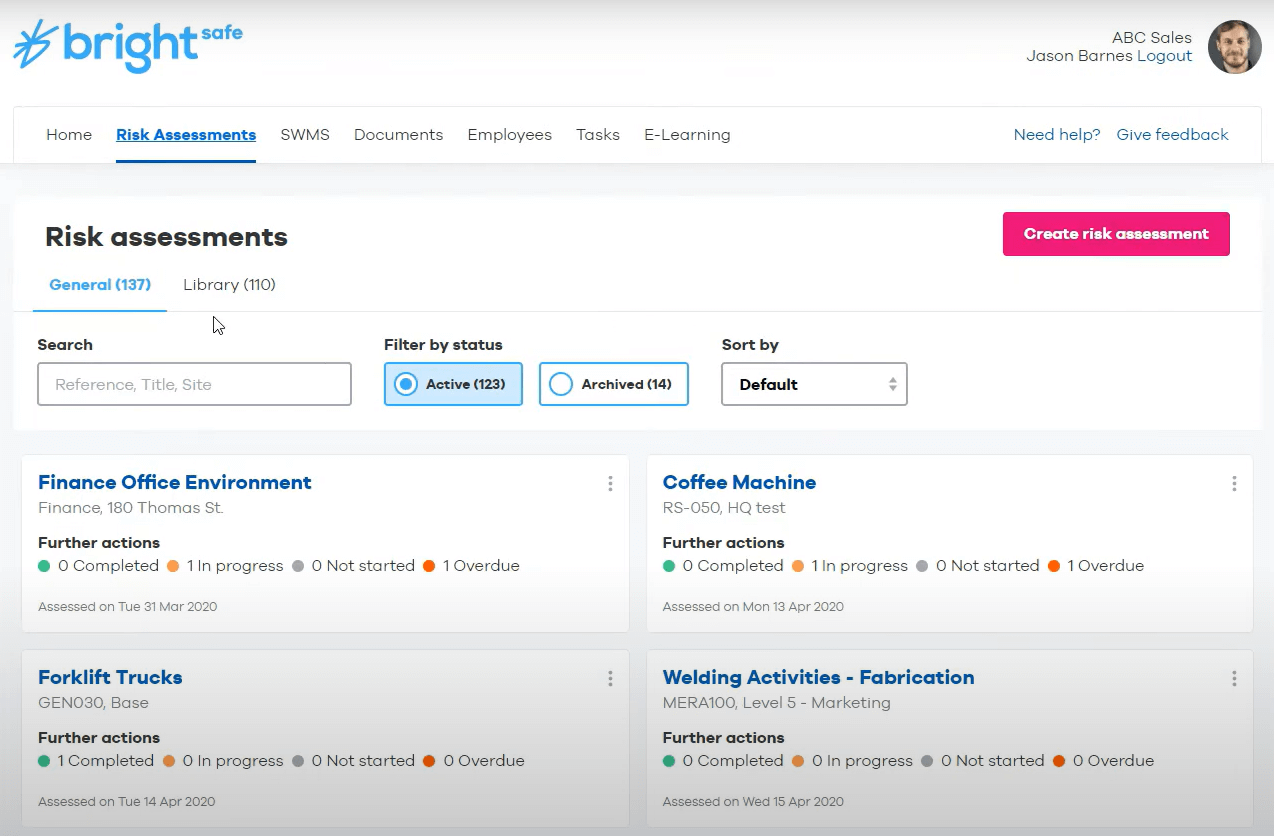
BrightSafe è nella mia lista dei preferiti perché offre un monitoraggio degli incidenti semplice e collegato a valutazioni del rischio flessibili, che aiuta sia nella documentazione sia nella prevenzione in un unico posto. Consiglio BrightSafe quando desideri andare oltre i fogli di calcolo e la documentazione cartacea, soprattutto se il tuo ambiente di lavoro gestisce una varietà di rischi per la sicurezza.
Quello che mi colpisce è la possibilità di personalizzare le valutazioni del rischio per diversi siti o attività, quindi registrare rapidamente incidenti, mancati incidenti e pericoli per avere un quadro completo della sicurezza. Mi piace anche che tutto sia verificabile e facilmente accessibile per rapide revisioni, importante quando si presentano protocolli o controlli di conformità.
Ideale per
- Organizzazioni che monitorano incidenti sul lavoro e personalizzano le valutazioni dei rischi
- Responsabili della sicurezza che gestiscono la conformità su più sedi lavorative
Meno indicato per
- Aziende che necessitano di una gestione integrata della manutenzione delle attrezzature
- Team che richiedono analisi avanzate oltre il monitoraggio degli incidenti
Cosa distingue BrightSafe
BrightSafe rende la gestione della sicurezza accessibile ai responsabili che vogliono abbandonare i processi manuali. Invece di sopraffarti con configurazioni complesse, permette di documentare gli incidenti e adattare le valutazioni dei rischi a diversi reparti o sedi. Trovo che richieda un approccio alla sicurezza che costruisce una registrazione viva e agisce su prove reali invece di reagire sul momento.
A differenza di Alliant Safety o di suite EHS più complesse, BrightSafe è ideale per i team che desiderano responsabilità e tracciabilità integrate nel flusso quotidiano, ma non a scapito di una configurazione ingombrante.
Compromessi con BrightSafe
BrightSafe ottimizza per una gestione degli incidenti semplice e ripetibile, il che significa rinunciare ad analisi avanzate e automazioni personalizzabili spesso necessarie in siti più grandi e fortemente soggetti a conformità.

Intelex
Software EHS personalizzabile che si integra con altri moduli per qualità, gestione dei rischi, sostenibilità ed ESG
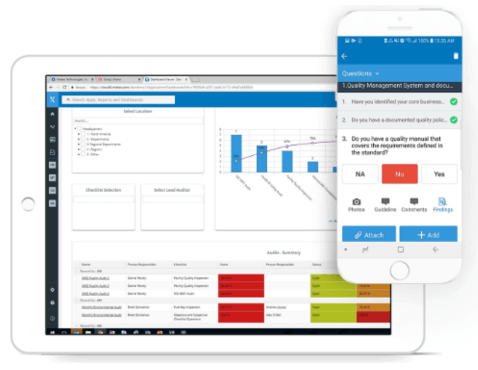
Intelex è una scelta ideale per le organizzazioni con esigenze di sicurezza complesse e che necessitano di flessibilità avanzata. Ho visto team trarre valore dal suo approccio modulare—soprattutto quando già monitorano dati relativi a qualità, ambiente o rischio e desiderano avere tutto in un unico strumento.
Ciò che mi colpisce è la possibilità di configurare i flussi di lavoro e collegare i parametri di sicurezza direttamente agli obiettivi ESG e di sostenibilità. Se vuoi dashboard personalizzate per mantenere dati sugli incidenti, audit e azioni di miglioramento strettamente connesse, Intelex è la soluzione.
Intelex è ideale per
- Organizzazioni che integrano gestione di sicurezza, qualità ed ESG
- Team EHS che necessitano di dashboard e flussi di lavoro altamente configurabili
Intelex non è adatto per
- Piccole imprese che hanno bisogno di strumenti di sicurezza basilari e pronti all’uso
- Team che cercano un’implementazione rapida con pochissima configurazione
Cosa distingue Intelex
Intelex adotta un approccio modulare, pensato per gestire insieme metriche di sicurezza, qualità ed ESG. Ho visto team sviluppare processi su misura per le loro esigenze di conformità, invece di adattarsi a flussi di lavoro prefabbricati come spesso accade con le app di sicurezza di base. Diversamente da strumenti come SafetyCulture, offre molta più flessibilità nella progettazione di moduli, dashboard e sistemi di tracciamento degli incidenti in base alle proprie necessità.
Questa configurazione ha maggior senso se si gestiscono requisiti complessi che variano tra regioni o unità aziendali.
Compromessi con Intelex
Intelex privilegia la personalizzazione, ma la configurazione richiede tempo e un lavoro amministrativo continuo. Se vuoi qualcosa da avviare e usare subito, non è la scelta giusta.

Sistema completo per la gestione della sicurezza con strumenti di coinvolgimento dei dipendenti e costruzione della cultura della sicurezza avanzati
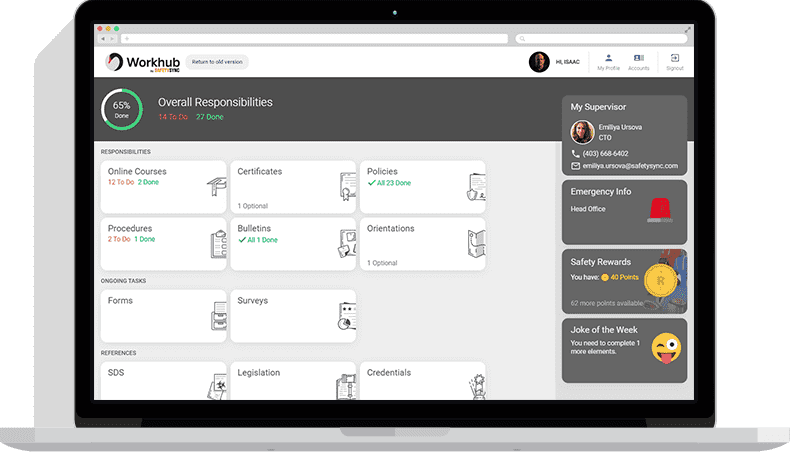
Cority Safety Cloud entra nella mia lista per le organizzazioni che necessitano di una piattaforma unica e unificata per la gestione degli incidenti, gli audit e le azioni correttive. Ciò che apprezzo è il modo in cui Cority mantiene la sicurezza al centro, coinvolgendo direttamente i dipendenti nella segnalazione dei pericoli e nella condivisione di feedback in tempo reale tramite strumenti mobili. Ho visto i team trarre beneficio dalle funzionalità di sicurezza comportamentale e di costruzione della cultura quando l'obiettivo è promuovere una responsabilità condivisa.
È ideale quando si vuole andare oltre le checklist e coinvolgere veramente le persone nella cultura della sicurezza, non solo nella conformità.
Cority Safety Cloud: Ideale per
- Grandi imprese con esigenze complesse di conformità in materia di sicurezza
- Organizzazioni che vogliono costruire una cultura della sicurezza partecipativa e guidata dai dipendenti
Cority Safety Cloud: Poco adatto per
- Piccole aziende con necessità di monitoraggio della sicurezza di base o occasionali
- Team che desiderano una soluzione per la sicurezza rapida e leggera
Cosa distingue Cority Safety Cloud
Cority Safety Cloud è pensato per le organizzazioni che desiderano che la sicurezza diventi un'attività condivisa e quotidiana in tutta l’azienda. A differenza di strumenti più leggeri come SafetyCulture, Cority punta a creare un ciclo di feedback in cui i dipendenti assumono un ruolo attivo: non solo segnalano pericoli, ma contribuiscono a plasmare l’intero programma insieme ai responsabili EHS.
In pratica, tutto ciò funziona al meglio quando si desidera un coinvolgimento che nasca dal basso, non solo l’applicazione di regole dall’alto.
Compromessi con Cority Safety Cloud
Cority si concentra su dettagli e coinvolgimento di livello enterprise, ma configurazione e progettazione del programma possono richiedere tempo. Per organizzazioni di piccole dimensioni o team che hanno bisogno di rispondere rapidamente, questa complessità può rallentare l’implementazione e i primi risultati.
SiteDocs
Software avanzato per la gestione della sicurezza con report dettagliati e riepiloghi dati generati dall'IA

SiteDocs si guadagna il suo posto tra le organizzazioni che danno priorità alla sicurezza e che vogliono andare oltre le semplici checklist. Testando i suoi report dettagliati e i riepiloghi dati generati dall'IA, noto un chiaro vantaggio per i team che gestiscono centinaia di ispezioni, audit e incidenti.
Apprezzo il modo in cui SiteDocs ti permette di approfondire le singole tendenze, ma anche di individuare i grandi schemi tramite approfondimenti automatizzati. È esattamente ciò che desidero quando i responsabili della sicurezza hanno bisogno sia dei dettagli che di sintesi chiare e attuabili per guidare le decisioni.
Per chi è ideale SiteDocs
- Responsabili della sicurezza che monitorano grandi volumi di ispezioni o incidenti
- Organizzazioni che desiderano riepiloghi dei dati sulla sicurezza generati dall'IA
Per chi non è ideale SiteDocs
- Piccoli team con soli requisiti di sicurezza di base
- Gruppi che preferiscono strumenti di sicurezza semplici e basati su checklist
Cosa distingue SiteDocs
SiteDocs si distingue organizzando la gestione della sicurezza attorno a tracciamenti dettagliati degli audit e dashboard di riepilogo. A differenza delle semplici app per checklist o Google Forms, ti invita ad analizzare nel tempo tendenze e lacune di conformità, non solo a raccogliere firme o moduli occasionali. Nella pratica, funziona al meglio per i responsabili della sicurezza che devono monitorare rischi in modo continuativo, con l'IA che mette in evidenza le scoperte chiave per evitare di perdere pattern in mezzo a una moltitudine di report.
Compromessi con SiteDocs
SiteDocs è ottimizzato per il tracciamento strutturato ad alto volume, ma questo focus significa che i piccoli team con flussi di lavoro semplici potrebbero trovare configurazione e reportistica più complessi di quanto necessario.
Safesite
Sistema di gestione della sicurezza completo e ottimizzato per mobile, con informazioni predittive e un punteggio di sicurezza brevettato
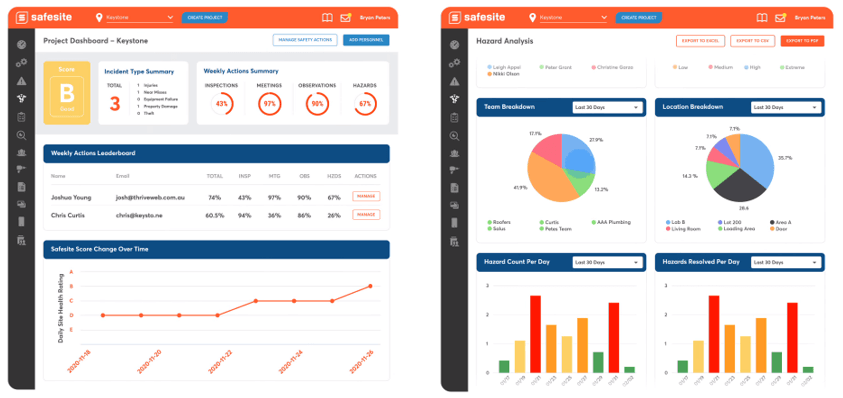
Safesite è nella mia lista perché è molto avanti nella gestione predittiva della sicurezza. Mi piace il fatto che tutto sia progettato per l'uso mobile, così le squadre possono registrare pericoli, incidenti o attività di sicurezza direttamente sul campo. Il punteggio di sicurezza brevettato ti dà una lettura diretta del rischio sul posto di lavoro, cosa che secondo me aiuta i supervisori ad agire rapidamente e apportare miglioramenti reali.
Safesite è l’ideale per
- Squadre operative che necessitano di una gestione della sicurezza mobile-first
- Aziende che monitorano i rischi con dati predittivi in tempo reale
Safesite non è adatto per
- Organizzazioni che utilizzano processi cartacei o molto manuali
- Piccoli team che non tracciano digitalmente le attività di sicurezza
Cosa distingue Safesite
Safesite considera la sicurezza come un processo proattivo e continuo che avviene direttamente sul campo. Invece di affidarsi a dashboard da desktop come succede con strumenti tipo SafetyCulture, Safesite prevede che le squadre registrino attività, segnalino pericoli e monitorino i dati direttamente dai dispositivi mobili. Questo approccio funziona bene quando vuoi consapevolezza e visibilità in tempo reale per i supervisori o i responsabili della sicurezza durante l'avanzamento dei lavori.
Compromessi con Safesite
Safesite è ottimizzato per flussi di lavoro digitali incentrati sui dispositivi mobili, ma si rinuncia alla possibilità di mantenere processi tradizionali e molto cartacei. Se non sei pronto per la gestione digitale dei registri, può sembrare un lavoro extra.

Software EHS mobile-friendly con funzionalità di tracciamento delle attrezzature
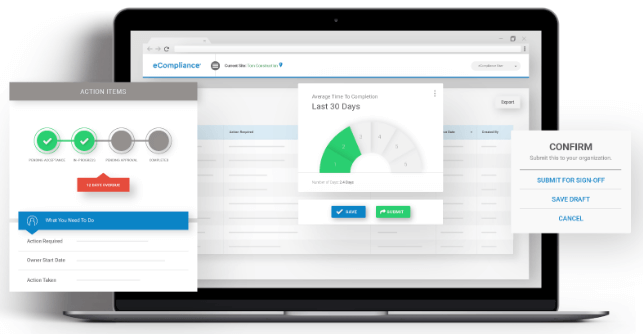
eCompliance è presente in questo elenco perché si specializza nella semplificazione della gestione della sicurezza in campo per i team che necessitano di accesso mobile. Quando ho valutato le sue funzionalità di tracciamento delle attrezzature, ho visto quanto sia semplice per il personale in prima linea controllare i registri delle ispezioni o lo stato della manutenzione direttamente dal proprio telefono.
L'app mobile riduce la burocrazia e mantiene aggiornati i dati sugli asset, cosa che considero particolarmente utile per i responsabili della sicurezza che coordinano su più cantieri. Mi piace il fatto che la programmazione delle ispezioni e la segnalazione dei rischi siano strettamente collegate ai profili delle attrezzature—questo rispecchia scenari reali in cui la conformità e la sicurezza degli asset si sovrappongono.
Per chi è ideale eCompliance
- Team di sicurezza che necessitano di ispezione e tracciamento delle attrezzature tramite dispositivi mobili
- Aziende che gestiscono più cantieri con personale distribuito sul territorio
Per chi non è adatto eCompliance
- Organizzazioni che non gestiscono asset o attrezzature
- Team che necessitano di analisi approfondite di incidenti e analisi della causa principale
Cosa distingue eCompliance
eCompliance è progettato per i team che operano sul campo e hanno bisogno di registrare ispezioni, accedere a moduli di sicurezza e tracciare le attrezzature senza lasciare il cantiere. A differenza di soluzioni come SafetyCulture che puntano su audit o segnalazioni basate su osservazione, eCompliance prevede che il personale utilizzi dispositivi mobili per chiudere il ciclo delle ispezioni e gestire lo stato degli asset dal vivo, proprio dove il lavoro avviene.
Nella pratica, questo rende lo strumento ideale per le organizzazioni con molti mezzi e attrezzature in movimento tra diversi cantieri.
Compromessi di eCompliance
eCompliance è ottimizzato per le attività di sicurezza pensate prima di tutto per il mobile, ma così facendo limita il livello di personalizzazione e analisi che si potrebbero ottenere da sistemi più focalizzati sulle dashboard. Se il tuo team desidera sviluppare workflow specializzati o analizzare le tendenze nei dettagli, qui incontrerai dei limiti.
Altri software per la gestione della sicurezza
Ecco alcune altre opzioni che non sono state incluse nell’elenco dei migliori software per la gestione della sicurezza. Non avevo spazio per una recensione completa di ciascuna di queste soluzioni, ma sono comunque degne di considerazione:
- WHS Monitor
Soluzione avanzata per la gestione della sicurezza che include l’accesso a 7 milioni di documenti e modelli per la sicurezza
- SafetyAmp
Software di gestione della sicurezza in cloud con app di registrazione configurabili per automatizzare le attività di monitoraggio della conformità
- Weever
Piattaforma digitale di gestione operativa con funzionalità di coinvolgimento dei dipendenti per mantenere la sicurezza in primo piano
- Lighthouse
Software di gestione della sicurezza semplice basato sul web con archiviazione dati offline per lavoratori in località remote


Come valuto il software di gestione della sicurezza
Divido la mia valutazione in due livelli: criteri di base che ogni strumento deve soddisfare—come la registrazione secondo OSHA e i flussi di lavoro sugli incidenti—e fattori differenzianti che separano gli strumenti più adatti dagli altri.
Funzionalità principali (Requisiti minimi per questa lista)
Quando seleziono gli strumenti per la mia lista, valuto ciascuno su una scala da 0 (non offre la funzionalità) a 5 (eccelle in quest'area) per ognuna delle funzionalità principali elencate di seguito. Poi, calcolo il punteggio totale dello strumento in percentuale. Ogni strumento deve raggiungere un punteggio totale minimo del 65% per essere considerato per l'inclusione.
- Segnalazione di incidenti e infortuni: Cerco moduli strutturati per la registrazione, flussi di lavoro di indagine e il monitoraggio delle azioni correttive che permettano all'HR di registrare tutto, da una scivolata in magazzino a un incidente mancato sul luogo di lavoro.
- Gestione della conformità normativa: Ogni strumento dovrebbe supportare la generazione dei registri OSHA 300, 300A e 301 (o equivalenti regionali), così il tuo team può ottenere registri pronti per audit senza doverli ricreare in un foglio di calcolo.
- Monitoraggio formazione e certificazioni di sicurezza: Valuto se la piattaforma traccia i completamenti, le date di scadenza delle certificazioni e i promemoria di rinnovo—specialmente per requisiti specifici di ruolo come l'uso del carrello elevatore o l'accesso a spazi confinati.
- Valutazioni dei rischi e ispezioni: Gli strumenti dovrebbero offrire modelli ispezione configurabili e programmazione, così il responsabile della sicurezza può eseguire un controllo mensile degli estintori o una valutazione trimestrale dei rischi da un unico sistema.
- Gestione di documenti e politiche di sicurezza: Controllo la presenza di un archivio centralizzato con controllo delle versioni e tracciamento dell'avvenuta lettura da parte dei dipendenti, importante quando è necessario dimostrare che il personale abbia visionato le procedure PPE aggiornate o le nuove schede di sicurezza SDS.
- Dashboard di reportistica e analisi: La piattaforma dovrebbe mostrare i principali KPI di sicurezza come TRIR, tassi DART e trend sugli incidenti in dashboard personalizzabili su cui il team HR può agire concretamente.
Una volta che ho una lista di strumenti che soddisfano questi criteri, considero ciò che distingue ogni piattaforma.
Fattori differenzianti (Cosa distingue i fornitori)
Ecco come confronto e metto a confronto i diversi fornitori:
Caratteristiche distintive
L'accesso mobile e offline è importante quando il personale è distribuito tra vari cantieri o magazzini—cerco app che permettano ai supervisori di eseguire ispezioni e registrare incidenti anche senza connessione Wi-Fi. L'integrazione con la gestione degli infortuni sul lavoro è un altro elemento distintivo, poiché collegare direttamente un report d'incidente a una richiesta risparmia all'HR la doppia digitazione sui sistemi. Controllo anche se una piattaforma gestisce la sicurezza di appaltatori e visitatori, un'esigenza reale per i team che gestiscono una forza lavoro mista su più sedi.
Oltre le funzionalità
L'integrazione con sistemi HRIS è fondamentale—verifico se una piattaforma si sincronizza con sistemi come Workday, BambooHR o ADP in modo che l'organigramma e i dati del personale restino aggiornati senza importazioni manuali. Anche la compatibilità con il settore e il team è importante; uno strumento progettato per squadre edili distribuite in vari cantieri ha esigenze di configurazione diverse rispetto a uno pensato per una struttura sanitaria. Valuto attentamente anche gli standard di conformità e sicurezza, dato che queste piattaforme archiviano dati sensibili su infortuni e salute che richiedono protezioni come la certificazione SOC 2 e controlli di accesso basati sui ruoli.
Come scegliere il software per la gestione della sicurezza
È facile perdersi in lunghi elenchi di funzionalità e strutture di prezzo complesse. Per aiutarti a rimanere concentrato mentre affronti il tuo specifico processo di selezione del software, ecco un elenco di fattori da tenere a mente:
| Fattore | Che cosa considerare |
|---|---|
| Scalabilità | Il software crescerà insieme alla tua azienda? Verifica se supporta un numero maggiore di utenti e dati con l'espansione della tua attività. |
| Integrazioni | Si integra con i sistemi attuali? Cerca la compatibilità con strumenti come i sistemi HR e gli ERP. |
| Personalizzazione | Puoi adattare il software ai tuoi flussi di lavoro? Assicurati di poter modificare moduli e processi in base alle tue esigenze. |
| Facilità d'uso | Il software è intuitivo? Valuta se il tuo team può imparare rapidamente a usare e navigare nella piattaforma senza frustrazioni. |
| Implementazione e onboarding | Quanto è agevole la transizione? Considera le risorse necessarie per la configurazione e la formazione, nonché i tempi per l'entrata in funzione. |
| Costo | Qual è il costo totale di proprietà? Confronta i costi degli abbonamenti, le spese nascoste e il valore delle funzionalità offerte. |
| Misure di sicurezza | Sono presenti misure di protezione dei dati? Assicurati della conformità agli standard del settore e della crittografia dei dati. |
| Requisiti di conformità | Supporta le normative necessarie? Verifica che il software soddisfi i requisiti di conformità specifici del settore. |
Che cos'è il software per la gestione della sicurezza?
Il software per la gestione della sicurezza è uno strumento che aiuta le organizzazioni a gestire la sicurezza sul luogo di lavoro e la conformità normativa. Professionisti come i responsabili della sicurezza, il personale delle risorse umane e gli addetti alla conformità utilizzano generalmente questi strumenti per garantire un ambiente di lavoro sicuro e rispettare le normative. Le funzionalità di segnalazione degli incidenti, valutazione dei rischi e monitoraggio della conformità aiutano a mantenere gli standard di sicurezza e la conformità normativa. Nel complesso, questi strumenti offrono valore semplificando i processi di sicurezza e riducendo i rischi sul luogo di lavoro.
Funzionalità
Quando selezioni un software per la gestione della sicurezza, presta attenzione alle seguenti funzionalità principali:
- Segnalazione degli incidenti: Consente agli utenti di documentare e monitorare in modo efficiente gli incidenti sul luogo di lavoro, favorendo una risposta tempestiva e la prevenzione.
- Valutazione dei rischi: Aiuta a identificare i potenziali pericoli e a valutare i rischi per garantire l'adozione di misure di sicurezza preventive.
- Monitoraggio della conformità: Garantisce il rispetto delle normative di settore monitorando lo stato di conformità e generando i report necessari.
- Gestione degli audit: Agevola audit e ispezioni periodici sulla sicurezza, contribuendo a mantenere gli standard di sicurezza in tutta l'organizzazione.
- Gestione dei documenti: Organizza i documenti e i registri relativi alla sicurezza, rendendo semplice l'accesso e l'aggiornamento delle informazioni importanti.
- Accesso da dispositivi mobili: Fornisce l'accesso ai dati e alle segnalazioni sulla sicurezza anche fuori sede, una funzione utile per i lavoratori sul campo e i team remoti.
- Flussi di lavoro personalizzabili: Consente di adattare processi e moduli alle esigenze e ai flussi di lavoro specifici dell'organizzazione.
- Analisi dei dati: Fornisce informazioni utili tramite dashboard e report in tempo reale, aiutando a prendere decisioni informate sulla sicurezza.
- Gestione della formazione: Supporta la pianificazione e il monitoraggio delle sessioni di formazione sulla sicurezza, garantendo la preparazione dei dipendenti.
- Funzionalità di integrazione: Si collega ai sistemi esistenti, come i software per le risorse umane e gli ERP, per semplificare le operazioni di sicurezza e la condivisione dei dati.
Vantaggi
L'implementazione di un software per la gestione della sicurezza offre diversi vantaggi al tuo team e alla tua azienda. Eccone alcuni:
- Maggiore conformità: Mantiene la tua organizzazione allineata alle normative di settore tramite il monitoraggio e la reportistica della conformità.
- Cultura della sicurezza rafforzata: Promuove un approccio proattivo alla sicurezza con strumenti di segnalazione degli incidenti e valutazione dei rischi.
- Risparmio di tempo: Riduce le attività amministrative automatizzando processi come audit e ispezioni.
- Migliore processo decisionale: Fornisce informazioni utili tramite l'analisi dei dati, aiutandoti a prendere decisioni informate sulla sicurezza.
- Maggiore accessibilità: Offre l'accesso da dispositivi mobili, consentendo al tuo team di gestire i dati sulla sicurezza da qualsiasi luogo.
- Processi personalizzati: I flussi di lavoro personalizzabili consentono di adattare il software alle tue specifiche esigenze di gestione della sicurezza.
- Formazione efficace: Gestisce e monitora le sessioni di formazione, garantendo che il tuo team sia adeguatamente preparato ad affrontare le sfide relative alla sicurezza.
Costi e prezzi
La scelta di un software per la gestione della sicurezza richiede la comprensione dei vari modelli di prezzo e dei piani disponibili. I costi variano in base alle funzionalità, alle dimensioni del team, ai componenti aggiuntivi e ad altri fattori. La tabella seguente riassume i piani più comuni, i relativi prezzi medi e le funzionalità generalmente incluse nelle soluzioni software per la gestione della sicurezza:
Tabella comparativa dei piani per i software di gestione della sicurezza
| Tipo di piano | Prezzo medio | Funzionalità comuni |
|---|---|---|
| Piano gratuito | $0 | Segnalazione di base degli incidenti, accesso limitato degli utenti e strumenti di base per la conformità. |
| Piano personale | $10-$30/utente/mese | Segnalazione degli incidenti, gestione dei documenti, valutazione dei rischi e accesso da dispositivi mobili. |
| Piano aziendale | $30-$60/utente/mese | Gestione degli audit, monitoraggio della conformità, flussi di lavoro personalizzabili e integrazioni. |
| Piano aziendale avanzato | $60-$100/utente/mese | Analisi avanzate, assistenza dedicata, funzionalità di sicurezza avanzate e personalizzazione completa. |
Domande frequenti
È difficile passare a un nuovo software per la gestione della sicurezza?
Passare a un nuovo software può essere difficile, ma molti fornitori offrono supporto durante l’implementazione. Cerca soluzioni con risorse per la formazione, tour dei prodotti e team di supporto dedicati. Pianifica attentamente la transizione valutando le esigenze di migrazione dei dati e preparando il tuo team al cambiamento.
Quanto è sicuro il software per la gestione della sicurezza?
La maggior parte dei software per la gestione della sicurezza include misure di sicurezza come la crittografia dei dati e l’autenticazione degli utenti. Quando scegli un software, chiedi informazioni sui protocolli di sicurezza e sulla conformità a standard come il GDPR o l’ISO. Assicurati che il software protegga i dati sensibili e sia in linea con le politiche di sicurezza della tua organizzazione.
Il software per la gestione della sicurezza può essere personalizzato per il mio settore?
Sì, molte soluzioni offrono opzioni di personalizzazione per soddisfare le esigenze specifiche di ciascun settore. Spesso è possibile adattare flussi di lavoro, moduli e report in base ai propri requisiti operativi. Quando valuti un software, verifica la presenza di funzionalità che consentano la personalizzazione e chiedi informazioni su modelli o moduli specifici per il settore.
Qual è il prossimo passo:
Se stai cercando un software per la gestione della sicurezza, contatta gratuitamente un consulente di SoftwareSelect per ricevere consigli.
Compili un modulo e fai una breve conversazione durante la quale il consulente approfondirà le tue esigenze specifiche. In seguito riceverai una rosa ristretta di software da esaminare. Ti supporterà persino durante l'intero processo di acquisto, comprese le negoziazioni sul prezzo.