

Le 10 migliori soluzioni software per la mentorship recensite nel 2026

10 Miglior Software di Mentoring: La Shortlist


Il miglior software di mentoring ti aiuta ad abbinare mentori e mentee in modo efficace—usando competenze, obiettivi e interessi per creare relazioni di sviluppo significative e di grande impatto.
Hai bisogno di una soluzione che non solo supporti il matching intelligente, ma anche il monitoraggio dei progressi, faciliti la comunicazione e cresca insieme allo sviluppo della tua organizzazione.
Basandomi sulla mia esperienza nel testare e recensire dozzine di sistemi di mentoring per team di ogni dimensione, ho raccolto una lista dei migliori strumenti che migliorano davvero i programmi di mentoring. In questa guida troverai piattaforme che rendono il mentoring più facile, strategico e molto più efficace per tutti i coinvolti.
Perché fidarsi delle nostre recensioni sui software
Il nostro team testa e recensisce software dal 2012. In quanto esperti HR noi stessi, sappiamo quanto sia difficile — e importante — scegliere il software giusto.
Per questa guida, abbiamo valutato gli strumenti attraverso test pratici e ricerche indipendenti, assegnando un punteggio agli strumenti in base ai nostri criteri di selezione. Ci basiamo inoltre sulle competenze di leader di pensiero del settore e di professionisti HR attivi.
Le nostre recensioni riflettono il nostro giudizio editoriale umano, non un discorso di vendita.
Revisori esperti:
Riepilogo dei Migliori Software di Mentoring
Questa tabella comparativa riassume i dettagli sui prezzi delle mie principali scelte di software di mentoring per aiutarti a trovare quello migliore in base al tuo budget e alle esigenze del tuo business.
| Tool | Best For | Trial Info | Price | ||
|---|---|---|---|---|---|
| 1 | Ideale per un abbinamento e un monitoraggio solidi | Demo gratuita disponibile | Prezzo su richiesta | Website | |
| 2 | Ideale per programmi di mentoring enterprise | Demo gratuita disponibile | Prezzi su richiesta | Website | |
| 3 | Ideale per personalizzazione e UX | Demo gratuita disponibile | Prezzi su richiesta | Website | |
| 4 | Ideale per l’abbinamento mentor-mentee | Demo gratuita + prova gratuita di 30 giorni disponibile | Prezzo su richiesta | Website | |
| 5 | Ideale per grandi aziende, enti pubblici o istituti educativi | Demo gratuita disponibile | Il prezzo dipende dal settore/ambito di appartenenza | Website | |
| 6 | Ideale per la formazione dei mentori su larga scala | Prova gratuita di 30 giorni + demo gratuita disponibile | Da $3,97/utente/mese | Website | |
| 7 | Il miglior software di mentoring focalizzato su diversità, equità e inclusione | Demo gratuita disponibile | Prezzo su richiesta | Website | |
| 8 | Il miglior software di mentoring per abbinamenti focalizzati sulla tecnologia | Not available | Da $10/mese | Website | |
| 9 | Il miglior software di mentoring per organizzazioni di livello enterprise | Demo gratuita disponibile | Prezzo su richiesta | Website | |
| 10 | Il miglior software per mentoring di gruppo | Demo gratuita disponibile | Da $299/utente/mese | Website |

Recensioni Migliori Software di Mentoring
Di seguito trovi i miei riassunti dettagliati dei migliori software di mentoring che sono entrati nella mia shortlist. Le mie recensioni offrono una panoramica dettagliata delle funzioni chiave, pro e contro, integrazioni e casi d’uso ideali di ciascun strumento per aiutarti a trovare quello più adatto a te.

Ideale per un abbinamento e un monitoraggio solidi

MentorcliQ aiuta i team HR e di sviluppo dei talenti a creare programmi di mentoring che realmente rafforzano la fidelizzazione e la crescita professionale, abbinando le persone giuste e monitorando i progressi nel tempo. È progettato per organizzazioni di medie e grandi dimensioni che vogliono risultati più prevedibili dal mentoring, invece di processi ad hoc o manuali.
Perché ho scelto MentorcliQ
Ho scelto MentorcliQ perché va oltre i semplici elenchi di mentori e mentee, utilizzando un abbinamento guidato da algoritmi per collegare i dipendenti in base a competenze, obiettivi e affinità di personalità, non solo disponibilità.
La sua tecnologia SMART Matching offre opzioni come abbinamenti suggeriti o auto-abbinamenti, consentendo di adattare le connessioni alla cultura aziendale e agli obiettivi del programma. MentorcliQ fornisce anche analisi chiare che misurano l'impatto su coinvolgimento e fidelizzazione, aiutandoti a mostrare un valore reale alla leadership, mentre promemoria automatici e suggerimenti nella piattaforma mantengono sia i mentori sia i mentee in progressione verso i loro obiettivi, riducendo il lavoro manuale tradizionalmente legato ai programmi di mentoring.
Infine, la piattaforma supporta diversi formati di mentoring (come one-to-one o gruppi tra pari), risultando flessibile per differenti strategie di sviluppo.
Caratteristiche principali di MentorcliQ
Ecco alcune funzionalità principali da evidenziare:
- SMART Matching: Utilizza un algoritmo sofisticato per abbinare mentori e mentee in base a competenze, interessi e obiettivi di sviluppo.
- Modelli di Programma: Strutture pronte all'uso che riducono i tempi di configurazione e assicurano coerenza tra le iniziative di mentoring.
- Monitoraggio dei Progressi: Strumenti che consentono di monitorare traguardi, obiettivi e coinvolgimento durante l'intero ciclo di mentoring.
- Libreria di Risorse: Contenuti di formazione integrati e guide che aiutano i partecipanti a rimanere in carreggiata e a ottenere valore da ogni relazione di mentoring.
Integrazioni di MentorcliQ
Le integrazioni includono ADP iHCM, ADP Onboarding, ADP Payroll Services, Azure, BambooCloud, Google Workspace, Microsoft 365, Microsoft Teams, Okta, OneLogin, Oracle Cloud, SAP SuccessFactors, Slack, UKG Pro, UKG Ready, Workday e Zoom.
Pros and Cons
Pros:
- L'abbinamento algoritmico migliora la qualità dell'intesa tra mentori e mentee
- Promemoria automatici riducono il carico amministrativo
- Dashboard chiare aiutano a monitorare coinvolgimento e impatto sulla fidelizzazione
Cons:
- Alcuni suggerimenti strutturati risultano generici per settori specifici
- Funzionalità di interazione in-app limitate oltre la comunicazione principale

Qooper
Ideale per programmi di mentoring enterprise

Qooper è una piattaforma di mentoring pensata per organizzazioni e istituti educativi che desiderano lanciare, gestire e scalare programmi strutturati di mentoring grazie a strumenti integrati per l’abbinamento, il monitoraggio e il supporto delle relazioni tra mentori e mentee. La piattaforma supporta una varietà di iniziative di mentoring, tra cui mentoring per la carriera, onboarding, sviluppo della leadership, programmi per dipendenti ad alto potenziale, pianificazione della successione, mobilità interna, sviluppo dei dipendenti, mentoring per studenti e programmi di mentoring rivolti ai membri.
Per chi è più adatto Qooper?
Qooper è ideale per team HR, professionisti L&D, università e associazioni che vogliono gestire programmi strutturati di mentoring su larga scala.
Perché ho scelto Qooper
Ho scelto Qooper come uno dei migliori per la struttura che offre ai responsabili dei programmi già dall’inizio. La libreria di modelli copre tutto, dal curriculum di mentoring di 6 mesi e i framework di definizione degli obiettivi fino ad agende delle sessioni e questionari per l’abbinamento—così il mio team non deve creare tutto da zero ogni volta. Mi piacciono anche i solleciti e le guide automatiche che consentono a mentori e mentee di restare in linea tra una sessione e l’altra senza richiedere check-in manuali. I partecipanti possono accedere a risorse sul mentoring, modelli di obiettivi, template di feedback, promemoria e materiali formativi durante tutto il percorso. Sul fronte analytics, il cruscotto di reportistica mi consente di filtrare i dati di coinvolgimento per coorte, ruolo o posizione, e di collegare i risultati del programma direttamente ai dati di retention e alle metriche di performance, monitorando anche la partecipazione, il progresso nelle relazioni e i risultati dello sviluppo dei dipendenti.
Caratteristiche principali di Qooper
- Abbinamento intelligente tra mentore e mentee: Un motore di abbinamento algoritmico accoppia mentori e mentee in base a criteri personalizzabili come obiettivi, competenze, interessi, disponibilità, stili di lavoro e finalità del programma.
- Definizione e monitoraggio degli obiettivi: Mentori e mentee possono fissare obiettivi, assegnare traguardi e monitorare i progressi direttamente sulla piattaforma.
- Messaggistica integrata e pianificatore di incontri: Chat, chiamate e un pianificatore di incontri integrato con il calendario permettono alle coppie di comunicare e fissare sessioni senza uscire dalla piattaforma. Gli utenti possono anche accedere tramite applicazioni desktop e mobile per connettersi, programmare incontri, monitorare obiettivi e condividere feedback.
- Libreria di contenuti formativi: Mentori e mentee hanno accesso a materiali di formazione selezionati—articoli, video e presentazioni—su mentoring, competenze trasversali e leadership.
- Gestione dei programmi a livello enterprise: Le organizzazioni possono gestire programmi di mentoring su onboarding, sviluppo della leadership, avanzamento di carriera, pianificazione della successione e mobilità interna, monitorando coinvolgimento e risultati tramite reportistica centralizzata.
Integrazioni di Qooper
Le integrazioni includono Google Workspace, Microsoft Teams, Outlook, Zoom, BambooHR, Cornerstone, Workday, SAP SuccessFactors e Okta. Qooper supporta anche integrazioni con sistemi HRIS, calendario, comunicazione, gestione dell’apprendimento, videoconferenza e gestione delle identità. Qooper è certificato SOC 2 Tipo I e Tipo II e conforme al GDPR, con supporto per SSO, autenticazione SAML, e controllo degli accessi basato sui ruoli.
Pros and Cons
Pros:
- Template di mentoring ben strutturati riducono i tempi di configurazione
- L’automazione mantiene vivo il coinvolgimento tra mentore e mentee
- Analytics chiari supportano il reporting del ROI per la leadership
Cons:
- L’interfaccia può risultare complessa nella gestione di più programmi
- La personalizzazione dei report può richiedere configurazione amministrativa


Together Software offre ai team HR e ai responsabili dei programmi una piattaforma per progettare, lanciare e gestire programmi di mentoring strutturati che aiutano i dipendenti a connettersi, crescere e raggiungere i propri obiettivi di sviluppo.
A Chi È Rivolto Together Software?
Together Software è ideale per organizzazioni di medie e grandi dimensioni con team dedicati di L&D o HR che gestiscono programmi di mentoring formali su larga scala.
Perché Ho Scelto Together Software
Together Software si guadagna il suo posto tra i migliori della mia lista grazie al grande controllo che offre agli amministratori di programma sull'esperienza di mentoring. Mi piace il fatto che sia possibile personalizzare tutto, dall'URL al branding fino all'algoritmo di abbinamento stesso—regolando criteri di matching come obiettivi, competenze e fusi orari per adattarsi alle esigenze specifiche del programma. Anche la libreria di template dei programmi spicca: i modelli sono già pronti con regole di abbinamento, agende per le sessioni, materiali promozionali ed email, così non si parte da zero ogni volta che si lancia una nuova iniziativa. Dal punto di vista UX, gli strumenti Health Monitor della piattaforma segnalano le coppie mentore-mentee che non si incontrano o hanno punteggi bassi nelle sessioni, così gli admin possono intervenire prima che un abbinamento si sciolga silenziosamente.
Funzionalità Principali di Together Software
- Molteplici formati di mentoring: Gestisci programmi di mentoring tradizionali 1-a-1, di gruppo, tra pari, reverse, ERG o flash da un'unica piattaforma.
- Questionari di registrazione: Raccogli obiettivi, competenze e aree di sviluppo dei dipendenti durante la registrazione per costruire profili dettagliati di mentori e mentee.
- Agende delle sessioni e risorse di discussione: Fornisci a mentori e mentee agende predefinite, manuali ed esercizi di definizione degli obiettivi per ogni sessione.
- Dashboard di reportistica del programma: Monitora le iscrizioni, i tassi di partecipazione, il raggiungimento degli obiettivi, il feedback delle sessioni e la pertinenza degli abbinamenti in tutto il programma.
Integrazioni di Together Software
Le integrazioni includono Workday, SAP SuccessFactors, BambooHR, UKG, Microsoft Teams, Slack, Zoom, Google Meet, Office 365 e Google Workspace.
Pros and Cons
Pros:
- Abbinamenti intelligenti basati su obiettivi e competenze
- I modelli di sessione integrati aiutano i partecipanti a iniziare subito
- La sincronizzazione del calendario riduce i conflitti di programmazione
Cons:
- Impostare il programma può richiedere tempo per chi lo gestisce per la prima volta
- La reportistica può sembrare complessa per gli admin meno tecnici
Brancher
Ideale per l’abbinamento mentor-mentee
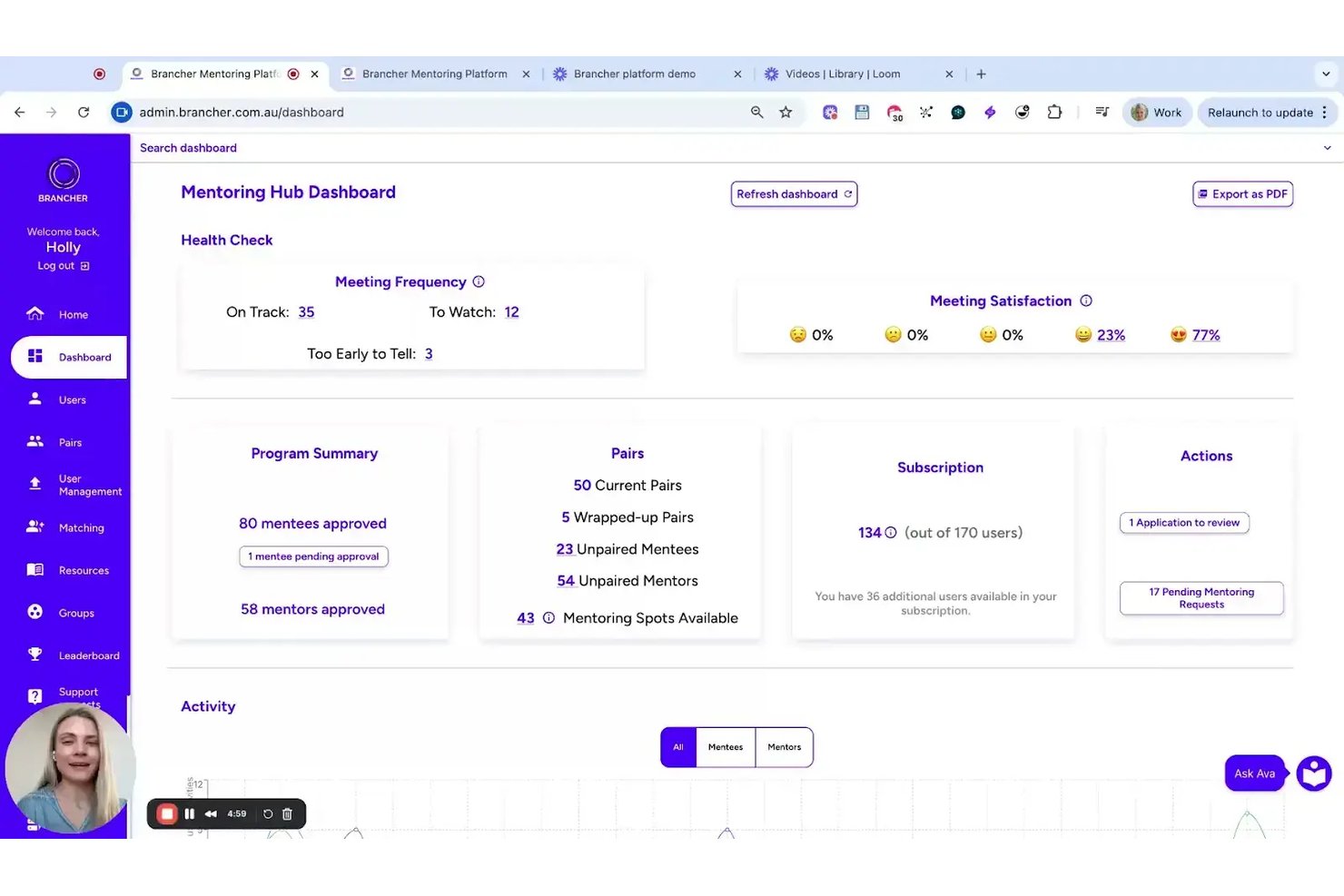
Brancher è una piattaforma di mentoring sviluppata da psicologi organizzativi che utilizza l'abbinamento basato su personalità e valori per accoppiare mentori e mentee, con una gestione strutturata del programma, monitoraggio degli obiettivi e strumenti di coinvolgimento potenziati dall’IA.
Per chi è ideale Brancher?
Brancher è adatto ai team HR di enti pubblici e medie-grandi aziende che desiderano gestire programmi di mentoring strutturati collegati a risultati misurabili in termini di retention e sviluppo.
Perché ho scelto Brancher
Brancher si distingue per il modo in cui accoppia mentori e mentee, combinando dati su personalità e valori per creare rapporti di mentoring più forti e compatibili. L’add-on Ava AI fornisce suggerimenti e indicazioni personalizzate 24/7, mantenendo attivi i partecipanti senza la necessità di un intervento amministrativo costante. Inoltre, moduli di formazione interattivi e sintetici, basati sulle scienze comportamentali, offrono sia ai mentori sia ai mentee attività pratiche da applicare prima e dopo ogni conversazione.
Caratteristiche principali di Brancher
- Abbinamento basato su personalità e valori: Utilizza algoritmi proprietari per abbinare mentori e mentee in base ai dati di personalità e valori.
- Integrazioni con calendario e video: Supporta la pianificazione e le riunioni tramite Google, Outlook, Teams e Zoom.
- Dashboard di avanzamento in tempo reale: Offre un monitoraggio dettagliato del coinvolgimento nei programmi e dei progressi dei partecipanti per gli amministratori.
- Sicurezza dei dati conforme al GDPR: Garantisce sicurezza di livello aziendale, crittografia e conformità agli standard internazionali di tutela della privacy.
Integrazioni Brancher
Brancher offre integrazioni native con Google Calendar, Outlook, Microsoft Teams e altri strumenti. È supportato il single sign-on.
Pros and Cons
Pros:
- L’IA gestisce gli abbinamenti e il coinvolgimento
- Dashboard configurabili per soddisfare le esigenze di reporting aziendali
- Interfaccia moderna sia per gli amministratori sia per gli utenti
Cons:
- Supporta solo programmi in lingua inglese
- Nessuna app mobile per mentee o mentori


MentorEase è una piattaforma di mentoring progettata per organizzazioni che necessitano di un abbinamento strutturato tra mentore e mentee, gestione dei programmi e monitoraggio dei progressi per sostenere iniziative di mentoring formali su larga scala.
Per chi è ideale MentorEase?
MentorEase è particolarmente adatto ai team Risorse Umane e Formazione & Sviluppo (L&D) in grandi aziende, enti pubblici o istituti educativi che gestiscono programmi di mentoring formali e su larga scala.
Perché ho scelto MentorEase
MentorEase merita un posto nella mia lista ristretta per la sua efficacia nel gestire la complessità dei programmi di mentoring su larga scala all'interno di grandi organizzazioni. Apprezzo in particolare l'algoritmo di abbinamento personalizzabile, che consente agli amministratori di assegnare criteri ponderati alle domande di registrazione – così, un ente pubblico può dare priorità a dipartimento, livello di anzianità o sede, mentre un'università può dare più peso all'esperienza nel settore o agli obiettivi di carriera. Anche la gestione multi-sessione dei programmi è notevole per le grandi aziende che organizzano programmi simultanei in divisioni globali, poiché gli amministratori possono gestire coorti separate, impostare la durata dei programmi e monitorare i Risultati di Apprendimento Azionabili (ALO) da un'unica dashboard. Trovo inoltre molto utile l'opzione sulla residenza dei dati per gli enti pubblici che devono mantenere i dati dei partecipanti su server localizzati in uno specifico paese per motivi di conformità.
Funzionalità principali di MentorEase
- Certificati di completamento: Genera e invia automaticamente tramite email PDF personalizzati di certificato a mentori e mentee al termine del programma.
- Strumenti rompighiaccio: Giochi rompighiaccio integrati per aiutare i nuovi abbinamenti mentore-mentee a sentirsi a proprio agio prima di affrontare gli obiettivi.
- Reportistica modello Kirkpatrick: Monitora i risultati dei programmi su quattro livelli—partecipazione, coinvolgimento, completamento e risultati—incluse indagini successive al mentoring fino a tre anni dopo.
- Pubblicazione di annunci: Gli amministratori possono inviare messaggi mirati nel feed delle notizie a mentori, mentee o a tutti i partecipanti direttamente dalla piattaforma.
Integrazioni MentorEase
Attualmente non sono elencate integrazioni native.
Pros and Cons
Pros:
- Supporta una vasta gamma di casi d'uso
- L'azienda offre risorse continue e webinar per aiutarti a ottenere il massimo ROI dal software
- Ideale per grandi aziende, enti pubblici o istituti educativi
Cons:
- Potrebbe essere troppo costoso per le organizzazioni di piccole dimensioni
- Potrebbero essere utili più integrazioni native con altri software

Ideale per la formazione dei mentori su larga scala

iSpring LMS offre ai team delle risorse umane e ai responsabili della formazione un modo per fornire, monitorare e gestire programmi strutturati di mentoring e formazione per i dipendenti, rendendo più semplice supportare lo sviluppo delle competenze e la condivisione delle conoscenze su larga scala.
Per chi è più adatto iSpring LMS?
iSpring LMS è particolarmente indicato per organizzazioni di medie e grandi dimensioni che necessitano di gestire programmi di mentoring strutturati e scalabili tra vari team o reparti.
Perché ho scelto iSpring LMS
Ho incluso iSpring LMS nella mia selezione per la sua efficacia nell'assegnazione dei mentori e nella gestione dello sviluppo strutturato su larga scala. Apprezzo in particolare la funzione di piano di sviluppo individuale, che consente di assegnare mentori e supervisori direttamente ai dipendenti, impostare compiti basati su azioni e monitorare le tappe dell'onboarding in un unico luogo. Le regole di iscrizione automatica ai corsi permettono di configurare un programma di mentoring una volta sola, attivandolo automaticamente per ogni nuovo assunto di un gruppo specifico, senza bisogno di interventi manuali. La funzione di revisione a 360 gradi è un ulteriore valore aggiunto, consentendo ai mentori di raccogliere feedback strutturati da colleghi, manager e collaboratori diretti per guidare le conversazioni di sviluppo.
Funzionalità principali di iSpring LMS
- Percorsi di apprendimento: Collega corsi e compiti in una sequenza strutturata che accompagna i mentee lungo un percorso di sviluppo definito.
- Dashboard di monitoraggio del progresso: Monitora per ogni partecipante i tassi di completamento, i risultati dei quiz e il tempo dedicato a tutta la formazione assegnata.
- App mobile per l'apprendimento: I mentee possono accedere a corsi, compiti e materiali da iOS o Android senza bisogno di un computer desktop.
- Scenari ramificati: Crea simulazioni interattive basate su decisioni che consentono ai mentee di esercitarsi in conversazioni e situazioni reali.
Integrazioni di iSpring LMS
Le integrazioni includono Salesforce, MS Azure, MS Exchange, BambooHR, Udemy, Go1, LinkedIn Learning e altre librerie di corsi popolari.
Pros and Cons
Pros:
- Onboarding veloce con corsi pronti all'uso
- Reportistica avanzata per il monitoraggio del mentoring
- L'accesso mobile supporta l'apprendimento flessibile
Cons:
- Capacità limitate di discussione tra pari
- La personalizzazione dei report è piuttosto limitata
New Product Updates from iSpring LMS

iSpring LMS Adds Multiple Observations to OJT Sessions
iSpring LMS now lets managers log multiple observations within one OJT session, grouping visits and auto-generating summary stats like averages, criterion results, and comparisons. For more information, visit iSpring LMS's official site.

Chronus
Il miglior software di mentoring focalizzato su diversità, equità e inclusione

Chronus è una piattaforma di mentoring progettata per organizzazioni e team HR che desiderano avviare, gestire e misurare programmi di mentoring strutturati a supporto della crescita, dell'engagement e della fidelizzazione dei dipendenti.
Per chi è consigliato Chronus?
Chronus è ideale per aziende di medie e grandi dimensioni che necessitano di un approccio scalabile e guidato dai programmi al mentoring rivolto a una forza lavoro ampia o distribuita.
Perché ho scelto Chronus
Ho scelto Chronus tra i migliori per il modo in cui è stato progettato incentrandosi su inclusione e senso di appartenenza—non come aggiunta, ma come parte fondamentale del funzionamento della piattaforma. Trovo particolarmente interessante il sistema inclusivo di criteri per l'abbinamento, che consente di personalizzare l'algoritmo MatchIQ® per dare priorità alle connessioni tra generi, etnie, nazionalità e neurodiversità. È anche possibile attivare l'Abbinamento Anonimo e nascondere le risposte mancanti nei campi delle domande, per ridurre i bias inconsci nel processo di abbinamento. Chronus supporta anche formati di programmi specifici DEI, come mentoring per la diversità, reverse mentoring e cerchi di mentoring—ciascuno progettato per servire in modo mirato gruppi di dipendenti sottorappresentati, sia tramite relazioni di sponsorship uno-a-uno sia attraverso gruppi di pari basati su ERG.
Funzionalità principali di Chronus
- Automazione dell'iscrizione e della selezione strutturata: Automatizza il processo di recruiting e iscrizione dei partecipanti ai programmi di mentoring, con sistemi di controllo integrati per mantenere amministratori e partecipanti allineati.
- Definizione degli obiettivi individuali ed apprendimento autonomo: I mentee possono fissare obiettivi personali di apprendimento e seguire contenuti di sviluppo con i propri tempi all'interno della piattaforma.
- Dashboard di ROI e reportistica dei programmi: Monitora l’impatto del programma tramite metriche come fidelizzazione, avanzamento, sviluppo delle competenze e produttività grazie a dashboard integrate progettate per i responsabili HR e i dirigenti.
- Cerchi di mentoring: Un formato di gruppo tra pari che consente ai dipendenti con interessi condivisi o obiettivi di apprendimento comuni di crescere insieme, compresi gruppi ERG focalizzati su appartenenza e comunità.
Integrazioni di Chronus
Le integrazioni includono Microsoft Teams, Outlook, Google Workspace, Workday, SuccessFactors, Slack, LinkedIn, Okta, Zoom e un'API aperta per integrazioni personalizzate.
Pros and Cons
Pros:
- Dati informativi di valore
- Single sign-on
- Potenti capacità di sondaggio
Cons:
- Nessun punteggio aggregato di soddisfazione
- Curva di apprendimento elevata

Il miglior software di mentoring per abbinamenti focalizzati sulla tecnologia

MentorCruise mette in contatto professionisti e talenti emergenti con mentori esperti, offrendo una piattaforma pensata per chi lavora nella tecnologia, nei prodotti e nelle startup e desidera una guida strutturata, lo sviluppo di competenze e la crescita professionale attraverso un mentorship individuale.
Per chi è ideale MentorCruise?
MentorCruise è particolarmente adatto a chi opera in ambiti tecnologici, di design e di prodotto e desidera un accesso diretto a mentori esperti del settore per lo sviluppo della carriera e delle competenze.
Perché ho scelto MentorCruise
Ho scelto MentorCruise perché è una piattaforma costruita intenzionalmente intorno al mentorship focalizzato sulla tecnologia. La rete di mentori è composta principalmente da ingegneri software, product manager, data scientist e UX designer che lavorano in aziende come Google, Microsoft, Meta e Spotify—dunque, durante la ricerca, si filtra per competenze reali e verificabili piuttosto che per profili generici di coach. Apprezzo anche il filtro basato sulle competenze, che permette ai mentee di cercare tecnologie specifiche come Python, Kotlin o intelligenza artificiale generativa e abbinarsi con chi ha esperienza pratica in quell’ambito. Inoltre, la chat di abbinamento assistita dall'IA aiuta i mentee a descrivere i propri obiettivi e mostra i profili dei mentori più adatti, riducendo il tempo necessario a trovare la persona giusta.
Caratteristiche principali di MentorCruise
- Strutture dei piani flessibili: Scegli tra piani di chat Q&A asincrona, regolari chiamate video individuali, o una combinazione delle due, per adattarsi al tuo orario e stile di apprendimento.
- Prenotazione di singole sessioni: Prenota sessioni singole per esigenze specifiche come preparazione ai colloqui, pianificazione dello studio o chiamate introduttive senza dover sottoscrivere un piano a lungo termine.
- Profili dei mentori verificati: Ogni profilo mentore include testimonianze verificate, dati sulle prestazioni e articoli pubblicati così da poter valutare il percorso del mentore prima di prenotare.
- Mentorship per team: Accesso a un piano dedicato ai team che consente alle organizzazioni di collegare più dipendenti con mentori selezionati in ambito tech e prodotto.
Integrazioni di MentorCruise
Le integrazioni native al momento non sono elencate.
Pros and Cons
Pros:
- Mentoring pratico
- Perfetto per il mentoring in ambito tech
- Cura attenta nella selezione dei mentori
Cons:
- Molteplici livelli di prezzo
- Non ottimale per il mentoring generale

Il miglior software di mentoring per organizzazioni di livello enterprise

MentorcliQ è una piattaforma software per il mentoring progettata per le organizzazioni che desiderano avviare, gestire e scalare programmi di mentoring strutturati, aiutando i team HR e i responsabili dei programmi ad abbinare mentori e mentee, monitorare i progressi e misurare l'impatto dei programmi.
Per chi è più adatto MentorcliQ?
MentorcliQ è particolarmente indicato per team HR di medie e grandi dimensioni che devono gestire più programmi di mentoring contemporaneamente su grandi o distribuite forze lavoro.
Perché ho scelto MentorcliQ
MentorcliQ è tra le migliori soluzioni nella mia lista perché è stata progettata appositamente per rispondere alla scala e alla complessità che i team HR di grandi aziende devono affrontare. Apprezzo in particolare l'algoritmo SMART Matching, basato su un modello di matching vincitore del Premio Nobel, che ottimizza gli abbinamenti su tutta la popolazione di partecipanti contemporaneamente—quindi, quando si abbinano centinaia di dipendenti, nessuno riceve un abbinamento di bassa qualità. Trovo anche molto utile la gestione multi-programma: puoi gestire programmi di mentoring 1:1, di gruppo, tra pari, reverse e flash contemporaneamente da un'unica interfaccia di amministrazione, ciascuno con la propria configurazione personalizzata e i relativi profili dei partecipanti. Il cruscotto di reportistica a livello enterprise consente al mio team di raccogliere insieme metriche individuali, a livello di programma e dell'intera organizzazione, rendendo più semplice collegare le attività di mentoring agli indicatori di retention e sviluppo quando si riporta alla leadership.
Caratteristiche principali di MentorcliQ
- Monitoraggio delle tappe del mentoring: Imposta e controlla obiettivi e tappe strutturate per ogni rapporto di mentoring durante tutto il ciclo del programma.
- Messaggistica in-app: Mentori e mentee possono comunicare direttamente all'interno della piattaforma senza dover utilizzare strumenti esterni.
- Libreria di risorse per i partecipanti: Gli amministratori possono caricare e condividere guide, modelli e materiali di formazione direttamente sulla piattaforma.
- Iscrizione automatica ai programmi: I partecipanti possono essere invitati, inseriti e iscritti ai programmi tramite flussi di lavoro automatizzati.
Integrazioni MentorcliQ
Le integrazioni native attualmente non sono elencate.
Pros and Cons
Pros:
- Promemoria e notifiche automatici
- Sicurezza di livello elevato
- Adatto per grandi aziende
Cons:
- Interfaccia utente datata
- Costoso per le piccole imprese


Mentorloop è una piattaforma di mentoring pensata per organizzazioni e team HR che desiderano creare programmi di mentoring strutturati e scalabili che mettono in contatto mentori e mentee, semplificano il matching e monitorano i progressi in tutta l'organizzazione.
Per chi è ideale Mentorloop?
Mentorloop è adatto a organizzazioni di medie e grandi dimensioni, dotate di team HR o L&D dedicati, che necessitano di avviare e gestire programmi di mentoring formali su larga scala.
Perché ho scelto Mentorloop
Mentorloop si guadagna il suo posto tra i migliori della mia selezione grazie alle sue eccellenti capacità di gestire il mentoring di gruppo oltre ai tradizionali formati uno-a-uno. Mi piace il fatto che l'algoritmo di matching della piattaforma non si limiti ad abbinare singoli membri in modo isolato: analizza l'intero gruppo per trovare gli abbinamenti più equi a livello globale nel programma. Questa è una differenza sostanziale quando si gestisce un'iniziativa di mentoring di gruppo su larga scala e si vuole che ogni partecipante senta di avere avuto la possibilità di ottenere un buon match. Apprezzo anche la funzione Sentiment, che fornisce in tempo reale feedback qualitativi dei partecipanti durante tutto il programma, così non si deve attendere la fine per scoprire se una dinamica di gruppo non stava funzionando.
Caratteristiche principali di Mentorloop
- Dashboard dei programmi: consente di visualizzare e gestire tutti i programmi di mentoring attivi, i progressi dei partecipanti e le metriche di coinvolgimento da una singola vista amministratore.
- Suggerimenti guidati per la conversazione: fornisce a mentori e mentee suggerimenti strutturati su argomenti per mantenere le sessioni focalizzate e produttive.
- Monitoraggio degli obiettivi: consente ai partecipanti di impostare, monitorare e aggiornare obiettivi personali durante la relazione di mentoring.
- Inviti automatici: invia promemoria programmati ai partecipanti che non hanno registrato attività, mantenendo costante il coinvolgimento in tutto il programma.
Integrazioni di Mentorloop
Le integrazioni includono Google Calendar, Apple Calendar, Office 365, Salesforce, Slack e Outlook.
Pros and Cons
Pros:
- Aggiornato regolarmente
- Intuitivo e facile da usare
- Tutorial di qualità
Cons:
- Funzioni di chat limitate
- Problemi con i filtri di matching
Altri Software di Mentoring
Ecco alcune ulteriori opzioni di software di mentoring che non sono entrate nella mia shortlist, ma che meritano comunque una valutazione:
- Torch
Il miglior software di mentoring per combinare mentori interni ed esterni
- Guider
Il miglior software di mentoring per programmi di mentorship personalizzabili
- PushFar
Il miglior software di mentoring per chi cerca mentori che li aiutino a far avanzare la carriera
- Ten Thousand Coffees
Il miglior software di mentoring per un'implementazione strutturata
- MentorCloud
Il miglior software di mentoring per una piattaforma mentor scalabile
- Mentorink
Miglior software di mentoring per il rinnovamento di programmi di mentorship esistenti


Wie ich HR-Ticketsysteme bewerte
Ich teile meine Bewertung in grundlegende Anforderungen – wie HR-spezifisches Fallrouting, Servicelevel-Agreements (SLAs) und Zugriffskontrollen – und Differenzierungsmerkmale, die einen echten HR-Service-Desk von einem umfunktionierten IT-Tool unterscheiden.
Kernfunktionalitäten (Mindestanforderungen für diese Liste)
Wenn ich Tools für meine Liste auswähle, bewerte ich jedes auf einer Skala von 0 (bietet die Funktion nicht) bis 5 (hervorragend in diesem Bereich) für jede unten aufgeführte Kernfunktionalität. Anschließend berechne ich die Gesamtpunktzahl des Tools als Prozentsatz. Jedes Tool muss eine Mindestpunktzahl von 65 % erreichen, um in Betracht gezogen zu werden.
- Mitarbeiter-Ticket-Einreichung: Ich prüfe, ob Mitarbeitende Anfragen über mehrere Kanäle einreichen können – zum Beispiel über ein Self-Service-Portal, E-Mail, Slack oder Microsoft Teams – statt nur über einen einzigen Meldeweg.
- Fallrouting & -zuweisung: Das Tool sollte Tickets je nach Anfrageart an die richtige HR-Fachperson weiterleiten: Eine Frage zu Leistungen geht z. B. an Compensation & Benefits, eine arbeitsplatzbezogene Beschwerde an die Mitarbeiterbeziehungen.
- Automatisierte Workflows & SLAs: Ich achte auf HR-spezifische Workflow-Vorlagen – Onboarding-Aufgabenketten, Genehmigungsprozesse für Urlaubsanträge, Offboarding-Checklisten – mit integriertem SLA-Tracking und Eskalationsregeln.
- HR-Wissensdatenbank: Eine durchsuchbare, kategorisierte Wissenssammlung, in der Mitarbeitende eigenständig Antworten auf Fragen zu Unternehmensrichtlinien finden können – besonders wichtig bei häufig gestellten Themen wie Urlaubsansprüchen oder Kleidungsregeln.
- Vertraulichkeit & Zugriffskontrollen: Ich prüfe, ob die Plattform rollenbasierte Berechtigungen und Datenschutz auf Fall-Ebene unterstützt, sodass sensible Mitarbeiterangelegenheiten nur für autorisiertes HR-Personal sichtbar sind.
- HR-Reporting & Analyse: Dashboards, die Ticketvolumen-Trends, durchschnittliche Lösungszeiten und typische Anfragekategorien anzeigen, helfen HR-Leitenden, wiederkehrende Problemfelder zu erkennen und Teamressourcen entsprechend zu steuern.
Sobald ich eine Liste von Tools habe, die die Anforderungen erfüllen, schaue ich mir an, wodurch sich jede Plattform auszeichnet.
Differenzierungsmerkmale (Was Anbieter unterscheidet)
So vergleiche und kontrastiere ich verschiedene Anbieter:
Herausragende Funktionen
Ein KI-gestützter virtueller Agent, der Fragen wie "Wie kann ich meine Steuerfreibeträge aktualisieren?" beantworten kann, ohne ein Ticket zu erstellen, macht in Hochlastphasen wie der offenen Einschreibung einen echten Unterschied. Außerdem prüfe ich Workflows für den gesamten Employee Lifecycle – vorgefertigte Abläufe, die Aufgaben in HR, IT und Facility Management anstoßen, wenn jemand ein- oder austritt. Eine tiefe HRIS-Integration ist ebenfalls wichtig, denn ein Ticketsystem, das Daten zu Mitarbeitenden aus Workday oder BambooHR zieht, liefert Bearbeitenden sofort Kontext, ohne zwischen Registerkarten wechseln zu müssen.
Mehr als Funktionen
Compliance und Datenschutz verdienen besondere Aufmerksamkeit – ich prüfe Zertifizierungen wie SOC 2 Typ II und DSGVO-Konformität sowie konfigurierbare Richtlinien zur Datenaufbewahrung für sensible HR-Fälle. Auch das Preismodell ist entscheidend: Manche Anbieter berechnen pro HR-Agent, andere pro Mitarbeitenden. Das passende Modell hängt davon ab, ob Ihr Team klein ist und viele Beschäftigte betreut – oder umgekehrt. Darüber hinaus bewerte ich die Unterstützung bei der Implementierung, insbesondere, ob der Anbieter HR-spezifische Onboarding-Angebote hat statt allgemeiner IT-Service-Desk-Setups.
Come Scegliere un Software di Mentoring
È facile perdersi tra le lunghe liste di funzionalità e le strutture di prezzi complesse. Per aiutarti a rimanere concentrato durante il tuo percorso di selezione del software, ecco una checklist di fattori da considerare:
| Fattore | Cosa Valutare |
|---|---|
| Scalabilità | Il software crescerà con il tuo team? Considera l’espansione futura e se lo strumento può gestire un maggior numero di utenti o funzionalità aggiuntive senza costi extra. |
| Integrazioni | Funziona con i sistemi che usi già? Controlla la compatibilità con gli strumenti HR già in uso per evitare silos informativi ed inserimenti manuali. |
| Personalizzazione | Puoi adattarlo alle tue esigenze? Cerca opzioni per personalizzare i flussi di lavoro o le dashboard in modo che si adattino al processo e agli obiettivi di mentoring del tuo team. |
| Facilità d’uso | È intuitivo per tutti i livelli di competenza? Scegli uno strumento facile da usare, che richieda poca formazione sia per mentori che per mentee. |
| Implementazione e onboarding | Quanto tempo richiede l’avviamento? Valuta il tempo e le risorse necessarie per avviamento e formazione, assicurandoti che il fornitore offra supporto adeguato nella fase di onboarding. |
| Costo | È in linea con il tuo budget? Confronta i piani tariffari e verifica se ci sono costi nascosti. Considera il costo totale di proprietà, inclusi formazione e supporto. |
| Sicurezza | I tuoi dati sono protetti? Assicurati che il software sia conforme alle normative di tutela dei dati come GDPR e che offra crittografia e controlli di accesso sicuri. |
| Assistenza | Riceverai aiuto quando ne hai bisogno? Valuta le opzioni di supporto del fornitore, come disponibilità 24/7, live chat e tempi di risposta per ricevere assistenza tempestiva. |
Cos'è il software di mentoring?
Il software di mentoring è uno strumento che facilita la creazione, la gestione e il monitoraggio dei programmi di mentoring. Professionisti HR, manager e responsabili di team utilizzano generalmente questi strumenti per promuovere lo sviluppo dei dipendenti e la condivisione delle conoscenze. L'abbinamento tra mentori e mentee, il monitoraggio dei progressi e la fornitura di strumenti di comunicazione favoriscono relazioni di mentoring efficienti e il successo del programma. Nel complesso, questi strumenti incrementano la crescita dei dipendenti e migliorano la cultura organizzativa.
Funzionalità
Quando scegli un software di mentoring, fai attenzione alle seguenti funzionalità chiave:
- Abbinamento mentore–mentee: Le migliori piattaforme di mentoring offrono strumenti di abbinamento automatici che associano mentori e mentee in base a competenze, obiettivi, livello di esperienza, interessi e preferenze di apprendimento. Abbinamenti migliori portano a relazioni più significative e a risultati di programma più forti.
- Monitoraggio dei progressi: Il software dovrebbe monitorare sessioni, traguardi e obiettivi di sviluppo affinché le organizzazioni possano valutare l'efficacia delle relazioni di mentorship. Le dashboard dei progressi aiutano i mentee a mantenere la responsabilità e i mentori a valutare la crescita nel tempo.
- Strumenti di comunicazione: Funzionalità integrate di messaggistica, videoconferenza e chat permettono a mentori e mentee di rimanere in contatto costante senza cambiare piattaforma. Una comunicazione semplice mantiene forte la motivazione nel percorso di mentoring.
- Funzionalità di pianificazione: Strumenti di pianificazione integrati aiutano entrambe le parti a trovare rapidamente orari per gli incontri, inviare promemoria ed evitare conflitti di calendario—rendendo semplice mantenere la relazione di mentoring anche per i partecipanti più impegnati.
- Reportistica e analisi: Una buona piattaforma di mentoring fornisce report dettagliati che evidenziano i livelli di partecipazione, i tassi di completamento degli obiettivi, le tendenze di coinvolgimento e i risultati del programma. Queste informazioni aiutano le organizzazioni a perfezionare e migliorare la loro strategia di mentoring.
- Programmi personalizzabili: Il software di mentoring dovrebbe consentire di progettare programmi in linea con gli obiettivi aziendali—che si tratti di sviluppo della leadership, supporto all'onboarding, iniziative DEI, apprendimento tra pari o progressione di carriera.
- Capacità di integrazione: Integrazioni con HRIS, LMS, strumenti di sviluppo del talento e piattaforme di comunicazione assicurano un flusso di dati fluido tra i sistemi. Questo riduce il lavoro manuale e mantiene le informazioni dei dipendenti coerenti.
- Accessibilità mobile: Interfacce compatibili con dispositivi mobili permettono a mentori e mentee di pianificare sessioni, inviare messaggi, completare attività e monitorare i progressi ovunque e in qualsiasi momento—fondamentale per team distribuiti o ibridi.
- Meccanismi di feedback: Strumenti di feedback in tempo reale aiutano i partecipanti a condividere ciò che funziona (e ciò che non funziona). Un feedback continuo favorisce il miglioramento basato sui dati e garantisce che il programma si evolva insieme alle esigenze dei partecipanti.
- Sicurezza dei dati: Le piattaforme di mentoring devono garantire la cifratura dei dati, controlli di accesso sicuri e la conformità al GDPR e ad altre normative sulla privacy, per proteggere le informazioni sensibili dei partecipanti.
Vantaggi
Implementare un software di mentoring offre numerosi vantaggi per il tuo team e la tua azienda. Eccone alcuni di cui potrai beneficiare:
- Miglior sviluppo dei dipendenti: Facilita lo sviluppo di competenze e la crescita professionale abbinando mentori e mentee in base a obiettivi specifici.
- Maggiore coinvolgimento: Mantiene i membri del team motivati e connessi attraverso strumenti di comunicazione e feedback regolari.
- Gestione efficace del programma: Semplifica la pianificazione e il monitoraggio dei progressi, risparmiando tempo e riducendo gli oneri amministrativi.
- Maggiore condivisione delle conoscenze: Favorisce lo scambio di competenze ed esperienze, promuovendo una cultura di apprendimento continuo.
- Insight guidati dai dati: Offre analisi e report per aiutarti a valutare l'efficacia del programma e prendere decisioni informate.
- Flessibilità e accessibilità: Offre accesso mobile e integrazione con i sistemi esistenti, consentendo agli utenti di partecipare ovunque e in qualsiasi momento.
- Gestione sicura dei dati: Garantisce la conformità alle normative sulla privacy, proteggendo le informazioni sensibili e costruendo fiducia nei partecipanti.
Costi e prezzi
Scegliere un software di mentoring richiede la comprensione dei diversi modelli di prezzo e dei piani disponibili. I costi variano in base alle funzionalità, alla dimensione del team, ai componenti aggiuntivi e altro ancora. La tabella seguente riassume i piani più comuni, i prezzi medi e le funzionalità tipiche incluse nelle soluzioni di mentoring software:
Tabella di Confronto dei Piani per Software di Mentoring
| Tipo di Piano | Prezzo Medio | Funzionalità Comuni |
|---|---|---|
| Piano Gratuito | $0 | Abbinamento base tra mentore e mentee, strumenti di comunicazione limitati e monitoraggio dei progressi. |
| Piano Personale | $5-$25/utente/mese | Abbinamento avanzato, reportistica migliorata e programmi di mentoring personalizzabili. |
| Piano Business | $30-$60/utente/mese | Integrazione con sistemi HR, accesso mobile e analisi dettagliate. |
| Piano Enterprise | $70-$100/utente/mese | Funzionalità basate su AI, supporto dedicato e capacità di personalizzazione totale. |
Domande Frequenti sul Software di Mentoring
Ecco alcune risposte alle domande più comuni sul software di mentoring:
Come si implementa un software di mentoring?
L’implementazione di un software di mentoring inizia identificando i tuoi obiettivi e bisogni. Una volta scelto uno strumento, collabora con il fornitore per configurarlo secondo le tue richieste. Forma il tuo team su come utilizzare il software in modo efficace. Sfrutta tutte le risorse fornite, come tutorial e supporto, per assicurare una transizione senza problemi. Revisiona regolarmente le prestazioni del software e raccogli feedback per apportare eventuali aggiustamenti.
Il software di mentoring viene utilizzato anche per i programmi peer-to-peer?
Sì, il software di mentoring spesso supporta programmi peer-to-peer, non solo il classico mentoring top-down. Puoi configurarlo per abbinare dipendenti allo stesso livello per un apprendimento reciproco. Questi programmi funzionano bene per onboarding, iniziative DEI o collaborazione tra funzioni. Il software monitora i progressi allo stesso modo degli altri tipi di mentoring.
Come fanno gli amministratori a monitorare l’attività di mentoring?
Di solito gli amministratori hanno accesso a cruscotti con report su numero di sessioni, raggiungimento degli obiettivi e livelli di coinvolgimento. Alcuni strumenti inviano avvisi quando cala l’attività o gli obiettivi stagnano. Puoi esportare i dati per i team HR o formazione per valutare l’impatto. Questo ti aiuta a vedere quali relazioni sono attive e quali richiedono attenzione.
Il software di mentoring supporta diversi tipi di mentoring?
Sì, la maggior parte degli strumenti permette di gestire più formati di mentoring contemporaneamente. Puoi creare programmi one-to-one, di gruppo, reverse o flash mentoring. Le impostazioni possono variare per ogni programma così da rispondere a esigenze diverse dei team. Questa flessibilità supporta stili e obiettivi di apprendimento diversificati in tutta l’organizzazione.
Cosa fare dopo:
Se sei nella fase di ricerca di un software di mentoring, contatta gratuitamente un consulente SoftwareSelect per raccomandazioni personalizzate.
Compili un modulo e fai una breve chiacchierata in cui approfondiscono le tue esigenze. Riceverai poi una lista ristretta di software da valutare. Ti supporteranno anche durante l'intero processo di acquisto, inclusa la negoziazione dei prezzi.