

10 beste programvareløsninger for mentorskap anmeldt i 2026

10 Kortliste over den beste mentorprogramvaren


Den beste mentorprogramvaren hjelper deg med å matche mentorer og menteer effektivt – ved å bruke ferdigheter, mål og interesser til å skape meningsfulle utviklingsrelasjoner med stor effekt.
Du trenger en løsning som ikke bare støtter smart matching, men som også følger med på fremdriften, legger til rette for kommunikasjon og skalerer i takt med organisasjonens vekst.
Med utgangspunkt i min erfaring med å teste og vurdere dusinvis av mentorsystemer på tvers av team i alle størrelser har jeg satt sammen en liste over de beste verktøyene som virkelig forbedrer mentorprogrammer. I denne veiledningen finner du plattformer som gjør mentoring enklere, mer strategisk og langt mer effektivt for alle involverte.
Hvorfor du kan stole på våre programvareanbefalinger
Teamet vårt har testet og anmeldt programvare siden 2012. Vi er selv HR-eksperter, så vi vet hvor vanskelig og hvor viktig det er å velge riktig programvare.
I denne guiden har vi vurdert verktøyene gjennom praktisk testing og uavhengig research og gitt dem poeng ut fra våre utvelgelseskriterier. Vi bygger også på innsikt fra ledende eksperter i bransjen og erfarne HR-eksperter.
Anmeldelsene våre bygger på vår egen redaksjonelle vurdering. De er ikke et salgsargument.
Ekspertanmeldere:
Sammenligningstabell for mentorprogramvare
Denne sammenligningstabellen oppsummerer prisopplysningene for mine beste utvalgte mentorprogrammer.
| Tool | Best For | Trial Info | Price | ||
|---|---|---|---|---|---|
| 1 | Best for robust matching and tracking | Free demo available | Pricing upon request | Website | |
| 2 | Best for enterprise mentoring programs | Free demo available | Pricing upon request | Website | |
| 3 | Best for customizability and UX | Free demo available | Pricing upon request | Website | |
| 4 | Best for mentor-mentee matching | Free demo + 30-day free trial available | Pricing upon request | Website | |
| 5 | Best for large corporations, government bodies, or educational institutions | Not available | From $249/month | Website | |
| 6 | Best for scalable mentor training | Free trial available | From $3.97/user/month (billed annually) | Website | |
| 7 | Best mentoring software focused on diversity, equity & inclusion | Free demo available | Pricing upon request | Website | |
| 8 | Best mentoring software for technology-focused matches | Not available | From $10/month | Website | |
| 9 | Best mentoring software for enterprise-level organizations | Free demo available | Pricing upon request | Website | |
| 10 | Best mentoring software for group mentoring | Free demo available | From $299/user/month | Website |

Anmeldelser av den beste mentorprogramvaren
Nedenfor finner du mine detaljerte sammendrag av den beste mentorprogramvaren som kom med på kortlisten min. Anmeldelsene mine gir et detaljert innblikk i de viktigste funksjonene, fordelene og ulempene, integrasjonene og ideelle bruksområdene for hvert verktøy, slik at du kan finne det beste alternativet for deg.

Best for robust matching and tracking
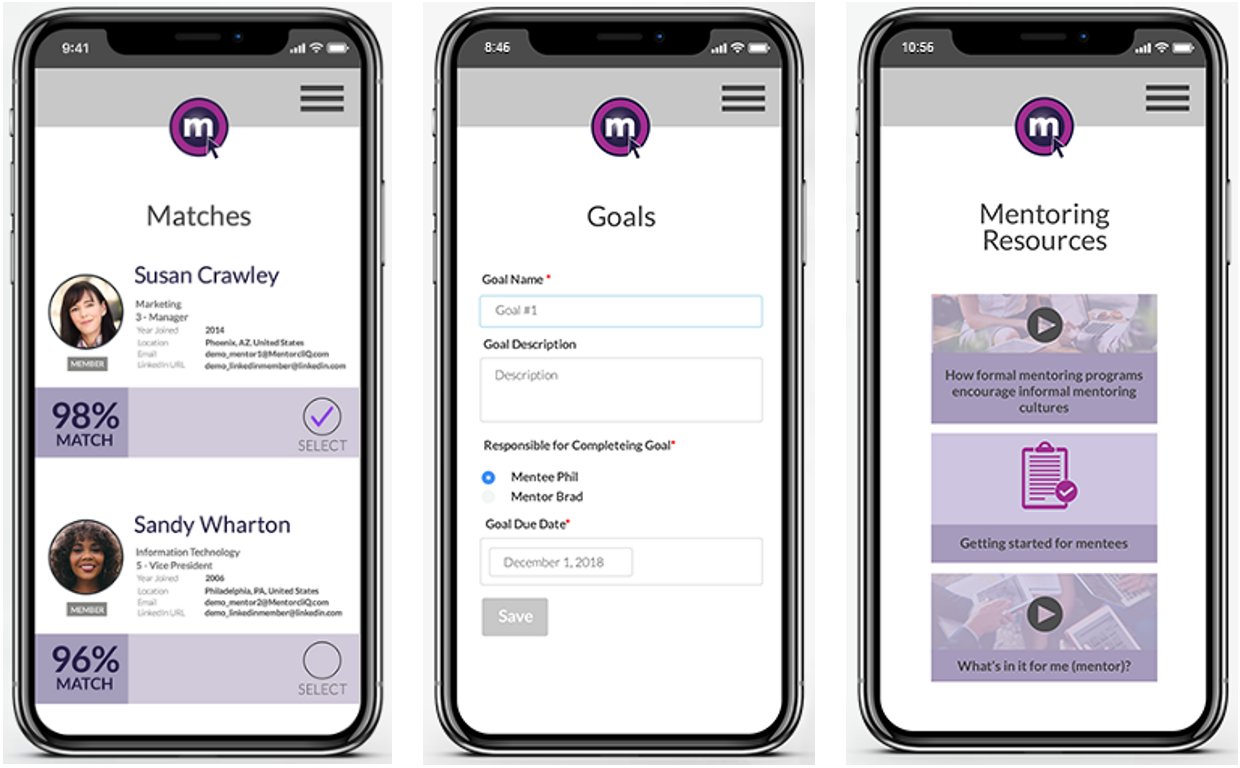
MentorcliQ helps HR and talent development teams build mentoring programs that actually strengthen retention and career growth by pairing the right people and tracking progress over time. It’s designed for medium to large organizations that want more predictable outcomes from mentoring rather than ad-hoc or manual processes.
Why I Picked MentorcliQ
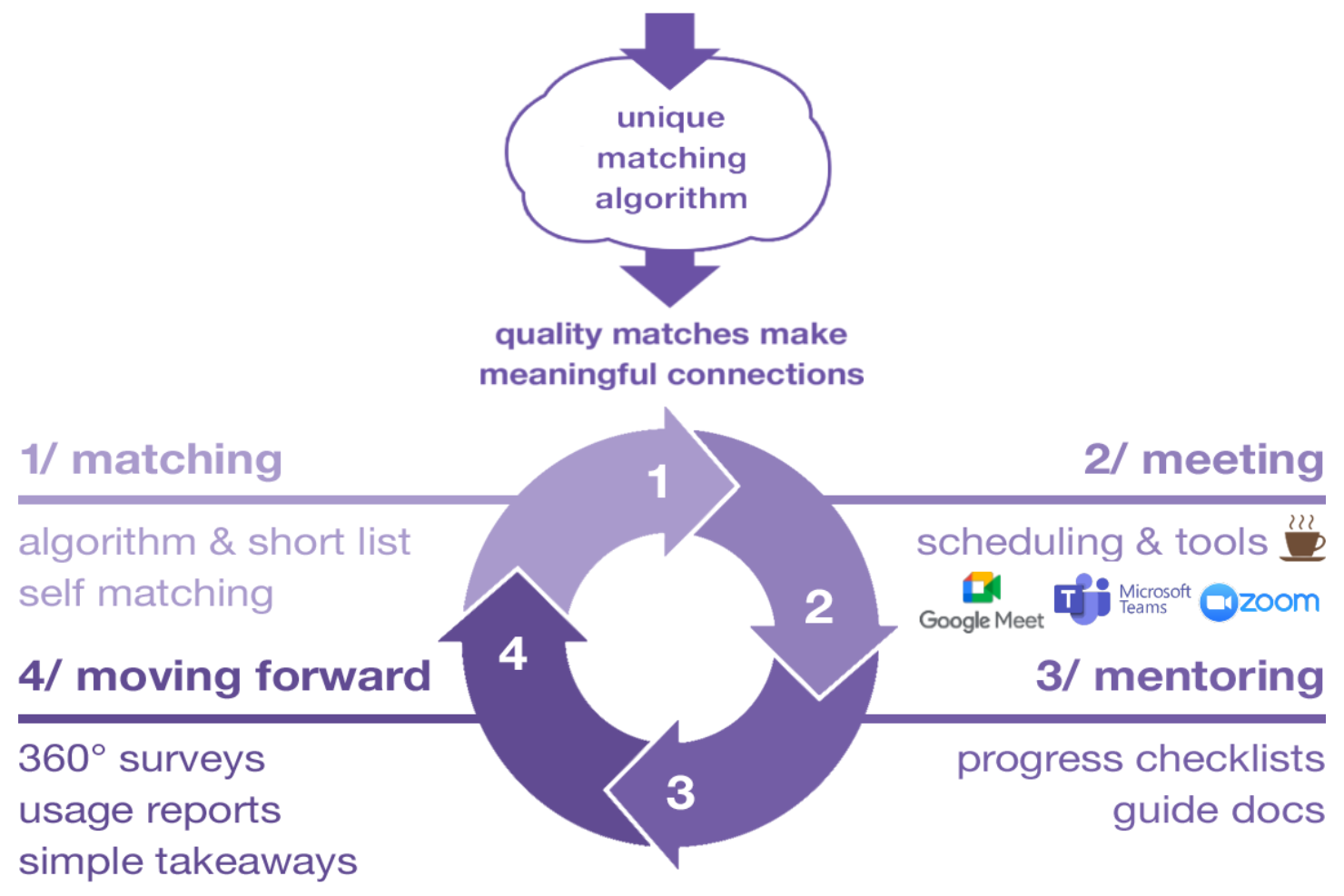
I picked MentorcliQ because it goes beyond basic mentor-mentee directories by using algorithm-driven matching to connect employees based on skills, goals, and personality alignment—not just availability.
Its SMART Matching technology gives you options like suggested matches or self-matching, so you can tailor connections to your company’s culture and program goals. MentorcliQ also provides clear analytics that measure engagement and retention impact, helping you show real value to leadership, and automated reminders and in-tool prompts keep both mentors and mentees progressing toward their objectives, reducing the manual work traditionally tied to mentoring programs.
Finally, the platform supports multiple mentoring formats (like one-on-one or peer groups), making it flexible for different development strategies.
MentorcliQ Key Features
Here are some key features worth highlighting:
- SMART Matching: Uses a sophisticated algorithm to pair mentors and mentees based on skills, interests, and development goals.
- Program Templates: Ready-to-use frameworks that reduce setup time and ensure consistency across mentoring initiatives.
- Progress Tracking: Tools that let you monitor milestones, goals, and engagement throughout the mentoring lifecycle.
- Resource Library: Built-in training content and guides that help participants stay on track and derive value from each mentoring relationship.
MentorcliQ Integrations
Integrations include ADP iHCM, ADP Onboarding, ADP Payroll Services, Azure, BambooCloud, Google Workspace, Microsoft 365, Microsoft Teams, Okta, OneLogin, Oracle Cloud, SAP SuccessFactors, Slack, UKG Pro, UKG Ready, Workday, and Zoom.
Pros and Cons
Pros:
- Clear dashboards help track engagement and retention impact
- Automated reminders reduce administrative burden
- Algorithmic matching improves fit quality across mentoring pairs
Cons:
- Limited in-app interaction features beyond core communication
- Some structured prompts feel generic to specific industries

Qooper
Best for enterprise mentoring programs
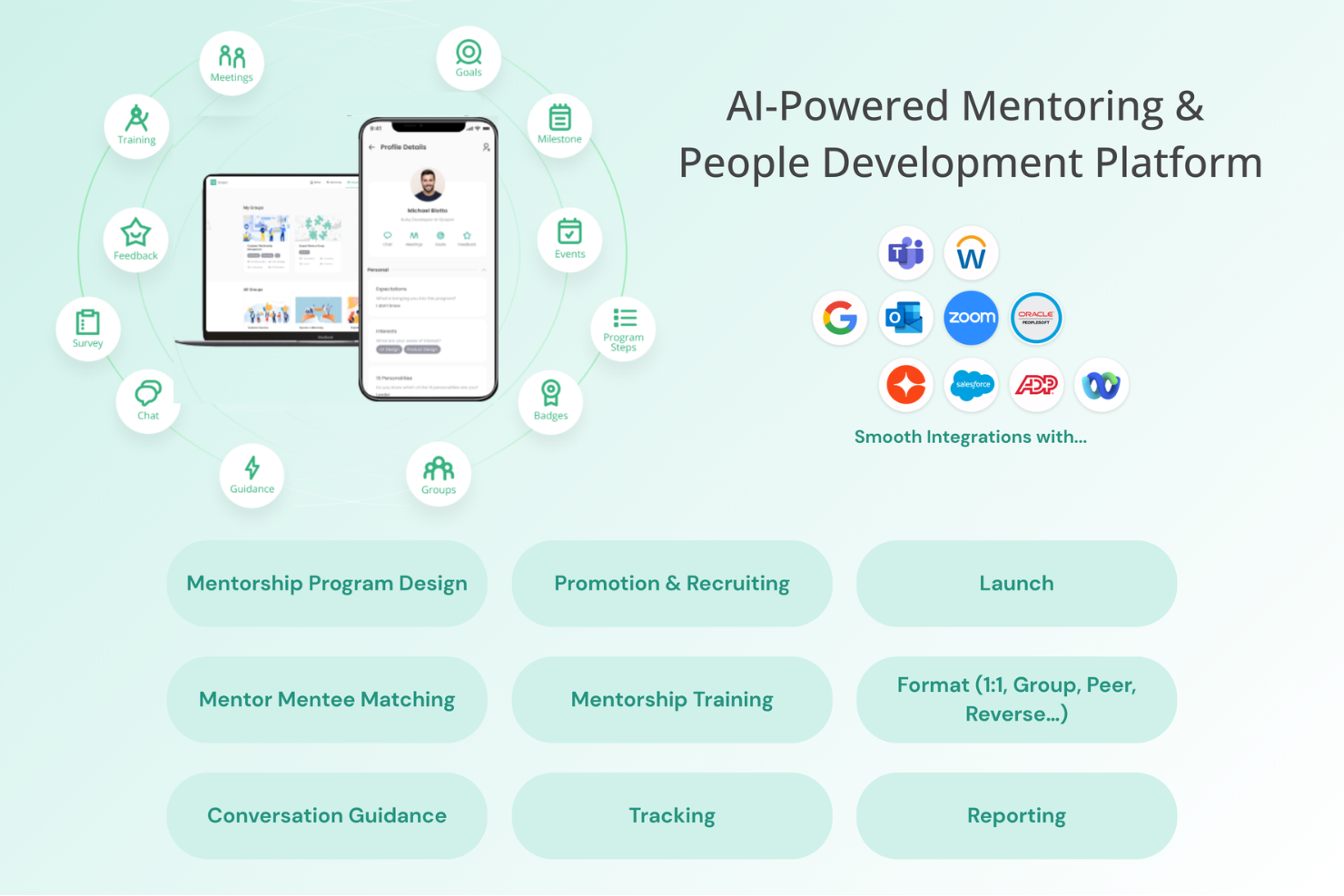
Qooper is a mentoring platform built for organizations and educational institutions that want to launch, manage, and scale structured mentoring programs with built-in tools for matching, tracking, and supporting mentor-mentee relationships. The platform supports a variety of mentoring initiatives, including career mentoring, onboarding, leadership development, high-potential employee programs, succession planning, internal mobility, employee development, student mentoring, and member mentoring programs.
Who Is Qooper Best For?
Qooper is a good fit for HR teams, L&D professionals, universities, and associations looking to run structured mentoring programs at scale.
Why I Picked Qooper
I picked Qooper as one of the best because of how much structure it gives program managers right out of the gate. The template library covers everything from 6-month mentoring curricula and goal-setting frameworks to session agendas and matching questionnaires—so my team isn't building programs from scratch every time. I also like the automated follow-ups and guidance that keep mentors and mentees on track between sessions without requiring manual check-ins. Participants can access mentoring resources, goal templates, feedback templates, reminders, and training materials throughout the mentoring journey. On the analytics side, the reporting dashboard lets me filter engagement data by cohort, role, or location, and tie program outcomes directly to retention and performance metrics while tracking participation, relationship progress, and employee development outcomes.
Qooper Key Features
- Smart mentor matching: An algorithmic matching engine pairs mentors and mentees based on customizable criteria such as goals, skills, interests, availability, working styles, and program objectives.
- Goal setting and tracking: Mentors and mentees can set goals, assign milestones, and monitor progress directly within the platform.
- In-app messaging and meeting scheduler: Built-in chat, calling, and a calendar-integrated meeting scheduler let pairs communicate and book sessions without leaving the platform. Users can also access the platform through desktop and mobile applications to connect, schedule meetings, track goals, and share feedback.
- Learning content library: Mentors and mentees can access curated training materials—articles, videos, and slideshows—covering mentorship, soft skills, and leadership.
- Enterprise program management: Organizations can manage mentoring programs across onboarding, leadership development, career growth, succession planning, and internal mobility initiatives while monitoring engagement and outcomes through centralized reporting.
Qooper Integrations
Integrations include Google Workspace, Microsoft Teams, Outlook, Zoom, BambooHR, Cornerstone, Workday, SAP SuccessFactors, and Okta. Qooper also supports integrations across HRIS, calendar, communication, learning management, video conferencing, and identity management systems. Qooper is SOC 2 Type I and Type II certified and GDPR compliant, with support for SSO, SAML authentication, and role-based access controls.
Pros and Cons
Pros:
- Clear analytics support ROI reporting for leadership
- Automation keeps mentor-mentee pairs engaged
- Strong mentoring templates reduce setup time
Cons:
- Reporting customization may require administrative setup
- Interface can feel dense when managing multiple programs


Together Software gives HR teams and program managers a platform to design, launch, and manage structured mentoring programs that help employees connect, grow, and achieve their development goals.
Who Is Together Software Best For?
Together Software is a good fit for mid-size to enterprise organizations with dedicated L&D or HR teams running formal mentoring programs at scale.
Why I Picked Together Software
Together Software earns its spot as one of the best on my shortlist because of how much control it gives program admins over the mentoring experience. I love that you can customize everything from the URL and branding to the pairing algorithm itself—adjusting matching criteria like goals, skills, and time zones to fit your program's specific needs. The program template library is also a standout: templates come pre-built with matching rules, session agendas, promotional assets, and emails, so you're not building from scratch every time you launch a new initiative. On the UX side, the platform's Health Monitor tools flag mentor-mentee pairs that aren't meeting or have low session scores, so admins can step in before a match quietly falls apart.
Together Software Key Features
- Multiple mentoring formats: Run traditional 1-on-1, group, peer-to-peer, reverse, ERG, or flash mentoring programs from a single platform.
- Registration questionnaires: Collect employee goals, skills, and development areas during sign-up to build detailed mentor and mentee profiles.
- Session agendas and discussion resources: Provide mentors and mentees with pre-built agendas, handbooks, and goal-setting exercises for each session.
- Program reporting dashboards: Track signups, participation rates, goal completions, session feedback, and pairing relevancy across your program.
Together Software Integrations
Integrations include Workday, SAP SuccessFactors, BambooHR, UKG, Microsoft Teams, Slack, Zoom, Google Meet, Office 365, and Google Workspace.
Pros and Cons
Pros:
- Calendar sync means fewer scheduling conflicts
- Built-in session templates help participants get started
- Intelligent pairing based on goals and skills
Cons:
- Reporting can feel complex for non-technical admins
- Setup can take time for first-time program admins
Brancher
Best for mentor-mentee matching
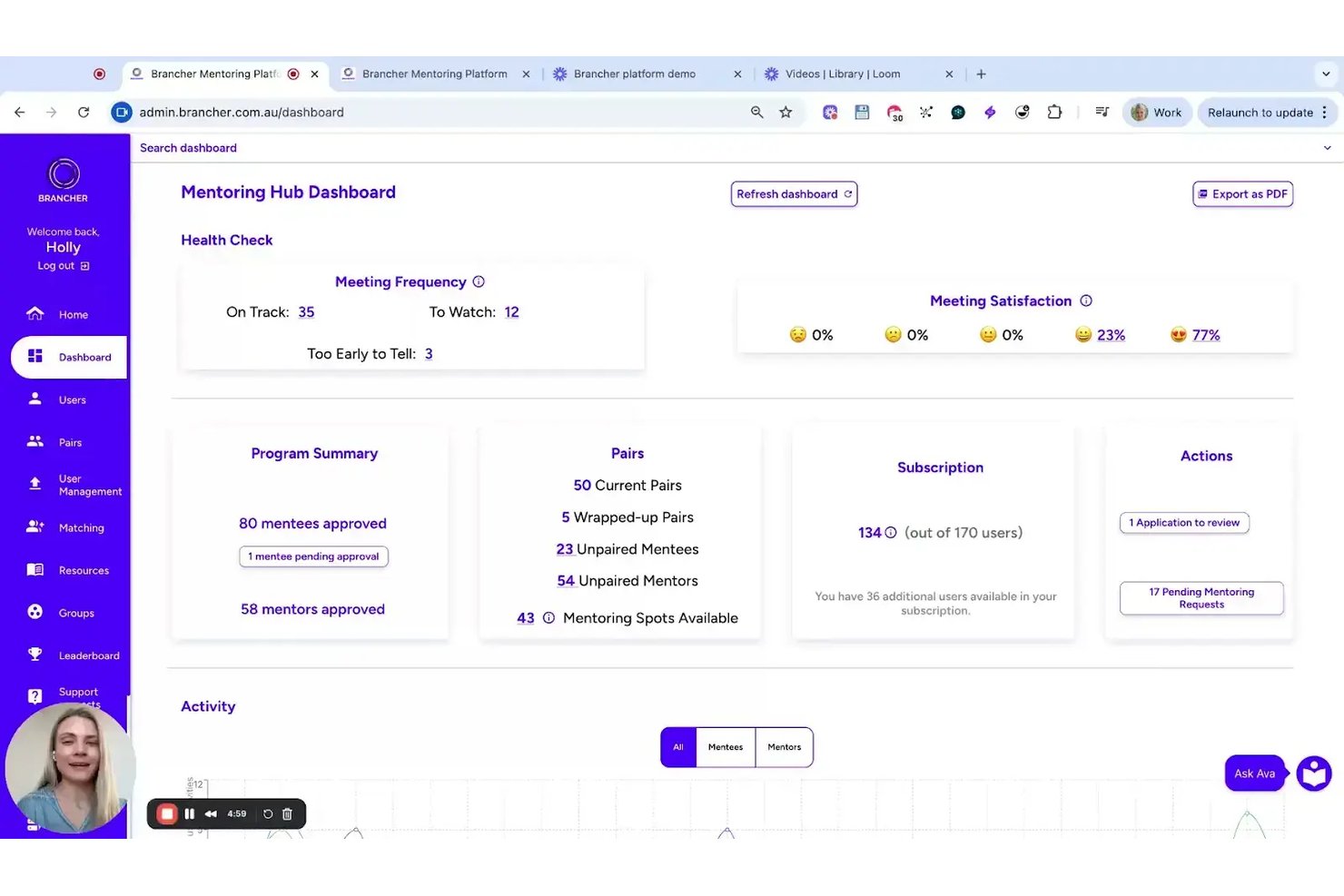
Brancher is a mentoring platform built by organizational psychologists that uses personality and values-based matching to pair mentors and mentees, with structured program management, goal tracking, and AI-driven engagement tools.
Who Is Brancher Best For?
Brancher suits HR teams in government agencies and mid-to-large enterprises that want to run structured mentoring programs tied to measurable retention and development outcomes.
Why I Picked Brancher
Brancher stands out for the way it pairs mentors and mentees, combining personality and values-based data to create stronger, more compatible mentoring relationships. The Ava AI add-on delivers 24/7 personalised prompts and guidance, keeping pairs moving without constant admin input. On top of that, bite-size interactive training modules grounded in behavioural science give both mentors and mentees something practical to act on before and after each conversation.
Brancher Key Features
- Personality and values-based matching: Uses proprietary algorithms to match mentors and mentees based on personality and values data.
- Calendar and video integrations: Supports scheduling and meetings through Google, Outlook, Teams, and Zoom.
- Real-time progress dashboard: Offers detailed tracking of program engagement and participant progress for administrators.
- GDPR-compliant data security: Provides enterprise-grade security, encryption, and compliance with international data privacy standards.
Brancher Integrations
Brancher offers native integrations with Google Calendar, Outlook, Microsoft Teams, and more. Single sign-on is supported.
Pros and Cons
Pros:
- Modern interface for both admins and users
- Configurable dashboards meet enterprise reporting needs
- AI handles pairing and engagement workflows
Cons:
- No mobile app for mentees or mentors
- Only supports English-language programs

Best for large corporations, government bodies, or educational institutions
MentorEase is a mentoring platform built for organizations that need structured mentor-mentee matching, program management, and progress tracking to support formal mentoring initiatives at scale.
Who Is MentorEase Best For?
MentorEase is a strong fit for HR and L&D teams in large corporations, government bodies, or educational institutions running formal, large-scale mentoring programs.
Why I Picked MentorEase
MentorEase earns its spot on my shortlist because of how well it handles the complexity of running mentoring programs at scale across large organizations. I particularly like the customizable matching algorithm, which lets admins assign weighted criteria to registration questions—so a government agency can prioritize department, seniority level, or location, while a university can weight industry experience or career goals. The multi-session program management also stands out for large corporations running concurrent programs across global divisions, since admins can manage separate cohorts, set program durations, and track Actionable Learning Outcomes (ALOs) from a single dashboard. I also find the data residency option genuinely useful for government bodies that need to lock participant data to servers in a specific country to meet compliance requirements.
MentorEase Key Features
- Completion certificates: Automatically generates and emails personalized PDF certificates to mentors and mentees when they finish a program.
- Ice breaker tools: Built-in conversation-starter games to help new mentor-mentee pairs get comfortable before diving into goals.
- Kirkpatrick model reporting: Tracks program results across four levels—participation, engagement, completion, and outcomes—including post-mentoring surveys up to three years later.
- Announcement posting: Admins can push targeted news feed messages to mentors, mentees, or all participants from within the platform.
MentorEase Integrations
Native integrations are not currently listed.
Pros and Cons
Pros:
- Well-suited for large corporations, government bodies, or educational institutions
- Company offers ongoing resources & webinars to help you get the best ROI from their software
- Supports a wide variety of use cases
Cons:
- Could use more native software integrations
- May be too expensive for small organizations

Best for scalable mentor training
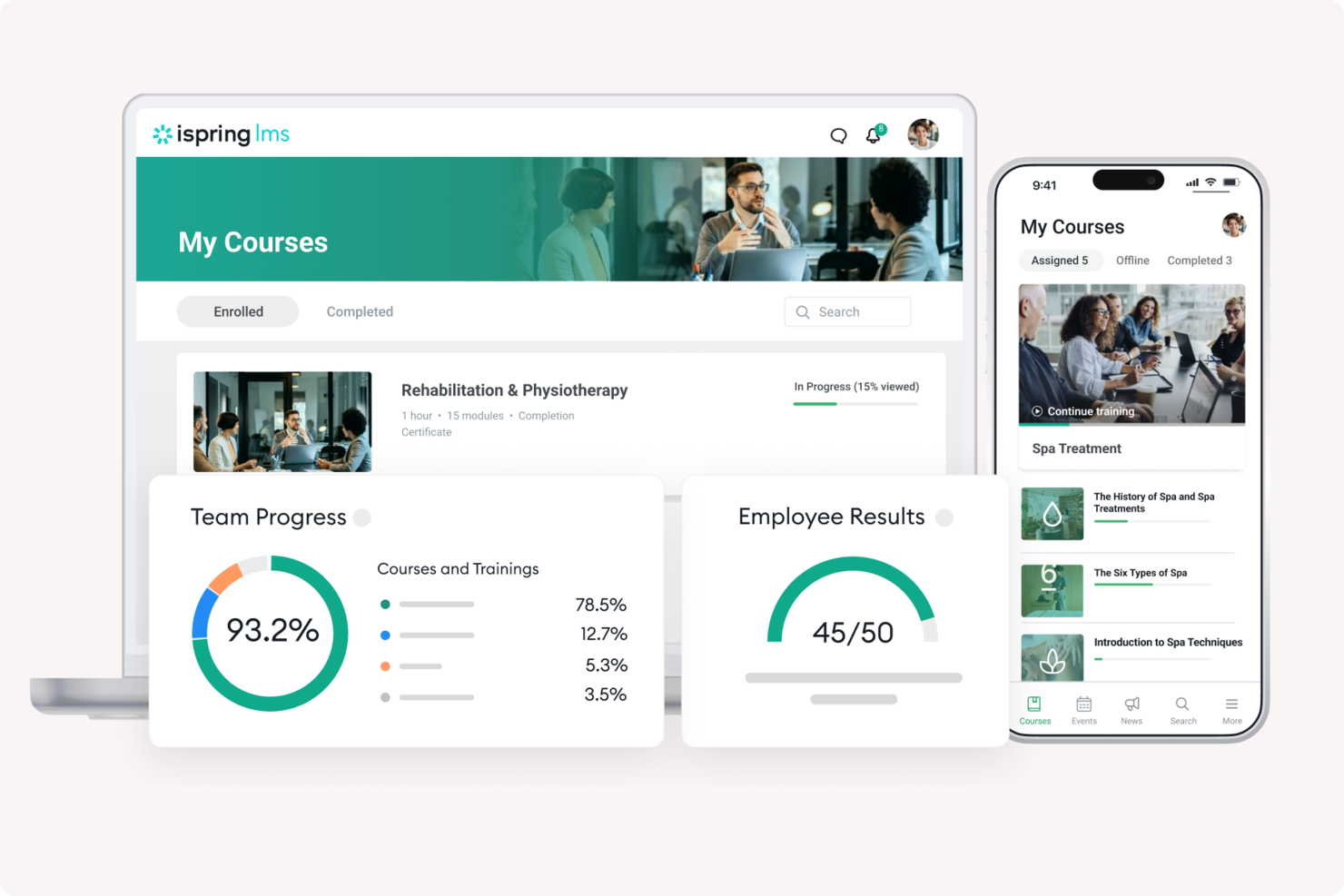
iSpring LMS gives HR teams and learning leaders a way to deliver, track, and manage structured mentoring and training programs for employees, making it easier to support skill development and knowledge sharing at scale.
Who Is iSpring LMS Best For?
iSpring LMS is a strong fit for mid-size to large organizations that need to run structured, scalable mentor training programs across multiple teams or departments.
Why I Picked iSpring LMS
iSpring LMS earns its spot on my shortlist because of how well it handles mentor assignment and structured development at scale. I particularly like the individual development plan feature, which lets you assign mentors and supervisors directly to employees, set action-based tasks, and track onboarding milestones in one place. The automatic course enrollment rules mean you can set up a mentoring program once and have it trigger for every new hire in a specific group, without manual intervention. The 360-degree review feature also adds real depth, letting mentors collect structured feedback from peers, managers, and direct reports to guide development conversations.
iSpring LMS Key Features
- Learning paths: Chain courses and tasks into a structured sequence that guides mentees through a defined development journey.
- Progress tracking dashboard: Monitor each learner's completion rates, quiz scores, and time spent across all assigned training.
- Mobile learning app: Mentees can access courses, tasks, and materials on iOS or Android without needing a desktop.
- Branching scenarios: Build interactive, decision-based simulations that let mentees practice real-world conversations and situations.
iSpring LMS Integrations
Integrations include Salesforce, MS Azure, MS Exchange, BambooHR, Udemy, Go1, LinkedIn Learning, and other popular course libraries.
Pros and Cons
Pros:
- Mobile access supports flexible learning
- Strong reporting for mentoring progress
- Fast onboarding with ready courses
Cons:
- Reporting customization is somewhat restricted
- Limited peer discussion capabilities
New Product Updates from iSpring LMS

iSpring LMS Adds Multiple Observations to OJT Sessions
iSpring LMS now lets managers log multiple observations within one OJT session, grouping visits and auto-generating summary stats like averages, criterion results, and comparisons. For more information, visit iSpring LMS's official site.


Chronus is a mentoring platform designed for organizations and HR teams who want to launch, manage, and measure structured mentoring programs that support employee growth, engagement, and retention.
Who Is Chronus Best For?
Chronus is a good fit for mid-size to enterprise organizations that need a scalable, program-driven approach to mentoring across large or distributed workforces.
Why I Picked Chronus
I picked Chronus as one of the best because of how intentionally it's built around inclusion and belonging—not as an add-on, but as a core part of how the platform works. What I find particularly compelling is the inclusive matching criteria, which lets you customize the MatchIQ® algorithm to prioritize connections across genders, ethnicities, nationalities, and neurodiversity. You can also turn on Anonymous Matching and hide unanswered question fields to reduce unconscious bias in the pairing process. Chronus also supports DEI-specific program formats like diversity mentoring, reverse mentoring, and mentoring circles—each designed to serve underrepresented employee groups in different ways, whether that's one-on-one sponsorship relationships or ERG-based peer groups.
Chronus Key Features
- Structured enrollment and recruitment automation: Automate the process of recruiting and enrolling participants into mentoring programs, with built-in accountability to keep admins and participants on track.
- Individual goal-setting and self-paced learning: Mentees can set personal learning goals and work through development content at their own pace within the platform.
- ROI dashboards and program reporting: Track program impact across metrics like retention, advancement, skill development, and productivity through built-in dashboards designed for HR leaders and executives.
- Mentoring circles: A peer-to-peer group format that lets employees with shared interests or learning goals develop together, including ERG-based groups focused on belonging and community.
Chronus Integrations
Integrations include Microsoft Teams, Outlook, Google Workspace, Workday, SuccessFactors, Slack, LinkedIn, Okta, Zoom, and an open API for custom integrations.
Pros and Cons
Pros:
- Valuable data insights
- Single sign-on
- Strong survey capabilities
Cons:
- No aggregate satisfaction scores
- Steep learning curve


MentorCruise connects professionals and aspiring talent with experienced mentors, offering a platform designed for those in tech, product, and startup roles who want structured guidance, skill development, and career growth through one-on-one mentorship.
Who Is MentorCruise Best For?
MentorCruise is a strong fit for individuals in tech, design, and product roles who want direct access to experienced industry mentors for career development and skill-building.
Why I Picked MentorCruise
I chose MentorCruise because it's deliberately built around technology-focused mentorship. The mentor network skews heavily toward software engineers, product managers, data scientists, and UX designers at companies like Google, Microsoft, Meta, and Spotify—so when you're browsing, you're filtering by real, verifiable expertise rather than generic coaching profiles. I also like the skill-based filtering, which lets mentees search by specific technologies like Python, Kotlin, or generative AI and match with someone who has hands-on experience in that area. Additionally, the AI-assisted matching chat helps mentees describe their goals and surface relevant mentor profiles, reducing the time needed to find a good fit.
MentorCruise Key Features
- Flexible plan structures: Choose between async Q&A chat plans, regular 1-on-1 video calls, or a combination of both to fit your schedule and learning style.
- One-off session booking: Book single sessions for specific needs like interview preparation, study planning, or introductory calls without committing to a long-term plan.
- Verified mentor profiles: Each mentor profile includes verified testimonials, performance data, and published blog posts so you can assess a mentor's track record before booking.
- Mentorship for teams: Access a dedicated team plan that lets organizations connect multiple employees with vetted mentors across tech and product disciplines.
MentorCruise Integrations
Native integrations are not currently listed.
Pros and Cons
Pros:
- Hands-on mentoring
- Perfect for tech mentoring
- Careful curation of mentors
Cons:
- Multiple pricing levels
- Not optimal for general mentoring


MentorcliQ is a mentoring software platform built for organizations that want to launch, manage, and scale structured mentoring programs, helping HR teams and program managers match mentors and mentees, track progress, and measure program impact.
Who Is MentorcliQ Best For?
MentorcliQ is a strong fit for mid-size to enterprise HR teams that need to run multiple mentoring programs simultaneously across large or distributed workforces.
Why I Picked MentorcliQ
MentorcliQ is one of the best on my shortlist because it's purpose-built for the scale and complexity enterprise HR teams face. I particularly like the SMART Matching algorithm, which is based on a Nobel Prize-winning matching model and optimizes pairings across an entire participant population at once—so when you're matching hundreds of employees, no one gets a low-quality pairing. I also find the multi-program management capability useful: you can run 1:1, group, peer, reverse, and flash mentoring programs simultaneously from a single admin interface, each with its own custom configuration and participant profiles. The enterprise-level reporting dashboard lets my team pull individual, program-level, and organization-wide metrics together, making it easier to tie mentoring activity to retention and development outcomes when reporting to leadership.
MentorcliQ Key Features
- Mentoring milestone tracking: Set and monitor structured goals and milestones for each mentoring relationship throughout the program lifecycle.
- In-app messaging: Mentors and mentees can communicate directly within the platform without switching to external tools.
- Participant resource library: Admins can upload and share guides, templates, and training materials directly within the platform.
- Automated program enrollment: Participants can be invited, onboarded, and enrolled into programs through automated workflows.
MentorcliQ Integrations
Native integrations are not currently listed.
Pros and Cons
Pros:
- Automatic reminders and notifications
- High-grade security
- Suitable for enterprises
Cons:
- Outdated UX
- Expensive for small businesses


Mentorloop is a mentoring platform for organizations and HR teams that want to build structured, scalable mentoring programs that connect mentors and mentees, simplify matching, and track progress across the entire organization.
Who Is Mentorloop Best For?
Mentorloop suits mid-size to large organizations with dedicated HR or L&D teams that need to run and manage formal mentoring programs at scale.
Why I Picked Mentorloop
Mentorloop earns its spot as one of the best on my shortlist because of how well it handles group mentoring alongside traditional one-on-one formats. I like that the platform's matching algorithm doesn't just pair individuals in isolation—it analyzes the entire cohort to find the most equitable groupings across the whole program. That's a meaningful difference when you're running a large group mentoring initiative and need every participant to feel like they got a fair shot at a good match. I also appreciate the Sentiment feature, which surfaces real-time qualitative feedback from participants throughout the program, so you're not waiting until the end to find out a group dynamic wasn't working.
Mentorloop Key Features
- Program dashboard: View and manage all active mentoring programs, participant progress, and engagement metrics from a single admin view.
- Guided conversation prompts: Provide mentors and mentees with structured topic suggestions to keep sessions focused and productive.
- Goal tracking: Let participants set, monitor, and update personal goals throughout the mentoring relationship.
- Automated nudges: Send scheduled reminders to participants who haven't logged activity, keeping engagement consistent across the program.
Mentorloop Integrations
Integrations include Google Calendar, Apple Calendar, Office 365, Salesforce, Slack, and Outlook.
Pros and Cons
Pros:
- Regularly updated
- Intuitive and easy to use
- Quality tutorials
Cons:
- Limited chat functions
- Issues with match filtering
Annen mentorprogramvare
Her er noen flere alternativer innen mentorprogramvare som ikke kom med på kortlisten min, men som likevel er verdt å se nærmere på:
- Torch
Mentoring software for combining internal and external mentors
- Guider
Mentoring software for customizable mentorship programs
- PushFar
Mentoring software for individuals seeking mentors to help advance their careers
- Ten Thousand Coffees
Mentoring software for structured implementation
- MentorCloud
Mentoring software for a scalable mentor platform
- Mentorink
Mentoring software for revamping existing mentorship programs
- Growth Mentor
Mentoring software for connecting with external mentors
- Mentoring Complete
Mentoring software for developing leaders
- MentorCity
Mentoring software for self-directed mentor matching
- Mentornity
Mentoring software for effortless success tracking


How I Evaluate Mentoring Software
I evaluate mentoring tools in two layers: the baseline must-haves—structured matching, program admin, and reporting—and the differentiators that matter most for L&D and DEI teams.
Core Functionality (Table Stakes For This List)
When I'm selecting tools for my list, I rank each one on a scale from 0 (does not offer the functionality) to 5 (excels in this area) for each core functionality listed below. Then, I calculate the tool's total score into a percentage. Each tool needs to achieve a minimum total score of 65% to be considered for inclusion.
- Mentor-Mentee Matching: I look at how each tool pairs participants—whether it relies on manual admin pairing, self-selection, or algorithmic matching based on skills, goals, and seniority.
- Program Administration: I check whether admins can configure and run multiple program formats (1:1, group, peer, reverse) from a single dashboard with custom workflows.
- Session Scheduling & Meetings: Each tool should offer calendar integrations and structured session agendas, so pairs aren't just matched and left to figure out logistics on their own.
- Goal & Progress Tracking: I evaluate how mentees define development goals and log milestones—tools like MentorcliQ and Together use structured plans rather than free-text notes.
- Reporting & Analytics: Dashboards should go beyond basic participation counts. I look for engagement metrics, satisfaction scores, and program-level impact data that L&D leads can share with stakeholders.
- HRIS & Communication Integrations: The tool should connect with your existing HRIS, SSO provider, and collaboration apps like Slack or Microsoft Teams to reduce friction during enrollment and ongoing use.
Once I have a list of tools that meet the criteria, I consider what sets each platform apart.
Differentiating Factors (What Sets Vendors Apart)
Here's how I compare and contrast different vendors:
Standout Features
AI-powered smart matching is a big differentiator. Tools like MentorcliQ and Chronus use machine learning to refine pairings over time based on feedback and outcomes, which saves L&D teams from manually sorting through spreadsheets. I also look for built-in content libraries with discussion guides and development resources—these give structure to sessions that might otherwise stall. A dedicated mobile app matters too, especially for distributed teams where mentees need to log progress or message their mentor between scheduled check-ins.
Beyond Features
DEI and ERG program support is something I evaluate closely. Vendors like Chronus and Together offer workflows built specifically for sponsorship and underrepresented talent initiatives, with reporting that segments outcomes by demographic data. Scalability matters just as much—I check whether a platform can run concurrent programs across regions and business units with multi-language and multi-timezone support. I also consider program design services, since many L&D teams benefit from vendor-provided playbooks and dedicated success managers to guide their first rollout.
Slik velger du mentorprogramvare
Det er lett å gå seg vill i lange funksjonslister og komplekse prismodeller. For å hjelpe deg med å holde fokus mens du går gjennom den unike prosessen din for valg av programvare, får du her en sjekkliste over faktorer du bør ha i tankene:
| Faktor | Hva bør du vurdere? |
|---|---|
| Skalerbarhet | Vil programvaren vokse sammen med teamet ditt? Ta hensyn til fremtidig utvidelse og om verktøyet kan håndtere flere brukere eller ekstra funksjoner uten økte kostnader. |
| Integrasjoner | Fungerer den med systemene du bruker i dag? Kontroller kompatibilitet med HR-verktøyene du allerede bruker, slik at du unngår datasiloer og manuell dataregistrering. |
| Tilpasningsmuligheter | Kan du tilpasse den til behovene dine? Se etter alternativer for å tilpasse arbeidsflyter eller dashbord til teamets mentorprosess og mål. |
| Brukervennlighet | Er den brukervennlig for alle ferdighetsnivåer? Velg et verktøy med et intuitivt grensesnitt som krever minimal opplæring for mentorer og menteer. |
| Implementering og introduksjon | Hvor lang tid vil oppsettet ta? Vurder tiden og ressursene som trengs for implementering og opplæring, og sørg for at leverandøren tilbyr tilstrekkelig støtte under introduksjonen. |
| Kostnad | Passer den inn i budsjettet ditt? Sammenlign prisplaner og se etter skjulte gebyrer. Vurder de totale eierkostnadene, inkludert opplæring og støtte. |
| Sikkerhetstiltak | Er dataene dine beskyttet? Sørg for at programvaren overholder personvernregler som GDPR, og tilbyr kryptering og sikre tilgangskontroller. |
| Tilgjengelig kundestøtte | Kan du få hjelp når du trenger det? Vurder leverandørens støttealternativer, for eksempel tilgjengelighet døgnet rundt, livechat og responstider, for å sikre rask hjelp. |
Hva er mentorprogramvare?
Mentorprogramvare er et verktøy som forenkler opprettelse, administrasjon og oppfølging av mentorprogrammer. HR-medarbeidere, ledere og teamledere bruker vanligvis disse verktøyene for å fremme medarbeiderutvikling og kunnskapsdeling. Matching av mentorer med adepter, oppfølging av fremdrift og kommunikasjonsverktøy bidrar til effektive mentorrelasjoner og vellykkede programmer. Alt i alt styrker disse verktøyene medarbeidernes utvikling og forbedrer organisasjonskulturen.
Funksjoner
Når du velger mentorprogramvare, bør du se etter følgende viktige funksjoner:
- Matching av mentorer og adepter: Gode mentorplattformer tilbyr automatiserte matchingsverktøy som kobler mentorer og adepter basert på ferdigheter, mål, erfaringsnivå, interesser og læringspreferanser. Bedre matcher fører til mer meningsfulle relasjoner og bedre resultater for programmet.
- Fremdriftsoppfølging: Programvaren bør følge opp økter, milepæler og utviklingsmål, slik at organisasjoner kan vurdere hvor effektive mentorrelasjonene er. Fremdriftsoversikter hjelper adepter med å ta ansvar, samtidig som mentorer kan følge utviklingen over tid.
- Kommunikasjonsverktøy: Innebygde meldinger, videokonferanser og chattefunksjoner gjør det mulig for mentorer og adepter å holde jevnlig kontakt uten å bytte plattform. Enkel kommunikasjon bidrar til å opprettholde fremdriften i mentorforholdet.
- Planleggingsfunksjoner: Integrerte planleggingsverktøy hjelper begge parter med å finne møtetidspunkter raskt, sende påminnelser og unngå kalenderkonflikter – noe som gjør mentorordningen enkel å opprettholde, selv for travle deltakere.
- Rapportering og analyse: En god mentorplattform tilbyr detaljerte rapporter som fremhever deltakelsesnivå, måloppnåelse, engasjementstrender og resultater for programmet. Denne innsikten hjelper organisasjoner med å videreutvikle og forbedre mentorstrategien.
- Tilpassbare programmer: Mentorprogramvaren bør gjøre det mulig å utforme programmer som samsvarer med virksomhetens mål – enten det gjelder lederutvikling, støtte ved introduksjon av nyansatte, DEI-initiativer, læring mellom kolleger eller karriereutvikling.
- Integrasjonsmuligheter: Integrasjoner med HRIS, LMS, verktøy for talentutvikling og kommunikasjonsplattformer bidrar til at data flyter sømløst mellom systemene. Dette reduserer manuelt arbeid og sørger for at medarbeiderinformasjonen er konsistent.
- Tilgjengelighet på mobil: Mobilvennlige grensesnitt lar mentorer og adepter planlegge økter, sende meldinger, fullføre oppgaver og følge fremdriften når som helst og hvor som helst – noe som er avgjørende for distribuerte eller hybride team.
- Tilbakemeldingsfunksjoner: Verktøy for tilbakemeldinger i sanntid hjelper deltakerne med å dele hva som fungerer (og hva som ikke fungerer). Kontinuerlige tilbakemeldinger støtter datadrevne forbedringer og sørger for at programmet utvikler seg i takt med deltakernes behov.
- Sikkerhetstiltak: Mentorplattformer må sørge for datakryptering, sikre tilgangskontroller og overholdelse av GDPR og andre personvernregler for å beskytte sensitiv deltakerinformasjon.
Fordeler
Implementering av mentorprogramvare gir flere fordeler for teamet og virksomheten din. Her er noen av fordelene du kan se frem til:
- Bedre medarbeiderutvikling: Legger til rette for utvikling av ferdigheter og karrierevekst ved å matche mentorer med adepter basert på spesifikke mål.
- Økt engasjement: Holder teammedlemmene motiverte og knyttet sammen gjennom regelmessig kommunikasjon og tilbakemeldingsverktøy.
- Effektiv programadministrasjon: Forenkler planlegging og fremdriftsoppfølging, sparer tid og reduserer administrative byrder.
- Bedre kunnskapsdeling: Oppmuntrer til utveksling av kompetanse og innsikt, og fremmer en kultur for kontinuerlig læring.
- Datadrevet innsikt: Gir analyser og rapporter som hjelper deg med å vurdere programmets effektivitet og ta informerte beslutninger.
- Fleksibilitet og tilgjengelighet: Tilbyr mobiltilgang og integrasjon med eksisterende systemer, slik at brukerne kan delta når som helst og hvor som helst.
- Sikker datahåndtering: Sikrer overholdelse av personvernregler, beskytter sensitiv informasjon og bygger tillit hos deltakerne.
Kostnader og priser
Valg av mentorprogramvare krever en forståelse av de ulike prismodellene og abonnementene som er tilgjengelige. Kostnadene varierer ut fra funksjoner, teamstørrelse, tillegg og mer. Tabellen nedenfor oppsummerer vanlige abonnementer, gjennomsnittsprisene deres og typiske funksjoner som er inkludert i mentorprogramvareløsninger:
Sammenligningstabell for abonnementer for mentorprogramvare
| Plantype | Gjennomsnittspris | Vanlige funksjoner |
|---|---|---|
| Gratisplan | $0 | Grunnleggende matching av mentorer og mentees, begrensede kommunikasjonsverktøy og fremdriftssporing. |
| Personlig plan | $5-$25/bruker/måned | Avansert matching, forbedret rapportering og tilpasningsbare mentorprogrammer. |
| Bedriftsplan | $30-$60/bruker/måned | Integrasjon med HR-systemer, mobiltilgang og detaljert analyse. |
| Foretaksplan | $70-$100/bruker/måned | AI-drevne funksjoner, dedikert kundestøtte og fullstendige tilpasningsmuligheter. |
Vanlige spørsmål om mentorprogramvare
Her er noen svar på vanlige spørsmål om mentorprogramvare:
Hvordan implementerer man mentorprogramvare?
Implementering av mentorprogramvare starter med å identifisere målene og behovene dine. Når du har valgt et verktøy, samarbeider du med leverandøren om å sette det opp i henhold til kravene dine. Lær opp teamet ditt i hvordan programvaren brukes effektivt. Benytt eventuelle tilgjengelige ressurser, som veiledninger og kundestøtte, for å sikre en smidig overgang. Gå jevnlig gjennom programvarens ytelse og innhent tilbakemeldinger for å gjøre nødvendige justeringer.
Brukes mentorprogramvare til kollega-til-kollega-programmer?
Ja, mentorprogramvare støtter ofte kollega-til-kollega-programmer, ikke bare tradisjonell mentorveiledning ovenfra og ned. Du kan konfigurere den til å koble sammen ansatte på samme nivå for gjensidig læring. Slike programmer fungerer godt ved introduksjon av nye ansatte, DEI-initiativer eller tverrfunksjonelt samarbeid. Programvaren sporer fremdriften på samme måte som i andre typer mentorprogrammer.
Hvordan overvåker administratorer mentoraktiviteten?
Administratorer får vanligvis tilgang til oversikter med rapporter om antall økter, måloppnåelse og engasjementsnivåer. Noen verktøy sender varsler når aktiviteten avtar eller mål blir utdaterte. Du kan eksportere data slik at HR- eller læringsteam kan evaluere effekten. Dette hjelper deg med å se hvilke relasjoner som er aktive, og hvilke som trenger oppfølging.
Kan mentorprogramvare støtte ulike typer mentorprogrammer?
Ja, de fleste verktøy lar deg kjøre flere mentorformater samtidig. Du kan sette opp individuelle programmer, gruppeprogrammer, omvendt mentoring eller lynmentoring. Innstillingene kan variere for hvert program, slik at de dekker ulike teambehov. Denne fleksibiliteten støtter ulike læringsstiler og mål på tvers av organisasjonen.