

10 beste programvarer for sikkerhetsstyring gjennomgått for 2026

10 Liste over den beste programvaren for sikkerhetsstyring


Å håndtere sikkerheten på arbeidsplassen kan være en krevende oppgave, særlig med stadig skiftende regler og behovet for å holde teamet ditt trygt. Som en person med god kjennskap til HR-bransjen forstår jeg utfordringene du står overfor. Programvare for sikkerhetsstyring kan bidra til å forenkle disse kompleksitetene ved å organisere data, spore hendelser og sikre etterlevelse.
I denne artikkelen deler jeg mine beste anbefalinger for programvare for sikkerhetsstyring. Jeg har testet og vurdert disse verktøyene uavhengig for å gi deg objektiv innsikt. Du finner praktiske løsninger tilpasset behovene dine, slik at det blir enklere å velge den rette løsningen for teamet ditt. La oss se nærmere på hvordan disse verktøyene kan gjøre sikkerhetsstyring mer håndterlig for deg.
Hvorfor du kan stole på våre programvareanbefalinger
Teamet vårt har testet og anmeldt programvare siden 2012. Vi er selv HR-eksperter, så vi vet hvor vanskelig og hvor viktig det er å velge riktig programvare.
I denne guiden har vi vurdert verktøyene gjennom praktisk testing og uavhengig research og gitt dem poeng ut fra våre utvelgelseskriterier. Vi bygger også på innsikt fra ledende eksperter i bransjen og erfarne HR-eksperter.
Anmeldelsene våre bygger på vår egen redaksjonelle vurdering. De er ikke et salgsargument.
Ekspertanmeldere:
Sammenligningstabell for programvare for sikkerhetsstyring
Denne sammenligningstabellen oppsummerer prisopplysningene for mine beste anbefalinger av programvare for sikkerhetsstyring:
| Tool | Best For | Trial Info | Price | ||
|---|---|---|---|---|---|
| 1 | EHS management software that offers both remote and in-person training | Not available | Website | ||
| 2 | Best for OSHA-compliant healthcare safety plans | Free demo available | Pricing upon request | Website | |
| 3 | Advanced EHS software designed to support ISO 45001 safety indicators | Free demo available | From $30/user/month (billed annually, min 5 seats) | Website | |
| 4 | HR software solution with integrated modules for health & safety and training management | Free demo or a free trial | From £16/month for up to 5 people | Website | |
| 5 | User-friendly incident tracking software with customizable risk assessment capabilities | Free demo available | Pricing upon request | Website | |
| 6 | Customizable EHS software that integrates with other modules for quality, risk management, sustainability, and ESG | Free demo available | From $44/user/month (billed annually) | Website | |
| 7 | Comprehensive safety management system with deep employee engagement and safety culture building tools | Request a free demo | Price upon request | Website | |
| 8 | Sophisticated safety management software with granular reporting and AI-generated data summaries | Free demo available | Pricing available upon request | Website | |
| 9 | Mobile-friendly, full-feature safety management system with predictive information and a patented safety score | 30-day free trial | From $16 USD/user/month | Website | |
| 10 | Mobile-friendly EHS software with equipment tracking capabilities | Free demo via their website | Pricing upon request | Website |
Beste programvare for sikkerhetsstyring
Nedenfor finner du en kort beskrivelse av hver programvare for sikkerhetsstyring, som viser hva hvert verktøy egner seg best til, i tillegg til noen bemerkelsesverdige funksjoner og skjermbilder som gir deg et innblikk i brukergrensesnittet. Les videre for å finne flere bonusanbefalinger nederst på listen.
EHS management software that offers both remote and in-person training

BIStrainer lands on my shortlist for the way it supports both remote and in-person training under one EHS platform. When teams split between job sites, offices, and remote locations, I find this kind of flexibility makes it easier to roll out safety programs on everyone’s schedule. I like that you can assign and track online courses while still managing classroom sessions and hands-on certifications in one system.
BIStrainer’s Best For
- Organizations delivering both online and in-person safety training
- Safety managers tracking blended EHS training and compliance
BIStrainer’s Not Great For
- Companies focused only on on-site, instructor-led training
- Teams needing advanced incident or hazard reporting tools
What sets BIStrainer apart
BIStrainer handles safety programs by letting you mix remote and in-person training from the same dashboard. Unlike providers that tie you to online learning only, it assumes you need to manage live sessions, supervisor sign-offs, and site-specific requirements too. I often see this work best for safety managers who juggle blended workforces and tight training records in regulated fields.
Tradeoffs with BIStrainer
BIStrainer optimizes for blended learning and certification, but you give up depth in incident and hazard tracking. If you need strong safety event management, you’ll want to add a second tool.
Best for OSHA-compliant healthcare safety plans

MedTrainer is on my shortlist because it covers OSHA safety planning and compliance needs for healthcare workplaces in one place. I’ve found its policy and procedure builder to be very effective for maintaining up-to-date safety documentation and ensuring nothing gets missed during audits.
What really stands out to me is how you can assign and track mandatory OSHA training by department, which is especially useful for clinics or multi-site organizations. I appreciate being able to organize and update compliance records across locations without digging through spreadsheets.
MedTrainer’s Best For
- Healthcare organizations needing OSHA-compliant safety documentation and training
- Multi-site clinics centralizing safety policies and audits
MedTrainer’s Not Great For
- Teams outside healthcare needing general safety management
- Organizations wanting deep custom incident tracking features
What sets MedTrainer apart
MedTrainer focuses on making OSHA and healthcare safety compliance routine instead of reactive. Unlike something like Google Workspace where you’re piecing documents and spreadsheets together, MedTrainer assumes you want safety plans, training, and policies centrally managed and audit-ready. In practice, this is especially helpful for healthcare organizations that are juggling multiple sites or accreditation standards.
Tradeoffs with MedTrainer
MedTrainer optimizes for healthcare safety and compliance, but that focus means you get less flexibility for non-healthcare or highly customized safety processes. You’re mostly working within structured, predefined workflows.
Cority
Advanced EHS software designed to support ISO 45001 safety indicators
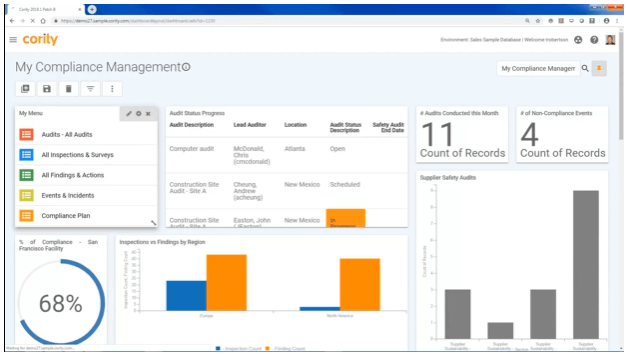
Cority earns its spot here for how well it centralizes enterprise-scale EHS management with a clear focus on ISO 45001 compliance. I recommend it when you need detailed tracking and incident reporting that can stand up to global safety standards.
What makes Cority valuable to me is its real-time safety indicators dashboard and customizable audit workflows. I especially like how this lets safety and HR teams monitor, prove, and improve compliance across multiple sites.
Cority’s Best For
- Large organizations managing complex EHS and compliance needs
- Teams needing ISO 45001-aligned safety indicators and audits
Cority’s Not Great For
- Small businesses with basic health and safety needs
- Teams seeking a lightweight or entry-level safety solution
What sets Cority apart
Cority stands out for how it expects safety and compliance teams to work across multiple sites using tightly defined processes and structured audit trails. Unlike more flexible tools like monday.com that let you design your own workflows, Cority has a stronger focus on supporting formal health and safety standards across global locations.
I see this working best when you need standardized data, centralized dashboards, and reporting that ties directly to regulations like ISO 45001.
Tradeoffs with Cority
Cority optimizes for standardization and regulatory alignment, but this means you give up flexibility for custom workflows or lighter use cases. Smaller teams or those needing a more adaptable solution can find it restrictive.

HR software solution with integrated modules for health & safety and training management
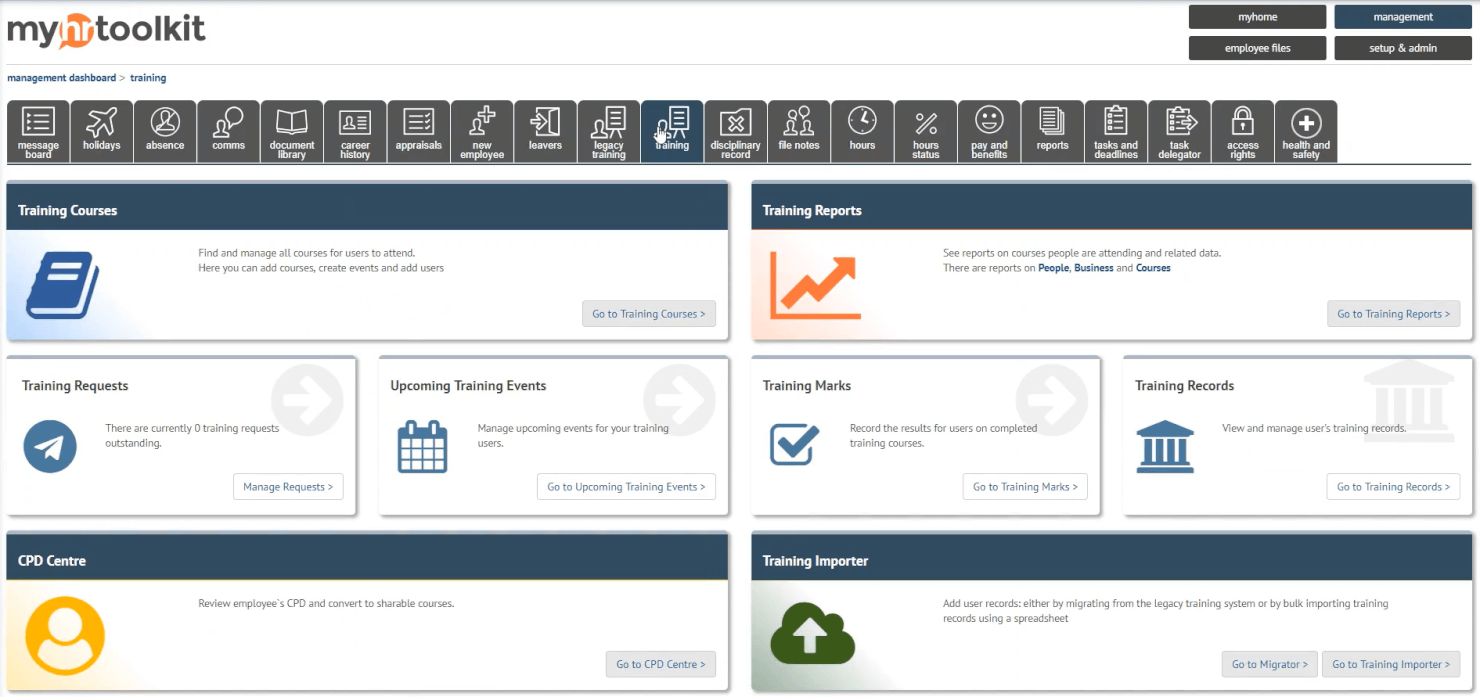
myhrtoolkit earns a spot on my list for how it brings essential health and safety tracking right into your core HR processes. I like how its integrated modules help you manage accident reporting, monitor staff compliance, and drive training management from the same system.
I find it works especially well for small and midsize teams needing to centralize incident records and training documentation. That full visibility over both safety and HR events is what sets it apart for me.
myhrtoolkit’s Best For
- Small to mid-sized businesses managing safety and HR together
- Teams needing built-in training and incident tracking
myhrtoolkit’s Not Great For
- Large enterprises with complex regulatory needs
- Highly specialized industries needing advanced safety analytics
What sets myhrtoolkit apart
myhrtoolkit stands out by blending HR management with health and safety recordkeeping in a way you don’t see with traditional HRIS tools like BambooHR. Instead of keeping compliance and training records as an afterthought, everything is managed side by side. Smaller organizations tend to use it to maintain a single source of truth without layering on a separate safety platform.
Tradeoffs with myhrtoolkit
myhrtoolkit optimizes for simple, integrated workflows, but teams needing custom compliance automation or advanced analytics find those areas limited. For highly regulated or technical environments, it often falls short.

User-friendly incident tracking software with customizable risk assessment capabilities

BrightSafe is on my shortlist because it gives you straightforward incident tracking tied to flexible risk assessments, which helps when you need both documentation and prevention in one place. I recommend BrightSafe when you want to move beyond spreadsheets and paper trails, especially if your workplace handles varied safety risks.
What stands out for me is how you can tailor risk assessments to fit different sites or activities, then quickly log accidents, near misses, and hazards for a complete safety record. I like how everything’s auditable and accessible for quick reviews, which is important when protocols or compliance checks come up.
BrightSafe’s Best For
- Organizations tracking workplace incidents and tailoring risk assessments
- Safety managers handling compliance across multiple worksites
BrightSafe’s Not Great For
- Businesses needing integrated equipment maintenance management
- Teams requiring advanced analytics beyond incident tracking
What sets BrightSafe apart
BrightSafe makes safety tracking feel accessible for managers who want to move away from manual processes. Instead of overwhelming you with configuration, it lets you document incidents and tailor risk assessments for different departments or sites. I find it expects you to approach safety by building a living record and acting on real evidence, rather than reacting in the moment.
Unlike Alliant Safety or more complex EHS suites, BrightSafe is great for teams who want accountability and traceability baked into the daily flow, but not at the cost of cumbersome setup.
Tradeoffs with BrightSafe
BrightSafe optimizes for simple, repeatable incident management, which means you sacrifice advanced analytics and customizable automation that larger, compliance-heavy sites often need.

Intelex
Customizable EHS software that integrates with other modules for quality, risk management, sustainability, and ESG
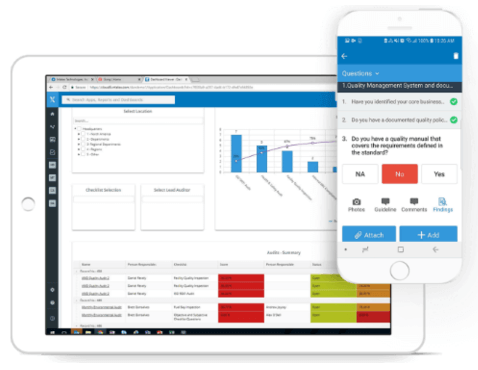
Intelex is a go-to for organizations with complex safety needs and a need for serious flexibility. I’ve seen teams get value from its modular approach—especially when they’re already tracking quality, environmental, or risk data and need everything in one tool.
What stands out for me is how you can configure workflows and link safety metrics directly to ESG and sustainability targets. If you want custom dashboards to keep incident data, audits, and improvement actions tightly connected, Intelex delivers.
Intelex’s Best For
- Organizations integrating safety, quality, and ESG management
- EHS teams needing highly configurable dashboards and workflows
Intelex’s Not Great For
- Small businesses needing basic, out-of-the-box safety tools
- Teams seeking quick setup with minimal configuration
What sets Intelex apart
Intelex takes a modular approach that expects you to manage safety, quality, and ESG metrics together. I see teams build out processes that match their compliance needs rather than forcing work into prefab workflows like you find in basic safety apps. Unlike something like SafetyCulture, you get lots of flexibility to design forms, dashboards, and incident tracking to your needs.
This setup makes the most sense when you’re dealing with complex requirements that change across regions or business units.
Tradeoffs with Intelex
Intelex optimizes for customization, but setup takes time and ongoing admin work. If you want something you can launch and use quickly, this isn’t a good fit.

Comprehensive safety management system with deep employee engagement and safety culture building tools

Cority Safety Cloud makes my list for organizations that need a single, unified platform for incident management, audits, and corrective actions. What I like is how Cority keeps safety front and center by engaging employees directly in reporting hazards and sharing real-time feedback through mobile tools. I’ve seen teams benefit from the behavioral safety and culture-building features when fostering shared responsibility is the goal.
This is best when you want to go beyond checklists and truly engage people in safety culture, not just compliance.
Cority Safety Cloud’s Best For
- Large enterprises with complex safety compliance needs
- Organizations building a participatory, employee-driven safety culture
Cority Safety Cloud’s Not Great For
- Small businesses with basic or occasional safety tracking needs
- Teams wanting a lightweight, quick-to-set-up safety solution
What sets Cority Safety Cloud apart
Cority Safety Cloud is designed for organizations that want safety to be a shared, everyday activity across the business. Unlike lighter tools like SafetyCulture, Cority leans into creating a feedback loop where employees take an active role—not just reporting hazards but shaping the overall program alongside EHS leaders.
In practice, this works best when you want safety engagement that feels bottom-up, not just top-down policy enforcement.
Tradeoffs with Cority Safety Cloud
Cority focuses on enterprise-level detail and engagement, but setup and program design can be time-intensive. For small organizations or teams that need to respond quickly, that complexity may slow deployment and early results.
SiteDocs
Sophisticated safety management software with granular reporting and AI-generated data summaries

SiteDocs earns its spot for safety-first organizations looking to level up beyond simple checklists. When I test its granular reporting and AI data summaries, I see a clear advantage for teams managing hundreds of inspections, audits, and incidents.
I appreciate how SiteDocs lets you drill into individual trends while also surfacing bigger patterns through automated insights. This is exactly what I want when safety leaders need both detail and clear, actionable summaries to guide decisions.
SiteDocs’s Best For
- Safety managers tracking large volumes of inspections or incidents
- Organizations that want AI-powered safety data summaries
SiteDocs’s Not Great For
- Small teams with only basic safety requirements
- Groups that prefer simple, checklist-based safety tools
What sets SiteDocs apart
SiteDocs stands out by organizing safety management around detailed audit trails and summary dashboards. Unlike basic checklist apps or Google Forms, it expects you to dig into trends and compliance gaps over time, not just collect signoffs or one-off forms. In practice, this works best for safety leaders who need to monitor ongoing risk, with AI surfacing key findings so you don’t miss patterns in a sea of reports.
Tradeoffs with SiteDocs
SiteDocs optimizes for high-volume, structured tracking, but that focus means small teams with simple workflows might find the setup and reporting more than they need.
Safesite
Mobile-friendly, full-feature safety management system with predictive information and a patented safety score
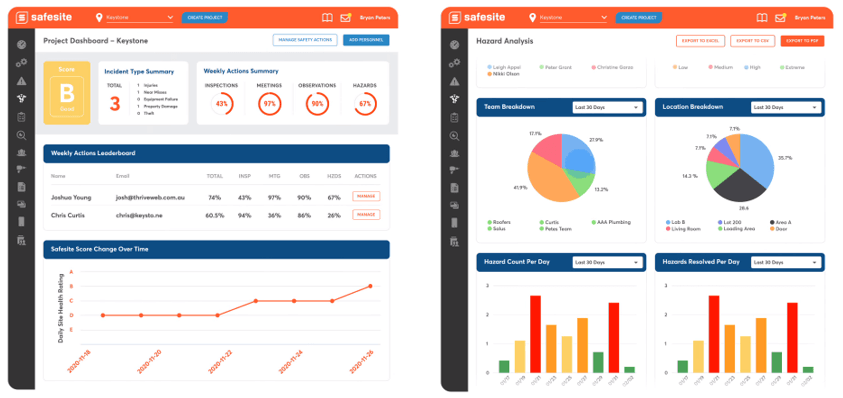
Safesite is on my list because it’s way ahead in predictive safety management. I like how everything is designed for mobile use, so teams can log hazards, incidents, or safety activities right in the field. The patented safety score gives you a direct read on jobsite risk, which I find helps supervisors act fast and make real improvements.
Safesite’s Best For
- Field teams that need mobile-first safety management
- Companies tracking risk with real-time, predictive data
Safesite’s Not Great For
- Organizations with paper-based or very manual processes
- Small crews that don’t track safety activities digitally
What sets Safesite apart
Safesite approaches safety as a proactive, continuous process that happens out in the field. Instead of relying on desktop-based dashboards like you find with something like SafetyCulture, Safesite expects crews to log activity, report hazards, and track metrics directly on mobile devices. This works well when you want real-time awareness and visibility for superintendents or safety managers as jobs progress.
Tradeoffs with Safesite
Safesite optimizes for mobile-first digital workflows, but you give up options for running traditional, paper-heavy processes. If you’re not ready for digital recordkeeping, it can feel like extra work.

Mobile-friendly EHS software with equipment tracking capabilities
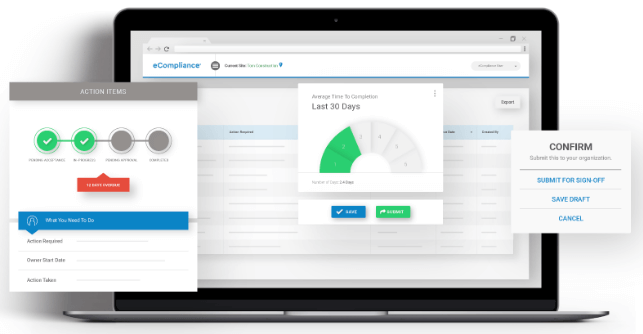
eCompliance makes this list because it specializes in simplifying field safety management for teams who need mobile access. When I evaluated its equipment tracking features, I saw how easy it is for frontline staff to check inspection records or maintenance status right from their phone.
The mobile app reduces paperwork and keeps asset data up to date, which I find especially valuable for safety leads coordinating across multiple job sites. I like how inspection scheduling and hazard reporting are tightly linked to the equipment profiles—this fits real-world scenarios where compliance and asset safety overlap.
eCompliance’s Best For
- Safety teams needing mobile equipment inspection and tracking
- Companies running multiple worksites with distributed field staff
eCompliance’s Not Great For
- Organizations that don’t manage equipment assets
- Teams needing in-depth incident investigation and root cause analysis
What sets eCompliance apart
eCompliance is designed for field teams who need to log inspections, access safety forms, and track equipment without leaving the worksite. Unlike options like SafetyCulture that emphasize audits or observation-based reporting, eCompliance expects staff to use mobile devices to close inspection loops and manage asset status live, right where the work happens.
In practice, this makes the tool a good fit for organizations with a lot of moving physical equipment across jobsites.
Tradeoffs with eCompliance
eCompliance optimizes for mobile-first safety tasks, but in doing so, it limits the level of customization and analytics you could get from more dashboard-oriented systems. If your team wants to build out specialized workflows or analyze trends in detail, you'll hit limits here.
Annen programvare for sikkerhetsstyring
Her er noen flere alternativer som ikke kom med på listen over den beste programvaren for sikkerhetsstyring. Jeg hadde ikke plass til en fullstendig vurdering av hver av disse, men de er likevel verdt å vurdere:
- WHS Monitor
Advanced safety management solution including access to 7 million safety documents and templates
- SafetyAmp
Cloud-based safety management software with configurable recordkeeping apps to automate compliance tracking tasks
- Weever
Digital operations management platform with employee engagement features to keep safety top-of-mind
- Lighthouse
Straightforward web-based safety management software with offline data storage for workers in remote locations
- EHS Insight
Safety management and injury tracking software compliant with OSHA, WCB, RIDDOR and MSHA - available as a free trial.
- Eddy
HR software system with built-in training tracking module and document storage for copies of certifications.
- Employment Hero
HRIS system with an integrated training tracker including automatic email notifications to ensure employees stay compliant.
- GoCanvas Safety
Advanced digital safety management system with e-signatures, digital photo capture, and client-facing reports - available as a 10-day free trial.
- LogicManager
HRMS software with modules for health & safety, risk management and compliance - known for excellent customer service and implementation services.
- ProntoForms
Safety management system built to support field teams, including solution-based templates or the ability to build your own.


How I Evaluate Safety Management Software
I split my evaluation into two layers: baseline criteria every tool must meet—like OSHA recordkeeping and incident workflows—and differentiators that separate best-fit tools from the rest.
Core Functionality (Table Stakes For This List)
When I'm selecting tools for my list, I rank each one on a scale from 0 (does not offer the functionality) to 5 (excels in this area) for each core functionality listed below. Then, I calculate the tool's total score into a percentage. Each tool needs to achieve a minimum total score of 65% to be considered for inclusion.
- Incident & Injury Reporting: I look for structured intake forms, investigation workflows, and corrective action tracking that let HR log everything from a warehouse slip-and-fall to a near-miss on a job site.
- Regulatory Compliance Management: Each tool should support OSHA 300, 300A, and 301 log generation (or regional equivalents), so your team can pull audit-ready records without rebuilding them in a spreadsheet.
- Safety Training & Certification Tracking: I evaluate whether the platform tracks completions, certification expiration dates, and renewal reminders—especially for role-specific requirements like forklift operation or confined space entry.
- Risk Assessments & Inspections: Tools should offer configurable inspection templates and scheduling, so a safety lead can run a monthly fire extinguisher audit or a quarterly site hazard assessment from a single system.
- Safety Document & Policy Management: I check for centralized storage with version control and employee acknowledgment tracking, which matters when you need to prove staff reviewed updated PPE procedures or new SDS sheets.
- Reporting & Analytics Dashboards: The platform should surface key safety KPIs like TRIR, DART rates, and incident trends in configurable dashboards your HR leadership team can actually act on.
Once I have a list of tools that meet this criteria, I consider what sets each platform apart.
Differentiating Factors (What Sets Vendors Apart)
Here's how I compare and contrast different vendors:
Standout Features
Mobile and offline access matters when your workforce is spread across job sites or warehouse floors—I look for apps that let supervisors complete inspections and log incidents without a Wi-Fi connection. Workers' comp integration is another differentiator, since linking an incident record directly to a claim saves HR from re-entering data across systems. I also check whether a platform handles contractor and visitor safety, which is a real need for teams managing mixed workforces across multiple locations.
Beyond Features
HRIS integration is a big one—I check whether a platform syncs with systems like Workday, BambooHR, or ADP so employee rosters and org data stay current without manual imports. Industry and workforce fit also matters; a tool built for construction crews spread across job sites has different configuration needs than one designed for a healthcare facility. I evaluate compliance and security standards closely too, since safety platforms store sensitive injury and medical records that demand protections like SOC 2 certification and role-based access controls.
Slik velger du programvare for sikkerhetsstyring
Det er lett å gå seg vill i lange funksjonslister og komplekse prismodeller. For å hjelpe deg med å holde fokus mens du arbeider deg gjennom den unike prosessen med å velge programvare, får du her en sjekkliste over faktorer du bør ha i mente:
| Faktor | Hva du bør vurdere |
|---|---|
| Skalerbarhet | Vil programvaren vokse sammen med selskapet ditt? Kontroller om den støtter flere brukere og mer data etter hvert som virksomheten utvides. |
| Integrasjoner | Kan den integreres med de nåværende systemene dine? Se etter kompatibilitet med verktøy som HR-systemer og ERP-systemer. |
| Tilpasningsmuligheter | Kan du tilpasse programvaren til arbeidsflytene dine? Sørg for at du kan endre skjemaer og prosesser slik at de passer behovene dine. |
| Brukervennlighet | Er programvaren intuitiv? Vurder om teamet ditt raskt kan lære å bruke og navigere på plattformen uten frustrasjon. |
| Implementering og oppstart | Hvor smidig er overgangen? Vurder ressursene som kreves til konfigurering og opplæring, samt tiden det tar før løsningen er klar til bruk. |
| Kostnad | Hva er de totale eierkostnadene? Sammenlign abonnementsavgifter, skjulte kostnader og verdien av funksjonene som tilbys. |
| Sikkerhetstiltak | Er det etablert tiltak for databeskyttelse? Sørg for etterlevelse av bransjestandarder og datakryptering. |
| Etterlevelseskrav | Støtter løsningen nødvendige regler? Kontroller om programvaren oppfyller bransjespesifikke krav til etterlevelse. |
Hva er programvare for sikkerhetsstyring?
Sikkerhetsstyringsprogramvare er et verktøy som hjelper organisasjoner med å administrere sikkerhet på arbeidsplassen og overholde regelverk. Fagpersoner som sikkerhetsledere, HR-medarbeidere og samsvarsansvarlige bruker vanligvis disse verktøyene for å sikre et trygt arbeidsmiljø og følge forskrifter. Funksjoner for hendelsesrapportering, risikovurdering og samsvarssporing bidrar til å opprettholde sikkerhetsstandarder og overholde regelverk. Samlet sett gir disse verktøyene verdi ved å forenkle sikkerhetsprosesser og redusere risikoer på arbeidsplassen.
Funksjoner
Når du velger sikkerhetsstyringsprogramvare, bør du se etter følgende viktige funksjoner:
- Hendelsesrapportering: Gjør det mulig for brukere å dokumentere og spore hendelser på arbeidsplassen effektivt, noe som bidrar til rask respons og forebygging.
- Risikovurdering: Bidrar til å identifisere potensielle farer og vurdere risikoer for å sikre at proaktive sikkerhetstiltak er på plass.
- Samsvarssporing: Sikrer overholdelse av bransjereguleringer ved å overvåke samsvarsstatus og generere nødvendige rapporter.
- Revisjonsstyring: Legger til rette for regelmessige sikkerhetsrevisjoner og inspeksjoner, noe som bidrar til å opprettholde sikkerhetsstandarder i hele organisasjonen.
- Dokumentstyring: Organiserer sikkerhetsdokumenter og -oppføringer, slik at det blir enkelt å få tilgang til og oppdatere viktig informasjon.
- Mobil tilgang: Gir tilgang til sikkerhetsdata og rapportering når du er på farten, noe som er nyttig for feltarbeidere og eksterne team.
- Tilpassbare arbeidsflyter: Gjør det mulig å tilpasse prosesser og skjemaer etter organisasjonens spesifikke behov og arbeidsflyter.
- Dataanalyse: Gir innsikt gjennom dashbord og rapporter i sanntid, slik at man kan ta velinformerte sikkerhetsbeslutninger.
- Opplæringsstyring: Støtter planlegging og sporing av sikkerhetsopplæring, slik at de ansatte er klare til å ivareta sikkerheten.
- Integrasjonsmuligheter: Kobler seg til eksisterende systemer som HR- og ERP-programvare for å effektivisere sikkerhetsdrift og datadeling.
Fordeler
Implementering av sikkerhetsstyringsprogramvare gir flere fordeler for teamet og virksomheten din. Her er noen av fordelene du kan se frem til:
- Bedre samsvar: Holder organisasjonen i tråd med bransjereguleringer gjennom samsvarssporing og rapportering.
- Styrket sikkerhetskultur: Fremmer en proaktiv tilnærming til sikkerhet med verktøy for hendelsesrapportering og risikovurdering.
- Tidsbesparelser: Reduserer administrative oppgaver ved å automatisere prosesser som revisjoner og inspeksjoner.
- Bedre beslutningstaking: Gir innsikt gjennom dataanalyse, slik at du kan ta velinformerte sikkerhetsbeslutninger.
- Økt tilgjengelighet: Tilbyr mobil tilgang, slik at teamet kan administrere sikkerhetsdata hvor som helst.
- Tilpassede prosesser: Tilpassbare arbeidsflyter gjør det mulig å tilpasse programvaren til dine spesifikke behov innen sikkerhetsstyring.
- Effektiv opplæring: Administrerer og sporer opplæring, slik at teamet er godt forberedt på sikkerhetsutfordringer.
Kostnader og priser
Valg av sikkerhetsstyringsprogramvare krever en forståelse av de ulike prismodellene og abonnementene som er tilgjengelige. Kostnadene varierer basert på funksjoner, teamstørrelse, tillegg og mer. Tabellen nedenfor oppsummerer vanlige abonnementer, gjennomsnittsprisene deres og typiske funksjoner som er inkludert i løsninger for sikkerhetsstyringsprogramvare:
Sammenligningstabell for abonnementer på sikkerhetsstyringsprogramvare
| Abonnementstype | Gjennomsnittspris | Vanlige funksjoner |
|---|---|---|
| Gratisabonnement | $0 | Grunnleggende hendelsesrapportering, begrenset brukertilgang og grunnleggende samsvarsverktøy. |
| Personlig abonnement | $10-$30/bruker/måned | Hendelsesrapportering, dokumentstyring, risikovurdering og mobil tilgang. |
| Bedriftsabonnement | $30-$60/bruker/måned | Revisjonsstyring, samsvarssporing, tilpassbare arbeidsflyter og integrasjoner. |
| Virksomhetsabonnement | $60-$100/bruker/måned | Avansert analyse, dedikert støtte, avanserte sikkerhetsfunksjoner og full tilpasning. |
Vanlige spørsmål
Er det vanskelig å bytte til ny programvare for sikkerhetsstyring?
Det kan være utfordrende å bytte til ny programvare, men mange leverandører tilbyr støtte ved oppstart. Se etter løsninger med opplæringsressurser, produktvisninger og egne supportteam. Planlegg overgangen nøye ved å vurdere behovene for datamigrering og forberede teamet ditt på endringen.
Hvor sikker er programvare for sikkerhetsstyring?
De fleste programmer for sikkerhetsstyring har sikkerhetstiltak som datakryptering og brukerautentisering. Når du velger programvare, bør du spørre om sikkerhetsprotokollene og samsvar med standarder som GDPR eller ISO. Sørg for at programvaren beskytter sensitive data og er i tråd med organisasjonens sikkerhetspolicyer.
Kan programvare for sikkerhetsstyring tilpasses bransjen min?
Ja, mange løsninger tilbyr tilpasningsmuligheter for å dekke spesifikke bransjebehov. Du kan ofte tilpasse arbeidsflyter, skjemaer og rapporter slik at de samsvarer med driftskravene dine. Når du vurderer programvare, bør du se etter funksjoner som gjør det mulig å tilpasse løsningen, og spørre om bransjespesifikke maler eller moduler.