

Se está a utilizar o iSpring Learn, mas está a deparar-se com limitações, não é o único. Talvez seja a falta de flexibilidade, a insuficiência dos relatórios ou funcionalidades que simplesmente não acompanham as necessidades da sua equipa em crescimento.
Analisei dezenas de plataformas LMS tendo em conta desafios reais de aprendizagem e desenvolvimento — como simplificar a integração de novos colaboradores, manter os funcionários remotos envolvidos e garantir que a formação acompanha a evolução dos objetivos empresariais.
Neste artigo, vou apresentar-lhe as melhores alternativas ao iSpring Learn. Quer esteja à procura de mais opções de personalização, ferramentas de relatórios mais robustas ou integrações mais simples, estas plataformas foram concebidas para ajudar a proporcionar experiências de aprendizagem impactantes em grande escala.
O que é o iSpring Learn?
O iSpring Learn é um sistema de gestão da aprendizagem (LMS) que faz parte do iSpring Suite. Foi concebido para ajudar as equipas a criar e gerir internamente programas de formação online.
É habitualmente utilizado por profissionais de recursos humanos, educadores e formadores que precisam de uma forma eficaz de disponibilizar cursos e acompanhar o progresso dos formandos. As suas capacidades de criação de cursos, gestão de conteúdos e elaboração de relatórios ajudam a simplificar o processo de formação e a melhorar o envolvimento dos utilizadores.
De forma geral, o iSpring Learn oferece uma plataforma intuitiva para desenvolver e proporcionar experiências de aprendizagem impactantes.
Why Trust Our Software Recommendations
6,700+
Reviews
20
Industry experts
16+
Evaluation factors
14
Years
Our team has been testing and reviewing software since 2012. As HR experts ourselves, we know how difficult—and important—it is to choose the right software.
For this guide, we evaluated tools using hands-on testing and independent research, scoring tools using our selection criteria. We also draw on insights from industry thought leaders and practicing HR experts.
Our reviews reflect our human editorial judgment, not a sales pitch.
Expert reviewers:
- Phil GrayCOO
 Kim BehnkeHR Tech Editor & Analyst
 Josh BarkerPeople Ops Manager

Tabela de comparação das alternativas ao iSpring Learn
Esta tabela de comparação destaca os preços, os períodos de avaliação gratuitos e a disponibilidade de demonstrações das minhas principais alternativas ao iSpring Learn.
| Tool | Best For | Trial Info | Price | ||
|---|---|---|---|---|---|
| 1 | Best for intuitive interface | Free trial available | Pricing upon request | Website | |
| 2 | Best for rapid course setup | Free plan + free demo available | From $119/month (billed annually) | Website | |
| 3 | Best for custom learning workflows | Free demo available | Pricing upon request | Website | |
| 4 | Best for AI-driven learning | Free demo available | Pricing upon request | Website | |
| 5 | Best for collaborative learning | 30-day free trial + free demo available | From $8/user/month | Website | |
| 6 | Best for rapid course setup | Free demo available | Pricing upon request | Website | |
| 7 | Best for live virtual sessions | Free demo available | Pricing upon request | Website | |
| 8 | Best for global enterprise organizations | Free demo available | Pricing upon request | Website | |
| 9 | Best for soft skills development | Not available | Pricing upon request | Website | |
| 10 | Best for curated course libraries | 45-day free trial + free demo available | From $20/month | Website |


Avaliações das melhores alternativas ao iSpring Learn
Apresentamos abaixo os meus resumos detalhados das melhores alternativas ao iSpring Learn que entraram na minha lista restrita. As minhas avaliações proporcionam uma análise detalhada das principais funcionalidades, vantagens & desvantagens, integrações e casos de utilização ideais de cada ferramenta, para ajudar a encontrar a melhor plataforma LMS para si.
 Best for intuitive interface
- Free trial available
- Pricing upon request
Visit WebsiteCustomer Rating:4.7/5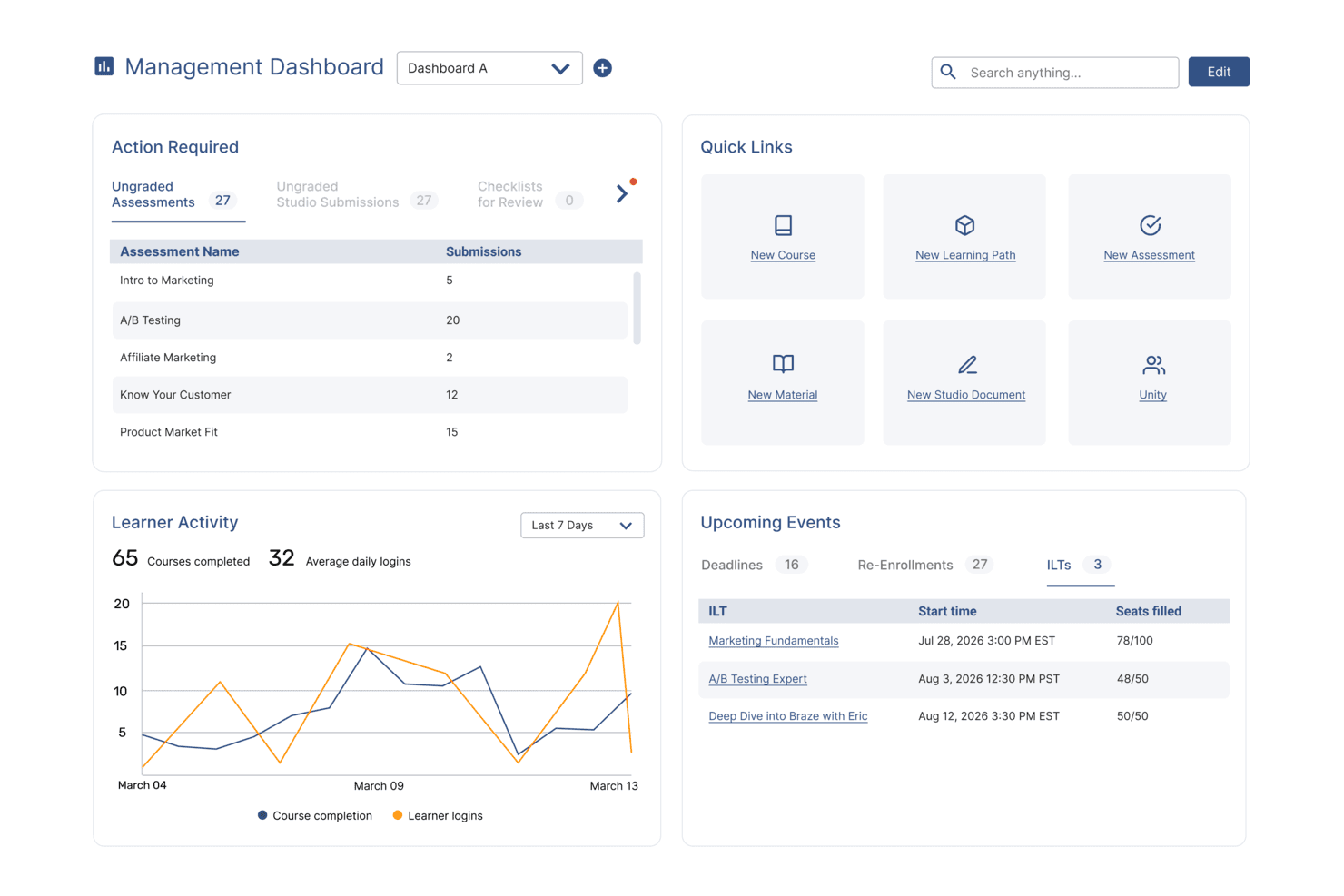
SkyPrep's management dashboard displays learner activity, upcoming events, and quick links. SkyPrep is an online training software that provides a comprehensive learning management system (LMS) for corporate training, onboarding, and compliance. It’s built for HR professionals, trainers, and organizations seeking to deliver engaging, branded learning experiences efficiently.
Why SkyPrep is a good iSpring Learn alternative: SkyPrep stands out for its gamified learning features and interactive content that keep employees motivated on their intuitive interface. Its intuitive course creation tools enable the development of rich, multimedia training programs without technical barriers.
The platform also offers strong customization to match your organization's branding and supports multi-tenant LMS setups, making it ideal for managing multiple audiences or external clients.
Standout features & integrations:
Features include gamification to enhance learner engagement, AI-powered content creation for fast course development, workflow automation to streamline training tasks, virtual classrooms for live sessions, and robust user management.
Integrations include ADP, Workday, SAP SuccessFactors, BambooHR, UKG Ready, UKG Pro, Oracle HCM, Paycom, Paylocity, Zoho People, Ceridian Dayforce, 7Shifts, Keka, Deel, Paycor, Salesforce, HubSpot, Zoom, GoToMeeting, Cisco Webex, Microsoft Teams, ClickMeeting, BigBlueButton, OpenSesame, Office365, G Suite, and Twilio.
Pros and Cons
Pros:
- Supports secure single sign-on
- Access to e-learning content libraries
- Integrates with leading CRM platforms
Cons:
- Relies on third-party service providers
- Setup may require technical support
Learn more about SkyPrep: Best for rapid course setup
- Free plan + free demo available
- From $119/month (billed annually)
Visit WebsiteCustomer Rating:4.6/5
TalentLMS speeds up onboarding with simple course creation tools. TalentLMS is a cloud-based learning management system designed to facilitate online training for businesses of all sizes. It's used by HR professionals, trainers, and educators to manage and deliver elearning courses effectively, supporting key functions like employee onboarding and compliance training with ease.
Why TalentLMS is a good iSpring Learn alternative: TalentLMS offers rapid course setup, which is perfect for teams needing quick training deployment. Its AI course creator helps you generate content efficiently, while the extensive library of ready-made courses saves you time.
In addition, the platform's user-friendly interface ensures your team can start training without a steep learning curve.
Standout features & integrations:
Features include an AI course creator, a library of over 1,000 ready-made courses, and mobile accessibility to keep your team engaged wherever they are.
Integrations include Zoom, Salesforce, Shopify, WordPress, Slack, Zapier, LinkedIn, Google Workspace, and Microsoft Teams.
Pros and Cons
Pros:
- Mobile accessibility
- AI course creator
- Extensive course library
Cons:
- Basic reporting features only
- Limited customization options
Learn more about TalentLMS: Best for custom learning workflows
- Free demo available
- Pricing upon request
Visit WebsiteCustomer Rating:4.7/5
Continu dashboard showcasing AI-powered learning and workforce training programs. Continu is a cloud-based learning platform designed for teams that prioritize flexibility and scalability in training. It’s a strong fit for organizations that need modern, data-driven learning management to onboard, upskill, and engage a global workforce.
Who Is Continu Best For?
Learning and development managers at midsize to large organizations who want to automate, customize, and analyze training journeys across teams or divisions.
Why Continu Is a Good iSpring Learn Competitor
I picked Continu for this spot because of how far its workflow automation actually goes compared to most LMS platforms. The Journeys feature lets you build multi-step, branching learning programs that adapt based on a learner's role, partner tier, or assessment score—so a new sales hire and a senior manager don't sit through the same content. I also appreciate that Journeys can launch automatically via CRM or HRIS triggers, meaning a new employee's onboarding path starts without anyone manually enrolling them. Pair that with Smart Segmentation™, which dynamically filters content delivery by department, region, or custom attributes, and you've got a genuinely automated, targeted training operation.
Continu Key Features
- Content authoring tools: Build and embed courses directly inside the platform using a drag-and-drop course builder.
- Analytics dashboard: Track learner progress, completion rates, and assessment scores across teams in real time.
- Content integrations: Pull in external content from sources like LinkedIn Learning, Udemy, and YouTube directly into your learning library.
- Mobile app: Deliver training to learners on iOS and Android, including offline access to downloaded content.
Continu Integrations
Continu offers native integrations with Salesforce, Workday, Slack, Zoom, Okta, and Microsoft Teams. An API is available for custom integrations.
Pros and Cons
Pros:
- Multilingual course delivery and localization tools
- Robust Salesforce and Slack integrations
- Advanced reporting and analytics dashboards
Cons:
- No built-in e-commerce functionality
- Some integrations cost extra
Learn more about Continu: Best for AI-driven learning
- Free demo available
- Pricing upon request
Visit WebsiteCustomer Rating:4.6/5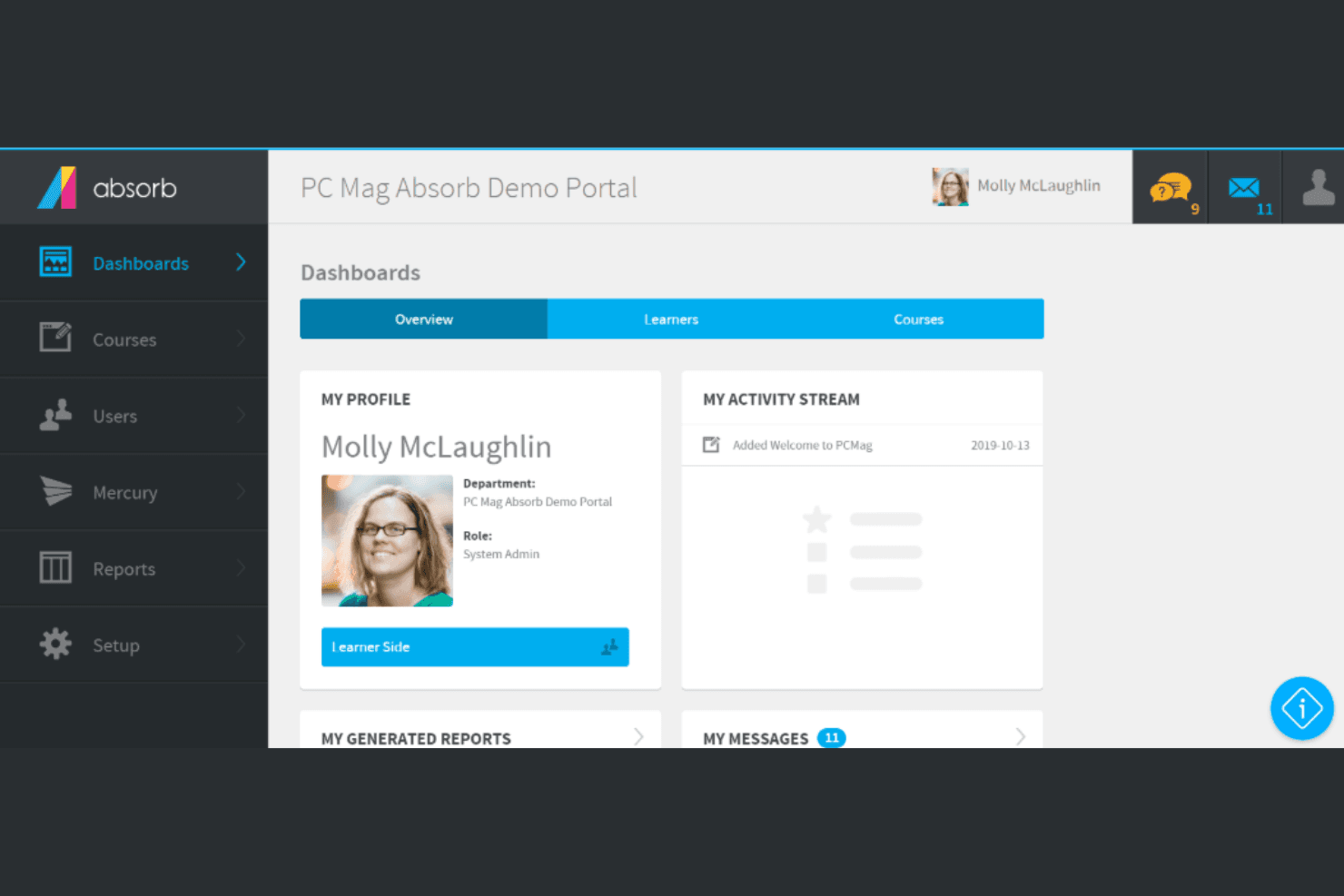
Absorb flexes to fit corporate, customer, and HR learning. Absorb is an AI-powered learning management system designed for diverse learning needs, serving HR professionals, educators, and trainers. It performs key business functions like compliance training, onboarding, and even customer education.
Why Absorb is a good iSpring Learn alternative: Absorb offers AI-driven learning, providing personalized upskilling and advanced reporting. The AI-powered features work to predict which training employees are likely to need and then connects them directly to it.
It also stands out due to its 24/7 in-house support and user-friendly administration tools, ensuring a smooth experience for your team.
Standout features & integrations:
Features include customizable course authoring, advanced reporting and analytics, and gamification tools to boost engagement.
Its course authoring tools and social learning features enable you to create engaging content efficiently. The platform supports different types of training programs, enhancing learner engagement through interactive elements and gamification features.
Integrations include Salesforce, Microsoft Dynamics, Zoom, LinkedIn Learning, Adobe Connect, PayPal, Shopify, BambooHR, and Google Analytics.
Pros and Cons
Pros:
- Strong customer support
- Advanced reporting capabilities
- Comprehensive content library
Cons:
- Some features need extra setup
- Limited pricing transparency
Learn more about Absorb: Best for collaborative learning
- 30-day free trial + free demo available
- From $8/user/month
Visit WebsiteCustomer Rating:4.7/5
360Learning supports peer-powered growth and team learning. 360Learning is a learning management system that focuses on collaborative learning and knowledge sharing within organizations. It serves HR professionals and teams aiming to foster a culture of continuous learning and development.
Why 360Learning is a good iSpring Learn alternative: 360Learning emphasizes collaborative learning, allowing your team to create and share courses easily. Its peer learning features encourage interaction and engagement, enhancing the learning experience.
The platform's analytics provide insights into learner progress, helping you identify areas for improvement. With customizable learning paths, you can tailor the training to meet specific needs, making it a versatile alternative.
Standout features & integrations:
Features include peer learning to boost engagement, analytics for tracking progress, and customizable learning paths to meet diverse needs. These features help your team learn and grow together.
Integrations include Slack, Microsoft Teams, Zoom, LinkedIn Learning, Google Workspace, Salesforce, HubSpot, BambooHR, PayPal, and Okta.
Pros and Cons
Pros:
- Encourages knowledge sharing
- Insightful analytics
- Customizable learning paths
Cons:
- Some advanced features cost extra
- Limited offline access
Learn more about 360Learning: Best for rapid course setup
- Free demo available
- Pricing upon request
Visit WebsiteCustomer Rating:4.6/5
LearnUpon organizes training across teams and systems. LearnUpon is a versatile learning management system designed to streamline training delivery for businesses of all sizes. It serves HR professionals and educators by providing tools for effective course creation and learner engagement.
Why LearnUpon is a good iSpring Learn alternative: LearnUpon excels in rapid course setup, allowing your team to quickly deploy training programs. Its user-friendly interface simplifies navigation and course management. Plus, the platform's reporting tools offer insights into learner progress and engagement.
With customizable branding options, you can align the platform with your organization's identity, making it a flexible choice.
Standout features & integrations:
Features include customizable white-label branding to match your organization's identity, robust reporting tools for tracking progress, and a user-friendly interface to simplify navigation. These features make managing your learning programs straightforward.
Integrations include Salesforce, Zoom, Microsoft Teams, LinkedIn Learning, Google Workspace, Slack, Adobe Connect, BambooHR, PayPal, and Okta.
Pros and Cons
Pros:
- Flexible for various industries
- White-label branding options
- Quick course deployment
Cons:
- May require third-party integrations
- Limited advanced analytics
Learn more about LearnUpon: Best for live virtual sessions
- Free demo available
- Pricing upon request
Visit WebsiteCustomer Rating:4.7/5
Tovuti supports cross-functional training with smart tools. Tovuti is an all-in-one learning management system built for organizations that need to create, deliver, and manage training programs. It’s used by teams across industries to support employee development, onboarding, and customer education.
Why Tovuti is a good iSpring Learn alternative: Tovuti makes it easy to run live virtual training sessions with built-in tools for hosting and managing real-time events. You can schedule sessions, track attendance, and even offer certificates for participation.
There are also features to manage registrations, send reminders, and include interactive elements like quizzes. If your team relies on live instruction, Tovuti gives you the setup to run it all from one training platform.
Standout features & integrations:
Features include a built-in course authoring tool that lets you create interactive lessons quickly. You can use gamification elements like leaderboards and badges to boost engagement. The platform also gives you options to customize user dashboards and landing pages for different groups.
Integrations include Zoom, Microsoft Teams, Google Workspace, Salesforce, LinkedIn Learning, Shopify, PayPal, Vimeo, YouTube, and Dropbox.
Pros and Cons
Pros:
- Fast course creation with AI tools
- Custom dashboards for different user groups
- Gamification boosts learner engagement
Cons:
- Setup needs support for advanced features
- Can feel overwhelming to first-time admins
Learn more about Tovuti: Best for global enterprise organizations
- Free demo available
- Pricing upon request
Visit WebsiteCustomer Rating:4.4/5
Docebo equips large teams with flexible learning management tools. Docebo is a cloud-based learning management system designed for medium to large organizations. It helps manage, deliver, and track employee training across different departments and regions.
Why Docebo is a good iSpring Learn alternative: It’s built to support complex, large-scale training programs across multiple languages and locations. You can set up custom learning paths, automate admin tasks, and manage user groups with advanced permissions.
The platform also gives you detailed analytics to monitor learning across different teams. If your company is growing or already spread out globally, Docebo makes it easier to keep training consistent everywhere.
Standout features & integrations:
Features include a built-in content marketplace, AI-based content tagging, and social learning tools. You can publish learning content directly inside the mobile app and let users track progress on the go.
The platform also supports headless learning, making it possible for teams to create customized elearning content within the platform that can be pushed through to multiple learning environments.
Integrations include Salesforce, Microsoft Teams, Google Workspace, Zoom, Shopify, Adobe Connect, Auth0, OneLogin, Workday, and Okta.
Pros and Cons
Pros:
- Detailed reporting and analytics tools
- Flexible learning paths and content rules
- Custom roles and permissions setup
Cons:
- Limited customization without support
- Admin interface feels overwhelming
Learn more about Docebo:

Eloomi lets HR guide progress with targeted training tools. Eloomi is a comprehensive learning management system (LMS) designed to enhance employee training and development across various industries. It serves HR professionals and organizations aiming to improve skills related to performance management.
Why Eloomi is a good iSpring Learn alternative: Eloomi offers tailored industry solutions with features like skills mapping and curated content, making it ideal for sectors requiring specialized training. Its performance management tools also help align learning with business goals.
The platform's real-time reporting and analytics provide insights into training progress. With a focus on user consent and data ownership, Eloomi ensures a customizable and transparent learning experience.
Standout features & integrations:
Features include skills mapping to identify learning needs, curated content for targeted training, and comprehensive reporting to track progress. These features help you manage and optimize learning effectively.
Integrations include Microsoft Teams, Salesforce, LinkedIn Learning, Zoom, Google Workspace, Slack, Adobe Connect, BambooHR, PayPal, and Okta.
Pros and Cons
Pros:
- Dedicated support teams
- Intuitive interface
- Mobile learning capabilities
Cons:
- Limited offline features
- Requires customization for full potential
Learn more about eloomi: Best for curated course libraries
- 45-day free trial + free demo available
- From $20/month
Visit WebsiteCustomer Rating:4.2/5
Skillsoft drives growth with expert-led skill building. Skillsoft is a digital learning platform focused on workforce development through upskilling, reskilling, and leadership training. It's used by organizations to help teams grow skills across technology, compliance, business, and leadership areas.
Why Skillsoft is a good iSpring Learn alternative: Skillsoft gives your team access to a large library of curated courses across key business and technical topics.
You can assign personalized learning paths based on job roles, skill gaps, or business goals. Built-in coaching, practice labs, and AI-powered feedback also help make the learning more effective.
If you're looking for ready-made content you can put to use right away, Skillsoft makes that easy.
Standout features & integrations:
Features include AI-powered coaching to help your team practice conversations and get feedback. There's also hands-on learning with practice modules for technical skills like coding and cybersecurity.
Integrations include Microsoft Teams, Workday, SAP SuccessFactors, Cornerstone, Oracle, Degreed, Docebo, Saba, UKG, and LinkedIn Learning.
Pros and Cons
Pros:
- Learning paths match job roles and goals
- Offers labs for hands-on tech training
- AI coaching helps with soft skill practice
Cons:
- Interface feels dated in some areas
- Custom course creation feels limited
Learn more about Skillsoft:
Outras alternativas ao iSpring Learn
Eis algumas alternativas adicionais ao iSpring Suite que não entraram na minha lista restrita, mas que ainda vale a pena conhecer:
- 11MoodleBest for academic course delivery
- 12Litmos LMSBest for tracking training compliance
- 13KallidusBest for tailored industry solutions
- 14Learn AmpBest for all-in-one employee development
- 15LearnDashBest for WordPress integration
- 16BridgeBest for performance management
- 17WeSchoolBest for remote learning tools
- 18Cornerstone LMSBest for compliance training courses
- 19Synergy LearningBest for tailored e-learning solutions
- 20Workleap LMSBest for employee skill development
Related Reviews
How I Evaluate iSpring Learn Alternatives
I split my evaluation into two layers: the baseline features—like SCORM authoring and certification tracking—every tool must have, and the differentiators that set one LMS apart from another.
Core Functionality (Table Stakes For This List)
When I'm selecting tools for my list, I rank each one on a scale from 0 (does not offer the functionality) to 5 (excels in this area) for each core functionality listed below. Then, I calculate the tool's total score into a percentage. Each tool needs to achieve a minimum total score of 65% to be considered for inclusion.
- Course Authoring & Content Creation: I check whether a platform lets you build courses natively—things like drag-and-drop editors, quiz builders, and SCORM/xAPI imports from tools like Articulate or Adobe Captivate.
- Learner Organization & Management: Grouping learners by department, role, or location matters when you're rolling out different training tracks for, say, warehouse staff vs. office teams.
- Progress Tracking & Reporting: Each tool should surface clear dashboards showing completions, scores, and overdue assignments so L&D managers can report training status to leadership without manual exports.
- Automated Enrollment & Reminders: I look for rule-based triggers—like auto-enrolling new hires in onboarding courses or sending recertification reminders 30 days before a deadline—that reduce admin busywork.
- Compliance & Certification Tracking: For teams managing safety, data privacy, or industry-regulated training, I evaluate whether the platform issues certificates, tracks expiration dates, and keeps audit-ready records.
- HRIS & SSO Integrations: Syncing employee data from systems like BambooHR or Workday and supporting single sign-on through providers like Okta or Azure AD keeps learner records accurate and access simple.
Once I have a list of tools that meet this criteria, I consider what sets each platform apart.
Differentiating Factors (What Sets Vendors Apart)
Here's how I compare and contrast different vendors:
Standout Features
AI-powered course creation is a major differentiator—platforms like Docebo and TalentLMS use generative AI to draft quizzes and outlines from uploaded documents, which saves L&D teams hours of manual work. I also evaluate mobile and offline learning support, especially for organizations training deskless or field workers who need to complete courses without reliable internet. Multi-tenant portals matter when you manage training across multiple brands, franchises, or external partners from a single LMS instance.
Beyond Features
Pricing structure plays a big role—per-user pricing works for smaller teams, but active-user models from vendors like Absorb LMS or TalentLMS can save money when not everyone logs in each month. I also evaluate whether a platform includes access to off-the-shelf content libraries through providers like Go1 or OpenSesame, since buying compliance and soft skills courses separately adds up fast. For teams in regulated industries, security certifications like SOC 2 and GDPR compliance are factors I always check before recommending a platform.
Por que procurar uma alternativa ao iSpring Learn?
Embora o iSpring Learn seja uma boa escolha para uma plataforma de aprendizagem eletrónica, existem vários motivos pelos quais alguns utilizadores procuram soluções alternativas. Por exemplo, pode estar à procura de uma alternativa ao iSpring Learn porque…
- Precisa de mais opções de personalização
- A sua equipa necessita de funcionalidades avançadas de elaboração de relatórios
- Procura um melhor acesso através de dispositivos móveis
- Precisa de integração com ferramentas específicas
- A sua organização necessita de soluções escaláveis
- Necessita de suporte multilingue
Se alguma destas situações lhe é familiar, veio ao lugar certo. Esta lista inclui várias opções de LMS mais adequadas para equipas que enfrentam estes desafios com o iSpring Learn e procuram soluções alternativas.
Principais funcionalidades do iSpring Learn
Eis algumas das principais funcionalidades do iSpring Learn, para ajudar a comparar as soluções alternativas e perceber o que oferecem:
- Gestão de conteúdos: inclui o carregamento de diferentes tipos de ficheiros e a edição de materiais com ferramentas de arrastar e largar, facilitando a gestão dos seus materiais de formação.
- Gestão de utilizadores: faça a gestão de utilizadores e grupos, defina funções e convide utilizadores, simplificando o processo de integração.
- Gestão da formação: crie cursos e avaliações, com opções de navegação passo a passo e notificações de conclusão para orientar os formandos.
- Relatórios: acompanhe o progresso e o envolvimento dos utilizadores através de estatísticas detalhadas, de modo a melhorar a eficácia da formação.
- Personalização: adapte o design do LMS à imagem da sua empresa, garantindo a consistência em toda a plataforma.
- Integração: integre facilmente outras ferramentas do ecossistema da sua empresa para melhorar a funcionalidade e simplificar os processos (por exemplo, integrando o seu software de RH para os colaboradores ou um CRM para formação orientada para os clientes).
- Avaliação do desempenho: atribua tarefas e forneça feedback, ajudando a sua equipa a melhorar as suas competências.
Calendário de eventos: centralize as atividades de formação, envie lembretes e notifique os utilizadores sobre alterações ao calendário.