

As equipas industriais não recebem formação em salas de conferências. Recebem formação no chão de fábrica, em diferentes turnos e em ambientes regulamentados onde a segurança, a qualidade e a conformidade não são opcionais. Se gere o desenvolvimento da força de trabalho na indústria, não está apenas a integrar novos colaboradores; está a acompanhar certificações, a documentar a formação em segurança, a preparar auditorias e a garantir que cada operador está qualificado para utilizar o equipamento da sua linha.
As folhas de cálculo e os registos em papel deixam rapidamente de ser eficazes neste ambiente. Um sistema de gestão da aprendizagem (LMS) desenvolvido para a indústria ajuda a centralizar a formação, automatizar o acompanhamento das certificações, atribuir formação com base nas funções e manter registos prontos para auditorias em vários locais. O sistema certo não se limita a disponibilizar cursos: apoia a conformidade, reduz os riscos e reforça as competências da força de trabalho no chão de fábrica.
Analisei e avaliei plataformas LMS líderes tendo em conta casos de utilização na indústria, com foco no acompanhamento da conformidade, na acessibilidade para os trabalhadores da linha da frente, na gestão de competências e na escalabilidade entre instalações. Abaixo encontrará as melhores opções para proporcionar uma formação eficaz, manter a conformidade e garantir a continuidade da produção.
Why Trust Our Software Recommendations
6,700+
Reviews
20
Industry experts
16+
Evaluation factors
14
Years
Our team has been testing and reviewing software since 2012. As HR experts ourselves, we know how difficult—and important—it is to choose the right software.
For this guide, we evaluated tools using hands-on testing and independent research, scoring tools using our selection criteria. We also draw on insights from industry thought leaders and practicing HR experts.
Our reviews reflect our human editorial judgment, not a sales pitch.
Expert reviewers:
- Phil GrayCOO
 Kim BehnkeHR Tech Editor & Analyst
 Josh BarkerPeople Ops Manager

Tabela comparativa de LMS para a indústria
Esta tabela comparativa resume os detalhes de preços das minhas principais seleções de LMS para a indústria:
| Tool | Best For | Trial Info | Price | ||
|---|---|---|---|---|---|
| 1 | Best for custom-branded LMS solutions & workflows | Free demo available | Pricing upon request | Website | |
| 2 | Best for safety and compliance training | Free trial available | Pricing upon request | Website | |
| 3 | Best for structured manufacturing training | Free trial available | From $3.97/user/month (billed annually) | Website | |
| 4 | Best for modular training content creation | Free demo available | Pricing upon request | Website | |
| 5 | Best for small teams | Free plan + free demo available | From $119/month (billed annually) | Website | |
| 6 | Best with analytics for workforce training | Free demo available | Pricing upon request | Website | |
| 7 | Best with mobile access to courses | Free demo available | Pricing upon request | Website | |
| 8 | Best for quick safety training deployment | Free demo available | From $1/user/month + $50/month | Website | |
| 9 | Best for AI integration | Free demo available | Pricing upon request | Website | |
| 10 | Best with automated learning workflow tools | Free demo available | From $1,250/month (billed annually) | Website |


Avaliações dos melhores LMS para a indústria
Abaixo encontrará os meus resumos detalhados dos melhores LMS para a indústria que entraram na minha lista restrita. As minhas avaliações apresentam uma análise detalhada das principais funcionalidades, vantagens e desvantagens, integrações e casos de utilização ideais de cada ferramenta, para o ajudar a encontrar a melhor opção para si.
 Best for custom-branded LMS solutions & workflows
- Free demo available
- Pricing upon request

Synergy Learning offers a learner dashboard with current course progress, overdue alerts, featured courses, activity bookmarks, and a 100% completion tracker for global teams training. Synergy Learning is a Moodle and Totara implementation partner that builds custom-branded LMS platforms with tailored compliance tracking, skills management, and multi-site training deployment for organisations with complex, regulated learning needs.
Who Is Synergy Learning Best For?
Mid-to-large manufacturers with complex training requirements that need a fully tailored LMS rather than an off-the-shelf product.
Why I Picked Synergy Learning
I picked Synergy Learning because its custom-branded approach genuinely sets it apart from off-the-shelf LMS options. Their exclusive Spark theme lets manufacturing teams deploy a fully branded platform, while Totara Perform supports role-based competency tracking and skills gap analysis tied to specific job functions on the production floor. Their bespoke development model means compliance workflows and automated enrolments can be built to match a plant's exact training structure.
Synergy Learning Key Features
- Multi-site role-based deployment: Assign, track, and report on training across multiple plants, shifts, and departments with granular user group controls.
- Course version control: Track updates and manage different iterations of training courses and SOPs for audit readiness.
- Offline-ready mobile app: Deliver training to frontline and non-desk workers with offline access in the Moodle and Totara mobile apps.
- Custom API and platform integrations: Connect with HRIS, ERP, and data visualization tools using available APIs and integration services.
Synergy Learning Integrations
Synergy Learning offers integrations with Tableau, Intelliboard, PayPal, LinkedIn Learning, and Workato. An API is available for custom integrations.
Pros and Cons
Pros:
- Deep Moodle and Totara platform expertise
- Custom branding across multi-site plant deployments
- Tailored compliance workflows for regulated industries
Cons:
- Longer implementation timelines than pre-built platforms
- No off-the-shelf manufacturing content library
Learn more about Synergy Learning: Best for safety and compliance training
- Free trial available
- Pricing upon request
Visit WebsiteCustomer Rating:4.7/5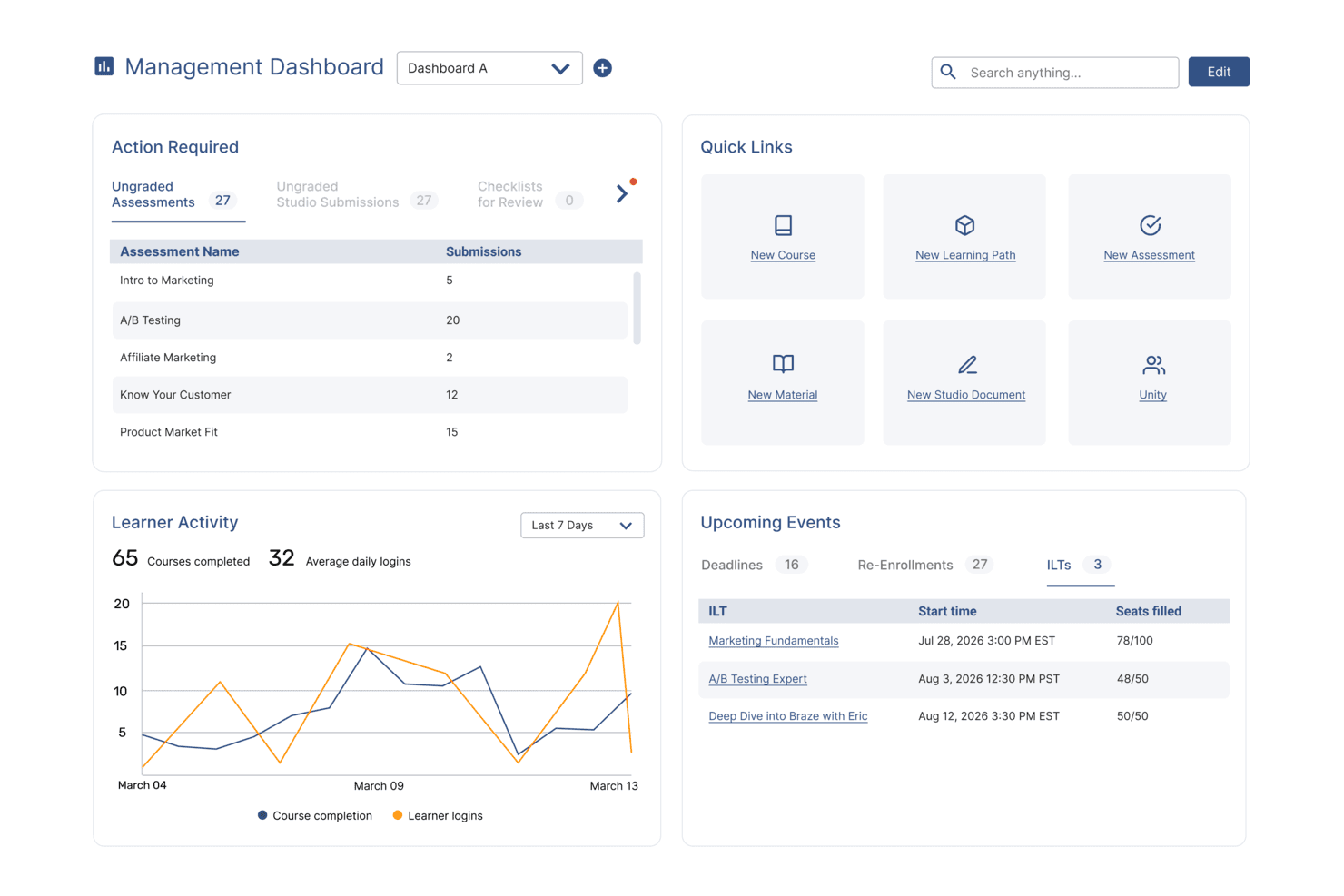
SkyPrep's management dashboard displays learner activity, upcoming events, and quick links. SkyPrep LMS is crafted to address the specific training challenges in manufacturing by offering a platform that improves learner engagement and training efficiency. Its intuitive interface and emphasis on user management support the development of detailed training programs, reducing training time and boosting knowledge retention. By tackling issues like compliance and skill development, SkyPrep provides a solution for organizations aiming to improve workforce training.
Why I Picked SkyPrep
I picked SkyPrep for its focus on improving learner engagement and training efficiency, important for the manufacturing sector. The platform's integration with HR and HCM systems like ADP and Workday ensures smooth user management and consistent employee data, vital for compliance and efficiency in manufacturing. Additionally, SkyPrep's compatibility with webinar tools such as Zoom and Microsoft Teams supports effective remote training sessions, making it ideal for organizations with distributed teams.
SkyPrep Key Features
In addition to its integration capabilities, SkyPrep offers several features improving its suitability for the manufacturing industry:
- Course Creation: Design and deploy custom training modules suited to your specific manufacturing processes and standards.
- Reporting and Analytics: Gain detailed insights into learner progress and training effectiveness, enabling data-driven decisions to improve training programs.
- Customization: Provides flexibility in branding and course delivery to match your organization's unique requirements and training objectives.
- Compliance & Certification Tracking: Track certifications, expirations, and mandatory training with automated reminders to help your teams stay compliant and audit-ready.
SkyPrep Integrations
Integrations include ADP, Workday, BambooHR, Salesforce, HubSpot, Zoom, Microsoft Teams, Slack, Stripe, PayPal, and more.
Pros and Cons
Pros:
- SCORM 1.2 support ensures content compatibility
- Custom email notifications improve communication
- Reporting provides detailed learning insights
Cons:
- Pricing not publicly available
- Security features are relatively basic
Learn more about SkyPrep: Best for structured manufacturing training
- Free trial available
- From $3.97/user/month (billed annually)
Visit WebsiteCustomer Rating:4.6/5
iSpring LMS dashboard showing course modules, team progress, and mobile app. iSpring LMS is a cloud-based learning management system designed to support the delivery and management of corporate training programs. It enables organizations to assign courses, track learner progress, and manage training activities across distributed teams.
Who Is iSpring LMS Best For?
iSpring LMS is suitable for organizations that require structured training programs, including onboarding, compliance, and ongoing employee development.
Why I Picked iSpring LMS
I selected this platform for its structured approach to training management and ease of deployment. It provides tools for organizing courses, assigning training paths, monitoring completion through a centralized system, and creating learning content with built-in authoring tools. This makes it suitable for teams that need to manage and track learning activities without complex setup requirements.
iSpring LMS Key Features
- Automated learning tracks: Create structured training programs with sequential modules and automated enrollment based on user roles or groups.
- Reporting tools: Monitor learner progress, completion rates, and assessment results through built-in dashboards.
- Mobile learning: Access training content via mobile devices, including offline support.
- Built-in authoring: Create training content directly within the platform using built-in content creation tools.
iSpring LMS Integrations
iSpring LMS integrates with tools such as Zoom, Microsoft Teams, Salesforce, HRIS platforms, eLearning content libraries, and other third-party software. It also provides API access and supports integration via connectors like Zapier.
Pros and Cons
Pros:
- Structured course and training management tools
- Built-in reporting for tracking learner progress
- Supports mobile access, including offline learning
Cons:
- Limited customization for complex training environments
- Reporting depth may not meet advanced analytics needs
Learn more about iSpring LMS: Best for modular training content creation
- Free demo available
- Pricing upon request

EducateMe LMS is a cloud platform for structured, cohort-based training with progress tracking tools. EducateMe LMS is a cloud-based learning management system that supports structured training programs, cohort-based learning, and collaborative course delivery. While not built exclusively for manufacturing, it can support frontline and operational training through customizable course structures and progress tracking tools.
Who Is EducateMe LMS Best For?
EducateMe LMS works well for manufacturing companies that need to deliver structured training to frontline workers, technical teams, or multi-site operations without relying on disconnected systems.
Why I Picked EducateMe LMS
I picked EducateMe LMS because of its modular course structure. You can build training programs using reusable content blocks and organize them into role-based learning paths. That flexibility is helpful when creating separate programs for machine operators, maintenance teams, or safety training groups. The platform also supports live sessions and progress tracking, which makes it easier to manage compliance-focused learning initiatives.
EducateMe LMS Key Features
- Modular course builder: Create structured training programs using reusable content blocks and flexible course organization.
- Cohort-based learning management: Organize learners into scheduled groups that move through training together.
- Live session support: Integrate live training sessions through Zoom and manage attendance within the platform.
- Progress analytics: Track learner completion, engagement, and performance metrics.
- Role-based permissions: Control access for instructors, administrators, and learners.
EducateMe LMS Integrations
Integrations include Zoom, Google Calendar, Outlook Calendar, Slack, Telegram, Stripe, Zapier, Google Forms, Google Docs, Google Sheets, Google Slides, Notion, Figma, and SSO providers such as Okta and Auth0. An API is available for custom integrations.
Pros and Cons
Pros:
- Zoom integration supports live instructor-led sessions
- Cohort-based delivery works for multi-site teams
- Modular course builder supports structured training programs
Cons:
- Limited enterprise-grade automation compared to large LMS platforms
- Not built specifically for manufacturing compliance workflows
Learn more about EducateMe LMS: Best for small teams
- Free plan + free demo available
- From $119/month (billed annually)
Visit WebsiteCustomer Rating:4.6/5
TalentLMS offers employee development for SMBs. TalentLMS is a cloud-based learning management system tailored for small to medium-sized businesses. It helps teams manage training programs and employee development.
Why I picked TalentLMS: I picked TalentLMS because it works well for manufacturing companies that need to standardize training across multiple plants without building a large internal L&D function. The platform makes it easy to assign safety modules, equipment training, and certification requirements by role or location. Its simple admin controls allow HR or operations managers to roll out compliance training quickly across shifts and sites. For manufacturers that need reliable tracking without heavy system complexity, TalentLMS provides a practical balance of structure and usability.
Standout features and integrations:
Features include customizable learning paths to guide users through courses, gamification elements to boost engagement, and mobile learning options for on-the-go access. Your team can enjoy a personalized learning experience, making training more effective. The platform also supports video conferencing for live sessions.
Integrations include Zoom, Microsoft Teams, Slack, Google Workspace, Shopify, Salesforce, LinkedIn Learning, BambooHR, Mailchimp, Zapier, and more.
Pros and Cons
Pros:
- Includes gamification features
- Customizable learning paths
- Easy course creation
Cons:
- Compliance reporting may require manual configuration for strict regulatory audits
- Limited built-in skills matrix for machine-level competency tracking
Learn more about TalentLMS: Best with analytics for workforce training
- Free demo available
- Pricing upon request
Visit WebsiteCustomer Rating:4.7/5
Continu dashboard showcasing AI-powered learning and workforce training programs. Continu is a corporate learning management system designed for manufacturing teams that need custom course creation, adaptive learning paths, content management, analytics, and system integrations.
Who Is Continu Best For?
Continu is a good fit for mid-to-large manufacturing organizations that need to train frontline workers, technical staff, and distributed teams at scale.
Why I Picked Continu
Continu is one of my top picks because I love how its analytics dashboard gives you a real-time view of training completion rates, assessment scores, and content engagement across your workforce. In a manufacturing context, I can track which teams or shifts are falling behind on compliance training and act on that data immediately. The reporting tools also let me break down performance by department or location, which is useful when managing training across multiple plant sites.
Continu Key Features
- Badges and certifications: Issue digital badges and certificates automatically when learners complete courses or meet competency requirements.
- Compliance auditing: Identify which users haven't completed mandatory training, giving you a clear view of compliance gaps across teams or facilities.
- Smart Segmentation: Set rules-based filters to automatically deliver the right training content to the right learner groups based on role, region, or department.
- SCORM/xAPI support: Import externally created eLearning files so you can incorporate existing training content into Continu without rebuilding it from scratch.
Continu Integrations
Continu offers native integrations with Zoom, Slack, Okta, Google Workspace, and Microsoft Teams, and provides an API for custom integrations.
Pros and Cons
Pros:
- Flexible rules for automated enrollments
- Mobile training access for production floor teams
- Direct integrations with Okta and Microsoft Teams
Cons:
- Admin navigation can be non-intuitive for new users
- Limited native integrations for manufacturing ERPs
Learn more about Continu: Best with mobile access to courses
- Free demo available
- Pricing upon request
Visit WebsiteCustomer Rating:4.6/5
Absorb course management dashboard showing category filtering and course organization tools for managing manufacturing training programs. Absorb is a learning management system designed to help manufacturers deliver training across diverse teams and locations. It supports complex compliance needs and skills development for both frontline and office-based employees. Manufacturing organizations looking to centralize training, automate certification tracking, and adapt learning to different roles may find Absorb especially useful.
Who Is Absorb Best For?
Absorb is a good fit for manufacturing organizations that need to deliver and track training for both deskless and office-based employees across multiple locations.
Why I Picked Absorb
For manufacturing teams with a large deskless workforce, mobile access is essential for delivering training where and when it’s needed. I picked Absorb because it offers a dedicated mobile app that allows employees to complete courses, access resources, and track progress directly from their smartphones or tablets. The platform also supports offline learning, so workers can download training materials and complete them even without an internet connection. This flexibility helps manufacturing organizations reach frontline staff who may not have regular access to computers.
Absorb Key Features
Some other features in Absorb that support manufacturing training needs include:
- Automated training assignments: Assign courses automatically based on job role, location, or department to ensure the right employees receive the right training.
- Customizable learning paths: Build structured learning journeys that guide employees through required courses and certifications.
- Compliance tracking dashboard: Monitor training completion and certification status in real time to help meet regulatory requirements.
- SCORM and xAPI support: Upload and deliver industry-standard e-learning content for consistent training experiences across your organization.
Absorb Integrations
Integrations include ADP, Workday, UKG, SAP SuccessFactors, NetSuite ERP, Salesforce, Microsoft Teams, Zoom, LinkedIn Learning, and Skillsoft.
Pros and Cons
Pros:
- Enables multilingual content for global manufacturing teams
- Provides automated recertification and reminder workflows
- Integrates with major ERP and HRIS systems
Cons:
- Course authoring tools are less advanced than peers
- Limited offline access for remote factory locations
Learn more about Absorb: Best for quick safety training deployment
- Free demo available
- From $1/user/month + $50/month
Visit WebsiteCustomer Rating:4.6/5
ProProfs Training Maker offers an intuitive SMB training platform. ProProfs Training Maker is an intuitive learning management system designed for businesses seeking straightforward training solutions. It caters to small to medium-sized companies looking to deliver effective courses without technical hassles.
Why I picked ProProfs Training Maker: I picked ProProfs Training Maker because it’s a straightforward way to deploy safety and SOP training without heavy configuration. Manufacturing teams can quickly create quizzes, compliance modules, and short-form assessments to reinforce policies and procedures. It works well for organizations that need to digitize toolbox talks, policy acknowledgments, or basic compliance tracking. For smaller manufacturing operations that want to move away from paper-based training records, it offers a fast and accessible solution.
Standout features and integrations:
Features include a built-in quiz maker to test knowledge, course templates for quick setup, and the ability to create certification programs. The program features customizable branding, which allows you to align training with your company's identity. The platform also supports mobile learning, enabling access to courses on-the-go.
Integrations include Salesforce, Mailchimp, Zendesk, Dropbox, Google Analytics, Freshdesk, SugarCRM, WordPress, Shopify, Google Workspace, and more.
Pros and Cons
Pros:
- Mobile learning access
- Supports multimedia content
- Simple drag-and-drop editor
Cons:
- Basic analytics may not satisfy audit-heavy environments
- Not ideal for large, multi-site manufacturing deployments
Learn more about ProProfs Training Maker:

Docebo offers training to improve company culture and compliance. Docebo is an LMS platform designed for the manufacturing industry, catering to businesses seeking innovative training solutions. It serves companies looking to enhance learning cultures, improve compliance, and optimize onboarding processes.
Why I picked Docebo: Docebo integrates generative AI capabilities, offering a unique approach to learning management for manufacturing teams. You can automate compliance training and certification renewals, simplifying administrative tasks. The platform supports various training formats, including webinars and SCORM, making it versatile for different learning needs. Its advanced reporting tools provide insights into program effectiveness, aligning with its AI integration focus.
Standout features and integrations:
Features include support for over 50 languages, mobile learning capabilities, and access to over 20,000 courses. This program includes automated compliance training, reducing manual workload. The AI-powered platform also offers e-signature functionality for secure compliance processes.
Integrations include Salesforce, Slack, Zoom, Microsoft Teams, Shopify, Okta, Google Workspace, LinkedIn Learning, BambooHR, Adobe Connect, and more.
Pros and Cons
Pros:
- Automates compliance tasks
- Supports multiple training formats
- AI-driven learning solutions
Cons:
- Initial setup may be complex
- Lack of pricing transparency
Learn more about Docebo: 10Best with automated learning workflow tools
Bridge
- Free demo available
- From $1,250/month (billed annually)
Visit WebsiteCustomer Rating:4.2/5
Bride LMS offers accelerated training with mobile access and audit, OSHA, ISO, and LOTO compliance. Bridge is an LMS and skills platform that combines AI-driven course recommendations, automated compliance training delivery, configurable learning paths, and performance management in one system built for mid-market teams.
Who Is Bridge Best For?
Bridge is a good fit for mid-market manufacturing companies that need to manage compliance training, skills development, and performance conversations in one place.
Why I Picked Bridge
Bridge is one of my top picks because I love how it automates the learning workflow from start to finish. Its AI-driven skills taxonomy automatically maps skills to every job title and tags courses accordingly, so manufacturing L&D teams aren't manually building course assignments from scratch. From there, Bridge fires off personalized course recommendations based on each worker's identified skill gaps, and built-in compliance reminders and notifications keep training completion on track without manual follow-up.
Bridge Key Features
- Mobile-first course delivery: Access and complete training from any mobile device, making it usable for manufacturing workers on the shop floor without a desktop.
- Pre-built manufacturing content library: Includes 75+ ready-to-use courses covering OSHA safety orientation, LEAN, Six Sigma, Kaizen, and other process improvement topics.
- One-click course translation: Automatically translate course content into multiple languages to support multilingual manufacturing teams.
- Configurable learning paths: Build structured, role-based training sequences that guide workers through onboarding, compliance, or upskilling in a set order.
Bridge Integrations
Bridge integrates with HRIS platforms, content providers, SSO authenticators, and asset management tools. Verified native integrations include LinkedIn Learning, OpenSesame, Beekeeper, Slack, Dropbox, YouTube, Vimeo, Kaltura, Panopto, and Credly, along with BambooHR, Salesforce, and Tableau. Bridge can connect to 1,000+ external applications through pre-built connectors, and its open API lets you build custom integrations. Webhooks and LTI support are also available for event-based integrations and launching third-party content inside Bridge. It's also available on Zapier.
Pros and Cons
Pros:
- Manager 1:1 agendas are built into LMS
- AI-powered skills mapping per role
- Links learning data to performance reviews
Cons:
- Native content authoring has limited formatting
- Reporting needs manual workarounds for detail
Learn more about Bridge:
Outros sistemas de gestão da aprendizagem para a indústria
Eis algumas opções adicionais de LMS para a indústria que não entraram na minha lista restrita, mas que vale a pena conhecer:
- 11Paradiso LMSBest for multilingual support
- 12Infor Best for scalability
- 13LearnUpon LMSBest for rapid plant-wide LMS rollout
- 14WorkRampBest for structured production onboarding
- 15Tovuti LMSBest for simulation-based and scenario training
- 16LitmosBest for global reach
- 17WebanywhereBest for custom branding
- 18Tooling U-SMEBest for industry-specific courses
- 19ComplianceQuestBest for QMS platform with built-in LMS capabilities
- 20MoodleBest for open-source flexibility
- 21360LearningBest for collaborative learning
- 22EdAppBest for microlearning modules
Related Reviews
How I Evaluate LMS for Manufacturing
I split my evaluation into two layers: the baseline capabilities a platform must have—like compliance tracking and shopfloor-friendly delivery—and the differentiators that set the best options apart.
Core Functionality (Table Stakes For This List)
When I'm selecting tools for my list, I rank each one on a scale from 0 (does not offer the functionality) to 5 (excels in this area) for each core functionality listed below. Then, I calculate the tool's total score into a percentage. Each tool needs to achieve a minimum total score of 55% to be considered for inclusion.
- Compliance & Certification Tracking: I check whether the platform automates recertification alerts and generates audit-ready reports for frameworks like OSHA, ISO, and FDA GMP.
- Skills & Competency Management: Role-based skills matrices matter here—I look for gap analysis tools that map operator competencies across production lines and job functions.
- SOP & On-the-Job Training: I evaluate how each platform handles version-controlled SOPs and whether supervisors can sign off on practical assessments at the workstation.
- Shopfloor-Friendly Delivery: Frontline workers rarely sit at desks, so I look for kiosk login, offline access, and multilingual support designed for shared devices on the floor.
- Manufacturing Content Library: I consider whether the platform includes prebuilt courses on topics like lockout/tagout, lean manufacturing, or machine safety—not just generic compliance.
- ERP/MES/HRIS Integrations: Connecting training records to systems like SAP, Oracle, or UKG is a real operational need, so I evaluate prebuilt connectors and API flexibility.
Once I have a list of tools that meet the criteria, I consider what sets each platform apart.
Differentiating Factors (What Sets Vendors Apart)
Here's how I compare and contrast different vendors:
Standout Features
AI-powered content authoring stands out when a platform can convert existing SOPs and machine manuals into microlearning modules without building courses from scratch. I also look for connected worker workflows that embed training directly into live production tasks, so operators learn in context at the workstation. Advanced analytics matter here too—I evaluate whether dashboards correlate training completion with plant KPIs like scrap rate, downtime, and incident frequency.
Beyond Features
Regulatory validation support is a major differentiator. I check whether vendors provide documented IQ/OQ/PQ validation packages for FDA-regulated environments like pharma or food manufacturing. Pricing structure also matters, especially how licensing handles high-turnover frontline workers like seasonal hires and temps who cycle through plants. Deployment flexibility is worth evaluating too, since some facilities need on-premise or hybrid hosting due to IT constraints or limited bandwidth on the production floor.
Como escolher um LMS para a indústria
É fácil ficar preso a listas extensas de funcionalidades e estruturas de preços complexas. Para o ajudar a manter o foco enquanto percorre o seu processo específico de seleção de software, eis uma lista de verificação de fatores a ter em conta:
| Fator | O que considerar |
|---|---|
| FatorEscalabilidade | O que considerarO LMS crescerá com a sua empresa? Verifique se consegue suportar mais utilizadores e conteúdos sem problemas de desempenho. |
| FatorIntegrações | O que considerarEstabelece ligação às suas ferramentas atuais? Certifique-se de que se integra com o seu software de RH, CRM ou outros sistemas essenciais. |
| FatorPersonalização | O que considerarPode adaptar o LMS às suas necessidades? Procure opções para modificar painéis de controlo, relatórios e interfaces de utilizador de modo a adequarem-se ao seu fluxo de trabalho. |
| FatorFacilidade de utilização | O que considerarÉ fácil de utilizar por todos os membros da equipa? Tenha em conta a curva de aprendizagem e se a sua equipa consegue navegar e utilizar facilmente o sistema. |
| FatorImplementação e integração inicial | O que considerarCom que rapidez pode começar? Avalie os recursos disponibilizados para a integração inicial, como vídeos de formação ou equipas de apoio, para garantir uma configuração tranquila. |
| FatorCusto | O que considerarOs preços cabem no seu orçamento? Compare o custo do LMS com as suas funcionalidades e as limitações do seu orçamento. Procure taxas ocultas ou contratos de longa duração. |
| FatorMedidas de segurança | O que considerarOs seus dados e as informações dos utilizadores estão seguros? Verifique a conformidade com os regulamentos de proteção de dados e a disponibilidade de encriptação e atualizações de segurança regulares. |
O que é um LMS para a indústria?
Um LMS para a indústria transformadora é um sistema de gestão da aprendizagem especializado, concebido para formar e desenvolver os colaboradores. Estas ferramentas são normalmente utilizadas por profissionais de recursos humanos, gestores de formação e líderes de equipa para melhorar as competências da força de trabalho e garantir o cumprimento das normas do setor. Nem todos os LMS são adequados para a indústria transformadora. Os ambientes de produção exigem o acompanhamento de certificações, documentação de conformidade com as normas de segurança, acesso baseado em turnos, formação multilingue e relatórios prontos para auditoria.
As ferramentas abaixo variam na profundidade com que suportam estas necessidades. Os módulos de formação, o acompanhamento da conformidade e as funcionalidades de elaboração de relatórios ajudam na gestão do desenvolvimento dos colaboradores e na manutenção dos protocolos de segurança. De um modo geral, estas ferramentas proporcionam melhorias estruturadas e orientações para a produtividade e a qualidade da manutenção nas operações da indústria transformadora.
Funcionalidades
Ao selecionar um LMS para a indústria transformadora, procure as seguintes funcionalidades essenciais:
- Módulos de formação: Disponibilizam conteúdos de aprendizagem estruturados para melhorar as competências e os conhecimentos dos colaboradores.
- Acompanhamento da conformidade: Monitoriza o cumprimento dos regulamentos do setor e das normas de segurança.
- Funcionalidades de elaboração de relatórios: Fornecem informações sobre o progresso dos formandos e a eficácia da formação.
- Personalização da marca: Alinha o aspeto da plataforma com a identidade da sua empresa, criando uma imagem coerente.
- Aprendizagem móvel: Permite aceder aos materiais de formação em qualquer lugar, aumentando a flexibilidade para os trabalhadores remotos.
- Conteúdos interativos: Envolvem os formandos através de questionários, vídeos, simulações e elementos de gamificação para melhorar a retenção.
- Suporte para integrações: Liga-se a sistemas existentes, como software de RH e ferramentas de CRM, para garantir operações fluidas.
- Gestão de certificações: Acompanha e gere as certificações dos colaboradores para garantir a conformidade contínua.
- Aprendizagem baseada em competências: Adapta os percursos de formação para responder a lacunas específicas de competências na força de trabalho.
- Ferramentas de análise: Disponibilizam dados detalhados sobre as interações dos utilizadores e os resultados da aprendizagem para uma melhoria contínua.
Benefícios
A implementação de um LMS para a indústria transformadora proporciona vários benefícios para a sua equipa e para a sua empresa. Eis alguns dos benefícios que pode esperar:
- Melhoria da conformidade: As funcionalidades de acompanhamento da conformidade mantêm a sua equipa atualizada relativamente aos regulamentos do setor.
- Maior produtividade: Os módulos de formação estruturados melhoram as competências da força de trabalho da sua equipa e conduzem a uma maior eficiência.
- Poupança de custos: A disponibilização de conteúdos online reduz as despesas de formação, minimizando a necessidade de sessões presenciais.
- Maior envolvimento: Os conteúdos interativos tornam a aprendizagem mais envolvente e eficaz para os colaboradores.
- Formação consistente: A disponibilização centralizada de conteúdos garante a uniformidade da formação em diferentes localizações.
- Melhor tomada de decisões: As ferramentas de análise fornecem informações sobre a eficácia da formação e ajudam-no a implementar melhorias fundamentadas na sua empresa.
- Escalabilidade: As capacidades escaláveis do LMS permitem-lhe expandir facilmente os seus programas de formação à medida que a sua empresa cresce.
Custos e preços
A seleção do melhor LMS para a indústria transformadora exige uma compreensão dos vários modelos de preços e planos disponíveis. Os custos variam consoante as funcionalidades, a dimensão da equipa, os complementos e outros fatores. A tabela abaixo resume os planos mais comuns, os respetivos preços médios e as funcionalidades normalmente incluídas nas soluções LMS concebidas para a indústria transformadora:
Tabela de comparação de planos para LMS para a indústria transformadora
| Tipo de plano | Preço médio | Funcionalidades comuns |
|---|---|---|
| Tipo de planoPlano gratuito | Preço médio$0 | Funcionalidades comunsAcesso limitado aos cursos, análise básica e apoio da comunidade. |
| Tipo de planoPlano pessoal | Preço médio$5-$25/utilizador/mês | Funcionalidades comunsPersonalização da marca, acesso móvel e conteúdos interativos. |
| Tipo de planoPlano empresarial | Preço médio$30-$50/utilizador/mês | Funcionalidades comunsRelatórios avançados, acompanhamento da conformidade e suporte para integrações. |
| Tipo de planoPlano empresarial avançado | Preço médio$60-$100/utilizador/mês | Funcionalidades comunsPersonalização total, gestor de conta dedicado e acesso abrangente à API. |
Perguntas frequentes sobre LMS para a indústria transformadora
Eis algumas respostas a perguntas frequentes sobre LMS para a indústria transformadora:
Qual é a diferença entre um LMS geral e um LMS para a indústria transformadora?
Um LMS geral pode disponibilizar conteúdos de formação, mas um LMS para a indústria transformadora é concebido tendo em conta a realidade do chão de fábrica — incluindo elementos como módulos de segurança e conformidade, mapeamento de competências para funções específicas, aprendizagem combinada para trabalho prático e rastreabilidade detalhada para auditorias. Foi concebido para apoiar linhas de produção, trabalho por turnos e requisitos regulamentares, em vez de se destinar apenas à aprendizagem em contexto de escritório.
Como sei se a minha empresa industrial está preparada para um LMS?
Normalmente, está preparada quando a formação se encontra dispersa por folhas de cálculo, unidades partilhadas ou recursos em papel. Outro sinal de que um LMS pode ser benéfico para a sua empresa é ter dificuldades em comprovar a conformidade ou em acompanhar quem está certificado para cada tarefa. Se as auditorias forem stressantes, os supervisores tiverem de voltar a explicar as mesmas coisas ou os problemas de qualidade estiverem relacionados com uma formação inconsistente, um LMS pode centralizar tudo e fornecer registos claros.
Um LMS pode ajudar na segurança e na conformidade regulamentar?
Sim — esta é uma das principais razões pelas quais os fabricantes adotam um LMS. Pode atribuir cursos de segurança obrigatórios, acompanhar as conclusões por função ou unidade, definir datas de validade para certificações e obter relatórios prontos para auditorias com apenas alguns cliques. Alguns sistemas também suportam assinaturas eletrónicas e a avaliação de resultados, o que ajuda a demonstrar a eficácia da formação aos reguladores e clientes.
Quão difícil é implementar um LMS no chão de fábrica?
Depende do seu ponto de partida, mas pode facilitar a adoção começando por uma escala reduzida: faça um projeto-piloto numa unidade ou departamento, uniformize um conjunto essencial de cursos de segurança e integração e disponibilize módulos curtos e focados, em vez de aulas longas. Procure soluções com acesso móvel ou suporte para quiosques, para que os trabalhadores da linha da frente possam concluir a formação sem precisarem de um computador dedicado.