

O software de gestão de tarefas proporciona à sua equipa um espaço central para organizar, definir prioridades e acompanhar todas as partes do seu fluxo de trabalho. Com calendários de projetos preenchidos, prioridades em constante mudança e entregas sobrepostas, precisa de ferramentas que ofereçam uma visibilidade clara e um controlo flexível sobre tarefas e prazos. Escolher a plataforma certa estabelece a base para uma melhor colaboração, menos estrangulamentos e resultados de projeto mais previsíveis.
Este guia irá ajudá-lo a comparar rapidamente os melhores softwares de gestão de tarefas, para que possa encontrar a opção mais prática para a forma de trabalhar da sua equipa.
Why Trust Our Software Recommendations
6,700+
Reviews
20
Industry experts
16+
Evaluation factors
14
Years
Our team has been testing and reviewing software since 2012. As HR experts ourselves, we know how difficult—and important—it is to choose the right software.
For this guide, we evaluated tools using hands-on testing and independent research, scoring tools using our selection criteria. We also draw on insights from industry thought leaders and practicing HR experts.
Our reviews reflect our human editorial judgment, not a sales pitch.
Expert reviewers:
- Phil GrayCOO
 Kim BehnkeHR Tech Editor & Analyst
 Josh BarkerPeople Ops Manager

Tabela de comparação de software de gestão de tarefas
A tabela abaixo compara os detalhes de preços das minhas principais escolhas de software de gestão de tarefas.
| Tool | Best For | Trial Info | Price | ||
|---|---|---|---|---|---|
| 1 | Best for tracking priorities with flexible views | Free plan + free trial + free demo available | From $12/user/month | Website | |
| 2 | Best for linking tasks to databases | Free plan + free demo available | From $20/user/month (billed annually) | Website | |
| 3 | Best for uniting documents and tasks | Free plan + 30-day trial available | From $10/user/month | Website | |
| 4 | Best for spreadsheet-style task tracking | 30-day free trial + demo available | From $9/user/month (billed annually) | Website | |
| 5 | Best for collaborating on project timelines | Free plan + 14-day trial + demo available | From $10/user/month (billed annually) | Website | |
| 6 | Best for combining database and task features | 14-day free trial | From $15/user/month (billed annually) | Website | |
| 7 | Best for simple card-based organization | Free plan + free trial available | From $5/user/month (billed annually) | Website | |
| 8 | Best for setting automated recurring tasks | Free plan + trial + demo available | From $10.99/user/month (billed annually) | Website | |
| 9 | Best for managing client-facing projects | Free plan + 14-day free trial + free demo available | From $9.99/user/month (billed annually) | Website | |
| 10 | Best for software development tracking | Free plan + 7-day free trial available | From $8.48/user/month | Website |


Avaliações dos melhores softwares de gestão de tarefas
Abaixo encontram-se os meus resumos detalhados dos melhores softwares de gestão de tarefas que entraram na minha seleção. As minhas avaliações oferecem uma análise detalhada das funcionalidades, dos melhores casos de utilização e das integrações de cada ferramenta, para o ajudar a encontrar a melhor opção para si.
 Best for tracking priorities with flexible views
- Free plan + free trial + free demo available
- From $12/user/month
Visit WebsiteCustomer Rating:4.6/5
ClickUp offers a List view for task management with columns for assignee, due date, stage, and priority, organized by status groups. ClickUp is a task and project management platform that combines multi-view task tracking, custom workflows, workload management, native time tracking, and built-in docs and collaboration tools in a single workspace.
Who Is ClickUp Best For?
ClickUp suits mid-size to large cross-functional teams that need to manage multiple concurrent projects across departments from a single, highly configurable workspace.
Why I Picked ClickUp
ClickUp earns its spot on my shortlist because of how much control it gives you over how you see your work. I can switch the same task data between List, Kanban, Gantt, Timeline, and Calendar views without duplicating anything, which is genuinely useful when tracking a multi-phase project across teams. Custom Fields let me surface priority, status, and owner at a glance, and I can filter or group by any of those fields across every view.
ClickUp Key Features
- Automations: Create automatic actions based on triggers like status changes, task creation, or date reached.
- Docs and wikis: Draft, organize, and collaborate on project documentation all within the workspace.
- Workload view: See team capacity and task allocation in real time to balance assignments.
- Native time tracking: Track time spent on tasks directly inside each project without external add-ons.
ClickUp Integrations
ClickUp offers over 100 native integrations, including Slack, Microsoft Teams, Google Drive, OneDrive, Dropbox, GitHub, GitLab, Figma, Zoom, Outlook, and HubSpot. It connects with Zapier and Make, and provides an API for custom integrations.
Pros and Cons
Pros:
- Advanced workload and capacity tracking
- Automations optimize repetitive task processes
- Multiple project views instantly switchable
Cons:
- Time tracking and reporting can be rigid
- Initial board setup feels overwhelming
Learn more about ClickUp: Best for linking tasks to databases
- Free plan + free demo available
- From $20/user/month (billed annually)
Visit WebsiteCustomer Rating:4.6/5
Airtable lets teams track deals with lead types, stages, and closed dates in a spreadsheet-style CRM view. Airtable is a relational-database-driven project management platform that combines task tracking, multi-view project planning, resource management, and workflow automation in a single, highly customizable workspace.
Who Is Airtable Best For?
Airtable is a strong fit for cross-functional operations and program teams that need to manage structured data records alongside tasks and projects.
Why I Picked Airtable
I picked Airtable as one of the best because no other tool on this list handles the connection between tasks and structured records as naturally. When my team runs an onboarding program, we link each task directly to the employee record, pulling in role, start date, and department through lookup fields automatically. The custom Interfaces feature then lets us surface a clean, role-specific view of those linked tasks for each stakeholder, without exposing the underlying database.
Airtable Key Features
- AI-powered resource recommendations: Airtable suggests staffing based on workload, skills, and project timelines.
- Multiple project views: Switch between grid, calendar, Kanban, Gantt, and gallery layouts for flexible task visualization.
- Automation builder: Automate project updates, notifications, and handoffs with built-in automation tools.
- Pre-built HR templates: Access ready-made templates for onboarding, recruiting, and employee records management.
Airtable Integrations
Airtable offers over 100 native integrations, including Jira, Box, Miro, Jotform, Salesforce, Tableau, Twilio, Zendesk, and Typeform. An API is available for custom integrations.
Pros and Cons
Pros:
- Triggers emails and new entries easily
- Interface designer creates tailored views
- Links tasks to relational databases
Cons:
- Lacks deep auto-scheduling Gantt tools
- Comments stay tied strictly to records
Learn more about Airtable: Best for uniting documents and tasks
- Free plan + 30-day trial available
- From $10/user/month
Visit WebsiteCustomer Rating:4.6/5
Notion offers a structured task management list view with priority levels, status tags, due dates, and assignees for tracking team tasks. Notion is an all-in-one workspace that blends task management, project databases, and collaborative documentation into a single, highly customizable platform.
Who Is Notion Best For?
Notion is a strong fit for small-to-mid-sized teams that manage a high volume of documentation alongside their day-to-day project work.
Why I Picked Notion
Notion earns its spot on my shortlist because no other task management tool ties live documents directly to project databases the way it does. I can link a task to the meeting notes, brief, or SOP that created it, all within the same page. Its relational database system means my team's project tracker and knowledge base are one connected system, not two separate tools.
Notion Key Features
- Multiple project views: Switch between Kanban boards, timeline, calendar, table, or gallery formats for any project database.
- Database automations: Set up custom workflow rules using buttons or database triggers to automate repetitive project actions.
- Granular permissions: Control access at the workspace, teamspace, database, or page level for nuanced team collaboration.
- AI meeting notes: Use built-in AI to record and generate summaries and action items from meetings linked directly to projects.
Notion Integrations
Notion offers native integrations with Slack, Google Drive, GitHub, Figma, Asana, Loom, Canva, Splunk, Jira, and more. Native connectors for Microsoft Teams and Linear are also available. An API supports custom integrations.
Pros and Cons
Pros:
- Embeds collaborative wikis and SOPs for HR
- Offers flexible database views for projects
- Links documents directly to tasks and projects
Cons:
- Recurring task options are limited compared to peers
- Lacks true capacity or workload management
Learn more about Notion: Best for spreadsheet-style task tracking
- 30-day free trial + demo available
- From $9/user/month (billed annually)
Visit WebsiteCustomer Rating:4.4/5
Smartsheet offers a board view for task tracking with lanes for To Do, In Progress, and Complete, showing task cards with priority, due dates, and progress. Smartsheet is a grid-based project and task management platform that combines spreadsheet-style data entry with Gantt charts, Kanban boards, workflow automation, and real-time dashboards.
Who Is Smartsheet Best For?
It's a strong fit for cross-functional teams in mid-size to large organizations that already rely on spreadsheets and need to scale their project management.
Why I Picked Smartsheet
I picked Smartsheet as one of the best because its grid view feels immediately familiar to anyone who's managed tasks in Excel, but adds task dependencies and automated timeline adjustments that spreadsheets can't do. I particularly like the critical path highlighting in Gantt view, which makes it easy to spot which tasks will delay a project if they slip. No-code automation handles things like auto-assigning tasks and triggering deadline reminders directly from that same grid.
Smartsheet Key Features
- Multi-view dashboards: View and track project data in grid, board, timeline, and calendar formats.
- Built-in forms for task intake: Collect and capture project requests or updates from any user directly into sheets.
- Unlimited conditional automation: Set up rules to trigger alerts, approvals, or updates based on changing task data.
- Resource management add-on: Monitor team workload and balance assignments across multiple projects.
Smartsheet Integrations
Smartsheet has native integrations with Google Workspace, Microsoft 365, Slack, Microsoft Teams, Box, Dropbox, DocuSign, Jira, Power BI, Adobe Creative Cloud, and Tableau. It also connects with Zapier, and an API is available for custom integrations.
Pros and Cons
Pros:
- Critical path and dependencies in Gantt view
- Automates task assignment and recurring workflows
- Spreadsheet-like interface with project management features
Cons:
- Workload allocation sold as separate product
- No built-in time tracking feature
Learn more about Smartsheet: Best for collaborating on project timelines
- Free plan + 14-day trial + demo available
- From $10/user/month (billed annually)
Visit WebsiteCustomer Rating:4.3/5
Wrike offers a detailed task view panel with status, assignee, dates, description, file attachments, and real-time collaborative cursors. Wrike is a work management platform that combines task tracking, multi-view project planning, workflow automation, resource management, and real-time collaboration tools in a single, highly customizable workspace.
Who Is Wrike Best For?
Wrike is a strong fit for mid-size to enterprise teams managing complex, multi-project operations across departments.
Why I Picked Wrike
Wrike earns its spot as one of the best on my shortlist because its interactive Gantt charts let my team set dependencies, adjust timelines, and see how one task shift cascades across an entire project. I also rely heavily on the cross-tagging feature, which lets us share tasks across multiple project folders without duplication. When review cycles overlap with delivery timelines, built-in proofing and approvals keep sign-offs moving without pulling work out of context.
Wrike Key Features
- AI-powered automation: Generate content, summarize comments, and set up workflow automation using Wrike Copilot and generative AI tools.
- Custom item types: Create tailored task structures that fit unique team or project requirements across your workspace.
- Request forms: Optimize task intake and automate workflow triggers with customizable, user-facing forms.
- Resource management dashboards: Visualize team capacity, allocations, and time tracking with interactive charts and reports.
Wrike Integrations
Wrike offers hundreds of native integrations, including Google Workspace, Microsoft 365, Salesforce, Slack, Adobe, Zoom, Jira, HubSpot, GitHub, and Tableau. It also provides an API for custom integrations.
Pros and Cons
Pros:
- Advanced resource planning for large teams
- Recurring task workflows with custom statuses
- Task dependencies update across all views instantly
Cons:
- Default alert settings clog up inboxes
- Resource planning only in highest tier
Learn more about Wrike: Best for combining database and task features
- 14-day free trial
- From $15/user/month (billed annually)
Visit WebsiteCustomer Rating:4.9/5
SmartSuite offers a Kanban view for initiative tracking, organizing tasks across Backlog, In Process, Ready for Review, and Completed status columns with priority and checklist progress indicators. SmartSuite is a work management platform that combines structured database records with task tracking, multiple project views, workflow automation, and team collaboration tools.
Who Is SmartSuite Best For?
SmartSuite suits operations and project teams that need to manage structured data records and active task workflows without switching between a spreadsheet tool and a separate project management platform.
Why I Picked SmartSuite
I picked SmartSuite because it genuinely bridges the gap between a database tool and a task manager in a way most task platforms don't attempt. Each record carries 40+ field types, including assignees, due dates, percent complete, and checklists, turning structured data entries into fully trackable tasks. My team can link program records directly to individual deliverables, so every task sits inside a real information layer rather than existing as a standalone to-do.
SmartSuite Key Features
- Gantt chart view: Visualize project timelines, milestones, and dependencies to track progress.
- Automation builder: Set up no-code automation to optimize task handoffs and updates.
- Resource allocation tools: Monitor workload and capacity for each team member within project dashboards.
- In-app commenting with mentions: Communicate directly on tasks and ping teammates for input or status updates.
SmartSuite Integrations
SmartSuite offers native integrations with Box, HubSpot, Twilio, Slack, Jira Cloud, Salesforce, Unsplash, Intercom, and more. It also connects with Zapier and Make, and an API is available for custom integrations.
Pros and Cons
Pros:
- Offers extensive built-in automation options
- Includes Gantt, timeline, and kanban views
- Combines relational database and task workflows
Cons:
- Lacks dedicated enterprise workload balancing
- Mobile app lacks full desktop functionality
Learn more about SmartSuite: Best for simple card-based organization
- Free plan + free trial available
- From $5/user/month (billed annually)
Visit WebsiteCustomer Rating:4.5/5
Trello offers a team task board with color-coded cards organized by individual team members across four workflow columns. Trello is a visual task management tool built around a card-and-board system, offering Kanban boards, timeline views, calendar views, and no-code automation to help teams organize and track work across projects.
Who Is Trello Best For?
Trello suits small teams and early-stage organizations that need a lightweight, visual way to manage tasks without a steep setup process.
Why I Picked Trello
Trello earns its spot as one of the best on my shortlist because the card-and-board system is the clearest way I've found to visualize task status across a project at a glance. I particularly like card mirroring, which lets me surface the same task across multiple boards without duplicating entries. Butler automation then handles repetitive card movements, so my team isn't manually dragging cards through lists all day.
Trello Key Features
- Multiple view options: Switch between calendar, timeline, table, map, and dashboard views for different project perspectives.
- Custom fields: Add unique data points to cards beyond default Trello labels and descriptions.
- Advanced checklists: Break tasks into detailed subtasks with individual due dates on each checklist item.
- Workspace templates: Use and share board templates across your workspace for consistent HR or project workflows.
Trello Integrations
Trello offers over 230 native integrations, including Slack, Microsoft Teams, Jira Cloud, Confluence, Google Drive, Dropbox, Salesforce, Miro, Gmail, and more. It also connects with Zapier and Make, and an API is available for custom integrations.
Pros and Cons
Pros:
- Butler tool automates common card movements
- Community templates simplify project startup
- Intuitive visual dragging for project steps
Cons:
- Multi-board view features require paid upgrades
- Dependent card links require third-party Power-Ups
Learn more about Trello: Best for setting automated recurring tasks
- Free plan + trial + demo available
- From $10.99/user/month (billed annually)
Visit WebsiteCustomer Rating:4.4/5
Asana offers a projects view with status tracking, task progress bars, dates, priority levels, and owner assignments. Asana is a work management platform that combines task assignment, project tracking, workflow automation, and cross-functional collaboration across multiple project views including list, board, timeline, and calendar.
Who Is Asana Best For?
Asana fits growing mid-sized teams that manage multiple concurrent projects across departments and need a structured way to coordinate work at scale.
Why I Picked Asana
Asana earns its spot on my shortlist because its recurring task automation works at both the task and workflow level. I use the Workflow Builder to build no-code rules that automatically generate the next task instance, reassign it, and update the due date the moment a trigger fires. I also like that recurring tasks aren't locked behind a paid plan, so my team can set up repeating checklists for compliance reviews or onboarding cycles without upgrading.
Asana Key Features
- Multi-homing tasks: Track and manage a single task across multiple projects with real-time sync.
- Portfolio workload: Visualize and balance team capacity using built-in workload views.
- Native time tracking: Estimate and log time spent on tasks for more accurate project reporting.
- Gantt and timeline views: Organize projects visually with horizontal bar charts that show task order and dependencies.
Asana Integrations
Asana offers 200+ native integrations, including Slack, Microsoft Teams, Figma, Loom, Trello, Dropbox, Microsoft 365, Salesforce, Tableau, Jira, and more. It also connects with Zapier and Make, and an API is also available for custom integrations.
Pros and Cons
Pros:
- Multi-homing tasks across several projects
- Multiple project views support diverse workflows
- Advanced recurring task automation built in
Cons:
- Lacks built-in collaborative document editing
- Native time tracking is paywalled
Learn more about Asana: Best for managing client-facing projects
- Free plan + 14-day free trial + free demo available
- From $9.99/user/month (billed annually)
Visit WebsiteCustomer Rating:4.4/5
Teamwork.com lets teams track project health with task completion, budget usage, time left, and health status across client projects. Teamwork.com is a project management platform built around client work, combining task tracking, Gantt charts, time logging, workload planning, and built-in billing and invoicing tools.
Who Is Teamwork.com Best For?
Teamwork.com is a natural fit for agencies, consultancies, and professional services teams that manage multiple client projects simultaneously.
Why I Picked Teamwork.com
I picked Teamwork.com as one of the best because of how deliberately it handles the line between your internal team and your clients. I can give clients access to specific projects only, so they can track progress and leave feedback directly through Proofs without seeing anything they shouldn't. What I really like is that the billable time my team logs converts straight into invoices inside the same platform, keeping the entire client project lifecycle in one place.
Teamwork.com Key Features
- Workload planner: Visualize team capacity and allocate tasks based on availability.
- Multiple project views: Switch between Gantt, board, table, and list layouts for every project.
- Subtasks and dependencies: Break down work into manageable units with dependencies to control sequencing.
- Integrated time tracking: Log tracked hours directly on tasks and projects for accurate reporting.
Teamwork.com Integrations
Teamwork.com offers 150+ native integrations, including HubSpot, Salesforce, QuickBooks, Xero, Google Drive, Microsoft 365, Slack, Dropbox, Box.com, and Harvest. It also integrates with Zapier and Make, and an API is available for custom integrations.
Pros and Cons
Pros:
- Customizable project templates for repeat work
- Built-in tools for tracking billable hours
- Client-specific permissions for project collaboration
Cons:
- Advanced workload planner requires higher tiers
- Requires external document management for co-editing
Learn more about Teamwork.com: 10Best for software development tracking
Jira
- Free plan + 7-day free trial available
- From $8.48/user/month
Visit WebsiteCustomer Rating:4.4/5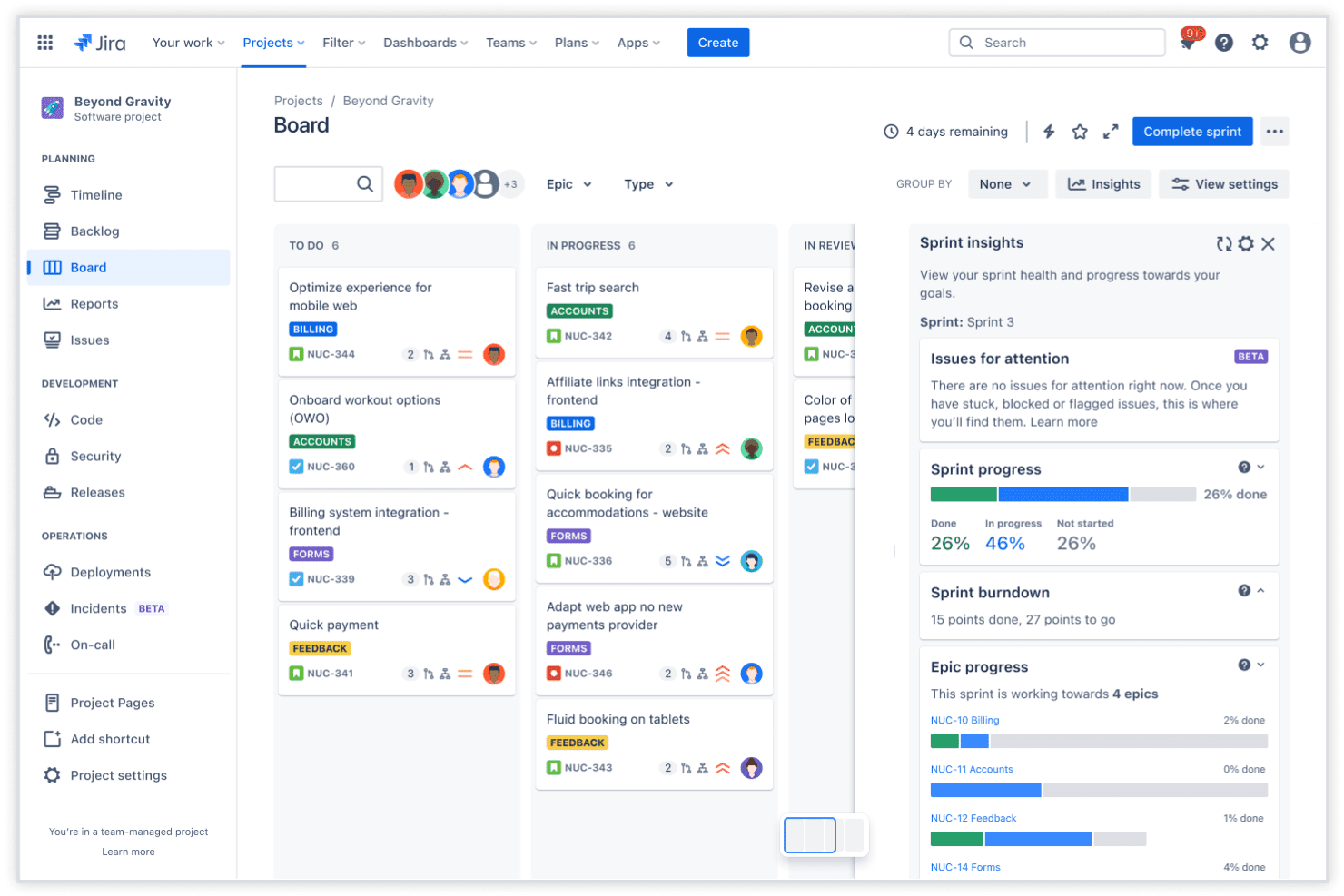
Jira lets teams manage agile projects with sprint boards, task columns, sprint insights, and epic progress tracking. Jira is a task and project management platform built around agile workflows, offering issue tracking, sprint planning, customizable workflows, and cross-team roadmapping for software and technical teams.
Who Is Jira Best For?
Jira is a strong fit for software development and IT teams that run agile or scrum workflows and need structured issue tracking at scale.
Why I Picked Jira
I picked Jira as one of the best because it links development activity directly to tasks in a way most project management tools don't attempt. When my team pushes a commit or triggers a build in Bitbucket, that activity surfaces inside the Jira issue automatically. Sprint backlog management and configurable workflow transitions let me define exactly how work moves through engineering, from triage to deployment.
Jira Key Features
- Kanban and backlog views: Visualize work in progress and prioritize upcoming tasks using flexible Kanban boards and backlogs.
- Advanced roadmaps: Plan cross-team work with multi-project timelines, capacity planning, and dependency tracking.
- Automation rules: Set custom triggers and actions for recurring tasks, status changes, and notifications.
- Time tracking: Monitor time spent on individual tasks with built-in tracking fields and reporting.
Jira Integrations
Jira offers native integrations with Confluence, Bitbucket, Trello, Slack, Microsoft Teams, GitHub, and Google Calendar. An API is available for custom integrations, and thousands of additional apps are accessible through the Atlassian Marketplace.
Pros and Cons
Pros:
- Highly customizable issue types and fields
- Granular permissions for project roles
- Advanced workflow automation and triggers
Cons:
- Overwhelming options for small departments
- Steep setup for non-technical teams
Learn more about Jira:
Outros softwares de gestão de tarefas
Eis algumas opções adicionais de software de gestão de tarefas que não entraram na minha seleção, mas que ainda vale a pena conhecer:
- 11monday.comBest for customizable visual workflows
- 12PaymoBest for combining time tracking with task lists
- 13Adobe WorkfrontBest for enterprise-grade workflow automation
- 14MeisterTaskBest for intuitive Kanban-style boards
- 15QuickbaseBest for low-code workflow customization
- 16Microsoft ProjectBest for advanced timeline and Gantt features
- 17GoodDayBest for built-in goal and OKR tracking
- 18HiveBest for integrating email with project tasks
How I Evaluate Task Management Software
My evaluation splits into two layers: the core functionality every tool must cover and the differentiators—like capacity planning and automation—that matter when managing complex HR project loads.
Core Functionality (Table Stakes for This List)
When I'm selecting tools for my list, I rank each one on a scale from 0 (does not offer the functionality) to 5 (excels in this area) for each core functionality listed below. Then, I calculate the tool's total score into a percentage. Each tool needs to achieve a minimum total score of 75% to be considered for inclusion.
- Task Assignment & Ownership: I check whether you can assign tasks to specific HR team members and track who's responsible for each step in processes like benefits enrollment or policy rollouts.
- Project & Workflow Views: Multiple views matter here. I look for options like Kanban, Gantt, list, and calendar so your team can visualize onboarding pipelines or review cycles the way that works best.
- Deadlines & Dependencies: Setting due dates is table stakes, but I also evaluate how each tool handles task dependencies and milestones for sequential HR workflows like multi-stage interview loops.
- Team Collaboration: I consider built-in commenting, mentions, file sharing, and notifications. Your HR team should be able to discuss a compliance update or share a revised handbook draft without leaving the platform.
- Recurring Tasks & Templates: HR runs on repeatable processes. I look for tools that let you set up recurring tasks for things like monthly payroll checklists and save reusable templates for new hire onboarding.
- Resource & Workload Management: I evaluate whether the tool gives you visibility into who's overloaded and who has capacity, especially during high-volume periods like open enrollment or annual performance reviews.
Once I have a list of tools that meet the criteria, I consider what sets each platform apart.
Differentiating Factors (What Sets Vendors Apart)
Here's how I compare and contrast different vendors:
Standout Features
Custom workflow automation is a big differentiator. I look for no-code rules that auto-assign tasks or route approvals when a project hits a specific stage—like notifying a hiring manager once an offer letter is drafted. Resource capacity planning matters just as much, especially during peak periods like open enrollment when HR teams juggle multiple initiatives at once. Portfolio-level dashboards round things out by giving leadership real-time views of status, risks, and milestones across all active projects.
Beyond Features
Integrations are one of the first things I check. Your task management tool needs to connect with the platforms your team already uses—Slack for communication, QuickBooks or Xero for invoicing, and CRMs like HubSpot or Salesforce for pipeline visibility. Scalability also plays a role. I evaluate whether a tool's permission structures and pricing tiers can grow with your team, from a small HR department to a multi-department operation. Strong onboarding support—like migration help and template libraries—can make or break adoption.
Como escolher um software de gestão de tarefas
É fácil perder-se em listas longas de funcionalidades e estruturas de preços complexas. Para o ajudar a manter o foco enquanto analisa o seu processo específico de seleção de software, eis uma lista de fatores a ter em conta:
| Fator | O que considerar |
|---|---|
| FatorEscalabilidade | O que considerarA ferramenta continuará a funcionar à medida que a sua equipa cresce ou que os seus processos se tornam mais complexos? Considere o suporte para vários departamentos, funções e colaboração entre equipas. |
| FatorIntegrações | O que considerarConsegue ligar-se facilmente às plataformas que já utiliza — HRIS, processamento salarial, mensagens e ferramentas de documentos? Procure opções de API nativas ou abertas para reduzir os silos. |
| FatorPersonalização | O que considerarPode adaptar os fluxos de trabalho, os campos e as permissões de modo a corresponderem aos seus projetos de RH? Certifique-se de que não fica limitado a modelos rígidos que tornam os seus processos mais lentos. |
| FatorFacilidade de utilização | O que considerarCom que rapidez é que a sua equipa consegue começar a utilizar a ferramenta? Procure uma navegação clara e menos cliques para os processos diários de RH, como a integração de novos colaboradores ou o acompanhamento da conformidade. |
| FatorImplementação e integração | O que considerarQue tipo de apoio à configuração está disponível? Considere a assistência na migração, os recursos de formação e o acesso a modelos direcionados para RH, para uma adoção mais rápida. |
| FatorCusto | O que considerarAlém do preço de tabela, verifique se existem suplementos pagos, taxas por utilizador ou custos de integração. Confirme se o crescimento futuro se enquadra no seu orçamento. |
| FatorMedidas de segurança | O que considerarO fornecedor disponibiliza encriptação de dados, permissões granulares e registos de auditoria para proteger as informações confidenciais dos colaboradores e cumprir as políticas internas? |
| FatorDisponibilidade do apoio | O que considerarQue nível de ajuda irá obter se surgir um problema? Verifique os tempos de resposta, o horário de apoio e os canais disponíveis — especialmente se gerir processos de RH fora do horário normal. |
O que é um software de gestão de tarefas?
O software de gestão de tarefas é uma plataforma digital que ajuda as equipas de RH a organizar, atribuir e acompanhar cada etapa dos seus projetos e processos multifuncionais. Centraliza a responsabilidade pelas tarefas, os prazos e a colaboração, para que possa monitorizar o progresso, gerir as cargas de trabalho e garantir que nada fica por fazer durante iniciativas complexas de RH ou fluxos de trabalho operacionais recorrentes.
Funcionalidades do software de gestão de tarefas
Ao selecionar um software de gestão de tarefas, procure as seguintes funcionalidades principais:
- Atribuição e responsabilidade pelas tarefas: Atribua tarefas a membros específicos da equipa de RH, defina prioridades e garanta a responsabilização à medida que os projetos passam do planeamento à conclusão.
- Várias vistas do fluxo de trabalho: Visualize os projetos em vistas Kanban, Gantt, de lista ou de calendário, de acordo com o estilo preferido pela sua equipa de RH, e esclareça o progresso de relance.
- Prazos e dependências: Crie datas-limite e associe tarefas relacionadas para que etapas como a integração de novos colaboradores, a formação em conformidade ou a revisão de políticas ocorram pela ordem correta.
- Ferramentas de colaboração: Centralize a partilha de ficheiros, as discussões, as menções e as notificações nas tarefas, para que todos se mantenham alinhados sem longas cadeias de e-mails.
- Tarefas recorrentes: Automatize processos de RH repetidos, desde tarefas mensais relacionadas com o processamento salarial até listas de verificação anuais de conformidade, reduzindo a configuração manual e as etapas esquecidas.
- Modelos personalizáveis: Crie e reutilize modelos para projetos de RH padrão, como a integração de novos colaboradores, a inscrição em benefícios ou a saída de colaboradores.
- Gestão de recursos e da carga de trabalho: Acompanhe as cargas de trabalho da equipa, identifique estrangulamentos e atribua tarefas com base na capacidade disponível, ajudando a prevenir o esgotamento ou o incumprimento de prazos.
- Permissões baseadas em funções: Controle quem pode visualizar, editar ou gerir projetos e informações confidenciais, de modo a cumprir as normas de privacidade e conformidade de RH.
- Acompanhamento do estado e relatórios: Monitorize o estado das tarefas, gere relatórios e visualize a saúde dos projetos para manter a liderança informada e identificar riscos numa fase inicial.
Funcionalidades comuns de IA do software de gestão de tarefas
Para além das funcionalidades padrão do software de gestão de tarefas acima indicadas, muitas destas soluções estão a integrar IA com funcionalidades como:
- Priorização automatizada de tarefas: A IA analisa prazos, dependências e carga de trabalho para sugerir quais as tarefas que devem ser realizadas primeiro, ajudando as equipas de RH a concentrarem-se no que é mais importante.
- Equilíbrio inteligente da carga de trabalho: A IA analisa a capacidade da equipa e redistribui automaticamente as tarefas para evitar a sobrecarga e garantir uma distribuição equilibrada entre os colaboradores de RH.
- Alertas preditivos de risco de incumprimento de prazos: A IA monitoriza os cronogramas dos projetos e sinaliza as tarefas em risco de atraso, permitindo-lhe resolver os estrangulamentos antes de afetarem as iniciativas de RH.
- Criação de tarefas em linguagem natural: A IA converte pedidos em linguagem corrente ou notas de reuniões em tarefas acionáveis, reduzindo a introdução manual e captando detalhes importantes no momento.
- Resumos automatizados de reuniões: A IA gera resumos concisos e itens de ação a partir de reuniões de projetos de RH, facilitando o acompanhamento das ações subsequentes e dos próximos passos.
Vantagens do software de gestão de tarefas
A implementação de um software de gestão de tarefas proporciona várias vantagens para a sua equipa e para a sua empresa. Eis algumas das que pode esperar:
- Visibilidade centralizada dos projetos: Acompanhe todos os projetos, tarefas, prazos e atualizações de estado de RH num único espaço de trabalho organizado.
- Maior responsabilização: Atribua claramente a responsabilidade pelas tarefas, para que as responsabilidades sejam transparentes entre os membros da equipa e nada fique por fazer.
- Processos de RH consistentes: Uniformize os fluxos de trabalho e utilize modelos para iniciativas repetíveis, como a integração de novos colaboradores, a conformidade e as avaliações anuais.
- Colaboração reforçada: Mantenha todas as conversas, documentação e comentários no contexto de cada tarefa, reduzindo os mal-entendidos.
- Otimização dos recursos: Equilibre as cargas de trabalho, identifique problemas de capacidade e evite o esgotamento dos colaboradores de RH, visualizando a disponibilidade da equipa.
- Gestão de riscos e prazos: Tire partido das dependências de tarefas integradas e dos alertas automatizados para resolver os estrangulamentos antes de causarem atrasos.
- Integração e adoção mais rápidas: Facilite a adaptação dos novos membros da equipa através de uma configuração orientada, modelos e fluxos de trabalho intuitivos.
Custos e preços do software de gestão de tarefas
A seleção de um software de gestão de tarefas exige uma compreensão dos vários modelos de preços e planos disponíveis. Os custos variam consoante as funcionalidades, a dimensão da equipa, os complementos e outros fatores. A tabela abaixo resume os planos mais comuns, os respetivos preços médios e as funcionalidades normalmente incluídas nas soluções de software de gestão de tarefas:
Tabela de comparação de planos para software de gestão de tarefas
| Tipo de plano | Preço médio | Funcionalidades comuns |
|---|---|---|
| Tipo de planoPlano gratuito | Preço médio$0 | Funcionalidades comunsAtribuição básica de tarefas, armazenamento limitado, vistas simples do fluxo de trabalho e ferramentas básicas de colaboração. |
| Tipo de planoPlano pessoal | Preço médio$5–$15/utilizador/mês | Funcionalidades comunsEspaços de trabalho individuais, vistas de tarefas personalizadas, acesso móvel e integrações limitadas. |
| Tipo de planoPlano empresarial | Preço médio$20–$35/utilizador/mês | Funcionalidades comunsPersonalização avançada de fluxos de trabalho, relatórios, gestão da carga de trabalho, bibliotecas de modelos e integrações. |
| Tipo de planoPlano para empresas | Preço médio$40–$60/utilizador/mês | Funcionalidades comunsSSO e segurança avançada, apoio prioritário, registos de auditoria, permissões personalizadas e assistência na integração. |
Perguntas frequentes sobre software de gestão de tarefas
Eis algumas respostas a perguntas frequentes sobre software de gestão de tarefas: