

O software de processamento salarial para organizações sem fins lucrativos ajuda a sua organização a gerir os salários de funções financiadas por subvenções, acompanhar o trabalho nos vários programas e cumprir as regras relevantes para organizações 501(c)(3), grupos religiosos e organizações sem fins lucrativos seculares. Se supervisiona o processamento salarial de uma organização sem fins lucrativos, já conhece a dificuldade de equilibrar a afetação de custos, os relatórios prontos para auditoria e os desafios fiscais específicos — tudo isto enquanto apoia as suas pessoas e a sua missão.
Reuni as melhores ferramentas de software de processamento salarial para organizações sem fins lucrativos para 2026, com foco nas funcionalidades que tornam o processamento salarial menos stressante, ajudam a manter a organização preparada para auditorias e permitem gerir o acompanhamento de subvenções e fundos da forma esperada pelos seus financiadores. Eis o que precisa de saber antes de escolher.
Why Trust Our Software Recommendations
6,700+
Reviews
20
Industry experts
16+
Evaluation factors
14
Years
Our team has been testing and reviewing software since 2012. As HR experts ourselves, we know how difficult—and important—it is to choose the right software.
For this guide, we evaluated tools using hands-on testing and independent research, scoring tools using our selection criteria. We also draw on insights from industry thought leaders and practicing HR experts.
Our reviews reflect our human editorial judgment, not a sales pitch.
Expert reviewers:
- Phil GrayCOO
 Kim BehnkeHR Tech Editor & Analyst
 Josh BarkerPeople Ops Manager

Tabela de comparação de software de processamento salarial para organizações sem fins lucrativos
Compare, lado a lado, os preços e as especificações do software de processamento salarial para organizações sem fins lucrativos que entrou na minha lista restrita.
| Tool | Best For | Trial Info | Price | ||
|---|---|---|---|---|---|
| 1 | Best for global and contractor payroll in one place | Free demo available | From $29/user/month | Website | |
| 2 | Best for coordinating paid staff and volunteers | Free demo available | From $4/user/month | Website | |
| 3 | Best for mid-market grant and program labor tracking | Free demo available | Pricing upon request | Website | |
| 4 | Best for time-to-payroll tracking in one place | 30-day free trial + free demo available | From $80/month | Website | |
| 5 | Best for grant-funded labor allocation across funds | Free demo available | Pricing upon request | Website | |
| 6 | Best for clergy and grant-funded payroll | Free demo available | Pricing upon request | Website | |
| 7 | Best for grant labor allocation at payroll | Free demo available | Pricing upon request | Website | |
| 8 | Best for grant and fund labor cost allocation | Free demo available | From $6/user/month | Website | |
| 9 | Best for clergy and grant-level payroll compliance | Free demo available | Pricing upon request | Website | |
| 10 | Best for church and clergy payroll compliance | Not available | Pricing upon request | Website |





Avaliações de software de processamento salarial para organizações sem fins lucrativos
Abaixo encontrará os meus resumos detalhados do melhor software de processamento salarial para organizações sem fins lucrativos que entrou na minha lista restrita. As minhas avaliações apresentam uma análise detalhada das funcionalidades, dos melhores casos de utilização e das capacidades de cada software, para o ajudar a encontrar a melhor opção para si.
 Best for global and contractor payroll in one place
- Free demo available
- From $29/user/month
Visit WebsiteCustomer Rating:4.9/5
Deel Payroll manages global payroll cycles across multiple countries in one view. Deel Payroll is a global payroll and contractor management platform that handles multi-country employee payroll, contractor payments, tax filing, and built-in time tracking across 150+ countries.
Who Is Deel Payroll Best For?
Deel Payroll is a strong fit for nonprofits that employ a mix of international staff and independent contractors and need both payroll and contractor payments managed in one place.
Why I Picked Deel Payroll
I've included Deel Payroll in my top picks because it's the only platform I've found that handles both international employee payroll and contractor payments in one place, which matters for nonprofits running programs across borders with a mix of staff and freelancers. I like that it files 1099-NECs directly from the platform and covers federal, state, and local tax filing across all 50 states automatically. Its percentage-based cost center splits also let you divide wages across programs without manual spreadsheet work.
Deel Payroll Key Features
- Built-in time tracking: Workers clock in and out via app, browser, or Slack, with approved hours flowing directly into payroll calculations.
- Multi-country payroll: Deel processes payroll across 150+ countries in 120+ currencies, covering international staff alongside US employees.
- Employee self-service portal: Employees can access pay history, year-to-date tax summaries, W-2s, and update direct deposit and withholding details independently.
- Cost center wage splitting: Wages can be divided across multiple cost centers by percentage with effective dates, supporting labor cost allocation across programs.
Deel Payroll Integrations
Deel Payroll offers native GL Sync integrations with QuickBooks Online, Xero, NetSuite, Sage Intacct, SAP, and Microsoft Dynamics. Syncs are manual, and there are no documented integrations with nonprofit platforms such as Aplos or Blackbaud.
Pros and Cons
Pros:
- Supports percentage-based program wage allocation
- Handles multi-state tax filings automatically
- Combines employee and contractor payroll
Cons:
- Grant reporting remains limited to cost centers
- No clergy or housing allowance workflows
Learn more about Deel Payroll: Best for coordinating paid staff and volunteers
- Free demo available
- From $4/user/month
Visit WebsiteCustomer Rating:4.5/5
Workzoom centralizes payroll processing tasks, pay runs, and sundries in one dashboard. Workzoom is a payroll and HR platform that handles grant-based salary allocation, fund-separated journal entries, volunteer tracking, and multi-jurisdiction pay processing across Canada, the United States, and the Bahamas.
Who Is Workzoom Best For?
Workzoom is a strong fit for mid-sized nonprofits with 50 or more employees that need to coordinate paid staff and volunteers within a single payroll and HR system.
Why I Picked Workzoom
I picked Workzoom as one of the best because it's one of the few platforms that keeps paid staff and volunteers inside the same scheduling view, so your team isn't toggling between systems to build a shift roster. Where it really shines is grant-based salary allocation: approved hours automatically split across configured grant codes, with fund-separated journal entries generated from those same rules, making funder audit reports far less painful to produce.
Workzoom Key Features
- Three-step pay run: Guides payroll through validation, audit and lock, and disbursement, with pre-flight checks that flag missing banking details, unapproved time, and tax-form gaps before processing.
- Multi-jurisdiction tax calculations: Applies jurisdiction-specific payroll rules across all 50 US states, Canada, and the Bahamas, with withholding configured by employee work location.
- Volunteer profile tracking: Maintains a distinct profile type for volunteers, separate from paid staff, with hours tracked and excluded from payroll and T4 generation.
- Statutory payroll outputs: Generates country-specific filing documents, including Canadian T4s and ROEs, US W-2s, and Bahamas NIB outputs, ready for employer review and submission.
Workzoom Integrations
Workzoom supports SAML 2.0 single sign-on with Azure AD, Okta, and OneLogin. No accounting integrations are named, and API availability isn’t documented.
Pros and Cons
Pros:
- Reviewers praise responsive implementation support
- Paid staff and volunteers share scheduling
- Grant-coded hours generate fund-separated journals
Cons:
- Small nonprofits fall below its stated audience
- Employers submit filings and remit payroll taxes
Learn more about Workzoom: Best for mid-market grant and program labor tracking
- Free demo available
- Pricing upon request
Visit WebsiteCustomer Rating:4.3/5
Paylocity's dashboard lets employees track time, time off, and tasks. Paylocity is a unified HR and payroll platform that handles payroll processing, time tracking, tax filing, benefits administration, and labor cost allocation across grants, programs, and funding sources for nonprofit organizations.
Who Is Paylocity Best For?
Paylocity is a strong fit for mid-market nonprofits with 100–500 employees that need to track and allocate labor costs across multiple grants, programs, or funding sources.
Why I Picked Paylocity
I picked Paylocity as one of the best because of how well it handles labor cost allocation across multiple grants and programs at the timesheet level. Employees can assign hours directly to specific jobs, cost centers, or funding sources, and those hours flow straight into payroll with no duplicate entry. The GL mapping at the payroll code level means finance teams can split a single payroll run across several grant budgets without manual workarounds.
Paylocity Key Features
- 403(b) plan administration: Paylocity's built-in retirement module, powered by Vestwell, supports 403(b) plans with automatic payroll-connected contribution syncing.
- Multi-state payroll processing: Run payroll across all 50 states in a single pay run, with automated state-specific tax calculation, filing, and compliance alerts.
- Automated tax filing: Paylocity files federal, state, and local taxes—including W-2s, 941s, and 1099s—and assumes liability for any filing errors.
- Employee self-service mobile app: Employees can access pay stubs, request time off, enroll in benefits, and clock in via the mobile app with biometric and geofencing support.
Paylocity Integrations
Paylocity offers native integrations with QuickBooks Online, Sage Intacct, and NetSuite, plus embedded Vestwell retirement administration. Its marketplace includes TrakPay, E-COMP NOW!, SmartPay, Accident Fund, and InsurePay, while APIs support custom integrations.
Pros and Cons
Pros:
- Multi-state tax compliance with real-time alerts
- Automated housing and clergy payroll settings
- Handles grant and program labor tracking
Cons:
- Limited fund accounting integrations available
- No nonprofit-specific pricing or discounts
 Best for time-to-payroll tracking in one place
- 30-day free trial + free demo available
- From $80/month
Visit WebsiteCustomer Rating:4.5/5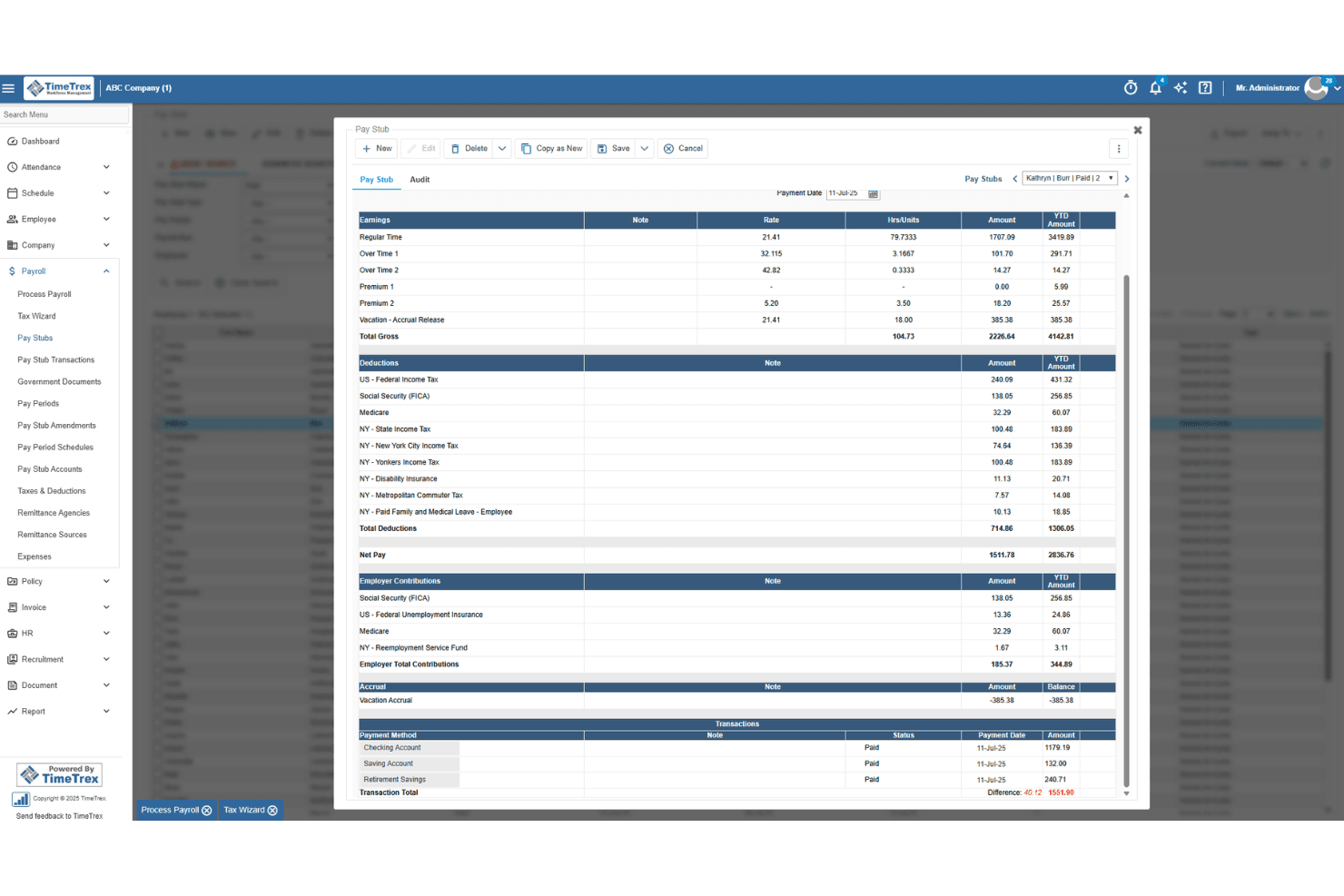
TimeTrex generates detailed pay stubs with earnings, deductions, and taxes. TimeTrex is a workforce management platform that combines time and attendance tracking, employee scheduling, leave management, and payroll processing in a single system.
Who Is TimeTrex Best For?
TimeTrex suits small nonprofits that want time tracking and payroll in one place, particularly those with hourly staff where hours-to-paycheck accuracy matters most.
Why I Picked TimeTrex
I picked TimeTrex as one of the best because of how tightly it connects time tracking to payroll, which matters when you're running hourly staff at a nonprofit and need every hour accounted for before a pay run. Clock-in data flows directly into payroll calculations, so there's no manual hour-entry step where numbers can drift. I also like that cost centers can be allocated across up to four levels, letting you tag hours to specific departments or programs before payroll runs.
TimeTrex Key Features
- Biometric facial recognition: Employees clock in and out using facial recognition to verify their identity at the point of punch.
- Leave and absence management: Tracks leave requests, balances, and accruals for paid time off and sick leave in a centralized system.
- Customizable workforce reports: Generates reports on attendance, labor trends, and payroll data that can be tailored to your organization's needs.
- QuickBooks and Sage integration: Transfers financial data between TimeTrex and your accounting system via two-way or flat-file data sharing.
TimeTrex Integrations
TimeTrex integrations include Intuit QuickBooks, Sage, ADP, Paychex, and Ceridian. It offers a REST API and custom integrations, though nonprofit fund-accounting workflows aren’t specified.
Pros and Cons
Pros:
- Grant-hour summaries support audit preparation
- Users praise patient, clear support responses
- Reviewers say time data simplifies payroll runs
Cons:
- Customers remain responsible for filing payroll taxes
- Fund-level payroll allocation isn’t documented
Learn more about TimeTrex: Best for grant-funded labor allocation across funds
- Free demo available
- Pricing upon request

Sage Intacct Payroll lets users configure federal tax rates and forms. Sage Intacct Payroll is a payroll and HR platform that combines multi-schedule payroll processing, tax filing, employee self-service, and real-time labor allocation across grants and funds—natively integrated with the Sage Intacct general ledger.
Who Is Sage Intacct Payroll Best For?
Sage Intacct Payroll is built for mid-to-large nonprofits with 100+ employees that manage complex, multi-fund grant portfolios and need payroll tightly integrated with fund accounting.
Why I Picked Sage Intacct Payroll
Sage Intacct Payroll earns its spot on my shortlist because of how it handles grant-funded labor allocation at the timecard level. When an employee clocks time against a specific federal grant, that cost flows directly into the Sage Intacct general ledger in real time, mapped to the correct dimension and GL account automatically. I also like that you can run percentage-based allocation across multiple grants simultaneously, which matters when staff split time across several funding sources with different reporting requirements.
Sage Intacct Payroll Key Features
- Multi-schedule payroll processing: Run payroll across multiple pay schedules simultaneously for salaried, hourly, and part-time employees within a single environment.
- Automated tax filing: Federal, state, and local tax calculations, withholding, and form generation—including W-2s, Form 941, and 1099s—are handled automatically across all 50 U.S. states.
- Employee self-service portal: Employees can access pay stubs, W-2s, update direct deposit details, enroll in benefits, and manage PTO without HR involvement.
- Multi-entity consolidation: Manage payroll across multiple affiliated chapters or entities with separate EINs under one environment, with consolidated reporting across all.
Sage Intacct Payroll Integrations
Sage Intacct Payroll has native integrations with Sage Intacct financials and Sage Intacct Time, plus Marketplace integrations for Salesforce, Blackbaud Raiser's Edge NXT, ADP Workforce Now, and Avalara. An open API supports custom integrations.
Pros and Cons
Pros:
- Automated compliance updates for nonprofit reporting
- Multi-entity payroll management in one system
- Real-time grant labor allocation to fund accounting
Cons:
- Significant implementation and onboarding commitment required
- No pre-configured clergy exemption workflows
Learn more about Sage Intacct Payroll: Best for clergy and grant-funded payroll
- Free demo available
- Pricing upon request
Visit WebsiteCustomer Rating:4.5/5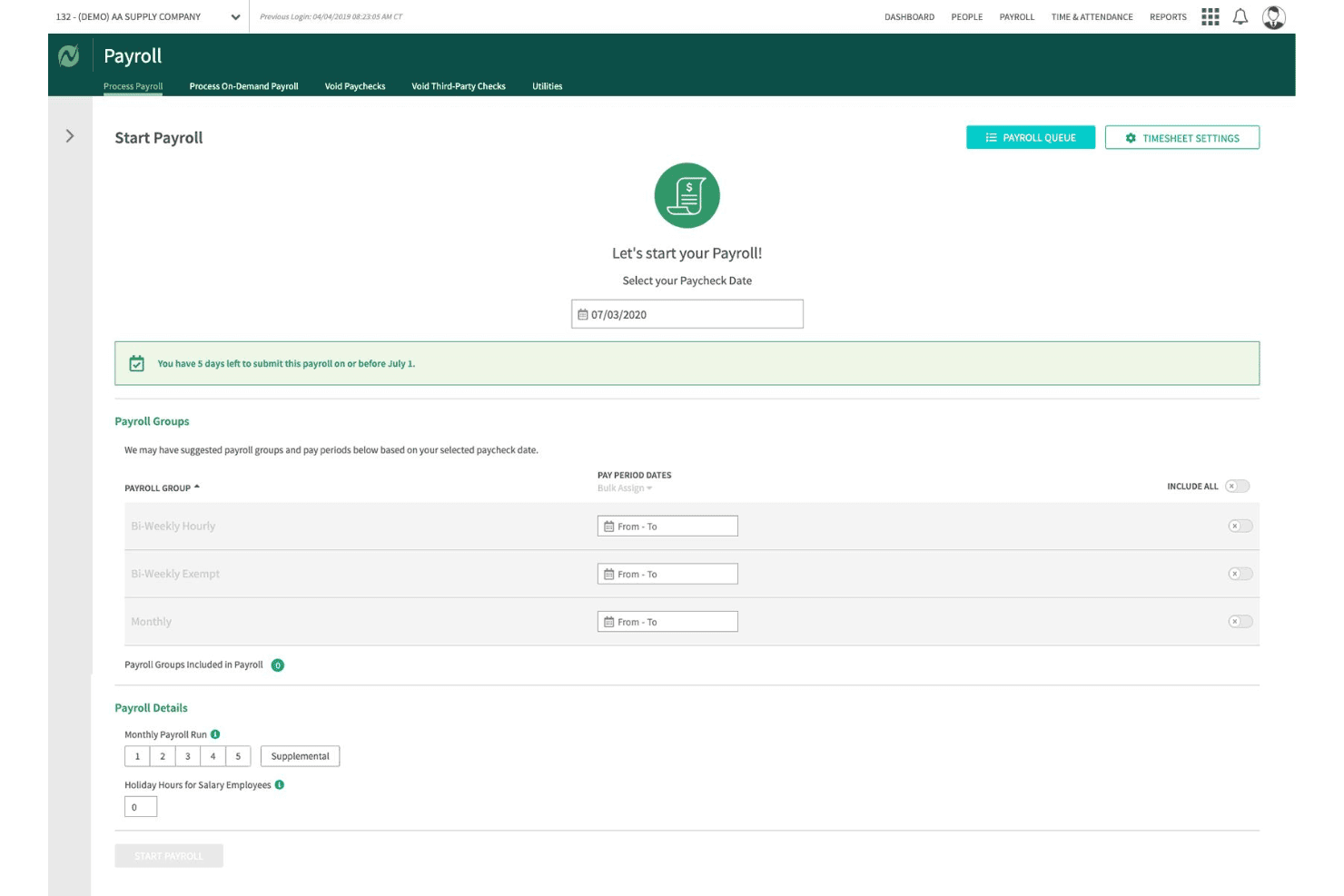
Netchex lets users configure payroll groups and pay periods before processing. Netchex is a full-service payroll and HR platform built for nonprofits, handling payroll processing, tax filing, time tracking, fund and grant allocation, and benefits administration in one system.
Who Is Netchex Best For?
Netchex is a strong fit for mid-sized nonprofits and faith-based organizations that need clergy payroll, housing allowance tracking, and multi-grant labor cost allocation handled natively in one platform.
Why I Picked Netchex
Netchex earns its spot on my shortlist because it handles clergy payroll and grant-funded labor allocation as native platform features, not manual workarounds. I particularly like how it supports minister dual-status payroll, IRC §107 housing allowance tracking with W-2 annotation, and Form 4361 Social Security opt-outs configured directly in the system. On the grant side, you can split a single employee's labor costs across multiple funds and programs at the timecard level, which flows automatically into audit-ready reporting.
Netchex Key Features
- OneScreen Payroll™ dashboard: Aggregates payroll readiness data across multiple locations or entities so you can review and run payroll in a single view.
- ACT Verification tool: Automatically checks that each employee is taxed correctly based on their work location, covering all 50 states.
- Timecard-level job code tracking: Links time entries to specific departments, cost centers, and programs directly on the timecard before payroll processes.
- AI anomaly monitoring via Sentinel: Continuously scans payroll data for compliance issues, approval errors, and compensation changes between pay periods.
Netchex Integrations
Netchex documents 23+ accounting and GL integrations, including QuickBooks Online, Blackbaud Financial Edge, MIP, Sage 50, Sage 300, Oracle NetSuite, and Microsoft Dynamics 365 Business Central. It also lists 44+ 401(k) provider integrations and supports custom GL file formats.
Pros and Cons
Pros:
- ACA, SUI, WOTC, and 501(c)(3) compliance
- Audit-ready fund and grant allocation built-in
- Clergy payroll and housing allowance automated
Cons:
- Interface slow and cumbersome for small teams
- No clear support for 403(b) plans
Learn more about Netchex: Best for grant labor allocation at payroll
- Free demo available
- Pricing upon request
Visit WebsiteCustomer Rating:4.4/5
UKG Ready's AI assistant guides managers through approving employee timesheets. UKG Ready is an HR and payroll platform with built-in time tracking, benefits administration, tax filing, and grant labor allocation tools designed for mid-to-large nonprofit organizations.
Who Is UKG Ready Best For?
UKG Ready is a strong fit for mid-to-large nonprofits that manage grant-funded programs and need payroll to reflect real-time labor allocations across multiple funding sources.
Why I Picked UKG Ready
I picked UKG Ready as one of the best because its dedicated "Time and Effort Reporting for Grants" module does something most payroll platforms don't: it lets you assign labor costs to specific grants in real time, with dashboards showing live spend versus budget. You can set employee rates by grant, track hours against milestones, and run role-based timesheet approvals that distinguish between, say, a principal investigator and a program assistant. Native 403(b) administration with 15-year rule support rounds out the nonprofit fit.
UKG Ready Key Features
- SmartCheck™ payroll error flagging: An AI-powered review scans each payroll run and surfaces potential errors before you finalize it.
- Multi-EIN payroll support: Run payroll across separate chapters, campuses, or affiliated entities under a single platform login.
- 403(b) catch-up contribution administration: Native setup supports 15-year rule provisions and USERRA make-up contributions for nonprofit retirement plans.
- Automated multi-jurisdiction tax filing: Federal, state, and local tax submissions—including W-2s, 1099s, and 941s—are filed end-to-end on your behalf.
UKG Ready Integrations
UKG Ready has documented integrations with QuickBooks and NetSuite, plus a Sage Intacct Marketplace connection. These accounting integrations support payroll-to-ledger workflows for nonprofit finance teams.
Pros and Cons
Pros:
- Multi-entity payroll under one login
- Native 403(b) 15-year rule support
- Real-time grant labor allocation during payroll
Cons:
- Reporting tools require administrative expertise
- No pre-built clergy tax workflows
Learn more about UKG Ready: Best for grant and fund labor cost allocation
- Free demo available
- From $6/user/month

APS Payroll lets users review gross-to-net payroll details before final approval. APS Payroll is a payroll and HR platform built with dedicated support for nonprofits and faith-based organizations, covering payroll processing, tax compliance, time tracking, benefits administration, and grant-level labor cost allocation.
Who Is APS Payroll Best For?
APS Payroll is a strong fit for nonprofits and faith-based organizations that need to allocate labor costs across multiple grants or programs and want a dedicated support team.
Why I Picked APS Payroll
APS Payroll earns its spot on my shortlist because of its Dimensions module, which lets you tag employee time directly to specific grants, programs, or departments at the timecard level. I love that those allocations flow straight into payroll processing and GL exports, so there's no manual rework when you're reconciling labor costs across multiple funding sources. The platform also handles 501(c)(3) FUTA exemptions and clergy dual-status taxation natively, which matters if your organization runs a mixed workforce of lay staff and ordained ministers.
APS Payroll Key Features
- Clergy housing allowance tracking: Set up, document, and track ministerial housing allowances to support correct federal income tax exclusion treatment.
- Employee self-service portal: Staff can view pay stubs, update direct deposit details, adjust W-4 withholding, and request time off through a web or mobile app.
- Sage Intacct bidirectional integration: Syncs employee records and dimensions between APS and Sage Intacct, then automatically posts payroll GL data by dimension into your fund accounting system.
- Custom report builder: Build ad hoc payroll and labor expense reports using configurable filters and columns to support board presentations and Form 990 preparation.
APS Payroll Integrations
APS Payroll lists 238 total connections, including a native bidirectional Sage Intacct integration plus integrations with QuickBooks, AccountMate, Acumatica, ACS Technologies, and Employee Navigator. An open API supports custom integrations.
Pros and Cons
Pros:
- Handles clergy housing allowance and dual-status
- Dedicated nonprofit and faith-based support teams
- Grant-level labor cost allocation with audit trails
Cons:
- No Aplos or Blackbaud Financial Edge NXT integration
- High monthly minimum excludes small nonprofits
Learn more about Apspayroll: Best for clergy and grant-level payroll compliance
- Free demo available
- Pricing upon request

Inova Payroll visualizes labor distribution and payroll trends by position and business unit. UKG Inova Payroll is a full-service payroll platform built for nonprofits, handling automated payroll processing, multi-state tax filing, clergy housing allowances, grant-level labor cost allocation, and fund accounting integrations across organizations of all sizes.
Who Is UKG Inova Payroll Best For?
UKG Inova Payroll is a strong fit for faith-based organizations and nonprofits managing federally funded programs that need clergy housing allowance support and grant-level labor cost tracking in one payroll system.
Why I Picked UKG Inova Payroll
I've included UKG Inova Payroll in my top picks because it handles two of the most technically demanding nonprofit payroll scenarios out of the box: clergy compensation and grant-level labor tracking. I specifically like that it supports housing allowances, Form 4361, and minister dual-status configuration, which most generalist platforms simply don't address. On the grant side, you can code timecards directly to funding sources, set primary and secondary funding splits per employee, and pull grant-level labor reports that hold up to OMB Uniform Guidance requirements.
UKG Inova Payroll Key Features
- Full-service tax filing: Files Forms 940, 941, 944, W-2, W-3, and 1099 across all 50 states and Washington, D.C., with automated reciprocity withholding and geospatial local tax ID matching.
- Multi-EIN payroll management: Manages payroll across multiple affiliated entities, chapters, or campuses under one login with separate EIN handling and consolidated reporting.
- Pay-as-you-go workers' comp: Calculates workers' compensation premiums per payroll run with no down payment, avoiding large year-end true-ups.
- Sage Intacct integration: Syncs payroll data bidirectionally with Sage Intacct, auto-posting GL journal entries by department, location, and dimension after each payroll run.
UKG Inova Payroll Integrations
UKG Inova Payroll integrates with Sage Intacct, QuickBooks Online, Acumatica, and Xero. It also provides an open REST API for custom connections, while Sage Intacct supports bidirectional GL and dimension syncing.
Pros and Cons
Pros:
- Manages multi-EIN nonprofit payroll compliance
- Supports grant-level labor cost tracking
- Handles clergy housing and parsonage allowances
Cons:
- No free trial or instant sandbox access
- No explicit support for 403(b) retirement plans
Learn more about UKG Inova Payroll: Best for church and clergy payroll compliance
- Not available
- Pricing upon request

Payroll Partners guides new hires through onboarding tasks and I-9 completion. Payroll Partners is a payroll and HR platform built specifically for churches and faith-based nonprofits, covering clergy tax handling, multi-campus labor allocation, time and attendance, benefits enrollment, and ATS-integrated recruiting.
Who Is Payroll Partners Best For?
Payroll Partners is built for churches and faith-based nonprofits that need clergy housing allowance management, dual-status minister tax handling, and multi-campus payroll support in one place.
Why I Picked Payroll Partners
Payroll Partners earns its spot on my shortlist because no other platform handles clergy payroll complexity with this level of specificity. I'm particularly impressed by its dual-status minister tax handling, which correctly separates FICA from SECA obligations, and its dedicated clergy housing allowance workflows, which even support mid-year reviews when a pastor's expenses change. It also manages pay confidentiality for pastoral staff, something most general payroll platforms simply don't offer.
Payroll Partners Key Features
- ATS-integrated recruiting: Post open roles directly to Indeed, Glassdoor, and ZipRecruiter, then manage candidate prescreening, scoring, and committee review workflows within the same platform.
- Paperless onboarding: New hires complete offer letter signing, federal and state forms, and I-9 verification online, with manager and employee task checklists tracking each step.
- ACA compliance dashboard: Tracks Applicable Large Employer status, generates 1094-C and 1095-C forms, and handles electronic filing with built-in compliance alerts.
- Multi-method time tracking: Employees can clock in via physical time clocks (badge, biometric, or proximity fob), web portal timesheets, or mobile app, with hours feeding directly into payroll.
Payroll Partners Integrations
Payroll Partners integrates with QuickBooks, Sage, Shelby Systems, Blackbaud, and ACS for accounting workflows. It also connects with Indeed, Glassdoor, and ZipRecruiter through its ATS, with custom integrations available on request.
Pros and Cons
Pros:
- Dedicated multi-campus labor allocation features
- Dual-status minister tax workflows included
- Handles clergy housing and parsonage allowances
Cons:
- Employee portal interface feels dated
- No public pricing or trial available
Learn more about Payroll Partners:
Outro software de processamento salarial para organizações sem fins lucrativos
Eis algumas opções adicionais de software de processamento salarial para organizações sem fins lucrativos que não entraram na minha lista restrita, mas que vale a pena conhecer:
- 11RipplingBest for all-in-one payroll with grant tracking
- 12GustoBest for clergy and 501(c)(3) payroll tax setup
- 13Paychex FlexBest for scaling secular nonprofits' payroll compliance
- 14PaycorBest for pay-as-you-go workers' comp
- 15ADP Workforce NowBest for grant and clergy payroll compliance
- 16OnPayBest for clergy and 501(c)(3) tax exemptions
- 17PaycomBest for mid-to-large nonprofits needing full HCM
- 18JustworksBest for secular nonprofits wanting PEO-backed benefits
- 19MIP Fund AccountingBest for grant-funded labor cost allocation
- 20isolvedBest for mid-size secular nonprofits needing full HCM
How I Evaluate Nonprofit Payroll Software
My evaluation splits into baseline criteria every tool must meet—like clergy tax handling and fund allocation—and differentiators that separate a solid pick from the right one for your org.
Core Functionality (Table Stakes For This List)
When I'm selecting tools for my list, I rank each one on a scale from 0 (does not offer the functionality) to 5 (excels in this area) for each core functionality listed below. I then calculate the tool's total score into a percentage, using 65% as a benchmark to help assess its overall fit for the list.
- Payroll processing: I check whether the tool handles automated pay runs across multiple schedules, direct deposit, and contractor payments without manual workarounds.
- Tax filing and compliance: Each tool needs to calculate, withhold, and file federal and state payroll taxes and generate year-end forms like W-2s and 1099s.
- Employee self-service: I look for a portal where staff can pull up pay stubs, download tax forms, and update their own direct deposit or withholding details.
- Nonprofit tax exemptions: Tools should support 501(c)(3) FUTA exemptions and clergy housing allowances—both come up constantly in nonprofit payroll setups.
- Fund and grant allocation: I evaluate how each platform splits labor costs across grants, programs, or restricted funds, since funders expect audit-ready reporting at the line-item level.
- Fund accounting integration: Syncing payroll data to systems like QuickBooks, Sage Intacct, or Aplos matters, so I check for native or bidirectional integrations with nonprofit accounting platforms.
Once I have a list of tools that meet the criteria, I consider what sets each platform apart.
Differentiating Factors (What Sets Vendors Apart)
Here's how I compare and contrast different vendors:
Standout Features
I check whether time tracking syncs directly into payroll with grant or job codes at the timecard level, since duplicate entry across systems is where allocation errors start. Board-ready reporting matters too—I look for pre-built labor cost reports broken out by fund, grant, and program that are formatted for board packets or grantor audits without manual spreadsheet work. For nonprofits running multiple chapters or campuses, I evaluate multi-entity support under a single login with separate EIN handling and consolidated reporting.
Beyond Features
I check whether each vendor offers onboarding support from specialists who understand nonprofit fund structures and clergy tax setup—not just generic payroll reps. A bad mid-year migration can mean duplicate tax filings or misallocated grant wages. I also look for bidirectional integrations with fund accounting platforms like Sage Intacct, Aplos, or QuickBooks, with class and dimension mapping that keeps your chart of accounts intact. Nonprofit-specific pricing matters too, especially flexible per-employee rates without long-term contracts for orgs with fluctuating grant-funded headcount.
Como escolher um software de processamento salarial para organizações sem fins lucrativos
O que deve ter em atenção ao escolher um software de processamento salarial que responda às necessidades da sua organização sem fins lucrativos em matéria de acompanhamento de subvenções, conformidade e afetação dos custos dos programas:
| Se a sua prioridade for... | Procure... |
|---|---|
| Se a sua prioridade for...Acompanhar o trabalho em várias subvenções ou programas | Procure...Afetação integrada dos custos de subvenções/fundos em cada processamento salarial |
| Se a sua prioridade for...Conformidade fiscal do clero ou de organizações religiosas | Procure...Módulos específicos para habitação e impostos do clero |
| Se a sua prioridade for...Relatórios prontos para auditoria destinados a financiadores ou órgãos de administração | Procure...Relatórios pré-configurados dos custos laborais por fundo |
| Se a sua prioridade for...Integração simples com ferramentas de contabilidade para organizações sem fins lucrativos | Procure...Sincronização nativa e bidirecional com o QuickBooks ou o Sage |
| Se a sua prioridade for...Crescimento com um número de colaboradores ou trabalhadores temporários variável | Procure...Preços flexíveis por utilizador, sem contratos de longa duração |
Como avaliar a sua lista restrita
- Teste a afetação de subvenções na aplicação: Faça a afetação e aprove o processamento salarial de uma subvenção de exemplo e verifique a exatidão do relatório exportado.
- Peça uma demonstração dos impostos do clero: Peça ao fornecedor que lhe explique a configuração do subsídio de habitação do clero e da isenção 501(c)(3).
- Obtenha um exemplo de relatório de auditoria: Solicite um relatório formatado dos custos laborais por fundo, tal como seria entregue para auditorias de financiadores ou documentos destinados ao órgão de administração.
- Experimente uma integração contabilística: Execute um processamento salarial e sincronize os resultados com o seu software de contabilidade para organizações sem fins lucrativos num ambiente de testes de 7 dias.
- Compromisso — conhecimentos especializados do setor face à escala geral do processamento salarial: Decida se pretende um especialista em organizações sem fins lucrativos com conformidade integrada ou um fornecedor maior que ofereça personalização, mas tenha menos foco no setor.
O que é um software de processamento salarial para organizações sem fins lucrativos?
O software de processamento de salários para organizações sem fins lucrativos consiste em ferramentas digitais concebidas para gerir o pagamento aos funcionários, a conformidade fiscal e a distribuição de fundos ou subsídios, especificamente para organizações sem fins lucrativos. Estas plataformas ajudam a lidar com requisitos específicos das organizações sem fins lucrativos, como o acompanhamento dos custos laborais por programa ou fundo, o suporte às necessidades de processamento de salários de membros do clero ou de organizações religiosas e a geração de relatórios prontos para auditorias, destinados a financiadores e órgãos de administração. Desempenham um papel fundamental para manter a sua organização em conformidade e organizada.
Funcionalidades do software de processamento de salários para organizações sem fins lucrativos
Ao selecionar software de processamento de salários para organizações sem fins lucrativos, procure as seguintes funcionalidades principais:
- Processamento de salários: Gere processamentos de salários recorrentes e pontuais para funcionários e prestadores de serviços, suporte vários calendários de pagamento e automatize os cálculos de remunerações, deduções e horas extraordinárias, para que possa processar os salários sem trabalho manual.
- Declaração de impostos e conformidade: Calcula, retém e declara os impostos federais, estaduais e locais sobre os salários — incluindo regras especiais para organizações 501(c)(3) — e gera formulários fiscais de fim de ano, como os W-2 e 1099, para ajudar a manter a conformidade.
- Distribuição de fundos e subsídios: Permite dividir as despesas com salários e remunerações entre subsídios, fundos ou programas específicos em cada processamento de salários, apoiando relatórios prontos para auditorias e os requisitos dos financiadores relativos ao acompanhamento detalhado dos custos.
- Isenções fiscais para organizações sem fins lucrativos: Suporta a configuração da isenção da FUTA para organizações sem fins lucrativos e permite processar subsídios de habitação para membros do clero, para que possa lidar com regras fiscais específicas do setor sem soluções alternativas.
- Portal de autosserviço para funcionários: Dá aos funcionários acesso a recibos de vencimento digitais e documentos fiscais, bem como a possibilidade de atualizar informações pessoais e bancárias, reduzindo a carga de trabalho dos recursos humanos e promovendo a autonomia dos funcionários.
- Integração com a contabilidade de fundos: Sincroniza os dados salariais com plataformas de contabilidade para organizações sem fins lucrativos, como QuickBooks, Sage Intacct ou Aplos, associando os custos salariais ao seu plano de contas para obter relatórios financeiros precisos.
- Acompanhamento do tempo com códigos de tarefas ou subsídios: Liga diretamente os registos de tempo dos funcionários às fontes de financiamento ou aos programas, reduzindo os erros de introdução de dados e garantindo que os custos laborais são corretamente distribuídos em cada processamento de salários.
- Relatórios pré-configurados para auditorias e órgãos de administração: Disponibiliza relatórios normalizados que discriminam os custos laborais por subsídio, fundo ou programa — formatados para auditorias de financiadores ou análises pelos órgãos de administração — para que possa cumprir os requisitos das partes interessadas sem manipulação manual de dados.
- Gestão de várias entidades: Suporta números de identificação do empregador (EIN) e informações financeiras separados para organizações que gerem vários capítulos ou locais, proporcionando simultaneamente uma visão consolidada através de uma única sessão de início de sessão.
- Integração inicial e suporte orientados para organizações sem fins lucrativos: Dá acesso a especialistas que compreendem o processamento de salários de organizações sem fins lucrativos, as estruturas de fundos e os cenários fiscais aplicáveis ao clero, ajudando a evitar erros de conformidade durante a configuração e a migração.
Vantagens do software de processamento de salários para organizações sem fins lucrativos
A implementação de software de processamento de salários para organizações sem fins lucrativos proporciona várias vantagens para a sua equipa e a sua organização. Eis algumas que pode esperar:
- Distribuição precisa de subsídios e fundos: Distribua as despesas salariais por subsídios, programas ou fundos específicos em cada processamento de salários, deixando os seus relatórios preparados para auditorias e para os requisitos dos financiadores.
- Conformidade fiscal especializada para organizações sem fins lucrativos: Trate das isenções da FUTA aplicáveis a organizações 501(c)(3) e dos subsídios de habitação para membros do clero através de módulos dedicados que mantêm a conformidade sem cálculos manuais.
- Fluxos de trabalho contabilísticos integrados: Sincronize diretamente os dados salariais com sistemas de contabilidade para organizações sem fins lucrativos, como QuickBooks, Sage Intacct ou Aplos, para que os seus registos se mantenham precisos e prontos para auditorias.
- Relatórios prontos para auditorias: Gere relatórios pré-configurados que discriminam os custos laborais por fundo, programa ou subsídio, apoiando apresentações aos órgãos de administração e auditorias de financiadores sem trabalho adicional em folhas de cálculo.
- Ferramentas de autosserviço para funcionários: Permita que os funcionários descarreguem recibos de vencimento, acedam a formulários fiscais e atualizem os seus dados através de portais online seguros, reduzindo a carga de trabalho dos recursos humanos.
- Suporte de integração inicial orientado para organizações sem fins lucrativos: Trabalhe com especialistas que compreendem as estruturas de fundos das organizações sem fins lucrativos e as regras fiscais aplicáveis ao clero, minimizando erros de configuração e riscos de conformidade.
- Preços adaptáveis e escalabilidade: Utilize modelos flexíveis de preços por utilizador que acomodam variações no número de funcionários financiados por subsídios e evitam contratos de longa duração.
Custos e preços do software de processamento de salários para organizações sem fins lucrativos
A seleção de software de processamento de salários para organizações sem fins lucrativos exige uma compreensão dos vários modelos e planos de preços disponíveis. Os custos variam consoante as funcionalidades, o tamanho da equipa, os complementos, entre outros fatores. A tabela abaixo resume os planos comuns, os respetivos preços médios e as funcionalidades normalmente incluídas nas soluções de software de processamento de salários para organizações sem fins lucrativos:
Tabela de comparação de planos de software de processamento de salários para organizações sem fins lucrativos
| Tipo de plano | Preço médio | Funcionalidades comuns |
|---|---|---|
| Tipo de planoPlano gratuito | Preço médio$0 | Funcionalidades comunsProcessamento básico de salários, cálculos fiscais simples e autosserviço limitado para os funcionários. |
| Tipo de planoPlano pessoal | Preço médio$8–$15/utilizador/mês | Funcionalidades comunsProcessamento normal de salários, entrega automatizada de declarações fiscais federais e estaduais, portal de autosserviço para funcionários e suporte por e-mail. |
| Tipo de planoPlano empresarial | Preço médio$16–$35/utilizador/mês | Funcionalidades comunsProcessamento de salários para funcionários e prestadores de serviços, alocação de custos de subvenções e fundos, integrações contabilísticas e relatórios de auditoria. |
| Tipo de planoPlano empresarial de grande dimensão | Preço médio$36–$60/utilizador/mês | Funcionalidades comunsFluxos de trabalho personalizados, suporte para várias entidades, assistência dedicada na integração, suporte prioritário e conformidade avançada. |
Perguntas frequentes sobre software de processamento de salários para organizações sem fins lucrativos
Eis algumas respostas a perguntas frequentes sobre software de processamento de salários para organizações sem fins lucrativos:
Como é que as plataformas de software de processamento de salários para organizações sem fins lucrativos gerem subvenções e fundos restritos?
A maioria dos softwares de processamento de salários para organizações sem fins lucrativos permite alocar diretamente os salários e vencimentos a subvenções, fundos ou programas específicos em cada processamento salarial. Isto ajuda a cumprir os requisitos dos financiadores relativamente aos relatórios de custos de mão de obra por rubrica e mantém as auditorias organizadas. Algumas ferramentas associam ainda o registo de tempos ou os códigos de funções às fontes de financiamento, para que a alocação da mão de obra ocorra automaticamente.
O software de processamento de salários para organizações sem fins lucrativos consegue gerir benefícios fiscais do clero e isenções 501(c)(3)?
Sim, muitas ferramentas de processamento de salários para organizações sem fins lucrativos disponibilizam módulos integrados para subsídios de habitação do clero e isenções FUTA ao abrigo da 501(c)(3). Deve sempre testar esta funcionalidade durante a demonstração. Alguns sistemas orientam-no na configuração dos impostos do clero, enquanto outros permitem a configuração manual para estruturas de processamento de salários religiosos mais complexas.
Que plataformas contabilísticas se integram com software de processamento de salários para organizações sem fins lucrativos?
Nas soluções de processamento de salários para organizações sem fins lucrativos, encontrará normalmente integrações com QuickBooks, Sage Intacct e Aplos. Algumas plataformas oferecem a sincronização direta dos dados salariais com o seu plano de contas, enquanto outras utilizam ferramentas de exportação/importação ou aplicações de terceiros. Vale a pena verificar se existe sincronização bidirecional e suporte para o mapeamento de classes ou dimensões, para evitar trabalho adicional.
Como posso saber se um fornecedor de processamento de salários compreende verdadeiramente as necessidades das organizações sem fins lucrativos?
Procure fornecedores que disponibilizem integração acompanhada por especialistas em organizações sem fins lucrativos, e não apenas por representantes de processamento de salários convencionais. Peça relatórios de exemplo — como os custos de mão de obra por subvenção — e solicite uma demonstração dos fluxos de trabalho de alocação de subvenções e fundos. A verdadeira experiência manifesta-se na facilidade com que a ferramenta gere regras fiscais, relatórios e requisitos de conformidade específicos das organizações sem fins lucrativos.
Qual é a melhor forma de avaliar software de processamento de salários para vários capítulos ou locais?
Verifique se o software permite gerir várias entidades ou vários EIN com uma única sessão de início. Isto significa que pode processar salários separados, alocar custos e gerar relatórios consolidados para organizações com várias localizações ou programas — tudo sem ter de gerir várias contas.
Existem opções de preços flexíveis para organizações sem fins lucrativos com um número de funcionários baseado em subvenções ou variável?
Sim, muitos fornecedores de software de processamento de salários para organizações sem fins lucrativos utilizam preços mensais, por funcionário, sem compromissos de longo prazo. Esta flexibilidade ajuda as organizações sem fins lucrativos a aumentar ou reduzir a sua dimensão à medida que o financiamento por subvenções ou o trabalho de projetos muda ao longo do ano. Esclareça sempre os termos do contrato e pergunte pelas opções para pessoal sazonal ou temporário.