

Manter a sua equipa motivada pode ser um desafio, e poderá ter dificuldade em reconhecer o contributo de cada funcionário, especialmente quando tem de conciliar várias responsabilidades. É aqui que entram o software de reconhecimento de funcionários e um programa formal de reconhecimento de funcionários. Ajudam-no a reconhecer conquistas e a aumentar o moral sem acrescentar trabalho à sua carga de trabalho.
Trabalho há anos no setor da gestão de recursos humanos, testando e analisando software de forma independente. Compreendo os desafios que enfrenta e procuro fornecer-lhe análises imparciais e bem fundamentadas das melhores soluções disponíveis.
Neste artigo, vou guiá-lo pelas minhas principais escolhas de software de reconhecimento de funcionários para pequenas empresas. Encontrará informações práticas para o ajudar a escolher a ferramenta certa para as necessidades específicas da sua equipa.
Porque pode confiar nas nossas recomendações de software
6,700+
Reviews
20
Industry experts
16+
Evaluation factors
14
Years reviewing software
A nossa equipa testa e analisa software desde 2012. Como especialistas em RH, sabemos o quão difícil — e importante — é escolher o software certo.
Para este guia, avaliámos as ferramentas através de testes práticos e pesquisa independente, pontuando-as de acordo com os nossos critérios de seleção. Recorremos também a contributos de líderes de opinião do setor e de especialistas em RH no ativo.
As nossas análises refletem o juízo da nossa equipa editorial, e não um discurso de vendas.
Revisores especialistas:
- Phil GrayCOO
 Kim BehnkeHR Tech Editor & Analyst
 Josh BarkerPeople Ops Manager

Tabela comparativa: software de reconhecimento de funcionários para pequenas empresas
Esta tabela comparativa resume os preços das minhas principais escolhas de software de reconhecimento de funcionários para pequenas empresas:
Score legend (out of 5)
- Excellent4.5–5
- Good4–4.4
- Average3–3.9
- Below average2–2.9
- Poor1–1.9
Sorted by: Default
| Tool | Starting Price | Website | |||||||
|---|---|---|---|---|---|---|---|---|---|
Best for values-tied peer recognition | 3.7 out of 5 | 5 | 2 | 4 | 4 | 3 | 4 | Pricing upon request Free demo available | Book Demo |
Best for gift cards sent at face value | 3.5 out of 5 | 2 | 3 | 5 | 5 | 3 | 3 | $200/month Free plan + free demo available | Website |
Best for values-tagged peer recognition analytics | 3.3 out of 5 | 4 | 3 | 4 | 1 | 4 | 4 | $2/user/month Free trial + demo available | Book Demo |
Best for starting free and adding paid features | 4.5 out of 5 | 5 | 4 | 5 | 5 | 4 | 4 | Pricing upon request Free demo available | Website |
Best for proof-based employee incentives | 3.8 out of 5 | 4 | 3 | 4 | 4 | 4 | 4 | $2/user/month Free demo available | Website |
Best for customer-submitted staff recognition | 3.8 out of 5 | 4 | 2 | 5 | 5 | 4 | 3 | $3,000 Free demo available | Website |
Best for spotting overlooked work to recognize | 3.8 out of 5 | 4 | 3 | 4 | 4 | 4 | 4 | $3/user/month 30-day free trial + free demo available | Website |
Best for recognition-linked award nominations | 4.2 out of 5 | 4 | 3 | 5 | 5 | 4 | 4 | $3/user/month Free demo available | Website |
Best for recognition without company email | 4.0 out of 5 | 4 | 3 | 5 | 4 | 4 | 4 | $3.75/user/month Free demo available | Website |
Best for turning customer thanks into kudos | 4.0 out of 5 | 4 | 5 | 4 | 4 | 4 | 3 | $1/user/month 14-day free trial + free plan + free demo available | Website |


Análise do melhor software de reconhecimento de funcionários para pequenas empresas
Apresentamos abaixo os meus resumos detalhados do melhor software de reconhecimento de funcionários para pequenas empresas que integrou a minha seleção. As minhas análises oferecem uma visão detalhada das principais funcionalidades, vantagens e desvantagens, integrações e casos de utilização ideais de cada ferramenta, para o ajudar a encontrar a melhor opção para si.
 Best for values-tied peer recognition
- Free demo available
- Pricing upon request
Customer Rating:4.7/5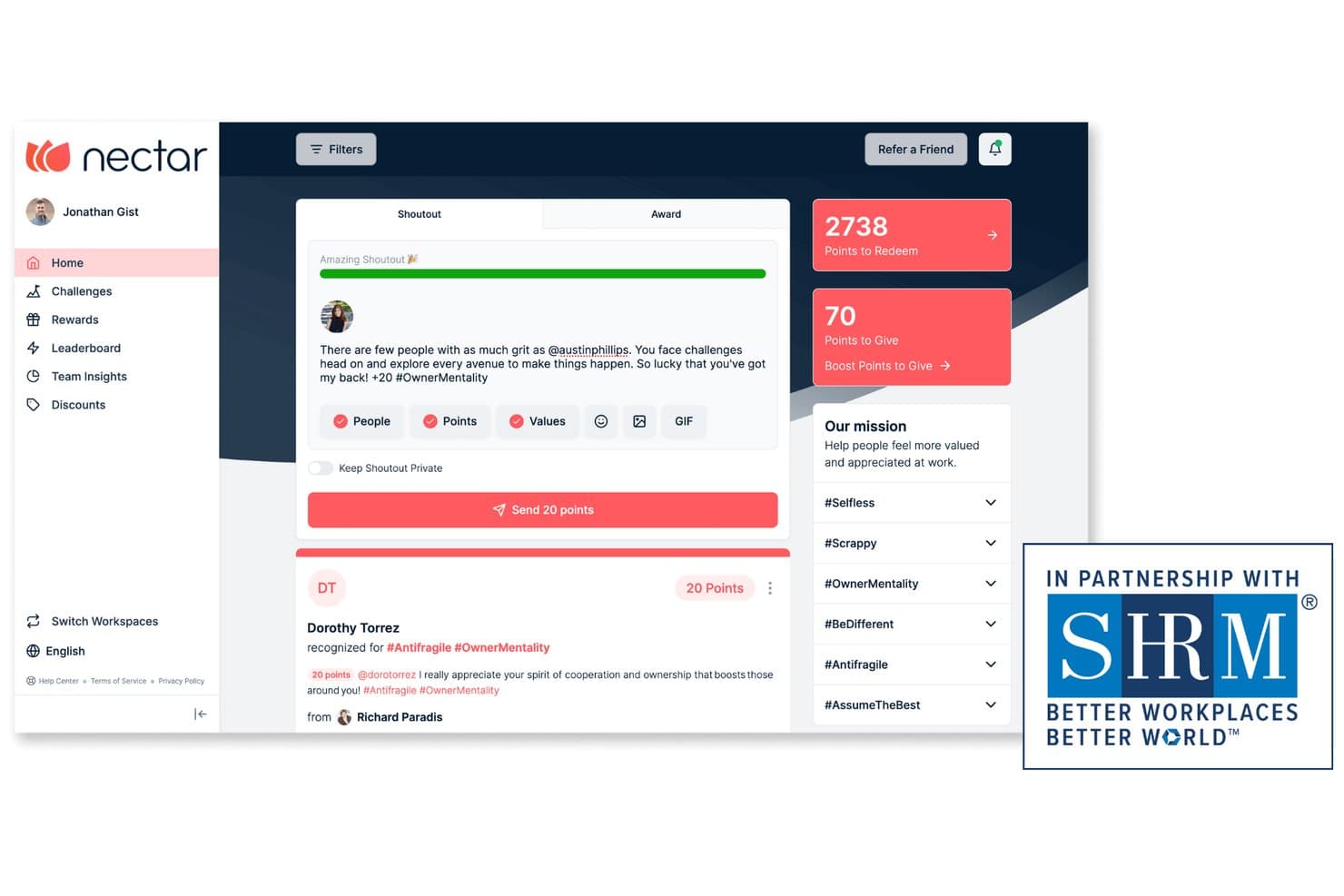
Nectar lets users send peer shoutouts and award points to teammates. Nectar Recognize is an employee recognition and rewards platform that brings together peer shoutouts, values tagging, milestone automation, points-based rewards, and team challenges in one place.
Who Is Nectar Best For?
Nectar is a strong fit for HR teams and people ops managers who want to tie peer recognition directly to company values, not just to milestones or one-off moments.
Why I Picked Nectar
I've included Nectar in my top picks because it's the only tool on this list that makes company values a first-class part of every shoutout, not an afterthought. When an employee recognizes a colleague, they tag a specific value alongside their message, and admins can then see which values show up most in recognition and which ones need more attention. I also love the Meaningful Meter, which nudges employees to write recognition that actually says something specific rather than a generic "great job."
Nectar Key Features
- Points-based rewards redemption: Employees redeem earned points for gift cards, Amazon catalog items, company swag, or custom perks like extra time off.
- Automated milestone recognition: Birthdays and work anniversaries trigger automatic shoutouts with customizable messages, point amounts, and feed visibility.
- Custom challenges: Teams can run points-backed challenges targeting wellness, learning, or team building, scoped to specific departments or locations.
- Recognition analytics dashboard: Admins track participation trends, budget spend by department, and which company values appear most in recognition activity.
Nectar Integrations
Nectar’s documented integrations include ADP, BambooHR, Gusto, Rippling, Workday, Okta, Slack, Microsoft Teams, and Kudoboard. The vendor doesn’t state a total integration count or API availability.
Pros and Cons
Pros:
- Automated milestones reduce routine HR follow-up
- Points make recognition tangible for employees
- Peer shoutouts reinforce company values
Cons:
- Recognition analytics may lack reporting depth
- Sales-led access complicates small-team adoption
Learn more about Nectar: Best for gift cards sent at face value
- Free plan + free demo available
- From $200/month
Visit WebsiteCustomer Rating:4.9/5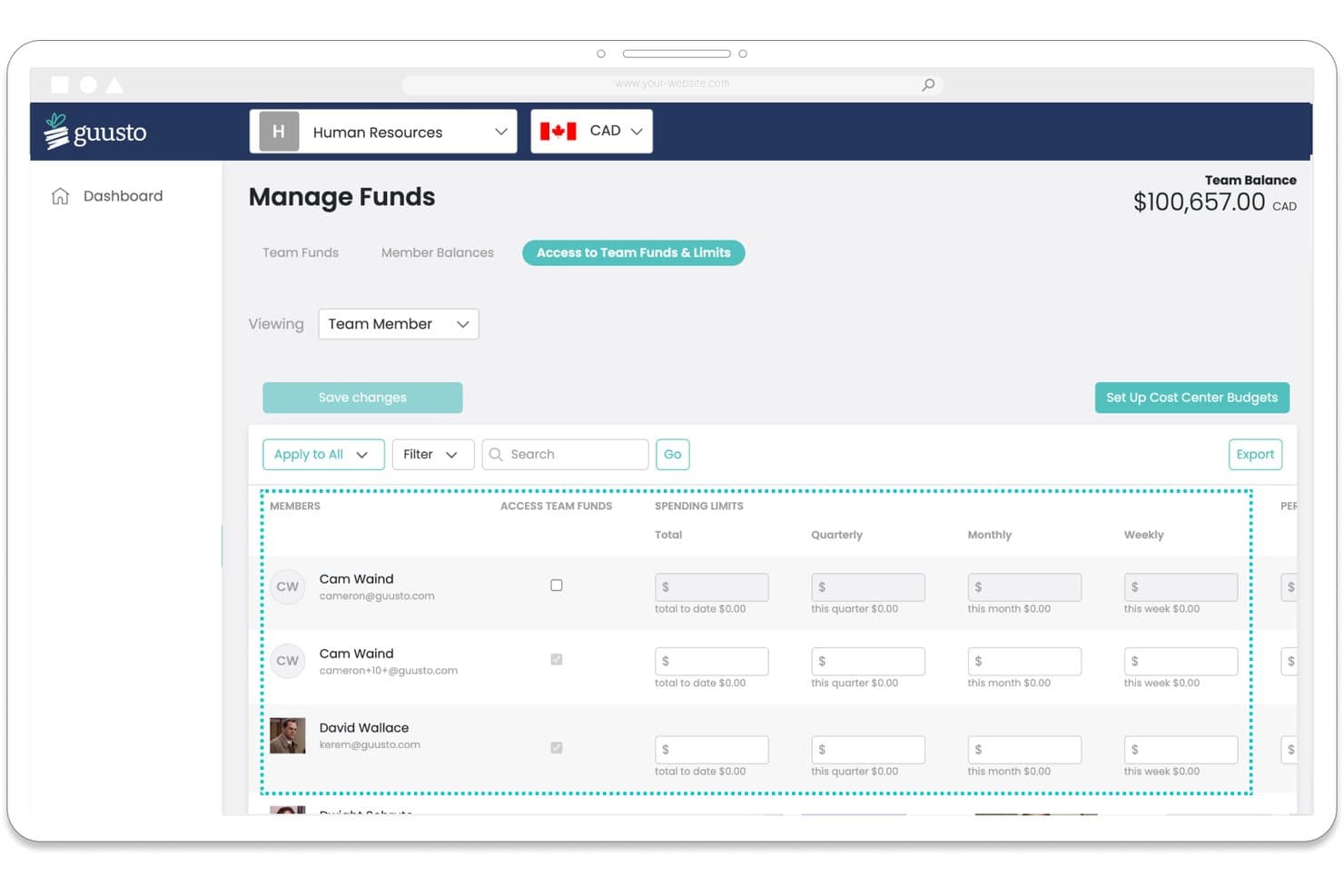
Guusto lets admins set spending limits per team member. Guusto is an employee recognition and rewards platform that lets teams send gift cards, swag, custom rewards, and charitable donations, with tools for milestone automation, peer shoutouts, budget controls, and manager-led recognition programs.
Who Is Guusto Best For?
Guusto works well for small business HR teams and office managers who want a straightforward rewards program without the overhead of a points system.
Why I Picked Guusto
I picked Guusto as one of the best because gift cards go out at face value with no markup, meaning every dollar your budget allocates actually lands in an employee's hands. Any unclaimed gift gets credited back in full, which I find especially useful for small teams where budget waste adds up fast. I also like that rewards reach staff who have no work email, delivered by text, QR code, or printed card.
Guusto Key Features
- Milestone automation: Automatically sends birthday, anniversary, and onboarding awards with personalized banners and manager alerts.
- Budget condition builder: Sets allocation rules based on employee data, with per-reward caps and approval workflows for spend control.
- TV and kiosk display: Shows recent recognition, leaderboards, and upcoming milestones on screens in shared workspaces.
- Bulk sending: Delivers up to 1,000 rewards at once via email, text, QR code, or printed card with scheduled delivery dates.
Guusto Integrations
Guusto offers native integrations with Microsoft Teams, Outlook, SharePoint, UKG Pro, Dayforce, Cornerstone, and Axonify. It also supports SSO, an open API, and SFTP for custom recognition, reporting, and payroll workflows.
Pros and Cons
Pros:
- Unclaimed gifts return to budget
- Rewards reach employees without work email
- Gift cards arrive at face value
Cons:
- Reward choices vary by location
- Social recognition lacks reactions and comments
Learn more about Guusto: Best for values-tagged peer recognition analytics
- Free trial + demo available
- From $2/user/month
Customer Rating:4.6/5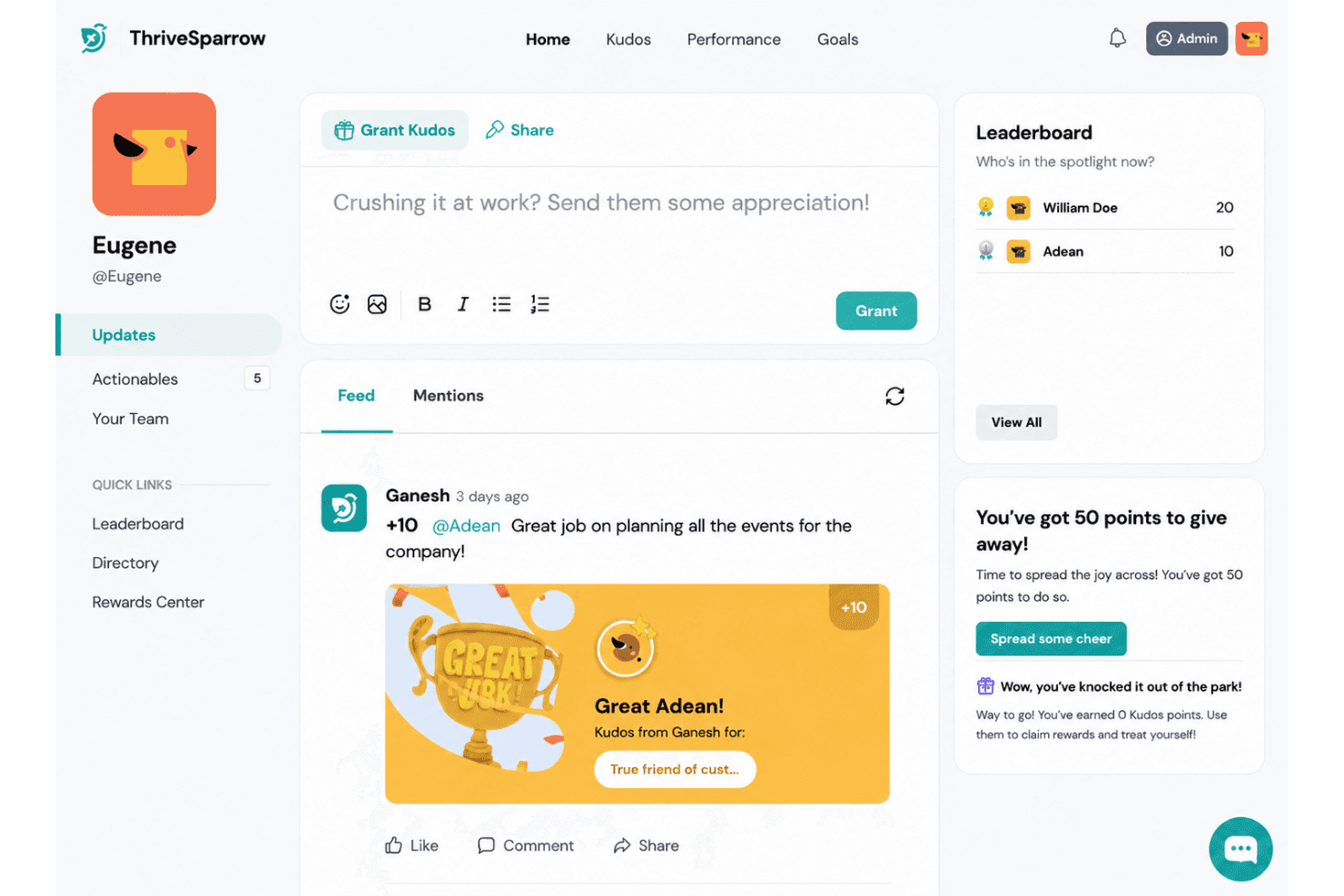
ThriveSparrow lets teams send kudos and track peer recognition points. ThriveSparrow's Kudos is a peer recognition and rewards platform that lets employees give values-tagged kudos, earn and redeem points through a rewards marketplace, and track recognition trends through built-in analytics dashboards.
Who Is ThriveSparrow Best For?
ThriveSparrow's Kudos is a good fit for HR managers and people ops teams who want to connect peer recognition directly to company values and track how those values show up across the organization over time.
Why I Picked ThriveSparrow
I picked ThriveSparrow as one of the best because of how it connects peer recognition directly to company values and then tracks that data over time. When an employee sends a Kudos, they tag a company value, and that tag feeds into dashboards showing which values appear most in recognition activity, how participation trends over reporting periods, and which keywords come up most often in messages. I find that level of values-to-recognition reporting genuinely useful for HR teams who need to show that culture initiatives are actually working.
ThriveSparrow Key Features
- Rewards marketplace: Employees redeem accumulated Kudos points for rewards through a built-in Rewards Center, with requests routed to an approver before fulfillment.
- Leaderboard: Rankings surface who's received the most Kudos and points, including which values they're recognized for, making participation visible across the team.
- Custom awards: Admins can create company-wide awards with set point values, dedicated budgets, and approval workflows.
- Slack and Microsoft Teams integration: Employees can give and receive recognition directly within Slack or Teams, with posts syncing back to the ThriveSparrow Home feed.
ThriveSparrow Integrations
ThriveSparrow offers native integrations with Slack, Microsoft Teams, Bamboo HR, Workday, Gusto, ADP, Deel, Oyster, Okta, and Google Workspace. Slack and Microsoft Teams support in-chat recognition, while other listed integrations support employee-data imports or user syncing.
Pros and Cons
Pros:
- Public kudos feed makes peer praise visible
- Reviewers praise clear dashboards and reports
- Values tags connect recognition with culture
Cons:
- Broader platform may exceed tiny teams' needs
- Milestone automation remains poorly documented
Learn more about ThriveSparrow: Best for starting free and adding paid features
- Free demo available
- Pricing upon request
Visit WebsiteCustomer Rating:4.8/5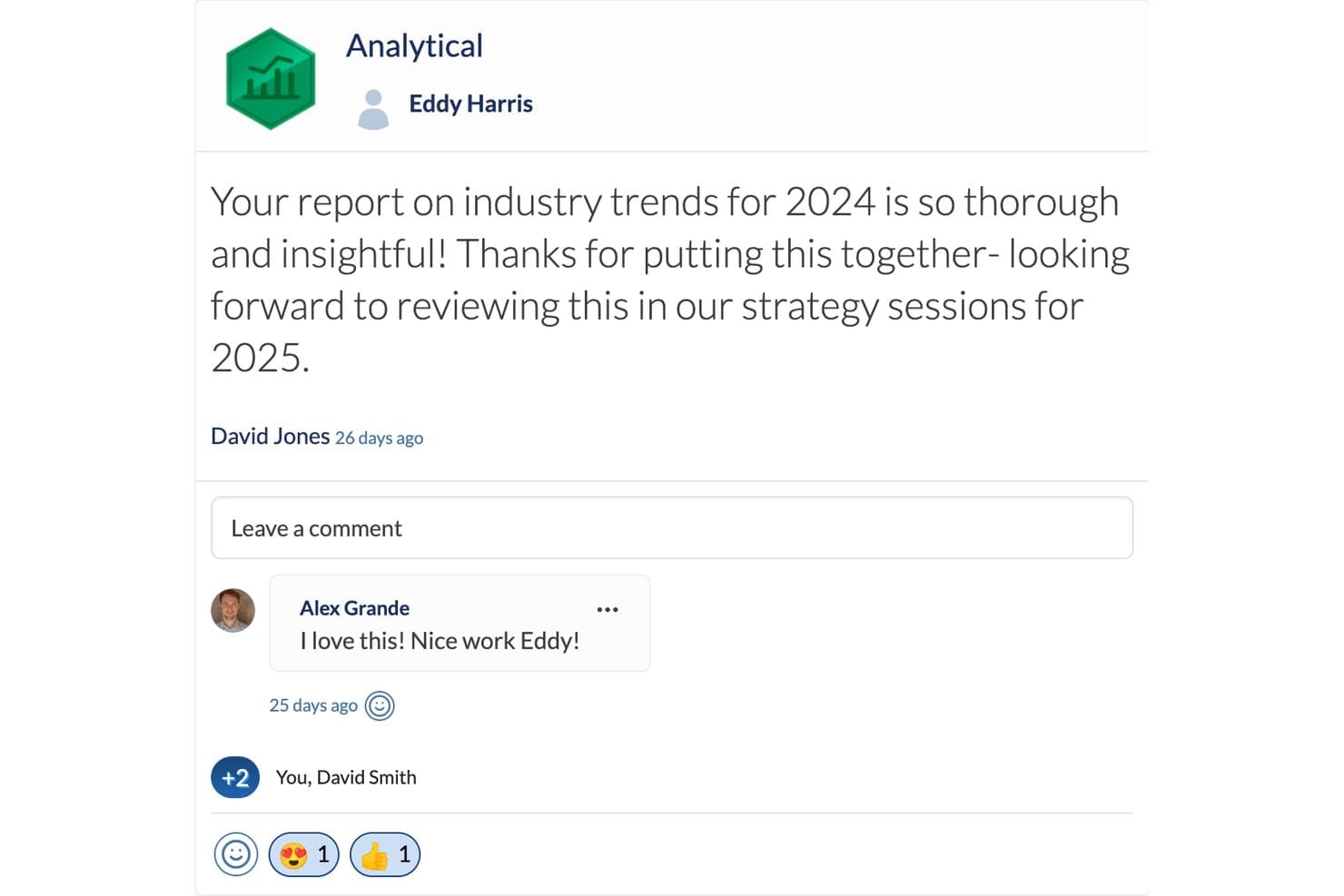
Recognize lets teammates publicly praise colleagues' work, with badges, comments, and emoji reactions. Recognize is an employee recognition platform built around peer-to-peer appreciation, points-based rewards, milestone automation, and value-tied badges.
Who Is Recognize Best For?
Recognize is a great fit for small businesses and growing teams that want to start with a free recognition program and layer in paid features as their needs expand.
Why I Picked Recognize
I've included Recognize in my top picks because it's one of the few tools that lets you start a real recognition program at zero cost and grow into paid features only when you're ready. I love that peer-to-peer recognition is tied directly to company values through customizable badges, so appreciation isn't just a shoutout but a signal of what your team actually stands for. Automated milestone celebrations for birthdays and service anniversaries mean recognition keeps happening even when no one remembers to initiate it.
Recognize Key Features
- Value-based recognition badges: Employees send recognition tied to specific company values using customizable badges, keeping appreciation connected to what your team stands for.
- Points redemption marketplace: Employees redeem earned points for gift cards, Amazon products, swag, and company-fulfilled rewards through a built-in catalog.
- TV kiosk mode: Recognition activity and anniversaries display on an office screen, keeping appreciation visible to the whole team throughout the day.
- Microsoft 365 integration: Employees can send and view recognition directly within Teams, Outlook, SharePoint, and Viva without switching platforms.
Recognize Integrations
Recognize offers native integrations with Slack, Microsoft 365 and Azure, Workday, ADP, BambooHR, Gusto, and Rippling, plus 50+ additional HR systems. It also supports Zapier and provides an OAuth-secured API with webhooks for custom integrations.
Pros and Cons
Pros:
- Values-linked badges make appreciation actionable
- Automated birthdays and service milestones
- Start free, add features as needs grow
Cons:
- Reward catalog filtering can frustrate point-based choices
- Recognition depends on consistent coworker participation
Learn more about Recognize: Best for proof-based employee incentives
- Free demo available
- From $2/user/month
Visit WebsiteCustomer Rating:4.7/5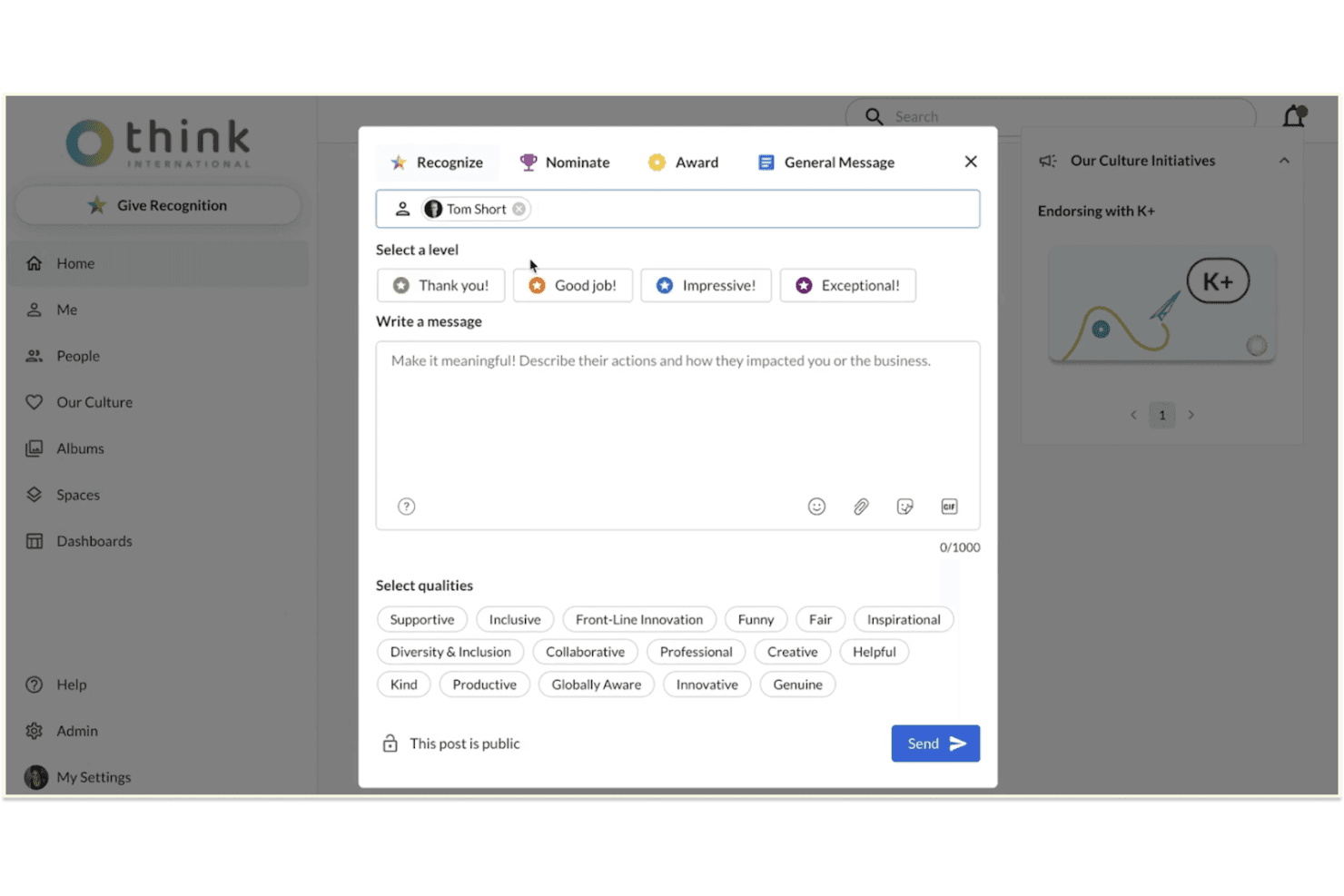
Kudos supports peer recognition and reward points tracking. Kudos is an employee recognition platform that combines peer-to-peer recognition, automated milestone tracking, a configurable rewards catalog, and incentive challenges with proof-based completion workflows.
Who Is Kudos Best For?
Kudos is a strong fit for HR managers and people ops teams that want to run structured, values-aligned recognition programs with accountability built in.
Why I Picked Kudos
Kudos earns its spot on my shortlist because of how it handles incentive accountability with its proof-based completion workflows. When I set up a challenge in Kudos, participants must submit verified proof before points are released, which keeps recognition tied to real outcomes rather than self-reporting. I also like the dedicated Points Bank per incentive, so budgets stay contained and visible from the start.
Kudos Key Features
- Peer-to-peer recognition: Employees can send recognition messages to colleagues with optional points, values tags, and scheduled delivery.
- Automated milestone tracking: The platform automatically recognizes work anniversaries, birthdays, and first days with configurable points and rules.
- Reporting dashboards: Administrators can track recognition activity, participation rates, and rewards usage, filtered by team, role, or location.
- AI Recognition Assistant: An AI-powered tool turns quick notes into personalized recognition messages that employees can edit before sending.
Kudos Integrations
Kudos offers dozens of integrations, including Slack, Microsoft Teams, Google Workspace, BambooHR, ADP, UKG, Workday, SAP SuccessFactors, Paylocity, and Okta. It also provides an API for custom HRIS integrations.
Pros and Cons
Pros:
- Automated milestones reduce manual recognition work
- Proof-based incentives tie rewards to outcomes
- Public recognition makes contributions visible
Cons:
- Participation fades without ongoing leadership support
- Point limits can restrict peer recognition
Learn more about Kudos: Best for customer-submitted staff recognition
- Free demo available
- From $3,000
Visit WebsiteCustomer Rating:4.9/5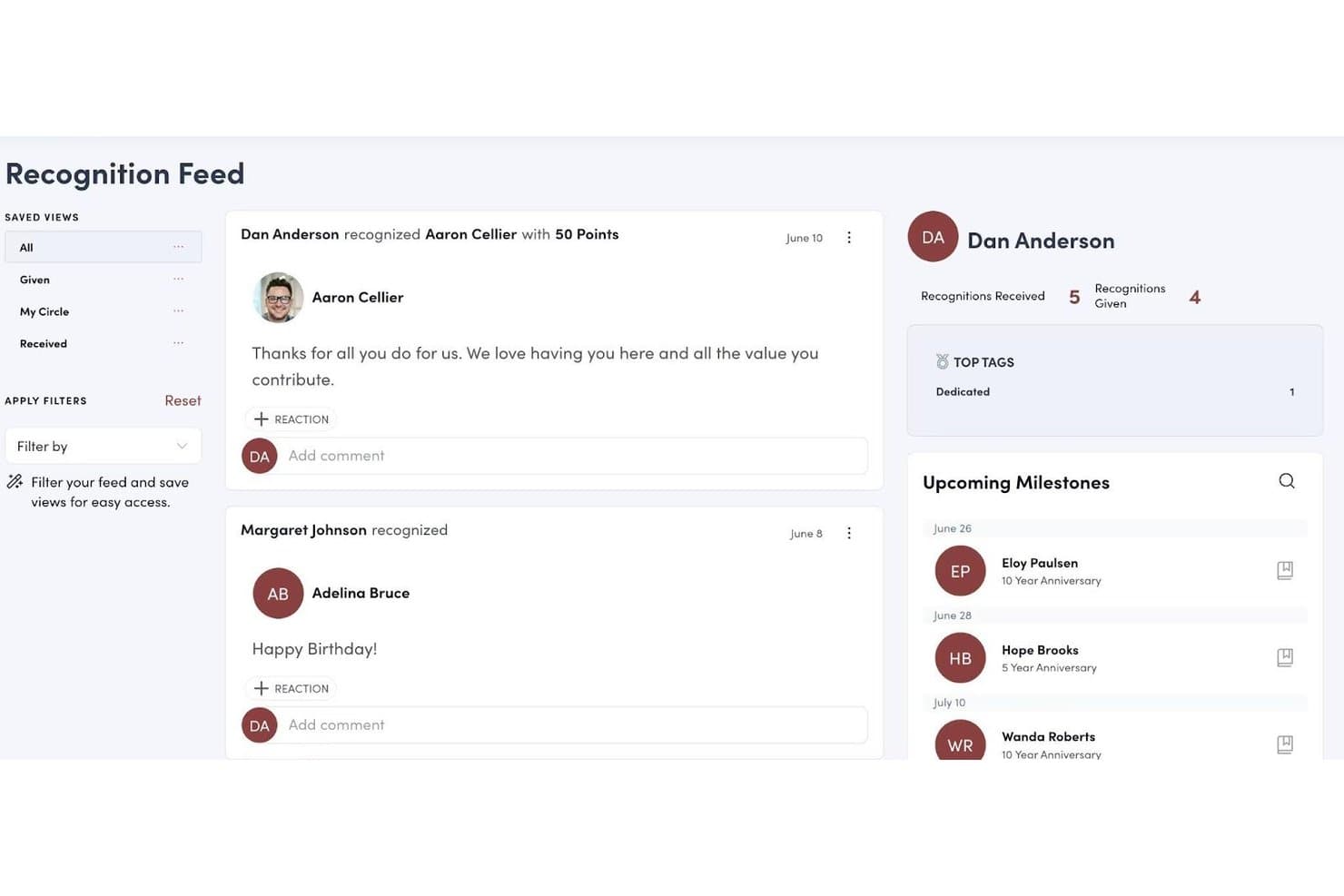
Awardco's Recognition Feed lets teammates publicly recognize colleagues with points and comments. Awardco is an employee recognition platform that combines peer-to-peer recognition, automated milestone programs, external recognition submissions, and a global rewards marketplace spanning gift cards, merchandise, and Amazon Business redemptions.
Who Is Awardco Best For?
Awardco suits small businesses with 50–200 employees that want to let customers and clients submit recognition directly for their staff.
Why I Picked Awardco
I picked Awardco as one of the best because of its External Recognition feature, which lets customers, patients, and clients submit recognition for staff via a QR code or link, with no Awardco login required. That's genuinely rare in this category. Admins can configure approval workflows before any submission goes live, so recognition stays relevant and appropriate. For a small business where customer relationships drive staff morale, that outside-in visibility adds real meaning to recognition moments.
Awardco Key Features
- Automated milestone programs: Moments automatically triggers recognition for birthdays, work anniversaries, and onboarding events using your employee data.
- Global rewards marketplace: Employees can redeem points across gift cards, merchandise, travel, and Amazon Business products in 163+ countries.
- Budget and cost-center controls: Admins can assign recognition budgets to specific teams, managers, or departments to keep spending on track.
- Recognition reporting dashboard: Track participation, program activity, and budget spend with filterable reports you can schedule and export.
Awardco Integrations
Awardco offers integrations with BambooHR, Gusto, Rippling, ADP, Workday, Microsoft Teams, Slack, and Amazon Business. It also provides a REST API and webhooks for custom integrations.
Pros and Cons
Pros:
- Customers can submit recognition without accounts
- Peer recognition makes appreciation more visible
- Amazon rewards offer useful employee choice
Cons:
- Reward availability and delivery can disappoint
- Advanced administration takes extra setup time
 Best for spotting overlooked work to recognize
- 30-day free trial + free demo available
- From $3/user/month
Visit WebsiteCustomer Rating:4.6/5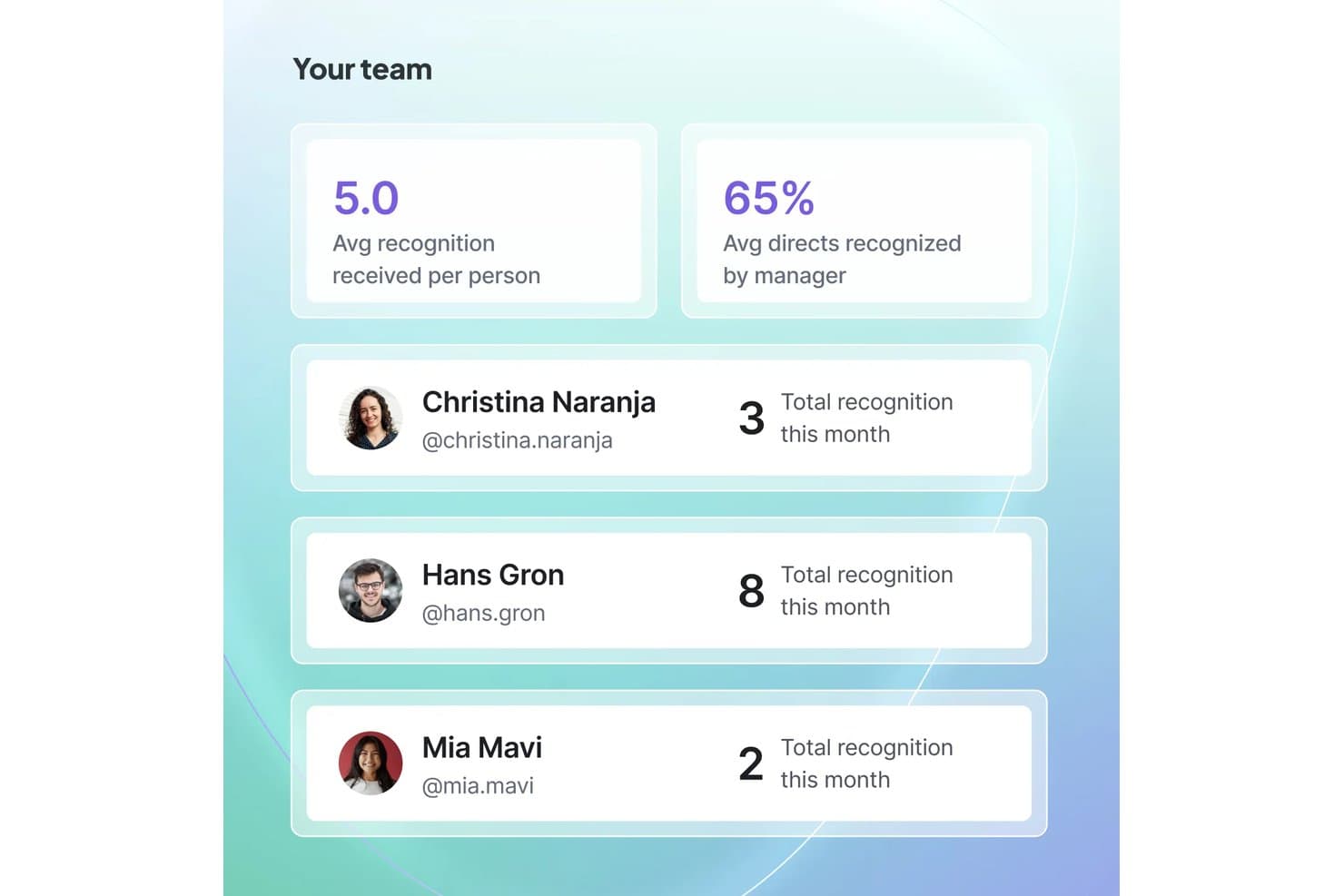
Bonusly's team insights dashboard tracks recognition received and manager participation across team members each month. Bonusly is an employee recognition and rewards platform that combines peer-to-peer recognition, automated milestone celebrations, a global rewards catalog, and culture analytics with AI-assisted tools for identifying unrecognized contributions.
Who Is Bonusly Best For?
Bonusly works well for small business HR teams and people managers who want a low-admin way to build a culture of recognition without it falling through the cracks.
Why I Picked Bonusly
I picked Bonusly as one of the best because its AI assistant, Bizy, actively surfaces employees who haven't been recognized recently, so quiet contributors don't keep slipping through the cracks. I love how it flags those overlooked moments and even suggests wording for a shout-out, which means managers aren't relying purely on memory or gut feel. The Culture Insights module backs this up with live participation data, showing exactly where recognition gaps exist across the team.
Bonusly Key Features
- Peer-to-peer recognition feed: Employees send public shout-outs tied to company values, visible across the entire team in a shared feed.
- Global rewards catalog: Employees redeem points for gift cards, cash, charitable donations, branded swag, and custom rewards.
- Automated milestone celebrations: Birthdays, work anniversaries, and new hire milestones trigger automatic recognition without any manual setup.
- HRIS integrations: Bonusly connects with 30+ HR platforms—including BambooHR, Gusto, and Rippling—to keep employee data synced automatically.
Bonusly Integrations
Bonusly has 30+ native HRIS integrations, including BambooHR, Gusto, Rippling, Workday, and ADP, plus native Slack and Microsoft Teams integrations. It also offers a REST API, MCP connections, and Zapier for custom connectivity.
Pros and Cons
Pros:
- Reward choices support varied preferences
- Public shout-outs make daily wins visible
- Bizy flags overlooked contributions
Cons:
- Some rewards take time to earn
- Monthly point limits restrict recognition
Learn more about Bonusly: Best for recognition-linked award nominations
- Free demo available
- From $3/user/month
Visit WebsiteCustomer Rating:4.8/5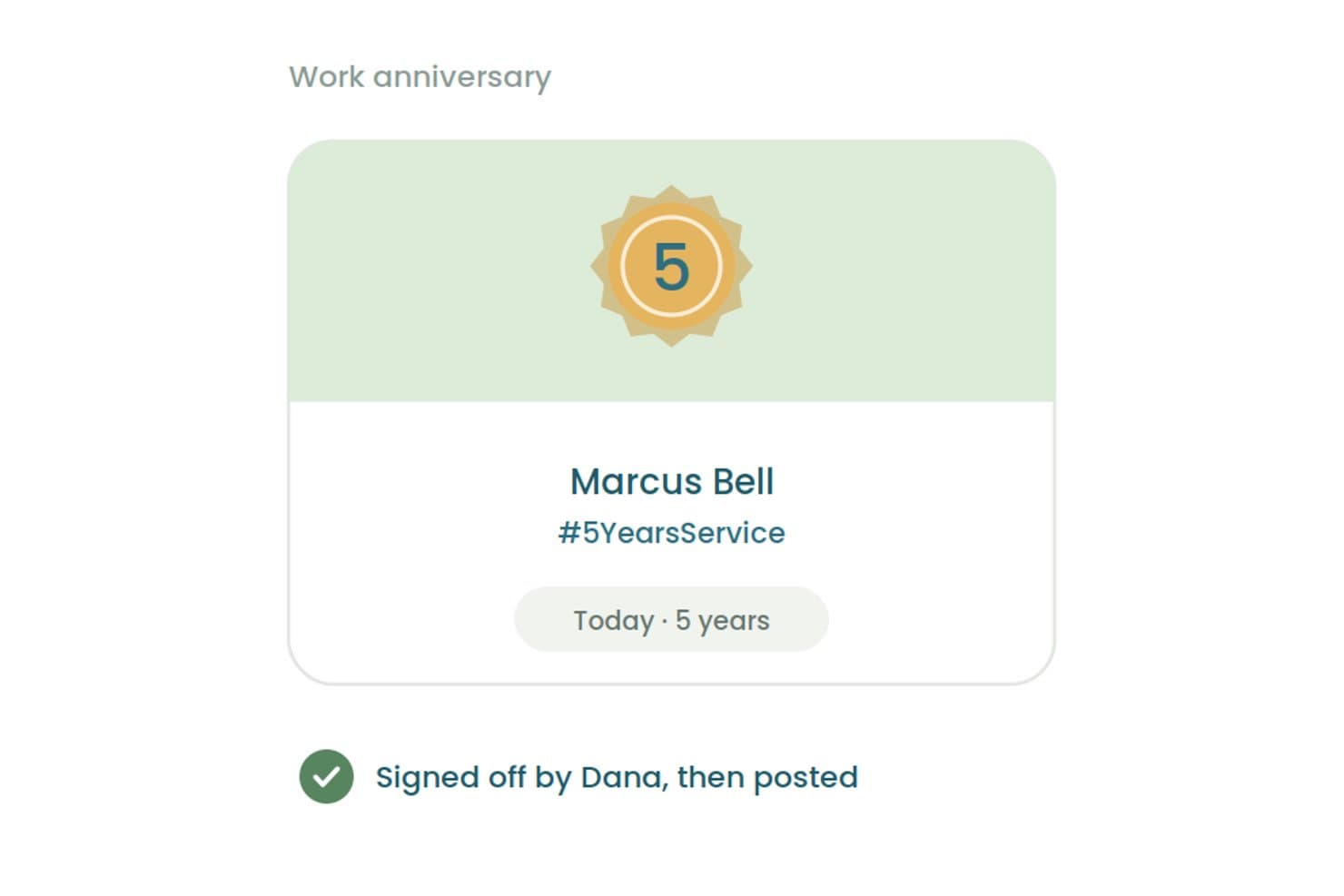
Workstars posts a work anniversary card celebrating an employee's five years of service. Workstars is an employee recognition platform that covers peer-to-peer recognition, milestone celebrations, reward redemption, award nominations, and program analytics in one place.
Who Is Workstars Best For?
Workstars is a strong fit for HR managers and people ops teams who want to tie award nominations directly into their existing recognition activity.
Why I Picked Workstars
I've included Workstars in my top picks because its award nomination system is built directly into the recognition flow, so nominations aren't a separate admin task. When an employee earns consistent peer recognition tied to specific values, that activity can feed into award nominations automatically. I also like the panel and poll features, which let teams vote on winners rather than leaving every decision to a single manager.
Workstars Key Features
- Peer-to-peer recognition feed: Employees can send public or private recognition to colleagues, with all activity appearing in a real-time social feed.
- Automated milestone celebrations: Workstars automatically tracks birthdays, work anniversaries, and onboarding dates and triggers celebrations on the relevant day.
- Reward redemption catalog: Employees can redeem points across 5,000+ options in 180 countries, including gift cards, charity donations, payroll cash-out, and a reloadable Mastercard.
- HRIS data sync: Native integrations with platforms like BambooHR, Workday, and ADP Workforce Now automatically keep employee records and reporting lines up to date.
Workstars Integrations
Workstars offers 20+ native integrations, including BambooHR, ADP Workforce Now, Workday, Slack, and Microsoft Teams. It also supports SSO through providers such as Google Workspace, Okta, and Microsoft Entra ID, plus a REST API for custom integrations.
Pros and Cons
Pros:
- Recognition-linked nominations simplify award administration
- Flexible rewards support monetary and noncash appreciation
- Peer recognition helps lift morale and participation
Cons:
- Initial setup and occasional slowness frustrate users
- Aggregate reporting can feel confusing
Learn more about Workstars: Best for recognition without company email
- Free demo available
- From $3.75/user/month (billed annually)
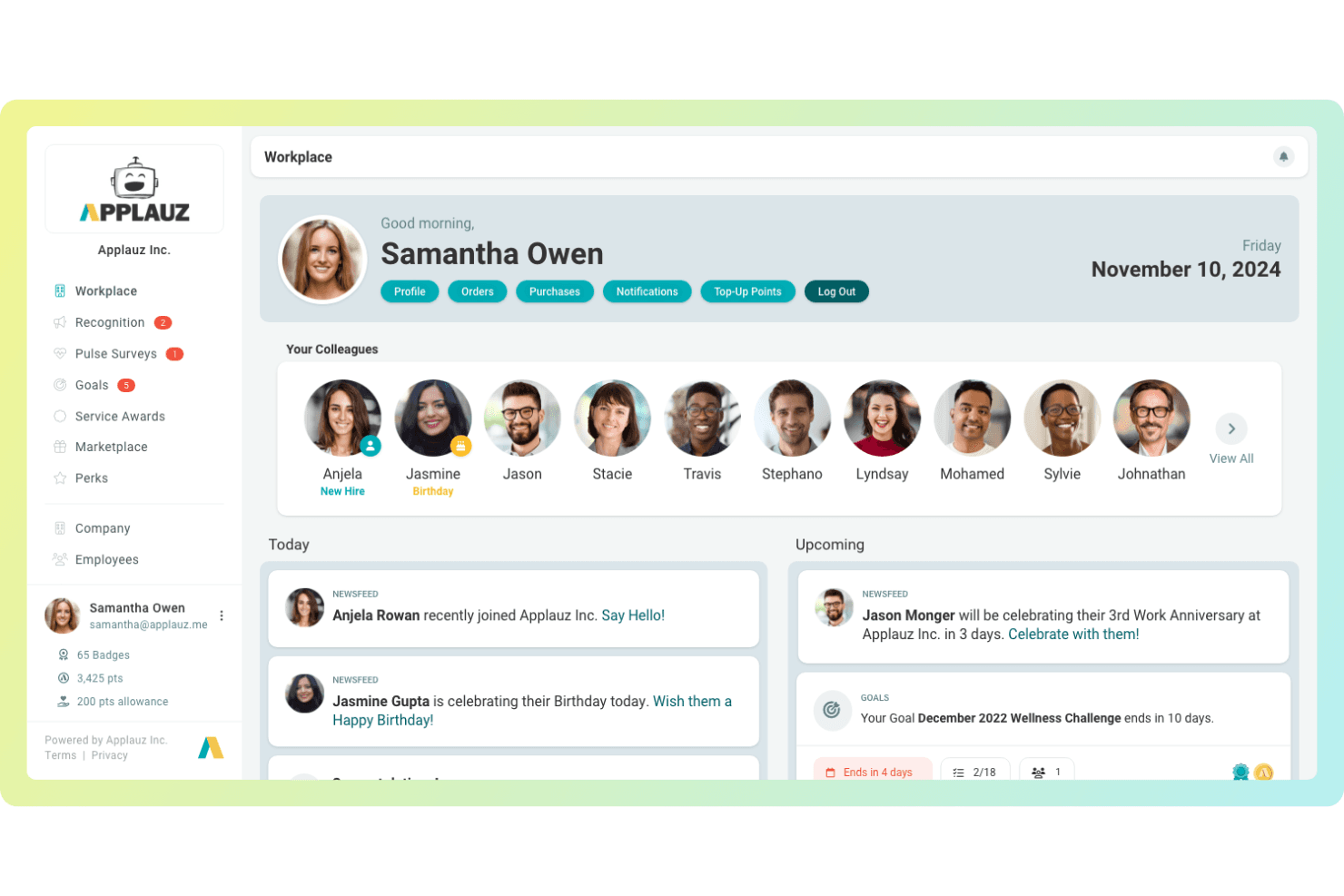
Applauz offers instant recognition posts and points-based rewards. Applauz is an employee recognition platform for small businesses that combines peer-to-peer recognition, automated milestone celebrations, a 30,000+ item rewards marketplace, and pulse surveys in one place.
Who Is Applauz Best For?
Applauz is a strong fit for small business HR managers and team leads who need to recognize employees across locations without relying on company email addresses for onboarding.
Why I Picked Applauz
I've included Applauz in my top picks because it lets employees join using a personal email or phone number, which means no one gets left out just because they don't have a company email address. I particularly like the automated milestone feature, which schedules birthday and work anniversary messages without any manual effort from HR. The 30,000+ item rewards marketplace, covering gift cards, merchandise, and experiences, gives employees real choice when redeeming points.
Applauz Key Features
- Peer recognition with badges: Employees and managers can publicly recognize individual or team contributions using customizable badges tied to company values.
- Pulse surveys and eNPS: Teams can run unlimited pulse surveys using 200+ pre-built templates or custom questions, with heatmap and benchmark analytics included.
- Goal management and incentives: Managers can set, track, and report on team goals, with point-based rewards tied directly to goal completion.
- Slack and Microsoft Teams integration: Recognition posts, survey reminders, and newsfeed reactions sync two-ways between Applauz and your existing communication tools.
Applauz Integrations
Applauz offers 40+ HRIS integrations, including Gusto, Bamboo HR, Workday, Rippling, and Deel, plus native Slack and Microsoft Teams integrations. It also supports SSO with Google, Microsoft, and Okta; API availability isn’t stated.
Pros and Cons
Pros:
- Broad reward catalog offers employee choice
- Public kudos connect dispersed teams
- Employees join without company email
Cons:
- Reward redemption tiers can feel unclear
- Some users report slow loading
Learn more about Applauz: 10Best for turning customer thanks into kudos
Matter
- 14-day free trial + free plan + free demo available
- From $1/user/month (billed annually)
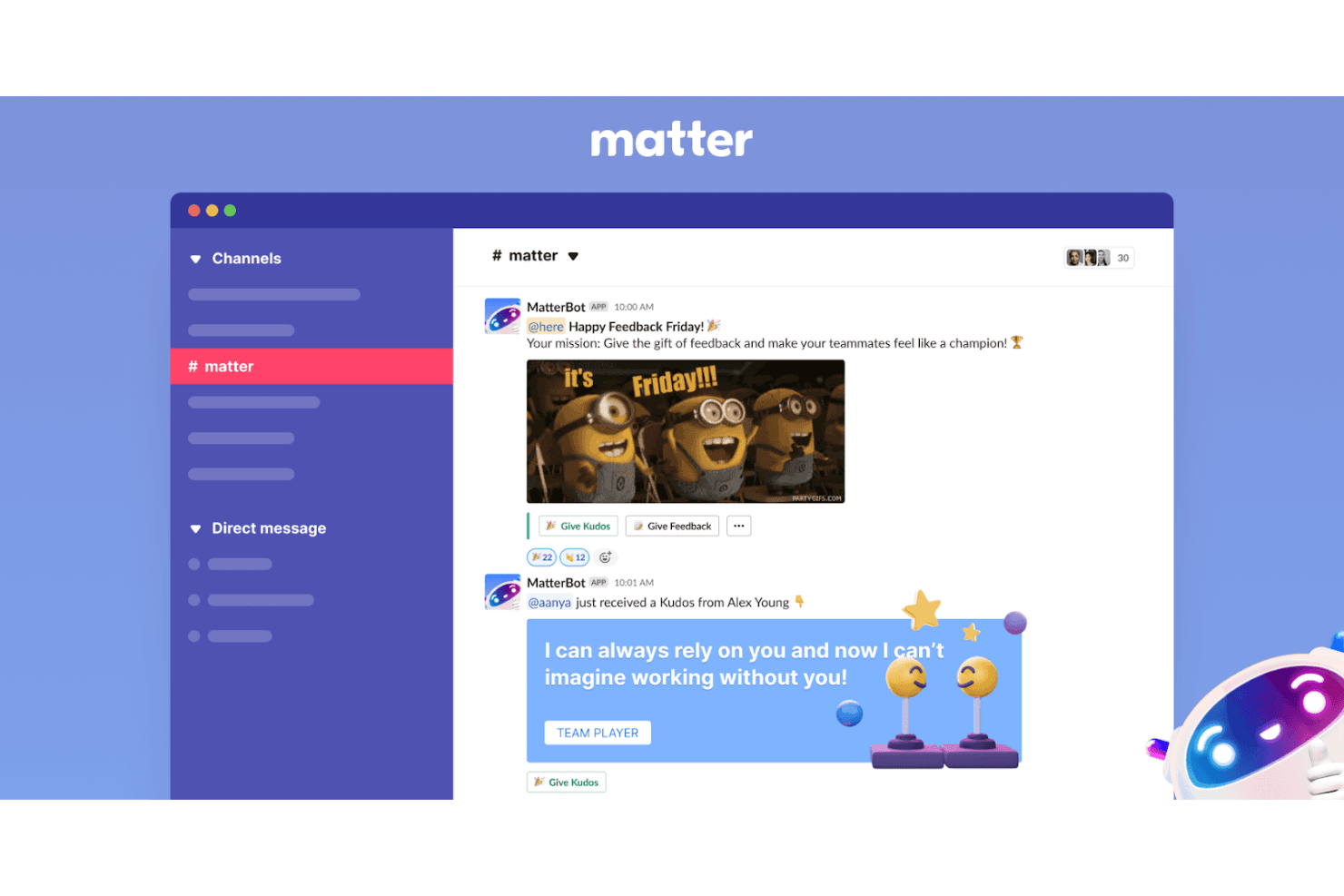
Matter routes peer feedback and kudos inside Slack channels. Matter is an employee recognition platform for small teams that runs entirely inside Slack and Microsoft Teams, offering peer-to-peer kudos, automated milestone celebrations, spot awards, QR code recognition, and a rewards catalog.
Who Is Matter Best For?
Matter works best for small teams already in Slack or Microsoft Teams who want peer recognition running inside the tools they use every day.
Why I Picked Matter
Matter earns its spot on my shortlist because of how well it converts unsolicited customer praise into peer recognition. The QR code feature is what sets it apart: customers, patients, or visitors scan a printed code and submit a thank-you message without logging into anything, and a designated reviewer approves it before it posts to your team's Slack or Teams channel. I also like the Feedback Friday prompts, which nudge teammates weekly to share kudos so recognition becomes a habit rather than an afterthought.
Matter Key Features
- Kudos template library: A built-in set of ready-made kudos types helps team members start recognizing peers without building anything from scratch.
- Celebrations module: Matter automatically posts birthday and work anniversary messages in your Slack or Teams channel, with optional reward coins attached.
- Spot awards: Managers can give named recognition awards publicly or privately, with configurable budgets that reset on a schedule you set.
- Recognition analytics dashboard: Tracks participation, top givers and receivers, and kudos activity over time, with exportable reports available on paid plans.
Matter Integrations
Matter offers native integrations with Slack and Microsoft Teams, plus 200+ HRIS platforms, including BambooHR, Gusto, Rippling, Workday, and ADP Workforce Now. HRIS integration requires an annual plan and an additional annual fee.
Pros and Cons
Pros:
- Milestones post automatically with optional rewards
- Weekly prompts encourage regular peer recognition
- QR submissions turn customer thanks into kudos
Cons:
- Reward choices vary across regions
- Weekly reminders can feel repetitive or intrusive
Learn more about Matter:
Outro software de reconhecimento de funcionários para pequenas empresas
Eis algumas opções adicionais de software de reconhecimento de funcionários para pequenas empresas que não integraram a minha seleção, mas que vale a pena conhecer:
- 11HeyTacoBest for recognition-based coworker matching
- 12AssemblyBest for HRIS-synced milestone celebrations
- 13AchieversBest for recognition-led new-hire onboarding
- 14Vantage CircleBest for hands-off milestone recognition
- 15Reward GatewayBest for recognition with wellbeing built in
- 16WorkmatesBest for AI-assisted recognition drafting
- 17MoBest for spotting and nudging overlooked teams
- 18MotivosityBest for rewarding progress toward team goals
- 19WorkhumanBest for bias-aware recognition coaching
- 20TerryberryBest for digital recognition and physical awards
- 21WorkTangoBest for linking recognition to retention data
- 22GoProfilesBest for recognition in an HRIS-fed directory
- 23eCardWidgetBest for automated cards signed by coworkers
- 24EmpulsBest for AI-guided recognition oversight
- 25Culture CloudBest for linking recognition to flight risk
How I Evaluate Employee Recognition Software for Small Businesses
I split my evaluation into three parts, giving the most weight to core functionality: recognize peers and redeem rewards. Next, I consider differentiators such as company-value tags. Finally, I weigh setup, responsive support, and clear pricing for lean HR teams.
Core Functionality (Table Stakes For This List)
When I'm selecting tools for my list, I score each one on a scale from 0 (does not offer the functionality) to 5 (excels in this area) for each core functionality listed below. I then convert the total into a percentage to help assess each tool's overall fit, with extra weight on any functionalities I’ve deemed essential.
- Peer Recognition (Essential): I look for an easy way for employees to recognize any colleague, add a personal message, and connect appreciation to meaningful contributions.
- Rewards and Redemption (Essential): I assess whether recognition can earn redeemable points, gift cards, or other rewards employees can choose from.
- Milestone Tracking: I check whether the tool surfaces birthdays and work anniversaries in time for managers or peers to recognize them.
- Recognition Feed: I look for a shared feed where employees can see, react to, or comment on recognition across the team.
- Small-Team Fit: I consider whether plans and account setup suit a small workforce without requiring enterprise-scale budgets or administration.
- Activity Reporting: I assess whether reports show recognition frequency and participation trends that HR can use to spot gaps across teams.
Once I have a list of tools that meet the criteria, I consider what sets each platform apart.
Differentiating Factors (What Sets Vendors Apart)
Here's how I compare and contrast different vendors:
Standout Features
I look for core values tagging that lets teams tie each recognition post to a specific company value—this turns a simple shoutout into a culture-building moment. Pulse surveys and eNPS bundled alongside recognition data give me a fuller read on morale without adding another tool. I also evaluate flexible point expiry controls, since small teams need tight budget guardrails for reward spend.
Beyond Features
I check whether pricing scales without locking small teams into enterprise contracts—per-user plans with no steep seat minimums let a 10-person shop budget month to month. Setup speed matters just as much; pre-built templates and self-serve onboarding mean you're not waiting on IT to launch. I also evaluate how easy it is to customize award categories and branding so recognition feels like yours, not a generic template.
Como escolher software de reconhecimento de funcionários para uma pequena empresa
É fácil perder-se em longas listas de funcionalidades e estruturas de preços complexas. Para o ajudar a manter-se concentrado enquanto percorre o seu processo específico de seleção de software, eis uma lista de verificação dos fatores a ter em conta:
| Fator | O que considerar |
|---|---|
| FatorEscalabilidade | O que considerarA ferramenta acompanhará o crescimento da sua empresa? Considere se suporta o número de utilizadores que espera ter à medida que a sua equipa cresce. |
| FatorIntegrações | O que considerarO software liga-se às ferramentas que já utiliza? Verifique a compatibilidade com os seus sistemas existentes para evitar interrupções. |
| FatorPersonalização | O que considerarPode adaptar o software à cultura da sua empresa? Procure opções para personalizar programas de reconhecimento e recompensas. |
| FatorFacilidade de utilização | O que considerarO software é intuitivo? Certifique-se de que não exige formação extensa para começar a utilizá-lo, o que pode poupar tempo à sua equipa. |
| FatorImplementação e integração inicial | O que considerarQuanto tempo demora a configurar? Uma integração inicial rápida para novos colaboradores, com recursos acessíveis como tutoriais e suporte, pode facilitar a transição. |
| FatorCusto | O que considerarO preço está de acordo com o seu orçamento? Avalie o custo total, incluindo quaisquer taxas ocultas, para garantir que é acessível para a sua pequena empresa. |
| FatorSalvaguardas de segurança | O que considerarQual é o nível de segurança da plataforma? Verifique as medidas de proteção de dados e a conformidade com as normas do setor para proteger informações sensíveis. |
| FatorDisponibilidade do suporte | O que considerarExiste ajuda quando precisa? Considere a disponibilidade e a qualidade do apoio ao cliente para resolver quaisquer problemas que surjam. |
O que é o software de reconhecimento de colaboradores para pequenas empresas?
O software de reconhecimento de colaboradores para pequenas empresas foi concebido para ajudar as empresas a reconhecer e recompensar os contributos dos seus colaboradores. Normalmente utilizados por profissionais de RH, equipas de recursos humanos e gestores, estas ferramentas melhoram o moral e o envolvimento no local de trabalho. Funcionalidades como o reconhecimento entre pares, recompensas personalizadas e feedback em tempo real ajudam a criar uma cultura empresarial positiva e uma cultura de reconhecimento, a melhorar a satisfação dos colaboradores e a experiência dos colaboradores, e a promover um ambiente de apoio que motiva e retém o talento.
Funcionalidades
Eis as principais funcionalidades que qualquer excelente software de reconhecimento de colaboradores para uma pequena empresa deve ter:
- Reconhecimento entre pares: Permite que os colaboradores reconheçam os contributos e o excelente trabalho uns dos outros, promovendo um ambiente de equipa solidário.
- Recompensas personalizadas: Oferece opções de recompensa personalizadas que estão alinhadas com a cultura da empresa e motivam os colaboradores.
- Feedback em tempo real: Disponibiliza capacidades de feedback automatizado imediato para melhorar a comunicação e o desenvolvimento dos colaboradores.
- Painel de análise: Fornece informações sobre as tendências de reconhecimento e o envolvimento dos colaboradores, ajudando os gestores a tomar decisões informadas.
- Acesso móvel: Permite que os colaboradores atribuam e recebam reconhecimento em qualquer lugar, garantindo um envolvimento contínuo.
- Distintivos personalizáveis: Permite aos utilizadores criar símbolos de reconhecimento únicos que refletem os valores da equipa.
- Comemoração de marcos: Apoia o reconhecimento de conquistas significativas dos colaboradores e de aniversários profissionais.
- Integração: Liga-se às ferramentas existentes para garantir um fluxo de trabalho fluido e a consistência dos dados.
- Gamificação: Incentiva a participação através de funcionalidades divertidas e competitivas que melhoram o moral.
- Proteção da segurança: Protege os dados sensíveis dos colaboradores através de medidas de segurança robustas e da conformidade com as normas do setor.
Benefícios
A implementação de software de reconhecimento de colaboradores na sua pequena empresa proporciona vários benefícios para a sua equipa e para a sua empresa. Eis alguns que pode esperar:
- Melhoria do moral: O reconhecimento regular através do reconhecimento entre pares aumenta o ânimo dos colaboradores e cria um ambiente de trabalho positivo.
- Maior envolvimento: O feedback em tempo real e as recompensas personalizadas aumentam o envolvimento, mantendo os colaboradores motivados e ligados ao seu trabalho.
- Maior retenção de colaboradores: A celebração de marcos e conquistas ajuda a reduzir a rotatividade, fazendo com que os colaboradores se sintam valorizados e apreciados.
- Maior produtividade: O reconhecimento e os incentivos incentivam os colaboradores a dar o seu melhor, conduzindo a um aumento da produtividade.
- Tomada de decisões informada: Os painéis de análise oferecem informações sobre a dinâmica da equipa, ajudando os gestores a tomar decisões baseadas em dados.
- Cultura empresarial mais forte: Os distintivos e as recompensas personalizáveis estão alinhados com os valores da empresa, reforçando uma cultura coesa e solidária.
- Comunicação eficiente: As capacidades de integração garantem um fluxo de informação fluido, melhorando a comunicação e a colaboração gerais da equipa.
Custos e preços
A seleção de software de reconhecimento de colaboradores para qualquer pequena empresa requer uma compreensão dos vários modelos de preços e planos disponíveis. Os custos variam consoante as funcionalidades, o tamanho da equipa, os complementos, entre outros fatores. A tabela abaixo resume os planos comuns, os respetivos preços médios e as funcionalidades normalmente incluídas nas soluções de software de reconhecimento de colaboradores para pequenas empresas:
Tabela de comparação de planos de software de reconhecimento de colaboradores para pequenas empresas
| Tipo de plano | Preço médio | Funcionalidades comuns |
|---|---|---|
| Tipo de planoPlano gratuito | Preço médio$0/user/month | Funcionalidades comunsFuncionalidades básicas de reconhecimento, personalização limitada e acesso a uma pequena seleção de recompensas. |
| Tipo de planoPlano pessoal | Preço médio$5-$15/user/month | Funcionalidades comunsReconhecimento entre pares, distintivos personalizados e funcionalidades básicas de criação de relatórios. |
| Tipo de planoPlano empresarial | Preço médio$16-$30/user/month | Funcionalidades comunsAnálises avançadas, acesso móvel, opções de integração e celebrações de marcos importantes. |
| Tipo de planoPlano corporativo | Preço médio$31-$50/user/month | Funcionalidades comunsPersonalização completa, suporte multilingue, medidas de segurança e suporte premium ao cliente. |
Perguntas frequentes
Eis algumas respostas a perguntas comuns sobre software de reconhecimento de colaboradores para pequenas empresas:
Como integro o software de reconhecimento de colaboradores com as ferramentas existentes?
Muitas soluções de reconhecimento de colaboradores podem ser integradas com ferramentas como o Slack, o Microsoft Teams e sistemas de recursos humanos. Verifique as opções de integração do software antes de efetuar a compra para garantir a compatibilidade com as ferramentas existentes. Isto ajudará a simplificar a comunicação e a partilha de dados. Procure plataformas que disponibilizem acesso à API ou integrações pré-configuradas para um processo de configuração mais simples.
É possível personalizar o software de reconhecimento de colaboradores para a cultura da minha empresa?
Sim, muitas plataformas de reconhecimento de colaboradores disponibilizam opções de personalização. Pode adaptar os programas de reconhecimento, as recompensas e até os elementos de marca à cultura da sua empresa, utilizando distintivos, mensagens e recompensas personalizados que reflitam a identidade única da sua equipa. Isto garante que o software parece uma extensão natural dos seus sistemas e valores existentes.
O software de reconhecimento de colaboradores é seguro?
Sim, um software de reconhecimento de colaboradores conceituado inclui medidas de segurança para proteger os seus dados. Procure plataformas que cumpram as normas do setor, como o RGPD ou as certificações ISO. Certifique-se de que a encriptação de dados, os controlos de acesso seguros e as auditorias de segurança regulares fazem parte do pacote, para que possa proteger informações sensíveis dos colaboradores e manter a confiança.
Como avalio o sucesso do software de reconhecimento de colaboradores?
Pode avaliar o sucesso através de análises e do feedback dos colaboradores. Procure software com funcionalidades de criação de relatórios que permitam acompanhar o envolvimento, as taxas de participação e as tendências de reconhecimento. Recolha regularmente feedback da sua equipa para compreender as suas experiências e identificar áreas a melhorar. Utilize estas informações para ajustar a sua estratégia de reconhecimento e maximizar o impacto do software.