

Dahili iletişim araçları, ekibinizin kuruluşunuz genelinde bilgi paylaşmasına, çalışmaları koordine etmesine ve bağlantıda kalmasına yardımcı olan yazılım platformlarıdır. En iyi dahili iletişim araçlarını arıyorsanız muhtemelen iş birliğini geliştirmek, iletişim hatalarını azaltmak ve ister uzaktan, ister hibrit, ister ofiste çalışan bir iş gücünüz olsun herkesin aynı hedef doğrultusunda ilerlemesini sağlamak istiyorsunuz.
Bu kadar çok seçenek mevcutken ekibinizin ihtiyaçlarına uyan, iş akışlarınızı destekleyen ve kuruluşunuz büyüdükçe ölçeklenebilen araçları bulmanız çok önemlidir. Bu listede gerçek iş yeri sorunlarını ele alan ve daha bağlantılı, bilgili ve katılım gösteren bir ekip oluşturmanıza yardımcı olan güvenilir çözümleri bulacaksınız.
Why Trust Our Software Recommendations
6,700+
Reviews
20
Industry experts
16+
Evaluation factors
14
Years
Our team has been testing and reviewing software since 2012. As HR experts ourselves, we know how difficult—and important—it is to choose the right software.
For this guide, we evaluated tools using hands-on testing and independent research, scoring tools using our selection criteria. We also draw on insights from industry thought leaders and practicing HR experts.
Our reviews reflect our human editorial judgment, not a sales pitch.
Expert reviewers:
- Phil GrayCOO
 Kim BehnkeHR Tech Editor & Analyst
 Josh BarkerPeople Ops Manager

Dahili İletişim Araçları Karşılaştırma Tablosu
Bu karşılaştırma tablosu, en iyi dahili iletişim aracı seçimlerimin fiyatlandırma ayrıntılarını özetler:
Sorted by: Default
| Tool | Starting Price | Website | |
|---|---|---|---|
Best for AI-planned comms with human approval | Not rated | Pricing upon request Free demo available | Website |
Best for reaching frontline employees | 4.7 out of 5 | Pricing upon request Free demo available | Website |
Best for tracking policy acknowledgments | 4.5 out of 5 | £3.75/user/month Free demo available | Website |
Best for fostering company culture | 4.8 out of 5 | Pricing upon request Free demo available | Website |
Best self-destructing messaging for secure data | 4.8 out of 5 | $2.50/user/month 30-day free trial + free demo available | Website |
Best AI-powered suggestions for task management | 4.6 out of 5 | $3/user/month Free plan + free demo available | Website |
Best for Microsoft 365 collaboration | 4.3 out of 5 | $4/user/month Free plan + 1-month free trial available | Website |
Best threaded messaging to reduce clutter | 4.2 out of 5 | $6/user/month Free plan available | Website |
Best for mobile-first communication | 4.6 out of 5 | $3.75/user/month 14-day free trial + free demo | Website |
Best for global workforce engagement | Not rated | Pricing upon request Free demo available | Website |


Dahili İletişim Araçları İncelemeleri
Aşağıda, kısa listeme giren dahili iletişim araçlarının ayrıntılı özetlerini bulabilirsiniz. İncelemelerim, size en uygun seçeneği bulmanıza yardımcı olmak için her platformun özelliklerine, en uygun kullanım alanlarına ve entegrasyonlarına ayrıntılı bir bakış sunar.
 Best for AI-planned comms with human approval
- Free demo available
- Pricing upon request
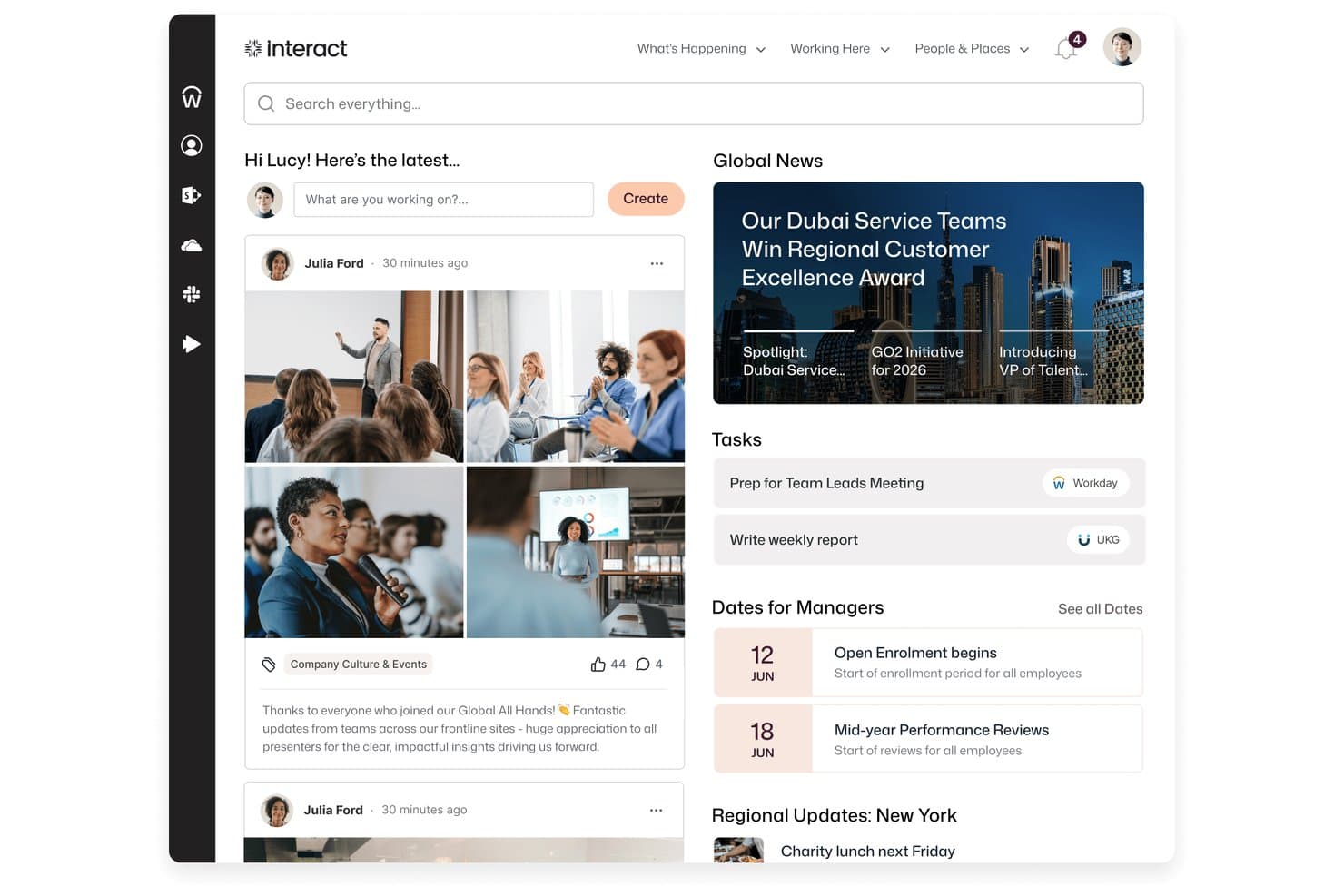
Interact Software centralizes news, tasks, and social updates in one intranet home screen. Interact is an AI-native intranet and internal communications platform that combines multi-channel broadcasting, campaign management, pulse surveys, employee directories, and frontline mobile access in a single hub.
Who Is Interact Software Best For?
Interact is a strong fit for enterprise internal communications and HR teams that need AI-assisted campaign planning with built-in approval workflows before anything goes out.
Why I Picked Interact Software
I picked Interact Software as one of the best because its Conductor AI module does something I find genuinely useful: it turns a communications goal into a fully sequenced campaign, complete with audiences, channels, timing, and reminders, but holds every action in a staged queue until a human approves it. That approval-first design is what earns it the best spot for AI-planned comms with human approval. I also like that Conductor can draft mandatory-read messages and pulse surveys grounded in your existing house style, so the content feels consistent without requiring a communications manager to start from scratch every time.
Interact Software Key Features
- Pulse surveys: Run targeted, recurring surveys with configurable anonymity to track eNPS and gather employee sentiment across teams and locations.
- Employee directory and org chart: Browse searchable employee profiles, reporting lines, and skill badges to help staff find and connect with colleagues.
- Multi-channel publishing: Distribute communications simultaneously across the intranet app, Microsoft Teams, Slack, employee email, and digital signage from a single editorial calendar.
- Mandatory-read tracking: Mark content as required reading, automatically log who has acknowledged it, and send reminders to employees who haven't.
Interact Software Integrations
Interact supports over 100 integrations, including Microsoft 365 services such as Teams, SharePoint Online, OneDrive, Outlook, Power BI, and Calendar, plus Workday, ServiceNow, Slack, Google Workspace, UKG, and SAP SuccessFactors. It offers an open API framework and Application Developer Kit for custom integrations.
Pros and Cons
Pros:
- Targeted broadcasts reduce scattergun updates
- Frontline app mirrors desktop content
- Campaign plans wait for human approval
Cons:
- Page editing can feel unintuitive
- Engagement data can be hard to retrieve
Learn more about Interact Software: Best for reaching frontline employees
- Free demo available
- Pricing upon request
Visit WebsiteCustomer Rating:4.7/5
Staffbase enhances internal communication and employee engagement. Staffbase is designed for organizations that need to connect with employees who aren’t always at a desk. The platform helps you reach frontline and mobile workers through targeted news, updates, and resources on any device. It’s especially useful in industries like healthcare, retail, and manufacturing, where keeping everyone informed can be a challenge.
Why I Picked Staffbase
Reaching employees who aren’t always at a computer is a real challenge, and that’s where Staffbase stands out. The platform offers a mobile-first employee app for knowledge management that delivers news and resources to frontline workers.
I like that you can segment communications by location, department, or role, so messages reach the right people without getting lost. This focus on targeted, accessible internal comms makes Staffbase a strong choice for organizations with a large frontline workforce.
Staffbase Key Features
Some other features in Staffbase help organizations manage communication and engagement at scale:
- Customizable News Channels: Create and manage multiple news streams for different teams or topics.
- Employee Surveys: Collect feedback from staff with built-in survey tools.
- Content Scheduling: Plan and schedule announcements or updates to go live at specific times.
- Document Management: Store and share important files, policies, and resources within the platform.
Staffbase Integrations
Integrations include Microsoft 365, SharePoint, Slack, Salesforce, and more.
Pros and Cons
Pros:
- Supports branded employee apps
- Content scheduling options
- Built-in survey tools
Cons:
- Restricted integrations with external HR systems
- Limited real-time chat functionality
Learn more about Staffbase: 3Best for tracking policy acknowledgments
Hub
- Free demo available
- From £3.75/user/month (billed annually)
Visit WebsiteCustomer Rating:4.5/5
Hub organizes internal news into a browsable, tagged feed. HUB is an employee intranet platform built by Pancentric Digital that combines internal news publishing, multi-channel messaging, knowledge management, and policy acknowledgment tracking in one place.
Who Is HUB Best For?
HUB is a strong fit for HR and internal comms teams that need a structured way to manage policy acknowledgments and company-wide communications in one place.
Why I Picked HUB
HUB earns its spot on my shortlist because of how seriously it handles policy acknowledgment tracking. I love that Must Reads lets you assign required reading to all staff or specific groups, then automatically sends daily reminders to anyone who hasn't confirmed and gives admins a live report of who's still outstanding. Paired with 22 management reports covering alerts, content views, and login activity, it's one of the more thorough options I've seen for proving compliance across a dispersed workforce.
HUB Key Features
- Email broadcasts: Compose, preview, and send bulk emails to all staff or selected users using custom, reusable templates.
- Group forums: Create open, private, or hidden group spaces with dedicated chat threads and resource sharing for teams or departments.
- AI writing assistant: Generate content suggestions, headlines, and teaser text, with grammar and spelling checks and four tone-of-voice options.
- 22 management reports: Access reports covering logins, user activity, content views, searches, alerts, messages, likes, and comments.
HUB Integrations
HUB documents native connectivity with Microsoft 365 and Google Workspace, including SharePoint, Microsoft Teams, OneDrive, Google Drive, Gmail, and Google Calendar. Other documented integrations include Slack, Confluence, Jira, Box, Eventbrite, Zendesk, and BambooHR; no API is documented.
Pros and Cons
Pros:
- Centralizes updates, resources, and team discussions
- Twenty-two reports show readership and activity
- Must Reads track overdue policy acknowledgments
Cons:
- Document-view metrics can be hard to collect
- Mobile experience is reportedly read-only
Learn more about Hub: Best for fostering company culture
- Free demo available
- Pricing upon request
Visit WebsiteCustomer Rating:4.8/5
Workvivo fosters workplace culture through engagement and employee recognition. Workvivo takes a social approach to internal communication, making it easier for organizations to build a sense of belonging. It’s a strong fit for HR teams and leaders who want to boost engagement and connect employees to company values, especially in distributed or hybrid workplaces. The platform brings together news, recognition, and interactive features that help reinforce culture beyond just sharing updates.
Why I Picked Workvivo
What sets Workvivo apart is its focus on building a vibrant company culture through communication. The platform offers a social feed where employees can share updates, celebrate achievements, and recognize each other’s contributions.
I appreciate how Workvivo lets you tie posts and recognition directly to company values, making culture visible and actionable every day. These features make it a strong choice for organizations that want to go beyond basic messaging and foster real engagement.
Workvivo Key Features
Some other features in Workvivo help organizations connect and inform employees in meaningful ways:
- Event Management: Manage various types of internal communication by organizing and tracking attendance for company events.
- Podcast and Video Sharing: Upload and share multimedia content to support your culture initiatives and engage employees with different communication styles.
- Pulse Surveys: Gather quick feedback from employees with short, targeted surveys.
- Knowledge Base: Centralize important documents, policies, and resources for easy access.
Workvivo Integrations
Integrations include Zoom, Slack, Microsoft Teams, SharePoint, Google Drive, and more.
Pros and Cons
Pros:
- Offers event management tools
- Social media-style activity feed
- Peer-to-peer recognition badges
Cons:
- Basic text formatting tools
- No built-in editorial calendar
 Best self-destructing messaging for secure data
- 30-day free trial + free demo available
- From $2.50/user/month
Visit WebsiteCustomer Rating:4.8/5
Troop Messenger secures business communication with encrypted collaboration tools. Troop Messenger is built for organizations that need secure, private team messaging without sacrificing usability. It’s a strong fit for industries like government, defense, or healthcare, where data protection and compliance are top priorities. With features like end-to-end encryption and on-premise deployment, Troop Messenger helps teams keep sensitive conversations and files protected.
Why I Picked Troop Messenger
Security is a top concern for many organizations, and that’s why I picked Troop Messenger for this list. The platform offers end-to-end encryption for messages and files, which helps protect sensitive information from unauthorized access.
I also like that Troop Messenger supports on-premise deployment, giving businesses full control over their data and compliance needs. For teams that handle confidential communications or operate in regulated industries, these security-focused features make Troop Messenger a strong choice.
Troop Messenger Key Features
Some other features in Troop Messenger help teams collaborate and manage communication more effectively:
- Burnout Chat: Send self-destructing messages that disappear after a set time.
- Forkout: Broadcast a message to multiple users or groups at once.
- Remote Screen Sharing: Share your screen with team members for real-time collaboration.
- Respond Later: Mark messages to reply to at a more convenient time.
Troop Messenger Integrations
Integrations include Google Drive, Dropbox, and Zapier.
Pros and Cons
Pros:
- Unique burnout self-destructing messages
- Advanced file search filters
- Self-hosted on-premise deployment option
Cons:
- Outdated user interface design
- Small video call participant limit
Learn more about Troop Messenger: Best AI-powered suggestions for task management
- Free plan + free demo available
- From $3/user/month (billed annually)
Visit WebsiteCustomer Rating:4.6/5
Chanty organizes team communication with messaging and task management. Chanty is designed for teams that want a straightforward chat solution without unnecessary complexity. It’s especially useful for small businesses or groups looking to get started with team messaging quickly and with minimal setup. With its simple interface and built-in task management, Chanty helps teams keep conversations and action items in one place.
Why I Picked Chanty
For teams that want to get up and running with minimal hassle, Chanty stands out for its simple team chat setup. You can create channels, start direct messages, and organize conversations without a complicated onboarding process.
I appreciate that Chanty includes built-in task management, so you can turn messages into actionable items right from the chat. This makes it a practical choice for small teams or businesses that want to keep communication and collaboration straightforward.
Chanty Key Features
Some other features in Chanty help teams communicate and collaborate more efficiently:
- Voice Messaging: Record and send voice messages directly within any chat or channel.
- Pinned Messages: Pin important messages in channels or conversations for quick reference.
- Teambook: Access a centralized hub for all your messages, tasks, and shared files.
- Built-in Audio and Video Calls: Start audio or video calls with team members from within the app.
Chanty Integrations
Integrations include Trello, GitHub, Google Drive, Dropbox, and more.
Pros and Cons
Pros:
- Voice message snippet recording
- Unlimited searchable message history
- Built-in Kanban task board
Cons:
- No native built-in calendar
- Glitchy large group video calls
Learn more about Chanty: Best for Microsoft 365 collaboration
- Free plan + 1-month free trial available
- From $4/user/month (billed annually)
Visit WebsiteCustomer Rating:4.3/5
Microsoft Teams facilitates workplace communication and Office 365 synergy. Microsoft Teams brings chat, meetings, and document collaboration into a single workspace for organizations already using Microsoft 365. It’s a strong fit for groups that want to connect communication with tools like Outlook, SharePoint, and OneDrive. The platform helps teams coordinate projects, share files, and keep conversations tied to the documents and calendars they use every day.
Why I Picked Microsoft Teams
What sets Microsoft Teams apart is how deeply it connects with the Microsoft 365 suite, making it a natural choice for organizations already invested in those tools. Teams lets you co-author documents in Word, Excel, or PowerPoint right inside a chat or meeting, so collaboration happens in real time without switching apps.
I appreciate how calendar events, emails, and files from Outlook and SharePoint are accessible directly within Teams, keeping everything in context. This tight integration helps teams keep communication, scheduling, and document management all in one place.
Microsoft Teams Key Features
Some other features in Microsoft Teams help round out its capabilities for internal communication:
- Private and Group Chats: Use the internal communication software to start one-on-one or group conversations for quick discussions.
- Meeting Recording and Transcription: Record meetings and automatically generate searchable transcripts for later reference.
- Customizable Tabs: Align your internal communication strategy by adding apps, files, or websites as tabs within channels.
- Breakout Rooms: Split larger meetings into smaller groups for focused discussions or activities.
Microsoft Teams Integrations
Integrations include Microsoft Word, Excel, PowerPoint, OneNote, SharePoint, Planner, Trello, GitHub, Zoom, and more.
Pros and Cons
Pros:
- Lets teams add apps and resources to channels
- Features meeting recording and transcription
- Built-in video meetings
Cons:
- Confusing guest access setup
- Search function may miss older messages
Learn more about Microsoft Teams: Best threaded messaging to reduce clutter
- Free plan available
- From $6/user/month (billed annually)
Visit WebsiteCustomer Rating:4.2/5
Twist promotes focused teamwork for remote teams through async communication and structured threads. Twist takes a different approach to team messaging by focusing on asynchronous communication and organized threads. It’s a strong fit for distributed teams, remote-first companies, or any group that wants to reduce notification overload and keep conversations easy to follow. With its thread-based structure, Twist helps you avoid the chaos of real-time chat and makes it easier to find important discussions later.
Why I Picked Twist
What sets Twist apart is its commitment to asynchronous team messaging, which is especially valuable for teams working across different time zones or with flexible schedules. Instead of relying on real-time chat, Twist organizes conversations into threads, making it easier to keep discussions focused and searchable.
I like that you can catch up on important topics without sifting through endless chat history or missing key updates. This approach helps teams reduce distractions and maintain clarity in their internal communications.
Twist Key Features
Some other features in Twist help teams manage communication and collaboration more intentionally:
- Inbox View: See all your new messages and thread updates in one organized place.
- Integrations with Tools: Connect Twist with apps like GitHub, Zapier, and Todoist for workflow automation.
- Advanced Search: Find past conversations, files, and threads quickly using keyword and filter options.
- Guest Access: Invite external collaborators to specific channels without giving them full workspace access.
Twist Integrations
Integrations include Asana, Google Calendar, Box, Calendly, Jira, and more.
Pros and Cons
Pros:
- Thread-based email archive feel
- Reduced notification fatigue alerts
- Structured asynchronous thread design
Cons:
- Minimal third-party integration catalog
- No real-time presence indicators
Learn more about Twist: Best for mobile-first communication
- 14-day free trial + free demo
- From $3.75/user/month (billed annually)
Visit WebsiteCustomer Rating:4.6/5
Blink connects frontline workers to the company intranet with real-time team communication. Blink puts mobile communication at the center, making it a strong choice for organizations with frontline or deskless workers. It’s designed for teams in industries like retail, healthcare, and transportation that need to reach employees who aren’t always at a desk.
With features built for quick updates, resource sharing, and secure messaging, Blink helps keep everyone connected no matter where they work.
Why I Picked Blink
Blink stands out for its mobile-first approach, which is especially important for organizations with a large frontline or remote workforce. The app offers a unified feed for company news, policy updates, and urgent alerts, all optimized for mobile devices.
I like that Blink includes secure direct messaging and group chats, making it easy for employees to connect and collaborate on the go. These features make Blink a strong fit for teams that need to reach people who aren’t tied to a desk or computer.
Blink Key Features
Some other features in Blink help teams manage communication and resources more efficiently:
- Document Hub: Store and share important documents so employees can access them from their mobile devices.
- Micro-apps: Add custom tools and workflows directly into the Blink platform to support unique business needs.
- Surveys and Polls: Collect feedback from employees quickly with built-in survey and polling tools.
- Single Sign-On (SSO): Allow users to access Blink securely using their existing company credentials.
Blink Integrations
Integrations include Microsoft 365, Google Workspace, Jira, ServiceNow, and more.
Pros and Cons
Pros:
- Digital forms for mobile workers
- Secure single sign-on access
- Frontline-first employee news feed
Cons:
- Limited structured engagement modules
- Tricky large-scale group management
Learn more about Blink:

Unily supports enterprise-wide communication and global employee engagement. Unily is designed for organizations with a global workforce that need to connect employees across locations, languages, and devices. It’s especially useful for large enterprises and multinational teams that want to deliver targeted communications and foster engagement at scale. With features for multilingual content, personalized news feeds, and mobile access, Unily helps you reach every employee, wherever they work.
Why I Picked Unily
Unily stands out for organizations that need to engage a dispersed, global workforce. Its multilingual content management lets you deliver communications in multiple languages, so every employee can access information in their preferred language.
I appreciate how Unily’s personalized news feeds ensure that relevant updates reach the right people, no matter where they’re located. These features make Unily a strong choice for companies focused on building a global employee experience across borders.
Unily Key Features
Some other features in Unily help teams communicate and collaborate more effectively:
- Drag-and-Drop Page Builder: Create and customize intranet pages without coding or IT support with the user-friendly interface.
- Video Center: Share, organize, and stream video content for company-wide communications.
- Mobile App: Give employees access to internal communications and resources from any device.
- Social Networking Tools: Enable commenting, liking, and sharing to encourage engagement and feedback.
Unily Integrations
Integrations include Microsoft 365, ServiceNow, Zoom, Salesforce, Google Workspace, and more.
Pros and Cons
Pros:
- Multi-layered analytics and engagement metrics
- Enterprise-grade security protocols
- AI-powered content translation
Cons:
- Complex multi-step approval workflows
- High total cost of ownership
Learn more about Unily:
Diğer Dahili İletişim Araçları
Kısa listeme girmeyen ancak yine de göz atmaya değer bazı ek dahili iletişim aracı seçenekleri şunlardır:
- 11Google ChatBest for Google Workspace users
- 12Zoom Team ChatBest with video meeting integration
- 13SlackBest for integrating with enterprise workflows
- 14AxeroBest for customizable intranet solutions
- 15BonuslyBest for peer recognition messaging
- 16FlockBest built-in shared to-do lists and reminders
- 17ConnecteamBest for managing deskless teams
- 18Teams.ccBest for private team channels
- 19LoomBest for video message sharing
- 20JiveBest for enterprise social networking
- 21ContactMonkeyBest for Outlook email tracking
- 22ThriveBest for employee feedback collection
- 23DiscordBest for real-time voice chat
How I Evaluate Internal Communication Tools
When HR teams need to reach a warehouse worker without a company email, the tool either handles it or it doesn't—I split my evaluation into baseline must-haves and what makes one stand out.
Core Functionality (Table Stakes For This List)
When I'm selecting tools for my list, I rank each one on a scale from 0 (does not offer the functionality) to 5 (excels in this area) for each core functionality listed below. Then, I calculate the tool's total score into a percentage. Each tool needs to achieve a minimum total score of 65% to be considered for inclusion.
- Multi-Channel Messaging: I check whether the platform supports DMs, group chats, and broadcast channels so HR can post a benefits update and a team chat in one place.
- Mobile Accessibility: A native mobile app matters because frontline workers in retail or healthcare often rely on personal phones to stay connected with HR.
- Targeted Audience Segmentation: I look for the ability to send messages by department, location, or role—like targeting a safety update only to warehouse staff.
- Engagement Analytics: Read rates and reach metrics tell you if anyone actually saw that open enrollment reminder, so I evaluate what reporting each tool offers.
- Content & File Sharing: Teams need to share policy PDFs, training videos, and event photos inside the platform rather than linking out to separate storage tools.
- Employee Directory & Profiles: A searchable directory with roles and departments helps new hires find the right contact fast, especially across multiple office locations.
Once I have a list of tools that meet this criteria, I consider what sets each platform apart.
Differentiating Factors (What Sets Vendors Apart)
Here's how I compare and contrast different vendors:
Standout Features
Pulse surveys and feedback tools let HR teams gauge morale inside the same platform where daily conversations happen, which drives higher response rates than routing people to a separate survey tool. Crisis and emergency alerts matter for organizations with frontline staff—I evaluate whether the platform supports mandatory read confirmations for safety or compliance incidents. AI content assistance is also worth considering, especially for global teams where HR needs to draft and translate announcements across multiple languages.
Beyond Features
HRIS integrations are a big one—I check whether employee records from platforms like Workday or BambooHR sync automatically so HR doesn't manually add and remove users as people join or leave. Deskless workforce fit also matters, particularly whether the tool supports shared device login or phone-number-based accounts for workers without corporate email. For organizations in regulated industries like healthcare or finance, I evaluate compliance certifications such as SOC 2 Type II and HIPAA alongside role-based access controls and audit logs.
Dahili İletişim Araçları Nasıl Seçilir?
Farklı mesajlaşma uygulamalarının uzun özellik listeleri ve karmaşık fiyatlandırma yapıları arasında kaybolmak kolaydır. Benzersiz yazılım seçimi süreciniz boyunca odaklanmanızı sağlamak için göz önünde bulundurmanız gereken faktörleri içeren bir kontrol listesi hazırladık:
| Faktör | Nelere Dikkat Edilmeli? |
|---|---|
| FaktörÖlçeklenebilirlik | Nelere Dikkat Edilmeli?Büyüdükçe araç ekip büyüklüğünüzü destekleyecek mi? Kullanıcı sınırlarını, fiyatlandırma kademelerini ve büyük gruplardaki performansı kontrol edin. |
| FaktörEntegrasyonlar | Nelere Dikkat Edilmeli?Araç, insan kaynakları bilgi sisteminize, proje yönetimi veya dosya depolama sistemlerinize bağlanıyor mu? Yerel entegrasyonları ve API seçeneklerini doğrulayın. |
| FaktörÖzelleştirilebilirlik | Nelere Dikkat Edilmeli?Kanalları, izinleri ve bildirimleri kuruluşunuzun yapısına ve iş akışlarına göre uyarlayabilir misiniz? Katı kurulumlara sahip araçlardan kaçının. |
| FaktörKullanım kolaylığı | Nelere Dikkat Edilmeli?Çalışanlar aracı hızlıca benimseyecek mi? Anlaşılır gezinme, minimum eğitim ihtiyacı ve benzer kuruluşlardan olumlu geri bildirim arayın. |
| FaktörUygulama ve işe alıştırma | Nelere Dikkat Edilmeli?Devreye alma ne kadar sürecek? Geçiş desteğini, eğitim kaynaklarını ve kurulum için BT ekibinin katılımına ihtiyaç duyup duymayacağınızı değerlendirin. |
| FaktörMaliyet | Nelere Dikkat Edilmeli?Fiyatlandırma planları şeffaf ve öngörülebilir mi? Kullanıcı bazlı fiyatlandırmayı, eklenti maliyetlerini ve sözleşme taahhütlerini hesaba katın. |
| FaktörGüvenlik önlemleri | Nelere Dikkat Edilmeli?Araç, veri koruma standartlarınızı karşılıyor mu? Özellikle hassas bilgileri işliyorsanız şifreleme, erişim denetimleri ve denetim günlükleri arayın. |
| FaktörUyumluluk gereksinimleri | Nelere Dikkat Edilmeli?Araç sektörünüzün yasal veya düzenleyici ihtiyaçlarını destekliyor mu (GDPR veya HIPAA gibi)? Sertifikaları ve veri yerleşimi seçeneklerini doğrulayın. |
Dahili İletişim Araçları Nedir?
Dahili iletişim araçları, ekiplerin ve kuruluşların iş yeri içinde mesajları, dosyaları ve güncellemeleri paylaşmasına yardımcı olan yazılım platformlarıdır. Bu araçlar, gerçek zamanlı ve eş zamansız iletişimi destekleyerek çalışanların iş birliği yapmasını, projeleri koordine etmesini ve gelişmelerden haberdar olmasını kolaylaştırır.
Bu araçlar genellikle grup sohbetleri, doğrudan mesajlaşma, dosya paylaşımı ve aranabilir konuşma geçmişleri gibi özellikleri içerir; tüm bunlar, dahili bilgilerin düzenli ve erişilebilir tutulması için tasarlanmıştır.
Özellikler
Dahili iletişim araçlarını seçerken aşağıdaki temel özelliklere dikkat edin:
- Doğrudan mesajlaşma: Çalışanlar arasında hızlı sorular veya gizli görüşmeler için özel, bire bir konuşmalar yapılmasını sağlar.
- Grup sohbet kanalları: Ekiplerin veya departmanların konuya, projeye ya da işleve göre düzenlenmiş özel alanlarda iletişim kurmasını sağlar.
- Dosya paylaşımı: Kullanıcıların belgeleri, görselleri ve diğer dosyaları doğrudan konuşmalar içinde yüklemesine, göndermesine ve bunlara erişmesine olanak tanır.
- Aranabilir mesaj geçmişi: Geçmiş mesajları ve dosyaları arama olanağı sunarak gerektiğinde önemli bilgilerin kolayca bulunmasını sağlar.
- Kullanıcı izinleri yönetimi: Kanallara kimlerin erişebileceğini, gönderi paylaşabileceğini veya moderasyon yapabileceğini kontrol ederek güvenliğin ve düzenin korunmasına yardımcı olur.
- Mesaj bildirimleri: Kullanıcıları yeni mesajlar veya bahsetmeler hakkında uyararak önemli güncellemelerin zamanında görülmesini sağlar.
- Ekran paylaşımı: Kullanıcıların gösterim, sorun giderme veya iş birliği amacıyla toplantılar ya da sohbetler sırasında ekranlarını paylaşmasına olanak tanır.
- Görüntülü ve sesli arama: Kontrol görüşmeleri veya acil görüşmeler için gerçek zamanlı sesli iletişimi ve sanal toplantıları destekler.
- Mesaj sabitleme: Kullanıcıların kolay başvuru için önemli mesajları bir kanalın veya sohbetin üst kısmında öne çıkarmasına ve kaydetmesine olanak tanır.
- Mobil ve masaüstü uygulamaları: İletişim araçlarına farklı cihazlardan erişim sunarak uzaktan ve hareket hâlinde çalışmayı destekler.
Avantajlar
Dahili iletişim araçlarını uygulamak, ekibiniz ve işletmeniz için çeşitli avantajlar sağlar. Yararlanabileceğiniz avantajlardan bazıları şunlardır:
- Daha hızlı bilgi paylaşımı: Gerçek zamanlı mesajlaşma ve bildirimler, ekiplerin güncellemeleri ve kararları hızlı bir şekilde dağıtmasına yardımcı olur.
- Gelişmiş iş birliği: Grup sohbet kanalları, dosya paylaşımı ve ekran paylaşımı, çalışanların projeler üzerinde birlikte çalışmasını kolaylaştırır.
- Daha iyi bilgi kalıcılığı: Aranabilir mesaj geçmişleri ve sabitlenmiş mesajlar, önemli bilgilerin her zaman erişilebilir olmasını sağlar.
- Geliştirilmiş güvenlik: Kullanıcı izinleri yönetimi ve güvenlik önlemleri, hassas görüşmeleri ve şirket verilerini korur.
- Daha fazla esneklik: Mobil ve masaüstü uygulamaları, uzaktan, hibrit ve hareket hâlinde çalışanların iletişim kurmasını destekler.
- Daha net sorumluluk takibi: Doğrudan mesajlaşma ve mesaj geçmişi, ileride başvurulmak üzere konuşmaların ve kararların kaydını sunar.
- Dahili e-posta yoğunluğunun azalması: Merkezi sohbet ve dosya paylaşımı, uzun e-posta dizilerine ve dağınık iletişimlere duyulan ihtiyacı azaltır.
Maliyetler ve Fiyatlandırma
Dahili iletişim araçlarını seçmek, mevcut çeşitli fiyatlandırma modellerinin ve planların anlaşılmasını gerektirir. Maliyetler özelliklere, ekip büyüklüğüne, eklentilere ve diğer unsurlara göre değişir. Aşağıdaki tablo, dahili iletişim aracı çözümlerinde yaygın planları, bunların ortalama fiyatlarını ve genellikle sunulan özellikleri özetlemektedir:
Dahili İletişim Araçları için Plan Karşılaştırma Tablosu
| Plan Türü | Ortalama Fiyat | Yaygın Özellikler |
|---|---|---|
| Plan TürüÜcretsiz Plan | Ortalama Fiyat$0 | Yaygın ÖzelliklerTemel mesajlaşma, sınırlı grup kanalları, dosya paylaşımı, temel arama ve sınırlı depolama. |
| Plan TürüKişisel Plan | Ortalama Fiyat$4–$8/kullanıcı/ay | Yaygın ÖzelliklerDoğrudan mesajlaşma, grup sohbetleri, dosya paylaşımı, aranabilir geçmiş ve temel destek. |
| Plan Türüİşletme Planı | Ortalama Fiyat$8–$15/kullanıcı/ay | Yaygın ÖzelliklerGelişmiş izinler, görüntülü ve sesli aramalar, entegrasyonlar, artırılmış depolama ve öncelikli destek. |
| Plan TürüKurumsal Plan | Ortalama Fiyat$15–$25/kullanıcı/ay | Yaygın ÖzelliklerÖzel güvenlik, uyumluluk araçları, şirket içi kurulum seçenekleri, özel hesap yönetimi ve gelişmiş analizler. |
Dahili İletişim Araçları SSS
Dahili iletişim araçları hakkında sık sorulan soruların bazı yanıtları:
Dahili iletişim araçları uzaktan ve hibrit ekipleri nasıl destekler?
Dahili iletişim araçları; cihazlar arasında gerçek zamanlı mesajlaşma, görüntülü görüşmeler ve dosya paylaşımı sağlayarak uzaktan ve hibrit ekipleri destekler. Bu, çalışanların bağlantıda kalmasına, projeler üzerinde iş birliği yapmasına ve nerede çalışırlarsa çalışsınlar önemli güncellemelere erişmesine yardımcı olur.
Dahili iletişim araçları diğer iş yeri yazılımlarıyla entegre olabilir mi?
Evet, çoğu dahili iletişim aracı İK bilgi sistemleri (HRIS), proje yönetimi ve dosya depolama sistemleriyle entegrasyonlar sunar. Entegrasyonlar iş akışlarını merkezileştirmeye, bağlam değiştirme ihtiyacını azaltmaya ve bilgilerin ekibinizin hâlihazırda kullandığı platformlar arasında sorunsuz şekilde akmasını sağlamaya yardımcı olur.
Dahili iletişim araçlarında hangi güvenlik özelliklerini aramalıyım?
Uçtan uca şifreleme, kullanıcı erişim denetimleri, denetim günlükleri ve uyumluluk sertifikaları gibi özellikleri arayın. Bu güvenlik önlemleri, hassas şirket verilerinin korunmasına ve iletişimlerinizin sektörel veya yasal gereklilikleri karşılamasına yardımcı olur.
Yeni bir dahili iletişim aracının benimsenmesini nasıl teşvik edebilirim?
Açık eğitim kaynakları, ürün tanıtımları ve işe alıştırma desteğiyle başlayın. Ekip liderlerini destekleyici öncüler olarak sürece dâhil edin, kullanım beklentilerini belirleyin ve endişeleri erkenden ele almak için geri bildirim toplayın. Aracın değerini düzenli olarak iletmek de benimsenmesini teşvik etmeye yardımcı olur.
Küçük işletmeler için uygun dahili iletişim araçları var mı?
Evet, birçok dahili iletişim aracı küçük ekipler için tasarlanmış ücretsiz veya düşük maliyetli planlar sunar. Bu planlar genellikle mesajlaşma, grup sohbetleri ve dosya paylaşımı gibi temel özellikleri içerir ve sınırlı bütçelere sahip kuruluşlar için erişilebilir olmalarını sağlar.