

Why Trust Our Software Recommendations
6,700+
Reviews
20
Industry experts
16+
Evaluation factors
14
Years
Our team has been testing and reviewing software since 2012. As HR experts ourselves, we know how difficult—and important—it is to choose the right software.
For this guide, we evaluated tools using hands-on testing and independent research, scoring tools using our selection criteria. We also draw on insights from industry thought leaders and practicing HR experts.
Our reviews reflect our human editorial judgment, not a sales pitch.
Expert reviewers:
- Phil GrayCOO
 Kim BehnkeHR Tech Editor & Analyst
 Josh BarkerPeople Ops Manager

Karşılaştırma Tablosu: Kredi Kartı Harcama Yönetimi Yazılımı
Bu karşılaştırma tablosu, en iyi kredi kartı harcama yönetimi yazılımı seçimlerimin fiyatlandırma ayrıntılarını özetlemektedir.
Sorted by: Default
| Tool | Starting Price | Website | |
|---|---|---|---|
Best for HRIS-driven card controls and payroll | 4.8 out of 5 | Pricing upon request Free demo available | Website |
Best for direct card feeds from any bank | 4.6 out of 5 | $11.99/user/month Free demo available | Website |
Best as AI for business | 4.4 out of 5 | $8/user/month Free trial + Free demo available | Website |
Best with integrated accounts payable suite | 4.5 out of 5 | $49/user/month Free plan available | Book Demo |
Best with unified spend controls | 4.8 out of 5 | Pricing upon request Free demo available | Website |
Best with real-time spend insights | 4.8 out of 5 | $15/user/month Free plan available; 30-day free trial | Website |
Best for finance team collaboration | 4.7 out of 5 | Pricing upon request Free demo available | Website |
Best for employee card issuance flexibility | 4.8 out of 5 | £8/user/month Free trial + free demo available | Website |
Best for fast-growing tech companies | 4.5 out of 5 | $12/user/month Free plan + free demo available | Website |
Best for corporate card reconciliation | 4.4 out of 5 | $8.50 to $12/active user Free demo available | Website |


Kredi Kartı Harcama Yönetimi Yazılımı İncelemeleri
Aşağıda, kısa listeme giren kredi kartı harcama yönetimi yazılımlarına ilişkin ayrıntılı özetlerimi bulabilirsiniz. İncelemelerim, size en uygun seçeneği bulmanıza yardımcı olmak için her platformun özelliklerine, entegrasyonlarına ve fiyatlandırmasına ayrıntılı bir bakış sunuyor.
 Best for HRIS-driven card controls and payroll
- Free demo available
- Pricing upon request
Visit WebsiteCustomer Rating:4.8/5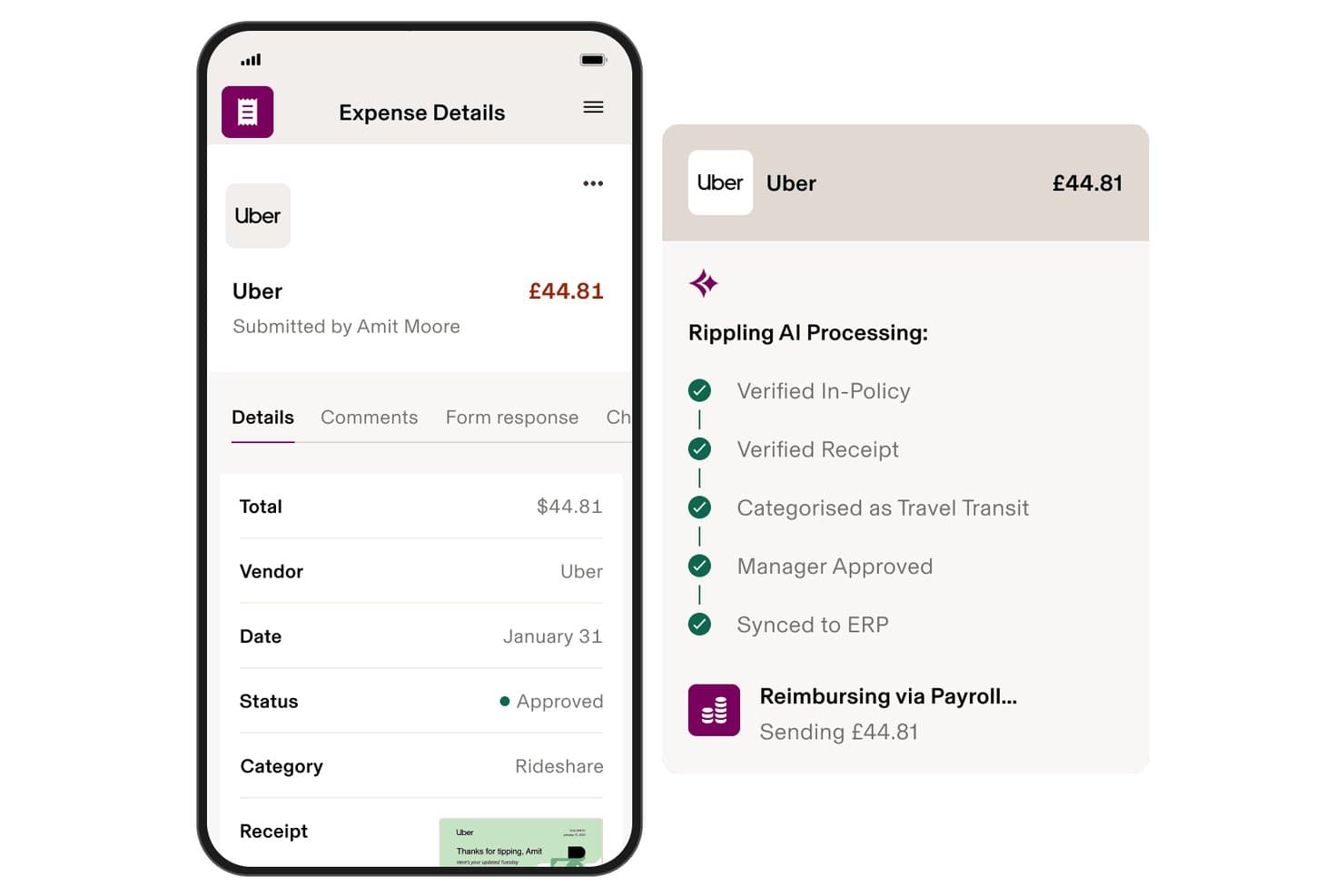
Rippling Spend automates expense approval and payroll reimbursement via AI. Rippling Spend is a corporate card and expense management platform that combines card issuance, real-time transaction controls, reimbursement workflows, and payroll integration within a single HRIS-connected system.
Who Is Rippling Spend Best For?
Rippling Spend is a strong fit for HR and finance teams that want employee data—like role, department, or location—to automatically drive card controls and reimbursement workflows.
Why I Picked Rippling Spend
I picked Rippling Spend because no other tool in this category ties corporate card controls directly to your HRIS data the way Rippling does. When an employee gets promoted or transfers to a new department, their spending limits and card policies update automatically, without any manual intervention. I also love that approved reimbursements feed directly into the next payroll run, so there's no separate reconciliation step eating up your team's time.
Rippling Spend Key Features
- Real-time transaction alerts: Administrators receive instant SMS and dashboard notifications when a card purchase is blocked or flagged as out-of-policy.
- AI-powered receipt capture: Employees submit receipts via mobile, email, or SMS, and OCR automatically extracts line-item data, translates any language, and converts currencies.
- Automated card lifecycle management: Cards are automatically issued to new hires, updated when employee attributes change, and revoked upon offboarding.
- Cashback rewards: Rippling Corporate Cards earn up to 1.75% cashback on eligible purchases with no annual fee.
Rippling Spend Integrations
Rippling Spend offers integrations with 70+ HRIS platforms, including Workday, BambooHR, ADP, and Gusto, plus native integrations with QuickBooks Online, NetSuite, Xero, and Sage Intacct. It also supports 650+ total app integrations and CSV imports.
Pros and Cons
Pros:
- Real-time policy enforcement blocks out-of-policy spend
- Reimbursements post automatically into payroll cycle
- Employee role changes update card controls instantly
Cons:
- Full platform value requires multiple Rippling modules
- Pricing is not publicly transparent online
Learn more about Rippling Spend: Best for direct card feeds from any bank
- Free demo available
- From $11.99/user/month (billed annually)
Visit WebsiteCustomer Rating:4.6/5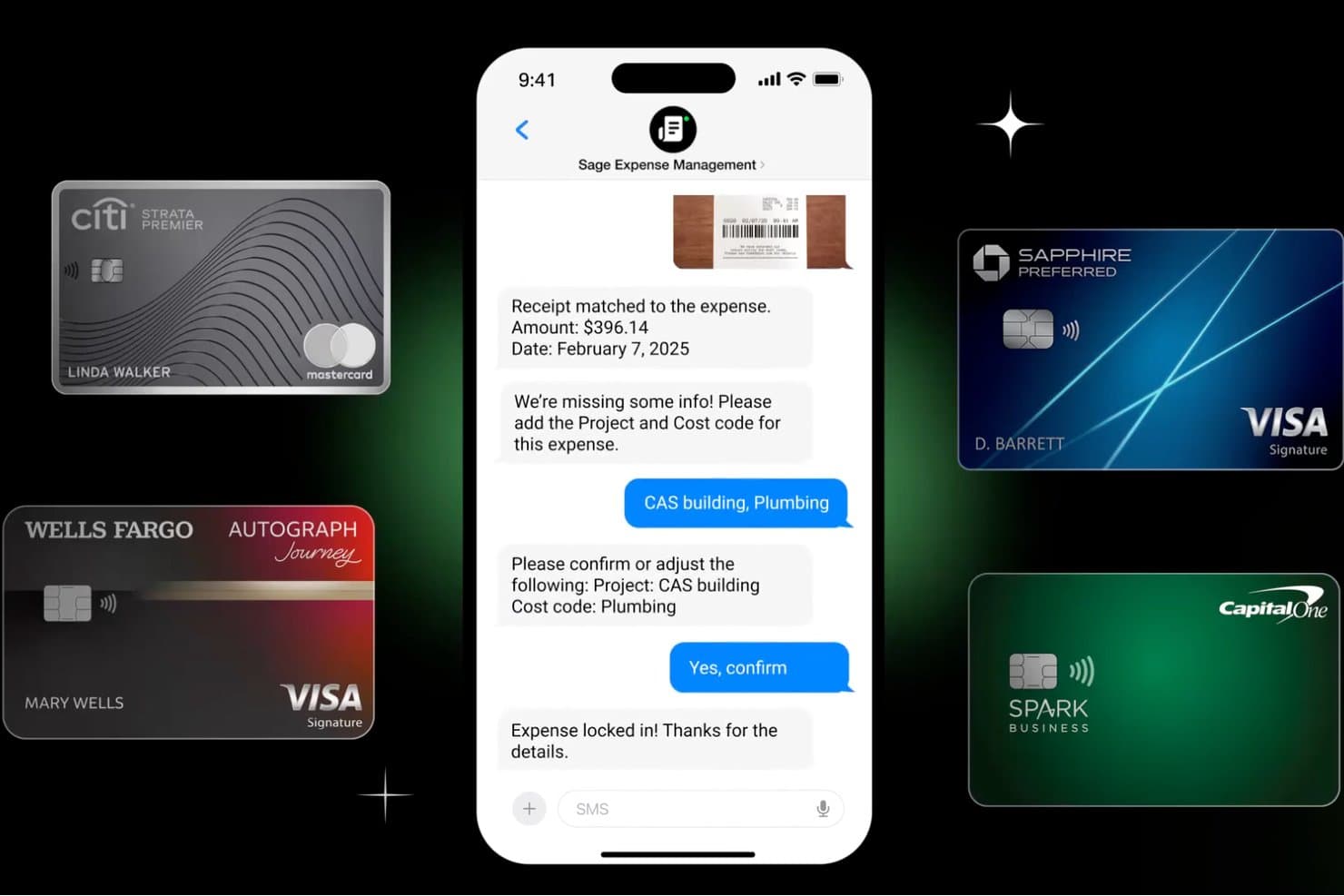
Sage Expense Management lets users code expenses via SMS chat. Sage Expense Management (formerly Fyle) is a credit card expense management platform that connects to corporate cards from any bank to automate transaction tracking, receipt matching, and reconciliation across your existing card programs.
Who Is Sage Expense Management (formerly Fyle) Best For?
Finance managers and controllers at small to mid-sized businesses who need real-time spend visibility across their existing corporate card programs will get the most out of this platform.
Why I Picked Sage Expense Management
I picked Sage Expense Management as one of the best because it connects to corporate cards from virtually any bank through real-time Visa and Mastercard network feeds, so transactions appear on the dashboard within seconds of a swipe. I like that this works without switching card programs: your team keeps existing cards and rewards while getting automatic receipt matching via text or email after every purchase. The AI then codes each transaction against your chart of accounts, cutting manual categorization significantly.
Sage Expense Management Key Features
- Budget tracking with alerts: Set spend limits by department, project, or cost center, with alerts when thresholds are reached.
- Two-way accounting sync: Native integrations with QuickBooks Online, Xero, Sage Intacct, and Sage 300 CRE keep your GL current.
- AmEx virtual card issuance: Admins create unlimited virtual cards with monthly spending limits for employees and contractors.
- Multi-stage approval workflows: Route reports through policy-driven, multi-level chains with sequential and automatic approvals.
Sage Expense Management Integrations
Sage Expense Management offers native integrations with QuickBooks Online, QuickBooks Desktop, Xero, Sage 50, Sage Intacct, and Sage 300 CRE. Its API supports custom integrations.
Pros and Cons
Pros:
- Text and email receipts cut receipt chasing
- Reviewers praise fast uploads and card syncing
- Real-time network feeds work across banks
Cons:
- Non-AmEx policy checks happen after purchase
- AmEx-only virtual cards exclude many teams
Learn more about Sage Expense Management (formerly Fyle): Best as AI for business
- Free trial + Free demo available
- From $8/user/month
Visit WebsiteCustomer Rating:4.4/5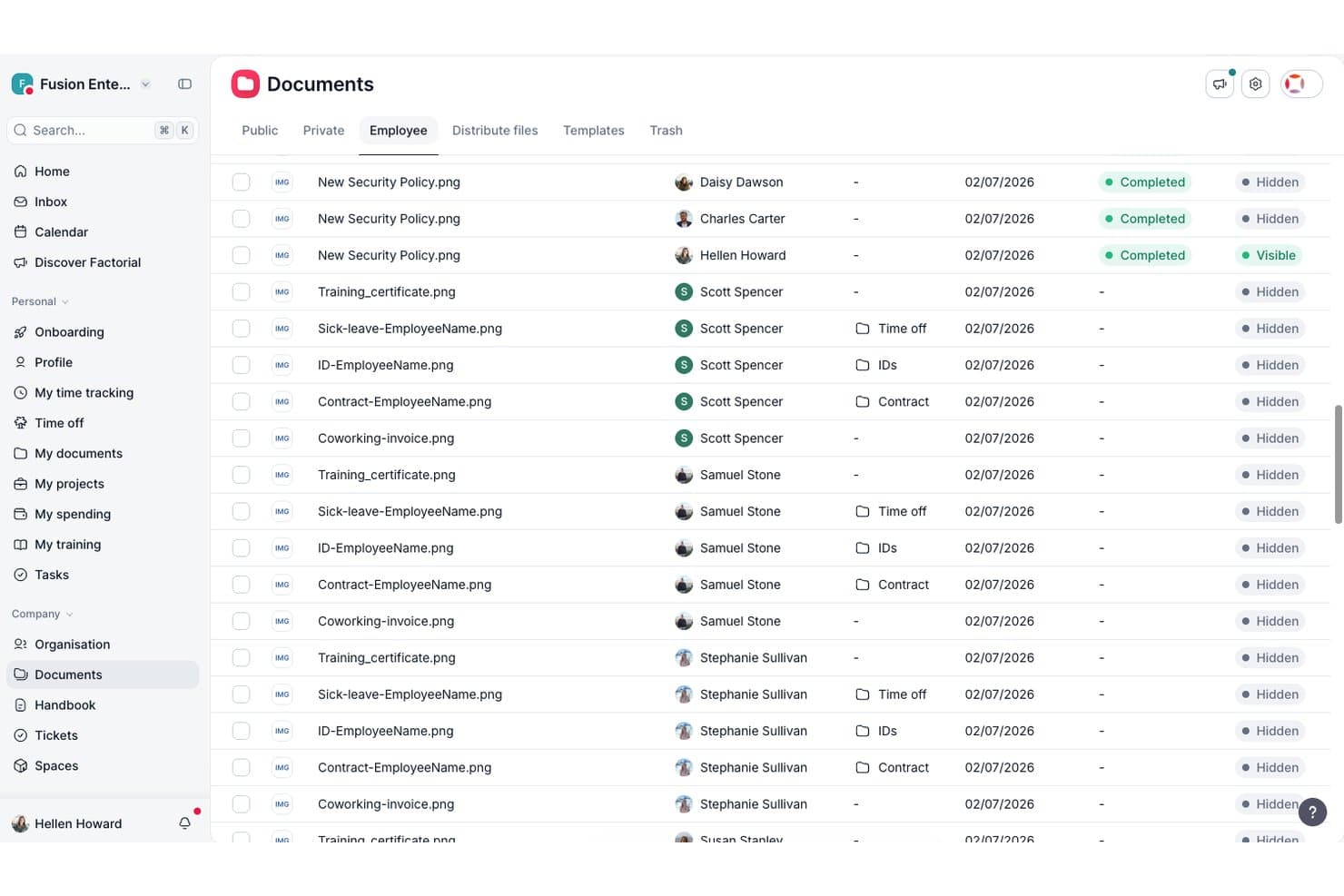
Factorial centralizes employee documents like contracts and IDs in one place. Factorial is an AI-driven business platform that combines expense management, corporate card issuance, spend policy enforcement, and HR-to-payroll workflows in one place.
Who Is Factorial Best For?
Factorial suits HR and finance teams at growing companies that want expense management, corporate cards, and people operations connected in one AI-driven platform.
Why I Picked Factorial
I picked Factorial as one of the best because its AI-for-business approach extends directly into expense management, where the built-in AI agent, One, can answer employee questions about spend policies and limits on the spot. I also like how physical and virtual cards connect automatically to expense records the moment a transaction happens, cutting out the manual logging step entirely. Expenses can also feed directly into payroll as supplements, which is a workflow I rarely see handled this natively in a single platform.
Factorial Key Features
- AI-powered OCR receipt capture: Factorial's AI agent extracts receipt details automatically, filling in expense information without manual data entry.
- MCC-based merchant restrictions: Administrators can allow or block specific merchant category code groups to control where corporate cards can be used.
- Multi-step sequential approval workflows: Expense approvals can be configured with multiple levels, each required to approve in order before an expense advances.
- Expense-to-payroll supplements: Approved expenses can be reflected directly as payroll supplements, connecting spend data to payroll within the same platform.
Factorial Integrations
Factorial lists marketplace integrations with Microsoft Business Central, SAP Business One, Sage 100, Sage 200 & Sage Despachos, and Microsoft Power BI. It also offers a public API, webhooks, SDKs, OAuth 2.0, and Zapier.
Pros and Cons
Pros:
- Approved expenses can feed payroll supplements
- Card purchases link directly to expense records
- AI answers clarify spend policies instantly
Cons:
- Factorial Cards are debit, not credit
- Receipt attachment still needs manual review
 4Best with integrated accounts payable suite
BILL
- Free plan available
- From $49/user/month
Visit WebsiteCustomer Rating:4.5/5
BILL lets you add new or alternative credit cards during payment processes. BILL is a financial operations platform that pairs AI-powered expense management with the BILL Divvy Card, letting you issue corporate cards, set budgets, auto-categorize transactions, and manage accounts payable and receivable in one place.
Who Is BILL Best For?
BILL is a strong fit for small to midsize businesses that need to manage corporate card spending, vendor payments, and expense reporting without separate tools.
Why I Picked BILL
I've included BILL in my top picks because it's one of the few credit card expense management tools that also runs a full accounts payable operation on the same platform. Most spend management tools stop at card transactions, but with BILL, you can capture vendor invoices via AI, route them through custom approval workflows, and process payments via ACH, virtual card, check, or international wire, all from the same dashboard where your card spend lives. I also like that BILL automatically performs 2- and 3-way matching, checking invoices against purchase orders and receipts to catch duplicates before they become a problem. That combination of card expense control and AP automation in a single system means your finance team isn't switching between tools to get a full picture of what the business owes.
BILL Key Features
- Corporate card issuance: Issue physical and virtual BILL Divvy Cards to employees with preset spending limits and category restrictions built in.
- Budget management: Create budgets by team, project, or individual and set hard limits that block out-of-policy spending before it happens.
- Employee reimbursements: Submit, review, and approve out-of-pocket expense claims directly within BILL alongside card transactions.
BILL Integrations
BILL offers native two-way syncs with QuickBooks Online, QuickBooks Desktop, QuickBooks Enterprise, Xero, Oracle NetSuite, Sage Intacct, and Microsoft Dynamics. It also integrates with Slack, Gmail, Lyft, and HR platforms like BambooHR, Workday, Gusto, and ADP Workforce Now. An API is available for custom integrations.
Pros and Cons
Pros:
- Built-in AP and AR alongside cards
- Enforceable budgets for projects or departments
- Budget-based cards prevent overspending proactively
Cons:
- Reporting customization options feel limited
- Balance must be paid in full every period
Learn more about BILL: Best with unified spend controls
- Free demo available
- Pricing upon request
Visit WebsiteCustomer Rating:4.8/5
Airbase card dashboard showing spend limits, balance tracking, and activity. Airbase brings together expense management, bill payments, and corporate cards in a single platform. Finance leaders at mid-sized and scaling companies use it to centralize control over all company spending. If you need to manage card expenses, reimbursements, and approvals in one place, Airbase offers a unified approach.
Who Is Airbase Best For?
Airbase is a strong choice for finance teams at mid-sized and rapidly growing companies that want unified control over all business spending.
Why I Picked Airbase
What stands out to me about Airbase is how it brings all spend controls—across cards, reimbursements, and bill payments—into one platform. I picked Airbase because it lets you set granular approval workflows and spending limits for every transaction type, not just card purchases. This unified approach means finance teams can manage, track, and enforce policies for all company spending from a single dashboard. For organizations that want to reduce manual oversight and ensure compliance across every dollar spent, Airbase’s centralized controls are a strong fit.
Airbase Key Features
Some other features that make Airbase useful for credit card expense management include:
- Automated receipt capture: Employees can upload receipts by email or mobile app, which are then matched to transactions automatically.
- Real-time transaction feeds: All card activity is updated instantly, so finance teams always see the latest spend.
- Corporate card issuing: Issue both virtual and physical cards to employees with customizable controls for each card.
- ERP and accounting integrations: Sync expense data directly with platforms like NetSuite, QuickBooks, Sage Intacct, and Xero.
Airbase Integrations
Integrations include NetSuite, QuickBooks Online, QuickBooks Desktop, Xero, Sage Intacct, Google Workspace, Okta, and Rippling.
Pros and Cons
Pros:
- Real-time visibility for HR budgeting
- Custom rules for expense policy audits
- Slack and email approval workflows
Cons:
- Reporting tools lack deep customization
- Requires pre-funding of corporate cards
Learn more about Airbase: 6Best with real-time spend insights
Ramp
- Free plan available; 30-day free trial
- From $15/user/month
Visit WebsiteCustomer Rating:4.8/5
Ramp dashboard showing business balance, expense insights, and linked corporate cards. Ramp offers a credit card expense management solution designed for finance teams that want more control and visibility over company spending. It’s a strong choice for businesses looking to automate expense tracking and enforce spending policies across departments. Ramp helps organizations reduce manual work and gain clearer insights into where money is going.
Who Is Ramp Best For?
Ramp is a good fit for mid-sized and larger companies that need real-time visibility and control over employee credit card spending.
Why I Picked Ramp
What sets Ramp apart for me is its focus on delivering real-time spend insights that help finance teams make faster, more informed decisions. Ramp automatically categorizes transactions and updates dashboards instantly, so you always have an up-to-date view of company spending. I also like that Ramp offers proactive alerts and spend anomaly detection, which helps you catch unusual activity before it becomes a problem. These features make Ramp especially useful for organizations that want to monitor expenses closely and respond quickly to changes in spending patterns.
Ramp Key Features
In addition to real-time spend insights and proactive alerts, Ramp offers several other features that support credit card expense management:
- Automated receipt matching: Ramp automatically matches uploaded receipts to corresponding transactions for easier reconciliation.
- Custom card controls: Set spending limits, merchant restrictions, and category rules for each employee card.
- Multi-entity support: Manage expenses and cards across multiple subsidiaries or business units from a single dashboard.
- Direct accounting integrations: Sync transactions and expense data directly with accounting platforms like QuickBooks, Xero, and NetSuite.
Ramp Integrations
Integrations include NetSuite, Sage Intacct, QuickBooks, Microsoft Dynamics Business Central, Xero, Workday Financial Management, and Oracle Fusion Cloud.
Pros and Cons
Pros:
- Real-time visibility of company spend
- Direct sync with QuickBooks and Xero
- Unlimited virtual cards for vendors
Cons:
- Customer support is mostly ticket-based
- No mobile app for expense management
Learn more about Ramp: Best for finance team collaboration
- Free demo available
- Pricing upon request
Visit WebsiteCustomer Rating:4.7/5
Spendesk subscription dashboard showing recurring payments and billing settings. Spendesk offers an all-in-one spend management platform designed for finance teams that want more control and visibility over company card expenses. It appeals to businesses looking to centralize payments, approvals, and expense tracking in one place. If you need to manage multiple payment methods and streamline expense workflows, Spendesk addresses these needs with dedicated tools for finance collaboration.
Who Is Spendesk Best For?
Spendesk is a strong fit for finance teams at small to mid-sized businesses that need centralized control over company card spending and expense approvals.
Why I Picked Spendesk
What drew me to Spendesk is how it brings finance teams together around every aspect of company card spending. The platform lets you issue physical and virtual cards, set granular spending limits, and require pre-approvals for card purchases, all in one place. I also appreciate the real-time visibility it gives finance teams into who is spending, what’s being spent, and which expenses need review. These collaboration-focused controls make Spendesk especially useful for organizations that want to keep finance, managers, and employees aligned on card usage and expense policies.
Spendesk Key Features
Some other features that make Spendesk useful for managing credit card expenses include:
- Automated receipt matching: The platform automatically matches uploaded receipts to card transactions for faster reconciliation.
- Mobile expense submission: Employees can submit card expenses and receipts directly from their mobile devices.
- Custom approval workflows: You can design multi-step approval processes tailored to your company’s policies.
- Real-time spend analytics: Finance teams get up-to-date dashboards and reports on card usage and expense trends.
Spendesk Integrations
Integrations include Xero, QuickBooks, FreshBooks, Sage, NetSuite, Microsoft Dynamics, SAP, Cegid, and Silverfin.
Pros and Cons
Pros:
- High-speed OCR for instant receipt capture
- Real-time budget tracking for HR teams
- Automates expense reimbursement processes
Cons:
- Significant monthly cost for small teams
- Rigid workflows for unique team needs
Learn more about Spendesk: 8Best for employee card issuance flexibility
Pleo
- Free trial + free demo available
- From £8/user/month
Visit WebsiteCustomer Rating:4.8/5
Pleo expenses dashboard showing team spending, receipts, and expense details. Pleo gives businesses a way to issue company cards and manage expenses in one platform. It’s designed for finance teams and managers who want more control and visibility over employee spending. If you need to automate expense tracking and reduce manual reconciliation, Pleo offers a modern approach tailored to growing companies.
Who Is Pleo Best For?
Pleo suits small to mid-sized businesses that want to empower employees with flexible card issuance and automated expense controls.
Why I Picked Pleo
What drew me to Pleo is how it lets you issue both physical and virtual cards to employees with just a few clicks. This flexibility means you can quickly equip new hires, contractors, or project teams with spending power while setting individual limits and rules for each card. I also appreciate that Pleo allows you to instantly freeze, cancel, or adjust cards as business needs change. For companies that want to empower employees but still maintain oversight, Pleo’s card issuance controls are a strong fit for modern expense management.
Pleo Key Features
Some other features that make Pleo useful for credit card expense management include:
- Automated receipt capture: Employees can snap photos of receipts in the mobile app, which are then matched to transactions automatically.
- Real-time spend tracking: All card activity is visible instantly in the admin dashboard, so finance teams always see up-to-date spending.
- Custom approval workflows: Set up multi-level approval processes for purchases above certain thresholds or for specific teams.
- Accounting software integrations: Sync expense data directly with platforms like QuickBooks, Xero, and Sage for faster reconciliation.
Pleo Integrations
Integrations include Xero, NetSuite, QuickBooks, SAP SuccessFactors, FreeAgent, XLedger, Twinfield, and BambooHR.
Pros and Cons
Pros:
- Fetch feature finds receipts in email
- Real-time spend visibility for HR leads
- Instantly freezes cards for leavers
Cons:
- High foreign transaction and conversion fees
- Limited tagging for complex accounting
Learn more about Pleo: 9Best for fast-growing tech companies
Brex
- Free plan + free demo available
- From $12/user/month
Visit WebsiteCustomer Rating:4.5/5
Brex compliance dashboard showing spend reports, receipts tracking, and policy checks. Brex offers an all-in-one expense management platform designed for startups and fast-scaling companies that need flexible controls and real-time visibility over spending. Finance teams and founders can issue cards, automate expense policies, and track transactions across teams and departments. If you’re looking for a solution that adapts to rapid growth and changing needs, Brex brings together card management and expense tracking in one place.
Who Is Brex Best For?
Brex is a strong fit for finance teams at fast-growing startups and tech companies that need scalable expense controls and card management.
Why I Picked Brex
What draws me to Brex for credit card expense management is how it’s built to keep up with the pace and complexity of fast-growing tech companies. The platform lets you instantly issue unlimited virtual and physical cards, each with customizable spend controls and real-time tracking. I also appreciate how Brex automates employee expense policy enforcement and provides granular visibility into spending across teams, projects, and departments. These features make it a strong choice for organizations that need to scale their expense management quickly without losing control or oversight.
Brex Key Features
Some other features that make Brex useful for credit card expense management include:
- Automated receipt capture: Employees can upload receipts via mobile or email, which are then automatically matched to transactions.
- Multi-entity management: Manage expenses and cards across multiple subsidiaries or business entities from a single dashboard.
- ERP and accounting integrations: Sync transactions and expense data directly with platforms like NetSuite, QuickBooks, and Xero.
- Travel booking and management: Book business travel and manage related expenses within the same platform.
Brex Integrations
Integrations include QuickBooks, NetSuite, Xero, Sage Intacct, Slack, and SAP Concur.
Pros and Cons
Pros:
- Easy multi-currency global reimbursements
- No personal guarantee for founders
- Automated travel and stipend policies
Cons:
- Complex setup for multi-entity teams
- Support is slower on the free version
Learn more about Brex: Best for corporate card reconciliation
- Free demo available
- From $8.50 to $12/active user
Visit WebsiteCustomer Rating:4.4/5
Webexpenses dashboard showing claims status, submitted expenses, and reports. Finance teams looking for a dedicated solution to manage and reconcile corporate card expenses may find Webexpenses a strong fit. The platform is designed to help organizations automate expense capture, policy enforcement, and transaction matching. If you need to reduce manual reconciliation and improve oversight of company card spending, Webexpenses offers targeted features for these needs.
Who Is Webexpenses Best For?
Webexpenses suits finance teams at mid-sized to large organizations that need to automate and control corporate card reconciliation.
Why I Picked Webexpenses
What stands out to me about Webexpenses is how it optimizes the reconciliation process for corporate card transactions. The platform automatically matches card statements with submitted expenses, which helps reduce manual work and errors for finance teams. I also like that it flags unmatched or out-of-policy transactions, making it easier to spot issues before they become bigger problems. For organizations that need to keep tight control over company card spending, these reconciliation-focused features make Webexpenses a strong choice.
Webexpenses Key Features
In addition to its reconciliation tools, Webexpenses offers several other features for managing credit card expenses:
- Automated receipt capture: Users can upload receipts via mobile app or email, which are then matched to card transactions.
- Policy enforcement engine: The system applies company expense policies automatically to submitted expenses, flagging violations for review.
- Multi-currency support: Webexpenses handles expenses in multiple currencies, making it suitable for international teams.
- Customizable reporting dashboards: Finance teams can generate and customize reports to analyze spending patterns and compliance.
Webexpenses Integrations
Integrations include Xero, QuickBooks, NetSuite, Sage Intacct, MYOB, SAP, Visa, and Mastercard.
Pros and Cons
Pros:
- Provides detailed audit trails for card transactions
- Offers customizable approval workflows for card spend
- Supports multi-currency card expense processing
Cons:
- No direct card issuing or virtual cards
- Limited real-time card transaction notifications
Learn more about Webexpenses:
Diğer Kredi Kartı Harcama Yönetimi Yazılımları
Kısa listeme giremeyen ancak yine de göz atmaya değer bazı ek kredi kartı harcama yönetimi yazılımı seçenekleri şunlardır:
- 11ExpensifyBest with receipt scanning automation
- 12RhoBest for automated policy enforcement
- 13BILL Spend & ExpenseBest for customizable approval workflows
- 14SlashBest for high-yield business accounts
- 15PayhawkBest for global multi-entity management
- 16StampliBest for real-time card transaction controls
- 17CoupaBest with global policy compliance tools
- 18RydooBest for automated card reconciliation workflows
How I Evaluate Credit Card Expense Management Software
I evaluate every tool against baseline requirements—like issuing virtual cards and syncing with your HRIS—then weigh the differentiators that matter most for HR-led expense programs.
Core Functionality (Table Stakes For This List)
When I'm selecting tools for my list, I rank each one on a scale from 0 (does not offer the functionality) to 5 (excels in this area) for each core functionality listed below. Then, I calculate the tool's total score into a percentage. Each tool needs to achieve a minimum total score of 65% to be considered for inclusion.
- Corporate Card Issuance: I check whether you can issue both physical and virtual cards with per-employee spending limits, like capping a new hire's onboarding card at a set amount.
- Real-Time Transaction Tracking: Every tool should show card transactions as they happen with auto-categorization, so HR sees a wellness purchase post instantly rather than waiting for a monthly statement.
- Policy & Approval Controls: I look for configurable spending rules and multi-level approval workflows, such as routing manager approval for purchases above a threshold or blocking non-approved merchant categories.
- Receipt Capture & Matching: The ability for employees to snap a photo or forward an email receipt and have it auto-matched to a transaction matters—manual matching buries HR teams at month-end.
- Expense Reporting & Reconciliation: I evaluate whether the tool generates reports coded to GL accounts and cost centers, which is especially useful when HR needs to reconcile stipend spending across departments.
- HRIS & Payroll Integrations: Native connections to platforms like BambooHR, Workday, or Gusto should sync employee data so cards are automatically issued at onboarding and deactivated at offboarding.
Once I have a list of tools that meet this criteria, I consider what sets each platform apart.
Differentiating Factors (What Sets Vendors Apart)
Here's how I compare and contrast different vendors:
Standout Features
Stipend management is a big differentiator. Tools that let you set up recurring wellness, learning, or remote work allowances directly on employee cards save HR from processing reimbursement requests manually. I also evaluate multi-currency and global card support, which matters when your workforce spans multiple countries and needs localized card programs. Automated compliance audits round things out—AI-driven flagging of out-of-policy spend or duplicate transactions keeps your team ahead of issues before month-end close.
Beyond Features
Compliance and security certifications like PCI-DSS and SOC 2 Type II are worth checking, especially when employee card data flows between your HRIS and expense platform. I also evaluate implementation support—a dedicated onboarding manager who helps configure spending policies and enroll employees can cut weeks off your rollout. Pricing transparency matters too. I look for clear per-user or flat-fee models without hidden charges for card issuance, and I check whether cashback or rebate programs help offset program costs for your HR budget.
Kredi Kartı Harcama Yönetimi Yazılımı Nasıl Seçilir?
Uzun özellik listeleri ve karmaşık fiyatlandırma yapıları arasında kaybolmak kolaydır. Size özgü yazılım seçimi sürecinizi yürütürken odaklanmanızı korumanıza yardımcı olmak için göz önünde bulundurmanız gereken faktörleri içeren bir kontrol listesi hazırladık:
| Faktör | Nelere Dikkat Edilmeli? |
|---|---|
| FaktörÖlçeklenebilirlik | Nelere Dikkat Edilmeli?İşletmeniz büyüdükçe yazılım mevcut ve gelecekteki kart hacminizi, kullanıcı sayınızı ve onay iş akışlarınızı yönetebilecek mi? |
| FaktörEntegrasyonlar | Nelere Dikkat Edilmeli?Manuel veri aktarımlarını önlemek için araç, muhasebe, bordro, insan kaynakları ve bankacılık sistemlerinize yerel olarak bağlanabiliyor mu? |
| FaktörÖzelleştirilebilirlik | Nelere Dikkat Edilmeli?Harcama politikalarını, onay zincirlerini ve raporlamayı kuruluşunuzun kendine özgü gereksinimlerine uyacak şekilde düzenleyebilir misiniz? |
| FaktörKullanım kolaylığı | Nelere Dikkat Edilmeli?Çalışanlar ve yöneticiler aracı hızla benimseyecek mi, yoksa karmaşık arayüzler harcama gönderme ve inceleme süreçlerini yavaşlatacak mı? |
| FaktörUygulama ve kullanıma alma | Nelere Dikkat Edilmeli?Sistemi çalışır duruma getirmek ne kadar sürecek ve sağlayıcı kullanıma sunma sırasında hangi kaynakları veya desteği sağlayacak? |
| FaktörMaliyet | Nelere Dikkat Edilmeli?Fiyatlandırma katmanları şeffaf mı ve kullanım alışkanlıklarınızla bütçenize uyuyor mu? Kullanıcı veya kart başına ücretlere dikkat edin. |
| FaktörGüvenlik önlemleri | Nelere Dikkat Edilmeli?Yazılım, hassas finansal verileri korumak için şifreleme, role dayalı erişim ve denetim izleri sunuyor mu? |
| FaktörUyumluluk gereksinimleri | Nelere Dikkat Edilmeli?Araç, harcama belgeleri ve raporlamaya ilişkin sektörel, vergisel veya bölgesel uyumluluk standartlarını karşılamanıza yardımcı olacak mı? |
Kredi Kartı Harcama Yönetimi Yazılımı Nedir?
Kredi kartı harcama yönetimi yazılımı, işletmelerin şirket kredi kartlarıyla yapılan harcamaları izlemesine, mutabakatını yapmasına ve kontrol etmesine yardımcı olan dijital bir araçtır. İşlem verilerinin toplanmasını otomatikleştirir, makbuzları satın alımlarla eşleştirir, şirket harcama politikalarını uygular ve onay iş akışlarını kolaylaştırır. Bu yazılım, finans ekiplerinin doğru kayıtları tutmasını, manuel veri girişini azaltmasını ve kurum içi ve kurum dışı raporlama gerekliliklerine uyumu sağlamasını destekler.
Kredi Kartı Harcama Yönetimi Yazılımının Özellikleri
Kredi kartı harcama yönetimi yazılımı seçerken aşağıdaki temel özelliklere dikkat edin:
- İşlem içe aktarma: Merkezi takip ve inceleme için kredi kartı işlemlerini bankanızdan veya kart sağlayıcınızdan yazılıma otomatik olarak aktarır.
- Makbuz eşleştirme: Yüklenen veya fotoğrafı çekilen makbuzları doğru kart işlemleriyle ilişkilendirerek manuel mutabakatı ve hataları azaltır.
- Politika uygulama: Kuruluşunuzun harcama kurallarını her işleme uygular ve onaydan önce politika dışı harcamaları işaretler veya engeller.
- Onay iş akışları: Harcamaları özelleştirilebilir inceleyici ve onaylayıcı zincirleri üzerinden yönlendirerek her aşamada gözetim ve uyumluluk sağlar.
- Gerçek zamanlı harcama takibi: Finans ekiplerinin ve yöneticilerin kart kullanımını gerçekleştiği anda izleyebilmesi için güncel panolar ve uyarılar sunar.
- Çoklu para birimi desteği: Farklı para birimlerindeki işlemleri yönetir, küresel ekipler için tutarları otomatik olarak dönüştürür ve raporlar.
- Harcama sınıflandırması: İşlemleri doğru genel muhasebe veya bütçe kategorilerine atayarak muhasebe ve raporlamayı kolaylaştırır.
- Muhasebe sistemleriyle entegrasyon: Yinelenen veri girişini önlemek ve ay sonu kapanışını hızlandırmak için harcama verilerini doğrudan muhasebe veya ERP yazılımınızla senkronize eder.
- Denetim izi: Her harcama üzerinde gerçekleştirilen tüm işlemlerin ayrıntılı kaydını tutarak uyumluluğu destekler ve denetimleri kolaylaştırır.
- Mobil uygulama erişimi: Kullanıcıların makbuzları kaydetmesine, harcamaları göndermesine ve onayları akıllı telefonlarından incelemesine olanak tanıyarak uzaktan çalışan ve seyahat eden çalışanları destekler.
Kredi Kartı Harcama Yönetimi Yazılımlarındaki Yaygın Yapay Zekâ Özellikleri
Yukarıda listelenen standart kredi kartı harcama yönetimi yazılımı özelliklerinin ötesinde, bu çözümlerin birçoğu aşağıdaki gibi özelliklerle yapay zekâyı bünyesine katıyor:
- Otomatik makbuz verisi çıkarma: Taranmış veya fotoğrafı çekilmiş makbuzlardaki önemli ayrıntıları okumak ve çıkarmak için yapay zekâyı kullanarak manuel veri girişini azaltır ve doğruluğu artırır.
- Anormallik tespiti: Olağandışı harcama kalıplarını veya olası sahtekârlığı gerçek zamanlı olarak belirlemek için makine öğreniminden yararlanır ve finans ekiplerini inceleme yapmaları için uyarır.
- Akıllı harcama sınıflandırması: Harcamaları doğru kategorilere otomatik olarak atamak için geçmiş işlemlerden öğrenir ve zaman içinde şirkete özgü kurallara uyum sağlar.
- Öngörücü politika ihlali uyarıları: Gönderimden önce şirket politikalarını ihlal etmesi muhtemel harcamaları tahmin etmek ve işaretlemek için geçmiş verileri analiz eder.
- Doğal dilde harcama sorguları: Kullanıcıların harcamalar veya harcama eğilimleri hakkında günlük dili kullanarak soru sormasını sağlar; yapay zekâ da soruları yorumlayarak ilgili sonuçları sunar.
Kredi Kartı Harcama Yönetimi Yazılımının Faydaları
Kredi kartı harcama yönetimi yazılımını uygulamak, ekibiniz ve işletmeniz için çeşitli faydalar sağlar. Yararlanabileceğiniz birkaç fayda şunlardır:
- Daha hızlı mutabakat: Otomatik işlem içe aktarma ve makbuz eşleştirme, manuel çalışmayı azaltır ve ay sonu kapanışını hızlandırır.
- Geliştirilmiş politika uyumluluğu: Yerleşik politika uygulama ve onay iş akışları, harcamaların şirket kurallarıyla uyumlu olmasını sağlamaya yardımcı olur.
- Gerçek zamanlı görünürlük: Panolar ve uyarılar, kuruluşunuz genelindeki kart kullanımı ve harcama eğilimleri hakkında güncel bilgiler sağlar.
- Azaltılmış sahtekârlık riski: Yapay zekâ destekli anormallik tespiti ve denetim izleri, şüpheli faaliyetlerin belirlenmesine ve uyumluluk çalışmalarının desteklenmesine yardımcı olur.
- Sadeleştirilmiş küresel operasyonlar: Çoklu para birimi desteği ve muhasebe sistemleriyle entegrasyon, uluslararası ekiplerin harcamalarını yönetmeyi kolaylaştırır.
- Daha iyi çalışan deneyimi: Mobil uygulama erişimi ve otomatik veri yakalama, harcamaların gönderilmesini ve onaylanmasını daha hızlı ve daha az zahmetli hâle getirir.
- Daha güçlü finansal kontroller: Özelleştirilebilir onay zincirleri ve ayrıntılı raporlama, finans ekiplerine şirket harcamaları üzerinde daha fazla gözetim ve kontrol sağlar.
Kredi Kartı Harcama Yönetimi Yazılımının Maliyetleri ve Fiyatlandırması
Kredi kartı harcama yönetimi yazılımını seçmek, mevcut çeşitli fiyatlandırma modellerinin ve planların anlaşılmasını gerektirir. Maliyetler özelliklere, ekip büyüklüğüne, eklentilere ve diğer unsurlara göre değişir. Aşağıdaki tablo, kredi kartı harcama yönetimi yazılımı çözümlerindeki yaygın planları, ortalama fiyatlarını ve genellikle dâhil edilen özellikleri özetlemektedir:
Kredi Kartı Harcama Yönetimi Yazılımı İçin Plan Karşılaştırma Tablosu
| Plan Türü | Ortalama Fiyat | Yaygın Özellikler |
|---|---|---|
| Plan TürüÜcretsiz Plan | Ortalama Fiyat$0 | Yaygın ÖzelliklerTemel işlem içe aktarma, sınırlı makbuz yakalama, manuel mutabakat ve temel raporlama. |
| Plan TürüBireysel Plan | Ortalama Fiyat$5-$12/kullanıcı/ay | Yaygın ÖzelliklerOtomatik makbuz eşleştirme, basit politika uygulama, mobil uygulama erişimi ve e-posta desteği. |
| Plan Türüİşletme Planı | Ortalama Fiyat$15-$45/kullanıcı/ay | Yaygın ÖzelliklerÇok düzeyli onay iş akışları, muhasebe sistemleriyle entegrasyon, gerçek zamanlı harcama takibi ve denetim izleri. |
| Plan TürüKurumsal Plan | Ortalama Fiyat$35+/kullanıcı/ay | Yaygın ÖzelliklerGelişmiş analizler, özel politika denetimleri, çoklu para birimi desteği, özel işe alıştırma ve öncelikli destek. |
Kredi Kartı Gider Yönetimi Yazılımı Hakkında SSS
Kredi kartı gider yönetimi yazılımı hakkında sık sorulan bazı soruların yanıtlarını burada bulabilirsiniz:
Kredi kartı gider yönetimi yazılımı uyumluluğa nasıl yardımcı olur?
Kredi kartı gider yönetimi yazılımı, şirket politikalarını uygulayarak, ayrıntılı denetim izlerini koruyarak ve vergi ile düzenleyici standartlar için gerekli belgelendirme koşullarını destekleyerek uyumluluğa yardımcı olur. Otomatik iş akışları ve gerçek zamanlı uyarılar da yetkisiz veya politika dışı harcama riskini azaltır.
Bu araçlar mevcut muhasebe veya ERP sistemleriyle entegre olabilir mi?
Evet, çoğu kredi kartı gider yönetimi yazılımı çözümü popüler muhasebe ve ERP sistemleriyle entegrasyonlar sunar. Bu, gider verilerinin otomatik olarak senkronize edilmesini sağlar, manuel veri girişini azaltır ve finans ekiplerinin platformlar genelinde doğru kayıtlar tutmasına yardımcı olur.
Bu yazılımı ekibime sunarken neleri göz önünde bulundurmalıyım?
Eğitim videoları, ürün tanıtımları ve destek erişilebilirliği gibi sunulan işe alıştırma kaynaklarını değerlendirin. Ayrıca arayüzün son kullanıcılar için ne kadar sezgisel olduğunu ve yazılımın şirketinizin onay iş akışlarına ve gider politikalarına uyacak şekilde özelleştirilip özelleştirilemeyeceğini inceleyin.
Kredi kartı gider yönetimi yazılımı kullanmanın güvenlik riskleri var mı?
Hayır, doğru şekilde uygulandığında bu araçlar hassas finansal verileri korumak için şifreleme, role dayalı erişim ve denetim günlükleri kullanır. Seçim yapmadan önce her zaman bir sağlayıcının güvenlik sertifikalarını ve veri koruma uygulamalarını inceleyin.
Bu çözümler uluslararası işlemleri nasıl ele alır?
Birçok kredi kartı gider yönetimi yazılımı çözümü, çoklu para birimli işlemleri, otomatik para birimi dönüşümünü ve gider politikalarının yerelleştirilmesini destekler. Bu, küresel ekiplerin farklı bölgelerdeki giderleri tutarlı ve doğru bir şekilde yönetmesine yardımcı olur.