

En iyi inşaat iş gücü yönetimi yazılımını arıyorsanız, muhtemelen değişken proje takvimleri, uyumluluk gereklilikleri ve koordinasyonu zor olan mobil bir iş gücüyle aynı anda ilgileniyorsunuz. Bu, yönetilmesi gereken çok şey demek.
Deneyimlerime göre inşaat iş gücü yönetimi yazılımı, inşaat şirketleri için büyük fark yaratabilir. Bu çözümler, manuel işleri azaltmak, iş gücü yönetimini iyileştirmek ve işletme sahiplerine günlük karar alma süreçleri için daha iyi veriler sağlamak üzere otomasyondan yararlanır. İhtiyaçlarınıza en uygun seçenekleri bulmak için çeşitli çözümleri inceledim.
Bu makalede, gerçek dünyadaki zorlukları çözen özelliklere odaklanarak inşaat iş gücü yönetimi yazılımları için en iyi seçimlerimi paylaşacağım. Her birinin artılarını ve eksilerini açıklayarak ekibiniz için doğru seçeneği bulmanıza yardımcı olacağım. İnşaat işletmenizde iş gücünüzü yönetmeyi biraz daha kolaylaştıralım.
Why Trust Our Software Recommendations
6,700+
Reviews
20
Industry experts
16+
Evaluation factors
14
Years
Our team has been testing and reviewing software since 2012. As HR experts ourselves, we know how difficult—and important—it is to choose the right software.
For this guide, we evaluated tools using hands-on testing and independent research, scoring tools using our selection criteria. We also draw on insights from industry thought leaders and practicing HR experts.
Our reviews reflect our human editorial judgment, not a sales pitch.
Expert reviewers:
- Phil GrayCOO
 Kim BehnkeHR Tech Editor & Analyst
 Josh BarkerPeople Ops Manager

İnşaat İş Gücü Yönetimi Yazılımları Karşılaştırma Tablosu
Bu karşılaştırma tablosu, en iyi inşaat iş gücü yönetimi yazılımı seçimlerimin fiyatlandırma ayrıntılarını özetlemektedir:
Sorted by: Default
| Tool | Starting Price | Website | |
|---|---|---|---|
Best for all-in-one time, pay, and job costing | 4.5 out of 5 | $50/user/month 30-day free trial + free demo available | Website |
Best for enterprise-level integrations | 4.2 out of 5 | Pricing upon request Free demo available | Website |
Best for scheduling simplicity | 4.5 out of 5 | $2.50/user/month Free trial available | Website |
Best for construction management | 4.5 out of 5 | Pricing upon request Free demo available | Website |
Best for GPS tracking | 4.5 out of 5 | $4/user/month 14-day free trial | Website |
Best for union and prevailing wage payroll | 4.4 out of 5 | Pricing upon request Free demo available | Website |
Best for mobile time tracking | 4.1 out of 5 | $9/employee/month + $50/month base fee Free demo available | Website |
Best for design collaboration | Not rated | Pricing upon request Free demo available | Website |
Best for time tracking accuracy | Not rated | $6/user/month 14-day free trial + free demo available | Website |
Best for daily reporting | Not rated | Pricing upon request Free demo available | Website |


En İyi İnşaat İş Gücü Yönetimi Yazılımları İncelemesi
Aşağıda, kısa listeme giren en iyi inşaat iş gücü yönetimi yazılımlarına ilişkin ayrıntılı özetlerimi bulabilirsiniz. İncelemelerim, inşaat işletmeniz için en iyisini bulmanıza yardımcı olmak amacıyla her aracın temel özelliklerine, artılarına ve eksilerine, entegrasyonlarına ve ideal kullanım alanlarına ayrıntılı bir bakış sunuyor.
 Best for all-in-one time, pay, and job costing
- 30-day free trial + free demo available
- From $50/user/month
Visit WebsiteCustomer Rating:4.5/5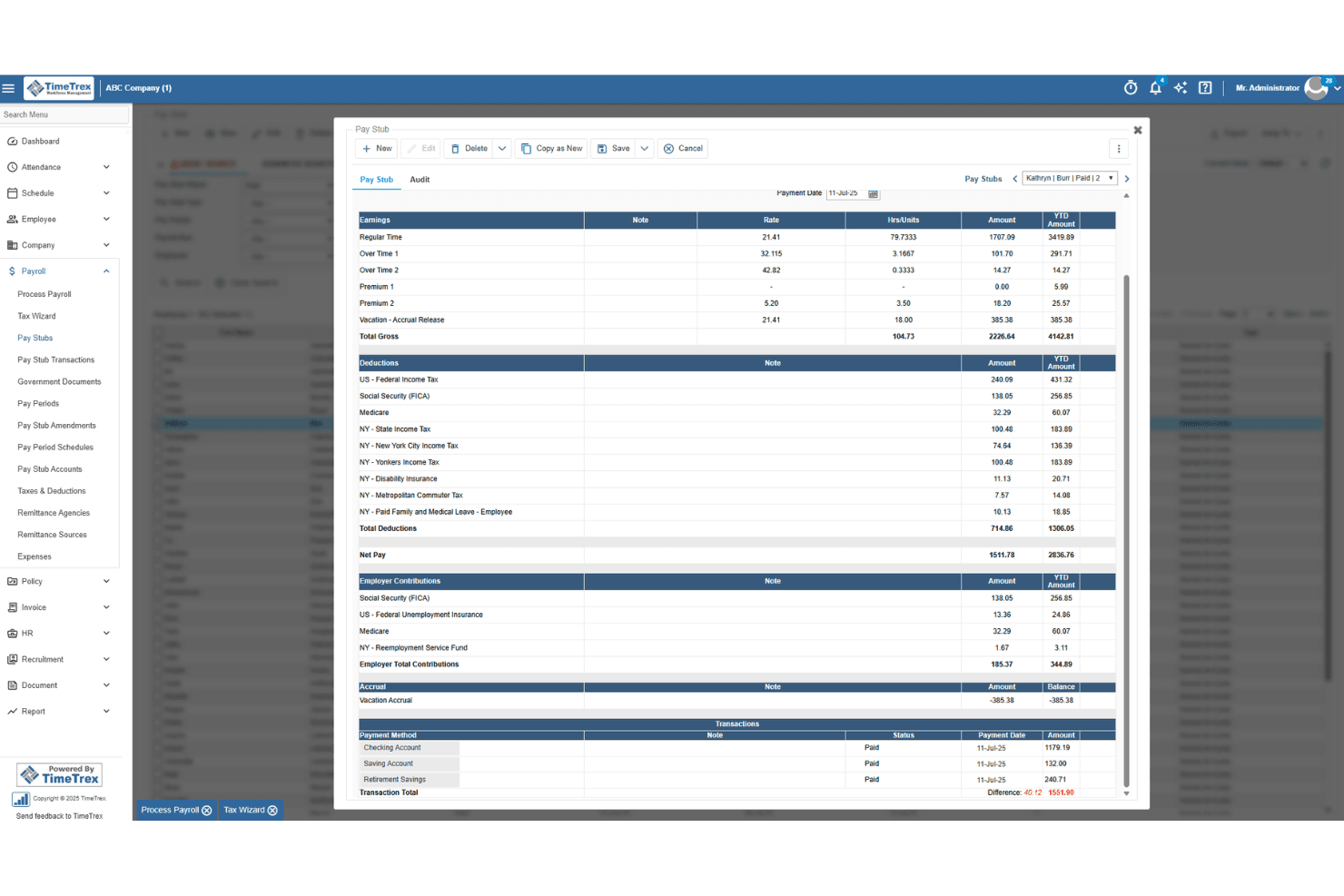
TimeTrex generates detailed pay stubs with earnings, deductions, and taxes. TimeTrex is a workforce management suite that combines time tracking, crew scheduling, built-in payroll, HR, and four-level job costing in a single platform.
Who Is TimeTrex Best For?
TimeTrex is a strong fit for small to mid-sized construction businesses that want time tracking, payroll, and job costing in one place without stitching together separate tools.
Why I Picked TimeTrex
TimeTrex earns its spot on my shortlist because it handles time tracking, payroll, and job costing inside a single platform, which means approved field hours flow directly into payroll without manual exports. I especially like the four-level job costing (branch, department, job, task) paired with offline GPS crew punching and Team Punch, so a foreman can clock in an entire crew on-site in one step and tie every hour to the right cost center in real time. For construction teams juggling multiple jobsites, that combination removes a lot of reconciliation work at month-end.
TimeTrex Key Features
- Built-in payroll: TimeTrex calculates wages, taxes, overtime, and deductions inside the same platform where hours are captured, so there's no separate payroll tool to manage.
- Kiosk mode: Any device can act as a fixed or mobile time clock with facial recognition and QR code punching, which is useful for shared jobsite check-in points.
- Document management: Employee records can hold attached files like certifications and licenses, keeping credentials organized in one place alongside time and HR data.
- Expense management: Workers can log and submit job-related expenses directly in the platform, tying costs to the same cost centers used for labor tracking.
TimeTrex Integrations
TimeTrex documents integrations with QuickBooks, Sage 100 Contractor, Xero, ADP, Paychex, and Ceridian. It also offers a REST API, two-way connectivity, flat-file options, and custom API development for construction systems.
Pros and Cons
Pros:
- Payroll and approved hours share one system
- Four-level job costing clarifies labor allocation
- Offline crew punching supports remote jobsites
Cons:
- Certification records lack renewal alerts
- No safety or equipment management tools
Learn more about TimeTrex: 2Best for enterprise-level integrations
CMiC
- Free demo available
- Pricing upon request
Visit WebsiteCustomer Rating:4.2/5
CMiC displays project management, financials, and all-in-one search features. CMiC is a construction ERP built on a single database platform, covering workforce management, construction payroll, HCM, project controls, document management, and field-to-office communication tools.
Who Is CMiC Best For?
CMiC is well-suited for large general contractors and construction enterprises that need a unified system to manage complex, multi-project workforce and financial operations.
Why I Picked CMiC
I've included CMiC in my top picks because its Single Database Platform is genuinely what sets it apart for enterprise construction teams. When payroll, job costing, project controls, and HCM all write to the same database, there's no data reconciliation between systems. I also like the PMxchange integration, which automatically syncs RFIs, submittals, and attachments between GC and subcontractor platforms without manual entry. For large contractors running multiple systems, that kind of data continuity across the entire project ecosystem is hard to replicate.
CMiC Key Features
- Crew time tracking: Log labor hours by crew and cost code directly from the field using the CONSTRUCT Crew Time module.
- Check-in/check-out tracking: Record worker arrivals, departures, and breaks on-site with the CONSTRUCT Check-In tool.
- Employee self-service portal: Employees can view pay stubs, request time off, and update personal information without going through HR.
- Mobile field access: Field crews and supervisors can submit timesheets, approvals, and workforce data from a mobile device on any job site.
CMiC Integrations
CMiC offers both CMiC-built and partner-built integrations with construction industry tools, including DocuSign, Microsoft (via a dedicated integration package), Power BI, Procore, Arcoro, HammerTech, SmartBarrel, hh2, Autodesk ProEst, and Oracle Textura. An API is available for custom integrations, with developer documentation hosted on CMiC's dedicated developer portal.
Pros and Cons
Pros:
- Trusted by top ENR 400 contractors
- Built-in certified payroll and union tracking
- Single database unifies financials and field data
Cons:
- Implementation requires significant time and cost
- Frequent performance lags during peak usage
Learn more about CMiC: Best for scheduling simplicity
- Free trial available
- From $2.50/user/month
Visit WebsiteCustomer Rating:4.5/5
When I Work schedules shifts, logs time, and supports team communication. When I Work is a scheduling and time tracking software aimed at small- to medium-sized businesses. It helps managers create schedules, track time, and communicate with their teams efficiently.
Why I picked When I Work: I picked When I Work for construction companies that need straightforward crew and shift scheduling rather than advanced workforce planning. It helps supervisors schedule hourly workers, communicate shift changes, track availability, and manage attendance from mobile devices. This makes it better suited to contractors with shift-based crews than companies that need detailed labor forecasting or construction resource planning.
Standout Features and Integrations:
Features include shift swapping capabilities, allowing your team to manage their schedules flexibly. The app's messaging feature facilitates easy communication between team members. When I Work also offers reporting tools to analyze labor costs and optimize workforce management.
Integrations include QuickBooks, ADP Workforce Now, Gusto, Square, Paychex, Zapier, and more.
Pros and Cons
Pros:
- Automated notifications
- Intuitive scheduling interface
- Easy shift swapping
Cons:
- Custom field configurability limitations
- Limited advanced features
Learn more about When I Work: Best for construction management
- Free demo available
- Pricing upon request
Visit WebsiteCustomer Rating:4.5/5
Buildertrend manages projects, communication, and job progress for builders. Buildertrend is a construction management software designed for contractors and home builders. It helps manage projects, optimize communication, and track job progress.
Why I picked Buildertrend: Buildertrend offers a full-spectrum suite of tools for managing construction projects efficiently. Its scheduling feature keeps your team on track, reducing delays and miscommunications. The daily logs allow you to document progress and issues in real time. These features make Buildertrend a suitable choice for managing complex construction operations.
Standout Features and Integrations:
Features include client communication tools that facilitate transparency and updates, a document management system to keep all your files organized, and budgeting tools to track expenses accurately. These features help you manage projects smoothly and maintain financial control. Buildertrend also offers a mobile app for on-the-go access to project information.
Integrations include QuickBooks, Xero, Gusto, Pro Xtra, Salesforce, HubSpot, Pipedrive, and more.
Pros and Cons
Pros:
- Strong client communication
- Effective scheduling tools
- Extensive project management
Cons:
- Mobile app can be slow to load
- No built-in bid tracking
Learn more about Buildertrend:

Timeero monitors work hours and locations for field staff. Timeero is a time tracking software tailored for mobile teams, focusing on accurate GPS tracking and time management. It helps businesses monitor employee locations and manage work hours efficiently.
Why I picked Timeero: Timeero offers real-time GPS tracking, ensuring your team is where they need to be. The software's geofencing capabilities alert you when employees enter or leave designated areas. Its mileage tracking feature helps manage expenses by recording travel distances automatically. These functionalities make Timeero a reliable choice for businesses that require precise location tracking.
Standout Features and Integrations:
Features include an offline mode that allows your team to log time without internet access, ensuring consistent tracking. The software offers customizable reports to analyze workforce data and make informed decisions. Timeero also provides a user-friendly interface that simplifies navigation and operation.
Integrations include QuickBooks, Xero, ADP, Gusto, Paychex, Paylocity, Zapier, Rippling, and more.
Pros and Cons
Pros:
- Offline time logging
- Automatic mileage tracking
- Geofencing alerts
Cons:
- Requires consistent internet for full features
- Mobile app glitches sometimes
Learn more about Timeero: Best for union and prevailing wage payroll
- Free demo available
- Pricing upon request
Visit WebsiteCustomer Rating:4.4/5
Miter centralizes payroll, field ops, and workforce alerts in one dashboard. Miter is a construction workforce management platform that brings together payroll, HR, time tracking, crew scheduling, field operations, expense management, and job costing in one system built specifically for contractors.
Who Is Miter Best For?
Miter is a strong fit for construction contractors who run union or prevailing wage jobs and need payroll, time tracking, and field operations in one place.
Why I Picked Miter
I picked Miter as one of the best because it handles union and prevailing wage payroll in a way that's genuinely built for how construction work actually runs. I like that it applies the correct wage rate and fringe benefits by job and classification automatically, supports multiple prevailing wage projects at once, and generates certified payroll reports in state-specific formats for jurisdictions like California, New York, and Illinois. The certified payroll output is also compatible with submission platforms like LCPTracker and eComply, which saves my team from manual rekeying.
Miter Key Features
- Digital onboarding: Collects new-hire forms, I-9s, and W-4s digitally and tracks onboarding completion status across new hires.
- Crew scheduling with double-booking detection: Flags when an employee is assigned to overlapping jobs and displays an alert before the conflict is saved.
- Mobile expense submission: Lets workers submit mileage and out-of-pocket reimbursements with receipts, job codes, and notes directly from the mobile app.
- Daily field reports: Captures timesheets, equipment logs, production quantities, photos, weather data, and e-signatures in a single jobsite report.
Miter Integrations
Miter offers native integrations with Sage Intacct, Acumatica, Procore, Sage 300 CRE, Viewpoint Vista, Viewpoint Spectrum, NetSuite, Xero, CMiC, and HCSS. It also provides a REST API for custom integrations.
Pros and Cons
Pros:
- Daily reports combine labor, equipment, and weather
- Certified reports reduce manual rekeying across projects
- Union and prevailing-wage payroll handles complex job rules
Cons:
- Manual job selection can lead to timecard corrections
- Mobile app performance complaints include slow loading and crashes
Learn more about Miter: Best for mobile time tracking
- Free demo available
- From $9/employee/month + $50/month base fee
Visit WebsiteCustomer Rating:4.1/5
ExakTime logs crew hours and simplifies payroll management. ExakTime is a time tracking software tailored for the construction and field service industries. It helps managers accurately track employee hours and manage payroll.
Why I picked ExakTime: ExakTime offers mobile time tracking, which allows your team to clock in and out from anywhere. GPS tracking verifies your crew's location, which is important for remote job sites. The software's digital time cards eliminate paperwork, simplifying payroll processing for human resources. ExakTime's focus on mobile time tracking makes it a practical tool for managing a dispersed workforce.
Standout Features and Integrations:
Features include geofencing to ensure employees clock in at the right location, photo ID capture for added security, and field notes to record job site information. These features help you maintain accurate records and improve security. ExakTime also offers reporting tools to analyze workforce data.
Integrations include QuickBooks, Sage 100 Contractor, ADP, Procore, Viewpoint, Foundation, Acumatica, Construction Payroll, and more.
Pros and Cons
Pros:
- Effective geofencing capabilities
- GPS location verification
- Accurate mobile time tracking
Cons:
- Occasional technical glitches can disrupt field workflows
- Interface can present a steep learning curve
Learn more about ExakTime: Best for design collaboration
- Free demo available
- Pricing upon request

Autodesk Construction Cloud coordinates design collaboration and workflows. Autodesk Construction Cloud is a construction management software designed for architects, engineers, and project managers. It facilitates design collaboration and project coordination, helping teams manage workflows and improve communication.
Why I picked Autodesk Construction Cloud: Autodesk Construction Cloud excels in design collaboration, offering tools that connect your team across different disciplines. Its cloud-based platform allows for real-time collaboration, ensuring everyone has access to the latest project data. The software's document management system keeps all files organized and accessible. This focus on design collaboration makes it a great choice for complex projects that require close coordination.
Standout Features and Integrations:
Features include clash detection to identify design conflicts early, a centralized dashboard for project tracking, and risk management tools to anticipate and mitigate potential issues. These features help you maintain project quality and reduce errors. Autodesk Construction Cloud also provides mobile access, enabling you to stay connected on the go.
Integrations include Revit, AutoCAD, Box, Egnyte, and more.
Pros and Cons
Pros:
- Effective clash detection
- Complete document management
- Strong design collaboration tools
Cons:
- Higher cost for small teams
- Steeper learning curve for non-technical users
Learn more about Autodesk Construction Cloud: Best for time tracking accuracy
- 14-day free trial + free demo available
- From $6/user/month (billed annually)

Workyard tracks time, jobs, and expenses for construction teams. Workyard is a construction workforce management software tailored for contractors and project managers. It focuses on time tracking, job management, and expense management to improve operational efficiency.
Why I picked Workyard: Workyard provides GPS-verified time tracking for precise time entries, which is necessary for accurate payroll processing. Automated clock-in/out features minimize manual errors, while compliance tools help keep your team aligned with labor laws. Real-time project tracking offers insights into job progress, helping you manage resources properly. Workyard's focus on accuracy in time tracking makes it a reliable choice for your team.
Standout Features and Integrations:
Features include a digital team calendar for assigning work, real-time location tracking for monitoring team movements, and tools for adding notes and checklists to tasks. These features help you manage your team efficiently and reduce administrative burdens. Workyard also provides a digital tool called Smart Forms to replace paper workflows, saving you time and effort.
Integrations include QuickBooks, ADP Run, Gusto, Microsoft Excel, Sage, Paychex, Paylocity, and more.
Pros and Cons
Pros:
- Compliance with labor laws
- Easy integration with payroll
- Automated clock-in/out
Cons:
- Initial setup can be time-consuming
- Limited customization options
Learn more about Workyard:

Raken records daily reports, time entries, and site photos for projects. Raken is a construction management software designed for field and project managers. It specializes in daily reporting, time tracking, and photo documentation to support project oversight.
Why I picked Raken: Raken's daily reporting feature allows your team to quickly log activities and progress. Simplified time tracking through timesheets keeps payroll management accurate. Photo documentation captures site conditions, providing visual records of project stages. These features make Raken a strong choice for maintaining detailed and organized project records.
Standout Features and Integrations:
Features include real-time project insights to update you on progress, safety management tools to ensure compliance, and customizable report templates. These features help you stay organized and maintain safety standards. Raken also offers offline access, allowing you to work without an internet connection.
Integrations include Procore, Autodesk Construction Cloud, Box, TrueLook, OneDrive, Google Drive, Dropbox, Sage 300, QuickBooks, and more.
Pros and Cons
Pros:
- Extensive photo documentation
- Accurate field documentation
- Efficient daily reporting
Cons:
- Not ideal for small projects
- Mobile app is less reliable than the web version
Learn more about Raken:
Diğer İnşaat İş Gücü Yönetimi Yazılımları
İşte kısa listeme giremeyen ancak yine de göz atmaya değer bazı ek inşaat iş gücü yönetimi yazılımı seçenekleri:
- 11WorkforceHubBest for small businesses
- 12MosaicBest for project visualization
- 13BridgitBest for resource planning
- 14RIVETBest for team communication
- 15RepliconBest for compliance tracking
- 16Contractor ForemanBest for budget management
- 17JobTreadBest for job costing
Related Reviews
How I Evaluate Construction Workforce Management Software
My evaluation splits into two layers: core capabilities a tool must have to make the list—think GPS time capture, crew scheduling, and certified payroll—and differentiators that set one vendor apart.
Core Functionality (Table Stakes For This List)
When I'm selecting tools for my list, I rank each one on a scale from 0 (does not offer the functionality) to 5 (excels in this area) for each core functionality listed below. Then, I calculate the tool's total score into a percentage. Each tool needs to achieve a minimum total score of 55% to be considered for inclusion.
- Crew scheduling & workforce planning: How well the software helps you assign workers to projects and jobsites, manage availability, and plan for upcoming labor needs.
- Jobsite time tracking: Whether field workers can easily track hours using mobile apps, GPS, geofencing, or other jobsite-friendly tools.
- Skills & compliance tracking: How well the platform tracks worker qualifications, certifications, training, and other compliance requirements.
- Field usability: Whether workers, foremen, and supervisors can easily use the software from the field, including across multiple jobsites.
- Payroll & labor reporting: How easily workforce and time data can flow into payroll, job costing, and labor reports.
- Construction integrations: Whether the software connects with the construction project management, ERP, accounting, and payroll systems contractors already use.
- Ease of use & implementation: How quickly office and field teams can adopt the software without adding unnecessary administrative work.
Once I have a list of tools that meet this criteria, I consider what sets each platform apart.
Differentiating Factors (What Sets Vendors Apart)
Here's how I compare and contrast different vendors:
Standout Features
Skills and trade matching is a big differentiator—I look for platforms that suggest best-fit workers for a job based on trade, cert status, and proximity to the site. Safety and incident reporting matters just as much, especially tools that let foremen log toolbox talks and near-misses directly from the field app. On projects with a mixed workforce, I evaluate how well the platform handles subcontractor crews alongside direct hires for time tracking and compliance. A multilingual mobile interface can also make or break field adoption when your crews span multiple language backgrounds.
Beyond Features
Construction industry specialization is a major signal—I check whether the vendor's core customer base is GCs and specialty trades, not HR teams that happen to work in construction. Integrations also carry a lot of weight; a platform that syncs natively with Procore or Sage 300 CRE saves hours of manual cost code reconciliation each week. I also evaluate how well the platform scales, particularly whether a 15-person concrete sub and a multi-regional GC running hundreds of concurrent jobs can both get value from the same tool.
İnşaat İş Gücü Yönetimi Yazılımı Nasıl Seçilir?
Uzun özellik listeleri ve karmaşık fiyatlandırma yapıları içinde kaybolmak kolaydır. Benzersiz yazılım seçimi sürecinizde ilerlerken odaklanmanızı korumanıza yardımcı olmak için aklınızda bulundurmanız gereken faktörlerin bir kontrol listesi aşağıdadır:
| Faktör | Dikkate alınması gerekenler |
|---|---|
| FaktörÖlçeklenebilirlik | Dikkate alınması gerekenlerYazılım ekibinizle birlikte büyüyebilir mi? İşletmeniz büyüdükçe daha fazla kullanıcıyı ve projeyi destekleyip desteklemediğini kontrol edin. Büyümeye uyum sağlayan esnek planları tercih edin. |
| FaktörEntegrasyonlar | Dikkate alınması gerekenlerMevcut araçlarınızla çalışıyor mu? İş akışlarını optimize etmek ve veri silolarını önlemek için muhasebe, proje yönetimi ve İK sistemlerine bağlandığından emin olun. |
| FaktörÖzelleştirilebilirlik | Dikkate alınması gerekenlerİhtiyaçlarınıza uyacak şekilde uyarlayabilir misiniz? Belirli iş akışlarınıza ve iş süreçlerinize uygun alanları, gösterge tablolarını ve raporları özelleştirme seçeneklerini arayın. |
| FaktörKullanım kolaylığı | Dikkate alınması gerekenlerHerkes için kullanıcı dostu mu? Yeni kullanıcıların öğrenme sürecini göz önünde bulundurun. Basit bir arayüz, eğitim süresini azaltabilir ve ekibiniz genelinde benimsenmeyi artırabilir. |
| FaktörUygulama ve işe alıştırma | Dikkate alınması gerekenlerNe kadar hızlı başlayabilirsiniz? Kurulum sırasında sunulan desteği ve kaynakları değerlendirin. Eğitim materyalleri ve özel işe alıştırma desteği arayın. |
| FaktörMaliyet | Dikkate alınması gerekenlerBütçenize uyuyor mu? Gizli ücretler de dahil olmak üzere fiyatlandırma planlarını karşılaştırın. Ödediğiniz ücret karşılığında elde ettiğiniz değeri değerlendirin ve uzun vadeli ROI'yi göz önünde bulundurun. |
| FaktörGüvenlik önlemleri | Dikkate alınması gerekenlerVerileriniz ve operasyonlarınız güvende mi? Hassas bilgileri korumak için şifreleme, erişim kontrolleri ve sektör standartlarına uygunluk gibi özellikleri kontrol edin. |
| FaktörDestek erişilebilirliği | Dikkate alınması gerekenlerİhtiyacınız olduğunda yardım alabilecek misiniz? Sorun giderme için 7/24 destek seçenekleri, yanıt süreleri ve bilgi tabanına veya topluluk forumlarına erişim arayın. |
İnşaat İş Gücü Yönetimi Yazılımı Nedir?
İnşaat iş gücü yönetimi yazılımı, inşaat ekiplerini ve projelerini yönetmeye ve organize etmeye yardımcı olarak iş gücü yönetimini desteklemek üzere tasarlanmış bir araçtır. Genellikle proje yöneticileri, saha denetçileri ve insan kaynakları uzmanları tarafından iş gücü saatlerini, programları ve uyumluluğu takip etmek için kullanılır. Zaman takibi, planlama ve uyumluluk desteği gibi özellikler, verimli proje yönetimini destekler ve operasyonların sorunsuz şekilde yürütülmesini sağlar. Genel olarak bu araçlar, üretkenliği ve kârlılığı artırmaya, inşaat ekiplerinin idari yüklerini azaltmaya yardımcı olur.
Özellikler
İnşaat iş gücü yönetimi yazılımı seçerken, etkili iş gücü yönetimini ve sahadaki günlük operasyonları destekleyen özelliklere odaklanmak önemlidir. Aşağıdaki temel özellikleri mutlaka arayın:
- Zaman takibi: Çalışanların saatlerini doğru şekilde kaydederek bordro yönetimine ve üretkenliğin izlenmesine yardımcı olur.
- Planlama: Yöneticilerin çalışma programları oluşturmasına ve ayarlamasına olanak tanıyarak iş gücünün en uygun şekilde dağıtılmasını sağlar.
- GPS takibi: Çalışanların iş sahalarındaki varlığını doğrulamak için gerçek zamanlı konum verileri sağlar.
- Uyumluluk yönetimi: İş kanunlarına ve güvenlik yönetmeliklerine uyulmasını sağlayarak yasal riskleri azaltır.
- Mobil erişim: Çalışanların kolaylıkla mobil cihazlarından programlarına erişmelerini ve giriş/çıkış yapmalarını sağlar.
- Proje yönetimi: Proje ilerlemesini planlamak, yürütmek ve takip etmek için araçlar sunarak denetimi iyileştirir.
- Raporlama araçları: İş gücü performansı ve proje maliyetleri hakkında içgörüler elde etmek için ayrıntılı raporlar oluşturur.
- Konum sınırlandırma: Çalışanların doğru konumlarda giriş/çıkış yapmasını sağlamak için sanal sınırlar belirler.
- Belge yönetimi: Proje belgelerini ve dosyalarını düzenleyerek ekip üyelerinin bunlara daha kolay erişmesini sağlar.
Avantajlar
İnşaat iş gücü yönetimi yazılımını uygulamak, ekibiniz ve inşaat işletmeniz için çeşitli avantajlar sağlar. Yararlanabileceğiniz avantajlardan bazıları şunlardır:
- Artan üretkenlik: Verimli planlama ve zaman takibi, iş gücü dağılımını optimize etmeye ve atıl süreyi azaltmaya yardımcı olur.
- Maliyet tasarrufu: Doğru zaman takibi ve raporlama araçları, iş gücü maliyetlerini yönetmeye ve tasarruf edilebilecek alanları belirlemeye yardımcı olacak uygulanabilir içgörüler sağlar.
- Geliştirilmiş uyumluluk: Yerleşik uyumluluk yönetimi özellikleri, hem şirket içi personel hem de alt yükleniciler için güvenlik yönetmeliklerine ve iş kanunlarına uyulmasını sağlamaya yardımcı olarak yasal riskleri azaltır.
- Daha iyi iletişim: Mobil erişim ve iletişim araçları, ekibinizin bağlantıda kalmasını ve bilgilendirilmesini sağlayarak iletişim hatalarını en aza indirir.
- Daha fazla proje denetimi: Proje yönetimi özellikleri, proje ilerlemesi hakkında gerçek zamanlı içgörüler sağlayarak bilinçli kararlar almanıza yardımcı olur.
- Sadeleştirilmiş belge yönetimi: Belgeleri ve dosyaları tek bir yerde düzenlemek, bunlara erişimi kolaylaştırır ve idari yükleri azaltır.
Maliyetler ve Fiyatlandırma
İnşaat iş gücü yönetimi yazılımı seçmek, sektörün saha çalışanları ile ofis personeli için iş gücü ücretlendirmesini nasıl yaptığını anlamayı gerektirir. Çoğu sağlayıcı SaaS modeli kullanır, ancak yapı farklılık gösterir:
- Kullanıcı/çalışan başına: Takip edilen her kişi için aylık ücret ödersiniz. Bu model, Workyard veya Timeero gibi zaman takip uygulamalarında yaygındır.
- Temel ücret + kullanıcı başına ücret: Birçok platform, sabit bir aylık "platform ücreti" ile kişi başına daha düşük bir ücreti birlikte alır.
- Proje bazlı: Daha büyük kurumsal araçlar, tek tek kullanıcı lisansları yerine yıllık inşaat hacminize (ACV) göre ücretlendirme yapabilir.
İnşaat İş Gücü Yönetimi Yazılımı İçin Plan Karşılaştırma Tablosu
| Plan Düzeyi | Tipik Fiyat Aralığı | Yaygın Özellikler |
|---|---|---|
| Plan DüzeyiBaşlangıç Düzeyi | Tipik Fiyat Aralığı$2 - $8/kullanıcı/ay | Yaygın ÖzelliklerMobil giriş/çıkış, GPS zaman damgaları ve temel planlama. |
| Plan DüzeyiOrta Düzey | Tipik Fiyat Aralığı$10 - $25/kullanıcı/ay | Yaygın ÖzelliklerKonum sınırlandırma, iş maliyetlendirme, günlük kayıtlar ve bordro entegrasyonları. |
| Plan DüzeyiKurumsal | Tipik Fiyat Aralığı$50+/kullanıcı/ay (veya özel) | Yaygın ÖzelliklerKaynak tahmini, BIM entegrasyonu, özel API erişimi ve özel destek. |
İnşaat İş Gücü Yönetimi Yazılımı Hakkında SSS
İnşaat iş gücü yönetimi yazılımı hakkında sık sorulan soruların bazı yanıtları:
İnşaat iş gücü yönetimi yazılımı için tipik uygulama süresi nedir?
Uygulama süresi değişiklik gösterir, ancak genellikle birkaç hafta ile birkaç ay arasında sürer. Bu süre; mevcut sistemlerinizin karmaşıklığı, ekibinizin büyüklüğü ve gereken özelleştirme düzeyi gibi faktörlere bağlıdır. Süreci hızlandırmak için özel olarak görevlendirilmiş bir proje yöneticiniz ve yazılım sağlayıcısıyla net bir iletişiminiz olduğundan emin olun. Açık bir plan ve zaman çizelgesine sahip olmak, beklentileri yönetmenize ve sorunsuz bir kullanıma geçiş sağlamanıza yardımcı olabilir.
İnşaat iş gücü yönetimi yazılımıyla veri güvenliğini nasıl sağlayabilirim?
Çoğu yazılım sağlayıcısı güvenliğe öncelik verir, ancak bunu doğrulamak önemlidir. Şifreleme, iki faktörlü kimlik doğrulama ve düzenli güvenlik güncellemeleri gibi özellikleri arayın. Satıcıya sektör standartlarına uygunlukları ve sahip oldukları sertifikalar hakkında sorular sorun. Ekibinizin güçlü parola politikaları gibi en iyi uygulamaları izlemesini sağlamak da verilerinizi korumaya yardımcı olur.
İnşaat iş gücü yönetimi yazılımı diğer araçlarla entegre olabilir mi?
Evet, birçok çözüm muhasebe yazılımı ve proje yönetimi platformları gibi popüler araçlarla entegrasyon sunar. Değerlendirdiğiniz yazılımın ekibinizin kullandığı belirli araçları destekleyip desteklemediğini kontrol edin. Entegrasyonlar, manuel veri girişini azaltarak ve bilgilerin sistemler arasında hatasız bir şekilde aktarılmasını sağlayarak iş akışınızı iyileştirebilir.
İnşaat iş gücü yönetimi yazılımı için mobil erişim önemli midir?
Evet, mobil erişim önemlidir; çünkü saha çalışanlarının işe giriş yapmasına, görevleri görüntülemesine ve çalışma sahalarından iletişim kurmasına olanak tanır. Bu, gerçek zamanlı güncellemeleri destekler ve konumdan bağımsız olarak tüm ekibinizin bağlantıda kalmasına yardımcı olur.