

İtfaiye departmanı çizelgeleme yazılımı, ekip kadrolarını, izin taleplerini, fazla mesaileri ve karmaşık vardiya atamalarını tek bir yerde otomatikleştirmenizi, düzenlemenizi ve takip etmenizi sağlar. Çizelgeleme için saatlerce zaman kazandıran, kurumunuzun mevzuata uygun kalmasını sağlayan ve her vardiyanın kapsanmasını güvence altına alan çözümler arıyorsanız, muhtemelen öngörülemeyen çağrı hacimlerini personel kısıtlamaları ve çalışma kurallarıyla dengelemeye çalışıyorsunuzdur. Bu rehberde, 2026 için en iyi seçimlerimi bulacaksınız—itfaiye hizmetlerinin günlük gerçeklerini karşılamak, manuel hataları azaltmak ve ekiplerinizin en önemli konulara odaklanmasını sağlamak üzere tasarlanmış araçlar.
Why Trust Our Software Recommendations
6,700+
Reviews
20
Industry experts
16+
Evaluation factors
14
Years
Our team has been testing and reviewing software since 2012. As HR experts ourselves, we know how difficult—and important—it is to choose the right software.
For this guide, we evaluated tools using hands-on testing and independent research, scoring tools using our selection criteria. We also draw on insights from industry thought leaders and practicing HR experts.
Our reviews reflect our human editorial judgment, not a sales pitch.
Expert reviewers:
- Phil GrayCOO
 Kim BehnkeHR Tech Editor & Analyst
 Josh BarkerPeople Ops Manager

İtfaiye Departmanı Çizelgeleme Yazılımları Karşılaştırma Tablosu
Bu karşılaştırma tablosu, en iyi itfaiye departmanı çizelgeleme yazılımı seçimlerim için fiyatlandırma ayrıntılarını özetlemektedir.
Score legend (out of 5)
- Excellent4.5–5
- Good4–4.4
- Average3–3.9
- Below average2–2.9
- Poor1–1.9
Sorted by: Default
| Tool | Starting Price | Website | |||||||
|---|---|---|---|---|---|---|---|---|---|
Best for 24/7 rotational shift coverage | 3.3 out of 5 | 4 | 4 | 1 | 3 | 4 | 4 | Pricing upon request Free demo available | Website |
Best for overtime and leave automation | 3.5 out of 5 | 4 | 4 | 2 | 4 | 3 | 4 | Pricing upon request Free demo available | Website |
Best for on-premise scheduling scalability | 3.8 out of 5 | 4 | 4 | 2 | 5 | 4 | 4 | $450/scheduler/year 30-day free trial | Website |
Best for automatic emergency shift filling | 4.2 out of 5 | 3 | 5 | 4 | 5 | 3 | 5 | Pricing upon request Free demo available | Website |
Best for all-in-one incident and staffing management | 3.8 out of 5 | 4 | 4 | 3 | 3 | 4 | 5 | Pricing upon request Free demo available | Website |
Best for compliance with complex shift laws | 4.0 out of 5 | 4 | 5 | 4 | 4 | 3 | 4 | $6/user/month 30-day free trial available | Website |
Best for detailed audit trails and reporting | 3.7 out of 5 | 5 | 4 | 4 | 4 | 4 | 1 | Pricing upon request Free demo available | Website |
Best for enterprise-grade public sector integration | 4.2 out of 5 | 4 | 4 | 3 | 5 | 5 | 4 | Pricing upon request Free demo available | Website |
Best for scalable use across department sizes | 3.3 out of 5 | 4 | 4 | 3 | 4 | 3 | 2 | Pricing upon request Free trial available | Website |
Best for rank-based position filling | 3.7 out of 5 | 3 | 4 | 2 | 5 | 4 | 4 | $50/user/year Free trial + free demo available | Website |


En İyi İtfaiye Departmanı Çizelgeleme Yazılımları İncelemeleri
Aşağıda, kısa listeme giren en iyi itfaiye departmanı çizelgeleme yazılımlarına ilişkin ayrıntılı özetlerimi bulabilirsiniz. İncelemelerim, sizin için en iyi seçeneği bulmanıza yardımcı olmak amacıyla her yazılımın özelliklerine, en uygun kullanım alanlarına ve entegrasyonlarına ayrıntılı bir bakış sunmaktadır.
 Best for 24/7 rotational shift coverage
- Free demo available
- Pricing upon request
Visit WebsiteCustomer Rating:4.6/5
Aladtec calendar shows shifts, assignments, times, and staffing status. Aladtec is a cloud-based fire department scheduling software built for managing crew rosters, automating shift assignments, and tracking staff availability for fire and EMS agencies.
Who Is Aladtec Best For?
Fire departments and EMS agencies need a centralized system for managing multiple rotating shifts and staffing large teams.
Why I Picked Aladtec
I picked Aladtec as one of the best because I can quickly assign and manage 24/7 shift patterns, set custom rotation templates, and handle real-time schedule changes without gaps—crucial for non-stop fire and EMS coverage.
Aladtec Key Features
- Time-off request management: Staff can submit and track paid or unpaid leave directly through the platform.
- Certification tracking: Managers monitor crew certifications and receive alerts for upcoming expirations.
- Mobile scheduling app: Schedulers and firefighters access and update schedules from any smartphone or tablet.
- Shift trade approval workflows: Team members can request shift swaps with built-in manager approval controls.
Aladtec Integrations
Integrations include Workday, Oracle, ADP, PeopleSoft, Ellucian, BambooHR, Paycor, Paychex, QuickBooks, and Sage.
Pros and Cons
Pros:
- Mobile alerts for expiring
- Flags shifts that violate labour law rules
- Supports unlimited rotating shift settings
Cons:
- Schedule templates require manual initial setup
- Requires manual approval for all trades
Learn more about Aladtec:

InTime automates fire shift scheduling, overtime, leave, and time tracking. InTime is a fire department scheduling platform for managing shift assignments, automating overtime and leave, handling time tracking, and controlling complex staffing rules.
Who Is InTime Best For?
Fire chiefs, operations managers, and HR teams at large or mid-sized fire departments seeking advanced control over shift, overtime, and leave policies.
Why I Picked InTime
I picked InTime as one of the best because I can set complex overtime rules, automate leave approval, and use the automated callback system to handle backfills right away. My team relies on these workflows to keep shift coverage compliant and predictable.
InTime Key Features
- Real-time shift bidding: Let staff submit shift requests directly within the platform.
- Mobile app: Access schedules and notifications on Android and iOS devices.
- Payroll export tools: Generate payroll data formatted for popular accounting systems.
- Audit trail tracking: Monitor all schedule edits and approvals for compliance.
InTime Integrations
Integrations include PeopleSoft, Munis, Eden, Tyler, ADP, QuickBooks, SAP, Ceridian, Springbrook Software, and Greentree.
Pros and Cons
Pros:
- Automates overtime equalization calculations
- Blocks unqualified staff from bidding on shifts
- Auto-callbacks to backfill open shifts
Cons:
- Requires custom coding for non-seniority bidding
- Requires separate modules for asset tracking
Learn more about InTime: Best for on-premise scheduling scalability
- 30-day free trial
- From $450/scheduler/year (billed annually)
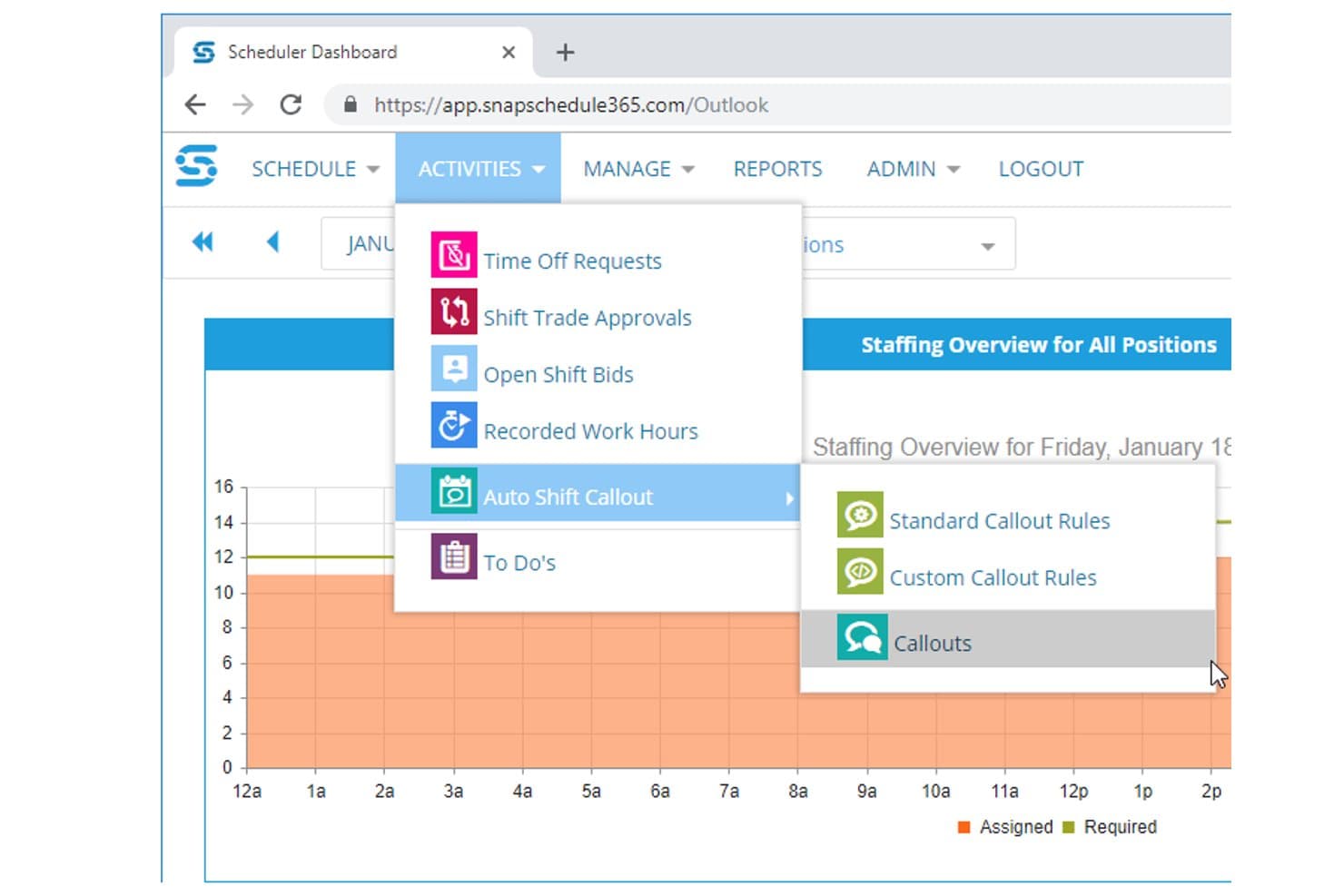
Snap Schedule automates shift callouts with custom scheduling rules. Snap Schedule is a cross-industry shift scheduling platform with dedicated fire department support, offering shift rotation management, automated callout workflows, certification tracking, time-off management, and labor compliance tools across both cloud and on-premise deployments.
Who Is Snap Schedule Best For?
Snap Schedule is a strong fit for municipal fire departments that need on-premise deployment options and highly configurable, rules-based callback automation to match union contract requirements.
Why I Picked Snap Schedule
Snap Schedule earns its spot on my shortlist because it's one of the few platforms that offers a genuine on-premise deployment option alongside its cloud product, which matters for departments with strict data sovereignty requirements. I particularly like its automated callout engine, which lets you encode your actual CBA language, including seniority ordering, overtime equalization, and mandatory recall escalation, directly into the system. That level of configurability means a department running a 48/96 rotation can automate a callback list that would otherwise take a supervisor an hour to work through manually.
Snap Schedule Key Features
- Skill and certification tracking: Maintains centralized certification records with expiration alerts and ties qualifications directly to scheduling eligibility for specialized roles.
- Mobile self-service app: Lets employees view schedules, submit PTO requests, bid on open shifts, and punch in/out via iOS or Android with GPS/geofencing support.
- Compliance and labor management: Enforces union rules like overtime limits, rest periods, and shift-length caps, with real-time alerts when a schedule would breach a configured threshold.
- Shift trade and bidding workflows: Lets employees initiate shift trades, giveaways, and open-shift bids through the portal, with configurable manager approval rules built in.
Snap Schedule Integrations
Snap Schedule doesn't have native integrations with ADP Workforce Now, Workday, or SAP. It supports file exports and custom connections through its documented Snap Schedule 365 v2 API.
Pros and Cons
Pros:
- On-premise deployment supports departmental control
- Certifications restrict specialized shift assignments
- Contract-driven callback rules with audit trails
Cons:
- Interface feels dated to reviewers
- Generalist terminology misses apparatus-specific workflows
Learn more about Snap Schedule: Best for automatic emergency shift filling
- Free demo available
- Pricing upon request

Vector Scheduling automates fire department shifts and staffing alerts. Vector Scheduling is a cloud-based fire department scheduling software that provides automated shift scheduling, dynamic roster management, real-time notifications, and configurable staffing rules for first responder teams.
Who Is Vector Scheduling Best For?
Vector Scheduling is a strong match for medium-to-large fire departments and EMS agencies that need automated shift management and configurable staffing rules.
Why I Picked Vector Scheduling
Vector Scheduling earns its spot as one of the best on my shortlist because I can automate complex staffing workflows by applying custom rules for roles, skills, and minimum staffing levels. It’s truly best for automated rule-based staffing workflows.
Vector Scheduling Key Features
- Real-time notifications: Instantly alert staff to shift changes or open assignments via SMS, email, or app push notifications.
- Mobile app access: Enable team members to view schedules, make requests, and receive updates from any device.
- Time-off request workflow: Let staff submit, track, and manage leave requests directly within the platform.
- Overtime tracking: Automatically log and report overtime for each user, aligning with department policies and payroll needs.
Vector Scheduling Integrations
Integrations include ImageTrend and Emergency Reporting.
Pros and Cons
Pros:
- Sends instant callback alerts to fill gaps
- Real-time notifications for staffing changes
- Enforces minimum staffing automatically
Cons:
- Lacks advanced human resources management features
- Occasional delays for reported time-off request approvals
Learn more about Vector Scheduling: Best for all-in-one incident and staffing management
- Free demo available
- Pricing upon request

First Due offers a vacation bidding calendar, roster, round tracking, and bid status. First Due is a fire department scheduling and personnel management platform that brings together incident tracking, time-off management, overtime, certifications, and live response data in one system.
Who Is First Due Best For?
First Due fits mid-sized and larger public safety agencies that want scheduling, incident reporting, and response tracking in one integrated suite.
Why I Picked First Due
I picked First Due as one of the best because I can coordinate staff schedules, track live incident data, and manage certifications within a single platform. I rely on its native integration between personnel availability and incident management for real-time deployment decisions.
First Due Key Features
- Automated shift notifications: Send alerts for shift assignments and changes via mobile and web.
- Time-off request workflows: Let team members request time off through configurable approval flows.
- Overtime management: Tracks and manages overtime eligibility, assignments, and records.
- Certification tracking: Monitors expiring, current, and required certifications for personnel.
First Due Integrations
Integrations include Pulsara, Hexagon, Esri, CentralSquare, GeoComm, OneDose, CRG, TargetSolutions, Action Training Systems, and E-9 Corporation.
Pros and Cons
Pros:
- Automatically generates pre-filled fire incident reports
- Links fire inspections to staff schedules
- Built-in incident management alongside scheduling
Cons:
- Lacks global contact syncing
- Requires frequent updates
Learn more about First Due: Best for compliance with complex shift laws
- 30-day free trial available
- From $6/user/month

Hero Schedule manages fire crew scheduling, overtime, and payroll exports. Hero Schedule is a cloud-based fire department scheduling software designed to handle crew scheduling, time-off requests, overtime management, payroll exports, event tracking, and custom shift rules.
Who Is Hero Schedule Best For?
Hero Schedule suits U.S.-based fire departments that need to manage labour laws and complex union agreements across multi-shift, around-the-clock operations.
Why I Picked Hero Schedule
I picked Hero Schedule as one of the best because I can set up shift structures that reflect complex labour and union rules. The tool lets me automate rule-based overtime, rest periods, and FLSA compliance right when building schedules.
Hero Schedule Key Features
- Shift swap approvals: Let admins review and approve swap requests from a single dashboard.
- Mobile notifications: Send real-time mobile alerts for schedule changes and time-off.
- Payroll export tools: Prepares pay data for upload to payroll software.
- Event calendar: Tracks training, meetings, and department events alongside schedules.
Hero Schedule Integrations
Supports custom integrations through APIs.
Pros and Cons
Pros:
- Unlimited custom shift templates
- Displays average weekly workload for shift bidding
- Calculates overtime based on FLSA rules
Cons:
- No built-in vehicle tracking
- No native individual performance tracking
Learn more about Hero Schedule: Best for detailed audit trails and reporting
- Free demo available
- Pricing upon request
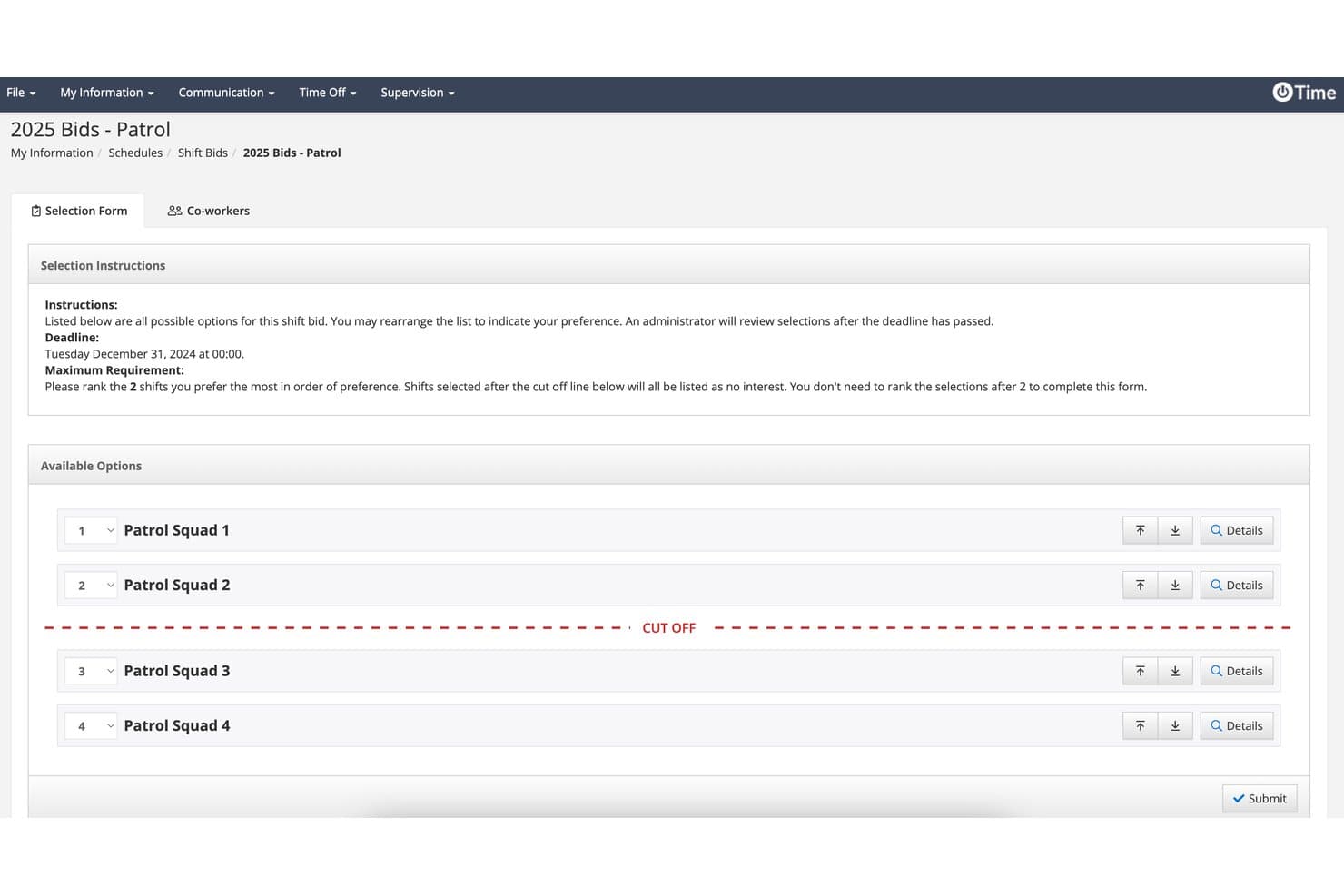
PowerTime lets firefighters rank shift preferences via a structured bid form. PowerTime is a public-safety-focused scheduling and workforce management platform that handles rotating shift patterns, overtime tracking, timesheets, leave management, and minimum staffing enforcement across multiple stations and apparatus.
Who Is PowerTime Best For?
PowerTime is a strong fit for fire chiefs and municipal workforce coordinators who need ironclad audit trails and defensible records of every scheduling decision.
Why I Picked PowerTime
PowerTime earns its spot on my shortlist because of how seriously it treats audit trails. Every schedule change, approval, and override is time-stamped and logged in an uneditable record, which matters when a grievance gets filed or a union arbitration requires you to prove who approved what and when. I also like that overtime sign-ups are time-stamped the moment a firefighter submits them, creating a defensible equalization record without any manual tracking. Pair that with 200-plus configurable reports, and you have a real paper trail.
PowerTime Key Features
- Rotating shift templates: Supports pre-built and custom templates for 24/48, 48/96, Kelly Day, and platoon rotations across multiple stations and apparatus.
- Mobile schedule access: Native iOS and Android apps let firefighters view schedules, request time off, swap shifts, and sign up for open shifts from anywhere.
- Minimum staffing enforcement: Real-time alerts notify supervisors when coverage drops below required levels and automatically post open shifts for personnel to request.
- Fatigue management rules: Automated rest-rule enforcement blocks scheduling that would put personnel below minimum rest thresholds between shifts.
PowerTime Integrations
PowerTime has documented integrations with PowerDMS Policy Management, Accreditation Management, Training Management, PowerReady, and PowerDetails. Payroll exports are supported, but named payroll, CAD, RMS, and NFIRS integrations aren't documented.
Pros and Cons
Pros:
- Time-stamped overtime sign-ups support fairness
- Handles complex firefighter rotation patterns
- Detailed audit trails support grievance defense
Cons:
- PowerTime-specific review volume remains limited
- Certification tracking requires separate modules
Learn more about PowerTime: Best for enterprise-grade public sector integration
- Free demo available
- Pricing upon request

UKG TeleStaff automates fire scheduling, leave, and compliance. UKG TeleStaff is a fire department scheduling and workforce management platform designed for public sector agencies, offering automated shift assignments, leave management, and compliance tracking.
Who Is UKG TeleStaff Best For?
Large public sector fire departments and EMS agencies need automated, policy-driven scheduling and strong integration with HR or payroll systems.
Why I Picked UKG TeleStaff
I picked UKG TeleStaff because I can sync scheduling with payroll and HR databases, apply union and agency rules automatically, and handle multi-location public sector workforce management at enterprise scale.
UKG TeleStaff Key Features
- Automated shift bidding: Let personnel submit shift preferences digitally.
- Credential tracking: Monitor firefighter certifications and renewal dates.
- Real-time roster updates: Instantly reflect schedule changes for all staff.
- Vacation and leave management: Enable staff to request and view time off securely.
UKG TeleStaff Integrations
Integrations include NetSuite, Equifax, Salesforce, Cornerstone, Deltek, Microsoft, QuickBooks, Concur, Jobvite, and IBM.
Pros and Cons
Pros:
- Auto-fills vacancies using seniority-based rules
- Applies union and agency rules automatically
- Syncs scheduling with HR databases
Cons:
- Lacks custom report builder
- High initial training time for admins
Learn more about UKG TeleStaff: Best for scalable use across department sizes
- Free trial available
- Pricing upon request

FireRoster shows a shift calendar and mobile dashboard for schedules and assignments. FireRoster is a cloud-based fire department scheduling software that supports automated shift management, crew availability tracking, event scheduling, time off requests, and compliance reporting.
Who Is FireRoster Best For?
FireRoster is a fit for fire departments and emergency services teams of any size that need flexible scheduling and real-time crew oversight.
Why I Picked FireRoster
I picked FireRoster because I can set up scheduling rules for small or multi-station departments, view and manage shift swaps in real time, and customize communications for shifting needs—making it work for agencies of any size.
FireRoster Key Features
- Automated overtime management: Tracks, calculates, and displays eligible overtime for each firefighter.
- Personnel skills tracking: Keeps records of individual certifications and qualification expirations.
- Time off and leave workflow: Let staff submit, approve, and manage leave within the app.
- Incident mapping integration: Attaches incident locations and mapping data to event records.
FireRoster Integrations
Supports custom integrations through APIs.
Pros and Cons
Pros:
- Updates digital station boards in real time
- Sorts daily personnel by assigned unit
- Displays live station rosters on dashboards
Cons:
- Requires manual data entry for external payroll
- No offline access for mobile users
Learn more about FireRoster: Best for rank-based position filling
- Free trial + free demo available
- From $50/user/year

Firehouse247 offers a daily schedule log, assignments, and vacancy status. Firehouse247 is a cloud-based fire department scheduling solution that brings together crew scheduling, resource coverage, accountability tracking, mobile access, and on-call shift management in one platform.
Who Is Firehouse247 Best For?
Firehouse247 suits fire departments that need granular rank-based scheduling tools to manage roles, positions, and coverage for career and volunteer crews.
Why I Picked Firehouse247
I picked Firehouse247 because I can quickly assign open shifts based on rank, seniority, or qualifications and automatically fill positions for both career and volunteer crews. The system makes it easy for my team to maintain rank coverage and compliance.
Firehouse247 Key Features
- Time off requests: Let staff submit and track leave requests online.
- Mobile app access: Schedule management and alerts are available from any device.
- Firefighter availability tracking: View and update who is available or unavailable for shifts in real time.
- Duty status notifications: Sends instant notifications for shift changes and assignments.
Firehouse247 Integrations
Integrations include CAD, Payroll, RMS, EMS, and NFIRS.
Pros and Cons
Pros:
- Automated assignments cover both rank and qualification
- Flags expired gear inspections alongside training
- Real-time tracking of firefighter availabilityFlags expired gear inspections alongside training
Cons:
- No built-in equipment maintenance tracking
- Interface lacks a dark mode option
Learn more about Firehouse247:
Diğer İtfaiye Departmanı Çizelgeleme Yazılımları
Kısa listeme girmeyen ancak yine de göz atmaya değer bazı ek itfaiye departmanı çizelgeleme yazılımı seçenekleri şunlardır:
- 11When I WorkBest for real-time multi-site coordination
- 12ParimBest for mobile-first open shift filling
- 13DeputyBest for AI-optimized labour cost control
- 14ConnecteamBest for quick self-service onboarding
- 15ESOBest for integrated certification tracking
- 16ImageTrendBest for incident data integration
- 17D4HBest for customizable emergency features
- 18eScheduleBest for mixed volunteer staffing
- 19Pace SchedulerBest for in-app shift bidding workflows
- 20VCSBest for integrated payroll with scheduling
How I Evaluate Fire Department Scheduling Software
I split my evaluation into baseline criteria—like platoon rotation support and FLSA 7(k) compliance—and differentiators that set one tool apart from another.
Core Functionality (Table Stakes For This List)
When I'm selecting tools for my list, I rank each one on a scale from 0 (does not offer the functionality) to 5 (excels in this area) for each core functionality listed below. Then, I calculate the tool's total score into a percentage. Each tool needs to achieve a minimum total score of 55% to be considered for inclusion.
- Fire Shift Rotation Support: I check whether a platform can auto-generate platoon rotations like 24/48, 48/96, and Kelly Day cycles across multiple stations.
- Overtime & Callback Management: Equitable overtime distribution matters, so I look for automated callback lists that follow seniority and union equalization rules.
- Shift Trades & Time-Off Requests: Firefighters need to swap shifts and bid on vacation slots, so the tool should handle self-service requests with approval workflows.
- Minimum Staffing & Vacancy Fill: I evaluate how well each tool enforces daily minimums by rank and apparatus, and whether it flags or auto-fills open slots.
- Certification & Training Tracking: Expiring EMT or hazmat certifications affect who's eligible to work, so I look for tools that tie cert status to scheduling.
- Payroll & FLSA Compliance: Fire departments operate under FLSA 7(k) work periods, and I check that the tool calculates overtime accruals and exports payroll data accordingly.
Once I have a list of tools that meet the criteria, I consider what sets each platform apart.
Differentiating Factors (What Sets Vendors Apart)
Here's how I compare and contrast different vendors:
Standout Features
An automated callback engine saves hours when a firefighter calls in sick at 2 a.m.—tools that auto-dial or text off-duty personnel in rank order until the slot fills are a clear step up from manual phone trees. I also look for a union contract rule engine that lets you codify seniority tiers and equalization formulas without custom development. A strong mobile app matters too, since crews need to view schedules, accept overtime, and submit trade requests from anywhere on shift.
Beyond Features
I evaluate whether a vendor specializes in public safety or just bolts fire scheduling onto a generic workforce tool. A vendor with deep fire service roots understands platoon structures and rank hierarchies out of the box. Integrations also matter—the platform should connect with municipal payroll systems and CAD/RMS platforms like ESO or ImageTrend so data flows without manual re-entry. Pricing flexibility is another factor I consider, since a three-person volunteer department and a 500-member metro agency need very different contract structures.
İtfaiye Departmanı Çizelgeleme Yazılımı Nasıl Seçilir?
Uzun özellik listeleri ve karmaşık fiyatlandırma yapıları içinde kaybolmak kolaydır. Özel yazılım seçimi sürecinizde ilerlerken odaklanmanıza yardımcı olmak için göz önünde bulundurmanız gereken faktörleri içeren bir kontrol listesi hazırladım:
| Faktör | Göz Önünde Bulundurulması Gerekenler |
| Ölçeklenebilirlik | Yazılım, departmanınız büyüdükçe ihtiyaçlarınızı karşılayabilecek mi? Kullanıcı, konum ve çizelge hacmi sınırlarını kontrol edin. |
| Entegrasyonlar | Hâlihazırda kullandığınız bordro, olay raporlama veya İK sistemlerine bağlanıyor mu? Yerel entegrasyonları doğrulayın. |
| Özelleştirilebilirlik | Çizelgeler, roller ve bildirimler departmanınızın politikalarına ve sendika kurallarına göre uyarlanabiliyor mu? |
| Kullanım kolaylığı | Ekibiniz yazılımı hızla benimseyecek mi? Arayüzün herkes için sezgisel olup olmadığını görmek üzere uygulamalı demoları deneyin. |
| Uygulama ve işe alıştırma | Sistemi kullanıma hazır hâle getirmek ne kadar sürecek? Veri aktarımı desteği, eğitim kaynakları ve kurulum adımları hakkında bilgi isteyin. |
| Maliyet | Fiyatlandırma kademeleri şeffaf ve öngörülebilir mi? İleride ihtiyaç duyabileceğiniz özellikler için ek ücret olup olmadığına bakın. |
| Güvenlik önlemleri | Platform, vardiya verilerini ve kişisel bilgileri şifreleme, denetim kayıtları ve erişim denetimleriyle koruyor mu? |
| Destek erişilebilirliği | Vardiya acil durumları ortaya çıktığında gerçek zamanlı yardım mevcut mu? Destek saatlerini, yanıt sürelerini ve üst kademeye aktarma sürecini doğrulayın. |
İtfaiye Departmanı Çizelgeleme Yazılımı Nedir?
İtfaiye departmanı çizelgeleme yazılımı; ekip çizelgelemesini otomatikleştiren, vardiya atamalarını yöneten, sertifikaları takip eden ve itfaiye departmanları için izin taleplerini izleyen dijital bir araçtır. Hem profesyonel hem de gönüllü ekipler için uygun personel sayısının korunmasına, departman politikalarına uyulmasına ve ekip üyeleri arasındaki iletişimin geliştirilmesine yardımcı olur.
Özellikler
İtfaiye departmanı çizelgeleme yazılımı seçerken aşağıdaki temel özelliklere dikkat edin:
- Vardiya planlama otomasyonu: Dönerli, sabit veya özel programlar oluşturmanıza ve tüm personel için yinelenen ve anlık vardiyaları otomatik olarak yönetmenize olanak tanır.
- Uygunluk takibi: Ekip üyelerinin uygunluklarını önceden bildirmesine olanak tanıyarak vardiyaları doldurmayı ve planlama çakışmalarını azaltmayı kolaylaştırır.
- Vardiya değişimi yönetimi: Departman kurallarına ve personel ihtiyacına uygunluğu korurken, çalışanlar arası veya yönetici onaylı vardiya değişimlerini destekler.
- İzin talebi yönetimi: Personelin yıllık izin, hastalık izni veya diğer devamsızlık türleri için talepte bulunması, talepleri takip etmesi ve onaylaması amacıyla bir iş akışı sunar.
- Rütbe ve yeterlilik kontrolleri: Sertifikalara veya kıdeme dayalı olarak yalnızca nitelikli ya da rütbesi uygun personelin belirli pozisyonlara veya kritik vardiyalara atanmasını sağlar.
- Gerçek zamanlı bildirimler: Açık vardiyalar, program değişiklikleri ve acil personel ihtiyaçları hakkında mobil uygulama, kısa mesaj veya e-posta aracılığıyla önemli uyarılar gönderir.
- Raporlama ve analiz: Yönetimin incelemesi ve denetimler için planlama düzenleri, fazla mesai, devam durumu ve uygunluk hakkında ayrıntılı raporlar oluşturur.
- Mobil erişim: Hem yöneticilere hem de personele programları görüntüleme ve yönetme, talepler gönderme ve herhangi bir cihazdan uyarı alma olanağı sağlar.
- Yetkinlik ve sertifika takibi: Personel lisanslarını ve sertifikalarını izler, yenileme gerektiğinde veya gereklilikler değiştiğinde uyarı gönderir.
- Uygunluk güvenceleri: Planlamanın iş kanunlarına, sözleşme yükümlülüklerine ve departman düzenlemelerine uygun olmasını sağlamaya yardımcı olur.
Faydalar
İtfaiye departmanı vardiya planlama yazılımını uygulamak, ekibiniz ve işletmeniz için çeşitli faydalar sağlar. Yararlanabileceğiniz bazı faydalar şunlardır:
- İyileştirilmiş vardiya kapsamı: Otomatik planlama, her vardiyaya her zaman doğru personelin atanmasını sağlamaya yardımcı olur ve manuel eksiklikleri azaltır.
- Daha hızlı vardiya doldurma: Uygunluk takibi ve mobil bildirimler, son dakika değişikliklerinde bile açık vardiyaların hızla doldurulmasına yardımcı olur.
- Daha yüksek uygunluk güvencesi: Yerleşik kontroller, iş kanunlarına, sendika sözleşmelerine ve departman kurallarına uygunluğun korunmasına yardımcı olur.
- Azaltılmış idari iş yükü: Vardiya değişimleri, izin talepleri ve fazla mesai için otomatik iş akışları, manuel planlama görevlerine harcanan zamanı azaltır.
- Daha net iletişim: Gerçek zamanlı uyarılar ve mobil erişim, herkesi program değişiklikleri, görevlendirmeler ve acil personel ihtiyaçları hakkında bilgilendirir.
- Daha iyi yetkinlik yönetimi: Sertifika takibi, yalnızca gerekli pozisyonlara nitelikli personel atamanıza yardımcı olur ve kayıtları güncel tutar.
- Uygulanabilir veri içgörüleri: Raporlama ve analiz, yönetime kaynak planlaması, bütçe yönetimi ve uygunluk denetimleri için değerli bilgiler sunar.
Maliyetler ve Fiyatlandırma
İtfaiye departmanı vardiya planlama yazılımı seçimi, mevcut çeşitli fiyatlandırma modellerinin ve planların anlaşılmasını gerektirir. Maliyetler özelliklere, ekip büyüklüğüne, eklentilere ve diğer unsurlara göre değişir. Manuel bir elektronik tablodan dijital bir zaman saatine geçmek, daha iyi bir kullanıcı deneyimi sunarak çalışanların elde tutulmasını ve personel refahını iyileştirebilir. Aşağıdaki tablo, itfaiye departmanı vardiya planlama yazılımı çözümlerinde yaygın planları, bunların ortalama fiyatlarını ve genellikle sunulan özellikleri özetlemektedir:
Plan Karşılaştırma Tablosu
| Plan Türü | Ortalama Fiyat | Yaygın Özellikler |
| Ücretsiz Plan | $0 | Temel vardiya planlama, sınırlı kullanıcı sayısı, mobil erişim ve basit raporlama. |
| Kişisel Plan | $5-$15/kullanıcı/ay | Vardiya değişimleri, izin talepleri, mobil bildirimler ve temel uygunluk takibi. |
| İşletme Planı | $20-$40/kullanıcı/ay | Gelişmiş planlama, yetkinlik takibi, fazla mesai yönetimi, raporlama araçları ve role dayalı görevlendirmeler. |
| Kurumsal Plan | $40-$80/kullanıcı/ay | Özel iş akışları, API erişimi, uygunluk özellikleri, özel destek, öncelikli başlangıç ve gelişmiş analiz. |
İtfaiye Teşkilatı Vardiya Planlama Yazılımı SSS
İtfaiye teşkilatı vardiya planlama yazılımı hakkında sık sorulan soruların bazı yanıtları:
İtfaiye teşkilatı vardiya planlama yazılımı 7/24 kapsama alanını nasıl yönetir?
İtfaiye teşkilatı vardiya planlama yazılımı, kesintisiz kapsama alanının korunmasına yardımcı olan otomatik, dönüşümlü veya sabit vardiya düzenleri oluşturur. Fazla mesai ve çağrı üzerine göreve dönüş için gelişmiş kurallar belirleyebilir, karmaşık veya birden fazla istasyonlu operasyonlarda bile her vardiyaya her zaman nitelikli personelin atanmasını sağlayabilirsiniz. Doğru yönetim sistemi, uzun vardiyalar için çalışan planlamasını nasıl yaptığınızı optimize edebilir.
İtfaiye teşkilatı vardiya planlama yazılımı sertifikaları ve eğitimleri takip edebilir mi?
Evet, çoğu çözüm süresi dolan sertifikalar ve eğitim kayıtları için yükleme yapmanıza, izleme gerçekleştirmenize ve uyarılar ayarlamanıza olanak tanır. Bu, gerekli pozisyonlara yalnızca uygun niteliklere sahip personeli atamanıza ve denetimlere veya uygunluk kontrollerine hazırlıklı olmanıza yardımcı olur. Bu eğitim saatleri birikimlerini yönetmek, yangından korunma standartlarının her zaman karşılanmasını sağlar.
Vardiya planlama yazılımını bordro veya olay raporlama sistemleriyle entegre etmek mümkün mü?
Evet, birçok platform vardiya planlama verilerini bordro yazılımı ve olay raporlama araçlarıyla senkronize etmek için yerleşik entegrasyonlar veya API erişimi sunar. Bu, zaman takibini kolaylaştırır ve manuel veri girişini azaltarak zamandan tasarruf edilmesine yardımcı olur. Bir karar vermeden önce mevcut sistemlerinizle uyumluluğu mutlaka doğrulayın.
Tedarikçilerden ne tür bir destek beklemeliyim?
Canlı sohbet, e-posta ve doğrudan telefon numarası gibi birden fazla destek kanalının yanı sıra kapsamlı bir SSS bölümü beklemelisiniz. Yanıt sürelerini, acil durum müdahalesi için 7/24 destek olanağını ve işe alıştırma ile sorun giderme kaynaklarını sorun.
Bu araçlar hem gönüllü hem de profesyonel itfaiye teşkilatlarında çalışır mı?
Evet, itfaiye teşkilatı vardiya planlama yazılımı hem gönüllü hem de profesyonel teşkilatlar tarafından kullanılabilir. Çoğu platform farklı personel modelleri oluşturmanıza, değişen uygunluk düzeylerini yönetmenize ve gerektiğinde izinleri veya rolleri özelleştirmenize olanak tanır.