

Ekibinizi organize etmek ve çizelgeleri düzenli tutmak gerçekten baş ağrıtıcı olabilir. Vardiyalarla uğraşmak, uygunluk durumlarını yönetmek ve herkesin aynı sayfada olmasını sağlamak zaman ve çaba gerektirir. İşte çevrim içi çalışan çizelgeleme yazılımları bu noktada işe yarar. Bu yazılımlar hayatınızı kolaylaştırmak ve ekibinizin sorunsuz çalışmasını sağlamak için tasarlanmıştır.
Deneyimlerime göre doğru araçlara sahip olmak, çizelgeleme zorluklarını ele alma biçiminizi değiştirebilir. İhtiyaçlarınıza en uygun seçeneği bulmanıza yardımcı olmak için çeşitli seçenekleri test edip inceledim. Özellikleri ve avantajları hakkında bilgilerle birlikte en iyi seçimlerime tarafsız bir bakış elde edeceksiniz.
Okumaya devam ederken hangi yazılım çözümlerinin sizin ve ekibiniz için gerçekten fark yaratabileceğini keşfedeceksiniz.
Why Trust Our Software Recommendations
6,700+
Reviews
20
Industry experts
16+
Evaluation factors
14
Years
Our team has been testing and reviewing software since 2012. As HR experts ourselves, we know how difficult—and important—it is to choose the right software.
For this guide, we evaluated tools using hands-on testing and independent research, scoring tools using our selection criteria. We also draw on insights from industry thought leaders and practicing HR experts.
Our reviews reflect our human editorial judgment, not a sales pitch.
Expert reviewers:
- Phil GrayCOO
 Kim BehnkeHR Tech Editor & Analyst
 Josh BarkerPeople Ops Manager

Çevrim İçi Çalışan Çizelgeleme Yazılımları Karşılaştırma Tablosu
Bu karşılaştırma tablosu, en iyi çevrim içi çalışan çizelgeleme yazılımı seçimlerim için fiyatlandırma ayrıntılarını özetlemektedir:
Sorted by: Default
| Tool | Starting Price | Website | |
|---|---|---|---|
Best for deskless workers that needs shift information accessible | 4.6 out of 5 | Pricing upon request Free plan + 14-day free trial available | Website |
Best for creating timesheets to integrate with payroll | 4.4 out of 5 | $8/user/month Free trial + Free demo available | Website |
Best custom workflows for team scheduling | 4.6 out of 5 | $9/user/month Free plan + 14-day trial available | Book Demo |
Best for AI-driven labor forecasting | 4.7 out of 5 | $5/user/month Free trial + free demo available | Website |
Best if you need a complete online HR platform | 4.2 out of 5 | $99/month Free plan + 30-day free trial + free demo available | Website |
Best online time clock with scheduling | 4.8 out of 5 | $4.99/user/month 14-day free trial + free demo available | Website |
Best for shift-based SMBs in Canada | 4.8 out of 5 | $3.50/user/month 21-day free trial + free demo available | Website |
Best for restaurants | 4.7 out of 5 | $44.99/month Free plan + 14-day free trial + free demo available | Website |
Best for field service or construction business | 4.7 out of 5 | $40/month 14-day free trial + free demo available | Website |
Best for absence management | 4.7 out of 5 | Pricing upon request Free demo available | Website |


En İyi Çevrim İçi Çalışan Çizelgeleme Yazılımı İncelemeleri
Sırada, en iyi 10 listeme giren her bir çevrim içi çalışan çizelgeleme yazılımının kısa bir özeti var. En sevdiğim 10 seçenek için, her birinin en iyi yaptığı işi açıkladım ve özelliklerini uygulamada göstermek amacıyla her birinin ekran görüntüsünü ekledim. Ayrıca, değerlendirebileceğiniz daha da fazla seçenek isterseniz aşağıda 20 ek seçenek bulunuyor.
 Best for deskless workers that needs shift information accessible
- Free plan + 14-day free trial available
- Pricing upon request
Visit WebsiteCustomer Rating:4.6/5
Connecteam's mobile app keeps users updated on their assigned shifts. Need more than just staff scheduling software? Connecteam is a complete work management platform managers from all types of industries use to handle their daily operations, scheduling, internal communications, and employee training.
Their time tracking capabilities extend to geofencing which ensures your team is in the right place and won’t clock out when away from the designated work site. Digital forms, checklists, and push notifications or reminders are bonus points that make it a good choice for “deskless” workers.
Integrations include Paychex, Xero, Gusto, QuickBooks Payroll (online + desktop), Zapier, Google Calendar, API access, and others.
Learn more about Connecteam: Best for creating timesheets to integrate with payroll
- Free trial + Free demo available
- From $8/user/month
Visit WebsiteCustomer Rating:4.4/5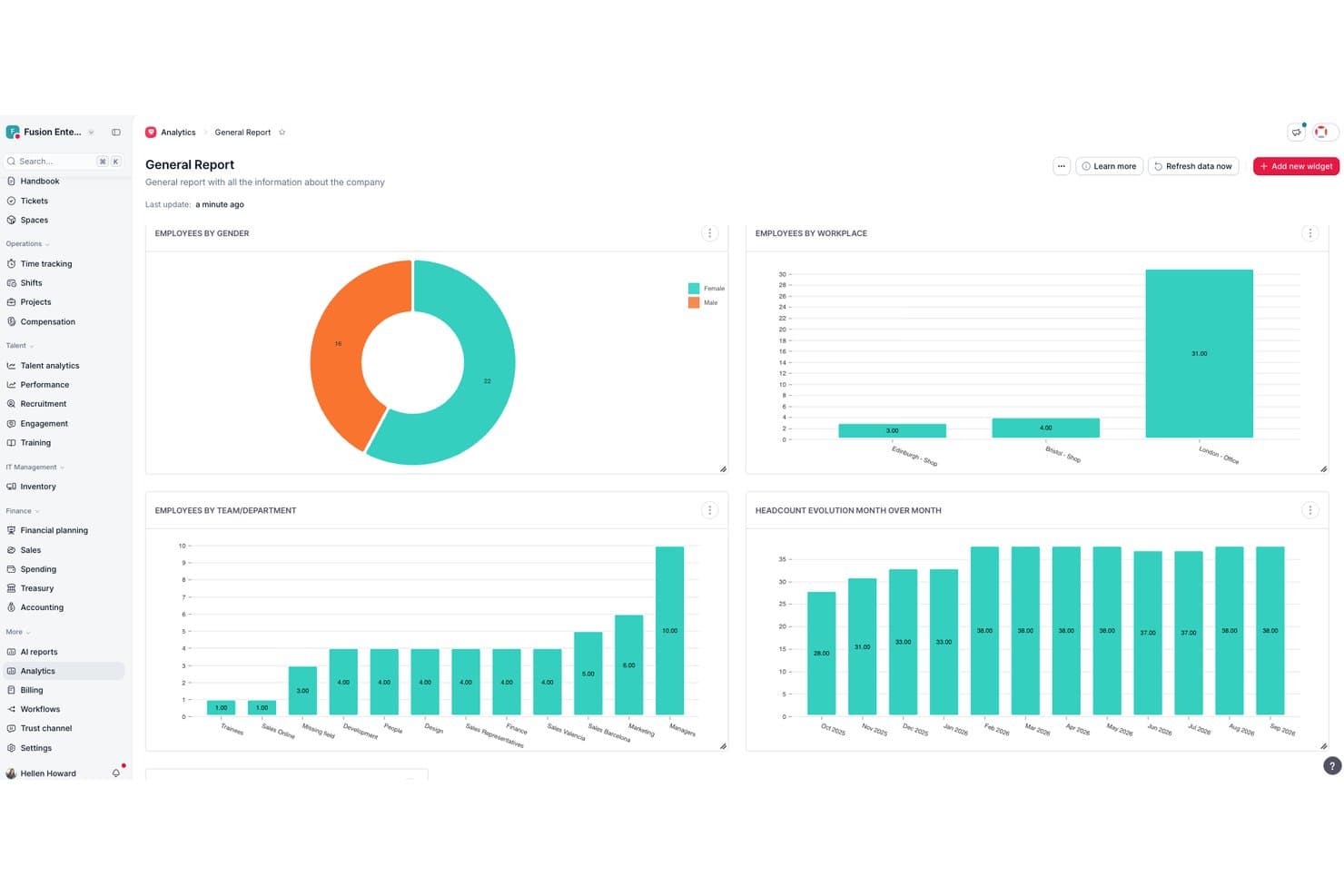
Factorial centralizes HR analytics into visual workforce reports. Factorial is an online software that's all about helping businesses manage their workforce in a more efficient manner. I picked Factorial because, let's face it, scheduling can be a real pain. I was looking for something that could simplify the process and help me keep track of who's doing what and when. Factorial seemed to tick all the boxes. It's easy to use, it's got a bunch of cool features, and it's designed specifically for businesses of any size.
What really makes Factorial stand out from the crowd are its features. It's got this awesome calendar view that lets you see your entire team's schedule at a glance. You can easily add shifts, assign tasks, and even set reminders. Plus, it's got a time tracking feature that's super handy for keeping tabs on how much time everyone's spending on their tasks. But my absolute favorite feature has to be the absence management. It lets you manage all types of absences, from vacations to sick days, all in one place.
Factorial further distinguishes itself by prioritizing employee well-being through a dedicated module that allows employees to provide anonymous feedback, report concerns, and suggest improvements. This module provides a secure space for employees to express their opinions without fear of reprisal, fostering an open and transparent communication culture. It also includes sentiment analysis capabilities that help HR teams identify trends and address potential issues proactively.
Integrations include Sage, Gmail, Payflow, Dynamics 365, LinkedIn, TravelPerk, PowerBI, Indeed, Recruitee, Slack, and other.
 Best custom workflows for team scheduling
- Free plan + 14-day trial available
- From $9/user/month (billed annually)
Visit WebsiteCustomer Rating:4.6/5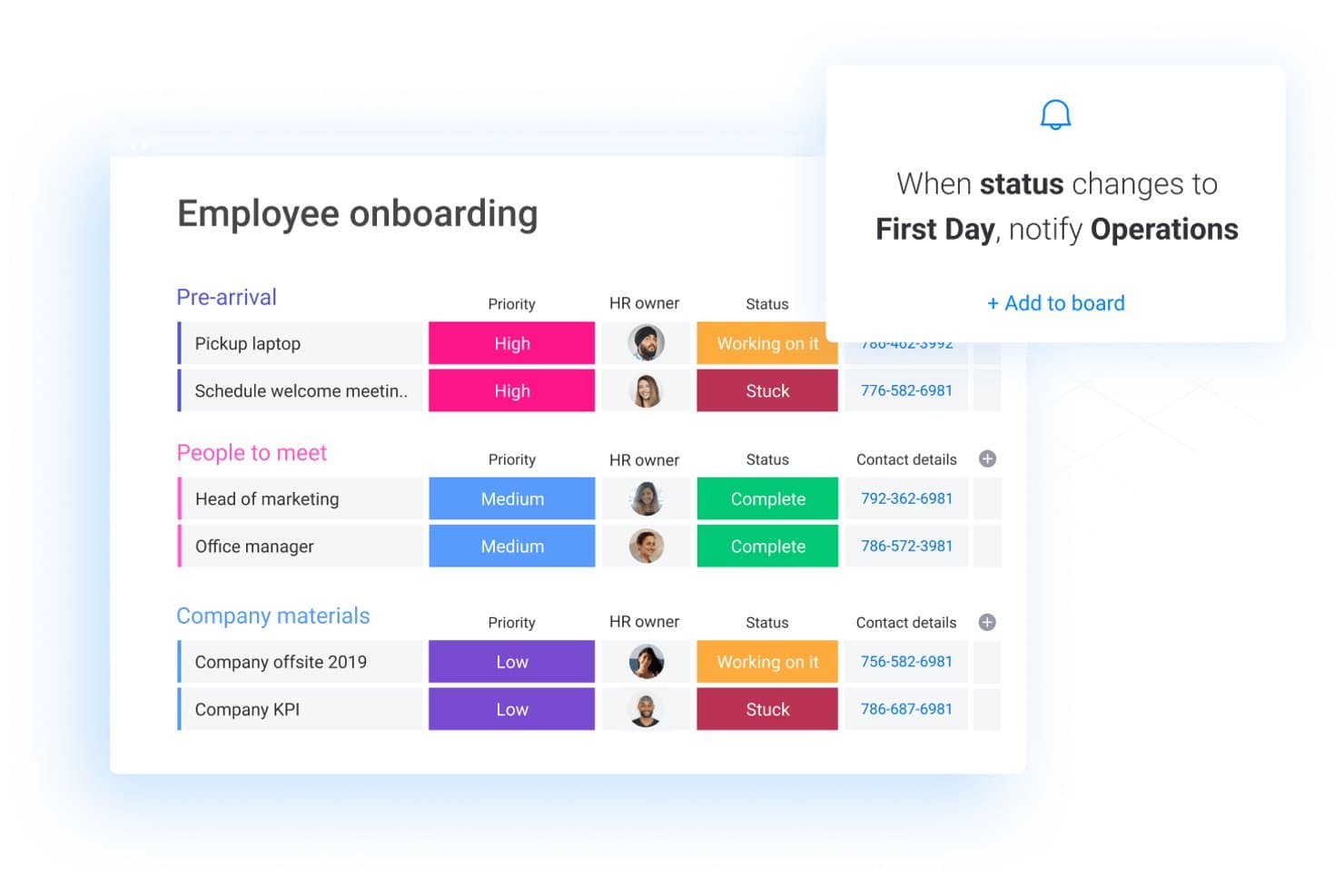
monday.com allows users to onboard new team members and create custom workflows for other employee management processes. monday AI Workspace is a customizable work management platform that lets teams build scheduling workflows, manage tasks and resources, automate processes, and coordinate work across projects using boards, timelines, and AI-powered tools.
Who Is monday AI Workspace Best For?
It's a strong fit for operations and project-based teams at mid-size to large organizations that need to build custom scheduling workflows across multiple departments.
Why I Picked monday AI Workspace
monday AI Workspace earns its spot on my shortlist because of how far you can take a custom scheduling workflow without writing a single line of code. I use the board-and-column system to build shift rosters that automatically notify team members when their assignments change, using automation triggers tied to status columns. What I find especially useful is layering the Timeline and Calendar views on the same board, so I can see coverage gaps and individual workloads side by side.
monday AI Workspace Key Features
- Resource management: Assign, balance, and view workloads for employees across projects using dashboard widgets and capacity tools.
- Automations builder: Set up custom triggers that automate schedule updates, notifications, and status changes across workflows.
- Time tracking column: Record hours spent on assigned tasks directly in boards for basic time logging and reconciliation.
- Calendar and timeline views: Visualize scheduled work, filter by team or individual, and compare overlapping assignments within an interactive calendar or Gantt interface.
monday AI Workspace Integrations
monday.com offers hundreds of integrations through its built-in integrations and marketplace, including tools like Slack, Salesforce, HubSpot, Google Workspace, Microsoft Teams, and Zoom. It also supports Zapier and provides an API for custom integrations.
Pros and Cons
Pros:
- Strong automation tools reduce manual scheduling tasks
- Flexible board views for visualizing team coverage
- Highly customizable shift scheduling workflow builder
Cons:
- Limited native shift swap and availability features
- No built-in labor compliance or rules engine
Learn more about monday AI Workspace: Best for AI-driven labor forecasting
- Free trial + free demo available
- From $5/user/month (billed annually)
Visit WebsiteCustomer Rating:4.7/5
Workforce.com gives managers and employees real-time scheduling, labor insights, and shift tools across desktop and mobile. Managing hourly teams becomes far more predictable when you have scheduling tools that respond to changing demand, and that’s where Workforce.com stands out. You get a system designed specifically for shift-based operations, giving your managers a clear view of staffing needs while helping your team stay organized and prepared for each day.
Why I Picked Workforce.com
I picked Workforce.com because of its AI-driven labor forecasting feature that predicts staffing needs based on sales and foot traffic, which is crucial for businesses facing fluctuating demand. This unique capability helps you optimize your workforce, reducing both overtime and understaffing. Additionally, its shift management tools allow employees to manage their availability and find replacements, minimizing disruption from last-minute call-outs. These features collectively address the core challenges of employee scheduling, making Workforce.com a valuable asset for any organization.
Workforce.com Key Features
I also found several other features that enhance its utility as a scheduling tool:
- Shift swapping and bidding: Allows employees to request replacements or bid on open shifts without manager micromanagement.
- Compliance alerts: Flags scheduling conflicts like overtime risks or break violations before the schedule is published.
- Time-off management: Connects approved leave requests directly to the schedule so you don’t miss gaps in coverage.
- Mobile employee app: Gives staff access to their schedules, shift updates, and notifications from their phones.
Workforce.com Integrations
Integrations include 401Go, Abacus, ADP, Azure, Clover, EduMe, Gusto, QuickBooks, Lightspeed, Paychex, Paycom, Square, Wokrday, Vend, and Xero.
Pros and Cons
Pros:
- Accurate pay calculations based on roles, rules, and hours
- Forecasting tools help align staffing with predicted demand
- Mobile app supports clock-ins, shift actions, and self-service
Cons:
- Some industries may require integrations not listed publicly
- Analytics depth may not match standalone BI platforms
Learn more about Workforce.com: Best if you need a complete online HR platform
- Free plan + 30-day free trial + free demo available
- From $99/month (billed annually)
Visit WebsiteCustomer Rating:4.2/5
Schedule employee tasks online from all devices and manage all work from a single tool. The Homebase team scheduling software is mainly used by small businesses such as small stores, beauty salons or fitness facilities, and other service providers. The platform provides an exhaustive set of features that let you run your HR tasks from start to finish, including hiring and onboarding, scheduling, time tracking, team communication, and more.
Its simplicity and vast array of functionalities have brought numerous distinctions such as “Top Rated Time Clock Software” by The Blueprint and a 5-star rating on QuickBooks Apps.
Homebase has a free plan you can use with an unlimited number of employees but fewer advanced features. This replaces a free trial.
 Best online time clock with scheduling
- 14-day free trial + free demo available
- From $4.99/user/month (billed annually)
Visit WebsiteCustomer Rating:4.8/5
Buddy Punch lets your employees view their current time-card and request time off right in the app. Buddy Punch is a web-based time clock and scheduling software. Your employees can view their current time card, request time off, submit a claim to correct a punch-in error, or even submit their time card for approval — all without ever leaving the Buddy Punch app. The interface has been built to ensure easy navigation and ease of use, with drag-and-drop schedule creation and the ability to create repeating/recurring shifts.
Buddy Punch’s key features work to keep your team accountable and honest. Through GPS tracking, you can stay on top of your staff’s location whenever they clock in/out of work. Some additional features include facial recognition and photos on punch, which run a biometric scan of your employees’ faces to verify who is attempting to punch in/out. In addition, Buddy Punch integrates with QuickBooks, ADP, Gusto, Paychex, Paylocity, PayPlus, SurePayroll, and Workday. With a Zapier account, you’ll have access to thousands of other apps and tools.
Buddy Punch costs from $3.49/user/month plus a $19/month base fee for their Standard time and attendance package. For enterprise organizations with over 200 employees, you can request a free quote. They also offer a 14-day free trial too.
Learn more about Buddy Punch: Best for shift-based SMBs in Canada
- 21-day free trial + free demo available
- From $3.50/user/month
Visit WebsiteCustomer Rating:4.8/5
Agendrix displays a color-coded weekly schedule with shift details, open slots, and time-off visibility, helping managers assign roles and avoid conflicts. Agendrix is a Canadian platform that helps small and mid-sized shift-based businesses manage staff schedules, time tracking, and employee communication. Its online employee scheduling software supports complex scheduling needs across locations, roles, and availability levels. The platform and mobile app offer bilingual support in English and French, making it an accessible tool for diverse teams.
I picked Agendrix because it’s built with the realities of shift-based work in mind, especially for small teams juggling variable availability. You can build schedules manually or let the system auto-fill them based on availability, time off, and workload settings. I like that it supports multiple locations and gives managers specific access permissions, which makes it more usable for growing teams. The mobile app is also solid—employees can check schedules, confirm shifts, or request changes without needing a desktop.
Additionally, managers can see if an employee has viewed an assigned shift and require shift confirmations, adding a layer of accountability. Agendrix also allows managers to attach task lists to shifts, helping ensure daily responsibilities are clear and trackable.
Automated shift scheduling, shift confirmation tracking, bilingual interface (English/French), task assignment per shift, multi-location scheduling, role and availability management, built-in team messaging, and e-documents for HR.
EmployerD, Nethris, Sage 50, Acomba, QuickBooks, Ceridian Powerpay, ADP Workforce Now, Payworks, Lightspeed, Azur, Easypay, BeLocum, Hopem, and Folks HR.
Learn more about Agendrix: Best for restaurants
- Free plan + 14-day free trial + free demo available
- From $44.99/month
Visit WebsiteCustomer Rating:4.7/5
Use the 7shifts data to maintain consistency throughout all locations and improve staff performance. Own a restaurant? 7shifts is the preferred solution for well-known brands like Five Guys or Sambo’s but small full-service restaurants make full use of it as well. The AI-based schedule builder supports automatic schedule building and optimization so you can meet demands in real-time.
Workers can notify managers of availability changes from the app to support a thorough bidirectional collaborative system. To sync your sales and labor data with wages, 7shifts integrates with dozens of top POS and payroll solutions.
Paid 7shifts plan $24.99/month/location but you can choose their 14-day trial or use the free plan for simple scheduling features.
Learn more about 7shifts: Best for field service or construction business
- 14-day free trial + free demo available
- From $40/month
Visit WebsiteCustomer Rating:4.7/5
ClockShark lets you build out an employee schedule calendar and then alert your team to any changes made via push notifications. ClockShark is an online employee scheduling software with timesheets and time tracking for field services and construction businesses. Employees can clock in and clock out from their smartphones and all job costing data is recorded within the app so you can access it for simple payroll and invoice processing. You have multiple options for employees to access ClockShark: by web browser, mobile app, or even a ClockShark "kiosk" using a tablet device. You can leverage facial recognition tools and individual PINs to ensure the utmost security no matter how you choose to access the software.
Crew management is simple with ClockShark's work scheduling calendar. You can create and assign shifts, color-code entries, and drag-and-drop items to make changes quickly. Notifications will prompt affected parties in real-time if their shift is altered in any way (canceled, shortened, swapped, etc.). ClockShark also has GPS and geofencing capabilities baked in so you can see where and when people are checking in.
Overall, ClockShark is a must-have online employee scheduling software for field service or construction businesses to streamline their timesheet-to-payroll workflows.
ClockShark integrates with QuickBooks, Sage 100 Contractor, Xero, ADP, Paychex, and other apps.
ClockShark costs from $7/user/month plus a $16/month base fee. They also offer a 14-day free trial.
Learn more about ClockShark: 10Best for absence management
edays
- Free demo available
- Pricing upon request
Visit WebsiteCustomer Rating:4.7/5
The edays dashboard shows employee leave entitlements and approval status in one centralized view. Navigating the complexities of employee scheduling can be a daunting task, but edays offers a solution tailored to meet the needs of businesses seeking efficiency in managing their workforce. Designed for organizations of all sizes, including those with a global reach, edays provides tools to handle various scheduling challenges, such as leave management and absence tracking. By offering a platform that integrates seamlessly with existing HR systems, edays addresses the need for a centralized approach to managing employee schedules, ultimately enhancing productivity and compliance across the board.
Why I Picked edays
I picked edays for its unique approach to online employee scheduling by focusing on comprehensive absence management. With features like customizable leave types and shared team calendars, edays allows you to manage complex scheduling scenarios effortlessly. The platform's ability to automate absence triggers and provide real-time insights into employee availability makes it a valuable tool for any organization looking to optimize its scheduling processes. In my view, the integration of these features with compliance tools ensures that your team can stay on top of both scheduling and regulatory requirements.
edays Key Features
In addition to its standout scheduling capabilities, edays offers several other features:
- Self-Service Holiday Booking: Employees can request leave conveniently through a web or mobile form.
- Entitlement Tracking: This feature allows you to monitor used, remaining, and pending leave entitlements.
- Public Holidays Import: Import over 200 regional public holidays or customize your own to fit your organizational needs.
- Time Off in Lieu (TOIL): Automatically track and request accrued overtime, providing flexibility in managing work hours.
edays Integrations
Integrations include SAP SuccessFactors, ADP, Workday, Microsoft Outlook, Google Calendar, Microsoft Teams, Slack, Xero, BambooHR, and Sage.
Pros and Cons
Pros:
- Global compliance and regional support
- Strong integrations with HR systems
- Robust absence and leave management
Cons:
- Reporting interface can feel cluttered
- Initial setup may feel complex
Learn more about edays:
Diğer Çevrim İçi Çalışan Çizelgeleme Yazılımları
İşte en iyi çevrim içi çalışan çizelgeleme yazılımları listesinin en üst sıralarında yer almayan ancak göz atmaya değer diğer uygulamalar:
- 11Bonsai Agency SoftwareBest for project-driven agencies
- 12UbeyaBest for AI-powered shift scheduling
- 13Sage HRBest for small and medium businesses
- 14eResource SchedulerBest for managing schedules, timesheets, and financials
- 15ShiftboardBest for highly regulated industries where you need to comply with diverse safety standards and labor laws
- 16ShiftbaseBest for easy shift scheduling
- 17Schedule360Best for healthcare providers
- 18InsightfulBest for shift scheduling with integrated employee monitoring
- 19Resource GuruBest for scheduling employees at agencies
- 20JustworksBest for managing a distributed workforce
- 21WrikeBest for companies looking resource scheduling with powerful project management features
- 22PaylocityBest for AI-driven scheduling efficiency
- 23TimeTrexBest for automated scheduling
- 24ParimBest for event & security scheduling
- 25TimeClock PlusBest for shift management
- 26BambooHRBest for managing employees throughout the whole life cycle
- 27Hub Planner by MilientBest for resource allocation and availability mapping
- 28When I WorkBest for employee shift scheduling and time tracking
- 29AladtecBest for rescue and law enforcement organizations
- 30WhenToWorkBest for a one-click smart scheduling process
How I Evaluate Online Employee Scheduling Software
I split my evaluation into two layers: the baseline any scheduling tool must cover—like shift building and mobile access—and the differentiators that separate a good fit from the right one.
Core Functionality (Table Stakes For This List)
When I'm selecting tools for my list, I rank each one on a scale from 0 (does not offer the functionality) to 5 (excels in this area) for each core functionality listed below. Then, I calculate the tool's total score into a percentage. Each tool needs to achieve a minimum total score of 65% to be considered for inclusion.
- Shift Schedule Creation: I look for drag-and-drop builders or template-based tools that let managers assign shifts by role, department, or location without rebuilding the week from scratch.
- Availability & Time-Off Management: Employees should be able to submit availability windows and PTO requests directly, and managers need clear approval workflows—especially for shift swap scenarios.
- Mobile Access for Employees: A native mobile app matters here because hourly and field staff rarely sit at a desk. I check whether employees can view schedules, pick up shifts, and get push alerts from their phones.
- Time & Attendance Tracking: Whether it's a built-in clock-in/out feature or a tight integration with a time tracking tool, I evaluate how well scheduled hours reconcile against actual hours worked.
- Labor Compliance Rules: I look at how the platform handles overtime thresholds, mandated break periods, and predictive scheduling laws—especially whether rules can be configured per region or role.
- Team Communication Tools: Schedule changes need to reach staff fast. I evaluate whether the tool offers in-app messaging, shift alerts, or announcement features that keep managers from chasing people through texts or emails.
Once I have a list of tools that meet the criteria, I consider what sets each platform apart.
Differentiating Factors (What Sets Vendors Apart)
Here's how I compare and contrast different vendors:
Standout Features
Demand-based forecasting is a big differentiator—I look at whether the tool pulls in sales or foot traffic data to suggest staffing levels instead of leaving managers to guess. Multi-location scheduling matters for teams that share staff across sites, and I evaluate how well a platform handles cross-location visibility without duplicate records. Open shift marketplaces are also worth considering because they let eligible employees claim unfilled shifts on their own, reducing the back-and-forth that comes with last-minute coverage.
Beyond Features
Payroll and HRIS integrations are high on my list—scheduling data needs to flow into systems like ADP, Gusto, or QuickBooks without manual exports. I also evaluate industry fit, since a tool built for hospitality workflows may not suit healthcare teams managing credentialed staff. Pricing structure matters too. I check whether per-user or per-location models scale fairly as headcount grows, especially for businesses adding new sites or seasonal staff.
Çevrim İçi Çalışan Çizelgeleme Yazılımı Nasıl Seçilir?
Uzun özellik listeleri ve karmaşık fiyatlandırma yapılarına kendinizi kaptırmanız kolaydır. Kendinize özgü yazılım seçimi sürecinizi yürütürken odağınızı korumanıza yardımcı olmak için göz önünde bulundurmanız gereken faktörlerin bir kontrol listesini burada bulabilirsiniz:
| Faktör | Nelere Dikkat Edilmeli? |
|---|---|
| FaktörÖlçeklenebilirlik | Nelere Dikkat Edilmeli?Yazılım ekibinizle birlikte büyüyebilir mi? Gelecekteki büyümeyi ve platformun daha fazla kullanıcıyı veya daha karmaşık çizelgeleme işlemlerini yönetip yönetemeyeceğini göz önünde bulundurun. |
| FaktörEntegrasyonlar | Nelere Dikkat Edilmeli?Bordro sistemleri veya iletişim platformları gibi mevcut araçlarınızla çalışıyor mu? Sistemler arasında sorunsuz veri akışı olduğundan emin olun. |
| FaktörÖzelleştirilebilirlik | Nelere Dikkat Edilmeli?Yazılımı özel ihtiyaçlarınıza uyacak şekilde uyarlayabilir misiniz? İş akışınıza uygun esnek ayarlar ve özelleştirilebilir şablonlar arayın. |
| FaktörKullanım kolaylığı | Nelere Dikkat Edilmeli?Arayüz ekibiniz için sezgisel mi? Tüm kullanıcılar için eğitim süresini ve öğrenme eğrisini en aza indiren bir çözüm seçin. |
| FaktörUygulama ve işe alıştırma | Nelere Dikkat Edilmeli?Ne kadar hızlı çalışmaya başlayabilirsiniz? Kurulum aşamasında eğitim kaynaklarının ve desteğin kullanılabilirliğini değerlendirin. |
| FaktörMaliyet | Nelere Dikkat Edilmeli?Fiyatlandırma bütçenize uygun mu? Abonelik planlarını karşılaştırın, gizli ücretleri kontrol edin ve uzun vadeli maliyetleri avantajlarla karşılaştırın. |
| FaktörGüvenlik önlemleri | Nelere Dikkat Edilmeli?Verileriniz ve çalışan bilgileriniz korunuyor mu? Şifreleme, kullanıcı izinleri ve veri koruma düzenlemelerine uygunluk gibi özellikleri arayın. |
| FaktörDestek kullanılabilirliği | Nelere Dikkat Edilmeli?İhtiyaç duyduğunuzda yardım alabilecek misiniz? Canlı sohbet, telefon desteği ve yanıt süreleri de dahil olmak üzere müşteri desteğinin kullanılabilirliğini kontrol edin. |
Çevrim İçi Çalışan Vardiya Planlama Yazılımı Nedir?
Çevrim içi çalışan vardiya planlama yazılımı, işletmelerin çalışan çalışma programları oluşturmasına, yönetmesine ve optimize etmesine yardımcı olan dijital bir araçtır. İnsan kaynakları profesyonelleri, yöneticiler ve ekip liderleri bu araçları genellikle planlamayı kolaylaştırmak, çakışmaları azaltmak ve iletişimi geliştirmek için kullanır. Vardiya değişimi, uygunluk takibi ve mobil erişim gibi özellikler, programları verimli bir şekilde yönetmeye ve herkesin bilgilendirilmesini sağlamaya yardımcı olur. Genel olarak bu araçlar zamandan tasarruf sağlar ve iş yeri verimliliğini artırır.
Özellikler
Çevrim içi çalışan vardiya planlama yazılımı seçerken aşağıdaki temel özelliklere dikkat edin:
- Vardiya değişimi: Çalışanların vardiyalarını kolayca değiştirmesine olanak tanıyarak planlama çakışmalarını azaltır ve esnekliği artırır.
- Uygunluk takibi: Yöneticilerin çalışanların ne zaman çalışmaya uygun olduğunu görmesine yardımcı olarak planlamayı daha verimli hâle getirir.
- Mobil erişim: Çalışanların programlarını kontrol etmesini ve hareket hâlindeyken değişiklik yapmasını sağlayarak erişilebilirliği artırır.
- Bordro entegrasyonu: Doğru ve zamanında ödemeler yapılmasını sağlamak için planlamayı bordro sistemlerine bağlar.
- Uyumluluk takibi: İş hukuku kurallarına uyumu izleyerek işletmelerin yasal sorunlardan kaçınmasına yardımcı olur.
- Özelleştirilebilir şablonlar: Belirli işletme ihtiyaçlarına uyacak şekilde düzenlenebilen, önceden hazırlanmış program şablonları sunar.
- Gerçek zamanlı güncellemeler: Anlık program değişiklikleri ve bildirimleri sağlayarak herkesin bilgilendirilmesini mümkün kılar.
- Yapay zekâ destekli öneriler: Geçmiş verilere dayanarak en uygun planlamayı önermek için yapay zekâ kullanır.
- İletişim araçları: Ekip iletişimini ve iş birliğini geliştirmek için mesajlaşma platformlarıyla entegre olur.
- Raporlama ve analiz: Stratejik karar alma sürecine yardımcı olmak için planlama düzenleri ve iş gücü maliyetleri hakkında içgörüler sunar.
Faydalar
Çevrim içi çalışan vardiya planlama yazılımını uygulamak, ekibiniz ve işletmeniz için çeşitli faydalar sağlar. İşte yararlanabileceğiniz bazı avantajlar:
- Zamandan tasarruf: Program oluşturma ve güncelleme işlemlerinin otomatikleştirilmesi, manuel planlama görevlerine harcanan zamanı azaltır.
- Geliştirilmiş iletişim: Yerleşik mesajlaşma araçları, herkesin program değişiklikleri ve güncellemeler hakkında bilgi sahibi olmasını sağlar.
- Artan esneklik: Vardiya değişimi ve mobil erişim gibi özellikler, çalışanların programlarını daha kolay yönetmesine olanak tanır.
- Maliyet verimliliği: Bordro entegrasyonu ve raporlama araçları, iş gücü maliyetlerini kontrol etmeye ve gereğinden fazla planlama yapılmasını önlemeye yardımcı olur.
- Geliştirilmiş uyumluluk: Otomatik uyumluluk takibi, iş yasalarına ve düzenlemelere uyulmasını sağlamaya yardımcı olur.
- Daha iyi karar alma: Analiz ve raporlama, planlama eğilimleri ve iş gücü kullanımı hakkında içgörüler sunarak stratejik planlamayı destekler.
- Çalışan memnuniyeti: Çalışanların planlamaya katılmasına olanak tanımak, memnuniyeti artırır ve çalışan devir oranını azaltır.
Maliyetler ve Fiyatlandırma
Çevrim içi çalışan vardiya planlama yazılımı seçmek, mevcut çeşitli fiyatlandırma modellerinin ve planların anlaşılmasını gerektirir. Maliyetler; özelliklere, ekip büyüklüğüne, eklentilere ve daha birçok etkene göre değişir. Aşağıdaki tabloda, çevrim içi çalışan vardiya planlama yazılımı çözümlerinde yaygın olarak sunulan planlar, bunların ortalama fiyatları ve tipik özellikleri özetlenmektedir:
Çevrim İçi Çalışan Vardiya Planlama Yazılımı İçin Plan Karşılaştırma Tablosu
| Plan Türü | Ortalama Fiyat | Yaygın Özellikler |
|---|---|---|
| Plan TürüÜcretsiz Plan | Ortalama Fiyat$0 | Yaygın ÖzelliklerTemel planlama, sınırlı kullanıcı erişimi ve mobil uygulama erişimi. |
| Plan TürüBireysel Plan | Ortalama Fiyat$5-$15/kullanıcı/ay | Yaygın ÖzelliklerGelişmiş planlama seçenekleri, uygunluk takibi ve vardiya değişimi. |
| Plan Türüİşletme Planı | Ortalama Fiyat$20-$40/kullanıcı/ay | Yaygın ÖzelliklerBordro entegrasyonu, uyumluluk takibi ve özelleştirilebilir şablonlar. |
| Plan TürüKurumsal Plan | Ortalama Fiyat$50+/kullanıcı/ay | Yaygın ÖzelliklerYapay zekâ destekli planlama, ayrıntılı analiz ve özel müşteri desteği. |
SSS
Çevrim içi çalışan vardiya planlama yazılımı ne kadar güvenlidir?
Evet, çevrim içi çalışan vardiya planlama yazılımı genellikle güvenlidir. Çoğu sağlayıcı, bilgilerinizi güvende tutmak için şifreleme kullanır ve veri koruma düzenlemelerine uyar. Bir çözüm seçerken, sektörünüz için geçerliyse GDPR veya HIPAA gibi standartlara uygun olup olmadığını kontrol edin. Ekibinizin güçlü parolalar kullandığından ve güvenlik için en iyi uygulamaları izlediğinden daima emin olun.
Çevrim içi çalışan vardiya planlama yazılımı diğer sistemlerle entegre olabilir mi?
Evet, birçok çevrim içi çalışan vardiya planlama aracı diğer sistemlerle entegre olabilir. Süreçleri kolaylaştırmak için bunları maaş bordrosu, insan kaynakları ve iletişim platformlarına bağlayabilirsiniz. Satın almadan önce yazılımın ihtiyaç duyduğunuz entegrasyonları desteklediğinden emin olun. Bu, zamandan tasarruf etmenizi ve manuel veri girişini azaltmanızı sağlar.
Çevrim içi çalışan vardiya planlama yazılımını kullanmak için eğitim gerekli mi?
Eğitim çoğu zaman yararlıdır, ancak her zaman gerekli değildir. Birçok araç kullanıcı dostu ve sezgisel olacak şekilde tasarlanmıştır. Bununla birlikte, eğitim oturumları veya öğreticiler sunmak ekibinizin yazılımdan en iyi şekilde yararlanmasına yardımcı olabilir. Başlangıç desteği, eğitim videoları veya etkileşimli kılavuzlar sunan sağlayıcıları tercih edin.