

Çalışan puantaj yazılımı, çalışma saatlerini takip etmek, programları yönetmek ve doğru bordro işlemlerini güvence altına almak için sorunsuz bir çözüm sunar. Ancak ekibinizin çalışma saatlerini yönetmek için doğru yazılımı bulmak, özellikle piyasada çok sayıda seçenek varken zor görünebilir.
İK yazılımları konusundaki deneyimimi kullanarak, ekiplerin en iyi çözümleri bulmasına yardımcı olmak için önde gelen çalışan puantaj yazılımlarının çoğunu test edip inceledim. Aşağıdaki kapsamlı incelemelerim, bu çözümleri ele alarak temel özelliklerini, kullanım kolaylıklarını ve maliyet etkinliklerini vurguluyor. İster küçük bir işletme ister büyük bir kuruluş olun, bu makalede bir sonraki zaman takip yazılımınızı bulabileceğinizden eminim.
Why Trust Our Software Recommendations
6,700+
Reviews
20
Industry experts
16+
Evaluation factors
14
Years
Our team has been testing and reviewing software since 2012. As HR experts ourselves, we know how difficult—and important—it is to choose the right software.
For this guide, we evaluated tools using hands-on testing and independent research, scoring tools using our selection criteria. We also draw on insights from industry thought leaders and practicing HR experts.
Our reviews reflect our human editorial judgment, not a sales pitch.
Expert reviewers:
- Phil GrayCOO
 Kim BehnkeHR Tech Editor & Analyst
 Josh BarkerPeople Ops Manager

Çalışan Puantaj Yazılımları Karşılaştırma Tablosu
Bu karşılaştırma tablosu, en iyi çalışan puantaj yazılımı seçimlerimin fiyatlandırma ayrıntılarını özetlemektedir:
Sorted by: Default
| Tool | Starting Price | Website | |
|---|---|---|---|
Best for direct data connection to payroll | 4.3 out of 5 | Pricing upon request Free demo available | Book Demo |
Best for AI-driven compliance monitoring | 4.3 out of 5 | $20/user/month Free demo available | Website |
Best for GPS tracking and geofencing | 4.6 out of 5 | Pricing upon request Free plan + 14-day free trial available | Website |
Best as AI for business | 4.4 out of 5 | $8/user/month Free trial + Free demo available | Website |
Best for mobile clock-in options | 4.2 out of 5 | $99/month Free plan + 30-day free trial + free demo available | Website |
Best for attendance across multi-site rotas | 4.3 out of 5 | £24/month 14-day free trial available | Website |
Best for tracking hours across multiple countries | 4.8 out of 5 | $5/user/month Free demo available | Website |
Best for customizable reports | 4.8 out of 5 | $4.99/user/month 14-day free trial + free demo available | Website |
Best for shift-based SMBs in Canada | 4.8 out of 5 | $3.50/user/month 21-day free trial + free demo available | Website |
Best for automatic productivity monitoring | 4.5 out of 5 | $6.42/user/month Free trial available | Website |


En İyi Çalışan Puantaj Yazılımı İncelemeleri
Aşağıda her bir çalışan puantaj yazılımına ilişkin kapsamlı analizimi ve genel değerlendirmemi bulabilirsiniz. Bu bölüm, her aracın avantajlarını ve dezavantajlarını, özelliklerini ve en uygun kullanım alanlarını anlamanıza yardımcı olacak.
 Best for direct data connection to payroll
- Free demo available
- Pricing upon request
Visit WebsiteCustomer Rating:4.3/5
Paycom is an HR and payroll platform with built-in time tracking. Paycom is a single-database HR and payroll platform with a built-in time and attendance module that supports time tracking, scheduling, geofencing, punch edits, and automatic timecard-to-payroll data flow.
Who Is Paycom Best For?
Paycom is best suited for mid-to-large organizations that want time tracking, HR, and payroll managed in one unified system rather than syncing separate tools.
Why I Picked Paycom
I picked Paycom because its time clock data flows directly into payroll without exports or manual reconciliation. Since everything runs on a single database, employee punches, overtime calculations, and labor allocations automatically populate payroll. The Beti® feature adds another layer by allowing employees to review and verify their pay before processing, which helps catch time-related errors early.
Paycom Key Features
- Geofencing and Microfence technology: Restricts clock-ins to approved GPS locations.
- Multiple clock-in methods: Web, mobile app, biometric, badge, and kiosk options.
- Manager on-the-Go approvals: Mobile timecard and punch edit approvals.
- GONE automated time-off decisions: Applies preset PTO rules for automatic approvals or denials.
Paycom Integrations
Paycom integrates with tools like Indeed and select accounting platforms such as NetSuite and QuickBooks Online for general ledger mapping. API access is available for authorized customers, though public open API documentation is limited.
Pros and Cons
Pros:
- Time punches feed directly into payroll without reentry
- Strong geofencing controls for location-based clock-ins
- Multiple clock-in options for different workforce types
Cons:
- GPS-based clock-ins may occasionally experience accuracy issues
- Limited open third-party integrations compared to standalone time clock tools
 2Best for AI-driven compliance monitoring
UKG
- Free demo available
- From $20/user/month
Visit WebsiteCustomer Rating:4.3/5
UKG centralizes employee data for easy tracking and management. UKG is a workforce management and time tracking platform that brings together biometric time clocks, mobile clock-in, attendance policy enforcement, labor forecasting, and AI-powered compliance tools across the employee lifecycle.
Who Is UKG Best For?
UKG is a strong fit for mid-to-large enterprises with complex workforce needs, multiple locations, and hourly or shift-based employees across industries like healthcare, retail, and manufacturing.
Why I Picked UKG
I've included UKG in my top picks because its AI-driven compliance monitoring sets it apart from most time clock platforms. UKG Bryte AI uses agentic AI to automatically handle compliance risk across time, pay, and tax, which means your team isn't manually tracking regulatory changes across locations. I especially like how this pairs with UKG's continuous timesheet readiness processing, which flags issues before payroll runs rather than after, catching things like missed punches or unapproved overtime before they become legal exposure.
UKG Key Features
- Biometric time clock hardware: The UKG InTouch DX terminal supports facial recognition, fingerprint scanning, and badge tap for physical punch capture at the clock.
- Geofencing for mobile clock-in: GPS-based location boundaries prevent employees from clocking in outside designated job sites directly from the mobile app.
- Exception-based manager alerts: Automated notifications flag attendance exceptions like late arrivals, early departures, or missed punches for manager review and approval.
- Absence and leave tracking: Employees can submit time-off requests and managers can track accruals, balances, and leave history alongside daily attendance records.
UKG Integrations
UKG offers 400+ partner integrations through the UKG Marketplace, including marketplace integrations with Slack, Oracle NetSuite, SAP, Microsoft Active Directory, and G-P (Globalization Partners). UKG Flow for Slack gives employees quick access to timekeeping and scheduling features directly from Slack. UKG also provides an open API through its Developer Hub for custom integrations, plus UKG Flow for prebuilt, event-driven connectors to third-party systems.
Pros and Cons
Pros:
- Payroll error alerts during timecard processing
- Offline time tracking for remote locations
- Biometric and touchless clock-in options
Cons:
- Custom reports often cost extra
- Implementation can take over a year
Learn more about UKG: Best for GPS tracking and geofencing
- Free plan + 14-day free trial available
- Pricing upon request
Visit WebsiteCustomer Rating:4.6/5
Connecteam's scheduling dashboard lets managers assign and manage shifts across multiple locations. Connecteam is a mobile-first employee time clock platform built for businesses with deskless, field, or mobile teams who need to track hours, manage shifts, and simplify payroll with location-based controls.
Who Is Connecteam Best For?
Connecteam is a great fit for small to mid-sized businesses in industries like construction, retail, hospitality, and healthcare that rely on hourly or field-based workers.
Why I Picked Connecteam
I picked Connecteam as one of the best because of how well its GPS and geofencing features work together for field-based teams. The geofencing tool lets you draw a radius around a job site, and employees can only clock in when they're physically within that boundary—they're also automatically clocked out when they leave. I also like the breadcrumbs feature, which logs an employee's location trail throughout their entire shift, so you can see exactly where someone was at any given time while clocked in. That level of location visibility is genuinely useful when you're managing crews across multiple job sites and need to verify hours without being on-site yourself.
Connecteam Key Features
- Kiosk mode: Set up a shared device as a clock-in station so employees can punch in and out from a single tablet at a fixed location.
- Timesheet management: Review, edit, and approve employee timesheets directly in the app before exporting them to payroll.
- Shift scheduling: Build and publish employee schedules, assign shifts by role or location, and send notifications when shifts are updated.
- Overtime and break tracking: Configure automatic break deductions and overtime rules to keep time records accurate and compliant.
Connecteam Integrations
Integrations include QuickBooks, Gusto, Xero, ADP, Zapier, Wix, Lightspeed, PrismHR, Square, and BambooHR.
Pros and Cons
Pros:
- Highly customizable features for different industries
- GPS tracking and geofencing improve accountability
- Easy-to-use mobile app for on-the-go access
Cons:
- Geolocation tools may struggle in remote areas
- Learning curve for new admins due to many features
Learn more about Connecteam: Best as AI for business
- Free trial + Free demo available
- From $8/user/month
Visit WebsiteCustomer Rating:4.4/5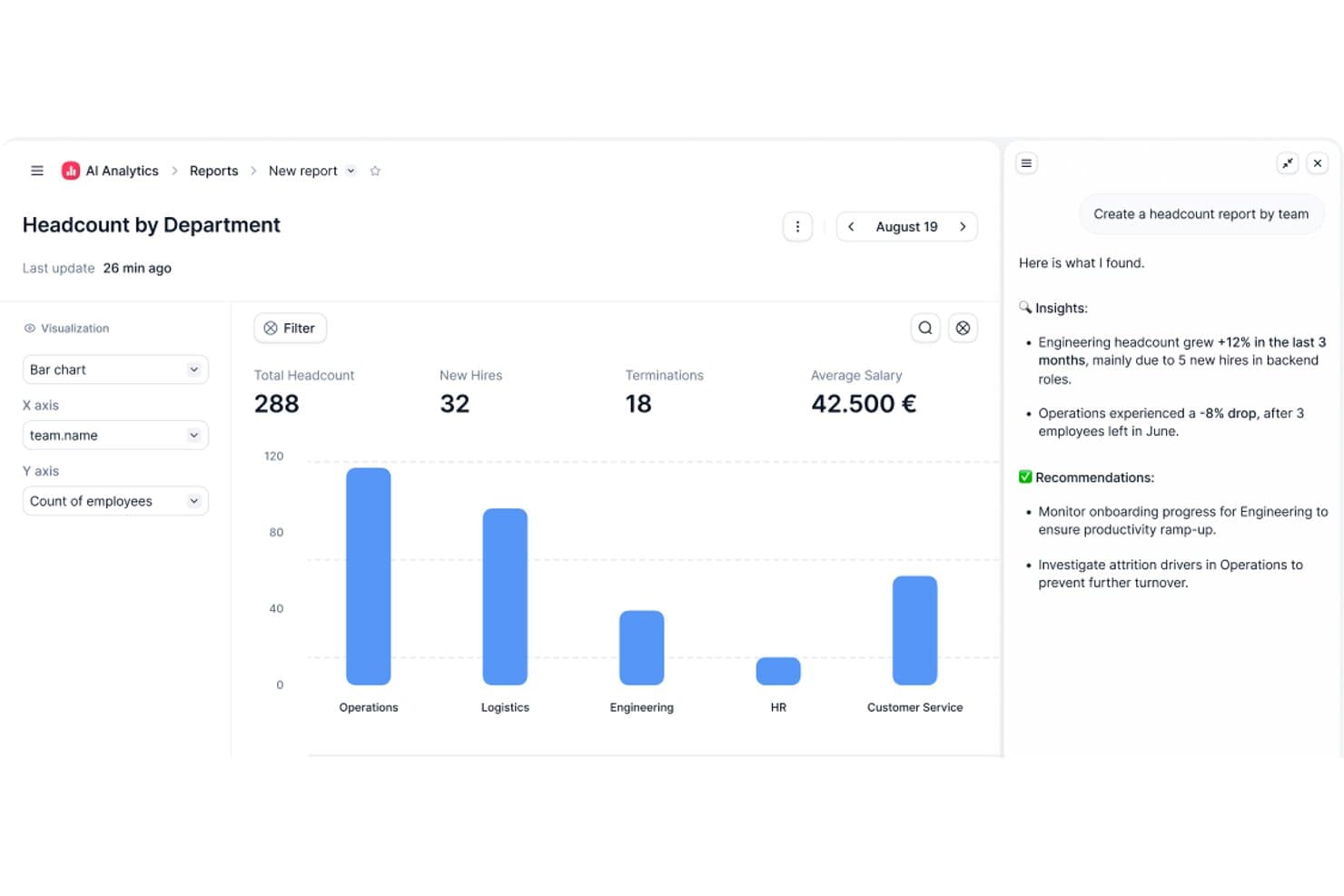
Factorial's AI Analytics generates headcount reports with insights and recommendations. Factorial is an AI-powered HR and business operations platform that covers time and attendance tracking, shift scheduling, timesheet generation, and absence management alongside broader HR workflows.
Who Is Factorial Best For?
Factorial suits small and growing businesses that want one platform to handle time tracking, scheduling, and broader HR workflows without juggling multiple tools.
Why I Picked Factorial
I've included Factorial in my top picks because it brings AI directly into everyday time tracking operations, from planning timetables to generating reports and answering employee questions about policies. I particularly like that its AI agent works with your actual company data, so when a manager needs a breakdown of worked hours across shifts, it can surface that analysis without manual digging. The mobile clock-in with geolocation and offline sync support makes it practical for teams spread across multiple sites.
Factorial Key Features
- QR-code clock-in: Employees scan a QR code at a physical location to register their work hours without using the mobile app.
- Geofencing for time tracking: Administrators can set location boundaries so clock-ins are only valid when employees are within a defined area.
- Break policy rules: Managers can configure duration-based break thresholds, with the system automatically applying the highest applicable rule during a shift.
- Project-based time tracking: Employees can clock in against specific assigned projects, letting managers track hours by project across the team.
Factorial Integrations
Factorial has marketplace integrations with ZKTeco, Suprema, a3innuva Nómina, DATEV LODAS, Sage 200 & Sage Despachos, and Silae. It also offers an API, webhooks, SDKs, an MCP server, and Zapier.
Pros and Cons
Pros:
- Offline punches sync after connectivity returns
- Timesheets and absence records stay together
- Mobile clock-ins suit remote and moving teams
Cons:
- No documented biometric or photo verification
- Payroll handoffs can require manual checks
 Best for mobile clock-in options
- Free plan + 30-day free trial + free demo available
- From $99/month (billed annually)
Visit WebsiteCustomer Rating:4.2/5
Homebase offers a mobile app that allows employees to clock in and out via smartphones, supporting remote teams with location-based clock-in capabilities. Homebase gives small businesses and hourly teams a way to track employee time, manage schedules, and handle payroll compliance all in one platform, helping owners and managers simplify workforce management and reduce manual admin work.
Who Is Homebase Best For?
Homebase is a great fit for small businesses in retail, hospitality, and food service that rely on hourly workers and need simple, accessible tools for scheduling and time tracking.
Why I Picked Homebase
I included Homebase on my shortlist because it handles mobile clock-in well for teams on the move. Employees can clock in directly from their phones using the Homebase app, and GPS tracking confirms they're at the right location when they do. The photo capture feature flags potential buddy punching without expensive hardware. The app also works offline, so a spotty Wi-Fi connection at a job site won't break your time tracking.
Homebase Key Features
- Automatic timesheet generation: Homebase converts clock-in and clock-out data, including breaks and overtime, directly into timesheets ready for payroll processing.
- Break tracking and compliance: The app tracks paid, unpaid, missed, and waived meal and rest breaks to help you stay aligned with local labor laws.
- Late clock-in alerts: Managers receive real-time notifications when an employee hasn't clocked in for their scheduled shift, so you can act before it becomes a problem.
- PTO and time-off management: Employees can submit time-off requests through the app, and managers can set blackout dates, request limits, and advance notice requirements.
Homebase Integrations
Integrations include Square, Toast, Clover, Shopify, QuickBooks, Gusto, ADP, Paychex, Heartland, and Revel.
Pros and Cons
Pros:
- Built-in reporting for labor costs, employee hours, and productivity
- efficient clock-in/out system with location tracking
- easy to set up and navigate, making it accessible for users
Cons:
- Only shows clock-in/out locations, not real-time employee whereabouts
- Lacks notifications for entering geofenced areas
 Best for attendance across multi-site rotas
- 14-day free trial available
- From £24/month
Visit WebsiteCustomer Rating:4.3/5
Here's where managers can review and approve employee timesheets with shift costs in Breathe HR. Breathe HR is a UK-focused HR platform for SMEs that includes time clock capture, rota scheduling, timesheet generation, and attendance monitoring as part of its broader people management suite.
Who Is Breathe HR Best For?
Breathe HR suits UK SMEs that need rota scheduling and attendance tracking across multiple sites, all within a single HR platform.
Why I Picked Breathe HR
I picked Breathe HR as one of the best because it handles rota scheduling and attendance tracking across multiple sites in one place, which is genuinely hard to find in a tool built for SMEs. Managers can build location-specific rotas, then monitor attendance in real time through a dashboard that filters by site or status and flags late arrivals, no-shows, and geofence exceptions. Clock-ins flow directly into auto-generated timesheets, with regular and overtime hours separated for payroll export.
Breathe HR Key Features
- Timesheet auto-generation: Breathe builds timesheets automatically from clock-in and clock-out events, with options for employee edits before manager approval.
- Bulk and auto-approval workflows: Managers can approve timesheets individually, in bulk, or configure auto-approval to remove manual sign-off entirely.
- Xero Payroll integration: Breathe syncs employee data changes directly with Xero and pulls payslips back into employee profiles after each pay run.
- Scheduled attendance reports: Managers can save custom reports of hours worked by location, employee, or position and schedule them to run daily, weekly, fortnightly, or monthly.
Breathe HR Integrations
Breathe HR offers integrations with Xero Payroll and Microsoft Outlook, plus a marketplace integration with hireful ATS. It also provides an API for custom applications.
Pros and Cons
Pros:
- Reviewers report easy employee adoption
- Clock punches generate editable timesheets
- Rotas and attendance share site context
Cons:
- Overtime and break rules remain basic
- Location refusal still permits clock-ins
Learn more about Breathe HR: Best for tracking hours across multiple countries
- Free demo available
- From $5/user/month
Visit WebsiteCustomer Rating:4.8/5
Employees can track time with Deel's time clock widget and review their logged time at the end of the day before submitting for approval. Deel HR gives businesses a way to track employee hours, attendance, and time off across multiple countries, helping HR teams manage compliance and payroll for distributed workforces.
Who Is Deel HR Best For?
Deel HR is a strong fit for HR teams managing remote or globally distributed employees across multiple countries and time zones.
Why I Picked Deel HR
I picked Deel HR as one of the best because it's one of the few time clock and attendance tools built specifically for teams spread across multiple countries. I like that the HRIS includes country-specific time-off rules and attendance policies for 150+ countries, so when my team has employees in Germany, Brazil, and the Philippines, each person's time data is governed by the right local rules automatically. The platform also lets employees submit time off requests and managers approve them directly in Slack or Microsoft Teams, which means my team isn't chasing down approvals across time zones. I also use the mobile app for on-the-go access, which is genuinely useful when managing a workforce that doesn't share a single office or even a single continent.
Deel HR Key Features
- Automated timesheets: Deel HR auto-generates timesheets based on tracked hours, reducing manual data entry for HR teams.
- Overtime tracking: The platform monitors and flags overtime hours according to each employee's local labor regulations.
- Employee self-service portal: Employees can view their own attendance records, hours worked, and time-off balances in one place.
- Payroll integration: Tracked time data feeds directly into Deel's payroll engine to support accurate, on-time pay runs.
Deel HR Integrations
Integrations include FaceUp, Snowflake, DefensX, Microsoft Finance, Kintsugi, ReFresh OS, Revo.ai, Keeper, Human Interest, and Everyminute.
Pros and Cons
Pros:
- Mobile app available
- Good payroll automation features
- Emphasizes global compliance
Cons:
- Could offer the ability to write more detailed notes for different work periods
- Reports could be more customizable
 Best for customizable reports
- 14-day free trial + free demo available
- From $4.99/user/month (billed annually)
Visit WebsiteCustomer Rating:4.8/5
Buddy Punch offers GPS tracking, photo verification, and streamlined scheduling features for accurate time management. Buddy Punch is an online time clock platform built for businesses that need simple, flexible ways to track employee hours, manage scheduling, and handle time-off requests across different locations or remote teams.
Who Is Buddy Punch Best For?
Buddy Punch is a good fit for small to mid-sized businesses that need an accessible, no-fuss time tracking solution without a steep learning curve.
Why I Picked Buddy Punch
Buddy Punch earns its spot on my shortlist because of how much control it gives you over reporting. I like that you can build custom reports by filtering on specific date ranges, departments, or individual employees, then export them directly to payroll. The payroll summary report is especially useful—it pulls regular hours, overtime, and PTO into one clean view without any manual sorting. I've also found the punch audit trail helpful for catching discrepancies before they become payroll errors.
Buddy Punch Key Features
- GPS tracking: Verify employee locations at the time of each punch using GPS coordinates captured on clock-in and clock-out.
- Scheduling tools: Build and publish employee schedules, assign shifts, and let employees view their upcoming shifts from the mobile app.
- PTO management: Track vacation, sick time, and other leave types with configurable accrual rules and an approval workflow.
- Webcam photo capture: Automatically take a photo of the employee at punch time to verify identity and reduce buddy punching.
Buddy Punch Integrations
Integrations include QuickBooks Online, QuickBooks Desktop, ADP Workforce Now, Gusto, Paychex, Paylocity, Paycor, Rippling, Workday, and Justworks.
Pros and Cons
Pros:
- Real-time monitoring
- GPS tracking
- Customizable reports
Cons:
- Basic mobile app
- No offline mode
Learn more about Buddy Punch: Best for shift-based SMBs in Canada
- 21-day free trial + free demo available
- From $3.50/user/month
Visit WebsiteCustomer Rating:4.8/5
Agendrix displays a color-coded weekly schedule with shift details, open slots, and time-off visibility, helping managers assign roles and avoid conflicts. Agendrix is a time clock and scheduling platform built for shift-based teams, helping small and mid-sized businesses manage attendance, track hours, and simplify payroll with digital tools designed for hourly workforces.
Who Is Agendrix Best For?
Agendrix is a strong fit for Canadian SMBs in retail, hospitality, and healthcare that rely on hourly or shift-based staff scheduling and need simple, compliant time tracking.
Why I Picked Agendrix
I picked Agendrix as one of the best because it's purpose-built for the kind of shift-based SMBs that are most common in Canada—think independent restaurants, retail chains, and healthcare clinics managing hourly staff across one or more locations. The time clock and scheduling features are fully connected: when an employee clocks in via the tablet kiosk or mobile app, their timesheet updates automatically and any variance from the scheduled shift is immediately visible. I also appreciate the geolocated punch-in option, which is useful for businesses with remote or multi-site staff who can't all clock in from a shared device. Additionally, Agendrix integrates directly with Canadian payroll providers like Ceridian Powerpay, Nethris, and Payworks, so approved timesheets flow straight into payroll without manual re-entry.
Agendrix Key Features
- Automated timesheet generation: Timesheets populate automatically from employee clock-ins and clock-outs, with overtime, premiums, and PTO calculated based on your configured rules.
- Shift task assignments: Attach a daily task list and instructions directly to individual shifts, so employees know exactly what's expected when they clock in.
- Open shift management: Publish unfilled shifts so eligible employees can volunteer on a first-come, first-served or seniority basis, with automatic notifications sent to qualifying staff.
- Time bank tracking: Log overtime as banked time or use time banks to round off timesheets, giving managers a clear view of each employee's hour balance.
Agendrix Integrations
Integrations include Sage, Ceridian, ADP Workforce Now, Nethris, Desjardins, Employer D, DLGL, and an API is available for custom integrations.
Pros and Cons
Pros:
- Integrates with major Canadian payroll systems
- Supports printable, email, and mobile schedule sharing
- Built-in messaging and notifications
Cons:
- Certain integrations may require manual setup
- Limited customization options for reports and analytics
Learn more about Agendrix: 10Best for automatic productivity monitoring
DeskTime
- Free trial available
- From $6.42/user/month (billed annually)
Visit WebsiteCustomer Rating:4.5/5
DeskTime offers a daily dashboard showing arrival time, productive time, and effectiveness, for time tracking. DeskTime is an automatic employee time tracking app that monitors app and URL usage, calculates productivity, tracks offline activity, logs clock-in/clock-out times, and includes shift scheduling and an absence calendar.
Who Is DeskTime Best For?
DeskTime is a good fit for small to mid-sized teams with desk-based or remote workers, where managers need visibility into how work hours are actually spent.
Why I Picked DeskTime
DeskTime is one of my top picks because I love how it handles productivity monitoring without requiring anyone on your team to do anything manually. The moment someone turns on their computer, DeskTime starts tracking, logging every app and URL used throughout the day. What I find especially useful is the productivity calculation feature, where you categorize apps and URLs as productive, unproductive, or neutral per team, so your marketing team's social media time counts differently than everyone else's.
DeskTime Key Features
- Shift scheduling: Build and assign employee schedules directly in DeskTime, with visibility into who's working and when.
- Absence calendar: Log and track employee time off, sick days, and other absence types in a shared team calendar.
- Project time tracking: Assign tracked time to specific projects and tasks so you can see exactly where billable or budgeted hours are going.
- Automatic screenshots: Capture optional, timed screenshots of employee screens during work hours for an additional layer of time verification.
DeskTime Integrations
DeskTime offers a small set of native integrations, including Google Calendar, Outlook Calendar, Trello, GitLab, Asana, and Jira, and it connects with Zapier. An API is also available for custom integrations.
Pros and Cons
Pros:
- Logs specific document titles per activity
- Admins can customize app productivity categories
- Automatic time tracking needs no manual input
Cons:
- Auto-start on boot is sometimes unreliable
- Mobile and leave tracking need improvement
Learn more about DeskTime:
Diğer Çalışan Puantaj Yazılımları
Aşağıda kısa listeme aldığım ek çalışan puantaj yazılımlarının bir listesini bulabilirsiniz. İlk 10’a girememiş olsalar da yine de değerlidirler ve daha fazla araştırmaya değerdirler.
- 11TogglBest for intuitive multi-device time tracking
- 12SloneekBest for HR time and absence management
- 13When I WorkBest for geofencing time accuracy
- 14ClockifyBest for browser extension time tracking
- 15JibbleBest for free time tracking with face recognition
- 16OnTheClockBest for small business time tracking
- 17edaysBest for tracking employee clock-in/clock-out
- 18Bonsai Agency SoftwareBest for project-driven agencies
- 19UbeyaBest for AI-powered shift scheduling
- 20ClockInEasyBest for face recognition
- 21WebHRBest for all-in-one HR automation
- 22Open Time ClockBest for multiple clock-in methods
- 23Time Clock WizardBest for affordable time tracking
- 24RhumbixBest for construction timekeeping and payroll
- 25LathemBest for remote team management
İlgili İK Yazılımı İncelemeleri
Aradığınızı hâlâ burada bulamadıysanız, test edip değerlendirdiğimiz diğer ilgili araçlara göz atın:
- İK Yazılımı
- Bordro Yazılımı
- İşe Alım Yazılımı
- Kayıtlı İşveren Hizmetleri
- Aday Takip Sistemleri
- İşgücü Yönetimi Yazılımı
How I Evaluate Employee Time Clock Software
I split my evaluation into two layers: the baseline any time clock tool must clear—like accurate punch tracking and payroll sync—and the differentiators that set the best picks apart.
Core Functionality (Table Stakes For This List)
When I'm selecting tools for my list, I rank each one on a scale from 0 (does not offer the functionality) to 5 (excels in this area) for each core functionality listed below. Then, I calculate the tool's total score into a percentage. Each tool needs to achieve a minimum total score of 65% to be considered for inclusion.
- Clock-In and Clock-Out Methods: I look for multiple punch options—web, mobile app, kiosk, and biometric—so teams in offices, job sites, and remote setups all have a reliable way to log time.
- Timesheet Generation & Approval: Each tool should auto-generate timesheets from punch data and support an approval workflow, so managers can review, edit, and sign off before payroll runs.
- Payroll System Integration: I check whether the platform syncs with payroll providers like ADP, QuickBooks, or Paychex, since manual exports add errors and eat into payroll deadlines.
- Overtime & Break Tracking: The tool needs configurable overtime rules and break enforcement, especially for organizations managing workers across multiple regions with different labor regulations.
- Attendance Reporting: I evaluate report depth—pre-built views for tardiness, absences, and hours worked are baseline, but filtering by department, location, or date range matters for larger teams.
- Fraud Prevention Controls: Features like GPS geofencing, photo capture, or biometric verification help prevent buddy punching, which is particularly important for field crews and distributed workforces.
Once I have a list of tools that meet the criteria, I consider what sets each platform apart.
Differentiating Factors (What Sets Vendors Apart)
Here's how I compare and contrast different vendors:
Standout Features
Built-in shift scheduling is a big differentiator—platforms like When I Work and Homebase let managers build schedules and track punches in one place, reducing the need to jump between separate tools. Job costing matters for teams that allocate hours to specific projects or clients, which is common in construction and professional services. I also look for integrated PTO management, where accruals and leave requests feed directly into timesheet data without manual updates.
Beyond Features
Labor law compliance is a factor I weigh carefully. Tools that support configurable overtime and break rules across multiple jurisdictions help HR teams stay audit-ready without manual tracking. I also evaluate the integration ecosystem, since a time clock that doesn't connect to your existing HRIS or payroll system creates more work than it solves. Pricing transparency matters too—I check whether vendors clearly disclose per-employee costs and any additional fees for hardware or premium support tiers.
Çalışan Puantaj Yazılımı Nasıl Seçilir?
Kendinize özgü yazılım seçim sürecinizi yürütürken aşağıdaki noktaları göz önünde bulundurun:
- Kullanım Kolaylığı: Yazılım hem yöneticiler hem de çalışanlar için sezgisel ve kullanıcı dostu olmalıdır. Karmaşık bir arayüz hatalara ve hayal kırıklığına yol açarak sistemin genel verimliliğini azaltabilir.
- Entegrasyon Yetenekleri: Yazılımın bordro, İK ve proje yönetimi araçları gibi mevcut sistemlerinizle sorunsuz bir şekilde entegre olabildiğinden emin olun. Bu, iş akışını düzenli tutmak ve veri silolarından kaçınmak açısından önemlidir.
- Mobil Erişilebilirlik: Mobil öncelikli günümüz dünyasında, mobil erişim sunan bir mesai takip yazılımına sahip olmak büyük önem taşır. Bu özellik, farklı konumlardan işe giriş ve çıkış yapması gereken uzaktan veya sahada çalışan personeli olan işletmeler için özellikle önemlidir.
- Raporlama ve Analiz: Çalışanların çalışma saatleri, fazla mesai ve devam durumu hakkında ayrıntılı raporlar oluşturabilme yeteneği, bilinçli iş kararları almak için hayati önem taşır. Özel ihtiyaçlarınızı karşılamak üzere özelleştirilebilir raporlama seçenekleri sunan bir yazılım arayın.
- Güvenlik Özellikleri: Çalışan verilerini korumak büyük önem taşır. Veri şifreleme, güvenli giriş ve veri koruma düzenlemelerine uyumluluk gibi güçlü güvenlik önlemleri sunan bir mesai takip yazılımı seçin.
Çalışan Mesai Takip Yazılımı Trendleri
Çalışan mesai takip yazılımı alanında fark ettiğim bazı trendleri ve bunların gelecek için ne anlama gelebileceğini burada bulabilirsiniz. En önemli içgörüleri ortaya çıkarmak için sayısız ürün güncellemesini, basın bültenini ve sürüm kaydını inceledim.
- Biyometrik Kimlik Doğrulama: Biyometrik kimlik doğrulama, benzersiz biyolojik özellikleri kullanarak güvenliği artırdığı için giderek daha fazla tercih ediliyor. Bu, zaman hırsızlığı riskini azaltır.
- Mobil Entegrasyon: Mobil entegrasyon, çalışanların akıllı telefonları aracılığıyla işe giriş ve çıkış yapmasına olanak tanır. Bu trend uzaktan çalışmayı ve esnek çalışma programlarını destekler; ayrıca saha çalışanları için zaman takibini kolaylaştırır.
- Yapay Zekâ Destekli Analiz: Yapay zekâ destekli analiz, iş gücü düzenleri hakkında içgörüler sunar. Bu, programları optimize etmeye ve verimliliği artırmaya yardımcı olur; ayrıca olası sorunları büyümeden önce belirlemeye katkı sağlar.
- Bulut Tabanlı Çözümler: Bulut tabanlı çözümler, her yerden gerçek zamanlı veri erişimi sunar. Bu, birden fazla konumu bulunan işletmeler için hayati önem taşır. Ayrıca verilerin güvenli bir şekilde saklanmasını ve kolayca erişilebilir olmasını sağlar.
- Coğrafi Sınırlandırma: Coğrafi sınırlandırma teknolojisi, çalışanların yalnızca belirlenen konumda olduklarında işe giriş yapmasını sağlar. Bu, sahte girişleri önler ve birden fazla çalışma sahası bulunan işletmeler için özellikle faydalıdır.
Teknoloji ilerledikçe çalışan mesai takip yazılımları da gelişmeye ve daha gelişmiş özellikler sunmaya devam ediyor. Bu trendler yalnızca doğruluğu ve güvenliği artırmakla kalmaz, aynı zamanda iş gücü yönetimini kolaylaştırarak işletmelerin esnek ve uzaktan çalışma düzenlemelerine uyum sağlamasını kolaylaştırır.
Çalışan Mesai Takip Yazılımı Nedir?
Çalışan mesai takip yazılımı, işletmelerin çalışanların çalışma saatlerini takip etmesine ve yönetmesine yardımcı olan bir araçtır. Doğru zaman kaydı, bordro işlemleri ve iş kanunlarına uyumluluk sağlamak için İK departmanları, yöneticiler ve çalışanlar tarafından yaygın olarak kullanılır.
Yazılım genellikle zaman takibi, devam durumu izleme ve raporlama özellikleri gibi bileşenleri içerir. Ayrıca bordro sistemleriyle entegre olabilir; böylece verilerin sorunsuz bir şekilde aktarılmasını sağlar ve manuel veri girişi hatalarını azaltır.
Çalışan Mesai Takip Yazılımının Özellikleri
Doğru çalışan mesai takip uygulamasını seçmek, bordro doğruluğunu, iş kanunlarına uyumluluğu ve genel operasyonel verimliliği önemli ölçüde etkileyebilir. Çalışan mesai takip yazılımı ararken dikkat etmeniz gereken en önemli özelliklerden bazıları şunlardır:
- Doğru Zaman Takibi: Doğru zaman takibi, çalışanların çalışma saatlerinin kesin bir şekilde kaydedilmesini sağlayarak bordro hatalarını azaltır ve zaman hırsızlığını önler.
- Biyometrik Kimlik Doğrulama: Parmak izi tarama veya yüz tanıma gibi biyometrik sistemler, çalışanların işe giriş ve çıkış yapması için güvenli ve doğru bir yöntem sunarak başkasının yerine kart basmayı ve zaman sahtekârlığını ortadan kaldırır.
- Mobil Erişilebilirlik: Mobil özellik, çalışanların mobil cihazlarını kullanarak işe giriş ve çıkış yapmasına olanak tanır ve uzaktan veya sahada çalışanların zamanını takip etmeyi kolaylaştırır.
- Bordro Entegrasyonu: Bordro sistemleriyle entegrasyon, zaman verilerinin aktarımını otomatikleştirerek manuel veri girişi hatalarını azaltır ve bordro sürecini kolaylaştırır.
- Kullanıcı Dostu Arayüz: Sezgisel ve kolay gezinilebilen bir arayüz, çalışanların sistemi hızlı bir şekilde öğrenip kullanmasını sağlayarak eğitim süresini en aza indirir ve benimseme oranlarını artırır.
- Raporlama ve Analiz: Gelişmiş raporlama ve analiz özellikleri, çalışanların devam durumu, fazla mesai ve üretkenliği hakkında içgörüler sunarak yöneticilerin bilinçli kararlar almasına yardımcı olur.
- Özelleştirilebilir Ayarlar: Özelleştirme seçenekleri, işletmelerin fazla mesai, molalar ve izin talepleri için kurallar belirlemek de dâhil olmak üzere yazılımı kendi özel ihtiyaçlarına göre uyarlamasına olanak tanır.
- Coğrafi Çit ve GPS Takibi: Coğrafi çit ve GPS takibi, çalışanların onaylanan konumlardan işe giriş yaptığından emin olur. Bu özellik, mobil veya uzaktan çalışan ekipleri bulunan işletmeler için özellikle kullanışlıdır.
- Uyumluluk Yönetimi: Uyumluluk özellikleri, fazla mesaiyi, molaları ve iş gücüyle ilgili diğer kuralları otomatik olarak hesaplayarak işletmelerin iş yasalarına ve yönetmeliklerine uymasına yardımcı olur.
- Gerçek Zamanlı Bildirimler: Gerçek zamanlı bildirimler, eksik girişler, geç kalmalar veya fazla mesai gibi sorunlar hakkında yöneticileri uyararak tutarsızlıkların giderilmesi için hızlı bir şekilde harekete geçilmesini sağlar.
Doğru çalışan zaman takip yazılımını seçmek; doğruluğu, güvenliği ve kullanım kolaylığını artıran özelliklerin değerlendirilmesini gerektirir. İşletmeler, bu temel özelliklere odaklanarak zaman takip süreçlerini iyileştirebilir, uyumluluğu sağlayabilir ve genel üretkenliği artırabilir.
Çalışan Zaman Takip Yazılımının Faydaları
Çalışan zaman takip yazılımı, zaman yönetimini kolaylaştırıp üretkenliği artırarak hem kullanıcılar hem de kuruluşlar için çeşitli avantajlar sunar. Aşağıda, çalışan zaman takip yazılımı kullanırken deneyimleyebileceğiniz bazı ek temel faydalar yer almaktadır.
- Doğru Zaman Takibi: Yazılım, çalışanların çalışma saatlerinin hassas bir şekilde kaydedilmesini sağlayarak bordro işlemlerindeki hata ve tutarsızlıkları azaltır.
- Artan Üretkenlik: Zaman takibini otomatikleştiren yazılım sayesinde çalışanlar görevlerine daha fazla odaklanabilir ve bu da daha yüksek verimlilik ve çıktıyla sonuçlanır.
- Gelişmiş Uyumluluk: Yazılım, çalışma saatleri ve fazla mesaiyle ilgili doğru kayıtları tutarak kuruluşların iş yasalarına ve yönetmeliklerine uymasına yardımcı olur.
- Maliyet Tasarrufu: Otomatik zaman takibi, manuel veri girişi ve idari görevlere duyulan ihtiyacı azaltarak zaman tasarrufu sağlar ve iş gücü maliyetlerini düşürür.
- Geliştirilmiş Çalışan Sorumluluğu: Yazılım, çalışma saatlerinde şeffaflık sağlayarak çalışanları programlarına uymaya teşvik eder ve genel sorumluluğu artırır.
Çalışan zaman takip yazılımına yatırım yapmak; doğruluğu, üretkenliği, uyumluluğu, maliyet verimliliğini ve sorumluluğu iyileştirerek kuruluşlara önemli ölçüde fayda sağlayabilir. Bu avantajlar, yazılımı iş gücü yönetimini optimize etmek isteyen işletmeler için değerli bir araç hâline getirir.
Çalışan Zaman Takip Yazılımının Maliyetleri ve Fiyatlandırması
Doğru çalışan zaman takip yazılımını seçmek, etkili iş gücü yönetimi için önemli olabilir. Her biri farklı işletme ihtiyaçlarına ve bütçelerine hitap eden birden fazla plan mevcuttur.
Bilinçli bir karar vermenize yardımcı olmak için tipik plan seçenekleri ve fiyatlandırmaları aşağıda açıklanmıştır.
Çalışan Zaman Takip Yazılımı Plan Karşılaştırma Tablosu
| Plan Türü | Ortalama Fiyat | Yaygın Özellikler |
| Ücretsiz Plan | $0 | Temel zaman takibi, sınırlı kullanıcı sayısı ve mobil uygulama |
| Temel Plan | $10/kullanıcı/ay | Zaman takibi, çalışan planlama ve raporlar |
| Standart Plan | $20/kullanıcı/ay | Tüm Temel Plan özellikleri, gelişmiş planlama, GPS takibi ve entegrasyonlar |
| Premium Plan | $30/kullanıcı/ay | Tüm Standart Plan özellikleri, PTO yönetimi ve biyometrik doğrulama |
| Kurumsal Plan | Özel Fiyatlandırma | Tüm Premium Plan özellikleri, özel entegrasyonlar ve özel destek |
Çalışan zaman takip yazılımı için plan türlerinin, maliyetlerin ve özelliklerin dökümü.
Bir plan seçerken ekibinizin büyüklüğünü ve ihtiyaç duyduğunuz belirli özellikleri göz önünde bulundurun. İşletmeler, farklı seçenekleri karşılaştırarak bütçe kısıtlamalarını karşılayan ve aynı zamanda iş gücü yönetimini ve verimliliği artıran bir çalışma saati yazılımı bulabilir.
Çalışanların Çalışma Saatlerini Takip Yazılımı Hakkında SSS
Çalışanların çalışma saatlerini takip yazılımı hakkında aldığım sık sorulan soruların yanıtlarını burada bulabilirsiniz.
Çalışanların çalışma saatlerini takip yazılımı, bordro sistemleriyle nasıl entegre olabilir?
Çalışanların çalışma saatlerini takip yazılımı, API’ler veya yerleşik bağlayıcılar aracılığıyla bordro sistemleriyle entegre olabilir. Bu entegrasyon, çalışma süresi ve devamlılık verilerinin bordro sistemine otomatik olarak aktarılmasını sağlar; manuel veri girişi hatalarını azaltır ve doğru bordro işlemlerini güvence altına alır. Bazı yazılım çözümleri popüler bordro sistemleriyle önceden oluşturulmuş entegrasyonlar sunarken, diğerleri özel geliştirme gerektirebilir.
Çalışanların çalışma saatlerini takip yazılımını kullanırken hangi uyumluluk hususları dikkate alınmalıdır?
Uyumluluk hususları arasında çalışma süresi takibi, fazla mesai ve molalarla ilgili iş kanunlarına ve düzenlemelere uyulması yer alır. Yazılım, yasal gereklilikleri karşılamak için doğru kayıt tutma ve raporlama özelliklerini desteklemelidir. Ayrıca çalışan bilgilerini korumak ve veri gizliliği yasalarına uyumu sağlamak için denetim izleri ve güvenli veri depolama gibi özellikler sunmalıdır.
Çalışanların çalışma saatlerini takip yazılımı birden fazla konumu ve uzaktan çalışanları yönetebilir mi?
Evet, çalışanların çalışma saatlerini takip yazılımı çözümlerinin çoğu birden fazla konumu ve uzaktan çalışanları yönetmek üzere tasarlanmıştır. Bu çözümler genellikle çalışanların her yerden işe giriş ve çıkış yapmasına olanak tanıyan mobil uygulamalar veya web tabanlı portallar sunar. GPS takibi ve coğrafi sınırlandırma özellikleri, çalışanların yetkili konumlardan işe giriş yaptığından emin olunmasını sağlayabilir.
Çalışanların çalışma saatlerini takip yazılımı vardiya planlamasını ve değişikliklerini nasıl yönetir?
Çalışanların çalışma saatlerini takip yazılımı genellikle yöneticilerin vardiyaları kolayca oluşturmasına, değiştirmesine ve atamasına olanak tanıyan vardiya planlama özellikleri içerir. Çalışanlar programlarını görüntüleyebilir, değişiklik talep edebilir ve yazılım üzerinden vardiya değişimi yapabilir. Çalışanları program değişiklikleri hakkında gerçek zamanlı olarak bilgilendirmek için bildirimler ve uyarılar ayarlanabilir.
Çalışanların çalışma saatlerini takip yazılımındaki veri güvenliği önlemleri nelerdir?
Çalışanların çalışma saatlerini takip yazılımındaki veri güvenliği önlemleri arasında aktarım sırasında ve depolama sürecinde verilerin şifrelenmesi, güvenli kullanıcı kimlik doğrulaması ve role dayalı erişim denetimleri bulunur. Hassas çalışan bilgilerinin korunmasını sağlamak için düzenli güvenlik denetimleri ve GDPR veya CCPA gibi sektör standartlarına uyum da önemlidir.
Çalışanların çalışma saatlerini takip yazılımı için hangi destek ve eğitim seçenekleri mevcuttur?
Destek ve eğitim seçenekleri sağlayıcıya göre değişir, ancak genellikle kullanıcı kılavuzları, video eğitimleri ve SSS gibi çevrimiçi kaynakları içerir. Birçok sağlayıcı telefon, e-posta veya sohbet yoluyla canlı destek de sunar. Bazıları, kuruluşların yazılımlarından en iyi şekilde yararlanmasına yardımcı olmak için yerinde eğitim veya web seminerleri sağlayabilir.
Çalışanların çalışma saatlerini takip yazılımı belirli iş ihtiyaçlarına uyacak şekilde nasıl özelleştirilebilir?
Çalışanların çalışma saatlerini takip yazılımındaki özelleştirme seçenekleri, çalışma süresi takip kuralları, fazla mesai hesaplamaları ve raporlama biçimleri için yapılandırılabilir ayarları içerebilir. Bazı yazılım çözümleri, belirli iş gereksinimlerine göre uyarlanmış özellikler oluşturmak için özel geliştirme hizmetleri sunar. Ayrıca birçok platform, işlevselliği genişletmek amacıyla üçüncü taraf araçların ve uygulamaların entegre edilmesine olanak tanır.