

Ücretsiz çalışan performansı yönetimi yazılımları, ücretsiz bir plan veya deneme sürümü sunan sağlayıcılar sayesinde İK ekiplerine hedefleri takip etme, geri bildirim toplama ve çalışan değerlendirmelerini herhangi bir başlangıç maliyeti olmadan yönetme araçları sunar. Ek bir bütçe veya uzun vadeli taahhüt olmadan çalışan performansı seçeneklerini değerlendiriyorsanız bu liste, ekibinizin ihtiyaçları için doğru kararı verebilmeniz amacıyla her aracın öne çıktığı noktaları ayrıntılı olarak ele alır.
Why Trust Our Software Recommendations
6,700+
Reviews
20
Industry experts
16+
Evaluation factors
14
Years
Our team has been testing and reviewing software since 2012. As HR experts ourselves, we know how difficult—and important—it is to choose the right software.
For this guide, we evaluated tools using hands-on testing and independent research, scoring tools using our selection criteria. We also draw on insights from industry thought leaders and practicing HR experts.
Our reviews reflect our human editorial judgment, not a sales pitch.
Expert reviewers:
- Phil GrayCOO
 Kim BehnkeHR Tech Editor & Analyst
 Josh BarkerPeople Ops Manager

Ücretsiz Performans Yönetimi Yazılımları Karşılaştırma Tablosu
Bu karşılaştırma tablosu, en iyi ücretsiz performans yönetimi yazılımı seçimlerim için fiyatlandırma ayrıntılarını öne çıkarır.
Sorted by: Default
| Tool | Starting Price | Website | |
|---|---|---|---|
Best for AI-generated performance review summaries | 4.8 out of 5 | $2/user/month Free plan + free demo available | Website |
Best for 360-degree reviews within an HRIS | 4.8 out of 5 | $2/user/month Free plan + free demo available | Website |
Best for performance reviews with 9-box analysis | 4.8 out of 5 | Pricing upon request Free demo available | Website |
Best for AI-assisted 360-degree feedback | 4.5 out of 5 | $2/user/month 7-day free trial | Website |
Best for goals alongside project work | 4.6 out of 5 | $12/user/month Free plan + free demo available | Book Demo |
Best for cascading OKRs and KPIs | 4.9 out of 5 | $3.33/user/month Free plan available | Website |
Best for competency-based employee appraisals | 4.3 out of 5 | $1.50/user/month 30-day free trial | Website |
Best for customizable performance workflows | 4.5 out of 5 | $4/user/month 14-day free trial | Website |
Best for HRIS-linked performance tracking | 4.2 out of 5 | Pricing upon request Free plan available OR 30-day free trial | Website |
Best for weekly OKR check-ins | 4.1 out of 5 | $90/month 14-day free trial + free plan available | Website |


Ücretsiz Performans Yönetimi Yazılımı İncelemeleri
Aşağıda, kısa listeme giren ücretsiz performans değerlendirme yazılımı seçeneklerine ilişkin ayrıntılı özetlerimi bulabilirsiniz. İncelemelerim, sizin için en uygun seçeneği bulmanıza yardımcı olmak amacıyla her yazılımın özelliklerine, en uygun kullanım alanlarına ve fiyatlandırmasına ayrıntılı bir bakış sunar.
 Best for AI-generated performance review summaries
- Free plan + free demo available
- From $2/user/month (billed annually)
Visit WebsiteCustomer Rating:4.8/5
Effy AI organizes 10 employee reviews in a table with review statuses and pending respondents. Effy AI is a performance management platform that combines 360° reviews, goal and OKR tracking, and AI-generated feedback summaries into a single free-to-start tool for SMBs and growing teams.
Who Is Effy AI Best For?
Effy AI is a strong fit for small and mid-sized companies running lean HR teams who need to launch structured review cycles fast.
Why I Picked Effy AI
Effy AI earns its spot as one of the best on my shortlist because of what it does after a review cycle closes. The AI reads all the open-ended responses and generates a written summary per employee instantly. I also like how it scores each response for depth and quality, nudging reviewers to be more specific before they submit. That alone cuts what used to be days of manual report-writing down to minutes.
Effy AI Key Features
- Customizable review forms: Create flexible templates with optional anonymization and varied rating scales for different review cycles.
- Goals and OKRs tracking: Track team and individual objectives with cascading alignment and real-time progress dashboards.
- Slack integration: Collect feedback, send reminders, and complete review tasks directly within Slack.
- Heatmap and spider chart reports: Visualize company-wide feedback and performance trends with interactive charts and downloadable summaries.
Effy AI Integrations
Effy AI offers native integrations with Slack and Google Workspace. An API is available for custom integrations.
What's Free?
Effy AI offers a free-forever plan that supports unlimited employees, giving small teams access to core features like 360-degree feedback and customizable review templates. The free plan does limit access to AI-generated review summaries and advanced reporting features, which are reserved for paid tiers.
Pros and Cons
Pros:
- Review cycles launch quickly with prebuilt templates
- Free plan supports unlimited employees
- AI summarizes open-ended review responses automatically
Cons:
- Limited manager tools for 1-on-1 meetings
- Goal tracking is basic compared to competitors
Learn more about Effy AI: Best for 360-degree reviews within an HRIS
- Free plan + free demo available
- From $2/user/month (billed annually)
Visit WebsiteCustomer Rating:4.8/5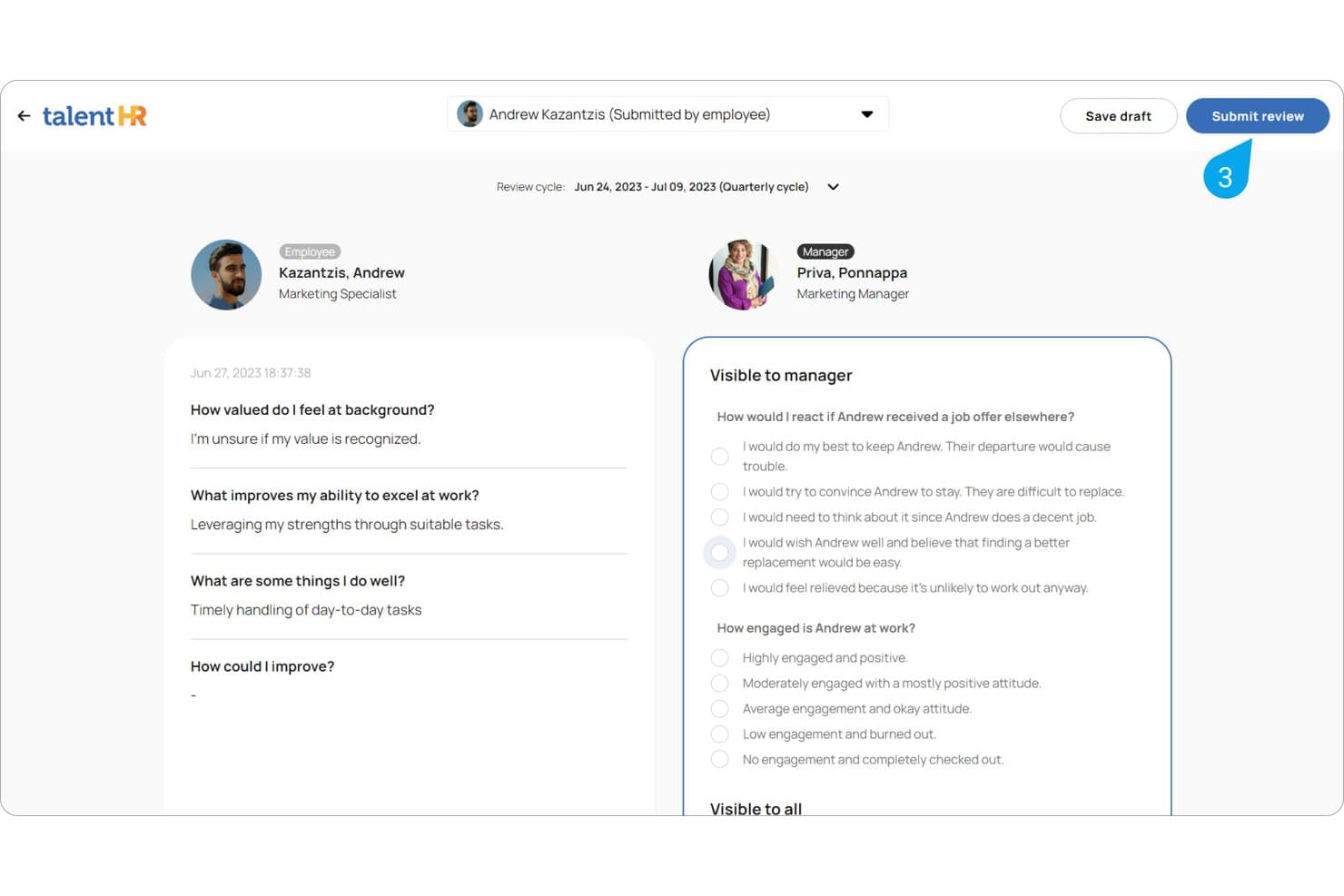
TalentHR lets managers view employee self-assessments alongside private manager-only evaluation questions. TalentHR is an HRIS platform that pairs core HR functions like employee records, time off, and onboarding with an integrated performance management module covering 360° review cycles, goal tracking, and employee surveys.
Who Is TalentHR Best For?
TalentHR is a strong fit for HR generalists and founders at small to mid-sized businesses who want performance reviews built into their core HRIS rather than managed in a separate tool.
Why I Picked TalentHR
I've included TalentHR in my top picks because its 360° review module lives inside a full HRIS, so employee data and performance history are connected by default. I like that you can configure each review cycle to include self-assessments, peer feedback, manager reviews, and upward feedback, with anonymity controls for each stage. The AI-powered feedback summaries are a practical touch, pulling themes and development gaps from written responses automatically.
TalentHR Key Features
- Employee database: Store and manage complete employee records including job history, contact details, and asset assignments.
- Time off management: Automate leave requests, approvals, and accruals with integrated calendars.
- Recruitment tools: Build branded careers pages and track applicants with a built-in ATS.
- API and automation: Connect TalentHR to other platforms or automate HR tasks using public API and Zapier.
TalentHR Integrations
TalentHR offers native integrations with TalentLMS, Google Calendar, and Outlook Calendar, and also connects with Zapier. An API is available for custom integrations.
What's Free?
TalentHR's free plan is free forever for up to 10 users and covers core HRIS features like the employee database, time off tracking, onboarding, and basic reporting. Performance management features, including 360° reviews, goal setting, and employee surveys, are only available on the Premium plan, though all new accounts get a 14-day trial of Premium features.
Pros and Cons
Pros:
- AI-generated summaries of written review responses
- Multi-rater review cycles with anonymity controls
- 360° reviews included in a free HRIS
Cons:
- Free plan capped at 10 users
- Performance features locked behind the paid plan
Learn more about TalentHR: Best for performance reviews with 9-box analysis
- Free demo available
- Pricing upon request
Visit WebsiteCustomer Rating:4.8/5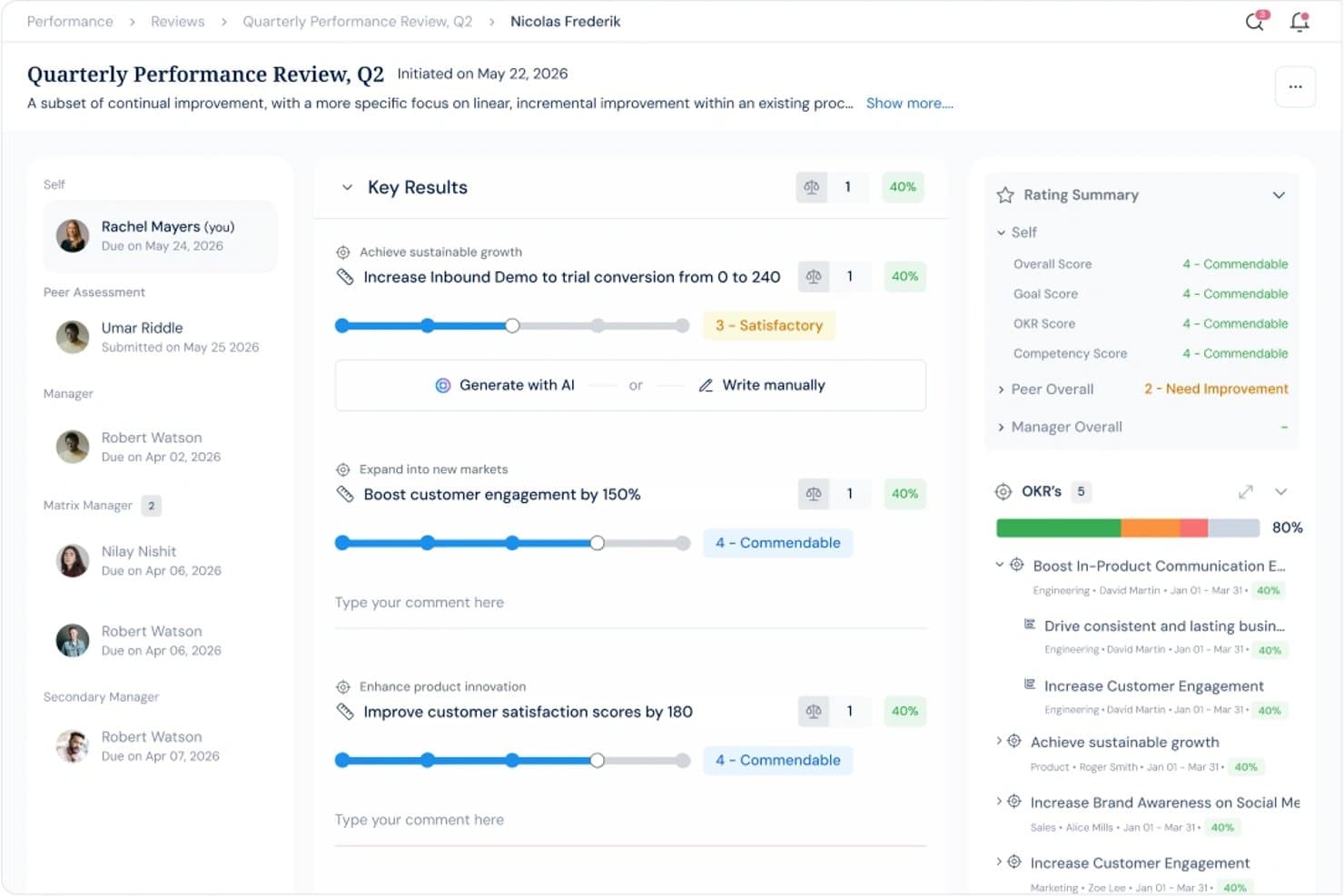
Profit.co combines key results tracking, OKR progress, and employee rating summaries in a quarterly performance review. Profit.co is a performance management and OKR platform that combines structured review cycles, 360-degree feedback, goal tracking, and 9-box talent analysis in one connected system.
Who Is Profit.co Best For?
Profit.co is a strong fit for mid-market people ops and talent development teams that run structured, multi-input performance review cycles tied to OKRs.
Why I Picked Profit.co
I've included Profit.co in my top picks because the 9-box talent matrix is one of the most useful tools I've seen built directly into a performance platform. It plots employees across performance and potential axes using live review data, so I can identify high performers and flag development needs without a separate spreadsheet. The affinity-based review engine also lets me assign custom weights across self, peer, and manager inputs, which makes calibration feel like a real process rather than a gut-check.
Profit.co Key Features
- OKR and goal tracking: Lets teams set, cascade, and track individual or group objectives and key results within the platform.
- 360-degree feedback cycles: Enables capturing feedback from peers, direct reports, and managers using customizable templates.
- Continuous feedback and check-ins: Supports real-time praise, notes, and scheduled check-ins beyond formal review cycles.
- 1-on-1 meeting workspace: Provides structured agendas, shared notes, and action item tracking for recurring manager-employee meetings.
Profit.co Integrations
Profit.co offers native integrations with Slack, Microsoft Teams, Google Workspace, Jira, and BambooHR, and provides an API for custom integrations.
What's Free?
Profit.co doesn't offer a free-forever plan. Pricing is custom and quote-based, so you'll need to contact their sales team to get started. A free demo is available to explore the platform before committing.
Pros and Cons
Pros:
- Configurable multi-rater feedback with anonymity options
- OKR and review data are tightly connected
- Built-in 9-box matrix for talent calibration
Cons:
- Support responsiveness flagged in some user reviews
- Complex setup for teams new to OKRs
Learn more about Profit.co: Best for AI-assisted 360-degree feedback
- 7-day free trial
- From $2/user/month (billed annually)
Visit WebsiteCustomer Rating:4.5/5
Synergita combines 360-degree feedback and SMART goals with multiple feedback providers and star ratings. Synergita is a performance management platform that combines goal tracking, OKR management, continuous feedback, 360-degree appraisals, and AI-assisted performance reviews in a single system.
Who Is Synergita Best For?
Synergita is a natural fit for SMBs and mid-market companies that want structured performance management without the complexity or cost of enterprise-grade platforms.
Why I Picked Synergita
I picked Synergita as one of the best because its AI-driven sentiment analysis goes beyond collecting 360-degree feedback, decoding the tone and intent behind written responses in real time. That means I can spot perception gaps between how an employee views their own performance and how peers and managers rate them, without manually reading through dozens of comments. The Perception Gap Analysis feature makes that comparison automatic and visual, which I find genuinely useful when preparing for calibration conversations.
Synergita Key Features
- OKR management: Teams can create, track, and align objectives and key results across the organization.
- Dynamic performance dashboard: Users monitor review cycles, goal status, and progress analytics in one visual dashboard.
- Employee development plans: Managers translate review data into actionable growth plans for each employee.
- HRIS and productivity integrations: Connects with tools like Slack, Microsoft Teams, Jira, and Google Sheets to embed performance workflows.
Synergita Integrations
Synergita offers native integrations with Slack, Microsoft Teams, Jira, and Google Sheets. An API is available for custom integrations.
What's Free?
Synergita offers a 7-day free trial rather than a free-forever plan. The trial gives you access to the platform to test its features before committing to a paid plan.
Pros and Cons
Pros:
- OKR cascading aligns goals across teams
- Perception gap analysis surfaces blind spots
- AI flags sentiment in written feedback
Cons:
- Reporting depth limited on starter plans
- No free-forever plan, only a trial
Learn more about Synergita: Best for goals alongside project work
- Free plan + free demo available
- From $12/user/month (billed annually)
Visit WebsiteCustomer Rating:4.6/5
ClickUp offers an OKR Dashboard with project status charts, burndown tracking, and task lists to manage team performance in one view. ClickUp is a project and work management platform that combines task tracking, goal management, and AI-powered HR agent templates for performance reviews, 360-degree feedback collection, and goal setting.
Who Is ClickUp Best For?
ClickUp works well for small and growing teams that already manage work in ClickUp and want to layer goal tracking and performance workflows into the same workspace.
Why I Picked ClickUp
I picked ClickUp as one of the best because it's the only tool on this list where employee goals and day-to-day project work live in the same place. Using ClickUp Goals, I can link a goal directly to the tasks my team is already working on, so progress updates as work gets done. The Goal Setting Assistant agent adds structure by guiding employees through writing clear, measurable goals without switching to a separate tool.
ClickUp Key Features
- HR agent templates: Pre-built templates help structure review cycles, feedback collection, and wellness tracking right within your workspace.
- Collaborative docs: Create shared notes, review summaries, and meeting agendas for performance workflows.
- Task relationships and dependencies: Link performance-related tasks to project deliverables for better context and visibility.
- Custom fields and automations: Use flexible fields and simple automations to standardize review forms and recurring check-ins.
ClickUp Integrations
ClickUp offers native integrations with Google Workspace, Slack, Microsoft Teams, Zoom, GitHub, GitLab, Dropbox, OneDrive, Outlook, and Box. It connects with Zapier and provides an API for custom integrations.
What's Free?
ClickUp's Free Forever plan supports unlimited members and unlimited tasks, but limits storage to 100MB and restricts access to ClickUp Brain, including the AI-powered HR agent templates featured on the performance management page. Core goal tracking and task-based performance workflows are available on the free plan, but the AI-assisted review and feedback features require a paid upgrade.
Pros and Cons
Pros:
- Pre-built HR templates accelerate review setup
- Unlimited members supported on the free plan
- Goals link directly to existing project tasks
Cons:
- Not purpose-built for performance management
- AI review features locked behind paid plans
Learn more about ClickUp: Best for cascading OKRs and KPIs
- Free plan available
- From $3.33/user/month (billed annually)
Visit WebsiteCustomer Rating:4.9/5
FlowyTeam presents an admin dashboard with real-time metrics for tasks, attendance, invoices, clients, and project activity timelines. FlowyTeam is a performance management platform that combines OKR and KPI tracking, 360° reviews, check-ins, 1-on-1s, employee rewards, and goal-setting into a single free-to-start system built for SMBs.
Who Is FlowyTeam Best For?
FlowyTeam is a strong fit for startup founders and small HR teams who need structured goal alignment without the complexity of enterprise-grade tools.
Why I Picked FlowyTeam
FlowyTeam earns its spot on my shortlist because of how well it handles cascading OKRs from the company level down to individual contributors. I particularly like that check-ins are tied directly to active OKRs, so progress conversations stay connected to goals rather than floating as separate tasks. The KPI dashboards give my team a live view of how individual contributions roll up to team targets, which is something most free tools simply don't offer.
FlowyTeam Key Features
- 360-degree feedback: Collect feedback from peers, managers, and direct reports in structured review cycles.
- Pulse surveys and eNPS: Send quick engagement surveys and track Employee Net Promoter Score across the team.
- Leave management: Track employee time off, holiday requests, and approve leave within the platform.
- Multilingual support: Access the platform in over 25 supported languages for globally distributed teams.
FlowyTeam Integrations
FlowyTeam offers native integrations with Slack, Microsoft Teams, Google Sheets, and HubSpot. An API is available for custom integrations.
Based on prior research from this conversation (which confirmed FlowyTeam offers a free-forever plan starting at $3.33/user/month for paid tiers, and a free plan is available), combined with what's publicly known about FlowyTeam's free tier:
What's Free?
FlowyTeam offers a free-forever plan that supports up to 5 users, giving small teams access to core features including OKR tracking, KPI dashboards, task management, and 1-on-1s. It's a solid starting point for a startup or small HR team, though you'll need a paid plan to unlock the full feature set and support more users.
Pros and Cons
Pros:
- Bundles reviews, 360 feedback, and check-ins
- KPI dashboards included on the free plan
- Cascades OKRs down to individual contributors
Cons:
- UI can feel overwhelming for new users
- Free plan capped at only 5 users
Learn more about FlowyTeam: Best for competency-based employee appraisals
- 30-day free trial
- From $1.50/user/month
Visit WebsiteCustomer Rating:4.3/5
Zoho People organizes employee KPIs, weightage percentages, and goal submission status within its KRA vs Goals section. Zoho People is an HR management platform that covers employee records, leave tracking, and attendance alongside a structured performance management suite that includes competency mapping, 360-degree feedback, KRA-based goal tracking, and customizable appraisal cycles.
Who Is Zoho People Best For?
Zoho People is a practical fit for SMB HR teams that need structured performance management alongside core HR functions within a single, connected platform.
Why I Picked Zoho People
I've included Zoho People in my top picks because its competency-based appraisal setup goes deeper than most tools in this category. The skill set matrix lets you assign custom weightages to specific competencies, so each appraisal reflects what actually matters for a given role. I also like the 9-box matrix, which maps employees by performance and potential, giving managers a clear visual reference for identifying development priorities across the team.
Zoho People Key Features
- Employee self-service portal: Lets staff update personal data, view records, and access company documents on their own.
- Time and attendance tracking: Offers clock-in/out, shift scheduling, and integration with biometric devices.
- Leave management: Supports customizable leave types, approval workflows, and balance tracking.
- Document management: Stores, organizes, and shares HR documents securely within the platform.
Zoho People Integrations
Zoho People offers native integrations with Zoho CRM, Zoho Projects, Google Workspace, Adobe Sign, QuickBooks, and Microsoft 365. An API is available for custom integrations.
What's Free?
Zoho People has a free-forever plan that supports up to 5 users and covers employee database management, leave management, and document management. Performance management features, including appraisals, 360-degree feedback, and OKRs, are only available on the Premium paid plan and above, so the free plan doesn't include the core functionality most performance-focused HR teams need.
Pros and Cons
Pros:
- Broad HR features beyond performance management
- 9-box matrix for talent visualization
- Competency-based appraisals with custom weightages
Cons:
- Free plan capped at five users
- Performance features locked behind paid plans
Learn more about Zoho People: Best for customizable performance workflows
- 14-day free trial
- From $4/user/month (billed annually)
Visit WebsiteCustomer Rating:4.5/5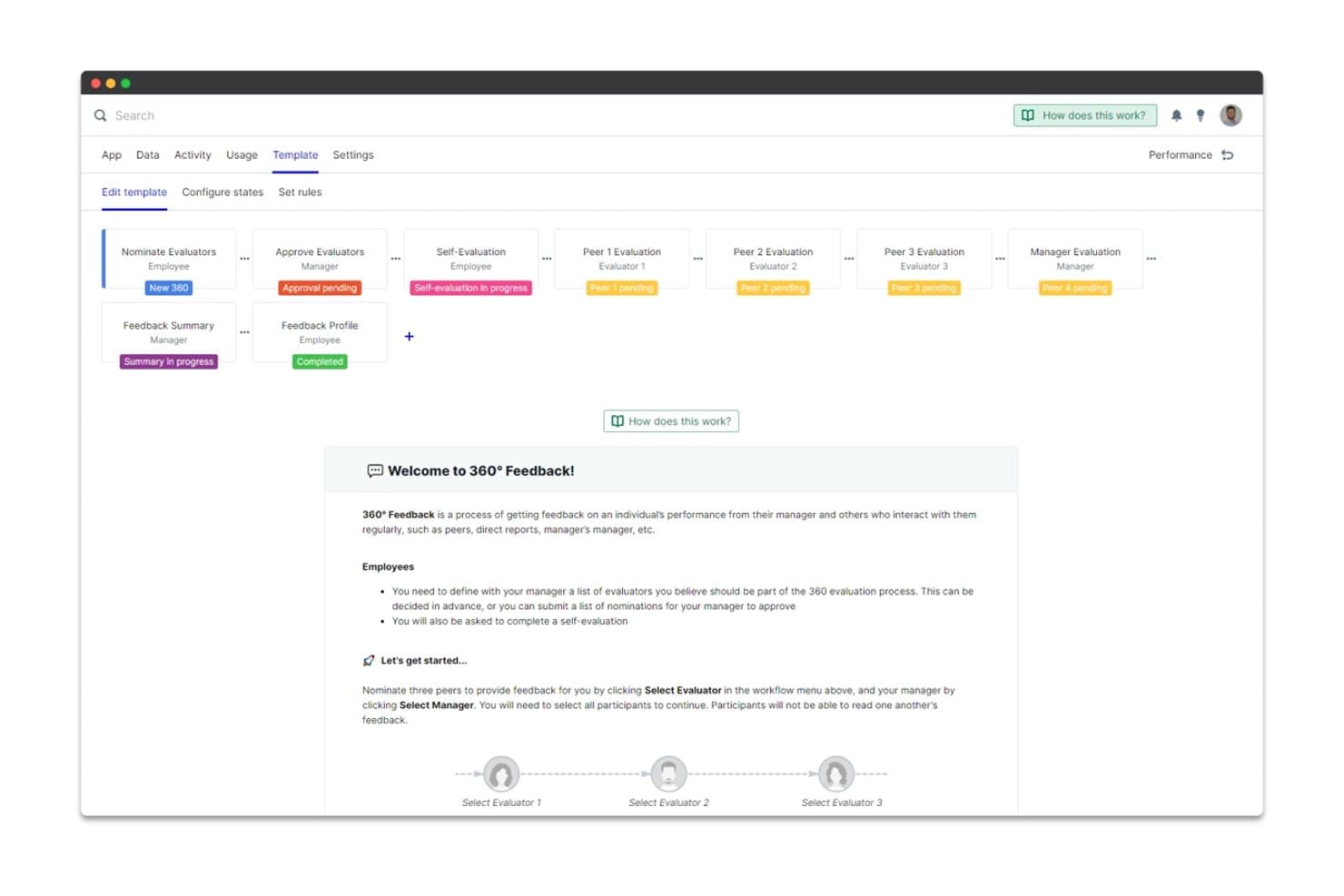
PeopleGoal offers a 360° Feedback workflow template with configurable stages including peer evaluations, manager review, and feedback summary. PeopleGoal is a performance management platform that covers goal-setting and OKRs, 360-degree feedback, customizable review cycles, one-on-ones, and employee development plans in a single no-code workspace.
Who Is PeopleGoal Best For?
PeopleGoal suits HR professionals at small to mid-sized companies who need fully configurable review and feedback workflows without relying on an IT team to build them.
Why I Picked PeopleGoal
I picked PeopleGoal as one of the best because its no-code workflow engine lets you build review cycles with custom states, participants, and rules from scratch. I particularly like the multi-manager assessment feature, which lets multiple managers contribute to a single employee review, a setup most platforms don't support natively. You can also run department-specific review templates while keeping a shared scoring structure across the org.
PeopleGoal Key Features
- Pulse surveys and eNPS: Collect quick engagement insights and track employee sentiment with built-in survey tools.
- Career development plans: Enable employees to create individual development and training plans directly in the platform.
- Custom reporting and analytics: Build, schedule, and export reports for performance data, goals, and feedback cycles.
- HRIS and productivity integrations: Connects with systems like BambooHR, Slack, and Microsoft Teams for streamlined workflows and data syncing.
PeopleGoal Integrations
PeopleGoal offers native integrations with Slack, Microsoft Teams, BambooHR, ADP, and Google Workspace. An API is available for custom integrations.
What's Free?
PeopleGoal offers a 14-day free trial that gives you access to its full feature set, including custom workflows, goal tracking, and feedback tools. There's no free-forever plan, so you'll need to move to a paid plan starting at $4/user/month (billed annually) after the trial ends.
Pros and Cons
Pros:
- Department-specific templates with unified scoring
- Supports multi-manager assessments natively
- Fully no-code custom review workflow builder
Cons:
- Reporting depth limited on entry tiers
- No free-forever plan exists
Learn more about PeopleGoal: Best for HRIS-linked performance tracking
- Free plan available OR 30-day free trial
- Pricing upon request
Visit WebsiteCustomer Rating:4.2/5
OrangeHRM lets admins search, filter, and add employee performance reviews with job titles, reviewers, review periods, due dates, and statuses. OrangeHRM is an open-source HR platform with a free Starter tier that combines employee management, leave tracking, time tracking, recruitment, and 180° performance reviews in a single system.
Who Is OrangeHRM Best For?
OrangeHRM is a strong fit for small businesses and startups with 20–50 employees that need a free, self-hostable HRIS with basic performance review functionality built in.
Why I Picked OrangeHRM
I picked OrangeHRM because its performance reviews are native to the same HR software handling your employee records, leave history, time tracking, and org structure. When I set up a 180° review cycle, employee profiles and reporting lines are already populated. I'm not pulling data from a separate HR database or reconciling records across platforms. The built-in reporting module also lets me view performance data alongside attendance and leave records in one place.
OrangeHRM Key Features
- 180° performance reviews: Conduct employee evaluations to collect feedback from managers and staff using a structured review form.
- Time and attendance tracking: Record employee work hours, overtime, and absences from a central dashboard.
- Leave management: Manage PTO requests, approvals, and leave balances with built-in calendar views.
- Reporting and analytics: Access pre-built reports summarizing employee reviews, attendance records, and HR data in one place.
OrangeHRM Integrations
Native integrations are not clearly documented. An API is available for custom integrations.
What's Free?
OrangeHRM's Starter plan is a free-forever, open-source tier that includes performance management, leave management, time tracking, recruitment, and reporting. It's self-hosted, so you'll need to manage your own server setup, and it's best suited for teams of 20–50 employees.
Pros and Cons
Pros:
- Free tier includes multiple HR modules
- Self-hosted option gives full data control
- Employee records and reviews live together
Cons:
- Performance features are basic vs. competitors
- Setup requires technical server management knowledge
Learn more about OrangeHRM: 10Best for weekly OKR check-ins
Weekdone
- 14-day free trial + free plan available
- From $90/month (billed annually)
Visit WebsiteCustomer Rating:4.1/5
Weekdone tracks plans, progress, problems, OKR progress, and Weekscore through its Weekly Planning dashboard. Weekdone is an OKR and goal management platform that combines weekly check-ins, progress tracking, continuous feedback, and 1-on-1 meeting tools with a free plan for teams of up to three users.
Who Is Weekdone Best For?
Weekdone is a strong fit for startups and small teams that are adopting the OKR framework for the first time and need structured goal-setting without enterprise complexity.
Why I Picked Weekdone
I picked Weekdone as one of the best because its weekly PPP (Plans, Progress, Problems) check-in structure keeps OKR progress from going stale between quarters. My team uses the visual OKR hierarchy tree to align individual key results directly to company-level objectives, so every weekly update rolls up meaningfully. The automated weekly status reports mean I'm not chasing people for updates manually.
Weekdone Key Features
- Company TV dashboards: Display real-time OKR and goal progress on dedicated screens for team visibility.
- Pulse surveys and engagement ratings: Gather quick weekly feedback and 5-star morale ratings from team members.
- 1:1 conversations and meeting agendas: Schedule and document private meetings between managers and employees with shared agendas.
- Slack and Microsoft Teams integrations: Capture updates and share newsfeed activity directly within your team’s chat environment.
Weekdone Integrations
Weekdone offers native integrations with Slack and Microsoft Teams. An API is available for custom integrations.
What's Free?
Weekdone's free plan is free forever for teams of up to three users and includes full access to all features. If you add a fourth user, the account shifts to a 14-day free trial before requiring a paid subscription.
Pros and Cons
Pros:
- Free plan unlocks the full feature set
- Weekly PPP check-ins keep OKR progress current
- OKR tree maps goals across entire org
Cons:
- Lacks formal performance review cycle templates
- Three-user limit restricts growing team adoption
Learn more about Weekdone:
Diğer Ücretsiz Performans Yönetimi Yazılımları
Kısa listeme girmeyen, ancak yine de incelemeye değer bazı ek ücretsiz performans yönetimi yazılımı seçeneklerini burada bulabilirsiniz:
- 11TeamflectBest for Microsoft Teams-based performance reviews
- 12monday.comBest for visual performance dashboards
- 13WebHRBest for 360-degree KPI-based reviews
- 1415FiveBest for manager-led employee check-ins
- 15Peoplebox.aiBest for Slack-based continuous feedback
- 16LeapsomeBest for automated 360-degree review cycles
- 17PerformYardBest for flexible employee review cycles
How I Evaluate a Free Performance Management Software
First, I define what counts as free. For performance management software, that means a free-forever plan—not a trial—since review cycles, goal tracking, and feedback are ongoing HR functions. From there, I split evaluation into two layers: the core functionality a tool must offer to make the list, and the differentiators that set one vendor apart from another.
Core Functionality (Table Stakes for This List)
In addition to my free offer requirements, I also use a scoring system to select tools for my list. Here's how it works:
When I'm selecting tools for my list, I rank each one on a scale from 0 (does not offer the functionality) to 5 (excels in this area) for each core functionality listed below. I then calculate the tool's total score into a percentage, using 65% as a benchmark to help assess its overall fit for the list.
- Performance Reviews: I look for customizable templates and rating scales that let HR teams run structured review cycles, whether it's an annual appraisal or a 90-day probation check-in.
- Goal Management: Each tool should let you set, assign, and track individual or team goals tied to performance outcomes, with visible progress updates.
- 360-Degree Feedback: I check whether the tool supports multi-source feedback from peers, managers, and direct reports rather than limiting reviews to a single evaluator.
- Continuous Feedback: The platform should support praise, notes, or quick check-ins outside formal review windows so feedback doesn't pile up for one annual conversation.
- 1-on-1 Meetings: I evaluate whether the tool offers shared agendas, talking points, and action items for recurring manager-employee conversations.
- Reporting & Analytics: Visibility into review completion rates, goal progress, and team-level performance trends helps HR teams spot gaps before they widen.
Once I have a list of tools that meet the criteria, I consider what sets each platform apart.
Differentiating Factors (What Sets Vendors Apart)
Here's how I compare and contrast different vendors:
Standout Features
OKR cascading is where I see the biggest gap between tools. Some let you align individual objectives up to team and company-level goals, while others stop at flat goal lists. I also look at continuous feedback features—tools that support real-time praise or kudos through Slack or Teams keep recognition part of daily work. Structured 1-on-1 meeting templates with shared agendas and action items round out the picture, giving managers a repeatable format for coaching conversations.
Beyond Features
User caps on free plans matter a lot. I check whether the employee limit fits your current team and leaves room for near-term hires, since outgrowing the free tier mid-review cycle creates headaches. Integrations with tools like Slack, Microsoft Teams, or your existing HRIS also shape adoption—if feedback lives outside the apps people already use daily, participation drops. I also evaluate the upgrade path, specifically whether historical review data carries over when you move to a paid plan so nothing gets lost.
Ücretsiz Performans Yönetimi Yazılımı Nasıl Seçilir?
Uzun özellik listeleri ve karmaşık fiyatlandırma yapılarına kendinizi kaptırmanız kolaydır. Kendinize özgü yazılım seçimi sürecinizde ilerlerken odağınızı korumanıza yardımcı olmak için göz önünde bulundurmanız gereken faktörlerin bir kontrol listesini burada bulabilirsiniz:
| Faktör | Göz önünde bulundurulması gerekenler |
|---|---|
| FaktörÖlçeklenebilirlik | Göz önünde bulundurulması gerekenlerBüyüdükçe ücretsiz plan ekibinizin büyüklüğünü karşılayacak mı? Kullanıcı sınırlarını ve yükseltme seçeneklerini kontrol edin. |
| FaktörEntegrasyonlar | Göz önünde bulundurulması gerekenlerAraç, Slack veya İKYS gibi mevcut uygulamalarınıza bağlanıyor mu? Eksik entegrasyonlar benimsenme sürecini aksatabilir. |
| FaktörÖzelleştirilebilirlik | Göz önünde bulundurulması gerekenlerAracı iş akışlarınıza, değerlendirme döngülerinize ve terminolojinize uyacak şekilde uyarlayabilir misiniz? |
| FaktörKullanım kolaylığı | Göz önünde bulundurulması gerekenlerArayüz çalışanlar ve yöneticiler için sezgisel mi? Kullanımı zor sistemler gizli eğitim maliyetleri oluşturur. |
| FaktörUygulama ve işe alıştırma | Göz önünde bulundurulması gerekenlerKullanıma geçmek ne kadar sürüyor? Yönlendirmeli kurulumlar, şablonlar ve bilgi tabanı desteği arayın. |
| FaktörMaliyet | Göz önünde bulundurulması gerekenlerÜcretsiz planı aştığınızda ne olur? Sürecinizi aksatabilecek gizli ücretleri veya yalnızca ücretli planlarda sunulan özellikleri kontrol edin. |
| FaktörGüvenlik önlemleri | Göz önünde bulundurulması gerekenlerSistem, hassas çalışan geri bildirimleri için yeterli veri koruması sunuyor mu? Uyumluluk, erişim kontrolleri ve dışa aktarma seçeneklerini arayın. |
| FaktörDestek erişilebilirliği | Göz önünde bulundurulması gerekenlerÜcretsiz pakette hangi destek seçenekleri sunuluyor: e-posta, canlı sohbet veya topluluk forumları mı? İşe alıştırma ya da sorun giderme sırasında ne kadar yardıma ihtiyaç duyacağınızı değerlendirin. |
Ücretsiz Performans Yönetimi Yazılımı Nedir?
Ücretsiz performans yönetimi yazılımı, İK ekiplerinin çalışan değerlendirmelerini yürütmesine, hedefleri takip etmesine ve başlangıç maliyeti olmadan geri bildirim toplamasına olanak tanıyan dijital bir platformdur. Bu araçlar, ücretsiz ve kalıcı bir plan sunarak küçük ekipler veya pilot programlar için değerlendirme döngüleri ve ilerleme takibi gibi temel görevleri destekler; ancak genellikle kullanıcı sayısını ve gelişmiş özellikleri sınırlar.
Ücretsiz Performans Yönetimi Yazılımının Özellikleri
Performans yönetimi yazılımlarında yaygın olarak bulunan özellikleri ve bunların hangilerinin genellikle ücretsiz ve ücretli planlara dahil edildiğini inceleyelim.
Ücretsiz Performans Yönetimi Yazılımı Özellikleri
- Performans değerlendirmeleri: Performans görüşmelerini belgelemek ve takip etmek için temel şablonlar ve derecelendirme ölçekleri kullanan yapılandırılmış çalışan değerlendirme döngüleri.
- Hedef belirleme: Kullanıcılar basit görsel ilerleme göstergeleriyle çalışan veya ekip hedefleri belirleyebilir, atayabilir ve izleyebilir.
- 360 derece geri bildirim: Anket formları veya geri bildirim talepleri aracılığıyla çalışma arkadaşlarından, yöneticilerden ve bazen doğrudan raporlayan çalışanlardan geri bildirim toplar.
- Sürekli geri bildirim: Kullanıcıların resmi değerlendirme döngüleri dışında, genellikle hızlı mesajlar veya yorumlar aracılığıyla sık sık takdir veya yapıcı notlar paylaşmasına olanak tanır.
- Bire bir toplantı gündemleri: Düzenli yönetici-çalışan görüşmelerinin odaklı ve eyleme dönük kalmasını sağlamak için temel paylaşılan veya ortaklaşa hazırlanan gündemleri destekler.
- Temel raporlama: Değerlendirme tamamlanma oranlarını takip etmek ve ekip veya çalışan ilerlemesini yüzeysel düzeyde görüntülemek için sınırlı gösterge tabloları veya özet görünümler sunar.
- Kullanıcı yönetimi: Yöneticilerin çalışan hesaplarını, rollerini ve izinlerini temel düzeyde eklemesine, kaldırmasına veya yönetmesine olanak tanır.
Ücretli Performans Yönetimi Yazılımı Özellikleri
- Gelişmiş değerlendirme özelleştirmesi: Karmaşık değerlendirme döngüleri için tamamen özelleştirilebilir değerlendirme iş akışları, koşullu mantık, otomasyon ve kalibrasyon araçları.
- OKR uyumu ve kademelendirme: Bireysel, ekip ve şirket hedeflerini uyumlu hâle getirme ve hedefleri kuruluş genelinde kademeli olarak yayma olanağı.
- Nabız anketleri ve eNPS: Ekip çalışanlarının zaman içindeki görüşlerini izlemek için kısa katılım anketleri ve çalışan Net Tavsiye Skoru takibi.
- HRIS ile entegrasyon: Otomatik çalışan senkronizasyonu ve daha kapsamlı raporlama için İK sistemlerine doğrudan ve gelişmiş bağlantılar.
- Özel analizler ve gösterge tabloları: Eğilimleri takip etmek ve gizli kalıpları ortaya çıkarmak için ayrıntılı analizler, role dayalı gösterge tabloları ve dışa aktarılabilir içgörüler.
- Anonimlik denetimleri: Özellikle 360 derece değerlendirmelerde, açık ve dürüst katılımı teşvik etmek için geliştirilmiş geri bildirim anonimliği.
- Tek oturum açma (SSO) ve güvenlik: Daha büyük veya düzenlemeye tabi kuruluşları desteklemek için SSO, API erişimi, denetim günlükleri ve gelişmiş role dayalı izinler.
- Özel işe alıştırma ve destek: Sağlayıcı uzmanlarından kişiselleştirilmiş uygulama, işe alıştırma oturumları ve öncelikli müşteri desteği.
- Özel markalama: Birleşik bir iş yeri deneyimi için logonuzu, kuruluş renklerinizi ve özel alan adınızı görüntüleme olanağı.
Ücretsiz Performans Yönetimi Yazılımının Faydaları
Ücretsiz performans yönetimi yazılımını uygulamak, ekibiniz ve işletmeniz için çeşitli faydalar sağlar. Yararlanabileceğiniz bazı faydalar şunlardır:
- Ön maliyet yoktur: Bütçe onayına veya hemen satın alma kararlarına gerek kalmadan temel performans yönetimi araçlarına ve döngülerine erişmenizi sağlar.
- Merkezi performans verileri: Çalışan hedeflerini, değerlendirmeleri ve geri bildirimleri tek bir yerde toplar; dağınık elektronik tabloları ve e-postaları ortadan kaldırır.
- Daha güçlü geri bildirim kültürü: Çalışanların mevcut durumlarını her zaman bilmeleri için çalışma arkadaşları ve yöneticiler arasında düzenli, yapılandırılmış geri bildirimi mümkün kılarak olumlu bir şirket kültürünü teşvik eder.
- Kolay hedef takibi: Hesap verebilirliği ve gelişimi destekleyerek bireysel veya ekip hedefleri belirlemenize, atamanıza ve bu hedeflerdeki ilerlemeyi izlemenize olanak tanır.
- Süreçlerin daha hızlı benimsenmesi: Önceden hazırlanmış şablonlar ve yönlendirmeli işe alıştırma, ekiplerin manuel veya güncelliğini yitirmiş süreçleri hızla değiştirmesine yardımcı olur.
- Büyüyen ekipleri destekler: Ücretsiz planların çoğu küçük ekipler veya girişimler için uygundur; çalışan sayısı arttıkça sorunsuz bir başlangıç noktası ve net bir üst pakete geçiş yolu sunar.
- Geliştirilmiş karar alma: Temel raporlama ve analizler, İK liderlerine ve yöneticilere çalışan gelişimi ve ekip performansı için eyleme dönüştürülebilir içgörüler sunar.
Performans Yönetimi Yazılımının Maliyetleri ve Fiyatlandırması
Bu makaleye ücretsiz olarak sunulan en iyi performans yönetimi yazılımı seçeneklerini arayarak geldiğinizi biliyorum. Ancak ücretsiz planlar yalnızca sınırlı özellikler sunduğundan, gelecekte planınızı daha üst bir pakete taşımanız gerekme ihtimali yüksektir.
Aşağıdaki tablo, performans yönetimi yazılımlarında yaygın planları, bu planların ortalama fiyatlarını ve genellikle içerdiği özellikleri özetlemektedir:
Performans Yönetimi Yazılımı Plan Karşılaştırma Tablosu
| Plan Türü | Ortalama Fiyat | Yaygın Özellikler |
|---|---|---|
| Plan TürüÜcretsiz Plan | Ortalama Fiyat$0 | Yaygın ÖzelliklerTemel değerlendirmeler, hedef belirleme, 360 derece geri bildirim, sınırlı raporlama ve kullanıcı sınırları. |
| Plan TürüKişisel Plan | Ortalama Fiyat$5–$10/kullanıcı/ay | Yaygın ÖzelliklerSınırsız kullanıcı, özelleştirilebilir şablonlar, ilerleme takibi, temel entegrasyonlar ve standart destek. |
| Plan Türüİşletme Planı | Ortalama Fiyat$10–$25/kullanıcı/ay | Yaygın ÖzelliklerGelişmiş analizler, OKR uyumu ve kademelendirme, HRIS entegrasyonları, SSO, özel markalama ve gelişmiş izinler. |
| Plan TürüKurumsal Plan | Ortalama Fiyat$25–$50/kullanıcı/ay | Yaygın ÖzelliklerGelişmiş güvenlik, özel işe alım süreci, özel iş akışları, API erişimi, gelişmiş uyumluluk ve öncelikli destek. |
Ücretsiz Performans Yönetimi Yazılımı Hakkında SSS
Ücretsiz performans yönetimi yazılımı hakkında sık sorulan bazı soruların yanıtlarını burada bulabilirsiniz:
Çoğu ücretsiz performans yönetimi yazılımı planının sınırlamaları nelerdir?
Çoğu ücretsiz plan kullanıcı sayısını sınırlar, değerlendirme döngülerinin sıklığını veya özelleştirilebilirliğini kısıtlar ve gelişmiş analizlere ya da entegrasyonlara erişimi sınırlar. Bu sınırlar küçük veya yeni ekipler için uygundur; ancak kuruluşunuz büyüdükçe veya süreçleriniz daha karmaşık hâle geldikçe büyük olasılıkla yükseltme yapmanız gerekir.
Yükseltme yaparsam veya araç değiştirirsem verileri ücretsiz bir plandan taşıyabilir miyim?
Evet, çoğu sağlayıcı ücretli bir plana veya başka bir platforma geçerken veri dışa aktarma ya da taşıma seçenekleri sunar. Geçişler sırasında geçmiş değerlendirmeleri, geri bildirimleri veya hedefleri kaybetmemek için veri taşınabilirliğini önceden kontrol etmek iyi bir fikirdir.
Çalışan değerlendirmeleri ve geri bildirimleri ücretsiz planlarda gizli tutulur mu?
Evet, ücretsiz planlar bile değerlendirmelerin gizliliğini korumak için genellikle role dayalı erişim denetimlerini içerir. Ancak denetim günlükleri veya ayrıntılı izinler gibi gelişmiş güvenlik özellikleri yalnızca ücretli katmanlarda sunulabilir; bu nedenle ihtiyaçlarınızı dikkatlice değerlendirin.
Ücretsiz performans yönetimi araçları HRIS veya üretkenlik uygulamalarıyla entegre olur mu?
Bazıları, genellikle sınırlı düzeyde olmak üzere entegre olur. Slack, Microsoft Teams veya Google Workspace ile temel entegrasyonlar bazen dâhil edilir; ancak gelişmiş HRIS bağlantısı veya SSO kimlik doğrulaması büyük olasılıkla ücretli özellikler arasında yer alır.
Küçük bir ekip için ücretsiz performans yönetimi yazılımını uygulamak ne kadar kolaydır?
Çoğu ücretsiz araç hızlı ve kendi kendine kurulabilecek şekilde tasarlanmıştır. Değerlendirme döngülerini veya hedef takibini hemen başlatmayı kolaylaştıran yönlendirmeli işe alım süreci, yardım kaynakları ve hazır şablonlar sunulmasını bekleyebilirsiniz.