

Verimlilik araçları, görevleri yönetmenize, çalışmaları düzenlemenize ve ilerlemeyi takip etmenize yardımcı olan yazılım veya uygulamalardır; böylece daha az stresle daha fazlasını yapabilirsiniz. En iyi verimlilik araçlarını arıyorsanız muhtemelen ekibinizin dikkat dağıtıcı unsurları azaltmasına, kolayca iş birliği yapmasına ve son teslim tarihlerinin önüne geçmesine gerçekten yardımcı olan güvenilir seçenekler arıyorsunuz; yalnızca daha fazla dijital karmaşa değil.
Bu rehberde, hem klasik favorileri hem de yeni ortaya çıkan uygulamaları içeren 2026 yılının en iyi seçeneklerini ve her birinin sunduklarına ilişkin dürüst değerlendirmeleri bulacaksınız. Çalışma gününüzde verimliliği, netliği ve odağı artıracak doğru aracı bulmak için bu listeyi kullanın.
Why Trust Our Software Recommendations
6,700+
Reviews
20
Industry experts
16+
Evaluation factors
14
Years
Our team has been testing and reviewing software since 2012. As HR experts ourselves, we know how difficult—and important—it is to choose the right software.
For this guide, we evaluated tools using hands-on testing and independent research, scoring tools using our selection criteria. We also draw on insights from industry thought leaders and practicing HR experts.
Our reviews reflect our human editorial judgment, not a sales pitch.
Expert reviewers:
- Phil GrayCOO
 Kim BehnkeHR Tech Editor & Analyst
 Josh BarkerPeople Ops Manager

Verimlilik Araçları Karşılaştırma Tablosu
Bu karşılaştırma tablosu, en iyi verimlilik aracı seçimlerim için fiyatlandırma ayrıntılarını özetlemektedir:
Sorted by: Default
| Tool | Starting Price | Website | |
|---|---|---|---|
Best for flexible time tracking | 4.8 out of 5 | $4.99/user/month Free plan + 7-day trial + demo available | Website |
Best for centralized tasks and calendars for focused daily planning | 4.7 out of 5 | $19/user/month 7-day free trial | Website |
Best for organizing tasks and projects with powerful simplicity | 4.6 out of 5 | $5/user/month Free plan available | Website |
Best for visual project and workflow management | 4.5 out of 5 | $5/user/month Free plan + free trial available | Website |
Best for building customizable team workspaces | 4.6 out of 5 | $10/user/month Free plan + 30-day trial available | Website |
Best for automatic time tracking and distraction management | 4.5 out of 5 | $7/month 14-day free trial available | Website |
Best for team chat, meetings, and document collaboration | 4.3 out of 5 | $4/user/month Free plan + 1-month free trial available | Website |
Best for aligning goals with project execution | 4.3 out of 5 | $4/user/month Free plan available | Website |
Best for blended notes, tasks, and calendar in one workspace | 4.0 out of 5 | $10/month Free plan available | Website |
Best for time tracking with built-in reporting | 4.7 out of 5 | $9/user/month Free plan available; 30-day free trial; Free demo available | Book Demo |


En İyi Verimlilik Araçları İncelemeleri
Kısa listeme giren en iyi verimlilik araçlarına ilişkin ayrıntılı özetlerimi aşağıda bulabilirsiniz. İncelemelerim, size en uygun aracı bulmanıza yardımcı olmak için her aracın özelliklerine, en iyi kullanım alanlarına ve entegrasyonlarına ayrıntılı bir bakış sunuyor.
 Best for flexible time tracking
- Free plan + 7-day trial + demo available
- From $4.99/user/month
Visit WebsiteCustomer Rating:4.8/5
Clockify offers a time tracker interface that logs daily and weekly work hours across multiple projects, tasks, and categories like overtime and invoiced entries. Clockify is a time tracker and timesheet app that covers manual timers, auto tracking, scheduling, reporting, invoicing, and expense management across teams.
Who Is Clockify Best For?
Clockify is a strong fit for agencies, consultancies, and service-based teams that need to track billable hours across multiple clients and projects. It is especially useful for growing teams, freelancers, and independent contractors because of its generous free tier.
Why I Picked Clockify
I picked Clockify as one of the best because it's a versatile, low-friction platform to track team productivity across diverse working styles. Its combination of real-time timers, automatic activity tracking, and visual breakdown reports lets you monitor employee output without micromanaging daily schedules. Auto Tracker silently records every app and website you visit, then lets you convert that raw activity into time entries with one click.
Clockify Key Features
- Pomodoro timer: Run timed focus sessions with automatic short and long breaks built into the work cycle.
- Project time budgets: Set hour or dollar-based budgets per project and receive alerts when you're approaching the limit.
- Visual reports: Generate summary, detailed, or weekly reports that break down logged time by user, project, or client.
- Kiosk mode: Set up a shared clock-in terminal on a tablet so team members can log hours without individual accounts.
Clockify Integrations
Clockify offers 100+ integrations through its browser extension and native connections, including QuickBooks, Xero, Jira, Asana, Trello, Slack, Google Calendar, Outlook, Salesforce, and HubSpot. It also connects with Zapier and has an API for custom integrations.
Pros and Cons
Pros:
- Kiosk mode for shared device clock-ins
- Auto tracker logs app usage silently
- Free time tracking for up to five users
Cons:
- No built-in task management features
- Reports require paid plans for filtering
Learn more about Clockify: Best for centralized tasks and calendars for focused daily planning
- 7-day free trial
- From $19/user/month
Visit WebsiteCustomer Rating:4.7/5
Akiflow offers a unified task manager and calendar view, helping users organize their day. Akiflow is a daily planning tool that pulls tasks from across your apps into a single inbox and lets you schedule them directly onto your calendar.
Who Is Akiflow Best For?
Akiflow is a strong fit for busy individual professionals, particularly managers and operators who juggle tasks across multiple tools and need a single place to plan their day.
Why I Picked Akiflow
I've included Akiflow in my top picks because of features like its Universal Inbox, which is genuinely unlike what most productivity tools offer. It pulls tasks from across your connected apps into one place, so instead of checking Slack, Gmail, and Asana separately, everything lands in a single queue you can schedule directly onto your calendar. The time blocking feature is tightly built into this workflow: you drag tasks onto your calendar, and Akiflow detects conflicts automatically. I also rely on the Rituals feature, which prompts a structured daily planning and shutdown review to close out each day intentionally.
Akiflow Key Features
- Focus timer: Set a countdown timer to lock into a single task and block out distractions during deep work sessions.
- Command bar: Create tasks, events, and meetings instantly using keyboard shortcuts and natural language input.
- Stats dashboard: Review how time was spent across tasks and projects, and track your inbox zero streak over time.
- Meeting link: Share a scheduling link that lets others book one-off or recurring meetings based on your live calendar availability.
Akiflow Integrations
Akiflow offers native integrations with Slack, Gmail, Google Calendar, Outlook Calendar, Outlook Email, Microsoft Teams, Notion, Asana, ClickUp, and Jira, along with Todoist, Trello, GitHub, Linear, Zoom, and Microsoft To Do. It also connects with Zapier and IFTTT for additional app connectivity.
Pros and Cons
Pros:
- Guided daily planning and shutdown rituals
- Keyboard-driven command bar speeds up input
- Drag-and-drop time blocking on the calendar
Cons:
- Limited project management for complex workflows
- No built-in time tracking feature
Learn more about Akiflow: Best for organizing tasks and projects with powerful simplicity
- Free plan available
- From $5/user/month (billed annually)
Visit WebsiteCustomer Rating:4.6/5
Todoist offers a clean daily task view with time-scheduled tasks organized by personal and team projects. Todoist is a task management app that lets individuals and teams capture, organize, and prioritize tasks and projects across devices with a clean, minimal interface.
Who Is Todoist Best For?
Todoist is a great fit for freelancers, solo professionals, and small teams who want a straightforward task manager without a steep learning curve.
Why I Picked Todoist
Todoist is one of my top picks because I love how its natural language input works in practice. I can type something like "submit report every Friday at 3pm" and Todoist instantly creates a recurring task with the right due date and time, no extra clicks needed. I also rely on the Priority levels (P1 through P4) to keep my task list focused, so the most critical work always surfaces first. The Karma system is a nice touch too, tracking my productivity trends over time without feeling gimmicky.
Todoist Key Features
- Project sections: Break projects into named sections to group related tasks and keep work organized by phase or category.
- Task delegation: Assign tasks to teammates directly within shared projects, with comments and file attachments on each task.
- Filters and labels: Create custom filters using combinations of due dates, assignees, and labels to build personalized task views.
- Productivity templates: Access pre-built project templates for common workflows like meeting agendas, goal tracking, and weekly reviews.
Todoist Integrations
Todoist offers 100+ integrations, including Google Calendar, Outlook Calendar, Slack, Microsoft Teams, Jira, Trello, Evernote, IFTTT, and Zoho Flow. It also connects with Zapier and Make, and provides an API for custom integrations.
Pros and Cons
Pros:
- Clean, distraction-free task views
- Works across all major platforms
- Natural language task input saves time
Cons:
- Limited project visualization beyond list view
- No built-in time tracking feature
Learn more about Todoist: Best for visual project and workflow management
- Free plan + free trial available
- From $5/user/month (billed annually)
Visit WebsiteCustomer Rating:4.5/5
Trello offers a kanban-style board view with categorized task columns to help teams track work progress visually. Trello is a Kanban-based project management tool that organizes work across visual boards, lists, and cards, with support for multiple project views, including timeline, table, calendar, and map.
Who Is Trello Best For?
Trello is a strong fit for small to mid-sized teams that manage work visually and prefer a card-based system over complex project hierarchies.
Why I Picked Trello
Trello earns its spot as one of the best on my shortlist because its board-and-card system makes team planning genuinely visual and concrete. I use boards to map out every stage of a project, and each card holds checklists, due dates, and file attachments so nothing lives outside the system. The timeline view layers those cards into a Gantt-style schedule, which I find useful when my team is juggling overlapping deadlines.
Trello Key Features
- Butler automation: Build no-code automation rules that trigger actions, like moving cards or assigning members, based on set conditions.
- Power-Ups: Extend board functionality with add-ons for voting, time tracking, and reporting directly within Trello.
- Board templates: Start projects faster using pre-built templates for common workflows like sprint planning and content calendars.
- Card labels and filters: Tag cards with color-coded labels and filter boards to surface only the work that matters.
Trello Integrations
Trello offers 200+ integrations through its Power-Ups marketplace, including Slack, Jira, Microsoft Teams, Gmail, Miro, Toggl, and Make. It also connects with Zapier and provides a REST API for custom integrations.
Pros and Cons
Pros:
- Butler automation handles repetitive tasks without code
- Free plan includes unlimited cards and members
- Drag-and-drop Kanban boards visualize workflow instantly
Cons:
- Boards get cluttered with large projects
- No built-in time tracking or reporting
Learn more about Trello: Best for building customizable team workspaces
- Free plan + 30-day trial available
- From $10/user/month
Visit WebsiteCustomer Rating:4.6/5
Notion is a collaborative workspace that combines docs, wikis, databases, and project management in one platform. Notion is a connected workspace where you can build docs, wikis, databases, and project boards, all linked together within a single platform.
Who Is Notion Best For?
Notion is a strong fit for small to mid-sized teams that need a single place to manage knowledge, documentation, and project work together.
Why I Picked Notion
Notion earns its spot on my shortlist because the whole workspace is genuinely connected. I can link a project database to a team wiki, reference meeting notes inside a task, and pull filtered views of the same database as a board, timeline, or table. Notion's bidirectional linking means nothing lives in a silo. I also like that Notion AI can summarize pages, generate action items, and answer questions across your workspace content directly.
Notion Key Features
- Templates: Notion's template gallery includes pre-built pages for meeting notes, project plans, OKRs, and roadmaps.
- Synced blocks: Write a block of content once and sync it across multiple pages so edits update everywhere automatically.
- Inline comments: Leave comments directly on any block and @mention teammates to flag questions or assign follow-ups.
- Custom database properties: Add formulas, rollups, date pickers, and multi-select fields to structure any type of information.
Notion Integrations
Notion offers native integrations with Slack, Google Drive, Jira, GitHub, GitLab, Asana, Figma, Trello, Salesforce, and Miro, among others. It also connects with Zapier, Make, and IFTTT, and provides a public API for custom integrations.
Pros and Cons
Pros:
- Real-time co-editing on shared pages
- Replaces multiple apps with one workspace
- Relational databases link pages and projects
Cons:
- Large databases cause noticeable slowdowns
- No built-in time tracking feature
Learn more about Notion: Best for automatic time tracking and distraction management
- 14-day free trial available
- From $7/month (billed annually)
Visit WebsiteCustomer Rating:4.5/5
RescueTime offers focus session management, timer tracking, offline activity logging, and detailed app usage breakdowns to help users stay productive. RescueTime is an automatic time tracking tool that runs silently in the background, logging time spent across apps, websites, and documents to give individuals a detailed breakdown of their daily work habits.
Who Is RescueTime Best For?
RescueTime is a natural fit for freelancers, remote workers, and individual contributors who need to understand where their time actually goes each day.
Why I Picked RescueTime
RescueTime is one of my top picks because it removes the need to manually log a single minute. The Focus Sessions feature lets you block distracting sites and apps on demand, so you can actually protect deep work time instead of just measuring what you lost to it. I also rely on the Goals and Alerts system, which nudges you back on track in real time rather than waiting until the end of the week to review what went wrong.
RescueTime Key Features
- Automatic activity categorization: RescueTime labels every app and website you use as productive, neutral, or distracting based on customizable category settings.
- Weekly email reports: A summary of your time use, productivity score, and top activities lands in your inbox each week automatically.
- Daily highlights log: Manually record what you accomplished each day alongside your tracked data to give context to your time reports.
- Offline time tracking: Log time spent in meetings, phone calls, or away from your device to keep your daily record complete.
RescueTime Integrations
RescueTime offers a small set of native integrations, including Slack, Trello, Asana, GitHub, Google Calendar, and Outlook/Office 365 Calendar. It also connects with Zapier and IFTTT. An API is available for custom integrations.
Pros and Cons
Pros:
- Runs silently without interrupting workflows
- Focus Sessions block distracting sites on-demand
- Tracks app and website time automatically
Cons:
- Tracks by app, not by project
- Mobile app is less reliable than desktops
Learn more about RescueTime: Best for team chat, meetings, and document collaboration
- Free plan + 1-month free trial available
- From $4/user/month (billed annually)
Visit WebsiteCustomer Rating:4.3/5
Microsoft Teams offers a One Productivity Hub personal tab that consolidates calendar events, to-do tasks, and files in a single dashboard view. Microsoft Teams is a workplace communication and collaboration platform that combines chat, video meetings, file sharing, and task management in one connected hub.
Who Is Microsoft Teams Best For?
Microsoft Teams is a natural fit for mid-sized to enterprise organizations already running on Microsoft 365.
Why I Picked Microsoft Teams
I picked Microsoft Teams as one of the best because everything my team does, from a quick chat to a full video call to co-editing a document, happens without switching apps. Channels keep project conversations threaded and searchable, and meeting recordings with auto-generated transcripts mean I can catch up on anything I missed. I also like that tasks can be pinned directly inside a channel, so work stays connected to the conversation.
Microsoft Teams Key Features
- Together mode: Places all meeting participants in a shared virtual background so everyone appears in the same space during video calls.
- Breakout rooms: Split a meeting into smaller group sessions and bring everyone back to the main call when time is up.
- Whiteboard: A shared digital canvas built into meetings where participants can sketch, annotate, and brainstorm in real time.
- Loop components: Send live, editable content blocks inside a chat that update for everyone as changes are made.
Microsoft Teams Integrations
Microsoft Teams offers over 3,000 marketplace integrations through the Microsoft AppSource directory, including tools like Asana, Salesforce, Jira, Trello, HubSpot, Figma, Miro, Zoom, Adobe Acrobat, and Confluence. It also has deep native integrations across the Microsoft ecosystem, including Microsoft 365, Power BI, and Planner, and connects with Zapier. An API is available for custom integrations.
Pros and Cons
Pros:
- Meetings support up to 1,000 participants
- Channels organize conversations and files by project
- AI-generated meeting summaries extract action items
Cons:
- Files scatter across chats, channels, and SharePoint
- High memory usage slows down multitasking
Learn more about Microsoft Teams: Best for aligning goals with project execution
- Free plan available
- From $4/user/month (billed annually)
Visit WebsiteCustomer Rating:4.3/5
GoodDay is a work management platform for project planning, task tracking, resource management, and team collaboration. GoodDay is a work management platform that covers project planning, task tracking, resource management, goal setting, and team collaboration across 20+ configurable views.
Who Is GoodDay Best For?
GoodDay is a strong fit for mid-sized teams that need a single platform to manage multiple projects across departments without switching between tools.
Why I Picked GoodDay
I've included GoodDay in my top picks because it genuinely functions as a single system for work that usually requires multiple tools. What I find most compelling is the "Action Required" feature, which creates clear task handoffs and accountability between team members without relying on chat or email follow-ups. I also use the Goals module to connect OKRs directly to individual tasks, so everyone can see how their daily work ties to larger targets. That kind of top-to-bottom alignment is rare in a tool at this price point.
GoodDay Key Features
- Gantt chart: Plan tasks, manage dependencies, and track subprojects on a visual timeline with resource allocation built in.
- Request forms: Build custom intake forms for cross-departmental requests to keep incoming work organized and routed correctly.
- Workload view: See all task assignments across your team on a timeline to spot capacity gaps and balance work distribution.
- Custom workflows: Configure task statuses and workflows to match how your team actually moves work through each stage.
GoodDay Integrations
GoodDay offers native integrations with Google Workspace (including Gmail, Google Docs, Google Drive, and Google Calendar), Slack, Dropbox, Box.com, GitHub, and GitLab. It also connects with Zapier and provides an API for custom integrations.
Pros and Cons
Pros:
- Free plan supports up to 15 users
- Built-in time tracking and resource planning
- 20+ project views, including map and whiteboard
Cons:
- Mobile app lacks full desktop functionality
- Can get unwieldy with large task volumes
Learn more about GoodDay: Best for blended notes, tasks, and calendar in one workspace
- Free plan available
- From $10/month (billed annually)
Visit WebsiteCustomer Rating:4/5
Routine offers a weekly calendar view that combines tasks, events, and time blocks in a single productivity workspace. Routine is a personal productivity and planning tool that combines task management, calendar time blocking, a universal inbox, and AI-powered meeting notes in one workspace.
Who Is Routine Best For?
Routine is a strong fit for founders, operators, and team leads who need a single workspace to manage personal tasks, team projects, and calendar commitments without switching between tools.
Why I Picked Routine
Routine earns its spot on my shortlist because it genuinely brings tasks and time together in one view. I like that the planner screen lets me see calendar events and my task list side by side, so time blocking doesn't require a separate step. The AI meeting notes feature works without a meeting bot, which I find much less disruptive in practice. It also pulls in tasks from connected apps, so my inbox stays consolidated instead of scattered across tools.
Routine Key Features
- Quick capture: Use a desktop hotkey to add tasks instantly without opening the full app.
- Recurring task scheduling: Set tasks to repeat on a custom schedule so nothing gets dropped.
- AI voice assistant: Capture tasks and notes by voice, which is useful when away from your desk.
- Labels, priorities, and projects: Categorize tasks with labels, set priority levels, and group work into projects.
Routine Integrations
Routine offers native integrations with Gmail, Google Calendar, Google Meet, Google Workspace, Google Contacts, Microsoft Outlook, Microsoft To Do, Microsoft Teams, Notion, Slack, Todoist, Asana, GitHub, Linear, Intercom, ChatGPT, Claude, Perplexity, and Cursor. It also connects with Zapier, Make, IFTTT, n8n, and Pipedream for workflow automation and offers a GraphQL API for custom integrations.
Pros and Cons
Pros:
- Keyboard-driven command bar speeds up input
- Drag-and-drop time blocking on the calendar
- Local-first architecture works fully offline
Cons:
- No AI-powered auto-scheduling for tasks
- Mobile app is less polished than the desktop
Learn more about Routine: 10Best for time tracking with built-in reporting
Toggl
- Free plan available; 30-day free trial; Free demo available
- From $9/user/month
Visit WebsiteCustomer Rating:4.7/5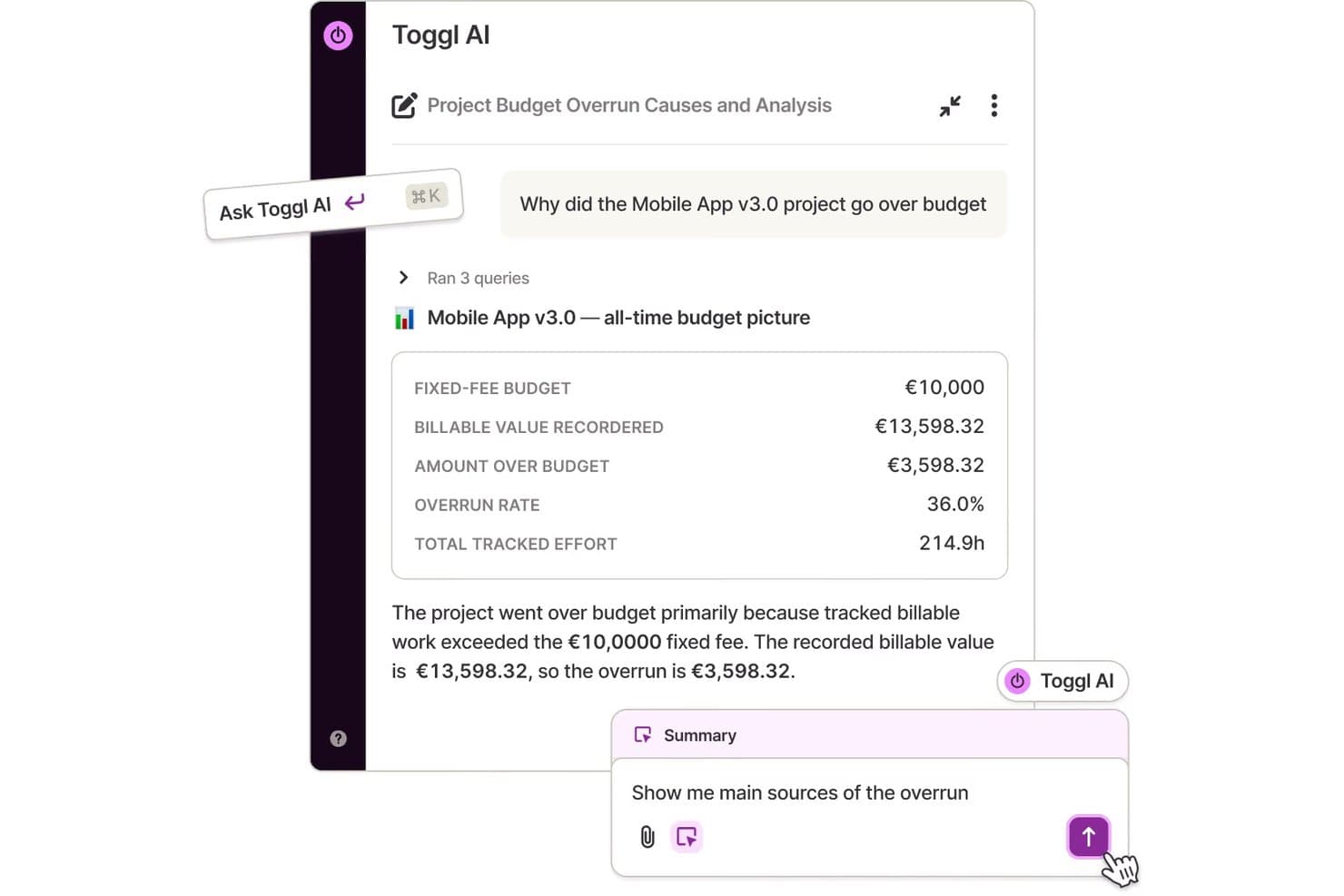
Toggl's AI analyzes project budget overruns with natural language queries. Toggl is a time tracking tool that lets individuals and teams log hours across projects, clients, and tasks, with built-in reporting and billing capabilities.
Who Is Toggl Best For?
Toggl is a natural fit for freelancers, consultants, and agencies that need to track billable hours across multiple clients and projects.
Why I Picked Toggl
I picked Toggl as one of the best because its background automated time tracking sets it apart. It runs quietly in the background, monitoring which apps and websites you use, and lets you convert that activity into time entries without manually starting and stopping a timer. I also like the calendar view, which lets you pull in existing calendar events and turn them into logged time. For anyone billing clients by the hour, the custom profitability and timesheet reports make it easy to see exactly where time went.
Toggl Key Features
- Billable rates: Set hourly rates at the workspace, project, or team member level to calculate earnings alongside logged hours.
- Project budgets: Define time or cost budgets per project and receive alerts when you're approaching the limit.
- Idle detection: Automatically detects when you've stepped away and prompts you to discard or keep the idle time from your entry.
- Browser extension: Log time directly from tools like Asana, Jira, and GitHub without leaving the tab you're working in.
Toggl Integrations
Toggl offers native integrations with Asana, Google Calendar, Jira, Outlook, QuickBooks Online, Salesforce, Slack, and iCal. Its browser extensions for Chrome, Firefox, and Edge embed a timer directly inside 100+ tools like Trello, GitHub, Notion, Todoist, and HubSpot. It also connects with Zapier and provides an API for custom integrations.
Pros and Cons
Pros:
- Filterable reports by project, client, or period
- Offline tracking syncs when reconnected
- Built-in Pomodoro timer for focused sessions
Cons:
- No pause option, only stop and restart
- No built-in invoicing for billable work
Learn more about Toggl:
Diğer Verimlilik Araçları
Kısa listeme giremeyen ancak yine de göz atmaya değer bazı ek verimlilik seçeneklerini burada bulabilirsiniz:
- 11SmartsheetBest for spreadsheet-style work management and automation
- 12AsanaWork tracking to manage tasks and deadlines
- 13SlackChannels-based team messaging and file sharing
- 14WrikeCollaborative work management for teams and enterprises
- 15ClickUpCustomizable workspace for task and project management
- 16monday.comAll-in-one platform for work management
- 17GuruKnowledge management platform with browser extension
- 18TimeJamGamified time tracking for team productivity
Verimlilik Araçları Seçim Kriterleri
Bu listeye dahil edilecek en iyi verimlilik araçlarını seçerken, manuel çalışmayı azaltmak ve görev görünürlüğünü iyileştirmek gibi yaygın alıcı ihtiyaçlarını ve sorunlarını göz önünde bulundurdum. Değerlendirmemi yapılandırılmış ve adil tutmak için aşağıdaki çerçeveyi de kullandım:
Core Functionality (25% of total score)
To be considered for inclusion in this list, each solution had to fulfill these common use cases:
- Track tasks and projects
- Set reminders and deadlines
- Assign tasks to team members
- Share files and information
- Generate productivity reports
Additional Standout Features (25% of total score)
To help further narrow down the competition, I also looked for unique features, such as:
- AI-powered automation and suggestions
- Built-in goal tracking modules
- Cross-platform offline sync
- Visual dashboards with real-time data
- Custom workflow builders
Usability (10% of total score)
To get a sense of the usability of each system, I considered the following:
- Clear and uncluttered interface design
- Intuitive navigation menus
- Easy drag-and-drop functionality
- Quick-access shortcuts and commands
- Mobile responsiveness and app quality
Onboarding (10% of total score)
To evaluate the onboarding experience for each platform, I considered the following:
- Step-by-step setup guides
- Interactive tutorials and product tours
- Availability of free training videos
- Prebuilt templates for rapid setup
- Live chat or chatbot onboarding assistance
Customer Support (10% of total score)
To assess each software provider’s customer support services, I considered the following:
- 24/7 support availability
- Multiple contact options, including chat
- Comprehensive online knowledge base
- Fast response and resolution times
- Regular product updates and communications
Value For Money (10% of total score)
To evaluate the value for money of each platform, I considered the following:
- Transparent pricing plans
- Free tier or free trial options
- Feature set offered for each price
- Flexible contract and billing terms
- Upgrade and downgrade flexibility
Customer Reviews (10% of total score)
To get a sense of overall customer satisfaction, I considered the following when reading customer reviews:
- Volume of positive ratings
- Feedback on reliability and stability
- Comments about mobile and desktop apps
- Trends in reported pain points
- Recommendations for specific use cases
Verimlilik Araçları Nasıl Seçilir?
Uzun özellik listeleri ve karmaşık fiyatlandırma yapıları arasında kaybolmak kolaydır. Benzersiz yazılım seçim süreciniz üzerinde çalışırken odağınızı korumanıza yardımcı olmak için göz önünde bulundurmanız gereken faktörleri aşağıda bir kontrol listesi olarak bulabilirsiniz:
| Faktör | Dikkat edilmesi gerekenler |
| Ölçeklenebilirlik | Bu araç, ekibinizin mevcut ve gelecekteki büyüklüğünü karşılayabilir mi? Büyümeyi, kullanıcı sınırlarını ve proje kısıtlamalarını düşünün. |
| Entegrasyonlar | Bu araç mevcut yazılım yığınınıza (e-posta, takvim, proje yönetimi vb.) bağlanabilecek mi? Yerel veya API bağlantılarını kontrol edin. |
| Özelleştirilebilirlik | Kapsamlı bir kurulum gerektirmeden düzenleri, iş akışlarını veya görünümleri ekibinizin süreçlerine uyacak şekilde uyarlayabilir misiniz? Esneklik ile katılık arasındaki dengeyi değerlendirin. |
| Kullanım kolaylığı | Arayüz tüm kullanıcılar için sezgisel mi? Ekip arkadaşlarını eğitmek için gereken süreyi ve yeni kullanıcıların ne kadar hızlı verimli hale gelebileceğini göz önünde bulundurun. |
| Uygulama ve kullanıma alıştırma | Aracı tamamen benimsemek ne kadar sürecek? Veri aktarımı kaynaklarını, kurulum desteğini ve kullanıma alıştırma materyallerine erişimi arayın. |
| Maliyet | Özellikle kullanım ölçeklendiğinde fiyatlandırma bütçenizle uyumlu mu? Kullanıcı kademelerini, yıllık ve aylık ödemeleri ve gizli eklenti ücretlerini inceleyin. |
| Güvenlik önlemleri | Bu araç, kuruluşunuzun veri şifreleme, erişim kontrolleri ve denetim günlüklerine ilişkin gereksinimlerini karşılıyor mu? Sertifikalar veya uyumluluk ayrıntıları için belgeleri inceleyin. |
| Destek erişilebilirliği | Ekibinizin yardıma ihtiyaç duyması hâlinde hangi kanallar kullanılabilir (e-posta, sohbet, telefon)? Yanıt sürelerini ve destek saatlerini ihtiyaçlarınızla karşılaştırın. |
Verimlilik Araçları Nedir?
Üretkenlik araçları, bireylerin ve ekiplerin görevleri düzenlemesine, iş yüklerini yönetmesine ve iş akışlarını kolaylaştırmasına yardımcı olan dijital uygulamalardır. Bu çözümler daha iyi iş birliğini teşvik eder, zaman yönetimini destekler ve proje bilgilerini merkezileştirir. Üretkenlik araçlarını kullanarak manuel süreçleri azaltabilir, görünürlüğü artırabilir ve günlük iş faaliyetlerinde genel verimliliği iyileştirebilirsiniz.
Üretkenlik Araçlarının Özellikleri
Üretkenlik araçlarını seçerken aşağıdaki temel özelliklere dikkat edin:
- Görev yönetimi: Herkesin ne yapılması gerektiğini ve bunun ne zamana kadar tamamlanacağını bilmesi için görevler oluşturmanıza, atamanıza ve önceliklendirmenize olanak tanır. Bireyler ve ekipler için işlerin görünür ve düzenli kalmasını sağlar.
- İş birliği araçları: Paylaşılan alanlar, yorumlar ve gerçek zamanlı düzenleme, birden fazla kullanıcının dosyalar veya projeler üzerinde birlikte çalışmasına olanak tanıyarak ekip çalışmasını destekler.
- Planlama ve takvimler: Toplantıları, son teslim tarihlerini ve kilometre taşlarını birleşik bir takvime entegre ederek herkesin zamanını yönetmeye ve işi verimli bir şekilde planlamaya yardımcı olur.
- Belge paylaşımı: Dosyaların yetkili kullanıcılar tarafından depolanabileceği, erişilebileceği ve güncellenebileceği merkezi bir konum sunarak herkesin en güncel sürüm üzerinde çalışmasını sağlar.
- Bildirimler ve hatırlatıcılar: Kullanıcıları son teslim tarihleri, yeni görevler veya güncellemeler hakkında uyararak kaçırılan son teslim tarihlerini azaltmaya ve herkesin plana bağlı kalmasına yardımcı olur.
- İlerleme takibi: Panolar, zaman çizelgeleri veya kontrol listeleri gibi görsel araçlar, görevlerin veya projelerin durumu hakkında bir bakışta güncel bilgiler sunar.
- Raporlama ve analiz: Daha iyi planlama ve hesap verebilirlik için ekip verimliliği, tamamlanmamış görevler ve proje durumu hakkında özetler ve içgörüler oluşturur.
- Mobil erişim: Kullanıcılara görevleri yönetme, iletişim kurma ve belgelere herhangi bir cihazdan erişme olanağı tanır; böylece işler uzaktan veya hareket hâlindeyken yapılabilir.
- İzinler ve erişim denetimi: Yöneticilerin gizliliği korumak ve hassas verileri uygun şekilde yönetmek için bilgileri kimlerin görüntüleyebileceğini, düzenleyebileceğini veya paylaşabileceğini yönetmesine olanak tanır.
Yaygın Üretkenlik Araçlarının Yapay Zekâ Özellikleri
Yukarıda listelenen standart üretkenlik aracı özelliklerinin yanı sıra bu çözümlerin birçoğu aşağıdaki gibi özelliklerle yapay zekâyı da kullanmaya başlıyor:
- Akıllı görev önerileri: Kullanıcıların listeleri manuel olarak sıralamak zorunda kalmadan bir sonraki adımda neye odaklanacaklarını belirlemelerine yardımcı olmak için etkinlik düzenlerinize, son teslim tarihi aciliyetine ve ekip önceliklerine göre görevler önerir.
- Otomatik toplantı özetleri: Toplantılardan sonra kısa özetler oluşturmak için doğal dil işlemeyi kullanır; önemli noktaları, yapılacakları ve kararları kaydederek kimsenin manuel not almasına gerek bırakmaz.
- Tahmine dayalı planlama: Yeni görevler veya toplantılar için en uygun planlamayı önermek, darboğazları ve takvim çakışmalarını azaltmak amacıyla geçmiş iş yükünü, ekip kapasitesini ve proje zaman çizelgelerini analiz eder.
- Otomatik önceliklendirme: Ekiplerin en acil öğeleri hızlı bir şekilde belirleyip ele alabilmesi için son teslim tarihlerini, bağımlılıkları ve iş yükünü dikkate alan algoritmaları kullanarak görevleri veya projeleri sıralar.
- E-posta ve mesaj taslağı oluşturma: Gelen iletişimler için önerilen yanıtları veya özetleri oluşturarak rutin yanıtlar için harcanan zamanı azaltır ve profesyonel, tutarlı iletişim sağlar.
Üretkenlik Araçlarının Faydaları
Üretkenlik araçlarının uygulanması ekibiniz ve işletmeniz için çeşitli faydalar sağlar. Yararlanmayı bekleyebileceğiniz birkaç fayda şunlardır:
- Görev görünürlüğünün iyileştirilmesi: Merkezî görev listeleri ve takip özellikleri, herkesin öncelikleri, son teslim tarihlerini ve ilerlemeyi görmesine yardımcı olarak projeler arasındaki karmaşayı azaltır.
- Daha güçlü iş birliği: Paylaşılan çalışma alanları, belge paylaşımı ve iletişim araçları, ekibinizin uzaktan veya yüz yüze çalışmasından bağımsız olarak birlikte çalışmasını kolaylaştırır.
- Artan hesap verebilirlik: Atanabilir görevler, net zaman çizelgeleri ve analizler, yöneticilere ve ekip üyelerine sorumluluklar ve görevlerin takibi hakkında şeffaf bir görünüm sunar.
- Daha hızlı işe alıştırma: Yönlendirmeli kurulum, şablonlar ve kullanıcı dostu arayüzler, yeni kullanıcıların günlük işlerine ve süreçlerine hızla uyum sağlamasına yardımcı olur.
- Daha iyi karar verme: Raporlama ve analiz özellikleri, ekip performansı, kaynak tahsisi ve proje durumu hakkında veriye dayalı içgörüler sunar.
- Esnek ölçeklenebilirlik: Bulut tabanlı mimari ve özelleştirilebilir iş akışları, kuruluşunuzun kullanıcı eklemesine ve ihtiyaçlarınız değiştikçe süreçleri uyarlamasına olanak tanır.
- Gelişmiş veri güvenliği: Yerleşik güvenlik önlemleri, hassas bilgilerin güvenli bir şekilde depolanmasını ve paylaşılmasını sağlayarak gizlilik ve uyumluluk gereksinimlerini karşılar.
Üretkenlik Araçlarının Maliyetleri ve Fiyatlandırması
Verimlilik araçlarını seçmek, mevcut çeşitli fiyatlandırma modellerini ve planları anlamayı gerektirir. Maliyetler özelliklere, ekip büyüklüğüne, eklentilere ve daha fazlasına göre değişir. Aşağıdaki tablo, verimlilik aracı çözümlerinde yaygın planları, ortalama fiyatlarını ve genellikle sunulan özellikleri özetlemektedir:
Verimlilik Araçları için Plan Karşılaştırma Tablosu
| Plan Türü | Ortalama Fiyat | Yaygın Özellikler |
| Ücretsiz Plan | $0 | Temel görev yönetimi, sınırlı kullanıcı sayısı, temel iş birliği ve sınırlı dosya depolama. |
| Kişisel Plan | $5-$12/kullanıcı/ay | Görev yönetimi, takvim entegrasyonu, belge paylaşımı, mobil erişim ve temel raporlama özellikleri. |
| İşletme Planı | $12-$25/kullanıcı/ay | Gelişmiş iş birliği, genişletilmiş depolama, entegrasyonlar, raporlama ve analiz, iş akışı otomasyonu ve destek. |
| Kurumsal Plan | $25-$50/kullanıcı/ay | Özel güvenlik, gelişmiş izinler, öncelikli destek, sınırsız depolama, özel entegrasyonlar ve uyumluluk. |
Verimlilik Araçları Hakkında Sık Sorulan Sorular
Verimlilik araçları hakkında sık sorulan bazı soruların yanıtları:
Verimlilik araçları uzaktan veya hibrit ekipleri nasıl destekler?
Verimlilik araçları, uzaktan ve hibrit ekiplerin görevleri yönetmesi, iletişim kurması ve belgeleri gerçek zamanlı olarak paylaşması için ortak bir platform sunar. Bulut erişimi, mobil uygulamalar ve entegre mesajlaşma gibi özellikler, herkesin nerede çalıştığından bağımsız olarak bağlantıda kalmasına yardımcı olur.
Verimlilik araçları e-posta veya takvimler gibi mevcut yazılımlarla entegre olabilir mi?
Evet, çoğu verimlilik aracı popüler e-posta istemcileri, takvim uygulamaları ve iş birliği platformlarıyla entegrasyonlar sunar. Bu, bildirimleri merkezileştirmenize, görevleri senkronize etmenize ve planlama ile iletişimi daha verimli hâle getirmenize yardımcı olur.
Verimlilik araçlarında aranması gereken önemli güvenlik özellikleri nelerdir?
Kullanıcı izinleri, role dayalı erişim, şifreleme ve uyumluluk seçenekleri sunan verimlilik araçlarını tercih edin. Bu özellikler hassas işletme bilgilerini korur ve önemli verilere kimlerin erişebileceğini veya bunları değiştirebileceğini yönetmenize yardımcı olur.
Küçük ekipler veya tek başına çalışan kullanıcılar için uygun verimlilik araçları var mı?
Evet, birçok verimlilik aracı, azaltılmış özelliklere sahip ücretsiz veya uygun fiyatlı kişisel planlar sunar. Bu sürümler, temel görev yönetimine ve iş birliğine ihtiyaç duyan serbest çalışanlar, yeni girişimler ve küçük ekipler için iyi bir seçenektir.
Verimlilik araçlarındaki yapay zekâ destekli özellikler ekiplerin daha iyi çalışmasına nasıl yardımcı olur?
Yapay zekâ özellikleri tekrarlayan işleri otomatikleştirir, görev öncelikleri önerir, toplantı özetleri oluşturur ve ekibinizin etkinliklerini analiz ederek programlar önerir. Bu, zamandan tasarruf sağlar ve ekibinizin yüksek değer taşıyan işlere odaklanmasını kolaylaştırır.