

Los 10 Mejores Softwares de Planificación Estratégica de 2026

10 Mejor software de planificación estratégica - Lista corta


Con tantas soluciones diferentes de software de planificación estratégica disponibles, averiguar cuál es la mejor para tus necesidades puede ser complicado. Sabes que quieres un software que te ayude a definir, seguir y alcanzar los objetivos empresariales, y que apoye la toma de decisiones más informada, pero necesitas averiguar qué sistema es el más adecuado. En esta publicación, te ayudaré a hacer más fácil tu elección compartiendo mis ideas sobre el mejor software de planificación estratégica para clarificar la visión de tu empresa, asignar recursos de manera eficiente y trazar el camino hacia el logro de tus metas comerciales.
Por qué confiar en nuestras reseñas de software
Nuestro equipo lleva probando y evaluando software desde 2012. Como expertos en RR. HH., sabemos lo difícil —y lo importante— que es elegir el software adecuado.
Para esta guía, evaluamos las herramientas mediante pruebas prácticas e investigación independiente, puntuando las herramientas según nuestros criterios de selección. También nos basamos en la experiencia de líderes de opinión del sector y de profesionales de RR. HH. en activo.
Nuestras reseñas reflejan nuestro criterio editorial humano, no un discurso de ventas.
Revisores expertos:
Resumen del mejor software de planificación estratégica
Esta tabla comparativa resume los detalles de precios de mis elecciones principales de software de planificación estratégica para ayudarte a encontrar el mejor para tu presupuesto y necesidades empresariales.
| Tool | Best For | Trial Info | Price | ||
|---|---|---|---|---|---|
| 1 | Mejor para la planificación de la fuerza laboral y dotación de personal global | Demostración gratuita disponible | Desde $5/empleado/mes | Website | |
| 2 | Ideal para la planificación de plantilla | Prueba gratuita disponible | Desde $12/usuario/mes (facturado anualmente) | Website | |
| 3 | Ideal para conectar todas las unidades de negocio | Demostración gratuita disponible | Precio bajo solicitud | Website | |
| 4 | Ideal para la visualización de datos | Demo gratuita disponible | Desde $70/usuario/mes | Website | |
| 5 | Ideal para la planificación visual en pizarras blancas | Plan gratuito disponible | Desde $8/miembro/mes (facturado anualmente) | Website | |
| 6 | Ideal para la planificación estratégica colaborativa | Plan gratuito + prueba gratuita de 14 días disponible | Desde $18/usuario/mes | Website | |
| 7 | Ideal para modelado de escenarios de la fuerza laboral | Demostración gratuita disponible | Precios bajo pedido | Website | |
| 8 | Mejor para minoristas | Demostración gratuita disponible | Precio a consultar | Website | |
| 9 | Ideal para empresas | Demostración gratuita disponible | Precio a consultar | Website | |
| 10 | Mejor para la planificación de la fuerza laboral | Prueba gratuita de 30 días + demo gratuita disponible | Precio bajo consulta | Website |


Reseñas del mejor software de planificación estratégica
A continuación, encontrarás mis resúmenes detallados del mejor software de planificación estratégica que incluyo en mi lista corta. Mis reseñas ofrecen una mirada detallada a las características clave, pros y contras, integraciones y casos de uso ideales de cada herramienta para que encuentres la mejor para ti.

Deel HR
Mejor para la planificación de la fuerza laboral y dotación de personal global
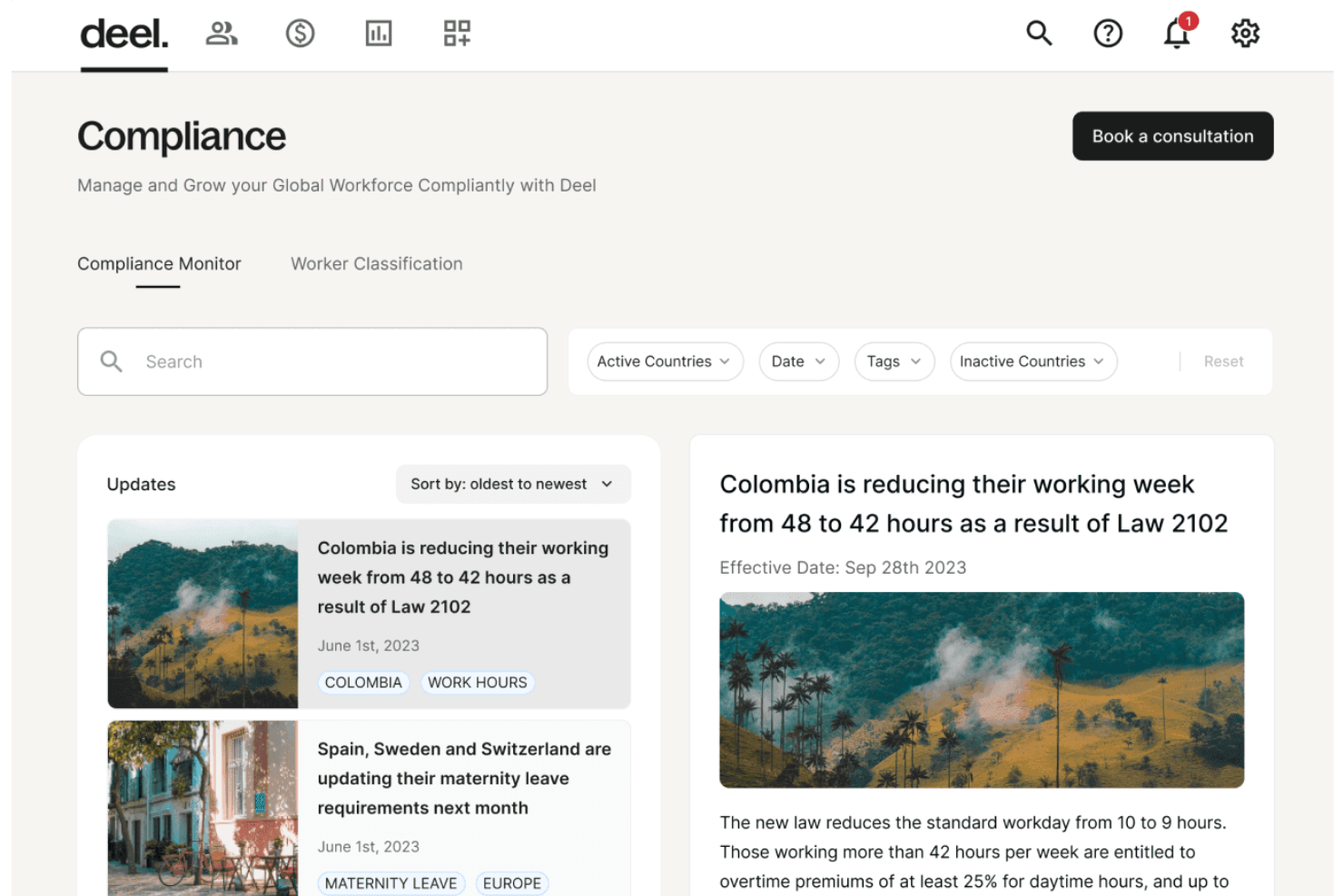
Deel es un servicio integral de Empleador de Registro (EOR) diseñado para facilitar la expansión de la fuerza laboral global, simplificando los procesos de contratación, incorporación, nómina y cumplimiento para empleados y contratistas internacionales.
Por qué elegí Deel: La plataforma ofrece gestión de cumplimiento global, lo cual es crucial para empresas que operan en múltiples países. Este énfasis en el cumplimiento ayuda a informar la planificación estratégica en el ámbito de la contratación y el empleo y contratos continuos, asegurando que las empresas se mantengan al día con los cambios en las regulaciones que afectan a sus empleados y contratistas internacionales.
Además, sus informes en tiempo real y capacidades de IA brindan a los líderes empresariales información actualizada sobre costos de nómina, cantidad de empleados y estado de cumplimiento. Estos datos en tiempo real permiten una toma de decisiones rápida e informada, asegurando que las operaciones de nómina siempre estén alineadas con los objetivos estratégicos de la empresa.
Funciones destacadas e integraciones de Deel
Las funciones incluyen un sistema de información de recursos humanos (HRIS), automatización de nómina, administración de beneficios, soporte especializado de RRHH, soporte interno para visas y migración laboral, gestión de contratos y herramientas de participación del empleado, como un sistema de gestión del aprendizaje.
Las integraciones incluyen Xero, Bob, Okta, Expensify, BambooHR, Slack, QuickBooks y NetSuite.
Pros and Cons
Pros:
- Soporte interno para visas y permisos de trabajo
- Automatización global de nómina
- Fuerte énfasis en la gestión de cumplimiento
Cons:
- Opciones de personalización limitadas
- Podría ofrecer funciones más robustas para la planificación visual
New Product Updates from Deel HR

Deel Expands Stablecoin Wallet to 80+ Countries
Deel expands its Stablecoin Wallet to 80+ countries with dollar-backed balances and optional rewards. This gives eligible contractors more ways to hold and manage earnings inside Deel. For more information, visit Deel’s official site.
 .
.
Ideal para la planificación de plantilla
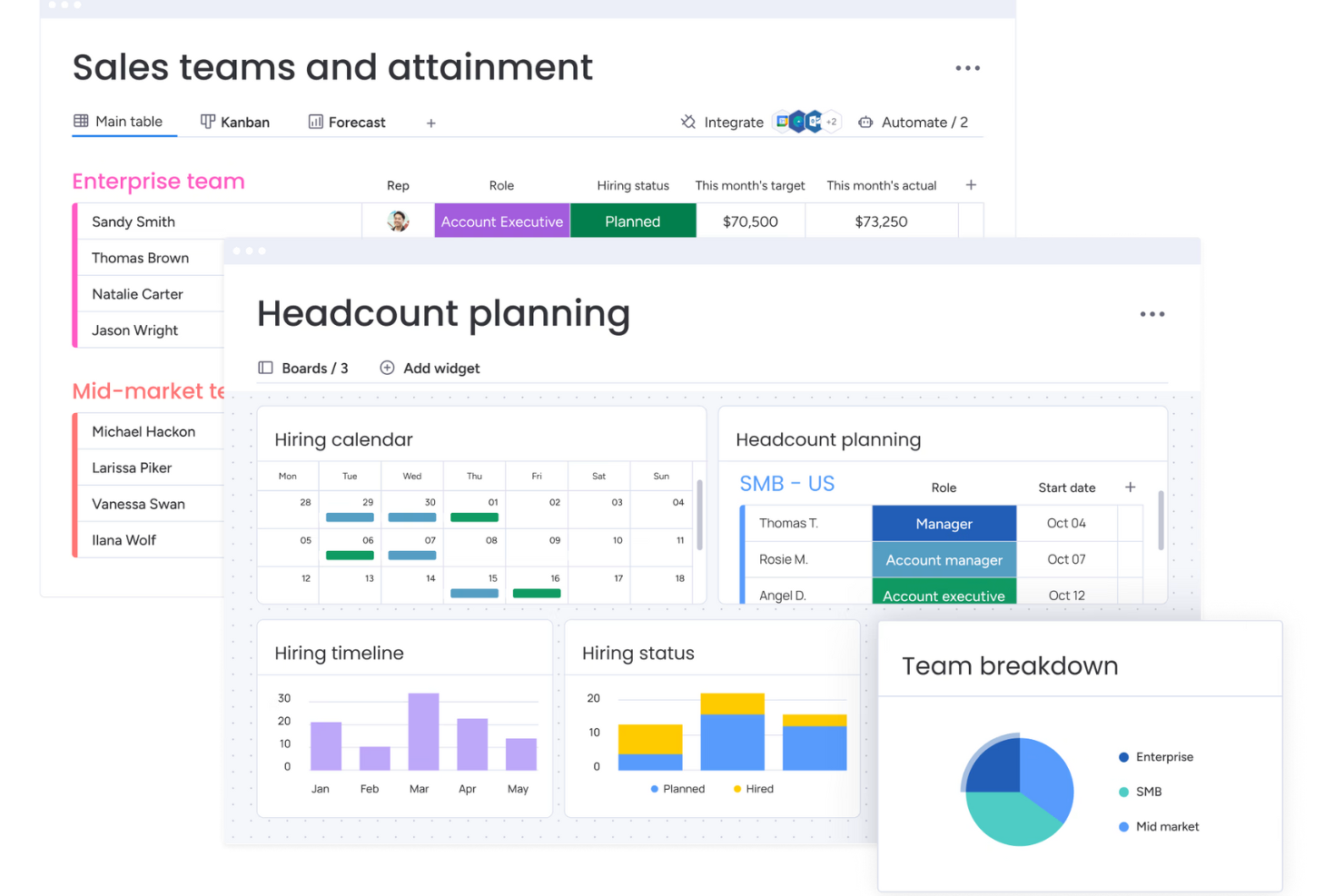
monday CRM es una plataforma de gestión de relaciones con clientes (CRM) personalizable, diseñada para ayudar a los equipos a gestionar sus embudos de ventas, hacer seguimiento de las interacciones con clientes y automatizar tareas rutinarias. Ofrece un espacio de trabajo centralizado en el que puedes supervisar todos los aspectos de tu proceso de ventas, desde la generación de prospectos hasta actividades posteriores a la venta.
Por qué elegí monday CRM: Me gusta que monday CRM ofrece capacidades de planificación de plantilla. La plataforma te permite crear y gestionar planes de contratación con tablas personalizables, paneles y automatizaciones. Puedes hacer seguimiento de los plazos de contratación, monitorizar el estado de posiciones planificadas versus cubiertas, y asegurarte de que tu equipo crece en línea con los objetivos del negocio. Los paneles visuales proporcionan información sobre la distribución de la fuerza laboral en los diferentes departamentos, ayudando a tomar decisiones informadas sobre la asignación de recursos.
También ofrece sólidas herramientas de planificación de ventas, que te ayudan a definir objetivos de ingresos, prever ventas y seguir el desempeño del equipo. Puedes organizar los equipos de ventas por región, función o etapa del embudo, facilitando el análisis del progreso y el ajuste de estrategias según sea necesario.
Características y conectores destacados de monday CRM
Las funciones incluyen puntuación de prospectos, previsión de ventas, seguimiento de actividades, plantillas de correo electrónico, establecimiento de objetivos, análisis de desempeño, gestión de territorios, gestión de contactos, gestión de tratos, asignación de tareas y compartición de archivos.
Las integraciones incluyen Slack, Google Drive, Gmail, Google Calendar, Jira, GitHub, Trello, Dropbox, Typeform y muchas más, accesibles mediante un plan de pago con Zapier.
Pros and Cons
Pros:
- Reportes y análisis avanzados
- Sólidas capacidades de integración
- Alta personalización y automatizaciones fáciles de usar
Cons:
- No es un software dedicado exclusivamente a la planificación estratégica
- Faltan funciones de diagramación para crear estrategias
New Product Updates from monday CRM

monday CRM Adds Meta Conversions API Integration
monday CRM now lets you connect Meta Conversions API and sync lead status back to Meta, improving targeting and conversions via a new Meta integration automation recipe. For more information, visit monday CRM's official site.

Phocas
Ideal para conectar todas las unidades de negocio

Phocas es un software de inteligencia empresarial y análisis financiero que proporciona a las organizaciones informes en profundidad y capacidades de planificación.
Por qué elegí Phocas: En cuanto a la planificación estratégica, Phocas te ayuda a conectar datos de todas tus unidades de negocio, como ventas, marketing y RRHH, proporcionando un lugar centralizado para alinear los objetivos generales de la empresa con las metas financieras.
Su función de planificación empresarial ofrece capacidades como previsiones de ventas, predicciones de demanda de clientes, planificación de escenarios, presupuestación y modelos de estrategias de precios. Los usuarios también pueden personalizar informes y comparar presupuestos con el gasto real, lo que ayuda a las organizaciones a diseñar estrategias de forma eficaz.
Funciones destacadas e integraciones de Phocas
Funciones incluyen paneles personalizables, Phocas AI para responder consultas, un nivel de análisis ad-hoc, estados financieros, gestión de reembolsos, funcionalidades CRM, flujos de trabajo colaborativos, cumplimiento de privacidad y controles de seguridad.
Integraciones incluyen MYOB, Netsuite, Oracle, QAD, Retail Express, Epicor, IFS, Jonas Metals Software, Acumatica, Accolent, Datafile, Enapps, Kerridge, Khaos Control, MAM Software, Merlin, Microsoft, Sage, SAP, Sympac, SYSPRO, Xero, y más.
Pros and Cons
Pros:
- Informes y paneles personalizables
- Fuertes capacidades de previsión
- Planificación para todos los departamentos de la empresa
Cons:
- Curva de aprendizaje para nuevos usuarios
- La cantidad de datos puede ser abrumadora

Ideal para la visualización de datos

AchieveIt es un software de estrategia que ayuda a los equipos a identificar problemas urgentes visualizando sus datos de diferentes maneras.
Por qué elegí AchieveIt: AchieveIt ofrece una interfaz limpia y no es difícil de usar. El software crea paneles útiles que puedes usar para guiar reuniones y conversaciones, y sus informes te ayudan a identificar brechas en tus planes estratégicos.
AchieveIt te permite visualizar los datos como desees. Puedes organizar tus metas e ideas en árboles, listas, diagramas de Gantt o tableros Kanban. Puedes crear vistas multiproyecto para entender lo que sucede entre varios departamentos, y usar filtros para obtener una visión detallada de diferentes métricas empresariales. AchieveIt es una gran herramienta para organizaciones impulsadas por datos.
Características y conexiones destacadas de AchieveIt
Funciones incluyen planificación de objetivos, creación de paneles, gestión de tareas, evaluación del desempeño y automatización.
Integraciones están disponibles de forma nativa a través de la API abierta del software. Su equipo de implementación trabajará directamente contigo para conectar otras herramientas.
Pros and Cons
Pros:
- Las plantillas te ayudan a organizar tu estrategia empresarial
- Actualizaciones en tiempo real para mayor visibilidad
- Funciones de automatización
Cons:
- Configurar fechas de metas e hitos podría ser más sencillo
- No dispone de funciones para gestión de portafolio

Miro
Ideal para la planificación visual en pizarras blancas

Miro es una herramienta de espacio de trabajo visual que ofrece una plataforma para la gestión de proyectos, la colaboración y la integración con otras aplicaciones. Se distingue por su capacidad para soportar espacios de trabajo innovadores visuales, permitiendo a los equipos construir, iterar y diseñar de manera eficiente.
Por qué elegí Miro: Elegí Miro porque ofrece un conjunto completo de herramientas y plantillas colaborativas que facilitan todo el proceso de planificación estratégica. Su característica más destacada es la posibilidad de visualizar estrategias y datos complejos utilizando su pizarra infinita, lo que resulta crucial para alinear equipos y comunicar planes en toda la organización.
Me gusta que también cuenta con un modo de presentación interactivo, un centro centralizado para el seguimiento de proyectos y recursos, y una integración fluida con otras plataformas, lo que en conjunto mejora la experiencia de planificación y ejecución estratégica en toda tu organización.
Funciones e integraciones destacadas de Miro
Funciones incluyen herramientas de colaboración en tiempo real, como notas adhesivas y comentarios, un lienzo infinito, marcos y formas personalizables, modo de presentación, Miro Assist AI, incrustación de documentos e imágenes, funciones de votación y encuestas, herramientas de mapas mentales, uso compartido de pantalla, planificación de cronogramas y hojas de ruta, control de acceso y gestión de permisos.
Integraciones incluyen Zoom, Figma, Asana, Microsoft Teams, Jira, Slack, Monday.com, Confluence, Google Drive, Box, Airtable, Notion, Azure y Webex. Algunas integraciones están limitadas solo a planes de pago.
Pros and Cons
Pros:
- Configuración intuitiva y sencilla
- Plan gratuito para siempre disponible
- Funcionalidades integradas de comunicación para colaboración fluida
Cons:
- La versión gratuita no permite exportar en alta calidad a pdf
- Las cuentas de visitantes/invitados solo están desbloqueadas en planes de pago
New Product Updates from Miro
Miro Adds Japan Data Residency for Enterprise Customers
Miro has introduced Japan data residency for enterprise customers, offering in-region storage for production data, backups, and metadata, plus in-region compute infrastructure. For more information, visit Miro's official site.

Ideal para la planificación estratégica colaborativa

Quantive Results es una plataforma de ejecución de estrategias que te ayuda a planificar la estrategia de tu empresa, establecer objetivos y hacer seguimiento a tu avance, mientras mantiene a los equipos alineados.
Por qué elegí Quantive Results: Lo que hace destacar a esta plataforma son sus funciones para la colaboración. Tu equipo de liderazgo puede utilizar los pizarrones y las plantillas de retrospectiva ya preparadas para planificar la estrategia de la empresa de manera colectiva. También se pueden hacer comentarios en el seguimiento de tus KPIs, lo que ayuda a plantear preguntas, dar contexto e impulsar ideas juntos.
Además de trazar tu estrategia a alto nivel, también puedes establecer y hacer seguimiento de objetivos con el software. Los OKR y KPIs pueden establecerse, y los objetivos pueden ser en cascada y estar vinculados a otros para mostrar cómo fluye el trabajo y contribuye a los objetivos generales. El software también cuenta con IA que te ayuda a definir KPIs y conectar objetivos relacionados.
Características destacadas e integraciones de Quantive Results
Características incluyen plantillas OKR predefinidas, establecimiento de objetivos multinivel, varios tipos de resultados clave, etiquetas, alineación de OKR y tareas, notificaciones automáticas, permisos de acceso avanzados y herramientas de reportes y análisis.
Integraciones incluyen Slack, Microsoft Teams, Asana, Miro, Jira, SurveySparrow, BambooHR, Workable, Humaans y Rally, entre otros. También puedes acceder a más integraciones con una cuenta de pago de Zapier.
Pros and Cons
Pros:
- Plantillas listas para usar disponibles
- Plan básico gratuito con usuarios ilimitados
- Gestión de cuentas y onboarding personalizado con el plan enterprise
Cons:
- No todas las integraciones están incluidas en todos los planes
- El plan Scale está limitado a 249 usuarios

Ideal para modelado de escenarios de la fuerza laboral

Lightcast es un software de planificación estratégica basado en la nube que facilita los procesos de planificación de fuerza laboral a largo plazo, presupuestación, previsión e informes para corporaciones.
Por qué elegí Lightcast: Su software te ayuda a crear una visión integral del futuro proyectado de tu organización, junto con información procesable y análisis de datos que te ayudan a tomar mejores decisiones basadas en datos. Puedes utilizar Lightcast para crear y analizar múltiples escenarios, evaluar el impacto potencial de cada uno en tu organización y ajustar tus planes en consecuencia. Su modelado de escenarios abarca la planificación de la fuerza laboral y el conteo de personal, así como capacidades de adquisición de talento, como la contratación basada en habilidades, y datos de referencia en DEI y salarios.
Sus paneles personalizables proporcionan una visión rápida de toda la información relevante y pueden modificarse para graficar métricas clave e identificar áreas de mejora. Para ayudarte a comprender datos complejos de manera rápida y sencilla, su software incluye una variedad de gráficos y visualizaciones que pueden personalizarse según las preferencias de tu negocio.
Características destacadas e integraciones de Lightcast
Las características incluyen herramientas de modelado de escenarios, análisis de datos, herramientas de gestión de flujos de trabajo y herramientas de adquisición de talento específicas para reclutamiento.
Detalles de integración no están disponibles, aunque Lightcast sí cuenta con una API que te ayuda a conectar su sistema con otras aplicaciones que ya utilices.
Pros and Cons
Pros:
- Los datos de referencia integrados son útiles para mantenerse competitivo en el mercado global de talento
- También se ofrecen servicios de consultoría adicionales
- Capacidad para analizar tendencias de empleo en diferentes sectores y regiones
Cons:
- No hay prueba gratuita disponible
- Los detalles de precios no son transparentes

Jedox
Mejor para minoristas

Jedox es un software de planificación estratégica y gestión del rendimiento empresarial que ayuda a los minoristas medianos y grandes a planificar sus estrategias de ventas.
Por qué elegí Jedox: Jedox ayuda a los minoristas que cuentan con múltiples sistemas de punto de venta a planificar para el futuro. La solución conecta tus datos de ventas, recursos humanos y desempeño empresarial para crear modelos de escenarios que tienen en cuenta tu personal, salarios, ubicaciones, competidores, tasas de devolución y SKUs. Los modelos te ayudan a presupuestar tus iniciativas y reaccionar ante los disruptores del mercado.
Jedox te permite crear planes de compra y flujos de trabajo detallados para que puedas reducir el exceso de inventario y las pérdidas de ventas. Los modelos de escenarios te ayudan a planificar para ciclos de ventas estacionales, de modo que puedas aumentar tus ganancias.
Funciones y integraciones destacadas de Jedox
Funciones: incluyen planificación de la demanda, previsión de ingresos, predicciones de fugas de clientes, información inteligente y análisis.
Integraciones: están disponibles de forma nativa con varias aplicaciones, incluidas Microsoft Excel, Microsoft Power BI, Oracle, SAP, Salesforce y Tableau.
Pros and Cons
Pros:
- Puede analizar grandes conjuntos de datos para crear modelos de escenarios
- Informes dinámicos
- Paneles flexibles y fáciles de seguir
Cons:
- La interfaz de usuario podría mejorar
- El generador de informes puede ser inestable a veces

Ideal para empresas
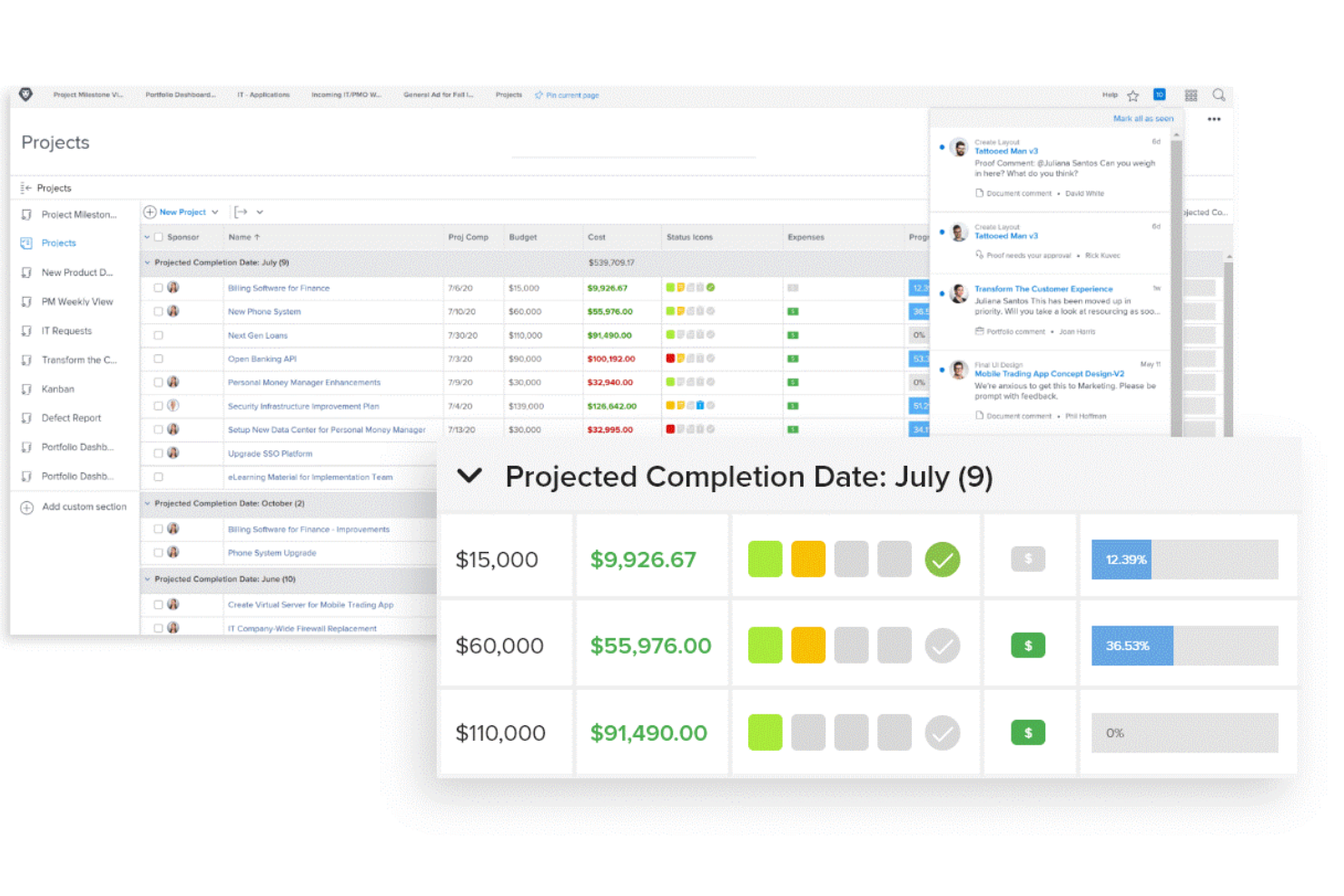
Adobe Workfront es una solución de gestión de proyectos y planificación estratégica que permite a las empresas organizar sus actividades diarias para que puedan alcanzar sus objetivos a largo plazo.
Por qué elegí Adobe Workfront: Adobe Workfront es una solución integral de planificación y gestión. El software tiene una interfaz limpia, lo que permite que las personas comiencen a usarlo sin necesidad de mucho entrenamiento. Como herramienta de planificación, Adobe Workfront es excelente porque te permite crear conexiones entre tareas y tus objetivos de alto nivel.
Adobe Workfront facilita transformar un plan en un proyecto accionable que está claramente dividido en múltiples tareas. Puedes asignar tareas a diferentes departamentos e individuos, y hacer seguimiento de su progreso en paneles interactivos. Los gerentes pueden enviar actualizaciones e informes de estado para mantener a todos informados y trabajando hacia el mismo objetivo final.
Funciones e integraciones destacadas de Adobe Workfront
Funciones incluyen gestión de la demanda, gestión de trabajo, planificación de portafolios, herramientas para la experiencia del trabajador e informes.
Las integraciones están disponibles de forma nativa con docenas de soluciones, incluyendo Adobe Creative Cloud, Box, Google Workspace, Jira, Microsoft Outlook, Salesforce y Slack.
Pros and Cons
Pros:
- Fácil de crear y gestionar tareas entre departamentos
- Fomenta la participación de los usuarios
- Excelentes funciones de gestión de proyectos
Cons:
- Algunas pantallas pueden llenarse demasiado, haciendo que la herramienta sea difícil de navegar
- Las funciones avanzadas tienen una curva de aprendizaje

Mejor para la planificación de la fuerza laboral

Workday Adaptive Planning es una herramienta de planificación estratégica que permite a empresas medianas y grandes gestionar su fuerza laboral.
Por qué elegí Workday Adaptive Planning: Workday Adaptive Planning te ayuda a reunir los datos de RRHH, finanzas y operaciones para que puedas obtener una comprensión completa de la dinámica de tu plantilla. Las funciones de generación de reportes del software facilitan identificar cómo tus actuales modelos de contratación y planes de retención afectan tus costos, permitiéndote desarrollar estrategias a largo plazo para optimizar tu fuerza laboral.
Workday Adaptive Planning te permite vincular los datos de tu fuerza laboral con modelos financieros para que puedas implementar tus planes de contratación a tiempo y dentro del presupuesto. Sus reportes integrados te ayudan a modelar la capacidad de habilidades de tu equipo según la ubicación o el costo, lo que te permite anticiparte a diferentes escenarios. Gracias a su capacidad para planificar grandes equipos, esta herramienta es una excelente opción para organizaciones medianas o grandes.
Características y conexiones destacadas de Workday Adaptive Planning
Funciones incluyen previsión, planificación estratégica, seguimiento de hitos, gestión de recursos y gestión del desempeño.
Integraciones disponibles de forma nativa con varias herramientas, incluidas Microsoft Dynamics, Oracle PeopleSoft, Sage Intacct, Salesforce y SAP.
Pros and Cons
Pros:
- Considera la estacionalidad, múltiples ubicaciones y diferentes geografías
- La previsión te ayuda a prepararte para diferentes escenarios
- Los reportes basados en roles permiten a los gerentes hacer seguimiento del desempeño de su equipo
Cons:
- La interfaz de usuario podría mejorarse
- Tiene una curva de aprendizaje
Otro software de planificación estratégica
Aquí tienes algunas opciones adicionales de software de planificación estratégica que no entraron en mi lista corta, pero que igual valen la pena revisar:
- Aha! Roadmaps
Ideal para empresas SaaS y tecnológicas
- Knovos Cascade
Mejor para startups
- Planview Portfolios
Mejor para la planificación de capacidad
- Rhythm Systems
Ideal para la planificación interdepartamental
- Spider Strategies
Mejor para el seguimiento de KPIs
- Elate
Ideal para la planificación dinámica
- Strategypoint
Ideal para una gestión de estrategia sencilla
- Peoplebox.ai
Mejor para empresas de rápido crecimiento
- Wrike
Ideal para graficar tareas, proyectos y hitos


Cómo evalúo el software de planificación estratégica
Cuando un CHRO necesita alinear los planes de plantilla con una estrategia de crecimiento a tres años, estructuro mi evaluación en aspectos básicos indispensables y los diferenciadores que separan las buenas herramientas de las excelentes.
Funcionalidad básica (Condiciones indispensables para esta lista)
Cuando selecciono herramientas para mi lista, califico cada una en una escala del 0 (no ofrece la funcionalidad) al 5 (destaca en esta área) para cada funcionalidad básica indicada a continuación. Luego, calculo la puntuación total de la herramienta en porcentaje. Cada herramienta debe lograr una puntuación total mínima del 65% para ser considerada para su inclusión.
- Planificación estratégica: Evalúo si la herramienta permite crear planes multianuales con hitos y dependencias, como trazar una estrategia de adquisición de talento a tres años para distintas regiones.
- Gestión de objetivos y OKR: Cada herramienta debe ofrecer una configuración estructurada de metas con efecto cascada, de modo que el objetivo de retención de personal del CHRO se traslade en acciones concretas a nivel de equipo.
- Planificación y modelado de escenarios: Busco modelización multivariable que permita comparar resultados en paralelo, como proyectar necesidades de personal bajo diferentes tasas de crecimiento y rotación.
- Seguimiento de la ejecución de iniciativas: Aquí es importante poder asignar responsables, definir plazos y marcar iniciativas en riesgo, especialmente cuando los equipos de RR. HH. ejecutan programas paralelos como lanzamientos de DEI y renovaciones de L&D.
- Tableros e informes: Reviso la existencia de tableros personalizables y en tiempo real que puedan mostrar el progreso de los KPI en formatos aptos para ejecutivos sin requerir una elaboración manual intensa.
- Alineación y efecto cascada de la estrategia: La herramienta debe conectar las prioridades a nivel empresarial con los objetivos departamentales e individuales, proporcionando a los líderes una visión clara desde los objetivos del consejo hasta el trabajo operativo de RR. HH.
Una vez que tengo una lista de herramientas que cumplen estos criterios, considero qué diferencia a cada plataforma.
Factores diferenciadores (lo que distingue a los proveedores)
Así es como comparo y contrasto a los diferentes proveedores:
Funciones destacadas
Busco herramientas que extraigan datos actuales de la fuerza laboral directamente de tu plataforma HRIS o HCM, de modo que las cifras de plantilla y rotación se integren en los planes estratégicos sin actualizaciones manuales. También son importantes los análisis impulsados por IA: algunas plataformas pueden avisar cuando una iniciativa está desviándose de su objetivo o resaltar riesgos de talento antes de que escalen. Los espacios colaborativos de trabajo en estrategia son otro diferenciador, sobre todo durante los ciclos anuales de planificación en los que los líderes de RR. HH. necesitan co-crear prioridades con finanzas y operaciones en tiempo real.
Más allá de las funciones
Los planes estratégicos suelen contener datos sensibles como referencias salariales, planes de sucesión y cronogramas de reestructuración. Reviso el cumplimiento con SOC 2 Tipo II y los permisos detallados según roles para garantizar la seguridad de esa información. También es fundamental el soporte en la implementación, porque lanzar una plataforma estratégica a mitad del ciclo de planificación sin acompañamiento puede frenar la adopción entre la dirección. En organizaciones con varias entidades, evalúo si la herramienta escala entre regiones y unidades de negocio permitiendo vistas locales para la planificación.
Cómo elegir un software de planificación estratégica
Es fácil perderse entre largas listas de funciones y estructuras de precios complejas. Para ayudarte a mantener el enfoque mientras avanzas en tu proceso único de selección de software, aquí tienes una lista de factores a tener en cuenta:
| Factor | Qué tener en cuenta |
|---|---|
| Escalabilidad | ¿Puede el software crecer con tu equipo? Busca herramientas que soporten el aumento de usuarios y datos sin problema. Considera tus necesidades futuras y cómo se adaptará la herramienta. |
| Integraciones | ¿Funciona con tus sistemas actuales? Verifica la compatibilidad con tus herramientas existentes, como sistemas CRM o ERP, para evitar silos de datos y garantizar flujos de trabajo sin interrupciones. |
| Personalización | ¿Puedes adaptarlo a tus necesidades? Evalúa el nivel de personalización disponible para ajustarse a tus procesos y flujos de trabajo específicos. Evita herramientas demasiado rígidas. |
| Facilidad de uso | ¿Es fácil de usar? Asegúrate de que tu equipo pueda utilizarlo rápidamente. Busca interfaces intuitivas y una capacitación mínima para mantener una alta adopción. |
| Implementación y onboarding | ¿Cuánto tiempo tardará la puesta en marcha? Considera el tiempo y los recursos necesarios para una transición fluida. Busca herramientas con procesos de onboarding claros y soporte. |
| Costo | ¿Está dentro del presupuesto? Compara los modelos de precios y los costos ocultos. Mira más allá del precio inicial para ver si ofrece valor a lo largo del tiempo. |
| Medidas de seguridad | ¿Tus datos están seguros? Asegúrate de que el software cumpla con tus estándares de seguridad. Busca cifrado, controles de acceso y cumplimiento de normativas del sector. |
| Disponibilidad de soporte | ¿Recibirás ayuda cuando la necesites? Revisa las opciones y horarios de soporte del proveedor. Asegúrate de tener acceso a asistencia oportuna si surgen problemas. |
¿Qué es el software de planificación estratégica?
El software de planificación estratégica es una herramienta que ayuda a las organizaciones a establecer objetivos, realizar un seguimiento del progreso y asignar recursos de manera eficaz. Profesionales como gerentes, líderes de equipo y ejecutivos utilizan estas herramientas para alinear a sus equipos y mejorar la toma de decisiones. Funciones como el establecimiento de metas, el seguimiento del rendimiento y el análisis de datos apoyan una planificación y ejecución eficientes. En general, estas herramientas ayudan a los equipos a trabajar de manera más inteligente y a alcanzar sus objetivos.
Características
Al seleccionar un software de planificación estratégica, preste atención a las siguientes características clave:
- Establecimiento de metas: Permite a los equipos definir y hacer seguimiento de los objetivos, asegurando que todos estén alineados y enfocados en resultados compartidos.
- Seguimiento del rendimiento: Supervisa el progreso y las métricas de desempeño, ayudando a los equipos a mantenerse en camino y tomar decisiones basadas en datos.
- Asignación de recursos: Administra los recursos de manera eficiente, asegurando un uso óptimo del tiempo y los materiales en los proyectos.
- Análisis de datos: Proporciona información a través de la visualización de datos, permitiendo una mejor toma de decisiones y planificación estratégica.
- Informes y paneles: Ofrece informes visuales y paneles para una visión rápida del progreso y las métricas de desempeño.
- Capacidades de integración: Se conecta con herramientas existentes, asegurando un flujo de datos sin inconvenientes y reduciendo el trabajo manual.
- Plantillas personalizables: Proporciona plantillas que se pueden adaptar a necesidades específicas, ahorrando tiempo y asegurando la coherencia.
- Herramientas de colaboración: Facilita la comunicación y el trabajo en equipo, permitiendo que los miembros trabajen juntos de manera efectiva.
- Planificación de escenarios: Ayuda a los equipos a anticipar y prepararse para distintos escenarios futuros, mejorando la resiliencia estratégica.
- Salvaguardas de seguridad: Garantiza la protección de datos con cifrado y controles de acceso, manteniendo la confidencialidad y el cumplimiento.
Beneficios
La implementación de un software de planificación estratégica ofrece varios beneficios para su equipo y su empresa. A continuación, algunos de los que puede esperar:
- Mejor alineación: Asegura que todos estén en la misma página con el establecimiento de metas y el seguimiento del progreso, mejorando la coordinación del equipo.
- Mejor toma de decisiones: Utiliza funciones de análisis de datos e informes para proporcionar información que guíe las decisiones estratégicas.
- Uso eficiente de los recursos: Gestiona los recursos de manera efectiva, garantizando una asignación óptima y reduciendo el desperdicio.
- Colaboración mejorada: Ofrece herramientas para la comunicación y el trabajo en equipo, ayudando a los miembros a trabajar de forma más eficaz.
- Mayor adaptabilidad: La planificación de escenarios prepara a su equipo para diferentes situaciones futuras, aumentando la flexibilidad y la resiliencia.
- Ahorro de tiempo: Ofrece plantillas personalizables y funciones de automatización, reduciendo el trabajo manual y acelerando los procesos.
- Seguridad de los datos: Garantiza la protección con salvaguardas de seguridad, manteniendo su información segura y en cumplimiento.
Costos y precios
Seleccionar un software de planificación estratégica requiere comprender los diferentes modelos y planes de precios disponibles. Los costos varían según las funciones, el tamaño del equipo, los complementos y más. La siguiente tabla resume los planes más comunes, sus precios promedio y las funciones típicas incluidas en las soluciones de software de planificación estratégica:
Tabla comparativa de planes para software de planificación estratégica
| Tipo de plan | Precio promedio | Funciones comunes |
|---|---|---|
| Plan gratuito | $0 | Establecimiento básico de metas, seguimiento de rendimiento limitado e informes básicos. |
| Plan personal | $5-$25/user/month | Establecimiento de metas, seguimiento del rendimiento, análisis de datos e integraciones básicas. |
| Plan empresarial | $30-$70/user/month | Informes avanzados, asignación de recursos, herramientas de colaboración e integraciones. |
| Plan para grandes empresas | $75-$150/user/month | Plantillas personalizables, planificación de escenarios, seguridad mejorada y soporte prioritario. |
Preguntas frecuentes sobre software de planificación estratégica
Aquí tienes respuestas a preguntas comunes sobre el software de planificación estratégica:
¿Cómo ayuda el software de planificación estratégica a la alineación entre departamentos?
El software ofrece a los equipos un espacio compartido para construir, visualizar y actualizar sus prioridades estratégicas. Cada departamento puede vincular sus objetivos con las metas generales de la empresa. Puedes ver cómo el trabajo contribuye entre equipos y evitar duplicidades o falta de alineación. Esto ayuda a la dirección y líderes de equipo a coordinar acciones sin necesidad de largas reuniones. Los paneles de control y los mapas visuales facilitan la comunicación.
¿Qué tipos de datos se pueden importar en el software de planificación estratégica?
Normalmente puedes importar hojas de cálculo, datos de proyectos, OKR u otros indicadores de desempeño. Algunas plataformas permiten conexiones por API o sincronización de datos desde herramientas empresariales como CRM o software de inteligencia de negocios. Esto permite que tu equipo acceda a datos en tiempo real vinculados a cada iniciativa. No tendrás que ingresar todo manualmente si tus sistemas se conectan bien. Solo asegúrate de que los datos importados se ajusten a tu estructura de planificación.
¿Con qué frecuencia se debe actualizar una plataforma de planificación estratégica?
Depende de cómo tu organización gestione sus ciclos de planificación. Algunos equipos actualizan el progreso mensualmente o trimestralmente, mientras que otros lo hacen semanalmente. La plataforma funciona mejor cuando las actualizaciones son consistentes y están ligadas a los hábitos de revisión del equipo. Puedes establecer recordatorios o asignar responsables para incentivar las actualizaciones. La clave es convertir este proceso en una rutina del equipo.
¿Es necesario recibir formación para usar el software de planificación estratégica?
Sí, normalmente se requiere algo de formación para utilizar correctamente el software de planificación estratégica. Muchos proveedores ofrecen tutoriales, seminarios web y materiales de soporte para ayudarte a comenzar. Aprovecha estos recursos para asegurarte de que tu equipo entienda cómo usar el software y pueda sacar el máximo provecho.
¿Qué sigue?
Si estás investigando software de planificación estratégica, conéctate con un asesor de SoftwareSelect para recibir recomendaciones gratuitas.
Solo tienes que llenar un formulario y tendrás una breve charla en la que se profundizará en las necesidades específicas de tu organización. Después, recibirás una lista corta de software para revisar. Incluso te acompañarán durante todo el proceso de compra, incluidas las negociaciones de precios.