

I 10 migliori software per la gestione delle competenze nel 2026

10 Elenco dei migliori software per la gestione delle competenze


Il software per la gestione delle competenze ti aiuta a monitorare, analizzare e sviluppare le capacità della tua forza lavoro. Se stai cercando il miglior software per la gestione delle competenze, probabilmente stai affrontando difficoltà come lacune nelle competenze, talenti non adeguatamente valorizzati o incertezza su chi possieda quali competenze nel tuo team. La piattaforma giusta può offrirti una visione in tempo reale delle competenze, supportare decisioni più consapevoli in materia di assunzioni e sviluppo e aiutarti a stare al passo con l’evoluzione dei ruoli e delle esigenze aziendali. In questa guida analizzerò gli strumenti più apprezzati per aiutarti a trovare la soluzione per la gestione delle competenze più adatta alle tue priorità HR e in grado di produrre risultati nel 2026.
Perché fidarsi delle nostre recensioni sui software
Il nostro team testa e recensisce software dal 2012. In quanto esperti HR noi stessi, sappiamo quanto sia difficile — e importante — scegliere il software giusto.
Per questa guida, abbiamo valutato gli strumenti attraverso test pratici e ricerche indipendenti, assegnando un punteggio agli strumenti in base ai nostri criteri di selezione. Ci basiamo inoltre sulle competenze di leader di pensiero del settore e di professionisti HR attivi.
Le nostre recensioni riflettono il nostro giudizio editoriale umano, non un discorso di vendita.
Revisori esperti:
Tabella comparativa: software per la gestione delle competenze
Questa tabella comparativa riassume i dettagli dei prezzi delle mie migliori selezioni di software per la gestione delle competenze.
| Tool | Best For | Trial Info | Price | ||
|---|---|---|---|---|---|
| 1 | Ideale per prevedere il potenziale di leadership dai dati | Demo gratuita disponibile | Prezzo su richiesta | Website | |
| 2 | Ideale per percorsi di carriera guidati dall'AI | Demo gratuita disponibile | Prezzi su richiesta | Website | |
| 3 | Ideale per valutazioni delle competenze su larga scala | Prova gratuita di 7 giorni + demo gratuita disponibile | Prezzi su richiesta | Website | |
| 4 | Migliori librerie di contenuti integrate | Prova gratuita di 45 giorni + demo gratuita disponibile | Da $20/mese | Website | |
| 5 | Ideale per monitoraggio integrato di apprendimento e competenze | Demo gratuita disponibile | Da $15.000 (fatturazione annuale) | Website | |
| 6 | Ideale per visualizzare la capacità del team | Piano gratuito + prova gratuita + demo gratuita disponibili | Da $5.5/utente/mese | Website | |
| 7 | Ideale per la ricollocazione dei talenti nelle grandi imprese | Demo gratuita disponibile | Prezzi su richiesta | Website | |
| 8 | Ideale per l’incrocio interno delle competenze | Demo gratuita disponibile | Prezzi su richiesta | Website | |
| 9 | Ideale per strutture di competenze personalizzabili | Piano gratuito + demo gratuita disponibile | Da $2.25/utente/mese (fatturato annualmente) | Website | |
| 10 | Ideale per settori guidati dalla conformità | Demo gratuita disponibile | Prezzo su richiesta | Website |
Recensioni dei software per la gestione delle competenze
Di seguito trovi le mie sintesi dettagliate dei migliori software per la gestione delle competenze inclusi nel mio elenco ristretto. Le mie recensioni offrono una panoramica dettagliata delle funzionalità, dei casi d’uso e delle integrazioni di ciascuna piattaforma per aiutarti a trovare quella più adatta a te.

Ideale per prevedere il potenziale di leadership dai dati
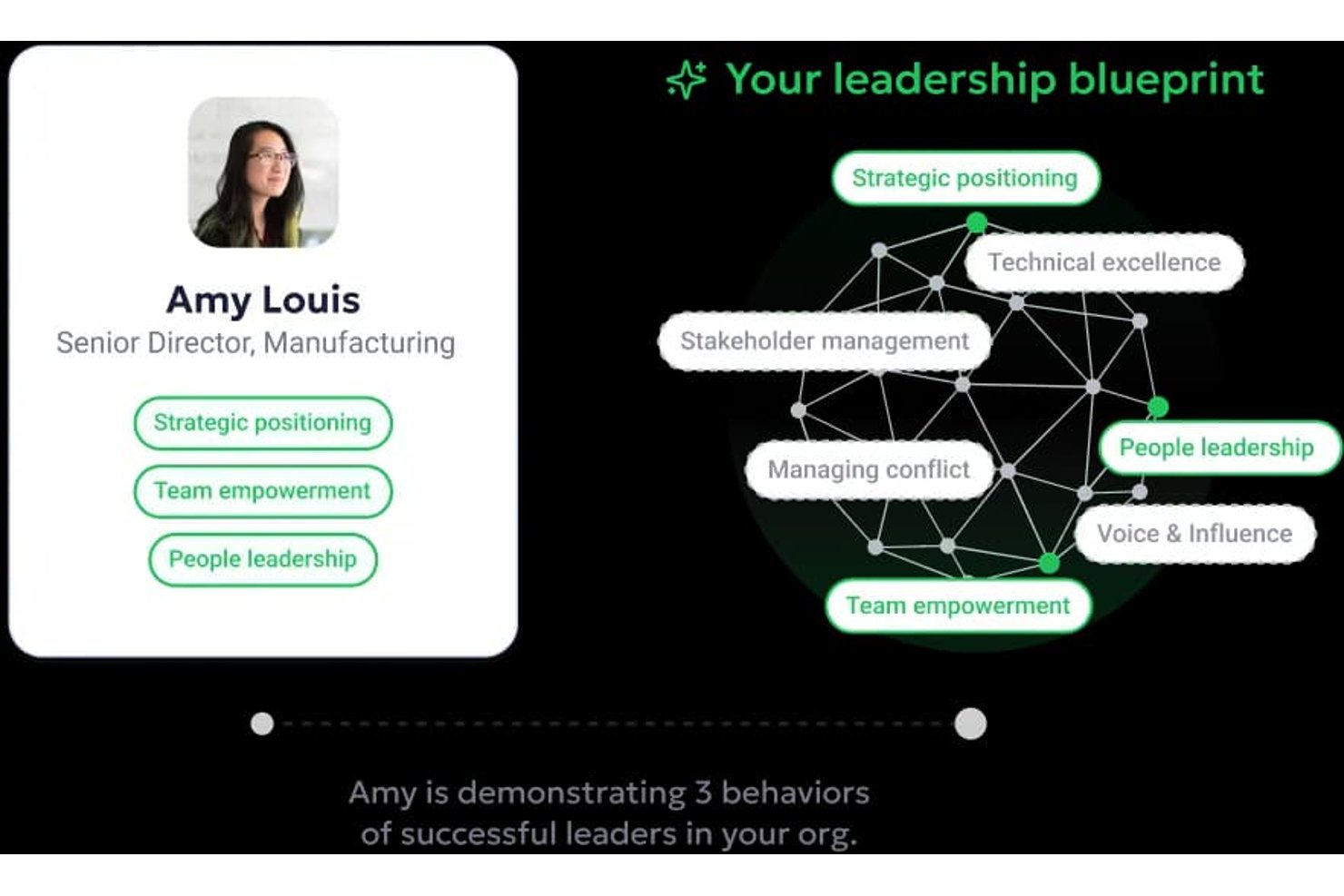
Workhuman Future Leaders è uno strumento di pianificazione della successione potenziato dall'AI che analizza i dati di riconoscimento tra colleghi per identificare i dipendenti ad alto potenziale e prevedere i futuri candidati alla leadership anni prima della promozione.
Per chi è ideale Workhuman Future Leaders?
È particolarmente indicato per i team HR e di gestione dei talenti delle grandi aziende che già utilizzano la piattaforma di riconoscimento Workhuman e vogliono costruire una pipeline di leadership più proattiva.
Perché ho scelto Workhuman Future Leaders
Ho scelto Workhuman Future Leaders perché nessun altro strumento di gestione delle competenze mette in evidenza le capacità di leadership come fa questo. Il suo motore AI Ascend™ analizza i modelli di riconoscimento tra colleghi, i contributi interfunzionali e la coerenza comportamentale per individuare il potenziale da dirigente fino a cinque anni prima della promozione. I modelli auto-apprendenti si ricalibrano in tempo reale con il mutare dei ruoli di leadership, così le previsioni rimangono accurate senza bisogno di manutenzione manuale dei modelli.
Funzionalità chiave di Workhuman Future Leaders
- Workhuman iQ analytics: Fornisce approfondimenti e visualizzazioni in tempo reale dai dati di riconoscimento e feedback.
- Integrazioni HRIS aziendali: Si integra con piattaforme come Workday, Microsoft Teams e Slack per la sincronizzazione dei dati e l'incorporamento nei flussi di lavoro.
- Pianificazione della successione guidata dal riconoscimento: Supporta la gestione continua della successione utilizzando i segnali di riconoscimento peer-to-peer.
- Hub di gestione amministrativa del programma: Offre controlli centralizzati per configurare riconoscimenti, premi e funzionalità di reporting.
Integrazioni di Workhuman Future Leaders
Workhuman Future Leaders offre integrazioni native con Microsoft Teams, Slack, Outlook, Workday e Yammer. È disponibile un'API aperta per integrazioni personalizzate.
Pros and Cons
Pros:
- Prevede il potenziale di leadership anni prima della promozione
- I dati di riconoscimento rilevano comportamenti di leadership spontanei
- L'intelligenza artificiale ricalibra le previsioni di successione in tempo reale
Cons:
- Assenza di una tassonomia delle competenze strutturata o di analisi delle lacune
- Richiede l'adozione della piattaforma di riconoscimento Workhuman esistente

Nestor
Ideale per percorsi di carriera guidati dall'AI

Nestor è una piattaforma di gestione delle competenze progettata per i team HR che offre valutazioni delle competenze, mappatura delle competenze in tempo reale, profili di talenti alimentati da AI e strumenti per la mobilità interna.
A Chi È Destinato Nestor?
Responsabili HR e del talento in organizzazioni di medie o grandi dimensioni che desiderano percorsi di carriera e mappatura delle competenze guidati dall’AI per la pianificazione della forza lavoro.
Perché Ho Scelto Nestor
Ho scelto Nestor perché offre percorsi di carriera integrati guidati dall’intelligenza artificiale, un’analisi personalizzata dei gap di competenze e la mappatura in tempo reale per ogni profilo dipendente. Posso usare la sua AI per individuare opportunità di lavoro interne in base alle competenze attuali e future. Mi piace che Nestor raccolga i profili dei talenti e i suggerimenti di upskilling direttamente all’interno della piattaforma per consentire davvero al mio team di costruire percorsi di crescita pertinenti.
Caratteristiche Principali di Nestor
- Gestione tassonomia delle competenze: Costruisci e personalizza una libreria di competenze e capacità aziendali.
- Raccolta di feedback a 360 gradi: Raccogli valutazioni delle competenze da manager, colleghi e autovalutazioni.
- Strumenti di calibrazione delle performance: Allinea i dati sulle competenze dei dipendenti con i criteri di performance e i benchmark.
- Dashboard personalizzabili: Visualizza approfondimenti e trend sulle competenze della forza lavoro in un’unica vista.
Integrazioni di Nestor
Le integrazioni includono ADP, BambooHR, Workday, PayFit, Lucca, Paychex, Okta, ChartHop e Ceridian.
Pros and Cons
Pros:
- Offre dashboard interattive per la mappatura delle competenze
- Allinea gli obiettivi individuali agli OKR aziendali
- Suggerisce percorsi di apprendimento in base ai gap rilevati in tempo reale
Cons:
- Nessuna integrazione API con piattaforme HRIS
- Libreria ridotta di assessment tecnici

iMocha
Ideale per valutazioni delle competenze su larga scala

iMocha è una piattaforma di intelligenza delle competenze basata su AI per team delle risorse umane e della gestione dei talenti che offre valutazioni preconfigurate, creazione personalizzabile dei test, analisi delle competenze e flussi di lavoro automatizzati per la valutazione.
Per chi è ideale iMocha?
Team HR e acquisizione talenti in grandi aziende che necessitano di valutare competenze su larga scala in diversi ruoli e aree geografiche.
Perché ho scelto iMocha
Ho scelto iMocha come uno dei migliori perché posso fornire valutazioni specifiche per ruolo e ad alto volume che si adattano automaticamente a più unità aziendali. Utilizzo la sua vasta libreria di competenze e il costruttore di test personalizzabile per mirare precisamente alle competenze che mi interessano. Per implementazioni su ampia scala, il mio team si affida a proctoring automatico e analisi dei dati per mantenere i risultati affidabili e utilizzabili.
Funzionalità chiave di iMocha
- Generazione di domande con intelligenza artificiale: Crea automaticamente domande per le valutazioni tramite intelligenza artificiale.
- Dashboard di benchmarking delle competenze: Confronta i livelli di competenza tra team o dipartimenti in tempo reale.
- Accesso alle valutazioni basato sul ruolo: Controlla chi può visualizzare, assegnare o modificare le valutazioni in base al ruolo utente.
- Integrazione con piattaforme per video colloqui: Collega le valutazioni a strumenti di video intervista per una valutazione combinata.
Integrazioni di iMocha
Le integrazioni includono SAP SuccessFactors, Workday HCM, iCIMS, Greenhouse, Zoho Recruit, Workable, BambooHR, Lever, Freshteam e Oracle.
Pros and Cons
Pros:
- Proctoring avanzato per valutazioni da remoto
- Test di programmazione live disponibili
- Valutazioni disponibili in più lingue
Cons:
- Focalizzazione limitata per lo sviluppo di carriera a lungo termine
- Marketplace interno delle competenze di base

Migliori librerie di contenuti integrate
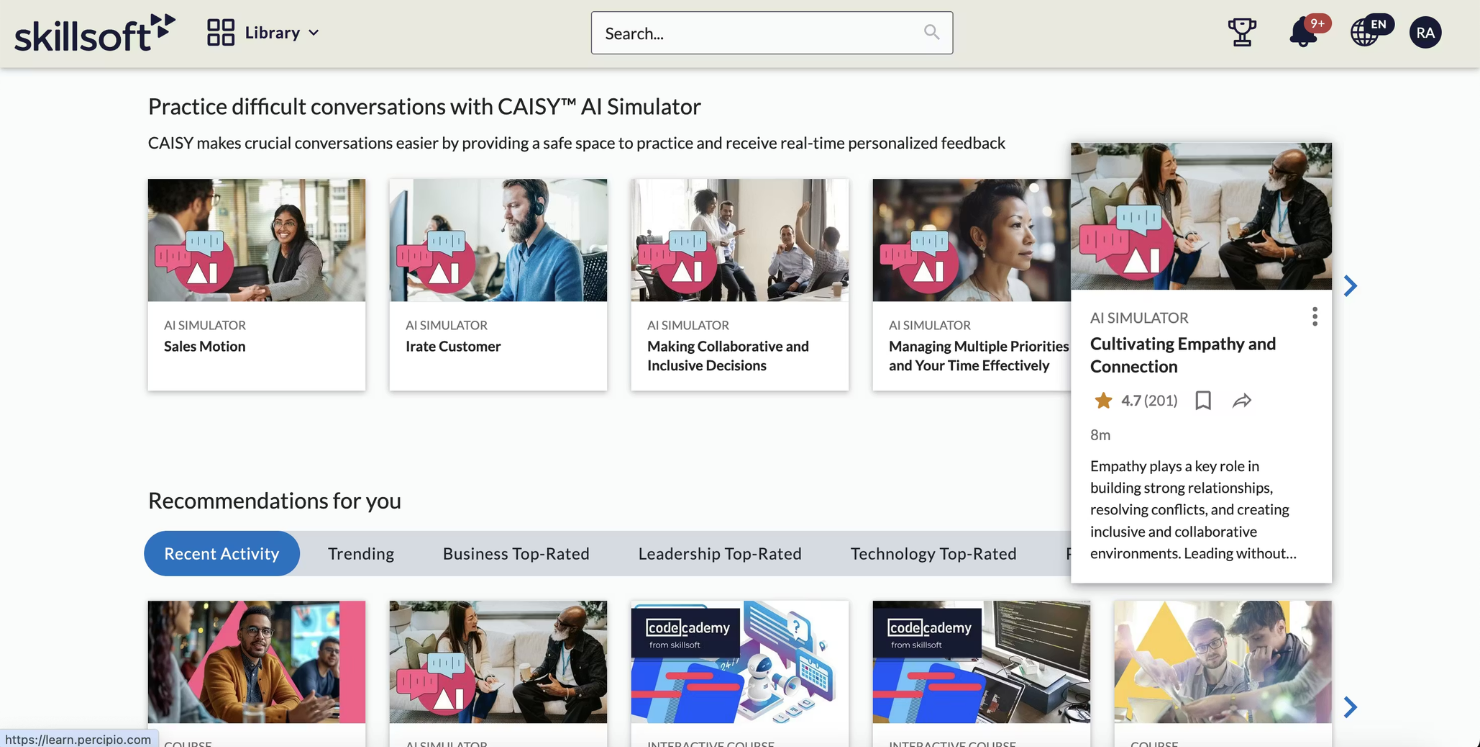
Skillsoft è una piattaforma cloud per la gestione delle competenze che offre moduli di apprendimento strutturati, percorsi di certificazione e vaste librerie di contenuti digitali per lo sviluppo e la formazione della forza lavoro.
Per Chi è Skillsoft?
I team di formazione e sviluppo in aziende di medie e grandi dimensioni che desiderano contenuti pronti all'uso per la crescita delle competenze della forza lavoro.
Perché Ho Scelto Skillsoft
Ho scelto Skillsoft tra i migliori perché consente di accedere istantaneamente a una vasta libreria di contenuti per competenze digitali, di leadership e compliance. Utilizzo i suoi percorsi di apprendimento preimpostati per collegare i contenuti direttamente ai framework di competenze aziendali. Il mio team può assegnare moduli di apprendimento mirati per ogni ruolo lavorativo senza creare risorse da zero.
Skillsoft: Caratteristiche Principali
- Dashboard di benchmarking delle competenze: Confronta in tempo reale i progressi sulle competenze della forza lavoro.
- Integrazione con piattaforme HRIS: Collega i dati di apprendimento con i sistemi HR esistenti.
- Raccomandazioni di contenuto automatizzate: Suggerisce corsi personalizzati in base ai gap di competenze.
- Valutazioni e quiz: Valuta i progressi degli utenti attraverso strumenti di test integrati.
Integrazioni Skillsoft
Le integrazioni includono Microsoft, Workday, SAP SuccessFactors, Cornerstone OnDemand, Oracle, SumTotal, Saba, Degreed, 360Learning e Moodle.
Pros and Cons
Pros:
- Ampia libreria di moduli di apprendimento preimpostati
- Libreria di certificazioni professionali integrate
- Consegna dei corsi ottimizzata per dispositivi mobili
Cons:
- Meno supporto per valutazioni sul campo
- Analisi avanzate limitate
Bridge
Ideale per monitoraggio integrato di apprendimento e competenze
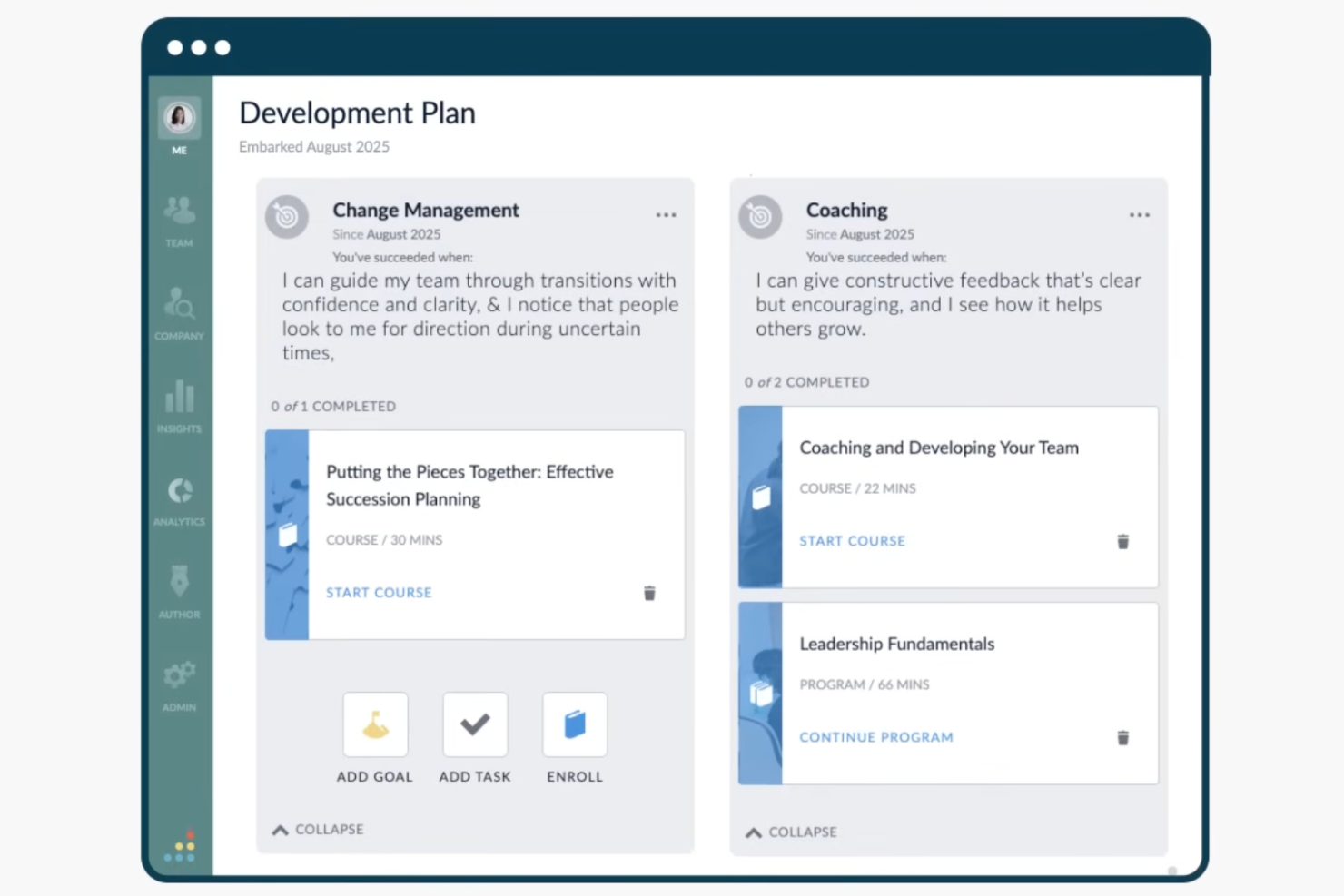
Bridge è una piattaforma di gestione delle competenze che abbina il monitoraggio delle competenze guidato dall'IA con strumenti per l'apprendimento, la valutazione delle performance e il feedback, progettati per team HR e responsabili delle risorse umane.
Per chi è più adatto Bridge?
Bridge è ideale per organizzazioni di medie e grandi dimensioni in cui i team HR devono collegare lo sviluppo delle competenze dei dipendenti all'apprendimento, alle performance e alla crescita professionale in un'unica soluzione.
Perché ho scelto Bridge
Ho incluso Bridge tra le mie scelte principali per la sua capacità di collegare strettamente i contenuti formativi ai dati effettivi sulle competenze. Quando sfoglio i corsi su Bridge, ciascuno è già collegato a specifiche competenze da una libreria di oltre 30.000 skill basate sui dati di Lightcast, così che completando un corso il profilo di competenze del dipendente viene aggiornato automaticamente. Mi piace anche che Bridge utilizzi l'IA per suggerire corsi personalizzati in base ai gap di competenze individuati, il che significa che i dipendenti non si limitano a sfogliare un catalogo, ma vengono indirizzati verso percorsi formativi che colmano reali carenze nel loro profilo di competenze.
Caratteristiche principali di Bridge
- Analisi dei gap di competenza: Visualizza una panoramica a livello di dashboard dei gap di competenze tra i team o nell'intera organizzazione, filtrati per ruolo o dipartimento.
- Percorsi di carriera: I dipendenti possono esplorare percorsi di carriera basati sul ruolo mappati rispetto alle competenze possedute e a quelle necessarie per le posizioni di destinazione.
- Piani di sviluppo individuale: Manager e dipendenti possono creare piani di sviluppo strutturati che collegano obiettivi formativi specifici alle competenze identificate come necessarie.
- Comunità delle competenze: Collega dipendenti con competenze o interessi formativi comuni in gruppi di pari per favorire il mentoring informale e la condivisione della conoscenza.
Integrazioni di Bridge
Bridge offre integrazioni native con fornitori di contenuti, piattaforme HRIS, strumenti SSO e sistemi di gestione video, tra cui LinkedIn Learning, OpenSesame, BambooHR, Slack, Dropbox, Google Calendar, Credly, Shopify, Kaltura e Panopto. È disponibile anche su Zapier. Sono disponibili API aperta e webhooks per integrazioni personalizzate e Bridge supporta LTI per lanciare contenuti di terze parti all'interno della piattaforma.
Pros and Cons
Pros:
- LMS e strumenti di gestione delle competenze riuniti su un'unica piattaforma
- Mappatura delle competenze guidata dall'IA per i titoli di lavoro
- Il feedback è collegato direttamente ai profili di competenza
Cons:
- Le funzionalità di reporting sono poco approfondite e flessibili
- Strumenti di creazione contenuti integrati limitati
Ideale per visualizzare la capacità del team

MuchSkills è una piattaforma di gestione delle competenze che si concentra sulla mappatura visiva delle competenze, i profili dei dipendenti, la pianificazione della capacità e il monitoraggio dei dati sulle competenze a livello organizzativo per team e aziende.
Per chi è ideale MuchSkills?
HR e responsabili di team in aziende in crescita che necessitano di una mappatura visiva delle competenze e di una pianificazione trasparente della capacità.
Perché ho scelto MuchSkills
MuchSkills si guadagna un posto nella mia selezione perché vedo chiaramente come la mappatura visiva delle competenze e delle capacità del team riveli subito punti di forza e lacune. Utilizzo la sua visualizzazione interattiva delle competenze per creare matrici di competenze chiare e dinamiche per la pianificazione dei progetti e la selezione dello staff. Grazie al monitoraggio della capacità basato su timeline, posso pianificare i carichi di lavoro e allocare le risorse con dati reali. Apprezzo anche le categorie di competenze personalizzate che consentono al mio team di organizzare distintamente le competenze di ciascun dipartimento.
Funzionalità principali di MuchSkills
- Approvazione e valutazione delle competenze: I membri del team possono approvare e valutare reciprocamente le competenze per garantirne l'accuratezza.
- Mappatura delle competenze basata sul ruolo: Assegna set di competenze specifiche ai ruoli lavorativi all'interno dell'organizzazione.
- Integrazione con l'organigramma: Visualizza la struttura dei team insieme ai profili di competenza individuali.
- Report personalizzati: Genera report su richiesta per la distribuzione delle competenze e la composizione dei team.
Integrazioni MuchSkills
Le integrazioni includono Salesforce, Power BI, Jira, Dayforce, Personio, Okta, SAP, Workday, Zoho Projects e BambooHR.
Pros and Cons
Pros:
- Tracciamento integrato delle certificazioni
- Evidenzia competenze sovra-concentrate
- Visualizzazione chiara della capacità del team
Cons:
- Nessuna valutazione integrata tramite video
- Formati limitati per l'esportazione dei report
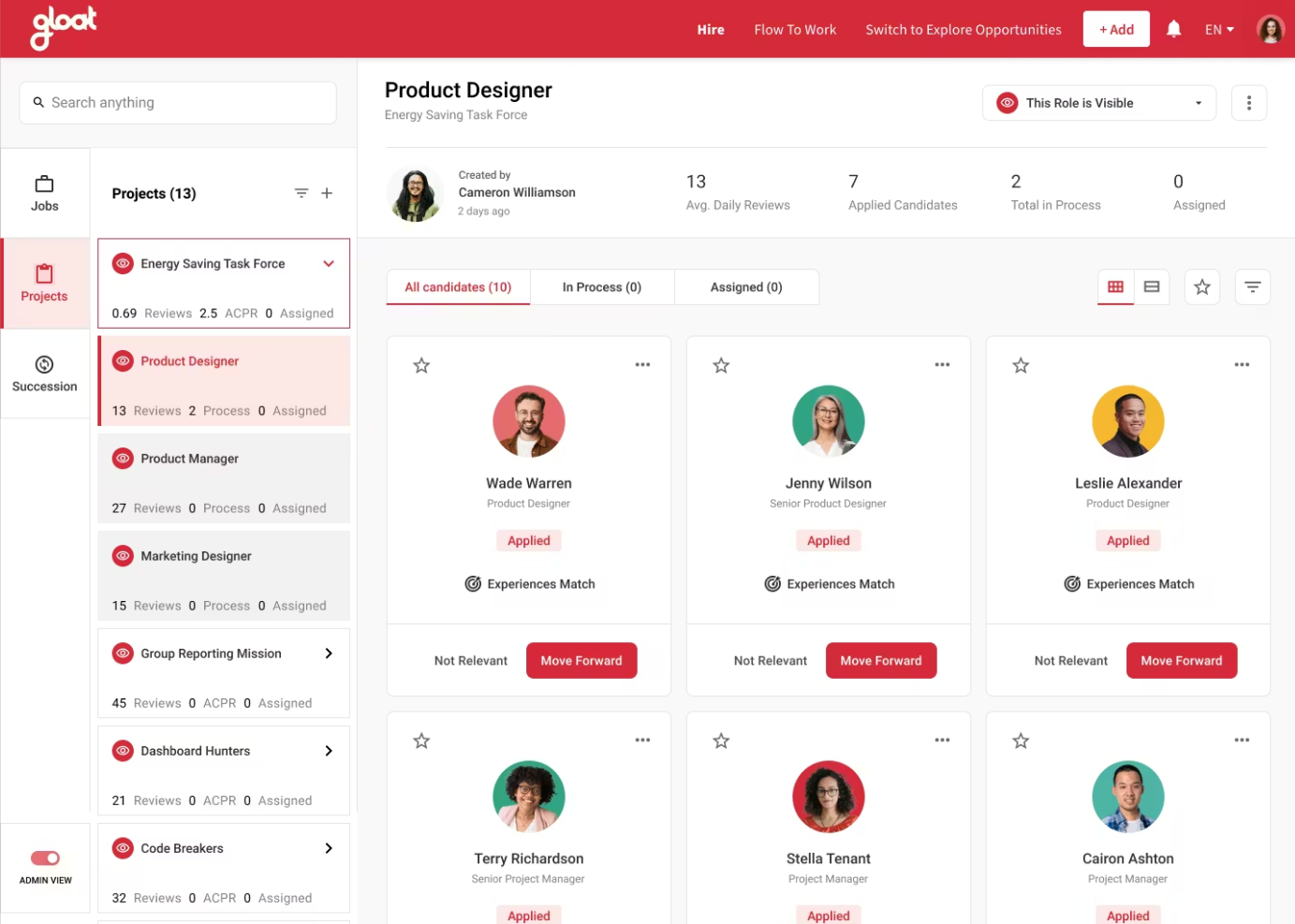
Gloat è una piattaforma di marketplace di talenti basata sull'IA per grandi organizzazioni che combina mappatura delle competenze dei dipendenti, abbinamento ai ruoli, flussi di lavoro per la mobilità interna e analisi della forza lavoro.
Per chi è ideale Gloat?
I team HR di grandi aziende globali che necessitano di ricollocazione interna dei talenti su larga scala e agilità della forza lavoro.
Perché ho scelto Gloat
Ho scelto Gloat come uno dei migliori perché posso gestire la ricollocazione dei talenti su larga scala utilizzando il suo motore di abbinamento guidato dall'IA, che collega i dipendenti a progetti e ruoli sulla base di dati reali sulle competenze. Il mio team si affida al suo marketplace interno per identificare capacità nascoste, riallocare il personale in modo efficiente e garantire l'agilità della forza lavoro senza assumere esternamente. Trovo che le sue analisi dettagliate aiutino a visualizzare la distribuzione del talento in tutta l'organizzazione durante le grandi transizioni.
Caratteristiche principali di Gloat
- Gestione inventario delle competenze: Traccia e cataloga in tempo reale le competenze dei dipendenti in tutta l'organizzazione.
- Mappatura delle competenze guidata dall'IA: Mappa automaticamente le competenze della forza lavoro rispetto alle esigenze organizzative attuali e future.
- Raccomandazioni personalizzate per lo sviluppo: Suggerisce percorsi mirati di upskilling o reskilling per i dipendenti in base ai gap di competenze.
- Gerarchie organizzative configurabili: Rispecchia strutture aziendali complesse per una rendicontazione più precisa di competenze e talenti.
Integrazioni di Gloat
Le integrazioni includono Microsoft Teams, Microsoft Copilot, SAP SuccessFactors, Workday e Oracle HCM.
Pros and Cons
Pros:
- Raccomandazioni di competenze e ruoli basate sull'IA
- Flussi di lavoro del marketplace dei talenti personalizzabili
- Offre un costruttore integrato di tassonomie delle competenze
Cons:
- L'implementazione può essere complessa
- Richiede grandi set di dati storici per l'accuratezza dell'IA


Neobrain è una piattaforma di gestione delle competenze e marketplace interno dei talenti basata sull’IA che facilita la mobilità interna centralizzando le opportunità di progetto e i percorsi di carriera. Si concentra sulla trasformazione delle competenze individuali in performance attraverso una mappatura dinamica e una pianificazione predittiva della forza lavoro.
Per chi è consigliato Neobrain?
Grandi aziende e team HR che danno priorità alla fidelizzazione dei talenti e vogliono creare un mercato interno del lavoro dove i dipendenti sono abbinati a nuove opportunità in base al loro potenziale, e non solo in funzione della posizione attuale.
Perché ho scelto Neobrain
Ho scelto Neobrain come soluzione migliore per l’incrocio interno delle competenze grazie alla sua intelligenza artificiale applicata alle skill. A differenza degli strumenti tradizionali che richiedono aggiornamenti manuali, Neobrain utilizza un’IA adattiva per creare un inventario delle competenze sempre aggiornato. Ho trovato particolarmente efficace la sua capacità di svolgere analisi semantica su CV e percorsi professionali per far emergere talenti nascosti che i dipendenti potrebbero non aver formalmente dichiarato.
Caratteristiche principali di Neobrain
- Marketplace interno dei talenti alimentato dall'IA: abbina istantaneamente i profili dei dipendenti ai ruoli aperti e ai percorsi di carriera basandosi sui gap di competenze in tempo reale
- Identificazione automatica dei gap di competenze: la piattaforma rileva automaticamente i punti di forza e di debolezza nella forza lavoro.
- Raccomandazioni formative integrate: suggerisce contenuti di formazione su misura in base ai gap di competenze rilevati.
- Dashboard di reportistica personalizzabili: permettono di visualizzare metriche chiave e insight sulla forza lavoro per reparto, sede o cluster di competenze.
Integrazioni di Neobrain
Le integrazioni includono 360Learning, ADP France, Cegid Talentsoft, CentralTest, Cornerstone OnDemand, Lucca, Oracle Cloud HCM, SAP SuccessFactors, SmartRecruiters e Workday.
Pros and Cons
Pros:
- Convalida delle skill da parte dei colleghi
- Monitoraggio interno delle capacità integrato
- Utilizza analisi semantica tramite IA per la scoperta delle competenze
Cons:
- Permessi basati sui ruoli limitati
- Avvisi automatici di base

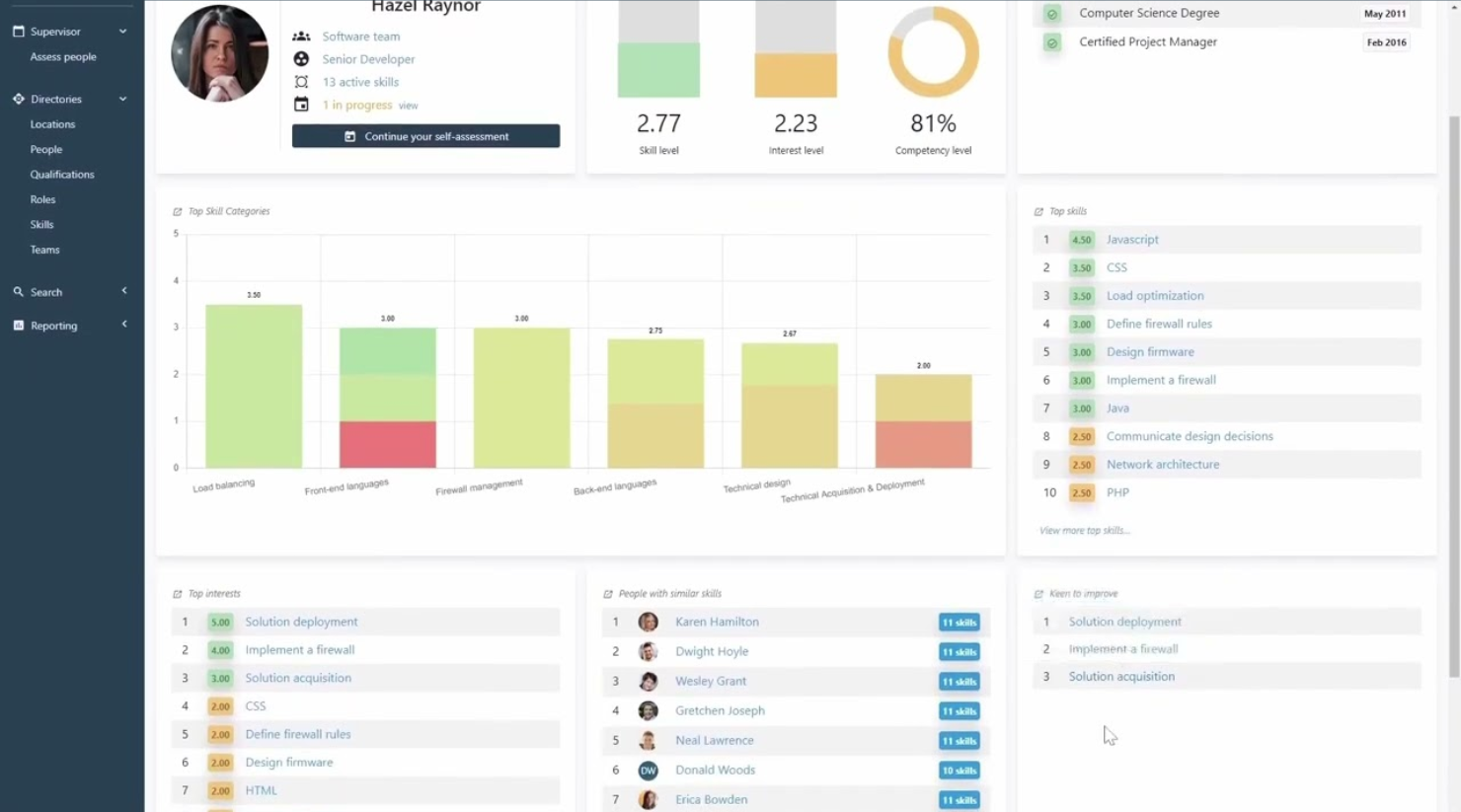
Skills Base è una piattaforma configurabile per la gestione delle competenze, progettata per costruire, mappare e valutare le competenze, i ruoli e le capacità dei dipendenti con strutture organizzative flessibili e valutazioni personalizzate.
A chi è rivolto Skills Base?
Team HR e responsabili delle risorse umane in organizzazioni di medie e grandi dimensioni che necessitano di un controllo flessibile sulle strutture e sulle valutazioni delle competenze.
Perché ho scelto Skills Base
Ho scelto Skills Base perché mi piace il modo in cui permette di progettare matrici delle competenze con gerarchie personalizzate, tipi di valutazione e livelli di rating per ogni ruolo o team. Il mio team utilizza la mappatura delle competenze per riflettere i cambiamenti delle strutture aziendali e le funzionalità di caricamento massivo e clonazione dei framework rendono le riorganizzazioni molto più semplici. Ritengo che dia il massimo valore quando si desidera un controllo dettagliato su ogni aspetto della tassonomia delle competenze.
Caratteristiche principali di Skills Base
- Analisi dei gap di competenze: Confronta i livelli di competenza richiesti con quelli attuali nei vari team o ruoli.
- Dashboard delle competenze: Visualizza in tempo reale i dati sulle competenze e capacità a livello aziendale.
- Strumenti di auto-valutazione degli utenti: Permette ai dipendenti di valutare e aggiornare i propri profili di competenza.
- Supporto multilingue: Utilizza la piattaforma in diverse lingue per team globali.
Integrazioni di Skills Base
Le integrazioni includono Workday, oltre a connessioni API con strumenti HR, LMS, CRM e BI.
Pros and Cons
Pros:
- Monitora i rischi di completamento delle valutazioni con avvisi AI
- Confronta le capacità dei team tramite heatmap
- Auto-valutazione e revisione del responsabile
Cons:
- Opzioni di integrazione limitate
- Analytics avanzata disponibile solo nei piani superiori

AG5 è una piattaforma configurabile per la gestione delle competenze che ti permette di controllare matrici delle competenze, monitoraggio delle qualifiche, registri di conformità e mappatura delle capacità della forza lavoro tutto in un unico luogo.
Per Chi è Ideale AG5?
I responsabili della conformità e i team HR nei settori regolamentati hanno bisogno di una gestione centralizzata delle competenze e della certificazione.
Perché Ho Scelto AG5
Ho scelto AG5 tra i migliori perché mi permette di mappare e mantenere profili dettagliati di competenze e qualifiche per tutti i team. Mi piace poter impostare avvisi automatici alla scadenza delle certificazioni e generare rapidamente report pronti per audit. Il mio team utilizza l'API per sincronizzare i dati sulle competenze in tempo reale direttamente con i sistemi HR.
Caratteristiche Principali di AG5
- Matrici delle competenze drag-and-drop: Crea e aggiorna in tempo reale matrici delle competenze visive per team e reparti.
- Controlli di accesso basati sui ruoli: Imposta e gestisci i permessi utente per ruolo, sito o team.
- Analisi dei gap di competenze: Identifica e segnala le competenze mancanti a livello di dipendente, team o organizzazione.
- Supporto multilingue: Accedi alla piattaforma in più lingue per supportare team diversificati e internazionali.
Integrazioni di AG5
Le integrazioni includono Workday, SAP SuccessFactors, Cornerstone, ADP Workforce Now, BambooHR, Moodle, Power BI, UKG e Microsoft Entra ID.
Pros and Cons
Pros:
- Gestisce audit di conformità complessi
- Automatizza gli avvisi di rinnovo delle certificazioni
- Importa dati HR da sistemi HCM
Cons:
- Mancano opzioni di personalizzazione dei report integrate
- Richiede la mappatura iniziale dei dati manuale
Altri software per la gestione delle competenze
Ecco alcune ulteriori opzioni di software per la gestione delle competenze che non sono state incluse nel mio elenco ristretto, ma che vale comunque la pena prendere in considerazione:


Come Valuto i Software di Gestione delle Competenze
Divido la mia valutazione in criteri di base—come la profondità della tassonomia delle competenze e l'analisi dei gap—e fattori differenzianti come l'inferenza AI e la pianificazione della forza lavoro, che distinguono gli strumenti eccellenti da quelli semplicemente adeguati.
Funzionalità di Base (Requisiti Fondamentali per Questa Lista)
Quando seleziono gli strumenti per la mia lista, assegno a ciascuno un punteggio su una scala da 0 (la funzionalità non è presente) a 5 (eccelle in quest'area) per ogni funzionalità di base elencata di seguito. Poi, calcolo il punteggio totale dello strumento in percentuale. Ogni strumento deve raggiungere un punteggio totale minimo del 65% per essere considerato per l'inclusione.
- Tassonomia o Ontologia delle Competenze: Valuto se la piattaforma offre una libreria di competenze predefinita e personalizzabile oppure richiede al team di crearne una da zero—e quanto bene si adatta con l'emergere di nuovi ruoli.
- Valutazione delle Competenze e Tracciamento della Proficienza: Ogni strumento dovrebbe permettere di rilevare i livelli di competenza con diversi metodi, come autovalutazioni, valutazioni dei manager o segnalazioni dei pari, invece di semplici tag sì/no alle competenze.
- Analisi dei Gap di Competenze: Cerco la capacità di evidenziare i gap a livello individuale, di team e di organizzazione—ad esempio, individuando una carenza di competenze in cloud architecture prima di una migrazione infrastrutturale pianificata.
- Profili di Competenze dei Dipendenti: Le migliori piattaforme mantengono profili dinamici che raccolgono certificazioni, storici di progetti e corsi completati, dando ai manager una visione in tempo reale delle capacità di ogni persona.
- Orientamento di Carriera e Raccomandazioni di Sviluppo: Controllo se lo strumento collega i dati sulle competenze a ruoli successivi suggeriti o a contenuti formativi, affinché i dipendenti vedano un percorso chiaro dalla posizione attuale al ruolo obiettivo.
- Matching del Talento Interno: La piattaforma dovrebbe abbinare le persone a ruoli aperti, incarichi temporanei o mentoring in base ai relativi profili di competenze—similmente a come Fuel50 e Gloat evidenziano opportunità interne tramite modelli di marketplace.
Una volta raccolta la lista di strumenti che soddisfano i criteri, considero ciò che distingue ciascuna piattaforma.
Fattori Differenzianti (Cosa Distingue i Fornitori)
Ecco come confronto e metto a confronto i vari fornitori:
Funzionalità Distintive
L'inferenza delle competenze tramite AI è un differenziatore importante—le piattaforme che rilevano capacità da progetti svolti, corsi completati e strumenti di collaborazione offrono dati molto più ricchi rispetto al solo auto-reporting. Inoltre, verifico se uno strumento propone un marketplace interno del talento dove i dipendenti possono esplorare incarichi temporanei, mentoring e responsabilità sfidanti adatte ai loro profili. La pianificazione strategica della forza lavoro è cruciale per i team alle prese con cambiamenti organizzativi, dove la modellazione di scenari può far emergere future carenze di competenze prima che diventino emergenze di assunzione.
Oltre le Funzionalità
Le integrazioni nel tech stack HR sono tra le prime cose che controllo. I dati sulle competenze sono utili solo se fluiscono tra il tuo HRIS, LMS e gli strumenti di valutazione delle performance—altrimenti si gestiscono archivi isolati. Valuto anche il supporto per l'implementazione e la gestione del cambiamento, poiché ottenere che i dipendenti completino effettivamente i loro profili di competenze è uno dei maggiori ostacoli all'adozione. La privacy dei dati è inoltre fondamentale, specialmente quando le piattaforme usano l'AI per dedurre le competenze dalle attività dei dipendenti: una gestione trasparente della governance e le certificazioni di compliance aiutano a costruire fiducia.
Come scegliere il software per la gestione delle competenze
È facile perdersi in lunghi elenchi di funzionalità e strutture tariffarie complesse. Per aiutarti a rimanere concentrato mentre affronti il tuo specifico processo di scelta del software, ecco una lista di controllo dei fattori da tenere a mente:
| Fattore | Cosa considerare |
|---|---|
| Scalabilità | La piattaforma si adatterà alla crescita della tua organizzazione, all’evoluzione della sua struttura o a un numero maggiore di utenti? |
| Integrazioni | Puoi collegare il software alle tue piattaforme HCM, LMS o HRIS per unificare processi e dati? |
| Possibilità di personalizzazione | Ti consente di rappresentare i ruoli, le tassonomie delle competenze e i flussi di lavoro specifici della tua organizzazione? |
| Semplicità d’uso | Gli utenti finali (dipendenti, manager e amministratori) si adatteranno e parteciperanno rapidamente senza una formazione approfondita? |
| Implementazione e inserimento | Quali risorse sono necessarie per il lancio: tempistiche, coinvolgimento del team interno e supporto esterno? |
| Costo | I costi ricorrenti, i prezzi basati sugli utenti e il supporto incluso sono chiari e in linea con gli obiettivi del tuo budget? |
| Misure di sicurezza | In che modo lo strumento gestisce i dati sensibili sulle competenze e sui dipendenti e soddisfa i tuoi requisiti di conformità? |
| Disponibilità del supporto | L’assistenza è accessibile attraverso i tuoi canali e fusi orari preferiti, soprattutto durante gli aggiornamenti critici? |
Che cos’è il software per la gestione delle competenze?
Il software per la gestione delle competenze è una piattaforma digitale che aiuta le organizzazioni a monitorare, valutare e sviluppare le competenze dei dipendenti in linea con le esigenze aziendali. Centralizza i dati sulle competenze, associa le competenze ai ruoli, individua le lacune e supporta attività mirate di apprendimento o sviluppo. I team HR lo utilizzano per creare inventari delle competenze, pianificare il miglioramento delle competenze e garantire che le capacità della forza lavoro siano in linea con l’evoluzione degli obiettivi organizzativi.
Funzionalità del software per la gestione delle competenze
Quando selezioni un software per la gestione delle competenze, presta attenzione alle seguenti funzionalità chiave:
- Inventario delle competenze: Catalogare e organizzare i dati sulle competenze dei dipendenti in un unico luogo per facilitarne la ricerca, il raggruppamento e la creazione di report.
- Mappatura delle competenze: Abbinare le competenze ai ruoli lavorativi, ai modelli organizzativi o ai percorsi di carriera per una pianificazione dello sviluppo più precisa.
- Analisi delle lacune di competenze: Confrontare le competenze attuali della forza lavoro con i livelli di competenza obiettivo ed evidenziare dove è necessario un ulteriore sviluppo.
- Assegnazione della formazione: Assegnare corsi, formazione o attività di sviluppo per colmare le lacune di competenze individuate o acquisire le competenze richieste.
- Monitoraggio dei progressi: Monitorare i progressi dei dipendenti mentre lavorano per raggiungere gli obiettivi di apprendimento o i requisiti di competenza.
- Strumenti di autovalutazione: Consentire ai dipendenti di valutare il proprio livello di competenza o i propri interessi, favorendo un approccio collaborativo allo sviluppo delle competenze.
- Approvazioni da parte di responsabili o colleghi: Facilitare il feedback a 360 gradi consentendo a responsabili o colleghi di convalidare le competenze o fornire il proprio contributo.
- Report e analisi: Fornire dashboard e report scaricabili che visualizzino i dati sulle competenze, le tendenze di sviluppo e il livello di preparazione dell'organizzazione.
- Gestione delle certificazioni: Monitorare l'ottenimento e lo stato di rinnovo delle certificazioni professionali o dei programmi di formazione obbligatori.
- Capacità di integrazione: Collegarsi a strumenti HRIS, LMS o di gestione delle prestazioni per sincronizzare i dati e centralizzare l'ecosistema delle competenze.
Funzionalità di intelligenza artificiale comuni nei software per la gestione delle competenze
Oltre alle funzionalità standard dei software per la gestione delle competenze elencate sopra, molte di queste soluzioni stanno integrando l'intelligenza artificiale con funzionalità come:
- Rilevamento automatico delle competenze: Analizzare curriculum, profili e dati sulle attività per identificare nuove competenze o competenze emergenti che i dipendenti potrebbero possedere, aggiungendole poi automaticamente agli inventari delle competenze.
- Analisi delle lacune di competenze basata sull'intelligenza artificiale: Utilizzare algoritmi di apprendimento automatico per confrontare i dati della forza lavoro e prevedere le future lacune di competenze in base ai cambiamenti nei ruoli o alle tendenze del settore.
- Raccomandazioni personalizzate per l'apprendimento: Generare percorsi di apprendimento personalizzati e suggerimenti di contenuti sulla base del profilo delle competenze, degli obiettivi e delle attività recenti di ciascun dipendente.
- Pianificazione predittiva della forza lavoro: Modellare il fabbisogno di talenti e gli scenari di mobilità utilizzando l'intelligenza artificiale, aiutando i team delle risorse umane a pianificare strategie di assunzione, aggiornamento delle competenze o successione.
- Pianificazione del percorso di carriera basata sull'intelligenza artificiale: Suggerire opportunità personalizzate di sviluppo professionale o possibili ruoli successivi sulla base delle competenze, delle aspirazioni dei dipendenti e delle esigenze organizzative.
Vantaggi dei software per la gestione delle competenze
L'implementazione di un software per la gestione delle competenze offre diversi vantaggi al team e all'azienda. Ecco alcuni dei benefici che si possono ottenere:
- Visibilità centralizzata sulle competenze: Ottenere una panoramica chiara e ricercabile delle competenze e delle lacune della forza lavoro utilizzando inventari centralizzati e mappe delle competenze.
- Sviluppo più mirato: Assegnare percorsi di formazione e apprendimento che affrontino lacune specifiche nelle competenze, supportati da analisi e autovalutazioni.
- Acquisizione e riqualificazione delle competenze più rapide: Accelerare lo sviluppo dei dipendenti abbinando risorse e opportunità di apprendimento alle esigenze di competenze e ai ruoli lavorativi in tempo reale.
- Pianificazione più efficace della forza lavoro: Utilizzare report, analisi e intelligenza artificiale predittiva per supportare decisioni basate sui dati riguardo ad assunzioni, mobilità e pianificazione della successione.
- Monitoraggio coerente della conformità: Monitorare certificazioni, formazione sulla sicurezza o competenze obbligatorie per garantire che il team sia sempre aggiornato rispetto agli standard normativi e aziendali.
- Maggiore coinvolgimento dei dipendenti: Incoraggiare la responsabilità per la propria crescita attraverso autovalutazioni, strumenti di approvazione e raccomandazioni personalizzate per la carriera.
- Maggiore allineamento con gli obiettivi aziendali: Collegare la gestione delle competenze alle priorità organizzative mettendo in evidenza le lacune che influenzano le prestazioni e il successo futuri dell'azienda.
Costi e prezzi dei software per la gestione delle competenze
La scelta di un software per la gestione delle competenze richiede la comprensione dei diversi modelli e piani tariffari disponibili. I costi variano in base alle funzionalità, alle dimensioni del team, agli elementi aggiuntivi e ad altri fattori. La tabella seguente riassume i piani più comuni, i relativi prezzi medi e le funzionalità tipicamente incluse nelle soluzioni software per la gestione delle competenze:
Tabella di confronto dei piani dei software per la gestione delle competenze
| Tipo di piano | Prezzo medio | Funzionalità comuni |
|---|---|---|
| Piano gratuito | $0 | Monitoraggio di base delle competenze, numero limitato di utenti, reportistica essenziale e semplici strumenti di autovalutazione. |
| Piano personale | $5–$15/utente/mese | Inventari individuali delle competenze, monitoraggio dei progressi, apprendimento autoguidato e analisi di base. |
| Piano aziendale | $10–$30/utente/mese | Mappatura delle competenze a livello di team, cruscotti per i manager, opzioni di integrazione, monitoraggio della conformità e reportistica ampliata. |
| Piano per grandi aziende | $30–$60/utente/mese | Flussi di lavoro personalizzabili, analisi avanzate, assistenza dedicata, strumenti per l'inserimento massivo degli utenti e funzionalità di sicurezza avanzate. |
Domande frequenti sul software per la gestione delle competenze
Ecco alcune risposte alle domande comuni sul software per la gestione delle competenze:
In che modo il software per la gestione delle competenze può migliorare la pianificazione della forza lavoro?
Il software per la gestione delle competenze offre una visibilità in tempo reale sulle competenze presenti nel team e sulle lacune specifiche. Ciò consente alle risorse umane di migliorare il processo decisionale relativo a chi è pronto per nuovi ruoli, pianificare il fabbisogno futuro di personale in base alle esigenze aziendali e indirizzare il potenziamento delle competenze dove è più necessario. Identificando i livelli di competenza in tutta l’organizzazione, è possibile ottimizzare il processo decisionale per assicurarsi di avere sempre le persone giuste nelle posizioni giuste.
È difficile implementare il software per la gestione delle competenze con gli strumenti HR esistenti?
No, la maggior parte delle piattaforme per la gestione delle competenze è progettata per integrarsi con un sistema di gestione dell’apprendimento esistente, un HRIS e funzioni simili. Tuttavia, è consigliabile verificare la disponibilità di integrazioni dirette o di un’API e pianificare la sincronizzazione dei dati per evitare il lavoro manuale richiesto da un tradizionale foglio di calcolo o file Excel. Se hai bisogno di maggiore flessibilità nel collegamento di questi sistemi, il software a codice aperto per la gestione delle competenze può offrirti un maggiore controllo sulla personalizzazione, anche se potrebbe richiedere un supporto tecnico più ampio.
Quali tipi di organizzazioni hanno maggiormente bisogno di un software per la gestione delle competenze?
Le organizzazioni con esigenze in rapida evoluzione, team numerosi o distribuiti oppure rigidi requisiti di conformità ottengono un vantaggio competitivo da questi strumenti. Sono particolarmente preziosi per la gestione dei talenti nei settori regolamentati, nelle aziende basate sulla tecnologia o in qualsiasi impresa orientata alla crescita basata sulle competenze. Che si tratti di gestire lavoratori in prima linea o team aziendali, questi strumenti aiutano ad allineare le competenze della forza lavoro alla strategia a lungo termine.
I dipendenti possono utilizzare il software per la gestione delle competenze per uno sviluppo autoguidato?
Sì, molte piattaforme consentono ai dipendenti di effettuare valutazioni delle competenze, esplorare percorsi di carriera suggeriti e monitorare i progressi verso i propri piani di sviluppo personale. In questo modo i dipendenti hanno un maggiore controllo, favorendo lo sviluppo delle competenze e una crescita continua e personalizzata attraverso una gestione chiara delle competenze.
L'utilizzo del software per la gestione delle competenze aiuta a gestire la conformità o il monitoraggio delle certificazioni?
Sì, questi strumenti consentono di monitorare certificazioni, licenze e competenze richieste, inviare promemoria sulle scadenze e centralizzare la documentazione per semplificare gli audit e la reportistica sulla conformità.