

I 20 migliori software per la gestione delle risorse del 2026: Recensione

10 Migliori Software di Gestione delle Risorse - Shortlist


I migliori software di gestione delle risorse aiutano i professionisti HR a tenere sotto controllo gli asset aziendali sostituendo fogli di calcolo disordinati e sistemi obsoleti con strumenti che automatizzano il tracciamento, semplificano check-in e check-out, monitorano i programmi di manutenzione e prevengono perdite costose.
Se sei frustrato per le attrezzature mancanti, gli aggiornamenti manuali che portano via tempo o l’incertezza su quali risorse abbia effettivamente il tuo team, non sei solo. Molti responsabili HR si trovano ad affrontare queste sfide, soprattutto con la crescita dell’azienda o l’adozione del lavoro ibrido. Con la piattaforma giusta, avrai visibilità chiara su ogni laptop, telefono e badge di accesso, ridurrai gli errori manuali e risparmierai tempo prezioso.
Dopo aver valutato decine di soluzioni per la gestione delle risorse, ho selezionato le migliori opzioni per le operazioni HR in base a facilità d’uso, integrazione, reportistica e impatto complessivo. In questa guida ti accompagnerò tra i sistemi top, così potrai scegliere con sicurezza il software adatto al tuo team oggi—e crescere insieme domani.
Table of Contents
- Migliori software in sintesi
- Perché fidarti di noi
- Cos'è il software per la gestione delle risorse?
- Recensioni
- Confronta specifiche
- Altri sistemi di gestione delle risorse
- Criteri di confronto
- Funzionalità principali
- Esistono diversi tipi di software per la gestione delle risorse?
- Quali sono i principali vantaggi del software per la gestione delle risorse?
- Domande frequenti
Why Trust Our Software Reviews
We’ve been testing and reviewing HR software systems since 2019. As HR experts ourselves, we know how critical and difficult it is to make the right decision when selecting software.
We invest in deep research to help our audience make better software purchasing decisions. We’ve tested more than 2,000 tools for different HR management use cases and written over 1,000 comprehensive software reviews. Learn how we stay transparent & our software review methodology.
Che cos’è un Software di Gestione delle Risorse?
Il software di gestione delle risorse è uno strumento digitale che aiuta le aziende a tracciare, gestire e mantenere le proprie risorse fisiche come laptop, attrezzature e dispositivi d’ufficio. Viene comunemente utilizzato da team HR, IT e Operations per sostituire fogli di calcolo manuali, ridurre le perdite di risorse e ottimizzare check-in, audit e manutenzione dell’attrezzatura.
Questo software migliora la visibilità, automatizza il tracciamento ricorrente e aiuta i team a prendere decisioni più intelligenti su acquisti e manutenzioni—il tutto risparmiando tempo e riducendo i costi operativi.
-

Remote People
Visit WebsiteThis is an aggregated rating for this tool including ratings from Crozdesk users and ratings from other sites.5 -
Worksome
Visit WebsiteThis is an aggregated rating for this tool including ratings from Crozdesk users and ratings from other sites.4.7 -
Homebase
Visit WebsiteThis is an aggregated rating for this tool including ratings from Crozdesk users and ratings from other sites.4.2




Recensioni Migliori Software di Gestione delle Risorse
Ecco i miei riepiloghi dettagliati dei migliori software di gestione delle risorse che sono entrati nella mia top 10, con note sulle funzionalità principali, integrazioni e un’anteprima della loro interfaccia utente.

Best for tracking software, hardware, SaaS subscriptions, and fixed assets

Freshservice is an ITAM (IT asset management) platform that was built to help organizations reduce IT costs and improve asset lifespan through proactively scheduled maintenance.
You can manage all phases of the typical asset lifecycle, including procurement, discovery, utilization, maintenance, and retirement. Their analytics also assist with forecasting future IT costs too.
Their software doubles as a configuration management database (CMDB) and can be used to track any sort of IT-related asset, including software, hardware, and software-as-a-service (SaaS) subscriptions. Asset managers will also appreciate the ability to automate common processes to save their IT teams time.
Other useful features that come with Freshservice include inventory and purchase order management modules, relationship mapping tools, and an automated asset discovery tool that catalogs all assets in your network at any given time.
Their mobile app also allows end-users to scan barcodes or QR codes to track non-IT, fixed assets too, making physical inventory management easy on any Android or iOS mobile device.
Integrations include Freshdesk, Freshbooks, Bomgar, CloudWatch, Dropbox, Jira, Google Suite, Microsoft Teams, Slack, Quickbooks, Zapier, Zoom, and other systems.
New Product Updates from Freshservice
 Experience)
Freshservice Introduces a Reimagined IT Asset Management (ITAM) Experience
Freshservice introduces a reimagined IT Asset Management (ITAM) experience with continuous infrastructure discovery, dependency mapping, IPAM, and Software License Management. This update helps teams improve asset visibility and manage connected IT environments more effectively. For more information, visit Freshservice’s official site.
 .
.

Deel is a comprehensive platform that combines HR, payroll, and global workforce management tools, making it an ideal choice for businesses operating across multiple countries. Its IT suite provides businesses with a unified platform to manage IT operations, enabling them to procure, deploy, track, and support equipment.
Deel IT excels as an asset management software by offering extensive features that cater to the needs of global businesses. It provides end-to-end equipment management, covering everything from sourcing and setup to ongoing maintenance, repairs, replacements, and returns. Furthermore, its centralized device management system gives businesses real-time visibility and control over all IT assets.
What makes Deel IT particularly suited for global asset management in 130+ countries is its ability to automate and standardize IT processes across multiple locations. Companies can set up custom workflows for onboarding and offboarding, with pre-configured devices shipped directly to employees with all necessary apps, software, and security controls.
Deel IT also offers flexible procurement options, rapid deployment of devices, and support for both owned and leased equipment, allowing businesses to manage their IT assets efficiently.
Integrations include Slack, Google Workspace, Microsoft Teams, BambooHR, Greenhouse, SAP SuccessFactors, Okta, and Azure Active Directory.
Best for customizable preventive maintenance scheduling
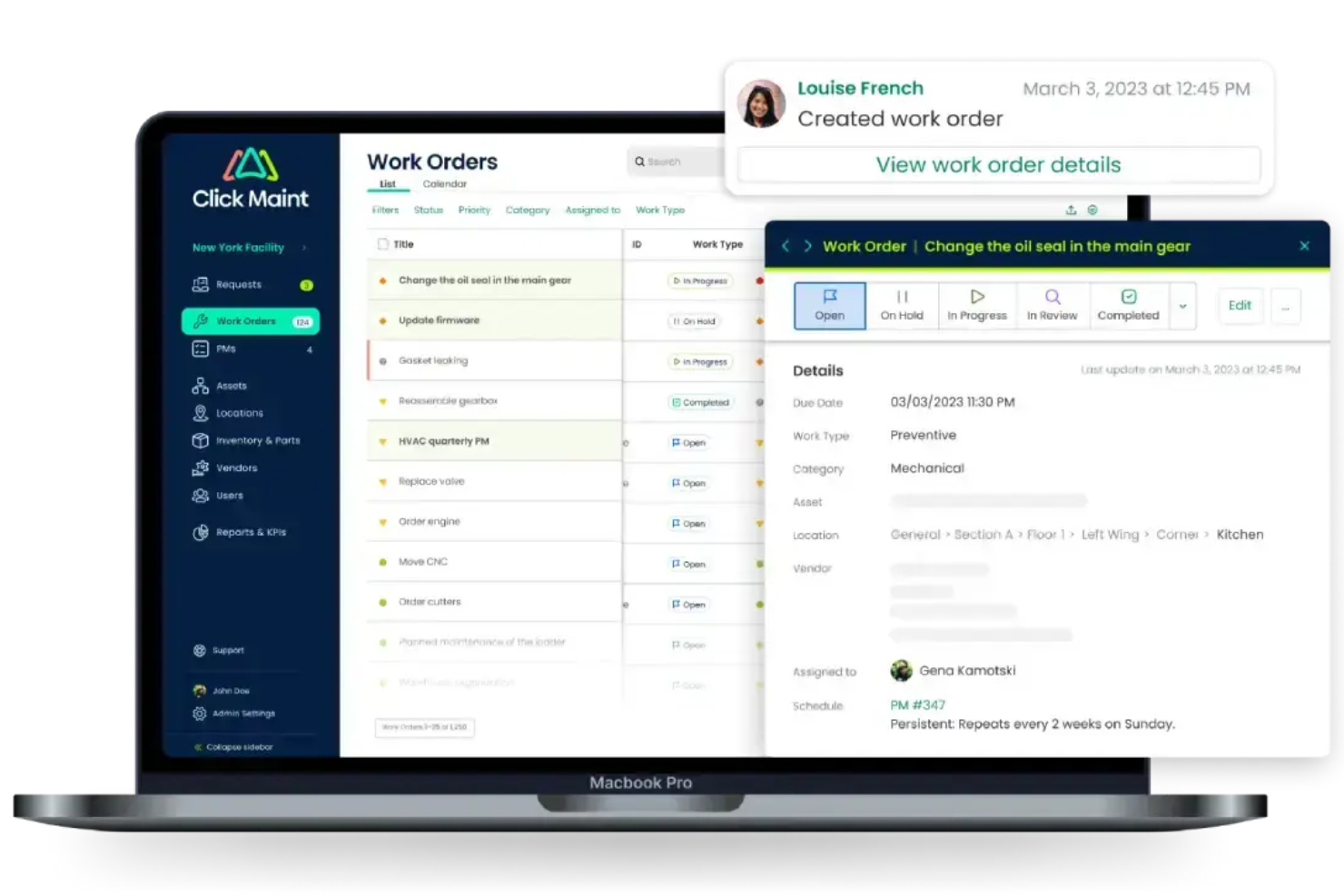
Click Maint CMMS is a maintenance management platform that tracks physical assets by location, manages work orders, schedules preventive maintenance, and controls parts inventory across facilities.
Who Is Click Maint CMMS Best For?
Click Maint CMMS is a good fit for maintenance managers and facility teams in industries like manufacturing, hospitality, and property management who need to manage assets and work orders across multiple locations.
Why I Picked Click Maint CMMS
I've included Click Maint CMMS in my top picks because its preventive maintenance scheduling goes well beyond basic calendar reminders. You can configure PM triggers across hourly, daily, weekly, monthly, and annual intervals, and tie each schedule directly to a specific asset or location. I also like that each PM record can carry its own task checklist, assigned technician or team, priority level, and parts costs—so every scheduled job arrives with full context, not just a due date.
Click Maint CMMS Key Features
- QR code asset tagging: Generate and print QR codes for any asset, then scan them via the mobile app to instantly pull up asset details, history, or open a work order.
- Parts and inventory management: Track parts stock levels across multiple storerooms, set reorder points, and log parts usage directly against work orders and assets.
- Asset maintenance history log: View a complete record of all work orders, costs, and downtime events tied to each individual asset over its lifecycle.
- Work order status tracking: Create, assign, and monitor work orders through their full lifecycle, from open to in-progress to completed, with priority and cost fields on each record.
Click Maint CMMS Integrations
Click Maint's open API makes it easy to integrate with ERP, accounting, and other business systems. The company's engineering team can work directly with your IT staff to set up custom integrations. Native integrations with specific third-party vendors are not clearly documented.
Pros and Cons
Pros:
- Fast setup across multiple site locations
- Tracks asset downtime with logged periods
- QR code scanning for quick asset lookup
Cons:
- Cannot connect with IoT sensors yet
- Mobile app less capable than desktop version


Pics.io offers a dynamic solution for businesses and creative teams seeking to efficiently manage and organize their digital content. Tailored for mid-sized to enterprise-level organizations, it addresses the challenges of securely storing, sharing, and retrieving media assets. With its intuitive interface, Pics.io transforms how teams collaborate and maintain their digital libraries, ensuring that your creative workflow remains uninterrupted and organized.
Why I Picked Pics.io
I picked Pics.io for its unique ability to provide advanced search capabilities that are essential for asset management. The software's visual search and natural language processing allow you to find similar images and files quickly, which is invaluable for teams managing large digital libraries. Additionally, its version control ensures that you always have access to the latest file versions, reducing the risk of errors and outdated content. These features make Pics.io a compelling choice for businesses that need to maintain an organized and efficient digital asset workflow.
Pics.io Key Features
In addition to its standout search and version control capabilities, Pics.io offers several other features that enhance its value as an asset management tool.
- AI-Powered Automation: The platform includes features like auto-tagging and facial recognition to organize and retrieve assets.
- Role-Based Access Management: Securely collaborate with your team by setting user permissions based on roles, ensuring that only authorized users access specific content.
- Integration with Google Drive and Amazon S3: Connect your existing storage solutions to Pics.io for a unified digital asset management experience.
- Custom Metadata: Enhance your file organization and searchability by adding custom metadata, making it easier to locate and manage files.
Pics.io Integrations
Integrations include Google Drive, Amazon S3, Salesforce, HubSpot, Adobe Creative Cloud, Zapier, Google Workspace, Monday.com, Trello, Shopify, and WordPress.
Pros and Cons
Pros:
- AI powered auto tagging
- Strong version control tools
- Advanced visual and AI search
Cons:
- Limited built in analytics
- Limited offline access available
New Product Updates from Pics.io
Pics.io Adds AI Keyword Asset Filtering
Pics.io now supports filtering by AI-generated keywords to speed up finding and managing assets. For more information, visit Pics.io's official site.
 .
.
Best asset management solution for tracking maintenance requests and work orders

MaintainX is an equipment and asset management software system with a strong focus on tracking the operating status of physical assets and equipment. You can use their software to determine which equipment is active or inactive, track time between equipment failures, or create work orders for maintenance.
To reduce your overall downtime, they have a preventive maintenance autopilot feature that automatically schedules equipment servicing proactively, before you experience a breakdown. Users will also appreciate MaintainX’s detailed metrics, which cover everything from asset locations to maintenance records, and work history to time vs. cost reports.
MaintainX integrates with enterprise resource planning (ERP) systems like Infor, Microsoft Dynamics 365, Oracle and SAP, with data management programs like MachineMetrics, Tableau and Zapier, and other popular accounting and fleet management tools.
Pricing for MaintainX starts at $8.33/user/month. You can also request a free trial or free demo through their website. In addition, they have a basic freemium plan with limited features for small teams.

Limble
Best scalable asset management platform for automated preventative maintenance

Limble is a CMMS and asset management platform designed to support businesses and industries of all scales, with a focus on reducing downtime, improving productivity, and ensuring compliance with industry regulations.
Its asset management capabilities include functionalities such as preventive maintenance, work orders, advanced reporting, parts inventory, downtime tracking, and workflow automation. I especially like that it allows you to track assets associated with different work orders, vendors, parts, and even preventative maintenance tasks.
Furthermore, it offers the ability to automate preventive maintenance scheduling. Users can create preventive maintenance (PM) templates, add standard operating procedures (SOPs) and checklists, and optimize PM schedules based on asset history. This helps in reducing unexpected breakdowns and extending the life of assets.
Limble offers a free plan with essential features. Paid plans begin at $28/user/month.


EZO AssetSonar is an IT Asset Management (ITAM) platform designed to support growing IT teams. It brings hardware, software, and SaaS management together in one system, helping organizations improve visibility, maintain control, and support compliance at scale.
I chose Ezo AssetSonar for its ability to offer real-time monitoring that ensures compliance and security within your IT environment. This feature allows you to stay ahead by identifying vulnerabilities and maintaining the integrity of your assets. Additionally, the software license optimization helps you manage your licenses effectively, ensuring you’re not overpaying for unused licenses and staying compliant with licensing agreements.
Another reason I picked Ezo AssetSonar is its focus on shadow IT management. This feature helps you identify unauthorized software within your network, reducing security risks. The asset dependency visibility feature is also noteworthy, as it aids in faster incident resolution by providing insights into asset relationships and dependencies, enhancing your team's productivity.
Features include a mobile app that allows on-the-go asset tracking, ensuring that you have full visibility and control wherever you are. The platform also offers IT service management, providing a service catalog that enhances the handling of IT requests and incidents. Furthermore, the hardware and software asset management features offer a structured approach to managing your IT assets, minimizing risks and improving operational efficiency.
Integrations include Intune, Jamf, Okta, and Zendesk.


InvGate Asset Management is a comprehensive IT asset management platform that helps organizations monitor, organize, and maintain control over their hardware, software, and cloud-based assets. It provides a centralized dashboard that offers complete visibility into your asset inventory, supporting smarter decisions and improved asset governance.
This platform stands out for its flexible onboarding options, which include agent-based setups, agentless network scans, manual asset entry, and integration with external systems like Lansweeper and FileWave.
It streamlines the entire asset lifecycle, from acquisition through disposal, while leveraging automation to apply asset policies and organize items. You can also customize asset records with fields tailored to your business needs, such as tracking usage, procurement data, or compliance statuses.
Other features include a configuration management database (CMDB) that visually represents asset relationships, helping teams understand how systems interact and depend on one another.
InvGate also automates recurring asset management tasks through customizable rules, reducing time spent on manual work. Furthermore, its inventory creation methods—from agent installations to third-party syncs—ensure compatibility with different organizational workflows.
Integrations with tools like Lansweeper, FileWave, Microsoft Active Directory, and Okta streamline onboarding by automatically importing existing asset data.

Issuetrak is a ticketing software designed to assist businesses in managing issues, tickets, or cases across various channels such as email, webforms, and direct application submissions.
I chose Issuetrak for asset management software due to its robust set of features that cater to omnichannel support management, which is essential for modern businesses that interact with customers across various platforms.
What makes Issuetrak different is its versatility in managing help desk tickets, customer support requests, and complaints across diverse industries, regardless of the company size.
The platform provides a robust ticketing system that enables omnichannel ticket submission, ensuring that customer issues are captured in a centralized system no matter how they are reported.
The platform includes a feature-rich Issue Hub for organizing and prioritizing tickets, and automated Round Robin Issue Assignment to distribute workload evenly among team members.
Issuetrak offers integrations with a variety of systems and platforms to enhance its issue tracking and management capabilities. Key integrations include Microsoft 365, Google Analytics, Gmail, Salesforce, Power BI, and thousands more through Zapier. You can also access the Issuetrak API for even more connections.

Asset Panda
Versatile asset tracking software with a wide range of use cases

Asset Panda is a flexible and versatile asset management system that works for any type of asset tracking, including fixed assets, IT assets, tool tracking, maintenance tracking, leased equipment, and reservations. Their system is used across a range of industries including government, healthcare, construction, education, and non-profit.
You can easily shape the software to meet your unique needs using their unlimited fields and configuration options. Their application also supports role-based permissions, giving you control over who can perform specific tasks within the system, or access sensitive data.
Advanced features within Asset Panda include asset kitting (bundling related equipment together to save time), a barcode generator (using custom barcodes or QR codes), and full asset lifecycle history (including repair tracking and forecasting).
You can also attach supporting material to asset records, including photos, user manuals, or warranty documents. This helpful feature leads to faster troubleshooting and less reliance on paper documents with everything digitized in your system.
Another feature I appreciate is the ROI calculator available on their website. If you’re on the fence on whether you need asset tracking software or not, plug your numbers into their calculator to get a sense of how much money you could save per year.
Integrations include Azure Active Directory, Lansweeper, Jira Service Management, Google Workspace, Meraki, Microsoft Active Directory, Microsoft Intune, Okta, OneLogin, Servicenow, Zendesk and other systems.
Migliori Software di Gestione delle Risorse: Tabella Comparativa
Questa tabella comparativa riepiloga prezzi, prova e dettagli demo per aiutarti a trovare il software di gestione delle risorse più adatto al tuo budget e alle tue esigenze aziendali.
| Tool | Best For | Trial Info | Price | ||
|---|---|---|---|---|---|
| 1 | Best for tracking software, hardware, SaaS subscriptions, and fixed assets | 14-day free trial + free demo available | From $19/agent/month (billed annually) | Website | |
| 2 | Best for global asset management in 130+ countries | Free demo available | from $5/person/month | Website | |
| 3 | Best for customizable preventive maintenance scheduling | 30-day free trial available | From $35/user/month (billed annually) | Website | |
| 4 | Best for visual search and NPL | 7-day free trial | From $100/month/user | Website | |
| 5 | Best asset management solution for tracking maintenance requests and work orders | Free plan + free demo available | From $20/user/month (billed annually) | Website | |
| 6 | Best scalable asset management platform for automated preventative maintenance | Free plan available | From $28/user/month | Website | |
| 7 | Best for growing teams managing IT assets | 7-day free trial | From $29.99/user/month | Website | |
| 8 | Best for simplifying IT asset onboarding | Free trial available | From $0.21/node/month | Website | |
| 9 | Best for omnichannel support management | Free trial available | From $478/user/annually | Website | |
| 10 | Versatile asset tracking software with a wide range of use cases | 7-day free trial + free demo available | Pricing upon request | Website |

Altri Sistemi di Gestione delle Risorse
Ecco alcune opzioni aggiuntive che non sono entrate nella lista dei migliori software di gestione delle risorse:
- HxGN EAM
Enterprise asset management tool designed to improve productivity and extend asset lifecycles through prescriptive maintenance
- ManageEngine Mobile Device Manager Plus
For managing your corporate mobile devices at scale
- AssetCloud
Flexible asset management software with efficient tools for managing identical items
- AssetTiger
User-friendly asset management system with a mobile app for inventory scanning and check in/out
- Asset infinity
Fixed asset management software that tracks the full asset lifecycle from purchase to disposal
- Rippling IT
For IT software that simplifies device and app management
- OfficeSpace
For hybrid asset lifecycle tracking
- MediaValet
With AI-powered categorization and search tools
- Papirfly
For centralized brand asset management
- 4ALLPORTAL
Enterprise asset management with advanced search capabilities, including OCR text recognition


Criteri di Confronto
Ti stai chiedendo come ho selezionato i migliori software di gestione delle risorse per questo elenco? Ecco un riepilogo dei miei criteri di valutazione:
- Interfaccia Utente (UI): Ho selezionato software con interfacce user-friendly e un apprendimento graduale per non complicare inutilmente le attività.
- Usabilità: Scelgo sistemi che funzionano su diversi sistemi operativi, con app mobile per ogni tipo di dispositivo, così le informazioni sono accessibili ovunque.
- Integrazione con altri Software: Ho scelto programmi che offrono integrazioni con altri sistemi collegati, come software di pianificazione delle risorse aziendali (ERP) e piattaforme di business intelligence.
- Rapporto Qualità/Prezzo: Preferisco sempre il software con prezzi trasparenti. La maggior parte delle piattaforme in questo elenco offre un prezzo di base, ma alcuni sistemi sono modulari e forniscono solo preventivi personalizzati in base al volume delle risorse da gestire.
Software di Gestione delle Risorse: Caratteristiche Principali
Ecco un riepilogo delle principali funzionalità che puoi aspettarti di trovare nei migliori software di gestione delle risorse:
- Etichettatura e tracciamento dei beni: Etichettatura di singoli articoli utilizzando una combinazione di metodi di tracciamento, inclusi codici a barre, codici QR, tracciamento bluetooth, RFID (identificazione a radiofrequenza) e tracciamento NFC (comunicazione in prossimità). A ciascun bene viene assegnato un identificatore univoco tramite uno di questi metodi e una voce corrispondente nel database dell’inventario.
- Storico del ciclo di vita del bene: Un resoconto completo della vita utile di un bene che copre l’acquisto, l’installazione, l’uso e la manutenzione continua, i trasferimenti di posizione, le informazioni su leasing o garanzia, e infine il decommissionamento e la dismissione.
- Reportistica dell’inventario in tempo reale: Una volta che hai popolato il sistema con tutti i tuoi inventari e beni, puoi rilassarti e lasciare che il sistema riepiloghi per te gli aggiornamenti dei dati dei beni mentre gli articoli vengono spostati tra i dipendenti.
- Modulo di manutenzione: Una soluzione integrata per tracciare e programmare attività di manutenzione e ordini di lavoro, spesso in modo proattivo o preventivo piuttosto che solo dopo che qualcosa si rompe. Alcuni sistemi possono programmare automaticamente la manutenzione in base ai dati storici delle prestazioni del bene.
- Permessi basati sui ruoli: La possibilità di impostare permessi per singoli utenti o gruppi di utenti, e riservare le funzioni di sistema di alto livello solo ai membri chiave per mantenere il controllo su chi può accedere a informazioni sensibili o generare report finanziari.
- Notifiche e avvisi: Si tratta di segnali di sistema personalizzabili che è possibile impostare, secondo necessità, per notificare agli stakeholder principali determinate azioni, come richieste di manutenzione, bassi livelli di stock o articoli prossimi alla sostituzione.
- Funzionalità mobile-friendly: Poiché ormai quasi tutti possiedono uno smartphone, è fondamentale che il software di gestione dei beni sia accessibile da dispositivi mobili. La maggior parte dei software dispone di app mobili che trasformano gli smartphone in scanner digitali, permettendo la facile registrazione in entrata e in uscita dei beni ovunque. Questa è una funzionalità molto importante, perché non vuoi trovarti con un sistema utilizzabile solo attraverso tecnologia di scansione proprietaria, il che comporterebbe costi di implementazione più elevati.
- Strumenti di reportistica finanziaria: L’ammortamento è una parte normale del ciclo di vita di un bene e va considerato per favorire previsioni accurate. I sistemi migliori includono moduli flessibili per l’ammortamento, e altri strumenti finanziari per aiutarti a decidere quando riparare le apparecchiature o sostituirle completamente.
Esistono diversi tipi di software per la gestione dei beni?
Ogni organizzazione avrà esigenze uniche quando si tratta di tracciare i propri beni aziendali. Il miglior software per la gestione dei beni è abbastanza flessibile da adattarsi a diversi stili di tracciamento. Tuttavia, a seconda del settore o dell’organizzazione, potresti beneficiare di una tipologia specifica di software per la gestione dei beni.
Ecco alcune delle nicchie più comuni per quanto riguarda i software di tracciamento dei beni:
- Beni fisici (noti anche come beni fissi): Questi sono beni materiali a lungo termine che non vengono consumati immediatamente (es. attrezzature aziendali, mobili, ecc.).
- Beni IT: Include sia apparecchiature informatiche fisiche (ad esempio hardware come computer, stampanti, scanner), sia altri beni meno tangibili (ad esempio licenze software e abbonamenti). A volte questi tracciatori specifici sono chiamati software per la gestione degli asset IT o software ITAM.
- Beni digitali: I beni digitali possono essere considerati una sotto-categoria degli asset IT, ma possono anche riferirsi a inventari digitali, come file digitali, foto, font o altri elementi che esistono solo in forma digitale. Questo tipo di software specializzato viene spesso descritto come software per la gestione dei beni digitali o software DAM.
- Beni a livello enterprise: Si tratta della gestione dei beni su scala più ampia, compresi beni fissi come attrezzature industriali, flotte di veicoli o imbarcazioni, strutture o impianti operativi e altre infrastrutture. Il software progettato per questo scopo specifico è spesso definito software per la gestione dei beni a livello enterprise o EAM.
Quali sono i principali vantaggi del software di gestione dei beni?
Avere informazioni a disposizione non fa mai male. Un software di gestione dei beni ti permette di consolidare inventario, manutenzione e altri dati in un unico luogo, rendendo più facile l’analisi e il monitoraggio nel tempo.
Ecco alcuni dei principali vantaggi che puoi aspettarti dall’utilizzo di questo tipo di software per il tracciamento dei beni:
- Avrai dati utili per prendere decisioni efficaci. Disporre di dati consolidati rende più facile individuare eventuali tendenze.
- Puoi monitorare il costo di proprietà degli asset nel tempo e decidere se è meglio noleggiare, esternalizzare o riparare e sostituire gli elementi.
- Puoi mantenere la conformità tramite una corretta tenuta dei registri fiscali.
- Risparmierai ai tuoi team molte attività di inserimento dati manuale, riducendo il carico amministrativo e facendo risparmiare tempo e denaro all’azienda.
- Col tempo, sarai in grado di ottimizzare i programmi di manutenzione per ridurre le spese di riparazione e massimizzare la durata utile dei tuoi asset.
- Con i dati a portata di mano, potrai garantire audit interni ed esterni senza ostacoli sulle informazioni relative agli asset.
FAQ sul software di gestione degli asset
Ecco alcune risposte alle domande più frequenti che potresti ancora avere sul software di gestione degli asset e sul suo funzionamento:
Come scelgo il software di gestione degli asset più adatto alle esigenze della mia azienda?
Inizia identificando le tipologie di asset che devi tracciare, come attrezzature d’ufficio, hardware, software e asset digitali. Cerca una piattaforma che supporti queste categorie, abbia un’interfaccia intuitiva e si adatti al flusso di lavoro del tuo team. Considera anche l’integrazione con i sistemi esistenti e verifica la presenza di reportistica intuitiva, funzioni di conformità e opzioni di personalizzazione. Leggere le recensioni e provare le demo ti aiuterà a scegliere più facilmente.
Il software di gestione degli asset può integrarsi con i miei sistemi contabili o ERP esistenti?
Sì, molti strumenti per la gestione degli asset offrono integrazioni con popolari piattaforme contabili e sistemi ERP. Questo semplifica il flusso dei dati, riduce l’inserimento manuale e aiuta a mantenere allineati i registri degli asset tra i vari reparti. Verifica sempre se il software selezionato offre connettori pronti all’uso o API flessibili, così da garantire un’integrazione senza problemi nel tuo stack tecnologico.
Qual è il tempo medio di implementazione per un software di gestione degli asset?
I tempi di implementazione variano solitamente da pochi giorni a diverse settimane. Dipende dalla complessità dei dati, dal numero di utenti che devono avere accesso e dalle necessità di integrazione. Le soluzioni cloud vengono spesso implementate più rapidamente dei sistemi on-premises. Puoi accelerare il processo preparando i dati degli asset e coinvolgendo fin da subito i membri chiave del team.
In che modo il software di gestione degli asset aiuta a tracciare la svalutazione e la conformità?
Il software di gestione degli asset solitamente automatizza i calcoli per la svalutazione e genera report utili per le revisioni finanziarie. È possibile configurare classi di asset, applicare diversi criteri di svalutazione e mantenere tutta la documentazione in un unico luogo. Così si semplifica la conformità agli standard contabili e si assicura l’aggiornamento continuo dei registri, riducendo il rischio di errori durante gli audit.
Cosa devo considerare nel calcolo del ritorno sull’investimento (ROI) per un software di gestione degli asset?
Concentrati sul tempo risparmiato grazie all’automazione del tracciamento manuale, sulla riduzione delle perdite di asset o delle risorse non registrate e sulla diminuzione delle attività amministrative. Confronta i costi con i benefici, come decisioni migliori grazie ai report, minori rischi di non conformità e una vita più lunga degli asset grazie alla manutenzione migliorata. Parti da una prova o un progetto pilota per misurare miglioramenti concreti prima di un’implementazione completa.
Cosa succede adesso?
Se stai cercando un software di gestione degli asset, collegati con un consulente SoftwareSelect per ricevere raccomandazioni gratuite.
Compila un modulo e fai una breve chiacchierata in cui potrai spiegare le tue esigenze specifiche. Poi riceverai una lista selezionata di software da esaminare. Ti supporteranno anche durante l’intero processo d’acquisto, incluse le trattative sui prezzi.