


Recensione di deskbird: Pro, Contro, Funzionalità e Prezzi


Hybrid work brings flexibility, but it also creates real problems: people arriving with nowhere to sit, uncertainty about who’s in the office, and unused office space costing more than it should. If you’re evaluating deskbird as a workplace management and desk booking software, you’re likely trying to solve these exact challenges.
In this review, I’ll walk you through what the platform does well, where it has limitations, and whether it’s a strong fit for your team. I’ll cover its features, usability, pricing structure, and how it stacks up for companies trying to streamline hybrid work.
deskbird Evaluation Summary

- From $5/user/month (billed annually)
- Free trial + free demo available
Perché fidarsi delle nostre recensioni sui software
Il nostro team testa e recensisce software dal 2012. In quanto esperti HR noi stessi, sappiamo quanto sia difficile — e importante — scegliere il software giusto.
Per questa guida, abbiamo valutato gli strumenti attraverso test pratici e ricerche indipendenti, assegnando un punteggio agli strumenti in base ai nostri criteri di selezione. Ci basiamo inoltre sulle competenze di leader di pensiero del settore e di professionisti HR attivi.
Le nostre recensioni riflettono il nostro giudizio editoriale umano, non un discorso di vendita.
Revisori esperti:
deskbird Overview
deskbird is a workplace management and hybrid scheduling platform that lets employees book desks, reserve meeting rooms, plan office days, and monitor how office space is being used. It brings together essential features such as desk booking, office maps, team scheduling, and attendance tracking, all within a clean and easy interface. Its main purpose is to help you avoid wasted space, streamline scheduling, and give everyone a clear view of where people are working at any given time.
pros
-
Fast and easy desk and room booking that most employees can use without guidance.
-
Smooth connections with Outlook, Google Calendar, Slack, and Teams for quicker adoption.
-
Helpful workspace insights that show how often your office is actually being used.
cons
-
Reporting depth may fall short for companies that need advanced or highly customized analytics.
-
Mobile app can feel less polished than the desktop experience.
-
Room scheduling may not fully support teams that rely on complex or highly structured recurring reservations.
Is deskbird Right For Your Needs?
Who Would be a Good Fit for deskbird?
deskbird works well for teams that want a simple way to manage hybrid work without the complexity of enterprise-level workplace systems. It is a strong option if you want employees to book desks easily, coordinate office days, and understand who is in the workspace at any time. Small and midsize companies benefit the most because the setup is light, the interface is intuitive, and the analytics provide enough clarity without overwhelming your team. It can also serve enterprise teams who are not looking for heavyweight options.
-
Tech Startups
deskbird’s flexibility supports rapid growth and changing team dynamics.
-
Creative Agencies
You can easily manage shared spaces for project-based work with deskbird.
-
HR Departments
deskbird simplifies workspace management for diverse and dynamic teams.
-
Small and Mid-Sized Organizations
A good choice for companies that want visibility, structure, and reliable scheduling without heavy administrative overhead.
-
Remote Workers
deskbird’s mobile app lets remote staff book desks on the go.
-
Hybrid Teams
Employees can share and view office schedules so everyone knows who will be on-site for collaboration.
-
Enterprises with Basic Needs
deskbird now serves multiple enterprise customers with over 5,000 employees with features such as SSO, role-based access controls, and top-tier data protection
Who Would be a Bad Fit for deskbird?
deskbird might not suit large corporations with complex, multi-floor office setups that need advanced reporting and customization capabilities. If your business requires detailed analytics for workspace utilization or extensive customization to match specific corporate policies, deskbird’s more straightforward feature set may fall short. Manufacturing industries with fixed workstations won’t benefit from its desk booking features either.
-
Large, Complex Corporations
You might need more advanced reporting and customization than deskbird offers.
-
Manufacturing Industries
Fixed workstations mean deskbird’s flexibility isn’t necessary for your setup.
-
Financial Services
You may require higher security features than what deskbird provides.
-
Legal Firms
Your need for detailed client confidentiality reporting might not align with deskbird’s capabilities.
-
Public Sector
Your compliance and reporting requirements might be too extensive for deskbird.
-
Healthcare Teams
You likely need specialized software for managing clinical and administrative spaces.
Come Testiamo e Valutiamo i Nostri Strumenti
Abbiamo impiegato anni per costruire, perfezionare e migliorare il nostro sistema di test e valutazione dei software. Il modello è progettato per cogliere le sfumature della scelta del software e per evidenziare cosa rende uno strumento efficace, concentrandosi sugli aspetti più critici del processo decisionale. Di seguito puoi vedere esattamente come funziona la nostra valutazione e attribuzione dei punteggi secondo sette criteri. Questo ci consente di fornire una valutazione imparziale del software basandoci su funzionalità principali, caratteristiche distintive, facilità d’uso, onboarding, assistenza clienti, integrazioni, recensioni dei clienti e rapporto qualità/prezzo.
Funzionalità Principali (25% del punteggio finale)
Il punto di partenza della nostra valutazione sono sempre le funzionalità principali dello strumento. Possiede le funzioni di base che l’utente si aspetta? Alcune di queste funzioni sono disponibili solo in piani a prezzi più alti? In sostanza, ci aspettiamo che uno strumento rispecchi almeno le capacità base dei concorrenti.
Caratteristiche Distintive (25% del punteggio finale)
Successivamente valutiamo le funzionalità particolari che superano le funzionalità di base tipiche degli strumenti della sua categoria. Un punteggio alto riflette caratteristiche specializzate o uniche che rendono il prodotto più veloce, efficiente, o che offrono ulteriore valore all’utente. Valutiamo inoltre quanto sia semplice integrare il software con altri strumenti tradizionalmente presenti nel tech stack per espanderne funzionalità e utilizzo. Gli strumenti che offrono numerose integrazioni native, collegamenti di terze parti e accesso API per creare integrazioni personalizzate ricevono i punteggi migliori.
Facilità d’Uso (10% del punteggio finale)
Consideriamo quanto sia veloce e semplice svolgere i compiti definiti dalle funzionalità principali utilizzando lo strumento. I software con punteggi alti sono ben progettati, intuitivi, dispongono di app mobili, offrono modelli preimpostati e rendono semplici anche i compiti più complessi.
Onboarding (10% del punteggio finale)
Sappiamo quanto sia importante una rapida adozione di una nuova piattaforma all’interno di un team, quindi valutiamo quanto sia facile imparare e utilizzare uno strumento con una formazione minima. Valutiamo quanto rapidamente un membro del team possa iniziare a utilizzare lo strumento senza esperienza. Le soluzioni con punteggio alto richiedono poco o nessun supporto.
Assistenza Clienti (10% del punteggio finale)
Esaminiamo quanto sia facile e veloce ricevere supporto o trovare aiuto tramite telefono, chat dal vivo o knowledge base. Gli strumenti e le aziende che forniscono un’assistenza in tempo reale ottengono i punteggi migliori, mentre i chatbot ottengono i risultati peggiori.
Recensioni dei Clienti (10% del punteggio finale)
Oltre ai nostri test e valutazioni, consideriamo il punteggio net promoter dei clienti attuali e passati. Analizziamo la loro propensione, se potessero scegliere, a selezionare di nuovo lo strumento per le sue funzionalità principali. Un software con un punteggio alto riflette un elevato net promoter score da parte dei clienti attuali o passati.
Rapporto Qualità/Prezzo (10% del punteggio finale)
Infine, considerando tutti gli altri criteri, esaminiamo il prezzo medio dei piani base rispetto alle funzionalità principali e teniamo conto del valore degli altri criteri di valutazione. I software che offrono di più, a meno, ottengono un punteggio più alto.
Core Features
Desk Booking
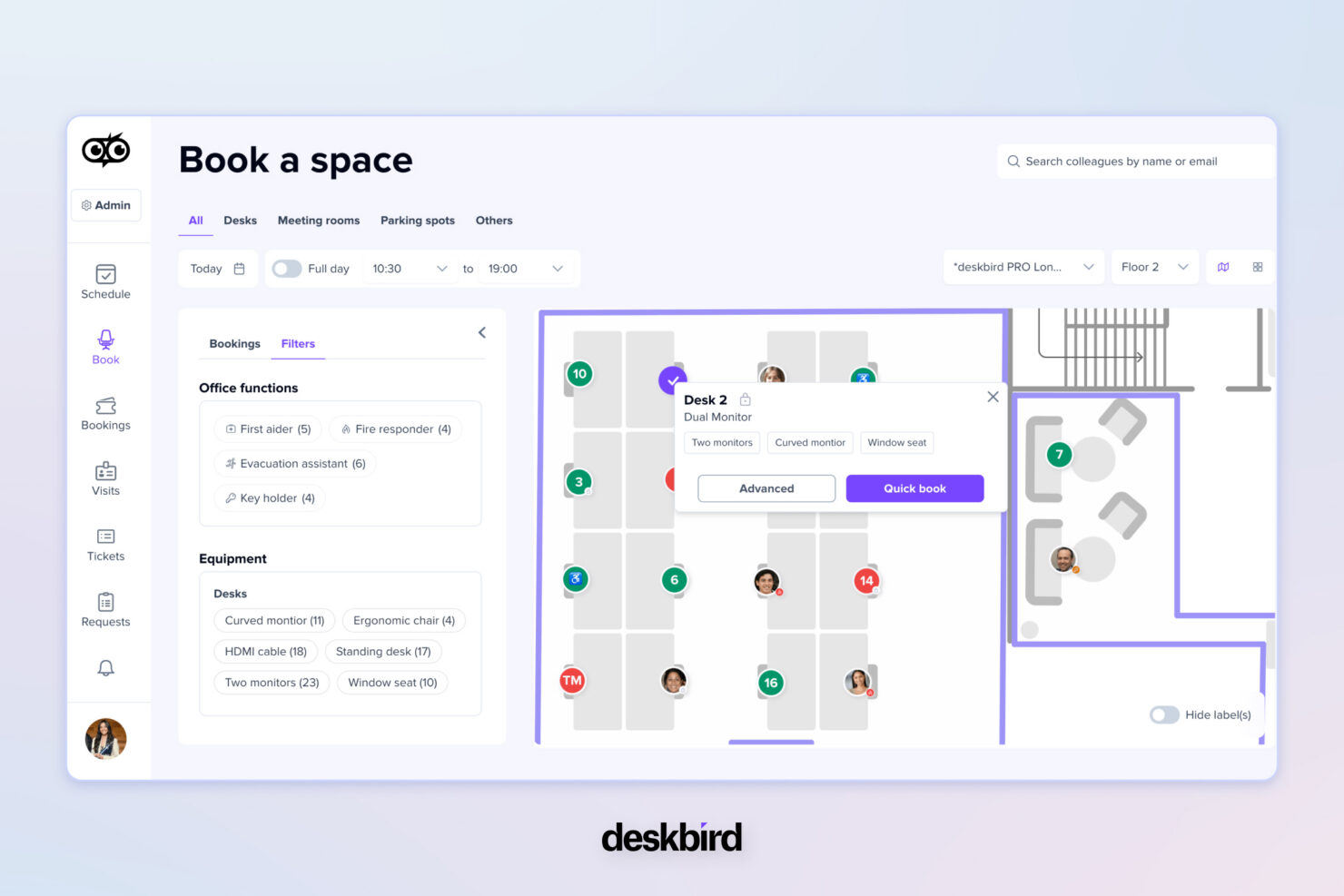
Gives teams a simple way to choose workspaces through an interactive floor plan that prevents seat conflicts and supports smoother in-office days.
Room Booking
Makes meeting coordination easier with real-time room availability that cuts down on double bookings and scheduling hassles.
Hybrid Scheduling
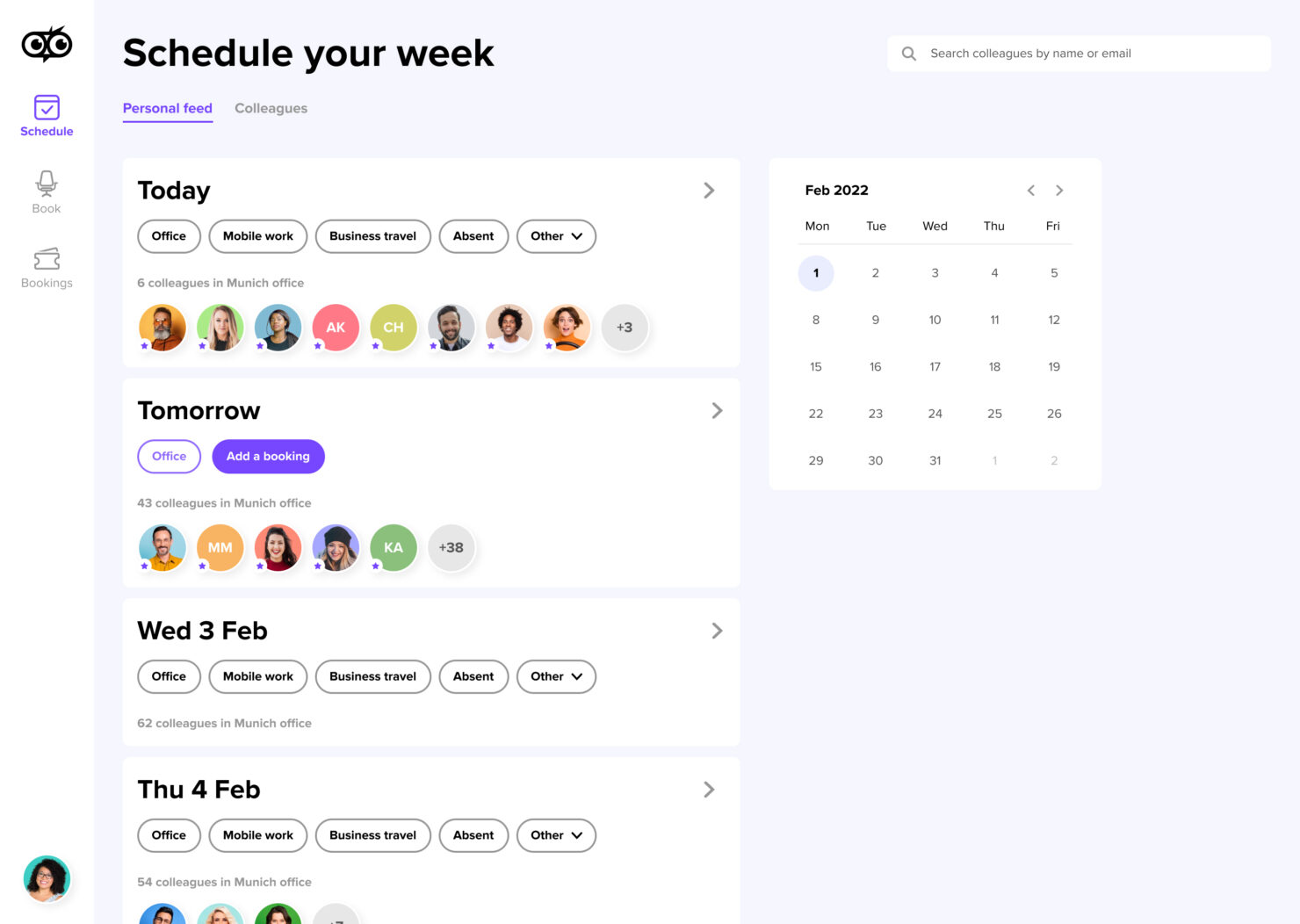
Helps teams align office days by sharing weekly schedules in one place, reducing guesswork around who will be on-site.
Visitor Management
Creates a smoother front-desk experience through pre-registration and tracked check-ins that improve security and predictability.
Workplace Analytics
Offers clear insights into attendance and space usage, allowing teams to optimize layouts and make smarter decisions about office needs.
Resource & Parking Booking
Centralizes the booking of shared resources like parking spaces and equipment, giving teams one place to manage all workspace needs.
Standout Features
Customizable Booking Rules
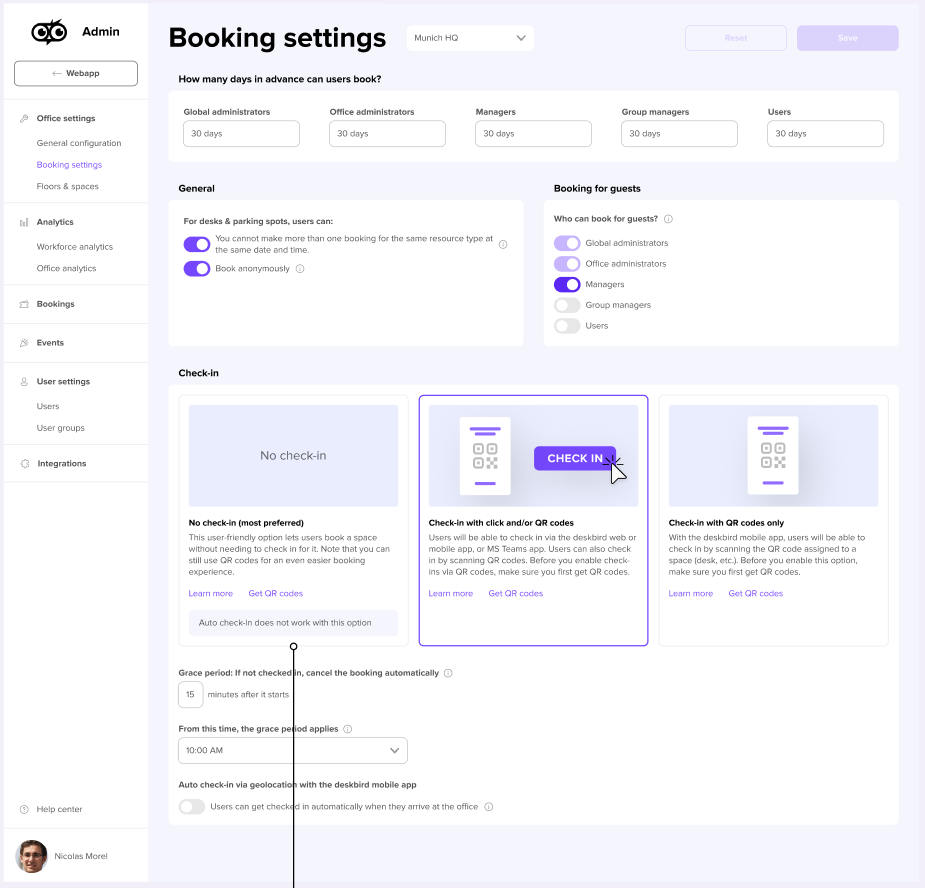
Set specific booking rules to match your office policies. deskbird allows you to customize booking limits and parameters, ensuring smoother operations.
Interactive Maps
Navigate your office with interactive maps that guide users to their booked desks. This feature enhances user experience by making it easier to find and secure their workspace.
Auto Release for No Shows
Keeps desks and rooms available by freeing spots when someone forgets to check in.
Ease of Use
deskbird stands out for its user-friendly interface, making it easy for your team to book desks quickly. The intuitive design and clear navigation simplify the booking process, reducing time spent on logistics. deskbird’s mobile app enhances usability by allowing desk bookings on the go, ensuring flexibility for remote workers. Compared to other tools, deskbird’s real-time updates and interactive maps improve your team’s experience by making desk reservations straightforward and efficient.
Onboarding
deskbird offers a straightforward onboarding process that helps your team get started quickly. The setup is intuitive, with clear instructions and helpful guides to assist new users. deskbird’s support resources, including tutorials and customer service, make it easy for your team to understand and use the platform efficiently. Compared to others, deskbird’s onboarding ensures a smooth transition, minimizing downtime and maximizing the value you get from the software.
Customer Support
deskbird provides reliable customer support that ensures your team can resolve issues quickly. Users appreciate the responsive helpdesk and access to comprehensive online resources. With options like live chat and email support, deskbird assists you in navigating any challenges you face. The availability of clear tutorials and a knowledgeable support team helps your team feel confident in using the platform, making it a dependable choice for workplace management.
Integrations
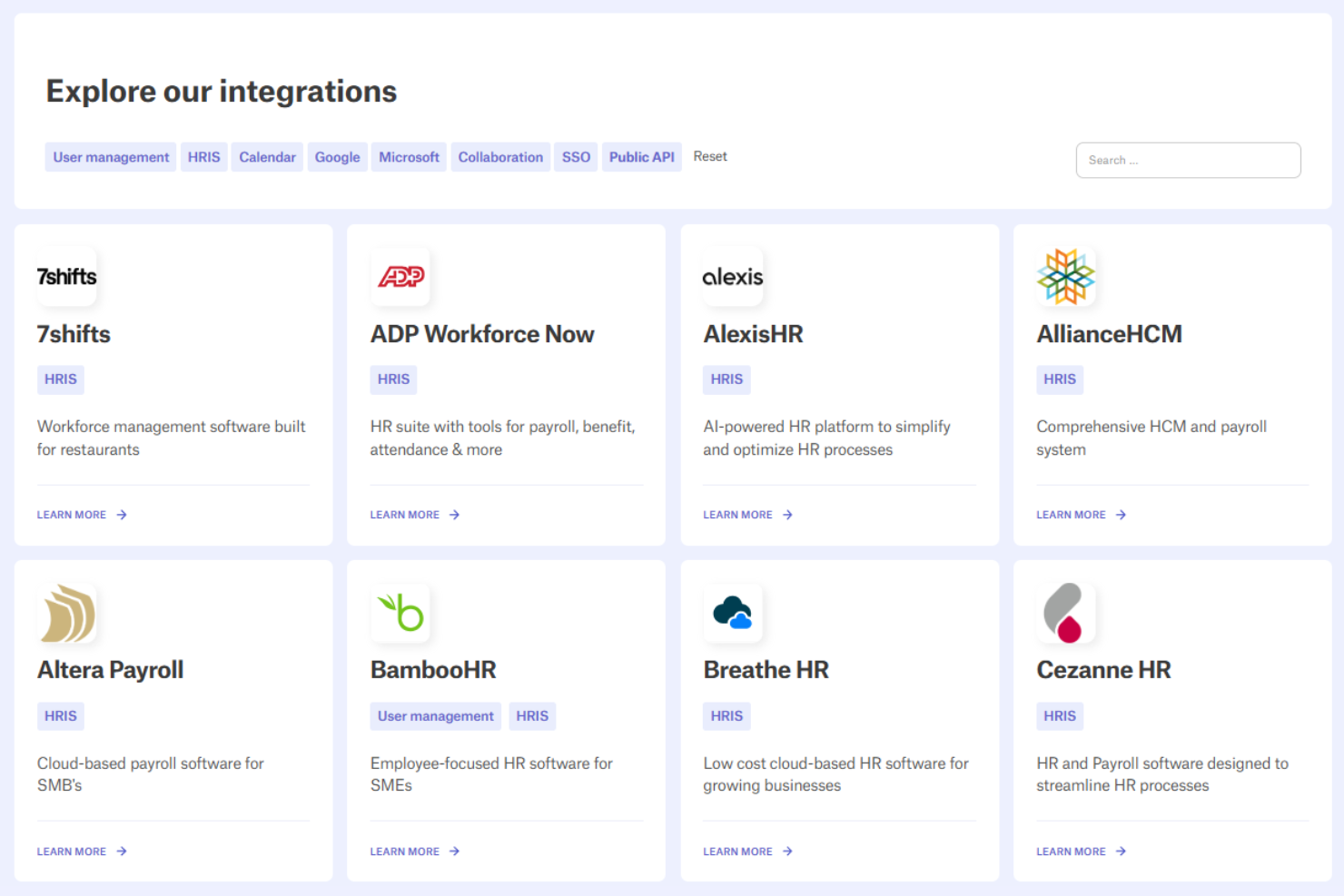
Integrations include Google Calendar, Outlook, Microsoft Teams, Slack, SSO providers, and several HRIS systems. An API is available for custom integrations if needed.
Value for Money
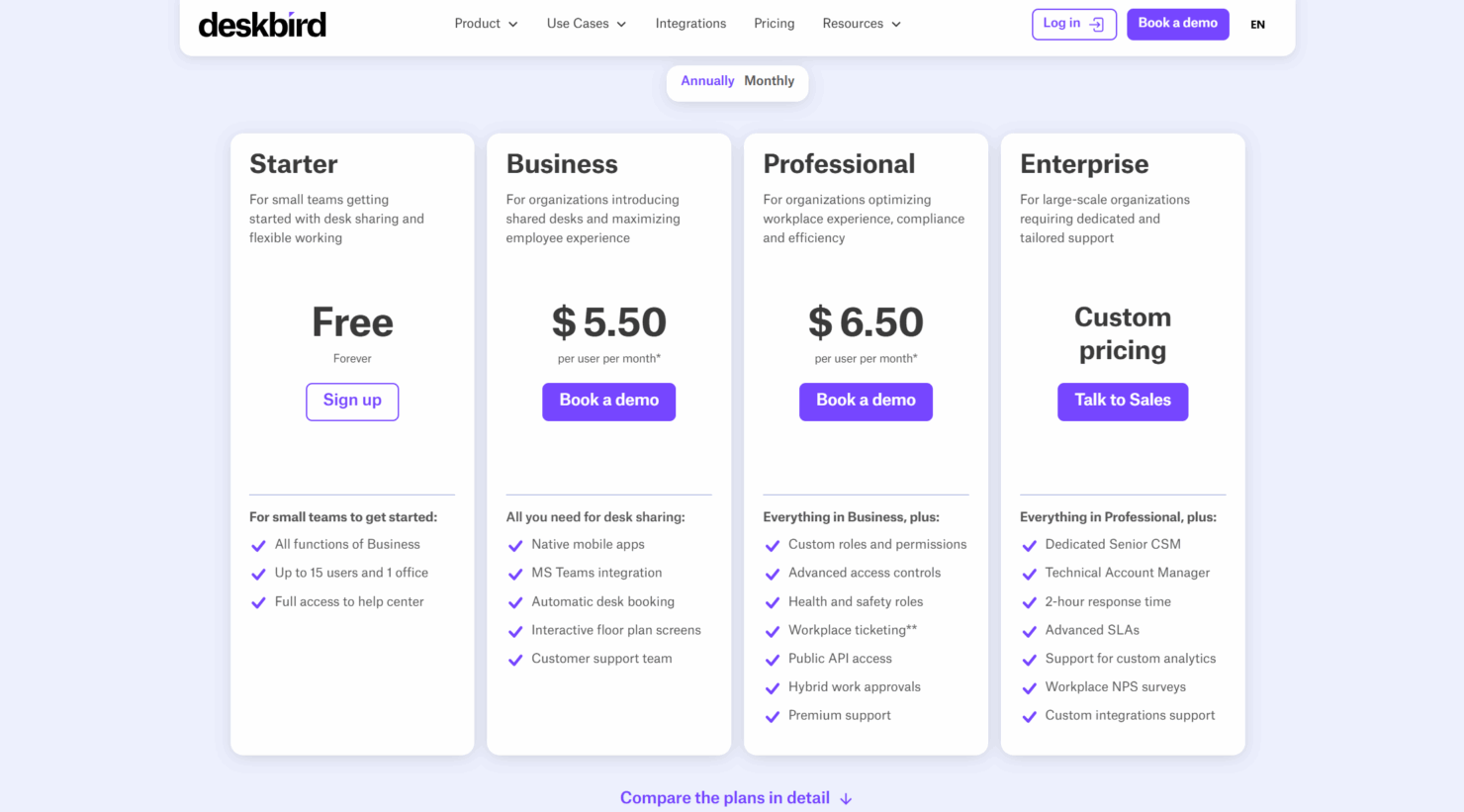
deskbird offers strong value for teams that want simple, reliable tools for hybrid work without committing to a heavy enterprise platform. Its pricing structure gives small teams an easy way to get started while offering larger organizations the option to scale into more advanced controls, permissions, and support as needed.
- Starter (Free Forever): For small teams that want essential desk sharing and scheduling tools
- Business: Adds mobile booking and integrations to support growing teams
- Professional: Unlocks advanced controls, permissions, and support options
- Enterprise: Comes with tailored assistance, higher service levels, and customization for complex organizations
deskbird Specs
- Access Management
- API
- Appointment Scheduling
- Batch Permissions & Access
- Calendar Management
- Chat
- Click-to-Dial
- Contact Management
- Custom Data Forms
- Custom Reports
- Customer Management
- Dashboard
- Dashboards
- Data Export
- Data Import
- Data Visualization
- Email Integration
- External Integrations
- Forecasting
- Google Apps Integration
- Lead Management
- Map Visualization
- Marketing Automation
- Mobile App
- Multi-User
- Notifications
- Resource Management
- Scheduling
- Self-service Portal
- Workflow Management
deskbird FAQs
What kind of support can I expect from deskbird?
How does deskbird ensure data security and compliance?
Can deskbird handle large-scale office environments?
How quickly can my team start using deskbird?
Is deskbird suitable for remote work settings?
What customization options does deskbird offer?
How does deskbird improve space management?
Does deskbird provide analytics for workspace utilization?
Does deskbird work across multiple office locations?
deskbird Company Overview & History
deskbird was founded in 2020 in St. Gallen, Switzerland, as companies began shifting heavily into hybrid work. The platform grew quickly by focusing on fast booking workflows and an intuitive user experience. Today, it offers a full suite of features, including desk and room booking, hybrid scheduling, visitor management, and workplace analytics.
Timeline of Key Milestones
- 2020: deskbird was founded in Switzerland as a modern solution for shared-office booking.
- 2021: Expanded its platform with desk booking, interactive floor plans, and early workplace management tools.
- 2022: Introduced deeper integrations and hybrid scheduling features to support growing hybrid teams.
- 2023: Added workplace analytics, visitor tools, and more advanced admin controls.
- 2024: Continued global expansion and strengthened support for mid-size and enterprise-level organizations.
- 2025: Serves a wide range of companies across Europe and beyond with ongoing platform improvements.