

10 beste ClickUp-alternativer for HR-team i 2026

Kortliste over alternativer til ClickUp


De beste alternativene til ClickUp for HR-team kombinerer fleksibel oppgavehåndtering, tydelig teamsamarbeid og funksjoner tilpasset personaladministrasjon. Hvis du leter etter alternativer til ClickUp, trenger du sannsynligvis verktøy som støtter HR-arbeidsflyter, forenkler oppfølging av ansatte og tilpasses teamets unike prosesser.
Ved å velge riktig plattform kan du håndtere introduksjon av nyansatte, medarbeidersamtaler og etterlevelse uten unødvendig kompleksitet. I denne veiledningen finner du en kuratert liste over de beste alternativene til ClickUp, der hvert alternativ har styrker som håndterer vanlige HR-utfordringer og hjelper deg med å bygge en mer organisert og menneskefokusert arbeidsplass.
Hva er ClickUp?
ClickUp er en programvareplattform for prosjektstyring som er utviklet for å hjelpe team med å håndtere oppgaver og deloppgaver, følge fremdriften og samarbeide i sanntid. Som en SaaS-løsning samler den arbeidsstyring, oppfølging av oppgaver og alt-i-ett-verktøy for samarbeid i et brukervennlig grensesnitt som støtter miljøer med flere team. Med gode tilpasningsmuligheter og støtte for komplekse arbeidsflyter brukes den ofte av markedsføringsteam og driftsteam som ønsker å samle arbeidet på ett sted.
Hvorfor du kan stole på våre programvareanbefalinger
Teamet vårt har testet og anmeldt programvare siden 2012. Vi er selv HR-eksperter, så vi vet hvor vanskelig og hvor viktig det er å velge riktig programvare.
I denne guiden har vi vurdert verktøyene gjennom praktisk testing og uavhengig research og gitt dem poeng ut fra våre utvelgelseskriterier. Vi bygger også på innsikt fra ledende eksperter i bransjen og erfarne HR-eksperter.
Anmeldelsene våre bygger på vår egen redaksjonelle vurdering. De er ikke et salgsargument.
Ekspertanmeldere:
Sammenligningstabell over alternativer til ClickUp
Denne sammenligningstabellen oppsummerer prisopplysningene for mine beste utvalgte alternativer til ClickUp:
| Tool | Best For | Trial Info | Price | ||
|---|---|---|---|---|---|
| 1 | Best for creating timeline visuals | Free plan available | Pricing upon request | Website | |
| 2 | Best for managing complex team projects | 2-week free trial; free demo available | From $8/user/month (billed annually) | Website | |
| 3 | Best for milestone-driven workflows | Free-forever plan available | From $39/month (billed annually) | Website | |
| 4 | Best for resource planning and allocation | 14-day free trial available | From $9/user/month (billed annually) | Website | |
| 5 | Best for simple team collaboration | 30-day free trial + free demo available | From $25/month (billed annually) | Website | |
| 6 | Best for creative agency management | Free demo available | From $10.50/user/month (billed annually) | Website | |
| 7 | Best with AI-powered task scheduling | Free trial available | From $19/user/month (billed annually) | Website | |
| 8 | Best for customizable project templates | Free-forever plan available | From $1/user/month (billed annually) | Website | |
| 9 | Best for tracking employee billable hours | Free demo available | From $12/user/month (billed annually) | Website | |
| 10 | Best for workforce time tracking | 14-day free trial | From $10/user/month (billed annually) | Website |
Anmeldelser av alternativer til ClickUp
Nedenfor finner du mine detaljerte oppsummeringer av de beste alternativene til ClickUp som kom med på kortlisten min. Anmeldelsene mine gir en detaljert gjennomgang av funksjonene, de beste bruksområdene og integrasjonene for hver plattform, slik at du kan finne den som passer best for deg.

Best for creating timeline visuals
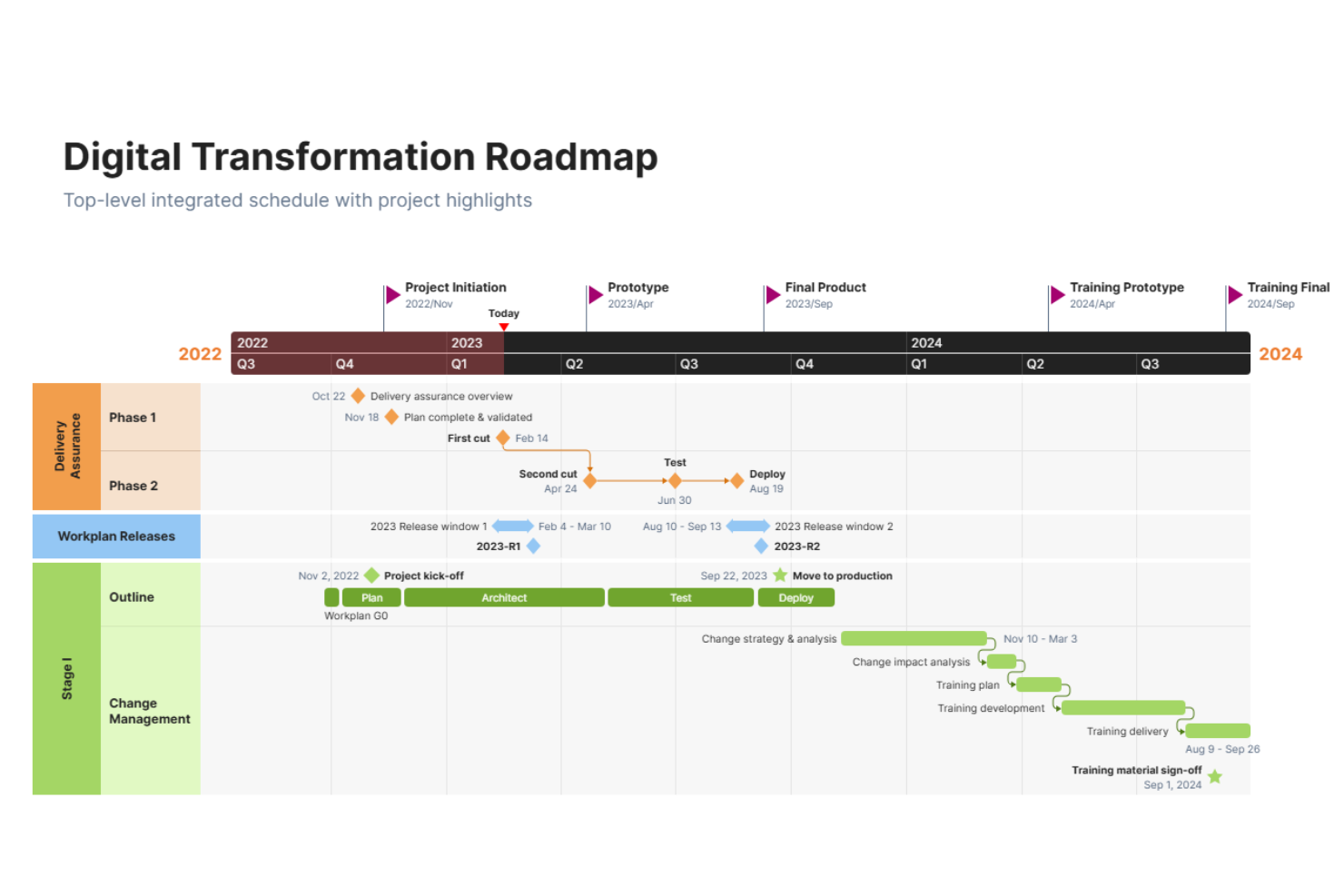
OfficeTimeline is a timeline and Gantt chart maker built for professionals who need to present project plans and milestones visually. HR teams use it to create clear, presentation-ready visuals for hiring timelines, onboarding schedules, and workforce planning.
Who Is OfficeTimeline Best For?
HR professionals and project leads who need to present hiring or workforce plans in a visual format.
Why OfficeTimeline Is a Good ClickUp Alternative
I picked OfficeTimeline because ClickUp's built-in timeline view is functional but not presentation-ready. When I need to walk executives through a hiring roadmap or onboarding schedule, OfficeTimeline's PowerPoint add-in lets me build polished, slide-ready visuals directly inside PowerPoint—no reformatting required. I also like the swimlane feature, which lets me separate workstreams like recruitment, onboarding, and training into distinct visual tracks on a single slide. In practice, that means my team can present a full workforce plan in one clear, executive-facing slide without exporting data or rebuilding visuals from scratch.
OfficeTimeline Key Features
- Planned vs. actual tracking: Compare original project schedules against real progress using baseline overlays on your timeline.
- Drag-and-drop visual editor: Reposition tasks and milestones directly on the timeline canvas without re-entering data.
- Ready-made templates: Access pre-built timeline and Gantt chart templates for project types like IT, pharma, and roadmaps.
- Task assignment: Assign individual tasks to team members directly within the online timeline view.
OfficeTimeline Integrations
Integrations include Microsoft PowerPoint, Microsoft Excel, Microsoft Project, Microsoft Word, and Office 365.
Pros and Cons
Pros:
- Allows baseline comparison for project tracking
- Supports swimlanes for multi-project visuals
- Exports timelines directly into PowerPoint slides
Cons:
- Not a full project management tool
- No Kanban or list task management

Workzone
Best for managing complex team projects
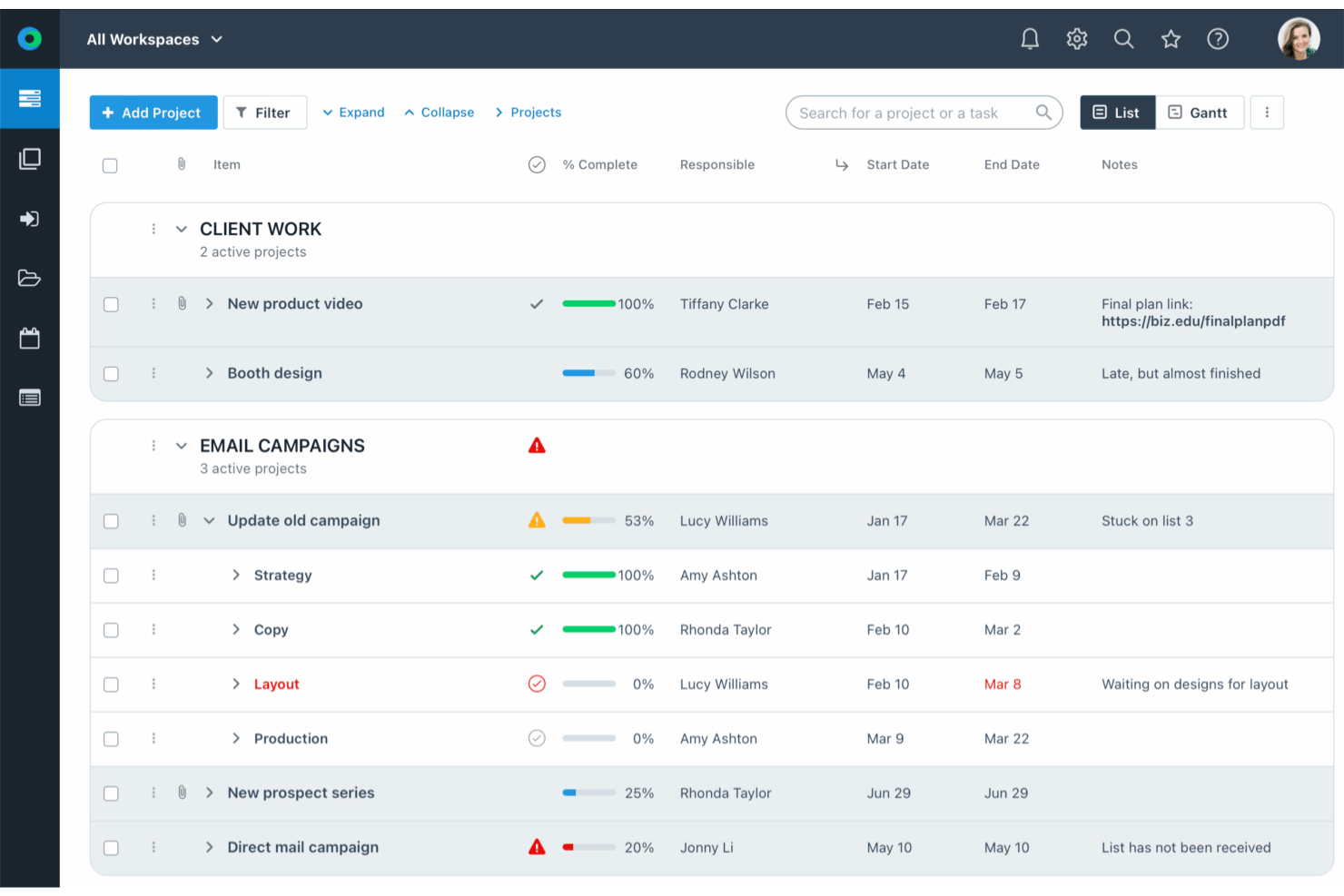
Workzone offers HR teams a centralized platform to coordinate projects, manage employee tasks, and track progress across departments. Its structured workspace design suits organizations that need clear oversight of complex HR initiatives and cross-team collaboration.
Who Is Workzone Best For?
HR departments in mid-sized to large organizations are managing multiple projects and cross-functional teams.
Why Workzone Is a Good ClickUp Alternative
I picked Workzone for its ability to handle layered, multi-team HR projects without losing visibility across workstreams. I like how its project dashboards give a clear, real-time view of task ownership and deadlines—useful when coordinating hiring campaigns or onboarding programs across departments. I also appreciate the workload management feature, which lets me see exactly where team members are stretched thin before assigning new tasks. In practice, that means my team can balance HR project demands without relying on manual check-ins or status meetings.
Workzone Key Features
- Task dependencies: Link related tasks so work moves in the right sequence across HR projects.
- File sharing: Attach and store documents directly within projects for easy team access.
- Email notifications: Send automated updates to keep stakeholders informed on task progress.
- Time tracking: Log hours spent on HR tasks and projects directly within the platform.
Workzone Integrations
Integrations include Box, Dropbox, Everhour, FreshBooks, GitHub, Google Drive, Harvest, HubSpot, Jira, and Microsoft Office 365.
Pros and Cons
Pros:
- Centralized document storage within each project
- Strong task dependency and sequencing options
- Detailed project templates for HR workflows
Cons:
- No built-in applicant tracking system features
- Limited mobile app functionality for HR teams
New Product Updates from Workzone

Workzone Enterprise Adds Multi-Stage Approval Workflows
Workzone Enterprise now includes Approval Workflows, enabling multi-stage document approvals to standardize complex processes and reduce manual effort. For more information, visit Workzone's official site.
 .
.
Nifty
Best for milestone-driven workflows
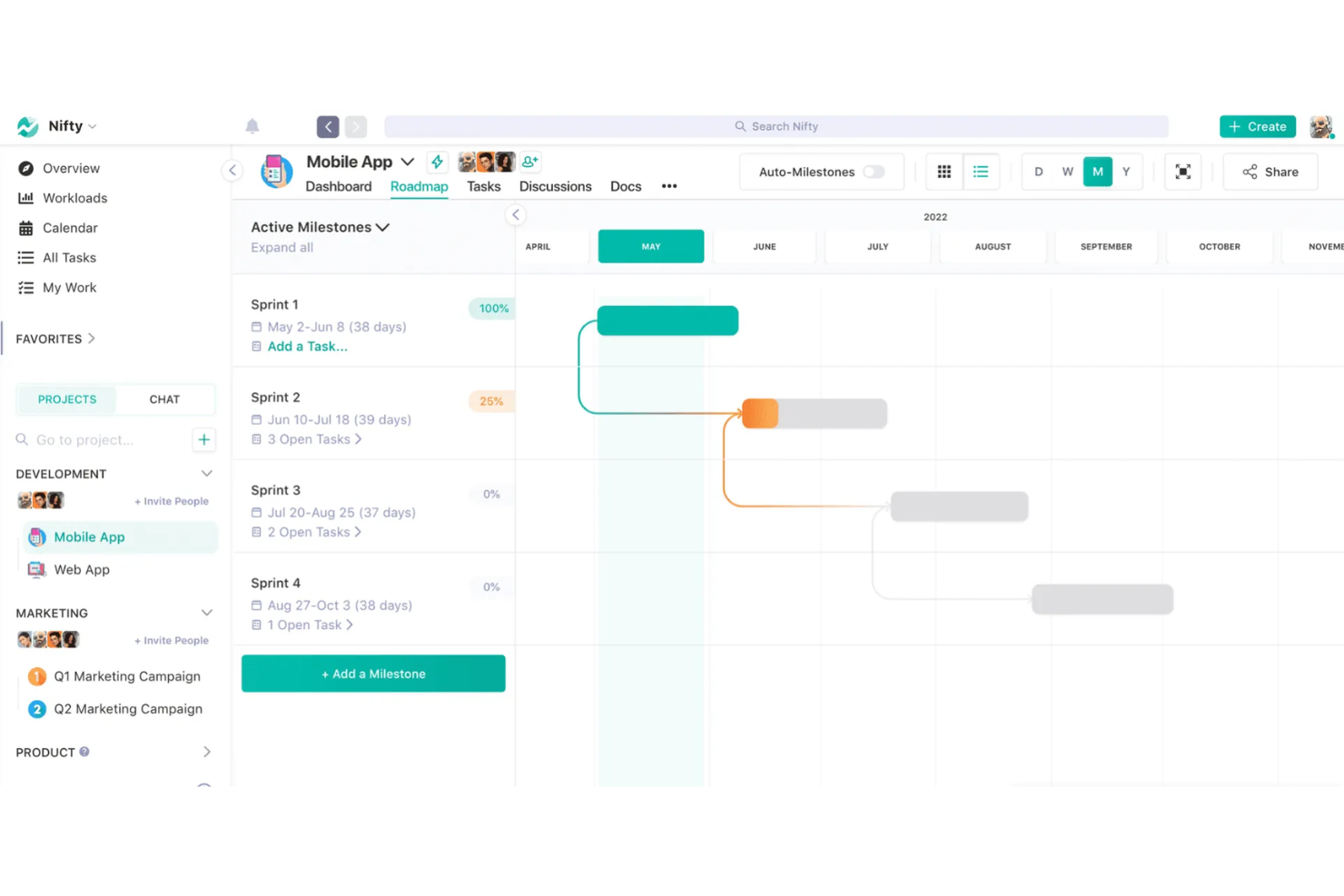
Nifty is a project management platform designed for HR teams and people managers who need to coordinate tasks, documents, and team communication in one place. It appeals to organizations looking for a structured way to manage projects, track progress, and keep everyone aligned without juggling multiple tools.
Who Is Nifty Best For?
HR teams at growing companies that need to coordinate projects and milestones across departments.
Why Nifty Is a Good ClickUp Alternative
I picked Nifty specifically because of how its Roadmaps feature ties milestone progress directly to task completion. When my team sets up an onboarding project, for example, each phase—offer acceptance, equipment setup, day-one orientation—becomes a milestone that updates automatically as tasks get checked off. I also appreciate the milestone dependency feature, which blocks tasks in one phase until the prior phase is complete. That kind of structured sequencing is something ClickUp requires more manual configuration to replicate.
Nifty Key Features
- Goals: Set trackable objectives tied to tasks, task lists, or custom fields, with progress that updates automatically as work is completed.
- Time tracking: Log hours at the task level across devices, with exportable timesheets broken down by project, task, and team member.
- Forms: Build intake forms that automatically generate tasks, post discussion messages, or create docs when a response is submitted.
- Automatic check-ins: Schedule recurring async updates with conditional follow-up questions to surface blockers without adding meetings.
Nifty Integrations
Integrations include Slack, Zoom, Webex, Google Drive, Microsoft 365, Harvest, GitHub, Miro, Typeform, and Outlook.
Pros and Cons
Pros:
- Forms create tasks or docs from submissions
- Built-in time tracking and exportable timesheets
- Milestone tracking updates automatically with task progress
Cons:
- Limited advanced workflow automation options
- No built-in Gantt chart view

Birdview
Best for resource planning and allocation
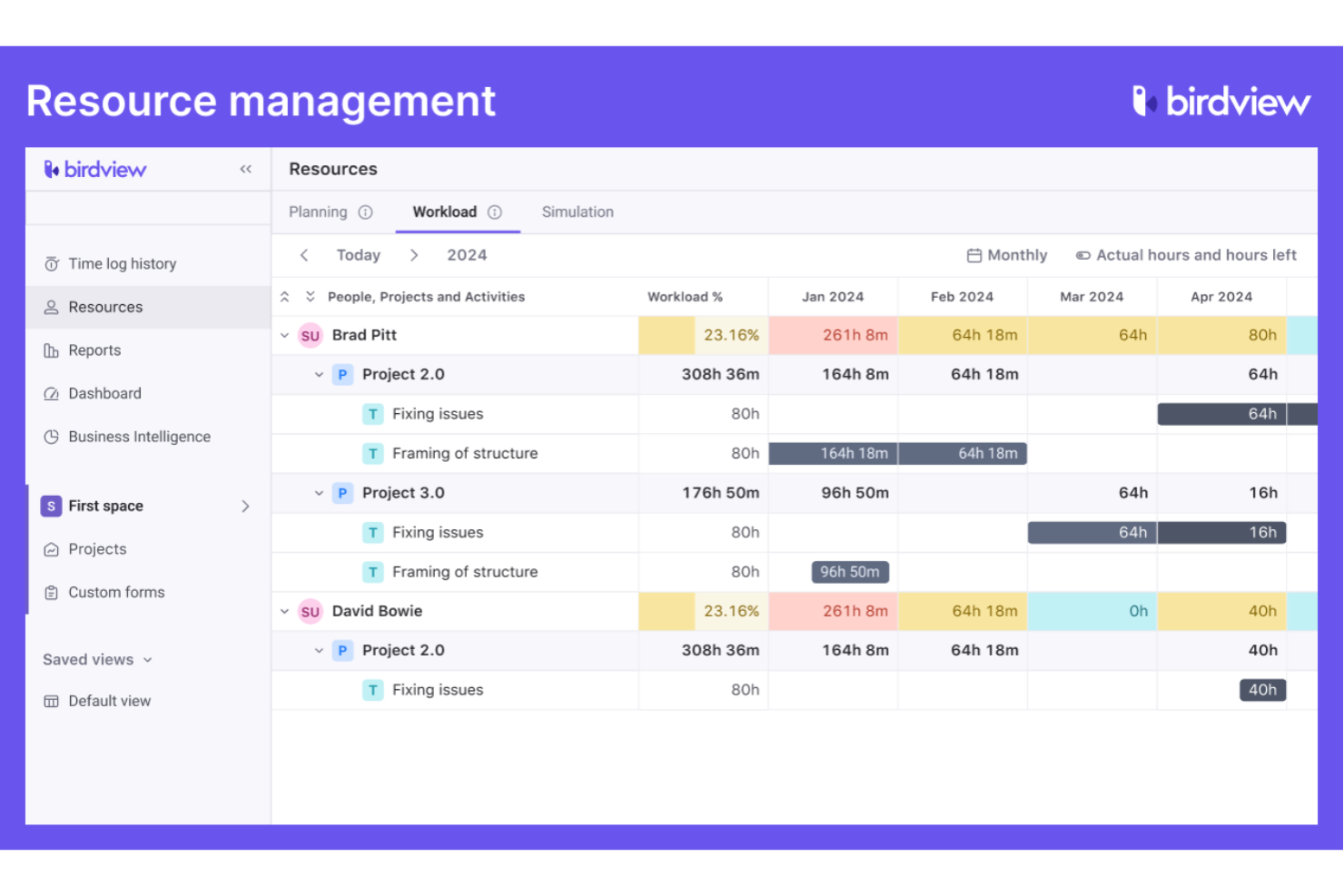
Birdview is a project and resource management platform built for organizations that need to coordinate people, projects, and capacity across teams. HR professionals and operations leads use Birdview to gain visibility into workloads, forecast staffing needs, and balance assignments in dynamic environments.
Who Is Birdview Best For?
Resource managers and HR teams at mid-sized to large organizations coordinating multiple projects and teams.
I picked Birdview because ClickUp doesn't offer dedicated resource planning at the depth that teams managing multiple concurrent projects actually need. Birdview's AI-based Team Builder matches open job roles to available employees or contractors by skills and availability—so when a new project kicks off, I'm not manually scanning spreadsheets to figure out who can take it on. I also rely on the demand vs. capacity forecasting view, which shows me where my team is overloaded weeks in advance, not after the fact. For HR teams supporting project-heavy organizations, that forward visibility changes how you staff and plan.
Birdview Key Features
- Gantt chart scheduling: Build and adjust project timelines with task dependencies using an interactive Gantt chart view.
- Client portal: Give external clients a dedicated space to review project progress, comment, and approve deliverables.
- Billing and invoicing: Generate itemized invoices based on logged time, expenses, or flat-fee tasks across multiple billing models.
- Project portfolio management: Group projects into portfolios to track budgets, statuses, and priorities across multiple initiatives at once.
Birdview Integrations
Integrations include QuickBooks, MS Outlook, Jira, Salesforce, HubSpot, Adobe Creative Cloud, MS Project, Excel, Office 365, and Gmail.
Pros and Cons
Pros:
- Gantt chart with task dependencies included
- Dedicated client portal for external collaboration
- Advanced resource allocation and forecasting tools
Cons:
- Limited automation for repetitive HR tasks
- No built-in chat or messaging feature

Basecamp
Best for simple team collaboration
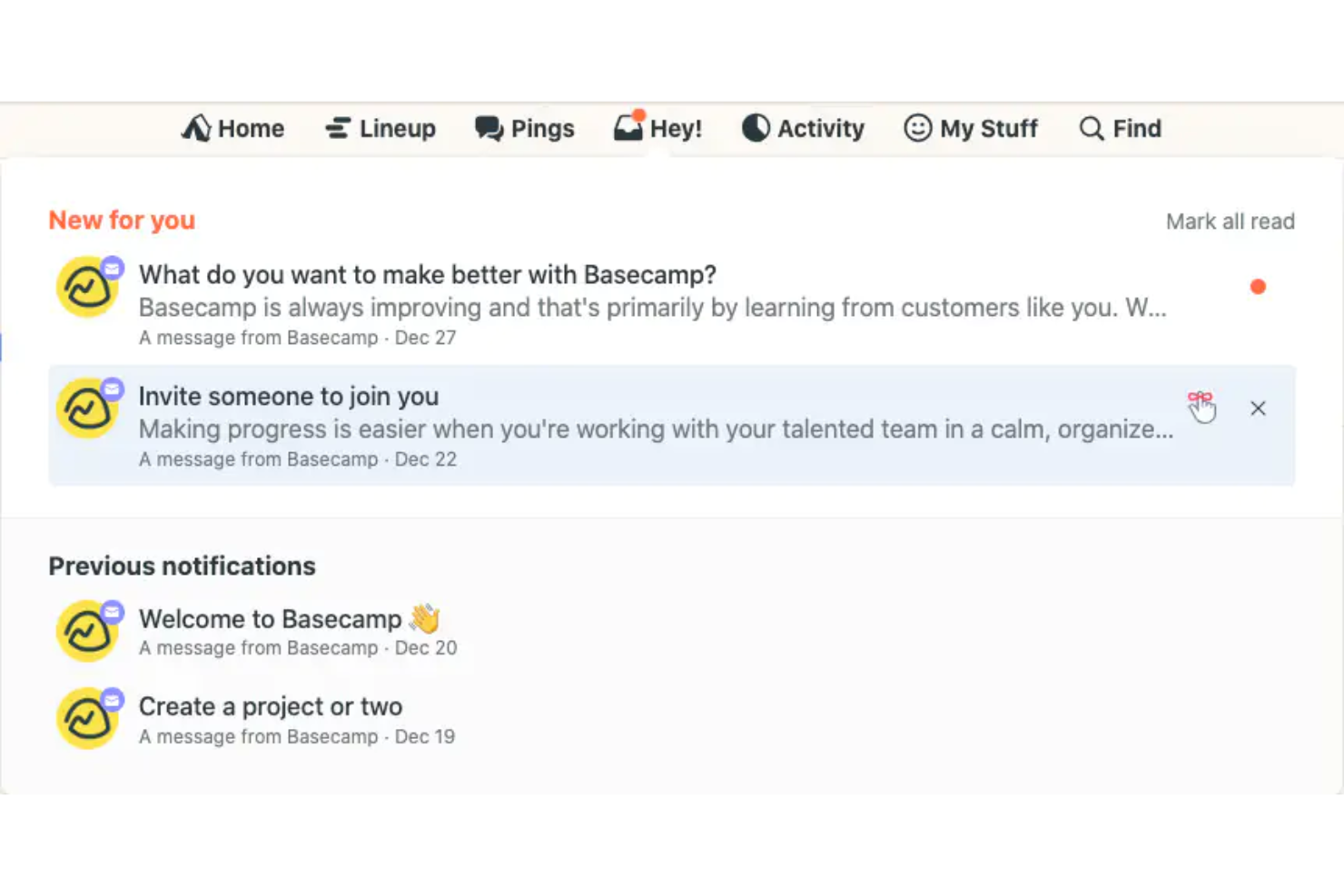
Basecamp is a team collaboration platform designed for organizations that want a straightforward way to manage communication, tasks, and schedules. HR teams and people managers use it to centralize project discussions, share files, and keep everyone aligned without a complex setup.
Who Is Basecamp Best For?
Small to midsize teams seeking a simple, centralized workspace for project communication and coordination.
Why Basecamp Is a Good ClickUp Alternative
I picked Basecamp because it strips away the complexity that makes ClickUp feel overwhelming for teams that just need to stay organized. Each project gets its own dedicated space with message boards, to-do lists, file storage, and a group chat—all in one place without any configuration required. I like how the Campfire chat feature keeps team conversations tied to specific projects, so HR discussions about onboarding or policy updates don't get buried in a general channel. For teams that don't need advanced workflows, Basecamp's flat structure makes it easier to get everyone participating from day one.
- To-do lists: Create and assign task lists with due dates and comments attached directly to each item.
- Docs & files: Upload, store, and share documents and files within each project space.
- Card Table: Organize and move tasks across a kanban-style board to track work in progress.
- Hill Charts: Visualize task progress on a curve to show what's still being figured out vs. what's in execution.
Basecamp Integrations
Integrations include Google Drive, Slack, GitHub, Harvest, Clockify, Everhour, Trello, Zendesk, Dropbox, and Asana.
Pros and Cons
Pros:
- Hill Charts visualize progress in a unique way
- Built-in message boards for project-specific discussions
- Flat project structure reduces organizational clutter
Cons:
- Fewer integrations than most competitors
- Limited reporting and analytics options

Best for creative agency management
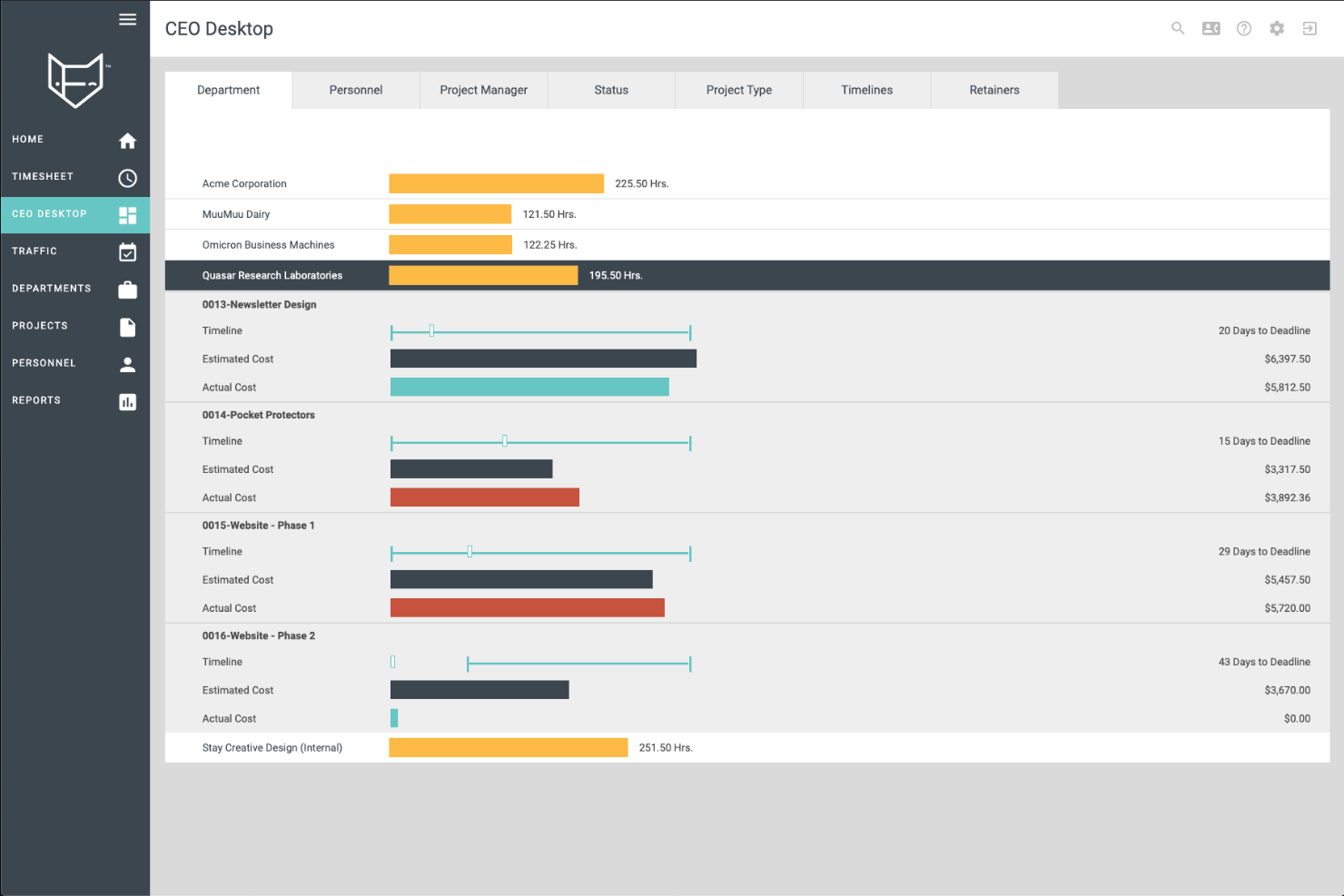
FunctionFox is a project management and time tracking platform designed for creative teams and agencies that need to manage client work, deadlines, and resources. HR professionals in creative environments use it to coordinate project assignments, monitor team workloads, and track billable hours.
Who Is FunctionFox Best For?
Creative agency managers and HR leads coordinating client projects and team workloads.
Why FunctionFox Is a Good ClickUp Alternative
I picked FunctionFox because ClickUp is built for general project management, while FunctionFox is designed specifically for creative agencies. For HR teams supporting creative departments, that distinction matters. I appreciate the retainer management feature, which lets my team track hours against ongoing client agreements and flag when a retainer is close to its limit—something ClickUp doesn't handle natively. The real-time capacity view is also something I rely on heavily. I can see exactly who has bandwidth before assigning new work, which prevents overloading team members during busy campaign periods.
FunctionFox Key Features
- Timesheet approval workflow: Review and approve submitted timesheets directly within the platform before they're finalized.
- Billable vs. non-billable time tracking: Mark tasks as billable or non-billable at setup so logged hours are automatically categorized.
- 50+ pre-built reports: Access over 50 out-of-the-box report types covering client hours, project profitability, and staff utilization.
- Budget vs. actuals tracking: Compare original project estimates against real logged hours and expenses to catch overruns early.
FunctionFox Integrations
There are no publicly listed native integrations; however, a custom API is available for custom integrations.
Pros and Cons
Pros:
- Provides budget vs. actuals tracking
- Includes built-in timesheet approval workflows
- Tracks billable and non-billable hours separately
Cons:
- Lacks native integrations with other tools
- No built-in task dependencies or Gantt charts

Motion
Best with AI-powered task scheduling
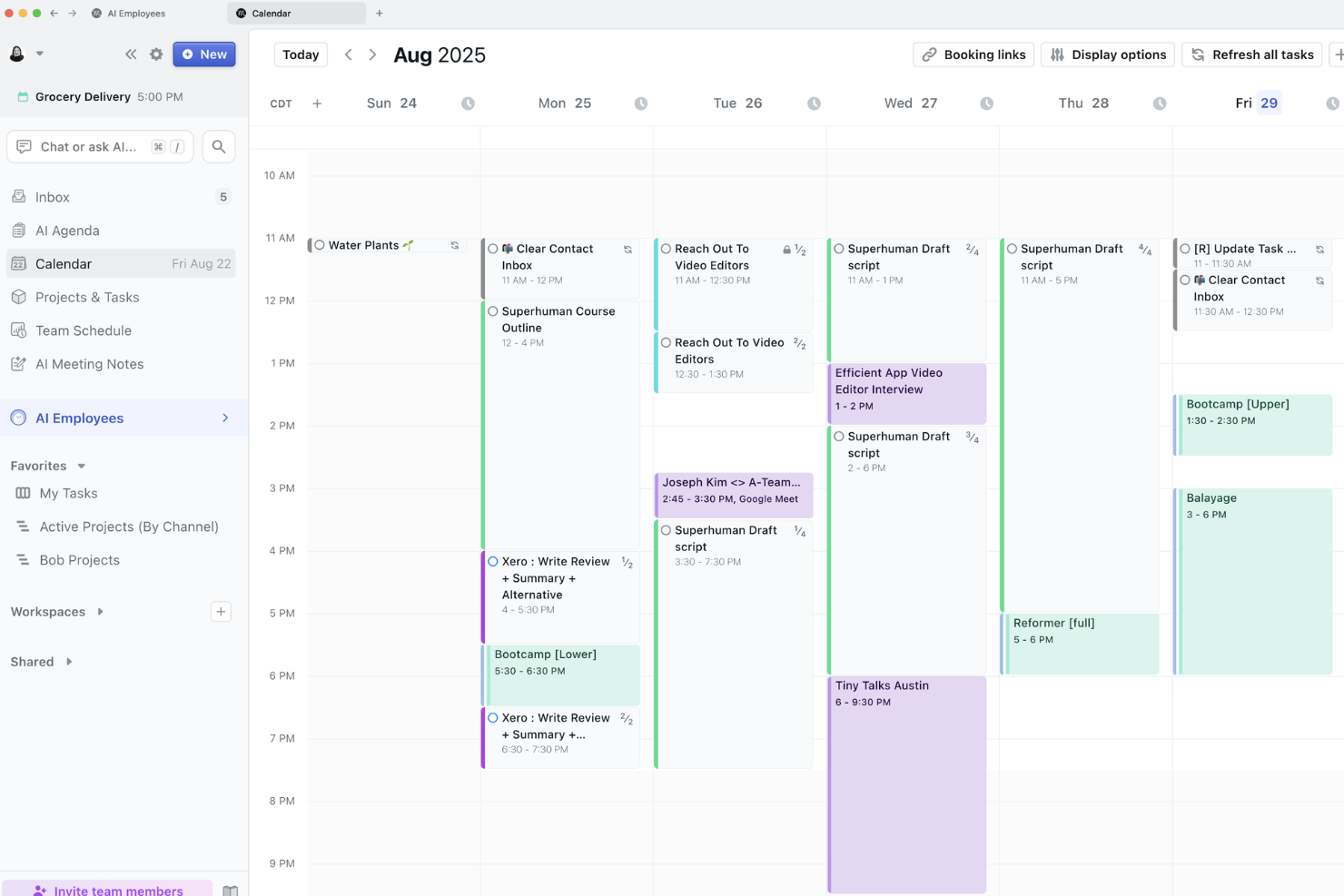
Motion is an AI-driven project and task management platform designed for HR teams that need to coordinate schedules, meetings, and deadlines across busy departments. It appeals to organizations looking to automate task prioritization and reduce manual calendar management.
Who Is Motion Best For?
HR professionals at fast-paced companies who need automated scheduling and task management.
Why Motion Is a Good ClickUp Alternative
I picked Motion because its AI scheduler automatically builds and rebuilds my team's daily task schedule based on deadlines, priorities, and available working hours—something ClickUp doesn't do natively. When a new hiring task gets added or a deadline shifts, Motion reorganizes the entire schedule without manual input. I also appreciate the AI meeting assistant, which finds optimal meeting slots and blocks focus time around them. In practice, that means my HR team spends less time coordinating calendars and more time on actual people's work.
Motion Key Features
- AI Gantt chart: View all projects on a live timeline that auto-updates task dates and teammate schedules when deadlines shift.
- AI workflows builder: Generate full project plans with auto-assigned tasks and deadlines from a written prompt or uploaded SOP.
- AI meeting notetaker: Automatically captures and summarizes meeting notes during calls.
- AI dashboards: Track task status, team capacity, and project progress across all active work in a single view.
Motion Integrations
Integrations include Google Calendar, Zoom, Gmail, Microsoft Teams, Google Meet, Microsoft Outlook 365, iCloud Calendar, and Siri.
Pros and Cons
Pros:
- Built-in focus time blocking
- Real-time calendar sync across platforms
- AI auto-schedules tasks and meetings
Cons:
- Limited reporting and analytics options
- No Kanban board for task management

Hive is a project and process management platform built for HR teams that need flexible workflows and centralized collaboration. It appeals to organizations looking to standardize onboarding, manage hiring pipelines, and coordinate cross-team HR initiatives in one place.
Who Is Hive Best For?
HR managers at mid-sized companies who need to standardize and automate recurring people processes.
Why Hive Is a Good ClickUp Alternative
I picked Hive specifically for its project template library, which lets my team apply pre-built structures for recurring HR processes like onboarding, performance reviews, and hiring pipelines in seconds. Each template comes with pre-assigned task owners, due dates, and default layouts that my team can modify before launching a project. I also appreciate that Hive lets you save any existing project as a new template, so once we've refined a process, we can lock it in for future use. That combination of ready-made and custom-built templates gives HR teams a level of process consistency that ClickUp's template system, while capable, requires more setup to achieve.
Hive Key Features
- Resourcing: Assign team members to projects and view their availability across the full project timeline.
- Proofing and approvals: Review and approve documents with internal or external stakeholders directly inside Hive.
- Urgency levels: Tag tasks with color-coded urgency indicators to surface the highest-priority work across a project.
- Hive Notes: Create and edit collaborative documents in real time with teammates before, during, or after meetings.
Hive Integrations
Integrations include Google Drive, Dropbox, Slack, Zoom, Microsoft Teams, Outlook Calendar, Jira, QuickBooks, Box, and GitHub.
Pros and Cons
Pros:
- Resourcing view shows team workload
- Built-in proofing and approval workflows
- Project templates can be customized and saved
Cons:
- Limited automation compared to ClickUp
- No built-in Gantt chart view

Best for tracking employee billable hours

ClickTime offers HR teams and finance managers a way to track employee hours, manage project budgets, and monitor resource allocation. Its detailed time entry and reporting tools help organizations improve billing accuracy and control labor costs.
Who Is ClickTime Best For?
Professional services firms and consultancies need to track employee billable hours across multiple projects.
I picked ClickTime because it focuses specifically on billable hour tracking in a way ClickUp doesn't. ClickUp treats time tracking as a project management add-on, while ClickTime builds its entire platform around it. I like how its billable hours feature lets my team assign custom billing rates by role or project, so client invoices reflect actual labor costs rather than flat estimates. I also appreciate the Report Studio, which lets me build custom labor cost reports by project, department, or cost center—something ClickUp's native reporting simply can't match for finance-focused teams.
ClickTime Key Features
- Online timesheets: Log and manage employee time entries across projects and tasks from a web browser or mobile app.
- Time off management: Track employee vacation, sick leave, and other time off requests in a dedicated vacation tracker.
- Project estimation: Set hour and cost budgets per project and monitor progress against those estimates in real time.
- Automated workflow: Configure rules to automate timesheet reminders, approvals, and recurring time entries.
ClickTime Integrations
Integrations include ADP WorkforceNow, Azure Entra, Bamboo HR, GitHub, Google Calendar, Google SSO, Hibob, Jira, and Microsoft Outlook Calendar. Custom integrations are also available via API.
Pros and Cons
Pros:
- Includes built-in time off and leave tracking
- Offers granular permission controls for managers
- Tracks billable hours with project-level detail
Cons:
- Limited workflow automation compared to ClickUp
- Lacks built-in task management boards
Hubstaff
Best for workforce time tracking

Hubstaff gives HR teams and operations managers a way to monitor employee time, activity, and productivity across remote or distributed workforces. Its detailed tracking and reporting features help businesses manage attendance, payroll, and compliance with less manual effort.
Who Is Hubstaff Best For?
Remote teams and HR managers in service-based businesses needing precise workforce time tracking.
Why Hubstaff Is a Good ClickUp Alternative
I picked Hubstaff because it goes far deeper into workforce time tracking than ClickUp ever does. Where ClickUp treats time tracking as a secondary feature, Hubstaff builds everything around it. I like how its automated timesheets convert tracked hours directly into payroll-ready data—my team doesn't need to manually reconcile hours at the end of a pay period. I also appreciate the GPS-based geofencing, which automatically clocks field employees in and out when they enter or leave a job site, something ClickUp simply doesn't offer.
Hubstaff Key Features
- Screenshot capture: Take automatic screenshots of employee screens at set intervals during work hours.
- Scheduling: Build and assign employee shifts with clock-in and clock-out time enforcement.
- Project budgeting: Set hour or cost limits per project and receive alerts when nearing the cap.
- Attendance reporting: Generate detailed reports on employee attendance, late clock-ins, and absences.
Hubstaff Integrations
Integrations include Asana, Trello, Jira, QuickBooks, PayPal, Slack, FreshBooks, Salesforce, Zendesk, and Gusto.
Pros and Cons
Pros:
- Automated payroll based on tracked hours
- GPS tracking for mobile and field teams
- Advanced employee monitoring with activity levels
Cons:
- Limited document collaboration features
- No built-in task management boards
Andre alternativer til ClickUp
Her er noen flere alternativer til ClickUp som ikke kom med på kortlisten min, men som likevel er verdt å se nærmere på:
- Smartsheet
For managing marketing workflows and reporting
- Asana
For team task coordination
- Zoho Projects
For integrated business apps
- Forecast
For AI-powered project planning
- ProjectManager
For visual project tracking
- Teamwork.com
For client service agencies
- Quickbase
For custom workflow apps
- Ravetree
For creative teams
- Productive
For agency operations
- Miro
For collaborative whiteboarding
- Runn
For resource scheduling
- Planview
For enterprise project management
- Tempo
For time tracking in Jira
- Trello
For simple task boards
- Workamajig
For creative project management
- monday.com
For customizable work management
- Scoro
For all-in-one business management
- Google Workspace
For collaborating on Instagram reports and data
- PathPro
For workflow automation
- Kantata
For resource management in services


How I Evaluate ClickUp Alternatives
I split my evaluation into baseline criteria—like multi-view task management and workflow automations—and differentiators like AI features, HR-specific templates, and compliance controls.
Core Functionality (Table Stakes For This List)
When I'm selecting tools for my list, I rank each one on a scale from 0 (does not offer the functionality) to 5 (excels in this area) for each core functionality listed below. Then, I calculate the tool's total score into a percentage. Each tool needs to achieve a minimum total score of 65% to be considered for inclusion.
- Task & Project Management: I look for multiple views—board, list, calendar, Gantt—so HR teams can manage recruiting pipelines in Kanban and track onboarding timelines on a Gantt chart.
- Customizable Workflows & Automations: Each tool should let you build custom pipelines and trigger-action automations, like auto-assigning a benefits enrollment task when a new hire reaches day 30.
- Templates & Forms: I evaluate whether platforms offer HR-relevant templates and form builders, since a strong onboarding checklist or employee intake form saves hours of setup.
- Collaboration & Document Management: Shared docs, comments, and @mentions matter for cross-functional HR work—think policy drafts reviewed by legal or exit interview notes shared with leadership.
- Permissions & Data Privacy Controls: Granular role-based access is key when HR workspaces contain sensitive employee data, so I check for private spaces, custom roles, and guest restrictions.
- Integrations & Reporting: I look at native connectors to HRIS, ATS, payroll, and communication tools, plus dashboards that track metrics like time-to-hire or onboarding completion rates.
Once I have a list of tools that meet this criteria, I consider what sets each platform apart.
Differentiating Factors (What Sets Vendors Apart)
Here's how I compare and contrast different vendors:
Standout Features
AI-powered features are a real differentiator—I evaluate whether a tool can draft job descriptions, summarize interview feedback, or generate policy documents without leaving the workspace. Employee lifecycle tracking also matters, since some platforms let you map the full journey from offer letter to offboarding in a single board. Built-in e-signature and approval flows round things out, letting HR teams route offer letters or policy acknowledgments without jumping to a separate tool.
Beyond Features
Compliance and data security weigh heavily in my evaluation—HR workspaces hold sensitive PII, so I check for SOC 2 certification, GDPR readiness, and audit logging. Total cost of ownership is another factor I consider closely, especially whether automation limits or per-seat pricing inflate costs as your HR team scales. I also look at implementation support, since platforms that provide HR-specific onboarding templates and dedicated CSMs tend to get adopted faster across people operations teams.
Hvorfor se etter et alternativ til ClickUp?
Selv om ClickUp er et godt valg av programvare for prosjektstyring, finnes det flere grunner til at HR-team kan være på utkikk etter alternative løsninger. Det kan hende du ser etter et alternativ til ClickUp fordi …
- Du trenger avanserte funksjoner for ressursplanlegging
- Teamet ditt håndterer komplekse prosjektporteføljer
- Du trenger mer omfattende sporing av HR-etterlevelse
- Du ønsker flere spesialiserte integrasjoner for HR-verktøy
- Organisasjonen din trenger bransjespesifikke arbeidsflyter
Hvis noe av dette høres kjent ut, har du kommet til rett sted. Listen min inneholder flere programvarealternativer som passer bedre for team som møter disse utfordringene med ClickUp og ser etter alternative løsninger.
Viktige funksjoner i ClickUp
Her er noen av de viktigste funksjonene i ClickUp, slik at du kan sammenligne hva alternative løsninger tilbyr:
- Oppgavehåndtering: Opprett, tildel og følg opp oppgaver med støtte for deloppgaver, sjekklister og detaljert oppfølging av oppgaver på tvers av team.
- Tilpassede visninger: Få tilgang til flere prosjektvisninger, inkludert liste-, tavle- og kalendervisninger, slik at teamene får fleksibilitet i hvordan de håndterer arbeidet.
- Tidsregistrering: Følg med på tiden som brukes på oppgaver, for å støtte avansert rapportering og bedre ressursplanlegging.
- Måloppfølging: Knytt teamets mål sammen med prosjektarbeidet, slik at organisasjoner med flere team kan holde seg samordnet i sanntid.
- Dokumenter og wikier: Bygg intern dokumentasjon på samme måte som i Notion, med støtte for kunnskapsdeling og bedre brukervennlighet.
- Automatiseringer: Håndter gjentakende oppgaver med regelbasert automatisering, og reduser manuelt arbeid på tvers av arbeidsflyter.
- Rapportering og oversikter: Bruk avanserte rapporteringsverktøy for å få innsikt i ytelse, arbeidsbelastning og prosjektfremdrift.
- Integrasjoner: Koble til andre plattformer, for eksempel CRM-systemer, Airtable og samarbeidsverktøy, for å utvide funksjonaliteten.
- Skjemabygger: Samle inn strukturerte data for å støtte arbeidsflyter som forespørsler om innsamling eller interne prosesser.
- Tillatelser og personvernkontroller: Administrer tilgang på tvers av team, med støtte for sikkerhet og kontroll på virksomhetsnivå.