

10 beste KI-samsvarsverktøy gjennomgått i 2026

10 Beste KI-verktøy for etterlevelse – kortliste


Det er vanskeligere enn noen gang å holde tritt med kravene til etterlevelse. Regelverket endres, dokumentasjonen hoper seg opp, og selv små mangler kan skape store risikoer. Mange team bruker mer tid på å følge med på regler enn på å faktisk ta dem i bruk. KI-verktøy for etterlevelse bidrar til å lette dette presset ved å overvåke krav, varsle om problemer og støtte konsekvent oppfølging på tvers av arbeidsflytene dine.
Basert på det jeg har sett da jeg testet disse plattformene, kan det riktige verktøyet forbedre måten du håndterer etterlevelse på betydelig. De bidrar til å organisere informasjon, redusere manuelle kontroller og gi deg bedre oversikt over potensielle risikoer. Jeg har gjennomgått en rekke løsninger for å gi deg en ærlig og praktisk vurdering av hva som fungerer, og hvorfor.
I denne artikkelen finner du mine beste anbefalinger, sammen med deres fremste funksjoner, fordeler og begrensninger. Enten teamet ditt bygger en ny prosess for etterlevelse eller videreutvikler en eksisterende, finner du alternativer som kan støtte målene dine.
Why Trust Our Software Recommendations
Our team has been testing and reviewing software since 2012. As HR experts ourselves, we know how difficult—and important—it is to choose the right software.
For this guide, we evaluated tools using hands-on testing and independent research, scoring tools using our selection criteria. We also draw on insights from industry thought leaders and practicing HR experts.
Our reviews reflect our human editorial judgment, not a sales pitch.
Expert reviewers:
Sammenligningstabell for KI-verktøy for etterlevelse
Denne sammenligningstabellen oppsummerer prisdetaljene for mine beste utvalgte KI-verktøy for etterlevelse:
| Tool | Best For | Trial Info | Price | ||
|---|---|---|---|---|---|
| 1 | Best for global compliance insights | Free demo available | From $49/contractor/month | Website | |
| 2 | Best for enterprise compliance visibility | Free demo available | Pricing upon request | Website | |
| 3 | Best for integrated compliance dashboards | Free demo available | Pricing upon request | Website | |
| 4 | Best for SOC 2 compliance | Free demo + free trial available | Pricing upon request | Website | |
| 5 | Best for customizable workflows | Free demo available | Pricing upon request | Website | |
| 6 | Best for privacy management | Free demo available | Pricing upon request | Website | |
| 7 | Best for AI-driven background checks | Free demo available | From $29.99/report | Website | |
| 8 | Best for startup compliance | Free demo available | Pricing upon request | Website | |
| 9 | Best for fast compliance audits | Not available | Pricing upon request | Website | |
| 10 | Best for continuous monitoring | Free demo available | Pricing upon request | Website |
Anmeldelser av de beste KI-verktøyene for etterlevelse
Nedenfor finner du mine detaljerte sammendrag av de beste KI-verktøyene for etterlevelse som kom med på kortlisten min. Anmeldelsene mine gir et detaljert innblikk i de viktigste funksjonene, fordelene \u0026 ulempene, integrasjonene og ideelle bruksområdene for hvert verktøy, slik at du kan finne det som passer best for deg.
Best for global compliance insights
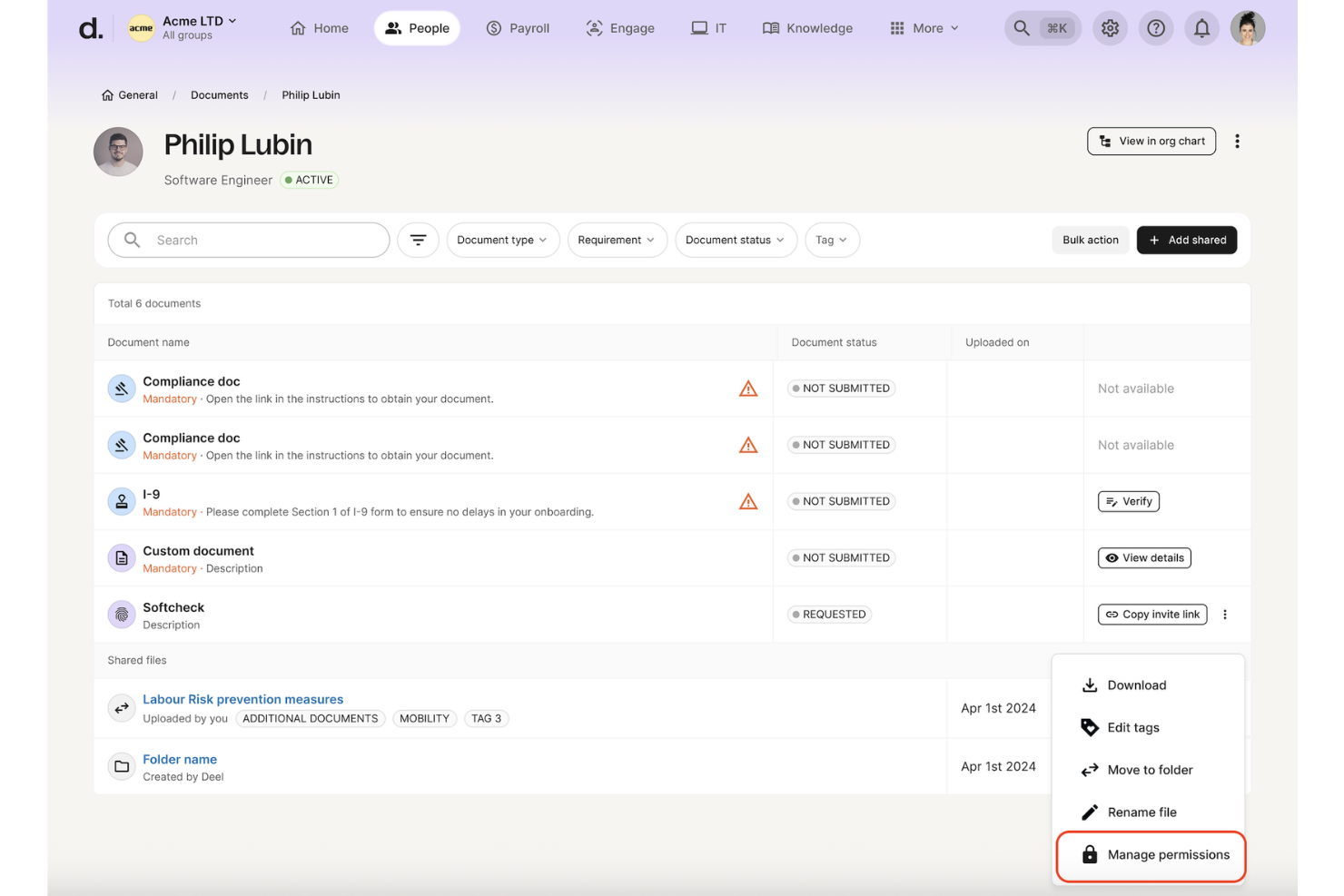
Deel HR is on my shortlist because it gives teams real clarity around global employment compliance. I recommend it when you need concrete, country-specific guidance on hiring, contracts, and policies as markets or headcounts expand. What sets Deel HR apart for me is its rules engine that auto-detects local requirements and risks as soon as you enter a new country. I like seeing clear compliance alerts and recommendations built into each hiring workflow.
Deel HR’s Best For
- HR, legal, and ops teams hiring across many countries
- Organizations seeking specific, automated compliance checks for global hiring
Deel HR’s Not Great For
- Teams with operations in just one country
- Companies needing deep workflow automation beyond compliance
What sets Deel HR apart
Deel HR stands out by building compliance guidance directly into every stage of the employee lifecycle. Instead of treating compliance as a separate checklist, it works best when you want requirements surfaced automatically as you expand in new countries.
Compared to something like Rippling or traditional HR suites, Deel HR expects you to manage compliance inside the same system where you handle contracts and onboarding. I find that you can visualize global compliance status at a glance without toggling between policy trackers and external tools.
Tradeoffs with Deel HR
Deel HR optimizes for compliance transparency and country-specific automation, but you give up flexibility in designing fully custom HR workflows or task routing. If your operations rely on tailored processes, you might find the structure limiting.
Pros and Cons
Pros:
- Employees can self-serve compliance-related questions without HR involvement
- AI gives instant guidance on local compliance rules across 150+ countries
- Context-aware AI highlights compliance details on HR pages in real time
Cons:
- Accuracy depends on complete and up-to-date employee and policy data
- Complex regulatory scenarios may still require human legal review
Best for enterprise compliance visibility
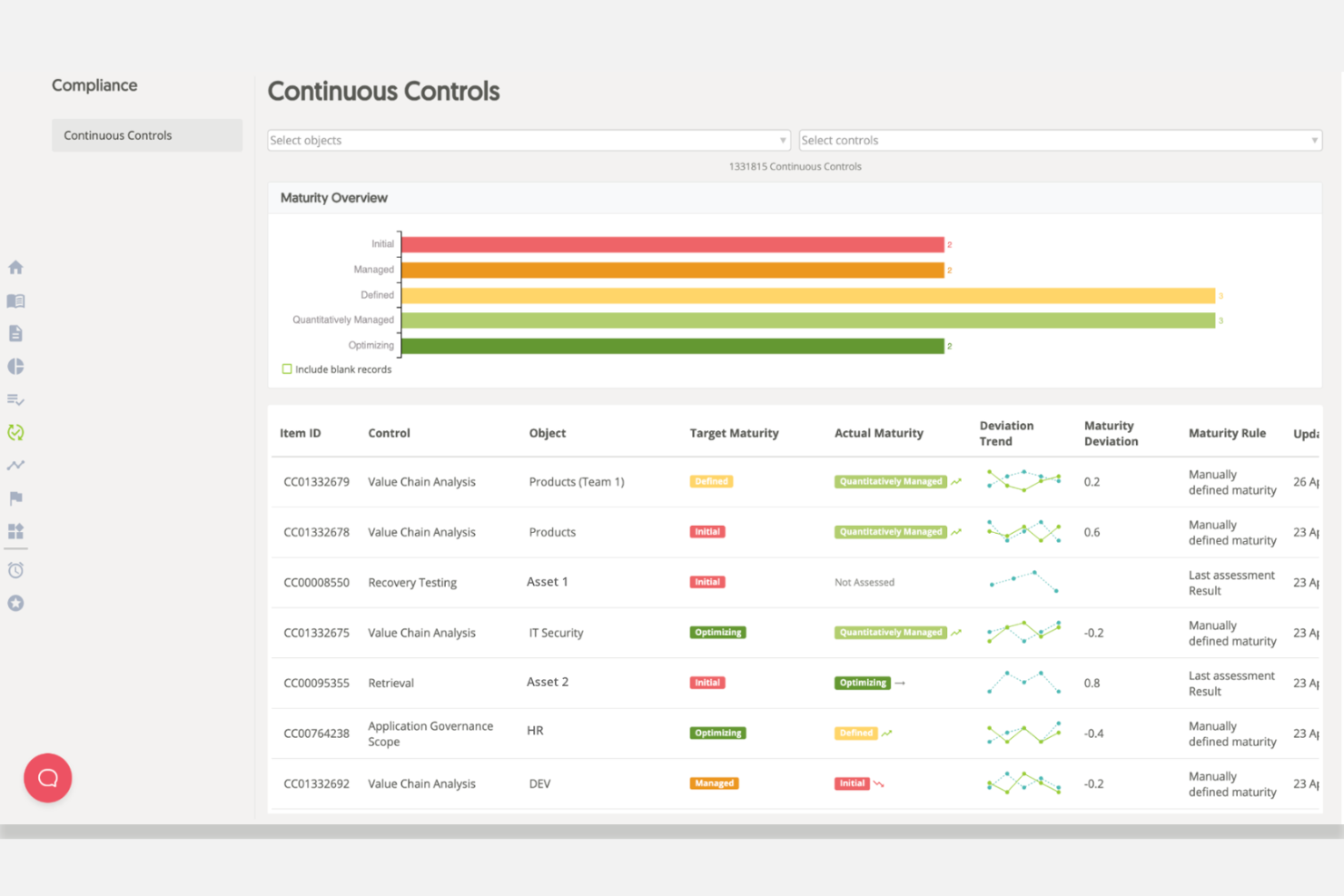
Mitratech Alyne made my list because of its focus on enterprise compliance visibility. I recommend it for compliance leaders who need continuous monitoring and risk assessments across complex, distributed environments. What stands out in my experience is Alyne’s real-time control frameworks and clear dashboards, which let teams identify compliance gaps before they grow. I especially like the out-of-the-box mapping to key global regulations.
Alyne’s Best For
- Enterprises managing global compliance and risk frameworks
- Compliance teams needing real-time visibility and control mapping
Alyne’s Not Great For
- Small businesses with straightforward compliance needs
- Teams seeking highly customizable, niche compliance workflows
What sets Alyne apart
Alyne is structured around real-time compliance monitoring rather than manual audits or periodic reviews. Unlike tools like ServiceNow or RSA Archer, it expects you to engage with live dashboards that flag issues as they emerge and map controls directly to regulations. In practice, this is good for organizations that want to identify and remediate gaps before they become risks. Alyne works best when you need proactive oversight rather than simple documentation.
Tradeoffs with Alyne
Alyne optimizes for standardization across large and complex organizations, making it a stronger fit for teams operating within well-defined compliance frameworks.
Pros and Cons
Pros:
- Pre-built templates speed up assessments and control reviews
- Real-time dashboards show risks and compliance status
- Multi-language support helps global compliance teams
Cons:
- Some standard mappings need manual review
- Certain workflows can feel less responsive

Best for integrated compliance dashboards
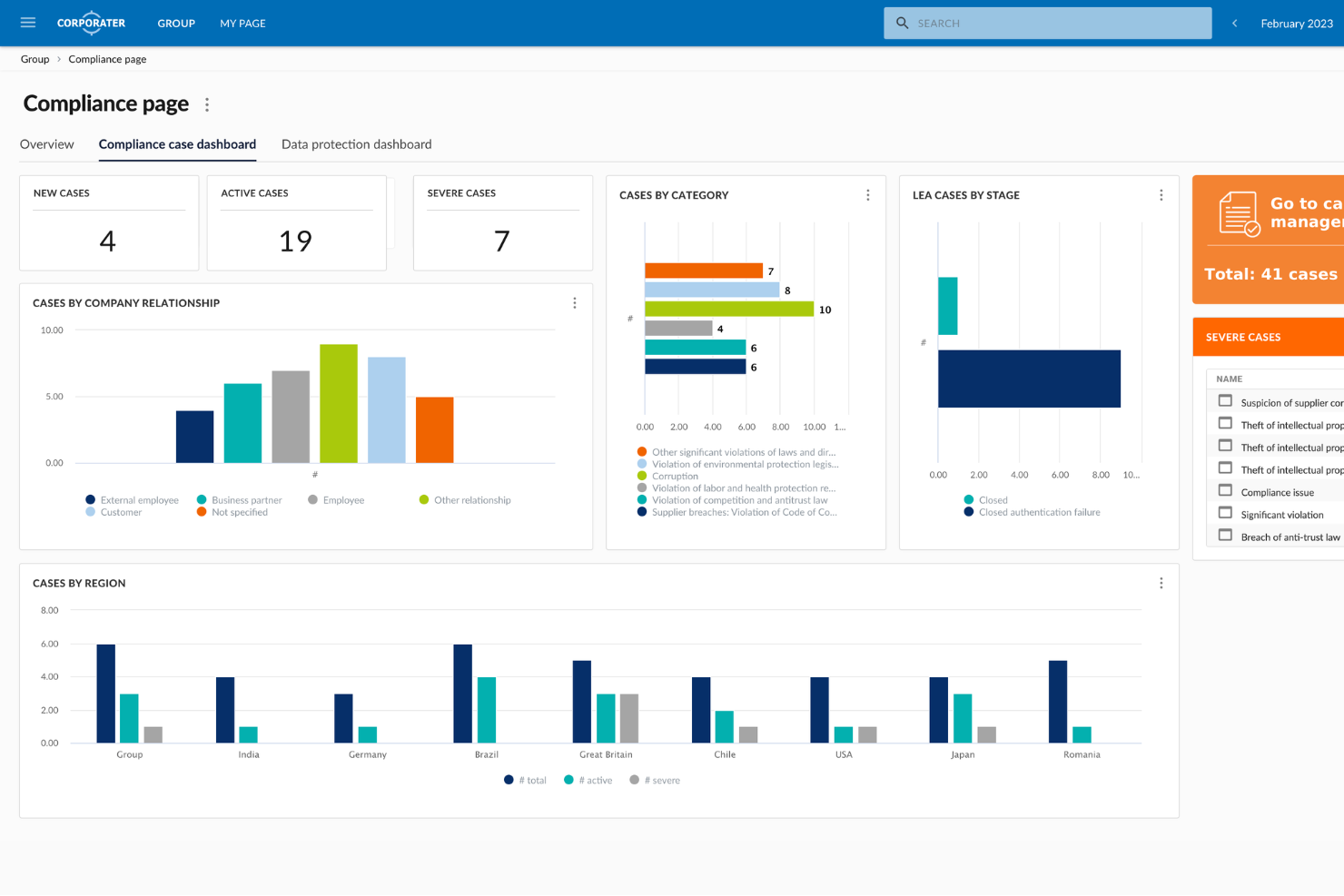
Corporater is an enterprise compliance management platform designed for organizations that need to automate policy controls, manage regulatory obligations, and monitor third-party risk within a single configurable system.
Who Is Corporater Best For?
Corporater is a strong fit for mid-to-large enterprises that need a centralized platform to manage compliance, risk, and governance across complex organizational structures.
Why I Picked Corporater
I've included Corporater in my top picks because its role-based compliance dashboards give different stakeholders a view that's actually relevant to them. A board member sees a high-level risk and compliance overview, while a compliance officer can drill down into individual KPIs, control statuses, and threshold breaches on the same platform. I also like that dashboards pull data automatically through Corporater's built-in ETL engine, so you're not manually consolidating spreadsheets before every reporting cycle. The KPI heat maps, trend arrows, and traffic light indicators make it straightforward to spot compliance gaps at a glance.
Corporater Key Features
- Policy management module: Create, distribute, and track policy acknowledgments across your organization with version control and audit trails.
- Regulatory obligation mapping: Link regulatory requirements directly to internal controls and processes to maintain a traceable compliance register.
- Third-party risk assessments: Run vendor due diligence questionnaires and score supplier risk profiles from within the platform.
- Audit management: Plan, execute, and document internal audits with structured workflows that connect findings to corrective action tasks.
Corporater Integrations
Corporater securely integrates aggregated RegTech and cybersecurity data into a centralized governance and compliance framework.
Pros and Cons
Pros:
- Multi-level user access control granularity
- Supports regulatory mapping to frameworks
- Customizable third-party risk scoring models
Cons:
- Reporting setup can be complex for admins
Best for SOC 2 compliance

Secureframe is on this list because it automates SOC 2 compliance in a way I haven’t seen from other AI-based compliance solutions. When I’ve set it up for teams, the pre-built policy templates and real-time risk monitoring make ongoing audit prep a steady, trackable process.
What I appreciate is how Secureframe manages evidence collection automatically and gives you a clean dashboard for tracking each requirement. This is where I think you get reliable clarity when SOC 2 is the immediate compliance goal.
Secureframe’s Best For
- Organizations pursuing SOC 2 or similar audits with strict evidence controls
- Teams that want automated, AI-driven compliance monitoring
Secureframe’s Not Great For
- Businesses needing flexible, custom compliance frameworks
- Small teams that only require basic data privacy tracking
What sets Secureframe apart
Secureframe builds compliance workflows around automation. Instead of relying on constant manual oversight like Drata or relying on static checklists, you get ongoing risk monitoring and evidence management throughout the year. In practice, I see organizations benefit from clear mapping between what the auditors want to see and what’s being tracked behind the scenes by Secureframe.
This works best if you want compliance to feel less like a project and more like an ongoing part of operations.
Tradeoffs with Secureframe
Secureframe optimizes for automated, structured compliance but limits custom control. If you want to adapt the framework or add edge-case processes, the system can feel too rigid.
Pros and Cons
Pros:
- Real-time compliance alerts
- Automated evidence collection
- Focused on SOC 2 compliance
Cons:
- Requires some technical knowledge
- Initial setup can be complex

Best for customizable workflows

LogicGate earns a spot here because of how much you can adapt its workflow engine to fit highly specific compliance needs. When I've set up risk and compliance processes in LogicGate, I find it's easy to tailor tasks, forms, and reviews for complex regulatory frameworks and fast-changing AI risk profiles.
What I appreciate most is how granular you can get with process configurations and automated controls. This is especially helpful for teams that need to manage overlapping compliance programs.
LogicGate’s Best For
- Risk and compliance teams creating custom regulatory workflows
- Organizations needing tailored automation for complex AI compliance
LogicGate’s Not Great For
- Small groups wanting plug-and-play compliance templates
- Teams that need simple or out-of-the-box solutions
What sets LogicGate apart
LogicGate is designed for teams who expect to model and manage compliance the way they actually work, rather than struggling to fit into someone else’s template. When I use LogicGate, I see organizations mapping out granular workflows that reflect their internal risk logic and approval chains, not just ticking off generic tasks. Unlike platforms like Jira, which you may need to wrangle into a compliance program, LogicGate lets you build processes with risk and audit in mind from the beginning.
Tradeoffs with LogicGate
LogicGate optimizes for flexibility in building out custom workflows, but this can slow down onboarding for those who want a plug-and-play compliance setup.
Pros and Cons
Pros:
- Supports complex compliance needs
- Drag-and-drop process design
- Highly customizable workflows
Cons:
- Requires training for customization
- Initial setup can be time-consuming
OneTrust
Best for privacy management

OneTrust earns a spot on my shortlist because of how seriously it handles privacy management at scale. When regulations or audits come up, I see teams using OneTrust’s automated data mapping and AI-powered assessment features to pinpoint risk across complex data flows.
What I appreciate is how it breaks down ongoing monitoring and incident response. If you need robust support for regulatory compliance—especially around AI and emerging privacy laws—it’s the first place I look.
OneTrust's Best For
- Enterprises managing privacy, consent, and regulatory AI compliance
- Legal and IT teams handling audits or complex data flows
OneTrust's Not Great For
- Small organizations with basic, manual compliance needs
- Teams that want lightweight, out-of-the-box AI risk tools
What sets OneTrust apart
OneTrust treats privacy management as a comprehensive, unified process and expects you to operationalize compliance centrally. Unlike simpler AI compliance add-ons or tracking tools, it works from the assumption that your organization manages sensitive data and regulatory obligations across multiple systems. You get workflows and dashboards that are ready for audit and incident response, instead of just checklists and policy templates.
Tradeoffs with OneTrust
OneTrust optimizes for centralization and formal processes, so you trade away speed and ease of setup for smaller needs. If your use case is lightweight or doesn’t need ongoing monitoring, it’s more system than you’ll actually use.
Pros and Cons
Pros:
- Automated compliance processes
- Wide privacy and AI tooling
- Extensive regulatory support
Cons:
- Requires training to use effectively
- Complex initial setup
Checkr
Best for AI-driven background checks
Checkr lands on this list because it automates the most time-consuming parts of background checks with AI, flagging compliance issues, disparities, and risk indicators at scale. This is a must when you’re hiring across multiple jurisdictions or need ongoing monitoring. What I really appreciate is how Checkr pulls in real-time data, so you aren’t stuck acting on out-of-date information.
Checkr’s Best For
- High-volume hiring needing automated compliance and background checks
- HR and risk teams balancing multiple jurisdictions or locations
Checkr’s Not Great For
- Small organizations with occasional, manual hiring needs
- Teams needing reference or credential checks only
What sets Checkr apart
Checkr organizes hiring compliance around automated background checks and real-time flags. Unlike platforms like Sterling that stick to a more manual process, Checkr leans hard into machine-driven review. I notice this approach works well when you want compliance issues to come up early and to get rid of bottlenecks that slow down high-volume hiring.
I’ve seen HR teams benefit most when they need to review applicants quickly across different states or countries.
Tradeoffs with Checkr
Checkr optimizes for speed and automation in background checks, but you lose the granular manual control some teams want when dealing with more sensitive or highly customized screens.
Pros and Cons
Pros:
- Automates adverse action notifications to save time
- Integrates well with most HR and ATS tools for full hiring workflow functionality
- Acheived ISO 42001 AI Governance Certification, highlighting responsible AI use
Cons:
- Less flexible than competitors for complex, non-standard background checks
- Occasional inaccuracies in background check reports
New Product Updates from Checkr
Checkr Adds Post-Hire Drug & Alcohol Clearinghouse Screening
Checkr adds post-hire limited-query support to its Drug & Alcohol Clearinghouse screening, alongside existing pre-hire full queries. The update helps employers manage recurring FMCSA screening requirements for employed CDL drivers within the same platform. For more information, visit Checkr’s official site.
 .
.
Sprinto
Best for startup compliance

Sprinto makes my shortlist because it removes so much guesswork from startup compliance and security frameworks. What stands out for me is how Sprinto automates ongoing monitoring, policy documentation, and audit readiness, right from early growth through scaling. Teams trying to prepare for SOC 2 or ISO 27001 without losing momentum tend to get a lot of value here.
I like how quickly you can set up continuous controls and map requirements to evidence, which is rare in entry-level compliance tools.
Sprinto’s Best For
- Startups building SOC 2 or ISO 27001 compliance from scratch
- Founders who want compliance automation and audit readiness early
Sprinto’s Not Great For
- Mature enterprises with deeply custom compliance processes
- Organizations that need non-standard, industry-specific certifications
What sets Sprinto apart
Sprinto is designed for startups that want to automate compliance processes early, rather than cobbling together manual policies like you would in Google Workspace or Excel. It expects you to treat compliance as an ongoing, integrated part of your growth, not just a one-time checklist. Unlike generic GRC tools, Sprinto is focused specifically on making regulatory frameworks manageable, even if you don’t have a dedicated compliance hire.
Tradeoffs with Sprinto
Sprinto optimizes for startups standardizing compliance, but this focus means established teams with unusual workflows or edge-case requirements will run into limitations.
Pros and Cons
Pros:
- Automated policy creation
- Quick compliance setup
- Tailored for startup needs
Cons:
- Can require technical knowledge
- Limited customization options

Vanta lands on my list because it speeds up the compliance audit process by automating evidence collection and mapping controls to frameworks like SOC 2 and ISO 27001. If you need to get audit-ready with minimal manual overhead, I find Vanta stands out for how it auto-monitors your systems and highlights issues in real time.
What I like is how quickly you can respond to auditor requests using Vanta’s centralized dashboard, so teams can reduce time spent tracking policy and control status.
Vanta’s Best For
- Fast-tracking SOC 2, ISO 27001, and similar audits
- Tech companies automating evidence collection for compliance
Vanta’s Not Great For
- Teams seeking custom, less-common compliance frameworks
- Organizations needing deep policy management features
What sets Vanta apart
Vanta is designed for people who want to move fast through compliance without having to map every control by hand. It automates evidence collection and monitoring, so you spend less time pulling documents and more time fixing real issues. Unlike manually managed GRC tools or Google Sheets tracking, Vanta expects you to work inside its system and let it surface risks for you.
This works great when your priority is audit readiness and you need to handle frameworks like SOC 2, not endlessly customize your compliance program.
Tradeoffs with Vanta
Vanta optimizes for standard frameworks and fast setup, but you give up custom policy management and advanced tailoring. Complex compliance scenarios or highly unique controls become harder to manage as a result.
Pros and Cons
Pros:
- Real-time monitoring capabilities
- Automated evidence collection
- Quick setup process
Cons:
- Can be overwhelming for small teams
- Limited customization options

Drata earns a spot here because it is built for organizations that need real-time insight into their compliance status, especially with ongoing regulatory shifts. I recommend Drata when you want active, automated monitoring of data flows and security controls, rather than periodic manual reviews.
What stands out to me is the continuous evidence collection and risk assessment features, which help you spot potential issues instantly and reduce audit preparation time. When testing Drata's features, I liked how clear the platform makes audit readiness at any moment, especially when demonstrating GDPR and AI regulation compliance for stakeholders.
Drata’s Best For
- Companies needing real-time, automated compliance monitoring
- Organizations working with complex regulatory frameworks like GDPR or AI laws
Drata’s Not Great For
- Small startups with basic, static compliance needs
- Teams looking for industry-specific compliance frameworks outside standard data privacy
What sets Drata apart
Drata expects organizations to adopt a monitoring-first mindset, rather than cycle through static audits like you do with tools built mainly for checklists or spreadsheets. It pushes you to integrate control tracking directly into live workflows, drawing a closer parallel to continuous monitoring platforms rather than legacy compliance trackers. Unlike Vanta or Secureframe, Drata leans harder into automated, always-on risk visibility, so you can keep tabs on your compliance status without pulling manual reports.
Tradeoffs with Drata
Drata optimizes for real-time compliance monitoring, but that means more setup and ongoing management of integrations. If your compliance posture rarely changes or you want a basic point-in-time check, this extra complexity often isn’t worth it.
Pros and Cons
Pros:
- Supports multiple frameworks
- Automated evidence collection
- Real-time compliance insights
Cons:
- Some learning curve involved
- Requires initial setup time
Andre KI-verktøy for etterlevelse
Her er noen flere alternativer for KI-verktøy for etterlevelse som ikke kom med på kortlisten min, men som likevel er verdt å undersøke:
- Diligent
For board governance
- AuditBoard
For risk management
- Centraleyes
For real-time insights
- Compliance.ai
For financial services
- Xapien
For automated research
- Regology (Reggi)
For regulatory updates
- ComplyAdvantage
For anti-money laundering detection
- Onfido
For identity verification


How I Evaluate AI Compliance Tools
I look for tools where AI surfaces bias risks, flags regulatory gaps, and generates audit-ready reports—not static checklists requiring manual work. From there, I split my evaluation into core functionality every tool must deliver and differentiating factors that separate the best fit from the rest.
Core Functionality (Table Stakes For This List)
When I'm selecting tools for my list, I rank each one on a scale from 0 (does not offer the functionality) to 5 (excels in this area) for each core functionality listed below. Then, I calculate the tool's total score into a percentage. Each tool needs to achieve a minimum total score of 55% to be considered for inclusion.
- AI Bias Auditing: I evaluate whether the tool can automatically test HR AI models for adverse impact across protected classes—like flagging disparate rejection rates in resume screening.
- Regulatory Mapping: Each tool should map AI usage to relevant HR regulations (EU AI Act, NYC LL 144, EEOC guidelines) and surface compliance gaps as rules change.
- AI Risk Assessment: I look for structured risk scoring that classifies HR AI systems by tier, so teams can prioritize audits for high-risk tools like hiring algorithms.
- Audit Trail & Documentation: Auto-generated logs, model cards, and impact assessments matter here—I check whether the output is regulator-ready or just a basic activity feed.
- AI Model Monitoring: Ongoing drift and fairness monitoring for deployed models is key. I look at whether tools alert teams when a promotion or screening model degrades over time.
- Vendor & Policy Governance: I check whether the tool inventories third-party HR AI vendors and enforces internal usage policies, especially for teams managing multiple AI-powered ATS or HRIS tools.
Once I have a list of tools that meet this criteria, I consider what sets each platform apart.
Differentiating Factors (What Sets Vendors Apart)
Here's how I compare and contrast different vendors:
Standout Features
Adverse impact simulation is a major differentiator—I look for tools that let HR teams model how changes to screening criteria affect fairness outcomes before going live. Candidate notification automation also matters, since manually tracking disclosure requirements across jurisdictions is a compliance risk in itself. I value explainable AI dashboards that translate model logic into plain language, making it easier to field questions from regulators or internal stakeholders during an audit.
Beyond Features
HRIS and ATS integrations are one of the first things I check—a tool that connects to Workday, Greenhouse, or SAP SuccessFactors can pull decision data directly instead of requiring manual uploads. Data security posture is equally important, since these platforms handle sensitive candidate and employee information; I look for SOC 2 Type II and ISO 27001 certifications at a minimum. I also evaluate regulatory advisory support, because teams often need expert guidance when preparing for their first bias audit or responding to a regulator inquiry.
Slik velger du KI-verktøy for etterlevelse
Det er lett å gå seg vill i lange lister over funksjoner og kompliserte prismodeller. For å hjelpe deg med å holde fokus mens du arbeider deg gjennom den unike prosessen din for valg av programvare, får du her en sjekkliste over faktorer du bør ha i bakhodet:
| Faktor | Hva du bør vurdere |
| Skalerbarhet | Vil verktøyet vokse med virksomheten din? Sjekk om det støtter fremtidige ekspansjonsplaner og kan håndtere økt datamengde og kompleksitet etter hvert som selskapet vokser. |
| Integrasjoner | Kobles det til de nåværende systemene dine? Sørg for at verktøyet kan integreres med eksisterende programvare, for eksempel HR-, økonomi- eller CRM-systemer, for å unngå datasiloer og dobbeltarbeid. |
| Tilpasningsmuligheter | Kan du tilpasse det til behovene dine? Se etter verktøy som lar deg tilpasse arbeidsflyter, rapporter og dashbord slik at de passer til de spesifikke samsvarsprosessene og forretningskravene dine. |
| Brukervennlighet | Er det brukervennlig? Evaluer grensesnittet for å se om det er intuitivt og enkelt for teamet ditt å navigere i uten omfattende opplæring eller teknisk ekspertise. |
| Implementering og innføring | Hvor raskt kan du komme i gang? Ta hensyn til tiden og ressursene som kreves for å implementere verktøyet og lære opp teamet, inkludert tilgjengelig støtte som veiledninger og dokumentasjon. |
| Kostnad | Passer det inn i budsjettet ditt? Sammenlign prisplanene og sørg for at verktøyet gir god valuta for pengene, med tanke på både den innledende investeringen og løpende utgifter. |
| Sikkerhetstiltak | Hvordan beskytter det dataene dine? Kontroller verktøyets sikkerhetstiltak, for eksempel kryptering, tilgangskontroller og samsvar med personvernregelverk, for å beskytte sensitiv informasjon. |
| Samsvarskrav | Oppfyller det myndighetskravene dine? Sørg for at verktøyet støtter de spesifikke rammeverkene og standardene for samsvar som er relevante for bransjen og det geografiske området ditt. |
Hva er verktøy for samsvar med kunstig intelligens?
Verktøy for samsvar med kunstig intelligens er programvareløsninger som er utviklet for å hjelpe organisasjoner med å håndtere og overholde myndighetskrav ved hjelp av kunstig intelligens. Disse verktøyene brukes vanligvis av samsvarsansvarlige, juridiske team og fagpersoner innen risikostyring for å automatisere og forenkle samsvarsprosesser. Automatiske varsler, sporing i sanntid og funksjoner for håndtering av endringer i regelverket bidrar til at man holder seg oppdatert på samsvarskrav og reduserer risiko. Samlet sett gir disse verktøyene virksomheter mulighet til å håndtere samsvar effektivt og redusere risikoen for manglende samsvar.
Funksjoner i verktøy for samsvar med kunstig intelligens
Når du velger verktøy for samsvar med kunstig intelligens, bør du se etter følgende viktige funksjoner:
- Automatiske varsler: Varsler teamet ditt om endringer i regelverket i sanntid, slik at dere kan opprettholde samsvar og unngå sanksjoner.
- Sporing av endringer i regelverket: Overvåker og informerer deg om nye og endrede regler, slik at du forblir informert og i samsvar med kravene.
- Verktøy for risikovurdering: Identifiserer og evaluerer potensielle samsvarsrisikoer, slik at du kan redusere dem proaktivt.
- Tilpassbare arbeidsflyter: Lar deg tilpasse samsvarsprosessene for å effektivisere organisasjonens spesifikke behov og krav.
- Sporing i sanntid: Gir oppdatert innsikt i samsvarsstatusen din, slik at du raskt kan ta beslutninger og iverksette tiltak.
- Håndtering av samsvarsoppgaver: Organiserer og sporer samsvarsrelaterte oppgaver, noe som forbedrer effektiviteten og ansvarligheten.
- Sikker dokumentdeling: Legger til rette for trygg og samsvarende deling av sensitiv informasjon mellom interessenter.
- Revisjonsspor og rapportering: Opprettholder detaljerte oversikter over samsvarsaktiviteter og støtter åpenhet og ansvarlighet.
Fordeler med verktøy for samsvar med kunstig intelligens
Implementering av verktøy for samsvar med kunstig intelligens gir flere fordeler for teamet og virksomheten din. Her er noen av fordelene du kan se frem til:
- Redusert risiko: Automatiske varsler og verktøy for risikovurdering bidrar til å identifisere og redusere samsvarsrisikoer på et tidlig tidspunkt.
- Tidsbesparelser: Sporing i sanntid og automatiserte prosesser frigjør tid for teamet ditt, slik at det kan fokusere på andre viktige oppgaver.
- Forbedret nøyaktighet: Automatisk sporing av endringer i regelverket sørger for at du alltid har den mest oppdaterte informasjonen om samsvar.
- Forbedret effektivitet: Tilpassbare arbeidsflyter og håndtering av samsvarsoppgaver forenkler prosessene og øker produktiviteten.
- Økt åpenhet: Funksjoner for revisjonsspor og rapportering gir tydelige oversikter over samsvarsaktiviteter og støtter ansvarlighet.
- Bedre beslutningstaking: Innsikt og analyser i sanntid muliggjør raske og velinformerte beslutninger for å opprettholde samsvar.
- Sikker informasjonsdeling: Sikker dokumentdeling beskytter sensitive data og sørger samtidig for samsvar med personvernregelverket.
Kostnader og priser for verktøy for samsvar med kunstig intelligens
Når du velger verktøy for samsvar med kunstig intelligens, må du forstå de ulike prismodellene og tilgjengelige planene. Kostnadene varierer basert på funksjoner, teamstørrelse, tillegg og mer. Tabellen nedenfor oppsummerer vanlige planer, gjennomsnittsprisene deres og typiske funksjoner som er inkludert i løsninger for verktøy for samsvar med kunstig intelligens:
Sammenligningstabell for AI-samsvarsverktøy
| Abonnementstype | Gjennomsnittspris | Vanlige funksjoner |
| Gratisabonnement | $0 | Grunnleggende samsvarssporing, begrenset rapportering og brukerstøtte fra fellesskapet. |
| Personlig abonnement | $200-$1250/bruker/måned | Automatiserte varsler, grunnleggende risikovurdering og standardiserte samsvarsmaler. |
| Bedriftsabonnement | $450-$3000/bruker/måned | Tilpassbare arbeidsflyter, avansert rapportering og integrasjon med tredjepartsapplikasjoner. |
| Storbedriftsabonnement | $2000-$5000/bruker/måned | Full sporing av regelverksendringer, dedikert kundestøtte og omfattende samsvarsanalyse. |
Vanlige spørsmål om AI-samsvarsverktøy
Her er noen svar på vanlige spørsmål om AI-samsvarsverktøy:
Krever AI-samsvarsverktøy teknisk ekspertise for å kunne brukes?
Nei, mange AI-samsvarsverktøy er utviklet for å være enkle å bruke og krever ikke omfattende teknisk ekspertise. Noen verktøy kan imidlertid ha avanserte funksjoner som krever grunnleggende teknisk kunnskap. Se etter løsninger med brukervennlige grensesnitt, veiledninger og brukerstøtteressurser som hjelper teamet ditt i gang. Det riktige verktøyet vil balansere funksjonalitet og tilgjengelighet, slik at teamet ditt kan bruke det effektivt uten en bratt læringskurve.
Hvordan holder AI-samsvarsverktøy seg oppdatert på regelverket?
AI-samsvarsverktøy bruker vanligvis automatiserte oppdateringer for å holde seg oppdatert innenfor regelverk. De overvåker endringer i lover og forskrifter for cybersikkerhet og bransjen, slik at systemet gjenspeiler de nyeste kravene og det ikke oppstår samsvarsproblemer. Denne automatiseringen sparer deg for tid og reduserer risikoen for manglende samsvar, samtidig som den forebygger en potensiell sårbarhet. Når du velger et verktøy, bør du undersøke hvor ofte og på hvilke måter det oppdateres, slik at du kan være sikker på at det holder deg informert om endringer i regelverket.
Hvordan vurderer jeg om et AI-samsvarsverktøy passer til organisasjonens risikoprofil?
Begynn med å undersøke om verktøyet støtter kartlegging og klassifisering av AI-systemene dine etter risikonivå. Se etter alternativer som lar deg dokumentere modeller, datasett og tiltenkt bruk i tråd med de interne styringsretningslinjene dine. Det er også viktig å bekrefte at verktøyet er i samsvar med rammeverk som er relevante for bransjen din, for eksempel innen helsevesen eller offentlig virksomhet, slik som EUs AI-forordning eller NIST AI RMF. Du oppnår best resultater når verktøyet utfyller de eksisterende arbeidsflytene dine, i stedet for å tvinge frem store prosessendringer for å tilpasse seg regelverket.
Hvordan vurderer man om et AI-samsvarsverktøy støtter kontinuerlig modellovervåking?
Du bør undersøke om verktøyet kan spore hvordan AI-systemet ditt oppfører seg over tid, og flagge driftsforskyvning, skjevhet eller avvikende resultater. Det riktige verktøyet for teamet ditt vil tilby instrumentpaneler eller varsler som kan knyttes til bestemte modeller og dataflyter. Spør om verktøyet lar deg definere terskler og måleverdier for hver modell og integrere med den eksisterende telemetrien din.
Hvilke viktige krav til datakvalitet bør du kontrollere før du stoler på et AI-samsvarsverktøy?
Teamet ditt må sikre at datasettene som brukes i AI-systemene, er nøyaktige, riktig merket og representative for bruk i den virkelige verden. Et AI-samsvarsverktøy kan varsle deg om dataproblemer, men det kan ikke rette opp dårlige inndata. Kontroller at verktøyet lar deg koble tilbake til treningsdataene, se dataopprinnelsen og oppdage avvik.
Hvordan håndterer AI-samsvarsverktøy rapportering og dokumentasjon?
Et AI-samsvarsverktøy inneholder vanligvis automatiserte rapporteringsfunksjoner som genererer sammendrag, revisjonsspor og dokumentasjon på samsvar. Disse rapportene hjelper teamet ditt med å demonstrere ansvarlighet og beredskap under gjennomganger eller revisjoner. Du kan vanligvis tilpasse rapportenes format og hyppighet slik at de samsvarer med den interne planen for samsvar. Denne funksjonen sparer tid og sikrer at dokumentasjonen din forblir konsekvent og fullstendig.