

10 beste KI-verktøy for arbeidsplassen vurdert i 2026

Kortliste over de beste AI-verktøyene for arbeidsplassen


Å jobbe med HR innebærer å hele tiden balansere mennesker, resultater og produktivitet, samtidig som man prøver å ta smartere og raskere beslutninger. Derfor endrer AI-verktøy måten team jobber på. De håndterer repetitive oppgaver, avdekker innsikt fra data og forbedrer kommunikasjonen, slik at du kan fokusere på det som virkelig betyr noe – menneskene dine.
Etter flere år med testing og vurdering av HR-programvare har jeg sett hvordan de riktige AI-verktøyene kan gjøre arbeidsmengden mindre og resultatene bedre. I denne artikkelen deler jeg de beste AI-verktøyene for arbeidsplassen som er verdt å utforske, hva som gjør dem unike, og hvordan de kan hjelpe teamet ditt med å jobbe mer effektivt.
Why Trust Our Software Recommendations
Our team has been testing and reviewing software since 2012. As HR experts ourselves, we know how difficult—and important—it is to choose the right software.
For this guide, we evaluated tools using hands-on testing and independent research, scoring tools using our selection criteria. We also draw on insights from industry thought leaders and practicing HR experts.
Our reviews reflect our human editorial judgment, not a sales pitch.
Expert reviewers:
Sammenligningstabell for AI-verktøy på arbeidsplassen
Denne sammenligningstabellen oppsummerer prisdetaljene for mine beste utvalgte AI-verktøy for arbeidsplassen:
| Tool | Best For | Trial Info | Price | ||
|---|---|---|---|---|---|
| 1 | Best for AI content generation | Free trial + free demo available | From $79/month (billed annually) | Website | |
| 2 | Best for customer support chat | 14-day free trial + free plan available | From $45/month | Website | |
| 3 | Best for document editing | Free plan available | From $21/user/month (billed annually) | Website | |
| 4 | Best for complex problem solving | Free plan + free demo available | From $20/month | Website | |
| 5 | Best for conversational AI | Free plan available | From $8/month | Website | |
| 6 | Otter.ai | Free plan available | From $16.99/user/month | Website | |
| 7 | Best for AI art creation | Not available | From $10/month | Website | |
| 8 | Best for AI-driven insights | Free plan available | From $20/user/month | Website | |
| 9 | Best for call note-taking | Free plan + free demo available | From $10/user/month (billed annually) | Website | |
| 10 | Best for workflow automation | 14-day free trial | From $37/month | Website |
Anmeldelser av de beste AI-verktøyene for arbeidsplassen
Nedenfor finner du mine detaljerte oppsummeringer av de beste AI-verktøyene for arbeidsplassen som kom med på kortlisten. Anmeldelsene mine gir en detaljert gjennomgang av de viktigste funksjonene, fordelene og ulempene, integrasjonene og de ideelle bruksområdene for hvert verktøy, slik at du kan finne det beste alternativet for deg.

Best for AI content generation

WriteSonic is an AI content generation tool aimed at marketers, writers, and businesses looking to create high-quality written content efficiently. It offers value by providing AI-driven writing assistance for various content types, from blog posts to social media captions.
Why I picked WriteSonic: This tool is perfect for AI content generation, offering features like automated article writing and custom content generation. Its AI capabilities allow your team to generate engaging and relevant content quickly. With functionalities like content optimization and language support, WriteSonic caters to diverse writing needs. These features make it a great choice for teams looking to enhance their content creation process.
Standout Features & Integrations:
Features include AI-driven article writing, customizable content templates, and language translation. You’ll find it helpful for scaling content production and maintaining consistency across various platforms. The translation feature broadens your reach by allowing content to be accessible in multiple languages.
Integrations include WordPress, Zapier, HubSpot, Shopify, Google Docs, Trello, Slack, Mailchimp, Asana, and Buffer.
Pros and Cons
Pros:
- Supports multiple languages
- Offers content optimization features
- Generates high-quality content quickly
Cons:
- Overreliance on specific prompts for quality output
- May require learning for customization

Crisp
Best for customer support chat

Crisp is a customer support chat platform aimed at businesses seeking to enhance their customer communication through live chat and automated messaging. It provides value by offering AI-driven chatbots that help manage customer inquiries and support processes.
Why I picked Crisp: Crisp is tailored for customer support chat, offering features like live chat and AI-driven chatbots that can handle customer queries efficiently. Its ability to automate responses and provide real-time support makes it a valuable tool for improving customer satisfaction.
With AI features like sentiment analysis and chat routing, your team can ensure customers receive the right assistance quickly. These capabilities make Crisp a strong choice for businesses focused on enhancing their customer support operations.
Standout Features & Integrations:
Features include live chat, automated messaging, and co-browsing capabilities. Your team can engage with customers directly on your website, providing instant support and increasing engagement. The ability to co-browse allows your support staff to guide users in real-time, enhancing the support experience.
Integrations include Slack, WordPress, Shopify, Mailchimp, HubSpot, Google Analytics, Facebook Messenger, Telegram, WhatsApp, and Twilio.
Pros and Cons
Pros:
- Includes sentiment analysis
- Offers AI-driven chatbots
- Provides real-time customer support
Cons:
- Limited advanced features
- May require technical setup

Best for document editing

Microsoft Copilot is an AI-powered tool designed to assist with document editing and content creation, primarily catering to business professionals and teams. It enhances productivity by integrating generative AI capabilities into Microsoft Office applications, helping users with tasks like drafting, editing, and summarizing documents.
Why I picked Microsoft Copilot: This tool handles document editing with ease by leveraging AI to offer smart suggestions and automate repetitive tasks. With features like AI-driven grammar and style checks, your team can produce polished content efficiently. Its ability to generate summaries and insights from data sets it apart for those focused on content accuracy and quality. These functionalities make it an essential tool for teams aiming to improve document management.
Standout Features & Integrations:
Features include grammar and style suggestions, automated content summarization, and real-time collaboration. Your team can benefit from its ability to simplify document workflows and enhance the quality of written content.
Integrations include Microsoft Word, Excel, PowerPoint, Outlook, OneNote, SharePoint, Teams, OneDrive, Azure, and Dynamics 365.
Pros and Cons
Pros:
- Integrates with the Microsoft Office suite
- Offers smart content suggestions
- Enhances document quality
Cons:
- Requires learning for advanced features
- Limited to the Microsoft ecosystem

Best for complex problem solving

Perplexity AI is a search engine-style tool that uses artificial intelligence to answer your questions in natural language and pull in live web data. It’s built for people who need to research, find facts, or dig into topics by uploading documents and asking follow-ups.
Why I picked Perplexity AI: Perplexity AI helps you handle complex questions by combining AI reasoning with live web searches. It lets you upload files like PDFs or images and analyze them alongside real-time data. Your team can also upload spreadsheets or documents to draw insights faster. With its Labs mode, you can explore deeper topics and test different models. This makes it helpful when you need more detailed, thoughtful answers.
Standout Features & Integrations:
Features include the ability to upload and analyse documents like PDFs or images. It offers Perplexity Labs mode, where you can experiment with advanced queries and different AI models. It offers real-time web search results with citations, so you get answers that link back to sources.
Integrations include API access via Sonar and native support for web, iOS, Android apps, and enterprise tools (via Enterprise Pro).
Pros and Cons
Pros:
- Gives you source-linked answers so you can verify
- Lets your team choose advanced models for deeper reasoning
- Handles both your files and web search together
Cons:
- May offer more than you need if you’re just doing basic queries
- Higher tiers get costly for many users

ChatGPT
Best for conversational AI

ChatGPT is an AI-driven conversational tool primarily used by businesses and individuals for generating human-like text responses. It serves users looking to enhance communication, automate customer service interactions, and support creative tasks with its advanced language processing capabilities.
Why I picked ChatGPT: ChatGPT is particularly effective in providing conversational AI, ideal for automating customer support and enhancing user engagement. Its natural language understanding allows your team to create engaging and context-aware dialogues. You can leverage its ability to generate creative content and assist in brainstorming sessions. This tool's AI-driven insights make it a standout choice for teams focused on communication and creativity.
Standout Features & Integrations:
Features include the ability to generate text based on prompts, support for multiple languages, and customization options for tone and style. You’ll find it useful for creating content, answering queries, and even drafting emails, which can save your team time and effort.
Integrations include Microsoft Teams, Slack, Zapier, Salesforce, Zendesk, Trello, Asana, HubSpot, Zoom, and Google Workspace.
Pros and Cons
Pros:
- Ideal for creative content generation
- Customizable tone and style
- Supports multiple languages
Cons:
- Requires an internet connection for access
- Limited to speech and text-based interactions

Otter.ai
Otter.ai
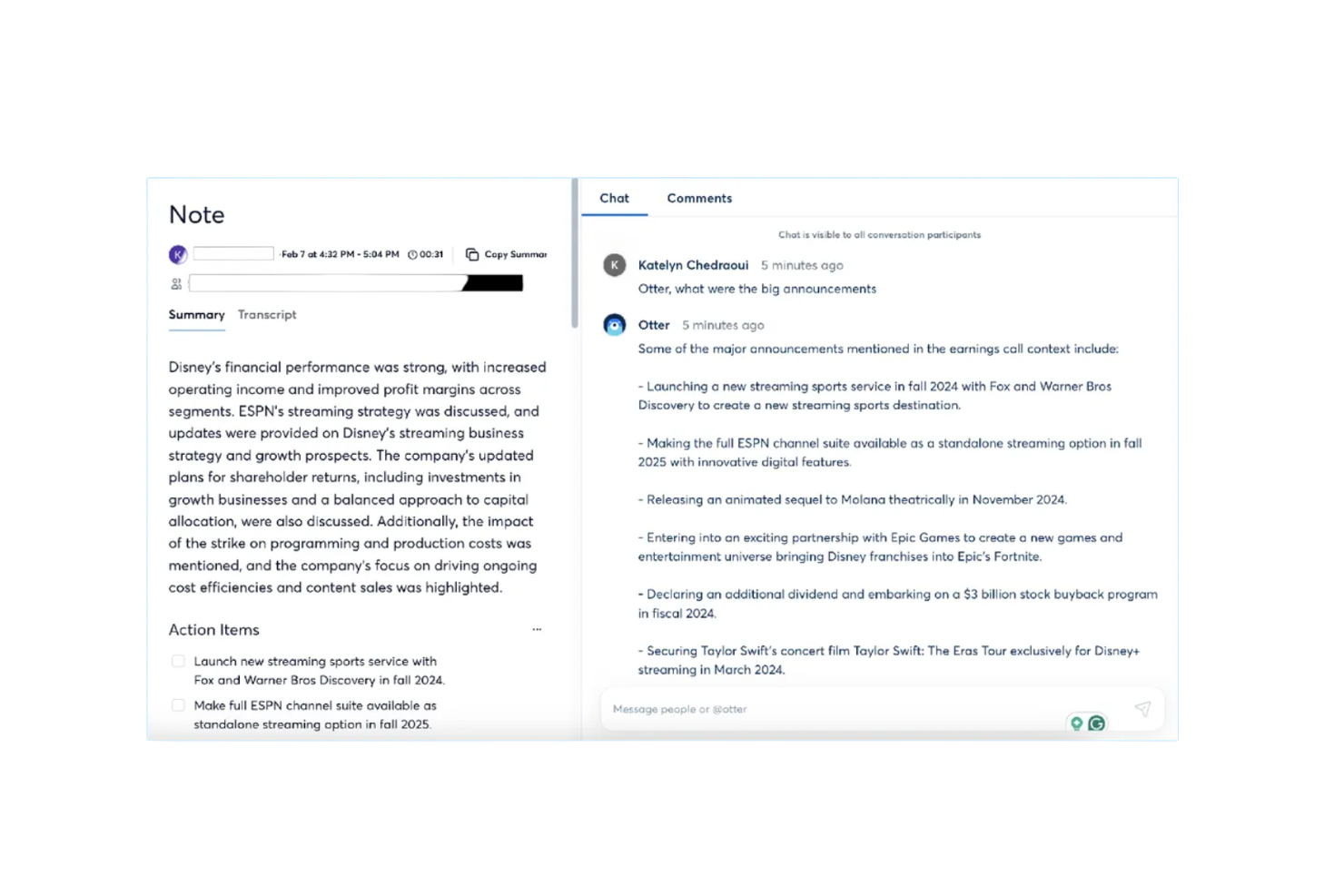
Otter.ai is an AI-powered meeting assistant that provides live transcription, automated summaries, and action item tracking. It primarily serves business professionals and teams looking to enhance productivity and improve meeting management through its AI capabilities.
Why I picked Otter.ai: This tool stands out in providing accurate meeting transcriptions and summaries, making it ideal for teams needing detailed records. With features like live transcription and action item tracking, your team can easily capture key insights and tasks. Its ability to integrate with platforms like Zoom enhances its utility for virtual meetings. These functionalities make it a valuable tool for improving communication and project management.
Standout Features & Integrations:
Features include automated meeting summaries, action item tracking, and specialized agents for different sectors like sales and education. Your team will benefit from its ability to save time by automating note-taking and summarizing discussions.
Integrations include Google Meet, Zoom, Dropbox, Google Calendar, Google Docs, HubSpot, Jira, Notion, Salesforce, Slack, and Asana.
Pros and Cons
Pros:
- Enhances virtual meeting productivity
- Automated meeting summaries
- Accurate live transcriptions
Cons:
- Poor speaker recognition in complex meetings
- Inconsistent accuracy in transcription with accents

Best for AI art creation

Midjourney is an AI art generation tool designed for artists, designers, and creative professionals looking to explore new visual possibilities. It offers value by providing advanced AI capabilities to create unique and imaginative artwork with ease.
Why I picked Midjourney: Midjourney shines in AI art creation, allowing your team to generate stunning visual content effortlessly. Its AI-driven algorithms help in producing intricate designs and art pieces that cater to various creative needs. You can experiment with different styles and techniques, making it perfect for artistic exploration. These features make it a standout choice for those seeking innovative ways to enhance their creative projects.
Standout Features & Integrations:
Features include customizable art styles, the ability to generate high-resolution images, and a user-friendly interface. Your team will appreciate the flexibility to adjust styles and experiment with different artistic expressions. High-resolution output ensures that your creations are suitable for various applications, from digital displays to print media.
Integrations include Adobe Photoshop, Adobe Illustrator, CorelDRAW, Canva, Procreate, Sketch, Figma, Blender, GIMP, and Krita.
Pros and Cons
Pros:
- Supports high-resolution output
- Offers customizable art styles
- Generates high-quality art
Cons:
- Challenges in generating precise details
- May have a learning curve

Claude
Best for AI-driven insights

Claude is a conversational AI platform developed by Anthropic that lets you upload documents, images, or text to generate insights, summaries, or responses in natural language. It’s used by professionals across roles who need to work with large amounts of text, data, or files and make sense of them quickly.
Why I picked Claude: Claude gives you deeper insight capabilities than typical tools. It offers features like file understanding, long-context document analysis, and multiple AI models (Haiku, Sonnet, Opus) that adapt to different workloads. You can feed in a PDF or set custom prompts, then Claude will pull out patterns, connections, or summaries you might miss. Because of this focus on advanced reasoning, your team gets more than just basic chat—it gets AI that helps interpret complex content.
Standout Features & Integrations:
Features include the ability to upload and analyze documents and images. It handles very large text contexts, so you don’t need to split things manually. It lets you choose between different models depending on task complexity and speed.
Integrations include Google Workspace, Microsoft 365, Slack, GitHub, Notion, Zoom, Figma, Dropbox, and Asana.
Pros and Cons
Pros:
- Strong insight output beyond simple replies
- Flexible model selection for different complexities
- High capacity for analyzing long documents
Cons:
- Usage limits can become a constraint at higher volume
- Some features may require advanced setup by your team

Best for call note-taking

Fireflies.ai is an AI-driven tool designed to transcribe and analyze meetings, catering to businesses and teams that need efficient note-taking and meeting analysis. It helps users by automating the transcription process and providing insights from recorded calls, enhancing productivity and collaboration.
Why I picked Fireflies.ai: Fireflies.ai is built for efficient call note-taking, offering automated transcription and keyword extraction to capture every detail accurately. Its AI features help you record, organize, and summarize meetings without manual effort. The platform also includes a sentiment analysis dashboard and key point highlights, making it easier for your team to review discussions and take action quickly. These capabilities make it a practical solution for improving how you manage and follow up on meetings.
Standout Features & Integrations:
Features include voice recognition, the ability to search and filter transcripts, and customizable meeting templates. You’ll find it helpful to quickly locate important information within transcripts, saving time and improving efficiency.
Integrations include Zoom, Microsoft Teams, Google Meet, Slack, Salesforce, HubSpot, Asana, Trello, Zapier, and Dropbox.
Pros and Cons
Pros:
- Highlights key meeting points
- Provides sentiment analysis
- Automates meeting transcriptions
Cons:
- Potentially slow processing for transcriptions
- Limited real-time collaboration features


Gumloop is an AI automation platform designed for a diverse range of business functions, including marketing, sales, operations, engineering, and support. It offers a drag-and-drop interface that allows users to automate workflows by integrating data, applications, and AI capabilities to enhance time management.
Why I picked Gumloop: Gumloop proves highly capable in workflow automation, providing a user-friendly interface for creating complex workflows without coding. Its ability to integrate with over 110 applications makes it versatile for various business needs. The platform's AI features, such as data extraction and decision-making, help make work processes efficient and consistent. These capabilities make it an ideal tool for teams looking to automate manual tasks (like to-do lists) and improve operational efficiency.
Standout Features & Integrations:
Features include a drag-and-drop interface, AI-driven decision-making, and data management tools. Your team can automate repetitive tasks and focus on more strategic work. The platform's ability to integrate with numerous applications allows for improved workflow automation.
Integrations include Google Sheets, Salesforce, HubSpot, Slack, Microsoft Teams, Dropbox, Trello, Asana, Zapier, and Mailchimp.
Pros and Cons
Pros:
- Enhances workflow automation
- User-friendly drag-and-drop interface
- Supports a wide range of applications
Cons:
- Smaller integration ecosystem
- May require initial setup time
Andre AI-verktøy for arbeidsplassen
Her er noen flere AI-verktøy for arbeidsplassen som ikke kom med på kortlisten min, men som likevel er verdt å sjekke ut:
- Zoom AI Companion
For virtual meetings
- AI on Google Search
For search enhancement
- SaneBox
For email inbox filtering
- Tableau
For interactive data visualization
- ClickUp
For customizable project views
- UiPath
For robotic process automation
- Connecteam
For mobile workforce management
- Motion
For automated scheduling
- Make
For visual workflow creation
- Jasper AI
For AI content writing
- Reclaim
For smart calendar management
- Notion AI
For AI-enhanced note-taking
- Descript
For audio and video editing
- Microsoft Power BI
For business intelligence reports
- ThoughtSpot
For AI-driven data insights
- Asana
For team task tracking
- Trello
For visual task management
- Zapier
For app integration automation
- Coral AI
For edge AI applications
- Dall-E
For AI-generated images
- IBM Watson Discovery
For AI-powered data analysis
- Superhuman
For fast email management
- Inc Magazine
For business growth insights
- Pilot AI
For AI-powered video analytics
- Slackbot
For workplace chat automation
- EmailTree AI
For AI email automation


How I Evaluate Workplace AI Tools
To make this list, a tool’s AI must support workplace tasks, like drafting content and summarizing documents. From there, I evaluate three things. Core functionality carries most weight, like connecting workplace data and automating workflows. Then I look for enterprise search connectors and assess data protection controls.
Core Functionality (Table Stakes For This List)
When I'm selecting tools for my list, I score each one on a scale from 0 (does not offer the functionality) to 5 (excels in this area) for each core functionality listed below. I then convert the total into a percentage to help assess each tool's overall fit, with extra weight on any functionalities I’ve deemed essential.
- AI Content Generation (Essential): I assess how well prompts produce usable drafts for job descriptions, employee updates, and other common workplace content.
- Workplace Data Integration (Essential): I look for useful connections to workplace data, such as email, chat, and documents, and check whether answers reflect that context.
- Task & Workflow Automation: I consider whether AI can handle repeatable, multi-step tasks, such as routing a request and preparing a response for review.
- Conversational Assistant: I evaluate how well the assistant handles natural follow-up questions when someone needs help finding a policy or drafting a message.
- Intelligent Search & Summaries: I check whether answers synthesize relevant details across connected sources, rather than simply returning documents to review.
- Team Collaboration Intelligence: I look for shared features, such as meeting summaries, that help teams capture decisions and follow up on agreed actions.
Once I have a list of tools that meet the criteria, I consider what sets each platform apart.
Differentiating Factors (What Sets Vendors Apart)
Here's how I compare and contrast different vendors:
Standout Features
I look for granular permissions and data boundaries, because HR teams handle sensitive employee information and AI should only surface what each user is authorized to see. Custom AI agents matter too. Building a no-code bot that answers benefits questions from your internal wiki saves hours of repetitive work. I also evaluate meeting intelligence—tools like Otter.ai and Microsoft Copilot can join calls, transcribe, and pull out action items, which keeps post-meeting follow-up from falling through the cracks.
Beyond Features
I check whether vendors commit to not training models on your data, and I look for certifications like SOC 2 and ISO 27001—especially important when AI touches employee records or compensation details. Integration depth matters just as much. A tool that natively connects to your HRIS, calendar, and chat apps delivers value faster than one requiring custom middleware. I also evaluate onboarding support, since HR teams often lead rollout and need training resources that help non-technical users adopt the tool quickly.
Slik velger du AI-verktøy for arbeidsplassen
Det er lett å gå seg vill i lange funksjonslister og kompliserte prismodeller. For å hjelpe deg med å holde fokus mens du jobber deg gjennom den unike prosessen med å velge programvare, får du her en sjekkliste over faktorer du bør ha i tankene:
| Faktor | Hva du bør vurdere |
|---|---|
| Skalerbarhet | Vokser verktøyet sammen med teamet ditt? Se etter løsninger som kan håndtere økt datamengde og flere brukere uten redusert ytelse. |
| Integrasjoner | Kan det kobles til de nåværende systemene dine? Kontroller at det er kompatibelt med den eksisterende programvaren din for å unngå avbrudd i arbeidsflyten. |
| Tilpasningsmuligheter | Kan du tilpasse verktøyet etter behovene dine? Sørg for at du kan justere innstillinger og arbeidsflyter slik at de passer til prosessene dine. |
| Brukervennlighet | Er det brukervennlig for teamet ditt? Vurder læringskurven og om teamet enkelt kan ta i bruk verktøyet uten omfattende opplæring. |
| Implementering og introduksjon | Hvor raskt kan du komme i gang? Vurder tiden og ressursene som kreves til oppsett og opplæring, samt om leverandøren tilbyr støtte i denne fasen. |
| Kostnad | Passer det inn i budsjettet ditt? Sammenlign prismodeller og se etter skjulte gebyrer. Vurder verdien det gir opp mot kostnaden. |
| Sikkerhetstiltak | Er dataene dine beskyttet? Sørg for at verktøyet følger sikkerhetsstandarder og tilbyr funksjoner som kryptering og tilgangskontroller. |
| Tilgjengelig brukerstøtte | Får du hjelp når du trenger det? Kontroller leverandørens åpningstider og støttekanaler, og vurder kvaliteten på og responstiden til kundeservicen. |
Hva er AI-verktøy for arbeidsplassen?
AI-verktøy for arbeidsplassen er programvareløsninger som bruker kunstig intelligens til å forbedre produktiviteten og effektiviteten i virksomheter. Disse verktøyene brukes vanligvis av HR-medarbeidere, ledere og teamledere til å automatisere oppgaver, forbedre beslutningstaking og legge til rette for kommunikasjon.
Funksjoner som naturlig språkbehandling, dataanalyse og prediktive funksjoner bidrar til å automatisere repetitive oppgaver, gi innsikt og forbedre samarbeidet. Alt i alt gir disse verktøyene betydelig verdi ved å spare tid, redusere feil og forbedre effektiviteten på arbeidsplassen.
Funksjoner
Når du velger KI-verktøy for arbeidsplassen, bør du se etter følgende viktige funksjoner:
- Naturlig språkbehandling: Gjør det mulig for verktøyet å forstå og svare på menneskelig språk, slik at kommunikasjonen med brukerne blir mer effektiv.
- Prediktiv analyse: Analyserer data for å forutsi trender og resultater, og bidrar til bedre beslutningstaking og planlegging.
- Automatisk transkripsjon: Konverterer talespråk til tekst, sparer tid og forbedrer nøyaktigheten i møtereferater og dokumentasjon.
- Dataintegrasjon: Gjør det mulig for verktøyet å koble seg til andre systemer og databaser, slik at dataflyten og tilgangen på tvers av plattformer blir sømløs.
- Sentimentanalyse: Evaluerer tekst for å fastslå følelsene eller holdningene bak den, slik at brukerne bedre kan forstå kundenes eller de ansattes følelser.
- Automatisering av oppgaver: Automatiserer repetitive oppgaver, slik at brukerne får mer tid til å fokusere på strategiske aktiviteter.
- Innsikt i sanntid: Gir oppdatert informasjon og analyse, slik at det blir mulig å reagere raskt på endringer og muligheter.
- Tilpassbare arbeidsflyter: Lar brukerne tilpasse prosesser etter sine spesifikke behov, noe som forbedrer effektiviteten og produktiviteten.
- KI-drevne chatboter: Tilbyr automatisert støtte og samhandling, og forbedrer kundeservice og engasjement.
- Sikkerhetsfunksjoner: Sørger for databeskyttelse og samsvar med bransjestandarder, og beskytter sensitiv informasjon.
Fordeler
Implementering av KI-verktøy på arbeidsplassen gir flere fordeler for teamet og virksomheten din. Her er noen av fordelene du kan se frem til:
- Økt produktivitet: Automatisering av repetitive oppgaver lar teamet fokusere på mer strategisk arbeid, noe som øker den samlede produktiviteten.
- Bedre beslutningstaking: Prediktiv analyse og innsikt i sanntid gir verdifulle data som hjelper teamet med å ta informerte beslutninger raskt.
- Forbedret kommunikasjon: Naturlig språkbehandling og KI-drevne chatboter legger til rette for effektiv kommunikasjon, både internt og med kunder.
- Tidsbesparelser: Automatisk transkripsjon og automatisering av oppgaver sparer tid på manuelle oppgaver, slik at teamet kan bruke tiden mer effektivt.
- Bedre kundeengasjement: Sentimentanalyse og KI-drevne chatboter forbedrer kundeinteraksjonene, noe som fører til økt tilfredshet og lojalitet.
- Fleksibilitet ved tilpasning: Tilpassbare arbeidsflyter sørger for at verktøyene dekker virksomhetens spesifikke behov, og forbedrer driftseffektiviteten.
- Datasikkerhet: Innebygde sikkerhetsfunksjoner beskytter sensitiv informasjon og sørger for samsvar med bransjestandarder.
Kostnader og priser
Ved valg av KI-verktøy for arbeidsplassen er det nødvendig å forstå de ulike prismodellene og abonnementene som er tilgjengelige. Kostnadene varierer basert på funksjoner, teamstørrelse, tillegg og mer. Tabellen nedenfor oppsummerer vanlige abonnementer, gjennomsnittsprisene deres og typiske funksjoner som er inkludert i løsninger med KI-verktøy for arbeidsplassen:
Sammenligningstabell for abonnementer for KI-verktøy på arbeidsplassen
| Abonnementstype | Gjennomsnittspris | Vanlige funksjoner |
|---|---|---|
| Gratisabonnement | $0 | Grunnleggende automatisering av oppgaver, begrenset datalagring og standard brukerstøtte. |
| Personlig abonnement | $5-$25/bruker/måned | Avansert automatisering av oppgaver, prediktiv analyse og brukerstøtte via e-post. |
| Bedriftsabonnement | $30-$75/bruker/måned | Tilpassede arbeidsflyter, integrasjoner med tredjepartsapper og prioritert brukerstøtte. |
| Virksomhetsabonnement | $100-$200/bruker/måned | Full tilpasning, egen kundeansvarlig og førsteklasses sikkerhetsfunksjoner. |
Vanlige spørsmål om AI-verktøy på arbeidsplassen
Her er noen svar på vanlige spørsmål om AI-verktøy på arbeidsplassen:
Kan flere avdelinger bruke det samme AI-verktøyet under én konto?
Ja, de fleste AI-plattformer for arbeidsplassen lar flere avdelinger operere under én organisasjonskonto. Hvert team kan ha sitt eget arbeidsområde for å administrere prosjekter og data separat. Rollebaserte tillatelser bidrar til å kontrollere hvem som kan se, redigere eller dele spesifikk informasjon.
Kan AI-verktøy for arbeidsplassen forbedre teamets produktivitet?
Ja, AI-verktøy for arbeidsplassen kan forbedre teamets produktivitet betydelig. De automatiserer repetitive oppgaver, gir datadrevet innsikt og legger til rette for bedre kommunikasjon. Ved å redusere manuelt arbeid kan teamet fokusere på strategiske aktiviteter og beslutningstaking. Se etter verktøy med funksjoner som oppgaveautomatisering, prediktiv analyse og samarbeid i sanntid for å maksimere produktivitetsgevinstene.
Hvilke sikkerhetstiltak bør jeg se etter i et AI-verktøy for arbeidsplassen?
Sørg for at verktøyet overholder bransjens sikkerhetsstandarder og tilbyr funksjoner som kryptering, tilgangskontroller og regelmessige sikkerhetsoppdateringer. Sjekk om leverandøren har retningslinjer for databeskyttelse og overholder forskrifter som GDPR. Det er viktig å beskytte sensitiv informasjon, så velg et verktøy som prioriterer sikkerhet og tilbyr åpenhet om sikkerhetspraksisen sin.
Hvordan integreres AI-verktøy for arbeidsplassen med annen programvare?
De fleste AI-verktøy for arbeidsplassen tilbyr integrasjonsmuligheter med populær programvare som CRM-systemer, kommunikasjonsplattformer og verktøy for prosjektstyring. Sjekk verktøyets integrasjonsmuligheter og kompatibilitet med de eksisterende systemene dine. Sømløs integrasjon sørger for at data flyter smidig mellom plattformene, reduserer manuell dataregistrering og forbedrer den samlede effektiviteten.
Hvilken type støtte kan jeg forvente fra leverandører av AI-verktøy for arbeidsplassen?
Støtten varierer fra leverandør til leverandør, men du kan vanligvis forvente alternativer som støtte via e-post, chat eller telefon. Noen leverandører tilbyr hjelp døgnet rundt, mens andre har begrensede åpningstider. Se etter leverandører som tilbyr omfattende dokumentasjon, opplæringsressurser og et responsivt supportteam. God støtte kan utgjøre en betydelig forskjell for teamets opplevelse av verktøyet.