

10 beste programvareløsninger for varsling av kritikkverdige forhold i 2026

10 Kortliste over beste programvare for varsling


Programvare for varsling er en digital plattform som gjør det mulig for ansatte og interessenter å rapportere kritikkverdige forhold, etiske bekymringer eller problemer med etterlevelse på en sikker og – ofte – anonym måte. Hvis du leter etter den beste programvaren for varsling, er du sannsynligvis opptatt av å beskytte organisasjonen din, oppfylle regulatoriske krav og bygge en tillitskultur. Når regelverket er i utvikling og forventningene på arbeidsplassen endrer seg, kan det føles overveldende å velge riktig verktøy. Denne listen hjelper deg med å sammenligne de beste løsningene, forstå deres unike funksjoner og finne den løsningen som passer best for behovene dine innen etterlevelse og rapportering.
Why Trust Our Software Recommendations
Our team has been testing and reviewing software since 2012. As HR experts ourselves, we know how difficult—and important—it is to choose the right software.
For this guide, we evaluated tools using hands-on testing and independent research, scoring tools using our selection criteria. We also draw on insights from industry thought leaders and practicing HR experts.
Our reviews reflect our human editorial judgment, not a sales pitch.
Expert reviewers:
Sammenligningstabell for programvare for varsling
Denne sammenligningstabellen oppsummerer prisopplysningene for mine beste utvalgte programmer for varsling:
| Tool | Best For | Trial Info | Price | ||
|---|---|---|---|---|---|
| 1 | Best for educational institution reporting | Free demo available | Pricing upon request | Website | |
| 2 | Best for customizable reporting workflows | Free trial available | From €99/month (billed annually) | Website | |
| 3 | Best with advanced case management tools | Free demo available | Pricing upon request | Website | |
| 4 | Best for multinational compliance needs | Free demo available | Pricing upon request | Website | |
| 5 | Best for anonymous multi-channel intake | Free demo available | Pricing upon request | Website | |
| 6 | Best with multilingual support options | Free demo available | Pricing upon request | Website | |
| 7 | Best for open-source deployment flexibility | Free demo available | Free, open-source | Website | |
| 8 | Best for hotline and web-based submissions | Free demo available | Pricing upon request | Website | |
| 9 | Best for rapid implementation timelines | 30-day free trial + free demo available | From $86/month (billed annually) | Website | |
| 10 | Best for integration with risk management systems | Free demo available | Pricing upon request | Website |
Anmeldelser av den beste programvaren for varsling
Nedenfor finner du mine detaljerte sammendrag av programvarene for varsling som kom med på kortlisten. Anmeldelsene mine gir et detaljert innblikk i funksjonene, de beste bruksområdene og integrasjonene til hver plattform, slik at du kan finne den som passer best for deg.

FaceUp
Best for educational institution reporting
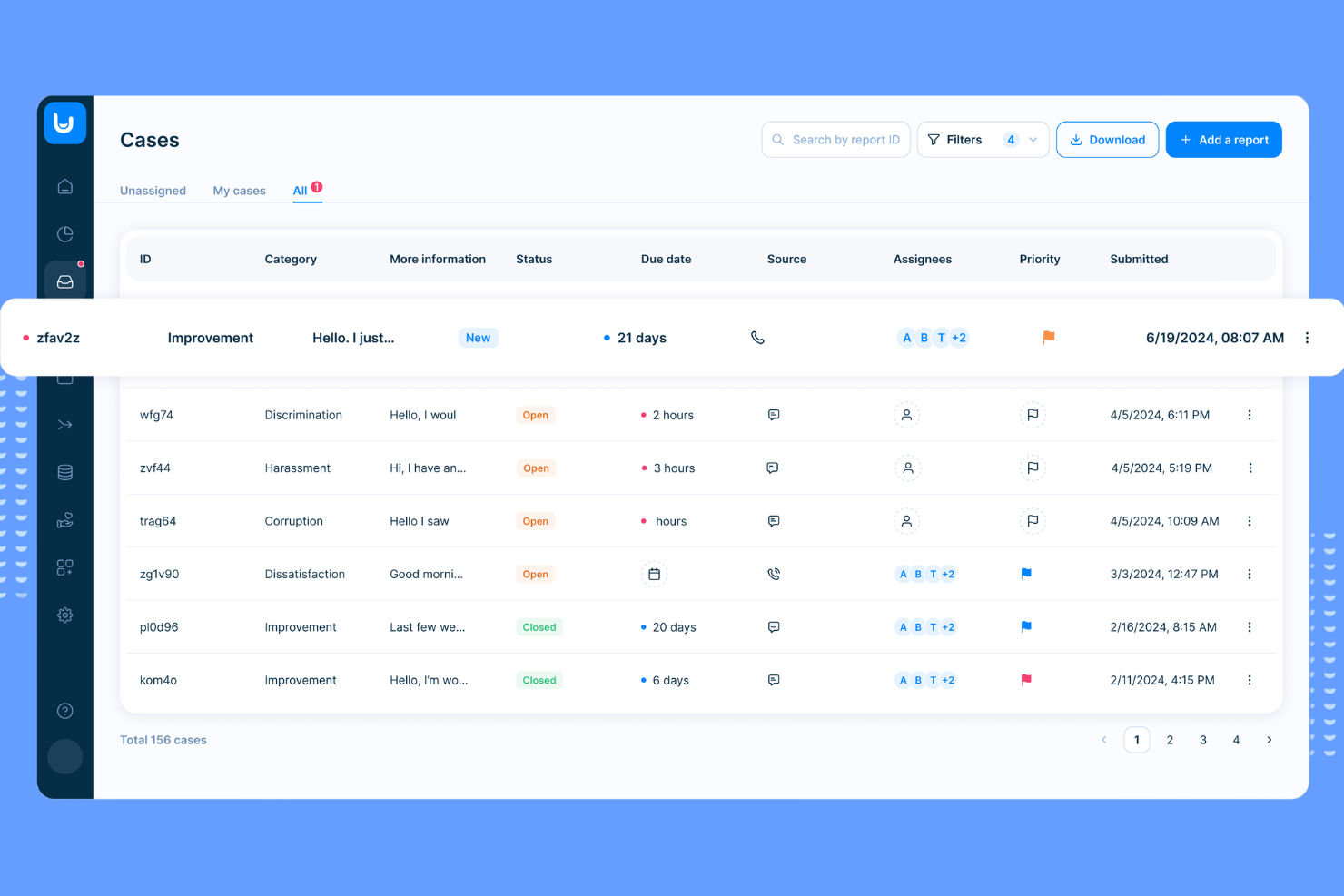
FaceUp is designed with the needs of schools and educational institutions in mind, offering a reporting platform tailored for students, teachers, and administrators. It addresses sensitive issues like bullying, harassment, and safety concerns by providing a confidential and accessible way to report incidents. The platform’s focus on education-specific workflows and communication tools helps schools respond quickly and appropriately to reports.
Why I Picked FaceUp
FaceUp stands out for educational institutions that need a reporting tool built specifically for school environments. The platform offers anonymous reporting channels designed for students, staff, and parents, making it easier to surface issues like bullying or misconduct. I like that FaceUp includes customizable forms and workflows tailored to school policies, so administrators can manage cases in a way that fits their unique needs. Its focus on education means features like in-app guidance and resources are relevant to the challenges schools face every day.
FaceUp Key Features
Some other features that make FaceUp useful for schools and organizations include:
- Mobile App Access: Allows users to submit reports and communicate directly from their smartphones.
- Document Uploads: Lets reporters attach files, images, or evidence to support their submissions.
- Automated Case Notifications: Sends alerts to designated staff when a new report is filed or updated.
- Role-Based Permissions: Controls access to sensitive information based on user roles within the institution.
FaceUp Integrations
Integrations include Slack, BambooHR, Deel, Rippling, Vanta, JOBka, Power BI, UKG Pro, Jira, and more.
Pros and Cons
Pros:
- Multilingual support for diverse school populations
- Bulk messaging to entire school communities
- Mobile app supports student and parent reporting
Cons:
- Lacks advanced investigation management tools
- No public-facing transparency or case status portal

Best for customizable reporting workflows
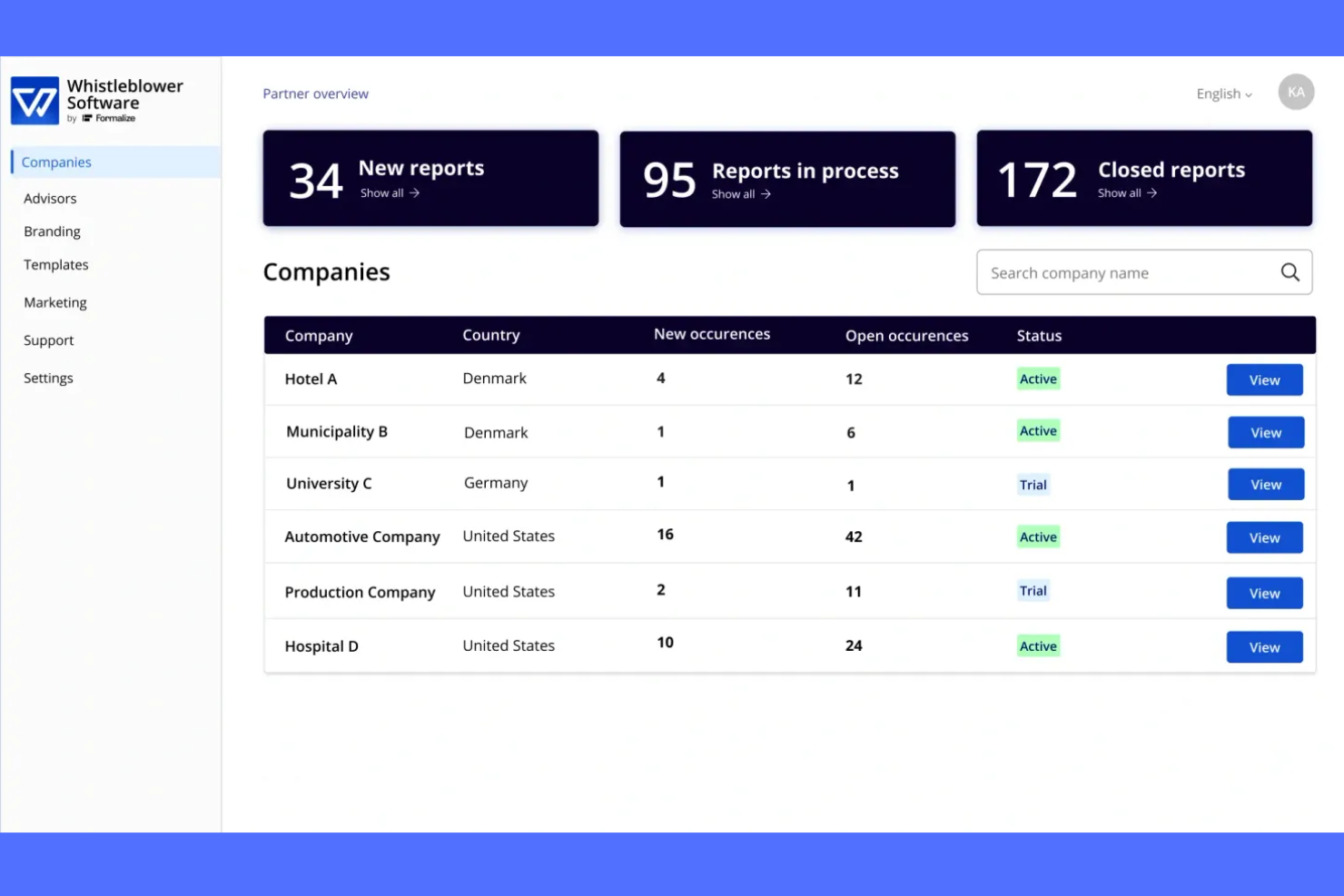
If you need a whistleblowing platform that adapts to your organization’s unique reporting needs, Whistleblower Software offers flexible workflow customization. This tool is a strong fit for compliance teams and HR professionals in organizations with complex or evolving reporting structures. Its configurable forms and process automation help you manage sensitive reports while meeting internal and regulatory requirements.
Why I Picked Whistleblower Software
I chose Whistleblower Software because its customizable reporting workflows address the need for flexibility in handling sensitive disclosures. The platform lets you design reporting forms and processes that match your organization’s structure and compliance requirements. I appreciate how you can set up automated routing and escalation rules, so reports reach the right people without manual intervention. This level of customization is especially useful for organizations with unique policies or multi-level review processes.
Whistleblower Software Key Features
Some other features that make Whistleblower Software stand out include:
- Anonymous Two-Way Messaging: Communicate securely with reporters while protecting their identity throughout the process.
- Multi-Language Support: Offer reporting and communication in multiple languages to accommodate diverse teams.
- Case Management Dashboard: Track, organize, and manage all reports and investigations from a centralized interface.
- Document Uploads: Allow users to attach supporting files and evidence directly to their reports for more thorough case documentation.
Whistleblower Software Integrations
Native integrations are not currently listed.
Pros and Cons
Pros:
- GDPR-compliant data handling and storage
- Multi-language support for global organizations
- Anonymous two-way communication with reporters
Cons:
- Custom branding options are restricted to higher tiers
- Limited public documentation on advanced features

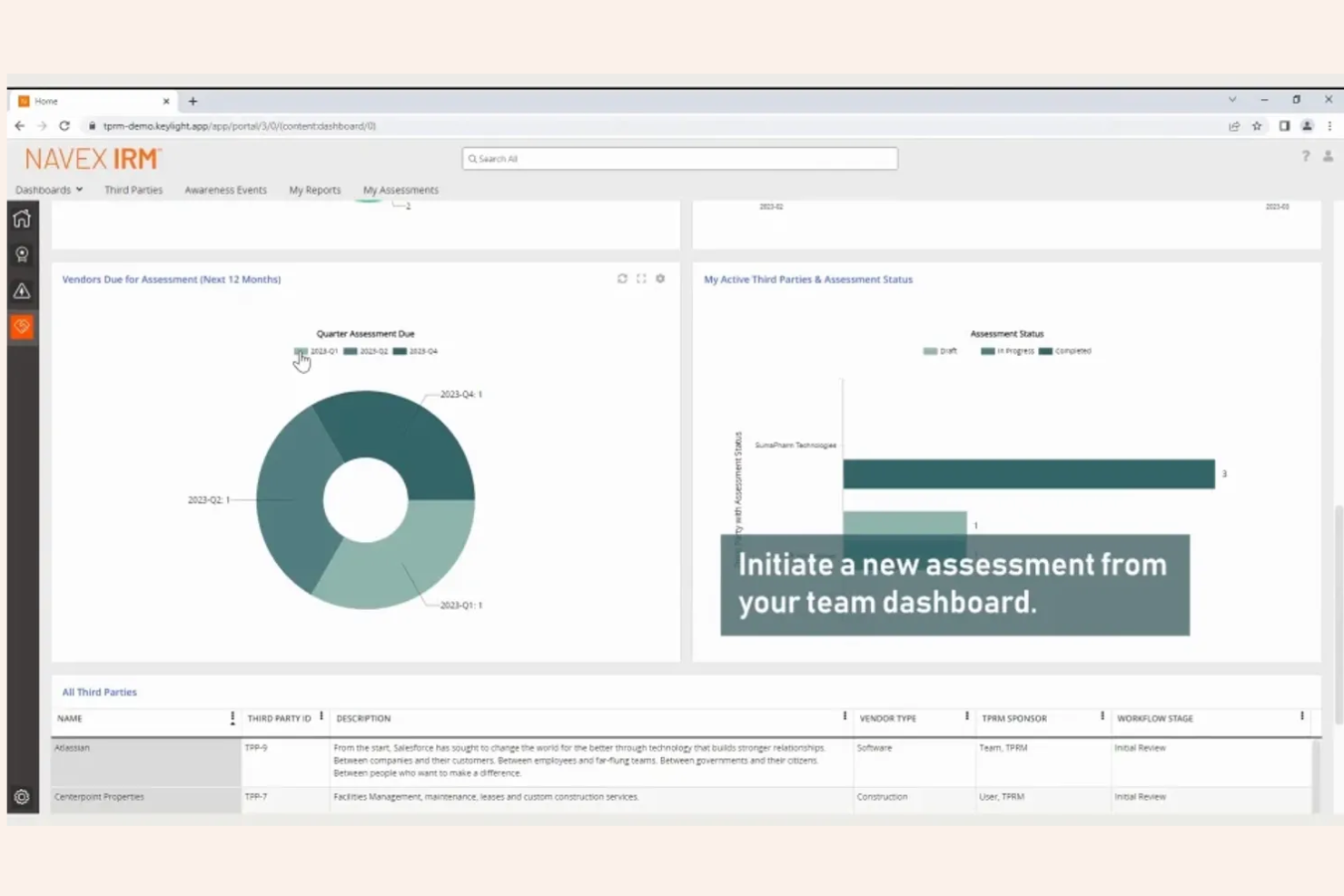
NAVEX is designed for organizations that need advanced case management and detailed oversight of whistleblowing reports. This platform is especially useful for compliance teams and legal departments in highly regulated industries. Its investigative tools and reporting features help you manage complex cases from intake through resolution while maintaining a clear audit trail.
Why I Picked NAVEX
What sets NAVEX apart is its advanced case management tools, which are essential for organizations handling sensitive or high-volume whistleblowing reports. The platform offers detailed case tracking, allowing you to assign tasks, set deadlines, and monitor progress throughout the investigation process. I appreciate the built-in audit trails and documentation features, which help ensure compliance and transparency at every stage. These capabilities make NAVEX a strong choice for teams that need to manage complex investigations with accuracy and accountability.
NAVEX Key Features
Some other features that make NAVEX a strong option include:
- Anonymous Reporting Channels: Enable employees to submit concerns without revealing their identity.
- Multi-Language Support: Allow users to access reporting tools and resources in several languages.
- Automated Alerts and Notifications: Send real-time updates to relevant stakeholders as cases progress.
- Customizable Intake Forms: Tailor reporting forms to collect the specific information your organization needs.
NAVEX Integrations
Native integrations are not currently listed.
Pros and Cons
Pros:
- Configurable access controls for sensitive cases
- Detailed audit trails for every case action
- Advanced case assignment and escalation options
Cons:
- Initial setup process can be time-consuming
- Reporting dashboard customization is limited
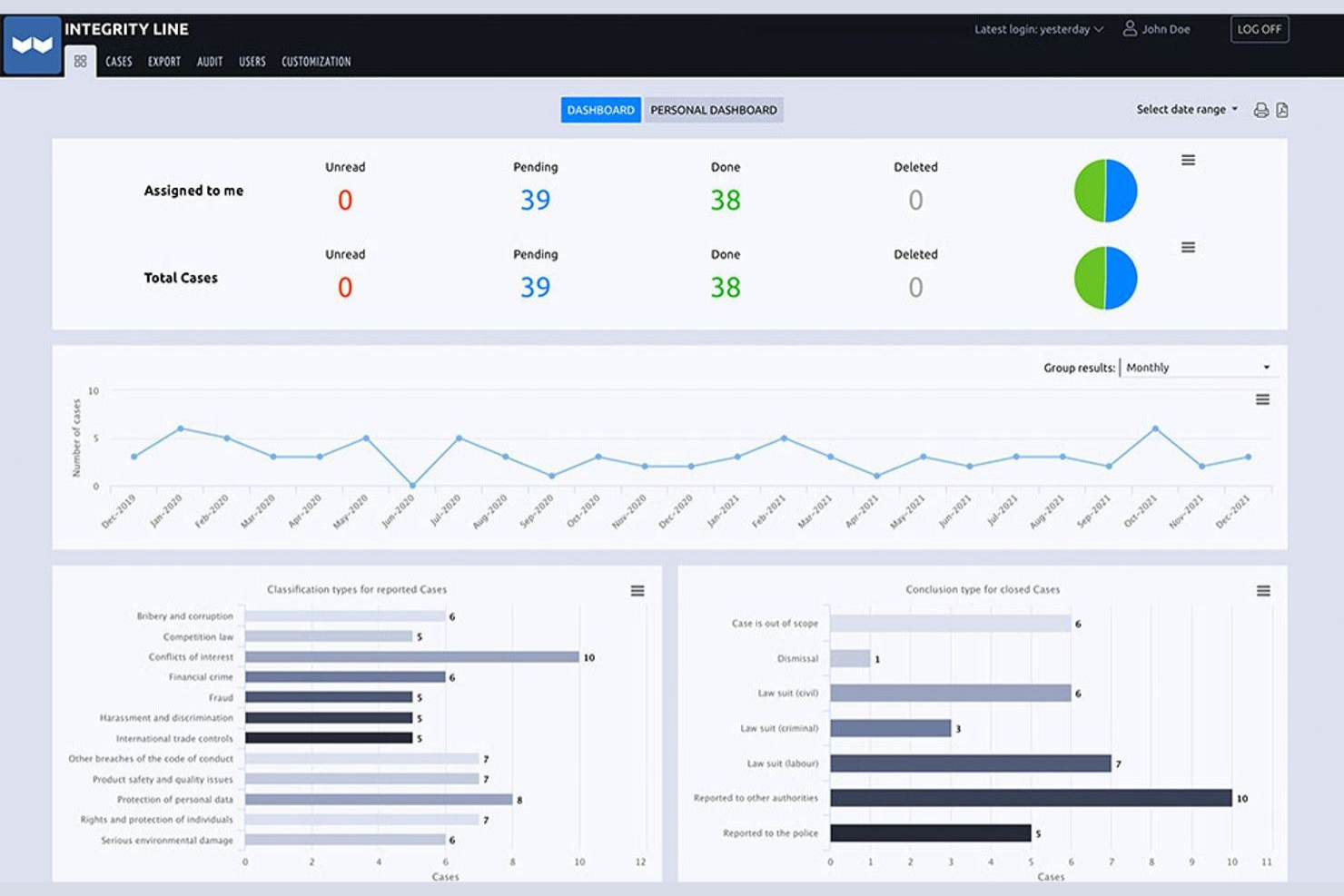
EQS is built for organizations that need to meet complex compliance requirements across multiple countries. This platform is especially relevant for multinational companies and compliance teams navigating varied legal frameworks and languages. Its global approach helps you manage whistleblowing reports securely while staying aligned with local and international regulations.
Why I Picked EQS
EQS stands out for organizations that operate across borders and need to comply with a range of international whistleblowing regulations. I picked EQS because it offers multi-language support and localization features, which help ensure accessibility and compliance in different regions. The platform also provides configurable workflows that let you adapt reporting and case management processes to meet local legal requirements. These capabilities make EQS a strong fit for multinational companies that need to manage whistleblowing reports in a consistent yet flexible way.
EQS Key Features
Some other features that make EQS appealing for compliance teams include:
- Anonymous Two-Way Communication: Lets reporters and investigators exchange messages without revealing identities.
- Automated Case Assignment: Routes new reports to the appropriate team members based on predefined rules.
- Document Management: Stores and organizes all case-related files securely within the platform.
- Customizable Reporting Channels: Offers web, phone, and mail intake options tailored to your organization’s needs.
EQS Integrations
Native integrations are not currently listed.
Pros and Cons
Pros:
- Secure document management for case files
- EU Whistleblower Directive requirements
- Anonymous two-way communication for reporters Meets
Cons:
- Reporting dashboard offers few visualization options
- Limited workflow automation compared to peers
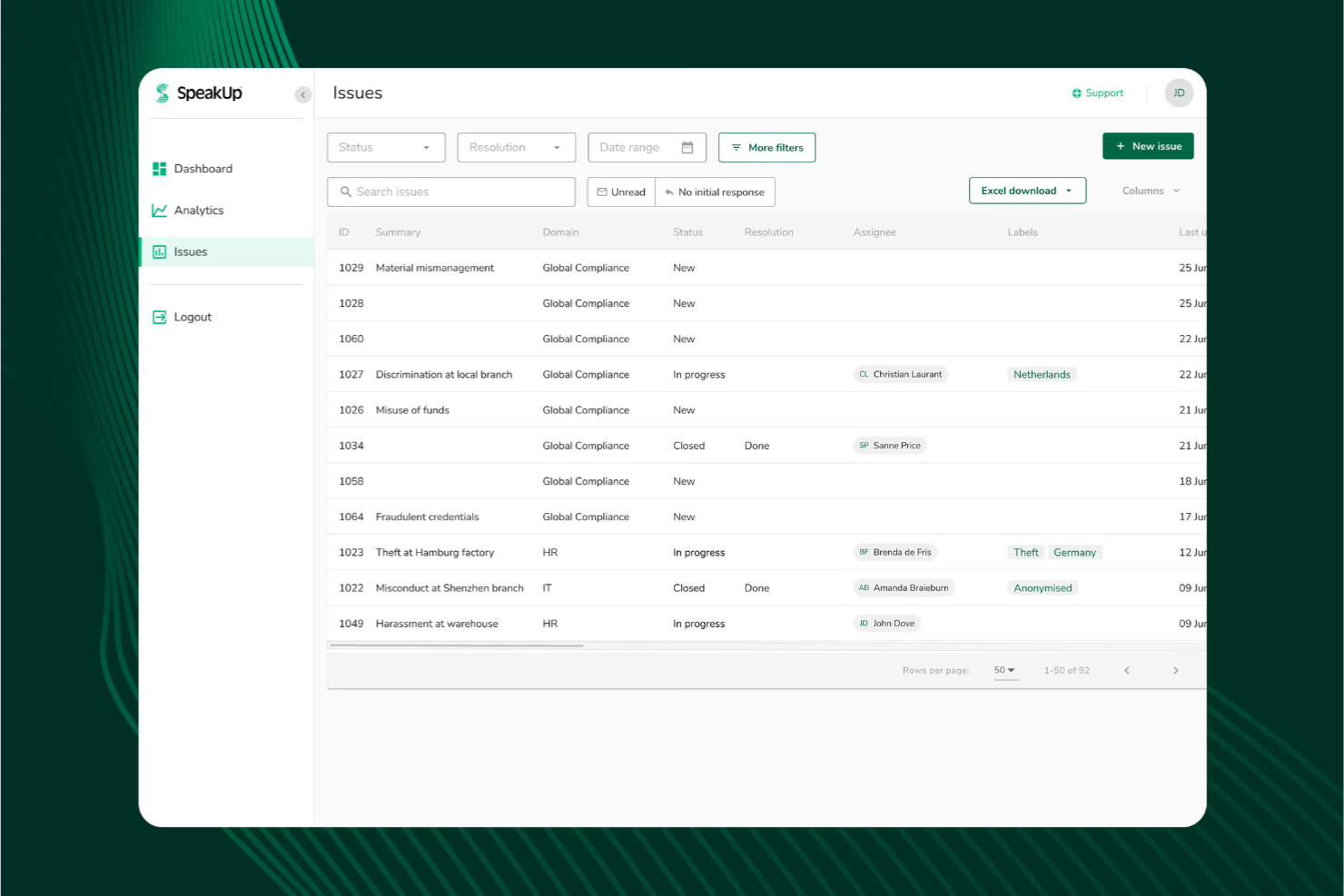
SpeakUp is designed for organizations that want to offer truly anonymous reporting across multiple channels. This platform is a strong fit for HR teams, compliance officers, and ethics committees that need to capture concerns via web, phone, or mobile app without revealing the reporter’s identity. Its flexible intake options help you reach employees and stakeholders wherever they are, supporting a culture of openness and trust.
Why I Picked SpeakUp
What drew me to SpeakUp is its focus on providing truly anonymous, multi-channel intake for whistleblowing reports. The platform lets users submit concerns through web forms, a dedicated mobile app, and a 24/7 phone hotline, all while protecting their identity. I appreciate that SpeakUp supports secure, two-way communication between reporters and investigators without compromising anonymity. These features make it a strong choice for organizations that want to lower barriers to reporting and ensure everyone feels safe speaking up.
SpeakUp Key Features
Some other features that make SpeakUp a strong option for compliance teams include:
- Case Management Dashboard: Lets you track, assign, and manage reports from intake through resolution.
- Automated Acknowledgement Messages: Send instant confirmation to reporters when a new case is submitted.
- Role-Based Access Controls: Restricts access to sensitive case information based on user roles.
- Customizable Intake Forms: Allows you to tailor reporting forms to fit your organization’s policies and requirements.
SpeakUp Integrations
Native integrations are not currently listed.
Pros and Cons
Pros:
- Intake forms can be tailored by organization
- Automated case acknowledgment for every submission
- Anonymous reporting available via web, app, and phone
Cons:
- No built-in translation for multilingual submissions
- No dedicated analytics or trend reporting tools

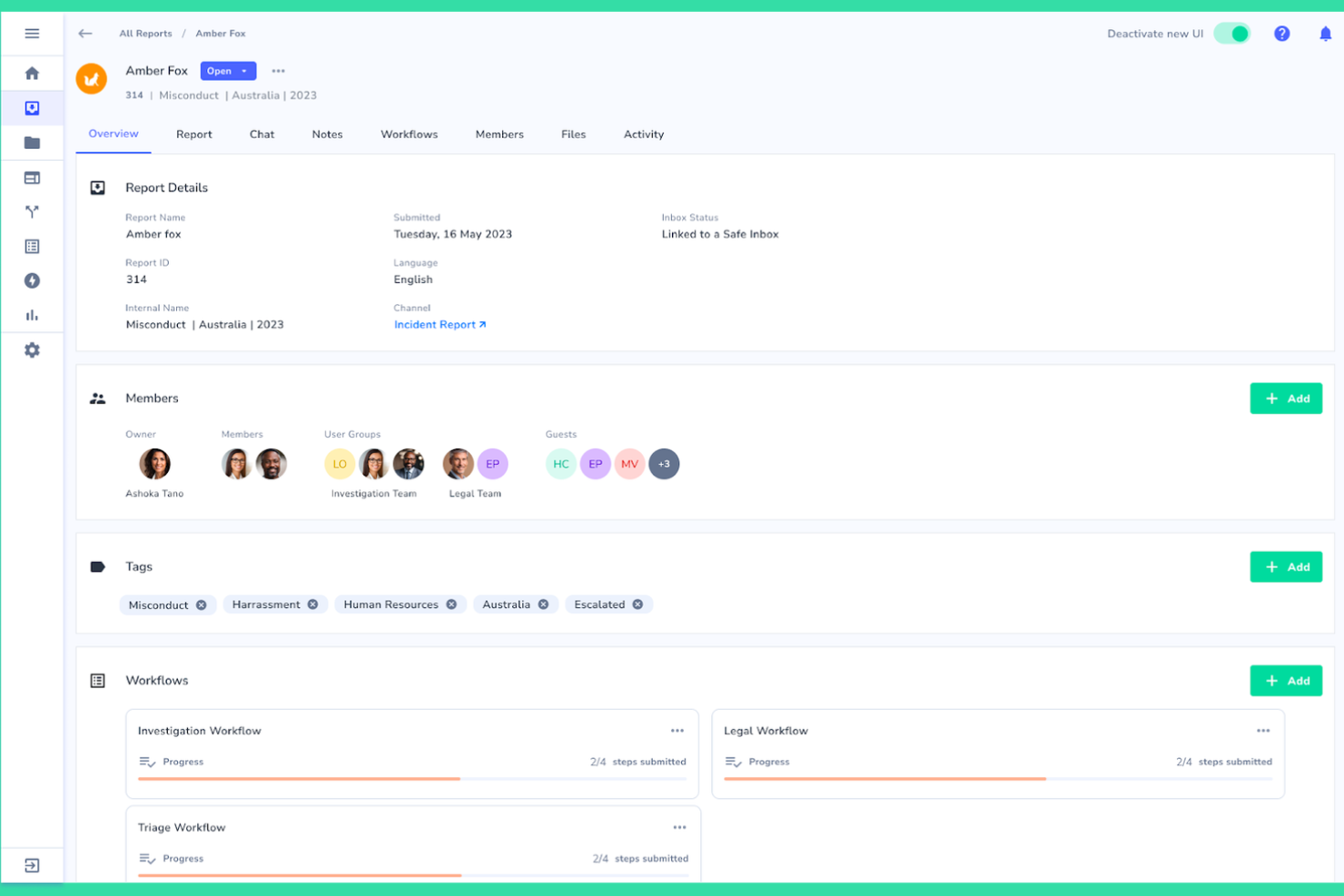
Whispli stands out for organizations that need to support whistleblowing across multiple languages and regions. This platform is especially useful for global HR teams, compliance leaders, and ethics officers who want to ensure every employee can report concerns in their preferred language. Its multilingual intake and communication features help break down language barriers, making it easier to foster a culture of trust and transparency worldwide.
Why I Picked Whispli
What makes Whispli a strong choice for whistleblowing software is its commitment to multilingual support. The platform allows users to submit reports and communicate with case managers in over 30 languages, which is essential for organizations with a global workforce. I appreciate that Whispli includes built-in translation tools, so both reporters and investigators can interact in their preferred language without confusion. This focus on language accessibility helps organizations remove barriers to reporting and ensures everyone’s voice can be heard, no matter where they’re located.
Whispli Key Features
Some other features that make Whispli appealing for compliance teams include:
- Anonymous Two-Way Messaging: Enables secure, ongoing conversations between reporters and case managers without revealing identities.
- Customizable Intake Forms: Lets you tailor reporting forms to match your organization’s specific policies and requirements.
- Case Management Dashboard: Centralizes all reports, case notes, and actions for easy tracking and follow-up.
- Automated Workflow Triggers: Allows you to set up rules that automatically assign cases or send notifications based on report details.
Whispli Integrations
Native integrations are not currently listed.
Pros and Cons
Pros:
- Detailed audit trails for every case action
- Automated workflows for case assignment
- Customizable intake forms for different policies
Cons:
- Limited public documentation for end users
- No built-in hotline or phone intake option

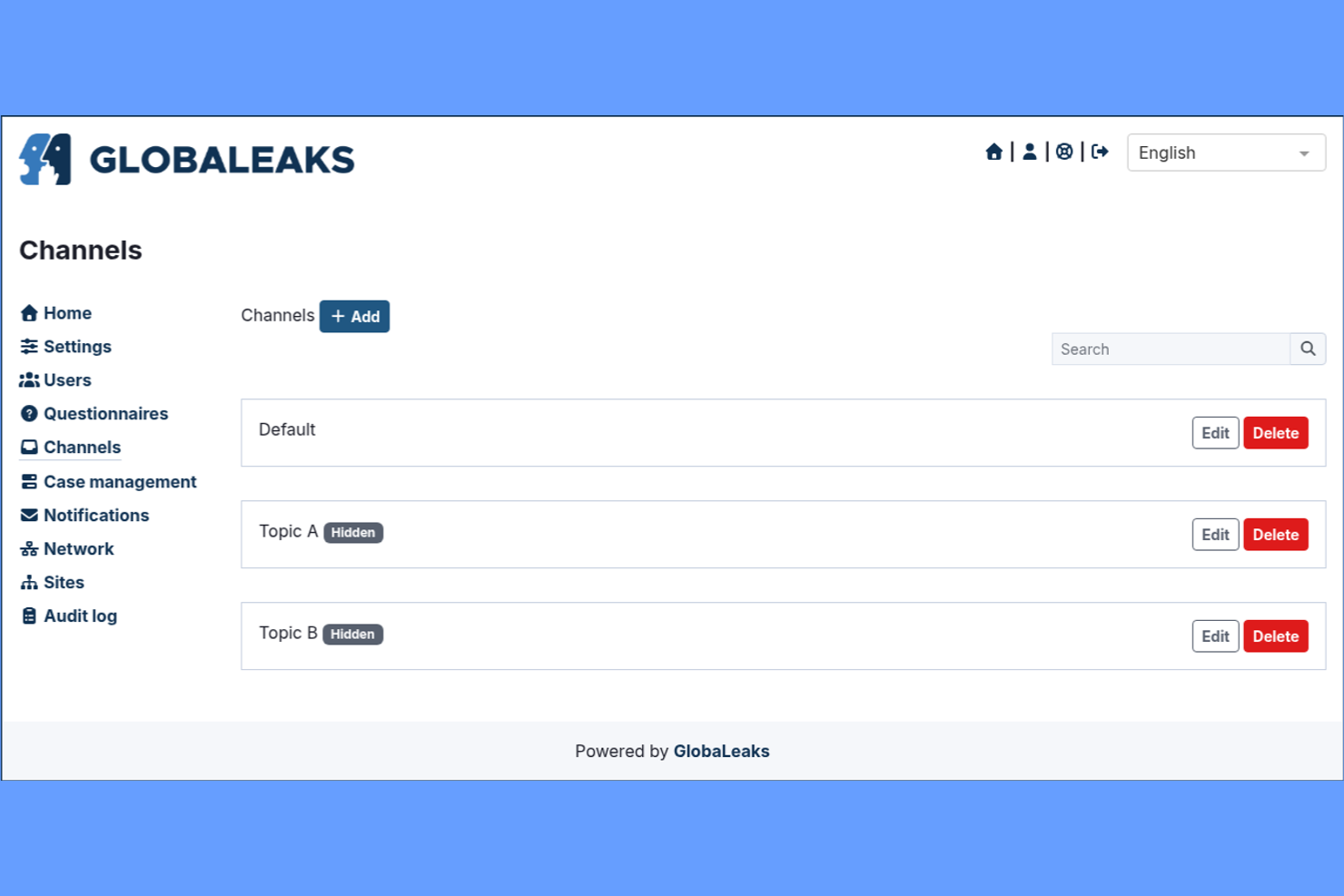
GlobaLeaks offers an open-source whistleblowing platform that gives organizations full control over deployment and data. It’s a strong fit for IT teams, NGOs, and public sector groups that need to customize workflows or meet strict data residency requirements. The tool’s flexibility helps organizations build secure, anonymous reporting channels tailored to their unique compliance and privacy needs.
Why I Picked GlobaLeaks
What sets GlobaLeaks apart is its open-source architecture, which gives organizations unmatched flexibility in how they deploy and manage their whistleblowing platform. I picked GlobaLeaks because it allows IT teams to self-host, customize workflows, and adapt security settings to meet strict internal or regulatory requirements. The platform supports anonymous submissions and encrypted communication, which are essential for protecting whistleblowers’ identities. This level of control makes GlobaLeaks especially appealing for organizations with unique compliance, privacy, or localization needs.
GlobaLeaks Key Features
Some other features that make GlobaLeaks appealing for organizations include:
- Multi-language Support: Lets users submit and manage reports in several different languages.
- Customizable Submission Forms: Allows administrators to design forms that fit specific reporting needs.
- Automated Data Retention Policies: Enable organizations to set rules for how long data is stored before deletion.
- Audit Logging: Tracks all access and actions within the platform for compliance and review purposes.
GlobaLeaks Integrations
Native integrations are not currently listed.
Pros and Cons
Pros:
- Anonymous reporting with strong encryption options
- Self-hosting supports strict data residency needs
- Fully open-source for complete deployment control
Cons:
- Limited reporting and analytics features
- No dedicated customer support or onboarding
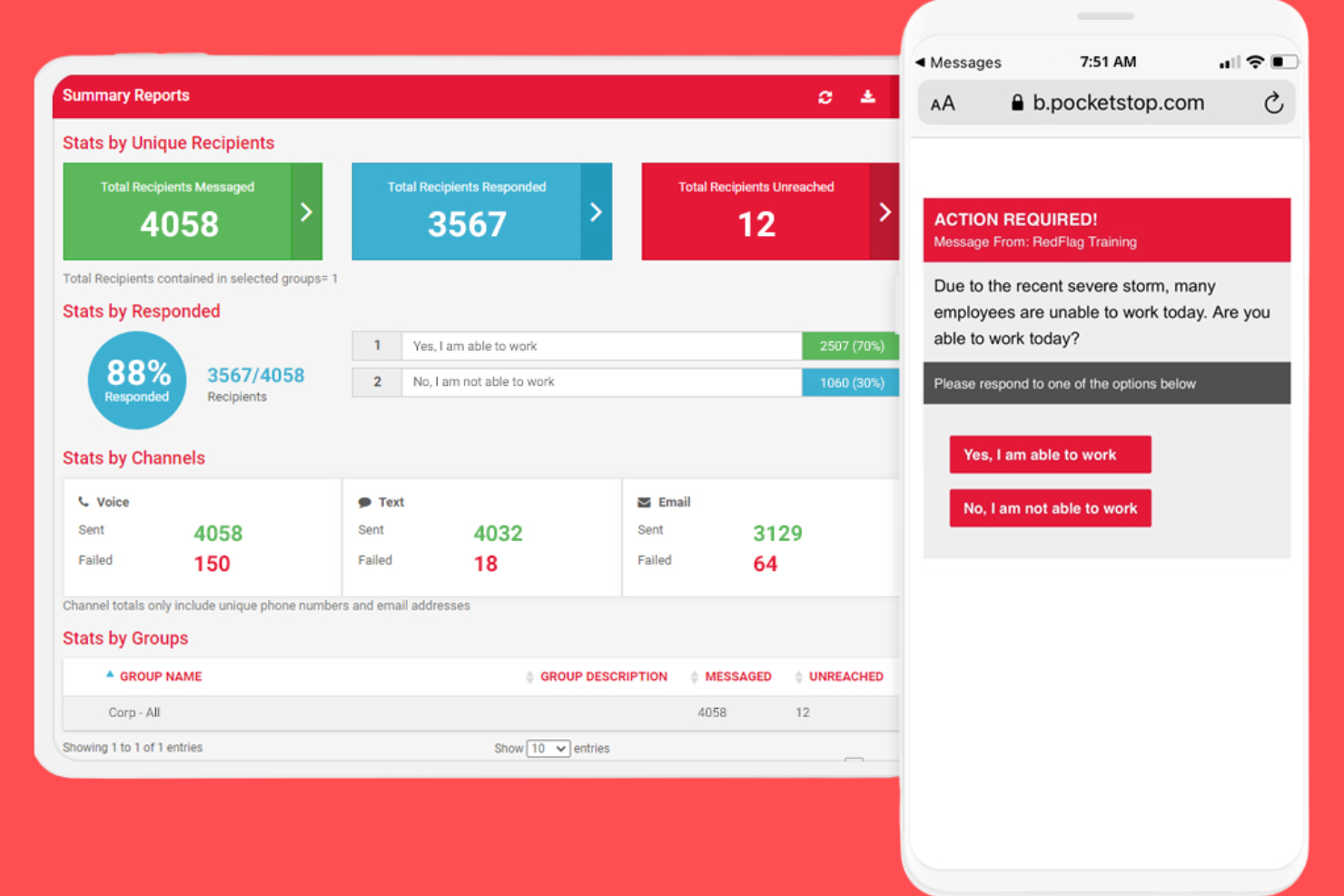
Red Flag Reporting offers a whistleblowing platform that combines a 24/7 hotline with secure web-based reporting. This solution is a strong fit for organizations that want to give employees and third parties multiple, accessible ways to report concerns. It’s especially useful for HR teams and compliance officers who need to manage reports from both phone and online channels in one place.
Why I Picked Red Flag Reporting
What drew me to Red Flag Reporting is its focus on providing both hotline and web-based submission options for whistleblowers. This dual-channel approach means employees and third parties can choose the reporting method that feels safest and most convenient for them. The platform supports anonymous reporting through both channels, which helps organizations encourage more open communication. I appreciate that Red Flag Reporting also offers 24/7 access, making it easier for users to report concerns at any time.
Red Flag Reporting Key Features
Some other features that make Red Flag Reporting stand out include:
- Case Management Portal: Lets administrators track, review, and manage all submitted reports in a secure online environment.
- Customizable Intake Forms: Allows organizations to tailor reporting forms to capture the information most relevant to their needs.
- Multilingual Support: Offers reporting and support in multiple languages to accommodate diverse workforces.
- Automated Acknowledgment Notifications: Send confirmation messages to reporters when a submission is received.
Red Flag Reporting Integrations
Native integrations are not currently listed.
Pros and Cons
Pros:
- Automated notifications sent to designated contacts
- Anonymous reporting available for all channels
- 24/7 hotline staffed by live operators
Cons:
- Case management features are basic in scope
- No mobile app for on-the-go submissions
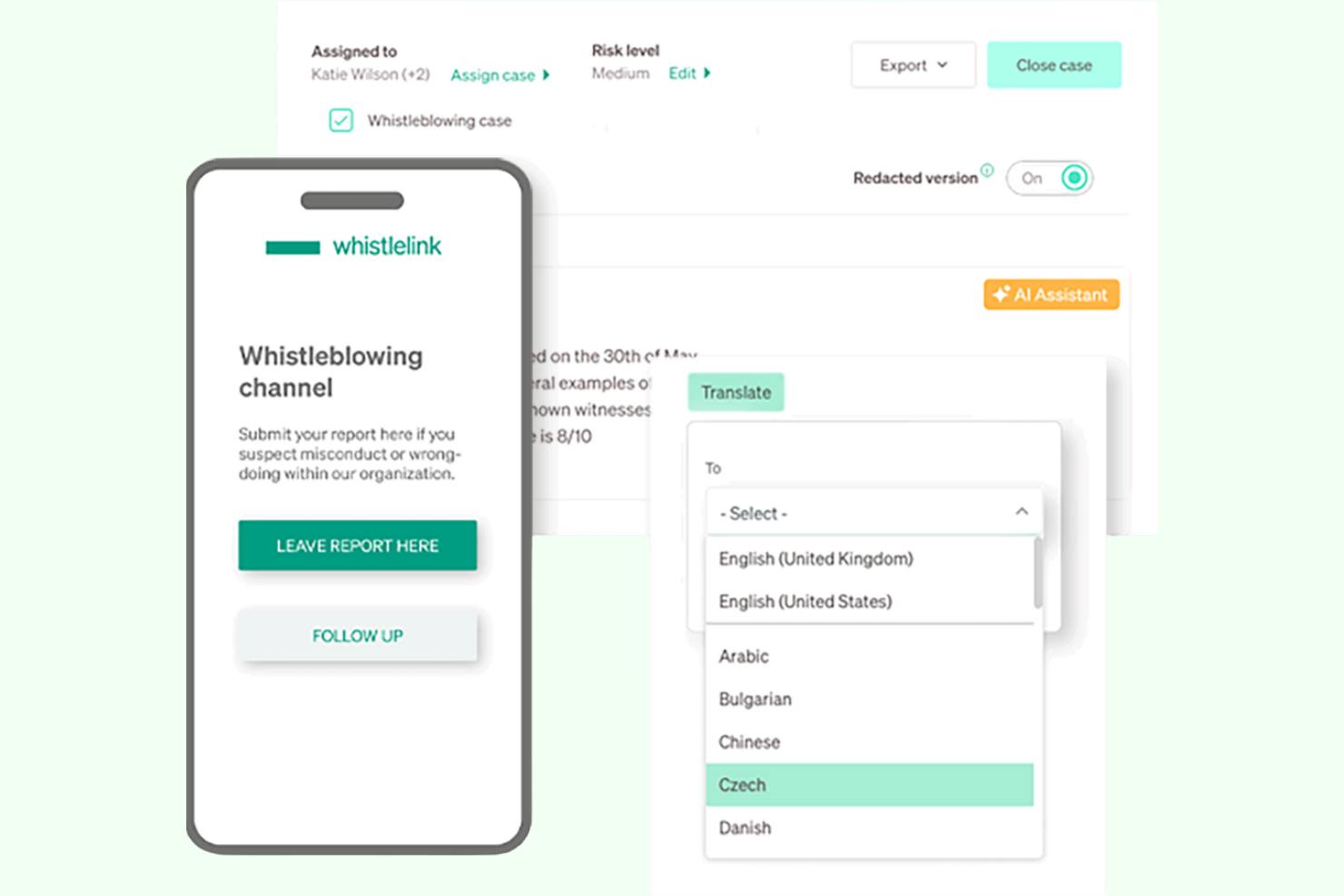
Whistlelink is designed for organizations that need to launch a whistleblowing channel quickly without a complex setup. It’s a strong choice for HR teams, compliance managers, and small to midsize businesses looking to meet regulatory requirements on tight timelines. The platform’s pre-configured workflows and simple onboarding help you get up and running in days, not weeks.
Why I Picked Whistlelink
What stands out about Whistlelink is how quickly you can get a whistleblowing channel live, even if you have limited technical resources. The platform offers pre-built templates and automated onboarding, so you can meet compliance requirements without a lengthy setup process. I picked Whistlelink because it lets you configure reporting workflows and launch your portal in just a few clicks. This makes it a practical option for organizations that need to respond to new regulations or internal policies on short notice.
Whistlelink Key Features
I also found several other features that help Whistlelink support secure and compliant reporting:
- Anonymous Two-Way Messaging: Enables ongoing, confidential communication between case managers and whistleblowers.
- Multi-Language Support: Lets users submit reports and access the portal in multiple languages.
- Role-Based Access Controls: Allows you to assign permissions and restrict access to sensitive case information.
- Automated Case Status Updates: Notifies relevant parties when there are changes or updates to a case.
Whistlelink Integrations
Native integrations are not currently listed.
Pros and Cons
Pros:
- Automated case status notifications for transparency
- Anonymous two-way messaging for follow-up
- Rapid deployment with minimal IT involvement
Cons:
- Custom branding options are restricted
- Limited advanced analytics or dashboarding

Mitratech
Best for integration with risk management systems
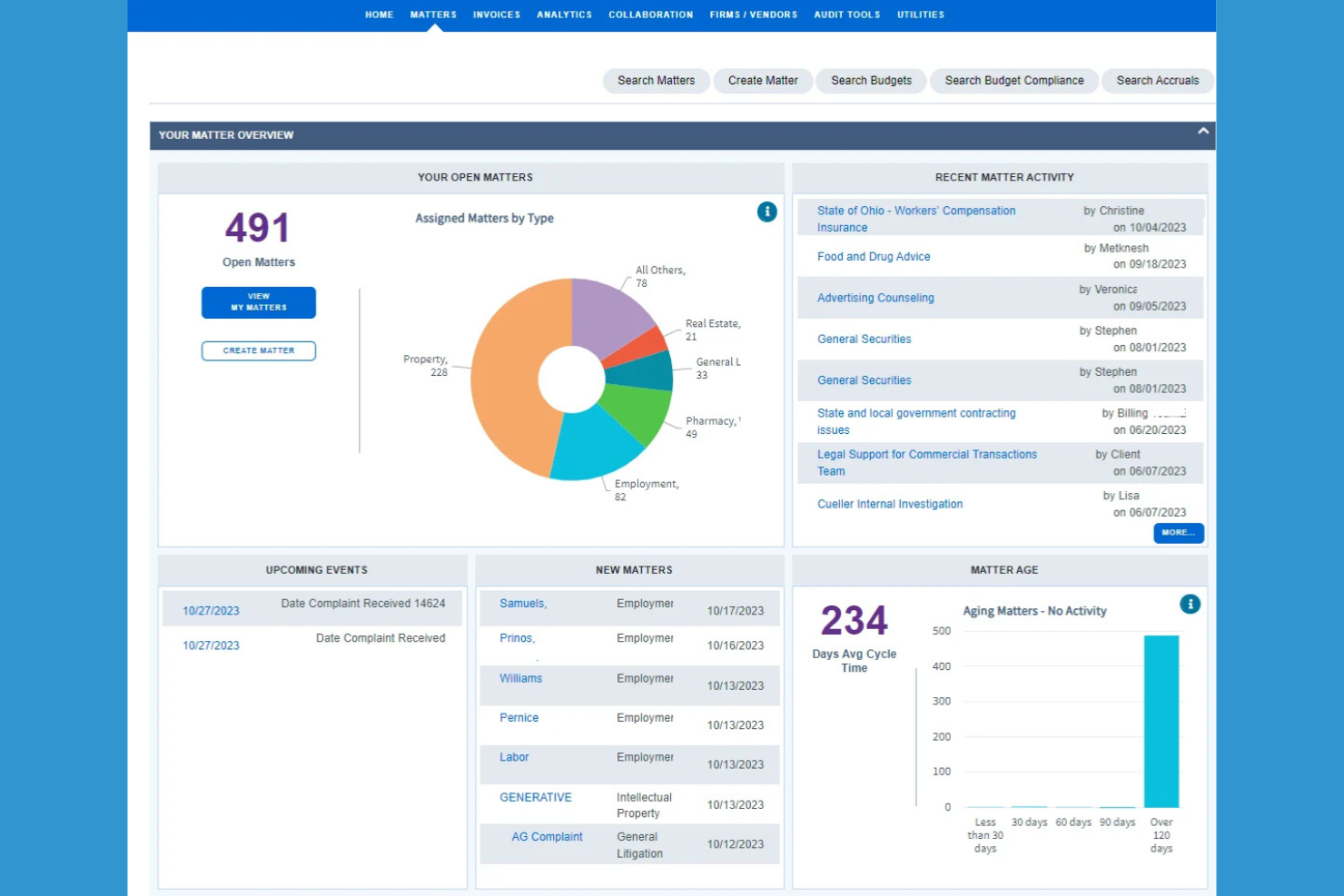
Mitratech’s ethics hotline solution is designed for organizations that want to connect whistleblowing channels directly with risk and compliance management systems. It’s especially useful for compliance teams and risk officers in regulated industries who need to centralize incident reporting and follow-up. The platform helps businesses manage reports, investigations, and risk data in one integrated environment.
Why I Picked Mitratech
Mitratech stands out for organizations that need whistleblowing software tightly connected to their risk management and compliance processes. I picked Mitratech because it lets you route reports directly into case management and risk assessment workflows, which helps compliance teams act quickly and consistently. The platform’s centralized dashboard brings together incident data, investigation status, and risk metrics in one place. This integration supports a more holistic approach to managing ethics concerns and regulatory obligations.
Mitratech Key Features
In addition to its integration with risk management systems, Mitratech offers several other features worth noting:
- Anonymous Reporting Channels: Lets employees and third parties submit concerns without revealing their identity.
- Multilingual Hotline Support: Provides reporting options in multiple languages for global teams.
- Automated Case Assignment: Routes incoming reports to the appropriate investigator or department based on predefined rules.
- Document Management: Stores and organizes evidence, correspondence, and case files within the platform.
Mitratech Integrations
Integrations include Mitratech TeamConnect, Mitratech CaseCloud, Mitratech PolicyHub, Mitratech Alyne, and more.
Pros and Cons
Pros:
- Automated case routing based on report type
- Supports multilingual reporting for global organizations
- Integrates directly with enterprise risk platforms
Cons:
- Some features require additional Mitratech modules
- Limited transparency on update release schedules
Annen programvare for varsling
Her er noen flere alternativer for programvare for varsling som ikke kom med på kortlisten min, men som likevel er verdt å undersøke:


How I Evaluate Whistleblowing Software
I evaluate tools in two layers: acceptance criteria—things like anonymous intake channels, encrypted two-way messaging, and regulatory compliance—and the differentiators that make one the right fit.
Core Functionality (Table Stakes For This List)
When I'm selecting tools for my list, I rank each one on a scale from 0 (does not offer the functionality) to 5 (excels in this area) for each core functionality listed below. Then, I calculate the tool's total score into a percentage. Each tool needs to achieve a minimum total score of 65% to be considered for inclusion.
- Anonymous Reporting Channels: I check how many intake methods are available—web forms, phone hotlines, mobile apps, QR codes—and whether each one fully protects reporter identity.
- Secure Two-Way Communication: Reporters often need to clarify details or share evidence after submitting. I look for encrypted, anonymous messaging that keeps the dialogue open.
- Case Management Workflow: Triage, assignment, investigation steps, and resolution tracking all need to live in one place. I evaluate how well each tool handles a case from intake to close.
- Regulatory Compliance Support: Tools should map to frameworks like the EU Whistleblower Directive, SOX, and GDPR with data residency and retention controls built in.
- Audit Trail & Reporting: I look for tamper-proof activity logs and configurable reporting dashboards that give compliance teams and leadership clear visibility into case outcomes.
- Role-Based Access & Confidentiality: Sensitive reports sometimes involve senior leaders. I evaluate whether the tool can route around conflicts of interest and restrict case visibility by role.
Once I have a list of tools that meet the criteria, I consider what sets each platform apart.
Differentiating Factors (What Sets Vendors Apart)
Here's how I compare and contrast different vendors:
Standout Features
Multilingual reporting matters when your workforce spans multiple countries—reporters are far more likely to come forward when they can submit in their own language. I also evaluate AI-powered triage that auto-categorizes and routes cases by severity, which makes a real difference when case volume is high. An investigator collaboration workspace with evidence lockers and interview templates helps teams manage formal investigations without juggling separate tools.
Beyond Features
Security certifications like ISO 27001 and SOC 2 Type II tell me a vendor takes data protection seriously—essential when you're handling sensitive misconduct reports. I also evaluate how well each tool connects to existing HRIS platforms and SSO providers, since a disconnected system creates friction for case handlers. Pricing transparency matters too; I look for clear per-employee or flat-rate models that include hotline staffing and translation rather than hiding them behind add-on fees.
Slik velger du programvare for varsling
Det er lett å gå seg vill i lange funksjonslister og kompliserte prisstrukturer. For å hjelpe deg med å holde fokus mens du arbeider deg gjennom den unike prosessen med å velge programvare, får du her en sjekkliste over faktorer du bør ha i tankene:
| Faktor | Hva du bør vurdere |
|---|---|
| Skalerbarhet | Vil programvaren håndtere dagens og fremtidens rapporteringsvolum? Ta høyde for vekst, fusjoner eller nye lokasjoner. |
| Integrasjoner | Kan verktøyet kobles direkte til HRIS-systemet, saksbehandlingssystemet eller plattformene for etterlevelse? Unngå manuell dataregistrering. |
| Tilpasningsmuligheter | Kan du tilpasse arbeidsflyter, inntaksskjemaer og varsler slik at de samsvarer med retningslinjene og rapporteringsstrukturen din? |
| Brukervennlighet | Vil både ansatte og administratorer oppleve grensesnittet som tydelig og tilgjengelig? Test med en liten gruppe før utrulling. |
| Implementering og innføring | Hvor lang tid tar oppsettet, og hvilke ressurser kreves? Se etter tydelige tidsplaner, støtte ved migrering og opplæring. |
| Kostnad | Er prisnivåene transparente og forutsigbare? Vær oppmerksom på ekstra gebyrer for brukere, saker eller avanserte funksjoner. |
| Sikkerhetstiltak | Tilbyr leverandøren kryptering, tilgangskontroller og revisjonslogger? Spør om sertifiseringer og hvor dataene lagres. |
| Krav til etterlevelse | Støtter programvaren de spesifikke regulatoriske forpliktelsene dine (f.eks. EUs varslerdirektiv, SOX)? Avklar dette med juridisk avdeling eller etterlevelsesansvarlige. |
Hva er programvare for varsling?
Varslingsprogramvare er et digitalt varslingssystem som gjør det mulig for ansatte og interessenter å sende inn varsler om kritikkverdige forhold, uetisk atferd eller brudd på regler og krav på en sikker og ofte anonym måte. Disse samsvarsløsningene støtter et bredere varslingsprogram og hjelper organisasjoner med å opprettholde et trygt og transparent arbeidsmiljø. De omfatter funksjoner som et sikkert rapporteringssystem, hendelseshåndtering og beskyttelsestiltak som varslerbeskyttelse og ende-til-ende-kryptering for å beskytte personopplysninger og sikre personvern. Mange plattformer er brukervennlige, tilbyr en god brukeropplevelse og kan inkludere KI-drevne verktøy for å effektivisere undersøkelser og redusere risiko knyttet til tredjeparter. Disse verktøyene brukes av HR-, juridiske- og samsvarsteam, styrker virksomhetens samsvarsprogram og tilbyr en pålitelig varslingsløsning for ansvarlig håndtering av sensitive varsler.
Funksjoner i varslingsprogramvare
Når du velger varslingsprogramvare, bør du se etter følgende nøkkelfunksjoner:
- Anonym varsling: Gjør det mulig for personer å sende inn bekymringer eller varsler uten å avsløre identiteten sin, noe som oppmuntrer flere til å si fra.
- Saksbehandling: Tilbyr verktøy for å spore, tildele og løse innrapporterte saker, slik at ingenting blir oversett.
- Rollebasert tilgangskontroll: Begrens tilgang til sensitiv informasjon basert på brukerroller, og beskytter konfidensialitet og dataintegritet.
- Toveis kommunikasjon: Gjør det mulig å opprettholde en sikker og løpende dialog mellom varsleren og etterforskerne, samtidig som anonymiteten bevares ved behov.
- Revisjonsspor: Logger automatisk alle handlinger som utføres i systemet, noe som støtter åpenhet og samsvar under undersøkelser.
- Flerspråklig støtte: Tilbyr grensesnitt og varslingsskjemaer på flere språk for å imøtekomme en mangfoldig arbeidsstyrke.
- Automatiserte varsler: Sender varsler og oppdateringer til relevante parter når en sak sendes inn, oppdateres eller lukkes.
- Opplasting og lagring av dokumenter: Lar brukere legge ved bevis eller støttedokumenter til varsler, slik at alt sakrelatert materiale samles på ett sted.
- Tilpassbare inntaksskjemaer: Gjør det mulig for organisasjoner å tilpasse varslingsskjemaer slik at de samler inn den spesifikke informasjonen som trengs til undersøkelser.
- Samsvarsrapportering: Genererer rapporter og dokumentasjon som hjelper organisasjoner med å oppfylle regulatoriske krav og dokumentere tilbørlig aktsomhet.
Fordeler med varslingsprogramvare
Implementering av varslingsprogramvare gir flere fordeler for teamet og virksomheten din. Her er noen av fordelene du kan se frem til:
- Større trygghet ved varsling: Anonyme kanaler og sikker håndtering av data oppmuntrer ansatte til å rapportere bekymringer uten frykt for represalier.
- Raskere saksbehandling: Sentralisert saksbehandling og automatiserte varsler hjelper team med å spore, tildele og løse varsler effektivt.
- Støtte for regulatorisk samsvar: Innebygd samsvarsrapportering og revisjonsspor gjør det enklere å oppfylle juridiske forpliktelser og dokumentere tilbørlig aktsomhet.
- Forbedret datasikkerhet: Rollebasert tilgangskontroll og kryptering beskytter sensitiv informasjon gjennom hele varslings- og undersøkelsesprosessen.
- Større åpenhet i organisasjonen: Revisjonslogger og tydelige arbeidsflyter fremmer ansvarlighet og bidrar til en åpenhetskultur.
- Tilgjengelighet for en global arbeidsstyrke: Flerspråklig støtte og tilpassbare skjemaer sikrer at alle ansatte kan rapportere problemer, uavhengig av hvor de befinner seg eller hvilket språk de snakker.
- Konsekvent håndheving av prosesser: Tilpassbare arbeidsflyter og inntaksskjemaer standardiserer hvordan varsler håndteres, og reduserer risikoen for feil eller skjevhet.
Kostnader og priser for varslingsprogramvare
Valg av varslingsprogramvare krever en forståelse av de ulike prismodellene og abonnementene som er tilgjengelige. Kostnadene varierer basert på funksjoner, teamstørrelse, tillegg og mer. Tabellen nedenfor oppsummerer vanlige abonnementer, gjennomsnittsprisene deres og typiske funksjoner som inngår i varslingsprogramvareløsninger:
Sammenligningstabell for abonnementer for varslingsprogramvare
| Prisplan | Gjennomsnittspris | Vanlige funksjoner |
|---|---|---|
| Gratisabonnement | $0 | Grunnleggende anonym rapportering, begrenset saksbehandling, e-postvarsler og grunnleggende datalagring. |
| Privatabonnement | $10–$25/per bruker/måned | Anonym rapportering, saksoppfølging, rollebasert tilgang, grunnleggende samsvarsverktøy og e-poststøtte. |
| Forretningsabonnement | $30–$60/per bruker/måned | Avansert saksbehandling, tilpassbare arbeidsflyter, revisjonsspor, støtte for flere språk og analyseverktøy. |
| Storbedriftsabonnement | $70–$150/per bruker/måned | Alle forretningsfunksjoner, egendefinerte integrasjoner, avansert sikkerhet, dedikert støtte og samsvarsrapportering. |
Vanlige spørsmål om varslingsprogramvare
Her er noen svar på vanlige spørsmål om varslingsprogramvare:
Hvordan sikrer organisasjoner anonymiteten til varslere?
Organisasjoner bruker krypterte rapporteringskanaler og fjerner identifiserende informasjon fra innsendinger. Mange plattformer tillater også anonym kommunikasjon begge veier, slik at oppfølgingsspørsmål kan stilles uten å avsløre varslerens identitet.
Kan varslingsprogramvare bidra til å oppfylle lovpålagte samsvarskrav?
Ja, de fleste varslingsprogrammer inneholder funksjoner som er utviklet for å støtte samsvar med regelverk som EUs varslingsdirektiv eller SOX. Disse funksjonene omfatter revisjonsspor, sikker datalagring og automatisert samsvarsrapportering.
Hvilke typer hendelser kan rapporteres gjennom varslingsprogramvare?
Varslingsprogramvare kan brukes til å rapportere et bredt spekter av problemer, blant annet bedrageri, trakassering, diskriminering, sikkerhetsbrudd og etiske bekymringer. Organisasjoner kan tilpasse inntaksskjemaer for å registrere de spesifikke hendelsestypene som er relevante for retningslinjene deres.
Hvor lang tid tar det å implementere varslingsprogramvare?
Tidsrammen for implementering varierer, men mange løsninger kan settes opp i løpet av noen dager til noen uker. Faktorer inkluderer behov for datamigrering, kompleksiteten i integrasjonene og tilgjengeligheten av ressurser for innføring, som opplæring og maler.
Passer varslingsprogramvare for små organisasjoner?
Ja, mange leverandører tilbyr abonnementer og funksjoner som er skreddersydd for små organisasjoner, inkludert kostnadsfrie alternativer eller alternativer til lav pris. Disse løsningene tilbyr vanligvis grunnleggende funksjoner for rapportering og saksbehandling uten å kreve omfattende IT-ressurser.