

10 beste verktøy for å sjekke skjevhet i stillingsannonser i 2026

Beste skjevhetssjekkere for stillingsbeskrivelser – kortliste


En skjevhetssjekker for stillingsbeskrivelser er et verktøy som skanner stillingsannonsene dine for skjev eller ekskluderende språk før de når kandidatene. Hvis du vil tiltrekke deg et mangfoldig og kvalifisert team og redusere utilsiktede barrierer i ansettelsesprosessen, utgjør det riktige verktøyet hele forskjellen.
Denne veiledningen dekker hva de beste skjevhetssjekkerne tilbyr, hvorfor ledende HR-team bruker dem, og hvordan du kan bruke disse løsningene til å skrive stillingsbeskrivelser som fremmer rettferdighet, samsvar og inkludering i 2026.
Hvorfor du kan stole på våre programvareanbefalinger
Teamet vårt har testet og anmeldt programvare siden 2012. Vi er selv HR-eksperter, så vi vet hvor vanskelig og hvor viktig det er å velge riktig programvare.
I denne guiden har vi vurdert verktøyene gjennom praktisk testing og uavhengig research og gitt dem poeng ut fra våre utvelgelseskriterier. Vi bygger også på innsikt fra ledende eksperter i bransjen og erfarne HR-eksperter.
Anmeldelsene våre bygger på vår egen redaksjonelle vurdering. De er ikke et salgsargument.
Ekspertanmeldere:
Sammenligningstabell for skjevhetssjekkere for stillingsbeskrivelser
Denne sammenligningstabellen oppsummerer prisopplysningene for skjevhetssjekkeren for stillingsbeskrivelser:
| Tool | Best For | Trial Info | Price | ||
|---|---|---|---|---|---|
| 1 | Best for interview-informed JD bias checks | Free plan available | From $100/user/month | Website | |
| 2 | Best for pay-informed JD bias checks at scale | Free plan + free demo available | Pricing upon request | Website | |
| 3 | Best for research-backed, multi-category bias checks | Free demo available | From $20,000/year (billed annually) | Website | |
| 4 | Best for full-cycle DEI hiring in staffing firms | Not available | Pricing upon request | Website | |
| 5 | Best for tailored language compliance monitoring | Free demo available | Pricing upon request | Website | |
| 6 | Best for third-party-certified AI bias governance | Free demo available | From $28,000/year (billed annually) | Website | |
| 7 | Best for data-driven 8-category bias detection | Free demo available | Pricing upon request | Website | |
| 8 | Best for outcome-tied inclusive language coaching | Free demo available | Pricing upon request | Website | |
| 9 | Best for automated writing guidance at scale | Free demo available | From $4,900/year | Website | |
| 10 | Best for science-backed subtle bias detection | Free demo available | Pricing upon request | Website |
Anmeldelser av de beste skjevhetssjekkerne for stillingsbeskrivelser
Nedenfor finner du mine detaljerte sammendrag av de beste verktøyene for skjevhetssjekking av stillingsbeskrivelser som kom med på kortlisten min. Anmeldelsene mine gir en detaljert gjennomgang av funksjonene, integrasjonene og de beste bruksområdene for hvert verktøy, slik at du kan finne det beste alternativet for deg.

Metaview
Best for interview-informed JD bias checks
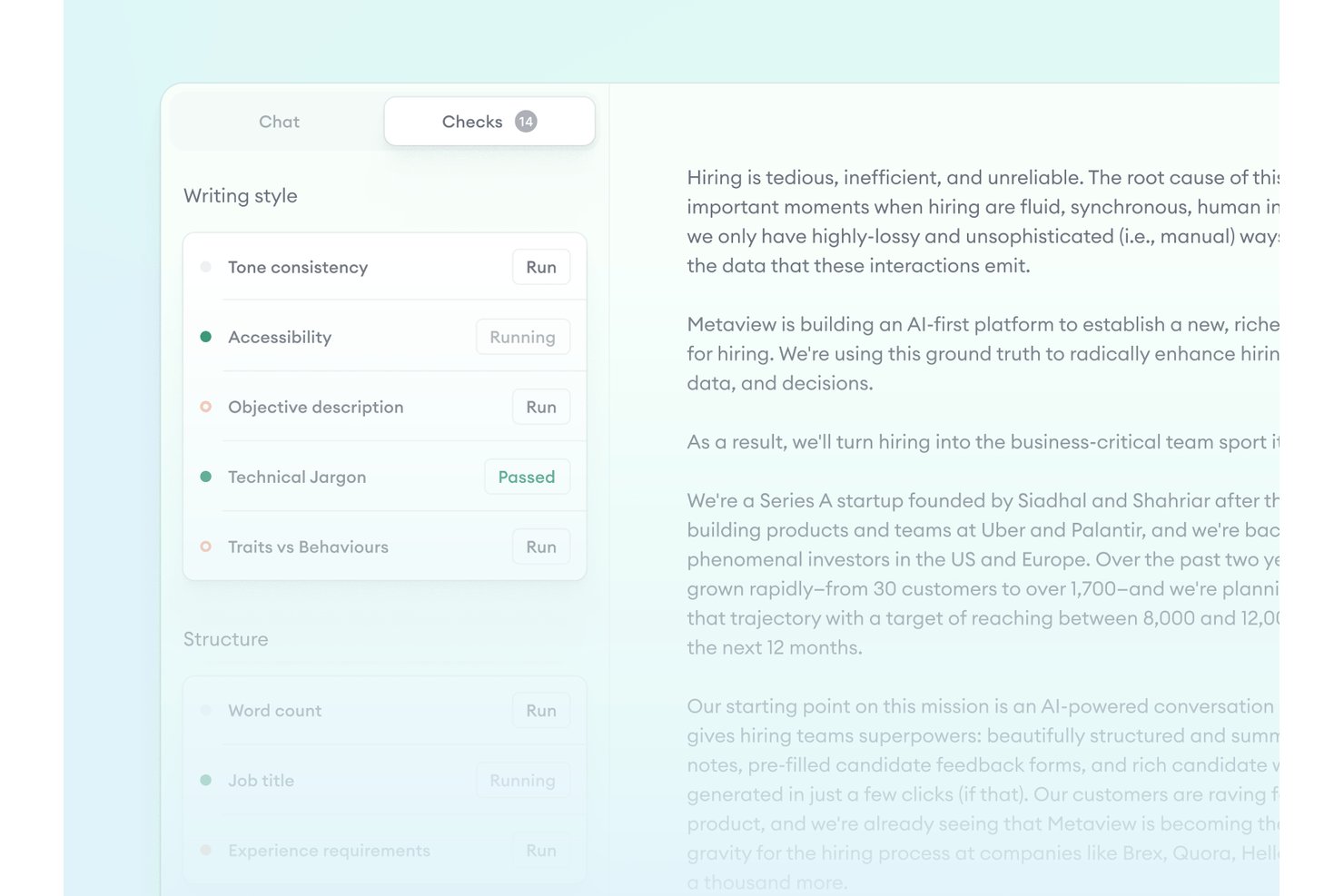
Metaview is an agentic recruiting platform with a Job Posts feature that flags gendered language, non-inclusive terms, and overly competitive phrasing in job descriptions while cross-referencing posts against interview scorecards and intake calls.
Who Is Metaview Best For?
Metaview suits talent acquisition teams that want job description bias checks tied directly to intake calls and interview scorecards, rather than a standalone editing tool.
Why I Picked Metaview
I picked Metaview as one of the best because of its interview-informed approach to JD bias checks, which no other tool on this list replicates. The Job Posts feature cross-references live and draft job descriptions against intake call recordings and scorecards, flagging gaps where a hiring manager's stated requirements don't match what's actually posted. It also catches gendered language, non-inclusive terms, and overly competitive phrasing while enforcing your brand voice so rewrites stay on-tone.
Metaview Key Features
- Brand voice enforcement: The AI learns your company's employer value proposition and tone, so any bias-related rewrites stay on-brand rather than generic.
- ATS write-back: Metaview pushes updated job post data directly back into connected ATS platforms, including Greenhouse, Lever, and Ashby.
- Customizable checks: Teams can configure which DEI and quality checks apply to their job posts based on internal standards.
- Multilingual job post support: The platform supports 50+ languages, letting global teams run checks on job descriptions written outside of English.
Metaview Integrations
Metaview has 47+ native ATS integrations, including Greenhouse, Lever, Workday, Ashby, iCIMS, SmartRecruiters, and SAP SuccessFactors. ATS write-back is supported for Ashby, Greenhouse, and Lever; no public API is currently listed.
Pros and Cons
Pros:
- Checks job posts in 50+ languages
- Customizes bias suggestions to your brand voice
- Flags language based on interview insights
Cons:
- Limited coverage of bias categories beyond gender
- No numeric bias scores or DEI dashboard
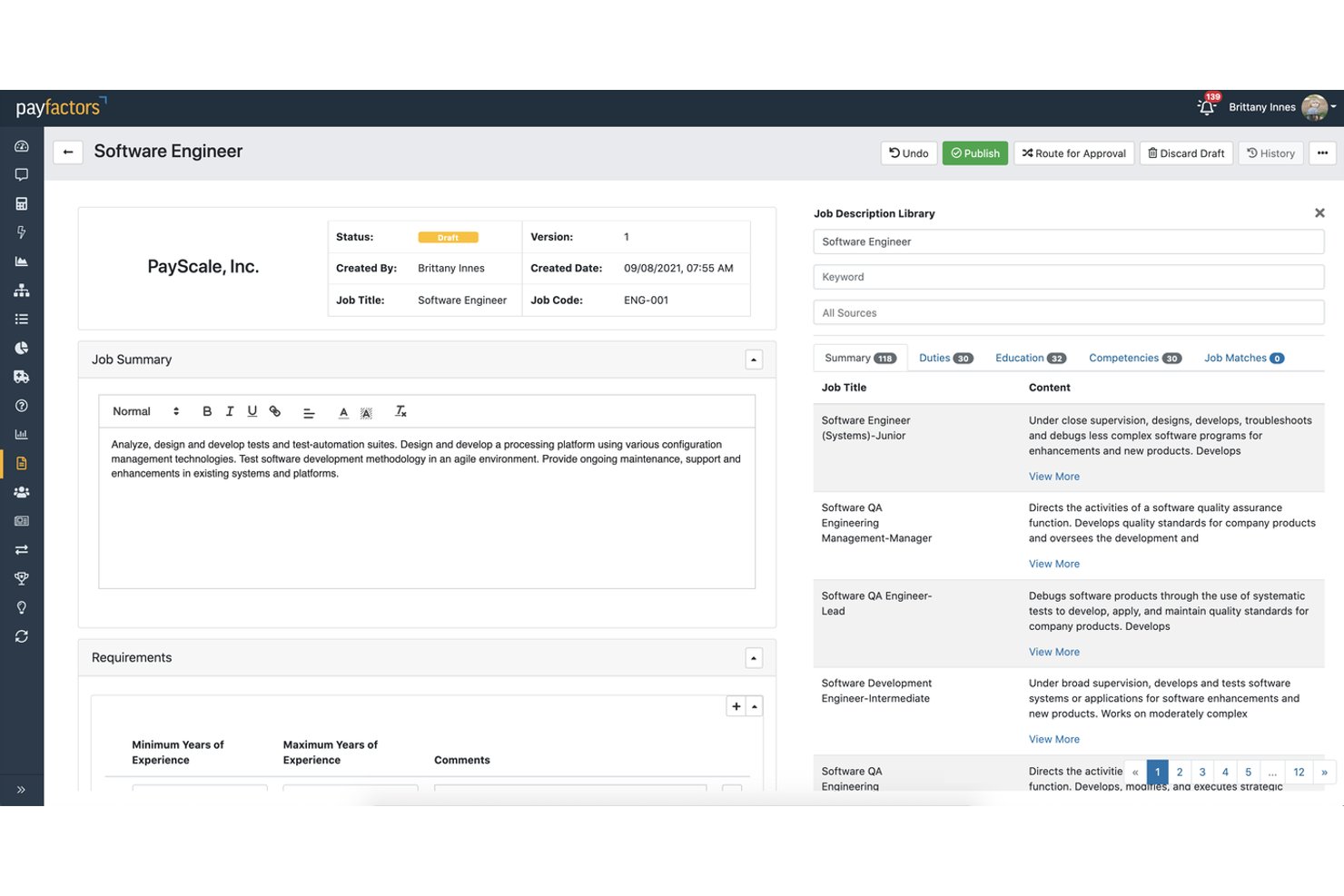
Payscale is a compensation intelligence platform that, through its JobNav Recruiter module, combines AI-guided job description scoring, inclusive language generation, and multi-country compliance checks to help enterprise teams create and manage job postings at scale.
Who Is Payscale Best For?
Payscale is a strong fit for enterprise TA and HR teams that need inclusive JD creation, pay transparency compliance, and compensation alignment in a single workflow.
Why I Picked Payscale
I picked Payscale as one of the best because no other tool on this list ties pay transparency compliance directly into the JD bias review process. When your team is writing a posting, JobNav Recruiter scores it across inclusivity, compliance, and clarity simultaneously, so you're catching biased language and illegal pay omissions in the same pass. I especially like that it's built on data from over 100 million jobs, which gives the AI-generated rewrites real market grounding rather than generic substitutions.
Payscale Key Features
- AI job description scoring: Evaluates each JD across inclusivity, compliance, and clarity simultaneously before the posting goes live.
- Governed job architecture: Locks job levels, families, and a mapped skills library to enforce consistent, inclusive language across all postings.
- Greenhouse bidirectional sync: Automatically syncs job content between JobNav Recruiter and Greenhouse every 20 minutes, keeping postings consistent across platforms.
- Multi-country compliance checks: Automatically flags pay transparency and regulatory requirements across 80+ countries, including US state-level laws and the EU Directive.
Payscale Integrations
Payscale offers a native bidirectional Greenhouse integration, references Workday connectivity, and provides 14 HRIS integrations through its Partner Marketplace. Its API supports custom integrations.
Pros and Cons
Pros:
- Generates inclusive language from job architecture
- Scores job descriptions before posting live
- Flags pay transparency and compliance issues
Cons:
- Not a dedicated standalone bias checker
- Bias categories not specifically broken out

Best for research-backed, multi-category bias checks
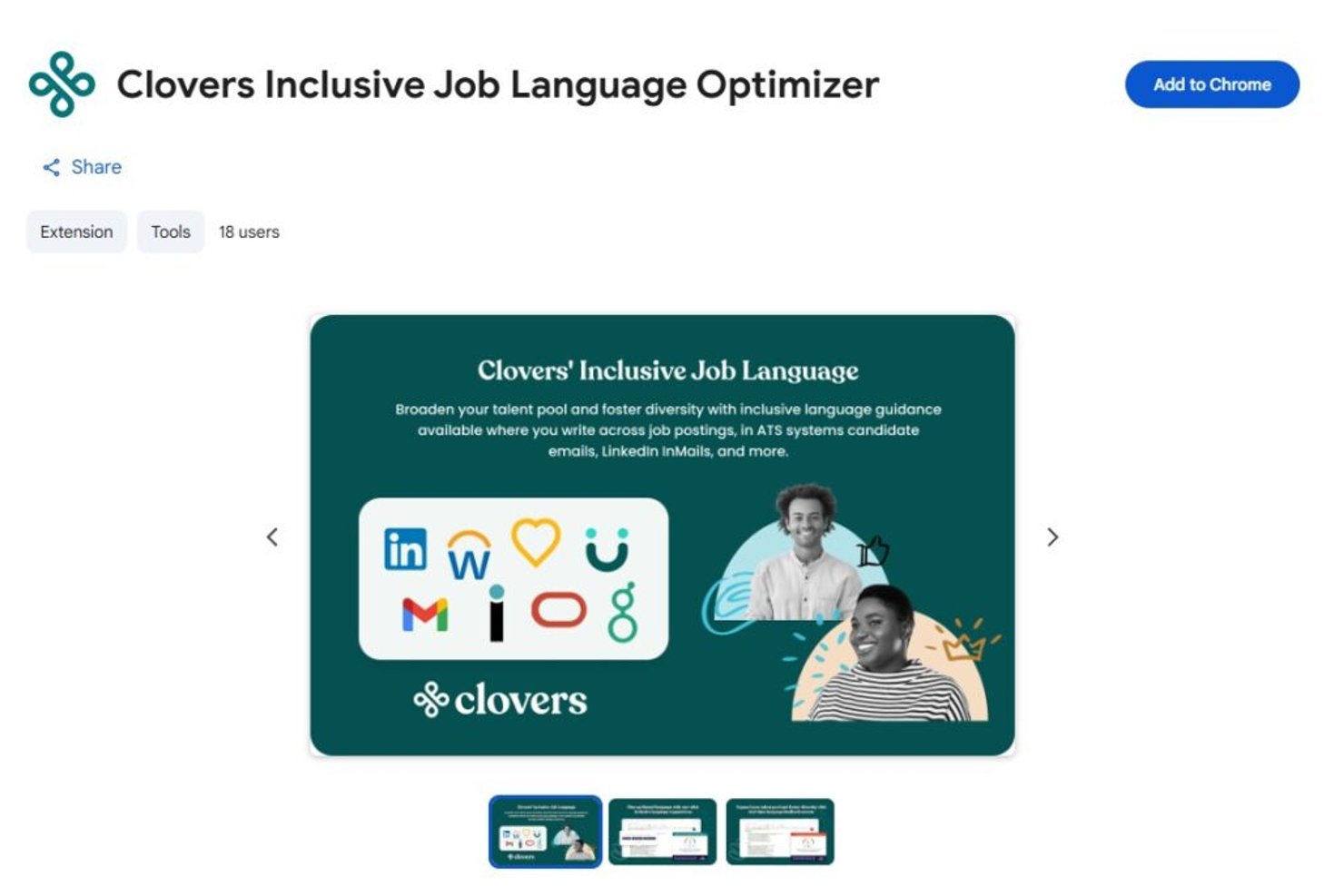
Clovers AI is a job description bias checker and inclusive hiring platform that combines a research-validated language optimization engine with an AI-powered job description editor, multi-category bias scoring, and a Chrome extension for in-browser editing.
Who Is Clovers AI Best For?
Clovers AI is a strong fit for enterprise talent acquisition teams that need bias detection grounded in peer-reviewed research across multiple protected categories.
Why I Picked Clovers AI
I picked Clovers AI because its bias detection engine is one of the few I've seen grounded in actual peer-reviewed research, specifically a Duke University study that informs how it flags language across six protected categories: gender, race, ethnicity, disability, veteran status, and LGBTQ+ identity. The Chrome extension checks language in real time, directly inside whatever tool you're already writing in, so there's no copy-paste step slowing you down. I also think the live inclusion score, which updates as you edit, gives recruiters immediate, concrete feedback rather than a vague pass/fail result.
Clovers AI Key Features
- ATS integrations: Connects natively with 12+ ATS and HRIS platforms, including Greenhouse, Workday, Lever, and SAP SuccessFactors, with two-way sync support.
- Chrome extension: Checks job description language for bias directly in your browser, across ATS platforms, Google Docs, and email, without copy-pasting text.
- Closed-loop hiring workflow: Combines job description optimization with structured interview question generation and interview transcription, covering bias detection across the full hiring process.
- SOC 2 Type II and GDPR compliance: Meets enterprise security and data privacy requirements out of the box.
Clovers AI Integrations
Clovers AI offers 12+ native ATS and HRIS integrations, including Greenhouse, Workday, Lever, and SAP SuccessFactors. It also supports two-way sync, SSO, and API access for custom integrations.
Pros and Cons
Pros:
- Inclusion score updates as you edit
- Chrome extension checks JDs in real time
- Flags bias across six protected categories
Cons:
- Limited in-app coaching on language choices
- No feature for pay transparency compliance
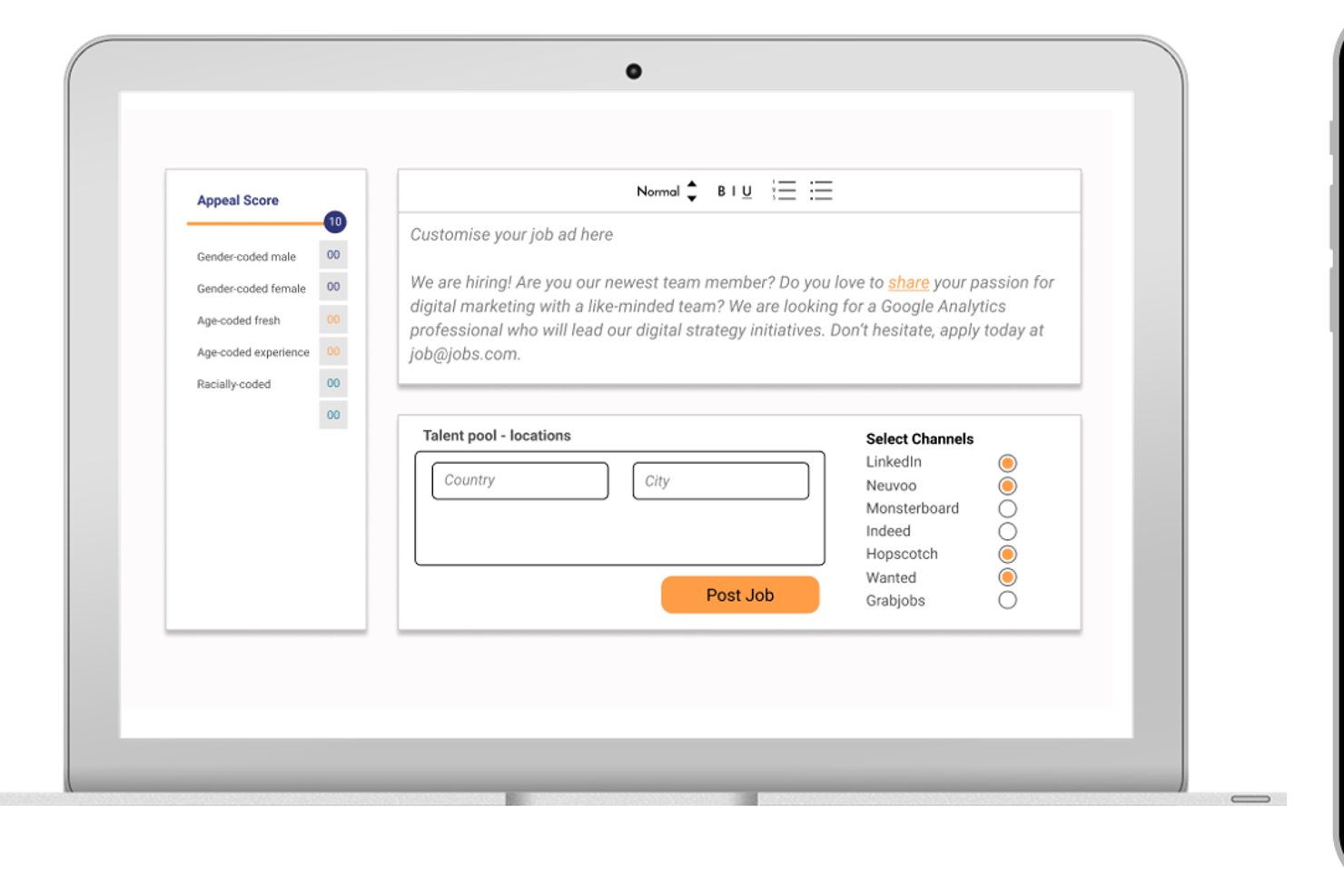
Diversely.io is a DEI recruiting platform that combines an AI-powered job ad bias analyser, anonymized candidate screening, diversity-focused job board distribution, and multi-dimensional diversity tracking across up to eight demographic dimensions.
Who Is Diversely.io Best For?
Diversely.io is a strong fit for staffing firms and recruitment agencies that want to embed DEI practices across the full hiring cycle, from job ad writing to candidate screening.
Why I Picked Diversely.io
I've included Diversely.io in my top picks because it goes well beyond a standalone bias checker, covering the full hiring cycle from job ad analysis to anonymized screening and DEI reporting. I especially like how the AI-powered Bias Analyser doesn't just flag gendered or exclusionary language; it actively suggests inclusive rewrites, which is exactly what staffing firms need when processing high volumes of job ads across multiple clients. The platform also tracks up to eight diversity dimensions, including socioeconomic status, and distributes postings to niche diversity job boards to actively broaden candidate pools.
Diversely.io Key Features
- Profile anonymiser: Automatically rewrites candidate profiles to remove identifying details like name, age, and school, leaving only skills-relevant content for shortlisting.
- Niche job board distribution: Posts job ads to diversity-specific and niche job boards globally to reach underrepresented candidate pools.
- Customizable diversity dashboard: Tracks hiring diversity data in real time, with filters by country, department, and role, plus Excel export for reporting.
- ATS integrations: Connects natively with Greenhouse, JobAdder, Bullhorn, SAP SuccessFactors, and Recruitee to embed DEI tracking directly into existing hiring workflows.
Diversely.io Integrations
Diversely.io has native integrations with Greenhouse, JobAdder, Bullhorn, SAP SuccessFactors, and Recruitee. Bryq, Crelate, Access Volcanic, and an API support additional connections.
Pros and Cons
Pros:
- Anonymizes profiles for fairer candidate review
- AI suggests inclusive rewrites for job ads
- Tracks up to eight diversity dimensions
Cons:
- No pay transparency compliance flagging
- Not available as a standalone product
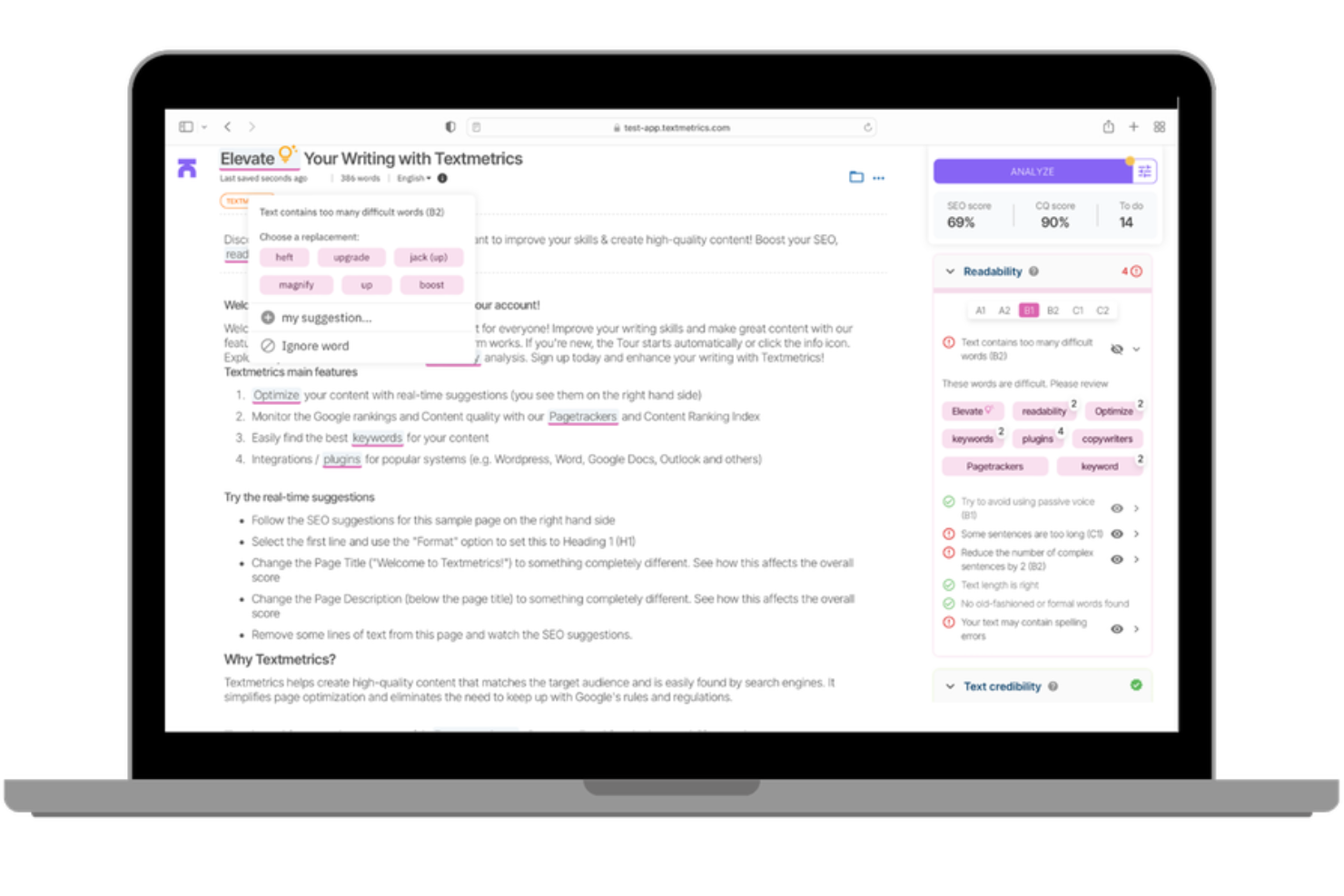
An AI-powered content compliance platform, Textmetrics scans job descriptions for gender bias, inclusive language issues, and readability gaps using configurable rules your organization sets.
Who Is Textmetrics Best For?
Textmetrics is a good fit for HR and employer branding teams in regulated industries where inclusive language in job postings needs to align with internal DEI policies or regional compliance standards.
Why I Picked Textmetrics
Textmetrics is one of my top picks because I love that it builds language compliance into the writing process itself, not just as a post-draft review. The custom word list feature lets my team flag or block specific terms that conflict with our inclusion standards, which I find more practical than relying on a generic ruleset.
I also use the multi-language support to apply the same compliance standards across postings written in different languages, keeping our standards consistent globally.
Textmetrics Key Features
- Gender bias score: Rates each job posting on a male-to-female language scale so you can see at a glance how gendered your text reads.
- Readability scoring: Analyzes text complexity against a target reading level to keep job postings accessible to a wider candidate pool.
- Tone of voice checker: Compares your writing against predefined brand voice guidelines to keep postings consistent across authors.
- ATS plugin integration: Embeds the writing assistant directly into your existing ATS so writers get compliance feedback without switching tools.
Textmetrics Integrations
Integrations include Greenhouse, SmartRecruiters, Lever by Employ, Recruitee, Pinpoint, Ubeeo, WordPress, Drupal, Optimizely, and Adobe Experience Manager.
Pros and Cons
Pros:
- Real-time inclusivity suggestions while you write
- Offers extensive multilingual support
- Broad scope of identity checks
Cons:
- No auto-apply for suggested text changes
- Limited accuracy with complex non-English grammar

X0PA AI
Best for third-party-certified AI bias governance
X0PA AI is an AI-powered recruiting platform that embeds bias detection directly into its job description generator, scanning for gendered, racial, ethnic, and cultural language across 72+ languages with inclusive rewrite suggestions built into the creation flow.
Who Is X0PA AI Best For?
X0PA AI suits multinational enterprise teams that need job description bias checks across dozens of languages and regions within a single recruiting platform.
Why I Picked X0PA AI
I picked X0PA AI as one of the best because no other tool on this list scans for gendered, racial, ethnic, and cultural bias across 72+ languages, which matters when you're hiring across regions where language nuance shifts dramatically. The bias detection is baked into the JD generation flow, so inclusive rewrites happen during drafting, not after. It's also the only tool here with independent AI fairness certifications from Singapore's IMDA and Dubai's AI Center, giving enterprise DEI teams third-party validation beyond vendor self-reporting.
X0PA AI Key Features
- EEO statement auto-inclusion: The generator automatically embeds EEO and compliance statements into every job description it produces.
- Unlimited JD variants: You can generate multiple versions of a job description for A/B testing or platform-specific publishing.
- Adverse impact calculator: A built-in tool quantifies hiring bias across gender and race/ethnicity using the EEOC Four-Fifths Rule.
- One-click job board publishing: Completed job descriptions publish directly to 2,000+ job boards from within the platform.
X0PA AI Integrations
X0PA AI offers 60+ pre-built integrations, including Greenhouse, Workday, SAP SuccessFactors, Oracle HCM, Lever, SmartRecruiters, Taleo, and Jobvite. Its API supports custom connectors for additional HR systems.
Pros and Cons
Pros:
- Embedded inclusive rewrites during JD drafting
- Bias checks in 72+ languages and regions
- Certified for fairness by independent AI bodies
Cons:
- No standalone option for job description scanning
- Only available within larger recruiting platform

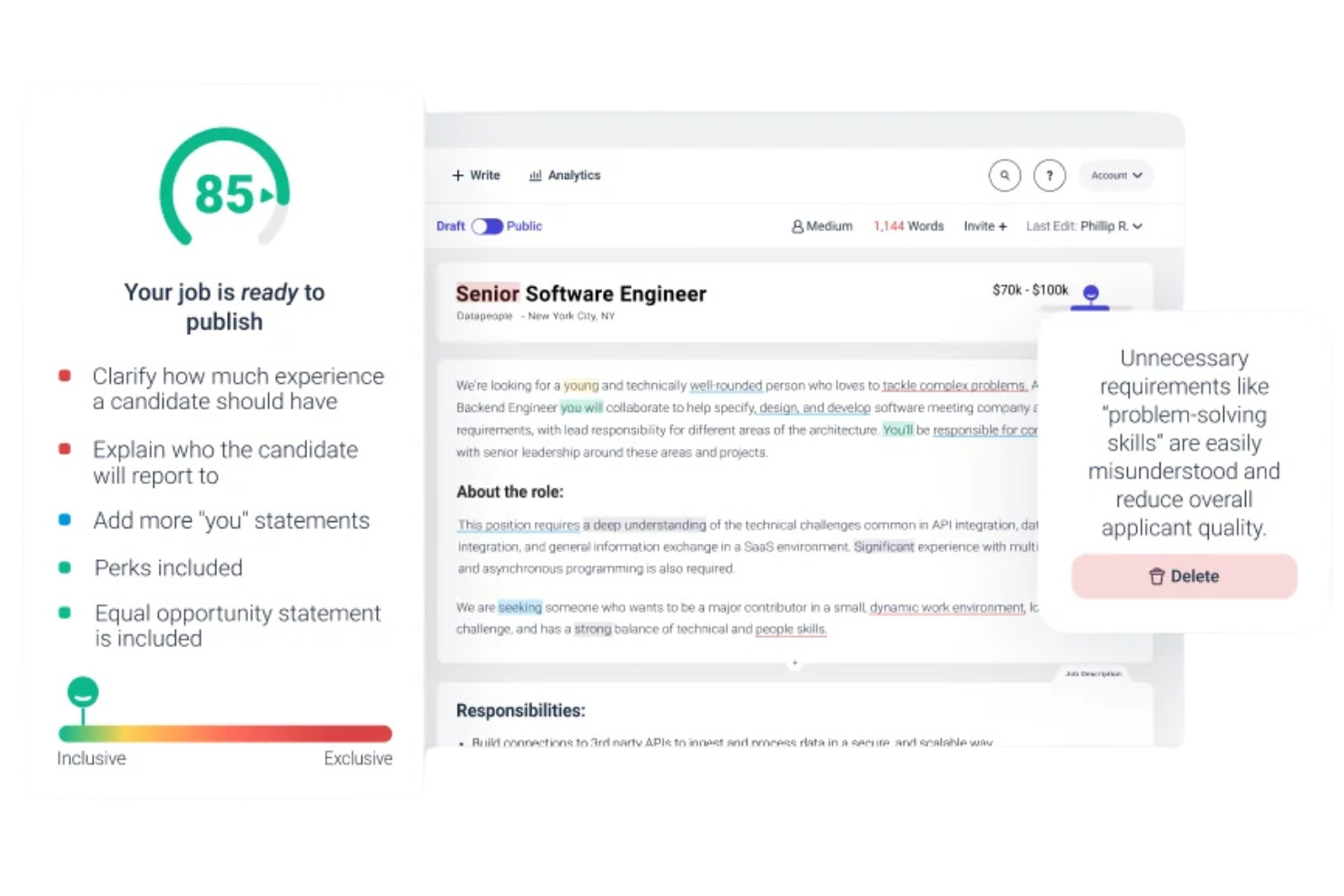
Datapeople is a job description optimization platform that combines talent-focused AI, bias and language scoring, template management, and policy controls to help teams write, standardize, and publish job ads.
Who Is Datapeople Best For?
Datapeople is a strong fit for recruiting teams and talent operations leaders who need data-backed visibility into how job description language affects candidate attraction.
Why I Picked Datapeople
I've included Datapeople in my top picks because the language analytics are genuinely differentiated from what I see in most other tools. Rather than a single bias score, Datapeople uses a colour-coded five-category system, flagging eight specific bias types in yellow, removing harmful content in red, and reinforcing good language choices in green.
My team can see exactly what kind of problem each flag represents, which makes corrections faster and more consistent. I also rely on the competitive job benchmarking feature, which lets you compare your posting against similar open roles from local talent competitors.
Datapeople Key Features
- Policy and style guides: Configure custom rules for tone, required content sections, and employer brand guidelines that apply across every job description your team publishes.
- AI first draft generation: Produces an initial job description draft using talent-trained AI, pulling from a dataset of over 100 million jobs and outcomes.
- Requirements analysis: Flags requirement combinations, degree mandates, and overloaded tech stacks that are likely to narrow or deter qualified applicants.
- Browser overlay: Surfaces real-time Datapeople guidance directly inside your ATS, so hiring managers can write and edit without leaving their existing workflow.
Datapeople Integrations
Datapeople offers native ATS integrations with Greenhouse, Lever, Workday, iCIMS, SmartRecruiters, SAP SuccessFactors, and GR8 People, with bidirectional sync and SSO support.
Pros and Cons
Pros:
- Hiring managers can self-edit in the ATS
- Scores predict real-world job post performance
- Explains the reason behind each bias flag
Cons:
- Lacks native API configurations
- No independent desktop client application

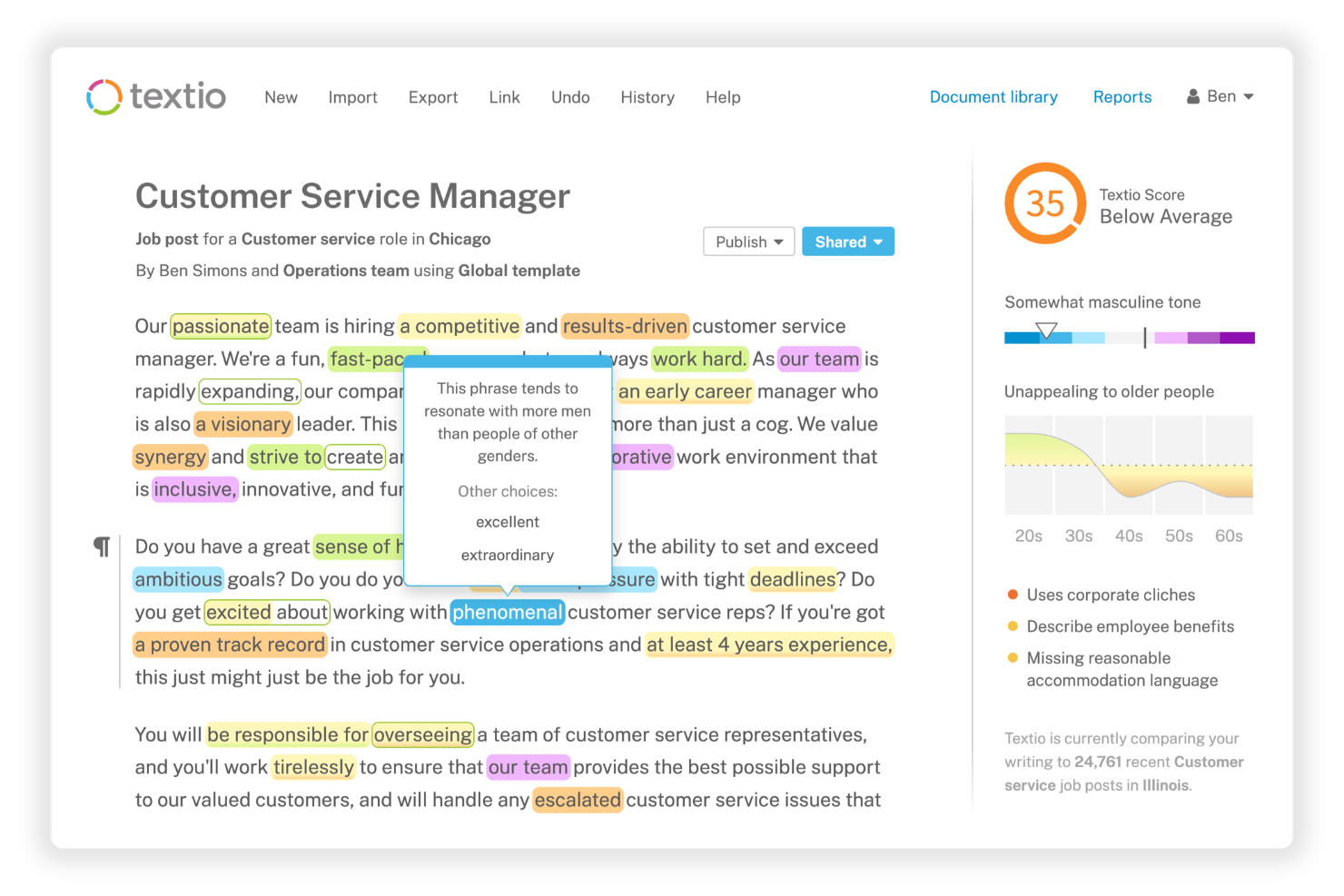
Textio is a job description bias checker and recruiting content platform that combines real-time inclusive language scoring, a gender meter, an age graph, and AI-assisted draft generation to help recruiting teams write and standardize bias-free job posts.
Who Is Textio Best For?
Textio is a strong fit for enterprise talent acquisition teams and recruiters who need to standardize inclusive language across a large volume of job posts, sourcing messages, and careers content.
Why I Picked Textio
I've included Textio in my top picks because the real-time language suggestions go deeper than a simple score. As you type, Textio flags biased phrases inline and immediately surfaces replacement options, so recruiters aren't hunting for answers after the fact.
I also like the Textio Score, which predicts who will apply based on your current language, giving you a concrete signal before you publish. Pair that with the gender meter and age graph, and you get a layered, visual read on exactly how your content is landing across different candidate groups.
Textio Key Features
- Custom brand guidance: Program your own word preferences and style rules directly into Textio so every job post reflects your employer brand.
- Job post library: Store, organize, and manage approved job descriptions in a central repository with templates, group labels, and status tracking.
- Sourcing message editor: Write and score candidate outreach emails in Textio using the same inclusive language guidance applied to job posts.
- Interview feedback tool: Write structured, skills-focused interview feedback with built-in bias detection to support fair hiring decisions.
Textio Integrations
Textio offers native ATS integrations with Workday, Greenhouse, iCIMS, Oracle Recruiting Cloud, SAP SuccessFactors, and Taleo, delivered through a browser extension that embeds Textio's guidance directly into each platform.
Pros and Cons
Pros:
- Supports unbiased internal appraisal processes
- Suggestions trained on real hiring outcomes
- Highlights latent demographic coded language
Cons:
- Requires periodic manual rule adjustment
- Restricted to single language usage
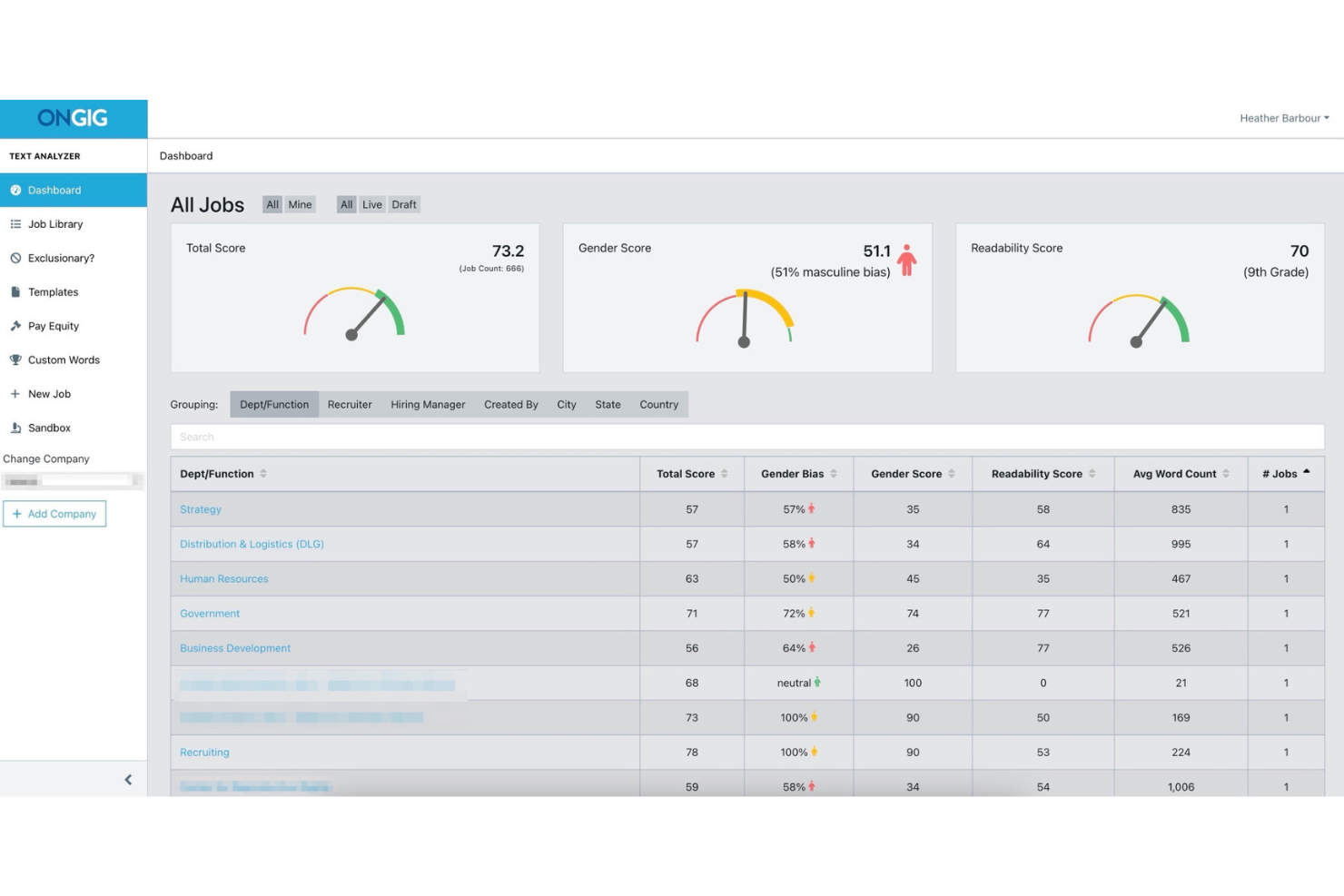
Ongig is a job description software platform that combines bias detection, template management, compliance controls, and ATS integration to help teams create and manage job postings at scale.
Who Is Ongig Best For?
Ongig is a strong fit for large enterprise HR teams and talent acquisition leaders managing high volumes of job descriptions across multiple departments or locations.
Why I Picked Ongig
Ongig is one of my top picks because I love how it handles bias detection and writing guidance at scale, which few tools do as well. The automated flagging of exclusionary language is paired with plain-language suggestions, so my team isn't just catching problems but actively rewriting them.
I also rely on the lockable template sections, which keep approved, bias-reviewed language consistent across every job family and location without having to manually audit each post.
Ongig Key Features
- Compliance auto-population: Automatically adds required sections like EEO statements and salary disclosures to keep job ads aligned with state and federal regulations.
- Version tracking: Maintains a full version history of each job description so recruiters and hiring managers always work from the most current, approved copy.
- Centralized job description repository: Stores all job descriptions in one cloud-based location, making it easy to organize, update, and access postings across teams.
- ATS integration via API: Connects with your existing applicant tracking system using one-way or two-way data exchange, depending on your plan tier.
Ongig Integrations
Integrations include Greenhouse, iCIMS, PCRecruiter, Oracle Taleo, SmartRecruiters, Breezy HR, Lever, Bullhorn, BambooHR, and Workday.
Pros and Cons
Pros:
- Provides a gender score per posting
- Handles high-volume job posting workflows
- Detects distinct bias categories simultaneously
Cons:
- No free self-service trial offered
- Lacks public user sentiment feedback

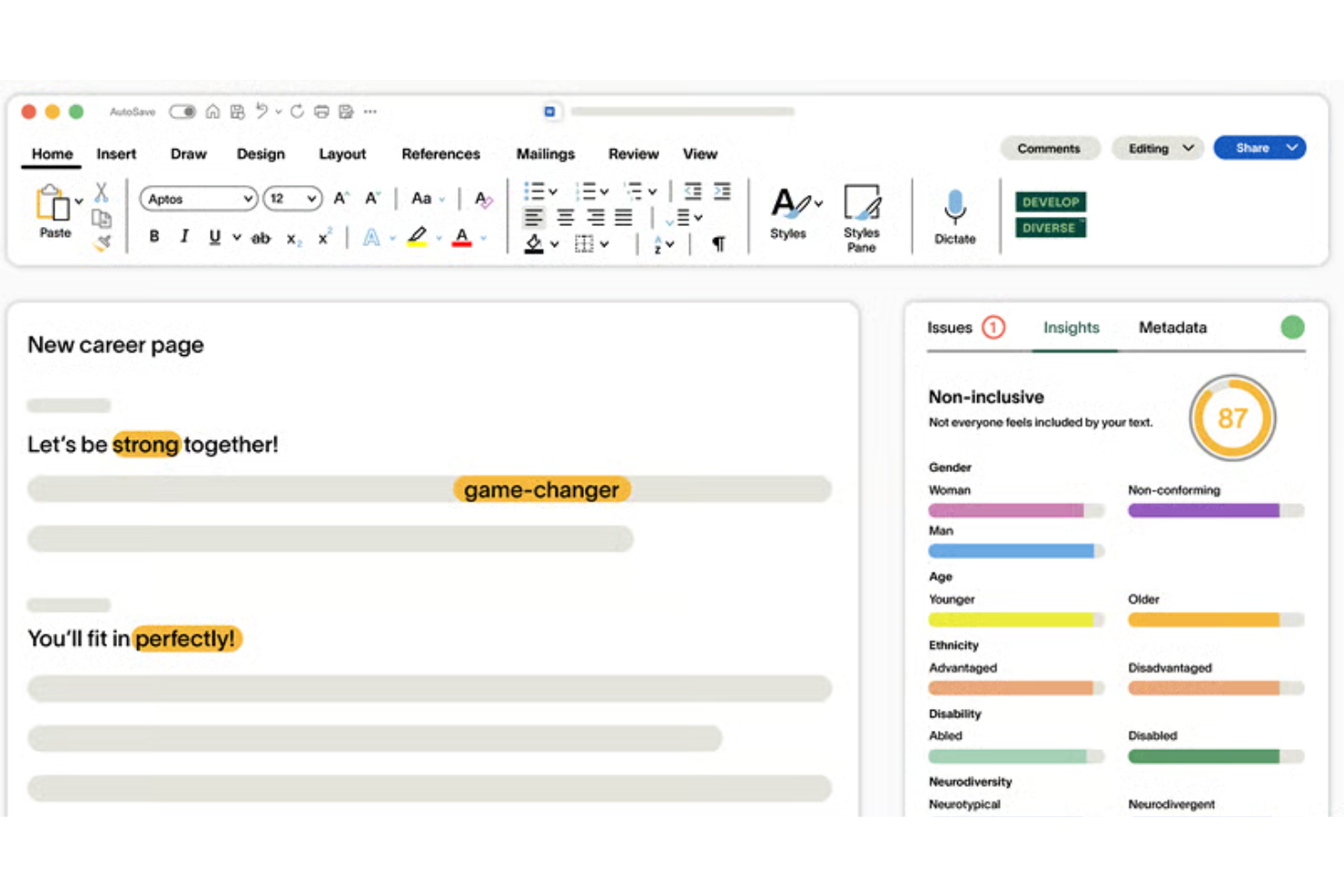
Develop Diverse is a science-backed AI writing editor that analyzes job descriptions, career pages, and recruiting emails for exclusionary language, clichés, and stereotypes, flagging issues at both word and sentence level with research-trained replacement suggestions.
Who Is Develop Diverse Best For?
Develop Diverse is a strong fit for DEI teams and HR professionals in mid-to-large organizations who need consistent, research-backed bias detection across all recruiting content, not just job descriptions.
Why I Picked Develop Diverse
Develop Diverse earns its spot on my shortlist because it goes further than most bias checkers in explaining the "why" behind each flag. When the editor highlights a word or phrase, it tells you who it's excluding and why, which builds real awareness over time, not just quick fixes.
I also like that its AI is continuously trained by linguists using current research, so it catches subtle bias patterns that generic tools built on ChatGPT-style models tend to miss.
Develop Diverse Key Features
- Inclusivity score: Each job description receives a real-time inclusivity score so you can track improvement as you edit.
- One-click sentence rewrites: Replace entire flagged sentences in a single click, not just individual words.
- Inclusivity Monitor: Automatically scans all publicly available job ads across your organization and flags posts that need improvement.
- Analytics and benchmarking: Compare your organization's inclusive language performance against 100+ other customers, broken down by job seniority.
Develop Diverse Integrations
Develop Diverse offers native integrations with Greenhouse, Workday, Teamtailor, HR-ON, SAP SuccessFactors, and SmartRecruiters. It also has a Microsoft Word add-in that brings its inclusive editor directly into your documents.
Pros and Cons
Pros:
- Extends bias detection to performance reviews
- Validated by historical data
- Flags subtle gender and age bias
Cons:
- Limited non-English vocabulary support
- Suggestions can feel repetitive over time
Andre skjevhetssjekkere for stillingsbeskrivelser
Her er noen flere alternativer for skjevhetssjekkere for stillingsbeskrivelser som ikke kom med på kortlisten min, men som likevel er verdt å undersøke:
- RoleMapper
For structured job description creation
- TalentKoala
For free inclusive JD bias checks
- Sapling
For browser-based DEI checks across any ATS
- DiverseTalent
For DEI-led inclusive hiring in UK firms


How I Evaluate Job Description Bias Checkers
I split my evaluation into two layers: the core capabilities each tool needs to detect and correct biased language, and the differentiators that matter for HR, talent acquisition, and DEI teams managing job descriptions at scale.
Core Functionality (Table Stakes For This List)
When I'm selecting tools for my list, I rank each one on a scale from 0 (does not offer the functionality) to 5 (excels in this area) for each core functionality listed below. Then, I calculate the tool's total score into a percentage. Each tool needs to achieve a minimum total score of 55% to be considered for inclusion.
- Bias Detection Engine: I check whether the tool identifies both obvious and contextual bias, including gendered, ageist, racial, ableist, and other exclusionary language.
- Inclusive Language Suggestions: I look for tools that provide usable, context-aware alternatives or rewrites rather than simply highlighting potentially biased terms.
- Job Description Editor: I evaluate whether recruiters can draft, edit, and re-scan job descriptions in one workspace, with inline highlighting and editing tools.
- Bias Scoring & Reporting: I look for a clear inclusivity or bias score with explanations, category breakdowns, or reporting that helps teams understand where improvements are needed.
- Multi-Category Bias Coverage: I assess how many dimensions of bias the tool covers, including gender, age, race, disability, LGBTQ+ identity, socioeconomic background, and other forms of exclusionary language.
- ATS & Workflow Integration: I check whether the tool connects with ATS or HRIS platforms, offers browser extensions, or otherwise lets recruiters check job descriptions within their existing workflows.
Once I have a list of tools that meet the criteria, I consider what sets each platform apart.
Differentiating Factors (What Sets Vendors Apart)
Here's how I compare and contrast different vendors:
Standout Features
Multilingual bias detection stands out for global teams that need to apply inclusive-language standards across different regions. I also look for compliance checks that flag missing salary ranges, benefits, accommodations, or other location-specific requirements.
Missing-section detection is useful for identifying absent content such as EEO statements, benefits, or diversity commitments. For larger teams, I also consider employer brand controls that keep rewrites consistent with approved terminology and tone. Outcome benchmarking is another differentiator when platforms can connect inclusivity scores with recruiting metrics such as application volume or candidate diversity.
Beyond Features
Workflow fit matters here. I consider whether a tool works through copy and paste, a browser extension, or native integrations with platforms like Greenhouse, Workday, Lever, and SmartRecruiters. I also look at whether edited job descriptions can be pushed back into the ATS without extra recruiter work.
For organizations hiring across regions, I consider support for local employment and pay transparency requirements, configurable rules, and audit trails. I also look at the research behind each tool's bias detection and whether teams can add their own terminology and exceptions.
Finally, I consider reporting and enterprise readiness. Team-level analytics and benchmarking can help DEI leaders track progress over time, while security certifications, access controls, and clear AI data-handling policies matter when job description content moves between HR systems.
Slik velger du en skjevhetssjekker for stillingsbeskrivelser
Det er lett å gå seg vill i lange funksjonslister og kompliserte prisstrukturer. For å hjelpe deg med å holde fokus mens du arbeider deg gjennom den unike prosessen din for valg av programvare, er her en sjekkliste over faktorer du bør ha i tankene:
| Faktor | Hva du bør vurdere |
|---|---|
| Skalerbarhet | Vil verktøyet håndtere det forventede antallet stillingsannonser etter hvert som teamet ditt vokser? Sjekk begrensningene for brukere og beskrivelser, og om du enkelt kan oppgradere abonnementer eller legge til plasser. |
| Integrasjoner | Kan løsningen kobles til det eksisterende ATS-et, dokumentlagringen eller samarbeidsplattformene dine? Bekreft kompatibiliteten for å unngå manuell eksport eller forstyrrelser i arbeidsflyten. |
| Tilpasningsmuligheter | Kan du justere innstillingene for skjevhetsoppdagelse eller legge til virksomhetsspesifikke formuleringer? Vurder om verktøyet tilpasser seg organisasjonens språk og behov innen rekruttering. |
| Brukervennlighet | Hvor raskt kan ikke-tekniske brukere lære seg plattformen og bruke den konsekvent? Se etter tydelig navigasjon, hjelp i appen og enkle arbeidsflyter for å redusere behovet for oppfølging eller risikoen for feil. |
| Implementering og oppstart | Hvilke ressurser kreves for å komme i gang? Vurder om du trenger bistand fra IT, hvor raskt du kan opprette brukerkontoer, og hvilken støtte til oppstart eller opplæring leverandøren tilbyr. |
| Kostnad | Er prisnivåene tydelige og i tråd med budsjettet og teamstørrelsen din? Se etter skjulte gebyrer, fornyelsespriser og om funksjonene du trenger, er tilgjengelige på lavere nivåer eller bare i premiumabonnementer. |
| Sikkerhetstiltak | Hvordan beskytter verktøyet stillingsdataene og det sensitive innholdet ditt? Bekreft opplysninger om kryptering, GDPR- eller SOC 2-samsvar og tilgangskontroller før du laster opp konfidensiell informasjon. |
| Tilgjengelig kundestøtte | Når og hvordan kan du få hjelp hvis noe slutter å fungere eller du trenger råd? Vurder kundestøttekanaler, vanlig svartid og tilgang til dokumentasjon eller kundebehandlere i arbeidstiden din. |
Hva er en skjevhetssjekker for stillingsbeskrivelser?
Et verktøy for å kontrollere skjevheter i stillingsbeskrivelser er et digitalt verktøy som skanner stillingsannonser for partisk eller ekskluderende språk. Det hjelper HR-team med å identifisere ord, fraser eller mønstre som kan avskrekke kandidater med ulik bakgrunn fra å søke.
Ved å tilby alternative forslag gjør disse verktøyene stillingsannonsene dine mer inkluderende og støtter en mer rettferdig ansettelsespraksis.
Funksjoner
Når du velger et verktøy for å kontrollere skjevheter i stillingsbeskrivelser, bør du se etter følgende viktige funksjoner:
- Oppdagelse av partisk språk: Skanner raskt stillingsbeskrivelser for å identifisere begreper og fraser som kan inneholde skjevheter knyttet til kjønn, alder eller funksjonsnedsettelse.
- Forslag til inkluderende språk: Gir alternative formuleringer som kan erstatte problematisk språk og bidra til å skape mer inkluderende stillingsannonser.
- Kategorisering av skjevheter: Angir hvilken type skjevhet som er oppdaget, slik at brukerne kan se om språket kan påvirke kjønn, etnisitet, alder eller en annen identitetsgruppe.
- Rapportering og analyse: Genererer rapporter som oppsummerer funn, følger forbedringer over tid og støtter interne DEI-tiltak.
- Samtidig skanning av flere beskrivelser: Gjør det mulig å skanne flere stillingsannonser samtidig, noe som sparer tid for team som håndterer store mengder annonser.
- Rollebasert veiledning: Tilbyr tips tilpasset ulike stillingsnivåer eller bransjer for mer nøyaktig og relevant oppdagelse.
- Alternativer for eksport og deling: Lar deg laste ned analyserapporter eller dele markerte beskrivelser med interessenter eller ansettelsesansvarlige.
- Brukertillatelser og samarbeid: Støtter ulike brukerroller og lar teammedlemmer samarbeide om redigering eller gjennomgang av stillingsannonser.
- Integrasjon med rekrutteringsverktøy: Kobler seg direkte til systemer for sporing av søkere eller HR-programvare, slik at kontroll av skjevheter kan bygges inn i de daglige arbeidsflytene.
Vanlige AI-funksjoner i verktøy for kontroll av skjevheter i stillingsbeskrivelser
I tillegg til standardfunksjonene for kontroll av skjevheter i stillingsbeskrivelser som er nevnt ovenfor, tar mange av disse løsningene i bruk AI med funksjoner som:
- Oppdagelse av kontekstuelle skjevheter: Analyserer setningenes kontekst for å fange opp subtile eller underforståtte skjevheter som regelbaserte systemer kan overse, noe som gir mer nøyaktige resultater.
- Forutseende analyse av søkerpåvirkning: Bruker historiske data og AI-modellering til å forutsi hvordan endringer i språket kan påvirke hvem som søker på en stilling, slik at annonsene kan forbedres i tråd med mangfoldsmål.
- Adaptive læringsalgoritmer: Forbedrer kontinuerlig oppdagelsen av skjevheter ved å lære av brukerredigeringer og tilbakemeldinger, slik at verktøyet utvikler seg i takt med endrede språkmønstre og DEI-standarder.
- Automatisk språkoptimalisering: Foreslår formuleringer som er tilpasset virksomhetens skrivestil og målgruppe, ved å bruke AI-drevet mønstergjenkjenning på historiske stillingsbeskrivelser.
- Tilbakemeldinger og veiledning i sanntid: Bruker AI til å gi umiddelbar veiledning mens du skriver eller redigerer, markerer risikoområder og anbefaler rettelser uten at det kreves en separat skanning.
Fordeler
Implementering av et verktøy for å kontrollere skjevheter i stillingsbeskrivelser gir flere fordeler for teamet og virksomheten din. Her er noen av fordelene du kan se frem til:
- Økt inkludering: Identifiserer og fjerner partisk språk, slik at stillingsannonsene dine blir mer tilgjengelige for kandidater med ulik bakgrunn.
- Bedre ansettelsesresultater: Foreslår alternative formuleringer som utvider søkergrunnlaget og bidrar til å tiltrekke et bredere spekter av talenter.
- Raskere etterlevelse: Gjør det enklere å følge DEI-standarder og ansettelsesregler ved å dokumentere og rapportere endringer i sanntid.
- Konsekvent språk: Standardiserer språket i stillingsannonser på tvers av ansettelsesteam for å støtte virksomhetens språkprofil og rettferdige rekrutteringspraksiser.
- Økt effektivitet: Gjør massebehandling og redigering direkte i teksten mulig, slik at team raskt kan oppdatere flere stillingsbeskrivelser.
- Bedre datadrevet innsikt: Tilbyr analyse og sammenligningsgrunnlag, slik at du kan følge forbedringer og trender i rekrutteringsinnholdet ditt.
- Redusert juridisk risiko: Bidrar til å forhindre diskriminerende språk som kan føre til rettslige utfordringer eller omdømmeskade.
Kostnader og priser
Valg av et verktøy for å kontrollere skjevheter i stillingsbeskrivelser krever en forståelse av de ulike prismodellene og abonnementene som er tilgjengelige. Kostnadene varierer basert på funksjoner, teamstørrelse, tillegg og mer. Tabellen nedenfor oppsummerer vanlige abonnementer, gjennomsnittsprisene deres og typiske funksjoner som er inkludert i løsninger for kontroll av skjevheter i stillingsbeskrivelser:
Sammenligningstabell for abonnementer for kontroll av skjevheter i stillingsbeskrivelser
| Plantype | Gjennomsnittlig pris | Vanlige funksjoner |
|---|---|---|
| Gratisplan | $0 | Dekker grunnleggende skjevhetsdeteksjon, støtter et begrenset antall stillingsbeskrivelser og inkluderer enkle forslag. |
| Personlig plan | $10-$25/bruker/måned | Tilbyr flere kategorier for skjevhet, lar deg eksportere rapporter, gir redigering direkte i teksten og e-poststøtte. |
| Bedriftsplan | $30-$60/bruker/måned | Inkluderer massebehandling, tilpassede ordlister, avansert analyse, integrasjonsmuligheter og teamsamarbeid. |
| Foretaksplan | $75-$150/bruker/måned | Legger til tilpasset onboarding, samsvarsrapportering, dedikert kontoadministrasjon, API-tilgang og prioritert støtte. |
Vanlige spørsmål om skjevhetskontroll av stillingsbeskrivelser
Her er noen svar på vanlige spørsmål om skjevhetskontroll av stillingsbeskrivelser:
Hvordan oppdager løsninger for skjevhetskontroll av stillingsbeskrivelser skjevhet?
De bruker språkanalyse til å flagge ord eller uttrykk i stillingsannonser og stillingskrav som kan føre til skjevhet, basert på forskningsbaserte ordlister og kontekstregler som dekker områder som kjønn, alder eller funksjonsnedsettelse. Dette hjelper rekrutteringsteam med å skrive kjønnsnøytrale og inkluderende stillingsbeskrivelser som tiltrekker kvalifiserte kandidater fra alle bakgrunner.
Kan jeg tilpasse skjevhetsdeteksjonen etter organisasjonens behov?
Ja, mange verktøy lar deg legge til egendefinerte termer eller uttrykk som samsvarer med retningslinjene for merkevaren eller spesifikke DEI-prioriteringer, slik at du kan tilpasse resultatene til konteksten din og skape et mer inkluderende arbeidsmiljø.
Støtter disse verktøyene flere språk?
Noen løsninger tilbyr flerspråklig skjevhetsdeteksjon og forslag til erstatninger, noe som gjør dem nyttige for globale rekrutteringsteam som ønsker å tiltrekke seg de beste talentene og håndtere rekrutteringsprosessen på tvers av ulike regioner.
Garanterer bruk av en skjevhetskontroll samsvar med EEOC eller lovverket?
Nei, men disse verktøyene bidrar til å redusere risikoen for problematisk språk i valg av stillingstitler og stillingsannonser, gjør det enklere å håndtere potensielle problemer og støtter arbeidet med å oppfylle kravene.
Kan jeg generere rapporter om forbedringer eller trender over tid?
Ja, rapporteringsfunksjoner lar deg spore endringer på tvers av inkluderende stillingsannonser, se vanlige mønstre for skjevhet og vise interessenter fremgangen mens du arbeider for å nå flere arbeidssøkere.