

10 læringsplattformer med åpen kildekode valgt ut for 2026

Liste over LMS-plattformer med åpen kildekode


LMS-plattformer med åpen kildekode er læringsstyringssystemer med kildekode som alle kan få tilgang til, endre og dele. Hvis du ser etter fleksible og kostnadseffektive måter å tilby opplæring eller undervisning på, lar LMS-alternativer med åpen kildekode deg tilpasse funksjoner, kontrollere data og tilpasse plattformen til organisasjonens behov.
Denne listen hjelper deg med å sammenligne ledende LMS-plattformer med åpen kildekode for 2026, slik at du trygt kan velge det riktige alternativet for teamet, skolen eller virksomheten din.
Why Trust Our Software Recommendations
Our team has been testing and reviewing software since 2012. As HR experts ourselves, we know how difficult—and important—it is to choose the right software.
For this guide, we evaluated tools using hands-on testing and independent research, scoring tools using our selection criteria. We also draw on insights from industry thought leaders and practicing HR experts.
Our reviews reflect our human editorial judgment, not a sales pitch.
Expert reviewers:
Sammenligningstabell for LMS-plattformer med åpen kildekode
Denne sammenligningstabellen oppsummerer prisdetaljene for mine beste utvalgte LMS-plattformer med åpen kildekode:
| Tool | Best For | Trial Info | Price | ||
|---|---|---|---|---|---|
| 1 | Best for customizable learning environments | Free to use | Free and open source | Website | |
| 2 | Best for intuitive user interface | Free trial + free demo available | Pricing upon request | Website | |
| 3 | Best for rapid course authoring | Free demo + free download available | Free, open-source | Website | |
| 4 | Best for workforce compliance tracking | Free demo available | Pricing upon request | Website | |
| 5 | Best for large-scale course delivery | Free demo available | From $8,000/year (billed annually) | Website | |
| 6 | Best for academic collaboration tools | Free plan available | Pricing upon request | Website | |
| 7 | Best for multimedia content support | 7-day free trial + free demo available | Free | Website | |
| 8 | Best for granular access control | Free to use | Free, open-source | Website | |
| 9 | Best for accessible learning design | Free to download + free demo available | Free | Website | |
| 10 | Best for corporate training management | Free to download | Free | Website |
Anmeldelser av LMS-plattformer med åpen kildekode
Nedenfor finner du mine detaljerte sammendrag av LMS-plattformene med åpen kildekode som kom med på listen min. Anmeldelsene gir en detaljert gjennomgang av funksjonene, de beste bruksområdene og integrasjonene til hver plattform, slik at du kan finne den beste for deg.

Moodle
Best for customizable learning environments
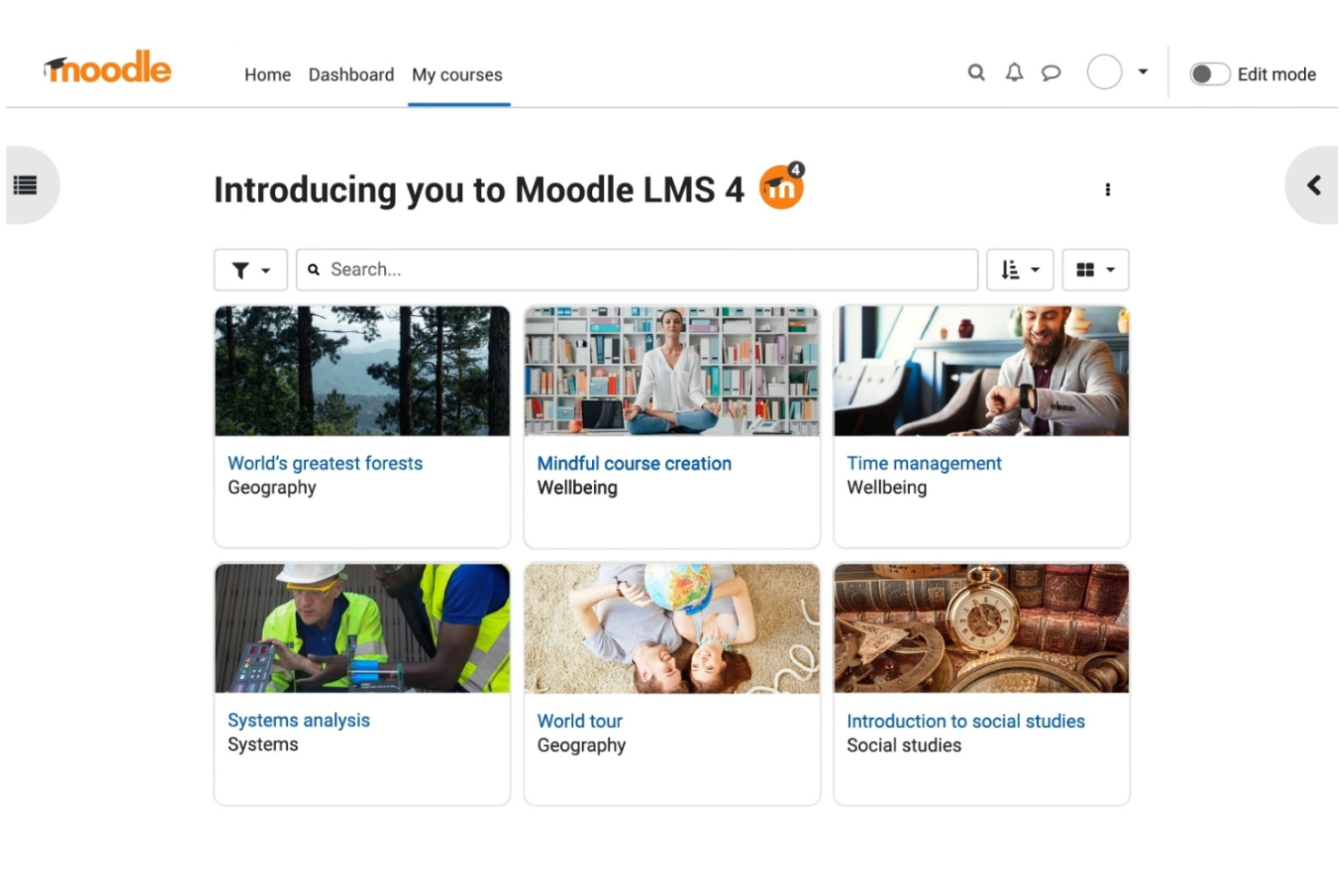
If you need a learning management system that you can fully adapt to your organization’s needs, Moodle LMS stands out for its flexibility. It’s a strong choice for schools, universities, and training teams that want to design unique learning environments. With its open source foundation, you can tailor courses, workflows, and integrations to fit your exact requirements.
Why I Picked Moodle LMS
Moodle’s open source framework gives you deep control over every aspect of your learning environment, which is why I picked it for this list. You can customize course layouts, user roles, and permissions to match your organization’s structure.
The platform also supports a wide range of plugins, so you can add features like advanced grading methods or custom reporting. This level of flexibility makes Moodle a strong fit for teams that want to build a learning experience tailored to their unique needs.
Moodle LMS Key Features
Some other features in Moodle make it a versatile choice for a range of learning scenarios:
- Mobile App Support: Learners and instructors can access courses and resources through dedicated mobile apps for iOS and Android.
- SCORM and LTI Compliance: The platform supports SCORM packages and LTI integrations, allowing you to import and share content from other systems.
- Quiz and Assessment Tools: Create a variety of quizzes, assignments, and automated grading options to assess learner progress.
- Multilingual Capabilities: Moodle offers support for dozens of languages, making it suitable for global teams or diverse classrooms.
Moodle LMS Integrations
Integrations include BigBlueButton, H5P, Turnitin, Microsoft 365, Google Drive, Zoom, Mahara, PayPal, Nextcloud, and Opencast.
Pros and Cons
Pros:
- Granular user roles and permission controls
- Extensive plugin library for added functionality
- Highly customizable learning environment with flexible configuration
Cons:
- Initial setup requires technical expertise
- Interface can feel outdated to some users

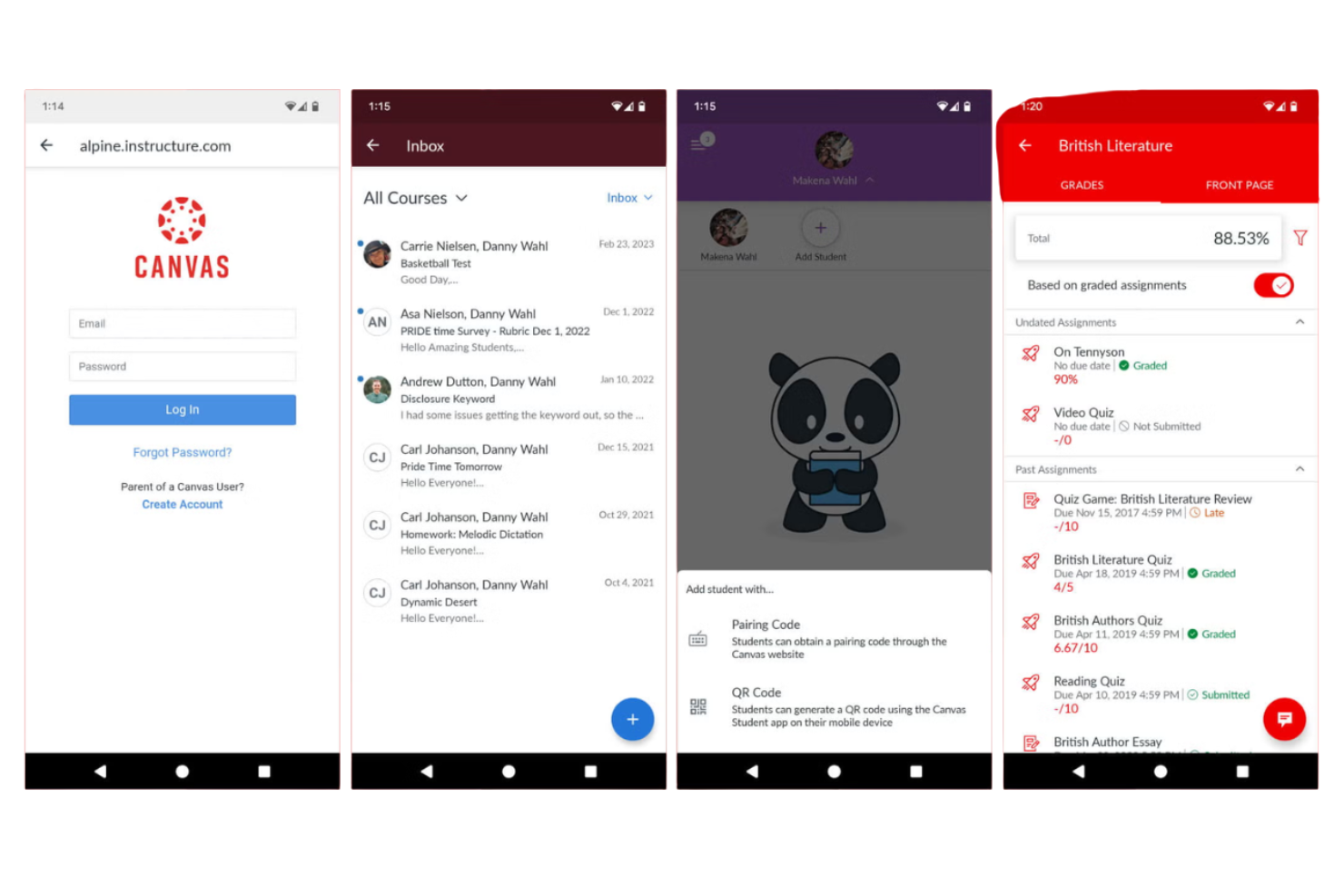
If you’re looking for an open source LMS that puts user experience first, Canvas LMS is worth considering. It’s designed for educators, training teams, and organizations that want a clean, intuitive interface for both course creators and learners. Canvas LMS helps reduce onboarding time and confusion, making it easier to manage content, assignments, and communication in one place.
Why I Picked Canvas LMS
What sets Canvas LMS apart in the open source LMS space is its focus on a user-friendly experience for both instructors and learners. I picked Canvas LMS because its drag-and-drop course builder and customizable dashboard help teams organize content and assignments with minimal friction.
The platform’s responsive design ensures that courses look and function well on any device, which is important for today’s mobile learners. These features make Canvas LMS a strong choice for organizations that want to prioritize clarity and accessibility in their learning environment.
Canvas LMS Key Features
Some other features that make Canvas LMS appealing for open source LMS users include:
- SpeedGrader: Quickly review and provide feedback on assignments with an integrated grading tool.
- Rich Content Editor: Create and format course materials using embedded media, links, and interactive elements.
- Learning Outcomes Tracking: Set, measure, and report on learning objectives for courses and programs.
- LTI Tool Integration: Connect external learning tools and apps directly within the Canvas environment.
Canvas LMS Integrations
Integrations include AWS, Google for Education, Cidilabs, Turnitin, Inspera, Lincoln Learning, BigBlueButton, Poll Everywhere, FeedbackFruits, and Atomic Jolt.
Pros and Cons
Pros:
- Strong course analytics for tracking engagement
- Drag-and-drop course builder simplifies content creation
- Intuitive interface for instructors and learners
Cons:
- Discussion boards lack advanced moderation features
- Admin controls require multiple navigation steps
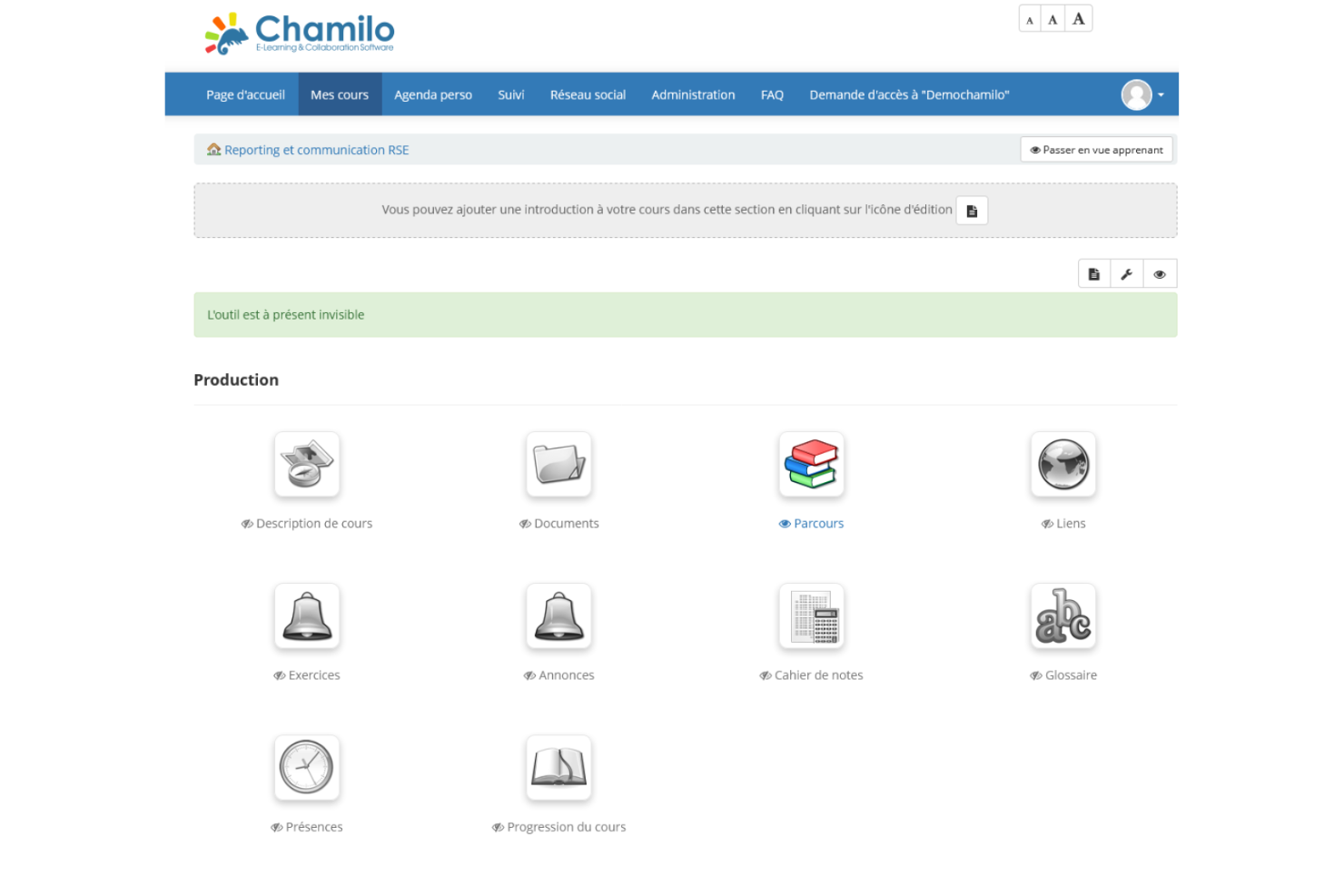
Chamilo stands out for teams that need to build and launch courses quickly without a steep learning curve. It’s especially useful for small businesses, nonprofits, and educators who want to create interactive training or learning content with minimal setup. The platform’s built-in authoring tools and straightforward interface help you get courses online fast, even if you don’t have technical expertise.
Why I Picked Chamilo
For organizations that need to get courses up and running quickly, Chamilo offers a direct path from concept to launch. I picked Chamilo because its built-in course editor lets you create lessons, quizzes, and multimedia content without extra plugins or technical setup.
The platform also supports rapid duplication and import of courses, which helps teams scale training programs or adapt materials for different audiences. These features make Chamilo a strong fit for anyone prioritizing speed and simplicity in open source LMS course authoring.
Chamilo Key Features
In addition to its rapid course authoring tools, Chamilo offers several other features that support a wide range of learning needs:
- SCORM 1.2 and 2004 Compliance: Import and deliver SCORM-compliant content for standardized e-learning experiences.
- Built-In Social Network: Enable learners to connect, share, and collaborate within the platform.
- Certificate Generation: Automatically issue certificates to learners upon course completion.
- Attendance Tracking: Monitor and report on learner participation and presence in sessions.
Chamilo Integrations
Integrations include OpenID Connect, LDAP, BigBlueButton, H5P, SCORM, xAPI, and more.
Pros and Cons
Pros:
- Certificate generation for completed courses
- Quick course setup with minimal technical effort
- Built-in course authoring with multimedia support
Cons:
- Basic analytics features
- Free version requires self-hosting
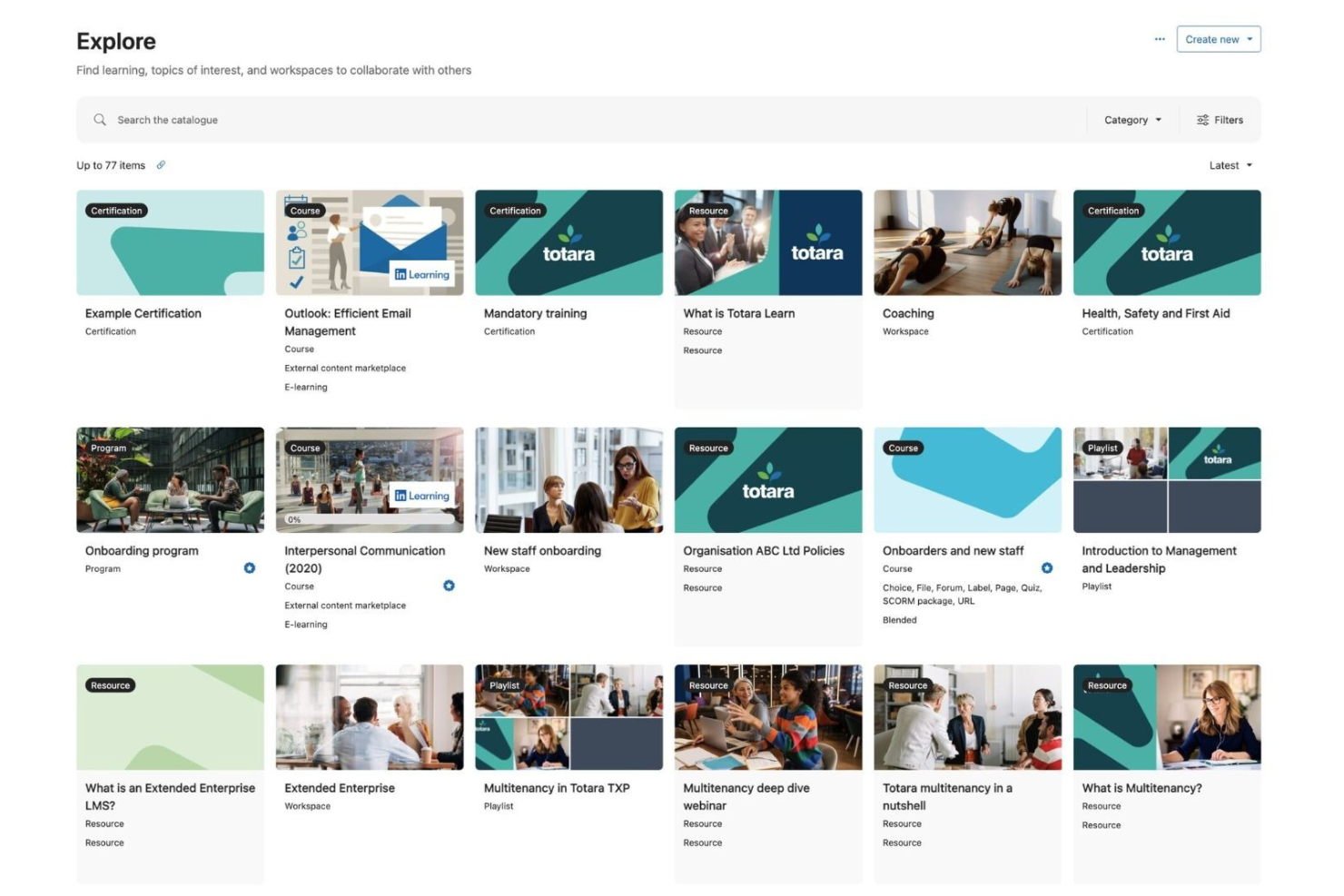
Totara Learn stands out for organizations that need to manage workforce compliance and track mandatory training. It’s built for HR teams, compliance managers, and regulated industries that require detailed reporting and certification management. With Totara Learn, you can automate renewals, monitor completion rates, and ensure your team meets regulatory standards.
Why I Picked Totara Learn
For organizations where compliance is a top priority, Totara Learn offers targeted tools for tracking and managing workforce certifications. I picked Totara Learn because its certification management feature lets you set up recurring training and automate renewal reminders, which is essential for regulated industries.
The platform’s detailed reporting tools help HR teams and compliance managers monitor completion rates and identify gaps in mandatory training. These capabilities make Totara Learn a strong fit for businesses that need to prove compliance and maintain up-to-date records.
Totara Learn Key Features
Some other features that make Totara Learn valuable for open source LMS users include:
- Audience Management: Segment learners into groups for targeted content delivery and reporting.
- Blended Learning Support: Combine online modules with in-person sessions and track both in one system.
- Customizable Learning Paths: Design personalized learning journeys based on roles or skills.
- SCORM and xAPI Compatibility: Import and track interactive e-learning content using industry standards.
Totara Learn Integrations
Integrations include OpenSesame, GO1, LinkedIn Learning, SAP SuccessFactors, Workday, BambooHR, Google Drive, Salesforce, Microsoft Teams, and Zoom.
Pros and Cons
Pros:
- Customizable learning paths for different roles
- Audience segmentation enables targeted training
- Certification tracking supports compliance management
Cons:
- The bulk user import process can be slow
- Reporting dashboards require manual setup
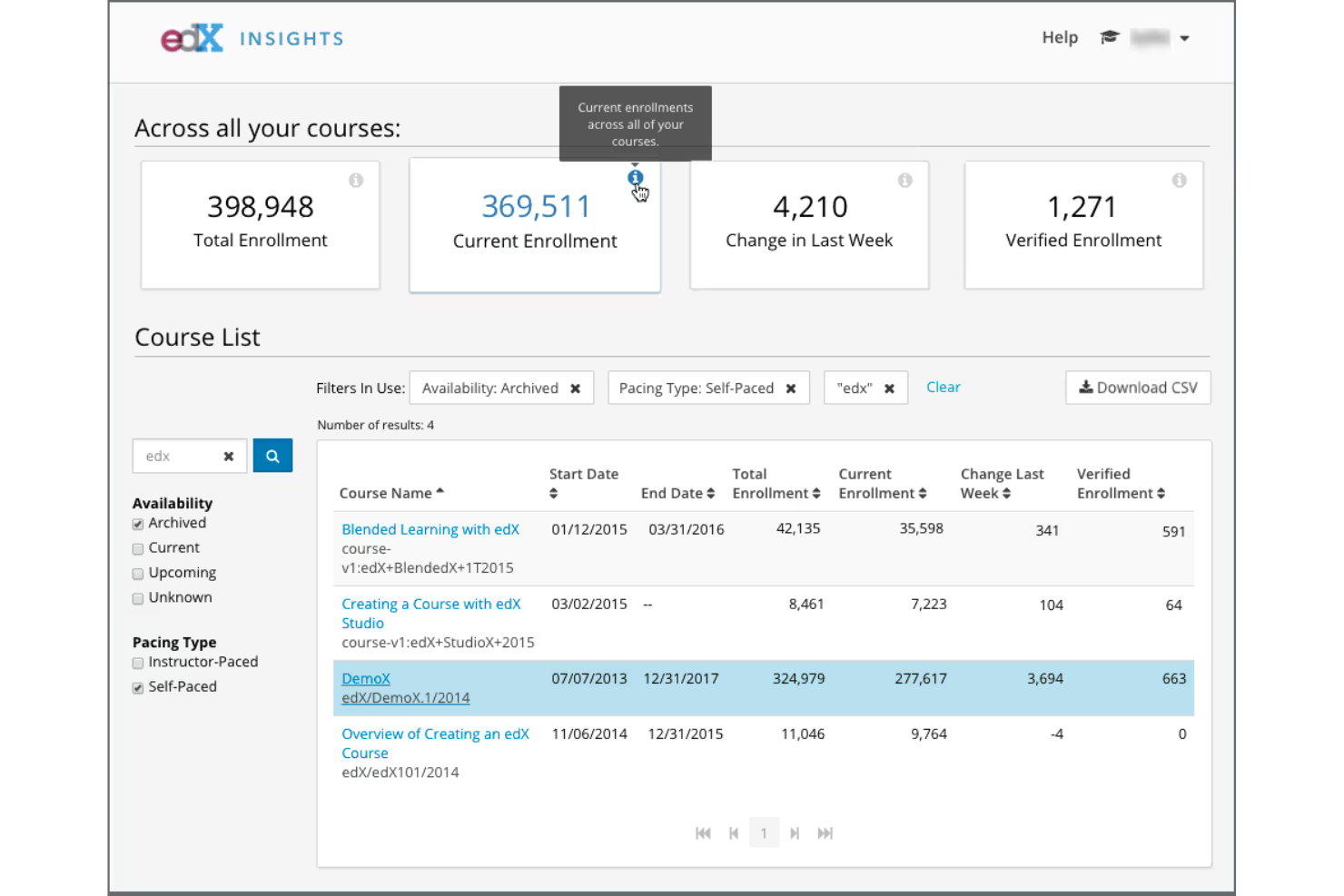
If you’re looking to deliver courses at scale, Open edX is built for high-volume learning environments. It’s a strong fit for universities, enterprises, and training providers that need to support thousands of learners at once. The platform’s modular architecture and support for massive open online courses (MOOCs) make it ideal for organizations with complex, large-scale education needs.
Why I Picked Open edX
What sets Open edX apart is its ability to handle large-scale course delivery without sacrificing flexibility. I picked it because it’s designed to support thousands of concurrent learners, making it a strong choice for universities and organizations running MOOCs or enterprise training programs.
The platform offers advanced course authoring tools and supports interactive content, including video, assessments, and discussion forums. Its modular architecture also allows you to extend or adapt the system as your learning needs grow.
Open edX Key Features
Some other features in Open edX make it a flexible option for a range of learning environments:
- XBlock Plugin Architecture: Extend platform functionality by developing or installing custom XBlock components.
- Multi-Tenant Support: Host multiple organizations or branded sites within a single Open edX instance.
- Comprehensive REST API: Integrate with external systems or automate tasks using the platform’s robust API.
- Accessibility Tools: Built-in features help ensure courses meet accessibility standards for diverse learners.
Open edX Integrations
Integrations include WordPress, Drupal, PayPal, Stripe, CyberSource, H5P, Zoom, Microsoft, Google, and Salesforce.
Pros and Cons
Pros:
- Supports advanced interactive course content
- Modular architecture allows deep customization
- Scales to support large numbers of concurrent learners
Cons:
- Upgrades can be complex for self-hosted setups
- Installation requires significant technical resources
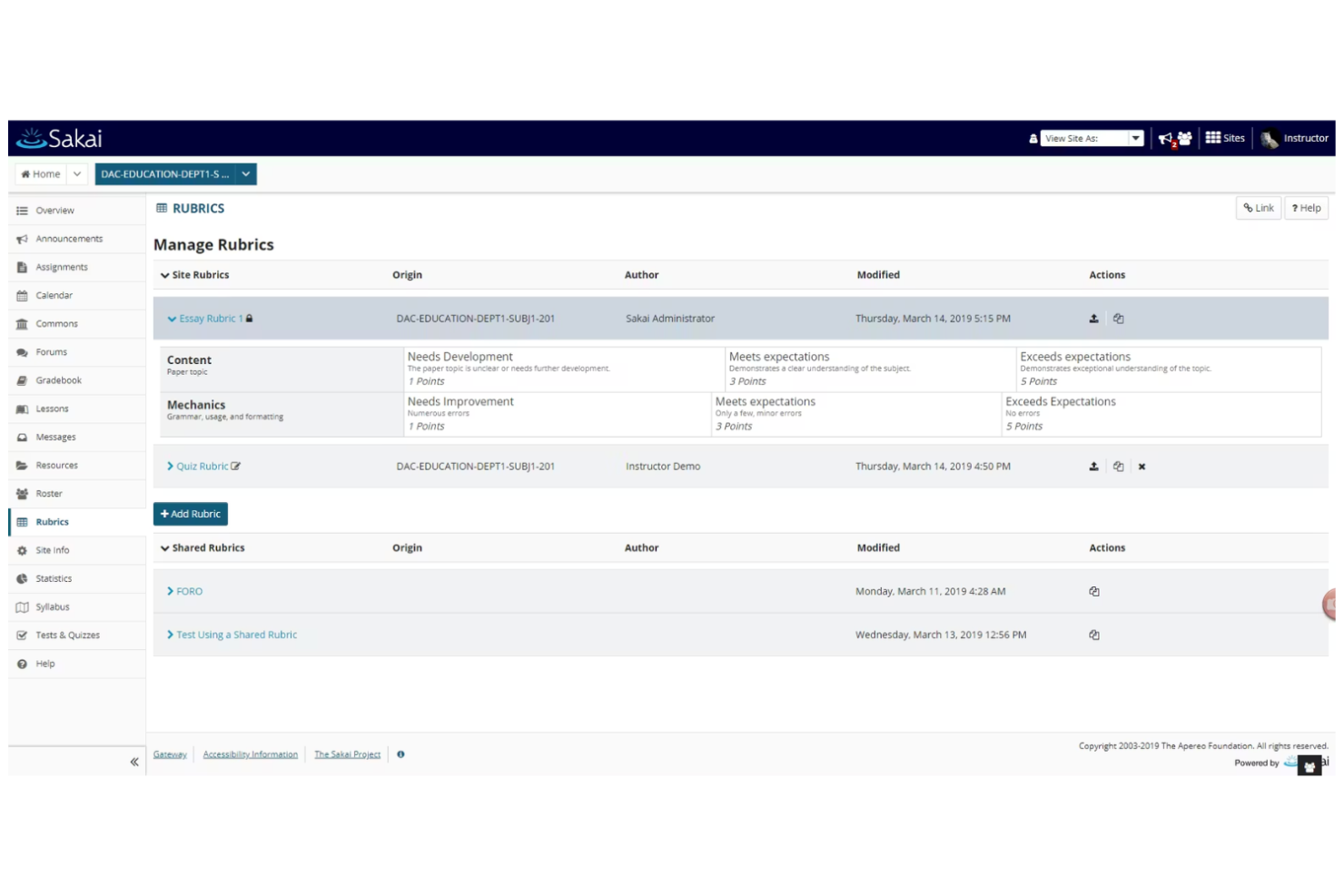
Sakai is designed for higher education institutions and academic teams that need advanced collaboration tools within an open source LMS. It’s especially useful for universities and colleges looking to support group projects, peer review, and interactive learning communities. With Sakai, you can facilitate real-time discussions, manage assignments, and create a collaborative digital classroom environment.
Why I Picked Sakai
What sets Sakai apart for open source LMS buyers is its strong focus on academic collaboration tools. I picked Sakai because it offers built-in features like group workspaces, peer assessment, and shared document editing, which are essential for fostering interactive learning environments.
The platform’s discussion forums and real-time chat tools help students and instructors connect and collaborate on projects or coursework. These capabilities make Sakai a great fit for educational institutions that want to support teamwork and active participation in their digital classrooms.
Sakai Key Features
In addition to its collaboration tools, Sakai offers several other features that support academic and organizational needs:
- Gradebook: Track, calculate, and share grades securely with students.
- Assessment Builder: Create quizzes, tests, and surveys with a variety of question types.
- Calendar Integration: Schedule assignments, events, and deadlines for courses and groups.
- Learning Analytics: Access detailed reports on student engagement and course activity.
Sakai Integrations
Integrations include IMS LTI-compliant tools and an extensive API for custom integrations. Native integrations are not currently listed.
Pros and Cons
Pros:
- Discussion forums enable active participation
- Peer review features support academic assessment
- Strong collaboration tools for group learning
Cons:
- Gradebook setup can be time-consuming
- Mobile interface lacks advanced functionality
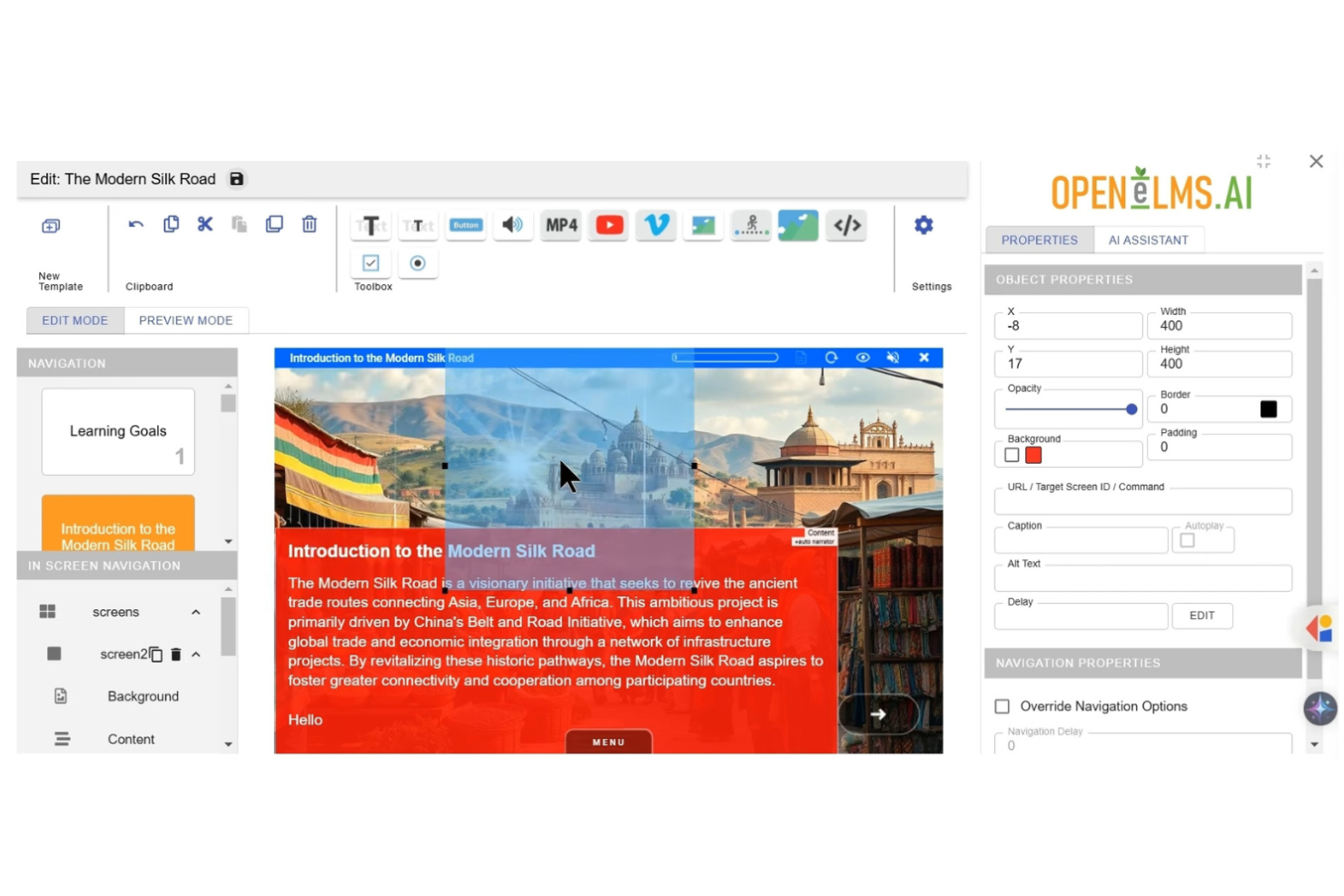
Open eLMS stands out for organizations that want to deliver engaging, multimedia-rich learning experiences. It’s especially useful for training teams, educators, and content creators who need to incorporate video, audio, SCORM, and interactive elements into their courses. If you’re looking for an open source LMS that supports a wide range of content formats and creative instructional design, Open eLMS is built for that flexibility.
Why I Picked Open eLMS
What drew me to Open eLMS is its strong focus on supporting a wide variety of multimedia content within an open source LMS framework. The platform allows you to embed video, audio, SCORM packages, and interactive HTML5 content directly into courses, making it easy to create dynamic and engaging learning experiences.
I appreciate that Open eLMS also includes a built-in authoring tool, so you can design and update multimedia lessons without relying on third-party software. For teams that want to push creative boundaries in digital learning, Open eLMS offers the flexibility and content support that many other open source options lack.
Open eLMS Key Features
Some other features that make Open eLMS appealing include:
- Automated Compliance Tracking: Monitor and record learner compliance with built-in reporting tools.
- Customizable Learning Paths: Set up tailored course sequences for different user groups or roles.
- Gamification Elements: Add badges, leaderboards, and points to encourage learner engagement.
- Mobile-Responsive Interface: Access all courses and resources from any device without loss of functionality.
Open eLMS Integrations
Integrations include Anders Pink, Badgr, Credly, Civica, Stripe, Go1, Google Analytics, H5P, Microsoft Teams, and Zoom.
Pros and Cons
Pros:
- Role-based permissions for structured access control
- Modular architecture supports custom extensions
- Strong alignment with business workflows and systems
Cons:
- Limited documentation for advanced setup
- Reporting features are still developing
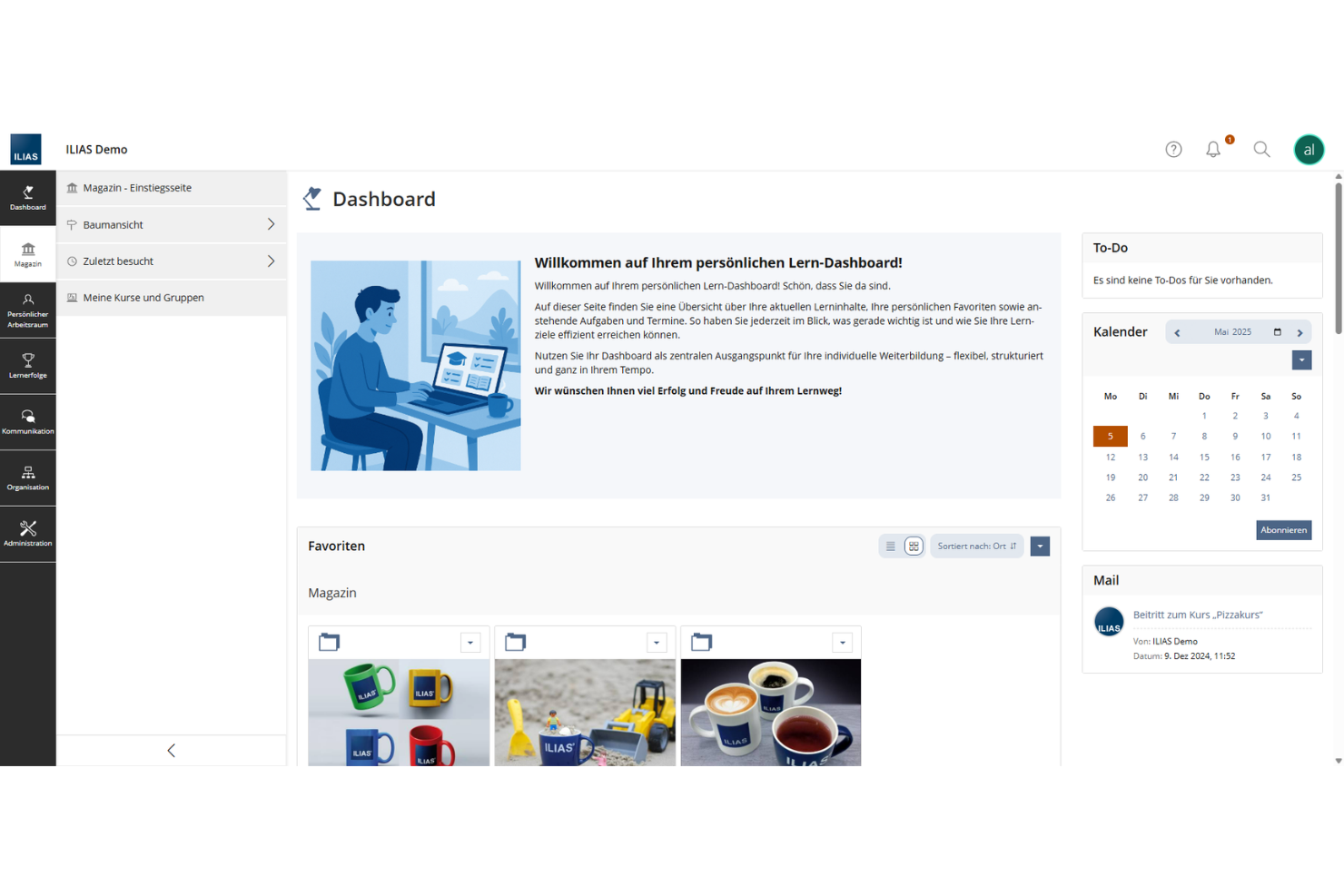
ILIAS stands out for organizations that need detailed control over user permissions and content access in an open source LMS. It’s a strong fit for universities, government agencies, and large enterprises with complex training structures or compliance requirements. With ILIAS, you can set granular access rules for courses, resources, and user groups, supporting secure and flexible learning environments.
Why I Picked ILIAS
ILIAS offers some of the most detailed access control options I’ve seen in open source LMS platforms. I picked ILIAS because it lets you define permissions at the level of individual users, groups, or even specific learning objects, which is essential for organizations with strict data security or compliance needs.
The platform’s role-based access system and customizable permission settings help you manage who can view, edit, or administer content across large and complex learning environments. This level of control makes ILIAS a strong choice for institutions that need to protect sensitive information or tailor access for different audiences.
ILIAS Key Features
In addition to its advanced access controls, ILIAS includes several other features that support diverse learning needs:
- SCORM Support: Import and deliver SCORM-compliant learning modules for standardized content delivery.
- Test and Assessment Tools: Build and manage quizzes, exams, and surveys with a variety of question types.
- Wiki and Blog Modules: Enable collaborative content creation and knowledge sharing within courses.
- Learning Progress Tracking: Monitor user activity and completion status for courses and learning paths.
ILIAS Integrations
Native integrations are not currently listed.
Pros and Cons
Pros:
- Built-in collaboration tools like wikis and blogs
- Highly configurable learning progress tracking
- Granular role-based access control for users
Cons:
- Reporting tools offer limited data visualization
- User interface feels outdated to many users

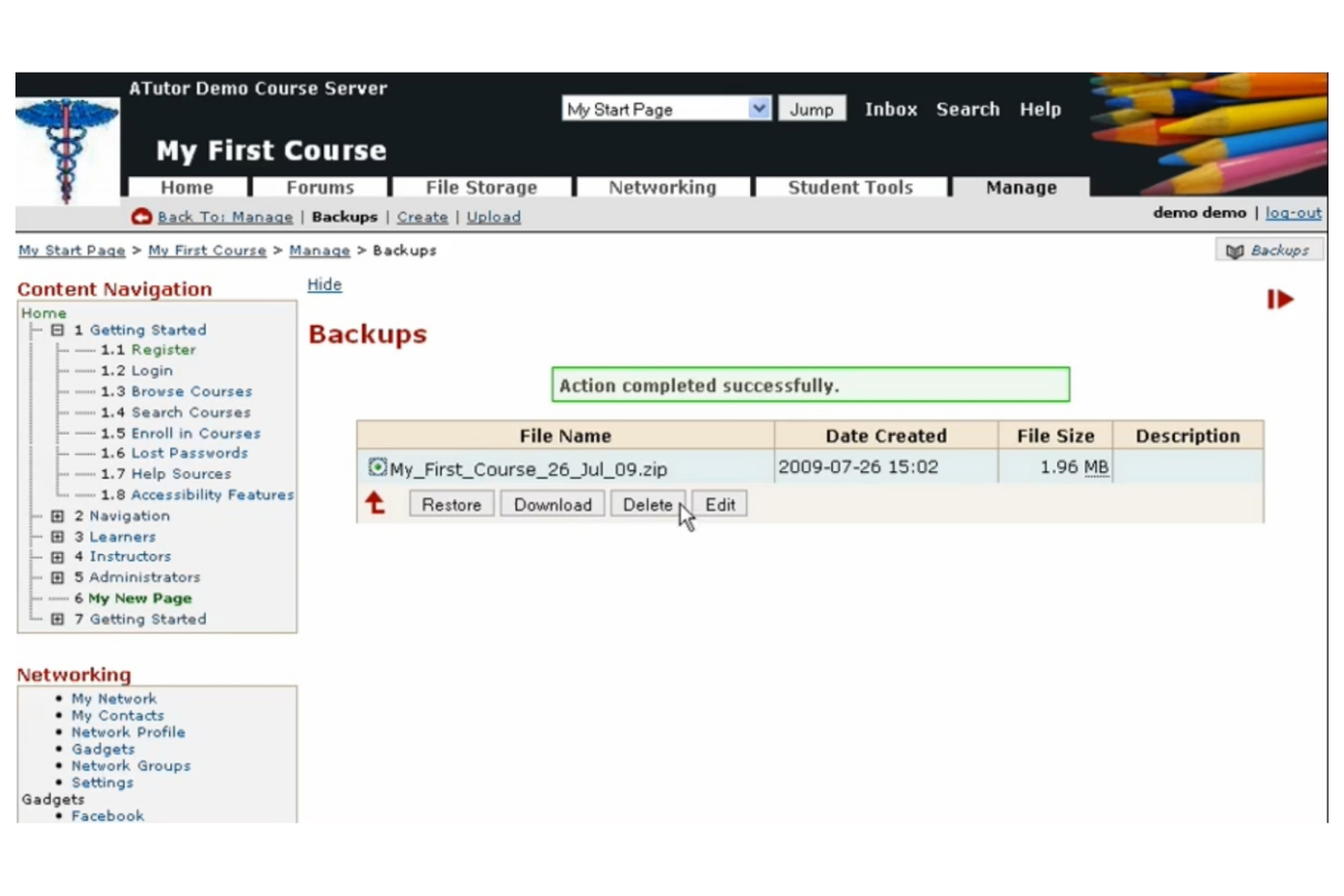
ATutor is designed for educators and organizations that prioritize accessibility in their online learning environments. It’s especially useful for schools, nonprofits, and public sector teams that need to meet strict accessibility standards or support learners with disabilities. With features like screen reader compatibility and adaptable content layouts, ATutor helps you create courses that are usable by everyone.
Why I Picked ATutor
What sets ATutor apart in the open source LMS space is its deep commitment to accessible learning design. I picked ATutor because it’s built from the ground up to meet WCAG and Section 508 accessibility standards, making it a strong choice for organizations that need to support all learners.
The platform includes features like keyboard navigation, screen reader compatibility, and adaptable themes that help ensure content is usable for people with a wide range of abilities. If you’re looking for an LMS that puts accessibility first, ATutor is one of the most purpose-built options available.
ATutor Key Features
Some other features that make ATutor a flexible option for open source users include:
- Content Authoring Tool: Create, organize, and manage course materials directly within the platform.
- SCORM 1.2 Compliance: Import and deliver SCORM-compliant learning modules for standardized e-learning content.
- Group Management: Set up learner groups for collaborative activities and targeted communication.
- Test and Survey Builder: Design quizzes, tests, and surveys with multiple question types for assessment and feedback.
ATutor Integrations
Integrations include BigBlueButton, PayPal, Beanstream, Moneris Canada, Moneris USA, MediaWiki, WordPress, Adobe Connect, Mahara, and Openmeetings.
Pros and Cons
Pros:
- Customizable open source codebase
- Built-in content authoring supports course creation
- Accessibility features meet recognized standards
Cons:
- Limited analytics for learner tracking
- Visual design appears dated

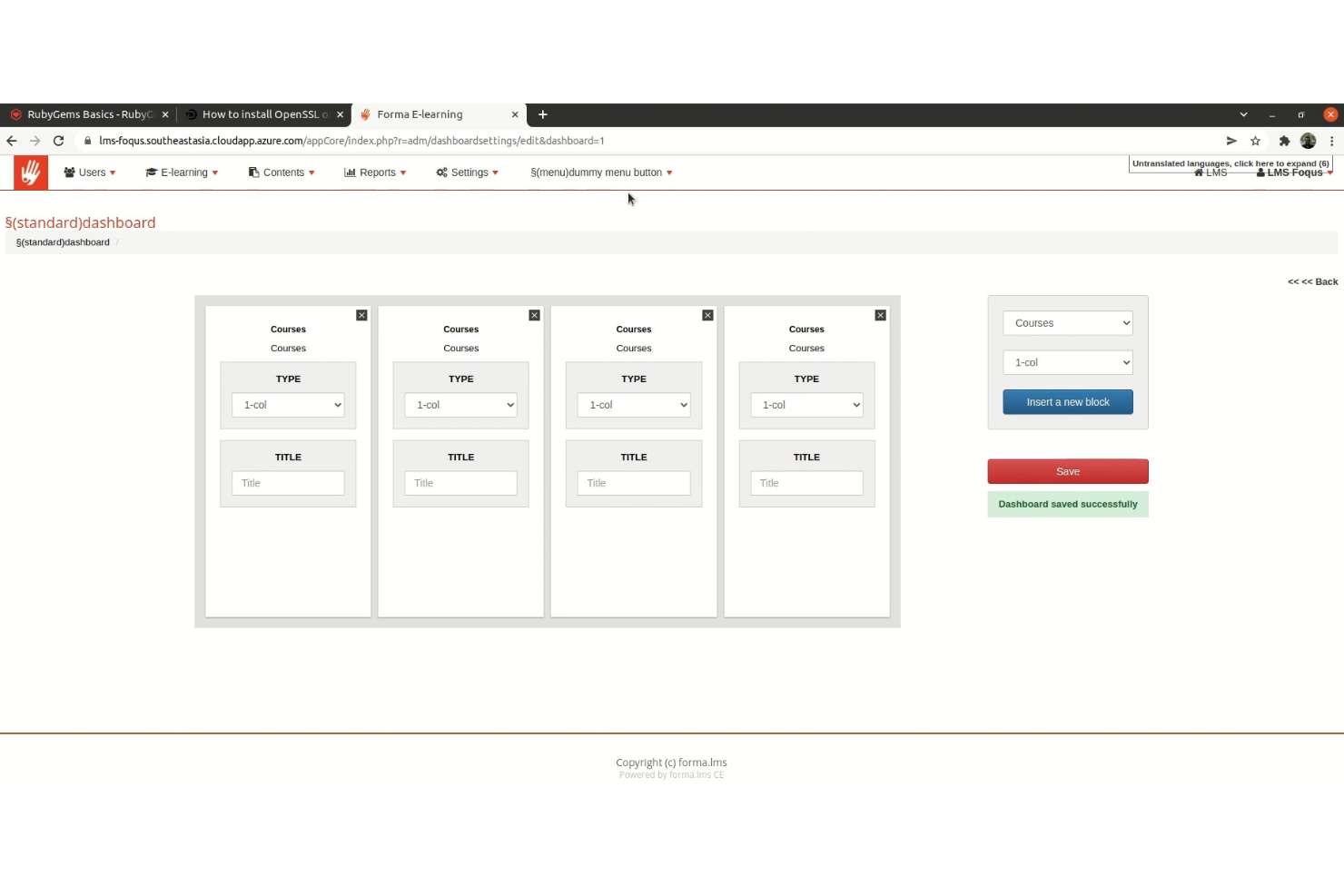
Forma LMS stands out for organizations that need to manage and deliver corporate training at scale. It’s built for HR teams, training managers, and consultants who want to track employee learning, automate compliance, and support blended training programs. Forma LMS offers features like advanced reporting, multi-company management, and webinar integration that help businesses centralize and control their learning processes.
Why I Picked Forma LMS
For organizations focused on structured corporate training, Forma LMS brings a set of features tailored to business needs. I picked Forma LMS because it supports multi-company management, letting you segment training programs and reporting for different business units or clients.
The platform also offers advanced reporting tools that help HR teams and managers track compliance, certifications, and learning progress across the organization. If you need an open source LMS that’s purpose-built for managing corporate learning at scale, Forma LMS is a strong fit.
Forma LMS Key Features
In addition to its business-focused management tools, Forma LMS offers several other features worth noting:
- Course Catalog: Organize and display available courses for learners to browse and self-enroll.
- Webinar Integration: Connect with popular webinar platforms to deliver live training sessions.
- Skill Gap Analysis: Identify and address gaps in employee skills through built-in assessment tools.
- Certificate Management: Issue, track, and manage training certificates for compliance and achievement.
Forma LMS Integrations
Native integrations are not currently listed.
Pros and Cons
Pros:
- Skill gap analysis supports workforce development
- Advanced reporting for compliance tracking
- Multi-company management for separate training groups
Cons:
- Limited mobile support for learners
- User interface design feels outdated
Andre LMS-plattformer med åpen kildekode
Her er noen flere LMS-alternativer med åpen kildekode som ikke kom med på listen min, men som likevel er verdt å undersøke:
- Frappe LMS
For integration with ERP systems
- Masteriyo LMS
For quick course setup
- Odoo
With integrated business management tools
- Open LMS
For enterprise-grade support options
- Claroline
For collaborative course creation


How I Evaluate Open Source LMS Solutions
I split my evaluation into two layers: the baseline an L&D team needs to run SCORM-based onboarding at scale, and the differentiators that set the best open source LMS apart.
Core Functionality (Table Stakes For This List)
When I'm selecting tools for my list, I rank each one on a scale from 0 (does not offer the functionality) to 5 (excels in this area) for each core functionality listed below. Then, I calculate the tool's total score into a percentage. Each tool needs to achieve a minimum total score of 65% to be considered for inclusion.
- Open Source Licensing Model: I check whether the platform uses a recognized OSI-approved license like GPL or MIT and confirm the source code is publicly accessible for forking and self-hosting.
- Course Authoring & Management: Each platform should let you build and organize learning content with SCORM or xAPI support, so your existing compliance modules import cleanly.
- Learner Enrollment & Tracking: I look for self-service and admin-driven enrollment, progress dashboards, and completion reporting that HR teams can pull for annual training audits.
- Assessments & Certifications: The platform should support quiz creation with auto-grading and certificate generation, useful for issuing proof of completion after onboarding courses.
- Role-Based Access Control: I evaluate whether the system offers distinct admin, instructor, manager, and learner roles so an L&D manager can oversee content without exposing system settings.
- Extensibility & Integrations: A usable REST API and plugin architecture matters here, especially for connecting the LMS to your HRIS or SSO provider like SAML or OAuth.
Once I have a list of tools that meet the criteria, I consider what sets each platform apart.
Differentiating Factors (What Sets Vendors Apart)
Here's how I compare and contrast different vendors:
Standout Features
Multi-tenant architecture is a big differentiator for me. HR teams managing training across departments or subsidiaries need separate branded portals without spinning up additional instances. I also evaluate mobile and offline learning support, which matters when you're rolling out safety training to frontline workers who aren't at a desk. Gamification features like badges and leaderboards can lift course completion rates for voluntary upskilling programs.
Beyond Features
Licensing and total cost of ownership deserve close attention. A platform may be free to download, but hosting, plugin costs, and developer time for customization add up fast. Community maturity is another factor I weigh heavily—an active contributor base means faster security patches and a richer plugin ecosystem. I also look at HR-specific integration paths, particularly connectors to HRIS platforms and SSO via SAML or LDAP, since a disconnected LMS creates manual data entry headaches for people ops teams.
Slik velger du et LMS med åpen kildekode
Det er lett å gå seg vill i lange funksjonslister og kompliserte prisstrukturer. For å hjelpe deg med å holde fokus mens du går gjennom den unike prosessen for programvarevalget ditt, får du her en sjekkliste over faktorer du bør ha i bakhodet:
| Faktor | Hva du bør vurdere |
|---|---|
| Skalerbarhet | Kan LMS-et håndtere dagens og fremtidige brukermengder, antall kurs og innholdstyper? Vurder kravene til database og drift ved vekst. |
| Integrasjoner | Kan LMS-et kobles direkte til HRIS-et, verktøyene dine for videokonferanser eller analyseverktøy? Kontroller at det er kompatibelt med den eksisterende teknologiplattformen din. |
| Tilpasningsmuligheter | Hvor enkelt kan du endre LMS-et slik at det passer til arbeidsflytene, merkevaren og rapporteringsbehovene dine? Vurder tilgang til kildekode og økosystemer for programtillegg. |
| Brukervennlighet | Vil administratorer, instruktører og deltakere oppleve grensesnittet som intuitivt? Test navigasjonen og arbeidsflytene for oppgaver med faktiske brukere før du bestemmer deg. |
| Implementering og innføring | Hvilke ressurser, hvilken dokumentasjon eller leverandørstøtte er tilgjengelig for oppsett og migrering? Ta hensyn til tiden og den interne kompetansen som trengs for lansering. |
| Kostnad | Hvilke kostnader kommer i tillegg til lisensiering for drift, vedlikehold, tillegg og støtte? Beregn de totale eierkostnadene over 1–3 år. |
| Sikkerhetstiltak | Tilbyr LMS-et datakryptering, tilgangskontroller for brukere og regelmessige sikkerhetsoppdateringer? Kontroller samsvaret med organisasjonens retningslinjer for data. |
| Tilgjengelig brukerstøtte | Hvilke støttekanaler tilbys (fellesskap, e-post, direktechat)? Kontroller svartidene og om det kreves betalt støtte for hastesaker. |
Hva er LMS-plattformer med åpen kildekode?
LMS-løsninger med åpen kildekode er læringsstyringssystemer der kildekoden er offentlig tilgjengelig, slik at alle kan bruke, endre og distribuere den. Disse plattformene lar organisasjoner drifte, tilpasse og kontrollere sine egne nettbaserte læringsmiljøer uten å bli låst til en leverandør.
Åpen kildekode-baserte læringsstyringssystemer er populære blant utdanningsinstitusjoner, bedrifter og ideelle organisasjoner som trenger fleksibilitet, åpenhet og muligheten til å tilpasse funksjoner til spesifikke opplærings- eller samsvarsbehov.
Funksjoner
Når du velger et LMS med åpen kildekode, bør du se etter følgende viktige funksjoner:
- Verktøy for kursoppretting: Bygg, organiser og oppdater kurs ved hjelp av moduler, leksjoner og multimedieinnhold for å støtte en rekke læringsformater.
- Brukeradministrasjon: Registrer, grupper og følg opp elever, instruktører og administratorer med tilpassbare roller og tillatelser.
- Vurderinger og quizer: Opprett og gjennomfør quizer, prøver og oppgaver for å måle elevenes fremgang og kunnskapsbevaring.
- Fremdriftssporing: Overvåk elevenes aktivitet, fullføringsgrad og prestasjoner gjennom oversikter og detaljerte rapporteringsverktøy.
- Import/eksport av innhold: Last opp, del og migrer kursmateriell ved hjelp av standardiserte filformater og kompatibilitet med SCORM/xAPI.
- Diskusjonsfora: Legg til rette for samhandling mellom elever og tilbakemeldinger fra instruktører gjennom innebygde fora eller meldingsverktøy.
- Sertifikatgenerering: Utsted digitale sertifikater eller merker til elever når de fullfører kurs eller moduler, og støtt behovene for dokumentasjon av kvalifikasjoner.
- Integrasjonsmuligheter: Koble til tredjepartsverktøy som betalingsløsninger, videokonferanser og analyseplattformer for en helhetlig opplevelse.
- Mobiltilpasning: Sørg for at elever og instruktører kan få tilgang til kurs og ressurser fra alle enheter, inkludert smarttelefoner og nettbrett.
- Tilpasningsmuligheter: Tilpass utseendet, følelsen og funksjonaliteten til LMS-et slik at det samsvarer med organisasjonens merkevare og arbeidsflytkrav.
Fordeler
Implementering av et LMS med åpen kildekode gir flere fordeler for teamet og virksomheten din. Her er noen av fordelene du kan se frem til:
- Full kontroll over data: Vær vert for og administrer ditt eget læringsmiljø, og sørg for samsvar med interne datapolicyer og personvernstandarder.
- Tilpasningsmuligheter: Endre plattformens kildekode og grensesnitt slik at det passer organisasjonens unike arbeidsflyter, merkevare og rapporteringsbehov.
- Kostnadsbesparelser: Unngå løpende lisensavgifter og reduser langsiktige kostnader ved å benytte gratis eller rimelig programvare og støtte fra fellesskapet.
- Skalerbarhet: Tilpass systemet slik at det kan håndtere et økende antall brukere, kurs og integrasjoner etter hvert som organisasjonen utvikler seg.
- Fleksible integrasjoner: Koble til et bredt utvalg tredjepartsverktøy, som HRIS, betalingsløsninger og videokonferanseplattformer, for å skape et helhetlig læringsøkosystem.
- Forbedringer drevet av fellesskapet: Dra nytte av kontinuerlige forbedringer, sikkerhetsoppdateringer og nye funksjoner som utvikles av et globalt fellesskap av utviklere og brukere.
- Ingen leverandørbinding: Behold friheten til å migrere, endre eller avslutte bruken av plattformen uten begrensninger fra leverandører av proprietær programvare.
Kostnader og priser
Valg av et LMS med åpen kildekode krever en forståelse av de ulike prismodellene og abonnementene som er tilgjengelige. Kostnadene varierer basert på funksjoner, teamstørrelse, tillegg og mer. Tabellen nedenfor oppsummerer vanlige abonnementer, gjennomsnittsprisene deres og typiske funksjoner som er inkludert i LMS-løsninger med åpen kildekode:
Sammenligningstabell for LMS med åpen kildekode
| Abonnementstype | Gjennomsnittspris | Vanlige funksjoner |
|---|---|---|
| Gratisabonnement | $0 | Tilgang til grunnleggende LMS-funksjoner, enkel kursoppretting, begrenset brukeradministrasjon og støtte fra fellesskapet. |
| Personlig abonnement | $5–$25/bruker/måned | Avanserte kursverktøy, grunnleggende rapportering, begrensede integrasjoner og brukerstøtte via e-post. |
| Forretningsabonnement | $20–$50/bruker/måned | Tilpasset merkevare, utvidede integrasjoner, avansert analyse, prioritert brukerstøtte og sertifikatverktøy. |
| Virksomhetsabonnement | $50–$100/bruker/måned | Egen kontoadministrasjon, tilpassede SLA-er, avansert sikkerhet, API-tilgang og hjelp med oppstart. |
Vanlige spørsmål om LMS med åpen kildekode
Her er noen svar på vanlige spørsmål om LMS med åpen kildekode:
Kan jeg migrere fra et proprietært LMS til et LMS med åpen kildekode?
Ja, du kan migrere fra et proprietært LMS til et LMS med åpen kildekode, men prosessen kan kreve datatilordning, eksport av innhold og teknisk støtte. Gå gjennom tilgjengelige migreringsverktøy og planlegg opplæring av brukerne for å sikre en smidig overgang.
Krever LMS-plattformer med åpen kildekode teknisk kompetanse for å settes opp?
Ja, de fleste LMS-plattformer med åpen kildekode krever noe teknisk kompetanse for installasjon, konfigurering og løpende vedlikehold. Organisasjoner uten interne IT-ressurser kan måtte engasjere ekstern støtte eller velge en leverandør av administrert hosting.
Er løsninger for LMS med åpen kildekode sikre?
Ja, løsninger for LMS med åpen kildekode kan være sikre hvis du følger beste praksis for oppdateringer, brukertillatelser og serverkonfigurering. Installer sikkerhetsoppdateringer regelmessig, og følg med på forum i fellesskapet for å få kjennskap til kjente sårbarheter.
Hvordan håndterer LMS-plattformer med åpen kildekode oppdateringer og nye funksjoner?
LMS-plattformer med åpen kildekode er avhengige av oppdateringer fra fellesskapet eller leverandøren. Du må følge med på nye utgivelser og installere oppdateringer manuelt eller med automatiserte verktøy, avhengig av hostingoppsettet ditt.
Kan jeg tilpasse utseendet og utformingen til et LMS med åpen kildekode?
Ja, du kan tilpasse utseendet og utformingen til et LMS med åpen kildekode ved å redigere temaer, maler og CSS-filer. Mange plattformer støtter også utvidelser og moduler for mer omfattende tilpasning.